Slate is not a CRM you install on a Friday and demo on Monday. It is an enrollment operating system that demands staffing, governance, and a multi-month implementation before it returns value. That distinction is what most CRM software reviews skip when they call Slate “all-inclusive” and move on.
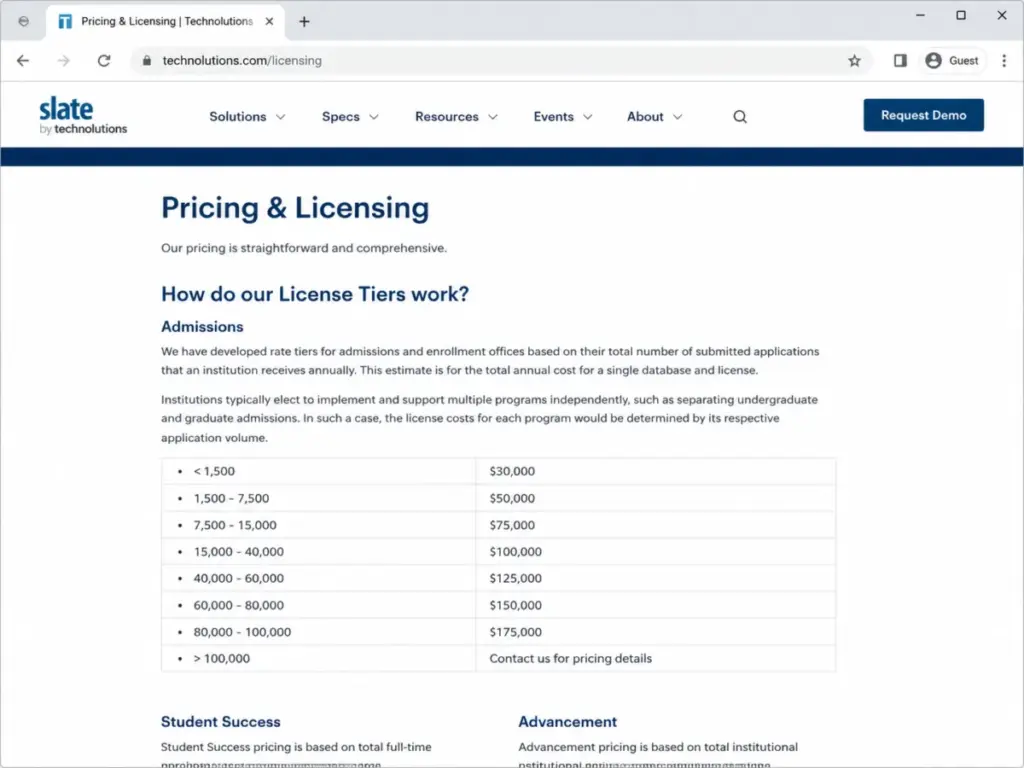
According to Technolutions’ official licensing page (as of May 2026), Admissions licenses start at $30,000/year and scale to $175,000/year based on submitted application volume. Most clients pay $50,000/year. The license covers features and functionality for one database, but the real bill includes Slate Credits, potential separate program databases, admin staffing, implementation consulting, and internal training. Over 2,000 colleges and universities run on Slate, and many of them have built entire operational teams around the platform.
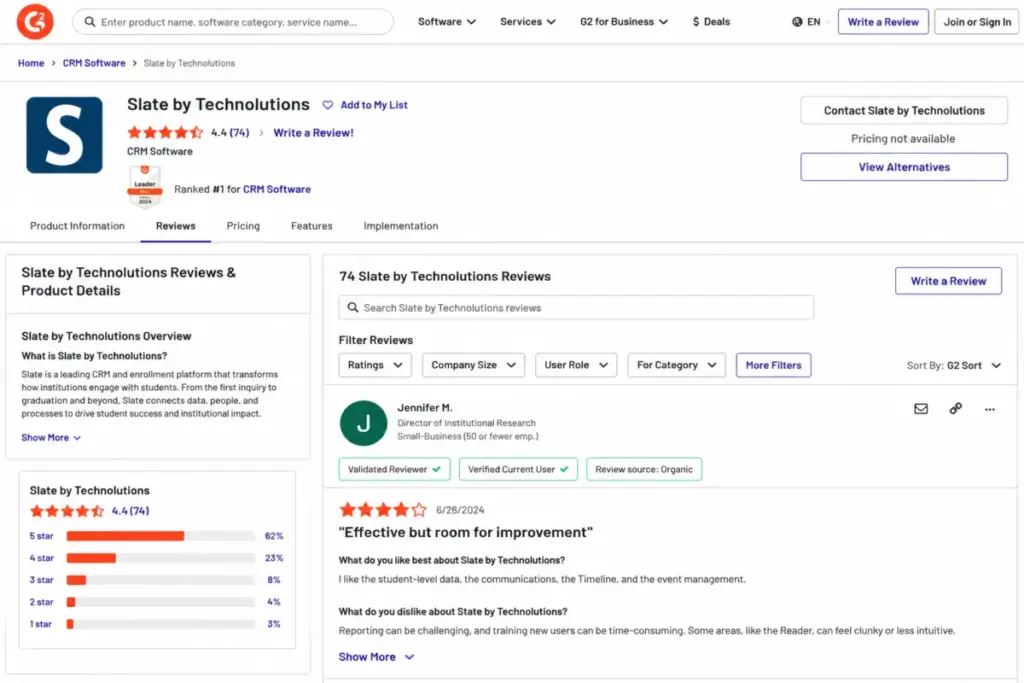
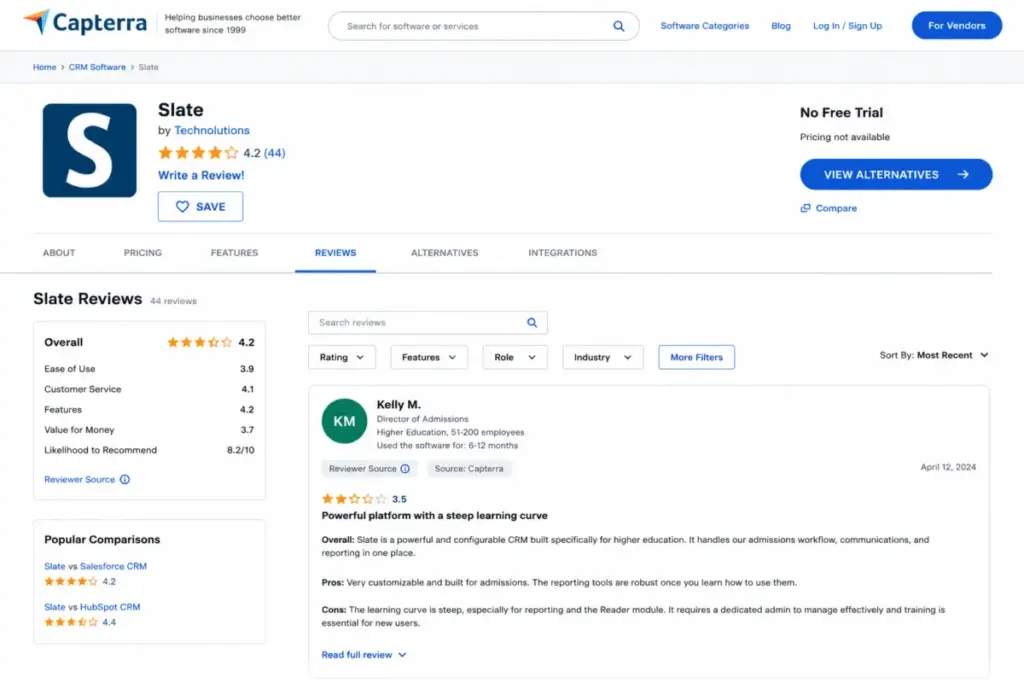
This review is based on official Technolutions documentation, published pricing, and validation against user reviews on G2 (74 reviews, 4.4 stars), Capterra (44 reviews, 4.2 stars), TrustRadius, Software Advice, and third-party research. I did not score this product based on brand popularity alone. Higher education enrollment teams evaluating CRM platforms for their institutions need to understand Slate’s true operating cost and readiness requirements before signing a contract.
Quick Verdict
| Category | Detail |
|---|---|
| Score | 7.8/10 |
| Best For | Admissions teams processing 1,500+ applications/year with dedicated Slate admin capacity |
| Not For | Small programs without technical admin staff or teams prioritizing plug-and-play simplicity |
| Starting Price | $30,000/year (Admissions, under 1,500 apps) |
| Most Common Price | $50,000/year (1,500 to 7,500 apps) |
| Free Trial | Not available |
| Key Strength | Purpose-built higher-ed admissions workflows, application management, and campus integrations |
| Key Weakness | Admin staffing burden, query/reporting learning curve, and hidden operating costs beyond the license |
The 60-Second Version
Slate earns 7.8/10 for admissions-focused enrollment teams that can fund and staff the platform properly.
- Buy if your institution processes 1,500+ submitted applications per year, has a named Slate owner, needs Reader/decision-release workflows, and can commit to a multi-month implementation.
- Skip if your team wants a modern marketing-first CRM, lacks an admin champion, or cannot budget beyond the license for Credits, consulting, and training.
- Biggest pricing trap: the annual license is only the starting line. Separate undergraduate/graduate databases, Slate Credits for SMS and identity verification, and consulting fees change the total cost.
- Best alternative by scenario: Element451 for AI-first engagement speed; Salesforce Education Cloud for enterprise CRM standardization; TargetX for Salesforce-native admissions depth.
The 3 Enrollment Problems Slate Solves
Slate is not a general-purpose CRM with a higher-ed label. It is a platform built around three specific operational problems that enrollment teams face every cycle.
Application Management and Review Workflows
Slate handles the full application lifecycle: inquiry capture, Slate-hosted applications, applicant status pages, document collection, application reading through the Reader module, committee review, and decision release. According to Technolutions’ Admissions page (as of May 2026), institutions can build and host their own applications within Slate, create custom review workflows, and release decisions directly through the platform.
This is Slate’s core value. The Reader module lets admissions teams assign applications, score them by rubric, route decisions, and manage multi-stage review processes. A director of institutional research on G2 praised Slate for student-level data, communications, Timeline, and event management. But the same reviewer noted the Reader workflow can feel clunky in certain navigation patterns.
That mixed feedback is consistent across review platforms. Reader is central to Slate’s pitch, and it works. The question is whether its interface friction bothers your team enough to evaluate alternatives.
Unified Communications Through Deliver
Slate’s Deliver module consolidates email, SMS, voice, print, and drip marketing into a single communications hub. Most admissions CRMs offer email. Fewer offer native SMS, voice, and print channels inside the same platform.
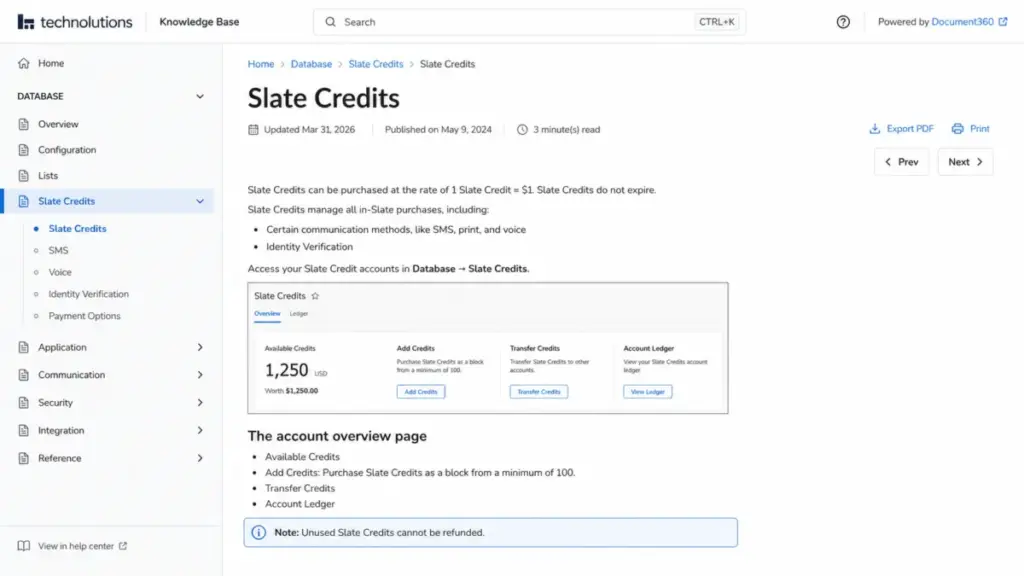
The catch: SMS, voice, print, and AI Identity Verification consume Slate Credits, which cost $1 each with a minimum purchase of 100. According to the official Slate Credits documentation, unused credits cannot be refunded, and third-party communication fees are outside the license agreement and subject to change.
So does Deliver justify the communications cost? For institutions that want a single admissions communication hub, yes. For teams that need advanced content journeys, ad partner connections, or more dynamic marketing flows, some G2 reviewers report pairing Slate with separate marketing tools.
Higher-Ed Integration Depth
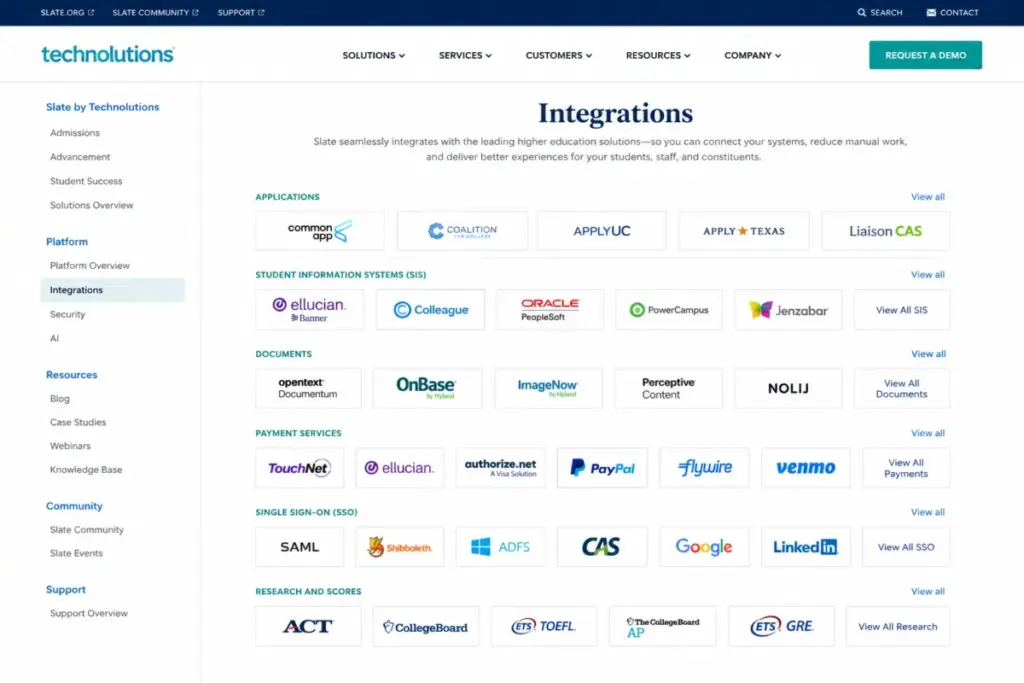
Slate connects to the systems enrollment teams already use: Common Application, Coalition, ApplyTexas, Liaison CAS products (BusinessCAS, NursingCAS, GradCAS, and others), plus major SIS platforms including Banner, Colleague, PeopleSoft, PowerCampus, and Jenzabar. The official integrations page also lists document management systems, score providers (ACT, SAT, GRE, TOEFL), payment processors, and SSO options.
This is not a logo wall. According to the Slate Knowledge Base, institutions build integrations through scheduled web services, batched file transfers, or API. The Upload Dataset endpoint has a rate limit of 50 posts per 5-minute window, and most uploads process within 15 minutes. Data can be exported by calling Slate queries as web services in JSON or XML.
For technical buyers, that matters: Slate provides real bidirectional SIS integration patterns, not just a Zapier connector.
The 2 Operational Problems Slate Creates
Credit where it is due: Slate solves enrollment workflow problems better than most platforms. But the operating model it demands creates two problems that buyers underestimate.
The Admin Staffing Reality
The biggest mistake most enrollment leaders make with Slate is assuming the license is the whole cost. It is not. Slate requires a named administrator (or team) who owns configuration, query building, reporting, SIS integration maintenance, communication governance, and decision-release workflows.
An associate director of admissions on Capterra described it this way (paraphrased): Slate is powerful and comprehensive, but administrators may need coding, SQL, heavy Knowledge Base use, and long-term ownership to get full value. One Capterra reviewer reported a small team took roughly 2 years to fully implement.
Third-party research from Intead’s user interviews found implementation timelines ranging from approximately 6 months to nearly 3 years, with 18 months cited as Slate’s recommended timeline at the time of that research. The variables: SIS integration complexity, data migration scope, application design, reporting requirements, decision workflows, and staff availability.
Before you sign, ask your team: do we have a named Slate owner, a reporting/query owner, an SIS integration owner, and a communication governance process? If the answer is “we will figure it out,” budget for consulting.
Query and Reporting: Power That Costs Training
Slate’s Data Explorer and query builder give trained operators deep reporting capabilities. That is a real competitive advantage.
The problem is the word “trained.” Nontechnical admissions staff consistently report difficulty building custom queries and reports without training or admin help. G2 reviewers praise Slate’s data power but note that reporting creation is hard without extensive training. Three clicks to find a basic report setting. Three.
This is not a bug. Slate prioritizes configurability over guided workflows. If your team has a dedicated analyst or Slate administrator, the reporting depth is a strength. If your frontline counselors need self-service dashboards, expect a training investment or frustration.
Slate Pricing by Application Volume in 2026
Slate’s Admissions pricing is annual and tiered by total submitted applications per database. According to Technolutions’ licensing page (as of May 2026), the tiers are:
| Applications/Year | Annual License |
|---|---|
| Under 1,500 | $30,000 |
| 1,500 to 7,500 | $50,000 |
| 7,500 to 15,000 | $75,000 |
| 15,000 to 40,000 | $100,000 |
| 40,000 to 60,000 | $125,000 |
| 60,000 to 80,000 | $150,000 |
| 80,000 to 100,000 | $175,000 |
| Over 100,000 | Contact Technolutions |
Technolutions states there has been no license price increase in its 20+ year history. That stability is uncommon in SaaS.
Student Success can run inside an existing Slate database at no extra cost. A separate Student Success license costs $30,000/year. Advancement pricing uses active full-time undergraduate enrollment tiers, starting at $50,000/year for under 2,500 FTE and scaling to $175,000/year for 45,000 to 60,000 FTE.
Where Pricing Starts to Pinch
The license math changes when institutions implement multiple programs independently. A university running separate undergraduate and graduate admissions databases pays separate license fees based on each program’s application volume. A regional university with 5,000 undergraduate and 2,000 graduate submitted applications could pay $50,000 + $50,000 = $100,000/year in license fees alone, before Credits, consulting, or staffing.
The Line Item Most Reviews Skip: Slate Credits
Slate Credits fund in-platform services beyond the license. Each credit costs $1, the minimum purchase is 100 credits, and unused credits cannot be refunded. Credits cover SMS, print mailings, voice calls, and AI Identity Verification.
If your admissions office sends 10,000 SMS messages per cycle, that is $10,000 in Credits on top of the license. Third-party communication fees are outside the license agreement and subject to change. Budget accordingly.
| Cost Component | Range | Notes |
|---|---|---|
| Admissions license | $30,000 to $175,000/year | Based on application volume |
| Separate program database | Additional license per program | Same tier structure applies |
| Student Success (separate) | $30,000/year | Free if managed in existing database |
| Advancement | $50,000 to $175,000/year | Based on FTE enrollment |
| Slate Credits | $1/credit, min 100 | SMS, print, voice, identity verification |
| Implementation consulting | Varies | Quote from Platinum Partners |
| Admin staffing | 0.5 to 2+ FTE | Institutional cost, not vendor fee |
Slate AI: What Is Included in 2026
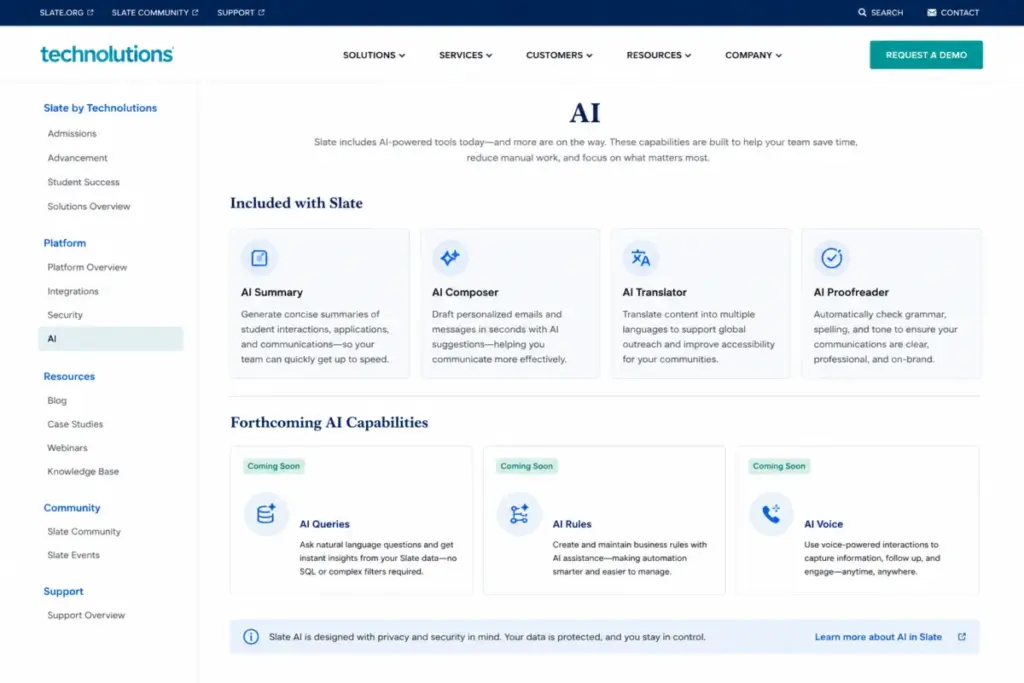
According to the official Slate AI page (as of May 2026), AI-powered tools are included in Admissions, Student Success, and Advancement solutions. Available features: AI Identity Verification, AI Dashboards, AI Knowledge Base, AI Tasks, AI Insights, and AI Reader. Forthcoming features include AI Queries, AI Rules, and AI Voice.
The distinction matters. Available features are part of current licenses. Forthcoming features are announced but not yet released. Do not sign a contract expecting forthcoming features to be available at launch.
Slate Mobile App and Applicant Experience
Slate has two mobile stories, and most reviews confuse them.
For applicants: Slate-hosted applications are mobile-optimized. Prospective students can complete applications, check status pages, and receive communications on any device. That is table stakes in 2026, but Slate delivers it natively.
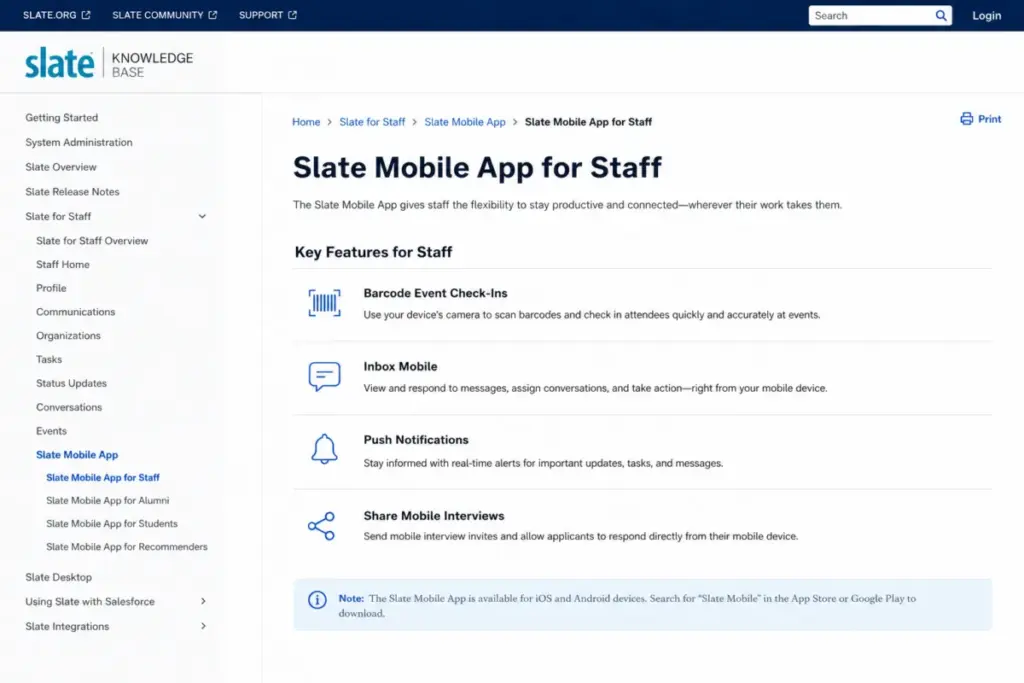
For staff: the Slate mobile app (available on Apple App Store and Google Play) is a workflow extension, not a desktop replacement. According to the Slate mobile Knowledge Base, staff features include barcode scanning for event check-ins, mobile Inbox, push notifications, Share mobile events, and mobile interviews. Is the staff app a full admin console? No. But for admissions counselors on the road during travel season, the event and Inbox features fill a real gap.
Security, Compliance, and Infrastructure
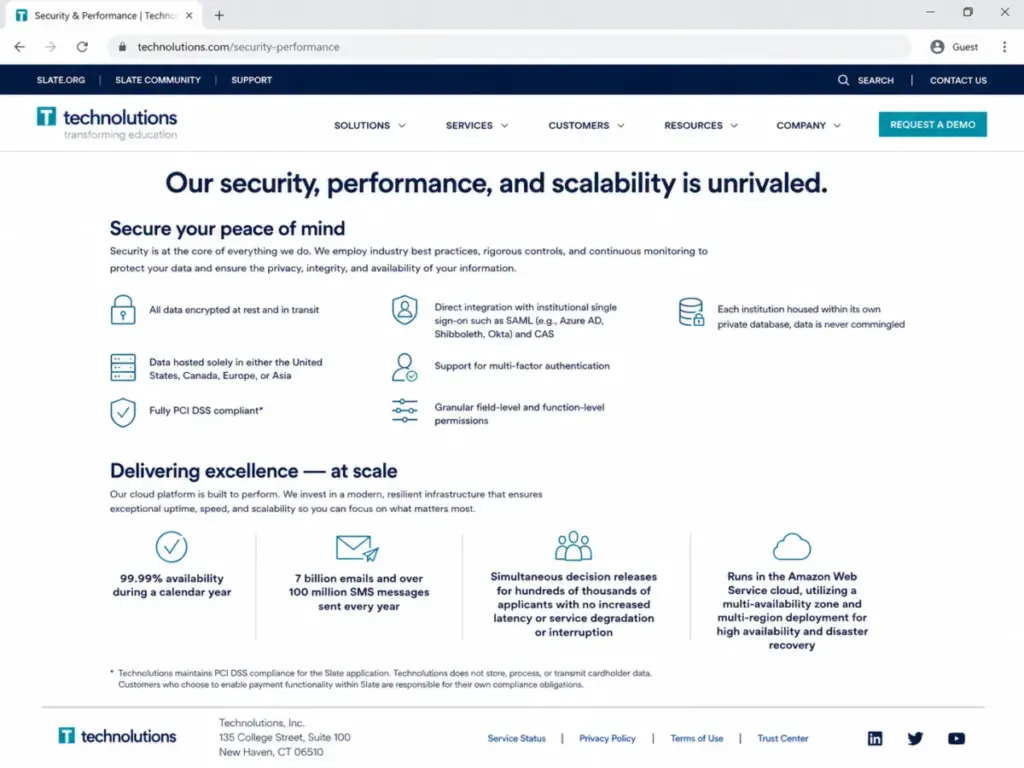
Slate’s security posture checks the boxes most higher-ed procurement offices require. According to the official security page (as of May 2026), data is encrypted at rest and in transit. SAML/CAS SSO and MFA are supported. Each institution gets its own private database (not a shared multi-tenant schema). Data can be hosted in the United States, Canada, Europe, or Asia. Granular field-level and function-level permissions let admins control access precisely.
Technolutions attests PCI DSS compliance for cardholder data it handles. The platform claims 99.99% calendar-year availability on an AWS multi-availability-zone, multi-region deployment. The scale numbers reinforce this: Technolutions reports processing 7 billion emails and over 100 million SMS messages annually, with simultaneous decision releases at high applicant volume.
One detail I wish were clearer: I could not verify a SOC 2 attestation in publicly accessible sources. Institutions that require SOC 2 compliance should confirm directly with Technolutions during procurement.
Slate Pros and Cons
- Purpose-built admissions workflows. Application management, Reader, decision release, and Slate-hosted applications are designed for enrollment operations, not adapted from sales CRM templates.
- Application-volume pricing with no historical price increases. Technolutions claims 20+ years of price stability, a rarity in SaaS licensing.
- Deep higher-ed integration ecosystem. Common App, Coalition, SIS bidirectional feeds, document systems, and score providers connect through native patterns (not only third-party middleware).
- Unified communications through Deliver. Email, SMS, voice, print, and drip marketing in one platform reduces the need for separate tools.
- Security and infrastructure. Data encrypted at rest and in transit, SAML/CAS SSO, MFA, PCI DSS attestation, private databases per institution, and a 99.99% availability claim on AWS multi-region deployment.
- Student Success at no added cost. Running student success communications inside an existing database requires no separate license.
- Admin staffing is a hidden operating cost. Without a dedicated Slate owner, configuration, query building, and governance stall. Capterra’s Ease of Use score is 3.9/5, the lowest of its category ratings.
- Query and reporting learning curve. Nontechnical users struggle with Data Explorer and custom queries without training. For a platform with annual licenses starting at $30,000, the reporting experience still requires more training than many nontechnical admissions users may expect.
- Reader usability is mixed. G2 reviewers note the Reader module can feel clunky in some navigation and bin-movement workflows.
- Slate Credits add unpredictable communication costs. SMS, print, voice, and Identity Verification consume Credits at $1 each, with no refunds on unused balances.
- Implementation timelines vary widely. Third-party research reported ranges from 6 months to nearly 3 years.
- No free trial or sandbox. Capterra and FitGap confirm: no free trial, no free version. You commit before you experience.
Who Should Use Slate (and Who Should Not)
| Buyer Profile | Recommendation | Why |
|---|---|---|
| Regional university, 5,000 apps/year, dedicated ops lead | Buy | $50,000/year tier fits; ops lead owns governance |
| Large public university, separate UG and grad admissions | Buy if governance is mature | Separate databases change total cost; strong fit if admin teams exist per program |
| Small graduate program, under 1,500 apps, no technical admin | Evaluate alternatives | $30,000/year is accessible, but admin burden without a dedicated owner creates risk |
| Marketing-led enrollment team needing campaign orchestration | Compare first | Slate has Deliver, but G2 sentiment suggests marketing teams may still pair with separate tools |
| Institution standardized on Salesforce enterprise CRM | Compare Salesforce Education Cloud | Existing Salesforce investment may make Agentforce Education a more natural architectural fit |
Best Slate Alternatives by Buyer Scenario
No single alternative replaces everything Slate does. The right choice depends on what your institution prioritizes.
| Scenario | Best Alternative | Why | Avoid If |
|---|---|---|---|
| AI-first student engagement and faster adoption | Element451 | Modular AI agents, faster implementation, quote-based pricing | You need deep application Reader and decision-release workflows |
| Salesforce-centered enterprise architecture | Salesforce Education Cloud | Unified CRM across departments, AppExchange ecosystem | You want a purpose-built admissions tool without Salesforce overhead |
| Salesforce-native admissions depth | TargetX by Liaison | Built on Salesforce with admissions-specific workflows | You are not on Salesforce and do not want to adopt it |
| SIS-native institution wanting bundled enrollment | Ellucian CRM Recruit | Tight Colleague/Banner integration | You need cross-SIS flexibility or advanced communications |
| Budget CRM with enrollment adaptation | HubSpot CRM or Zoho CRM | Lower entry cost, general CRM flexibility | You need native Common App/Coalition feeds or Reader workflows |
Element451: When Speed and AI Matter More Than Workflow Depth
Element451 focuses on AI-driven student engagement, modular implementation, and a faster adoption curve. It is a strong fit for institutions that want to launch enrollment communications quickly without building a Slate-scale governance team. The trade-off: Element451 does not offer the same depth in application Reader or committee-review workflows.
Salesforce Education Cloud: When the Campus Runs on Salesforce
Institutions already invested in Salesforce infrastructure may find Salesforce Education Cloud (now branded Agentforce Education) a more natural architectural fit. The advantage: CRM data unification across admissions, advancement, student affairs, and other departments. The disadvantage: Salesforce licensing complexity, per-seat costs, and the need for a Salesforce administrator.
TargetX: Salesforce-Native Admissions Without Starting From Scratch
TargetX by Liaison sits on Salesforce but adds admissions-specific workflows, application management, and retention tools. It splits the difference between Slate’s admissions depth and Salesforce’s enterprise breadth. The catch: you inherit Salesforce platform costs plus TargetX licensing.
For teams exploring the broader CRM software landscape, Slate sits in a specialized niche. General-purpose CRMs like HubSpot or Zoho CRM can serve enrollment teams with lighter requirements, but they lack native higher-ed application and review workflows. Institutions considering Ellucian CRM Recruit should compare integration depth with their specific SIS before assuming a bundled approach is simpler.
Teams that primarily need sales and marketing automation rather than admissions workflow depth should evaluate whether Slate’s Deliver module or a dedicated marketing platform better fits their campaign goals.
Our review methodology explains how we evaluate and score every platform on SaaSZap.
Frequently Asked Questions
How much does Slate by Technolutions cost?
Slate Admissions licenses start at $30,000/year for institutions with fewer than 1,500 submitted applications. Most clients pay $50,000/year (1,500 to 7,500 applications). Pricing scales to $175,000/year for 80,000 to 100,000 applications. Student Success can run in an existing database at no extra cost or as a separate $30,000/year license. Advancement starts at $50,000/year based on FTE enrollment.
Does Slate have a free trial?
No. Capterra and FitGap confirm Slate does not offer a free trial or free version. Institutions commit to an annual license before accessing the platform.
Does Slate require a dedicated administrator?
Effectively, yes. Review sentiment across G2, Capterra, and third-party research consistently describes a steep learning curve. Institutions that succeed with Slate typically have at least one named administrator who owns configuration, queries, integrations, and governance.
How long does Slate implementation take?
Implementation timelines vary significantly. Third-party research from Intead reported ranges from approximately 6 months to nearly 3 years, with 18 months cited as Slate’s recommended timeline at the time of that research. Variables include SIS integration complexity, data migration, application design, and staff availability.
Is Slate only for admissions?
No. Slate covers admissions, student success, and advancement. Student Success communications can run inside an existing Admissions database at no additional cost. Advancement uses a separate FTE-based pricing model starting at $50,000/year.
What are Slate Credits?
Slate Credits are purchased at $1 each (minimum 100) and cover in-platform services including SMS, print, voice, and AI Identity Verification. Credits do not expire but cannot be refunded if unused. Third-party communication fees are outside the license agreement.
Does Slate integrate with Banner, PeopleSoft, and Common App?
Yes. Slate has native integrations with Common Application, Coalition, major SIS platforms (Banner, Colleague, PeopleSoft, PowerCampus, Jenzabar), document management systems, score providers, and payment processors. Institutions build custom integrations through scheduled web services, file transfers, or API.
Is Slate better than Salesforce Education Cloud for higher ed?
It depends on your architecture. Slate is purpose-built for admissions workflows: application management, Reader, and decision release. Salesforce Education Cloud offers broader enterprise CRM with the AppExchange ecosystem. Institutions already standardized on Salesforce may find Agentforce Education a more natural fit; admissions-focused teams without Salesforce investment often prefer Slate’s workflow depth.
What are the best Slate alternatives for small colleges?
Element451 offers AI-driven engagement with faster adoption. HubSpot CRM and Zoho CRM provide lower-cost general CRM options. TargetX and Ellucian CRM Recruit serve institutions wanting admissions-specific tools on Salesforce or Ellucian platforms.
Is Slate by Technolutions worth it in 2026?
Slate earns 7.8/10 for institutions that can fund the license, staff a dedicated admin function, and treat implementation as an operating model. It is not worth it for teams expecting plug-and-play simplicity or those that cannot sustain the governance investment beyond year one.
Final Verdict
Slate by Technolutions earns 7.8/10. It is the strongest admissions workflow platform in higher education for institutions that can fund the license and commit to the operating model it demands. Application management, Reader, decision release, Deliver communications, and SIS integration depth are category-leading when properly staffed and governed.
It is not the best fit for small programs without a technical admin champion, marketing-led teams needing advanced campaign orchestration, or institutions that want a CRM they can configure in a weekend.
Choose Element451 if your priority is AI-first enrollment engagement with faster time to value. Choose Salesforce Education Cloud if your institution is already standardized on Salesforce. Choose TargetX if you want Salesforce-native admissions depth without building from scratch.
The license starts at $30,000/year. The real investment starts the day you assign someone to own it.