HubSpot CRM costs $0 for two users and 1,000 contacts. Zoho CRM costs $0 for three users. Freshsales costs $0 for three users. Bigin costs $0 for one user and 500 records. Four free plans, four different ceilings, and four very different bills once your team outgrows them. That gap between the starting price and the 12-month total cost of ownership is the single most important variable in choosing a best CRM software option for your small business.
I analyzed pricing for 45+ business tools with full add-on breakdowns over the past three years. For this ranking, I compared 27 CRM platforms across six weighted criteria: pricing value, core feature depth, ease of use, integrations, scalability, and user fit. Ten made the final list. The rest failed on one or more of those criteria for a typical US small business with 2 to 20 users.
Here is the short version. If you want a free CRM that scales into a full platform, HubSpot CRM is the best overall. If you want the most features per dollar, Zoho CRM wins. If you plan to outgrow a small-business CRM within 18 months, start on Salesforce Starter Suite and skip the migration. Every other pick serves a specific use case, and I will tell you exactly which one.
This article covers what CRM software does for small teams and who should avoid each option on the list.
Quick Verdict: Best CRM for Small Business by Use Case
| Use Case | Best Pick | Why It Fits |
|---|---|---|
| Best overall CRM for small business | HubSpot CRM | Free CRM with broadest upgrade path across sales, marketing, service, and operations |
| Best value CRM for growing SMBs | Zoho CRM | Free for 3 users, Standard at$14/user/month billed annually, deep automation and customization |
| Best for scaling beyond small business | Salesforce Starter Suite | $25/user/month with Salesforce ecosystem and upgrade path |
| Best for built-in sales engagement | Freshsales | Free for 3 users, Growth at$9/user/month, built-in phone and email |
| Best sales pipeline CRM | Pipedrive | Visual pipeline, Lite at$14/seat/month billed annually, fast rep adoption |
| Best visual CRM for workflow teams | monday CRM | No-code boards, pipelines, quotes, starting from$10/user/month |
| Best for micro businesses | Bigin by Zoho CRM | Free for 1 user, paid from$7/user/month, built for spreadsheet replacement |
| Best simple CRM with projects | Capsule CRM | Free for 2 users and 250 contacts, Starter at$18/user/month |
| Best no-frills CRM | Less Annoying CRM | $15/user/month flat, no tiers, no contracts, 30-day trial |
| Best relationship CRM for Gmail/Outlook | Nimble | $24.90/seat/month billed annually, inbox-native, social enrichment |
Five of the ten have free plans, but none of those free plans work at scale. The free-to-paid jump is where most small businesses miscalculate their CRM budget. The table above shows what each tool does best. The sections below show what each tool costs in practice. Small businesses should also filter CRM by industry workflow, not just price.
A real estate office has to manage buyer leads, seller relationships, appointments, referrals, and repeat client follow-up differently from a consulting firm or ecommerce shop, so CRM for real estate teams is the more relevant comparison set for brokers and agents.
How We Chose and Ranked These CRMs
I evaluated each CRM using a weighted scoring system across six criteria (as of May 2026):
| Criterion | Weight | What I Checked |
|---|---|---|
| Pricing value | 20% | Starting price, free plan, minimum seats, annual vs monthly, add-ons, hidden costs |
| Core feature depth | 20% | Contact management, pipeline, automation, reporting, email tools, AI features |
| Ease of use | 15% | Onboarding, UI clarity, setup complexity, learning curve for non-technical teams |
| Integrations | 15% | Native integrations, app marketplace, API, Zapier/Make, Google, Microsoft, Slack |
| Scalability | 15% | Permissions, reporting, governance, upgrade path, multi-team fit |
| User fit | 15% | Best-for match, not-best-for match, limitation severity, buyer risk |
Data sources: Official pricing pages, official product pages, official help centers, G2 and Capterra review patterns, and authoritative third-party reviews. Pricing was verified on May 25, 2026. I did not conduct hands-on testing for this ranking; product assessments are based on official documentation, third-party validation, and verified pricing evidence.
Limitation: Pricing changes frequently. Promotional rates, bundle discounts, and regional currency rendering can affect final checkout totals. Verify all prices on official pricing pages before purchasing.
Best for Overall Small Business CRM: HubSpot CRM
Badge: Best Overall CRM for Small Business
Score: 9.25/10
Starting price: $0 free CRM (up to 2 users, 1,000 contacts); paid Starter pricing on HubSpot pricing page
Free plan: Yes, up to 2 users and 1,000 contacts
Free trial: Free plan available; premium trial duration varies
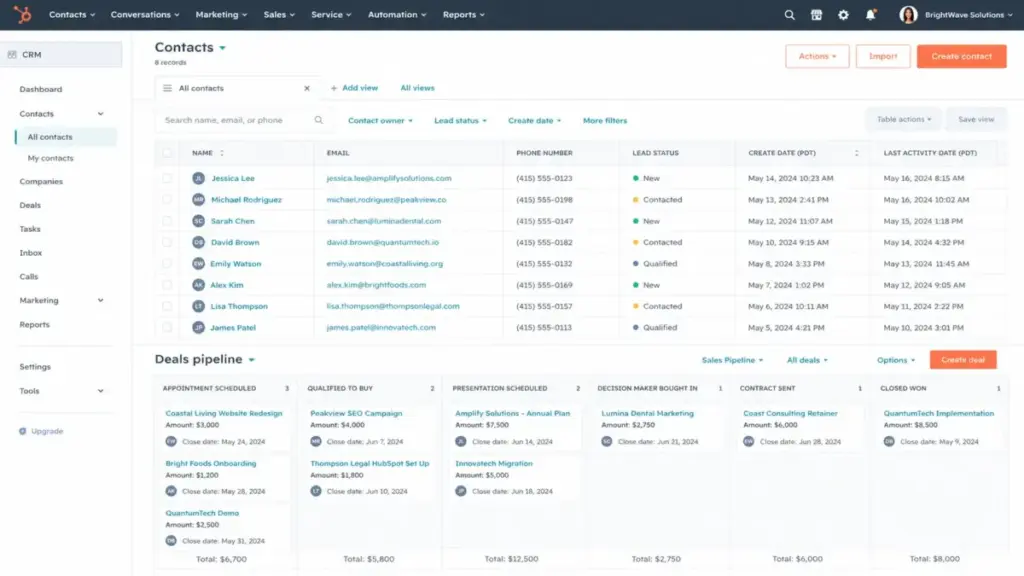
HubSpot gives you a free CRM that works for a 1-2 person team. Contact management, deal tracking, pipeline management, meeting scheduling, and live chat are all included at $0. That is a real product, not a demo.
But here is the catch. The free CRM caps at 2 users and 1,000 contacts (for new free users). A 5-person sales team needs the paid Starter plan, and the price depends on promotional and bundle pricing that changes regularly. Advanced automation, custom reporting, and scaled marketing contacts require Professional or higher tiers.
What it does well: Broadest CRM ecosystem on this list. Sales, marketing, service, content, operations, and commerce modules all live under one login. The HubSpot App Marketplace is one of the deepest in the CRM category. Gmail, Outlook, Slack, Zendesk, Zapier, and Shopify integrations are available. For a small business that wants to add capabilities over time without switching platforms, the upgrade path is the strongest here.
The add-on tax: Advanced automation requires Professional. Custom reporting requires Professional. Marketing contacts beyond the free limit add cost. Multi-hub use (Sales + Marketing + Service) stacks pricing quickly. A team that starts free and grows to 10 users needing sequences, forecasting, and custom reports can face a bill that is 4-5x what the Starter page suggests.
Use HubSpot CRM if:
- You want a credible free CRM that grows into a full platform
- You need sales, marketing, and service under one login
- Your team is 1-5 people starting and you plan to scale
Do not use HubSpot CRM if:
- You need advanced automation at low cost from day one
- Your budget is fixed and you cannot absorb tier-jump pricing
- You need more than 1,000 contacts on a free plan immediately
For a deeper look at this platform, read our HubSpot CRM review.
Best Value CRM for Growing SMBs: Zoho CRM
Badge: Best Value CRM for Growing SMBs
Score: 8.61/10
Starting price: Free for 3 users; Standard at $14/user/month billed annually (USD, verify at checkout for regional pricing)
Monthly price: $20/user/month for Standard
Free plan: Yes, Free Edition for 3 users
Free trial: Paid-plan trial available
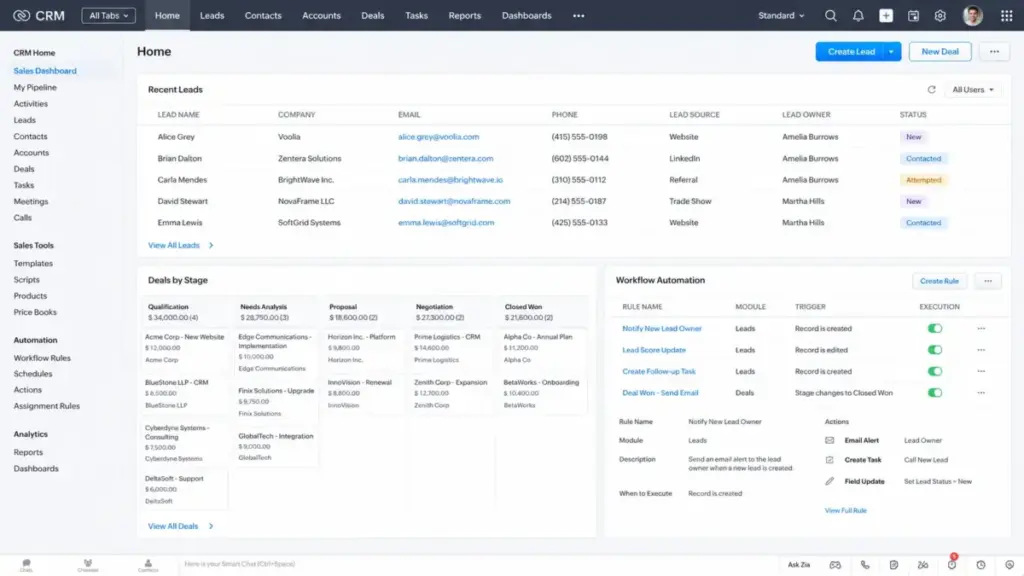
Zoho CRM delivers the most CRM depth per dollar on this list. The Standard plan at $14/user/month includes leads, deals, workflows, reports, dashboards, and forecasting. At $20/user/month on monthly billing, it is still cheaper than most competitors at the same feature level.
The free plan covers 3 users, which is one more than HubSpot. The paid tiers add Zia AI, CPQ, territory management, and custom functions as you move up. For a 10-person team on Standard billed annually, the monthly bill is $140. That is less than one seat on most HubSpot Professional plans.
The setup trade-off: Zoho CRM is not a plug-and-play tool. You will spend time configuring modules, layouts, workflows, and settings. For teams that want a simple CRM with zero configuration, Zoho is the wrong pick. For teams willing to invest setup time for long-term value, it is the strongest option in this price range.
What it does well: Leads, deals, workflows, reports, dashboards, forecasting, Zia AI, CPQ, territory management, and custom functions. Integrations with Zoho apps, Google Workspace, Slack, WhatsApp, and the Zoho Marketplace.
Use Zoho CRM if:
- You want deep CRM features at the lowest annual cost
- Your team is comfortable configuring workflows and modules
- You use or plan to use other Zoho ecosystem tools
Do not use Zoho CRM if:
- You want the simplest possible CRM with zero configuration
- Your team is non-technical and dislikes settings screens
- You need primarily Salesforce or HubSpot ecosystem integrations
Check our Zoho CRM review for a full feature-by-feature breakdown.
Best for Scaling Beyond Small Business: Salesforce Starter Suite
Badge: Best CRM for Scaling Beyond Small Business
Score: 8.60/10
Starting price: $25 USD/user/month (billed monthly or annually)
Free plan: No
Free trial: Yes, 30-day trial
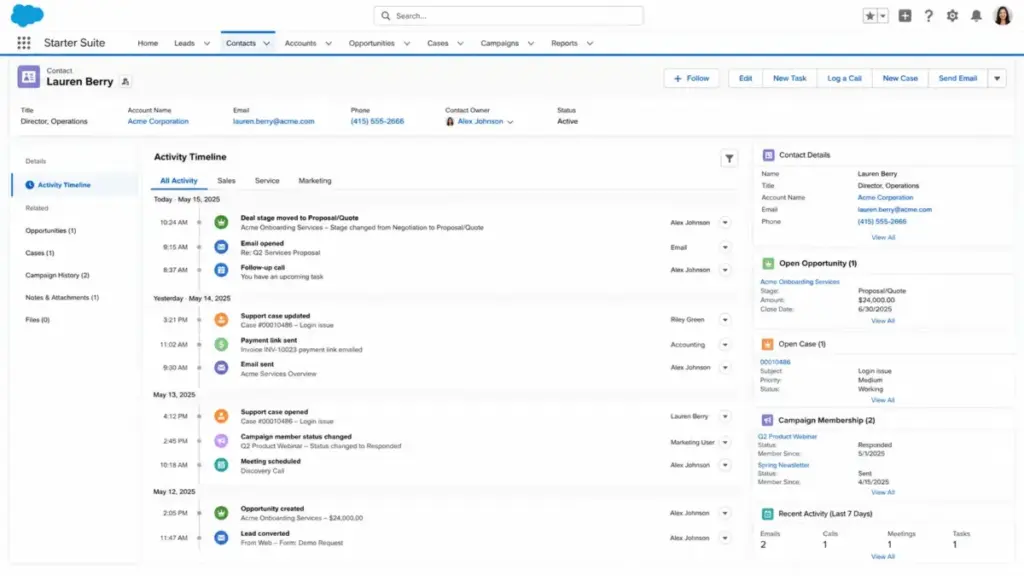
Salesforce Starter Suite is not the cheapest CRM on this list. At $25/user/month for a 10-person team, you are paying $250/month before add-ons, AppExchange apps, or implementation support. That is $110 more than Zoho CRM Standard for the same headcount.
The reason it ranks third: migration. Small businesses that start on a lightweight CRM and outgrow it within 12-18 months face a CRM migration that costs time, data integrity risk, and team retraining. Salesforce Starter Suite lets you skip that. You start on the same platform you will use at 50 or 500 users.
What it includes: Sales tools, service tools, marketing tools, commerce tools, Slack integration, built-in AI, unified customer timeline, and guided small-business CRM setup. The Salesforce AppExchange adds hundreds of integrations and extensions.
Hidden costs to watch: Add-ons, AppExchange apps, support tiers, implementation assistance, and extra marketing email sends beyond the 2,000/month included in Starter can increase total cost. The base subscription is transparent, but the operational cost is not.
Use Salesforce Starter Suite if:
- You expect to outgrow a lightweight CRM within 18 months
- You want a Salesforce ecosystem path from day one
- Your team can handle moderate administration and setup
Do not use Salesforce Starter Suite if:
- Your team is under 3 people and budget is the top priority
- You need a zero-configuration CRM
- You do not plan to scale beyond 10 users in the next 2 years
Our Salesforce CRM review covers the full platform architecture in detail.
Best for Built-In Sales Engagement: Freshsales
Badge: Best CRM for Built-In Sales Engagement
Score: 8.51/10
Starting price: $0 free (up to 3 users); Growth at $9/user/month billed annually
Annual pricing: Growth $9, Pro $39, Enterprise $59 (per user/month)
Free plan: Yes, up to 3 users
Free trial: Yes, no credit card required
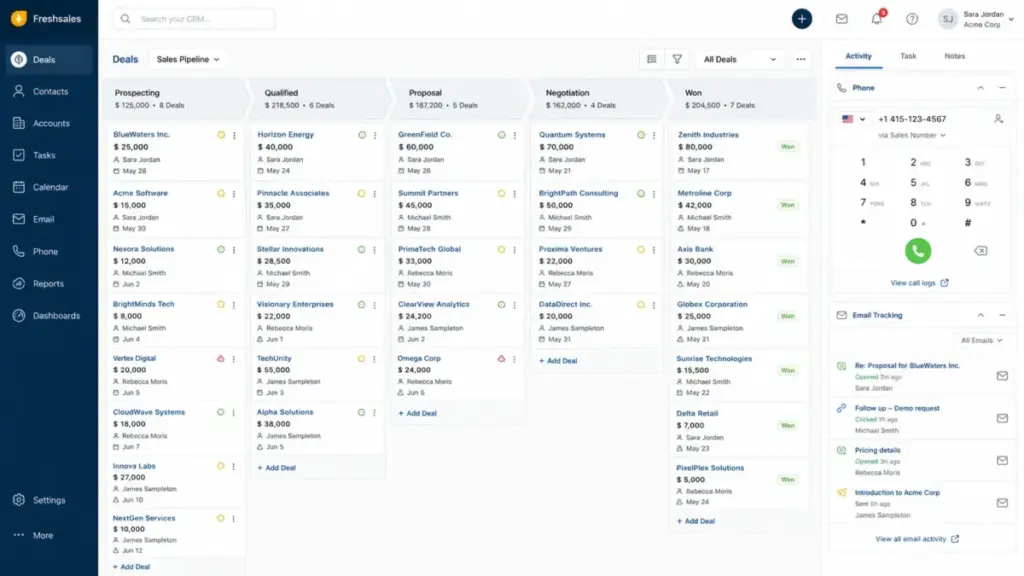
Freshsales bundles CRM, email, and built-in phone on a single platform starting at $9/user/month. For a 10-person sales team on Growth billed annually, that is $90/month. That includes lead capture, campaign tools, Kanban views, email templates, built-in phone, live chat, contact scoring, and sales sequences.
The free plan covers 3 users with basic CRM features. The jump to Growth at $9/user/month adds multiple sales pipelines and custom reports. Pro at $39/user/month adds advanced automation and AI features.
The add-on caveat: Freddy AI Agent session packs and CPQ are add-ons, not included in base plans. Advanced AI features require higher plans or additional purchases. The marketplace is not as broad as HubSpot or Salesforce, so teams relying on extensive third-party integrations should verify coverage first.
Use Freshsales if:
- You want CRM plus built-in phone and email on one platform
- Your team is 3-15 people doing outbound or inbound sales
- You want a low entry price with clear upgrade tiers
Do not use Freshsales if:
- You need a broad third-party app marketplace
- You want advanced AI without add-on cost
- Your workflow requires deep marketing automation beyond CRM
For pricing tier details, see our Freshsales pricing breakdown.
Best Sales Pipeline CRM: Pipedrive
Badge: Best Sales Pipeline CRM
Score: 8.43/10
Starting price: US$14/seat/month billed annually (Lite); US$24/seat/month billed monthly
Free plan: No
Free trial: Yes, 14-day trial, no credit card required
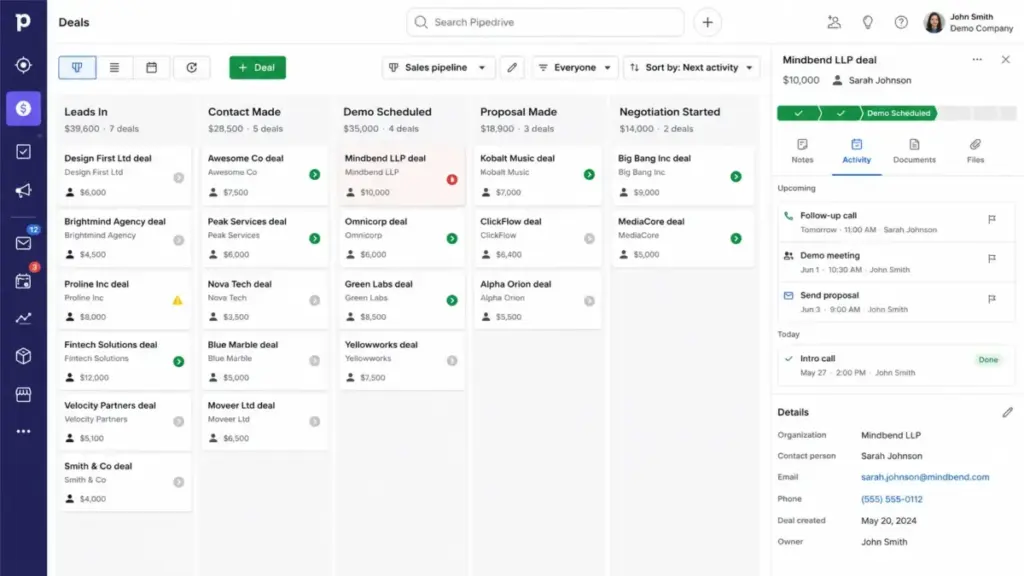
Pipedrive is the clearest sales pipeline CRM on this list. The visual pipeline, deal tracking, lead and contact management, activity management, calendar, and AI-assisted workspace are all available on the Lite plan. Rep adoption is faster here than on most CRMs because the interface is built around one thing: moving deals forward.
For a 10-person team on Lite billed annually, the bill is $140/month. That matches Zoho CRM Standard, but Pipedrive’s feature set is narrower. You get a better pipeline experience. You do not get built-in marketing automation or service tools.
Add-on costs that matter: LeadBooster, Campaigns, Web Visitors, Smart Docs, and Projects are all add-ons. A team that needs lead generation, email marketing, and project tracking on Pipedrive can see the real cost reach $30-40/seat/month with add-ons. The 500-plus marketplace apps and Zapier integration help, but the base product is a sales pipeline CRM, not an all-in-one.
Use Pipedrive if:
- Your team’s primary job is moving deals through a visual pipeline
- You want the fastest CRM adoption for sales reps
- You are a 5-20 person sales team and do not need marketing or service modules
Do not use Pipedrive if:
- You need an all-in-one CRM with marketing and service
- You want a permanent free plan
- Your workflow depends on features that are add-on-only
Read our Pipedrive CRM review for a full evaluation, or compare costs in our Pipedrive pricing breakdown.
Best Visual CRM for Workflow-Driven Teams: monday CRM
Badge: Best Visual CRM for Workflow-Driven Teams
Score: 8.39/10
Starting price: From $10/user/month (official page); Basic CRM around $12/user/month billed annually from review data
Free plan: No full CRM free plan
Free trial: Available; verify duration on monday CRM signup page
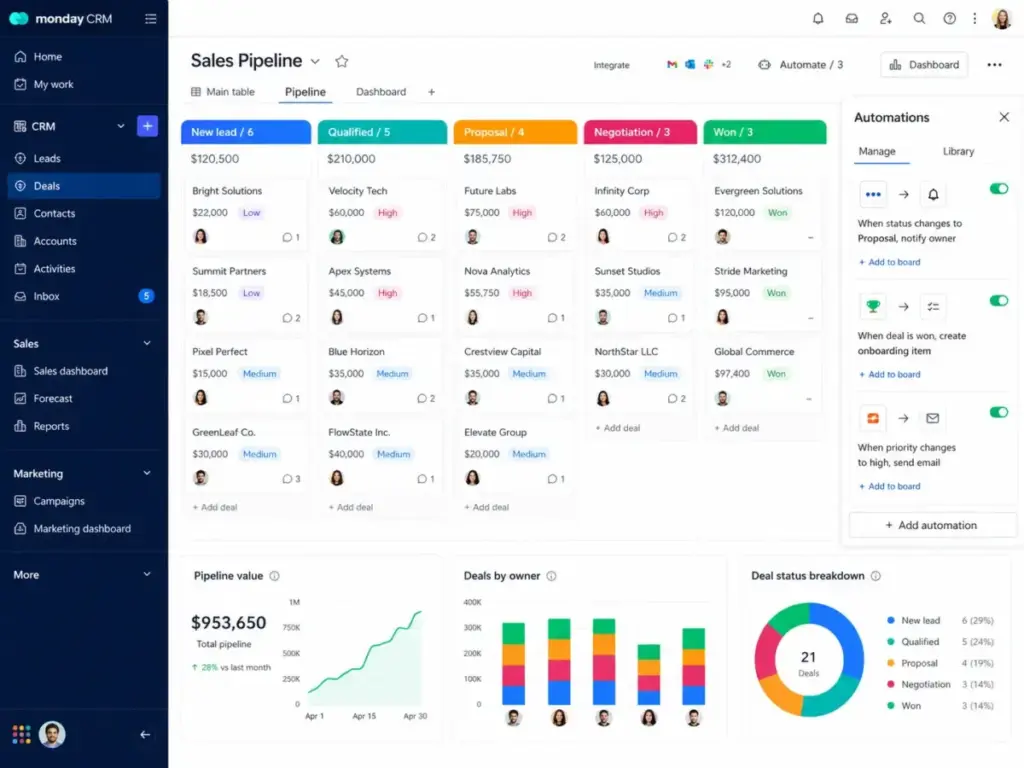
monday CRM is the most visually approachable CRM on this list. Customizable pipelines, boards, dashboards, quotes, invoices, and custom automations make it a strong pick for teams that think in visual workflows rather than database views.
Here is the thing. monday CRM requires a 3-user minimum according to review evidence. The official pricing page says the final price depends on team size. For a 10-person team on Basic billed annually at roughly $12/user/month, the bill is $120/month. Competitive, but the seat minimum means a solo founder cannot just buy one seat. Small teams should also compare monday.com CRM alternatives when the 3-seat minimum, contact caps, or workflow limits make the advertised entry price less practical than it first appears.
Plan limits to watch: Basic plan limits automation actions, integration actions, contacts/deals, dashboards, and columns. Quotes, invoices, advanced permissions, and enterprise controls are locked behind higher tiers. AI features are plan-gated.
Use monday CRM if:
- Your team manages sales alongside project delivery and operations
- You want a visual, no-code CRM that non-technical users can configure
- Your team is 3+ people who think in boards and workflows
Do not use monday CRM if:
- You are a solo founder or 2-person team (seat minimum applies)
- You need deep sales automation on the entry plan
- You prefer traditional CRM database views over visual boards
- Our monday CRM review
Best for Micro Businesses: Bigin by Zoho CRM
Badge: Best CRM for Micro Businesses
Score: 8.26/10
Starting price: $0 free (1 user, 500 records); paid from $7/user/month
Monthly price: $9/user/month for Express
Annual price: $7/user/month for Express
Free plan: Yes, 1 user
Free trial: Yes, 15 days
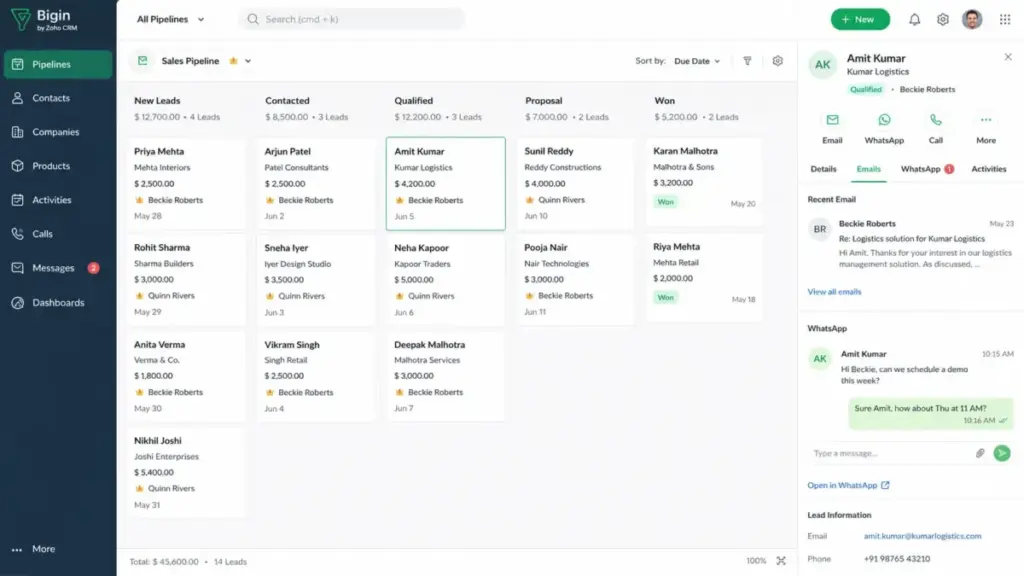
Bigin exists to replace the spreadsheet. If you are a solo operator, freelancer, or local business owner tracking leads in Google Sheets, Bigin gives you a real pipeline CRM for $7/user/month. The free plan covers 1 user with 500 records. Express bumps that to 50,000 records. Premier goes to 100,000.
The feature set is intentionally limited compared to full Zoho CRM. You get lead management, deal management, pipelines, email, calls, WhatsApp, tasks, web forms, and workflows. You do not get Zia AI, CPQ, territory management, or deep customization. That is the point. Bigin is not Zoho CRM lite. It is a different product for a different buyer.
Migration path: Bigin offers migration from Pipedrive, HubSpot, Insightly, and Zoho CRM. Teams that outgrow Bigin can move to Zoho CRM without switching ecosystems. Zoho Books, Zoho Invoice, Google Workspace, Microsoft 365, Zoom, and Mailchimp integrations are available.
Use Bigin if:
- You are replacing a spreadsheet with your first real CRM
- Your team is 1-5 people with simple pipeline needs
- You want the lowest possible CRM cost with a clear upgrade path to Zoho CRM
Do not use Bigin if:
- You need deep CRM customization, advanced analytics, or multi-department RevOps
- Your contact list exceeds 500 records and you want to stay on the free plan
- You need features that only full Zoho CRM provides
Best Simple CRM with Project Follow-Through: Capsule CRM
Badge: Best Simple CRM with Project Follow-Through
Score: 8.14/10
Starting price: $0 free plan; Starter at $18/user/month
Free plan: Yes, 250 contacts, 2 users, 1 project board, 1 sales pipeline
Free trial: Yes, 14-day trial for paid plans
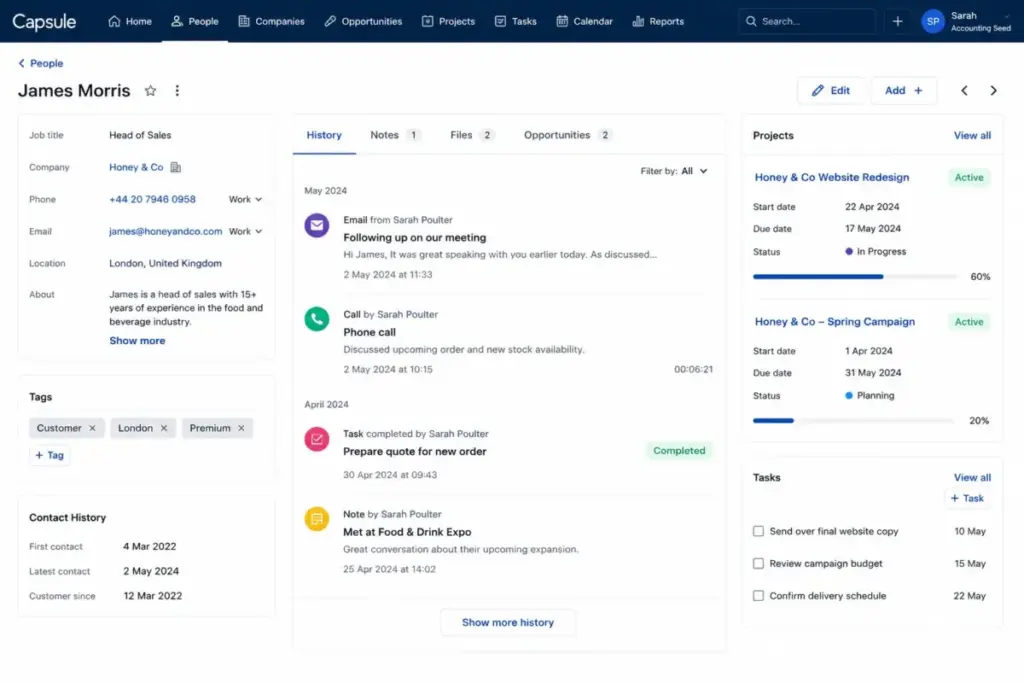
Capsule CRM adds something most simple CRMs skip: project follow-through. After you close a deal, the project board lets you track post-sale delivery without switching to a separate tool. Contact management, sales pipeline, projects, tasks, calendar, automations, reports, email templates, and shared mailbox cover the essentials. Small businesses that like Capsule’s project follow-through but outgrow its automation or reporting limits should compare Capsule CRM alternatives by post-sale workflow depth, sales pipeline control, setup friction, and practical 10-user cost.
The free plan is tighter than HubSpot’s: 250 contacts, 2 users, one project board, and one pipeline. The Starter plan at $18/user/month opens up more capacity. For a 10-person team, that is $180/month, which is higher than Zoho CRM or Freshsales but comes with a simpler interface and lower learning curve.
Limitations: Lower tiers lack stronger automation and advanced marketing features. Support and AI depth are lighter than larger CRMs. The integration set covers Google Workspace, Microsoft 365, Mailchimp, Xero, QuickBooks, and Zapier, which handles most small-business workflows.
Use Capsule CRM if:
- You want simple contact management plus post-sale project tracking
- Your team values low learning curve over feature depth
- You need CRM-to-project handoff without a separate tool
Do not use Capsule CRM if:
- You need advanced marketing automation or deep analytics
- You need AI features on lower tiers
- Your team exceeds 15 people and needs scaled reporting
Read our Capsule CRM review for details on plan limits and workflows.
Best No-Frills CRM: Less Annoying CRM
Badge: Best No-Frills CRM
Score: 7.77/10
Starting price: $15 USD/user/month (one price, no tiers)
Free plan: No
Free trial: Yes, 30-day free trial
Billing: No annual discount, no contracts
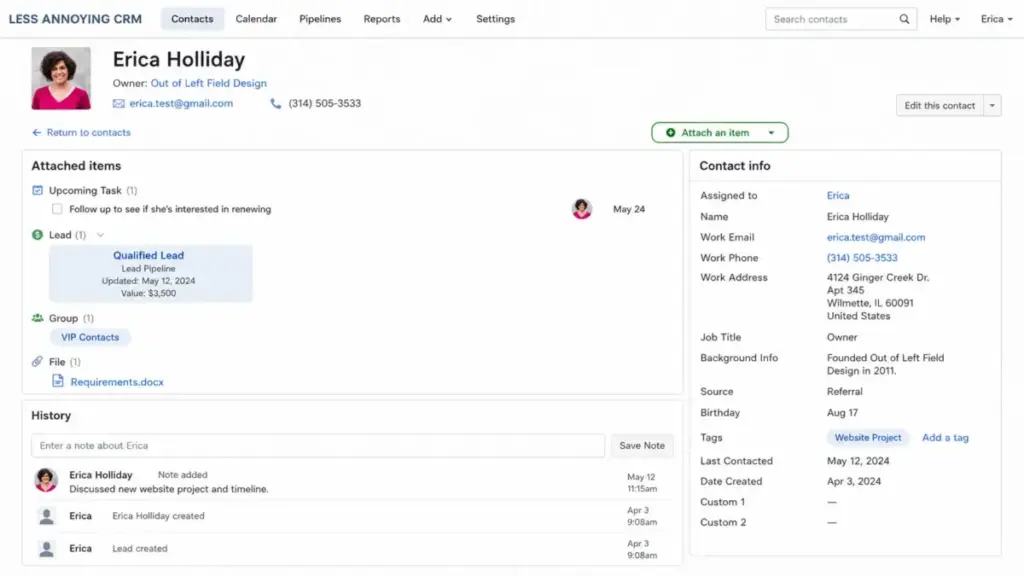
Less Annoying CRM charges $15/user/month. That is the entire pricing page. No tiers, no annual contracts, no add-ons, no hidden fees. The official help page states: one price, no additional fees, no contracts. For a 10-person team, the bill is $150/month. Next month, it is still $150. That predictability is the product.
You get contact management, company management, pipelines, task management, calendar, email and calendar sync, simple reporting, and human support. You do not get AI, advanced marketing automation, deep analytics, or a large native integration marketplace. Google and Outlook sync plus Zapier and API patterns extend functionality.
The trade-off is feature depth, not hidden cost. If your team needs automation sequences, predictive lead scoring, or multi-department reporting, Less Annoying CRM will feel insufficient. If your team needs contacts, deals, tasks, and a pipeline without configuration headaches, it does exactly that. If that feature ceiling becomes the constraint, compare Less Annoying CRM replacement options by automation, reporting depth, integrations, and migration effort for small teams.
Use Less Annoying CRM if:
- You want transparent, flat pricing with zero surprises
- Your team is 2-10 people who need CRM basics only
- You distrust tiered pricing and add-on economics
Do not use Less Annoying CRM if:
- You need AI, advanced automation, or deep reporting
- You want a large native integration marketplace
- You plan to scale past 15 users and need governance controls
Read our Less Annoying CRM review for a full assessment of what you gain and lose with one-price simplicity.
Best Relationship CRM for Google and Microsoft Users: Nimble
Badge: Best Relationship CRM for Google and Microsoft Users
Score: 7.83/10
Starting price: $24.90/seat/month billed annually; $29.90/seat/month billed monthly
Free plan: No
Free trial: Yes, 14-day trial, no credit card needed
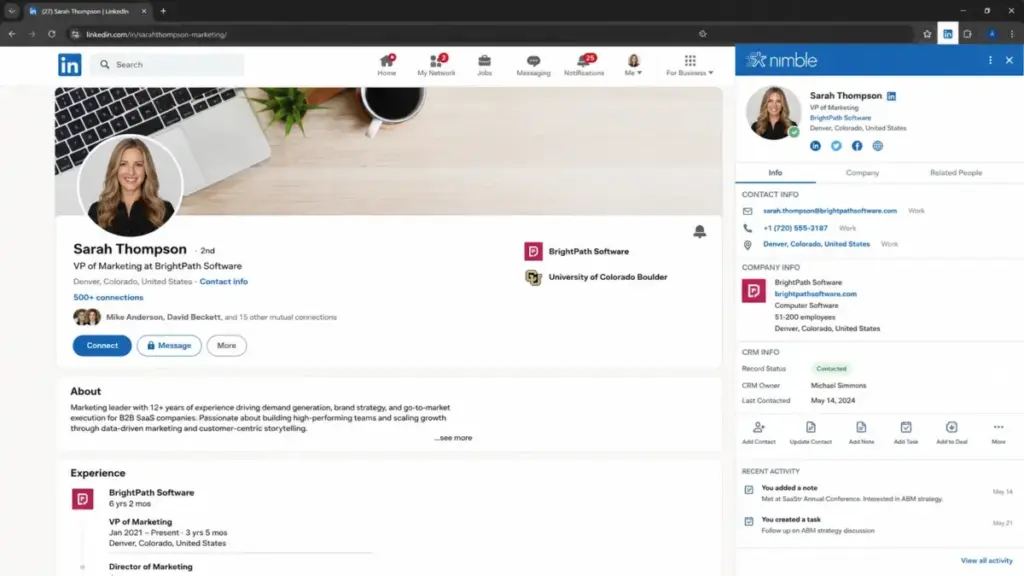
Nimble works from your inbox. If your sales process happens inside Gmail or Outlook, Nimble’s Prospector extension enriches contacts, logs conversations, and manages pipeline without forcing you into a separate CRM tab. That workflow integration is the differentiator.
At $24.90/seat/month billed annually for a 10-person team, the bill is $249/month. That is higher than Zoho CRM, Freshsales, Pipedrive, or Less Annoying CRM for the same headcount. The premium buys you relationship management, contact enrichment (25 credits/user/month), inbox CRM, sales pipelines, reporting, AI-powered email tools, and group messaging (1,000/license/month). If that premium stops matching your budget or contact-volume needs, evaluate Nimble alternatives against the same per-seat cost, enrichment-credit limits, and inbox-based selling workflow.
Add-ons that increase cost: Email marketing, additional data enrichment credits, web forms and web chat, extra contacts beyond 25,000 records, extra storage beyond 2 GB per seat, and additional email packages are all separate purchases. A team that uses Nimble as a full CRM plus prospecting plus marketing tool can see the real cost climb above $35/seat/month.
Use Nimble if:
- Your selling happens inside Gmail or Microsoft 365 inboxes
- You value relationship context and social profile enrichment
- You want a one-plan CRM with no tier confusion
Do not use Nimble if:
- You are price-sensitive and want a CRM under $15/user/month
- You need advanced reporting or high-volume email marketing included
- You want a free plan or a CRM with higher contact limits at the base price
Our Nimble CRM review covers the full add-on breakdown and workflow analysis.
Pricing Comparison: Starting Price vs Practical Cost
| CRM | Starting Price | Practical Tier (annual) | 10-User Monthly Cost | Free Plan | Free Trial |
|---|---|---|---|---|---|
| HubSpot CRM | $0 | Starter (verify on pricing page) | Varies by Starter pricing | Yes (2 users, 1K contacts) | Free plan |
| Zoho CRM | $0 | Standard $14/user/mo | $140 | Yes (3 users) | Yes |
| Salesforce Starter Suite | $25/user/mo | $25/user/mo | $250 | No | 30 days |
| Freshsales | $0 | Growth $9/user/mo | $90 | Yes (3 users) | Yes |
| Pipedrive | $14/seat/mo | Lite $14/seat/mo | $140 | No | 14 days |
| monday CRM | From $10/user/mo | Basic ~$12/user/mo | $120 | No | Yes |
| Bigin | $0 | Express $7/user/mo | $70 | Yes (1 user) | 15 days |
| Capsule CRM | $0 | Starter $18/user/mo | $180 | Yes (2 users) | 14 days |
| Less Annoying CRM | $15/user/mo | $15/user/mo (only tier) | $150 | No | 30 days |
| Nimble | $24.90/seat/mo | $24.90/seat/mo (only tier) | $249 | No | 14 days |
What this means: At 10 users billed annually, the cheapest practical CRM is Bigin at $70/month and the most expensive is Salesforce at $250/month. But cheapest is not always best. Bigin is built for micro-businesses and will feel limited for a 10-person sales team. Salesforce is built for scale and gives you the platform you will still be on at 50 users. The right CRM is the one whose 12-month cost matches your 12-month growth plan.
All prices verified as of May 2026. Confirm current pricing on official vendor pages before purchasing.
Feature Gate Comparison: What You Get by Plan
| Feature | HubSpot (Free) | Zoho (Standard) | Salesforce (Starter) | Freshsales (Growth) | Pipedrive (Lite) |
|---|---|---|---|---|---|
| Contact management | Yes | Yes | Yes | Yes | Yes |
| Pipeline management | Yes | Yes | Yes | Yes | Yes |
| Email integration | Yes | Yes | Yes | Yes | Yes |
| Workflow automation | Limited | Yes | Yes | Limited | Limited |
| Custom reporting | No | Basic | Basic | Yes | Limited |
| AI features | No | Zia (basic) | Built-in AI | Freddy (basic) | AI workspace |
| Built-in phone | No | No | No | Yes | No |
| Marketing tools | Limited | Limited | Included | Basic | Add-on |
| API access | Yes | Yes | Yes | Yes | Yes |
| App marketplace | 1,000+ | Zoho Marketplace | AppExchange | Freshworks | 500+ |
| Feature | monday (Basic) | Bigin (Express) | Capsule (Starter) | LACRM | Nimble |
|---|---|---|---|---|---|
| Contact management | Yes | Yes | Yes | Yes | Yes |
| Pipeline management | Yes | Yes | Yes | Yes | Yes |
| Email integration | Higher tiers | Yes | Yes | Sync | Inbox CRM |
| Workflow automation | Limited | Basic | Basic | No | Basic |
| Custom reporting | No | No | Yes | Basic | Yes |
| AI features | Plan-gated | No | No | No | AI email |
| Built-in phone | No | Calls | No | No | No |
| Marketing tools | No | No | No | No | Add-on |
| API access | Yes | Yes | Yes | API | Yes |
| App marketplace | 200+ | Zoho ecosystem | Zapier | Zapier | 100+ |
What this means: Automation and AI are the two features most commonly gated behind higher tiers. HubSpot, Pipedrive, monday, and Freshsales all limit automation on entry plans. AI features are locked or add-on-based on every CRM except Salesforce Starter Suite. If your team needs both, check the tier that includes them, not the starting price.
Setup and Migration Difficulty
| CRM | Setup Difficulty | Reason |
|---|---|---|
| HubSpot CRM | Low | Free plan is quick to start; paid Hubs add complexity |
| Zoho CRM | Medium | Module configuration and layout customization take time |
| Salesforce Starter Suite | Medium-High | Simplified but still Salesforce; admin knowledge helps |
| Freshsales | Low | Clean onboarding; no credit card for trial |
| Pipedrive | Low | Pipeline-first design; reps adopt quickly |
| monday CRM | Low-Medium | Visual setup is fast; automation configuration adds time |
| Bigin by Zoho CRM | Low | Built for spreadsheet replacement; 15-minute setup |
| Capsule CRM | Low | Simple interface; minimal configuration |
| Less Annoying CRM | Low | Single plan, no tier decisions, no customization overhead |
| Nimble | Low-Medium | Browser extension setup; inbox integration requires configuration |
Which CRM Should You Avoid?
Not every CRM on this list fits every small business. Here are the situations where a specific pick becomes the wrong one:
- Avoid HubSpot CRM if you have a fixed budget under $50/month and a growing contact list. The free plan ceiling forces upgrades, and the Professional tier jump is one of the steepest in the category.
- Avoid Zoho CRM if your team dislikes configuring software. The depth is the strength, but the setup complexity is a real barrier for non-technical teams.
- Avoid Salesforce Starter Suite if you are a 2-person team with a $30/month CRM budget. Salesforce’s value shows at scale, not at micro-team sizes.
- Avoid monday CRM if you are a solo founder. The 3-user minimum means you are paying for seats you do not use.
- Avoid Less Annoying CRM if you need automation sequences or AI. The simplicity comes at the cost of feature depth.
- Avoid Nimble if you are comparing cost-per-seat against free-plan CRMs. The relationship-CRM premium only justifies itself for inbox-heavy, relationship-driven sales workflows.
How to Choose the Right CRM for Your Small Business
Step 1: Count your users. CRM pricing is per-user. A 3-person team and a 15-person team face very different economics. Some CRMs have seat minimums (monday CRM requires 3).
Step 2: Check the free plan ceiling. Free plans are a starting point, not a permanent solution. HubSpot caps at 2 users and 1,000 contacts. Zoho caps at 3 users. Freshsales caps at 3 users with basic features. Know when you will hit the wall.
Step 3: Price the practical tier, not the starting tier. The starting price is for the plan with the fewest features. The practical tier is the plan your team will use for 12 months. For most small businesses, that is one tier above the cheapest paid plan.
Step 4: Audit add-on costs. Pipedrive add-ons, HubSpot Hub stacking, Freshsales AI packs, and Nimble enrichment credits can add 30-60% to the base subscription. Ask: what will this cost with everything my team needs?
Step 5: Match the CRM type to your sales motion. Pipeline-first sales teams should look at Pipedrive. Relationship sellers should look at Nimble. Ops-heavy teams should look at monday CRM. All-in-one needs point to HubSpot or Salesforce.
Step 6: Test the migration path. If you start on Bigin, can you move to Zoho CRM later? (Yes.) If you start on Less Annoying CRM, where do you go next? (Anywhere, but you lose simplicity.) The CRM migration process is underrated in CRM decisions.
Step 7: Run a 14-30 day trial with real data. Import your actual contacts, run your actual deals, and see if the CRM fits your actual workflow. Every product on this list offers either a free plan or a free trial. Use it.
Common Mistakes When Choosing a CRM
1. Choosing by starting price alone. Bigin at $7/user/month is the cheapest. It is also the most limited. The right question is not “What is the cheapest CRM?” It is “What does this CRM cost with the features my team needs?”
2. Ignoring the free-plan ceiling. Free plans expire in functionality, not in time. HubSpot’s 1,000-contact cap, Zoho’s 3-user limit, and Bigin’s 500-record cap are hard walls that force upgrades.
3. Skipping the add-on audit. Pipedrive’s LeadBooster, HubSpot’s Marketing Hub, and Nimble’s enrichment credits are not optional for many teams. They are requirements disguised as add-ons.
4. Overbuying for future needs. A 3-person team does not need Salesforce Starter Suite. Start with what fits now and plan the migration for when you need it.
5. Underestimating setup time. Zoho CRM and Salesforce require real setup effort. Less Annoying CRM and Capsule do not. Match setup tolerance to the CRM you choose.
6. Forgetting integrations. A CRM that does not connect to your email, calendar, and accounting tool creates data silos. Check CRM integration options before committing.
7. Not testing with real data. Every CRM feels clean with 10 demo contacts. Import 500 real contacts, run 20 deals through the pipeline, and see what breaks.
Final Verdict
HubSpot CRM is the best overall CRM for small business in 2026. The free plan is functional, the ecosystem is the broadest, and the upgrade path covers sales, marketing, service, and operations. The caveat: the free-to-paid jump is steep, and the per-hub pricing stacks quickly for teams that need multiple modules.
Here is my recommendation by team profile:
- Solo founders and freelancers: Start with Bigin by Zoho CRM at $0-$7/user/month or Less Annoying CRM at $15/user/month
- 3-5 person sales teams on a budget: Freshsales Growth at $9/user/month or Zoho CRM Standard at $14/user/month
- 5-15 person sales teams focused on pipeline: Pipedrive Lite at $14/seat/month
- Teams needing CRM plus project delivery: monday CRM or Capsule CRM
- Relationship-driven teams in Gmail/Outlook: Nimble at $24.90/seat/month
- Teams planning to scale past 20 users: Salesforce Starter Suite at $25/user/month, or HubSpot paid plans
- Teams that want zero complexity: Less Annoying CRM at $15/user/month, flat
For teams comparing best free CRM options, HubSpot, Zoho, Freshsales, and Bigin are the four to evaluate. For teams focused on CRM for sales teams, Pipedrive and Freshsales are the strongest pure-play picks.
The best CRM is not the one with the most features. It is the one your team will still be using 12 months from now, at a cost you planned for, running workflows you need. Pick based on that, not on the pricing page headline.
FAQ
What is the best CRM for a small business with fewer than 5 employees?
For teams under 5, Bigin by Zoho CRM ($0-$7/user/month) or Freshsales ($0-$9/user/month) offer the best balance of price and features. Both have free plans that cover 1-3 users. If you want zero configuration, Less Annoying CRM at $15/user/month is the simplest option.
Is HubSpot CRM free plan good enough for a small business?
HubSpot’s free CRM is functional for 1-2 users with up to 1,000 contacts. It includes contact management, deal tracking, pipeline management, and live chat. The plan becomes limiting when you need more than 2 users, advanced automation, or custom reporting, all of which require paid plans.
How much does a CRM cost for a 10-person small business?
At 10 users on annual billing, costs range from $70/month (Bigin Express) to $250/month (Salesforce Starter Suite). Zoho CRM Standard runs $140/month, Pipedrive Lite runs $140/month, and Freshsales Growth runs $90/month. Add-ons can increase these figures by 30-60%.
Do I need a CRM if I only have 50 customers?
A CRM becomes valuable once manual tracking causes missed follow-ups or lost deals. At 50 customers, a free CRM like HubSpot, Zoho, or Bigin gives you structured contact management and pipeline visibility at no cost. The time to start a CRM is before you need it, not after.
What is the difference between a CRM and a spreadsheet?
A CRM automates contact tracking, deal management, follow-up reminders, email logging, and pipeline reporting. A spreadsheet requires manual entry for all of those tasks. The practical difference shows at 50+ contacts: a CRM saves hours per week in data entry and eliminates missed follow-ups.
Can I switch CRMs later without losing data?
Yes, but CRM migration involves data export, field mapping, workflow rebuilding, and team retraining. Most CRMs support CSV import and some offer direct migration tools (Bigin migrates from HubSpot, Pipedrive, and Insightly). Plan 2-4 weeks for a full migration of 1,000+ contacts.
Which free CRM has the highest contact limit?
Among CRMs on this list, HubSpot free allows 1,000 contacts for up to 2 users. Zoho CRM Free Edition supports 3 users. Freshsales free supports 3 users. Bigin free supports 1 user with 500 records. Contact limits vary by product, and free plans are designed to convert, not to serve long-term.
Is Salesforce too complex for a small business?
Salesforce Starter Suite is simplified for small businesses with guided setup and a lower price point ($25/user/month) than standard Salesforce editions. It is more complex than Pipedrive or Less Annoying CRM, but less complex than full Salesforce Sales Cloud. Teams that plan to scale will benefit from starting on the Salesforce platform early.
What CRM features matter most for small business?
Contact management, pipeline management, email integration, task management, and basic reporting cover 80% of small-business CRM needs. Automation, AI, advanced reporting, and marketing tools become important as your team grows past 5-10 users. Start with what you need today and upgrade when you need more.
How long does it take to set up a CRM?
Setup time ranges from 15 minutes (Bigin, Less Annoying CRM) to several days (Salesforce, Zoho CRM with full customization). Most small-business CRMs can be functional within 1-2 hours with basic contact import and pipeline configuration. Full customization of workflows, automations, and integrations takes longer.