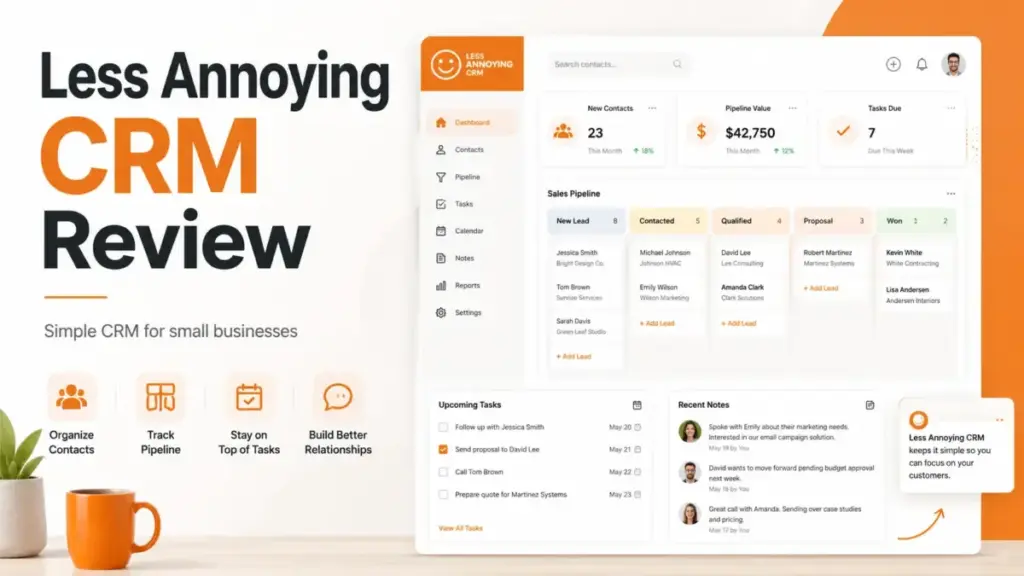
Less Annoying CRM costs $15 per user per month with zero feature tiers, zero contracts, and zero upgrade gates. That single-plan simplicity is the entire product thesis, and it is both the strongest selling point and the hard ceiling most reviews fail to explain.
If your team has outgrown spreadsheets but does not need AI lead scoring, native email campaigns, or multi-pipeline reporting, this CRM software deserves serious consideration. But if your sales process requires anything beyond contact management, task reminders, and lightweight pipeline tracking, you will hit the product boundary fast.
I researched Less Annoying CRM by verifying official documentation, the current pricing page, help center articles, app store listings, and cross-referencing user sentiment across G2, Capterra, GetApp, and TrustRadius.
Our review methodology prioritizes official source verification over recycled SERP claims. The goal: separate what this CRM actually delivers from the “simple and cheap” narrative that dominates the current search results. Many ranking pages contain stale mobile-app claims and miss critical details about email limitations, support hours, and security specifics. This review corrects those gaps.
Among top-rated CRM platforms, Less Annoying CRM occupies a unique position: a family-owned, self-funded product built specifically for the 2-to-15-person team that needs structure without a CRM administrator.
Less Annoying CRM at a Glance
| Detail | What You Get |
|---|---|
| Price | $15/user/month + applicable tax (as of May 2026) |
| Free Trial | 30 days, no credit card required |
| Contracts | None. Cancel anytime. |
| Feature Tiers | None. One plan includes everything. |
| Contact Limit | No strict limit; recommended below 50,000 total records |
| Storage | 25 GB per user |
| Mobile App | iOS and Android (no offline mode) |
| Support | Free phone, email, screenshare. Phone: weekdays 9am-4:30pm CT |
| Security | AWS hosting, 256-bit encryption, GDPR, 2FA |
| Best For | Solo operators, consultants, service teams, insurance agents |
| Not For | Teams needing email campaigns, AI scoring, advanced automation |
| SaaSZap Score | 7.4/10 |
The 3 Problems Less Annoying CRM Solves
Problem 1: Spreadsheet Chaos for Small Teams
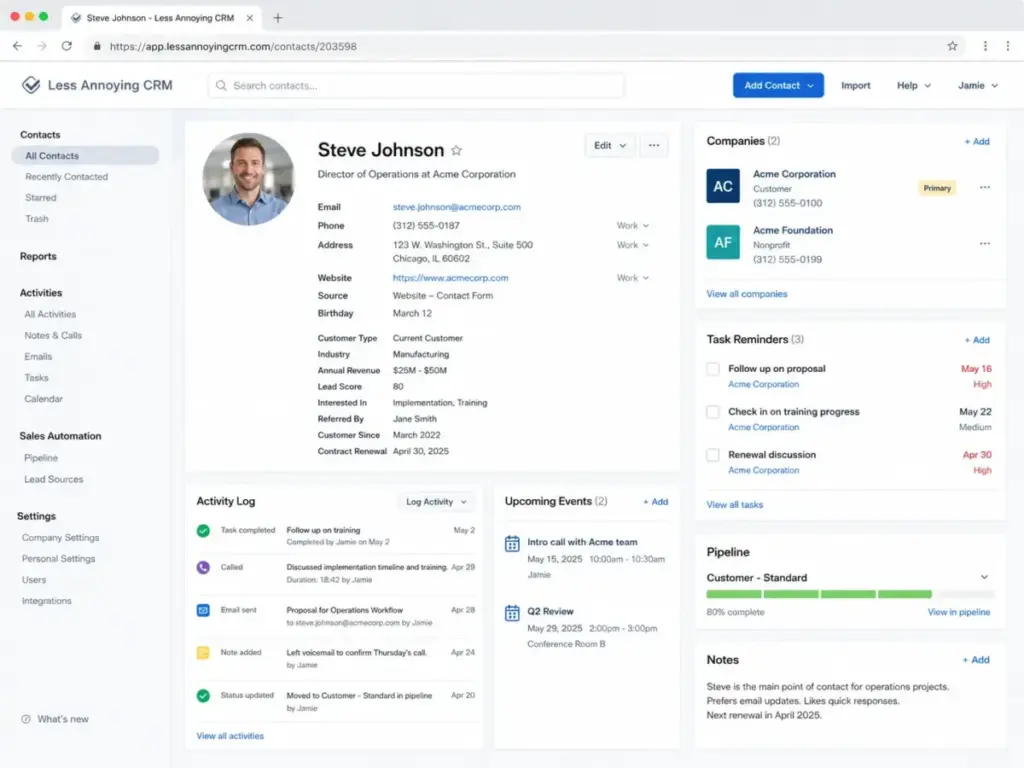
The core promise is replacing the spreadsheet-and-sticky-note system that breaks once a team adds a third person. Less Annoying CRM consolidates contacts, companies, notes, follow-up tasks, and calendar events into a single workspace. According to the official product tour, every account includes unlimited contacts and companies, unlimited custom fields, unlimited pipelines, task management with daily email reminders, calendar sync with Google Calendar and Outlook, and one-click data exports.
That feature set sounds basic compared to Salesforce or HubSpot. That is the point. A 5-person insurance brokerage tracking 2,000 clients does not need 50 automation workflows. They need a contact record that loads in two clicks with the last interaction visible. Less Annoying CRM is built for exactly that operational profile.
Problem 2: CRM Adoption Friction
The biggest CRM failure is not a missing feature. It is a team that stops using the tool after week two. Less Annoying CRM attacks this by removing every friction point that kills adoption in larger platforms: no mandatory onboarding fees, no setup consultants, no multi-day implementation, no admin role required. The official pricing page confirms zero setup fees and zero support fees. Free human coaching, live demos, and screenshare training sessions come included.
One detail most reviews miss: Less Annoying CRM now offers public forms and automations that can create contact records and trigger follow-up workflows automatically. A website inquiry form can create a lead, assign it to a pipeline, and generate a reminder task without manual entry. That is not enterprise automation, but it closes the gap between “spreadsheet replacement” and “actual workflow tool.”
Problem 3: CRM Budget Anxiety
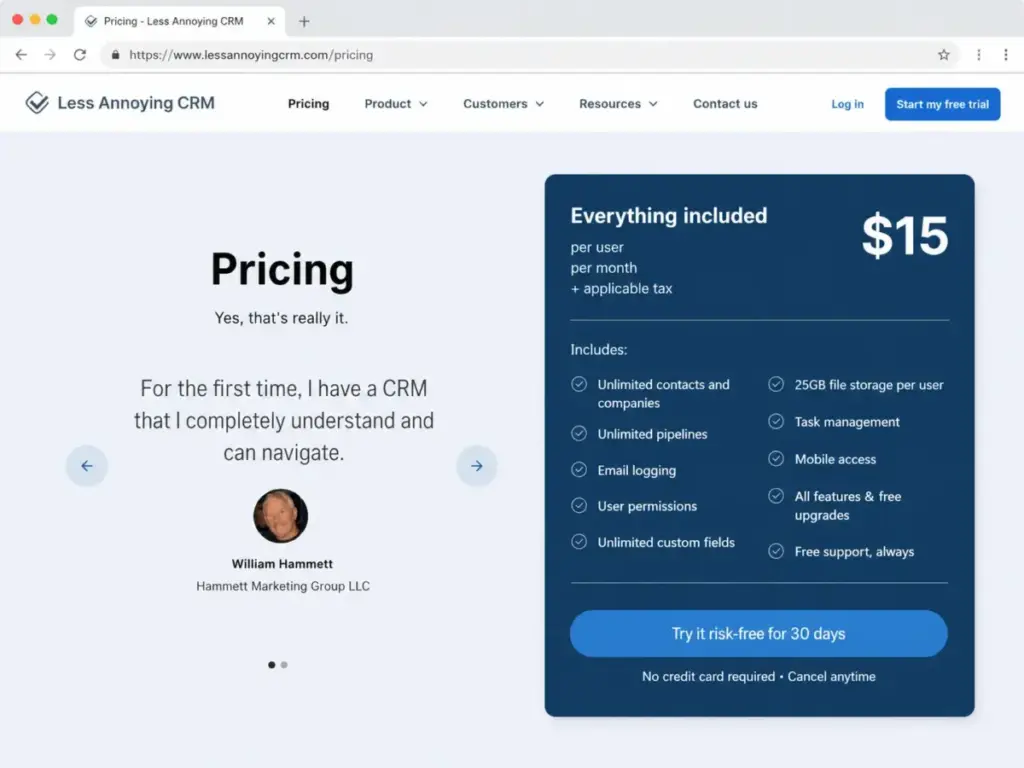
The pricing model eliminates the cost math that plagues most CRM buying decisions. According to Less Annoying CRM’s pricing page (verified May 2026):
- $15/user/month (USD) or £14/user/month (GBP)
- No annual contract discount because there is no annual contract
- No feature gates: every user gets every feature
- No add-on fees for support, training, or upgrades
- Applicable taxes may apply; other currencies not accepted
For a 5-person team, the monthly bill is $75 before tax. For 10 users, $150. No surprises. No “contact us for Enterprise” pricing page. No mandatory onboarding at $3,000.
Is that cheap? Compared to Pipedrive Essential at $14/user/month or Zoho CRM Standard at $14/user/month, the price is competitive but not the lowest. The value is not the dollar amount; it is the total absence of upgrade pressure and hidden cost escalation.
But here is the ceiling: there is nothing to upgrade to. If your team needs deeper automation, AI features, or advanced reporting six months from now, you cannot buy a higher tier. You switch CRMs entirely.
The 2 Problems Less Annoying CRM Creates
The Email Boundary Nobody Explains Clearly
Less Annoying CRM does not send or receive email. This is the single most misunderstood limitation, and most competing reviews gloss over it with vague “email integration” language.
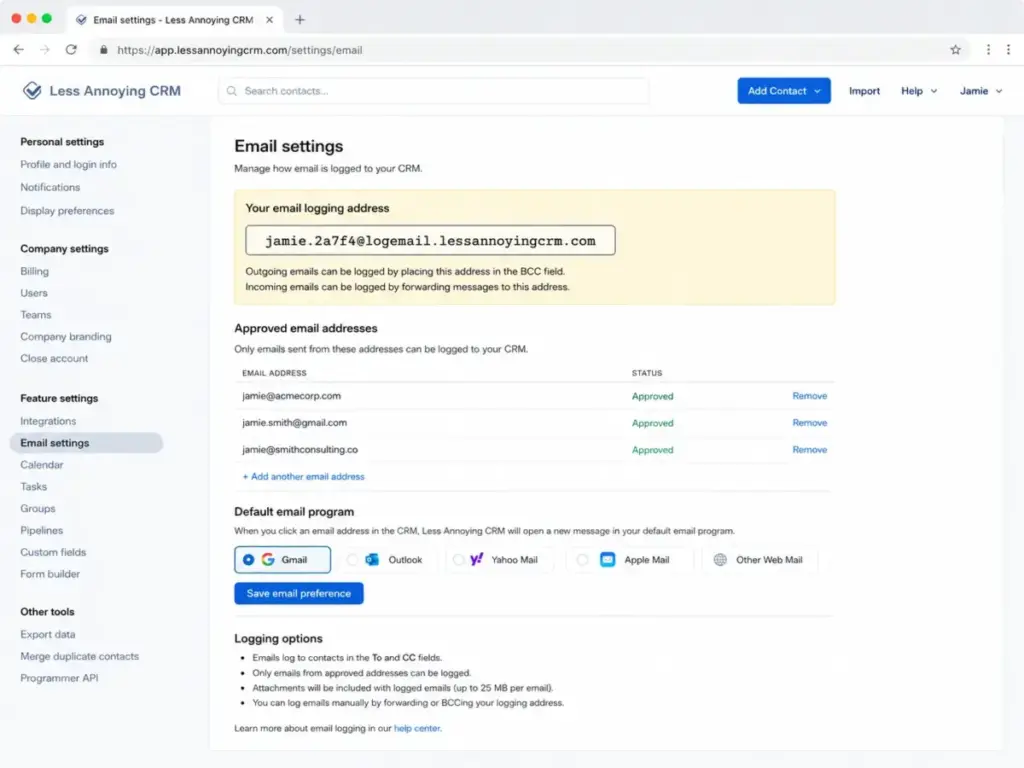
According to the official help documentation, the CRM can link out to your email program to start a new message from a contact record. It can log email history using BCC logging. But it cannot send emails natively, cannot run email sequences, and cannot track email opens or clicks.
So what does “email integration” actually mean here?
What LACRM can do with email:
- Log sent/received emails to contact records via BCC
- Open your email client from within a contact profile
- Connect to Mailchimp via native integration for campaign sending
What LACRM cannot do with email:
- Send emails from within the CRM
- Track open rates or click-through rates
- Run automated drip sequences or outreach cadences
- Send bulk emails to contact segments
For a consultant who primarily communicates via phone and in-person meetings, this limitation is irrelevant. For a sales team running outbound sequences, this is a deal-breaker. If email automation is part of your sales process, Pipedrive’s email tracking capabilities or HubSpot’s marketing tools are better fits.
The Scalability Ceiling
Less Annoying CRM does not pretend to be a growth CRM, and that honesty is refreshing. But the operational ceiling arrives sooner than most buyers expect:
- Reporting stays lightweight. No custom dashboards, no deal velocity metrics, no revenue forecasting beyond basic pipeline views.
- Automation covers form-to-record creation and task triggers, but complex multi-step branching workflows are not available.
- Integrations connect through Zapier, Mailchimp, Google Calendar, Outlook Calendar, QuickBooks Sync, CallHippo, JustCall, Pabbly Connect, and LeadsBridge. The open API extends connectivity, though public API rate limits are not documented in accessible help pages.
- User permissions exist but lack the role-based granularity that 15-plus-person teams typically need.
A practical rule: if your team is under 10 people, relationship-driven (not volume-driven), and does not run outbound email campaigns, Less Annoying CRM fits. Once you add a dedicated sales manager who needs forecasting, or a marketing person who needs campaign analytics, you have outgrown the product.
Less Annoying CRM Mobile App: The Real Status in 2026
Several ranking pages still claim Less Annoying CRM has no native mobile app. That is outdated information.
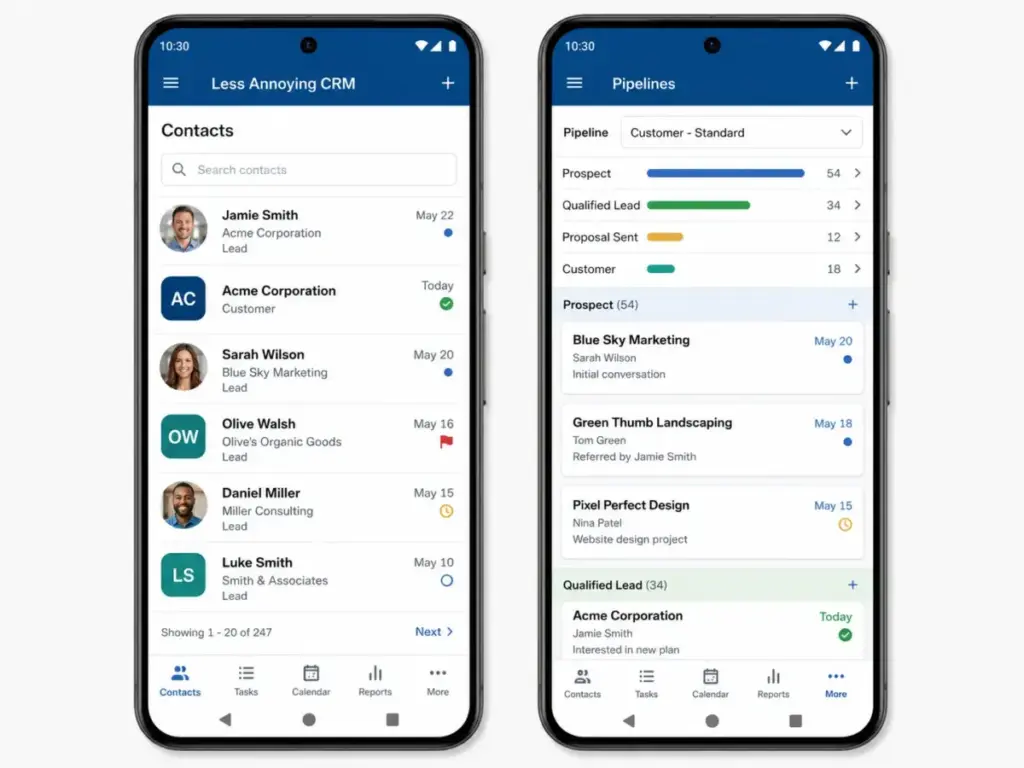
According to the official mobile access help page, iOS and Android apps are available for download. The Google Play listing confirms the Android app supports adding contacts, companies, leads, tasks, and events; viewing the calendar; browsing pipelines; and accessing form submissions.
The caveats matter: the app requires an active internet connection. There is no offline mode. And the Google Play listing describes it as a first-version release, with native features like push notifications, caller ID integration, and biometric login listed as future additions.
For a real estate agent checking contact details between showings on Wi-Fi, the app works. For a field sales rep working in areas with spotty cell coverage, the lack of offline access is a real limitation.
Less Annoying CRM Pricing in 2026: What You Pay and What You Cannot Buy
| Item | Details | Source |
|---|---|---|
| Monthly Price | $15/user/month + tax | Official pricing, May 2026 |
| Annual Discount | None listed | Same source |
| Free Trial | 30 days, no credit card | Same source |
| Free Tier | None | Same source |
| Feature Gates | Zero. All features included. | Same source |
| Storage | 25 GB per user | Same source |
| Contact Limit | No hard cap; stay below 50,000 | Pricing FAQ |
| Add-ons | None from LACRM; integrations may have separate costs | Same source |
Where Pricing Starts to Pinch
The pinch is not about the price going up. It is about the price staying flat while your needs grow beyond what the product delivers. A 3-person consulting firm paying $45/month gets extraordinary value. A 12-person sales team paying $180/month eventually needs reporting, automation, and email tools that require separate subscriptions to Mailchimp ($13-$350/month), Zapier ($19.99-$69/month), and potentially a dedicated email outreach tool.
The total cost of ownership increases not because Less Annoying CRM charges more, but because you bolt on tools to compensate for what it does not include.
Support: Strong, But Not What You Might Assume
Less Annoying CRM’s support reputation is deserved but requires context. According to the official support page, every account (including trial accounts) gets free email support, free phone support, and scheduled screenshare calls.
The specifics that most reviews omit:
| Support Channel | Availability |
|---|---|
| Phone | Weekdays, 9:00am – 4:30pm US Central Time |
| Weekdays and weekends | |
| Weekend Phone | Not available |
| Language | English only |
| Screenshare | Scheduled sessions, free |
| 24/7 Support | Not available |
For a US-based small business CRM buyer, weekday phone support with real humans is genuinely above average. A named reviewer on TrustRadius described unusually responsive human support as a standout feature for small companies managing modest contact bases.
For international teams in non-English-speaking countries or teams needing weekend phone support, the coverage gaps matter.
Security and Compliance: What Is Verified
According to official GDPR documentation, Less Annoying CRM uses:
- AWS hosting with servers in Virginia, USA
- 256-bit encryption in transit, at rest, and in backups
- Encrypted backups stored in separate US locations
- Two-factor authentication (2FA)
- External vulnerability scans and application penetration tests
- GDPR compliance as a data processor with standard contractual clauses
- EU-US Data Privacy Framework certification
No public SOC 2 certification was found in the reviewed official documentation. I flag this not as a criticism, but because some SERP pages make unsupported compliance claims. If SOC 2 matters to your organization, verify directly with Less Annoying CRM before purchasing.
Less Annoying CRM Pros and Cons
- Genuinely flat pricing. $15/user/month with every feature included. No tier confusion, no upgrade traps. That predictability is rare in the CRM market.
- Fast time-to-value. No setup fees, no implementation consultants, no multi-week deployment. Official positioning targets teams that want to be productive within the first session.
- Human support included at every level. Phone, email, and screenshare support comes free, even for trial users. Most CRMs gate phone support behind paid tiers.
- Forms and automations bridge the gap. Public forms that auto-create contacts and trigger tasks move LACRM beyond basic contact storage.
- No vendor lock-in pressure. Month-to-month billing with one-click exports means you can leave without penalty. That is unusual confidence from a vendor.
- No native email sending or tracking. The CRM logs emails but cannot send, sequence, or measure engagement. For outbound-driven teams, this is a non-starter.
- No offline mobile access. The iOS and Android apps require internet. Field teams in low-connectivity areas lose access to their data.
- Support is English-only with limited hours. Phone support ends at 4:30pm Central Time on weekdays. No weekend phone. International and non-English-speaking teams face a real gap.
- Reporting stays basic. No custom dashboards, no forecasting, no deal velocity analytics. A sales manager tracking team performance across multiple pipelines will find this insufficient.
- No free permanent plan. Unlike HubSpot CRM (free for unlimited users) or Zoho CRM (free for up to 3 users), Less Annoying CRM requires payment after the 30-day trial.
- Scalability has a hard boundary. No upgrade path exists. When you outgrow the feature set, migration is the only option.
Who Should Use Less Annoying CRM
| Buyer Profile | Verdict | Why |
|---|---|---|
| Solo consultant replacing spreadsheets | Strong fit | Predictable pricing, fast setup, trial without credit card |
| 2-5 person service business needing follow-up discipline | Strong fit | Tasks, reminders, calendar sync, shared notes, free support |
| Insurance or financial services team tracking client relationships | Strong fit | Contact histories, custom fields, forms, pipeline tracking |
| 10-15 person sales team needing pipeline velocity and automation | Consider alternatives | Limited automation, reporting, and sales-process depth |
| Marketing-led team needing email sequences and click tracking | Not a fit | No native email sending, no open/click tracking |
| Enterprise team needing governance, SSO, or 24/7 support | Not a fit | No enterprise controls, limited support hours |
Better Alternatives by Scenario
If Less Annoying CRM does not fit your operational profile, here are evidence-based alternatives: For a structured switching framework, compare Less Annoying CRM alternatives by automation depth, reporting needs, integration coverage, and the point where simplicity stops helping.
| Scenario | Better Choice | Why |
|---|---|---|
| Need a free CRM to start | HubSpot CRM | Free for unlimited users; paid tiers add automation and reporting |
| Need visual pipeline management + email tracking | Pipedrive CRM | Email tracking, visual pipeline, AI sales assistant from $14/user/month |
| Need CRM + marketing automation in one platform | Zoho CRM | Free tier for 3 users; advanced automation and analytics at scale |
| Need simple CRM with sales action focus | OnePageCRM | Action-focused CRM designed for next-step selling |
| Need CRM + email marketing combined | ActiveCampaign CRM | Native email automation, sequences, and CRM in one subscription |
For a deeper analysis of small team options, see our best CRM for freelancers guide.
FAQ: Less Annoying CRM
How much does Less Annoying CRM cost in 2026?
Less Annoying CRM costs $15 per user per month plus applicable tax. There are no pricing tiers, no contracts, and no features locked behind upgrades. Billing is monthly only; no annual discount is listed on the official pricing page (verified May 2026).
Does Less Annoying CRM have a free plan?
No. Less Annoying CRM offers a 30-day free trial with no credit card required and no feature restrictions during the trial. After 30 days, the $15/user/month charge begins. If you need a permanently free CRM, HubSpot CRM and Zoho CRM both offer free tiers.
Does Less Annoying CRM have a mobile app?
Yes. iOS and Android apps are available. The apps support adding contacts, viewing pipelines, managing tasks, and accessing form submissions. The app requires an internet connection and has no offline mode. Features like push notifications and biometric login are listed as coming in future updates.
Can Less Annoying CRM send emails?
No. Less Annoying CRM does not send or receive emails directly. It can log email history via BCC and link to your email program from contact records. It cannot track email opens or clicks. For email campaigns, you need a separate tool like Mailchimp (which has a native integration) or a Zapier connection.
Is Less Annoying CRM secure?
Less Annoying CRM uses AWS hosting in Virginia, 256-bit encryption in transit and at rest, 2FA, external vulnerability scans, and penetration testing. The platform complies with GDPR and is certified under the EU-US Data Privacy Framework. No public SOC 2 certification was verified in official documentation.
What integrations does Less Annoying CRM support?
Native and partner integrations include Google Calendar, Google Contacts, Outlook Calendar, Mailchimp, Zapier, QuickBooks Sync, CallHippo, JustCall, Pabbly Connect, LeadsBridge, and Badger Maps. The open API allows custom connections. Zapier extends access to thousands of additional apps.
Who should not use Less Annoying CRM?
Teams that need native email campaigns, outreach sequences, AI lead scoring, advanced analytics, quote or order management, complex multi-step automation, offline mobile access, 24/7 phone support, or multilingual customer support. If any of these are requirements, consider Pipedrive, HubSpot, or Zoho CRM’s expanded feature set.
Is Less Annoying CRM worth it in 2026?
For teams of 2-10 people who need contacts, tasks, calendar, notes, and pipeline tracking without CRM administration overhead, yes. The $15/user/month price with no hidden costs delivers clear value for relationship-driven businesses. For growing sales teams that will need reporting, automation, or email tools within 12 months, starting with a more expandable CRM saves the cost and disruption of a future migration.
Final Verdict: Less Annoying CRM Scores 7.4/10
Less Annoying CRM earns 7.4/10. It is the best CRM for small teams that have outgrown spreadsheets and want a tool they can adopt in a single afternoon. The flat $15/user/month pricing, zero feature gates, and free human support create an adoption experience that most CRMs twice the price cannot match.
It is not the right choice for teams that need email marketing, sales automation, advanced reporting, or enterprise governance. If those needs are 6-12 months away, starting with Pipedrive or HubSpot’s free CRM gives you room to grow without a forced migration.
The simplest way to think about Less Annoying CRM: it is not good because it has fewer features. It is good only when fewer features remove the adoption friction that causes most CRM implementations to fail. If your team will actually use a simple CRM every day, that beats owning a powerful CRM that sits unused.
Start with the 30-day free trial and evaluate whether the feature ceiling matters for your current workflows before committing.