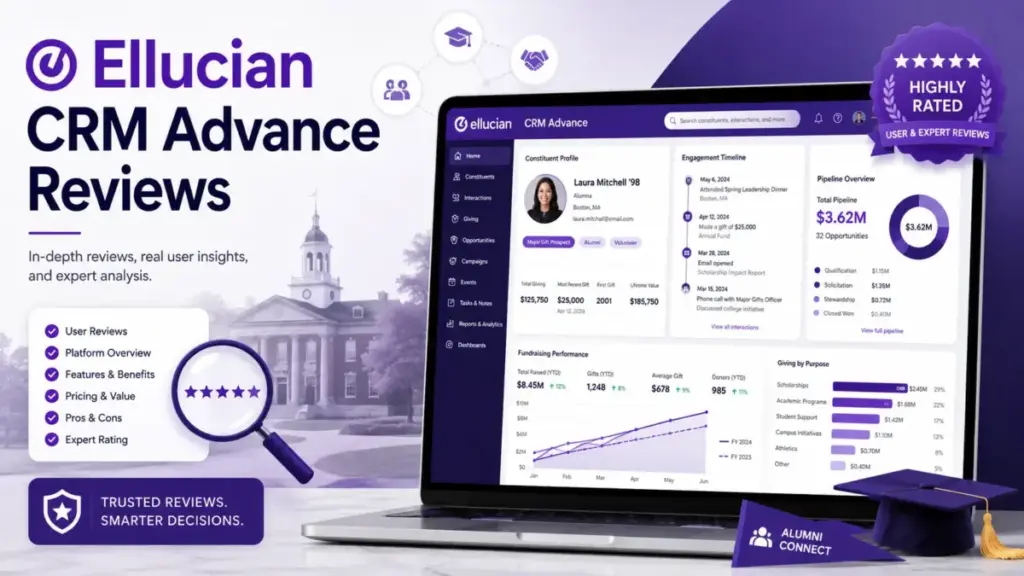
Ellucian CRM Advance is not a plug-and-play donor CRM. It is an institutional advancement platform built for universities already running Ellucian Banner, Colleague, or other Ellucian systems, and the gap between what the product page promises and what your procurement team needs to budget for is wider than most Ellucian CRM Advance reviews acknowledge. If your campus operates outside the Ellucian and Microsoft stack, the implementation math changes entirely.
I evaluated CRM Advance through official Ellucian product documentation, public customer stories from George Washington University, Oregon State University Foundation, and The Campanile Foundation at SDSU, verified review sentiment across G2, TrustRadius, and Gartner Peer Insights, and cross-referenced a UK public procurement pricing document (the only public pricing reference available). A higher education CRM purchase at this level deserves more than a feature list. It deserves a procurement framework.
TL;DR: Quick Verdict
| Category | Detail |
|---|---|
| Product | Ellucian CRM Advance |
| Score | 6.5/10 |
| Best For | University advancement teams on Ellucian Banner or Colleague with Microsoft Dynamics expertise and institutional IT support |
| Not For | Small nonprofits, development offices without Ellucian ecosystem dependence, teams needing transparent per-user pricing or quick self-service setup |
| Pricing | Not publicly disclosed in the US; quote-based only |
| Free Trial | None found |
| Testing Level | Third-party validated (official docs, customer stories, review platforms, public procurement reference) |
The 60-Second Version
Ellucian CRM Advance handles alumni engagement, donor pipeline tracking, fundraising campaigns, online giving, event management, and stewardship automation for higher education advancement offices. The platform runs on Microsoft Dynamics 365 and integrates with Ellucian Banner and Colleague. Ellucian positions it as AI-powered advancement software with Power BI dashboards and Microsoft Copilot-assisted outreach.
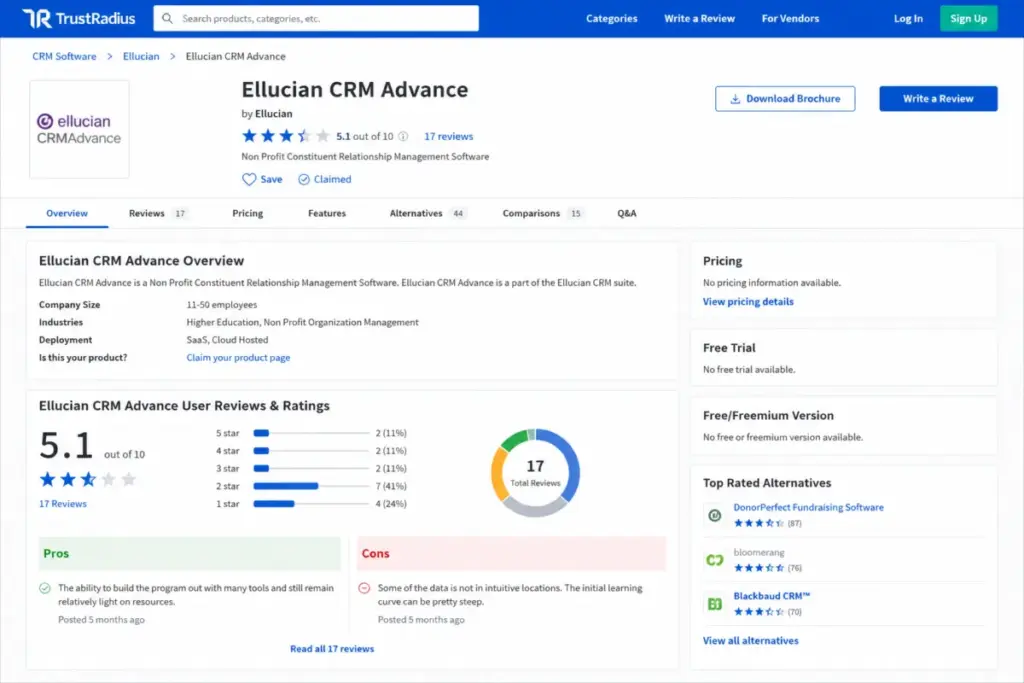
The catch: US pricing is entirely opaque. No public plan tiers, no feature gate table, no self-service trial. Customer stories emphasize process redesign, unified data definitions, and change management rather than quick setup. Review sentiment on TrustRadius (scoring around 5.1 out of 10 from 17 reviews) flags a steep learning curve and non-intuitive data locations. If your institution already runs Ellucian and Microsoft infrastructure, CRM Advance fits the ecosystem. If not, compare Salesforce CRM, Blackbaud Raiser’s Edge NXT, Slate by Technolutions, and Affinaquest before signing a contract.
What CRM Advance Is (and Is Not)
Ellucian CRM Advance is advancement-specific CRM software for higher education institutions. It covers constituent data management, donor engagement, fundraising pipeline oversight, online giving, event management, gift society assignment, and stewardship automation.
It is not Ellucian’s admissions CRM (that is CRM Recruit). It is not the student advising CRM (that is CRM Advise). And it is not Ellucian Banner or Colleague, which are student information systems. Most competing review pages on the SERP mix these products together or attribute Ellucian-wide Capterra ratings (a 3.6 overall from 84 reviews covering all Ellucian products) to CRM Advance specifically. That conflation misleads buyers.
This review focuses exclusively on the advancement and fundraising use case: alumni relations, donor cultivation, campaign analytics, and gift processing for university foundations and development offices.
The 3 Problems CRM Advance Solves
1. Fragmented Advancement Data Across Campus Units
Large universities run fundraising operations across multiple schools, colleges, and affiliated foundations. Donor records, alumni contact data, gift history, and event attendance often sit in disconnected systems.
According to Ellucian’s George Washington University customer story, GW selected CRM Advance to modernize fundraising, unify advancement efforts, and create consistency across units using functionality built for higher education on a Microsoft Dynamics foundation. The Oregon State University Foundation case highlights open architecture, flexible data fields, and analytics that helped replace a legacy fundraising database and support campaign scale.
That unification is CRM Advance’s strongest argument. If your advancement office manages constituents across multiple organizational units and needs a single system of record, this is the problem the platform targets directly.
2. Disconnected Fundraising Workflows and Manual Stewardship
Advancement teams juggling spreadsheets for donor tracking, manual thank-you letter workflows, and disconnected event sign-ups lose time and donor attention.
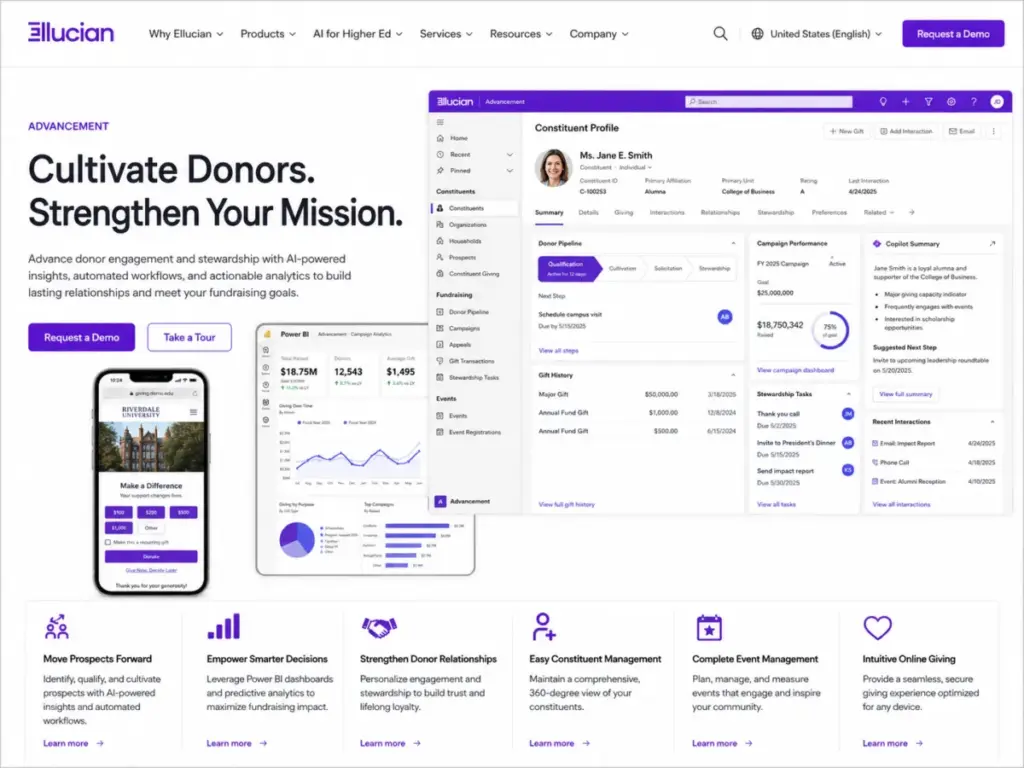
Ellucian’s official product page lists automated stewardship tasks, AI-generated donor insights, full pipeline oversight, and secure event management as core capabilities. The Campanile Foundation at SDSU reported that CRM Advance helped streamline operations, reduce manual processes, improve data integration, and support personalized outreach to over 500,000 alumni with limited staff resources.
The automation promise is real for teams willing to invest in configuration. But “automation” here means institutional-grade workflow design, not drag-and-drop simplicity.
3. Lack of Advancement-Specific Analytics and Reporting
Generic CRM dashboards do not speak the language of gift societies, pledge fulfillment rates, or campaign performance by giving level.
CRM Advance provides campaign dashboards and analytics powered by Microsoft Power BI and supports personalized outreach with Microsoft Copilot. Oregon State University Foundation’s case specifically references analytics and data integration as drivers for choosing the platform.
Is the reporting as flexible as a dedicated BI tool? Review sentiment suggests limitations. A verified user on TrustRadius noted that some data is not in intuitive locations and the initial learning curve can be steep. A Director of Development on Gartner Peer Insights described the system as highly customizable for managing constituents but warned that customizations can be tricky to maintain and upgrades may affect them.
That tension, between customization potential and reporting governance overhead, is the reality most reviews skip.
The 2 Problems CRM Advance Creates
The Implementation and Change Management Burden
CRM Advance should be treated as an institutional advancement transformation project, not a software installation. Every official customer story emphasizes process redesign, unified definitions, data integration, and change management rather than quick deployment.
The biggest mistake most advancement teams make with CRM Advance is underestimating the organizational work required before the technology delivers value. You need data ownership agreements across units, standardized constituent definitions, reporting governance, super-user training, and Microsoft Dynamics administration capacity. Without dedicated staff for ongoing administration, heavily customized instances become difficult to maintain.
That is where a formal CRM implementation guide becomes useful, because the hard part is governance before configuration.
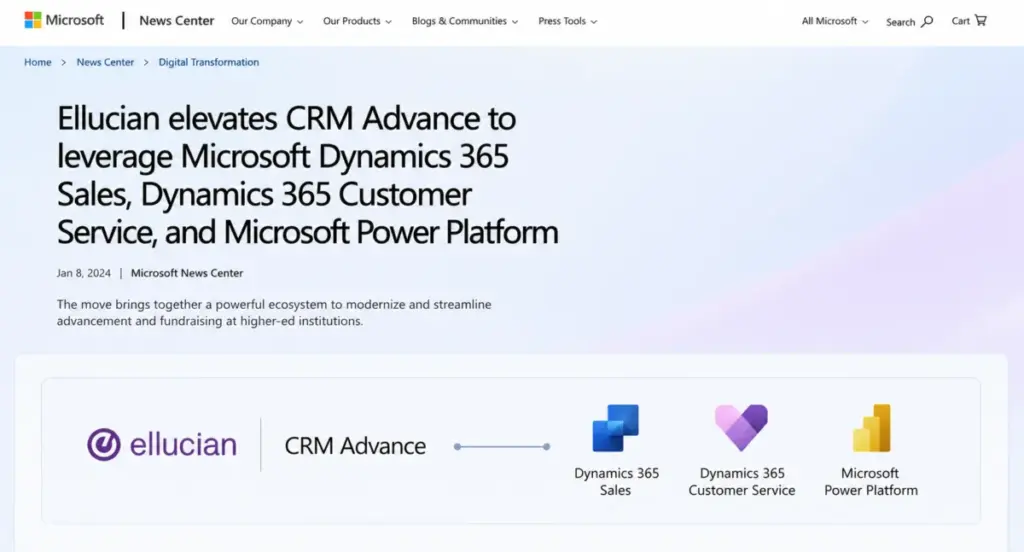
One detail most reviews miss about CRM Advance: the platform’s Microsoft Dynamics 365 foundation means your IT team needs Microsoft ecosystem expertise, not just CRM administration skills. Ellucian announced that CRM Recruit, CRM Advise, and CRM Advance are being upgraded to Microsoft Dynamics 365 Sales, Dynamics 365 Customer Service, and Microsoft Power Platform. That direction amplifies the dependency on Microsoft talent.
The Pricing Opacity Problem
US pricing for Ellucian CRM Advance is not publicly disclosed. The official product page directs buyers to “Request a Demo” with no visible plan tiers, per-user rates, FTE bands, or module bundles. There is no public free trial and no freemium version.
That matters because advancement teams cannot even ballpark a budget before engaging the vendor sales process.
Ellucian CRM Advance Pricing Reality (as of May 2026)
Ellucian does not publish standard US pricing for CRM Advance. Every deployment is quote-based. Here is what the public record shows:
| Plan | Price | Billing | Limits | Source |
|---|---|---|---|---|
| US commercial pricing | Not publicly disclosed | Quote-based | No public US seat limits, FTE bands, or module bundles found | Ellucian product page |
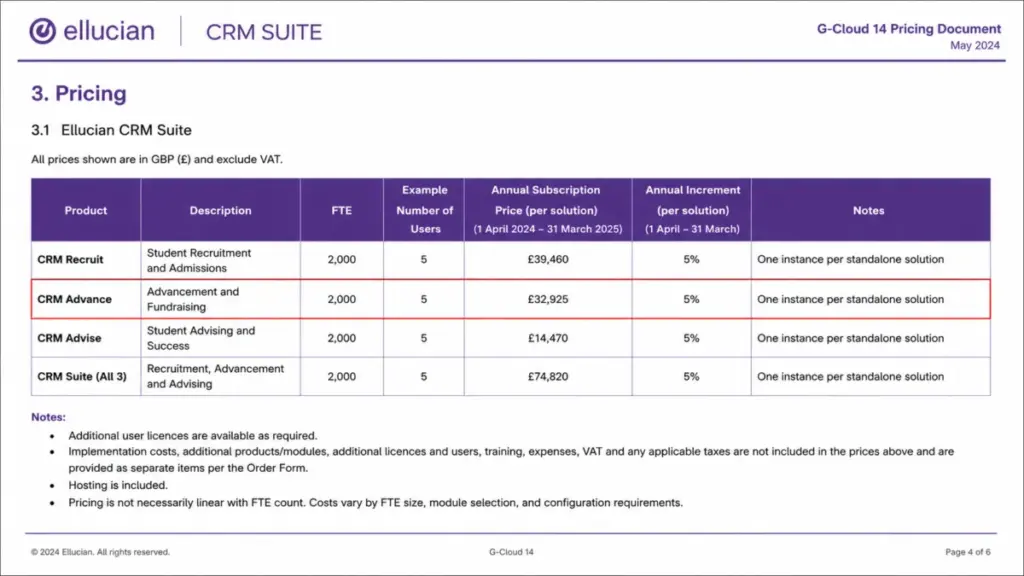
| UK G-Cloud 14 reference (not US pricing) | £32,925/year | Annual | Typical 2,000 FTE institution, 5 users; implementation, additional users, VAT, expenses excluded | UK G-Cloud pricing document |
Pricing caution: The UK G-Cloud reference is a public procurement document, not US commercial pricing. It shows one data point for a 2,000 FTE institution with 5 users. Pricing is not necessarily linear with FTE count, and costs vary by module selection, configuration, and institution size. Do not use this figure as a US budget estimate. Ask Ellucian directly for US-specific pricing during your demo.
Where the Real Costs Hide
The quote from Ellucian covers only software licensing. Advancement teams should budget separately for:
- Implementation services: process redesign, data migration, configuration, and testing
- Additional user licenses: the UK reference bundles only 5 users; larger teams need more
- Microsoft Dynamics and Power Platform expertise: internal or contracted
- Training: staff onboarding, super-user development, change management
- Integration work: connecting to Banner, Colleague, or third-party tools
- Annual increments: the UK procurement document notes annual cost increases
- Ongoing administration: dedicated system administrator for customized instances
For a mid-sized university foundation with 15-20 advancement staff, the total cost of ownership over three years, including implementation, licensing, training, and administration, will significantly exceed the annual software fee alone. I suspect most institutions underestimate this by 40-60% based on the scope of work described in official customer stories.
Ellucian CRM Advance Key Features
Ellucian’s official product page lists these capabilities:
| Feature | What It Does | What to Verify |
|---|---|---|
| AI-generated donor insights | Surfaces patterns in giving behavior | Ask which AI models power this and whether insights improve over time |
| Microsoft Power BI dashboards | Campaign and fundraising analytics | Confirm which reports are pre-built vs. custom and who owns report governance |
| Microsoft Copilot outreach | Personalized donor communications | Ask for Copilot availability timeline and licensing implications |
| Constituent data management | Central alumni and donor records | Verify data migration scope, deduplication, and staging capabilities |
| Event management portal | Secure event registration and tracking | Test the attendee experience and check mobile responsiveness |
| Online giving | Donations from any device | Ask about payment processor options, PCI DSS scope, and transaction fees |
| Gift society assignment | Automatic giving-level classification | Confirm customization rules and reporting integration |
| Full pipeline oversight | Track donor cultivation stages | Compare pipeline flexibility to Salesforce or Blackbaud pipelines |
| Mobile-friendly interface | Access from anywhere | Note: a standalone mobile app has not been publicly confirmed; the official page describes a mobile-friendly web interface |
A G2 reviewer noted that the platform can be built out with many tools, runs relatively lightly on resources, integrates with Ellucian Banner, and supports add-on tools such as Reeher. That flexibility is real, but it also means your team bears the configuration burden.
The Ellucian and Microsoft Ecosystem Fit
This is the part most reviews skip. CRM Advance does not exist in isolation. It sits inside two overlapping ecosystems:
The Ellucian ecosystem: Banner (SIS), Colleague (SIS), Ellucian Student, Ellucian Marketplace for pre-built integrations, and shared constituent data. If your campus already runs Banner or Colleague, CRM Advance inherits that data alignment. A G2 reviewer specifically praised Banner integration as a strength.
The Microsoft ecosystem: Dynamics 365 Sales and Customer Service foundation, Power Platform extensibility, Power BI reporting, and the Copilot AI direction. Ellucian’s Marketplace blog describes pre-built integrations connecting Ellucian solutions with partner applications.
Why does this matter for your procurement decision? Because the strongest evidence favors institutions already aligned with both Ellucian and Microsoft. If your campus IT team already manages Microsoft Dynamics, Power BI, and Azure Active Directory, CRM Advance adds to an existing stack. If your campus runs a different ERP, a different cloud provider, or lacks Microsoft administration talent, every integration becomes custom work.
So does ecosystem alignment justify the investment? For Banner and Colleague campuses with Microsoft infrastructure, yes. For mixed-stack universities prioritizing vendor independence, compare Slate, Salesforce Education Cloud, Blackbaud, and Affinaquest first.
Security and Compliance for Donor Data
Advancement teams handle sensitive donor financial data, alumni personal information, and gift records. Security due diligence is not optional.
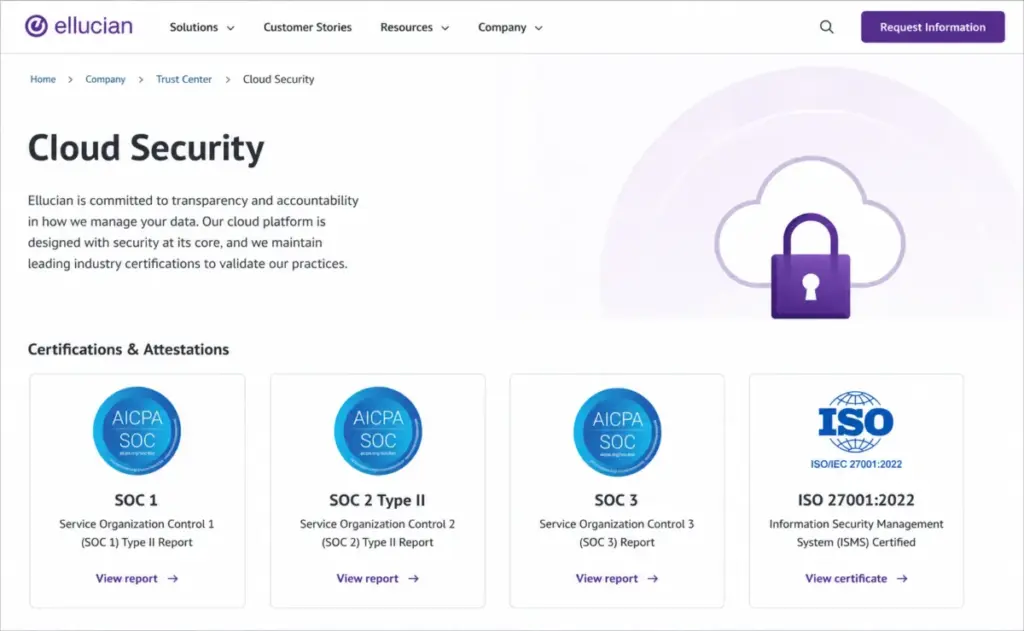
According to Ellucian’s security page, Ellucian Cloud Services holds ISO 27001:2022 certification, and SOC 1, SOC 2 Type II, and SOC 3 reports are available to customers. The public security page references alignment with CSA, HECVAT, PCI DSS, NIST 800-171, and Cyber Essentials Basic.
Ellucian’s privacy notice states that Ellucian processes customer personal data as a processor or service provider according to customer instructions and maintains technical and organizational safeguards.
Buyer due diligence checklist for your demo:
- Request the latest SOC 2 Type II report and ISO 27001 certificate
- Ask for HECVAT completion (standard for higher education procurement)
- Clarify PCI DSS scope for online giving and gift processing
- Review data processor terms and the shared responsibility matrix
- Ask about incident response procedures and notification timelines
- Confirm data residency and backup policies
Ellucian CRM Advance Pros and Cons
- Purpose-built for higher education advancement: constituent management, donor engagement, gift processing, event management, and fundraising analytics designed for university workflows, not adapted from a generic CRM
- Ellucian ecosystem alignment: native integration with Banner and Colleague reduces data friction for institutions already on the Ellucian stack
- Microsoft Dynamics 365 and Power Platform foundation: access to Power BI dashboards, Copilot AI direction, and Power Platform extensibility for teams with Microsoft skills
- Proven at scale: customer stories from George Washington University (multi-unit unification), Oregon State University Foundation (legacy replacement), and The Campanile Foundation at SDSU (500,000+ alumni outreach) demonstrate institutional-scale deployment
- Enterprise security posture: ISO 27001:2022 certification, SOC reports, and HECVAT alignment meet higher education procurement standards
- Pricing is completely opaque: no public US pricing, no plan tiers, no feature gates; procurement teams enter vendor negotiations without any benchmark (the UK G-Cloud reference is £32,925/year for 5 users at 2,000 FTE, but this is not US pricing)
- Implementation requires institutional transformation: every customer story describes process redesign, data governance, and change management, not quick deployment; budget for 6-12+ months of implementation work
- Steep learning curve and non-intuitive data locations: TrustRadius users report difficulty finding data and significant onboarding friction; expect dedicated training investment
- Customization maintenance risk: Gartner Peer Insights feedback warns that customizations can be tricky to maintain and upgrades may affect them; requires dedicated administration staff
- Reporting governance overhead: Power BI dashboards require someone who owns report definitions, data quality, and ongoing maintenance
- No public free trial or sandbox: no way to evaluate the product before engaging the sales process
- Support details undisclosed: public SLA tiers, named CSM availability, and escalation paths are not published; ask during your demo
Best Alternatives by Buyer Scenario
The right alternative depends on your specific situation. Here is how the competitive landscape maps to advancement buyer profiles:
| Buyer Scenario | Best Choice | Why | Avoid If |
|---|---|---|---|
| Ellucian Banner campus needing unified advancement | Ellucian CRM Advance | Ecosystem alignment, shared constituent data, Microsoft Dynamics foundation | Your campus is moving away from Ellucian or lacks Microsoft IT expertise |
| Salesforce-first campus wanting advancement tools | Salesforce Education Cloud | Existing Salesforce skills, AppExchange ecosystem, transparent per-user pricing | You need advancement-specific gift processing workflows out of the box |
| Independent foundation replacing legacy donor database | Blackbaud Raiser’s Edge NXT | Purpose-built fundraising, established in higher ed advancement, broader user community | You need deep Ellucian SIS integration |
| Admissions-heavy institution wanting enrollment plus advancement | Slate by Technolutions | Strong admissions CRM with advancement module, popular with enrollment teams | Your primary need is donor management at scale |
| University wanting donor engagement with alumni community | Affinaquest Advancement RM or Almabase | Advancement-specific workflows (Affinaquest) or alumni engagement platform (Almabase) | You need full ERP-level integration with Ellucian systems |
| Small nonprofit development office on a budget | DonorPerfect | Transparent pricing, quick setup, designed for smaller fundraising teams | You are a large university with complex multi-unit advancement needs |
| Alumni relations team prioritizing community building | Hivebrite or EverTrue | Community platform (Hivebrite) or data-enriched alumni engagement (EverTrue) | Donor pipeline tracking and gift processing are your primary requirements |
If your institution values vendor independence over ecosystem continuity, compare Dynamics 365 Sales directly (since CRM Advance runs on it) and evaluate whether buying Microsoft Dynamics separately with a higher-ed partner gives you more flexibility.
10 Questions to Ask During Your CRM Advance Demo
Because pricing and feature gates are not public, your demo is your only opportunity to gather the data you need for a procurement decision. Ask these:
- What is the total annual licensing cost for our FTE count and user count?
- What modules, integrations, and user licenses are included in our quote vs. add-on?
- What is the implementation timeline and what does Ellucian Professional Services scope include?
- What does data migration look like, and is there a staging area for cleaning data before go-live?
- How does the Power Platform roadmap affect our current instance over the next 2-3 years?
- Who owns report governance, and how many pre-built Power BI dashboards ship with the product?
- What Microsoft Dynamics and Power Platform skills does our IT team need to maintain the system?
- What are the support tiers, SLA response times, and escalation paths available to us?
- How do upgrades affect existing customizations, and what is the upgrade testing process?
- Can we see a reference customer at a similar institution size and Ellucian stack?
Frequently Asked Questions
What is Ellucian CRM Advance?
Ellucian CRM Advance is higher education advancement software built on Microsoft Dynamics 365. It handles constituent management, donor engagement, fundraising campaigns, online giving, event management, and stewardship automation for university advancement offices and foundations.
How much does Ellucian CRM Advance cost?
US pricing is not publicly disclosed. All pricing is quote-based through the Ellucian sales process. A UK public procurement document lists £32,925/year for a 2,000 FTE institution with 5 users, but this is not US pricing and excludes implementation, additional licenses, and other costs.
Does Ellucian CRM Advance have a free trial?
No public free trial or freemium version exists. TrustRadius comparison pages confirm no free trial and no free version. Buyers must request a demo through Ellucian’s website to evaluate the product.
Is Ellucian CRM Advance built on Microsoft Dynamics?
Yes. Ellucian announced that CRM Advance runs on Microsoft Dynamics 365 Sales and Customer Service with Microsoft Power Platform. Campaign dashboards use Power BI, and outreach personalization uses Microsoft Copilot.
Does Ellucian CRM Advance integrate with Banner?
Yes. Ellucian positions CRM Advance as part of the Ellucian ecosystem alongside Banner and Colleague. G2 reviewers specifically mention Banner integration as a strength, and the Ellucian Marketplace offers pre-built integrations connecting Ellucian solutions with partner and third-party applications.
What are the main limitations of Ellucian CRM Advance?
TrustRadius users report non-intuitive data locations and a steep learning curve. Gartner Peer Insights reviewers warn that customizations can be tricky to maintain and upgrades may affect them. US pricing opacity, no public free trial, and high implementation complexity are additional concerns.
Is Ellucian CRM Advance suitable for small nonprofits?
No. CRM Advance is designed for university advancement offices with institutional IT support and Ellucian ecosystem alignment. Small nonprofits needing transparent pricing, quick setup, and simple donor management should consider DonorPerfect, Bloomerang, or similar platforms.
What are the best Ellucian CRM Advance alternatives?
Blackbaud Raiser’s Edge NXT for established advancement fundraising, Slate by Technolutions for admissions-plus-advancement, Salesforce Education Cloud for Salesforce-first campuses, Affinaquest for advancement-specific workflows, and DonorPerfect for smaller development teams. The best pick depends on your ecosystem, budget, and institutional size.
How long does Ellucian CRM Advance implementation take?
Official customer stories describe institutional transformation projects involving process redesign, data governance, staff training, and change management. Budget for 6-12+ months of implementation work for a mid-sized university, longer for multi-unit deployments like George Washington University’s.
Should we migrate from Advance Web to CRM Advance?
If your institution is already on Ellucian’s older Advance Web platform, CRM Advance represents the modern Microsoft Dynamics-based direction. Oregon State University Foundation’s case shows the benefits of moving from a legacy fundraising solution. Ask Ellucian about migration paths, data compatibility, and the upgrade timeline during your demo.
Final Verdict: Who Should Use Ellucian CRM Advance?
Ellucian CRM Advance earns 6.5/10. It is best for mid-sized to large university advancement teams already committed to the Ellucian and Microsoft ecosystem, with institutional IT support, dedicated administration capacity, and a realistic implementation budget that accounts for process redesign, data governance, training, and ongoing Microsoft Dynamics expertise.
It is not the best fit for small nonprofit development teams, institutions without Ellucian ecosystem dependence, advancement offices needing transparent per-user pricing before vendor engagement, or teams without the staff capacity for a multi-month implementation and ongoing system administration.
Choose Blackbaud Raiser’s Edge NXT if your advancement team needs a proven donor CRM with a broader user community and more visible pricing. Choose Salesforce Education Cloud if your campus already runs Salesforce and wants CRM flexibility with AppExchange ecosystem access. Choose Slate if admissions CRM is your primary need with advancement as a secondary use case.
If I could give just one piece of advice about Ellucian CRM Advance, it would be this: treat it as an institutional transformation decision, not a software purchase. The technology works for the right campus profile. The question is whether your institution has the ecosystem fit, implementation capacity, and governance readiness to make it work.