Most support teams do not lose customers because they give bad answers. They lose customers because requests sit unread in a shared inbox, bounce between Slack threads, or land in an email folder nobody checks after 3 PM. A ticketing system turns that scattered communication into structured, owned, trackable service work, and the difference shows up in response times, SLA compliance, and the cost of every resolved request.
If your team handles more than a handful of support requests per day across help desk solutions like email, chat, phone, or a customer portal, the question is not whether you need structure. The question is how much structure. This guide explains what a ticketing system is, how tickets move from intake to resolution, which type fits your team, what metrics prove the system works, and when a shared inbox is enough.
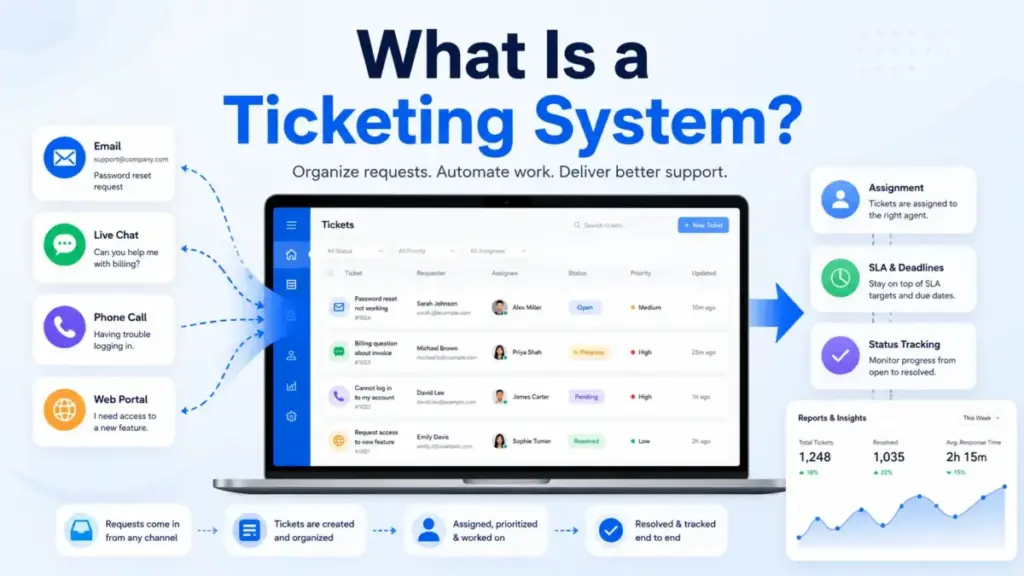
Quick Answer: A ticketing system is software that captures, prioritizes, assigns, tracks, and resolves requests from customers, employees, or internal users. Each ticket represents a specific issue, question, or service request with clear ownership, status history, SLA tracking, and resolution data. It differs from a shared inbox by adding routing rules, priority levels, assignment logic, reporting, and automation.
The 60-Second Explanation of a Ticketing System
Simple definition: A ticketing system is a tool that turns every incoming request (email, chat message, phone call, form submission) into a numbered record with an owner, a priority, a status, and a deadline. Think of it as a task manager built specifically for service work.
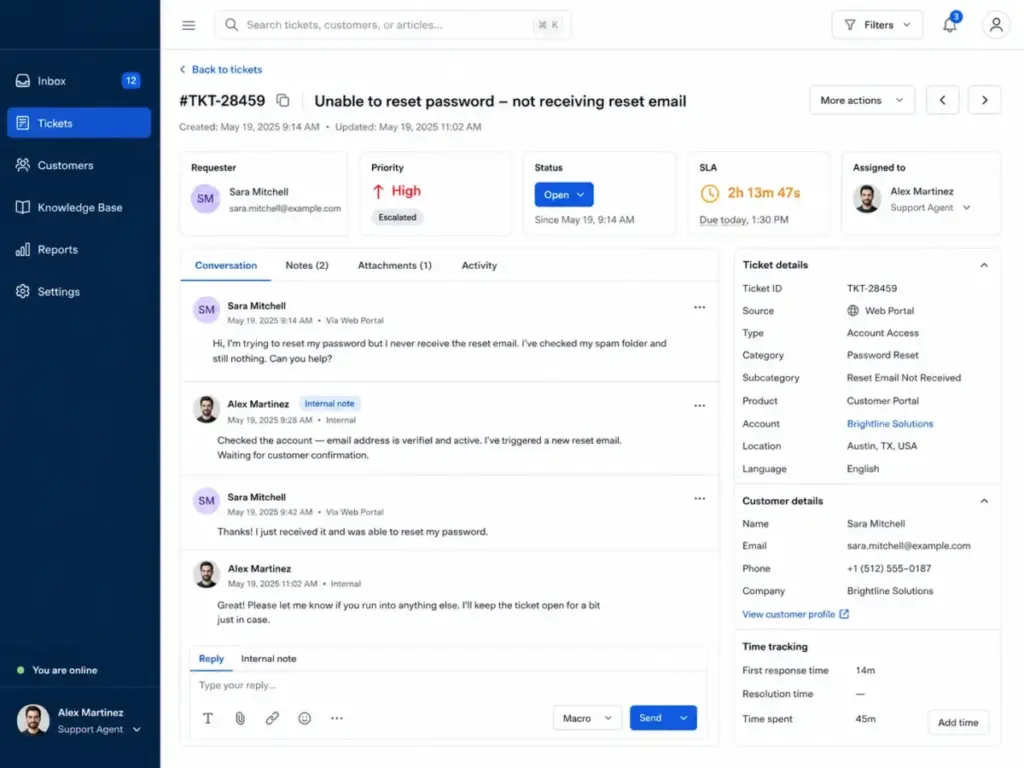
Technical definition: A ticketing system creates a structured data object (the ticket) for each service request. That object contains requester identity, timestamp, channel source, category, priority, severity, assigned agent or queue, SLA timer, status history, internal notes, customer replies, linked knowledge articles, and resolution metadata. Rules engines handle triage, routing, escalation, and automation. The system tracks every state change, enabling reporting on speed, quality, workload, and cost.
Business definition: For operations leaders, a ticketing system is a cost-center control layer. It answers three questions at any given moment: how many requests are open, who owns each one, and whether the team is meeting its service commitments. Without that visibility, every hiring decision, process change, and vendor evaluation relies on guesswork. Salesforce reported that 77% of support agents say workloads have grown more complex compared with one year earlier, which makes structured ticket data more valuable than simply adding headcount.
The core concept behind help desk software is the same: give every request a home, an owner, and a measurable outcome. A ticketing system is the mechanism that makes that possible.
How a Ticketing System Actually Works
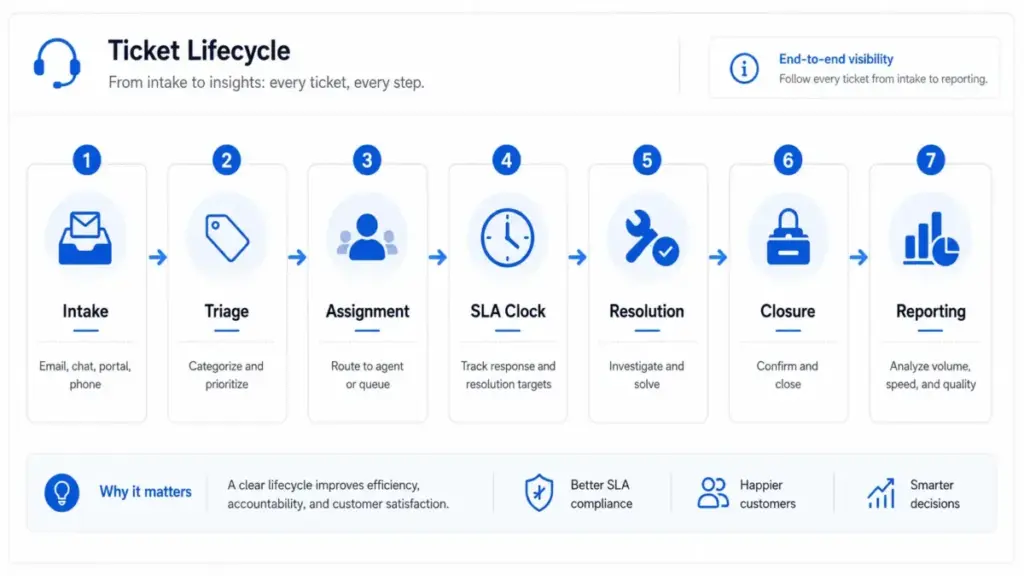
A ticketing system follows a repeatable service workflow with decision points at each stage. The stages below apply whether you run a 3-person support team or a 200-agent service desk.
The Ticket Lifecycle
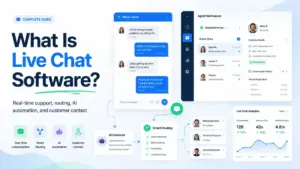
- Intake. A request arrives through email, chat, phone, portal, social messaging, Slack, Microsoft Teams, or an embedded widget. The system creates a ticket automatically.
- Ticket creation. The system stamps the ticket with a unique ID, requester details, timestamp, source channel, and initial status (usually “new” or “open”).
- Triage and categorization. Rules or an agent assign category, issue type, priority, and severity. AI-powered systems can classify tickets using intent detection.
- Routing and assignment. Assignment rules send the ticket to the right agent, queue, or team based on product area, language, customer tier, SLA urgency, or agent skill.
- Investigation and collaboration. The assigned agent works the ticket using internal notes, customer replies, macros, linked knowledge articles, or escalation to a specialist.
- SLA tracking. Timers monitor first response, next response, and resolution targets. Breach alerts fire before deadlines pass.
- Resolution. The agent resolves the issue and marks the ticket solved with a resolution reason code.
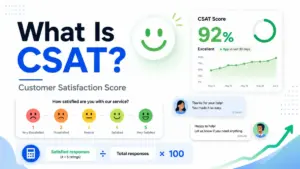
- Closure and feedback. After a waiting period, the ticket closes. The system can trigger a CSAT or CES survey.
- Reporting. Closed ticket data feeds dashboards that track volume, speed, quality, backlog, agent workload, and recurring issues.
What Every Useful Support Ticket Should Contain
Most definitions stop at “a ticket tracks a request.” The fields inside the ticket determine whether routing, reporting, and AI actually work.
| Field | Why It Matters |
|---|---|
| Requester name and email | Identifies the customer across channels |
| Company or account | Enables tier-based routing and SLA assignment |
| Source channel | Shows where requests originate (email, chat, phone, portal) |
| Priority | Controls queue ordering and SLA timers |
| Severity | Separates business impact from urgency |
| Category and issue type | Drives reporting accuracy and AI classification |
| Product area | Routes to the right specialist team |
| Assigned agent or queue | Creates ownership |
| Status | Tracks lifecycle stage (open, pending, escalated, solved, closed) |
| SLA policy | Ties response and resolution targets to the ticket |
| Timestamps | Records create, first response, resolution, and reopen times |
| Internal notes | Separates agent-to-agent communication from customer replies |
| Resolution reason | Powers root-cause analysis and deflection metrics |
What this means: if your ticketing system only captures requester, subject, and status, your reports will tell you how many tickets closed but not why they were opened, how they were routed, or whether you met your service commitments.
Where Things Go Wrong
The ticket lifecycle breaks at predictable points. Bad categories produce misleading reports. Missing severity fields mean every ticket looks equally urgent. Tickets stuck in “pending” status without follow-up rules create hidden backlog. And AI-powered routing fails when knowledge base content is outdated or categories are inconsistent. The system is only as reliable as the data design behind it.
Ticketing System vs Help Desk vs Service Desk vs ITSM
These terms overlap in practice, which confuses buyers evaluating software. The table below draws the line.
| Term | Scope | Primary Users | Key Workflows | Example Tools |
|---|---|---|---|---|
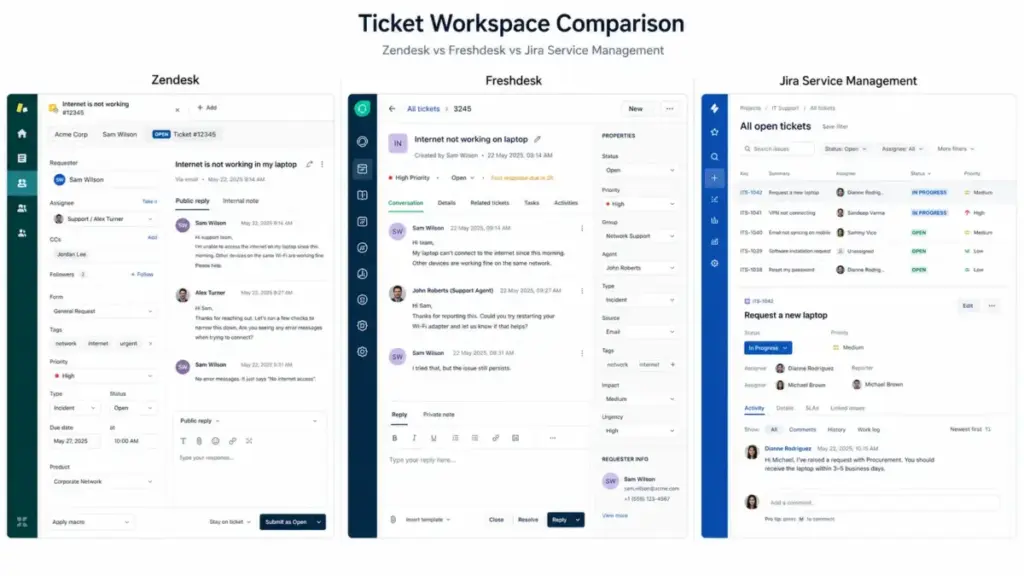
| Ticketing system | Core mechanism: capture, assign, track, resolve requests | Any team handling requests | Ticket creation, routing, SLA, status tracking, reporting | Zendesk, Freshdesk, HubSpot Service Hub |
| Help desk | Lightweight support platform for customer or employee requests | Support teams, IT teams | Tickets, shared inbox, canned replies, basic reporting | Help Scout, Zoho Desk, Freshdesk |
| Service desk | ITIL-aligned IT service platform | IT departments | Incidents, service requests, knowledge base, change approval | Jira Service Management, Freshservice |
| ITSM | Broad IT service management framework | IT operations | Incident, problem, change, asset, SLA, knowledge, service catalog | ServiceNow ITSM, BMC Helix |
| ESM (Enterprise Service Management) | Extends service management to HR, finance, legal, facilities | Cross-department | Service portals, workflow automation, approvals, SLA across departments | ServiceNow, Jira Service Management |
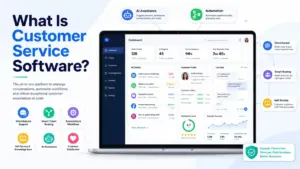
What this means: a ticketing system is the engine inside all of these. A help desk wraps it in a support interface. A service desk adds ITIL processes. ITSM and ESM extend it across the organization. Most teams buying their first platform need either a help desk or a customer service software solution, not a full ITSM suite.
Step-by-Step: Setting Up a Ticketing System That Works
Theory is easy. The following steps reflect what actually matters during the first 30 days.
Step 1: Define What Counts as a Ticket
Not every message deserves a ticket. Decide early: customer issues, bugs, billing questions, access requests, incidents, returns, and internal tasks each need different handling. If everything becomes a ticket, agents drown in noise.
Step 2: Choose Intake Channels
Map where requests currently arrive: email, support form, portal, live chat, phone, social, Slack, Microsoft Teams, or a product widget. Connect those channels first. Add new ones only after the core workflow works.
Step 3: Design Required Ticket Fields
Use the ticket data model table above. Start with 8 to 10 fields. Avoid building 25 required fields on day one, because agents will skip them or fill them with garbage data.
Step 4: Create a Clear Status Model
Keep it simple: new, open, pending customer, pending internal, escalated, solved, closed, reopened. Most teams need 5 to 8 statuses. More than 10 creates confusion and reporting noise.
Step 5: Build Routing Rules
Route by product area, language, customer tier, issue type, SLA urgency, or agent skill. Start with one or two rules. Add complexity after you see real ticket patterns.
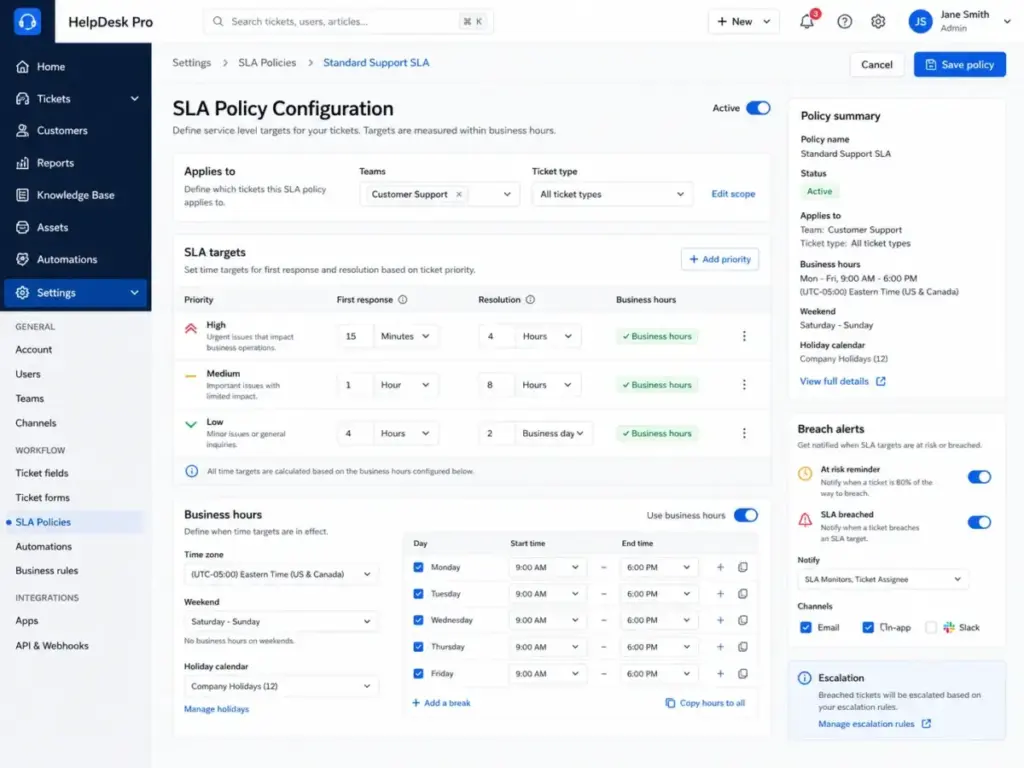
Step 6: Define SLA Policies Before Launch
Set first response time, next response time, and resolution targets. Attach business-hours calendars. Configure breach alerts. Without SLAs, there is no accountability.
Step 7: Connect the Knowledge Base
Agents need access to approved answers, not scattered documents. Link your knowledge base so agents and AI can reuse content instead of improvising replies.
Step 8: Pilot With One Queue
Run the system with one team or one request type for two weeks before adding automation, AI deflection, or multi-department workflows. Piloting catches data-model problems before they spread.
Step 9: Train Agents on Ticket Hygiene
Cover ownership, internal notes versus customer replies, merging, splitting, tags, macros, escalation paths, and closure reasons. Agents who do not understand the workflow will work around it.
Step 10: Review Metrics Weekly for the First Month
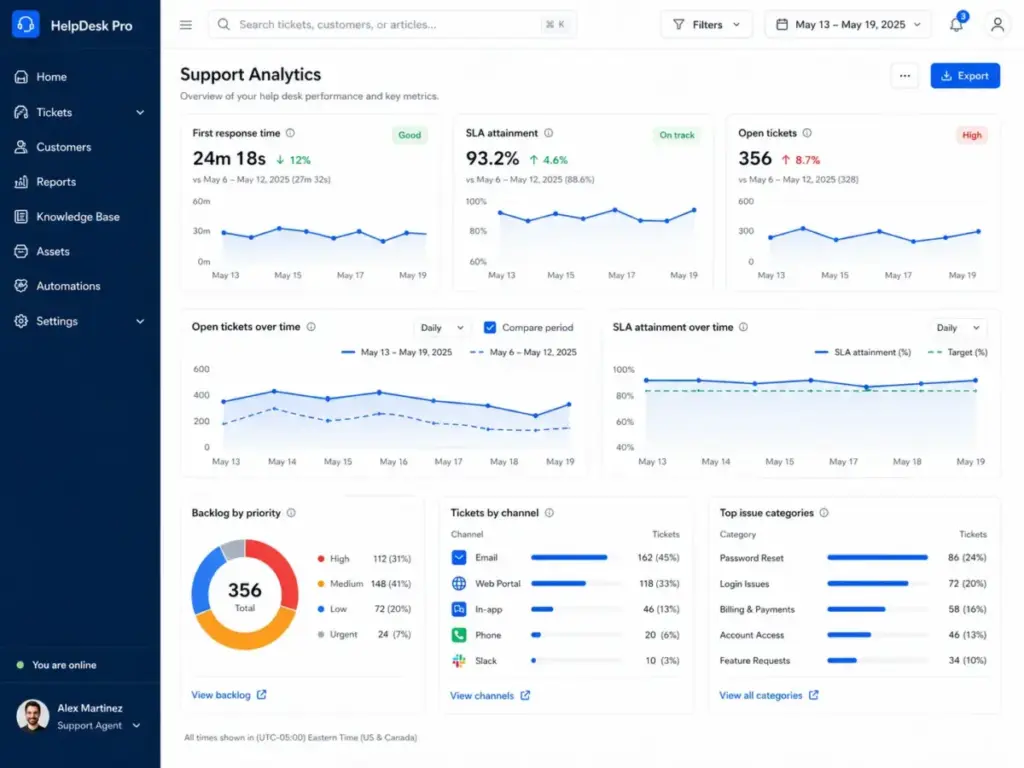
Track first response time, resolution time, SLA attainment, and backlog. Refine categories, automations, and knowledge gaps based on real ticket patterns.
The Mistakes That Waste Your First Month
These are the errors I see most often when teams implement ticketing systems for the first time.
- Buying an enterprise ITSM platform before documenting basic workflow. A 10-person support team does not need ServiceNow. Start with a tool that matches your current volume and complexity.
- Using too many categories. If agents need a dropdown with 40 options, they will pick the wrong one. Start with 8 to 12 categories and expand based on data.
- Skipping SLA definitions. Without SLAs, you cannot tell whether the system is working or just collecting tickets.
- Failing to train agents on internal notes versus customer replies. One misclick sends internal troubleshooting details to the customer.
- Letting tickets sit in “pending” without timeout rules. Tickets in pending status for more than 72 hours need automatic follow-up or reassignment.
- Using AI before cleaning knowledge content. AI agents trained on outdated or contradictory articles produce wrong answers at scale.
- Treating every Slack message as urgent. Not everything needs a ticket. Define the boundary between quick-ask channels and formal service requests.
- Measuring only volume instead of resolution quality. A team that closes 500 tickets per week with a 30% reopen rate has a quality problem, not a productivity win.
Common Misconceptions About Ticketing Systems
| Misconception | Reality |
|---|---|
| A ticketing system is just an email inbox with ticket numbers | The value comes from assignment rules, priority levels, status history, SLA enforcement, collaboration tools, automation, reporting, and searchable service data |
| Only IT teams need ticketing | Customer support, HR, finance, legal, facilities, and SaaS success teams use ticketing patterns whenever request volume and accountability matter |
| AI can replace the ticketing system | AI depends on structured tickets, knowledge articles, ticket history, categories, escalation rules, and workflow data to resolve or assist safely |
| The best ticketing system is the one with the most features | The best fit depends on volume, channels, SLA needs, integrations, admin capacity, and whether the team needs a help desk, ITSM, ESM, or only a shared inbox |
What this means: most misconceptions come from treating ticketing as software rather than as an operating model. The software matters, but the data design, routing rules, SLA policies, and knowledge management behind it determine whether the system actually reduces response times or just adds process friction.
When to Use and When to Avoid a Ticketing System
Use a Ticketing System When
- Support requests arrive from more than one channel
- Ownership is unclear and requests get dropped
- Customers regularly ask “what is the status of my request?”
- The team misses follow-ups or duplicates work
- Managers need SLA or workload visibility
- Support data needs to inform product, operations, or knowledge base improvements
- You plan to implement AI-assisted support (AI needs structured ticket data to function)
Avoid or Delay a Full Ticketing Platform When
- The team handles fewer than 20 requests per week with no SLA commitments
- All requests come from a single channel that one person manages
- There is no shared ownership problem (one person handles everything)
- A simple shared inbox with tags and assignments handles the workflow without extra admin burden
- The team does not need reporting beyond basic email search
The decision is not “ticketing system or nothing.” For teams between those two extremes, a lightweight shared inbox tool with ownership and collision detection is often enough.
How to Measure Ticketing System Success
Gartner reported that 91% of customer service and support leaders face executive pressure to implement AI in 2026. That pressure makes measurement more important, because you cannot evaluate AI impact without baseline metrics from your ticketing data.
| Category | Metric | What It Measures |
|---|---|---|
| Speed | First response time | How quickly agents acknowledge a request |
| Speed | Average resolution time | How long tickets take to close |
| Quality | SLA attainment rate | Percentage of tickets resolved within SLA targets |
| Quality | Reopened ticket rate | Frequency of inadequate resolutions |
| Quality | First contact resolution | Percentage of tickets resolved on the first reply |
| Backlog | Open ticket volume | Current unresolved workload |
| Backlog | Backlog age | Average age of open tickets |
| Workload | Tickets per agent | Volume distribution across the team |
| Workload | Escalation rate | Percentage of tickets requiring specialist involvement |
| Customer experience | CSAT score | Customer satisfaction after resolution |
| Customer experience | Customer effort score (CES) | How much effort the customer needed to get help |
| Self-service | Ticket deflection rate | Percentage of requests resolved without agent involvement |
| Cost | Cost per ticket | Total support cost divided by resolved tickets |
What this means: track 4 to 6 metrics at launch. First response time, resolution time, SLA attainment, and CSAT give most teams enough signal. Add deflection rate and cost per ticket once workflow automation and self-service are in place.
What Good Ticketing Operations Look Like: Real Examples
The following products implement ticketing in different ways. Pricing is included because the gap between entry price and the plan most teams need is where budgets go sideways.
| Platform | What It Does | Entry Price | Practical Plan | Pricing Model | Key Caveat |
|---|---|---|---|---|---|
| Zendesk | Omnichannel ticketing with routing, analytics, AI agents, and workforce engagement | $19/agent/month (Support Team, billed annually) | Suite Professional at $115/agent/month | Per agent, billed annually | AI add-ons and Advanced AI are separate purchases; costs scale with agent count and add-on selections |
| Freshdesk | Email, chat, and phone ticketing with SLA management, Freddy AI, and a customer portal | Free for up to 2 agents | Pro at $55/agent/month (billed annually) | Per agent, free tier available | Freddy AI Agent capabilities require Freshdesk Omni at higher price points |
| Jira Service Management | Customer and employee service requests with portals, queues, workflows, assets, and knowledge base | Free for up to 3 agents | Standard at $17.65/agent/month (billed annually) | Per agent, free tier available | Pricing increased in 2025; advanced features like asset management require Premium at $44.27/agent/month |
| ServiceNow ITSM | Enterprise IT service management with incident, problem, change, and AI-powered workflows | Custom quote only | Custom quote (typically $100+/user/month for enterprise) | Custom enterprise licensing | No public self-serve pricing; requires sales engagement and often professional services for deployment |
| HubSpot Service Hub | Ticket pipelines with CRM context, help desk workspace, SLAs, AI summaries, and reporting | Free tools available | Service Hub Professional at $100/month/seat | Per seat, billed annually | Professional includes 5 seats; exceeding seat count increases monthly cost; AI features limited on Starter |
What this means: entry prices range from free to custom-quote-only. The plan most teams actually need costs 17 to 115 per agent per month depending on channel coverage, AI features, and SLA requirements. ServiceNow sits in a different category entirely: it targets enterprises with dedicated IT service operations, not teams buying their first ticketing tool.
Review limitation: pricing data is based on official pricing pages and documentation checked as of May 2026. AI add-on pricing, promotional rates, and enterprise negotiated discounts vary. Confirm current rates with each vendor before purchasing.
For a side-by-side evaluation of the leading platforms, see our help desk software comparison. Individual reviews for Zendesk and Freshdesk cover feature gates, limitations, and who-should-avoid recommendations in detail.
Frequently Asked Questions
What is a ticketing system in plain terms?
A ticketing system is software that turns every support request into a trackable record with an owner, a priority, and a deadline. It replaces scattered emails and chat messages with a structured workflow where nothing gets lost and managers can measure performance.
How does a ticketing system differ from a shared inbox?
A shared inbox shows messages. A ticketing system adds assignment rules, priority levels, SLA timers, status tracking, collision detection, internal notes, automation, and reporting. If your team has more than 2 people handling requests, a shared inbox stops being enough when ownership becomes unclear.
Do small teams actually need a ticketing system?
Yes, if the team handles requests from more than one channel and customers ask for status updates. No, if one person handles everything through email with no SLA commitments. Freshdesk and Jira Service Management both offer free tiers for up to 2 to 3 agents, which removes the cost barrier for small teams.
Is Jira a ticketing system or a project management tool?
Both. Jira Software is a project management tool for development teams. Jira Service Management is a ticketing and service desk product built on the same platform. They share the Jira interface but serve different workflows.
Can AI handle support tickets automatically?
Partially. AI can classify tickets, suggest replies, route requests, and deflect common questions through chatbots. Gartner predicted that agentic AI will autonomously resolve 80% of common customer service issues by 2029. That prediction depends on clean ticket data, accurate knowledge articles, well-defined escalation rules, and human oversight for edge cases. AI without those foundations misroutes and over-automates.
What is the difference between a ticket and an incident?
A ticket is a general record of any service request: question, complaint, access request, or bug report. An incident is a specific type of ticket that documents an unplanned service disruption. Incident management adds urgency classification, impact assessment, and root-cause analysis on top of standard ticket tracking.
How many ticket statuses should we use?
Start with 5 to 8: new, open, pending customer, pending internal, escalated, solved, closed, and reopened. More than 10 statuses creates confusion and reporting noise. Fewer than 4 hides important workflow stages.
What fields should every support ticket have?
At minimum: requester, source channel, priority, category, assigned agent, status, SLA policy, and timestamps. Add severity, product area, and resolution reason once the team processes enough volume to make those fields meaningful for reporting.
Should we buy a ticketing system or an ITSM platform?
Buy a ticketing system or help desk if you handle customer support, billing questions, or general service requests. Buy an ITSM platform only if your IT team manages incidents, changes, assets, and a service catalog with ITIL-aligned processes. Overbuying creates admin burden the team cannot sustain.
How do we know if our ticketing system is actually working?
Track four metrics from day one: first response time, average resolution time, SLA attainment rate, and CSAT score. If first response times are under your SLA target, resolution times are trending down, SLA attainment is above 90%, and CSAT stays above 4.0/5, the system is working. If any of those metrics stall or decline, investigate category accuracy, routing rules, and knowledge base coverage before adding more automation.