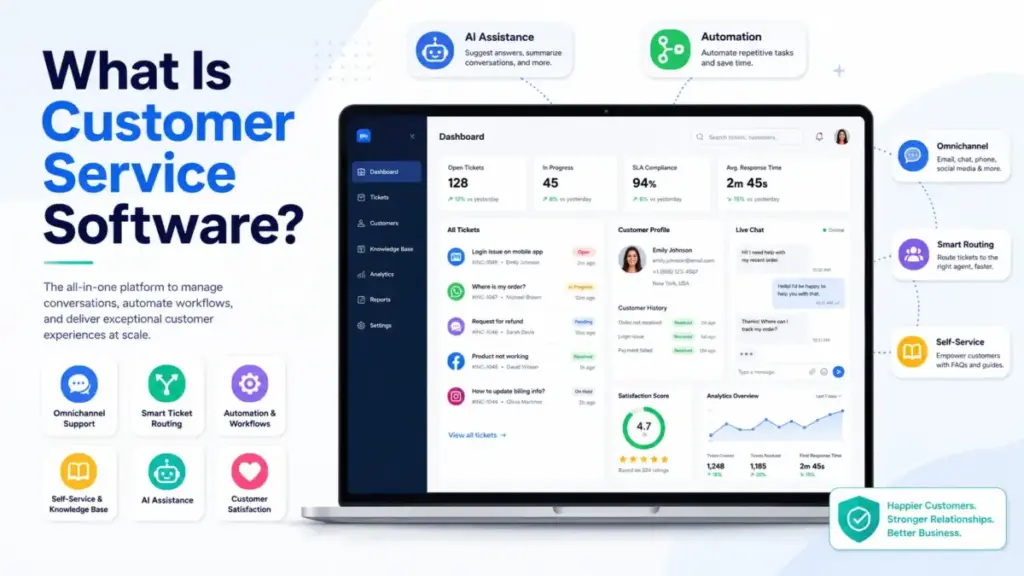
Customer service software is not a shared inbox with a logo on it. It is the operating layer that connects your support channels, customer context, automation rules, knowledge content, AI agents, escalation paths, and performance metrics into a single system of record.
The distinction matters because teams that treat this category as “email with tickets” end up buying tools they configure poorly, staff inconsistently, and replace within 18 months. This guide explains how customer service platforms actually work, where AI fits (and where it does not), what the real pricing looks like across five leading tools, and how to avoid the buying mistakes that turn a support investment into another queue nobody trusts.
Quick Answer: Customer service software is a platform that collects, organizes, routes, responds to, and reports on support requests across channels like email, chat, phone, messaging, social media, and self-service portals. It differs from a CRM (which stores relationship data) and from a simple shared inbox (which lacks routing, SLAs, knowledge, and reporting). Use it when your team handles multi-channel support volume that outgrows email and spreadsheets.
The 60-Second Explanation of Customer Service Software
For beginners: Customer service software gives your support team one place to see every customer question, no matter how it arrives, assign it to the right person, track how long it takes to resolve, and measure whether customers leave satisfied.
For practitioners: The platform ingests requests from email, chat, phone, social, forms, portals, and in-app messages. It converts those interactions into tickets or conversations, enriches them with customer history and account data, applies routing rules or AI classification, assigns work to agents or AI agents, suggests answers from knowledge base content, tracks SLA timers and status, escalates when needed, and records outcomes for reporting. Mature systems also feed resolved issues back into knowledge management, product feedback, quality assurance, and workforce planning.
For decision-makers: This is a cost-center investment that pays back through faster resolution, consistent support quality, self-service deflection, and operational visibility. Gartner predicted in March 2026 that more than 50 percent of customer service organizations will double technology spend by 2028 without an equivalent reduction in talent, according to a Gartner press release. That means tool selection, data quality, escalation design, and AI governance are now strategic decisions, not just operational ones.
How Customer Service Software Actually Works
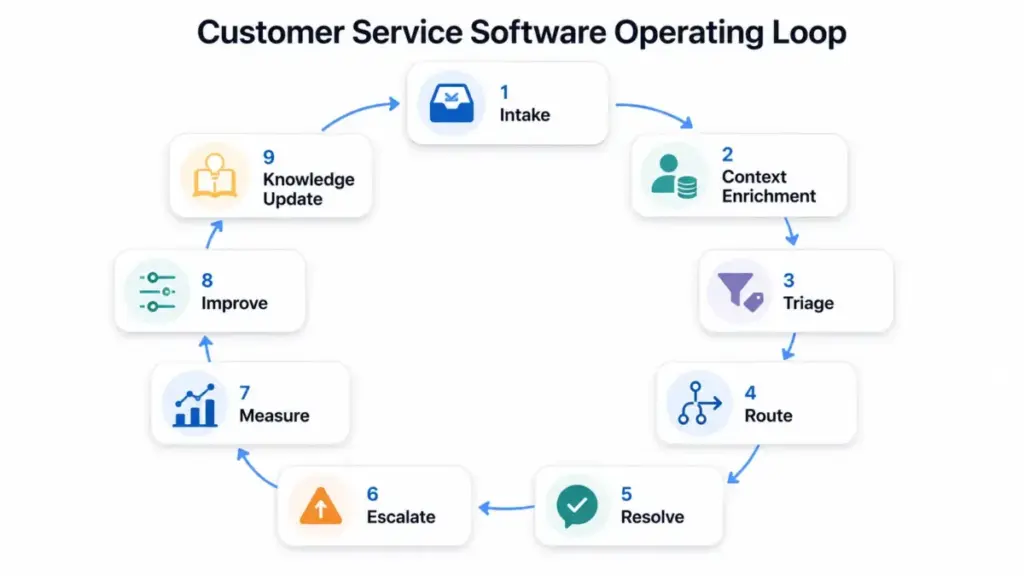
The operating loop of customer service software follows a predictable sequence, but the quality of each step determines whether the tool improves service or simply adds another queue.
Step 1: Intake. The system collects requests from configured channels. Email, live chat, messaging apps, phone, social media, web forms, customer portals, and in-app widgets all feed into one workspace.
Step 2: Context enrichment. The platform pulls in customer history, account data, prior tickets, product or subscription details, and CRM records. Without this step, agents answer questions blind.
Step 3: Triage and classification. Rules-based logic or AI classifies the request by type, urgency, product area, language, or sentiment. This determines routing.
Step 4: Routing and assignment. The system assigns the request to the right agent, team, queue, or AI agent based on skills, availability, load balancing, or round-robin rules.
Step 5: Resolution. Agents (or AI agents) respond using knowledge suggestions, saved replies, macros, collaboration tools, and internal notes. SLA timers track response and resolution deadlines.
Step 6: Escalation. When a request exceeds an agent’s authority, knowledge, or SLA threshold, the system routes it to a specialist, manager, or engineering team with full context attached.
Step 7: Measurement. The platform records first response time, resolution time, SLA attainment, CSAT scores, and agent workload.
Step 8: Knowledge feedback. New issues that lack documentation get flagged for knowledge base updates, closing the loop between support operations and self-service content.
Where things go wrong: Bad data and outdated knowledge bases make AI and routing unreliable. Omnichannel tools increase complexity if channels, ownership, and escalation rules are not designed before the software goes live. I have seen teams open five channels without staffing any of them properly, which creates worse customer experiences than a well-run email queue.
Customer Service Software vs CRM vs Help Desk vs Ticketing System
One of the most common confusions I encounter is buyers treating these categories as interchangeable. They overlap, but they solve different operational jobs.
| Category | Primary Job | Key Difference |
|---|---|---|
| Customer service software | Manages and resolves support requests across channels | Combines ticketing, routing, knowledge, SLAs, and analytics into one operating layer |
| CRM software | Stores customer relationship and account data | Tracks sales pipeline, lifecycle stage, and revenue; CRM is the data layer, not the support workflow layer |
| Help desk software | Collects and prioritizes support tickets | A subset of customer service software focused on ticket queues and agent assignment |
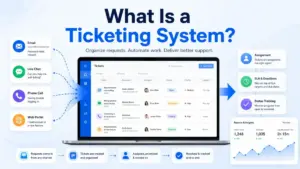
| Ticketing system | Converts requests into trackable tickets | The transaction layer inside help desk or customer service platforms |
| Contact center software | Handles voice-first support with call routing, IVR, and workforce management | Focused on phone and voice channels; customer service software covers all channels |
For teams focused mainly on ticket queues and agent ownership, help desk software is the narrower category to understand.
What this means: A CRM stores who your customers are. Customer service software manages what happens when those customers need help. Some platforms (like HubSpot Service Hub) combine both. Others (like Zendesk or Freshdesk) focus on the support operations side and integrate with separate CRMs.
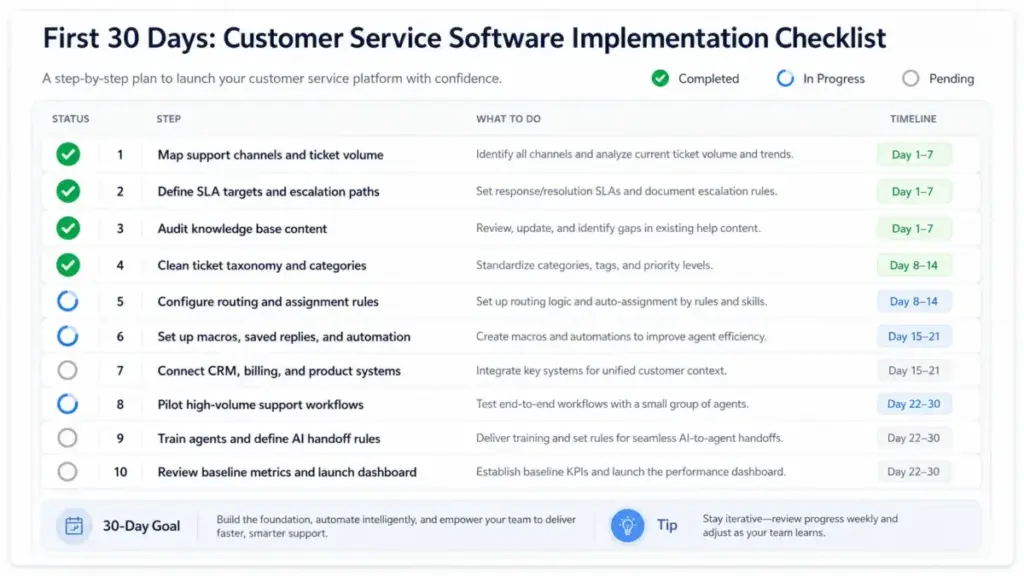
Step-by-Step: How to Implement Customer Service Software
Buying the tool is the easy part. The implementation decisions determine whether it works. Here is the sequence that reduces failed rollouts.
Step 1: Map Your Current Support Demand
Document your request channels, volume per channel, request types, urgency levels, business impact, and current ownership. You cannot configure routing without this data.
Step 2: Define the Operating Model Before Choosing Software
Decide on channels, SLAs, routing rules, escalation paths, agent roles, AI handoff rules, and reporting cadence before you evaluate vendors. The operating model drives the tool choice, not the other way around.
Step 3: Audit Your Knowledge Sources
Review macros, help center articles, saved replies, customer data, product documentation, and historical tickets for accuracy and duplication. AI features depend on clean, governed knowledge.
Step 4: Choose the Platform Type
Match your model to the right category: shared inbox for simple support, ticketing system for structured queues, omnichannel suite for multi-channel operations, CRM-connected service hub for account-context-driven support, or AI-first platform for high-deflection goals.
Step 5: Pilot the Highest-Volume Workflows First
Start with password resets, billing questions, order status, product troubleshooting, and cancellation requests. These cover the majority of ticket volume for most teams.
Step 6: Configure Core Workflows
Set up ticket categories, routing rules, SLA timers, priority levels, saved replies, knowledge suggestions, collision prevention, internal notes, and customer notifications.
Step 7: Add AI Only Where Knowledge and Escalation Logic Are Ready
Start with summarization, tagging, draft replies, and answer suggestions before moving to autonomous actions. Intercom’s 2026 Customer Service Transformation Report found that only 10 percent of respondents reached mature AI deployment, while 87 percent of teams at that stage reported improved metrics, according to Intercom’s research.
Step 8: Connect Business Systems
Integrate CRM, billing, product analytics, ecommerce, and communication tools where customer context changes the answer.
Step 9: Train the Team
Cover workflow ownership, tone, escalation protocols, privacy, data quality, and AI review expectations.
Step 10: Measure Baseline Metrics Before Launch
Review weekly during rollout and monthly after stabilization.
The Mistakes That Waste Your First 90 Days
I track recurring failures across customer service software implementations. These are the most expensive:
- Buying by feature checklist instead of support workflow. A tool with 200 features does not help if it does not match how your team actually handles requests.
- Opening too many channels without staffing or escalation rules. Omnichannel support means consistent context across chosen channels, not blindly opening every possible channel.
- Treating AI as a replacement before knowledge quality is ready. Gartner notes that likely AI wins include case summarization and agent assistance, while higher-risk uses include AI agents and correspondence generation, per Gartner’s customer service AI analysis.
- Ignoring add-ons and usage pricing. The seat price on the marketing page is rarely the total cost. AI outcomes, voice minutes, messaging charges, workforce management, and advanced analytics often sit behind add-ons or higher tiers.
- Failing to integrate CRM, billing, and order data. Agents without customer context ask customers to repeat information, which increases handle time and decreases satisfaction.
- Not defining ownership for knowledge maintenance. A knowledge base without an owner decays within months. AI answers built on stale content produce wrong answers at scale.
- Tracking vanity metrics while ignoring resolution quality. Fast first response means nothing if the ticket gets reopened three times.
Common Misconceptions About Customer Service Software
Misconception: “Customer service software is just a shared inbox.”
A shared inbox handles messages. Customer service software adds routing, SLAs, knowledge, reporting, customer context, automation, and escalation management.
Misconception: “A CRM and customer service software are the same thing.”
A CRM stores customer relationship data. Customer service software operationalizes support work. Some platforms combine both, but the jobs are not identical.
Misconception: “AI customer service software can replace agents immediately.”
Gartner cautions that AI increases technology spend and changes frontline roles rather than eliminating talent needs for most organizations.
Misconception: “Omnichannel means adding every channel.”
Omnichannel means giving customers consistent context and handoffs across chosen channels. Adding channels without staffing or escalation rules creates fragmented experiences.
Misconception: “The cheapest seat price is the cheapest support stack.”
Total cost depends on AI usage fees, add-ons, voice and messaging charges, onboarding, integrations, data migration, and administration. The entry price tells less than half the story.
When to Use Customer Service Software (and When to Avoid It)
Use it when:
- Support requests arrive across multiple channels
- Agents lack customer context when responding
- Tickets get missed, duplicated, or lost
- Response times are inconsistent and untracked
- Managers cannot measure support quality or team workload
- Customers need self-service options
- The team has outgrown email and spreadsheets
Avoid overbuying when:
- Your team handles very low support volume on one simple channel
- You have no defined support process or owner for administration
- You have no reliable knowledge base to power AI or self-service
- Your budget does not cover required add-ons, migration, training, and maintenance
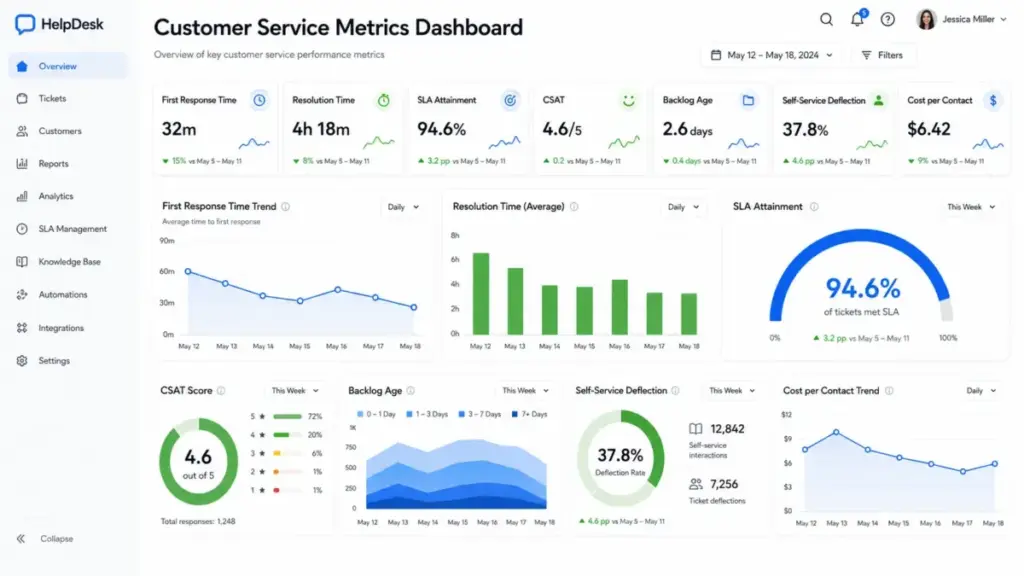
How to Measure Success: Customer Service Software Metrics
| Metric | What It Measures | Why It Matters |
|---|---|---|
| First response time | Time from request to first agent reply | Speed of initial acknowledgment |
| Average resolution time | Time from request to final resolution | Efficiency of the full support cycle |
| First contact resolution | Percentage resolved in one interaction | Quality of initial response |
| SLA attainment | Percentage of tickets meeting SLA targets | Operational compliance |
| Backlog age | How long unresolved tickets have been open | Queue health and staffing adequacy |
| Self-service deflection | Percentage resolved without agent involvement | Knowledge base and AI effectiveness |
| AI resolution rate | Percentage resolved by AI without human handoff | AI deployment maturity |
| AI handoff rate | Percentage of AI interactions escalated to agents | AI confidence and knowledge coverage |
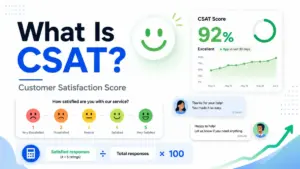
| CSAT | Customer satisfaction score after resolution | Customer experience quality |
| Cost per contact | Total support cost divided by contact volume | Operational efficiency |
What Good Customer Service Software Looks Like: 5 Real-World Examples
These five platforms implement customer service software differently. I chose them to show the range of approaches, not to rank them against each other.
Zendesk: Enterprise-Ready Omnichannel Suite
Zendesk implements customer service software through ticketing, email, live chat, telephony, messaging, knowledge base, AI agents, routing, dashboards, automations, and triggers. According to Zendesk’s pricing page (as of May 2026), Support Team starts at $19/agent/month billed yearly. Suite Team starts at $55/agent/month. Suite Professional starts at $115/agent/month. Suite Enterprise plus Copilot requires sales contact.
The add-on reality: Copilot, Workforce Engagement Bundle, and Contact Center add-ons each list at $50/agent/month billed yearly. Buyers should verify which AI, voice, workforce, and enterprise functions are included versus add-ons.
Freshdesk: AI-Boosted Ticketing for Growing Teams
Freshdesk implements customer service software as AI-boosted ticketing with shared inbox, customer portal, multilingual help desk, Freddy AI Agent, analytics, self-service, and routing. According to Freshdesk’s pricing page (as of May 2026), Growth starts at $19/agent/month billed annually. Pro is $55/agent/month. Enterprise is $89/agent/month.
The add-on reality: Freddy AI Agent sessions include the first 500. Additional sessions cost $49 per 100 sessions. Sessions align with the payment cycle and may expire. The base seat price does not tell the full AI cost story.
Intercom: AI-First Platform with Usage-Based Fin AI
Intercom implements customer service software as an AI-first support platform with Fin AI Agent, Messenger, shared inbox, ticketing, help center, workflows, and multilingual support. Per Intercom’s pricing page (as of May 2026), Essential starts at $29/seat/month plus Fin from $0.99/outcome. Advanced is $85/seat/month plus Fin. Expert is $132/seat/month plus Fin.
The add-on reality: Intercom pricing has seat and usage components. Fin outcomes, WhatsApp, SMS, email campaigns, and phone add usage charges. Intercom is best described as seat-based plus usage-based, not a simple flat per-seat plan.
Help Scout: Approachable Shared Inbox and Knowledge Base
Help Scout implements customer service software around a shared inbox, multiple inboxes, live chat, social channels, knowledge bases, workflows, SLAs, AI Inbox assistant, and AI Drafts. According to Help Scout’s pricing page (as of May 2026), Standard starts at $25/user/month. Plus is $45/user/month. Pro is $75/user/month.
The add-on reality: AI Answers is a paid add-on at $0.75 per resolution. WhatsApp, advanced workflows, SSO/SAML, and HIPAA compliance are tier-gated to Plus or Pro.
HubSpot Service Hub: CRM-Connected Service Platform
HubSpot Service Hub implements customer service software inside HubSpot’s customer platform with help desk workspace, ticketing, omnichannel communication, SLA management, knowledge base, customer portal, and Breeze AI agents. Per HubSpot’s product page (as of May 2026), Free starts at $0/month. Starter is from $10/month per seat with a limited-time discount. Professional is from $100/month per seat. Enterprise is from $150/month per seat.
The add-on reality: The displayed Starter price is a limited-time new-customer discount. Product packaging and limits should be verified on the pricing page.
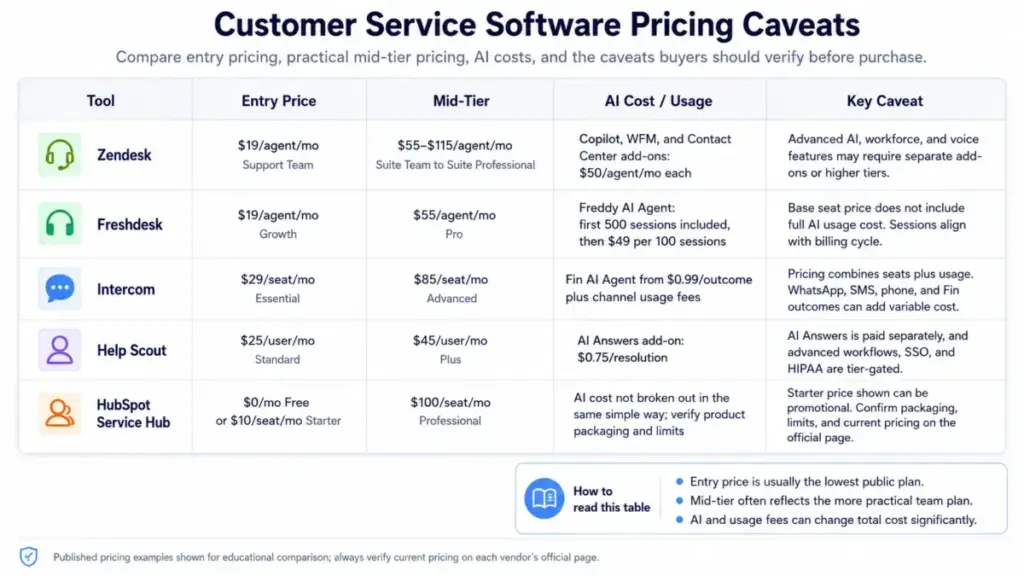
Pricing Comparison Summary
| Product | Entry Price | Mid-Tier | AI/Usage Add-On |
|---|---|---|---|
| Zendesk | $19/agent/mo (Support Team) | $55-$115/agent/mo (Suite) | Copilot, WFM, Contact Center: $50/agent/mo each |
| Freshdesk | $19/agent/mo (Growth) | $55/agent/mo (Pro) | Freddy AI: first 500 sessions included, then $49/100 sessions |
| Intercom | $29/seat/mo (Essential) | $85/seat/mo (Advanced) | Fin AI: from $0.99/outcome, plus channel usage fees |
| Help Scout | $25/user/mo (Standard) | $45/user/mo (Plus) | AI Answers: $0.75/resolution add-on |
| HubSpot Service Hub | $0-$10/seat/mo (Free/Starter) | $100/seat/mo (Professional) | Starter discount is limited-time; check packaging |
What this means: Entry prices range from free to $29/seat/month, but total cost depends heavily on AI usage, add-ons, tier-gated features, and team size. Compare practical-tier pricing at your expected volume, not marketing-page entry prices.
Tools and Resources for Customer Service Software
Beyond the five examples above, other platforms in this category include Salesforce Service Cloud, ServiceNow Customer Service Management, Zoho Desk, Front, Gorgias, LiveAgent, Hiver, Kustomer, Gladly, and Jira Service Management.
For deeper evaluations of individual platforms, see our Zendesk review, Freshdesk review, Intercom review, and Help Scout review. For a comparison of two leading platforms, see Zendesk vs Intercom.
Beginner Checklist: Getting Started with Customer Service Software
Use this checklist before you start evaluating vendors:
- [ ] Map current support channels and volume per channel
- [ ] Document the top 10 request types by frequency
- [ ] Define SLA targets for first response and resolution
- [ ] Identify who owns escalation for each request type
- [ ] Audit your knowledge base for accuracy and coverage
- [ ] Calculate your budget including AI, add-ons, and migration
- [ ] List required integrations (CRM, billing, ecommerce, communication)
- [ ] Define routing rules for at least your top 3 request categories
- [ ] Identify your AI readiness level (knowledge quality, escalation rules, monitoring)
- [ ] Set baseline metrics before launching any new tool
FAQ
What is customer service software?
Customer service software is a platform that helps businesses collect, organize, route, respond to, and report on support requests across channels such as email, chat, phone, messaging, social media, and self-service portals.
Is customer service software the same as help desk software?
Help desk software is a subset of customer service software focused on ticket queues and agent assignment. Customer service software typically adds omnichannel support, AI, self-service, CRM integration, workforce tools, and broader analytics.
Is customer service software the same as a CRM?
No. A CRM stores customer relationship data and manages sales pipelines. Customer service software manages the operational workflow of support requests. Some platforms combine both, but they address different jobs.
How much does customer service software cost?
Entry prices range from free (HubSpot Service Hub) to $29/seat/month (Intercom Essential), but total cost depends on plan tier, AI usage fees, add-ons, voice and messaging charges, and team size. Always compare at your expected volume.
Can AI customer service software handle tickets without human agents?
AI can resolve certain ticket types autonomously, but effectiveness depends on knowledge base quality, escalation rules, and monitoring. Intercom’s 2026 report found only 10 percent of teams reached mature AI deployment. Start with AI-assisted workflows before fully autonomous actions.
When should a company buy customer service software?
Buy when support requests spread across multiple channels, agents lack customer context, tickets get missed, response times are inconsistent, or the team has outgrown email. Avoid overbuying if volume is low and no one owns administration.
What metrics should I track after launching customer service software?
Track first response time, average resolution time, first contact resolution, SLA attainment, CSAT, self-service deflection, AI resolution and handoff rates, backlog age, and cost per contact. Set baselines before launch and review weekly during rollout.
What is the difference between Zendesk and a shared inbox?
A shared inbox handles email in a collaborative view. Zendesk adds ticketing, routing, SLA management, knowledge base, AI agents, omnichannel support, analytics dashboards, and enterprise-grade add-ons. The gap grows as team size and channel count increase.
How do support teams prevent AI from giving wrong answers?
Govern the knowledge base with clear ownership, update cadence, source accuracy checks, and stale-content detection. Monitor unsupported answer rates and AI handoff rates. Require human review for high-stakes actions and restrict AI to topics covered by verified documentation.
This guide draws on official product documentation, published pricing pages, and authoritative research including Gartner’s 2026 customer service technology predictions and Intercom’s 2026 Customer Service Transformation Report. All pricing reflects published rates as of May 2026 and should be verified on each vendor’s official pricing page before purchase decisions.