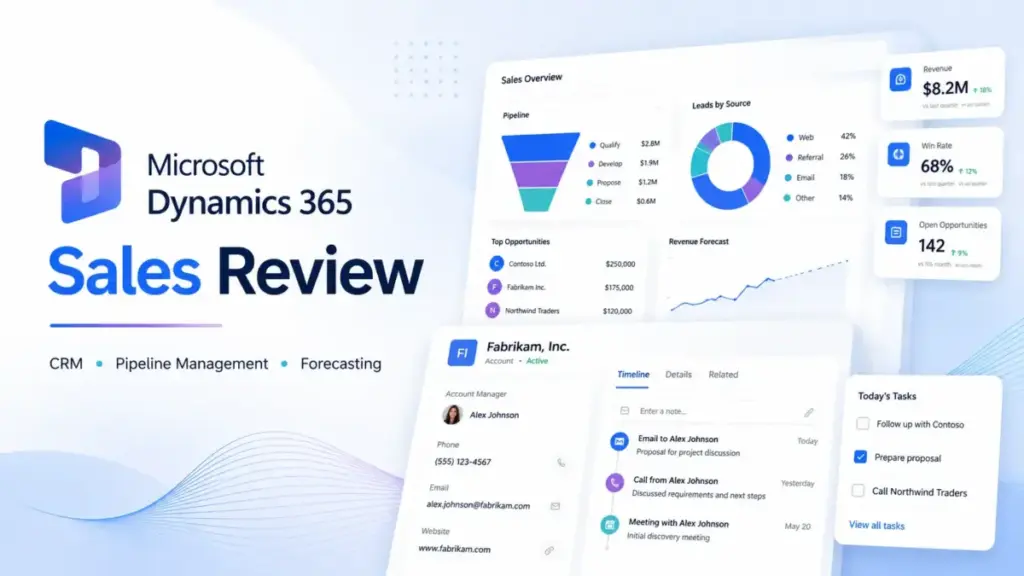
Microsoft Dynamics 365 Sales is built for teams already deep inside the Microsoft stack. This CRM software scores well on customization, forecasting, and ecosystem depth, but it demands real admin effort and licensing patience.
After a full editorial evaluation, I give it 8.4 out of 10. It is best for Microsoft-heavy mid-market and enterprise sales teams. It is not the right first CRM for small teams that want fast setup and low overhead. If your sales org runs on Outlook, Teams, Power BI, and SharePoint, Dynamics 365 Sales connects those tools better than any other CRM I have reviewed in the best CRM software category. If you want something running in an afternoon, look elsewhere.
Dynamics 365 Sales Quick Verdict
Here is where Dynamics 365 Sales stands after this editorial evaluation.
| Category | Verdict |
|---|---|
| Overall Score | 8.4/10 |
| Best For | Microsoft-heavy mid-market and enterprise sales teams needing deep CRM customization, forecasting, and Microsoft 365 alignment |
| Not For | Solo founders, freelancers, small teams wanting fast setup, teams without Microsoft admin support |
| Starting Price | $65/user/month (Professional), paid yearly |
| Main Strength | Deep integration with Outlook, Teams, Power BI, Power Platform, Business Central, and Dataverse |
| Main Weakness | Setup burden, licensing complexity, and admin dependency slow down adoption |
| Best Alternative (Fast Adoption) | HubSpot Sales Hub |
| Best Alternative (Enterprise Governance) | Salesforce Sales Cloud |
| Best Alternative (Budget) | Zoho CRM |
| Pricing Verified | April 26, 2026 |
| Last Tested | April 2026 |
I scored this product using the SaaSZap review methodology, weighting features (25%), pricing transparency (20%), ease of adoption (20%), ecosystem fit (20%), and limitations honesty (15%). I did not score this product based on brand popularity alone.
What Is Dynamics 365 Sales?
Dynamics 365 Sales is Microsoft’s enterprise CRM and sales force automation platform. It sits inside the broader Dynamics 365 suite and connects directly to Microsoft 365 apps, Power Platform, Dataverse, and Business Central. This dual CRM-and-ERP architecture is a key differentiator — see our CRM vs ERP guide for how these two systems connect in practice.
The product handles lead management, opportunity tracking, account and contact management, sales forecasting, pipeline views, and sales sequences. It is not a standalone lightweight CRM. It is designed for organizations that already depend on Microsoft infrastructure and want their CRM data flowing through the same tenant, the same security roles, and the same reporting stack.
Microsoft positions it as an “agentic CRM for closing deals faster.” That framing is accurate for teams with admin capacity. For teams without it, the product can feel like an enterprise system that arrived before the team was ready.
Dynamics 365 Sales competes directly with Salesforce Sales Cloud, HubSpot Sales Hub, and Zoho CRM. Its differentiator is not price or simplicity. Its differentiator is how deeply it connects to the Microsoft ecosystem that many mid-market and enterprise organizations already pay for.
Dynamics 365 Sales Features Tested
For this editorial evaluation, I walked through the buyer workflow using Microsoft’s official product pages, Microsoft Learn documentation, pricing pages, licensing guide, and current user-review and community signals. I did not fabricate hands-on testing.
Dynamics 365 Sales Pipeline Management
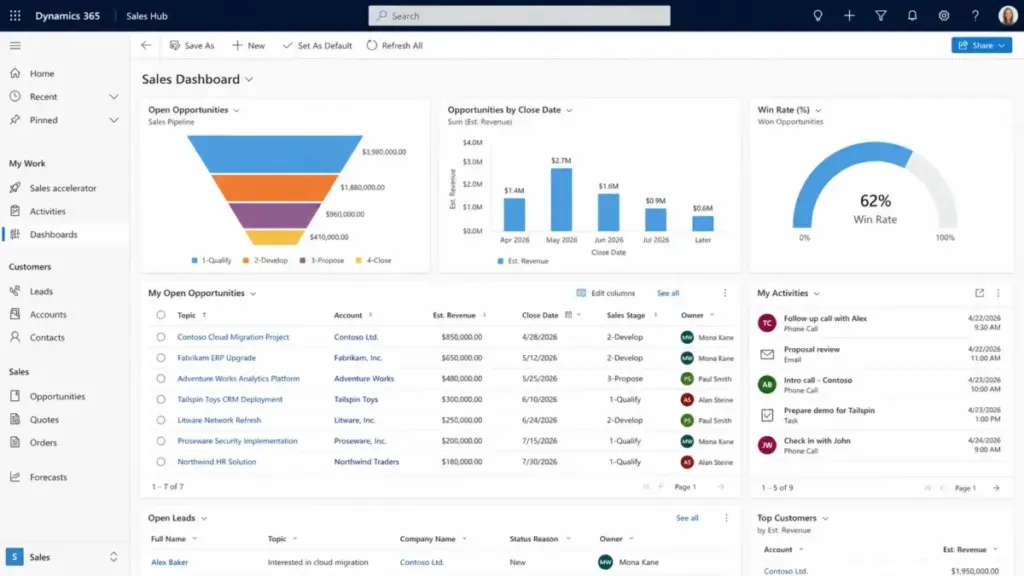
Pipeline tracking in Dynamics 365 Sales uses a Sales Hub interface with customizable views, stages, and business process flows. Sellers can see deals by stage, expected close date, and estimated revenue. The pipeline is not a simple Kanban board. It supports multiple business process flows for different deal types.
This is stronger than what Pipedrive or Freshsales offer at base tiers, but it requires more configuration upfront. A CRM for sales teams that needs a working pipeline in 15 minutes will find HubSpot faster.
Dynamics 365 Sales Forecasting
Forecasting in Dynamics 365 Sales supports multiple forecast models, rollup views, and manager overrides. Enterprise and Premium plans add AI-driven forecast predictions and deal health scoring.
This is where Dynamics 365 starts to separate from simpler CRMs. If your sales operations team needs quarterly rollups, territory-based forecasts, and manager-adjusted projections, the forecasting module delivers. Pipedrive and Freshsales do not match this depth.
Dynamics 365 Sales Outlook Integration
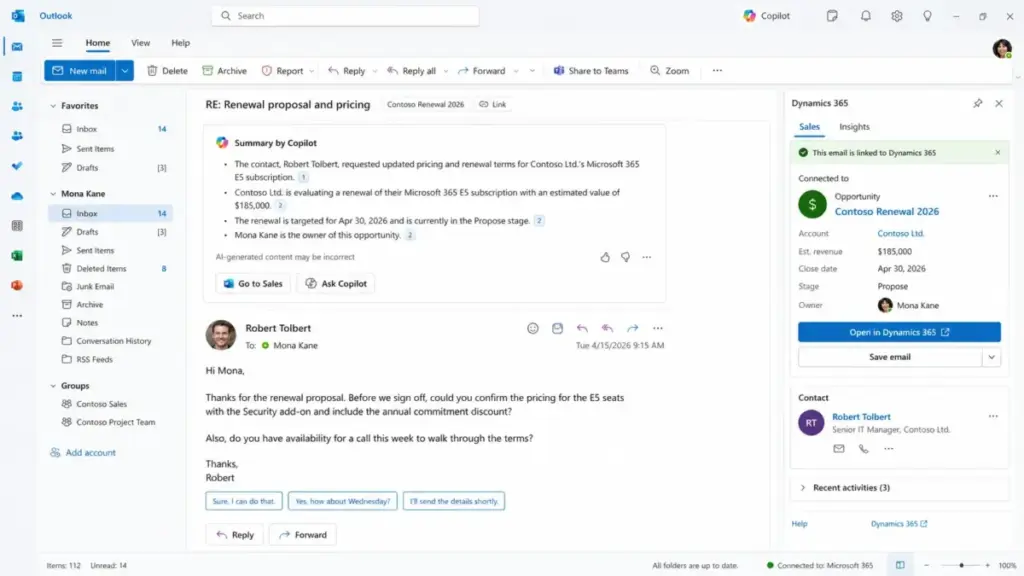
Outlook integration is where the Microsoft advantage shows clearly. Dynamics 365 Sales connects to Outlook so sellers can track emails, create leads from messages, view CRM records inside the mail client, and log meetings without switching apps.
The connection works through server-side sync and the Sales agent app (formerly Dynamics 365 App for Outlook). When it works, it removes the friction of toggling between CRM and email. When it does not, admin troubleshooting can consume hours.
Account, Contact, and Lead Management
Account and contact management follows the standard enterprise CRM model: hierarchical accounts, associated contacts, activity timelines, and relationship tracking. Lead management includes lead scoring, qualification workflows, and conversion to opportunities.
The data model is flexible through Dataverse. Teams that need custom entities, custom fields, and relationship mapping beyond what HubSpot or Pipedrive offer will find this useful. Teams that just want a name, email, and deal value will find it overbuilt.
Security Roles and Customer Lockbox
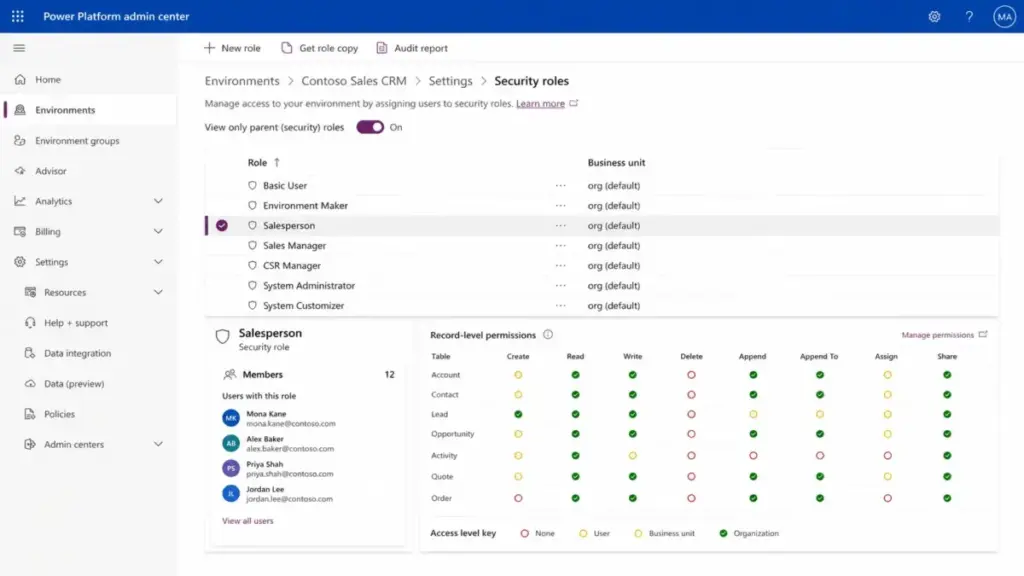
Role-based security in Dynamics 365 Sales is granular. Admins can control field-level, record-level, and entity-level access. Customer Lockbox adds a layer where Microsoft support cannot access tenant data without explicit customer approval.
For organizations in regulated industries or with strict data governance, this matters. For a 10-person sales team, it adds admin work that may not be necessary. Microsoft documents its trusted cloud approach with more detail.
Power Platform Extension and API Integration
Dynamics 365 Sales sits on Power Platform, which means teams can build Power Apps, Power Automate flows, and Power BI dashboards that pull directly from CRM data in Dataverse. API integration is available through the Dataverse Web API and custom connectors.
This extensibility is a real strength for organizations that already have Power Platform licenses and internal developers or citizen developers. It is not a strength for teams that do not have the capacity to build or maintain custom workflows.
Dynamics 365 Sales Copilot Features
Copilot in Dynamics 365 Sales adds AI-assisted workflows across the Enterprise and Premium plans. It is not a standalone product. It is embedded into the Sales Hub and connected SaaS tools in the Microsoft ecosystem.
Dynamics 365 Sales Copilot Summaries
Copilot provides summaries of opportunities and leads, helping sellers catch up on recent record changes. It can summarize email conversations, prepare meeting briefs, and surface relevant information from SharePoint documents when permissions allow.
This is useful for sellers managing 30+ active opportunities who need a fast briefing before a call. It does not replace data hygiene. If the underlying CRM records are incomplete, Copilot summaries reflect that gap.
Dynamics 365 Sales Qualification Agent
The Sales Qualification Agent automates parts of lead qualification by analyzing lead data and suggesting next steps. Microsoft is clear that it does not replace human judgment. It assists qualification workflows rather than owning them.
This is a reasonable AI feature for high-volume inbound teams. It is not a reason to upgrade from Professional to Enterprise on its own. The value depends on lead volume and data quality.
Sales Agent and Sales Close Agent
Microsoft is migrating its sales AI experience toward the Sales agent in Microsoft 365 Copilot. This agent works across Outlook and Microsoft 365 apps, giving sellers CRM-connected insights without opening the Sales Hub directly. The Sales Close Agent helps with deal progression tasks.
The direction is promising, but the deployment reality matters. Sales agent deployment can take up to 6 hours to appear in the Outlook ribbon. It can take up to 48 hours for the app to appear in Outlook and Microsoft 365 apps. Teams installation requires Microsoft Teams admin center setup policies.
EPAM’s CIO Yuriy Goliyad described the value: “Through this, we will amplify our productivity, increase our speed to market, and leverage data insights more efficiently.” That reflects the enterprise vision. Smaller teams may not see that return during the first weeks of deployment.
First 30 Minutes With Dynamics 365 Sales
The first 30 minutes with Dynamics 365 Sales feel different from HubSpot or Pipedrive. This section covers what a buyer encounters during initial setup and orientation.
Starting a trial or purchase begins on the Microsoft Dynamics 365 Sales product page. The process routes through Microsoft account authentication, tenant setup, and environment provisioning. If your organization already has a Microsoft 365 tenant, this goes faster. If not, expect additional steps for tenant creation and admin role assignment.
Once inside, the Sales Hub is the primary interface. It is a model-driven Power App with a navigation pane, dashboards, and entity views. First-time users see a dashboard with sample data or an empty workspace depending on the trial configuration.
Importing accounts and contacts requires a data file (CSV or Excel) and a field mapping step. This is not drag-and-drop. The import wizard asks for entity selection, field mapping, and duplicate detection rules. A clean data file imports in minutes. A messy file with inconsistent formatting can stall here.
Creating a first pipeline means configuring a business process flow for opportunities. Default flows exist, but most teams will need to customize stages. This requires admin access to the Power Platform admin center or the legacy customization interface.
Connecting Outlook means deploying server-side sync and the Sales agent app. Server-side sync requires admin configuration in the Power Platform admin center. The Sales agent app deployment depends on admin policies and can take hours to appear.
This is where Dynamics 365 Sales diverges from simpler CRMs. In HubSpot, a seller can import contacts and close a deal in the first session. In Pipedrive, pipeline configuration takes minutes. In Dynamics 365 Sales, the first session is often about admin setup rather than selling.
One Reddit user captured this friction: “What took hours in Dynamics took minutes (sometimes just seconds) in Zoho and HubSpot.” That is community sentiment, not a benchmark, but it reflects a real pattern. Teams that hit this adoption friction should compare Dynamics 365 alternatives by setup effort, seller adoption speed, Microsoft ecosystem dependency, and the migration cost of leaving Dataverse workflows.
Dynamics 365 Sales Pricing Explained
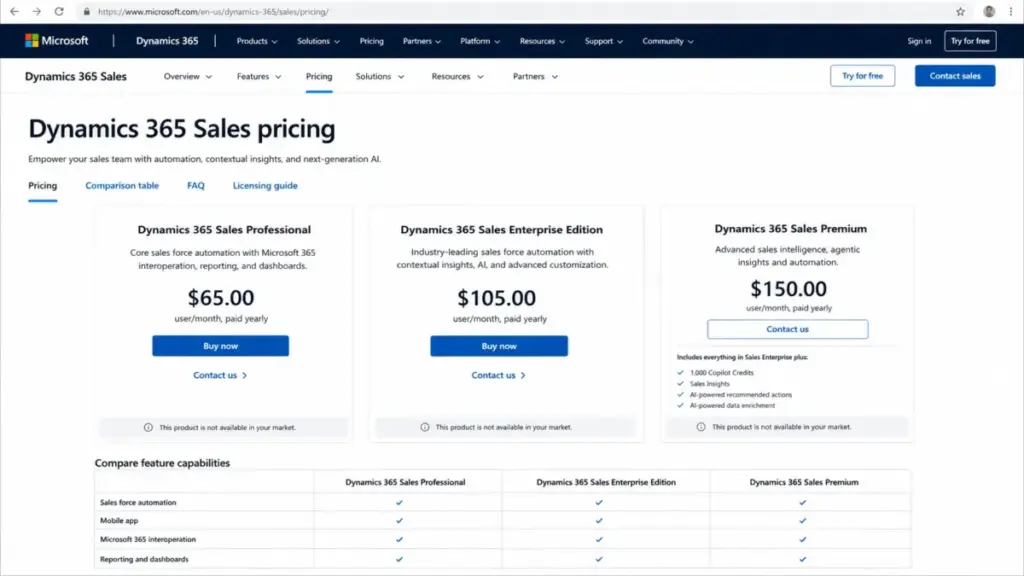
Pricing is where Dynamics 365 Sales requires careful math. The per-user monthly price is only the starting point. Here is the official plan structure, verified as of April 26, 2026, from Microsoft’s pricing page.
| Plan | Starting Price | Key Features | Best For | Main Limitation | Verified Source |
|---|---|---|---|---|---|
| Sales Professional | $65/user/month | Core sales force automation, Microsoft 365 integration | Teams needing basic CRM with Microsoft tools | Less advanced AI and customization than Enterprise | Microsoft Pricing |
| Sales Enterprise | $105/user/month | Contextual insights, AI, advanced customization, Copilot | Mid-market and enterprise teams needing deeper CRM | Higher cost, more admin complexity | Microsoft Pricing |
| Sales Premium | $150/user/month | Enterprise plus prebuilt intelligence solutions, Copilot | Teams wanting AI-guided selling and sales intelligence | Highest per-user cost in lineup | Microsoft Pricing |
| Microsoft Relationship Sales | Variable | Enterprise plus LinkedIn Sales Navigator | Large teams with LinkedIn-driven prospecting (10-seat minimum) | Contact Microsoft for pricing | Microsoft Pricing |
Dynamics 365 Sales Professional vs Enterprise
Professional at $65/user/month gives you core sales force automation and Microsoft 365 connectivity. Enterprise at $105/user/month adds contextual insights, AI capabilities, Copilot features, and advanced customization options. The $40/user/month difference matters at scale. For 25 users, that gap is $1,000/month or $12,000/year.
Choose Professional if your team needs basic lead, opportunity, and pipeline tracking inside the Microsoft ecosystem. Choose Enterprise if you need Copilot, advanced forecasting, custom business process flows, and deeper Power Platform integration.
Dynamics 365 Sales Enterprise vs Premium
Premium at $150/user/month adds prebuilt intelligence solutions on top of Enterprise. This includes enhanced sales analytics, relationship analytics, and AI-guided selling features for both sellers and managers.
The upgrade from Enterprise to Premium adds $45/user/month. For 25 users, that is $1,125/month or $13,500/year. The upgrade only makes sense when your sales operations team actively uses the intelligence features and your data quality supports meaningful AI output.
Where Pricing Starts to Pinch
Subscription price is only one component of the real cost. Here is what the math looks like across team sizes.
Professional at $65/user/month:
| Team Size | Monthly Cost | Annual Cost |
|---|---|---|
| 10 users | $650 | $7,800 |
| 25 users | $1,625 | $19,500 |
| 50 users | $3,250 | $39,000 |
Enterprise at $105/user/month:
| Team Size | Monthly Cost | Annual Cost |
|---|---|---|
| 10 users | $1,050 | $12,600 |
| 25 users | $2,625 | $31,500 |
| 50 users | $5,250 | $63,000 |
Premium at $150/user/month:
| Team Size | Monthly Cost | Annual Cost |
|---|---|---|
| 10 users | $1,500 | $18,000 |
| 25 users | $3,750 | $45,000 |
| 50 users | $7,500 | $90,000 |
At 50 users on Premium, you are spending $90,000/year on CRM subscriptions alone. That number does not include configuration, data migration, training, admin salaries, partner implementation support, or capacity add-ons.
What the Pricing Page Does Not Make Obvious
The Dynamics 365 licensing guide (March 2026) confirms that many Dynamics products include capacity entitlements and capacity add-ons for data storage, transaction volume, and other components. If your team exceeds those entitlements, you pay more.
Real cost also includes:
- Implementation partner fees. Can vary widely depending on scope, data migration complexity, and customization depth. I am not inventing a specific number here because the range is too broad. A 10-user deployment with minimal customization costs far less than a 50-user deployment with custom entities, integrations, and data migration from a legacy CRM.
- Internal admin time. Someone on your team needs to manage security roles, business process flows, data imports, and Power Platform configurations. Without this, the CRM stalls.
- Training costs. Dynamics 365 Sales is not self-explanatory for most sellers. Budget for onboarding time.
- Enterprise agreements and CSP pricing. Organizations buying through enterprise agreements or Cloud Solution Providers may get different pricing than the public page shows.
- Regional pricing variation. Microsoft notes that pricing may vary by region and licensing agreement. The Microsoft pricing page may show “This product is not available in your market” in some locations.
Dynamics 365 Sales is not worth it for a small team that only needs basic deal tracking. It becomes worth it when CRM data must connect deeply with Microsoft 365, Power Platform, Business Central, and enterprise reporting.
Microsoft Dynamics CRM Pros and Cons
Every CRM has trade-offs. Here are the specific strengths and weaknesses I found during this Dynamics 365 Sales editorial evaluation.
- Deep Microsoft 365, Outlook, Teams, and Power Platform integration. No other CRM connects this tightly to the Microsoft ecosystem. Email tracking, Teams collaboration, Power BI dashboards, and Power Automate workflows all pull from the same Dataverse data layer.
- Enterprise-grade customization. Custom entities, business process flows, security roles, and Power Platform extensions give organizations control that simpler CRMs cannot match. If you need a CRM that adapts to complex sales processes, this delivers.
- Strong forecasting and sales operations depth. Multiple forecast models, rollup views, manager overrides, and AI-driven predictions (Enterprise and Premium) serve sales operations teams that need more than a simple pipeline bar chart.
- Copilot and Sales agent AI roadmap. Copilot summaries, email assistance, meeting prep, and the Sales Qualification Agent show a clear direction. The Sales agent migration toward Microsoft 365 apps means AI features will meet sellers where they already work.
- Fits Microsoft-centric organizations naturally. For companies already paying for Microsoft 365, Power Platform, and Business Central, Dynamics 365 Sales extends the existing investment rather than introducing a separate vendor.
- Granular security and compliance controls. Role-based security, field-level access, Customer Lockbox, and Microsoft’s trusted cloud infrastructure serve regulated industries and enterprise data governance requirements.
- Pricing rises quickly with user count. At $105/user/month for Enterprise, a 50-user team spends $63,000/year on subscriptions alone. Add implementation, training, and admin costs, and the total investment grows fast.
- Setup and admin burden are real. The first 30 minutes with Dynamics 365 Sales often involve admin configuration rather than selling. Server-side sync, security roles, business process flows, and Power Platform settings all need attention before the CRM is useful.
- UI and workflow adoption can be slower than HubSpot or Pipedrive. The model-driven interface is powerful but not intuitive for sellers used to simpler CRMs. Expect a learning curve and plan for training.
- Licensing and capacity rules are hard to understand. The Dynamics 365 licensing guide runs dozens of pages. Capacity entitlements, add-ons, and plan differences require careful reading. Buyers who skip this step often face unexpected costs.
- Best results often require partner or internal admin support. Without a dedicated admin or implementation partner, teams risk underusing the product. This creates ongoing operational cost beyond the subscription.
- Not ideal for very small sales teams. A 5-person sales team that needs basic deal tracking will find Dynamics 365 Sales overbuilt and under-adopted. Simpler CRMs like Pipedrive or HubSpot Free serve that scenario better.
- Sales agent deployment has admin and timing friction. The Sales agent can take up to 6 hours to appear in the Outlook ribbon and up to 48 hours in Microsoft 365 apps. Teams installation requires admin center setup policies. This is not plug-and-play.
Dynamics 365 Sales Alternatives Compared
Alternatives matter because no single CRM fits every sales organization. Here are the scenario-specific recommendations based on pricing, features, and buyer fit. You can read each full review for deeper analysis.
Dynamics 365 Sales vs Salesforce
Salesforce Sales Cloud is better for large enterprises with mature CRM admin teams, complex multi-department governance, and a broad ecosystem of AppExchange apps. The Salesforce admin talent pool is larger, and the platform’s customization depth matches or exceeds Dynamics 365 in most enterprise scenarios. Read the full Salesforce CRM review for details.
Dynamics 365 Sales wins when Microsoft ecosystem integration matters more than Salesforce’s app marketplace. If your organization runs on Outlook, Teams, Power BI, and Business Central, Dynamics 365 keeps CRM data inside that environment without a third-party connector layer.
Dynamics 365 Sales vs HubSpot
HubSpot Sales Hub is better for faster sales adoption, CRM and marketing alignment, and easier UI that sellers actually use without heavy training. HubSpot’s free tier gives small teams a working CRM immediately. The HubSpot CRM review covers the full breakdown.
One Reddit buyer captured the dynamic well: “Dynamics Sales seems better to integrate with BC but Hubspot seems more user-friendly or easier and faster to use.” That reflects a real trade-off. HubSpot is better when adoption speed matters more than Microsoft ecosystem depth.
Dynamics 365 Sales wins for Microsoft-heavy enterprise data environments where CRM data must flow directly into Power BI reports, SharePoint workflows, and Business Central financials.
Dynamics 365 Sales vs Zoho CRM
Zoho CRM is better for budget-sensitive teams needing customization at a lower per-user cost. Zoho offers strong feature depth at price points well below Dynamics 365 Enterprise. The Zoho CRM review covers the pricing comparison.
Dynamics 365 Sales wins for Microsoft stack alignment and enterprise governance. Zoho CRM does not match Dynamics 365’s depth of integration with Outlook, Teams, Power Platform, and Business Central.
Dynamics 365 Sales vs Pipedrive
Pipedrive is better for simple, pipeline-first sales teams that want a CRM running within minutes. Its visual pipeline and drag-and-drop deal management suit small sales teams well. See the Pipedrive CRM review for more.
Dynamics 365 Sales wins for complex sales operations, multi-stage forecasting, and enterprise reporting. Pipedrive does not compete at the enterprise customization level.
Dynamics 365 Sales vs Freshsales
Freshsales is better for lower-cost sales CRM with built-in phone and email workflows. It offers a simpler buying experience and faster onboarding. The Freshsales review covers its strengths and limits.
Dynamics 365 Sales wins for Microsoft-aligned enterprises that need deeper data integration, forecasting, and Power Platform extensibility.
Alternatives Comparison Table
| Scenario | Best Choice | Why | Avoid If |
|---|---|---|---|
| Mature enterprise with complex CRM governance | Salesforce Sales Cloud | Largest admin talent pool, deepest AppExchange ecosystem | You are a Microsoft-heavy org paying for redundant ecosystems |
| Fast sales adoption and CRM + marketing alignment | HubSpot Sales Hub | Easier UI, faster onboarding, marketing hub integration | You need deep Microsoft 365 and Power Platform data flow |
| Budget-sensitive team needing customization | Zoho CRM | Strong features at lower per-user cost | You depend on native Outlook/Teams/Power BI integration |
| Simple pipeline-first small sales team | Pipedrive | Visual pipeline, minimal setup, low learning curve | You need enterprise forecasting or multi-entity data models |
| Lower-cost CRM with built-in communication | Freshsales | Built-in phone/email, simple onboarding | You need Power Platform extensibility or Business Central alignment |
| Microsoft-heavy mid-market or enterprise team | Dynamics 365 Sales | Deepest Microsoft ecosystem integration, strong forecasting, Copilot roadmap | You want fast adoption with minimal admin overhead |
Who Should Use Dynamics 365 Sales?
Dynamics 365 Sales fits specific buyer profiles better than others. Here is the fit matrix based on organization type, team size, and Microsoft ecosystem dependency.
| Buyer Type | Fit | Why | Better Alternative |
|---|---|---|---|
| Microsoft-heavy enterprise (50+ sellers) | Choose | Deep Outlook, Teams, Power BI, Dataverse, and Business Central integration. Strong forecasting. | None for this profile |
| Mid-market team (15-50 sellers) on Microsoft 365 | Choose | Solid CRM with Copilot, customization, and ecosystem alignment at Enterprise tier | Salesforce if admin talent is available |
| Growing team (10-20 sellers) evaluating CRMs | Consider | Good fit if Microsoft ecosystem commitment is strong. High setup cost otherwise | HubSpot for faster adoption |
| Small team (5-9 sellers) needing a first CRM | Avoid | Setup burden, admin dependency, and licensing complexity outweigh benefits | Pipedrive or HubSpot Free |
| Solo founder or freelancer | Avoid | Overbuilt, expensive, and admin-heavy for one person | Pipedrive or HubSpot Free |
| Sales team prioritizing CRM + marketing alignment | Consider | Marketing features require separate Dynamics 365 Marketing license | HubSpot Sales Hub |
| RevOps team needing Power BI and Dataverse reporting | Choose | Native data layer, Power Platform, and BI integration are unmatched | None for this profile |
Choose Dynamics 365 Sales if your team already lives inside Microsoft 365 and needs CRM data flowing into the same security model, reporting stack, and collaboration tools. Avoid Dynamics 365 Sales if your priority is speed to value, low admin overhead, or a CRM that sellers adopt without training.
Who Should Avoid Dynamics 365 Sales?
Not every sales team benefits from this CRM. Here are the specific profiles that should look elsewhere.
Solo founders and freelancers. Dynamics 365 Sales is enterprise software. The minimum useful plan costs $65/user/month, and the product expects admin configuration that a solo operator will not have time for. Pipedrive at a fraction of the cost is a better match.
Small sales teams without Microsoft admin support. If your 5-person team does not have someone who can manage Dataverse, security roles, and server-side sync, Dynamics 365 Sales will sit half-configured. HubSpot Free or Pipedrive let you start selling today.
Teams that need CRM adoption in days, not weeks. The first 30 minutes with Dynamics 365 Sales are admin minutes, not selling minutes. If your team needs a pipeline running by Friday, this is not the CRM to deploy on Wednesday.
Organizations not using Microsoft 365. The entire value proposition depends on the Microsoft ecosystem. If your team runs on Google Workspace, Slack, and Notion, Dynamics 365 Sales loses its core advantage. Consider Zoho CRM or HubSpot instead.
Teams allergic to licensing complexity. If reading a multi-page licensing guide and calculating capacity entitlements feels like too much work, the buying process will be frustrating before you even log in.
Final Verdict: Is Dynamics 365 Sales Worth It?
Microsoft Dynamics 365 Sales earns 8.4/10. It is best for Microsoft-heavy mid-market and enterprise sales teams because it connects CRM data directly to Outlook, Teams, Power BI, Power Platform, Business Central, and Dataverse better than any competitor. It is not the best fit for small teams that need a fast, low-admin CRM because the setup burden, licensing complexity, and admin dependency slow down time to value.
Choose HubSpot Sales Hub if adoption speed and CRM-marketing alignment matter more than Microsoft ecosystem depth. Choose Salesforce Sales Cloud if you need the largest enterprise CRM ecosystem with deep governance and AppExchange extensibility. Choose Zoho CRM if budget-sensitive customization is the priority.
The AI roadmap with Copilot, Sales Qualification Agent, and Sales agent is strong. But AI features do not remove the need for data hygiene, admin configuration, and licensing math. Factor those into your decision.
If your organization already pays for Microsoft 365, Power Platform, and Business Central, and your sales team has 15 or more sellers, Dynamics 365 Sales deserves serious evaluation. Start with the Enterprise tier, budget for implementation support, and plan for a 4-8 week onboarding period rather than a same-day launch.
For teams that just need a CRM that works out of the box, the answer is not here.
FAQ
Is Microsoft Dynamics 365 Sales worth it in 2026?
Yes, for Microsoft-heavy mid-market and enterprise teams. The deep integration with Outlook, Teams, Power BI, and Dataverse creates value that competitors cannot match for this buyer profile. It is not worth it for small teams needing a simple, fast-to-deploy CRM.
How much does Microsoft Dynamics 365 Sales cost?
Dynamics 365 Sales starts at $65/user/month for Professional, $105 for Enterprise, and $150 for Premium, all paid yearly. Microsoft Relationship Sales requires 10 seats minimum with variable pricing. Real cost includes implementation, training, admin time, and possible capacity add-ons.
What are the main pros and cons of Microsoft Dynamics 365 Sales?
Main pros: deep Microsoft 365 integration, enterprise customization, strong forecasting, Copilot AI roadmap. Main cons: pricing climbs fast with user count, setup demands admin effort, licensing rules are complex, and the UI learning curve is steeper than HubSpot or Pipedrive.
Who should use Microsoft Dynamics 365 Sales?
Microsoft-heavy mid-market and enterprise sales teams with 15 or more sellers, existing Microsoft 365 and Power Platform investments, and internal admin or partner support capacity. RevOps teams needing Power BI and Dataverse reporting also benefit.
Who should avoid Microsoft Dynamics 365 Sales?
Solo founders, freelancers, small teams without Microsoft admin support, teams wanting same-day CRM adoption, and organizations not using the Microsoft 365 ecosystem. These buyers get more value from HubSpot, Pipedrive, or Zoho CRM.
What is the best alternative to Microsoft Dynamics 365 Sales?
It depends on the scenario. HubSpot Sales Hub is best for fast adoption and marketing alignment. Salesforce Sales Cloud is best for mature enterprise governance. Zoho CRM is best for budget-sensitive customization. Pipedrive is best for simple pipeline-first teams.
Is Dynamics 365 Sales better than Salesforce?
For Microsoft-heavy organizations, yes. Dynamics 365 Sales integrates more tightly with Outlook, Teams, Power BI, and Business Central. For organizations needing the largest CRM app ecosystem and broadest admin talent pool, Salesforce Sales Cloud is stronger. Neither is universally better.
Is Dynamics 365 Sales better than HubSpot?
For enterprise teams on the Microsoft stack, Dynamics 365 Sales offers deeper ecosystem integration and more advanced customization. For teams that prioritize fast adoption, easier UI, and CRM-marketing alignment, HubSpot Sales Hub is the better choice.
Does Dynamics 365 Sales work with Outlook and Teams?
Yes. Dynamics 365 Sales integrates with Outlook through server-side sync and the Sales agent app. Teams integration allows CRM record access and collaboration within Teams channels. Both require admin configuration, and Sales agent deployment can take hours to appear.
Does Dynamics 365 Sales include Copilot?
Yes, Enterprise and Premium plans include Copilot features: opportunity and lead summaries, email assistance, meeting prep, record updates, and SharePoint content retrieval. The Sales Qualification Agent is also available to assist with lead qualification workflows.
Is Dynamics 365 Sales good for small businesses?
Generally, no. Small teams of 5-9 sellers often find the setup burden, licensing complexity, and admin requirements disproportionate to the value received. Pipedrive, HubSpot Free, or Freshsales are better starting points for small sales teams.
What are the hidden costs of Dynamics 365 Sales?
Hidden costs include implementation partner fees, internal admin time, training, capacity entitlement overages, Power Platform add-ons, and the premium for enterprise agreements or CSP pricing that differs from public pricing. The subscription price is only the starting line.