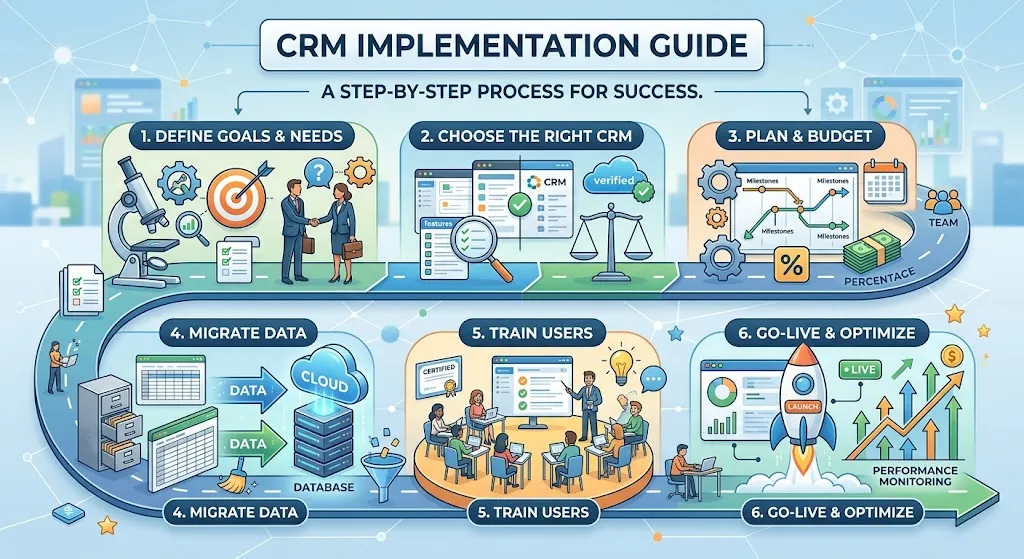
CRM implementation fails when teams treat it like software installation instead of a change to how revenue work gets done. Every year, companies buy CRM software expecting pipeline visibility, forecasting accuracy, and faster deal cycles. What they get instead is a configured tool that reps avoid, managers ignore, and admins maintain alone.
This guide covers the full CRM implementation process: planning, data migration, configuration, training, adoption measurement, and the launch decisions that separate a working system from an expensive contact list. If you are comparing platforms before you start, the best CRM software roundup covers tool selection. This article covers what happens after you pick one.
What Is CRM Implementation?
CRM implementation is the process of planning, configuring, migrating data into, and launching a CRM system so that sales, marketing, and service teams use it as their daily operating system. It is not the same as signing up for a CRM or importing a CSV file. Implementation covers everything from defining deal stages and field requirements to setting permissions, building integrations, training users, and measuring adoption after launch.
I see teams confuse four related but different activities. Here is how they break down.
| Activity | Scope | Duration | Outcome |
|---|---|---|---|
| CRM Setup | Account creation, basic config, user invites | 1 to 3 days | Software is accessible |
| CRM Implementation | Process design, data architecture, migration, training, launch, governance | 2 to 16 weeks | System supports daily workflows |
| CRM Migration | Moving data and workflows from one CRM to another | 1 to 8 weeks | Historical data preserved and usable |
| CRM Adoption | Ongoing measurement of daily usage, data quality, workflow compliance | Continuous | Reps and managers use CRM in every revenue conversation |
CRM setup is a subset of implementation. Migration is a phase within implementation. Adoption is the outcome that proves implementation worked. If your team finishes “implementation” but reps still track deals in spreadsheets, the implementation failed.
How CRM Implementation Works
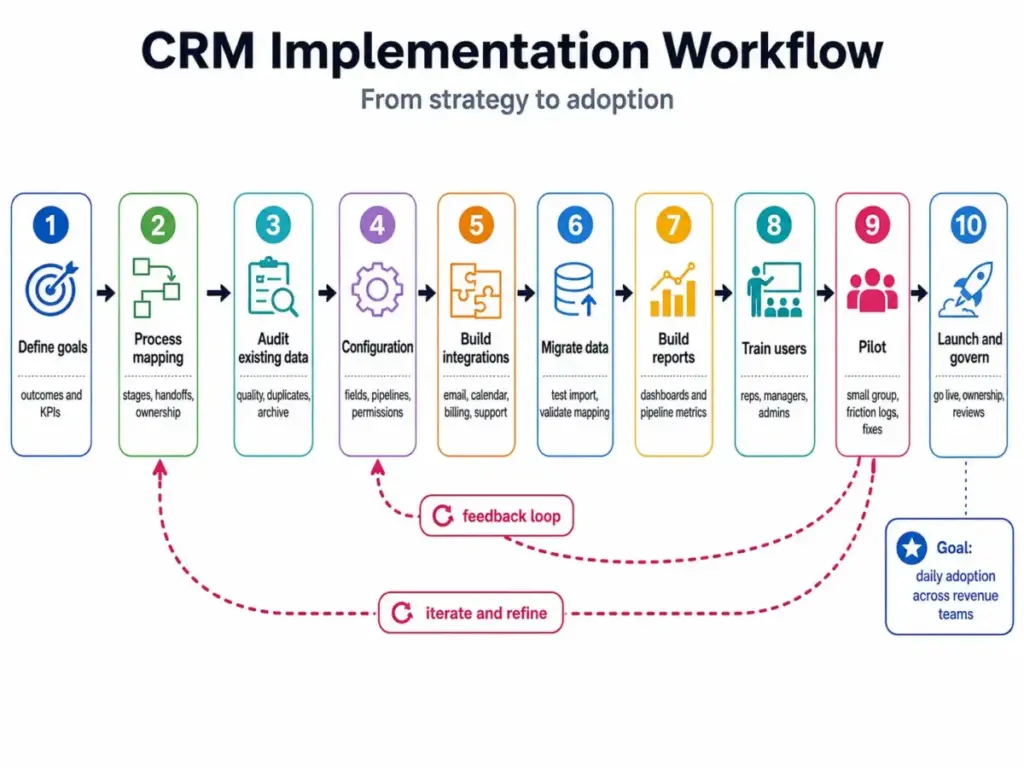
CRM implementation follows a sequence of phases, but real rollouts are not linear. Teams loop between process design, field testing, and user feedback before moving forward. Here are the 10 phases I recommend for any team between 5 and 100 users.
Phase 1: Define goals. Write down what the CRM must do in the first 90 days. Not “improve sales.” Concrete outputs: “Every rep logs activity on every open deal. Managers run pipeline reviews from the CRM dashboard every Monday.”
Phase 2: Map your sales process. Document how a lead becomes a customer today. Identify deal stages, handoff points, required fields, and ownership rules. Do this before opening CRM settings.
Phase 3: Audit existing data. Count your contacts, companies, and deals. Identify duplicates, missing fields, and outdated records. Decide what migrates, what gets archived, and what gets deleted.
Phase 4: Configure the CRM. Set up pipelines, deal stages, contact properties, lifecycle stages, user roles, and permissions. Salesforce advises not giving users more access than needed for their job. Follow least-privilege access from day one.
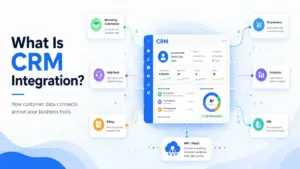
Phase 5: Build integrations. Connect email, calendar, forms, billing, and support tools. If your CRM connects to external systems through an API, confirm data sync frequency, field mapping, and error handling before migration.
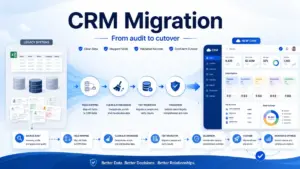
Phase 6: Migrate data. Run a test import with 100 records. Validate field mapping, owner assignment, and duplicate detection. Then import the full dataset with a rollback plan ready.
Phase 7: Build reports and dashboards. Create the 3 to 5 reports your managers will review weekly: pipeline value by stage, activity per rep, deal velocity, and win rate. These are also the core inputs to sales forecasting, understanding how pipeline value, stage distribution, and velocity combine to produce a projected revenue number is the next step after your dashboards are live.
Phase 8: Train users. Train by role. Reps need deal creation, activity logging, and contact management. Managers need pipeline views, forecasting, and report filters. Admins need field management, automation rules, and data hygiene workflows.
Phase 9: Run a pilot. Launch with one team or 5 to 10 users for 2 weeks. Collect friction logs. Fix field names, required field annoyances, and missing workflow steps before full rollout.
Phase 10: Launch and govern. Go live for all users. Define a CRM owner who manages field requests, automation changes, data quality audits, and quarterly reviews.
CRM Migration Risk Table
Data migration is the phase where most CRM implementations break. I have seen teams lose 6 weeks to bad imports that corrupt pipeline reporting. Here are the risks I track on every project.
| Risk | Trigger | Consequence | Prevention |
|---|---|---|---|
| Duplicate records | No dedup before import | Inflated pipeline, double outreach | Run dedup tool pre-migration |
| Orphan deals | Owner field unmapped | Deals with no assigned rep | Map every owner to active user |
| Broken lifecycle stages | Old stages do not match new pipeline | Contacts stuck in wrong stage | Create stage mapping document |
| Lost activity history | Activities not included in export | No context on past conversations | Export activities as separate object |
| Field truncation | Text fields exceed new CRM limits | Truncated notes, lost data | Audit field lengths before import |
| Wrong date formats | Source uses DD/MM/YYYY, target expects MM/DD/YYYY | Dates scrambled silently | Standardize date format in CSV |
“Would anyone be able to offer me advice on a successful plan of action for handling a Salesforce migration or merging two Salesforce instances?” (Reddit user, r/salesforce)
That question appears in migration threads every month. The answer is always the same: build a source-to-target field map, test with a small batch, and never merge without a rollback export.
CRM Implementation Timeline
Implementation speed depends on data complexity, integration count, and team size, not just the number of users. A 10-person team with clean data and no integrations implements faster than a 10-person team migrating from 3 spreadsheets with 50,000 contacts.
| Team Size | Typical Scope | Realistic Timeline | Main Risk |
|---|---|---|---|
| 1 to 5 users | Basic pipeline, contact import, email sync | 1 to 2 weeks | Over-configuring fields nobody uses |
| 6 to 20 users | Multi-pipeline, role permissions, 2 to 3 integrations | 3 to 6 weeks | No CRM owner after launch |
| 21 to 100 users | Cross-department rollout, migration, custom reporting, automation | 6 to 12 weeks | Scope creep from department requests |
| 100+ users | Enterprise config, security review, multi-team pilot, change management | 12 to 24 weeks | Executive non-adoption killing rep compliance |
For a team of 5 sales reps, start with one pipeline, 10 to 15 contact fields, and email sync. Do not build automations in the first 2 weeks. Wait until you see how reps actually use the system before automating anything.
For teams above 20 users, assign a CRM administrator before configuration starts. This person owns field standards, automation rules, and data quality reviews. Without an owner, every department adds fields and views until the system becomes a graveyard of unused properties.
CRM Implementation Costs
CRM implementation costs more than the subscription price. Pipedrive explains that CRM pricing depends on user count, features, integrations, and support level. That is the visible cost. The hidden costs add up faster.
Visible costs: Per-user subscription fees, onboarding packages, premium support tiers.
Hidden costs that most teams miss:
- Data cleanup: If your contact database has 40% duplicates or missing fields, you will spend 10 to 40 hours cleaning data before migration. That is admin time or consultant fees.
- Integration work: Connecting CRM to billing, marketing automation, or support tools requires mapping fields, testing sync, and handling errors. Budget 5 to 20 hours per integration.
- Workflow rebuilds: Automating lead assignment, deal rotation, and lifecycle updates requires testing. Each workflow takes 2 to 8 hours to build, test, and document.
- Training time: If 20 reps spend 4 hours each in CRM training, that is 80 hours of selling time lost. Factor it into the rollout cost.
- Upgrade pressure: Free and starter plans often lack automation, custom reporting, or permissions. Teams outgrow starter tiers within 3 to 6 months. Check HubSpot pricing tiers before committing to a plan based on your current headcount alone.
- Consultant fees: External CRM implementation partners charge $100 to $300 per hour. A 40-hour engagement adds $4,000 to $12,000 to the project cost.
- Admin overhead: Someone maintains the CRM after launch. For teams under 20 users, this is a part-time role. For teams above 50, it is a full-time position.
Nucleus Research found that CRM returns averaged $8.71 for every $1 spent. But that ROI depends on adoption. A CRM that sits unused returns $0.
CRM Data Migration Checklist
Data migration is not “export and import.” It is a translation project. You are converting one data model into another while preserving relationships, history, and ownership. Here is the checklist I use for every migration.
Before migration:
- Export all contacts, companies, deals, activities, and notes from the source system
- Count total records by object type
- Identify and remove duplicates (aim for under 5% duplicate rate)
- Remove contacts with no email, no activity in 24+ months, and no open deals
- Document every custom field and its purpose
- Build a source-to-target field mapping document
- Define owner mapping (old user IDs to new user accounts)
- Decide which historical data matters (last 12 months of activity vs. full history)
During migration:
- Run a test import with 100 to 200 records
- Validate field mapping on test records
- Check owner assignment on imported deals
- Verify date formats, currency fields, and multi-select values
- Confirm lifecycle stages and deal stages map correctly
After migration:
- Compare record counts: source export vs. target CRM
- Spot-check 20 records across contacts, companies, and deals
- Verify that activity timelines appear on migrated records
- Run a pipeline report and compare to pre-migration baseline
- Keep source system read-only for 30 days as rollback insurance
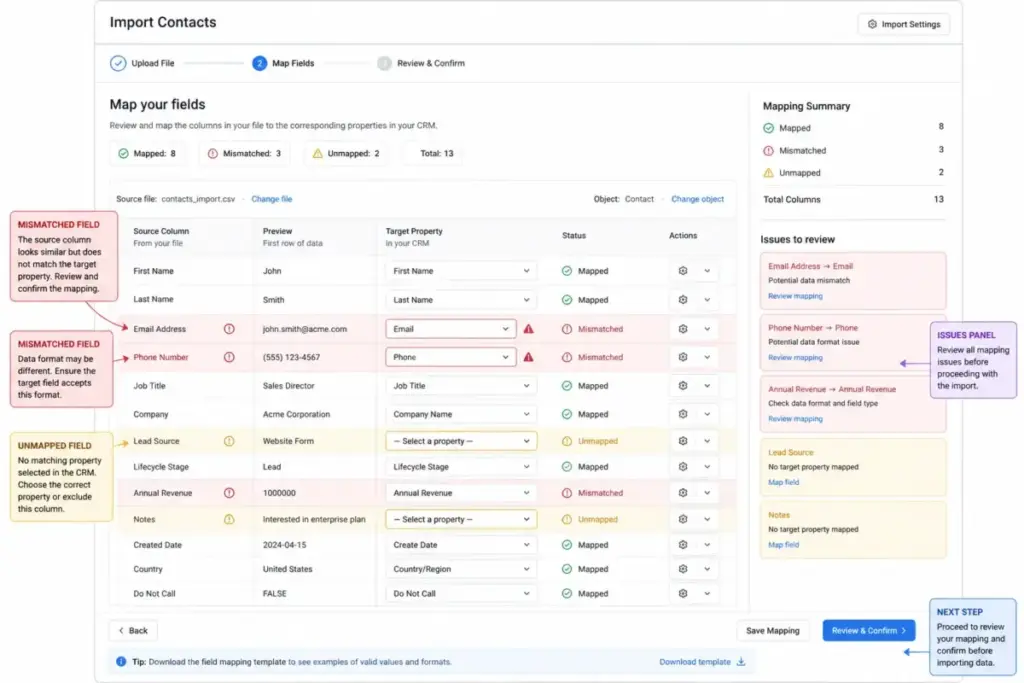
[SCREENSHOT: annotated CRM field mapping import screen showing source columns mapped to target CRM properties, with highlighted mismatches and unmapped fields]
Do not migrate every historical field. If nobody has looked at a custom field in 6 months, do not bring it into the new system. Dead fields create noise for reps and clutter reports for managers.
CRM Adoption Is the Real Rollout
CRM adoption is the measurable, daily use of the CRM system across sales, marketing, and service workflows. Salesforce defines CRM adoption as how teams use and gain value from an implemented CRM. KPMG states that user adoption is a key element of CRM return on investment.
Launch day is not the finish line. It is the starting line. Here are the adoption KPIs I track in the first 90 days:
- Weekly active users: What percentage of licensed users log in and take action each week? Target: 85%+ by week 4.
- Required field completion: Are reps filling in deal amount, close date, and deal stage on every opportunity? Target: 95%+ completion.
- Activity logging: Are reps logging calls, emails, and meetings? Target: 3+ logged activities per rep per day.
- Deal stage hygiene: Are deals sitting in the same stage for more than 2x the average cycle time? If yes, pipeline data is stale.
- Duplicate rate: Are new duplicates being created post-launch? Target: under 2% weekly duplicate creation rate.
- Dashboard usage: Are managers opening pipeline dashboards weekly? If managers do not use the CRM for pipeline reviews, reps will not use it for daily selling.
- Manager review cadence: Does every sales manager run a weekly pipeline review inside the CRM? This is the single strongest predictor of sustained adoption.
The pattern is consistent. When managers run pipeline meetings from the CRM, reps log data. When managers run pipeline meetings from memory or a side spreadsheet, CRM data decays within weeks.
CRM Implementation Mistakes
Every failed CRM implementation shares a few common patterns. These are not edge cases. They are the default outcome when teams skip planning.
1. Copying old processes into the new CRM. This is the fastest path to failure. If your old CRM had 85 custom fields and 12 unused pipelines, rebuilding them in a new tool just recreates the mess.
“Most teams try to copy every old process into the new CRM. That usually creates a messy setup that nobody enjoys using.” (Reddit user, r/hubspot)
2. Too many required fields. If creating a deal takes 3 minutes and 14 fields, reps will avoid creating deals. Start with 5 to 7 required fields. Add more only when you have evidence that the missing data causes a real workflow problem.
3. No CRM owner. Without a named owner, field requests pile up, automations break silently, and data quality degrades. Assign one person who is accountable for CRM health.
4. Migrating dirty data. Importing 50,000 contacts with 30% duplicates and missing emails poisons every report and automation from day one. Clean before you migrate.
5. Automating before workflows are clear. Automation multiplies whatever you feed it. If your lead routing logic is wrong, automation routes leads to the wrong reps faster. Map the workflow manually first. Automate after 2 to 4 weeks of confirmed manual process.
6. Weak training. A 1-hour webinar is not training. Role-based training with hands-on exercises in the actual CRM, using real deals and contacts, is the minimum. Budget 2 to 4 hours per role.
7. Skipping the pilot. Launching to 50 users on day one means 50 people hit the same bugs, confusion points, and missing fields simultaneously. A 2-week pilot with 5 to 10 users catches 80% of friction before it scales.
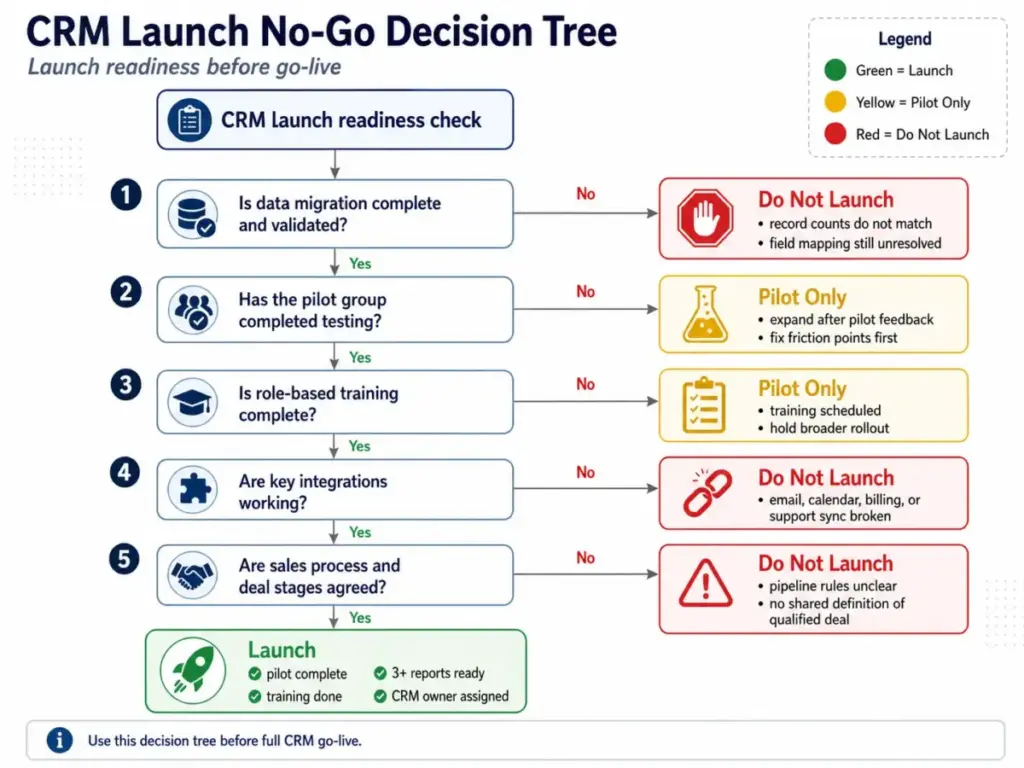
8. No no-go criteria. Teams launch on schedule even when data is not migrated, training is incomplete, or integrations are broken. Define conditions that must be true before launch. If they are not met, delay.
When You Should Not Launch Yet
This is the section most CRM implementation guides skip. Not every rollout is ready on schedule. Launching a CRM before it is ready damages trust with your team and makes re-adoption harder later.
Here is the decision framework I use.
| Signal | Verdict |
|---|---|
| Data migrated, owners mapped, pilot complete, 3+ reports built, training done for all roles | Launch |
| Data migrated, pilot running, training scheduled but not complete, 1 to 2 integrations pending | Pilot only (expand after training) |
| Data migration incomplete, no pilot group, training not started, key integration broken | Do not launch yet |
| Org is mid-acquisition, data model is changing, team structure is unclear | Do not launch yet |
| Sales process is undefined, deal stages not agreed on, no CRM owner assigned | Do not launch yet |
“The magic is in the planning. Configuring is a breeze once you’re clear on what you’re looking to accomplish.” (HubSpot Community user)
If your sales team cannot agree on what a “qualified deal” means, no CRM configuration will solve that disagreement. Fix process first. Then implement the tool.
Best Tools for CRM Implementation
The right CRM depends on your implementation complexity, not a feature checklist. Here is how I think about tool fit based on rollout context.
HubSpot CRM fits teams that want a fast implementation with marketing and sales alignment built in. The free tier supports up to 2 users and 1,000 contacts, which is enough for a 2-person team to start without budget approval. Implementation for teams under 10 users takes 1 to 3 weeks when the sales process is already defined. Read the full HubSpot CRM review for setup speed benchmarks.
Salesforce Sales Cloud fits teams that need granular permissions, multi-object customization, and enterprise reporting. Implementation takes longer (6 to 24 weeks for mid-market teams), but the platform handles complex approval workflows, territory management, and cross-department visibility. Salesforce describes its key implementation steps as goals, software selection, data migration, customization, integrations, training, and post-launch support. See the detailed Salesforce review for a breakdown of pricing and configuration depth.
Pipedrive fits sales-first teams that want pipeline visibility without configuration overhead. Implementation for a 5 to 15 rep team takes 1 to 3 weeks. The trade-off: limited marketing automation and lighter reporting compared to HubSpot or Salesforce. Read the Pipedrive CRM review for pipeline-specific workflow analysis.
Zoho CRM fits budget-sensitive teams that need broad functionality. Zoho CRM offers a free edition for up to 3 users and provides 1,100+ ready-to-use app integrations. Implementation complexity scales with Zoho’s customization depth, so keep the first rollout simple. The Zoho CRM review covers integration breadth and plan tier differences.
If you are choosing between the two most common enterprise-to-SMB CRM platforms, the HubSpot vs Salesforce comparison breaks down where each fits based on team size, sales process complexity, and total cost of ownership. For context on how SaaS Zap evaluates these tools, the SaaS Zap review methodology explains the scoring framework.
Alex Morrison’s Quick Take
I have watched enough CRM rollouts to know where they stall. It is not the software. It is not the data migration. It is the operating rhythm change.
A CRM implementation succeeds when managers change how they run pipeline reviews, forecast meetings, and rep coaching sessions. If the weekly pipeline meeting still happens from memory or a spreadsheet export, the CRM becomes a data entry chore that reps tolerate until they stop.
Here is what I tell every RevOps leader: configure fewer fields than you think you need. Launch with one pipeline. Make the first week about logging activities and updating deal stages, nothing else. After 2 weeks of clean usage, add the next layer.
The companies that get the $8.71 return per $1 spent (per Nucleus Research) are the ones where the CRM is the operating system for revenue decisions, not a reporting afterthought. If your VP of Sales does not open the CRM dashboard every Monday morning, your implementation has a leadership problem, not a software problem.
CRM Implementation FAQ
Answers to the questions I hear most from sales leaders and CRM admins planning their first rollout.
What is CRM implementation?
CRM implementation is the full process of planning, configuring, migrating data into, and launching a CRM so teams use it daily. It includes sales process mapping, field design, permission setup, integration configuration, training, and adoption measurement. Implementation turns CRM software into an operating system for revenue work.
What are the steps in CRM implementation?
The 10 core steps are: define goals, map your sales process, audit existing data, configure the CRM, build integrations, migrate data, build reports, train users by role, run a pilot with 5 to 10 users, and launch with governance. Most teams spend the most time on data audit and process mapping.
How long does CRM implementation take?
Timeline depends on team size and data complexity. A 5-person team with clean data implements in 1 to 2 weeks. A 20-person team with integrations and migration needs 3 to 6 weeks. Enterprise rollouts with 100+ users, multiple departments, and legacy data take 12 to 24 weeks.
How much does CRM implementation cost?
Beyond subscription fees (which range from $0 for free tiers to $150+ per user per month for enterprise plans), hidden costs include data cleanup (10 to 40 hours), integration work (5 to 20 hours per connection), training time, and potential consultant fees ($100 to $300 per hour).
Why do CRM implementations fail?
The top failure causes are: migrating dirty data, copying old processes instead of redesigning, no named CRM owner, too many required fields, skipping the pilot phase, and managers not using the CRM in pipeline reviews. Failure is an adoption problem, not a technical problem.
What is the difference between CRM setup and CRM implementation?
CRM setup is creating an account, inviting users, and adjusting basic settings. It takes 1 to 3 days. CRM implementation is the broader project that includes process design, data migration, configuration, training, and adoption. Setup is a small part of implementation.
How do you migrate data to a CRM?
Export data from your source system, build a field mapping document, remove duplicates, run a test import with 100 records, validate mapping accuracy, then import the full dataset. Keep the old system read-only for 30 days as rollback insurance.
How do you train employees on a new CRM?
Train by role, not in a single all-hands session. Reps need deal creation and activity logging (2 hours). Managers need pipeline views and report filters (2 hours). Admins need field management and automation rules (4 hours). Use the actual CRM with real data during training.
What should be included in a CRM implementation plan?
An implementation plan includes: goals and KPIs, sales process documentation, data audit results, field and pipeline configuration specs, integration requirements, migration plan with rollback steps, training schedule by role, pilot group selection, launch criteria, and post-launch governance model.
What are CRM implementation best practices?
Start with fewer fields than you think you need. Map your sales process before configuring the tool. Clean data before migration. Assign a CRM owner. Run a 2-week pilot. Train by role. Measure adoption weekly for 90 days. Do not automate until the manual workflow is confirmed working.
What is CRM adoption?
CRM adoption is the measurable, daily use of CRM software in sales, marketing, and service workflows. KPIs include weekly active users, required field completion, activity logging rate, deal stage hygiene, and manager dashboard usage. A CRM that is configured but not used daily is a failed implementation.
When should you not launch a CRM?
Do not launch when data migration is incomplete, training has not started, key integrations are broken, the sales process is undefined, deal stages are not agreed on, or no CRM owner is assigned. Launching before these conditions are met damages team trust and makes re-adoption harder.
Key Takeaways
- CRM implementation is a process design project, not a software installation. It includes goals, data architecture, migration, training, and adoption measurement across 2 to 24 weeks depending on team size.
- Clean your data before migration. Importing duplicates, orphan records, and dead fields corrupts every report and automation from day one.
- Adoption is the outcome that proves implementation worked. Track weekly active users, required field completion, and manager dashboard usage for 90 days post-launch.
- Do not copy old processes into a new CRM. Redesign workflows based on current sales process reality, then configure the tool to match.
- If managers do not use the CRM in weekly pipeline reviews, reps will stop using it within weeks. Leadership adoption drives team adoption. Full stop.