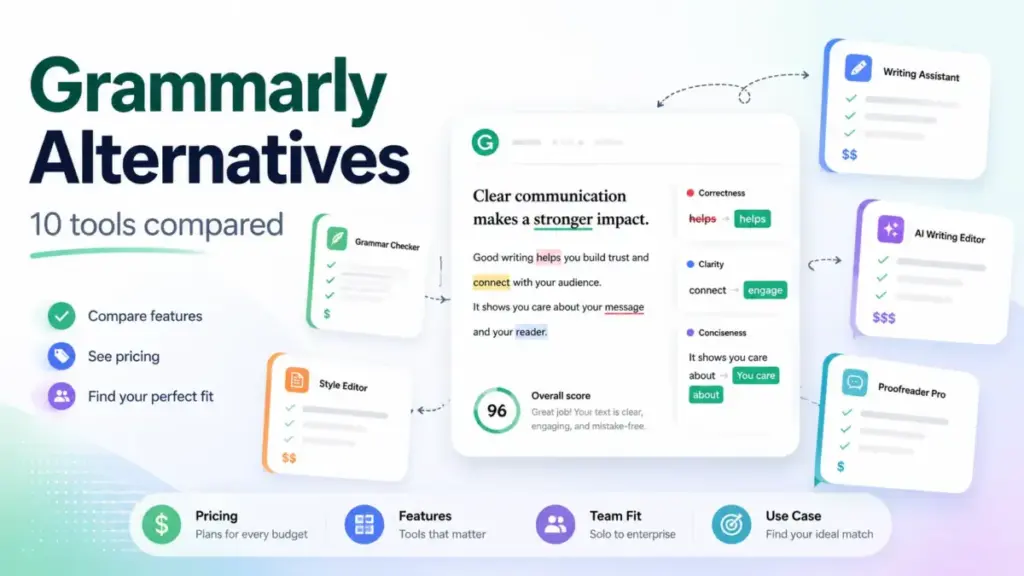
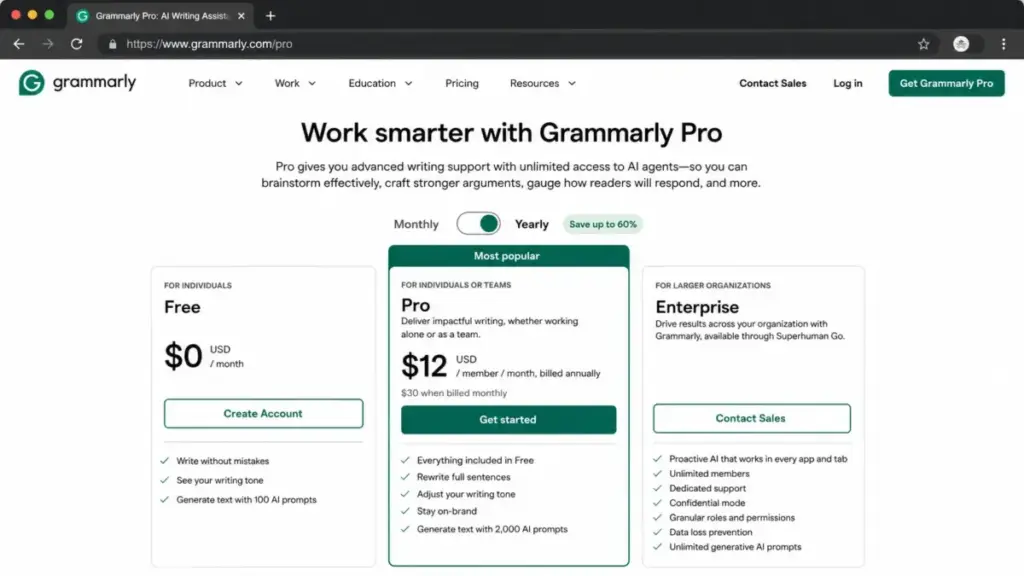
Grammarly Pro costs $12 per member per month billed annually. For a 10-person content team, that is $120 per month, $1,440 per year, just for grammar and style suggestions. And that is the annual rate. Monthly billing pushes it to $300 per month, $3,600 per year.
The price is not the only reason people start looking elsewhere. Some writers find the suggestions too prescriptive. Others need deeper long-form editing reports, multilingual grammar, or rewrite-first workflows that Grammarly does not prioritize. Enterprise teams want governed brand voice and knowledge assets, not just red underlines. Microsoft 365 users question why they are paying for a separate writing subscription when Editor is already bundled.
I evaluated 10 Grammarly alternatives by comparing official pricing, feature gates, team cost at 10 users, migration difficulty, and the specific frustration each tool resolves. Every price in this guide comes from official pricing pages or documentation, verified as of June 2026. I did not hands-on test these tools for this article. All evaluations are based on official documentation, published pricing, and verified user review signals from platforms like G2 and Capterra.
If you are comparing AI writing tool options, the table below maps each switching trigger to the alternative that fixes it.
Quick Verdict: Best Grammarly Alternatives by Switching Trigger
| If you are leaving Grammarly because… | Best alternative | Why |
|---|---|---|
| Team cost is too high | LanguageTool | $58.30/month for 10 users on annual Premium, less than half of Grammarly Pro |
| You need deeper long-form editing | ProWritingAid | 25+ writing reports, style analysis, and author comparison tools |
| You write in multiple languages | LanguageTool | 30+ languages with grammar and style checks |
| You want rewrite-first workflows | QuillBot | Paraphraser, summarizer, AI detector, and humanizer at $8.33/month |
| Suggestions feel too aggressive | Hemingway Editor Plus | Readability-first editing with target reading levels and concise prose |
| You need enterprise brand governance | Writer.com | Playbooks, Knowledge Graph, brand profiles, and compliance controls |
| You want marketing AI, not grammar | Jasper | Brand voice, audiences, agents, and content workflows for marketing teams |
| You need ESL correction and translation | Ginger | Grammar correction, rephrasing, and translation in 40+ languages |
| You already pay for Microsoft 365 | Microsoft Editor | Premium grammar and style bundled with your existing subscription |
| You want lightweight team editing | Outwrite | Grammar, style, plagiarism checks, and team billing at $7.95/user/month |
What this means: There is no single best Grammarly alternative. The right choice depends on why you are leaving. A novelist needs ProWritingAid. A multilingual support team needs LanguageTool. A marketing department needs Jasper or Writer.com. The rest of this guide maps each frustration to the tool that solves it.
The Grammarly Problem Map
Grammarly is still the default AI writing assistant for millions of users. Its cross-app grammar, spelling, tone, and clarity suggestions work well for individual writers. The browser extension, desktop app, and integrations cover most writing surfaces.
But the problems show up at scale, in specific workflows, and in the gap between what the marketing page promises and what the plan-by-plan reality delivers.
Pain Point 1: Price at Scale
Grammarly Pro costs $12/member/month billed annually or $30/member/month billed monthly (as of June 2026). For a 10-person team, that is $120 to $300 per month depending on billing cycle. Enterprise pricing requires contacting sales.
“The biggest one is the price.” — Verified G2 reviewer (source)
Several alternatives deliver grammar checking, paraphrasing, or style editing at a lower per-user cost. LanguageTool, Wordtune, and Outwrite all cost less than Grammarly Pro for a 10-user team on annual billing.
Pain Point 2: Prescriptive Suggestions
“Some of the advanced recommendations can appear a bit stilted.” — Verified Capterra reviewer (source)
Grammarly’s tone and clarity rewrites occasionally produce awkward phrasing. Writers who want editorial control rather than automated corrections often prefer readability-first tools like Hemingway Editor Plus or report-driven tools like ProWritingAid that show patterns instead of forcing changes.
Pain Point 3: Limited Long-Form Editing Depth
Grammarly focuses on inline suggestions. It does not offer document-level structure analysis, pacing reports, readability targets, style consistency reports, or author comparison tools. Writers working on novels, whitepapers, or long blog posts may find the editing experience shallow compared to ProWritingAid’s 25+ writing reports.
Pain Point 4: Narrow Multilingual Support
Grammarly works primarily in English. Users writing in German, French, Spanish, Portuguese, or other languages need tools like LanguageTool (30+ languages) or Ginger (40+ language translation) for grammar and style checking beyond English.
Pain Point 5: Missing Enterprise Governance
Grammarly offers team plans and enterprise administration. But organizations that need governed brand voice playbooks, knowledge graph integration, content approval workflows, and compliance controls often outgrow what Grammarly provides. Writer.com and Jasper are built for this workflow.
Pain Point 6: Microsoft 365 Overlap
Users already paying for Microsoft 365 get Microsoft Editor Premium included. Paying for Grammarly on top of a Microsoft 365 subscription means double-paying for grammar checking that covers much of the same ground.
Alternatives That Fix the Cost Problem
ProWritingAid: Best for Long-Form Writers
ProWritingAid is the strongest Grammarly alternative for writers who need editing depth, not just inline corrections.
Pricing starts at $10/month billed yearly or $30/month billed monthly (as of June 2026). A free plan is available. The annual cost for 10 individual Premium seats is approximately $100/month, $20 less per month than Grammarly Pro at the same team size.
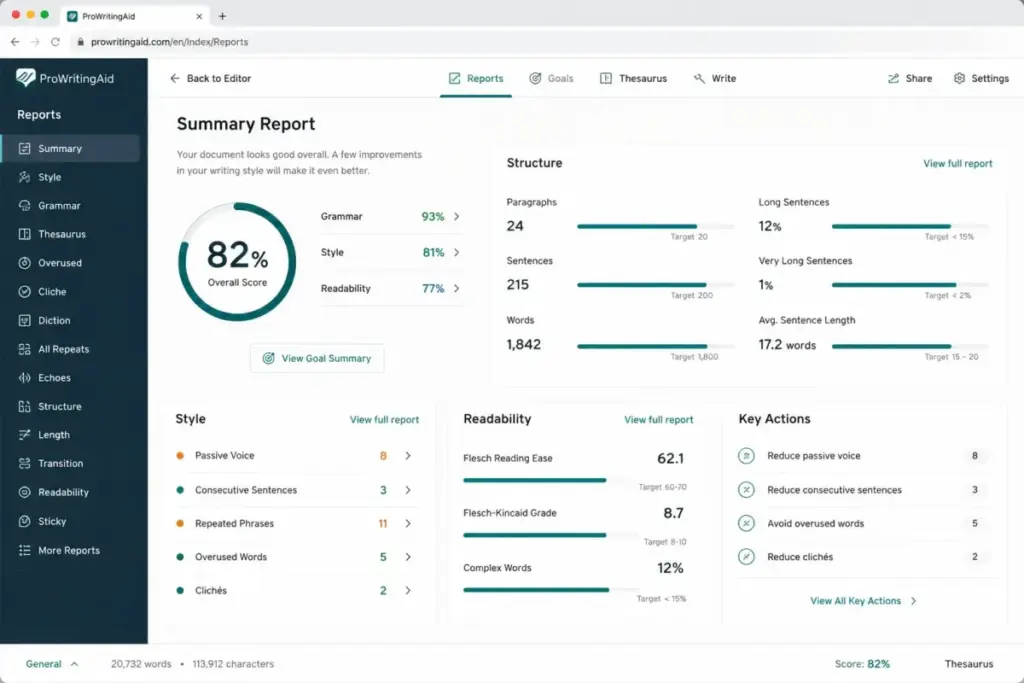
ProWritingAid does better than Grammarly in document-level analysis. It offers 25+ writing reports covering style, structure, pacing, sentence length, readability, overused words, and author comparison. The Sparks AI feature handles rephrasing and idea generation. Custom style guides and terminology management are included on Premium.
The tradeoff: ProWritingAid is less convenient than Grammarly for users who mainly want fast cross-app inline suggestions. The browser extension and real-time checking exist, but the product’s strength is in dedicated editing sessions, not background correction.
Best for:
- Novelists, bloggers, and long-form content creators
- Editors who want structural feedback, not just grammar fixes
- Students and academic writers
Avoid if: You only need a quick grammar checker across email, Slack, and browser forms. ProWritingAid’s value is in deep editing, not lightweight cross-app coverage.
Migration difficulty: Low
Verdict: Choose ProWritingAid if your primary frustration with Grammarly is shallow editing. The writing reports alone justify the switch for anyone producing content longer than 1,000 words regularly.
LanguageTool: Best Multilingual Alternative

LanguageTool is the strongest Grammarly alternative for multilingual writers and teams that need grammar checking beyond English.
Pricing starts at approximately $5.83/month equivalent billed annually in USD (as of June 2026). Free web tools are available. For 10 individual annual Premium accounts, the cost is approximately $58.30/month, less than half of Grammarly Pro’s $120/month.
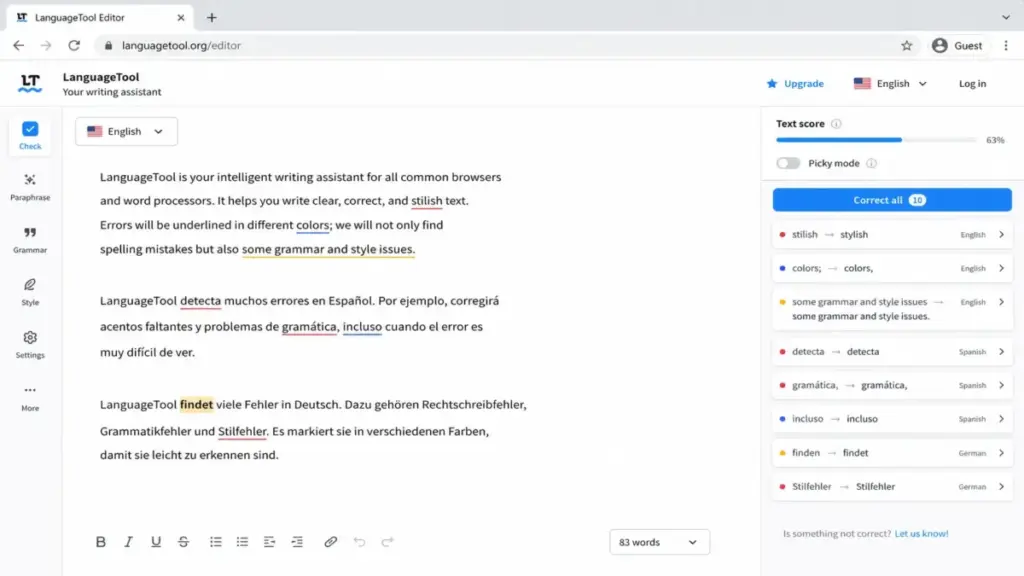
LanguageTool supports 30+ languages with grammar and style checks, paraphrasing, personal dictionary, and shared team dictionary and style guide features. The open-source roots give it credibility in multilingual grammar communities.
The tradeoff: LanguageTool’s official help documentation now states that browser extension access is Premium-only for users who want in-app checking. The free experience is less generous for cross-app use than older reviews imply. Exact USD pricing may also be localized by region, so confirm your local price before committing.
Best for:
- Multilingual writers and ESL users
- Open-source-friendly teams
- Teams that want grammar and style support in German, French, Spanish, Portuguese, and other languages
Avoid if: You need full AI writing generation, plagiarism checking, or enterprise brand governance. LanguageTool is a grammar and style checker, not a content platform.
Migration difficulty: Medium. Browser extension behavior has changed, and users switching from Grammarly’s always-on experience may notice differences.
Wordtune: Best for Sentence Rewrites

Wordtune is the best Grammarly alternative for users whose primary need is faster phrasing, tone adjustment, and fluency improvement at the sentence level.
Pricing starts at $4.89/month billed annually for the Advanced plan (as of June 2026). Monthly billing costs $6.99/month. Unlimited starts at $6.99/month billed annually. A Basic free plan is available.
For 10 users, the annual-equivalent cost is $48.90/month on Advanced or $69.90/month on Unlimited. Both cost less than half of Grammarly Pro’s $120/month.
Wordtune focuses on rewrites, AI suggestions, vocabulary improvement, clarity, fluency, and summaries. Paid plans include a 3-day trial.
The tradeoff: The Advanced plan caps rewrites at 30 per day and AI suggestions at 30 per day, with 15 summaries per month. Heavy users will need the Unlimited tier. And Wordtune is not a full grammar-governance platform. It is a rewriting tool.
Best for:
- ESL writers improving fluency
- Sales reps and support teams writing emails
- Professionals who want clearer, more concise phrasing
Avoid if: You need unlimited daily rewrites on a budget (the Advanced plan’s 30/day cap may not be enough) or enterprise grammar governance.
Migration difficulty: Low
Alternatives That Fix the Editing Depth Problem
Hemingway Editor Plus: Best for Readability

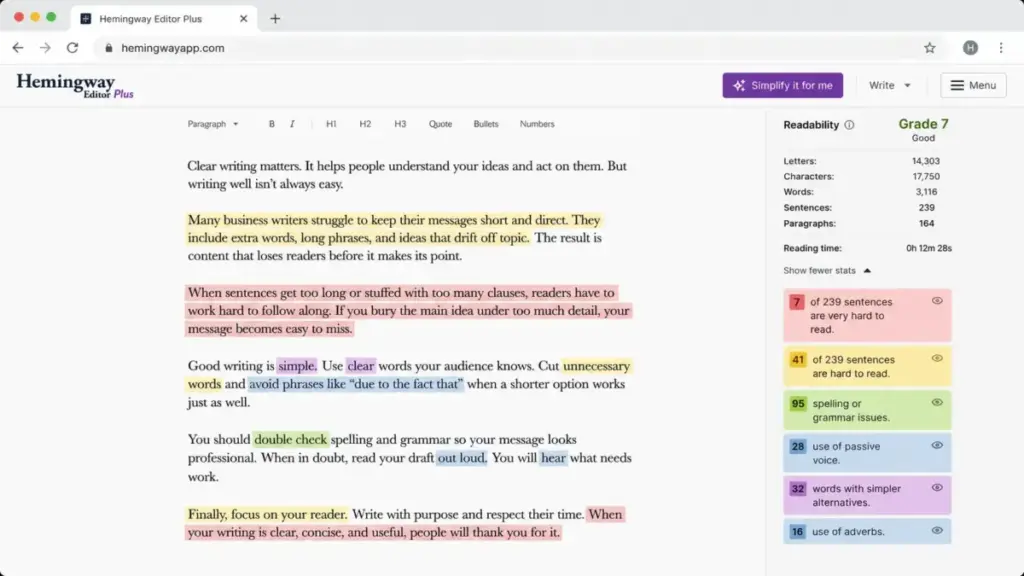
Hemingway Editor Plus is the best Grammarly alternative for writers and editors who prioritize concise, readable prose over automated grammar correction.
Pricing starts at $8.33/month equivalent billed annually for the Individual 5K plan (as of June 2026). The Team 10K plan costs $12.50/user/month billed annually. For a 10-user team, that is $125/month on Team 10K.
Hemingway highlights passive voice, wordiness, adverb overuse, and complex sentences with color-coded readability scores. The Plus subscription adds AI sentence rewrites, advanced grammar fixes, and tone and style adjustments.
The tradeoff: AI sentence rewrites are capped by plan. Hemingway is better for editing drafts in a dedicated environment than replacing every Grammarly browser and app workflow. It does not offer the always-on cross-app experience Grammarly provides.
Best for:
- Writers targeting a specific reading level
- Editors who want visual readability feedback
- Content teams that want concise, scannable prose
Avoid if: You need real-time grammar checking across email, Slack, and browser forms. Hemingway is an editing tool, not a background assistant.
Migration difficulty: Medium. You will need to change your editing workflow from inline corrections to dedicated editing sessions.
Alternatives That Fix the Enterprise Governance Problem
Writer.com: Best for Enterprise Governance

Writer.com is the strongest Grammarly alternative for large organizations that need governed brand voice, knowledge integration, content approval workflows, and AI governance controls.
Pricing is not publicly disclosed for the current numeric self-serve Starter price (as of June 2026). A Starter 14-day free trial is available. Enterprise pricing requires contacting sales. The Starter plan is limited to 5 users, so 10-user teams should treat Writer.com as a sales-led evaluation.
Writer.com offers an AI agent platform with playbooks, Personality profiles, Knowledge Graph, connectors, brand and voice profiles, governance and auditability, and enterprise admin controls. It is designed for teams that need every piece of content to match approved brand standards.
The tradeoff: Writer.com is overkill and less transparent on price for individuals or small teams that only need grammar correction. The platform is built for enterprise content operations, not for a solo blogger fixing typos.
Best for:
- Enterprise content teams (50+ users)
- Organizations with strict brand voice and compliance requirements
- Teams that need AI workflow governance and approval chains
Avoid if: You are an individual writer or a team under 10 users looking for grammar checking. The pricing and feature set are scaled for enterprise, not personal use.
Migration difficulty: High. Implementing playbooks, Knowledge Graph, and governance workflows requires significant setup.
Jasper: Best for Marketing Teams

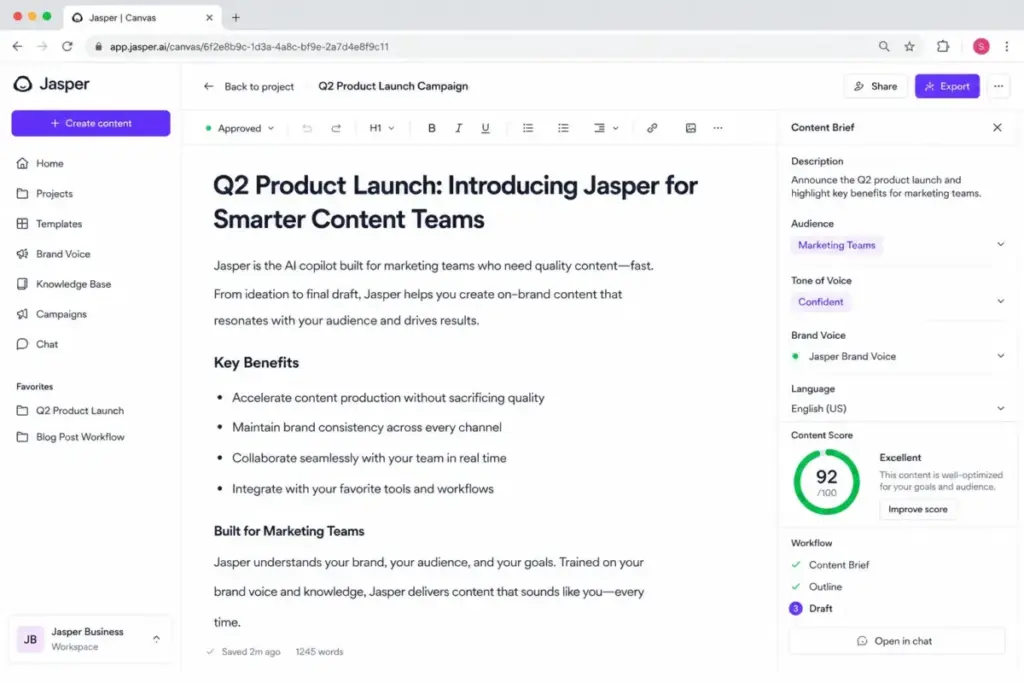
Jasper is the strongest Grammarly alternative for marketing teams that need campaign content, brand knowledge, and AI content workflows rather than a pure grammar checker. For a deeper look at what the platform offers, see our Jasper AI review.
Pricing starts at $59/seat/month billed annually for the Pro plan (as of June 2026). Monthly billing costs $69/seat. The Pro plan includes one seat. Additional users and enterprise features require the Business plan, which is custom-priced through sales.
For a 10-user team, Jasper pricing moves into custom/contact-sales territory because additional users require Business discussion. This is not a budget Grammarly replacement.
Jasper offers a Canvas platform, Essential Agents, Brand Voices, Knowledge assets, Audiences, workflows, API access, and enterprise governance. A 7-day free trial is available.
The tradeoff: Jasper is not a focused Grammarly replacement for everyday grammar checking. It is a marketing AI platform. Teams evaluating Jasper pricing should note that the per-seat cost reflects this positioning. If you only need grammar checking, Jasper is a $59/month overinvestment.
Best for:
- Marketing teams producing campaign content at scale
- Organizations that need brand voice consistency across content types
- Teams that want AI content generation, not just AI grammar correction
Avoid if: You want a simple grammar checker. Jasper is built for marketing operations, not proofreading. The pricing confirms this.
Migration difficulty: High. Moving from Grammarly (grammar checker) to Jasper (marketing AI platform) is not a migration. It is a category change.
Alternatives That Fix the Multilingual and ESL Problem
QuillBot: Best Budget Paraphraser

QuillBot is the best Grammarly alternative for students, freelancers, and budget-conscious users who prioritize paraphrasing and rewriting over enterprise features.
Pricing starts at $8.33/month equivalent billed annually ($99.95/year) or $19.95/month monthly (as of June 2026). A free plan is available. For 10 individual annual Premium accounts, the cost is approximately $83.30/month.
QuillBot bundles a paraphraser, grammar checker, plagiarism checker, AI detector, AI humanizer, summarizer, and browser extensions. The paraphraser is the core product, with multiple rewriting modes and tone adjustments.
The tradeoff: The free plan has word and usage limits. The Premium plagiarism checker is limited to 25,000 words per month. Public team pricing was not confirmed on the official page, so 10-user cost is estimated from individual accounts.
QuillBot is less suited to governed business style guides, brand voice controls, and cross-app team writing administration. It is a personal writing and paraphrasing tool, not a team governance platform.
Best for:
- Students writing essays and research papers
- Freelancers who need paraphrasing and plagiarism checking
- Budget-conscious users who want grammar + rewriting under $10/month
Avoid if: You need team administration, brand voice controls, or enterprise content governance. QuillBot is designed for individual use.
Migration difficulty: Low
Ginger: Best for ESL Correction
Ginger is the best Grammarly alternative for ESL writers who need contextual grammar correction combined with translation support.
Pricing starts at a promotional $4.99/month billed annually ($59.88/year) or $9.90/month monthly (as of June 2026). A free version is available. No free trial is listed. For 10 individual annual Premium accounts, the promotional cost is approximately $49.90/month.
Ginger offers contextual grammar correction, sentence rephrasing, translation in 40+ languages, browser extensions, Google Docs support, and an MS Office add-in. The translation feature is particularly useful for ESL writers who need to switch between languages.
The tradeoff: The MS Office add-in is listed as Windows-only on the official page. Displayed prices are promotional and may change. Business plans are contact-sales. The product is less transparent for teams and business governance than Grammarly.
Best for:
- ESL writers who need grammar + translation in one tool
- Individual users who want multi-device correction at a low price
- Users who write primarily in English but need occasional translation support
Avoid if: You need team billing, brand voice governance, or Mac-native MS Office integration. Ginger’s team and business features are not as clear as Grammarly’s.
Migration difficulty: Low
Alternatives That Fix the Microsoft Overlap Problem
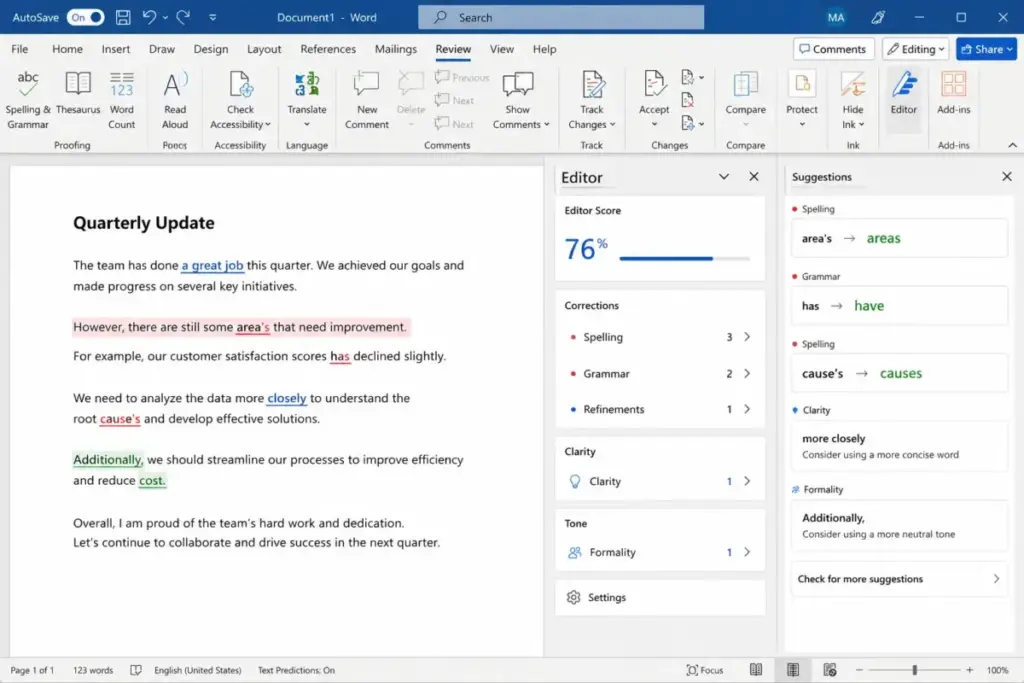
Microsoft Editor: Best for Microsoft 365 Users
Microsoft Editor is the best Grammarly alternative for people who already pay for Microsoft 365 and write mainly in Word, Outlook, and Microsoft apps.
Basic Editor is free. Premium features are bundled with Microsoft 365 subscriptions such as Personal at $9.99/month or $99.99/year (as of June 2026). Editor Premium cannot be purchased alone.
For 10 users with Microsoft 365 Personal monthly subscriptions, the cost is $99.90/month. Annual equivalent from $99.99/year each is $83.33/month. But this includes the full Microsoft 365 suite (Word, Excel, PowerPoint, Outlook, OneDrive storage), not just the writing assistant.
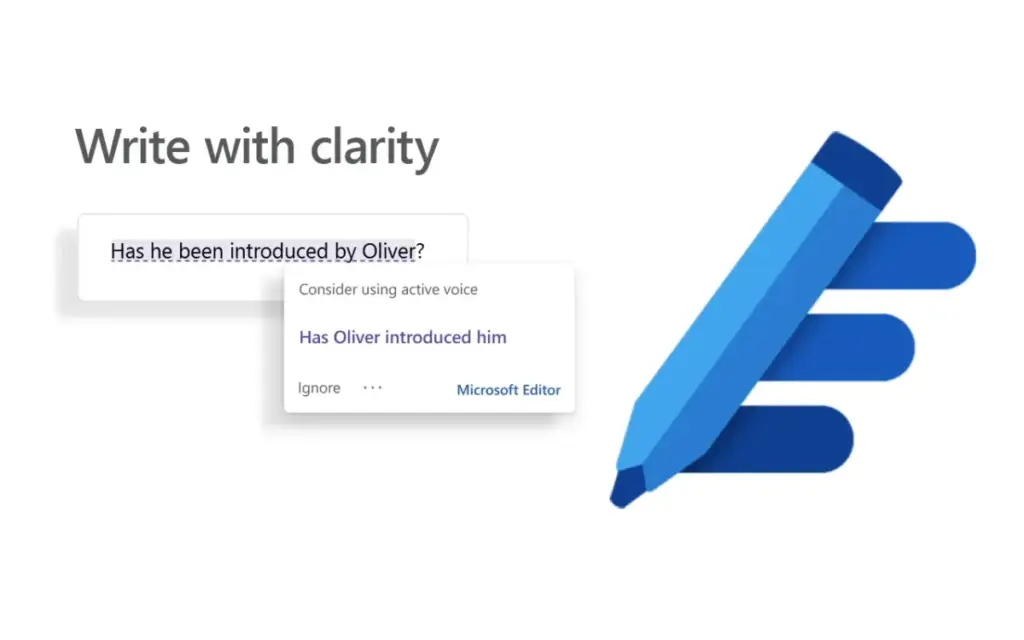
Microsoft Editor covers spelling, grammar, clarity, conciseness, formality guidance, and multilingual support. It works directly inside Word and Outlook without a separate browser extension.
The tradeoff: Editor Premium is not independent from Microsoft 365. Its value depends entirely on whether you already use Microsoft 365. If you do, it is effectively free. If you do not, you are buying an entire productivity suite to get a grammar checker.
Best for:
- Teams already paying for Microsoft 365
- Users who write primarily in Word and Outlook
- Organizations that want to reduce SaaS sprawl by using bundled tools
Avoid if: You work primarily in Google Docs, browser forms, or non-Microsoft apps. Microsoft Editor’s cross-app coverage is narrower than Grammarly’s.
Migration difficulty: Medium. The writing experience differs from Grammarly’s always-on approach, especially outside Microsoft apps.
Outwrite: Best Lightweight Team Editor
Outwrite is the best Grammarly alternative for small teams and education users who want grammar, style, structure, and plagiarism checks without enterprise complexity.
Pricing starts at $7.95/user/month for Teams or $9.95/month for individual Pro (as of June 2026). A free plan is available. For a 10-user team, the cost is $79.50/month on Teams.
Outwrite offers spelling and grammar, thesaurus, style improvements, structural suggestions, sentence rewriting, and plagiarism checks. It supports browser extensions, Google Docs, Word, and a web app.
The tradeoff: Sentence rewriting is labeled experimental. Plagiarism checks are capped at 50 per month on Pro. Outwrite is less mature as an AI writing ecosystem than Grammarly, Writer.com, or Jasper.
Best for:
- Small teams (5-15 users) that want team billing at a lower price
- Education users who need plagiarism checking
- Lightweight business writing teams
Avoid if: You need advanced AI writing generation, enterprise governance, or a mature cross-app ecosystem. Outwrite is a good grammar tool, not a content platform.
Migration difficulty: Low
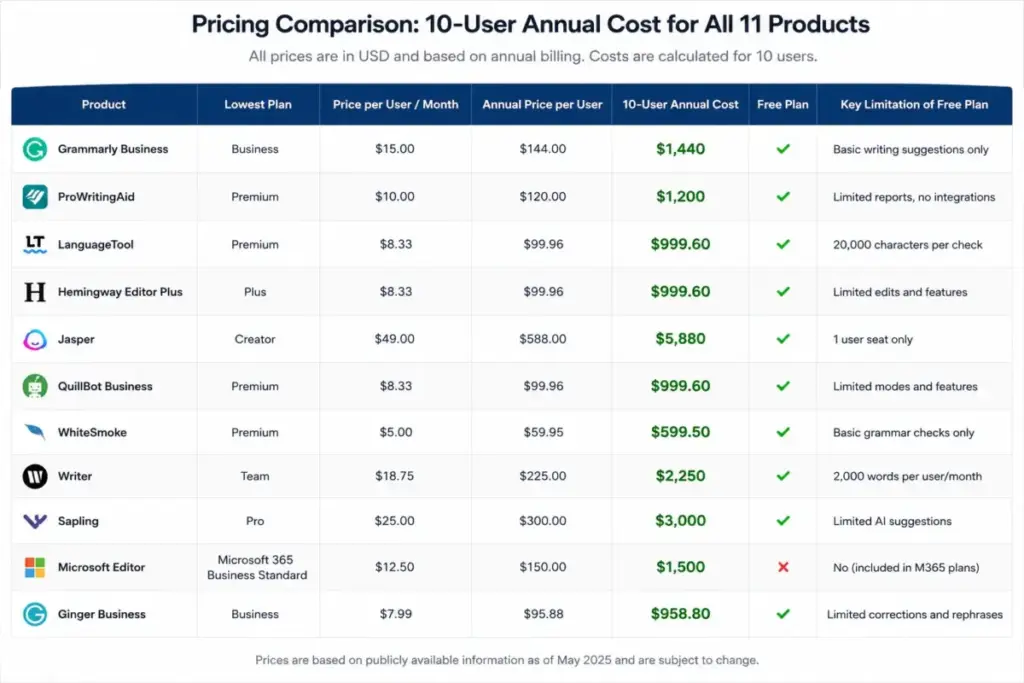
Pricing Comparison: Grammarly vs 10 Alternatives
All prices verified as of June 2026 from official pricing pages. Prices may change. Check each product’s official pricing page for current rates.
| Product | Starting price | 10-user cost (annual equivalent) | Free plan | Billing basis |
|---|---|---|---|---|
| Grammarly | $12/member/month (annual) | $120/month | Yes | Per user |
| ProWritingAid | $10/month (annual) | $100/month | Yes | Per user |
| QuillBot | $8.33/month (annual) | $83.30/month | Yes | Individual |
| LanguageTool | $5.83/month (annual) | $58.30/month | Yes (web) | Individual/Team |
| Wordtune | $4.89/month (annual) | $48.90/month (Advanced) | Yes | Per user |
| Hemingway Plus | $8.33/month (annual) | $125/month (Team 10K) | No | Per user (team) |
| Writer.com | Not disclosed | Custom/sales-led | Trial | Custom |
| Jasper | $59/seat/month (annual) | Custom/sales-led | Trial | Per seat + custom |
| Ginger | $4.99/month (promo annual) | $49.90/month | Yes | Individual |
| Microsoft Editor | Free basic; $9.99/month (M365) | $99.90/month (M365 Personal) | Yes | Bundle |
| Outwrite | $7.95/user/month (Teams) | $79.50/month | Yes | Per user (team) |
What this means: If cost is your primary switching trigger, the cheapest 10-user options are Wordtune Advanced ($48.90/month), Ginger ($49.90/month promotional), and LanguageTool ($58.30/month). But cheap is not always right. Ginger’s pricing is promotional and may increase. Wordtune Advanced caps rewrites at 30/day. LanguageTool’s browser extension is now Premium-only. The “real” cost depends on which limitations you can accept.
Hidden costs to watch:
- ProWritingAid: Premium Pro costs more; some AI usage has daily limits
- QuillBot: Plagiarism checker limited to 25,000 words/month
- Writer.com: Enterprise features require sales-led scoping
- Jasper: Additional users beyond one seat require Business plan discussion
- Ginger: Promotional pricing may expire; no free trial
- Microsoft Editor: Requires full Microsoft 365 subscription; cannot be purchased alone
How to Choose the Right Grammarly Alternative
The decision framework depends on your switching trigger, not on feature count.
If cost is the issue: Compare the 10-user annual-equivalent cost, not the starting price. Wordtune, Ginger, and LanguageTool are the cheapest options, but each has usage limits. Calculate whether the limits affect your team’s actual workflow before switching.
If editing depth is the issue: ProWritingAid’s 25+ writing reports are unmatched for long-form content. Hemingway Editor Plus is better for readability-focused editing. Neither replaces Grammarly’s cross-app convenience, so decide whether you need always-on correction or dedicated editing sessions.
If multilingual support is the issue: LanguageTool supports 30+ languages. Ginger offers translation in 40+ languages. QuillBot has multilingual paraphrasing. Grammarly’s English-first approach is a genuine limitation here.
If enterprise governance is the issue: Writer.com and Jasper are not grammar checkers. They are content platforms. If you need playbooks, brand voice governance, and approval workflows, these tools solve problems Grammarly was never designed to address. Budget for sales-led pricing, as both require custom quotes for teams over 5 to 10 users.
If you already pay for Microsoft 365: Start with Microsoft Editor. It is included in your subscription and handles grammar, spelling, clarity, and conciseness in Word and Outlook. Teams that also rely on Slack or Zoom for writing may want to compare collaboration tool options alongside their grammar stack. Only add a separate tool if Editor’s coverage is insufficient for your non-Microsoft workflows.
If you need rewriting, not grammar checking: QuillBot and Wordtune are rewriting tools first, grammar checkers second. This is a meaningful distinction. Grammarly fixes your writing. QuillBot and Wordtune rewrite your writing. Decide which workflow you actually need.
Which Grammarly Alternative Should You Avoid?
Not every alternative fits every buyer. Here is where each tool falls short.
| Tool | Avoid if… |
|---|---|
| ProWritingAid | You only need quick cross-app grammar checking, not deep editing reports |
| QuillBot | You need team administration, brand voice, or business governance |
| LanguageTool | You expect free browser extension access (now Premium-only per official help) |
| Wordtune | You need more than 30 rewrites per day on the cheapest paid plan |
| Hemingway Plus | You need always-on background grammar checking across apps |
| Writer.com | You are a solo user or small team looking for simple grammar correction |
| Jasper | You want a grammar checker, not a $59/seat marketing AI platform |
| Ginger | You need team billing transparency or Mac MS Office add-in support |
| Microsoft Editor | You do not use Microsoft 365 or write primarily in Google Docs |
| Outwrite | You need enterprise-grade AI writing or a mature content ecosystem |
What this means: The most common mistake is treating every tool on this list as a Grammarly clone. Jasper is a marketing platform. Writer.com is enterprise governance. Hemingway is a readability editor. Microsoft Editor is a bundled feature. Matching the tool category to your actual need prevents the most expensive switching errors.
The Alternative Nobody Mentions: Staying with Grammarly
Grammarly is still the most convenient all-in-one writing assistant for cross-app grammar checking. Its browser extension, desktop app, and integration coverage are broader than any single alternative.
Stay with Grammarly if:
- You need grammar, tone, and clarity checking across every app you use (email, Slack, Google Docs, social media, CMS)
- Your team is under 5 members and the $12/member/month annual price fits the budget
- You value convenience over depth and do not need 25+ writing reports, readability scoring, or rewriting tools
- Your organization has already invested in Grammarly Enterprise administration and workflows
Switch from Grammarly if:
- Your 10-user team cost exceeds what you get from the product
- You need editing depth, multilingual support, or rewriting workflows that Grammarly does not offer
- Your enterprise needs brand governance, playbooks, and AI workflow controls beyond what Grammarly provides
- You already pay for Microsoft 365 and do not use Grammarly’s features outside Microsoft apps
Migration Risk Assessment
| Tool | Migration difficulty | Main risk | Key consideration |
|---|---|---|---|
| ProWritingAid | Low | Workflow change from inline to report-based editing | Install browser extension and test with existing documents |
| QuillBot | Low | Individual accounts, no centralized team migration | Each user sets up separately |
| LanguageTool | Medium | Browser extension is now Premium-only; free experience differs | Verify local pricing and extension access before canceling Grammarly |
| Wordtune | Low | Usage caps on Advanced plan may surprise heavy users | Test with a single user for one week before team rollout |
| Hemingway Plus | Medium | Different editing workflow (dedicated editor vs background checker) | Requires changing how your team edits, not just which tool they use |
| Writer.com | High | Enterprise setup with playbooks, Knowledge Graph, connectors | Plan for 2-4 week implementation with sales support |
| Jasper | High | Category change from grammar checker to marketing AI platform | Not a migration; a platform adoption |
| Ginger | Low | Promotional pricing may change; Windows-only MS Office add-in | Confirm current pricing and platform compatibility before committing |
| Microsoft Editor | Medium | Premium features require Microsoft 365; narrower cross-app coverage | Only effective if your team already uses Microsoft apps |
| Outwrite | Low | Experimental features (sentence rewriting); plagiarism cap | Good for quick team rollout; limited advanced AI features |
What this means: Most grammar-focused alternatives (ProWritingAid, QuillBot, Wordtune, Ginger, Outwrite) have low migration difficulty. You install the extension, import your preferences, and start using it. Enterprise platforms (Writer.com, Jasper) require significant setup. Hemingway and Microsoft Editor require workflow changes more than technical migration.
Final Verdict: Best Grammarly Alternative for Most Teams
For most teams switching because of cost: LanguageTool offers the best balance of grammar and style coverage at $58.30/month for 10 users on annual Premium. It supports 30+ languages and includes browser extension access on paid plans.
For writers who need depth: ProWritingAid at $100/month for 10 users delivers 25+ writing reports that Grammarly does not match.
For teams that need rewrites: Wordtune at $48.90/month for 10 users (Advanced) provides the lowest-cost rewriting-first experience, with the caveat of daily usage caps.
For enterprise governance: Writer.com is the closest to a Grammarly Enterprise replacement for brand-governed content operations, but pricing requires sales engagement.
For Microsoft 365 users: Microsoft Editor is effectively free if you already subscribe. Start there before adding another tool.
The best Grammarly alternative is the one that solves the frustration that made you search for alternatives. Not the one with the longest feature list. And if your writing stack includes AI chatbot options, keep in mind that general-purpose chatbots handle drafting, not grammar governance.
FAQ
What is the best free Grammarly alternative?
LanguageTool and QuillBot both offer free plans with basic grammar checking. LanguageTool’s free web tools cover 30+ languages. QuillBot’s free plan includes paraphrasing with word limits. Neither free plan matches Grammarly Free’s cross-app coverage, but both are functional for light use.
Is ProWritingAid better than Grammarly for long documents?
Yes, if editing depth matters more than real-time convenience. ProWritingAid’s 25+ writing reports (style, pacing, readability, structure, sentence variety) provide document-level analysis that Grammarly does not offer. Grammarly is better for quick inline corrections across apps.
Is LanguageTool still free for browser extensions?
No. Official LanguageTool help documentation confirms that browser extension access is now Premium-only for users who want in-app checking. Free web tools are still available on the LanguageTool website, but the always-on browser extension experience requires a paid plan.
What is the cheapest Grammarly alternative for 10 users?
Wordtune Advanced costs approximately $48.90/month for 10 users on annual billing. Ginger costs approximately $49.90/month at promotional annual pricing. LanguageTool Premium costs approximately $58.30/month. All three are cheaper than Grammarly Pro’s $120/month for 10 users.
Is Microsoft Editor as good as Grammarly?
Microsoft Editor covers grammar, spelling, clarity, conciseness, and formality in Word and Outlook. It does not match Grammarly’s coverage across all apps and browsers. If you already pay for Microsoft 365 and write mainly in Microsoft apps, Editor handles the basics well. If you work across Google Docs, social media, and non-Microsoft tools, Grammarly’s cross-app coverage is broader.
Should I use QuillBot or Grammarly for school?
QuillBot is better for students who need paraphrasing, summarizing, and plagiarism checking at a lower price ($8.33/month annual). Grammarly is better for students who need grammar and tone checking across multiple writing surfaces. If budget is the primary constraint, QuillBot Premium offers more rewriting tools for less money.
What Grammarly alternative is best for brand voice governance?
Writer.com is the best option for enterprise brand voice governance. It offers playbooks, Knowledge Graph, brand profiles, connectors, and AI workflow governance. Jasper also provides brand voice features but is positioned as a marketing AI platform rather than a writing governance tool.
Is Jasper a real Grammarly competitor?
No. Jasper is a marketing AI platform, not a grammar checker. It competes with content marketing tools, not proofreading software. Teams that need campaign content, brand voice, audiences, and AI workflows may benefit from Jasper. Teams that need grammar checking should look at ProWritingAid, LanguageTool, or QuillBot instead. For broader AI content tool options, see our guide to AI content creation tools.
Which Grammarly alternative works best with Google Docs?
ProWritingAid, LanguageTool, QuillBot, Ginger, and Outwrite all support Google Docs through browser extensions or direct integrations. ProWritingAid and LanguageTool offer the deepest Google Docs editing experience based on official documentation. For another AI writing option worth evaluating, see the Writesonic review.
Which Grammarly alternative has the best plagiarism checker?
QuillBot and Outwrite both include plagiarism checking. QuillBot Premium limits plagiarism checks to 25,000 words per month. Outwrite Pro caps plagiarism checks at 50 per month. Neither matches dedicated plagiarism tools like Turnitin, but both provide basic plagiarism screening alongside grammar checking.
Methodology
This article evaluates 10 Grammarly alternatives based on official pricing pages, product documentation, and published user review signals from G2 and Capterra. All pricing was verified as of June 2026. Testing level is official research only. I did not conduct hands-on testing of any product for this article. Limitations include localized pricing variations, promotional pricing that may expire, and enterprise pricing that requires sales engagement. Check each product’s official pricing page for current rates.