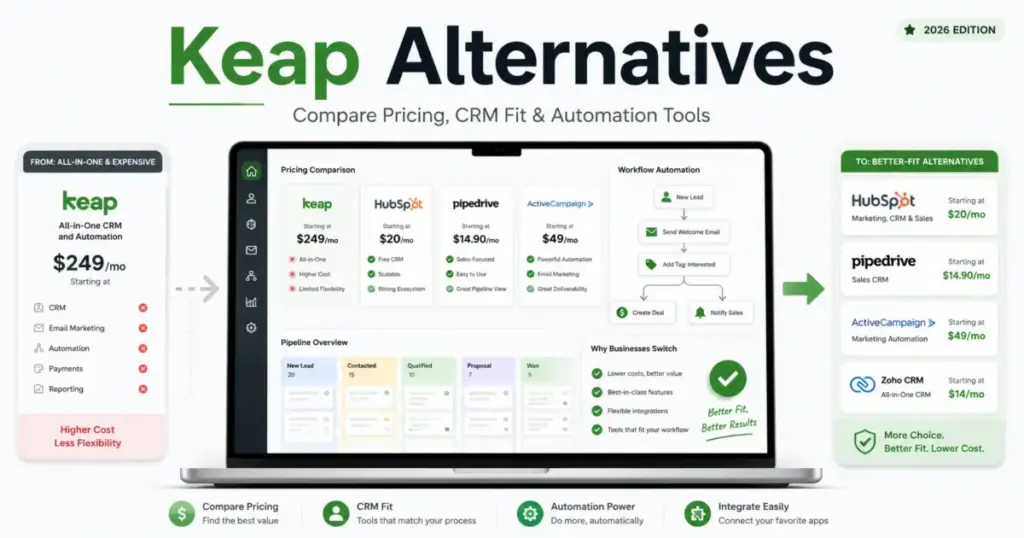
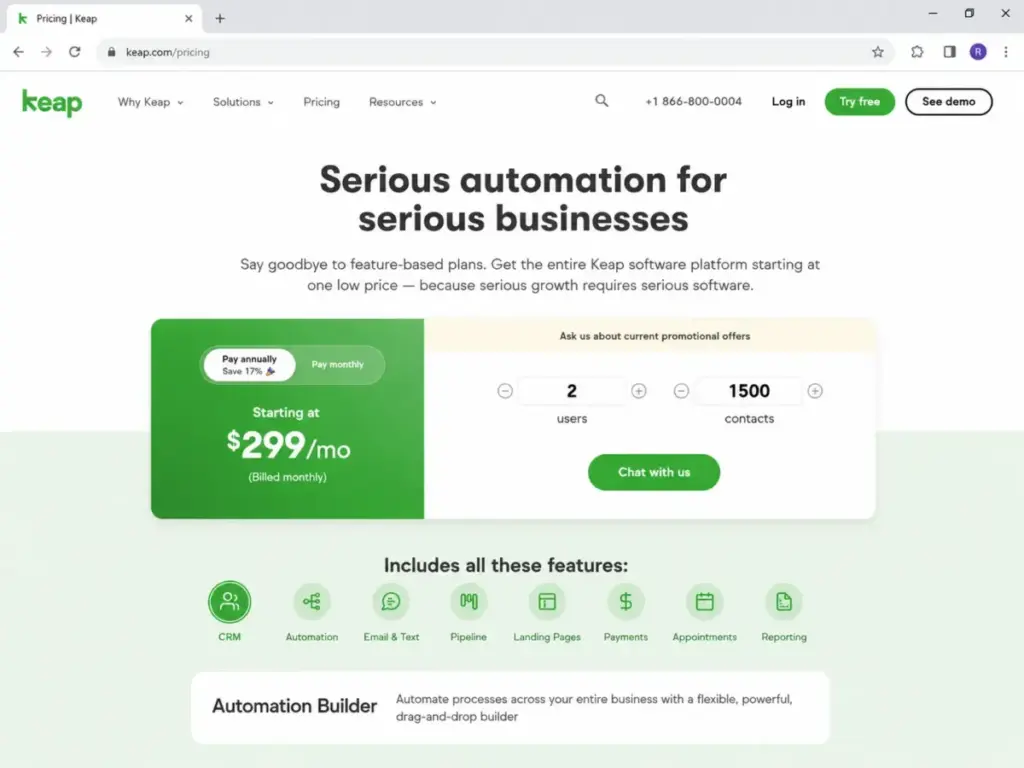
Keap starts at $299/month. If you are looking for Keap alternatives to escape this high price floor, you are not alone.
During my years of consulting, I have seen many small businesses buy Keap expecting simple marketing automation, only to end up paying for a heavy payment engine, business phone lines, and appointment tools they do not use.
Before committing your budget, you must check if you actually need Keap’s all-in-one suite or if a modular setup would serve you better.
In this guide, I will compare the 10 best CRM software options by switching trigger, practical cost, feature gates, and migration difficulty.
Quick Verdict: Best Keap Alternatives by Switching Trigger
The table below maps the best alternatives to Keap based on the exact reason you are leaving the platform.
| If you are leaving Keap because… | Best alternative | Why |
|---|---|---|
| The entry price is too high | Zoho CRM | Offers standard contact management and basic workflows starting at $14/user/month. |
| You only need advanced email marketing | ActiveCampaign | Provides deep email automation builder and list segmentation without operational overhead. |
| You run a marketing agency | HighLevel | Built specifically for agencies with unlimited sub-accounts and client billing tools. |
| You want a direct all-in-one replacement | Ontraport | Closest layout match to Keap with custom objects, courses, membership logic, and built-in payments. |
| You want simple sales pipeline tracking | Pipedrive | Focuses purely on visual deal stages, activity reminders, and sales representative adoption. |
| You need a free starting point | HubSpot Sales Hub | Generous free tools with options to upgrade to a promotional $10/user/month Starter tier. |
| You want to scale to enterprise systems | Salesforce CRM | Unmatched custom database capabilities, AppExchange integrations, and advanced user controls. |
| You need cheap built-in sales phone lines | Freshsales | Growth tier starting at$9/user/month annually includes built-in phone, email, and pipelines. |
What this means: If you are escaping Keap, do not just search for the cheapest CRM. Choose the tool that addresses your specific exit reason. A sales team that needs visual deal tracking will hate a tool built for email marketing newsletters.
The Keap Problem Map: Why Teams Leave the Platform
Most buyers assume Keap is a simple tool for contact management. In reality, it is a complex business platform that forces you into a specific workflow. After evaluating 40+ CRM platforms for SaaSZap, I can tell you that teams usually look for alternatives due to four specific barriers. Understanding what CRM software does at an architectural level helps explain why.
First, the pricing model is a massive entry floor. Keap’s entry tier is $299/month. This flat rate includes a limited contact tier. If your list grows, your monthly bill jumps, even if your team size remains the same.
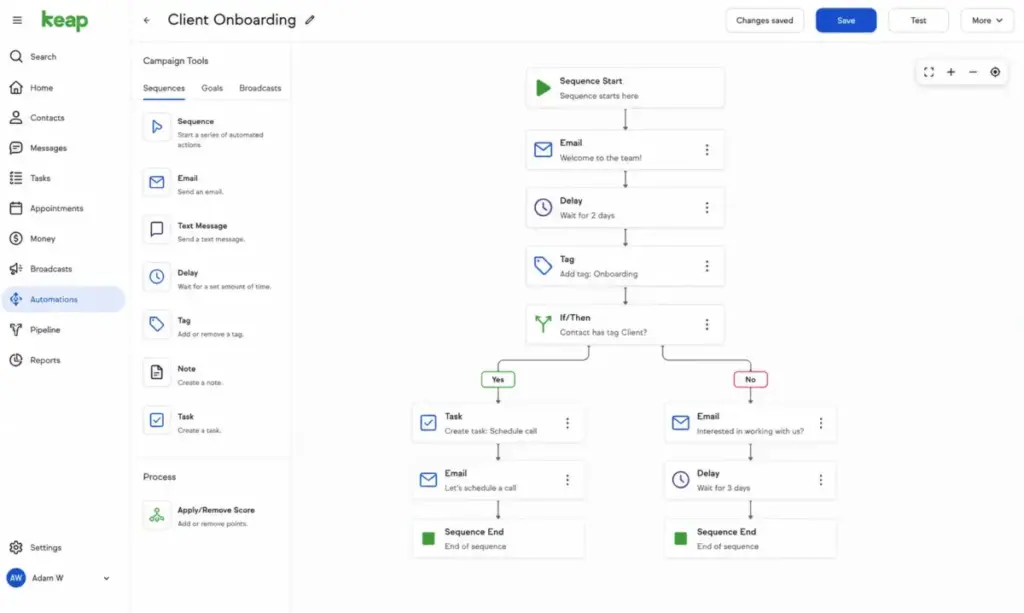
Second, the operational architecture is highly coupled. Keap is not a single tool. It is a platform of interconnected modules sharing a customer database. It bundles landing pages, invoice generators, business phone systems, text marketing, and appointments. Setting this up requires significant time. For teams that only need an email builder or a sales pipeline, this bundle is overkill.
Third, text and voice marketing tiers carry hidden usage costs. While Keap includes local phone numbers, text messages outside your plan allowance trigger overage charges.
Finally, trial accounts face strict restrictions. If you test Keap, you will face restrictive trial send limits and complex DKIM setup requirements. These barriers make it hard to evaluate the email delivery engine before paying. You can read my full Keap CRM review to understand these limitations.
Alternatives That Solve Keap’s High Entry Price
These four options are built for small teams that want to escape Keap’s $299/month price floor. They offer entry paths that cost a fraction of Keap’s flat rate.
Zoho CRM: Best Budget CRM

Zoho CRM is the strongest Keap alternative for teams leaving because the entry price is too high for simple contact management.
Pricing starts at $14/user/month billed annually, with a free forever plan for up to 3 users. The practical tier for most switchers is the Standard plan because it unlocks custom fields, multiple pipelines, and automated workflows.
It does better than Keap in database customization. You can customize fields, modules, and layouts without paying a high flat rate.
The tradeoff is the interface. It feels dated and requires clicking through multiple menus to perform basic tasks.
Plus, Zoho’s free plan is a conversion trap. It is limited to 3 users and locks out advanced customization, forcing growing teams to upgrade to paid tiers quickly. You can read my full Zoho CRM review to see how the pricing scales.
Best for:
Small B2B teams needing custom layouts.
Businesses wanting to build a CRM database on a budget.
Teams of 3 to 10 users.
Avoid if:
You want advanced email marketing campaigns built natively.
You need immediate customer support without purchasing a premium support package.
Migration difficulty: Medium
Verdict: Choose Zoho CRM if you want a customizable CRM database without the high flat-rate cost of Keap.
Brevo: Best Low-Cost Email and CRM Bundle

Brevo is the strongest Keap alternative for teams leaving because contact-based pricing escalates too quickly.
Pricing starts at $0/month for a basic free tier, with paid plans scaling by email send volume rather than contact list size. The practical tier for most switchers is the Starter or Business plan because it removes the daily sending limits and unlocks marketing automation.
It does better than Keap in pricing predictability. Since Brevo charges by email sends, you can store unlimited contacts without paying contact overages.
The tradeoff is the sales pipeline. The pipeline tool is very basic and lacks advanced forecasting or automatic deal actions. Read my detailed review of Brevo for a complete breakdown of its features.
Best for:
High-volume newsletter senders.
Small ecommerce brands with large lists of unengaged contacts.
Teams needing basic transactional emails.
Avoid if:
You need a dedicated B2B sales pipeline with phone call tracking.
Your sales reps make outbound calls directly from the CRM.
Migration difficulty: Medium
Verdict: Choose Brevo if you have a large contact list and want to pay for email volume instead of contact database size.
Mailchimp: Best for Simple Newsletter and Ecommerce Campaigns

Mailchimp is the strongest Keap alternative for teams leaving because Keap’s campaign builder is too complex for simple newsletters.
Pricing starts at $0/month for a limited free plan under 250 contacts. The practical tier for most switchers is the Standard plan because it unlocks multi-step customer journeys, A/B testing, and send-time optimization.
It does better than Keap in ecommerce integrations. It connects natively to Shopify and WooCommerce, making it simple to trigger abandoned cart sequences.
The tradeoff is contact limits. Mailchimp charges by total contacts, including unsubscribed addresses, which can trigger surprise bills. My review of Mailchimp covers these overage risks in detail.
Best for:
Solopreneurs sending weekly newsletters.
Small ecommerce shops needing basic automation.
Creators needing simple landing page forms.
Avoid if:
You need a dedicated sales pipeline for B2B reps.
You want to manage invoices and payments natively inside the CRM.
Migration difficulty: Low
Verdict: Choose Mailchimp if you want an easy email campaign builder and do not need a sales pipeline CRM.
Freshsales: Best Value Sales CRM

Freshsales is the strongest Keap alternative for teams leaving because B2B sales reps need built-in communication tools without all-in-one overhead.
Pricing starts at $9/user/month billed annually for the Growth plan, with a free basic plan for up to 3 users. The practical tier for most switchers is the Pro plan at $39/user/month because it unlocks multiple pipelines, AI lead scoring, and sales sequences.
It does better than Keap in sales communication. The built-in phone and email system allows reps to dial and email leads directly from the pipeline view.
The tradeoff is marketing depth. The marketing automation module is separate and requires an additional subscription to match Keap’s campaign depth. Read my Freshsales CRM review for a complete breakdown.
Best for:
5-person B2B sales teams doing outbound calling.
Teams that need to track lifecycles and deals.
Startups wanting built-in phone systems.
Avoid if:
You want to build complex membership sites or host courses.
You need native invoice and physical product payment tools.
Migration difficulty: Low
Verdict: Choose Freshsales if you want an affordable sales CRM with built-in calling tools.
Alternatives That Solve Keap’s All-in-One Complexity
These options focus on doing one thing exceptionally well. They replace Keap’s complex multi-module layout with clean interfaces.
ActiveCampaign: Best for Email Automation Depth

ActiveCampaign is the strongest Keap alternative for teams leaving because they want deep email sequences without paying for business phone lines and invoices.
Pricing starts around $15/month for contact-based plans, with a 14-day free trial. The practical tier for most switchers is the Professional plan because it unlocks split automations, predictive sending, and site personalization.
It does better than Keap in customer journey building. The visual automation builder is fast and makes it simple to map complex behavioral tags.
The tradeoff is operational features. There are no native invoicing, physical product payment, or scheduling tools. My ActiveCampaign CRM review has more details.
Best for:
B2B companies with long email nurturing cycles.
Creators needing advanced tag-based segmentation.
Teams that already have separate payment systems.
Avoid if:
You want a native CRM database that tracks physical sales rep activities out of the box.
You need a built-in business phone line.
Migration difficulty: Medium
Verdict: Choose ActiveCampaign if your primary goal is building advanced email campaigns without the billing overhead of Keap.
HighLevel: Best for Agencies

HighLevel is the strongest Keap alternative for agencies leaving because they need white-label branding and multiple client workspaces.
Pricing starts at $97/month for the Starter plan, with an Unlimited plan available at $297/month. The practical tier for agency owners is the Unlimited plan because it allows you to create unlimited client sub-accounts.
It does better than Keap in client management. Agencies can build templates for CRM funnels and push them to client sub-accounts in one click.
The tradeoff is setup complexity. The platform has a massive feature set that can confuse small business clients if not customized properly.
Best for:
Marketing agencies managing multiple client accounts.
Consultants wanting to resell CRM software under their own brand.
Teams needing unlimited seats and contacts at a flat rate.
Avoid if:
You are a solo small business owner who wants a simple setup.
You need highly polished native email templates without editing HTML.
Migration difficulty: High
Verdict: Choose HighLevel if you are an agency owner needing white-label capabilities and client sub-accounts.
Pipedrive: Best Pipeline-First CRM

Pipedrive is the strongest Keap alternative for teams leaving because their sales representatives find Keap’s interface too hard to use daily.
Pricing starts at $14.90/user/month billed annually, with a 14-day free trial. The practical tier for most switchers is the Advanced plan because it unlocks automated email sequences and meeting scheduler links.
It does better than Keap in pipeline management. The drag-and-drop Kanban deal board is highly visual and loads quickly.
The tradeoff is marketing campaign depth. Pipedrive is a sales tool. You must buy the Campaigns add-on to send bulk newsletters. Learn more in my Pipedrive CRM review.
Best for:
5-person sales teams focused on deal staging.
Reps who want to log calls and emails quickly.
Teams migrating from basic spreadsheets.
Avoid if:
You need complex marketing automations based on web page visits.
You want to host member courses natively.
Migration difficulty: Low
Verdict: Choose Pipedrive if your sales reps need a clean visual tool to track active pipeline deals.
Alternatives That Solve Keap’s Platform and Scaling Limitations
These platforms are built for growing organizations that have outgrown Keap’s SMB database constraints or want a more robust ecosystem.
HubSpot Sales Hub: Best Free-to-Scale CRM

HubSpot Sales Hub is the strongest Keap alternative for teams leaving because they want a modern CRM database that can scale with their company’s growth. If the decision is specifically between HubSpot’s free-to-scale CRM and Keap’s bundled automation, compare the HubSpot vs Keap tradeoffs first.
Pricing starts at $0/month for basic free tools. The practical tier for most switchers is the Starter tier, which commonly costs $10/user/month promotional or $20/user/month list. Professional and Enterprise tiers scale to higher price points.
It does better than Keap in user interface design. The dashboard is modern, clean, and requires almost no team training to start using.
The tradeoff is cost at scale. If you need advanced custom reporting or automation sequences, you must upgrade to Professional, which requires a steep price jump.
HubSpot’s free tier acts as an onboarding hook. It gets your data into the system, but once you need automated sequences, the jump to Professional costs $100/seat/month. You can check my HubSpot CRM review to understand this scaling cost.
Best for:
Growing startups expecting to hire more sales reps.
Teams wanting a massive integration marketplace.
Small businesses needing a clean free starting point.
Avoid if:
You want advanced workflow automation at a low monthly cost.
Your finance team will reject steep price increases as you add seats.
Migration difficulty: Medium
Verdict: Choose HubSpot Sales Hub if you want an easy onboarding path and a large app ecosystem to support future growth.
Ontraport: Best Direct Keap-Style Replacement

Ontraport is the strongest Keap alternative for teams leaving because they want to preserve Keap’s all-in-one logic without its specific interface limitations.
Pricing is dynamic across plans, but they offer paid SMB tiers with a 14-day free trial. You should check the official pricing page to confirm current plan rates for your contact volume.
It does better than Keap in database architecture. The custom objects engine is highly flexible, allowing you to link contacts to companies, partners, and custom deals.
The tradeoff is the learning curve. Like Keap, the interface has a complex configuration that requires time to master.
Best for:
Course creators hosting membership sites.
Consultants selling digital products with complex billing cycles.
Small businesses needing custom database objects.
Avoid if:
You only need a basic contact list for occasionally sending emails.
You want a plug-and-play setup that works in 10 minutes.
Migration difficulty: Medium
Verdict: Choose Ontraport if you want an all-in-one platform that combines custom database tracking, payments, and automation.
Salesforce Starter Suite: Best Enterprise Growth Path

Salesforce Starter Suite is the strongest Keap alternative for teams leaving because they expect to outgrow small-business tools and need enterprise database controls.
Pricing starts at $25/user/month billed annually. The practical tier is this Starter Suite, though teams can upgrade to Pro Suite at $100/user/month as sales operations grow.
It does better than Keap in system customization. The Salesforce database can store highly complex data models and custom layouts for different roles.
The tradeoff is administration. You will likely need a certified administrator or developer to build advanced workflows. Read my Salesforce CRM review to see if you have the technical capacity.
Best for:
B2B startups wanting to start on the Salesforce database early.
Companies that must meet strict security and compliance standards.
Teams needing to connect CRM to custom databases.
Avoid if:
You do not have the technical resources to manage system configuration.
You want simple, pre-built small business email campaigns.
Migration difficulty: High
Verdict: Choose Salesforce Starter Suite if you want an enterprise-grade database foundation that your team will never outgrow.
Pricing Comparison: Starting Price vs Practical Tier
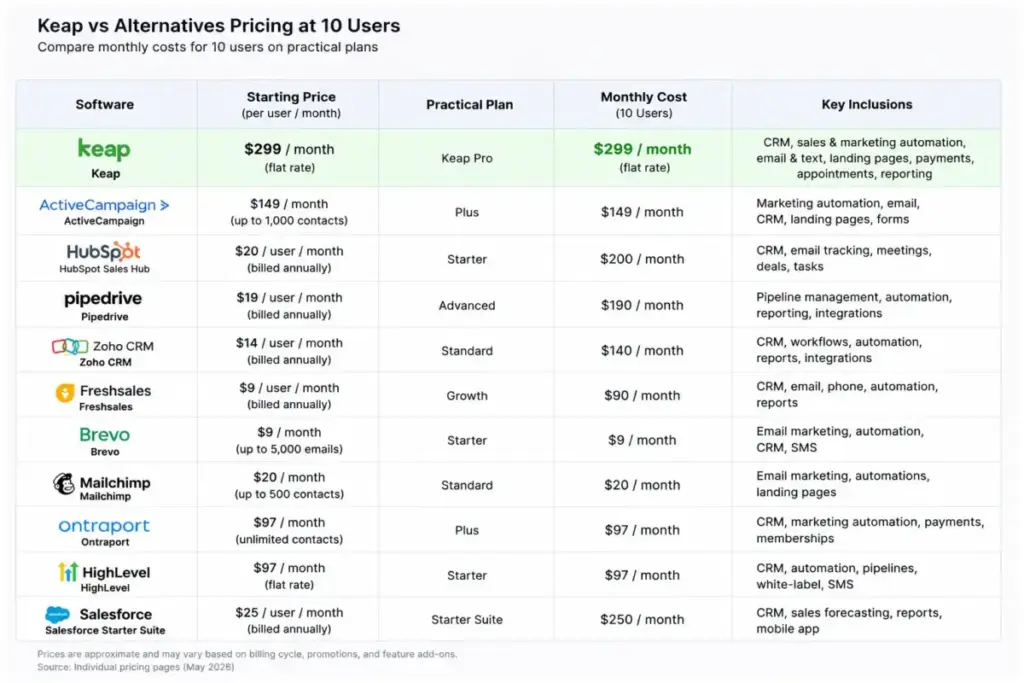
Understanding CRM cost requires looking past starting prices. I built this comparison model to show what a team actually pays compared to the advertised rates.
Pricing Comparison: Starting Price vs Practical Tier
Understanding CRM cost requires looking past starting prices. I built this comparison model to show what a team actually pays compared to the advertised rates.
| Product | Starting Price | Practical Tier | 10-User Cost (Monthly) | Free Plan | Trial |
|---|---|---|---|---|---|
| Keap | $299/month | Growth | Not seat-based (platform rate) | None | Yes |
| ActiveCampaign | $15/month | Professional | Contact-based (varies by list) | None | 14-day trial |
| HubSpot Sales Hub | $0/month | Starter | $100/month (promo) or $200/month (list) | Free | Free trial |
| HighLevel | $97/month | Starter | $97/month (unlimited users) | None | 14-day trial |
| Ontraport | Dynamic pricing | SMB Tiers | Varies by contact volume | None | 14-day trial |
| Zoho CRM | $0/month | Standard | $140/month (annually) | Free (3 users) | Free trial |
| Pipedrive | $14.90/user/month | Essential | $149/month (annually) | None | 14-day trial |
| Brevo | $0/month | Starter/Business | $0 (if free) or send-based | Free | Free plan |
| Mailchimp | $0/month | Standard | Contact-based (varies by list) | Free (250 contacts) | Free plan |
| Salesforce Starter | $25/user/month | Starter Suite | $250/month (annually) | None | Start free option |
| Freshsales | $0/month | Growth | $90/month (annually) | Free (3 users) | 21-day trial |
Pricing verified as of May 26, 2026. Rates are subject to change. Seat-based estimates do not include local taxes, SMS credits, or optional AI add-ons.
What this means: Keap’s $299/month entry price makes it one of the most expensive starting options on the market. For a 10-user team, switching to a seat-based tool like Freshsales or Zoho CRM can save you over $150/month while providing better pipeline tracking. However, if your database has over 50,000 contacts, seat-based options with contact add-ons can become more expensive than Keap’s flat rate.
Feature Gate Comparison: What You Actually Get by Plan
Advertised features are often gated behind higher plans. This table shows where each alternative unlocks key features.
| Product | Automation Gates | Custom Reporting Gates | API Access Gates | Multiple Pipelines | Phone/SMS Gates |
|---|---|---|---|---|---|
| Keap | Included on entry | Included on entry | Included on entry | Yes | Included on entry |
| ActiveCampaign | Standard (5-action limit) | Professional tier | Standard tier | Yes | Varies by plan |
| HubSpot Sales Hub | Professional tier | Professional tier | Free tier | Starter tier | Starter tier |
| HighLevel | Included on entry | Included on entry | Included on entry | Yes | Usage-based |
| Ontraport | Included on entry | Included on entry | Included on entry | Yes | Included on entry |
| Zoho CRM | Standard tier | Professional tier | Standard tier | Standard tier | Standard tier |
| Pipedrive | Advanced tier | Professional tier | Essential tier | Essential tier | Advanced tier |
| Brevo | Starter tier | Business tier | Free tier | Starter tier | Separate credit purchase |
| Mailchimp | Standard tier | Standard tier | Standard tier | Standard tier | Add-on purchase |
| Salesforce Starter | Starter Suite | Starter Suite | Pro Suite | Starter Suite | Pro Suite |
| Freshsales | Growth tier | Pro tier | Growth tier | Growth tier | Growth tier |
What this means: On paper, tools like HubSpot and Pipedrive look cheaper than Keap. But if you need automated sequences, HubSpot gates them behind Professional at $100/seat/month and Pipedrive gates them behind Advanced at $27.90/seat/month. If you have 10 reps, those gates push your bill to $1,000/month for HubSpot or $279/month for Pipedrive. Always check where your must-have features are gated before making a decision.
Migration Risk Assessment: Switching Difficulty and Risks
Moving your data out of Keap carries operational risks. I created this difficulty matrix to help you estimate the time and risks of the CRM migration process.
| Alternative | Migration Difficulty | Main Risk | Typical Timeline |
|---|---|---|---|
| Pipedrive | Low | Custom field matching errors | 1 to 2 weeks |
| Freshsales | Low | Phone number porting delays | 1 to 2 weeks |
| Mailchimp | Low | Tag structures breaking | 1 to 2 weeks |
| Zoho CRM | Medium | Multi-pipeline data mismatch | 2 to 4 weeks |
| ActiveCampaign | Medium | Automated sequence logic rebuild | 3 to 5 weeks |
| Brevo | Medium | Contact list opt-in validation | 2 to 4 weeks |
| HubSpot | Medium | Custom layout configuration time | 3 to 5 weeks |
| Ontraport | Medium | Custom object linkage errors | 4 to 6 weeks |
| HighLevel | High | Funnel rebuild and agency setup | 4 to 8 weeks |
| Salesforce | High | Database structure mapping failures | 6 to 12 weeks |
Migration difficulty is an editorial estimate based on data model complexity, workflow rebuild effort, integration requirements, and setup depth.
What this means: If you use Keap purely as a contact database, migrating to Pipedrive or Freshsales is fast. You can export a CSV and import it within a few hours. But if you have spent years building custom campaigns in Keap, migrating to ActiveCampaign or Ontraport will require rebuilding every sequence from scratch. In my consulting work, I always tell clients to budget $2,000 to $5,000 for developer support if they have more than 20 active marketing campaigns to rebuild.
How to Choose the Right Keap Alternative
To select the correct alternative, ask your team these four diagnostic questions:
- What is your list size compared to your user count? If you have a 50,000-contact newsletter list and only 2 users, avoid seat-based CRMs. Look at Brevo or ActiveCampaign. If you have 10 sales reps and only 500 B2B leads, choose Pipedrive or Freshsales.
- Do you need native payments and invoicing? If you sell physical products or manage subscription courses, Ontraport is the direct replacement. If you already use Stripe or QuickBooks, you can choose a simpler sales CRM.
- What is your technical management capacity? Do not choose Salesforce or HighLevel if you do not have an in-house administrator or agency developer. You will end up paying for a system that your team cannot configure.
- Which features can you compromise on? Write down your must-have list. If you do not need text marketing or business phone systems, you can save significant money by switching to a standard sales CRM.
Under the broad category of the best CRM for small business options, making a choice is all about understanding what your business actually does.
Which Keap Alternative Should You Avoid?
Avoid Salesforce if you are a solo consultant or a team under 5 people without technical help. Salesforce is a powerful database, but setting up basic email campaigns requires significant configuration. I have seen small teams spend thousands of dollars on setup consultants only to abandon the system because data entry took too long.
Similarly, avoid HighLevel if you are not running an agency or managing multiple client brands. The interface is crowded with tools for reputation management, funnel building, and client portals. For a standard small business, this layout adds unnecessary daily friction.
The Alternative Nobody Mentions
Ontraport is often overlooked because it does not have the massive marketing budget of HubSpot or Mailchimp. However, it is the most logical replacement for Keap switchers who still want an all-in-one system.
It handles custom objects better than Keap. For instance, you can link a contact to a company, a course registration, and a partner agent. The visual automation builder is clean and allows you to test paths without hitting credit limits. If you want to keep your payment processing, landing pages, and email campaigns under one login, it is the underdog pick worth evaluating.
When to Stay with Keap
Do not leave Keap if your entire sales system relies on its native payments and billing engine. Rebuilding subscription billing cycles and invoice automations in a new tool can cause payment processing downtime.
Plus, Keap provides US-based phone support and 24/7 chat support on all paid plans. Many cheaper alternatives gate phone support behind expensive enterprise tiers. If your team relies on calling a support rep to fix database issues quickly, staying with Keap is the safer operational decision.
Final Verdict: Best Keap Alternative for Most Teams
If your team is leaving Keap because the $299/month price floor is too expensive, the right choice depends on your sales model:
- Choose Pipedrive if you are a B2B sales team that needs visual deal tracking and your reps want a clean pipeline tool.
- Choose ActiveCampaign if your business relies on automated email sequences and customer segment tagging.
- Choose HubSpot Sales Hub if you want a modern CRM database with a large integration marketplace and room to scale.
- Choose Ontraport if you want to keep payments, landing pages, and custom objects under one login.
Before starting any CRM migration process, review the CRM migration guide to prepare your data import and avoid database mapping errors.
FAQ
What is the cheapest alternative to Keap CRM?
Freshsales and Zoho CRM are the cheapest alternatives. Freshsales starts at $9/user/month billed annually, and Zoho CRM Standard starts at $14/user/month annually. Both tools also offer limited free plans for up to 3 users. These plans are much cheaper than Keap’s starting price of $299/month.
Does HubSpot replace Keap?
Yes, HubSpot can replace Keap. HubSpot Sales Hub provides contact management, pipeline tracking, and meeting schedulers. However, while HubSpot offers a free tier, unlocking advanced automations and custom reporting requires upgrading to the Professional tier. This upgrade can quickly become more expensive than Keap’s flat rate.
Which Keap alternative has a free plan?
HubSpot Sales Hub, Zoho CRM, Brevo, Freshsales, and Mailchimp all offer free plans. However, each free plan carries strict limits. For instance, Mailchimp’s free plan caps at 250 contacts, and Brevo’s free plan limits email sending to 300 messages per day.
Can I migrate my contacts from Keap easily?
Yes, exporting contact lists as CSV files from Keap is straightforward. However, you cannot export automated campaign flows or email templates. You must rebuild your marketing automation logic and custom field layouts in your new CRM.
Is ActiveCampaign better than Keap for email marketing?
Yes. ActiveCampaign offers more email automation depth and cleaner segmentation tools than Keap. However, ActiveCampaign lacks Keap’s native invoice generation, scheduling tools, and built-in business phone lines. You must use integrations to connect those features.
Why do people leave Keap?
The most common reasons are the $299/month starting price, text marketing usage overages, and the complexity of managing an all-in-one system. Many teams realize they only need a simple pipeline CRM or email newsletter builder, making Keap’s bundled features unnecessary.