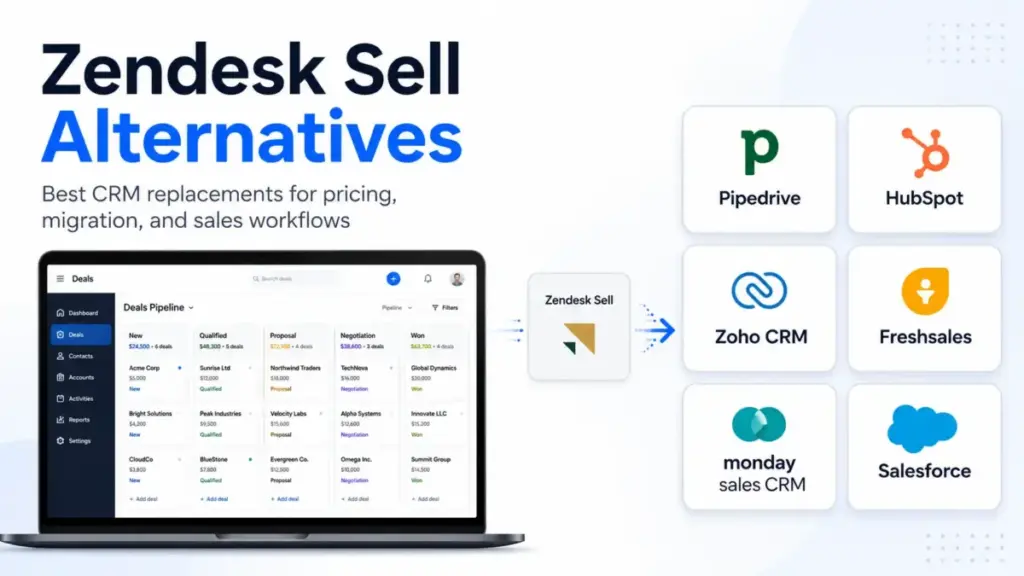
Zendesk Sell Team starts at $19 per agent, but the real cost of sticking with it is the looming August 31, 2027 retirement deadline.
If your sales organization has not planned a replacement path, choosing the best Zendesk Sell Alternatives is now urgent.
A standard CSV export will not copy your historical sales activities. Standard exports leave behind email threads, call logs, and appointment records.
I have spent years helping sales operations managers switch platforms. In my experience, the best CRM is the one that prevents data loss. The right tool must fit your team’s everyday sales process.
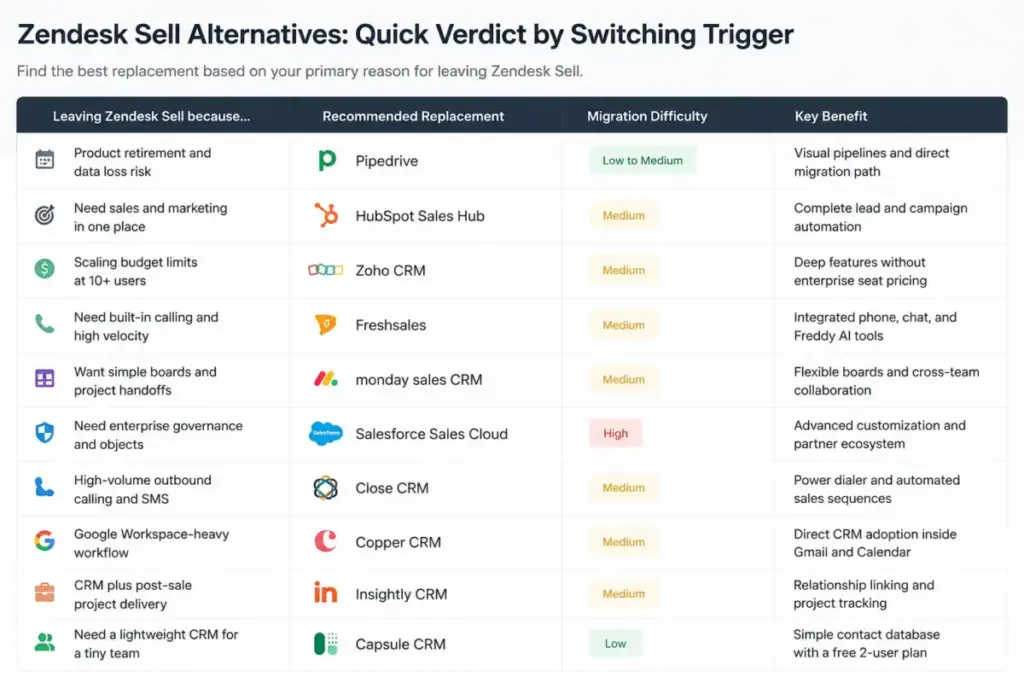
Zendesk Sell Alternatives: Quick Verdict by Switching Trigger
The choice of a replacement depends on your primary reason for leaving. The table below matches specific sales operational pain points to recommended replacement tools.
| Leaving Zendesk Sell because… | Recommended Replacement | Migration Difficulty | Key Benefit |
|---|---|---|---|
| Product retirement and data loss risk | Pipedrive | Low to Medium | Visual pipelines and direct migration path |
| Need sales and marketing in one place | HubSpot Sales Hub | Medium | Complete lead and campaign automation |
| Scaling budget limits at 10+ users | Zoho CRM | Medium | Deep features without enterprise seat pricing |
| Need built-in calling and high velocity | Freshsales | Medium | Integrated phone, chat, and Freddy AI tools |
| Want simple boards and project handoffs | monday sales CRM | Medium | Flexible boards and cross-team collaboration |
| Need enterprise governance and objects | Salesforce Sales Cloud | High | Advanced customization and partner ecosystem |
| High-volume outbound calling and SMS | Close CRM | Medium | Power dialer and automated sales sequences |
| Google Workspace-heavy workflow | Copper CRM | Medium | Direct CRM adoption inside Gmail and Calendar |
| CRM plus post-sale project delivery | Insightly CRM | Medium | Relationship linking and project tracking |
What this means:
If you want the easiest pipeline-first transition, Pipedrive is the best fit. If you want a complete marketing and service ecosystem, choose HubSpot. For teams with heavy outbound calling needs, Close CRM offers the best velocity. Do not select Salesforce unless you have a dedicated system administrator.
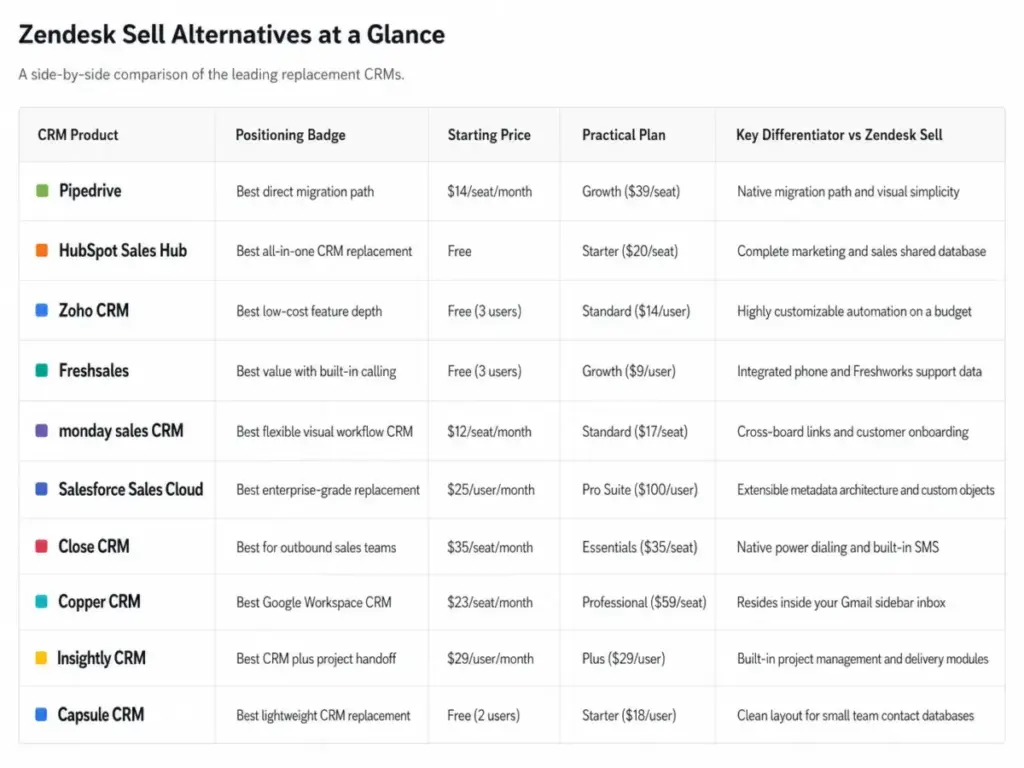
Zendesk Sell Alternatives at a Glance
For a side-by-side comparison, the table below highlights how each candidate positions itself against the competition.
| CRM Product | Positioning Badge | Starting Price | Practical Plan | Key Differentiator vs Zendesk Sell |
|---|---|---|---|---|
| Pipedrive | Best direct migration path | $14/seat/month | Growth ($39/seat) | Native migration path and visual simplicity |
| HubSpot Sales Hub | Best all-in-one CRM replacement | Free | Starter ($20/seat) | Complete marketing and sales shared database |
| Zoho CRM | Best low-cost feature depth | Free (3 users) | Standard ($14/user) | Highly customizable automation on a budget |
| Freshsales | Best value with built-in calling | Free (3 users) | Growth ($9/user) | Integrated phone and Freshworks support data |
| monday sales CRM | Best flexible visual workflow CRM | $12/seat/month | Standard ($17/seat) | Cross-board links and customer onboarding |
| Salesforce Sales Cloud | Best enterprise-grade replacement | $25/user/month | Pro Suite ($100/user) | Extensible metadata architecture and custom objects |
| Close CRM | Best for outbound sales teams | $35/seat/month | Essentials ($35/seat) | Native power dialing and built-in SMS |
| Copper CRM | Best Google Workspace CRM | $23/seat/month | Professional ($59/seat) | Resides inside your Gmail sidebar inbox |
| Insightly CRM | Best CRM plus project handoff | $29/user/month | Plus ($29/user) | Built-in project management and delivery modules |
| Capsule CRM | Best lightweight CRM replacement | Free (2 users) | Starter ($18/user) | Clean layout for small team contact databases |
What this means:
These ten platforms span from simple sales databases to highly complex enterprise CRM engines. Identify whether you need a dedicated sales-only pipeline tool like Pipedrive or a broad suite like HubSpot. Your choice will dictate the structure of your customer relationships.
The Zendesk Sell Problem Map
Zendesk announced that Zendesk Sell will retire on August 31, 2027. You can verify this timeline on the Zendesk Sell official page. This decision leaves customers in the dark. Many users face uncertainty about long-term product updates.
Pricing is another frequent complaint. The entry plan starts at $19 per agent per month (as of May 2026). However, the entry tier gates key features. Advanced automation and lead scoring require the Growth plan at $55 per agent per month. Professional features cost $115 per agent per month. These price steps surprise small teams.
A verified reviewer on G2 noted that “some features are locked behind higher-tier plans.” You can read these comments on the Zendesk G2 review page. This gating creates budget pressure.
Another reviewer explained that “Zendesk’s do-it-yourself approach to their product leaves customers in the dark.”
Data portability is the biggest hidden migration risk. When you export data, you get basic contacts and deals. You do not get historical timeline events. You lose email histories and call notes. This loss destroys the context of old leads. If you plan to switch, read a CRM migration guide to protect your records.
The table below lists the core strengths and limitations of Zendesk Sell.
| Zendesk Sell Strengths | Zendesk Sell Limitations |
|---|---|
| Connected to Zendesk support ecosystem | August 31, 2027 retirement deadline |
| Simple contact and deal management | Advanced automations locked behind high tiers |
| Integrated sales email and call tracking | High risk of activity history loss on export |
| Native reporting dashboards for sales | No free plan tier for small teams |
What this means:
Zendesk Sell is a strong sales CRM for teams already using Zendesk Support. However, the retirement deadline makes replacement planning unavoidable. You must find an alternative that preserves your data and fits your budget.
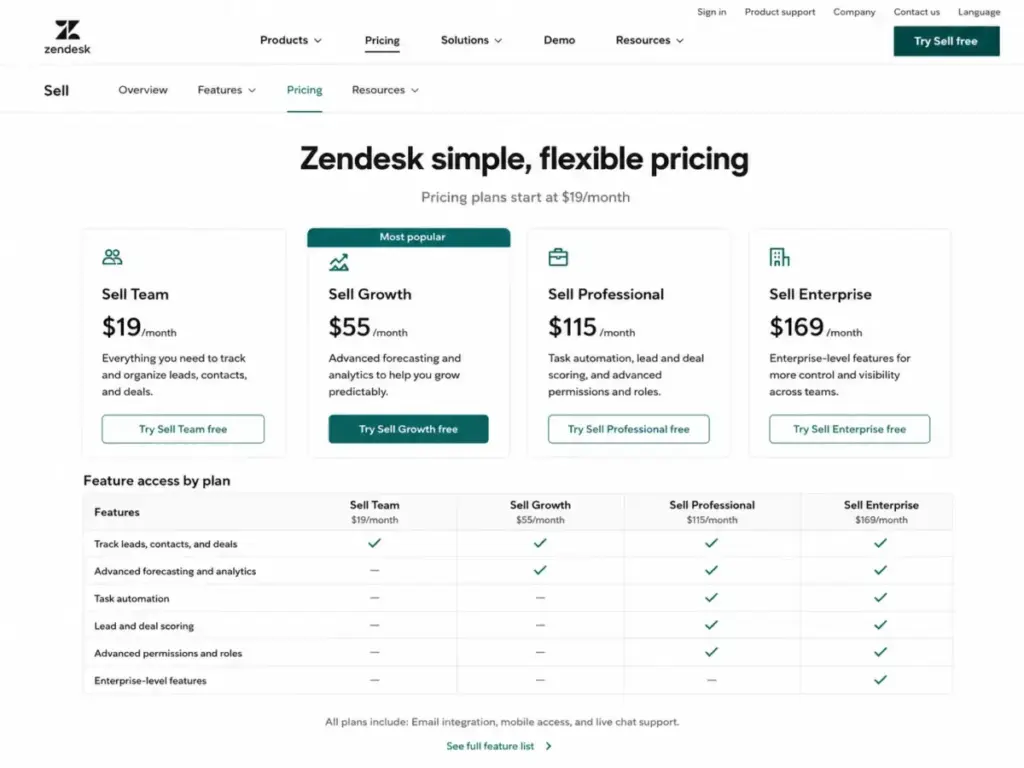
To understand the replacement market, we must look at what CRM software actually does to support reps.
Alternatives That Fix the Retirement and Migration Blocker
These tools offer the cleanest transition paths for teams leaving Zendesk Sell. They preserve data and match the visual deal workflows.
Pipedrive: Best direct migration path

Pipedrive is the most direct pipeline-first replacement for Zendesk Sell. It focuses entirely on visual sales pipelines. Pipedrive Lite starts at $14 per seat per month billed annually (as of May 2026). The Growth plan is $39 per seat per month. The Premium plan is $59 per seat per month. The Ultimate plan costs $79 per seat per month. You can review these tiers on the Pipedrive official pricing page.
Pipedrive’s database architecture is built around the deal object. Contacts and organizations link to deals as separate records. This structure matches Zendesk Sell’s layout. It makes data mapping simple during migration.
Pipedrive does better than Zendesk Sell in pipeline visualization. It offers clean, drag-and-drop boards. The main tradeoff is marketing automation. Pipedrive requires paid add-ons like LeadBooster and Campaigns. These add-ons raise the real cost.
Pipedrive Hidden Math:
At $14 per seat, Pipedrive Lite costs $140 per month for 10 users. If you add the Campaigns add-on at $16 per month and the LeadBooster add-on at $32 per month, the real bill reaches $188 per month. The pricing page does not highlight these additions.
- Best for: 5-person sales teams focused on visual pipeline tracking.
- Avoid if: You need native help desk and ticket management.
- Migration difficulty: Low to Medium. Pipedrive offers a native import tool for Zendesk Sell.
If you want a detailed review of Pipedrive’s features, read our Pipedrive CRM review.
HubSpot Sales Hub: Best all-in-one CRM replacement

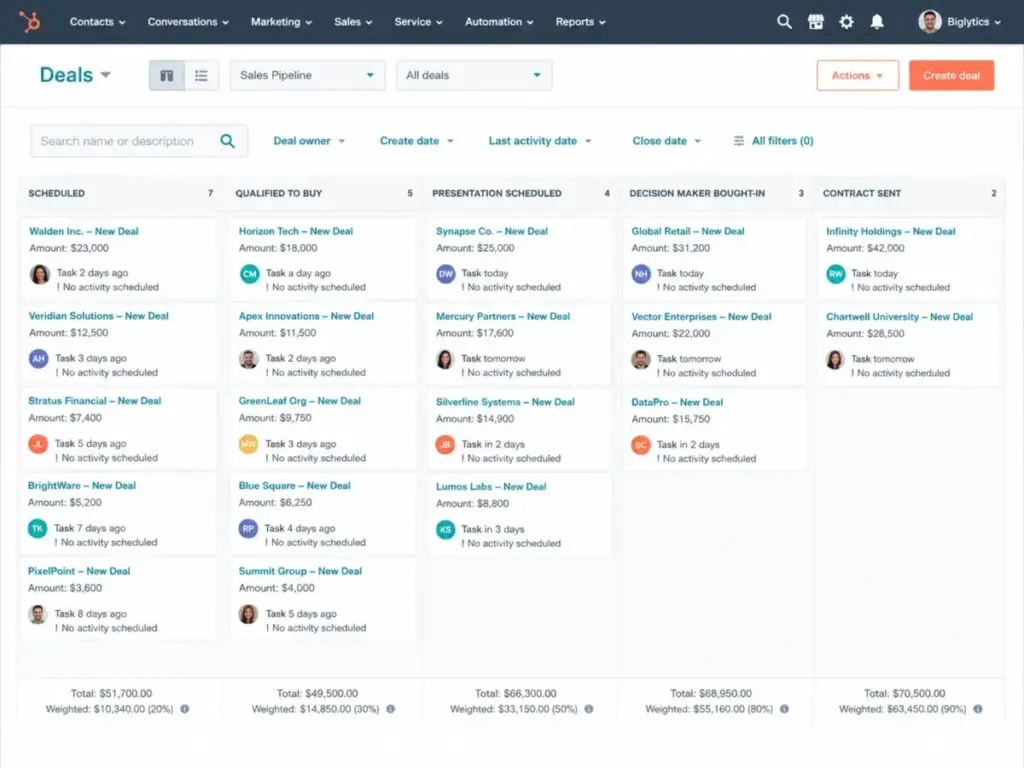
HubSpot is the strongest replacement for teams wanting sales and marketing in one place. HubSpot Sales Hub offers a permanent Free plan. Paid Starter plans start at $10 per seat per month promotional. The regular Starter price is $20 per seat per month (as of May 2026). The Professional plan costs $100 per seat per month. The Enterprise plan costs $150 per seat per month. You can check these options on the HubSpot Sales Hub official page.
HubSpot is built on a single database layer called the Smart CRM. Sales Hub, Marketing Hub, and Service Hub share this database. When a rep updates a contact, the marketing team sees it instantly. This prevents data silos across departments.
HubSpot does better than Zendesk Sell in marketing integrations. It connects emails, landing pages, and meetings. The main tradeoff is the steep price jump. Advanced features like custom objects require the Professional plan.
HubSpot Hidden Math:
HubSpot Starter costs $200 per month for 10 seats. If you need custom reports and deal routing, you must upgrade to Professional. That plan costs $1,000 per month. You also pay a mandatory onboarding fee of $3,000. Your monthly bill increases 5x.
- Best for: Growing SaaS sales teams needing email sequences and shared databases.
- Avoid if: Your budget is strictly under $300 per month for 10 users.
- Migration difficulty: Medium. HubSpot has import templates but mapping custom field history takes time.
For an in-depth analysis of HubSpot’s capabilities, read our HubSpot CRM review.
Alternatives That Solve Outbound Sales and Integration Limits
These tools focus on outbound calling speed and advanced platform architecture.
Salesforce Sales Cloud: Best enterprise-grade replacement

Salesforce is the default choice for large revenue teams. Salesforce Starter Suite costs $25 per user per month (as of May 2026). The Pro Suite costs $100 per user per month. The Enterprise plan is $175 per user per month. You can verify these plans on the Salesforce Sales Cloud pricing page.
Salesforce’s database architecture is highly extensible. It uses metadata-driven customization. You can create custom objects for any business concept. For example, you can link deals to custom partner accounts.
Salesforce does better than Zendesk Sell in database customization. It supports custom objects, advanced forecasting, and validation rules. The main tradeoff is setup complexity. You cannot set up Salesforce alone. It requires certified consultants and implementation fees.
Salesforce Hidden Math:
Salesforce Starter Suite costs $250 per month for 10 users. But most enterprise teams need the Enterprise plan at $175 per user per month. That costs $1,750 per month. Onboarding consultants typically charge $5,000 to $15,000 for setup.
- Best for: 50-person enterprise revenue teams with complex forecasting needs.
- Avoid if: You are a 3-person team without technical help.
- Migration difficulty: High. Data mapping is complex and requires custom API work.
If you are evaluating Salesforce, read our Salesforce CRM review.
Close CRM: Best for outbound sales teams

Close CRM is a sales engagement platform with a CRM database inside. Close Solo starts at $9 per month billed annually (as of May 2026). Multi-user teams need the Essentials plan at $35 per seat per month. The Growth plan is $99 per seat per month. The Scale plan costs $139 per seat per month.
Close’s communication tools are built directly into its database engine. The system does not use external telephony plugins. It routes calls and SMS directly through native servers. This ensures fast dialer performance.
Close does better than Zendesk Sell in outbound velocity. It includes built-in SMS, email sequences, and a power dialer. The main tradeoff is marketing support. Close has no native tools for newsletters or web forms.
- Best for: 10-user outbound SDR teams making 100+ calls per day.
- Avoid if: You manage inbound leads from web forms.
- Migration difficulty: Medium. Close provides migration assistance for teams with 10+ users.
Alternatives That Solve Price-to-Value at Scale
These CRMs provide deep features at lower monthly price points.
Zoho CRM: Best low-cost feature depth

Zoho CRM is a highly customizable database. Zoho offers a Free edition for up to 3 users (as of May 2026). The Standard plan is commonly listed at $14 per user per month billed annually. You can find detailed descriptions on the Zoho CRM official page.
Zoho CRM integrates with the broader Zoho ecosystem. It connects to Zoho Books for accounting and Zoho Desk for customer support. This shared database structure provides complete visibility of the customer lifecycle.
Zoho CRM does better than Zendesk Sell in automation depth. It includes custom workflows, Zoho Zia AI, and inventory tracking. The main tradeoff is interface design. The dashboard looks cluttered. Configuring settings takes many steps.
Zoho CRM Hidden Math:
Zoho Standard costs $140 per month for 10 users. If your team needs AI assistance and advanced forecasting, you must upgrade to Enterprise at $40 per user per month. That costs $400 per month.
- Best for: Budget-conscious teams needing custom modules and workflows.
- Avoid if: You want a clean, simple layout out of the box.
- Migration difficulty: Medium. Zoho offers migration tools, but custom field mapping is required.
To learn more about Zoho’s pricing and features, read our Zoho CRM review.
Freshsales: Best value CRM with built-in communication

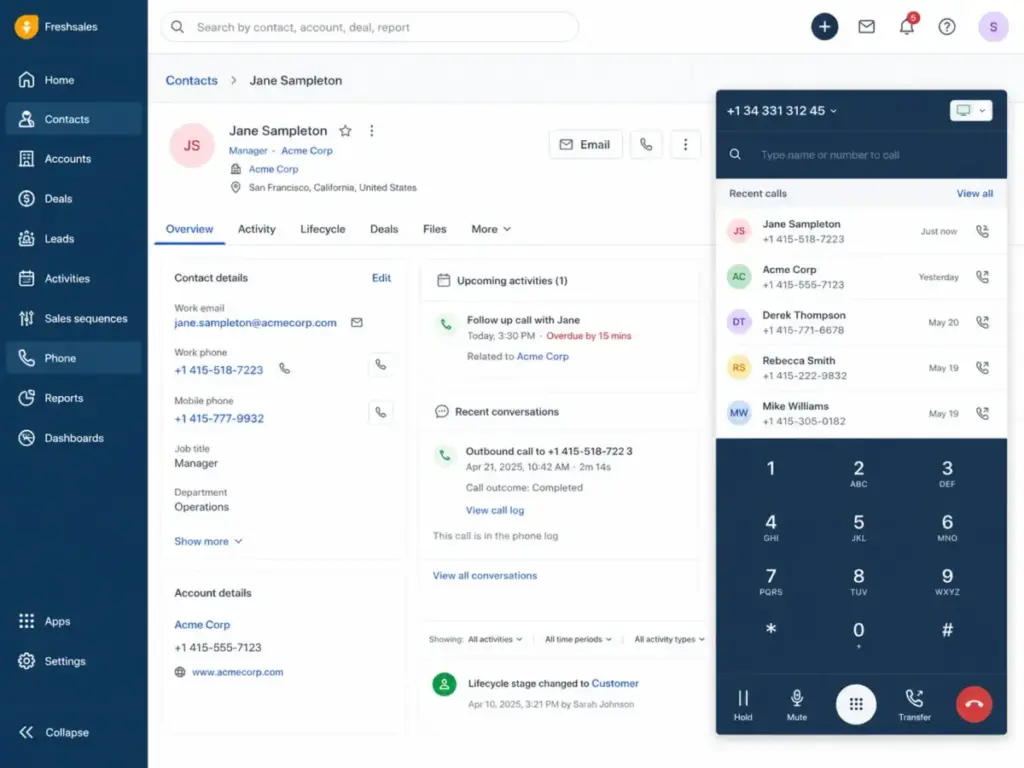
Freshsales is a sales-first CRM from Freshworks. Freshsales has a Free plan for up to 3 users (as of May 2026). The Growth plan starts at $9 per user per month billed annually. The Pro plan is $39 per user per month. The Enterprise plan costs $59 per user per month. You can verify these options on the Freshsales official page.
Freshsales is built on the Freshworks Neo platform. It shares a common data layer with Freshdesk and Freshservice. This unified architecture allows sales reps to view support tickets directly from the deal record.
Freshsales does better than Zendesk Sell in communication tools. It integrates phone, email, and chat directly. The main tradeoff is advanced customization. The Growth plan limits custom modules and roles.
Freshsales Hidden Math:
Freshsales Growth costs $90 per month for 10 users. If you add the Freddy AI Agent and CPQ billing add-ons, the real cost increases by $39 per user. The monthly bill becomes $480.
- Best for: Small sales teams wanting built-in phone lines and simple pipelines.
- Avoid if: You require complex partner management portals.
- Migration difficulty: Medium. Data imports are simple, but API reconnections take time.
Read our detailed Freshsales review for feature scores.
Alternatives That Solve Operational Complexity for SMBs
These platforms prioritize simple layouts and visual work management.
monday sales CRM: Best flexible visual workflow CRM

monday sales CRM is built on top of the monday.com project management board. Basic plans start at $12 per seat per month billed annually (as of May 2026). Plans require a 3-user minimum.
monday sales CRM is a work operating system. Boards contain columns that store text, numbers, dates, and status labels. It links boards together using connection columns. This allows sales boards to pass data directly to project boards.
monday CRM does better than Zendesk Sell in project handoffs. It links sales deals to customer onboarding boards. The main tradeoff is sales database depth. It lacks advanced sales forecasting and lead scoring.
- Best for: Teams managing both sales pipelines and post-sale onboarding projects.
- Avoid if: You have high-volume outbound sales calling needs.
- Migration difficulty: Medium. You can import via CSV, but you must rebuild all automation rules.
For a full look at this platform, read our Monday.com CRM review.
Alternatives That Solve Niche Workspace Gaps
These systems fit specific team environments, such as Google Workspace or complex post-sale delivery teams.
Copper CRM: Best Google Workspace CRM

Copper CRM is built for teams using Google Workspace. Copper Basic costs $23 per seat per month billed annually (as of May 2026). The Professional plan is $59 per seat per month. The Business plan costs $99 per seat per month.
Copper’s database syncs directly with Google Workspace APIs. It scans your Gmail inbox to identify customer emails automatically. It links these emails to contact records without manual logging.
Copper does better than Zendesk Sell in Gmail adoption. It resides inside your Gmail inbox as a side panel. The main tradeoff is the Basic plan limits. You cannot track sales opportunities on the Basic plan.
- Best for: 5-person agencies working entirely out of Gmail and Google Calendar.
- Avoid if: You use Outlook or require advanced custom reporting.
- Migration difficulty: Medium. Contacts sync instantly, but deal history requires manual import.
For a full look at this platform, read our Copper CRM Review.
Insightly CRM: Best CRM plus project handoff

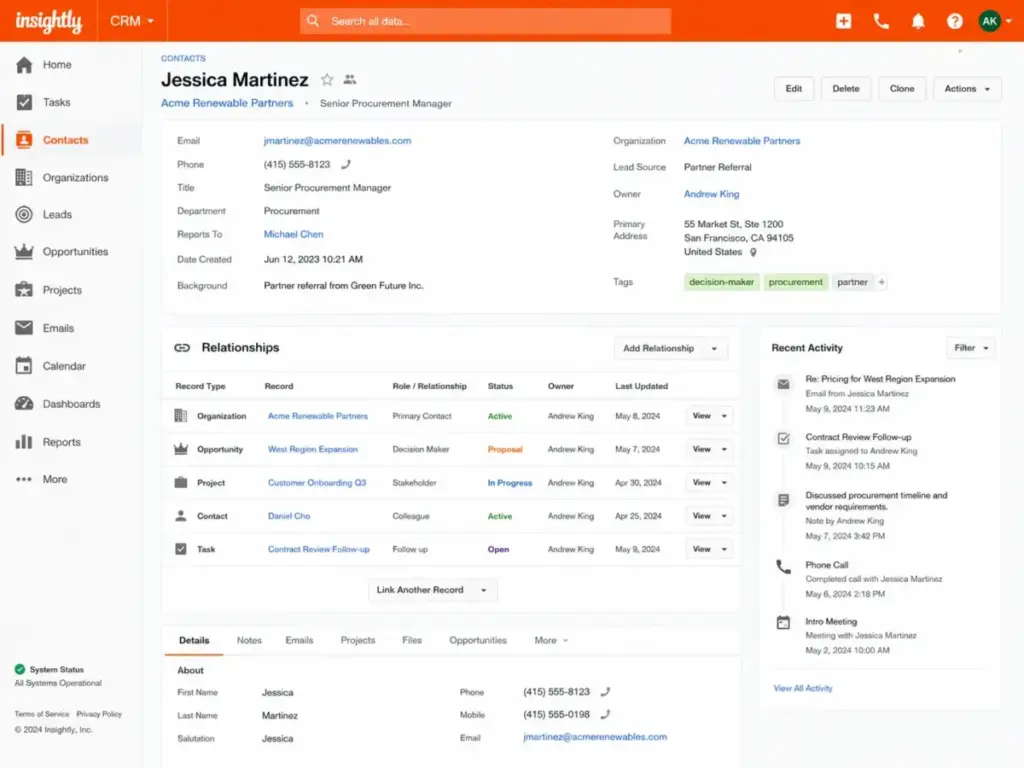
Insightly CRM combines sales pipelines with project management. Teams considering that sales-pipeline-plus-project-management model should also compare Insightly alternatives by delivery handoff quality, automation gates, and total first-year implementation cost. Plus plans start at $29 per user per month billed annually (as of May 2026). The Professional plan is $49 per user per month. The Enterprise plan costs $99 per user per month.
Insightly’s architecture uses relationship linking. You can connect a contact to multiple organizations, opportunities, and projects. This creates a web of connections that maps complex business relationships.
Insightly does better than Zendesk Sell in post-sale execution. It converts closed deals into project tasks automatically. The main tradeoff is add-on costs. Insightly Marketing and Service modules are priced separately.
- Best for: Professional services teams handling client onboarding inside the CRM.
- Avoid if: You only need a simple, sales-first visual pipeline.
- Migration difficulty: Medium. Rebuilding relationship links takes time.
For a full look at this platform, read our Insightly CRM Review.
Pricing Comparison & 10-User Cost
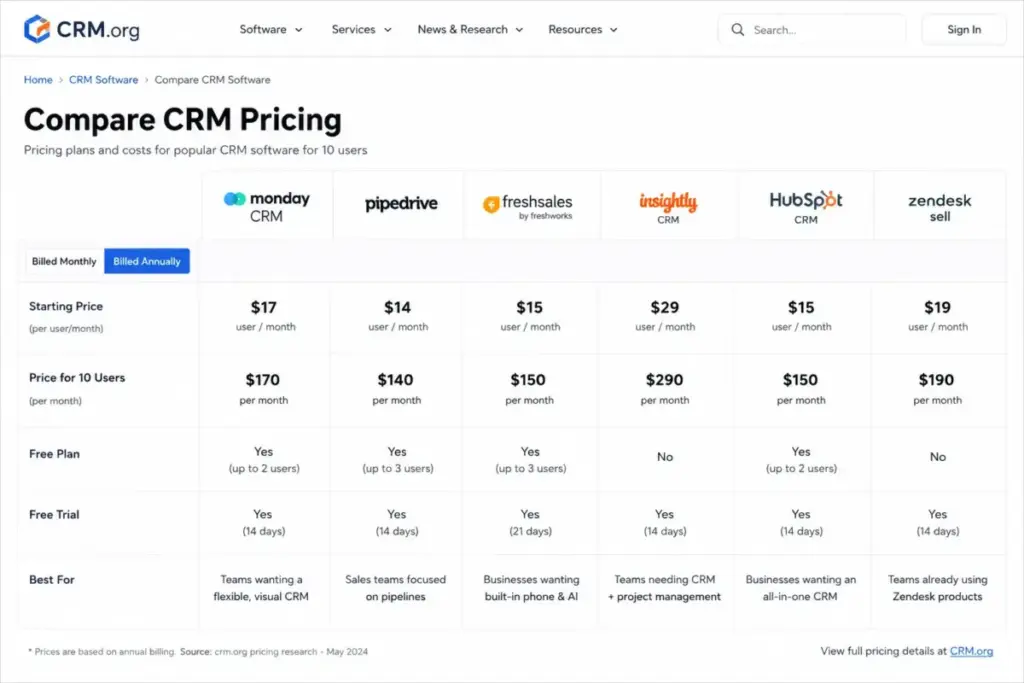
Sticker prices are misleading. A CRM that looks cheap at one user can become expensive at 10 users.
The table below normalizes pricing for Zendesk Sell and its alternatives. It calculates the monthly cost for a 10-user team on the practical plan.
| CRM Product | Starting Price | Practical Plan | 10-User Monthly Cost | Billing Basis | Hidden Costs to Watch |
|---|---|---|---|---|---|
| Zendesk Sell | $19/agent/month | Growth ($55/agent) | $550/month | per agent | High-tier gates, migration costs |
| Pipedrive | $14/seat/month | Growth ($39/seat) | $390/month | per seat | Paid marketing and lead add-ons |
| HubSpot Sales Hub | Free | Starter ($20/seat) | $200/month | per seat | $3,000+ onboarding on Pro tier |
| Zoho CRM | Free (3 users) | Standard ($14/user) | $140/month | per user | AI and advanced analytics gates |
| Freshsales | Free (3 users) | Growth ($9/user) | $90/month | per user | Freddy AI and CPQ add-on costs |
| monday sales CRM | $12/seat/month | Standard ($17/seat) | $170/month | per seat | 3-user minimum, upfront annual pay |
| Salesforce Sales Cloud | $25/user/month | Pro Suite ($100/user) | $1,000/month | per user | Implementation and admin costs |
| Close CRM | $35/seat/month | Essentials ($35/seat) | $350/month | per seat | Outbound sequences require upgrade |
| Copper CRM | $23/seat/month | Professional ($59/seat) | $590/month | per seat | Basic tier excludes lead management |
| Insightly CRM | $29/user/month | Plus ($29/user) | $290/month | per user | Marketing and support modules extra |
What this means:
At 10 users, Freshsales and Zoho CRM offer the lowest entry costs. Pipedrive and monday sales CRM occupy the middle tier. HubSpot Starter is affordable. However, upgrading HubSpot to Professional costs $1,000 per month. Salesforce and Copper are the most expensive options for growing teams.
Feature Gates: What You Get by Plan
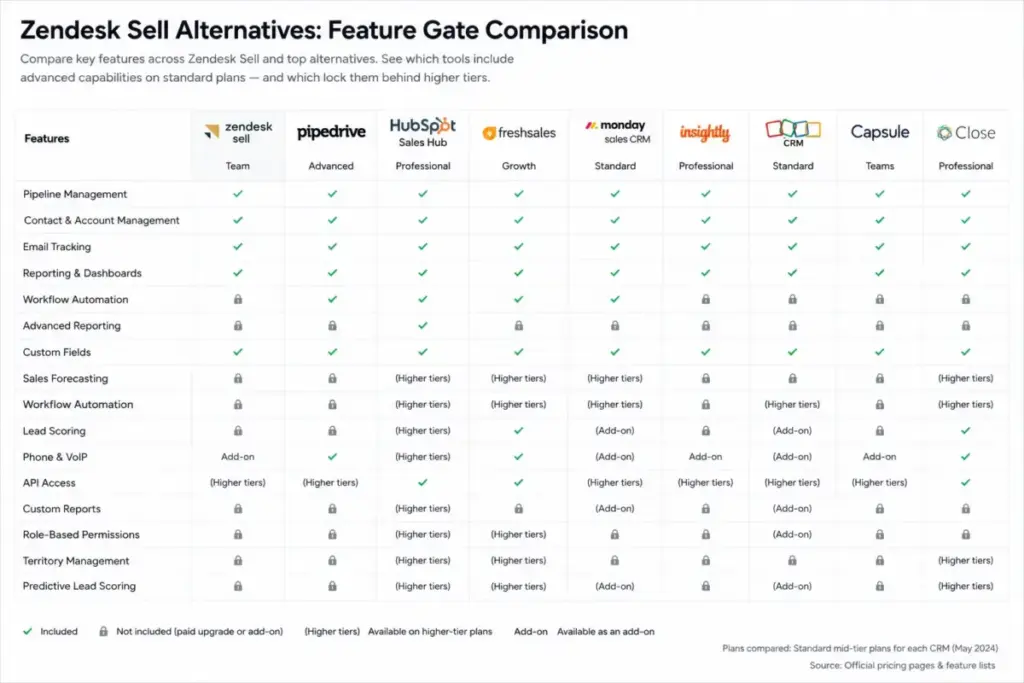
Knowing the price is only half the battle. You must know which plan unlocks the capabilities your sales team actually needs.
The table below details where each Zendesk Sell alternative gates key sales capabilities.
| CRM Alternative | Automation Gate | Reporting Gate | AI Assistant Gate | Multiple Pipelines Gate |
|---|---|---|---|---|
| Pipedrive | Growth ($39/seat) | Lite ($14/seat) | Premium ($59/seat) | Growth ($39/seat) |
| HubSpot Sales Hub | Professional ($100/seat) | Professional ($100/seat) | Free plan | Starter ($20/seat) |
| Zoho CRM | Standard ($14/user) | Standard ($14/user) | Enterprise ($40/user) | Standard ($14/user) |
| Freshsales | Growth ($9/user) | Growth ($9/user) | Pro ($39/user) | Growth ($9/user) |
| monday sales CRM | Standard ($17/seat) | Standard ($17/seat) | Pro ($27/seat) | Standard ($17/seat) |
| Salesforce Sales Cloud | Starter ($25/user) | Starter ($25/user) | Starter ($25/user) | Starter ($25/user) |
| Close CRM | Essentials ($35/seat) | Essentials ($35/seat) | Growth ($99/seat) | Essentials ($35/seat) |
| Copper CRM | Professional ($59/seat) | Professional ($59/seat) | Professional ($59/seat) | Professional ($59/seat) |
| Insightly CRM | Plus ($29/user) | Plus ($29/user) | Enterprise ($99/user) | Plus ($29/user) |
| Capsule CRM | Growth ($36/user) | Growth ($36/user) | Growth ($36/user) | Growth ($36/user) |
What this means:
Feature gates are the primary driver of CRM upgrades. HubSpot gates automation heavily, forcing teams to purchase the $100 per seat Professional tier. Pipedrive and Zoho CRM offer much lower entry barriers for standard workflow rules. Calculate these gate thresholds before purchasing.
How to Choose the Right Alternative
To select the best replacement for Zendesk Sell, ask three questions about your sales team:
- What is your team size and budget limit? If your budget is strictly under $200 per month for 10 users, look at Freshsales or Zoho CRM.
- What is your primary sales communication channel? If your reps make high-volume outbound calls, Close CRM is the clear fit. If you use Gmail exclusively, choose Copper.
- Do you need marketing automation? If you need forms, newsletters, and deal tracking in one place, choose HubSpot.
Which Alternative Should You Avoid?
Not every CRM is a good fit. Some alternatives will create operational problems for small teams.
The table below lists which alternatives to avoid based on your team’s characteristics.
| Avoid this alternative… | If your team has this profile… | Because of this structural issue… |
|---|---|---|
| Salesforce Sales Cloud | Under 10 users with no IT administrator | Setup is too complex. You will waste weeks on configuration. |
| HubSpot Sales Hub | High-volume outbound calling reps | Outbound sequences and calling seats scale in cost quickly. |
| Zoho CRM | Non-technical reps who want a simple layout | The interface is cluttered. Onboarding takes longer. |
| Pipedrive | Teams needing native marketing and help desks | Marketing add-ons raise the monthly bill by 40%. |
What this means:
Avoid Salesforce if you are a small business. Do not buy HubSpot if you only need outbound dialing tools. Choose Pipedrive if you want simplicity. Choose Zoho CRM if you need custom features on a budget.
The Alternative Nobody Mentions
Capsule CRM: Best lightweight CRM replacement
Capsule CRM is a simple alternative that many buyers overlook. Capsule offers a Free plan for up to 2 users and 250 contacts (as of May 2026). The paid Starter plan is commonly listed at $18 per user per month.
Capsule CRM’s database is extremely lightweight. It stores contacts, cases, and opportunities. You can customize fields and tags without database configuration.
Capsule CRM does better than Zendesk Sell in ease of use. The interface is clean. Rebuilding your pipelines takes less than an hour. The main tradeoff is advanced sales reporting. Capsule lacks lead scoring and deep custom dashboard analytics.
- Best for: Solo founders and 3-person sales teams wanting a simple contact database.
- Avoid if: You require complex sales forecasting and deal routing rules.
- Migration difficulty: Low. Capsule imports CSV files quickly.
Migration Risk Assessment
Migrating your CRM database carries risk. A standard CSV export will not copy your historical activity logs.
The matrix below rates the migration difficulty for each Zendesk Sell replacement.
| CRM Alternative | Migration Difficulty | Typical Timeline | Core Data Risks |
|---|---|---|---|
| Pipedrive | Low to Medium | 1 to 2 weeks | Minor custom field mapping errors |
| HubSpot Sales Hub | Medium | 2 to 4 weeks | Timeline event loss, contact duplicate errors |
| Zoho CRM | Medium | 2 to 4 weeks | Complex database relationships break |
| Freshsales | Medium | 1 to 3 weeks | Phone log history mapping errors |
| monday sales CRM | Medium | 2 to 4 weeks | Automation rules must be completely rebuilt |
| Salesforce Sales Cloud | High | 4 to 12 weeks | High API complexity, data structure failure |
| Close CRM | Medium | 1 to 3 weeks | Custom activity timeline field errors |
| Copper CRM | Medium | 1 to 2 weeks | Gmail history sync duplicate errors |
| Insightly CRM | Medium | 2 to 4 weeks | Post-sale project links break |
| Capsule CRM | Low | 1 week | Advanced database mapping limits |
What this means:
Pipedrive and Capsule CRM offer the lowest risk. Most standard migrations complete in less than two weeks. Salesforce is the highest-risk option. It requires a dedicated data migration team.
When to Stay with Zendesk Sell
You should not switch CRMs without a clear operational reason. Stay with Zendesk Sell if:
- Your sales team is small and already deeply integrated with Zendesk Support.
- You have built custom dashboards that your support managers rely on daily.
- You have paid for annual plans that run through late 2026.
If these conditions apply, wait to migrate. However, you must begin your research. The August 2027 deadline is absolute. If you use Zendesk Support, research the best help desk software options to ensure your support ecosystem stays connected.
Final Verdict
The best Zendesk Sell alternative is not the tool with the most features. It is the CRM that solves your team’s specific transition trigger.
- For direct migration and simplicity, choose Pipedrive.
- For all-in-one marketing and sales, choose HubSpot Sales Hub.
- For budget-friendly feature depth, choose Zoho CRM.
- For lightweight contact management, choose Capsule CRM.
Plan your migration early. Rebuilding pipelines and training sales reps takes time. Start your transition at least six months before the 2027 retirement date to protect your customer relationships.
FAQ
What is replacing Zendesk Sell?
Zendesk has not announced a direct replacement for Zendesk Sell. They recommend migrating to partner platforms. Pipedrive is the easiest replacement for visual pipeline management. HubSpot is the best choice if you need a combined sales and marketing database.
When is the Zendesk Sell retirement date?
Zendesk Sell will retire on August 31, 2027. After this date, the database will shut down. You will lose access to all customer records, deals, and communication histories. You must export your data before this deadline.
Can I export all my data from Zendesk Sell?
Yes, but exports are limited. You can export contacts, companies, and deals to CSV files. However, standard exports do not include historical email threads, call recordings, or activity logs. You must use API migration tools to copy these records.
Is HubSpot cheaper than Zendesk Sell?
It depends on your team size. HubSpot Starter is $20 per seat per month, which is comparable to Zendesk Sell Team at $19. However, HubSpot Professional is $100 per seat. This is more expensive than Zendesk Sell Growth at $55.
What is the easiest CRM to migrate to?
Pipedrive is the easiest CRM replacement for Zendesk Sell. It has a similar visual pipeline layout. Pipedrive also offers custom import tools that map contact and deal fields automatically.
Does Pipedrive have a free plan?
No, Pipedrive does not offer a permanent free plan. It provides a 14-day free trial. If you need a free CRM database, look at HubSpot Sales Hub or Freshsales. Both offer free plans for up to three users.