Most small business owners researching a Keap CRM review hit the same wall: the pricing page says $299/month, but the real first-year cost is much higher once you add implementation, extra users, SMS tiers, and contact scaling. That gap between the sticker price and the actual investment is exactly where buying mistakes happen. Keap is not a standard CRM software tool.
It is a lifecycle automation platform that bundles contact management, email marketing, SMS, sales pipeline, invoicing, payments, and appointment scheduling into one system. For the right buyer, it replaces three to five separate tools and pays for itself. For the wrong buyer, it is an overpriced contact database. This review breaks down the real numbers, the features that justify the cost, and the specific business types that should or should not sign up.
Quick Verdict Box
| Score | 8.1 / 10 |
| Best For | Automation-heavy service businesses, coaches, consultants, local service providers |
| Not For | Teams needing cheap CRM-only software or a free entry point |
| Starting Price | $299/month (monthly) or $2,988/year (annual billing) |
| Free Trial | 14 days, no credit card required |
| Biggest Strength | Lifecycle automation that replaces multiple tools |
| Biggest Drawback | Total cost rises fast with implementation, extra users, contacts, SMS add-ons, and contract rules |
Keap CRM Review Verdict
Keap earns an 8.1/10 because it delivers real value for service businesses that will actively use its automation, payments, and scheduling tools, but its cost structure punishes buyers who only need a basic sales pipeline. The score reflects strong automation depth, a solid all-in-one feature set, and legitimate time savings for high-ticket service sellers. It also reflects the $500 implementation fee, per-user charges, contact-based pricing tiers, SMS add-on costs, and a $299 early termination penalty that competing platforms avoid entirely.
Alex Morrison’s Quick Take: I rate Keap based on the SaaSZap review methodology, which weights pricing transparency, feature depth, and buyer fit equally. Keap scores well on automation and feature breadth. It loses points on entry cost, trial limitations, and pricing complexity. If you plan to use automation, payments, and scheduling daily, Keap is worth serious consideration. If you plan to manage contacts and run a pipeline with nothing else, look at cheaper alternatives first.
What Is Keap CRM?
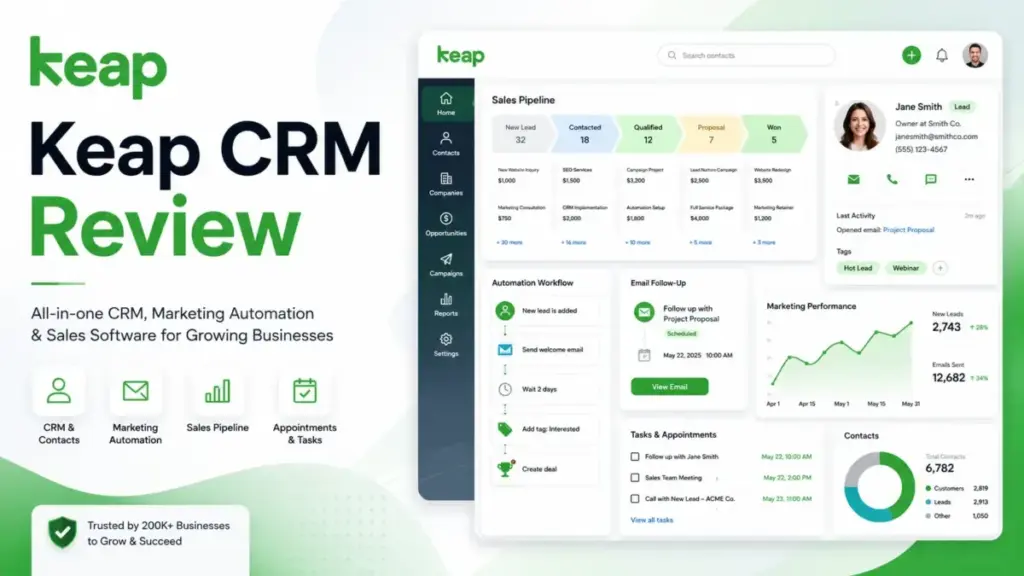
Keap is a CRM and business automation platform designed for small service businesses, coaches, consultants, and local service providers. It combines contact management, marketing automation, email marketing, SMS, sales pipeline, invoicing, payment processing, and appointment scheduling in a single system.
Keap was originally known as Infusionsoft, a name many longtime users still recognize. The company rebranded to Keap in 2019 to signal a shift toward simplicity for smaller teams. Keap is now a Thryv brand following Thryv’s acquisition, though the product operates independently under the Keap name with its own pricing, support, and feature development.
The key distinction: Keap is not a CRM-only tool. Products like Pipedrive or basic HubSpot CRM focus on contact records and deal tracking. Keap focuses on automating the entire customer lifecycle, from lead capture through follow-up, booking, quoting, invoicing, and payment collection. That scope is what justifies its higher price point, but only if the buyer actually uses those capabilities.
Keap CRM Features That Matter
Keap packs a wide feature set into one subscription. Below, I break down the features that most influence a buying decision, based on official documentation and platform analysis.
Keap CRM Contact Management
Keap stores contacts, company records, and full interaction histories in a single view. Each contact record shows tags, custom fields, notes, tasks, automation history, email activity, and purchase records. You can segment contacts using tags, saved filters, and lists. Duplicate merge is built in.
For service businesses that need to track where a lead is in the buying process and what happened at every touchpoint, this is practical. Tags and custom fields give enough flexibility for most small teams. One limitation: Keap does not offer a spreadsheet-style data view as flexible as what Zoho CRM or HubSpot provide. Filtering and list building work, but heavy data manipulation is better handled with an export.
Keap CRM Automation Builder
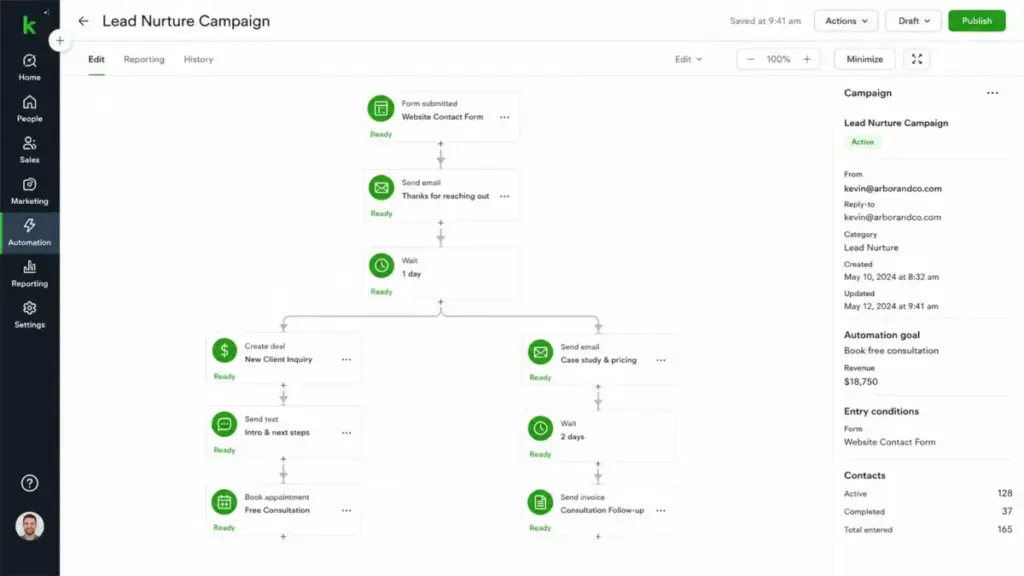
This is the feature that defines Keap. The visual automation builder uses “when-then” logic: when a trigger fires (form submitted, tag applied, invoice paid, appointment booked), then Keap executes an action sequence (send email, send SMS, assign task, update field, move pipeline stage, wait, branch).
Keap also offers an AI Automation Assistant and pre-built automation templates that help new users get started without building from scratch. The builder supports branching, delays, conditional splits, and multi-step sequences. For a service business that wants to automate lead follow-up, appointment reminders, quote delivery, payment reminders, and post-service review requests, this automation engine is the core value driver.
The learning curve is real. Building effective automations takes planning, and businesses that skip the implementation phase tend to underuse this feature. That said, Keap’s visual builder is more approachable than coding-heavy alternatives, and the template library provides a reasonable starting point.
Keap CRM Email and SMS Marketing
Keap includes email marketing with broadcasts, automated sequences, newsletters, and an AI Content Assistant for drafting. Landing pages and lead capture forms are built in, so you do not need a separate tool for basic lead generation.
SMS and text marketing are available as add-ons. Tier 1 starts at $24/month and includes 500 messages plus 100 voice minutes. Higher tiers scale up to $279/month. Text overage costs $0.015 per message, and voice overage is $0.01 per minute. A local number add-on is $10/month.
An important geographic limitation exists here. 1:1 texts and the business line feature are available in the U.S. and Canada only. Text broadcasts and automated SMS are restricted to the U.S. only. If your business operates outside North America and relies on SMS, Keap’s text marketing will not cover your needs.
Email deliverability depends on proper setup. Keap supports DKIM configuration, and the platform handles sending infrastructure. Based on official documentation, Keap manages sender reputation at the platform level, which benefits users who follow best practices but also means your deliverability is partly tied to the behavior of other Keap senders on shared infrastructure.
Keap CRM Sales Pipeline
Keap provides a visual pipeline with drag-and-drop deal management. You can create multiple pipelines, customize stages, and automate stage transitions. When a deal moves stages, automations can trigger follow-up emails, task assignments, or notifications.
The pipeline integrates with Keap’s quoting and invoicing tools. You can generate a quote from a deal, convert it to an invoice, and collect payment without leaving the platform. For service businesses selling $1,000 to $50,000 engagements, this pipeline-to-payment flow is a genuine time saver.
Compared to dedicated pipeline tools like Pipedrive, Keap’s pipeline is functional but less customizable. Pipedrive offers deeper reporting, more pipeline views, and more granular deal analytics. Keap’s pipeline wins on integration with the rest of the suite, not on standalone pipeline depth.
Keap CRM Payments and Invoicing
Keap includes native invoicing, checkout forms, quotes, order bumps, promo codes, and recurring payment support. Keap Pay is the native payment processor, though third-party processors like Stripe, PayPal, and Eway are also supported. Standard payment processing fees apply through merchant accounts.
Recurring payments are especially useful for coaches, consultants, and agencies that bill monthly retainers. Automated billing with credit card expiration reminders reduces failed payments and manual follow-up.
This payment capability is a genuine differentiator. Most CRM platforms at this price point do not include native invoicing and payment processing. HubSpot requires higher tiers or third-party tools. ActiveCampaign does not include payments at all. If your business needs CRM plus invoicing plus payments, Keap consolidates that stack.
Keap CRM Integrations and API
Keap connects to external tools through its native integrations, the Keap Marketplace, Zapier, webhooks, and a REST API. Gmail and Outlook email sync are built in.
For teams that need to connect Keap to accounting software, project management tools, or custom internal systems, the API integration options are solid. Zapier extends reach to thousands of apps without code. The developer portal provides documentation for custom builds.
One caution: some advanced integrations available through the Keap Marketplace are third-party tools with their own pricing. Always verify whether a marketplace integration is free or paid before factoring it into your workflow plan.
Keap CRM Pricing in 2026
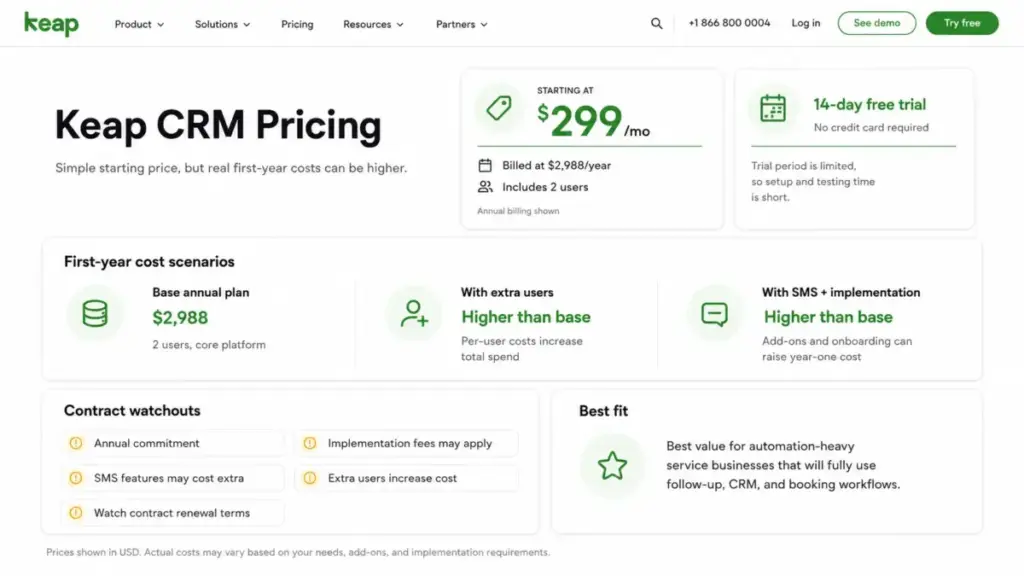
Keap uses a single-plan pricing model with add-ons for SMS, extra users, and additional contacts. Below is the base pricing verified from the Keap pricing page on April 26, 2026.
| Detail | Value |
|---|---|
| Monthly price | $299/month |
| Annual price | $2,988/year ($249/month equivalent) |
| Included users | 2 |
| Extra user cost | $39/month per user |
| Free trial | 14 days, no credit card |
| Implementation | $500 one-time (discounted from $1,500) |
| SMS Tier 1 | $24/month (500 messages, 100 voice minutes) |
| SMS Tier range | $24/month to $279/month |
| Text overage | $0.015 per message |
| Voice overage | $0.01 per minute |
| Local number add-on | $10/month |
| Annual early termination fee | $299 |
| Cancellation rule | Must call support 10+ days before next invoice |
| Pricing source | keap.com/pricing, verified April 26, 2026 |
Keap First-Year Cost Reality Check
The pricing page tells you the subscription cost. It does not tell you the full first-year investment quickly enough. Below are three buyer scenarios using verified pricing components. Contact tier pricing beyond the base inclusion is not fully visible on the public pricing page, so I have marked those cells for verification.
| Cost Component | Scenario 1: Solo/Duo | Scenario 2: Small Team | Scenario 3: Growing Team |
|---|---|---|---|
| Users | 2 | 4 | 8 |
| Contacts | 1,500 | 5,000 | 10,000+ |
| Billing | Annual | Annual | Annual |
| Base subscription | $2,988 | $2,988 | $2,988 |
| Extra users (annual) | $0 (2 included) | $936 ($39 x 2 x 12) | $2,808 ($39 x 6 x 12) |
| Contact tier upgrade | Verify with pricing selector | Verify with pricing selector | Verify with pricing selector |
| Implementation | $500 | $500 | $500 |
| SMS add-on (annual) | $0 (no SMS) | $576 (Tier 2, $48/mo x 12) | $3,348 (Tier 4, $279/mo x 12) |
| Estimated first-year minimum | $3,488 | $5,000+ | $9,644+ |
← Scroll →
What this table shows: Even in the simplest scenario with two users, no SMS, and base contacts, you spend $3,488 in year one. A four-person team with moderate SMS usage crosses $5,000. A growing team with heavy text marketing can approach $10,000 before contact tier upgrades. Compare this to HubSpot’s free CRM tier or Zoho CRM at $14/user/month, and you see why Keap only makes financial sense when you are actively replacing multiple tools with it.
Contract and Cancellation Watchouts
If you choose annual billing, you agree to a 12-month term. Canceling before the term ends triggers a $299 early termination fee. Monthly billing avoids this fee but costs $50 more per month ($299 vs. $249 equivalent).
Cancellation requests must be initiated at least 10 days before the next invoice date, and you must call support to cancel. There is no self-service cancellation button. This friction point is worth knowing before you sign an annual contract.
The 14-Day Trial Is Useful but Not Full Proof
The free trial gives you 14 days to explore the platform without a credit card. That is a genuine low-risk entry. But the trial has three significant limitations:
- Email sending is capped at 25 emails. You cannot test broadcast performance, deliverability, or sequence engagement at any real scale.
- Payment processing is disabled. You cannot test checkout forms, invoicing, or recurring payments, which are core features for service businesses.
- SMS/text is not available. You cannot send or receive texts during the trial.
These limitations mean the trial is useful for evaluating the automation builder, contact management, and pipeline. It is not useful for validating the full revenue workflow that makes Keap worth its price. Make your trial count by focusing on building one complete automation and testing the contact management experience.
Keap User Experience and Setup
Keap’s onboarding involves required implementation services. The current promotional price is $500 (discounted from $1,500). This is not optional. Keap’s model assumes that guided setup increases long-term success, and based on the complexity of the automation builder, that assumption has merit.
During implementation, Keap’s team helps with data migration, automation setup, and initial configuration. For businesses moving from spreadsheets or basic CRMs, this hands-on start can prevent the common pattern of buying a tool and never fully adopting it.
The platform interface uses a dashboard with sections for contacts, pipeline, automation, marketing, sales, and reports. In my analysis, the automation builder is the most distinctive part of the UX. The visual “when-then” builder is more intuitive than writing automation rules in a spreadsheet or text editor. Pre-built templates reduce the cold-start problem.
Keap offers U.S.-based phone support, 24/7 chat support, a Customer Success Manager, Keap Academy training, and a community forum. The support model is stronger than what most sub-$300 CRM platforms provide. One pattern noted in user reviews: billing and cancellation support receives more complaints than product support.
The mobile app is available in the U.S., Australia, Canada, U.K., and New Zealand. Users outside these countries cannot access the mobile app, which limits on-the-go contact management for international teams.
Keap Pros and Cons
- All-in-one lifecycle automation. CRM, email, SMS, pipeline, invoicing, payments, and scheduling in one subscription. As one G2 reviewer noted, Keap works as an “all-in-one CRM, marketing automation, and simple invoicing tool.”
- Visual automation builder with templates. The “when-then” builder is approachable for non-technical users, and the template library gives a real starting point.
- Built-in payment processing. Native invoicing, checkout forms, recurring payments, and promo codes eliminate the need for separate billing tools.
- Appointment scheduling included. No need for a separate Calendly or Acuity subscription for basic booking needs.
- Strong support model. U.S.-based phone support, 24/7 chat, Customer Success Manager, and structured training through Keap Academy.
- PCI DSS compliance. Keap is audited annually for PCI DSS compliance, with documentation available upon request per the data protection FAQ. HIPAA Security Controls are also available, though enabling them does not make a business HIPAA compliant on its own.
- High entry cost with no free plan. $299/month or $2,988/year before implementation, extra users, or SMS. No free tier exists.
- Required implementation fee. $500 upfront (promotional) is mandatory. Competitors like HubSpot and Zoho let you start for free with no onboarding fee.
- Contact-based cost scaling. Your monthly bill grows as your contact database grows. The exact tiers require checking the pricing selector or contacting sales.
- Short trial with major feature gaps. 14 days with a 25-email cap, no payments, and no SMS makes it hard to validate the full platform before committing.
- SMS and mobile geography limits. Text broadcasts are U.S. only. Business line texts are U.S. and Canada only. The mobile app is limited to five countries.
- Cancellation friction. Annual contracts carry a $299 early termination fee, and you must call support at least 10 days before your next invoice to cancel.
- Weaker standalone pipeline. Compared to Pipedrive or HubSpot Sales Hub, Keap’s pipeline tools are functional but less deep in reporting and customization.
Keap CRM Alternatives
Keap CRM Alternatives Keap is not the right fit for every business. Below are five alternatives with clear guidance on when each one is the better choice. For a broader view, see our best CRM software roundup. For teams comparing replacement paths by cost, automation depth, and service-business fit, the dedicated Keap alternatives guide gives a cleaner side-by-side view than a single-product review.
Keap vs HubSpot CRM
HubSpot offers a free CRM tier with contact management, pipeline, email tracking, and basic reporting at no cost. For a direct buyer-scenario matchup, use the HubSpot vs Keap comparison before choosing between HubSpot’s modular hubs and Keap’s bundled automation.
Choose HubSpot if: You need a free starting point, plan to scale gradually, or want a CRM-first tool with optional marketing and service add-ons. Read the full HubSpot CRM review for details.
Choose Keap if: You need built-in invoicing, payment processing, SMS, and appointment scheduling in one subscription without assembling a multi-hub stack.
Keap vs ActiveCampaign
ActiveCampaign is a marketing automation and email platform with CRM features bolted on. Its automation builder is powerful, and email deliverability is a core strength. Pricing starts lower than Keap for email-focused use cases.
Choose ActiveCampaign if: Your primary need is email automation and lead nurturing, and you already have separate tools for invoicing, payments, and scheduling. See the full ActiveCampaign review.
Choose Keap if: You want CRM, automation, payments, and scheduling in one tool instead of pairing ActiveCampaign with Stripe, Calendly, and a separate invoicing app.
Keap vs GoHighLevel
GoHighLevel targets marketing agencies with white-label CRM, funnel building, SMS, email, reputation management, and client sub-accounts. It is priced as a flat monthly fee with unlimited sub-accounts on higher plans.
Choose GoHighLevel if: You run a marketing agency and need to provision CRM/automation sub-accounts for clients under your own brand.
Choose Keap if: You are a service business owner (not an agency) who needs polished invoicing, payment processing, and a structured onboarding experience.
Keap vs Zoho CRM
Zoho CRM starts at $14/user/month and offers deep CRM functionality: custom modules, workflows, scoring, reports, and a large integration ecosystem through Zoho’s 50+ apps. It is significantly cheaper than Keap per user.
Choose Zoho CRM if: You need a full-featured CRM at a fraction of Keap’s price and can handle marketing, invoicing, and scheduling through separate Zoho apps or third-party tools. Read the Zoho CRM review.
Choose Keap if: You want one login for CRM, marketing, payments, and scheduling instead of configuring multiple Zoho apps.
Keap vs Pipedrive
Pipedrive is a pipeline-focused CRM built for sales teams. It starts at $14/user/month and offers excellent visual pipeline management, deal tracking, and sales reporting. It does not include invoicing, payments, or appointment scheduling natively.
Choose Pipedrive if: Your team’s core job is managing deals through a pipeline and you need deep sales analytics at low cost. See the Pipedrive CRM review.
Choose Keap if: You need post-sale automation, invoicing, and recurring payments alongside your pipeline.
Decision Table: Choose the Right Tool
| If You Need… | Choose | Why |
|---|---|---|
| Free CRM to start | HubSpot | Free tier with contacts, pipeline, and basic email |
| Email automation at lower cost | ActiveCampaign | Stronger email engine, lower entry price |
| Agency white-label CRM | GoHighLevel | Unlimited client sub-accounts on higher plans |
| Cheap CRM with deep features | Zoho CRM | $14/user/month with custom modules and workflows |
| Pipeline-only simplicity | Pipedrive | $14/user/month with best-in-class pipeline UX |
| All-in-one automation + payments | Keap | CRM, email, SMS, invoicing, payments, scheduling |
For a direct feature comparison with another option, see Keap CRM vs Agile CRM.
Who Should Use Keap?
Keap works best for businesses where automation saves real administrative hours on high-value client interactions. Here are the buyer profiles that benefit most.
Coaches and consultants selling $2,000+ packages who need automated lead follow-up, appointment booking, contract delivery, payment collection, and post-engagement nurture. Keap replaces a CRM, a scheduler, an email tool, and an invoicing app.
Local service providers (landscapers, home services, cleaning companies, dental offices) who want to automate appointment reminders, review requests, and recurring billing. The SMS integration (in the U.S.) adds direct client communication that email alone cannot match.
Small agencies managing a sales pipeline with quotes and invoices. Keap’s pipeline-to-payment flow saves time on the proposal-to-close process.
Small sales teams (2 to 8 people) that need shared contact records, pipeline visibility, and automated follow-up without hiring an operations manager to run the system.
The common thread: Keap’s best buyers are service-oriented businesses with high-ticket or recurring revenue where automating the client lifecycle saves enough hours to justify the subscription cost. If your average deal is $5,000 and automation helps close two extra deals per month, Keap pays for itself multiple times over.
Who Should Not Use Keap?
Being direct about bad fit is just as useful as recommending the product. Here are the buyer profiles that should look elsewhere.
Startups on tight budgets. If $3,488+ in year one (minimum) is a significant percentage of your revenue, Keap is premature. Start with HubSpot’s free CRM or Zoho CRM at $14/user/month and upgrade when your revenue justifies it.
CRM-only sales teams. If you need a contact database and a pipeline with nothing else, Keap is overbuilt and overpriced for your use case. Pipedrive or HubSpot’s free tier covers this at a fraction of the cost.
Global businesses dependent on SMS. Text broadcasts are U.S. only. Business line texts are U.S. and Canada only. The mobile app is limited to five countries. If SMS is central to your strategy and you operate outside North America, Keap cannot serve you fully.
Ecommerce brands with large, low-value contact lists. Keap’s contact-based pricing becomes expensive quickly for businesses with tens of thousands of leads at low average order values. A platform like Mailchimp or Brevo handles large email lists at lower per-contact cost.
Teams that dislike mandatory onboarding. The $500 implementation fee is required. If your team prefers self-service setup and resists guided onboarding, Keap’s model will frustrate you from day one.
Final Verdict
Keap CRM earns 8.1 out of 10 for service businesses that will commit to using its automation, payments, and scheduling features daily. It is a genuinely capable platform that consolidates what many small businesses currently pay for across three to five separate subscriptions.
The contrarian truth about this Keap CRM review: Keap is not expensive if it replaces your CRM, email marketing tool, scheduler, invoicing app, and SMS platform. Add up what you currently spend on those tools, factor in the admin hours automation saves, and Keap often comes out ahead for businesses with $3,000+ average deal sizes. It is expensive if you treat it as a normal CRM and ignore 60% of its feature set.
My recommendation: try the 14-day free trial, focus on the automation builder and contact management, and run the first-year cost math from this review against your current tool stack. If the numbers work, Keap is worth the investment. If they do not, the alternatives table above points you to the right tool for your situation.
For more options tailored to smaller teams, explore our guides on the best CRM for small business and best CRM for marketing automation.
Keap CRM FAQ
Is Keap CRM worth it?
Keap is worth it for service businesses that actively use its automation, invoicing, payment processing, and appointment scheduling. If you only need contact management and a pipeline, cheaper alternatives like Pipedrive ($14/user/month) or HubSpot’s free CRM deliver better value for that narrow use case.
How much does Keap CRM cost?
Keap starts at $299/month on monthly billing or $2,988/year on annual billing (equivalent to $249/month). Two user licenses are included. Each extra user costs $39/month. Implementation is $500 one-time. SMS add-ons range from $24 to $279/month. Pricing verified April 26, 2026.
What is Keap CRM used for?
Keap is used for contact management, lifecycle automation, email marketing, SMS marketing, sales pipeline management, invoicing, payment processing, and appointment scheduling. It targets service businesses that need to automate the full client journey from lead capture through payment collection.
Is Keap better than HubSpot?
Keap is better than HubSpot if you need built-in invoicing, payments, and SMS in a single subscription. HubSpot is better if you need a free starting point, a larger integration ecosystem, or separate specialized hubs for marketing, sales, and service. Neither is universally better.
Does Keap have a free plan?
No. Keap does not offer a free plan. It offers a 14-day free trial with no credit card required. The trial is limited to 25 emails, no payment processing, and no SMS. The lowest paid option starts at $249/month equivalent on annual billing.
What are the main disadvantages of Keap?
The main disadvantages are high entry cost ($299/month plus $500 implementation), contact-based pricing that scales with your database, a 14-day trial with major feature gaps, SMS features limited to the U.S. and Canada, a $299 annual contract early termination fee, and cancellation only by phone.
Does Keap include email marketing?
Yes. Keap includes email marketing with broadcasts, automated sequences, newsletters, landing pages, lead capture forms, and an AI Content Assistant. Email marketing is part of the base subscription, not an add-on.
Is Keap the same as Infusionsoft?
Keap was originally called Infusionsoft. The company rebranded to Keap in 2019. Keap is now a Thryv brand. The product retains many of Infusionsoft’s core automation capabilities in a simplified interface designed for smaller teams.
What is the Keap implementation fee?
Keap charges a one-time implementation fee currently displayed at $500 on the implementation services page, discounted from $1,500. This covers guided setup, data migration assistance, and initial automation configuration. Implementation is part of Keap’s required onboarding model.
Can Keap replace ActiveCampaign?
Keap can replace ActiveCampaign if you also need invoicing, payments, and scheduling in the same platform. ActiveCampaign is stronger for pure email automation at a lower price point. Choose based on whether you need a multi-tool consolidation or a focused email automation engine.