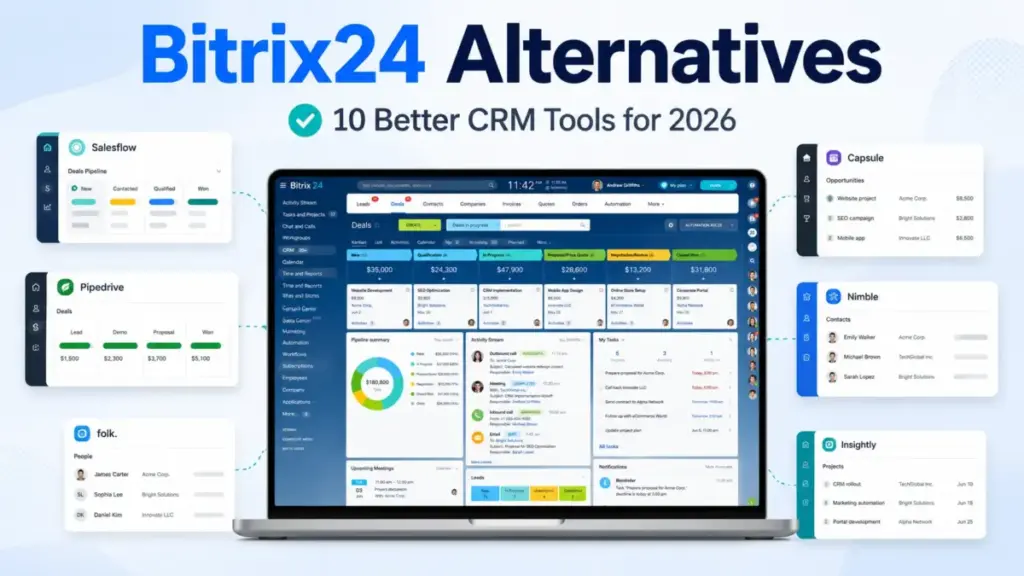
Bitrix24 looks like a massive bargain. For approximately $49 a month, your sales team gets a flat-rate CRM, task tracker, website builder, and telephony system. But there is a catch.
If you are comparing Bitrix24 alternatives, you should know that the real bill is not the subscription fee; it is the administrative overhead and onboarding friction that slows down your reps.
If your reps find the system too complicated, they will stop using it. That is why most teams search for a best CRM for sales teams. They do not need more features; they need a cleaner tool that matches their daily workflows.
A sales team needs to understand what CRM software does at a fundamental level: it is built to organize contacts and close deals, not to host company-wide video calls or build websites.
In my role as a CRM analyst and sales technology consultant, I have evaluated more than 40 CRM platforms. For this analysis, I examined the official documentation, analyzed pricing structures, and compared feature gates across these 10 alternatives to identify the exact switching triggers where each platform outshines Bitrix24.
I paid special attention to per-user costs, custom field mappings, and migration difficulty to help you avoid the hidden traps of switching tools. My analysis is current as of May 27, 2026.
Quick Verdict: Best Bitrix24 Alternatives by Switching Trigger
The table below summarizes which alternative fits best based on your primary reason for leaving Bitrix24.
| If you are leaving Bitrix24 because… | Best alternative | Why |
|---|---|---|
| Interface is too complex and crowded | HubSpot Sales Hub | Much cleaner user experience and clear onboarding path |
| You need a focused sales pipeline | Pipedrive | Visual deal tracking without intranet or task management clutter |
| You want marketing-first automation | EngageBay | Budget-friendly email marketing with built-in landing pages |
| Your team is project-heavy | ClickUp | Advanced task management, Gantt charts, and custom workflow docs |
| You need enterprise CRM customization | Salesforce Sales Cloud | Mature customization, deep reporting, and AppExchange ecosystem |
| You want a low-cost all-in-one stack | EngageBay | Combines CRM, helpdesk, and live chat at a low per-user price |
| You want simple contact enrichment | Nimble | Inbox-based contact enrichment and calendar integration |
What this means:
If you choose a replacement based on your specific team pain point rather than a generic feature checklist, you will get a much higher return on your investment. HubSpot is the clearer fit for this use case if you want marketing alignment, while Pipedrive is the better pick if you only want pipeline execution.
Why Teams Look for Bitrix24 Alternatives
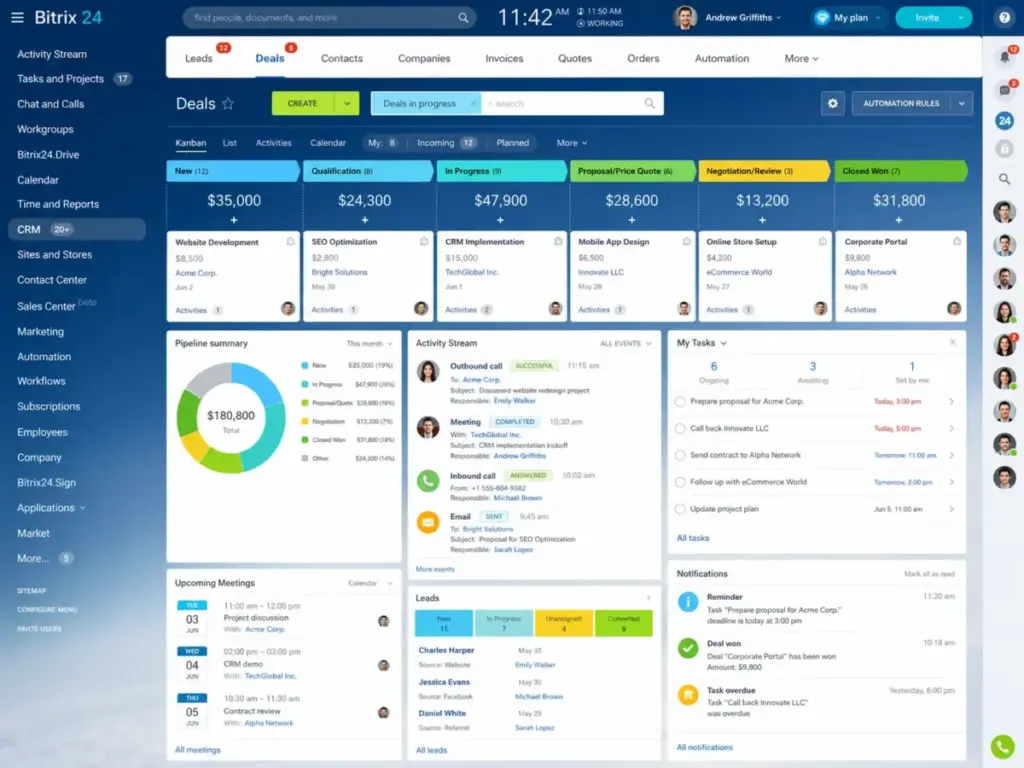
Bitrix24 tries to be everything to everyone. It packages a CRM, document drive, task manager, human resource intranet, website builder, and telephony system under one roof. But this massive scope creates significant interface complexity. Sales reps often complain about the steep learning curve. The navigation menus are crowded, and finding basic contact records can take multiple clicks.
Another key issue is the trade-off in feature depth. Because the vendor builds so many different modules, individual tools often lack the maturity of specialized platforms. For example, the email sync and reporting modules are basic compared to dedicated sales systems.
Flat-rate pricing can also become a trap. Bitrix24 offers flat pricing with user caps instead of charging per seat. This sounds cheaper, but it hides the cost of administrative time. A team of 10 users might pay less for the subscription, but they lose hours of productivity managing a complex system.
Support is another common complaint. Many verified reviews on Capterra note that customer support is slow and resolving technical issues is difficult. For instance, one verified reviewer stated: “The interface is not always the easiest to use, and it can take some time to figure everything out.” This friction leads sales operations managers to seek simpler, more focused tools.
Bitrix24 Strengths and Limitations
Before switching, it is important to analyze what you will lose and gain. The table below lists the core advantages and trade-offs of staying with Bitrix24.
| Bitrix24 Strengths | Bitrix24 Limitations |
|---|---|
| CRM and task management in one shared database | Highly complex interface that requires training |
| Telephony and chat included natively | Advanced CRM features are locked behind higher plans |
| Flat-rate pricing models with user caps | Telephony credits and call recording cost extra |
| Built-in website builder and e-signature tools | Customer support is slow and difficult to contact |
What this means:
Bitrix24 remains an excellent choice if your primary goal is to minimize software subscription costs for a large team and you have a dedicated administrator to configure the system. If you do not have admin capacity, the learning curve will likely cost you more in time than you save on subscription fees. For the product-level evidence behind those trade-offs, see the Bitrix24 feature review.
If Leaving Because of Interface Complexity: Try HubSpot Sales Hub, monday sales CRM, or Pipedrive
HubSpot Sales Hub: Best overall Bitrix24 alternative for CRM-led growth

HubSpot Sales Hub is the strongest Bitrix24 alternative for teams leaving because they want a cleaner CRM database that connects directly with marketing. Instead of a crowded intranet, HubSpot organizes your data around a clean contact record.
Pricing starts at $20 per seat per month on the Starter catalog plan, but the practical tier for most switchers is the Professional plan at $100 per seat per month. This is because critical sales tools like automated email sequences, custom reporting, and forecasting are locked behind the Professional tier.
HubSpot does better than Bitrix24 in user adoption and ecosystem depth. The interface is clean, and the app marketplace has thousands of integrations. The tradeoff is that HubSpot becomes very expensive as your team grows. If you need marketing contacts or multiple hubs, your monthly bill will quickly escalate.
Best for:
- Growing sales teams that need marketing alignment
- B2B companies with complex sales cycles
- Teams of 10 to 50 reps that want fast adoption
Avoid if:
- You have a tight budget and need advanced automation
- You only need a simple, basic contact list
Migration difficulty: Medium.
Migrating from Bitrix24 to HubSpot requires export and import of CSV files. You will need to map custom fields carefully, as HubSpot enforces strict data types. You will also need to rebuild your automation workflows from scratch.
Verdict: Choose HubSpot Sales Hub if you want a clean, professional sales system and have the budget to pay for the Professional plan. You can read my full HubSpot CRM review for a detailed analysis of its features. You can also view the Bitrix24 vs HubSpot comparison for a head-to-head evaluation.
monday sales CRM: Best visual CRM replacement for teams overwhelmed by Bitrix24

monday sales CRM is a visual tool that replaces Bitrix24’s cluttered workspace with colorful, customizable boards. It is built on top of monday’s work management engine, making it easy to track deals and tasks together.
Pricing starts at approximately $12 per seat per month billed annually, with a strict 3-seat minimum. This means your starting bill is at least $36 per month. The practical tier is the Standard plan at approximately $20 per seat per month, which enables email integration, custom automations, and basic dashboards.
monday sales CRM does better than Bitrix24 in pipeline visualization. You can build custom workflows by clicking columns and dragging items. The tradeoff is that it lacks the deep CRM capabilities of Salesforce or HubSpot. It is a work management tool adapted for sales, so advanced forecasting and pipeline analytics are limited.
Best for:
- Small sales teams that want highly visual boards
- Agencies that manage projects and sales in one tool
- Teams of 3 to 15 users that want a simple setup
Avoid if:
- You need deep enterprise sales forecasting
- You are a solo sales rep (due to the 3-seat minimum)
Migration difficulty: Low-Medium.
monday.com CRM has a clean Excel import tool. You can move your contacts quickly, but you must rebuild your automations and board structures manually.
Verdict: Choose monday sales CRM if you want a highly visual tool and do not need complex database relationships. You can find other monday sales CRM alternatives if the 3-seat minimum is a blocker for your team.
Pipedrive: Best for sales teams that only want pipeline execution

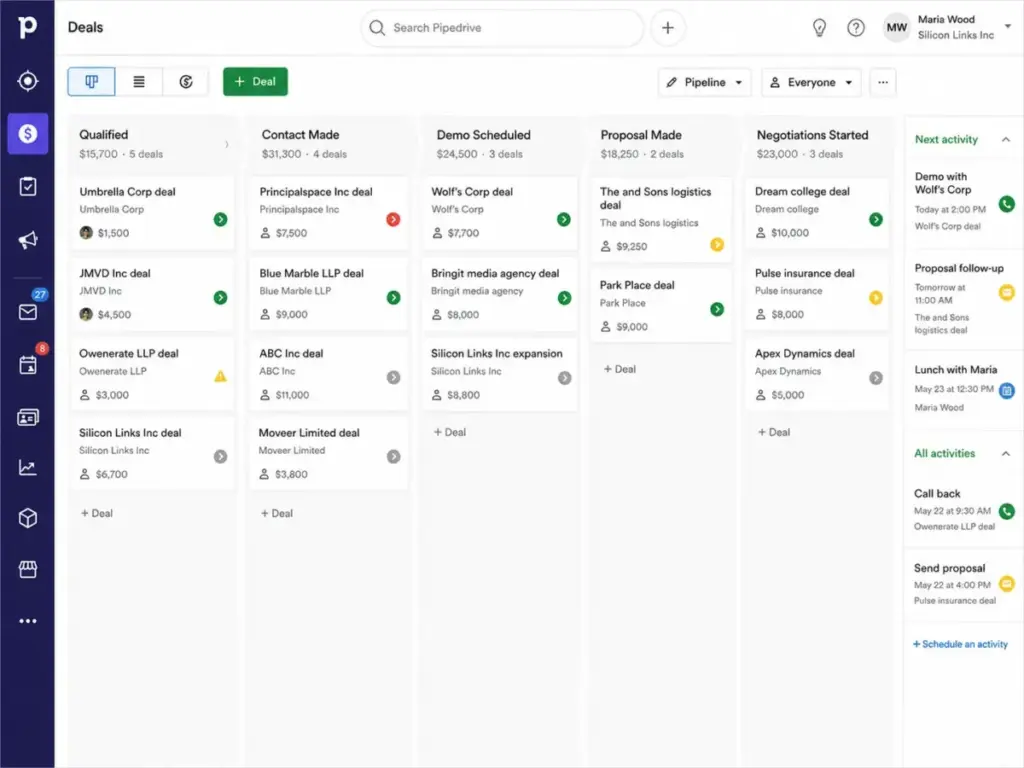
Pipedrive is built for sales reps who want to focus on their pipeline without the distraction of intranet modules or website builders. It is a dedicated pipeline manager that keeps deal stages visible.
Pricing starts at about $14 per user per month billed annually (or $24 monthly) for the Lite plan. The practical tier for most switchers is the Advanced plan at approximately $29 per user per month (or $44 monthly) because it enables workflow automation and full email sync with templates.
Pipedrive does better than Bitrix24 in daily sales execution. The interface is built around the deal pipeline, making it easy to see which deals need follow-up. The tradeoff is that Pipedrive does not include project management, video calling, or invoicing natively. You will need to connect separate tools.
Best for:
- Active outbound sales teams
- Small businesses with 5 to 20 reps
- Teams that want a CRM that feels like a simple pipeline
Avoid if:
- You need built-in marketing automation or support helpdesks
- You want a free plan for long-term use
Migration difficulty: Low.
Pipedrive has built-in data import partners that handle data mapping. You can import contacts and deals in under an hour, but you will need to reconnect your email and calendars.
Verdict: Choose Pipedrive if your sales team lives and dies by the visual pipeline. Read my detailed Pipedrive CRM review to understand its workflow automation limits and pricing.
If Leaving Because You Need a Focused Sales Pipeline: Try Freshsales
Freshsales: Best value CRM with built-in communication tools

Freshsales combines a clean CRM interface with built-in phone, live chat, and email templates, making it a great replacement for Bitrix24’s telephony features.
Pricing is free for up to 3 users with basic contact management. Paid plans start at $9 per user per month billed annually. The practical tier is the Pro plan at $39 per user per month, which enables multiple pipelines, visual sales sequences, and AI-assisted deal insights.
Freshsales does better than Bitrix24 in communication tracking. You can make phone calls directly from a contact card without setting up a complex telephony module. The tradeoff is that it lacks Bitrix24’s project management and collaboration features.
Best for:
- Inside sales teams that make frequent phone calls
- Small businesses that want built-in phone and email
- Teams of 3 to 20 reps looking for value
Avoid if:
- You need project management or team task collaboration
- You need advanced enterprise customization
Migration difficulty: Low-Medium.
Freshsales has a direct CSV import wizard. The interface is intuitive, meaning your team will require minimal retraining.
Verdict: Choose Freshsales if you want built-in telephony and a clean interface without paying for expensive add-ons. Read my full Freshsales review for an analysis of its plans. You can also review the Freshsales pricing breakdown to check hidden call costs.
If Leaving Because Your Team Is Project-Heavy: Try ClickUp
ClickUp: Best for project-heavy teams leaving Bitrix24

ClickUp is a project management tool that includes a flexible workflow system, making it ideal for teams that use Bitrix24 primarily for task management.
Pricing is free for basic personal use. The Unlimited plan starts at $7 per user per month billed annually, while the Business plan costs $12 per user per month. The Business plan is the practical tier for teams because it enables advanced sharing, custom automation, and detailed dashboards.
ClickUp does better than Bitrix24 in task organization, document sharing, and goal tracking. The interface is modern and allows you to view tasks in List, Board, Calendar, or Gantt views. The tradeoff is that ClickUp is not a classic CRM. It can track deals using custom fields, but it lacks native sales forecasting and dialer tools.
Best for:
- Agencies and project-driven teams
- Teams that need to track tasks, documents, and time
- Businesses that want a modern workspace
Avoid if:
- You need a dedicated sales CRM with built-in calling
- Your team only does simple outbound sales
Migration difficulty: Medium.
ClickUp has import tools for Excel, but setting up your hierarchy (Spaces, Folders, Lists) requires careful planning.
Verdict: Choose ClickUp if your business is driven by project delivery rather than sales pipelines. You can read about ClickUp for a comparison of its task management tools, and check the ClickUp pricing page to view plan differences.
If Leaving Because You Need Enterprise CRM Scalability: Try Salesforce Sales Cloud or Zoho CRM
Salesforce Sales Cloud: Best for enterprise CRM depth
Salesforce Sales Cloud is the gold standard for enterprise sales operations. It is the destination for teams that have outgrown Bitrix24’s custom field and reporting limitations.
Pricing starts at $25 per user per month for the Starter Suite, which includes basic CRM and Slack integration. The practical tier for scaling teams is the Enterprise plan at approximately $165 per user per month, which enables full API access, custom page layouts, and advanced workflow rules.
Salesforce does better than Bitrix24 in customization, reporting, and ecosystem depth. The AppExchange allows you to connect almost any business software. The tradeoff is that Salesforce is expensive and complex. Your finance team may push back because you will likely need a dedicated administrator or developer to maintain it.
Best for:
- Large sales teams with complex operations
- Companies that need deep customization
- Businesses that require strict security and compliance
Avoid if:
- You do not have dedicated IT or admin support
- You want a simple tool you can set up in an afternoon
Migration difficulty: High.
Migrating to Salesforce is a complex process. You will need to map database relationships, clean your data, and rebuild all automations. Professional implementation can take weeks or months.
Verdict: Choose Salesforce if you are a growing enterprise and need a CRM that can scale indefinitely. Read my full Salesforce CRM review to understand the hidden costs of customization. You can also view the Salesforce pricing page to check higher tier costs.
Zoho CRM: Best for configurable CRM at a lower per-user price

Zoho CRM offers enterprise-level customization at a fraction of the cost of HubSpot or Salesforce, making it a great middle-ground alternative.
Pricing starts with a free edition for up to 3 users. Paid plans start at $14 per user per month billed annually for the Standard plan. The practical tier for most teams is the Professional plan at $23 per user per month, which enables inventory management, workflow rules, and email integration.
Zoho CRM does better than Bitrix24 in customization and adjacent app integration. The Zoho ecosystem includes tools for finance, campaigns, desk, and analytics that share a common data layer. The tradeoff is that Zoho CRM still has a significant learning curve, and the interface can feel outdated in some sections.
Best for:
- Small to mid-market sales teams
- Businesses that want to customize their CRM without hiring developer help
- Teams that want to use adjacent Zoho products
Avoid if:
- You want a modern, simple pipeline tool out of the box
- You need high-end sales engagement tools on lower tiers
Migration difficulty: Medium.
Zoho offers migration tools designed for switching from other systems. It handles CSV mapping well, but setting up Zoho’s custom modules takes time.
Verdict: Choose Zoho CRM if you want custom CRM database features at a reasonable price. You can view my Zoho CRM review for detail on its customization. You can also check the Zoho CRM pricing structure to see what features are plan-gated.
If Leaving Because You Need a Lower-Cost All-in-One Stack: Try EngageBay
EngageBay: Best budget all-in-one CRM and marketing suite

EngageBay is built specifically to replace expensive all-in-one tools like HubSpot, offering CRM, marketing automation, helpdesk, and live chat in one suite.
Pricing starts with a free plan for up to 15 users (with contact caps). Paid All-in-One plans start at $12.74 per user per month billed annually. The practical tier for growing teams is the Growth plan at $42.49 per user per month, which enables email sequences, landing pages, and web forms.
EngageBay does better than Bitrix24 in marketing automation and ease of use. The marketing dashboard is much cleaner than Bitrix24’s website builder module. The tradeoff is that EngageBay has strict contact and email limits on its lower plans.
Best for:
- Small businesses that want CRM and email marketing together
- Startups on a tight budget
- Teams that want to replace both CRM and support tools
Avoid if:
- You have a contact list larger than 50,000 profiles (costs rise quickly)
- You need advanced enterprise forecasting
Migration difficulty: Low-Medium.
EngageBay offers direct CSV import. Because the tool is simpler than Bitrix24, setting up pipelines and templates is relatively fast.
Verdict: Choose EngageBay if you want a complete sales and marketing system without the complexity or cost of Bitrix24.
If Leaving Because You Need a Relationship-Driven CRM: Try Nimble
Nimble: Best for relationship-driven small teams

Nimble is built around social media and contact enrichment, helping consultants and small teams manage relationships from their email inbox.
Pricing is simple: a single plan at $24.90 per seat per month billed annually (or $29.90 monthly). There are no multiple tiers to choose from, though you can buy add-ons for extra storage or group messaging.
Nimble does better than Bitrix24 in contact enrichment. It automatically pulls social profiles, company details, and contact history into your database. The tradeoff is that Nimble is not built for complex sales pipelines or large teams. It lacks advanced workflow automation and telephony. If those limits matter after you shortlist Nimble, review Nimble CRM alternatives that preserve contact enrichment while adding stronger pipeline automation or sales operations depth.
Best for:
- Professional services, consultants, and agencies
- Small teams that use Microsoft 365 or Google Workspace
- Sales reps who sell via social networks
Avoid if:
- You have a large sales team with structured pipelines
- You need built-in calling or ticketing systems
Migration difficulty: Low.
Nimble connects directly to your Google or Microsoft account. It imports your email contacts and calendar events in minutes, making the setup simple.
Verdict: Choose Nimble if you want a simple CRM that enriches your contacts automatically and sits inside your inbox.
The Remaining Alternatives Worth Evaluating: Insightly
Insightly: Best for post-sale project handoff

Insightly CRM is built to handle the transition from closing a sale to executing a project, filling a major gap in classic sales tools.
Pricing starts around $29 per user per month billed annually for the CRM Plus plan. The practical tier is the Professional plan at $49 per user per month, which enables custom objects, workflow automation, and advanced lead routing.
Insightly does better than Bitrix24 in post-sale operations. Once a deal is won, you can convert it into a project board automatically. The tradeoff is that Insightly’s marketing and integration tools (AppConnect) require expensive add-on bundles that raise the total cost.
Best for:
- Construction, professional services, and agencies
- Teams that manage projects after the deal closes
- Mid-market businesses looking for structured workflows
Avoid if:
- You want a low-cost, simple sales pipeline
- You do not manage projects after closing a sale
Migration difficulty: Medium.
Insightly imports CSV data well, but you will need to spend time configuring the relationship between contacts, deals, and projects.
Verdict: Choose Insightly if your business sells projects and you want to bridge the gap between sales and delivery. You can check my Insightly CRM review for detail on its project handoff feature.
Pricing Comparison: Starting Price vs Practical Tier
The table below lists the pricing structure for all 10 alternatives compared to Bitrix24.
| Product | Starting Price (USD) | Practical Sales-Ready Tier | 10-User Cost (USD) | Billing Basis | Free Plan | Free Trial | Official Pricing Source |
|---|---|---|---|---|---|---|---|
| Bitrix24 | Free | Basic Plan (~$49/mo) | ~$49/month flat | Flat rate, user caps | Yes | Yes | Bitrix24 Prices Page |
| HubSpot Sales Hub | Free tools | Starter ($20/seat/mo) | $200/month | Per seat | Yes | Yes | HubSpot Services Catalog |
| Zoho CRM | Free (3 users) | Standard ($14/user/mo) | $140/month | Per user | Yes | Yes | Zoho CRM Pricing |
| monday sales CRM | Approx. $10/user/mo | Standard CRM (~$20/seat/mo) | ~$200/month | Per seat, 3-seat min | No | 14 Days | monday CRM Pricing |
| Pipedrive | About $14/user/mo | Advanced (~$29/user/mo) | $290/month | Per user | No | 14 Days | Pipedrive Pricing Page |
| Freshsales | Free (3 users) | Growth ($9/user/mo) | $90/month | Per user | Yes | 21 Days | Freshworks CRM Pricing |
| Salesforce | $25/user/mo | Starter Suite ($25/user/mo) | $250/month | Per user | No | 30 Days | Salesforce Sales Pricing |
| ClickUp | Free | Business ($12/user/mo) | $120/month | Per user | Yes | Yes | ClickUp Pricing Page |
| Insightly | Approx. $29/user/mo | Plus ($29/user/mo) | $290/month | Per user | No | 14 Days | Insightly Pricing Plans |
| EngageBay | Free | All-in-One Basic (~$15/user/mo) | ~$150/month | Per user | Yes | Yes | EngageBay Pricing |
| Nimble | $24.90/seat/mo | Business ($24.90/seat/mo) | $249/month | Per seat | No | 14 Days | Nimble Pricing |
What this means:
Pricing comparison alone is misleading. While Bitrix24 looks cheaper at $49 flat for 5 users, a per-user tool like Freshsales at $90 for 10 users provides a cleaner interface that will save your team hours of training. If you scale to 10 users on HubSpot Professional, you will pay $1,000 a month. You must evaluate the practical tier cost rather than the entry price.
Feature Gate Comparison
Understanding where features are locked is essential before selecting a CRM. The table below outlines key feature gates across the platforms.
| Product | Workflow Automation Tier | Custom Reporting Tier | API Access Tier | Telephony / Dialers | Project / Task Tracking |
|---|---|---|---|---|---|
| Bitrix24 | Standard plan and up | Basic plan and up | Paid plans only | Built-in module | Standard task board |
| HubSpot Sales Hub | Professional ($100/seat) | Professional ($100/seat) | Starter plan and up | Built-in calling | Basic tasks only |
| Zoho CRM | Standard ($14/user) | Standard ($14/user) | Professional ($23/user) | Built-in phone bridge | Tasks connected to deals |
| monday sales CRM | Standard ($20/seat) | Pro plan ($33/seat) | Standard plan and up | Twilio integration | Full task boards |
| Pipedrive | Advanced ($29/user) | Lite plan and up | Advanced plan and up | Caller add-on | Simple tasks only |
| Freshsales | Growth ($9/user) | Growth ($9/user) | Pro plan ($39/user) | Built-in dialer | Basic task views |
| Salesforce | Professional plan and up | Starter Suite ($25/user) | Enterprise ($165/user) | Dialer add-on | Basic task logs |
| ClickUp | Unlimited ($7/user) | Business ($12/user) | Unlimited plan and up | Integration only | Dedicated project views |
| Insightly | Professional ($49/user) | Professional ($49/user) | Plus plan and up | Built-in telephony | Structured task boards |
| EngageBay | Growth ($42.49/user) | Pro plan ($99.99/user) | Growth plan and up | Built-in dialer | Task lists |
| Nimble | Business plan | Business plan | Business plan | Integration only | Task logs |
What this means:
Many vendors advertise advanced features on their homepage but gate them behind expensive plans. If you need workflow automation, you cannot use HubSpot Starter; you must pay for Professional. With Pipedrive, you must bypass the Lite tier to access automations. Compare feature gates to find the real cost of your must-have tools.
Migration Difficulty by Alternative
Switching tools involves data portability risks. The table below lists the difficulty of migrating from Bitrix24.
| Product | Migration Difficulty | Primary Risks & Blockers | Rebuild Effort |
|---|---|---|---|
| Pipedrive | Low | Direct import wizard simplifies deal and contact mapping | Reconnect email and calendar tools |
| Nimble | Low | Sitting in your inbox makes contact enrichment fast | Rebuild pipeline stages |
| Freshsales | Low-Medium | Enforces phone formatting rules during import | Re-enter caller settings |
| monday sales CRM | Low-Medium | Excel import is clean but lacks complex data structures | Rebuild dashboard views |
| EngageBay | Low-Medium | Contact limits can block imports on basic tiers | Re-enter marketing templates |
| HubSpot Sales Hub | Medium | Enforces strict data types and custom field rules | Rebuild all automation sequences |
| Zoho CRM | Medium | Custom module structures require mapping planning | Re-train team on modular workspace |
| ClickUp | Medium | Setting up Spaces, Folders, and Lists takes time | Rebuild Gantt and list views |
| Insightly | Medium | Relationship mapping between deals and projects is complex | Rebuild project delivery templates |
| Salesforce | High | Complex database structure requires specialized setup | Rebuild all reports and layouts |
What this means:
Migration difficulty is an editorial estimate based on data model complexity, workflow rebuild effort, integration requirements, and setup depth. If you want a quick transition with low risk, Pipedrive or Nimble is your best option. If you choose Salesforce or HubSpot, prepare for a transition process that requires days or weeks of planning and configuration.
How to Choose the Right Bitrix24 Alternative
To select the right platform, ask your sales operations team these five key questions:
- What is your budget threshold for 10 users? If your budget is under $150 per month, skip HubSpot Professional and Salesforce. Focus on Freshsales, ClickUp, or Zoho CRM instead.
- Do you need a marketing automation suite or a sales pipeline? B2B sales teams doing outbound calling should prioritize Pipedrive or Freshsales. B2C teams that need lead forms and email newsletters should choose HubSpot or EngageBay.
- Who will configure and manage the CRM database? If you do not have a dedicated system administrator, avoid Salesforce. Choose a simpler tool like monday sales CRM or Pipedrive that reps can configure themselves.
- Is project execution critical after the sale closes? If you build and deliver custom projects for clients (like agencies or professional services), prioritize ClickUp or Insightly. They bridge the gap between sales and task execution.
- How will your sales reps make phone calls? If you need built-in calling features without buying separate telephony systems, choose Freshsales or EngageBay. They include dialers on their starting tiers.
Which Bitrix24 Alternative Should You Avoid?
The table below highlights which platform you should avoid based on your team’s specific requirements.
| Product | Avoid If… | Why it is a bad fit |
|---|---|---|
| Salesforce Sales Cloud | You do not have dedicated IT admin support | Setup is too complex and requires expert management |
| HubSpot Sales Hub | You need advanced features on a tight budget | Professional plans require a steep pricing jump |
| ClickUp | You need a dedicated sales dialer and forecasting | It is a project manager, not a classic sales CRM |
| monday sales CRM | You are a solo sales representative | It enforces a strict 3-seat minimum subscription |
| Nimble | You have a sales team larger than 10 reps | It lacks advanced sales pipelines and workflow automation |
What this means:
No CRM software is perfect for every business model. An alternative that works for a project-heavy agency will frustrate a high-volume outbound calling team. Avoid tools that force your reps to perform extra data entry or switch between multiple screens to complete simple tasks.
When to Stay with Bitrix24
You should not switch from Bitrix24 if your primary concern is keeping software subscription costs as low as possible. If you have a team of 30 users and want basic CRM, chat, tasks, and document sharing under one bill, Bitrix24’s flat-rate cloud plans are far cheaper than per-user tools.
Staying with Bitrix24 also makes sense if you have already invested time in setting up its telephony module and website builder. Rebuilding these tools in separate platforms will take significant administrative effort. If your team is comfortable with the interface, the friction of migrating data and retraining reps may outweigh the benefits of a cleaner system.
Final Verdict: Best Bitrix24 Alternative for Most Teams
Strip away the marketing, and you get a clear choice:
- Choose Pipedrive if you are a small to mid-market sales team that wants to focus on visual pipeline execution and sales activities. It is the best choice to replace Bitrix24’s complex sales modules with a clean, fast tool.
- Choose HubSpot Sales Hub if you are a growing business that needs to align marketing and sales, and you have the budget to afford its Professional plan.
- Choose EngageBay if you want the all-in-one breadth of Bitrix24 (CRM, marketing, support, live chat) but want a much cleaner interface at a low per-user price.
- Choose ClickUp if your team is driven by project management and tasks rather than traditional sales pipelines.
For most teams leaving Bitrix24 due to complexity, Pipedrive represents the best balance of visual simplicity, quick setup, and sales pipeline focus. It does not try to build your website or run your intranet; it just helps your reps close deals.
FAQs
Is there a free alternative to Bitrix24?
Yes. Freshsales and Zoho CRM both offer free plans for up to 3 users with basic contact management features. EngageBay also offers a free tier for up to 15 users, though it enforces strict contact and email limits. If you have a team larger than 3 users, you will outgrow these free plans quickly.
What is the cheapest Bitrix24 alternative for 10 users?
Freshsales is the cheapest per-user alternative for a team of 10, costing $90 per month on its Growth plan. ClickUp is also affordable at $70 per month on the Unlimited plan, though it is a project manager rather than a classic sales CRM. monday sales CRM costs approximately $120 per month for 10 users at Basic pricing.
Can I migrate my data from Bitrix24 to HubSpot?
Yes, you can export your Bitrix24 contacts, deals, and activities to CSV files and import them into HubSpot. However, you will need to map custom fields carefully because HubSpot enforces strict data formatting. You will also need to rebuild your automated workflows and pipeline stages manually in HubSpot.
Why do companies leave Bitrix24?
Most companies leave Bitrix24 because the interface is too complex and crowded. The platform includes hundreds of modules for intranet, HR, project management, and CRM, which creates navigation friction. Teams also switch when they want a dedicated sales pipeline with better reporting and faster user adoption.
Does Pipedrive replace Bitrix24 tasks?
No, unless you only need basic task logs connected to your sales deals. Pipedrive is a sales pipeline manager, not a project management tool. If your team relies on Bitrix24’s advanced task lists, Gantt charts, and document collaboration, you should look at ClickUp or best project management software options instead.
Is Zoho CRM better than Bitrix24?
Yes, if you want a customizable sales CRM without the crowded intranet features of Bitrix24. Zoho CRM offers deeper sales customization, mature analytics, and integration with the adjacent Zoho product ecosystem. However, it still has a learning curve and requires setup planning.