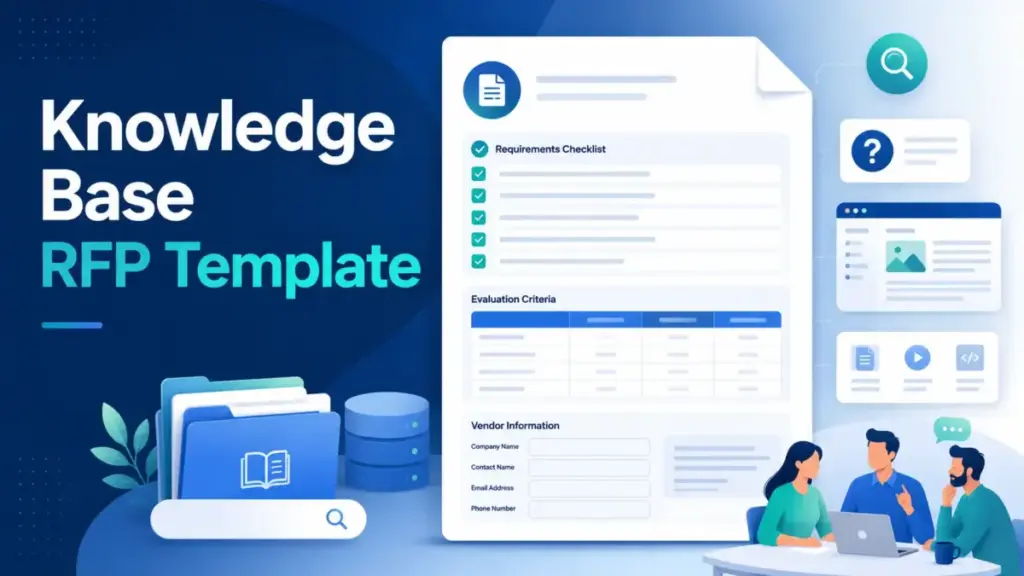
The average knowledge base procurement decision involves 5 to 8 stakeholders, content migration from at least 2 existing systems, and an AI readiness question that most downloaded RFP templates never address. A knowledge base RFP template that lists features without translating support, security, AI, content governance, and adoption needs into scorable vendor evidence produces spreadsheets full of “yes” answers and zero confidence in the final decision.
This article is not a copy-paste checklist. I built this knowledge base RFP framework from procurement patterns across customer-facing help centers, internal support systems, and AI-ready knowledge platforms. It covers what a knowledge base RFP template is, what sections belong in it, which vendor questions actually produce useful answers, how to score responses with a weighted matrix, and when an RFI or RFQ fits the situation better. I evaluated vendor documentation, real RFP examples, and knowledge base software capabilities across Document360, Zendesk, Intercom, Atlassian, and Guru to ground every recommendation in specific, verifiable evidence.
The 60-Second Explanation of a Knowledge Base RFP Template
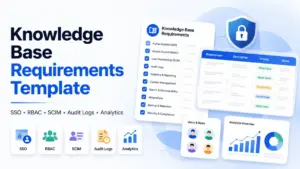
A knowledge base RFP template is a structured procurement document used to request comparable proposals from vendors that provide knowledge base, help center, documentation, or knowledge management software. The U.S. Federal Acquisition Regulation (FAR 15.203) defines an RFP as a document that communicates requirements to prospective contractors and solicits proposals. A knowledge base RFP applies that same principle to knowledge management platforms, adding categories specific to content authoring, search quality, permissions, taxonomy, AI readiness, analytics, integrations, and migration support.
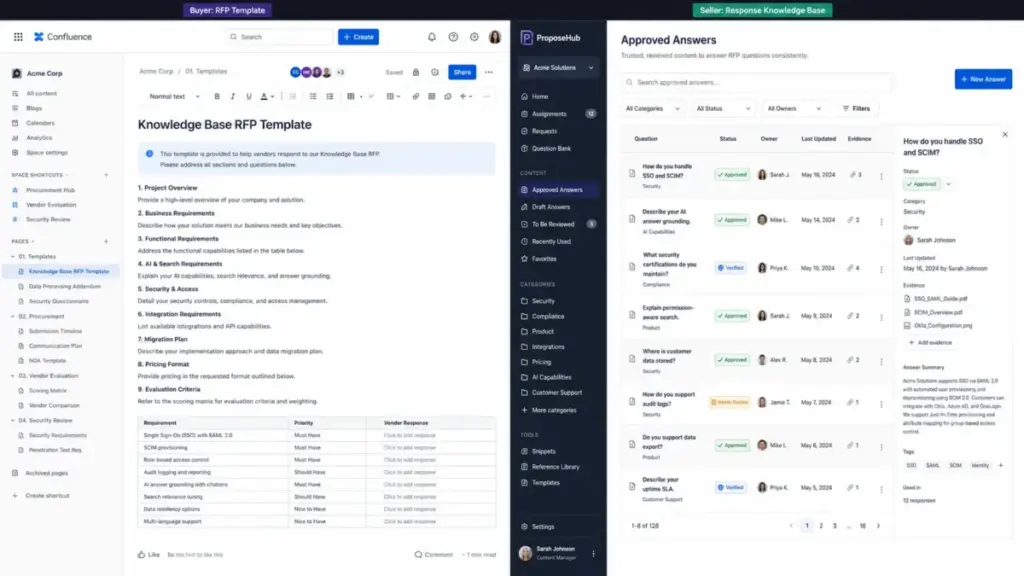
The distinction matters: a knowledge base RFP helps buyers select knowledge base software. An RFP response knowledge base, by contrast, helps sellers answer RFPs. Tribble defines the latter as a centralized content repository for approved answers, compliance evidence, and supporting materials. These are related workflows with different audiences and different tools.
Why This Distinction Matters in 2026
Knowledge base selection has become a higher-stakes decision than it was even 2 years ago. According to a Gartner survey, 91% of customer service leaders face executive pressure to implement AI in 2026, with customer satisfaction, operational efficiency, and self-service success ranking as top priorities. Zendesk CX Trends 2026 reports that 74% of consumers now expect customer service availability 24/7, a direct consequence of AI-era expectations.
The knowledge base is no longer just a help center. It is the source of truth that feeds AI agents, generative search, agent assist tools, and enterprise search. Forrester warns that AI-first customer service exposes operational gaps unless companies simplify tech stacks, improve data quality, and optimize knowledge bases. As Kim Hedlin, Director of Research in Gartner’s Customer Service and Support practice, notes: “Service organizations are entering a period where AI and human expertise must work in tandem.”
That pressure reframes every knowledge base procurement conversation. The question is not just “which tool has the best editor” but “which platform produces knowledge that AI systems, support agents, customers, and employees can all trust.”
Step-by-Step: Building a Knowledge Base RFP That Produces Actionable Vendor Responses
Step 1: Define the Use Case Before Writing a Single Requirement
Most failed knowledge base procurements start by listing features before defining the audience. A customer-facing help center, an internal support knowledge base, a product documentation portal, a partner knowledge hub, and an AI knowledge layer each require different capabilities.
| Use Case | Primary Users | Critical Requirements | Example Platforms |
|---|---|---|---|
| Customer self-service help center | End customers, prospects | Article search, SEO, ticket deflection, branding, localization, analytics | Zendesk, Intercom, Document360 |
| Internal support knowledge base | Agents, IT, HR, operations | Permissions, SSO, internal search, ownership, verification, collaboration | Guru, Confluence, Nuclino |
| Product documentation portal | Developers, technical users | Versioning, API docs, structured authoring, content reuse | Document360, Confluence |
| AI-ready knowledge management | AI agents, copilots, RAG systems | Source citations, permission-aware answers, freshness, feedback loops, guardrails | Zendesk, Guru, Intercom |
Start here: who creates content, who approves it, who searches it, who maintains it, and which support or product systems must connect to it.
Step 2: Inventory Current Content and Migration Sources
Before asking vendors about capabilities, map the content you already have. Common sources include existing help centers, PDFs, Google Docs, spreadsheets, Confluence spaces, Notion databases, Zendesk articles, Intercom conversations, shared drives, ticket histories, and chat logs.
The migration question is the one that most generic RFP templates skip entirely. A 500-article help center with inconsistent tagging, duplicate content, and 3 years of outdated articles requires a different migration plan than a clean 50-article documentation site.
Step 3: Separate Mandatory Requirements from Nice-to-Haves
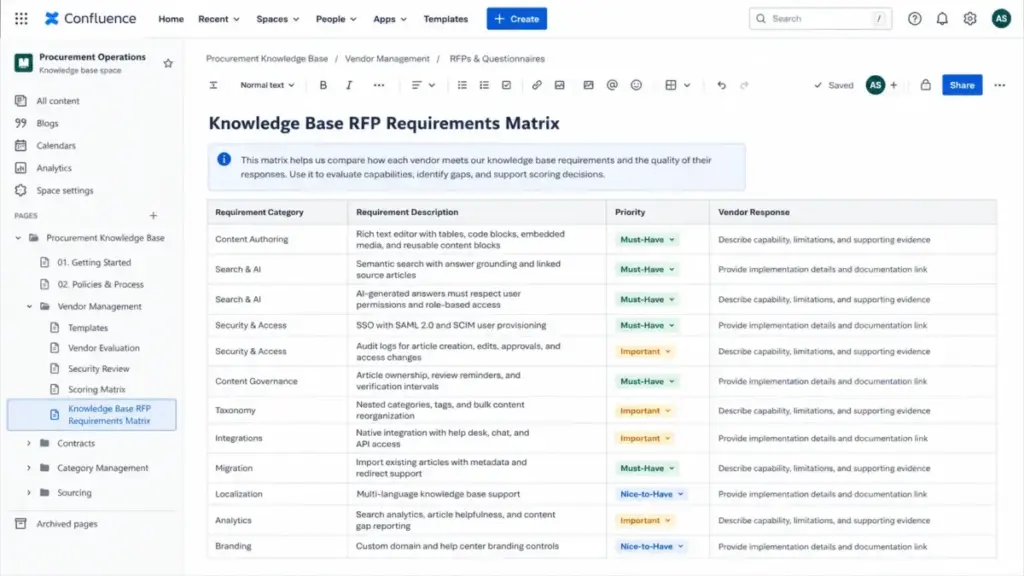
Organize requirements into categories that force vendors to distinguish between core capabilities and aspirational features:
- Functional requirements: Content authoring, rich media, approval workflows, publishing controls, versioning, taxonomy, search, article feedback, localization
- AI and knowledge quality: AI-generated answers, source citations, permission-aware retrieval, content freshness detection, feedback loops, guardrails
- Security and access: SSO/SAML, SCIM provisioning, role-based access, article-level permissions, inherited permissions, audit logs, data residency, encryption, AI data usage policies
- Integration requirements: Help desk, CRM, chat, ticketing, internal communication tools, API access, webhooks
- Implementation and migration: Content import, taxonomy mapping, redirect handling, training, sandbox environment, migration timeline
- Commercial terms: Pricing model, contract length, support tiers, SLA commitments, add-on costs, AI feature pricing
This is where most buyers make their first mistake: treating all requirements as equally important. Tag each requirement as Must-Have, Important, or Nice-to-Have before sending the RFP.
The 5 Mistakes That Waste Your First Month of Knowledge Base Procurement
Mistake 1: Copying a Generic Software RFP
A standard software RFP covers company background, scope, technical requirements, timeline, and budget. It does not cover content governance, taxonomy design, article verification intervals, search quality testing, AI answer grounding, or migration complexity. Downloading a template and sending it to Zendesk, Document360, and Confluence produces responses that look identical on paper but differ wildly in practice.
Mistake 2: Accepting Yes/No Answers as Proof
Ask “Do you support SSO?” and every vendor says yes. Ask “Describe how your platform handles SSO with SCIM provisioning for 600 users across 4 departments, each needing different article visibility rules, with audit logs for access changes” and you get answers that reveal actual capability versus marketing.
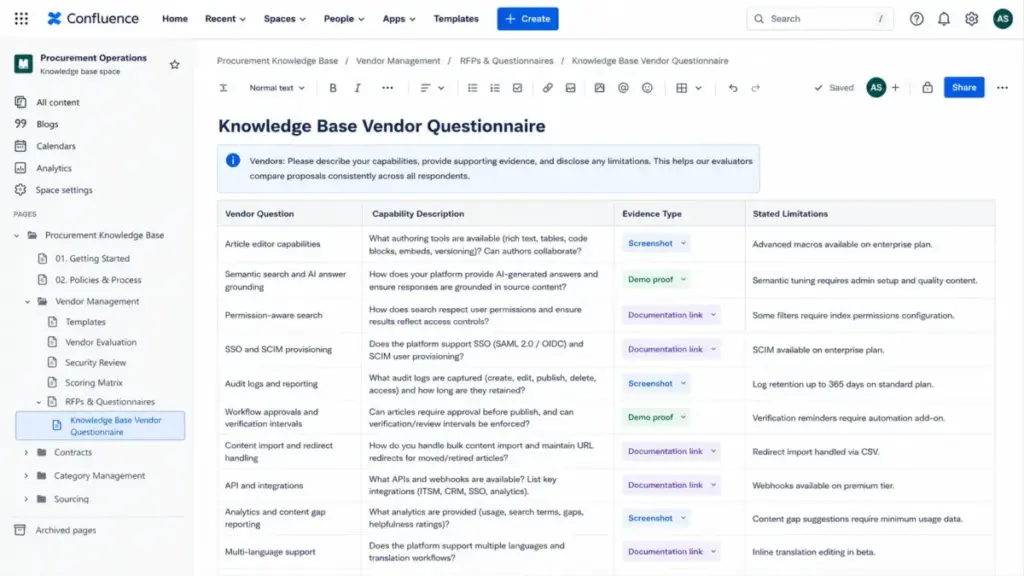
Write vendor questions that require evidence: screenshots, documentation links, demo proof, customer references, migration samples, security artifacts, and stated limitations.
Mistake 3: Overweighting UI While Ignoring Content Governance
A beautiful editor matters. A beautiful editor connected to content with no owner, no verification schedule, no taxonomy, and no freshness controls produces a knowledge base that decays within 6 months. Your RFP must weight content lifecycle management (ownership, review cycles, stale-content detection, duplicate handling) at least as heavily as content creation.
Guru positions itself as a governed enterprise knowledge layer with verified, cited, permission-aware answers, unified search across apps, stale-content detection, duplicate merging, and ownership workflows. Zendesk offers verification intervals and scheduled publishing. These are the governance features that separate a living knowledge base from a content graveyard.
Mistake 4: Skipping the Demo Script
Running vendor demos without a standardized script is how organizations pick the vendor with the best sales engineer instead of the best product. Define a common demo script before shortlisting, covering:
- Create a new article with rich media, internal links, and metadata
- Route the article through an approval workflow
- Search for the article using a natural-language customer question
- Show what happens when search returns zero results
- Demonstrate article-level permissions across two user roles
- Show article feedback collection and helpfulness metrics
- Demonstrate AI-generated answer grounding with source citations
- Show content analytics: views, helpfulness, search terms, content gaps
- Demonstrate migration of a sample article set (10-20 articles with categories)
- Show ticket deflection or self-service resolution tracking
Run the same script for every vendor. Score each task on a 1-5 scale.
Mistake 5: Comparing License Price Instead of Total Cost
The license price is the smallest line item in a knowledge base procurement. Total cost of ownership includes implementation, migration, content cleanup, admin time, support tier fees, AI add-ons, localization setup, sandbox environments, API usage, and future scale. A $15/agent/month tool that requires 200 hours of content migration work costs more in year 1 than a $45/agent/month tool with automated import.
What Good Knowledge Base Procurement Looks Like: Vendor Questions That Produce Real Answers
Generic questions produce generic responses. Here are the vendor question categories that separate a useful RFP from a formality.
Content Creation and Governance Questions
- Describe your article editor capabilities, including rich text, code blocks, embedded media, tables, and callout formatting
- How does your platform handle article ownership assignment, review reminders, and verification intervals?
- What happens to an article when its designated owner leaves the organization?
- Describe your taxonomy management: folders, categories, tags, nested structures, bulk reorganization
- How does your platform detect duplicate or near-duplicate content?
Search and AI Readiness Questions
- Describe your search architecture: keyword matching, semantic search, generative search, or hybrid
- How does your platform generate AI-powered answers from knowledge base content?
- Zendesk documentation states that generative search quality depends on knowledge base quality. How does your platform ensure AI answer accuracy?
- How does your AI handle permissions? Can users receive AI-generated answers that reference articles they do not have permission to view?
- What feedback mechanisms exist for users to flag inaccurate AI-generated answers?
- How do you handle “no result” scenarios? What does the user see when no relevant article exists?
Security and Permissions Questions
- Describe your authentication options: SSO/SAML, SCIM, MFA, IP restrictions
- How granular are article-level permissions? Can you restrict visibility by user role, group, geography, or product?
- Do permissions inherit from parent categories to child articles?
- What audit logging exists for content creation, modification, deletion, and access?
- Where is customer data stored? Do you offer data residency options?
- Provide your SOC 2 Type II report, or describe your security certification timeline
- How does your platform use customer content for AI model training? Provide your AI data usage policy
Migration and Implementation Questions
- Describe your content import capabilities: supported formats, metadata preservation, redirect handling
- What is the typical migration timeline for a 500-article knowledge base with 3 content sources?
- Do you provide a sandbox or staging environment for testing before go-live?
- What training resources do you offer for administrators, authors, and reviewers?
- Describe your onboarding process, timeline, and any required professional services fees
The Scoring Matrix: How to Compare Knowledge Base Vendors Without Bias
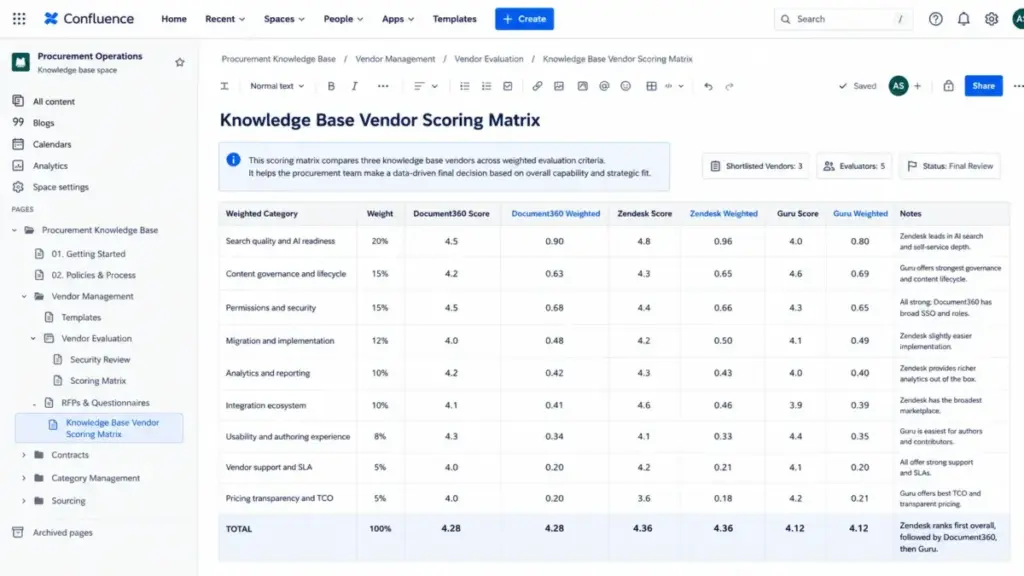
A scoring matrix that weights every category equally produces the same result as no scoring matrix at all. Weight categories based on your organization’s priorities before vendors submit proposals.
Sample Weighted Scoring Matrix
| Category | Weight | Scoring Criteria (1-5) |
|---|---|---|
| Search quality and AI readiness | 20% | Semantic search, generative answers, source citations, permission-aware retrieval, feedback loops |
| Content governance and lifecycle | 15% | Ownership, verification, freshness detection, duplicate handling, approval workflows |
| Permissions and security | 15% | SSO/SCIM, role-based access, article-level controls, audit logs, compliance documentation |
| Migration and implementation | 12% | Import capabilities, timeline, taxonomy mapping, training, sandbox availability |
| Analytics and reporting | 10% | Article performance, search analytics, content gaps, self-service metrics, ticket deflection |
| Integration ecosystem | 10% | Help desk, CRM, chat, API, webhooks, marketplace |
| Usability and authoring experience | 8% | Editor quality, workflow design, admin interface, mobile experience |
| Vendor support and SLA | 5% | Response times, support channels, uptime guarantees, escalation paths |
| Pricing transparency and TCO | 5% | Per-seat vs flat rate, add-on clarity, AI pricing, annual vs monthly, scale pricing |
How to Score: Anchors That Prevent Inflated Ratings
Each evaluator must use consistent scoring anchors:
- 5 = Exceeds requirements: Vendor demonstrates capability with evidence, references, and live demo proof
- 4 = Meets requirements: Vendor confirms capability with documentation or screenshots
- 3 = Partially meets: Vendor has the feature but with limitations, workarounds, or roadmap dependency
- 2 = Weak: Feature exists in basic form but lacks the depth required
- 1 = Does not meet: Feature missing, on roadmap only, or requires third-party solution
Multiply each category score by its weight. Compare total weighted scores across vendors. Document evaluator notes for every score to create an auditable decision trail.
How Knowledge Base Platforms Handle These Requirements: 5 Real Examples
Understanding how current platforms approach these categories helps buyers calibrate expectations and write sharper RFP questions.
Document360 provides a knowledge base portal for editors, writers, and reviewers alongside a public or private knowledge base site. According to the Document360 features page, the platform includes Pro Analytics, Custom Workflow Builder, SSO and SCIM provisioning, a REST API, and an AI Premium Suite with AI-powered search and writing tools.
Zendesk offers an AI-powered knowledge base with generative content creation, AI agents connected to the knowledge base, semantic and generative search, approval workflows, verification intervals, article performance tracking, and content gap identification. Zendesk documentation confirms that AI-generated answers derive from primary search results and that users can only view generated answers for articles they have permission to view.
Intercom centralizes internal and external support content in its Knowledge hub. Content types include public articles, internal articles, snippets, synced/imported content from other platforms, managed external sources, and PDFs. This content powers the Fin AI Agent, Copilot, and Help Center self-service.
Atlassian Jira Service Management and Confluence connect knowledge articles to service portals and agent workflows. According to Atlassian’s documentation, customers can search articles in the help center, agents can share or reference articles during requests, and agents can create new articles from useful request information.
Guru describes its enterprise search as connecting knowledge across applications, verifying it automatically, and delivering cited, permission-aware answers across apps and AI tools. Its governance model emphasizes stale-content detection, duplicate merging, and ownership workflows.
These are not rankings. They are examples of how different platforms approach the same procurement requirements, and they illustrate why your RFP questions must go beyond “do you have search?” into “how does your search handle permissions, citations, and content quality?”
Tools That Support Knowledge Base Procurement
Several categories of tools support the knowledge base selection process:
Knowledge base platforms (the products you evaluate): Document360, Zendesk, Intercom, Atlassian Confluence, Guru, Shelf, Help Scout, Freshdesk, Notion, Helpjuice
RFP response platforms (for sellers, not buyers, but useful for context): Responsive, Loopio, Tribble
Help desk solutions often include built-in knowledge bases, so your RFP process may overlap with a broader support platform evaluation.
When to Use a Knowledge Base RFP, and When Not To
Use a Full RFP When:
- The purchase affects multiple teams (support, IT, content, security, AI)
- You are migrating from an existing platform with 200+ articles
- The knowledge base will power AI agents, generative search, or copilot features
- Security and compliance review is required (SOC 2, data residency, HIPAA)
- Annual spend exceeds your organization’s procurement threshold
- Multiple brands, products, or regions need separate knowledge instances
- Enterprise integrations (SSO, SCIM, API) are mandatory
Skip the RFP When:
- Your team needs a simple public FAQ with fewer than 50 articles
- Budget is small and the vendor shortlist is obvious
- You are still exploring the market and do not have defined requirements
In the exploration phase, use an RFI (Request for Information) to learn vendor capabilities before writing requirements. The U.S. General Services Administration distinguishes between RFIs (market research), RFPs (complete proposals evaluated on multiple factors), and RFQs (fixed requirements where price is the main variable). An RFI collects capability information. An RFP collects full proposals with evidence. An RFQ compares pricing when requirements are already locked.
FAQ
What is a knowledge base RFP template?
A knowledge base RFP template is a structured procurement document that requests comparable proposals from knowledge base, help center, documentation, or knowledge management software vendors. It includes sections for functional requirements, AI readiness, content governance, security, integrations, migration, pricing, and vendor evaluation criteria.
What sections should a knowledge base software RFP include?
A complete knowledge base RFP includes: company overview and project scope, audience and use case definition, functional requirements, AI and search requirements, security and permissions, integration requirements, migration and implementation plan, pricing and commercial terms, vendor background and references, demo requirements, evaluation criteria and scoring matrix, and submission timeline.
How do you evaluate knowledge base software vendors?
Score vendor proposals against a weighted matrix covering search quality, AI readiness, content governance, permissions, migration support, analytics, integrations, usability, support, and total cost of ownership. Run standardized demo scripts across all shortlisted vendors and validate security documentation independently.
What questions should you ask knowledge base vendors?
Ask questions that require evidence, not yes/no answers. Request screenshots of the editor, documentation of permission models, demo proof of AI-generated answers with source citations, migration sample results, security certification documents, and customer references from organizations with similar scale and use case.
What is the difference between an RFP, RFI, and RFQ?
An RFI collects general capability information during market exploration. An RFP requests complete proposals evaluated on multiple factors including capability, experience, pricing, and implementation. An RFQ requests price quotes when requirements are fixed and pricing is the remaining variable.
How do you create an RFP scoring matrix for knowledge base software?
Assign percentage weights to each evaluation category before vendor submissions arrive. Use 1-5 scoring anchors tied to specific evidence levels (demo proof, documentation, references). Multiply scores by weights to produce total weighted scores. Document evaluator notes for auditability.
What are must-have requirements for knowledge base software in 2026?
Content authoring with approval workflows, semantic or generative search, permission-based access controls, content verification and freshness management, analytics and reporting, AI answer grounding with source citations, SSO/SAML authentication, API access, and content migration support.
How do you evaluate AI-powered knowledge base features?
Test how the platform generates AI answers, whether it cites source articles, whether it respects user permissions in AI-generated responses, how it handles content quality and freshness, and what feedback mechanisms exist for flagging inaccurate answers. Zendesk documentation confirms that generated answer quality depends directly on knowledge base content quality.
When should you use a knowledge base RFP instead of a free trial?
Use an RFP when procurement affects multiple stakeholders, requires security review, involves content migration, or exceeds organizational spending thresholds. Free trials work well for individual team evaluation but do not test governance, migration, permissions at scale, or total cost of ownership.
What are common mistakes in knowledge base software RFPs?
Copying generic software RFP templates without knowledge-specific requirements, accepting yes/no vendor answers without evidence, overweighting editor UI while ignoring content governance, skipping standardized demo scripts, comparing license price without total cost of ownership, and treating vendor claims as proof without demo validation.