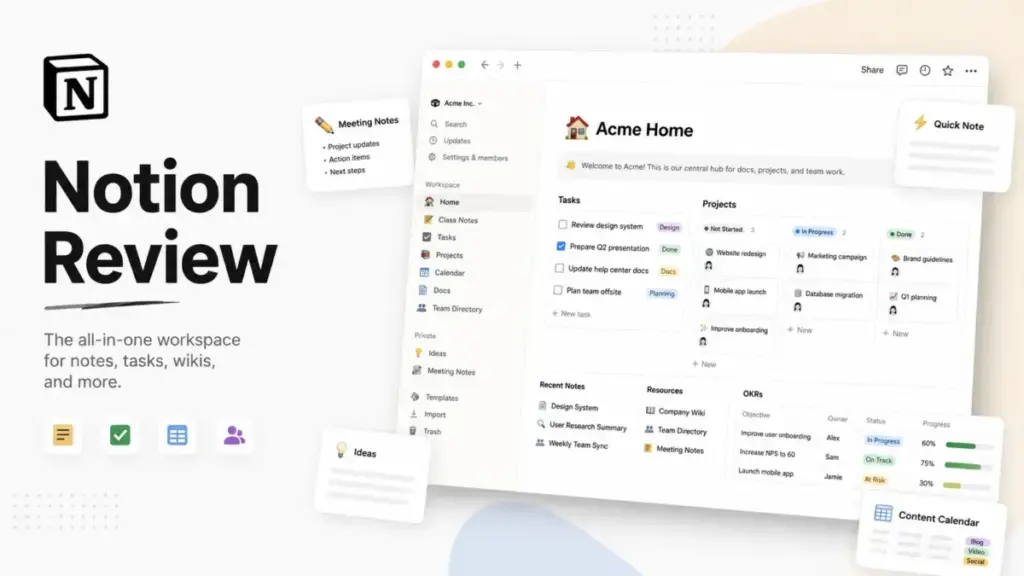
Most teams do not struggle with Notion because it lacks features. They struggle because Notion gives them too much freedom without forcing structure. Every new workspace starts as a blank canvas, and within weeks, that canvas either becomes a well-organized operating system or a tangled mess of orphaned pages and duplicate databases.
This Notion review breaks down exactly where the product excels, where it falls short, and which teams will actually benefit from adopting it in 2026. I evaluate Notion as an all-in-one workspace for docs, wikis, databases, projects, and AI, not just as a note-taking app. If your team is considering knowledge base software or a flexible collaboration platform, this review will help you decide whether Notion fits your workflow or whether a competitor does the job better.
For context on how I score every product on this site, see our review methodology.
Quick Verdict
Notion scores 8.6 out of 10 in this review. It is best for documentation-heavy teams, startup operators, creators, product teams, and knowledge-base workflows that need flexible pages, databases, docs, wikis, and lightweight project tracking in one workspace.
Notion is not the best fit for teams that need strict project execution, native time tracking, advanced reporting, heavy resource management, offline-first knowledge work, or high-volume database automation.
| Category | Verdict |
|---|---|
| Overall score | 8.6/10 |
| Best for | Documentation-heavy teams and flexible workspaces |
| Weakest area | Strict project execution |
| Starting price | Free; Plus $10/member/month |
| Best paid tier | Business for AI-heavy teams |
| Main alternatives | Confluence, Coda, Airtable, ClickUp, monday.com |
Top reason to buy: Notion consolidates docs, wikis, databases, and lightweight projects into a single workspace that most team members can learn within a week.
Top reason to avoid: If your team needs execution-level PM with time tracking, dependencies, workload dashboards, and strict reporting, Notion will disappoint. Tools like ClickUp, monday.com, or Asana handle that job better.
What Is Notion?
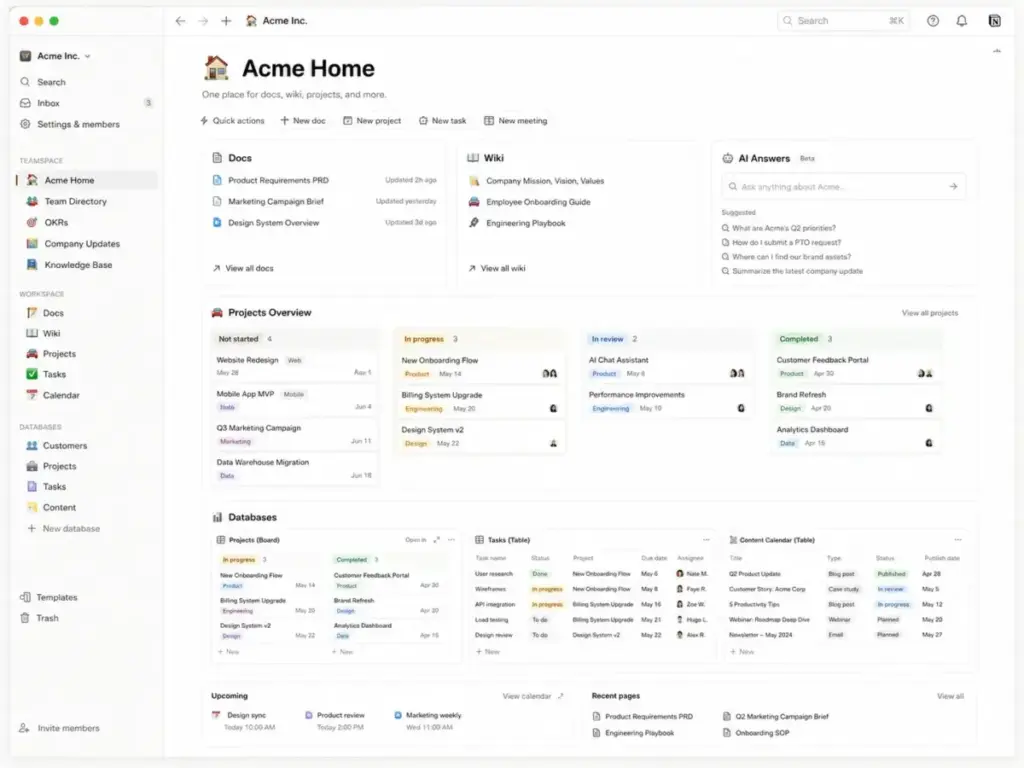
Notion is an AI-powered workspace that combines docs, wikis, projects, databases, forms, sites, calendar, mail, and search into one product. It sits at the intersection of knowledge base, project management, and collaboration software.
Unlike tools that specialize in one job, Notion lets teams build custom systems from scratch using blocks, pages, and relational databases. Since the launch of Notion 3.0 in September 2025 and continued updates through April 2026, the product now includes AI agents, enterprise search, meeting notes, and credit-based custom automation.
Notion Setup Debt Explained
Notion’s blank canvas is both the product and the problem. Every team I have observed adopting Notion goes through a predictable cycle: excitement in week one, chaos by week four, and either a cleanup sprint or quiet abandonment by month three.
I call this “setup debt.” Notion saves tool costs only after the team agrees on naming conventions, database structure, permissions, template standards, and page ownership. Without those agreements, the workspace becomes a liability.
The 30-Day Adoption Lifecycle
Day 1-3: Initial setup. Teams import docs, create first pages, and choose from Notion’s template gallery. Everything feels fast and flexible. Most team members are optimistic.
Day 4-10: System building. Someone starts creating databases, dashboards, and task boards. This is where design decisions compound. If no one owns the information architecture, different teams build conflicting systems.
Day 11-30: Governance reality. Permissions need tuning. Teamspaces need owners. Naming conventions need enforcement. The team realizes Notion does not impose structure; they must create it themselves.
Day 31-90: Workspace entropy. Without an internal owner who maintains templates, archives stale pages, and enforces standards, the workspace degrades. Pages get nested six levels deep. Duplicate databases appear. Search returns noise instead of answers.
“Customizable Yet Complex; A Mixed Bag for Serious Presentation” – Daniel R., Small-Business reviewer, G2
The takeaway: Notion’s flexibility is a feature for disciplined teams and a trap for teams that skip governance. Budget at least one person-week for initial architecture before inviting the full team.
Notion Key Features
Notion packs more feature categories into one workspace than any direct competitor I have tested. The product spans docs, wikis, databases, projects, AI, mail, calendar, forms, sites, and integrations. Below is how each area performs in practice.
Notion Docs and Block Editor
Notion’s block editor remains one of the best in the category. Every paragraph, heading, image, toggle, callout, code snippet, and embed is a block you can drag, nest, and rearrange. Teams can build anything from a simple meeting note to a multi-section product spec with synced blocks that update across pages.
In practice, the block editor works best for internal documentation and team knowledge. It handles long-form writing well, though it is not a replacement for Google Docs when real-time co-editing with tracked changes and commenting workflows matter at scale.
Limitation: Notion’s export options are limited. If your team frequently needs to share polished PDFs or presentations with external stakeholders, the formatting can break during export.
Notion Wikis and Knowledge Base
This is Notion’s strongest use case. If you need a refresher on the basics, understanding what is a knowledge base will help you better structure your Notion workspace. Teams can build structured wikis with verified pages, owners, tags, and properties. Wiki pages support status labels, expiration dates, and page verification to keep documentation current.
“You can build various dashboards, choose from different templates, and have broad customization available as well.” – Victoria C., Marketing Specialist, Capterra
For teams replacing scattered Google Docs, Confluence, or internal wikis, Notion’s wiki system provides a single source of truth with better flexibility than most alternatives. The verification system helps fight documentation rot.
Limitation: Wikis require someone to enforce page ownership. Without a documentation lead, verified pages expire silently and stale content remains in search results.
Notion Databases
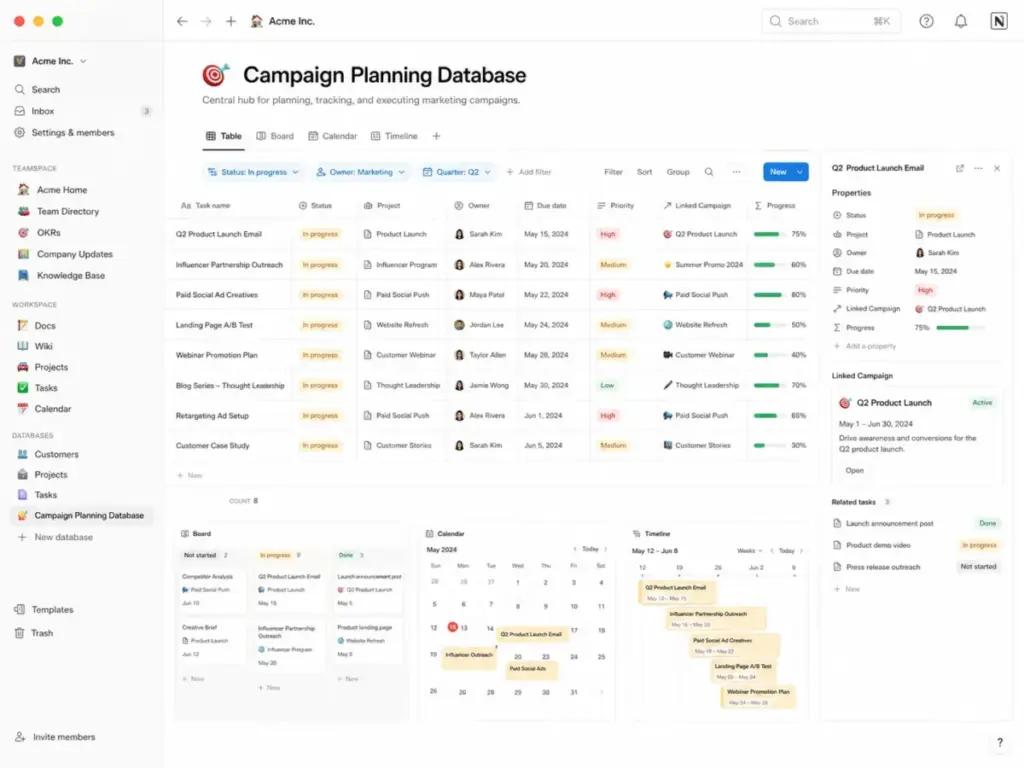
Notion databases offer six views (table, board, calendar, timeline, gallery, list), relations, rollups, formulas, filters, and sorts. Teams use them for everything from CRM tracking to sprint boards to content calendars.
The relational database model is powerful for connecting projects to tasks, tasks to people, and people to documentation. For teams that outgrow spreadsheets but do not need a full database platform, Notion databases hit a useful middle ground.
Limitation: Complex databases with thousands of rows, heavy formulas, and multiple relations can slow down noticeably. If your workflow depends on database performance at scale, Airtable is the stronger choice.
Notion Projects
Notion Projects gives teams task boards, timelines, sprint views, and project-level dashboards. It connects tasks to docs, so every project carries context alongside its execution view.
For planning-oriented teams, this is a genuine strength. Product teams can link PRDs to sprint tasks. Marketing teams can connect campaign docs to content calendars. The context layer is something dedicated PM tools often lack.
Limitation: Notion Projects does not include native time tracking, workload management, resource allocation, or dependency logic beyond basic relation linking. For execution-heavy project management, tools on the best project management software list outperform Notion.
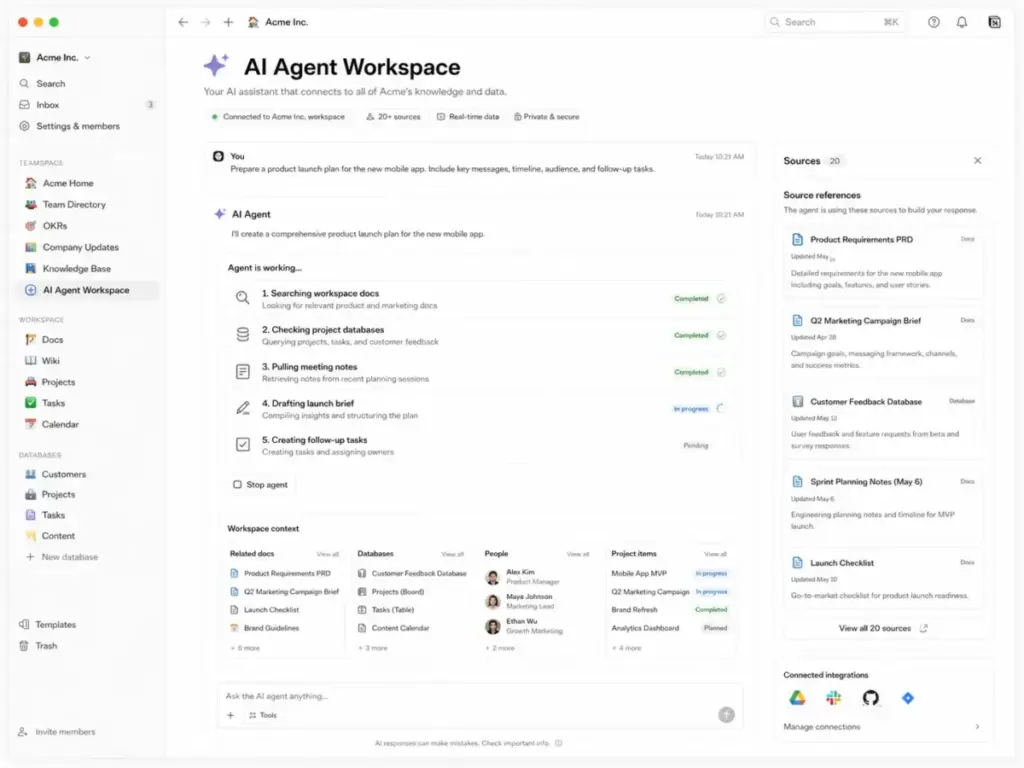
Notion AI, Agent, and Meeting Notes
Notion’s AI layer has evolved significantly since Notion 3.0 launched agents in September 2025. The current AI suite includes:
- Notion AI: Summarize, draft, translate, and extract action items from pages and databases.
- Notion Agent: Available on Business and Enterprise. Searches across your workspace and connected tools to answer questions with source citations.
- AI Meeting Notes: Transcribes and summarizes meetings with action items.
- Enterprise Search: Searches Notion plus connected apps like Slack, Google Drive, and Jira. Available on Business and Enterprise.
- Custom Agents: Scheduled or triggered workflows that create docs, update databases, or execute multi-step tasks. Free to try until May 3, 2026; starting May 4, 2026, Custom Agents use Notion credits.
AI performance is solid when the workspace is well-structured. Notion Agent pulls from your pages, databases, and connected tools, and returns answers with source references.
Limitation: AI value concentrates on Business and Enterprise. Free and Plus users get only trial AI capabilities. Custom Agent costs are usage-based, and teams with heavy automation needs should model credit consumption before committing.
Notion Mail, Calendar, Forms, and Sites
Notion has expanded beyond its core workspace with four companion products:
- Notion Mail: A free email app for Gmail-based workflows. It organizes your inbox with AI and connects to your Notion workspace.
- Notion Calendar: A calendar app that syncs with Google Calendar and links meetings to Notion pages.
- Notion Forms: Collect responses directly into Notion databases. Custom forms are available on Plus and above.
- Notion Sites: Publish Notion pages as public websites. Custom sites with domains are available on Plus and above.
These are useful additions, not standalone replacements. Notion Mail and Calendar work best when your team already lives inside Notion. They add friction if your team uses Outlook or non-Google calendars.
Notion Integrations and API
Notion connects with Slack, Jira, GitHub, Asana, GitLab, Zapier, Make, and dozens of other tools through its integrations directory. The integrations work well for syncing updates, embedding content, and triggering lightweight workflows.
The Notion API supports reading, writing, and querying databases, pages, and blocks. It is useful for building internal tools, syncing data, and automating repetitive page creation.
Limitation: The Notion API enforces an average of 3 requests per second per integration. Rate-limited requests return HTTP 429 with a Retry-After header. This makes the API suitable for lightweight internal automation but weak for heavy sync workloads, real-time integrations, or transactional systems. Teams that need high-throughput database automation should consider Airtable or dedicated workflow platforms.
Notion User Experience
Notion’s user experience rewards structure-minded teams and punishes everyone else. The product looks clean. The sidebar is intuitive at small scale. Templates provide useful starting points. But the blank-canvas model creates a hidden cost.
The Blank Canvas Problem
New users face a paradox: Notion can do almost anything, but that means the user must decide what it should do. There is no default project board, no preset wiki hierarchy, no mandatory folder structure. This flexibility delights power users and frustrates teams that want a tool that works out of the box.
“The interface looks clean, but figuring out how to actually structure things takes more time than it should.” – Verified Reviewer, Chief of Staff, Capterra
Search and Navigation
Notion’s search works well in small-to-medium workspaces. It returns pages, databases, and content blocks. Enterprise Search (Business and above) extends this to connected apps like Slack and Google Drive.
In large workspaces with hundreds of pages, search quality degrades when pages lack consistent titles, tags, or owners. Navigation through nested sidebar menus can become slow and confusing. This is the workspace entropy problem: without governance, findability drops over time.
Mobile Experience
Notion’s mobile app handles reading and light editing well. For quick updates, meeting notes, and page references, the mobile experience is acceptable.
Database-heavy workflows are a different story. Editing complex database views, filtering multi-relation fields, and navigating nested pages on a phone is clunky at best.
“mobile app fails sometimes.” – Verified Reviewer, Designer, Capterra
For teams that depend on mobile for daily work, Notion’s mobile app is functional but not where the product shines.
The Workspace Entropy Risk
Every Notion workspace I have audited beyond 6 months shows the same pattern: pages created without naming conventions, databases duplicated across teamspaces, and archived content that never gets deleted. This is not a bug. It is the natural result of giving every team member the ability to create anything, anywhere.
The fix is governance: a workspace owner, naming standards, regular archive reviews, and documented templates. Teams that invest in this maintenance get a strong return. Teams that skip it end up searching for a replacement tool within a year.
Notion Pricing and Plans
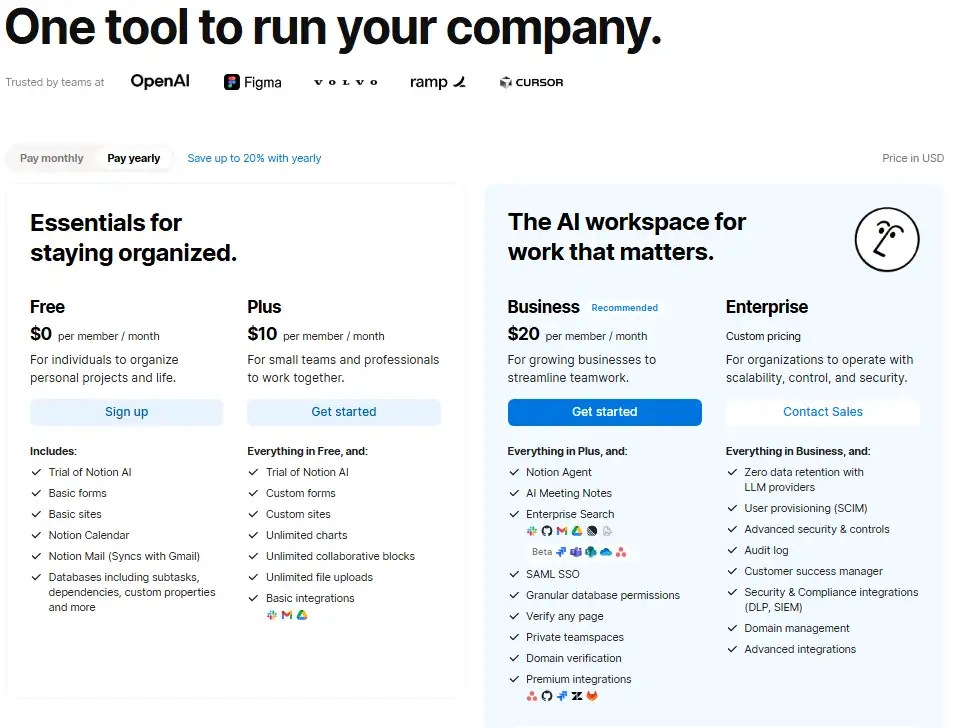
Notion’s pricing structure is straightforward on the surface but hides important upgrade gates for AI and enterprise features. Understanding the tier differences is critical before committing your team.
Pricing verified on April 28, 2026 from Notion’s official pricing page.
| Plan | Price | Best For | Key Limits |
|---|---|---|---|
| Free | $0/member/month | Solo users, students, personal systems | Trial AI, 5 MB upload limit, limited blocks for 2+ members |
| Plus | $10/member/month | Small teams and client collaboration | Trial AI only, no advanced AI features |
| Business | $20/member/month | AI-heavy teams and growing companies | Still lacks Enterprise governance |
| Enterprise | Custom | Regulated or large organizations | Contact sales |
| Custom Agents credits | $10/1,000 monthly credits | Business/Enterprise automation | Credits reset monthly |
For a detailed breakdown of each tier, see our Notion pricing guide.
What the Pricing Page Does Not Make Obvious
Serious AI use points to Business, not Plus. Notion Agent, AI Meeting Notes, Enterprise Search, and Research Mode are all Business-tier features. Free and Plus users get only trial-level AI access.
Custom Agents become usage-based from May 4, 2026. The free trial period ends, and Custom Agent workflows start consuming Notion credits at $10 per 1,000 monthly credits. Teams building automated workflows should estimate credit usage before scaling.
Enterprise is required for true governance. SCIM provisioning, audit logs, advanced security controls, zero data retention with AI providers, and unlimited page history are Enterprise-only. Growing teams with compliance needs will hit this wall on Business.
Free is generous for solo use but weak for collaboration. Solo free workspaces get unlimited pages and blocks. But free workspaces with two or more members have a limited collaborative block allowance. The moment you add a teammate, the Free plan’s limitations surface quickly.
The AI pricing shift changes Notion’s value equation. In 2024, Notion AI was a $10/month add-on. Now, AI is bundled into plans, but its real value concentrates on Business and Enterprise. If your team bought Notion for AI, the actual entry price is $20/member/month, not $10.
Notion Pros and Cons
Notion’s strengths center on flexibility and consolidation. Its weaknesses center on structure, execution depth, and enterprise controls. Here is the honest breakdown.
- Strong all-in-one workspace that consolidates docs, wikis, databases, and projects
- Flexible block editor and relational databases that adapt to almost any workflow
- Generous free plan for solo users, students, and personal knowledge systems
- Business plan includes meaningful AI workspace capabilities (Agent, Meeting Notes, Enterprise Search)
- Large template gallery and active community ecosystem
- Stronger security posture on Enterprise with SOC 2 Type 2, ISO 27001, and HIPAA support
- Useful integrations with Slack, Jira, GitHub, Asana, Zapier, and Make
- Learning curve and setup debt require upfront investment in workspace architecture
- Not ideal for strict PM execution: missing native time tracking, dependencies, workload dashboards
- Database-heavy workspaces can experience slowdowns with thousands of rows and complex formulas
- Mobile database work remains clunky compared to desktop
- Offline-first workflows are better served by Obsidian or local-first tools
- Heavy automation is constrained by API rate limits (3 requests/second per integration)
- AI value pushes teams toward Business ($20/member/month) and credit-based Custom Agent costs
- Enterprise controls (SCIM, audit logs, advanced governance) gated behind custom pricing
Is Notion Good for Project Management?
Notion is good for project planning, documentation, and lightweight task tracking. It is not a full project management system. This distinction matters for every team evaluating Notion as a PM replacement.
Notion Projects connects tasks to docs, supports board and timeline views, and provides sprint-level organization. For teams that value context alongside execution (linking a task to its PRD, spec, or meeting notes), Notion does this better than most PM tools.
But Notion lacks native time tracking, workload visualization, advanced dependencies, resource allocation dashboards, portfolio-level reporting, and strict operational controls. If your team runs on execution cadence and needs real-time visibility into who is doing what, when it is due, and how much capacity remains, Notion will not keep up.
Here is how Notion compares for PM-specific jobs:
| Job | Notion | Better Alternative |
|---|---|---|
| Context-rich project documentation | Strong | None needed |
| Lightweight task tracking | Adequate | None needed |
| Sprint planning with specs | Strong | None needed |
| Time tracking and billing | Not available | ClickUp, monday.com |
| Workload and resource planning | Not available | Asana, monday.com |
| Advanced dependencies | Weak | ClickUp, Asana |
| Portfolio reporting | Weak | monday.com, Asana |
Notion beats Trello for context-rich docs and databases. ClickUp beats Notion for execution-heavy project operations. monday.com beats Notion for visual operations and structured workflows. Asana beats Notion for task clarity and cross-team project execution. For a ranked comparison of all these tools by their free tiers, see our best free project management software guide.
Notion vs Alternatives
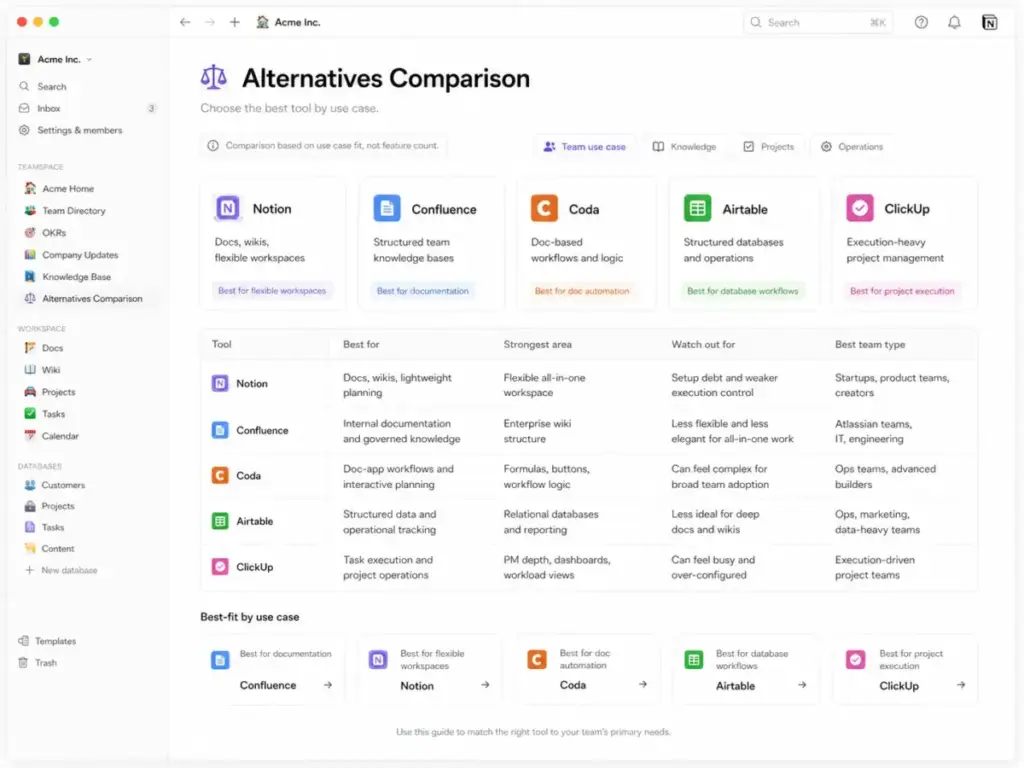
No single tool wins every use case, and Notion is no exception. Below are direct comparisons against Notion’s primary competitors, framed by job-to-be-done rather than generic feature lists. For a broader view, see our Notion alternatives roundup.
Notion vs Confluence
Choose Notion for flexible startup and team workspaces where speed, customization, and wiki-style documentation matter most.
Choose Confluence for governed enterprise documentation, stricter admin patterns, Atlassian ecosystem integration (Jira, Bitbucket), and teams that need formal page approval workflows.
Notion wins on flexibility and user experience. Confluence wins on enterprise governance and Atlassian-native workflows. For a detailed side-by-side, read our Notion vs Confluence comparison.
See also: Confluence review.
Notion vs Coda
Choose Notion for cleaner docs, stronger wikis, and broader team adoption with less friction.
Choose Coda for doc-app workflows, advanced formulas, buttons, automations, and teams that want documents to behave like applications.
Notion is easier to adopt. Coda is more powerful for teams that need programmatic document logic. See also: Coda review.
Notion vs Airtable
Choose Notion when content, context, and knowledge management matter more than structured data operations.
Choose Airtable when your workflow centers on structured databases, reporting, relational views, and large-scale data management.
Notion’s databases are flexible but limited at scale. Airtable’s databases are purpose-built and handle larger datasets with better performance. See also: Airtable review.
Notion vs ClickUp
Choose Notion for documentation-led operations where knowledge, wikis, and context drive the workflow.
Choose ClickUp for execution-led project management with time tracking, workload views, goals, dependencies, and dashboards.
This is the most common comparison I see, and the answer is clear: if your team’s primary need is documentation with some project tracking, Notion wins. If your team’s primary need is project execution with some documentation, ClickUp wins.
Notion vs monday.com
Choose Notion for flexible knowledge systems, internal wikis, and teams that want to build custom workflows from blocks and databases.
Choose monday.com for visual project operations, process control, dashboards, and teams that need structured boards with automation out of the box.
monday.com is more opinionated and easier to adopt for operations-focused teams. Notion is more flexible but requires more setup investment.
Notion vs Obsidian
Choose Notion for team collaboration, shared wikis, databases, and cloud-first workspaces.
Choose Obsidian for local-first personal knowledge management, offline-heavy workflows, and users who want full control over their files in Markdown format.
These tools serve different needs. Notion is collaborative and cloud-based. Obsidian is personal and local-first. For solo knowledge workers who work offline frequently, Obsidian is the better tool. For a comparison that includes another wiki-style competitor, see Guru vs Notion.
Who Should Use Notion?
Notion works best for teams that want to build and maintain a shared operating system. The following micro-cohorts get the most value from Notion in 2026.
5-20 person startup teams building an internal operating system from docs, meeting notes, project specs, hiring docs, and team wikis. Notion’s free plan gets you started, and the Plus plan scales affordably as the team grows.
3-10 person agencies managing content calendars, client portals, SOPs, and campaign documentation. Notion databases and templates help standardize delivery across clients without requiring a dedicated PM tool.
10-50 person product teams documenting PRDs, launch plans, sprint notes, roadmap context, and decision logs. The connection between docs and project boards keeps context alive where it matters.
Solo creators and consultants managing notes, templates, client work, and content systems. Notion’s free plan is one of the most generous personal productivity tools available.
Support or RevOps teams maintaining living internal wikis that need regular updates, verification, and cross-team access. Notion’s wiki verification and page ownership features help keep documentation current.
Who Should Not Use Notion?
Notion is the wrong choice when the job demands execution rigor, offline reliability, or enterprise-grade governance at non-enterprise pricing. Do not recommend Notion for:
- Field teams that work mostly from mobile. The mobile database experience is too limited for heavy daily use.
- Teams needing native time tracking and resource planning. Notion has no built-in time tracking or workload management.
- Teams with heavy reporting requirements. Notion’s charts and analytics are basic compared to dedicated PM or BI tools.
- Teams needing offline-first local knowledge bases. Notion requires internet connectivity. Obsidian or local-first tools are better.
- Teams with high-volume API sync requirements. The 3 requests/second rate limit makes heavy automation impractical.
- Enterprises that need SCIM and audit logs but will not pay for Enterprise. These controls are gated behind custom pricing with no mid-tier option.
James Carter’s Quick Take
Notion is worth it when the team wants to build a shared operating system and has someone willing to maintain it. The product is genuinely impressive as a knowledge workspace, and the AI additions since 2025 add real value for teams on Business or Enterprise.
But Notion is overrated when buyers expect it to replace dedicated PM tools, database platforms, wiki systems, and automation engines without tradeoffs. Every consolidation play has a cost. With Notion, that cost is setup time, ongoing governance, and the acceptance that you are trading depth for breadth.
My recommendation: start with a small team, define your information architecture before inviting the full org, assign a workspace owner, and revisit your structure at 30 and 90 days. If you treat Notion like a product you maintain, it rewards you. If you treat it like a tool you configure once, it will decay.
For teams exploring the broader collaboration space, our guide to best team collaboration tools covers options across categories.
FAQ
Is Notion worth it in 2026?
Yes, for the right use case. Notion is worth it for teams that need a flexible workspace for docs, wikis, databases, and lightweight project tracking. It is not worth it for teams that primarily need execution-focused project management or offline-first knowledge management. The free plan remains generous for solo use, and the Plus plan at $10/member/month delivers strong value for small teams.
How much does Notion cost?
Notion starts free and scales to $20/member/month for Business. The Free plan works for solo users. Plus costs $10/member/month with unlimited blocks and file uploads. Business costs $20/member/month and adds AI Agent, Meeting Notes, and Enterprise Search. Enterprise is custom-priced. Custom Agents use credits at $10 per 1,000 monthly credits starting May 4, 2026.
Is Notion free enough for personal use?
Yes. The Free plan gives solo users unlimited pages and blocks, trial AI, basic forms, Notion Calendar, and Notion Mail. The 5 MB file upload limit is the main constraint. For personal notes, knowledge management, and light project tracking, the Free plan is one of the best options in the category.
Is Notion good for project management?
Notion is good for project planning and context, but not for strict project execution. It lacks native time tracking, workload management, advanced dependencies, and portfolio reporting. Teams that need those capabilities should evaluate ClickUp, monday.com, or Asana instead.
What is Notion best used for?
Notion is best for internal documentation, team wikis, knowledge bases, and lightweight project planning. It excels when teams need to combine docs, databases, and project boards in one workspace. The AI features on Business add value for search, summarization, and automated workflows.
What are Notion's biggest limitations?
Setup debt, execution gaps, and AI pricing pressure. The blank-canvas model requires upfront investment in workspace structure. Project management features lack depth compared to dedicated PM tools. Serious AI use requires Business or Enterprise plans. Large databases can slow down. The mobile experience for database work is weak. The API rate limit of 3 requests per second constrains heavy automation.
Is Notion better than Confluence?
Notion is better for flexible, fast-moving teams. Confluence is better for governed enterprise documentation. Notion wins on user experience, speed, and customization. Confluence wins on Atlassian integration, formal approval workflows, and enterprise governance patterns. The right choice depends on whether your team values flexibility or structure more.
Is Notion better than ClickUp?
Notion is better for documentation-led workflows. ClickUp is better for execution-led project management. If your team’s primary job is knowledge management with some project tracking, choose Notion. If your team’s primary job is project execution with some documentation, choose ClickUp.
Does Notion work offline?
Notion has limited offline support. You can view recently accessed pages offline, and edits sync when you reconnect. But Notion is not designed for offline-first workflows. It requires internet connectivity for full functionality. Teams that need reliable offline access should consider Obsidian or other local-first tools.
Is Notion AI included in all plans?
Trial AI is included on all plans. Full AI capabilities require Business or Enterprise. Notion Agent, AI Meeting Notes, Enterprise Search, and Research Mode are Business-tier features. Custom Agents use Notion credits starting May 4, 2026, at $10 per 1,000 monthly credits. The Free and Plus plans offer only limited AI access.
Notion Review: Final Verdict
Notion earns an 8.6/10 because it delivers the best all-in-one workspace for teams that prioritize documentation, knowledge management, and flexible internal systems. I recommend it for teams willing to invest in setting up and maintaining their workspace structure.
Where Notion loses points is project execution depth, mobile database usability, and the reality that serious AI use now pushes buyers toward the Business plan or higher.
| Criterion | Score | Notes |
|---|---|---|
| Ease of setup | 7.8 | Flexible but structure-heavy |
| Docs and wiki | 9.3 | Strongest use case |
| Databases | 8.7 | Flexible but not Airtable-level |
| Project management | 7.6 | Good planning, weaker execution |
| AI features | 8.8 | Strong on Business+ |
| Integrations | 8.1 | Good, API limits matter |
| Value | 8.4 | Free/Plus strong; AI pushes Business |
| Admin/security | 8.2 | Stronger on Enterprise |
Related productivity guides