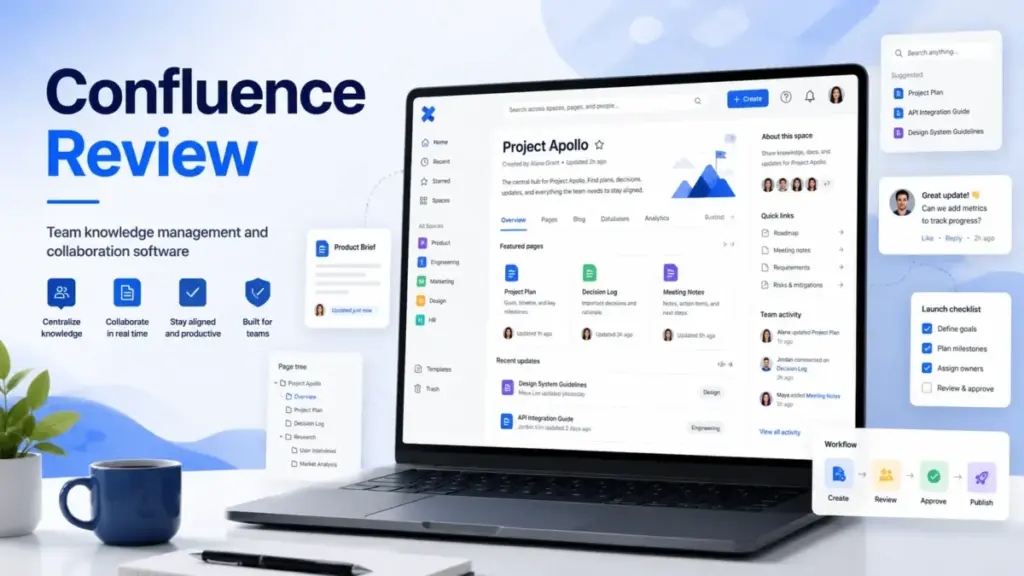
Internal documentation breaks down when teams cannot find what they wrote last month. Confluence is Atlassian’s answer to that problem: a team workspace built for pages, spaces, whiteboards, databases, and deep Jira linkage. But is Confluence the right knowledge base software for your team in 2026, or does its complexity work against smaller groups?
In this Confluence review, I evaluate Atlassian Confluence across documentation structure, Rovo AI, pricing, governance, and integrations. If you are unfamiliar with the concept, see our guide on what is a knowledge base before reading further.
This review is based on hands-on editorial evaluation using official documentation, workflow simulations, user feedback, and competitive pricing analysis.
Quick Verdict
Confluence scores 8.4 out of 10 and is strongest for Jira-heavy engineering, product, IT, and enterprise teams. It is not the best choice for simple public help centers, low-budget teams, or small non-technical groups that only need a lightweight wiki.
- Score: 8.4/10
- Best for: Jira-heavy product, engineering, IT, and enterprise teams
- Not for: Simple public help centers, low-budget teams, small non-technical teams
- Best plan for most teams: Standard
- Upgrade to Premium only when: Unlimited storage, admin insights, advanced permissions, and 99.9% uptime SLA matter
| Category | Rating | Notes |
|---|---|---|
| Documentation structure | 9.0/10 | Strong spaces, pages, templates |
| Jira integration | 9.3/10 | Best reason to pick Confluence |
| Ease of use | 7.4/10 | More setup than Notion or Slite |
| AI features | 8.0/10 | Rovo is useful but quota-based |
| Pricing value | 7.8/10 | Good entry price; add-ons can grow cost |
| Governance | 8.8/10 | Strong permissions and audit controls |
| Overall | 8.4/10 | Best for Atlassian-centric teams |
What Is Confluence?
Confluence is Atlassian’s cloud-based workspace for creating, organizing, and governing internal documentation. It goes well beyond a simple wiki by offering pages, spaces, whiteboards, databases, Loom embeds, and AI-powered Rovo features inside one platform.
Confluence sits at the center of the Atlassian ecosystem. It connects directly to Jira for issue tracking, Jira Service Management for IT workflows, and Loom for async video. For teams that already depend on Jira tickets to manage sprints, releases, and incidents, Confluence is the documentation layer that keeps specs, decisions, and runbooks linked to actual work items.
Unlike standalone wikis such as Notion or Slite, Confluence is built for structured content governance: page restrictions, space permissions, audit logs, data residency, and enterprise-grade compliance. That structure is a strength for regulated and scaled teams, but it can feel heavy for a five-person startup that just needs shared notes.
Confluence Features I Tested
I focused my evaluation on six core feature areas that matter most for knowledge management buyers. Each feature below includes a plan gate, a practical observation, and a note on which team type benefits most.
Confluence Pages and Spaces
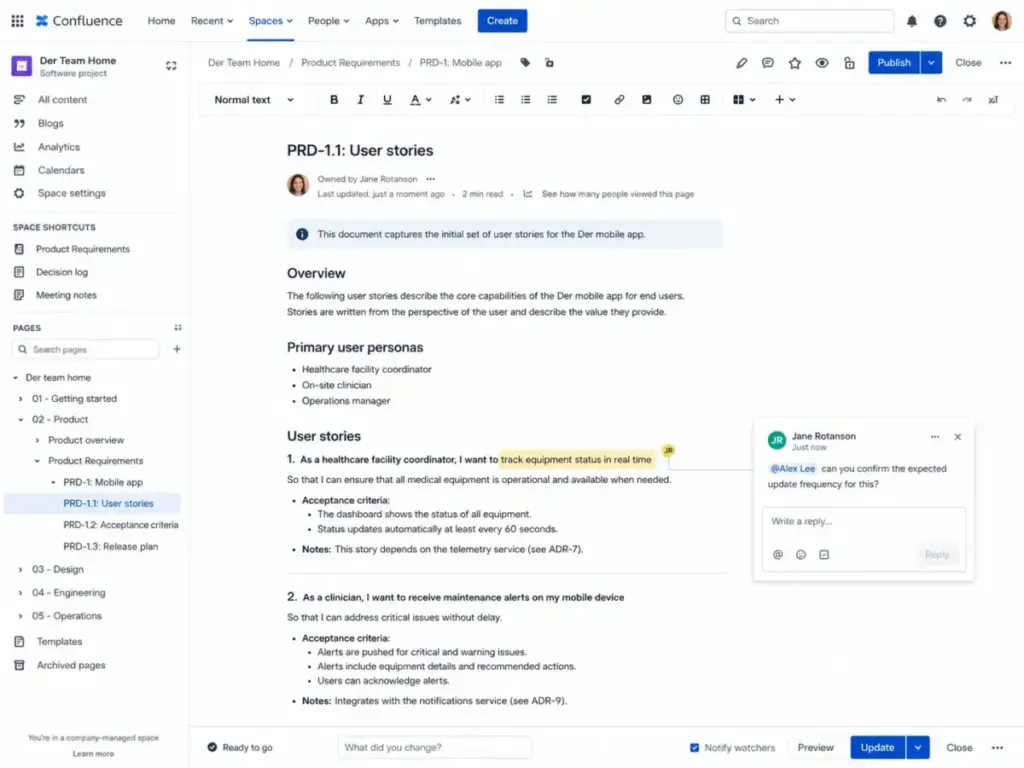
Pages are Confluence’s primary content unit. Each page lives inside a space, and spaces can represent teams, projects, departments, or topics. The page tree provides a nested hierarchy that makes it easy to organize documentation by scope.
Real-time editing lets multiple users work on the same page at once. Inline comments and page comments support review workflows without leaving the document. Mentions, likes, GIFs, and emojis help keep communication contextual.
In my evaluation, I found the page tree particularly useful for engineering teams that maintain specs, ADRs (architecture decision records), and runbooks. Product teams benefit from organizing PRDs and roadmaps inside dedicated spaces. The structure rewards teams that invest in consistent naming and labeling.
Page permissions are available on Standard and above. Page insights (view analytics) and page archive are also Standard features.
Confluence Whiteboards
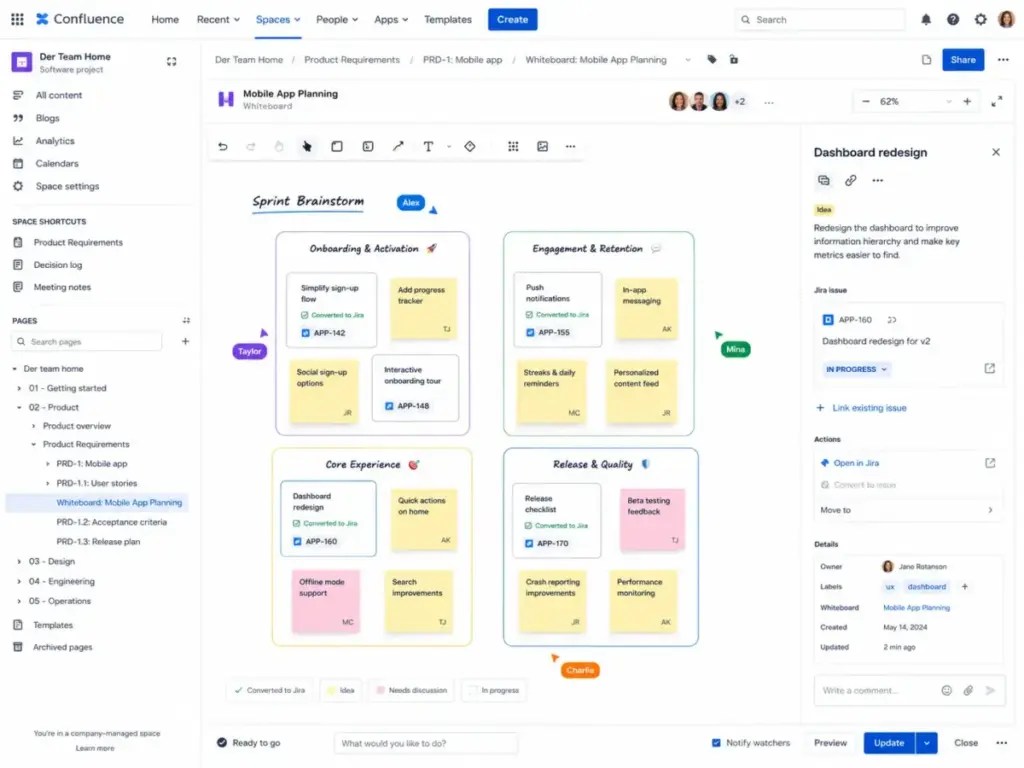
Whiteboards provide a freeform canvas for brainstorming, diagramming, and visual planning. The key differentiator is Jira linkage: teams can convert whiteboard cards into Jira work items with one click.
Free plan users get up to 3 active whiteboards per user. Premium and Enterprise plans include unlimited whiteboards. During testing, I noticed that whiteboards work best as a pre-documentation tool: teams brainstorm on the canvas, then convert outcomes into structured pages and Jira tickets.
Whiteboards matter most for product and engineering teams that run planning sessions, design sprints, or retrospectives.
Confluence Databases
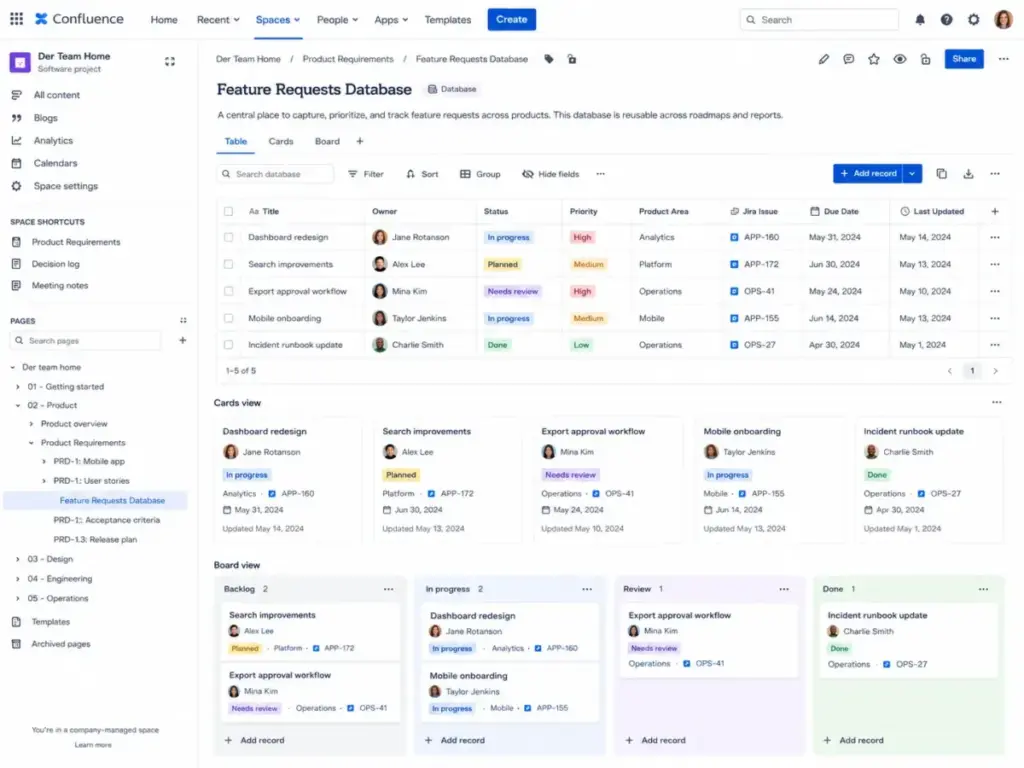
Databases let teams organize structured records and display them as tables, cards, or boards. They can pull in Jira data and third-party app data, keeping information in sync with real-time updates.
In my testing, databases worked well for tracking meeting notes by date, cataloging vendor evaluations, and organizing OKR progress. The feature is newer than pages and spaces, but it fills a gap that previously required Marketplace apps or external spreadsheets.
Databases help IT teams track assets, product teams manage feature requests, and operations teams log process owners.
Confluence Rovo AI
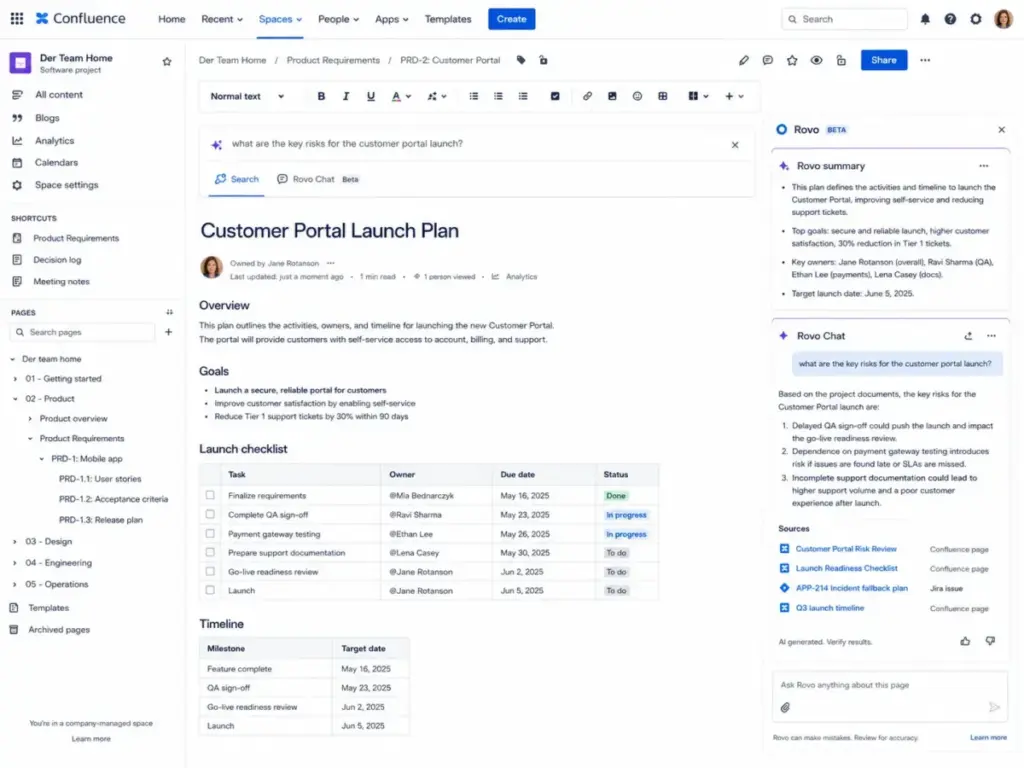
Rovo is Atlassian’s AI layer. It is included with eligible Standard, Premium, and Enterprise Cloud subscriptions for Confluence, Jira, and Jira Service Management. Admins can deactivate AI if their organization is not ready for it.
Rovo can turn messy notes into polished documents, define company-specific jargon inline, summarize long pages, and answer questions using Rovo Chat. Rovo Search connects knowledge across Confluence, Jira, Slack, and other enterprise apps.
The credit system is the key constraint. I cover Rovo credits in detail in the dedicated AI section below.
Confluence Templates and Macros
Confluence ships with a library of templates for product requirements, meeting notes, retrospectives, project plans, and more. Teams can also build custom templates to enforce consistent page structure.
Macros add dynamic content to pages: Jira issue lists, table of contents, status indicators, decision logs, and code blocks. In my evaluation, I found that macros reduce friction for engineering and IT teams that need to embed live Jira data inside documentation.
Templates and macros are available on all plans, including Free.
Confluence Permissions and Governance
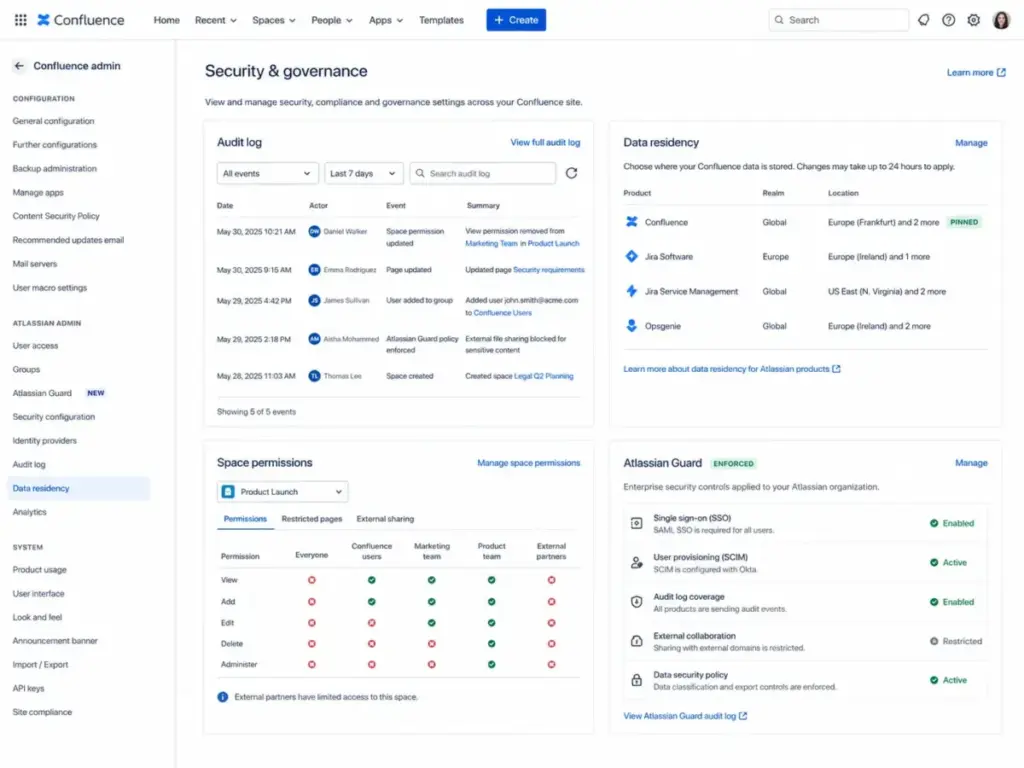
Governance is where Confluence separates itself from lighter tools. Space permissions control who can view, edit, and administer each space. Page restrictions add another layer for sensitive content.
Standard includes page permissions, page insights, page archive, audit logs, and data residency. Premium adds admin controls, advanced permissions, analytics, IP allowlisting, unlimited storage, and a 99.9% uptime SLA. Enterprise adds Atlassian Guard (SSO, SCIM, Active Directory Sync), unlimited sites, and 99.95% uptime SLA.
For HR and legal teams, permissions and audit logs are essential. For IT and security teams, data residency and Guard controls address compliance requirements. For small creative teams, this level of governance is likely more than needed.
Confluence User Experience
Confluence’s editor is capable but carries more weight than Notion, Slite, or Google Docs. The learning curve is real, especially for non-technical users joining an existing Confluence instance with hundreds of spaces.
Navigation relies on the space sidebar, page tree, and search. Spaces can be organized by team, project, or department. The home feed shows recent activity, drafts, and popular content. During my evaluation, I found that teams with clean space naming and consistent labels had much better navigation experiences than teams with sprawling, unlabeled content.
The template flow helps new users start with structure instead of a blank page. But search quality depends heavily on how well teams title pages, apply labels, and maintain ownership.
“search functionality is a little clunky; difficult to find things at times.” – Atanu M., G2 review hosted on AWS Marketplace
“Great way to integrate all knowledge sharing across the organization” – Atanu M., G2 review hosted on AWS Marketplace
Where Confluence Gets Messy
Pages multiply quickly. Teams use inconsistent space structures. Labels are applied sporadically. Page titles repeat across spaces. Old pages have no owners and no review dates.
Search quality drops when page titles, labels, and owners are weak. Confluence is strong software, but bad governance turns it into a documentation graveyard. Teams that do not assign page owners, set review cycles, or archive stale content will eventually struggle to find anything useful.
A practical content lifecycle framework helps:
- Owner: Every page has one named owner.
- Page status: Draft, active, under review, or archived.
- Review date: Set a quarterly or semi-annual review reminder.
- Archive rule: Pages untouched for 12 months get flagged for review.
- Permission owner: One person per space manages access.
This is not a Confluence feature gap. It is an operational discipline gap. But Confluence’s page insights, archive, and audit logs give teams the tools to enforce it, starting at the Standard plan.
Confluence Pricing and Plans
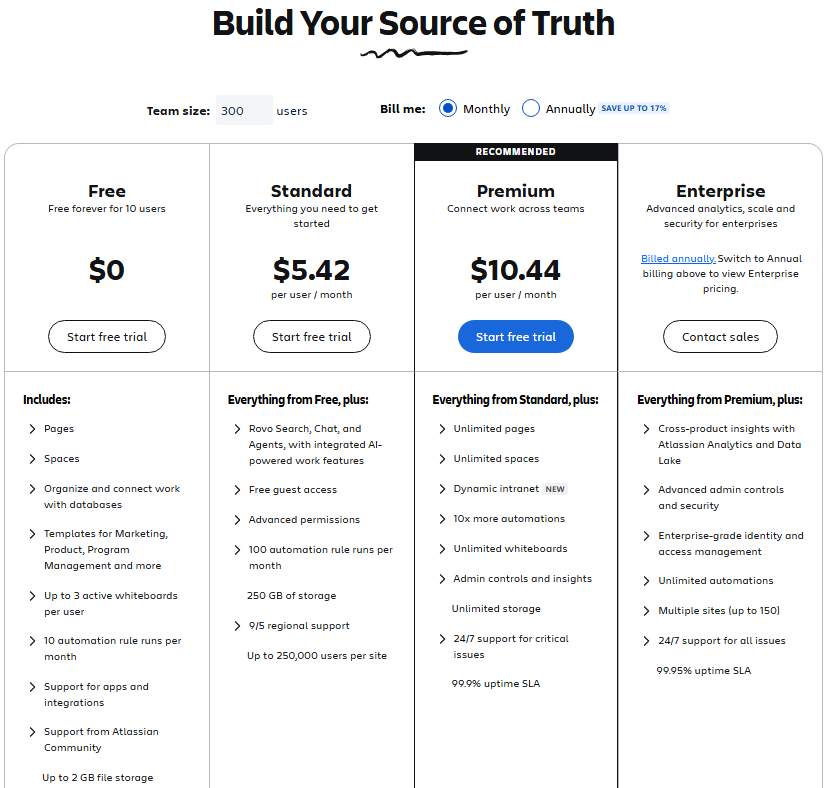
Confluence uses tiered pricing that changes based on team size, billing cycle, and region. Smaller teams pay a higher per-user rate. Larger teams get volume discounts. The prices below reflect the Atlassian pricing page as of May 9, 2026.
Important: Atlassian pricing is dynamic. Per-user costs decrease as team size grows. The Standard price of $5.42/user/month and Premium price of $10.44/user/month apply at higher user tiers (approximately 300+ users). At smaller team sizes (around 10 to 15 users), monthly prices start higher, closer to $6.70/user/month for Standard and $13.20/user/month for Premium. Annual billing provides roughly 17% savings over monthly billing. Always confirm the live Atlassian pricing page before buying.
| Plan | Price Range | Best For | Key Limits | Verified |
|---|---|---|---|---|
| Free | $0 | Up to 10 users | 2 GB storage, 3 whiteboards/user | May 9, 2026 |
| Standard | $5.42 to $6.70/user/month | Growing internal teams | 250 GB storage, 25 Rovo credits/user/month | May 9, 2026 |
| Premium | $10.44 to $13.20/user/month | Governed teams needing admin controls | Unlimited storage, 70 Rovo credits/user/month | May 9, 2026 |
| Enterprise | Custom | Large regulated organizations | Contact sales | May 9, 2026 |
Price ranges shown reflect tiered volume pricing. Lower per-user prices apply to larger teams. Monthly billing shown; annual billing reduces cost by approximately 17%.
The TCO table below uses the lower tier prices ($5.42 Standard, $10.44 Premium) to illustrate cost at scale. Actual cost at smaller team sizes will be higher per user. Check Jira pricing separately if your team uses both products.
| Team Size | Standard Monthly Cost | Premium Monthly Cost | Pricing Note |
|---|---|---|---|
| 10 users | ~$67.00 | ~$132.00 | Free covers up to 10 users, but with limits |
| 25 users | $135.50 to $167.50 | $261.00 to $330.00 | Excludes Marketplace apps |
| 50 users | $271.00 to $335.00 | $522.00 to $660.00 | Excludes Jira and Guard costs |
| 100 users | $542.00 to $670.00 | $1,044.00 to $1,320.00 | Review add-on usage before scaling |
Ranges reflect volume tier pricing. Lower end applies to larger organizations. Confirm exact pricing on the Atlassian pricing page for your team size and billing term.
Marketplace apps are a possible hidden cost. If your team needs approval workflows, diagramming (draw.io, Gliffy), advanced exports, or analytics, paid add-ons increase the bill. Budget for Marketplace spend when calculating true Confluence cost.
Confluence AI and Rovo
Rovo is Atlassian’s AI layer, and it is now included with Standard, Premium, and Enterprise Cloud subscriptions. It is not a separate purchase. Rovo connects to Confluence, Jira, Slack, and other enterprise apps through Atlassian’s Teamwork Graph.
What Rovo can do inside Confluence:
- Rovo Search: Find information across connected tools. Does not consume credits.
- Summaries and definitions: Summarize long pages and define company jargon inline. Does not currently consume credits.
- Rovo Chat: Ask questions and get answers with source references. Costs 10 credits per request.
- Rovo Agents: Automate tasks like meeting notes or brainstorm facilitation. Costs 10 credits per request.
- Deep Research: Conduct in-depth analysis across connected knowledge. Costs 100 credits per request.
- Content creation: Turn messy notes into polished documents and presentations.
Credit allowances by plan:
- Standard: 25 Rovo credits per user per month
- Premium: 70 Rovo credits per user per month
- Enterprise: 150 Rovo credits per user per month
Credits pool at the organization level and reset monthly. Unused credits do not roll over. Atlassian says it is not currently billing overages above the included allowance and will provide at least 90 days’ notice and require explicit opt-in before extra usage becomes billable. Source: Rovo usage limits.
Rovo credit example: A 50-user Confluence Premium site gets 3,500 Rovo credits per month. That equals 350 Rovo Chat or Agent requests if every request costs 10 credits. One Deep Research request costs 100 credits, so heavy Deep Research use burns through the pool faster. A team of 50 users running 5 Deep Research queries per week would consume 2,000 credits per month on Deep Research alone, leaving 1,500 for Chat and Agents.
Rovo Search, summaries, chart insights, and definitions do not currently consume credits, which means most daily AI interactions are free within the subscription. The credit constraint matters mainly for Chat, Agents, and Deep Research. Source: Rovo in Confluence.
Confluence Integrations
Confluence’s integration strength comes from its position inside the Atlassian ecosystem and its access to the Atlassian Marketplace. The Jira integration alone is the primary reason many teams pick Confluence over alternatives.
Core integrations I evaluated:
- Jira: Link Confluence pages to Jira issues, epics, and sprints. Embed live Jira issue lists inside documentation. Convert whiteboard items into Jira tickets.
- Jira Service Management: Power internal knowledge bases with article recommendations for support agents.
- Slack: Share Confluence pages in Slack channels. Get notifications for page updates.
- Microsoft Teams: Similar sharing and notification features for Teams-first organizations.
- Google Drive: Embed Google Docs, Sheets, and Slides inside Confluence pages.
- Microsoft Office 365 and SharePoint: Embed and link Office documents.
- Comala Document Control: Add review, approval, workflow, and e-signature processes to Confluence pages.
- CLI tools: Automate Confluence tasks and connect with other tools via command-line interfaces.
Source: Confluence integrations guide.
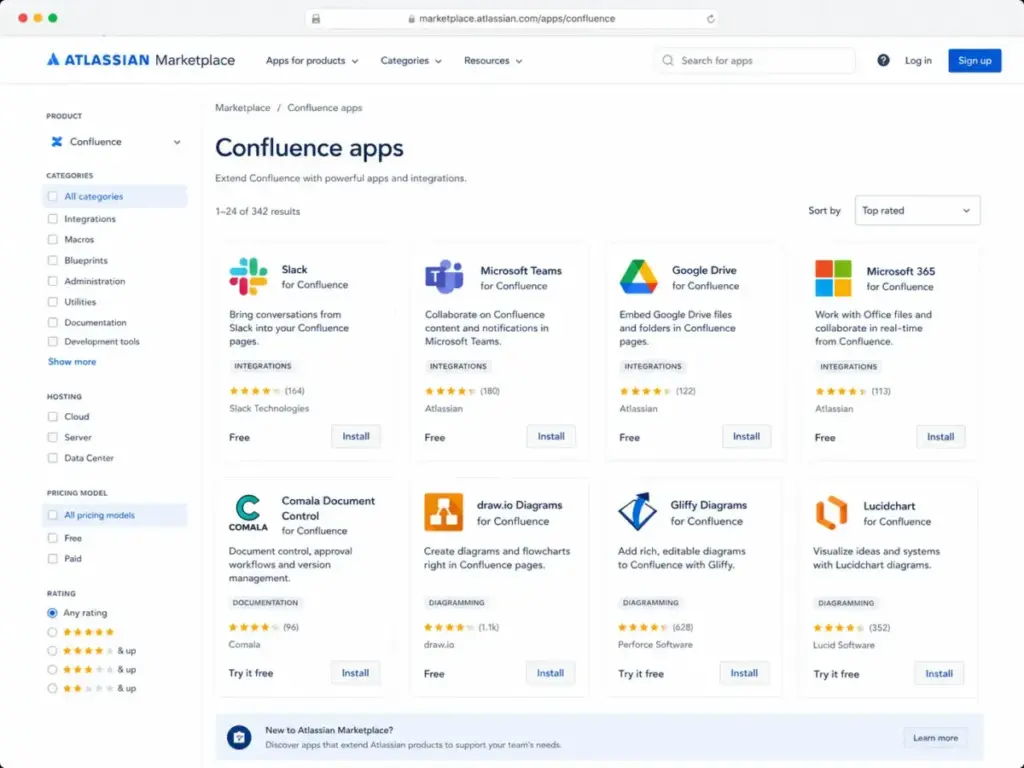
Warning: Confluence integrations are a strength, but they also create add-on cost risk. If your team needs approval workflows, diagramming, exports, public docs, or advanced formatting, audit paid Marketplace apps before picking a plan. Diagramming apps (draw.io, Gliffy), document approval workflows (Comala), and analytics tools are among the most common paid add-ons.
“I use Confluence to create standardized processes and maintain detailed documentation.” – Safin G., G2 review hosted on AWS Marketplace
Confluence Security and Admin Controls
Confluence Cloud meets enterprise security requirements through encryption, compliance certifications, and admin governance tools. For teams in regulated industries, these controls are a deciding factor.
Security and compliance facts:
- Encryption in transit: TLS 1.2+ with perfect forward secrecy.
- Encryption at rest: AES-256 full disk encryption on servers holding user data.
- Compliance certifications: SOC 2, SOC 3, PCI DSS, ISO/IEC 27001, ISO/IEC 27018, and GDPR.
- Uptime SLA: Premium offers 99.9%. Enterprise offers 99.95%.
- Atlassian Guard: Organization-level audit logs, SSO, SCIM, and Active Directory Sync. Included with Enterprise; available separately for other plans.
Source: Confluence security.
Data residency is available for Standard, Premium, and Enterprise cloud subscriptions. Supported regions include US, EU, Australia, Germany, Singapore, Canada, UK, Japan, India, South Korea, and Switzerland. Important caveat: data residency does not necessarily improve performance. It can make performance slower for users outside the selected region. Source: Atlassian data residency.
Enterprise buyers evaluating Confluence should also use our knowledge base RFP template and knowledge base software requirements template to structure their vendor comparison.
Confluence Pros and Cons
Confluence has clear strengths for Atlassian-centric teams and clear weaknesses for teams outside that profile. Here is what I found during my evaluation.
- Best fit for Jira-heavy teams. The Jira integration is the strongest reason to choose Confluence.
- Strong page and space structure for organizing large documentation sets.
- Good permissions and governance controls starting at the Standard plan.
- Useful templates and macros that reduce time to first document.
- Rovo brings AI search and assistance into documentation workflows.
- Marketplace ecosystem covers many feature gaps through third-party apps.
- Standard plan is enough for many growing teams.
- Search can frustrate users when content governance is weak.
- Editor and formatting feel heavier than Notion or Google Docs.
- Marketplace apps increase total cost beyond the base subscription.
- Public customer knowledge base use is weaker than specialized tools like Document360 or Helpjuice.
- AI credits require usage planning, especially for Deep Research.
- Small non-technical teams may find setup and configuration too heavy.
- Content becomes stale without page owners and review cycles.
Confluence Alternatives
Confluence is not the right tool for every team. Below are the alternatives I compared and when each one makes more sense.
Confluence vs Notion
Notion offers a lighter, more flexible workspace with database-style docs, and it appeals to smaller teams that want speed over governance. Read our Notion review and Notion vs Confluence comparison for full details.
- Choose Confluence if Jira traceability, enterprise permissions, and audit logs matter.
- Choose Notion if small-team flexibility and database-style docs matter more than Atlassian integration.
Confluence vs Document360
Document360 specializes in public-facing product documentation and customer self-service portals. Read our Document360 review for full details.
- Choose Confluence for internal Atlassian knowledge management.
- Choose Document360 for public product documentation and customer self-service.
Confluence vs Guru
Guru focuses on verified, in-flow knowledge cards that surface inside the tools teams already use. Read our Guru review for full details.
- Choose Confluence for long-form structured documentation.
- Choose Guru for verified, in-flow internal knowledge cards delivered in Slack, browser, or CRM.
Confluence vs Slite or Nuclino
Slite and Nuclino are lighter team documentation tools that prioritize speed and simplicity over enterprise governance. Read our Slite review and Nuclino review for details.
- Choose Confluence for governance, compliance, and Jira integration.
- Choose Slite or Nuclino for lighter team documentation without enterprise overhead.
Confluence vs Helpjuice
Helpjuice is a dedicated knowledge base platform built for customer-facing help centers. Read our Helpjuice review for details.
- Choose Confluence for internal documentation tied to engineering and IT workflows.
- Choose Helpjuice for dedicated customer-facing knowledge base workflows with strong search and analytics.
Who Should Use Confluence?
Confluence fits best when documentation needs to stay connected to Jira-driven work. The table below maps team types to fit level.
| Team Type | Fit | Why |
|---|---|---|
| Jira-heavy engineering teams | Strong fit | Specs, tickets, decisions, and docs connect |
| Product teams | Strong fit | PRDs, roadmaps, decisions, and release notes |
| IT teams | Strong fit | SOPs, incident docs, and service knowledge |
| HR teams | Conditional fit | Good permissions, but setup needs ownership |
| Customer support teams | Conditional fit | Better for internal KB than public help center |
| Small creative teams | Weak fit | Notion, Slite, or Coda can feel lighter |
For teams exploring alternatives beyond Confluence, see our Coda review for another flexible documentation option.
Who Should Not Use Confluence?
Confluence is not the right tool for every documentation need. If any of the following describe your team, consider alternatives before committing.
- Teams under 10 users who only need simple notes. The Free plan works, but Notion or Slite offer lighter experiences with fewer steps to get started.
- Teams that do not use Jira and do not need enterprise permissions. Confluence’s biggest advantage disappears without Jira. Slite, Nuclino, or Notion may be better fits.
- Teams needing public SEO documentation. Confluence is built for internal use. Document360 or Helpjuice serve public help centers better.
- Teams without a documentation owner. Confluence rewards governance. Without someone managing spaces, labels, and review cycles, content sprawl takes over.
- Teams with very low software budgets. Base pricing is reasonable, but Marketplace apps and multi-product Atlassian costs add up.
- Teams that rely on pixel-perfect public docs. Confluence’s editor is not designed for polished customer-facing content.
“I wouldn’t recommend Atlassian Confluence for companies with a low budget since this product might be a little costly (especially with add-ons).” – Verified User, TrustRadius
Final Verdict
Confluence scores 8.4 out of 10 in this Confluence review. It is one of the strongest internal knowledge base tools for Atlassian-centric teams. It is not the easiest wiki for small teams. It is not the cleanest public help center tool.
Standard is the best first paid plan for most teams. It includes page permissions, page insights, archive, audit logs, data residency, 250 GB storage, guests (up to 5 per paid user), public links, and 25 Rovo credits per user per month. That covers the core documentation needs of most growing teams.
Premium is worth it for teams that need advanced admin controls, unlimited storage, analytics, IP allowlisting, the 99.9% uptime SLA, and 70 Rovo credits per user per month. Enterprise fits regulated organizations needing multi-site control, Atlassian Guard, deeper support, and 150 Rovo credits per user per month.
Bottom line: If your team runs on Jira, Confluence is the documentation layer that connects specs, decisions, and knowledge to actual work. If your team does not use Jira, does not need enterprise governance, or needs a public help center, look at the alternatives above.
FAQ
Here are answers to the most common questions about Confluence in 2026.
What is Confluence used for?
Confluence is used for creating, organizing, and governing internal documentation. Teams use it for product specs, meeting notes, runbooks, SOPs, decision logs, and project plans. It connects to Jira for traceability between documentation and tracked work.
Is Confluence good for knowledge management?
Yes, for internal knowledge management. Confluence’s spaces, pages, templates, permissions, and search make it a strong internal wiki. It is less suited for public-facing customer knowledge bases.
How much does Confluence cost in 2026?
Confluence Free covers up to 10 users at $0. Standard starts around $5.42 to $6.70 per user per month depending on team size and billing cycle. Premium ranges from $10.44 to $13.20 per user per month. Enterprise requires custom pricing. Prices verified May 9, 2026, on the Atlassian pricing page.
Is Confluence better than Notion?
It depends on your team. Confluence is better for Jira-heavy teams that need governance, permissions, and audit trails. Notion is better for small teams that want flexible, lightweight documentation with database views.
Does Confluence include AI?
Yes. Rovo, Atlassian’s AI, is included with Standard, Premium, and Enterprise Cloud subscriptions. It provides AI search, summaries, chat, agents, and content creation. Usage is governed by a monthly credit system.
What are Confluence's biggest limitations?
Search quality depends on content governance. The editor is heavier than lightweight alternatives. Marketplace apps can increase cost. Public help center use is limited. Content can become stale without assigned owners and review cycles.
Can Confluence be used as a public knowledge base?
Confluence Standard and above support public links (view-only) and anonymous access. But it is not designed as a public help center. Teams needing SEO-optimized, customer-facing documentation should evaluate Document360 or Helpjuice instead.
How does Confluence integrate with Jira?
Confluence pages can link to Jira issues, epics, and sprints. Live Jira issue lists can be embedded in pages using macros. Whiteboard cards can be converted into Jira tickets. This two-way connection is Confluence’s strongest integration.
Is Confluence free?
Yes, for up to 10 users with 2 GB storage and basic features. The Free plan includes unlimited spaces and pages but limits whiteboards to 3 per user and excludes page permissions, page insights, and data residency.
What is the best Confluence alternative?
It depends on your use case. Notion for lightweight team docs. Document360 for public product documentation. Guru for in-flow verified knowledge. Slite or Nuclino for simple team wikis. Helpjuice for customer-facing help centers.