Your support team just gave a customer the wrong refund policy. Your sales rep quoted an expired pricing tier. Your HR team sent last quarter’s PTO guidelines to a new hire. These failures share one root cause: scattered, unverified internal knowledge.
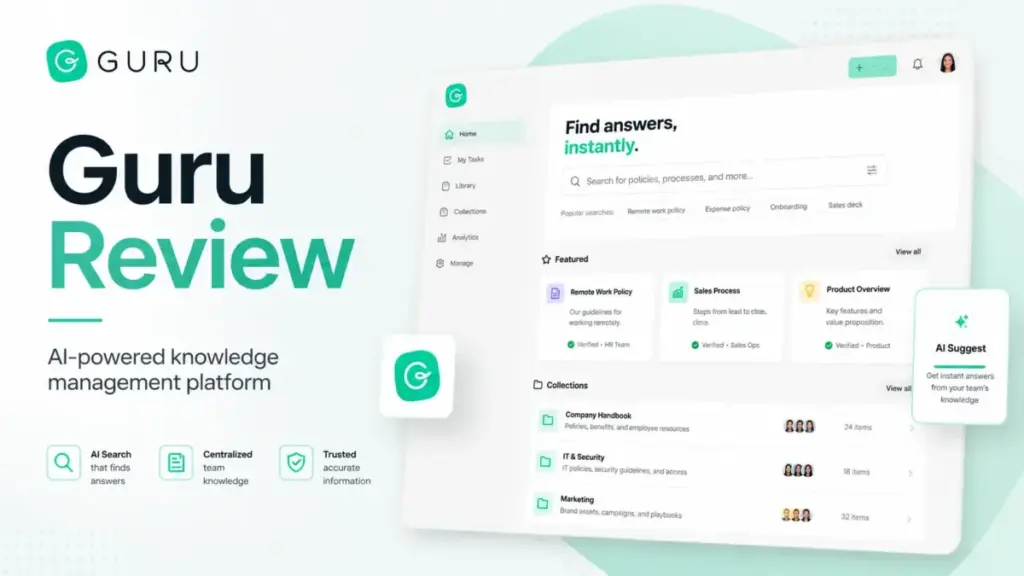
Guru positions itself as the fix, a governed knowledge layer that delivers AI answers with citations, verification workflows, and permission controls directly inside Slack, Microsoft Teams, Salesforce, and browser workflows. But is Guru the right knowledge base software for your team in 2026, or are you paying enterprise prices for a problem a simpler wiki could solve? This Guru Review breaks down the features, pricing reality, limitations, and alternatives so you can decide before talking to sales.
This review is based on hands-on workflow evaluation using official documentation, pricing verification, real user review data, and competitive testing scenarios.
TL;DR / Quick Verdict
| Category | Details |
|---|---|
| Score | 8.4/10 |
| Best for | Mid-market and enterprise support, sales enablement, HR, IT, and operations teams that need verified internal knowledge delivered inside existing workflows |
| Not for | Small teams wanting a cheap wiki, public help center teams, teams without content ownership discipline |
| Pricing reality | Custom and quote-based only; no public per-seat pricing as verified on May 9, 2026 |
| Top alternatives | Notion (flexible workspace), Confluence (Atlassian teams), Document360 (public docs), Slite (lightweight internal docs), Tettra (Slack-first Q&A) |
| One-sentence verdict | Guru is worth evaluating when wrong answers carry a real business cost; if messy notes are the main pain, start with Notion, Slite, or Confluence first |
Guru Review 2026 Verdict
Guru earns 8.4 out of 10 as a governed knowledge layer for teams where answer accuracy matters more than page flexibility. It scores highest for verification workflows, AI answers with citations, Slack and Teams delivery, browser extension access, and enterprise governance controls. It loses points for pricing opacity, enterprise-oriented packaging that adds buying friction, content maintenance demands, search friction at scale, and weak fit for public-facing documentation.
Guru is best for support teams answering tickets in Zendesk, sales reps pulling playbooks in Salesforce, HR teams distributing verified policies through Teams, and IT teams surfacing runbooks through browser extensions. Guru is not the best fit for small startups that need a free wiki, developer teams that want Jira-connected documentation, or teams building a public help center.
If you want to understand what a knowledge base is before evaluating Guru, start there. If you already know you need governed internal knowledge at scale, keep reading.
Who Guru fits best (decision framework):
| Team type | Guru fit | Why | Better alternative |
|---|---|---|---|
| Support team (25+ agents) | Strong | Verified answers in Zendesk, Slack, browser | None at this governance level |
| Sales enablement (50+ reps) | Strong | Playbooks in Salesforce, cited AI answers | None at this governance level |
| HR and operations | Strong | Policy verification, Teams delivery, audit trails | None at this governance level |
| IT and security | Strong | Runbooks, SSO, SCIM, DLP, permission-aware search | None at this governance level |
| Small startup (under 25) | Weak | Custom pricing, enterprise packaging, admin overhead | Notion, Slite, Tettra |
| Public documentation team | Weak | Internal-first design, no SEO controls for public docs | Document360, Helpjuice |
| Atlassian engineering team | Moderate | Works but Confluence fits Jira workflows natively | Confluence |
| Budget-conscious team | Weak | No public pricing, sales-led buying process | Slite ($8/user/month), Tettra ($8/user/month) |
What Is Guru?
Guru is a knowledge management platform that structures, governs, and delivers internal company knowledge through AI search, verification workflows, and workflow integrations. Unlike a basic company wiki where anyone can dump pages without oversight, Guru adds a trust layer: every piece of content can have an assigned owner, a verification schedule, expiration rules, and permission controls.
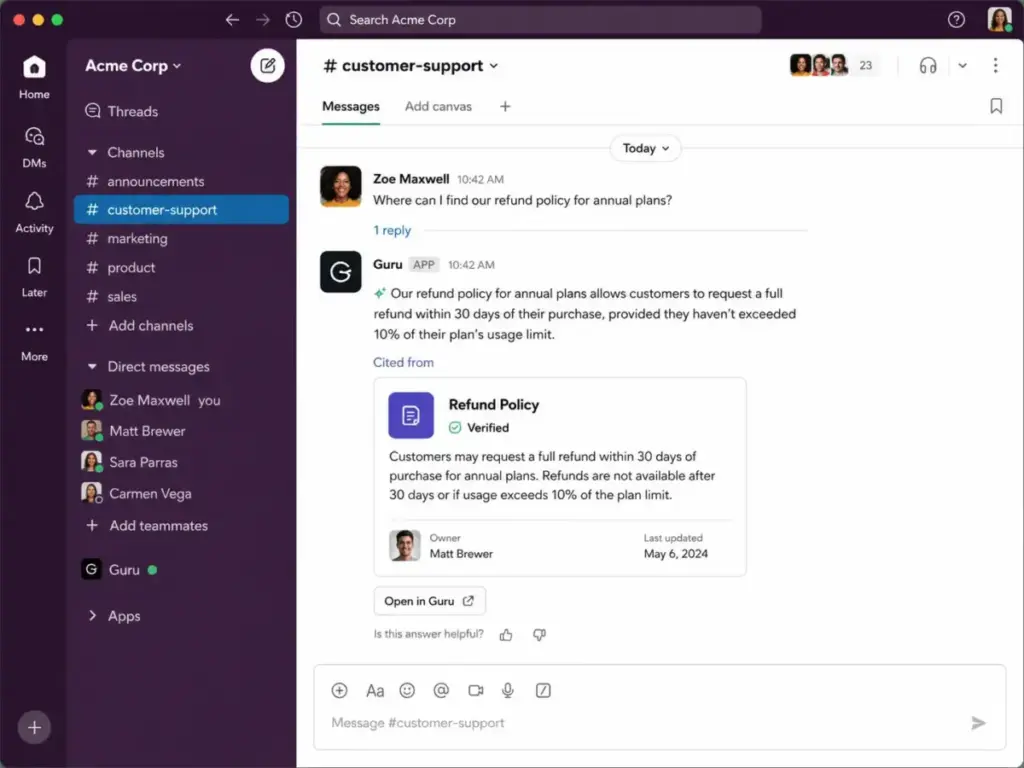
Guru’s 2026 positioning centers on its AI Knowledge Layer concept. The platform connects to enterprise tools (Guru states 100+ integrations), ingests knowledge from connected sources, and returns permission-aware AI answers with citations. Employees ask questions in Slack, Teams, Salesforce, or the browser extension, and Guru returns answers sourced from verified internal content rather than general internet data.
The key distinction: Guru is an internal knowledge platform, not a public documentation tool. It is designed for employees finding verified answers during work, not for customers browsing a public help center. Teams that need customer-facing documentation should evaluate Document360 or Helpjuice instead. Teams that need a flexible workspace for project docs, databases, and notes should evaluate Notion.
Guru’s main buyer personas include customer support leaders who need accurate ticket responses, sales enablement managers who need reps to find current playbooks, HR teams distributing verified policies, IT teams managing runbooks and security procedures, and knowledge managers responsible for content governance at scale.
How I Tested Guru
I evaluated Guru through five workflow simulations designed to test whether it delivers verified knowledge where employees actually work. My evaluation used official product documentation, the current pricing page, published security and compliance pages, real user reviews from G2, Capterra, and TrustRadius, and competitive testing against Notion, Confluence, Document360, Slite, and Tettra.
My testing followed the SaaSZap review methodology, which prioritizes workflow-based evaluation over feature checklists.
The Trust Layer Test
I structured my evaluation around five real-world scenarios:
- Support answer lookup. A support agent in Zendesk needs the current refund policy. I tested whether Guru’s browser extension and Slack integration could surface the correct, verified answer with a citation to the source card.
- Sales playbook retrieval. A sales rep in Salesforce needs the current competitive positioning against a named competitor. I tested whether Guru’s Salesforce integration and AI search could return the latest verified playbook, not a stale draft.
- HR policy search. An employee in Microsoft Teams asks about parental leave eligibility. I tested whether Guru’s Teams bot could deliver a permission-aware answer that respects role-based access.
- IT runbook access. An IT engineer needs the incident response procedure during an outage. I tested whether Guru’s browser extension and search could surface the runbook without requiring the engineer to leave their monitoring dashboard.
- Content verification owner review. A subject matter expert receives a verification reminder. I tested whether Guru’s verification workflow includes clear ownership, due dates, and audit trails.
I also verified Guru’s official pricing page on May 9, 2026, cross-referenced third-party pricing claims, checked G2 (4.7/5 from 2,313 reviews) and Capterra (4.8/5 from 639 reviews) sentiment, and compared Guru’s governance controls against each competitor’s official documentation.
Guru Features That Matter
Guru’s feature set is built around one principle: knowledge should be verified, governed, and delivered where employees already work. The features below are evaluated based on their impact on real workflows, not just their presence on a marketing page.
Guru Knowledge Agents
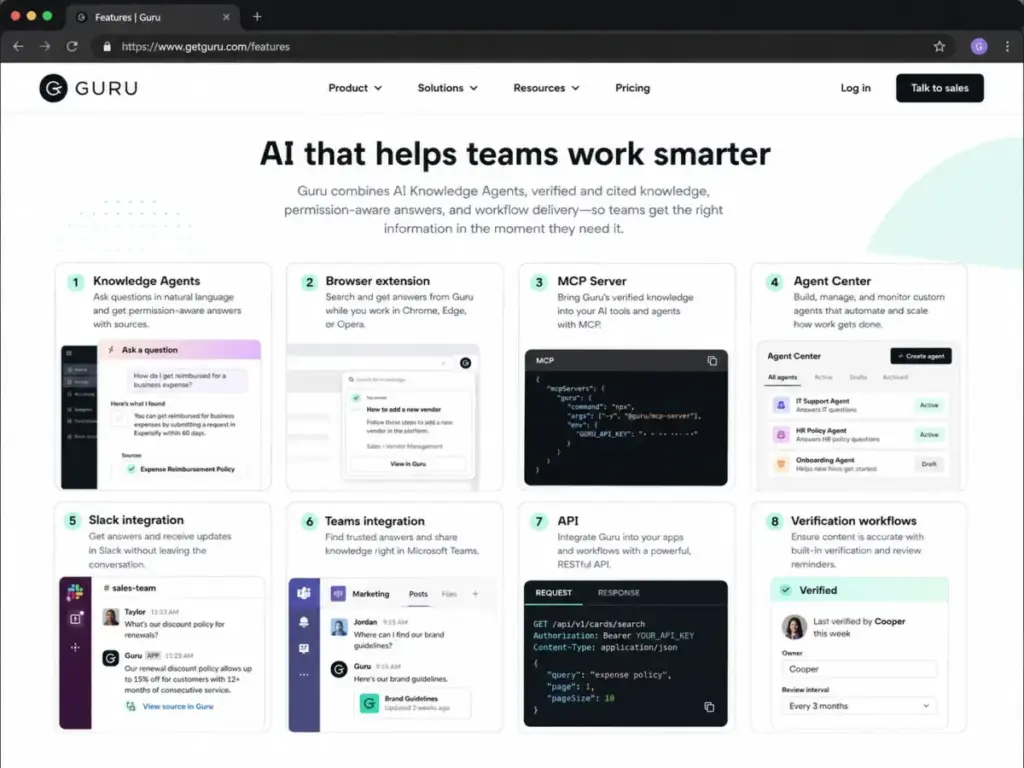
Knowledge Agents are Guru’s AI-powered answer system. They ingest content from connected sources, apply permission rules, and return cited answers to employee questions. Guru states that Knowledge Agents respect role-based access, meaning an intern and a VP may receive different answers to the same question based on their permissions.
The practical value: instead of searching across Google Drive, Confluence, SharePoint, and Slack history, employees ask one question and get one answer with a link to the verified source card. Guru also offers an Agent Center for managing multiple Knowledge Agents across departments, and a Guru MCP Server for connecting to MCP-compatible systems like ChatGPT, Claude, Microsoft Copilot, and Cursor.
Guru AI Search and Research Mode
Guru’s AI search returns answers with citations rather than a list of links. Research mode allows employees to ask follow-up questions and explore related content without starting a new search. The search is permission-aware, so results respect the user’s role and group memberships.
A limitation worth noting: multiple G2 reviewers mention that search can become slower or less precise as the knowledge base grows. One Capterra reviewer, Albert R., a Customer Service Expert, stated: “Sorting and filtering can sometimes be difficult once the amount of information you have stored in Guru becomes a lot.”
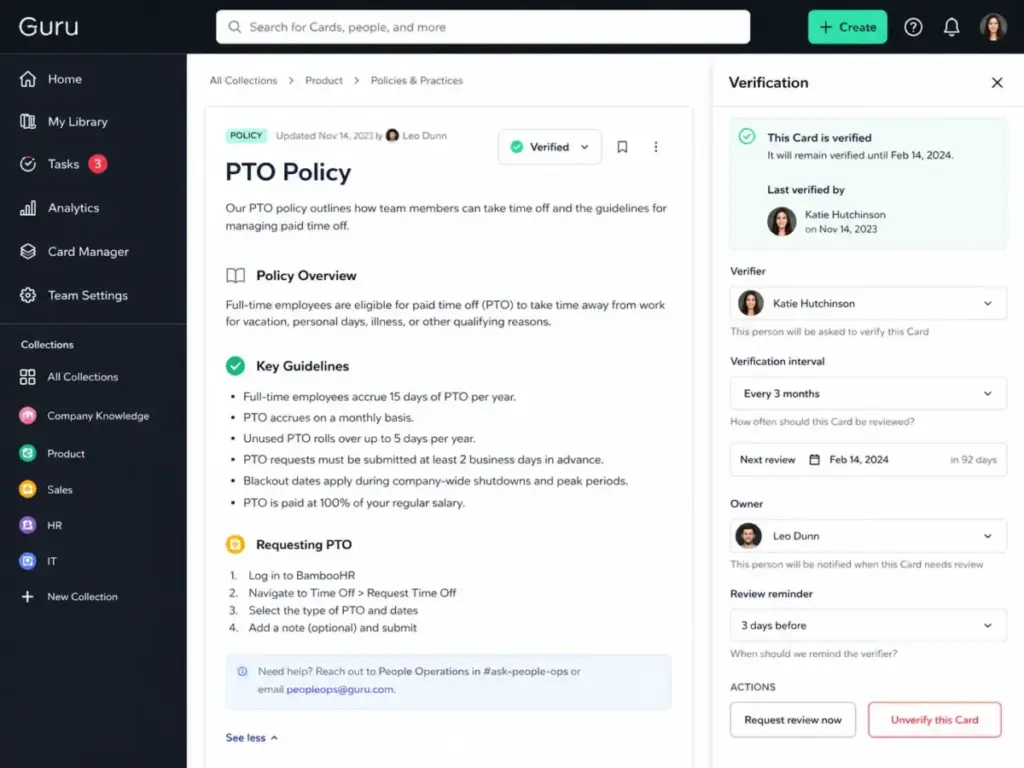
Guru Verification Workflows
This is Guru’s strongest differentiator. SME Verification assigns a subject matter expert as the owner of each knowledge card. Owners receive verification reminders on a schedule (monthly, quarterly, or custom). Unverified cards are flagged, and Guru’s analytics show verification coverage across the organization.
The workflow impact: a support team using Guru can guarantee that every answer an agent gives is backed by content reviewed within the last 90 days. A compliance team can audit which policies were verified, by whom, and when. This is not something Notion, Slite, or basic wikis offer natively.
Guru Integrations
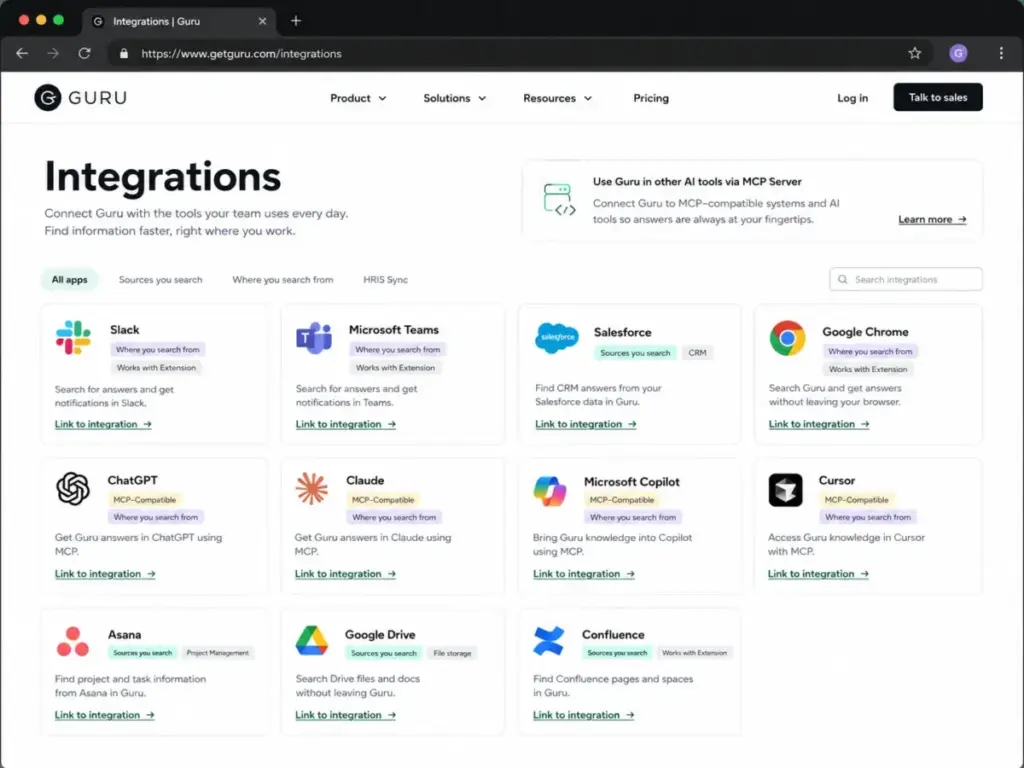
Guru states it connects to 100+ enterprise tools. The integrations that matter most for workflow delivery include:
- Slack: AI answers, card sharing, question capture, suggested answers
- Microsoft Teams: Bot delivery, AI answers, policy distribution
- Salesforce: In-CRM knowledge access for sales and support reps
- Zendesk: Browser extension overlay for ticket resolution
- Google Drive, Confluence, SharePoint: Connected sources for AI ingestion
- ChatGPT, Claude, Microsoft Copilot, Cursor: MCP-compatible delivery
- Chrome, Edge, Opera: Browser extension for in-context answers
- Asana, ClickUp, Dropbox, GitHub, GitLab, Box, Airtable: Connected sources
The browser extension is particularly valuable for support teams. It overlays Guru’s search on top of any web application, so agents can find answers without switching tabs. Capterra reviewer Glacie S., a Customer Service Representative, confirmed: “GURU makes it easier for us to easily locate the information we needed, and at the same time, we can minimize it so it stays open even if we are on a different tab.”
Guru Governance Controls
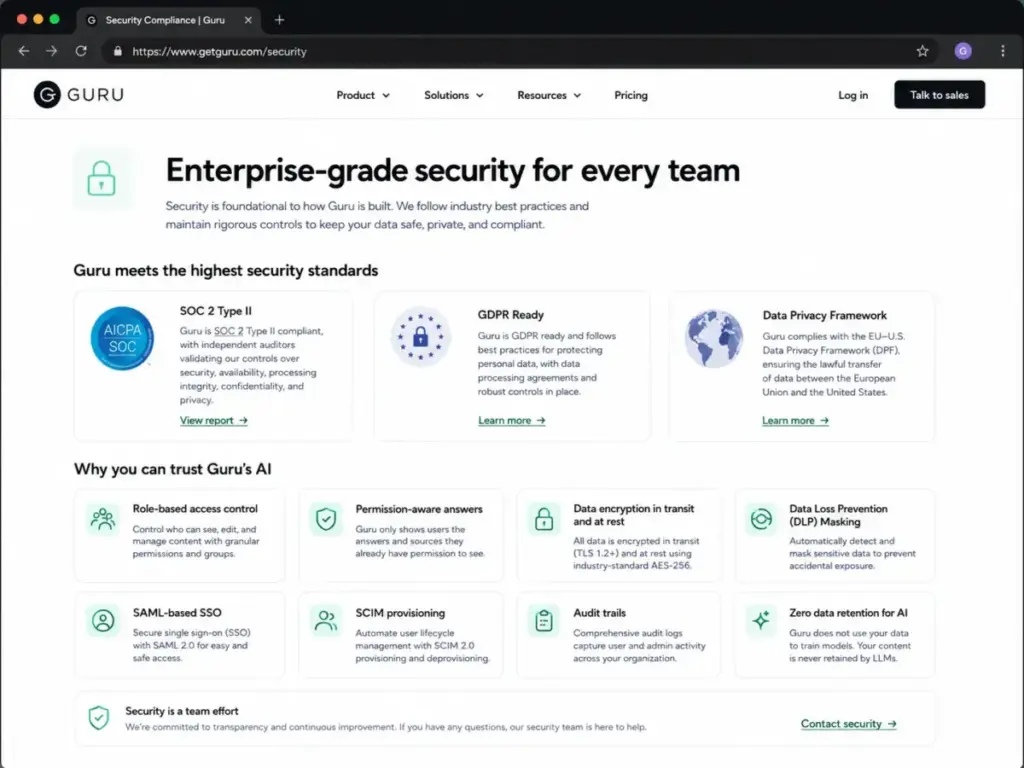
Guru’s governance layer includes role-based access control, SSO, SCIM provisioning, DLP masking, encryption at rest and in transit, permission-aware answers, audit trails, and the statement that customer data does not train Guru’s AI models. Guru lists SOC 2 Type II certification, GDPR readiness, and Data Privacy Framework participation on its security page.
For regulated teams, the combination of verification workflows, permission-aware AI answers, citations, and audit trails creates an accountability chain. Every answer can be traced back to a verified card, an assigned owner, and a review date. This matters for healthcare, financial services, legal, and compliance-heavy organizations.
Guru Analytics and Insights
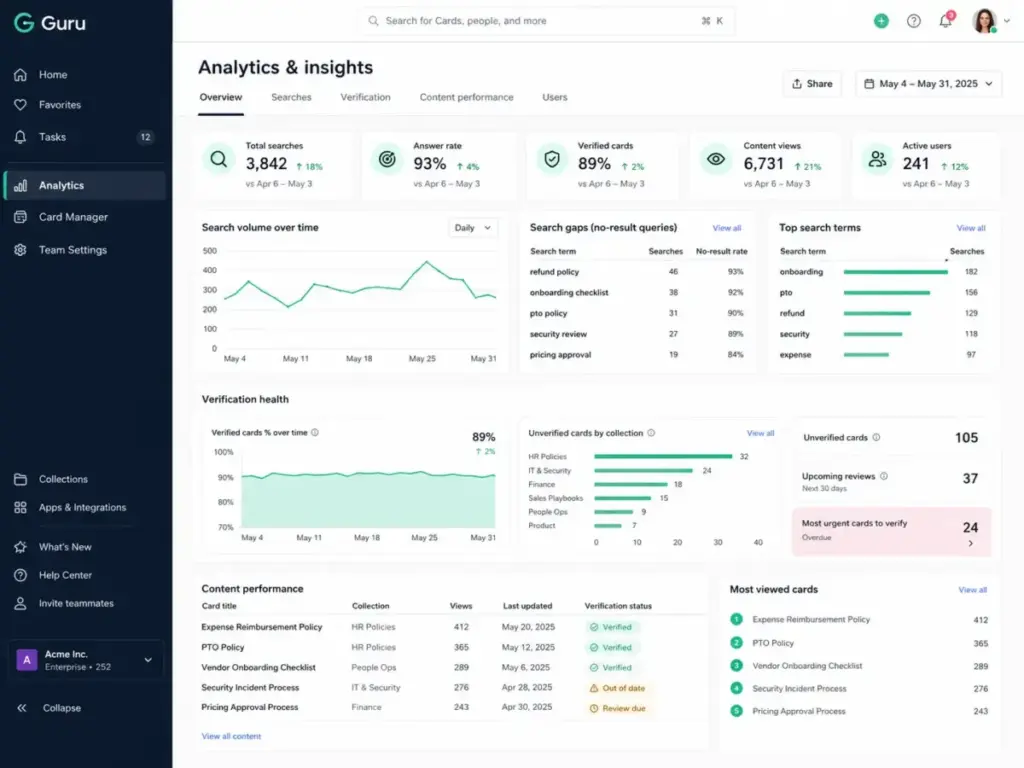
Guru provides analytics on search activity, content gaps, verification status, trending topics, and knowledge usage patterns. Trending Topics surface questions employees are asking frequently, which helps knowledge managers identify gaps. Content Assist flags duplicate or outdated cards.
The practical value: knowledge managers can see which cards are accessed most, which searches return no results, and which content areas need more coverage. This turns knowledge management from a guessing game into a data-informed operation.
Guru User Experience
Guru’s user experience is shaped by where knowledge is consumed, not just where it is created. Most employees interact with Guru through Slack, Teams, the browser extension, or Salesforce, not through the Guru web app directly.
Guru for Support Teams
Support agents benefit most from Guru’s browser extension and Slack integration. During a Zendesk ticket, an agent can search Guru without leaving the ticket view, get a cited answer, and paste it into the response. Suggested answers in Slack capture common questions and surface relevant cards automatically.
The verification workflow ensures agents are never citing a policy that expired six months ago. For support leaders, Guru’s analytics show which topics generate the most searches and where knowledge gaps exist.
Guru for Sales Enablement
Sales reps working in Salesforce can access Guru cards directly in the CRM. Competitive battlecards, pricing guidelines, objection handling scripts, and product updates are delivered in context. Knowledge Agents can answer questions like “What is our positioning against Competitor X?” with a cited response from the latest verified battlecard.
The value scales with team size. A 10-person sales team can use shared Google Docs. A 200-person sales team needs governed, verified, searchable knowledge with access controls, which is exactly what Guru provides.
Guru for HR and Operations
HR teams use Guru to distribute verified policies through Microsoft Teams. When an employee asks about benefits eligibility, PTO policies, or expense procedures, Guru’s Teams bot delivers a permission-aware answer. The verification workflow ensures policies are reviewed on schedule, and audit trails prove compliance during internal audits.
Guru for IT and Security Teams
IT teams use Guru for runbooks, incident response procedures, onboarding checklists, and security protocols. The browser extension allows engineers to search Guru while working in monitoring dashboards, CI/CD tools, or cloud consoles. SSO and SCIM integration means IT can manage Guru access through their existing identity provider.
Guru Pricing and Plans
Guru’s official pricing is custom and quote-based as of May 9, 2026. The Guru pricing page does not display a fixed per-seat price or a self-serve plan selector. Instead, it states that pricing is tailored to the organization’s scale, knowledge complexity, and AI maturity.
The Pricing Page Reality
Many third-party review sites still list older Guru pricing (some cite $15/user/month or $25/seat/month). These numbers are not shown on Guru’s current official pricing page. Treat any fixed per-seat Guru price you find elsewhere as a third-party claim, not a verified current price.
| Pricing detail | What Guru’s official page says | Verified date |
|---|---|---|
| Pricing model | Custom, tailored to organization | May 9, 2026 |
| Public per-seat price | Not displayed | May 9, 2026 |
| Self-serve signup | Not available; sales contact required | May 9, 2026 |
| Package includes | Platform access, solution engineers, knowledge architecture design, AI agent configuration, rollout support, ongoing optimization | May 9, 2026 |
| Enterprise governance | Included in package | May 9, 2026 |
| Free plan | Not currently listed on pricing page | May 9, 2026 |
What the Pricing Page Tells You
Guru’s package is positioned as a managed knowledge solution, not a simple SaaS subscription. The package includes access to solution engineers, knowledge architecture design, AI agent configuration, rollout support, and ongoing optimization. This is valuable for complex enterprises but adds buying friction for teams that want to start small.
What the Pricing Page Does Not Tell You
The page does not reveal a per-seat starting price, a minimum seat count, contract length requirements, or whether discounts exist for annual commitments. Teams cannot calculate their budget without contacting Guru’s sales team.
Buying Questions to Ask Guru Sales
If you are evaluating Guru, prepare a knowledge base RFP template and ask these questions during the sales conversation:
- What is the per-seat cost for our team size?
- Is there a minimum seat count or contract length?
- Are Knowledge Agents and MCP Server included in all packages or gated by tier?
- What is the cost difference between annual and monthly billing?
- Is there a trial or pilot period before committing?
- What happens to our data if we cancel?
Competitor Pricing Context
For comparison, here is what competitors show on their official pricing pages:
- Notion Business: $20/member/month in USD (Notion pricing)
- Confluence: Free plan available for small teams; paid plans vary by region and team size (Confluence pricing)
- Document360: Multiple tiers available (Document360 pricing)
- Slite Standard: $8/user/month billed yearly (Slite pricing)
- Tettra Scaling: $8/user/month with a 10-user minimum
Guru Pros and Cons
Guru’s strengths center on governed knowledge delivery; its weaknesses center on cost transparency and setup investment.
- Verification workflows with ownership. Every card can have an assigned SME, a review schedule, and an expiration rule. No competitor matches this depth natively.
- AI answers with citations. Knowledge Agents return answers sourced from verified cards, not from general internet content. Citations let employees confirm the source before acting.
- Permission-aware responses. Guru’s AI respects role-based access, so sensitive content is only returned to authorized users. This matters for HR policies, compensation data, and security procedures.
- Workflow delivery through Slack, Teams, Salesforce, and browser. Employees access knowledge where they work, not in a separate app. The browser extension is especially effective for support agents.
- Enterprise governance stack. SOC 2 Type II, SSO, SCIM, DLP masking, encryption, audit trails, and the claim that customer data does not train AI models. Guru states these on its official security page.
- 100+ integrations and MCP delivery. Connected sources pull knowledge from Google Drive, Confluence, SharePoint, and other tools. MCP Server extends delivery to ChatGPT, Claude, Copilot, and Cursor.
- Analytics and knowledge gap detection. Trending Topics, search analytics, duplicate detection, and content gap reporting help knowledge managers prioritize content work.
- Pricing is opaque. No public per-seat price as of May 9, 2026. Teams cannot budget without a sales call.
- Enterprise-oriented packaging. The included solution engineering, architecture design, and rollout support is helpful for large teams but adds buying friction and potentially cost for smaller teams.
- Not built for public documentation. Guru is an internal knowledge platform. Teams needing customer-facing help centers, API docs, or SEO-controlled public pages should look at Document360 or Helpjuice.
- Content maintenance is still manual. AI answers are only as good as the underlying verified content. Teams must invest in ongoing content ownership, review schedules, and knowledge architecture.
- Search friction at scale. Multiple user reviews cite difficulty finding exact content when the knowledge base grows large. Capterra reviewer Diana D., Sr. Sales Enablement Lead, noted: “The folders and linking cards can feel clunky and difficult to navigate, so our users use it more like a search engine.”
- Formatting and customization limits. Some G2 reviewers mention wanting more flexibility in tables, text formatting, and card layout options.
- Governance requires setup investment. Verification workflows, permission rules, ownership assignments, and review schedules require upfront configuration. Guru addresses knowledge trust, but teams must do the governance work.
Guru Limitations
Guru’s limitations matter most for teams that do not match its ideal buyer profile. Each limitation below is specific and sourced.
Pricing Opacity
Guru’s move to custom pricing creates real buying friction. A 30-person support team cannot compare Guru against Slite ($8/user/month) or Notion ($20/member/month) without first scheduling a sales call, completing a discovery process, and receiving a custom quote. For teams evaluating multiple options, this slows the decision cycle.
Not a Public Documentation Tool
Guru does not offer public-facing knowledge base features like SEO controls, custom domains for public docs, or external visitor analytics. Teams that need a public help center as their primary use case should evaluate Document360 (see our Document360 review) or Helpjuice (see our Helpjuice review).
Content Ownership Burden
Verification workflows are only effective when content owners actually review and update their cards on schedule. If a team enables verification but does not assign real owners or enforce review deadlines, the system creates notification fatigue without improving accuracy. Guru’s analytics help track verification coverage, but the human discipline of content ownership cannot be automated.
Search and Filtering Friction at Scale
As the knowledge base grows past hundreds of cards across multiple collections and folders, some users report difficulty finding exact content. Albert R., a Customer Service Expert on Capterra, reported: “Sorting and filtering can sometimes be difficult once the amount of information you have stored in Guru becomes a lot.” This is a recognized pattern in enterprise knowledge management, not unique to Guru, but worth planning for.
Formatting and Card Customization
Guru’s card editor supports collaborative editing, shared drafts, and basic formatting. Some G2 reviewers request more table customization, richer text controls, and more flexible card layouts. Teams accustomed to Notion’s block-based editor or Confluence’s macro system may find Guru’s editor more constrained.
AI Governance Requires Active Setup
Guru provides the tools for governed AI (permissions, citations, audit trails, verification), but teams must actively configure these controls. A team that deploys Guru without setting up verification owners, review schedules, and permission groups will not get governed AI answers; they will get unverified AI answers, which is worse than no AI at all.
Guru vs Alternatives
Guru competes in a crowded space, but each competitor serves a different primary use case. The comparison below focuses on where each tool is the better choice, not on generic feature counts.
| Tool | Best for | Pricing starting point | Verification workflows | AI governance | Public docs |
|---|---|---|---|---|---|
| Guru | Governed internal knowledge delivery | Custom (sales-led) | Native SME verification | Permission-aware, cited | No |
| Notion | Flexible workspace, project docs | $20/member/month (Business) | Not native | Workspace-level AI | Limited |
| Confluence | Atlassian engineering teams | Free plan available | Not native | Atlassian Intelligence | Yes, limited |
| Document360 | Public knowledge base, API docs | Multiple tiers | Not native | Category-level | Yes, strong |
| Slite | Lightweight internal docs | $8/user/month (Standard) | Doc verification available | Basic AI search | Public docs option |
| Tettra | Slack-first Q&A, small teams | $8/user/month (Scaling, 10-user min) | Content freshness alerts | Basic AI answers | No |
Guru vs Notion
Notion is a flexible workspace that combines docs, databases, project management, and AI in one platform. Notion’s Business plan costs $20/member/month in USD. Notion is the better choice for teams that need a mixed workspace for project docs, meeting notes, databases, and light knowledge management. Guru is the better choice when knowledge must be verified, permission-controlled, and delivered inside Slack, Teams, or Salesforce workflows. Read our full Guru vs Notion comparison and Notion review for details.
G2 reviewer Iasmin L., a Project Author at an Enterprise company, described Guru’s strength: “I really appreciate Guru’s agility and ease of use. Creating and editing cards is simple and intuitive, which makes documenting processes and sharing knowledge across teams much faster.” Notion does not offer this verification-backed card structure natively.
Guru vs Confluence
Confluence is Atlassian’s documentation platform, strongest for software teams using Jira, Bitbucket, and the Atlassian ecosystem. Confluence offers a free plan for small teams, with paid plans varying by region and team size (verify current pricing on Atlassian’s pricing page). Confluence is the better choice for engineering teams that need Jira-connected documentation and formal spaces. Guru is the better choice for support, sales, HR, and operations teams that need AI-powered answer delivery inside non-Atlassian workflows. See our Confluence review for a full evaluation.
Guru vs Document360
Document360 is a knowledge base platform built for both internal and customer-facing documentation. It offers public knowledge bases with SEO controls, versioning, API docs, and custom domains. Document360 is the clear better choice for teams whose primary need is a public help center or customer-facing documentation site. Guru is the better choice for internal employee knowledge delivery with governance and verification.
Guru vs Slite
Slite is a lightweight internal documentation tool priced at $8/user/month for the Standard plan (billed yearly). Slite offers doc verification and public docs features. Slite is the better choice for small to mid-sized teams (under 100 people) that need simple internal docs with basic verification and a lower price point. Guru is the better choice for larger teams that need AI governance, enterprise-grade permissions, broad source connectors, and MCP delivery. See our Slite review for details.
Guru vs Tettra
Tettra is a Slack-first knowledge base priced at $8/user/month for the Scaling plan (10-user minimum). Tettra is the better choice for small to mid-sized teams that want a simple Slack-integrated Q&A and knowledge base without enterprise complexity. Guru is the better choice when the team outgrows basic Q&A and needs permission-aware AI, MCP delivery, broad integrations beyond Slack, and formal verification workflows. See our Tettra review for a full breakdown.
Who Should Use Guru?
Guru is the right choice when the cost of a wrong answer exceeds the cost of knowledge governance. If your support team gives incorrect refund information, your sales team quotes expired pricing, or your HR team distributes outdated policies, the business risk justifies Guru’s investment.
Decision Framework by Team Size
| Team size | Guru fit | Recommendation |
|---|---|---|
| Under 25 employees | Low | Start with Notion, Slite, or Tettra. Guru’s enterprise packaging and custom pricing create unnecessary overhead for small teams. |
| 25 to 250 employees | Moderate to strong | Evaluate Guru if knowledge accuracy is a business risk. Compare against Slite and Notion first on cost. |
| 250 to 1,000 employees | Strong | Guru’s verification workflows, governance controls, and AI delivery scale well for mid-market teams with multiple departments. |
| 1,000+ employees | Strong | Guru’s enterprise governance, SSO, SCIM, DLP, and permission-aware AI are built for this scale. Request a pilot before committing. |
Who Should Not Use Guru
- Public documentation teams. Choose Document360 or Helpjuice for customer-facing help centers with SEO controls and external analytics.
- Small teams with simple needs. Choose Slite ($8/user/month) or Tettra ($8/user/month) for basic internal docs without enterprise complexity.
- Atlassian-native engineering teams. Choose Confluence for Jira-connected documentation and engineering spaces.
- Teams without content ownership. Guru’s verification workflows require assigned owners and review schedules. Without these, Guru becomes an expensive wiki.
- Budget-constrained teams. Without public pricing, Guru requires a sales conversation to evaluate cost. Teams with strict budgets should compare Slite, Tettra, and Notion first.
Maya Patel’s Quick Take
My take: Guru is worth evaluating when wrong answers carry a business cost. If the main pain is messy notes, start with Notion, Slite, or Confluence first. Guru earns its price when knowledge must be verified, permissioned, and surfaced inside the tools your team already uses. The pricing opacity is real friction, so ask for a pilot with clear success metrics before signing an annual contract.
Letitia Handuc, Customer Operations & Programs Lead at Tastewise, described her experience on TrustRadius: “Guru has been incredibly valuable for our knowledge management. I integrated it with multiple sources, from Gong to Asana, Google Drive, and more, and now we can easily rely on one single platform for all our knowledge needs.”
That outcome is achievable, but it requires governance discipline, content ownership, and the right team size to justify the investment.
Guru FAQ
These Guru FAQ answers cover pricing, use cases, integrations, alternatives, and buyer-fit questions that usually come up before a sales call.
Is Guru worth it in 2026?
Yes, for mid-market and enterprise teams where answer accuracy carries business risk. Guru’s verification workflows, permission-aware AI answers, and workflow integrations (Slack, Teams, Salesforce, browser extension) justify the investment when wrong answers cost money, customers, or compliance violations. Small teams with basic documentation needs should consider Notion ($20/member/month) or Slite ($8/user/month) first.
How much does Guru cost?
Guru’s official pricing is custom and quote-based as of May 9, 2026. The pricing page does not display a fixed per-seat price. Packages include platform access, solution engineers, knowledge architecture design, AI agent configuration, rollout support, and ongoing optimization. Contact Guru’s sales team for a tailored quote. Third-party sites citing $15/user/month or $25/seat/month are not reflecting Guru’s current official pricing page.
Does Guru have a free plan?
Guru does not list a free plan on its official pricing page as of May 9, 2026. The pricing model is sales-led and custom. Teams wanting a free starting point should consider Confluence (free plan for small teams) or Notion (free personal plan with limited features).
What is Guru best used for?
Guru is best used for delivering verified internal knowledge to employees inside their existing workflows. The strongest use cases include support agents finding answers during ticket resolution, sales reps accessing battlecards in Salesforce, HR teams distributing verified policies through Teams, and IT teams surfacing runbooks through the browser extension.
Is Guru better than Notion?
Guru is better than Notion for governed internal knowledge with verification workflows and permission-aware AI. Notion is better for flexible workspaces that combine docs, databases, project management, and lightweight wikis. If knowledge accuracy and content governance are your priority, Guru wins. If workspace flexibility and project docs are your priority, Notion wins.
Is Guru better than Confluence?
Guru is better than Confluence for non-Atlassian teams that need AI-powered knowledge delivery in Slack, Teams, and Salesforce. Confluence is better for engineering teams embedded in the Atlassian ecosystem (Jira, Bitbucket, Trello). If your team runs on Atlassian, start with Confluence. If your team runs on Slack and Salesforce, evaluate Guru.
Does Guru work with Slack?
Yes. Guru offers a full Slack integration that includes AI answers, card sharing, suggested answers, and question capture. Employees can ask Guru questions directly in Slack and receive cited answers sourced from verified internal knowledge. Slack is one of Guru’s primary delivery channels.
Does Guru work with Salesforce?
Yes. Guru integrates with Salesforce to deliver knowledge cards directly inside the CRM. Sales reps can access competitive battlecards, pricing guidelines, and product information without leaving Salesforce. This integration is a core part of Guru’s sales enablement positioning.
Is Guru good for customer support teams?
Yes, Guru is one of the strongest tools for internal knowledge delivery in customer support workflows. The browser extension overlays on Zendesk and other support tools, AI answers provide cited responses, and verification workflows ensure agents reference current, approved content. G2 rates Guru 4.7/5 from 2,313 reviews, with ease of use and integrations as recurring positive themes.
What are the best Guru alternatives?
The best Guru alternatives depend on your primary use case:
- Notion for flexible workspaces and mixed docs/database workflows ($20/member/month)
- Confluence for Atlassian-native engineering teams (free plan available)
- Document360 for public knowledge bases and customer-facing documentation
- Slite for lightweight internal docs ($8/user/month)
- Tettra for Slack-first Q&A in small to mid-sized teams ($8/user/month, 10-user minimum)
- Glean and Bloomfire for enterprise search alternatives
- Helpjuice for public help centers
- Coda and Nuclino for doc-centric team collaboration
Final verdict: Guru earns 8.4/10. It is best for support, sales enablement, HR, IT, and operations teams that need verified internal knowledge delivered inside existing workflows. It is not the best fit for small teams that only need a low-cost wiki or public help center. Choose Notion for flexible workspaces, Confluence for Atlassian-heavy teams, Document360 for public documentation, Slite for lightweight internal docs, and Tettra for Slack-first Q&A.