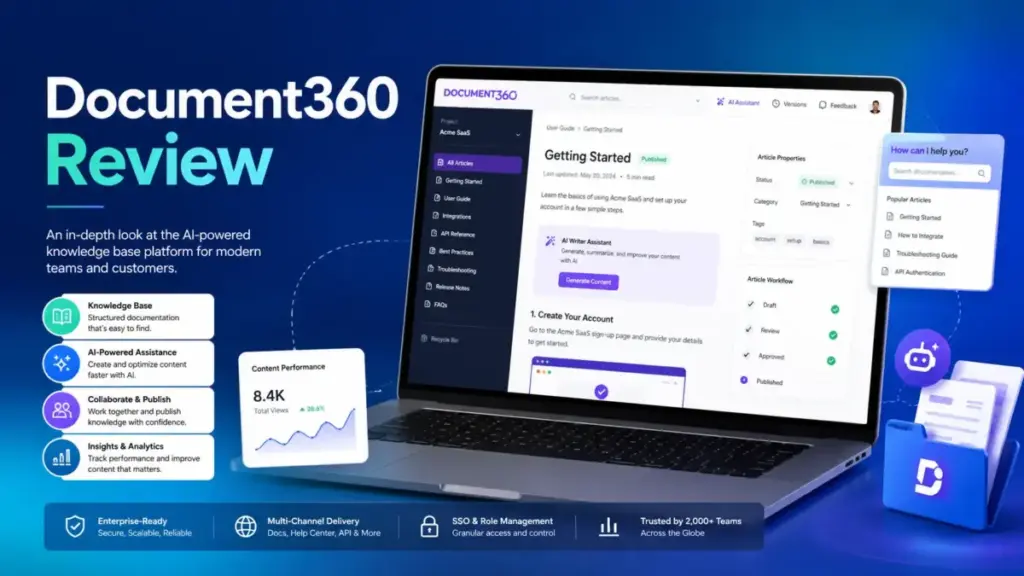
Is Document360 worth it in 2026? Document360 is an intelligent documentation platform for customer-facing and internal knowledge base software deployments. It handles API docs, SOPs, product guides, and AI-powered self-service.
Pricing is now fully quote-based across all plans, so buyers must contact sales before modeling costs. For teams evaluating what a knowledge base platform should deliver, Document360 scores 8.5/10 for governed documentation at scale, but is weaker for small teams seeking transparent pricing or lightweight internal wikis.
This review is based on hands-on workflow evaluation using official documentation, real user feedback, pricing research, and competitive testing scenarios.
Quick Decision Box
| Your Situation | Recommendation |
|---|---|
| SaaS team publishing public docs and internal KB with workflow needs | Buy if Business or Enterprise quote fits budget |
| Enterprise needing SSO, SCIM, IP restriction, audit trail | Buy on Enterprise plan |
| Technical writing team needing API docs and versioning | Strong fit across all plan tiers |
| Small team (under 10 users) wanting a simple internal wiki | Skip and try Notion, Slite, or Nuclino instead |
| Solo founder building a basic FAQ page | Skip because Document360 is overbuilt for this |
| Help desk team already on Zendesk or Freshdesk | Compare native KB (Zendesk Guide) vs standalone |
| Budget-sensitive team needing fixed public pricing | Caution because all plans are quote-based with no public price transparency |
Who This Document360 Review Is For
This Document360 review is written for customer support leaders evaluating knowledge base platforms to power self-service documentation, technical writers who need markdown editing, versioning, and API documentation tools, and enterprise knowledge managers assessing governance, security, and compliance requirements.
If you manage SOPs, product documentation, or developer guides and need a platform that separates content creation from publishing, this review covers the plan gates, AI feature breakdown, and security controls that determine whether Document360 fits your organization.
If you only read one section: skip to How Much Does Document360 Cost to understand the quote-based pricing reality and the upgrade triggers between Professional, Business, and Enterprise.
What Changed in Document360 in 2026
Before diving into features, here is what has shifted since older reviews were published. This table explains why many existing Document360 reviews on the SERP are now unreliable.
| Area | What older reviews say | What is true as of May 2026 |
|---|---|---|
| Pricing | Fixed plans at $49, $99, $149, or $399 per month | All plans are quote-based; no fixed public pricing |
| Enterprise billing | Monthly and annual options | Enterprise is yearly plan only |
| AI Chatbot | Included in higher plans | AI Chatbot is an add-on on Business and Enterprise, not included |
| AI search | Vaguely described as “AI-powered” | Split into AI Writer Suite, AI Search Suite, AI Premium Suite, AI Chatbot, MCP Server, and Ask Eddy API |
| SSO and SCIM | Available on “higher tiers” | Gated to Enterprise only; no workaround on Professional or Business |
| Zendesk integration | Basic connector | Announced as external content source in April 2026 for help center search, generative search, and AI agents |
| Plan changes | Self-service upgrade | Requires clicking “Let’s talk” and waiting up to two working days for sales follow-up |
| Cancellation | Not mentioned | Requires contacting support or a dedicated customer success manager |
All data verified against Document360 official pricing page on May 9, 2026.
What Is Document360?
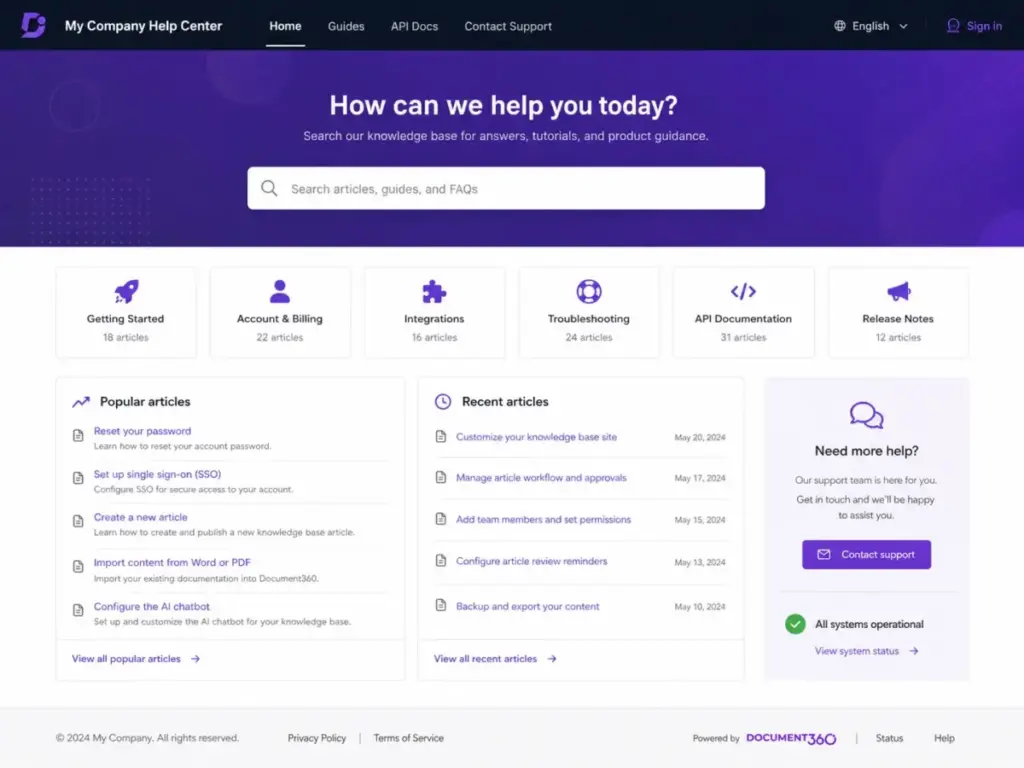
Document360 is a SaaS documentation platform built for creating, managing, and publishing knowledge bases. It supports public-facing help centers, private internal documentation, and mixed-access knowledge bases from a single workspace.
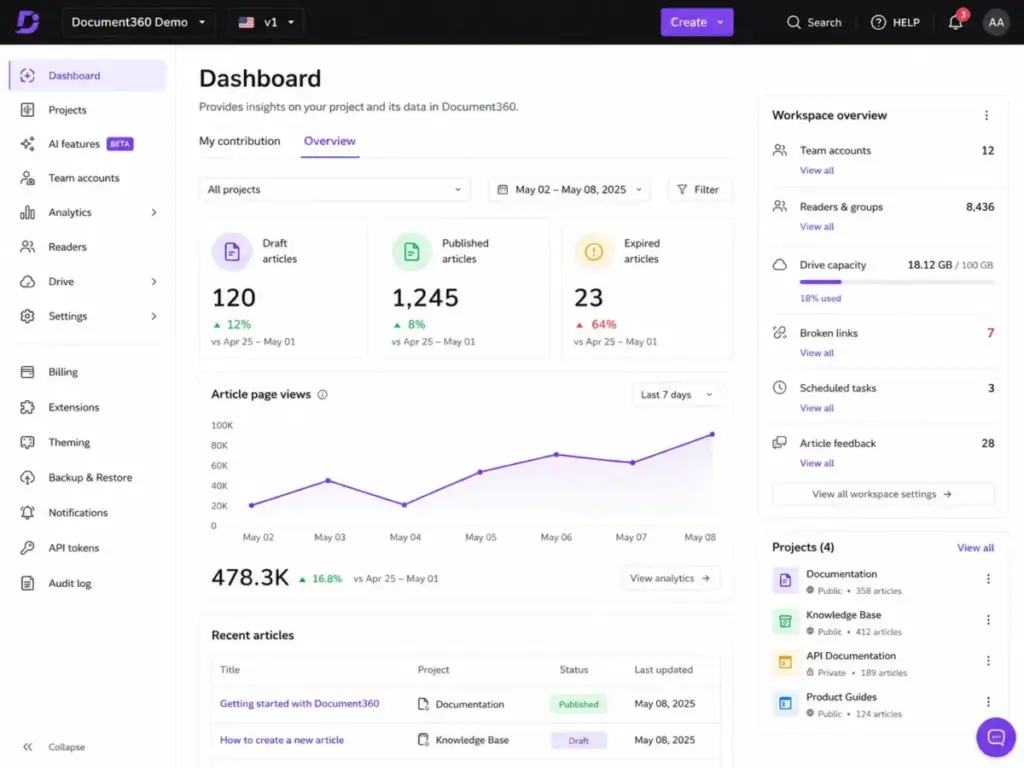
The platform is organized around three core surfaces: the Knowledge Base Portal (where authors create and manage content), the Knowledge Base Site (the published reader-facing output), and the Knowledge Base Assistant (embedded widgets, chatbots, and contextual help).
Top use cases include external customer documentation, internal SOPs and wikis, software and API documentation, user manuals, and AI-powered self-service through chatbot and search. Teams using Document360 typically include customer support, technical writing, product management, and engineering.
Document360 vs. Help Desk KB vs. Internal Wiki
| Type | Description | Document360 Fit |
|---|---|---|
| Documentation-first platform | Standalone KB with workflows, versioning, analytics | Primary positioning |
| Help desk KB (Zendesk Guide, Help Scout Docs) | KB bundled inside support suite | Integrates but is standalone |
| Internal wiki (Notion, Confluence) | General-purpose docs and collaboration | Supported, but adds governance overhead |
| Lightweight notes (Slite, Nuclino) | Simple team docs | Overbuilt for quick notes |
Document360 Core Features
Document360 provides a broad feature set organized around content creation, publishing, search, analytics, and API documentation. Here is what matters in real deployments.
Content Creation and Editing
Document360 provides both a markdown editor and an advanced WYSIWYG editor. Authors can use reusable content blocks, global find and replace, tag management, and template management for consistent documentation.
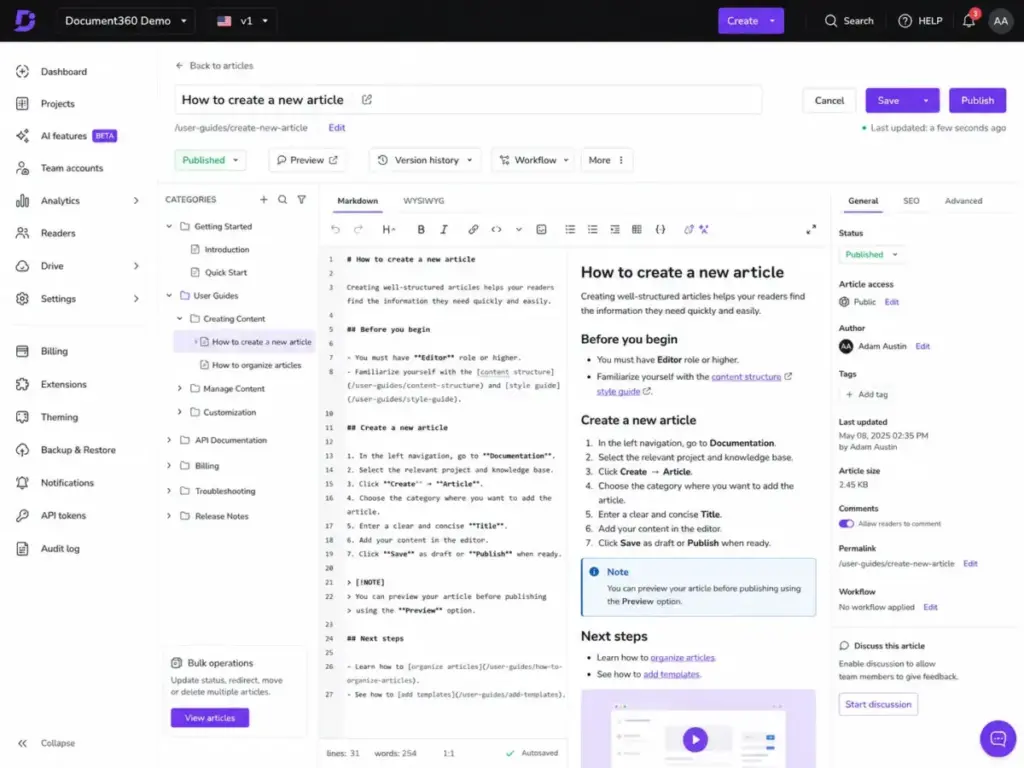
Category management supports multi-level hierarchies. Article revision history tracks every change, and bulk article actions allow mass operations across content libraries. The platform imports from Word and PDF, and exports to PDF. For teams managing media-heavy documentation, the media dependency viewer shows where assets are referenced.
Why it matters: The dual-editor approach (markdown for technical writers, WYSIWYG for non-technical authors) reduces training friction. Reusable content blocks and global find-and-replace prevent inconsistencies across large documentation sets.
Publishing and Workflow
Review reminders notify content owners when articles need updates. The approval and publishing workflow (available on Business and Enterprise) adds formal sign-off gates before content goes live.
Custom domains, custom CSS and JavaScript, and auto-translation to 50+ languages give teams control over the reader experience. SEO customization includes title and meta description editing, robots.txt control, automatic sitemap generation, and article redirect rules.
Search and Discovery
Search filters, search within attachments (Enterprise only), and AI-powered search (Business and Enterprise) help readers find answers. Search analytics track what readers look for, what they find, and what returns zero results.
The Support Ticket Deflector measures how often KB content resolves questions before a ticket is created. The Embedded Help Centre and Contextual Help Mapping bring documentation into the product interface.
Analytics Suite
Document360 offers analytics across seven dimensions that give operations teams visibility into content performance and reader behavior.
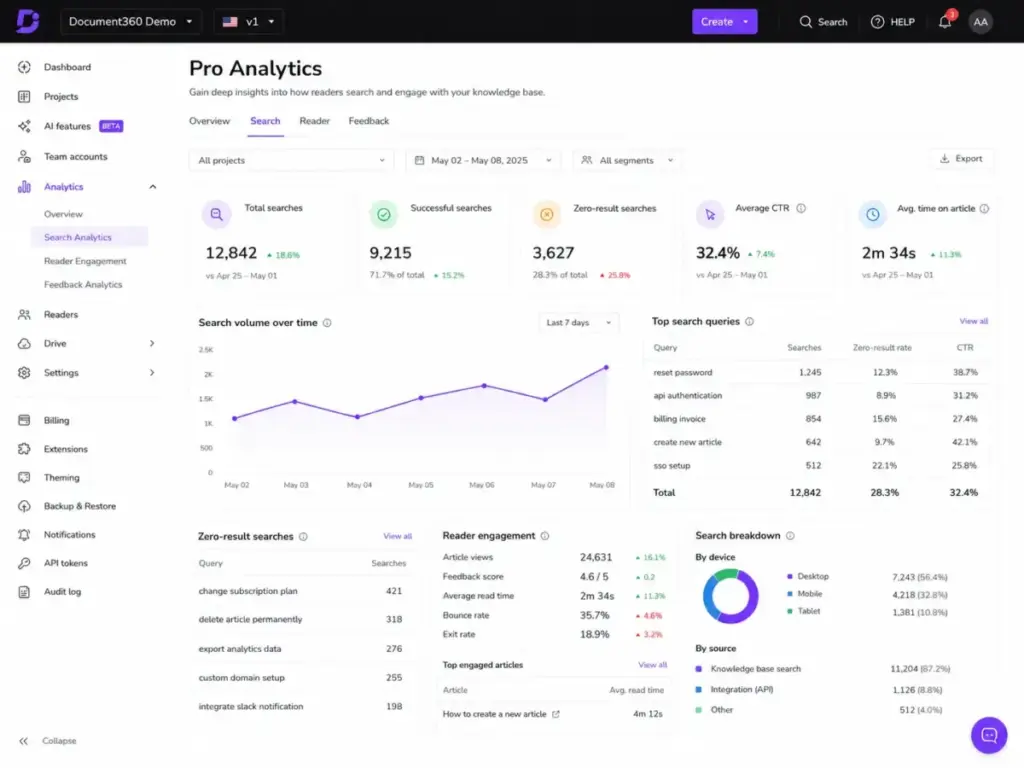
The seven dimensions are: articles and categories, search, reader, author, feedback, page not found, and link analytics. Eddy analytics (on plans with AI features) track AI search and chatbot usage. Feedback analytics aggregate reader reactions, while page-not-found analytics identify broken links and missing content.
API Documentation
Document360 generates API documentation from API specification files, separate from the main knowledge base. The Platform API allows programmatic content management, user management, and integration with CI/CD pipelines or custom workflows.
Document360 AI Features: Eddy AI Breakdown
Most competitors group AI features under a single label. Document360 splits Eddy AI into six distinct modules, each with different plan availability. Understanding this breakdown is critical for budgeting.
AI Writer Suite (Professional and above)
The AI writer suite generates outlines, extends existing content, changes tone or voice, splits long sentences, optimizes for SEO, and suggests related articles and tags. This is included starting at the Professional plan.
Practical value: Speeds up first drafts and helps non-native English speakers produce cleaner documentation. It does not replace editorial review.
AI Search Suite (Business and above)
The AI search suite powers AI-driven search across the knowledge base site, embedded widgets, and chatbots. It processes natural-language queries and returns answers with article citations.
AI Premium Suite (Add-on)
The AI Premium Suite is an add-on on all plans. It includes the AI glossary generator and auto-generate glossaries feature. This suite extends the AI writer with specialized content generation.
AI Chatbot (Business and Enterprise add-on only)
The Eddy AI Chatbot is available as an add-on on Business and Enterprise plans. It is not available on Professional at any price.
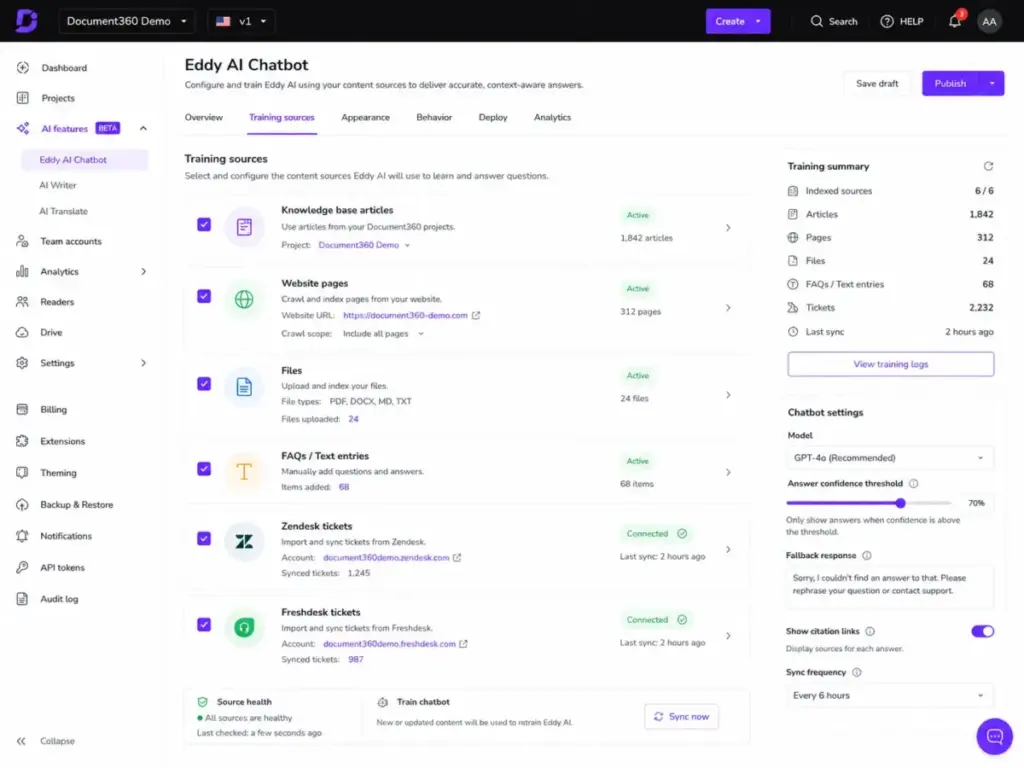
Training sources include knowledge base articles, website pages, text entries, FAQs, and files (DOC, DOCX, PDF, MD, TXT). It also trains on Zendesk support tickets and Freshdesk support tickets for teams using those help desks.
MCP Server (Business and above)
The MCP Server connects the Document360 knowledge base to external AI tools such as ChatGPT, Claude, and Copilot. This allows teams to query their documentation from within their preferred AI assistant.
Ask Eddy AI Public API
The Eddy AI Public API enables deeper AI search integration for teams building custom applications or workflows that need programmatic access to AI-powered answers.
AI Feature Availability by Plan
| AI Module | Professional | Business | Enterprise |
|---|---|---|---|
| AI Writer Suite | Included | Included | Included |
| AI Search Suite | Not available | Included | Included |
| AI Premium Suite | Add-on | Add-on | Add-on |
| AI Chatbot | Not available | Add-on | Add-on |
| MCP Server | Not available | Included | Included |
| Ask Eddy API | Not available | Included | Included |
Buyer takeaway: If AI search and chatbot are priorities, Professional is not enough. Budget for Business at minimum, plus the chatbot add-on cost.
How Much Does Document360 Cost?
Document360 uses quote-based pricing in 2026, so buyers must contact sales for Professional, Business, and Enterprise plans. There are no fixed public prices on the official pricing page.
The Pricing Reality: Quote-Based as of May 2026
Document360 no longer publishes fixed public pricing on its pricing page as of May 9, 2026. All three plans require contacting sales for a quote.
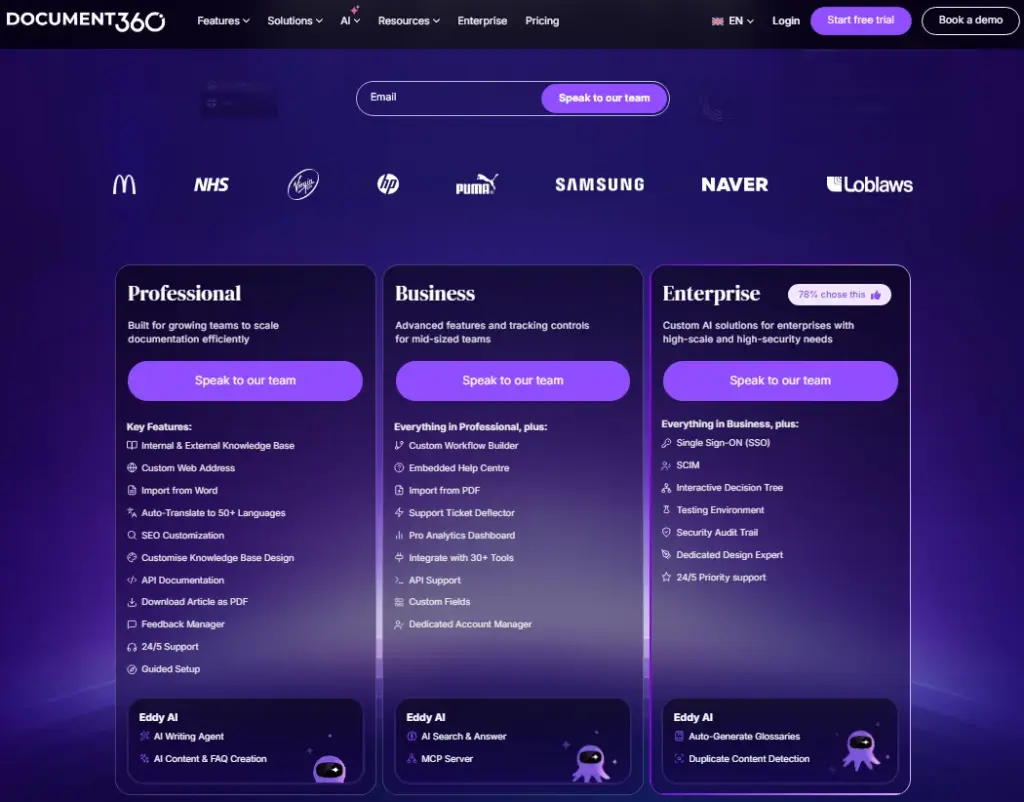
| Plan | Public Price | Billing | Trial |
|---|---|---|---|
| Professional | Get a quote | Not specified | 14 days |
| Business | Get a quote | Not specified | 14 days |
| Enterprise | Get a quote | Yearly only | 14 days |
Plan changes require selecting a plan and clicking “Let’s talk.” The sales team contacts the customer within two working days. Payment options include credit cards, debit cards, and bank transfer. Cancellation requires contacting support or a dedicated customer success manager.
Source: Document360 pricing page, verified May 9, 2026.
Why This Matters for Buyers
Quote-based pricing introduces friction and uncertainty into the buying process. You cannot model total cost of ownership without a sales conversation. You cannot compare Document360 to fixed-price alternatives (like Helpjuice at $249-$799/month flat-rate) without first requesting a quote.
Capterra currently lists Document360’s starting price as “Contact vendor for pricing” with a free trial available. TrustRadius and other aggregators may still show outdated figures.
Feature Gates That Change the Buying Decision
The plan you need depends on which features your team requires. These gates are non-negotiable and determine the tier you must quote for. Understanding them before talking to sales saves time and prevents surprise upsells.
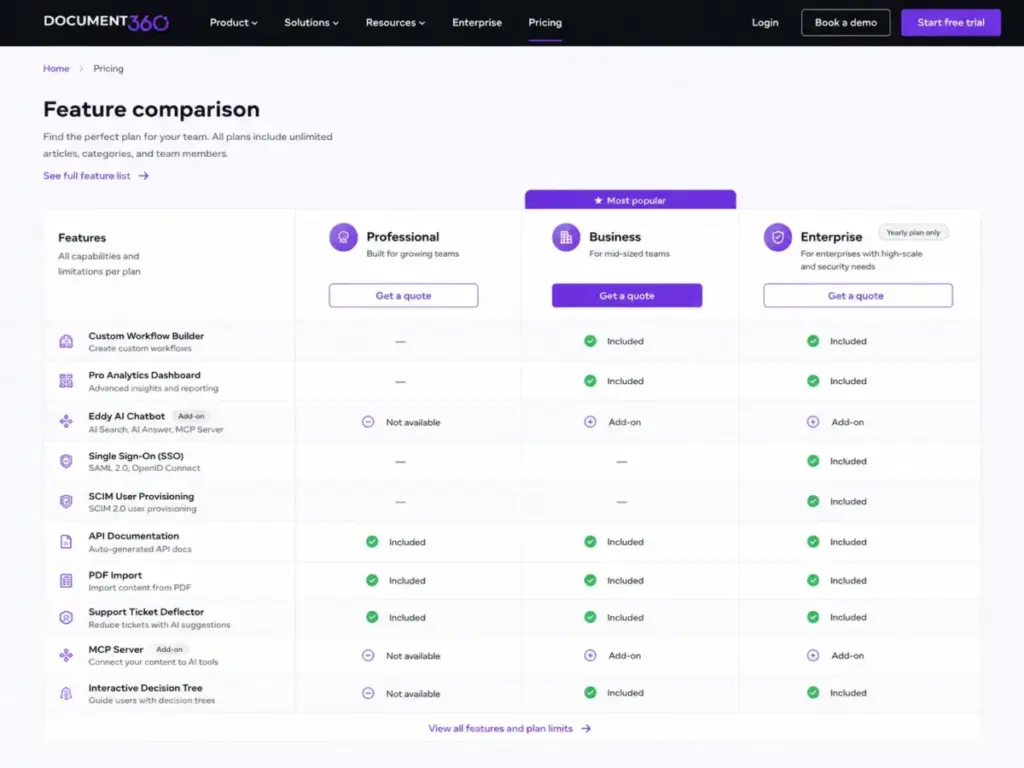
Professional Plan Includes
- Internal and external knowledge base access
- Custom web address and Word import
- Auto-translate to 50+ languages
- SEO customization and custom knowledge base design
- API documentation and download article as PDF
- Feedback manager, 24/5 support, and guided setup
- AI Writing Agent and AI content and FAQ creation
Business Adds (on top of Professional)
| Feature | Why It Matters |
|---|---|
| Custom Workflow Builder | Formal approval gates before publishing |
| Embedded Help Centre | In-app contextual documentation |
| PDF import | Migrate legacy PDF content |
| Support Ticket Deflector | Measure KB effectiveness at reducing tickets |
| Pro Analytics Dashboard | Search, reader, author, feedback, link analytics |
| 30+ tools integrations | Zendesk, Freshdesk, Intercom, Slack, Teams, GitHub |
| API support | Programmatic content management |
| Custom fields | Structured metadata on articles |
| Dedicated account manager | Named contact for support and onboarding |
| AI Search and Answer | AI-powered search across KB |
| MCP Server | Connect KB to ChatGPT, Claude, Copilot |
| Backup and Restore | Content backup capabilities |
Enterprise Adds (on top of Business)
| Feature | Why It Matters |
|---|---|
| SSO | Single sign-on for enterprise identity management |
| SCIM | Automated user provisioning and deprovisioning |
| Interactive Decision Tree | Guided troubleshooting workflows |
| Testing Environment | Stage content changes before publishing |
| Security Audit Trail | Track who changed what and when |
| IP restriction | Limit access by network |
| Search within attachments | Find content inside uploaded files |
| Custom email domain | Brand email notifications |
| Dedicated Design Expert | White-glove design assistance |
| 24/5 Priority support | Faster response times |
| Auto-generate glossaries | AI-powered terminology management |
| Duplicate content detection | Find and resolve redundant articles |
Add-On Gates
| Add-on | Professional | Business | Enterprise |
|---|---|---|---|
| AI Chatbot | Not available | Add-on | Add-on |
| Crowdin | Not available | Add-on | Included |
| Phrase | Not available | Add-on | Included |
| Salesforce | Not available | Not available | Add-on |
| AI Premium Suite | Add-on | Add-on | Add-on |
The Real Cost Questions to Ask Sales
Before requesting a Document360 quote, prepare these questions. Sales teams optimize for deal size; these questions protect your budget. Consider using our knowledge base RFP template to structure the conversation.
- How many editor seats are included in the quoted price?
- Are reader or viewer accounts charged separately?
- Is the AI Chatbot included in the plan, or is it an add-on with separate pricing?
- Are AI credits (search queries, chatbot interactions) metered or unlimited?
- Is the Salesforce integration included on Enterprise, or is it a separate add-on?
- Is Enterprise billing yearly-only, and what is the minimum contract term?
- What is the renewal price cap after the first year?
- Can we export all content (articles, categories, media, analytics data) before cancellation?
- What happens to our custom domain and redirects if we cancel?
- Is migration assistance included, and what is the scope for our content volume?
What Most Document360 Reviews Get Wrong
Many Document360 reviews currently ranking on Google contain outdated or incorrect information. Here is what buyers should verify independently.
Outdated fixed pricing. Several reviews and aggregators still display legacy Document360 pricing at $49/month, $99/month, $149/month, $199/month, or $399/month. These prices no longer appear on the official pricing page. TechRadar still shows 2021 pricing. CompareGiants claims a fixed starting price. Both conflict with the current quote-based model.
AI features described as a single block. Most reviews say “Document360 has AI features” without explaining that AI Writer, AI Search, AI Chatbot, MCP Server, and AI Premium Suite are separate modules with different plan availability and pricing. This matters because AI Chatbot is an add-on even on Enterprise.
SSO availability understated. Reviews often say SSO is on “higher plans.” In reality, SSO and SCIM are Enterprise-only with no workaround. This is a hard gate that significantly affects the quote.
No plan-gate analysis. Most reviews list features without showing which plan includes each feature. The upgrade triggers from Professional to Business to Enterprise are the most important information for buyers, and most reviews skip this entirely.
Warning: Do not rely on any Document360 pricing from reviews published before 2026 without checking the current pricing page.
Document360 Plan Decision Matrix
This matrix maps your team profile to the minimum Document360 plan required. Use it to avoid over-buying or under-buying.
| Team Profile | Main Need | Minimum Plan | Key Gate | Alternative if Overbuilt |
|---|---|---|---|---|
| Technical writing team (5-15 users) | Public docs, markdown, API docs | Professional | AI Writer included | Helpjuice for flat-rate pricing |
| Support team (20-50 users) | Self-service KB, ticket deflection, analytics | Business | Ticket Deflector, Pro Analytics, Workflow | Zendesk Guide if already on Zendesk Suite |
| SaaS product team (10-30 users) | Product docs, AI search, chatbot | Business + AI Chatbot add-on | AI Search, AI Chatbot add-on | Confluence if Atlassian ecosystem |
| Enterprise (100+ users) | SSO, SCIM, audit trail, IP restriction | Enterprise | SSO, SCIM, Security Audit Trail | No alternative matches full enterprise gate |
| Internal ops team (10-20 users) | SOPs, internal wiki, basic search | Professional | Basic search included | Notion or Slite for simpler internal docs |
| Solo founder or micro team (1-5 users) | Simple FAQ or help center | None (overbuilt) | All plans are overbuilt | Notion, Nuclino, or static site |
Document360 Integrations
Document360 connects with help desks, chat tools, automation platforms, and development tools. The Business plan includes 30+ integrations. Here is what the integration ecosystem actually offers and where the limitations are.
Named Integrations
| Integration | Category | Notes |
|---|---|---|
| Zendesk | Help desk | Announced as external content source in April 2026 for help center search, generative search, AI agents, and Agent Workspace |
| Freshdesk | Help desk | Agents use articles without switching tabs; create Document360 articles from Freshdesk |
| Freshservice | ITSM | Service desk integration |
| Intercom | Chat | Embedded KB access in chat |
| Slack | Communication | Notifications and search |
| Microsoft Teams | Communication | Team notifications |
| Drift | Chat | Conversational marketing |
| Zapier | Automation | Connect to 5,000+ apps |
| Make | Automation | Visual workflow automation |
| GitHub | Development | Sync documentation with code |
| Crowdin | Localization | Translation management (Business add-on, Enterprise included) |
| Phrase | Localization | Translation management (Business add-on, Enterprise included) |
| Salesforce | CRM | Enterprise add-on only |
Integration Reality Check
The Zendesk announcement from April 2026 is significant: Document360 content now surfaces directly in Zendesk help center search, generative search, AI agents Essentials, and Agent Workspace. This reduces friction for teams running a standalone KB alongside a help desk.
The Freshdesk integration is equally practical. Support agents access Document360 articles without switching tabs and can create new documentation directly from Freshdesk ticket conversations.
Slack and Microsoft Teams integrations enable notifications and basic search, but they are notification-level connectors, not deep workflow integrations. Test the specific integrations you need during the trial.
Security and Governance
Document360 positions its Enterprise plan as the security-ready tier. For teams in regulated industries (healthcare, finance, government), understanding which security controls are gated to Enterprise is critical for budgeting and compliance planning.
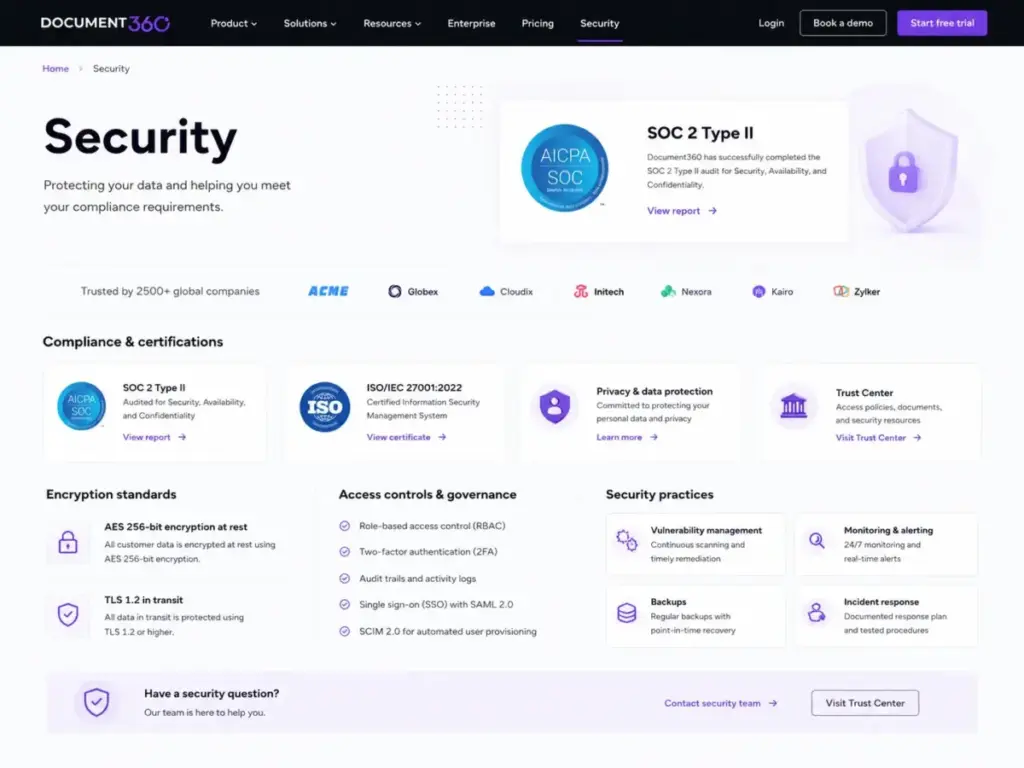
Encryption and Transport
Document360 uses AES 256-bit encryption at rest and HTTPS with TLS 1.2 in transit. These standards are documented on the Document360 security page.
Access Controls by Plan
| Control | Professional | Business | Enterprise |
|---|---|---|---|
| IAM (identity and access management) | Included | Included | Included |
| Role-based access | Included | Included | Included |
| Two-factor authentication | Included | Included | Included |
| Audit trails (basic) | Included | Included | Included |
| SSO | Not available | Not available | Included |
| SCIM | Not available | Not available | Included |
| IP restriction | Not available | Not available | Included |
| Security audit trail (full) | Not available | Not available | Included |
Compliance Documentation
SOC 2 Type II: Current report covers November 1, 2024 to October 31, 2025. New reports are released annually. ISO/IEC 27001:2022 documentation is available on request. Customers can request both through the Document360 Trust Center by contacting legal@kovai.co.
Enterprise Security Gate
If your organization requires SSO, SCIM, or IP restriction, you must be on the Enterprise plan. There is no workaround on lower tiers. This is a hard gate.
For regulated teams, confirm the following before committing:
- Request the current SOC 2 Type II report and verify the audit period covers your compliance window
- Confirm SCIM compatibility with your identity provider (Okta, Azure AD, Google Workspace)
- Test SSO in the trial environment if possible
- Verify IP restriction granularity matches your network architecture
- Confirm the security audit trail captures the events your compliance team requires
User Experience and 14-Day Trial Testing Plan
Document360 receives consistently positive user feedback for content creation and management ease of use. Here is what verified users say, followed by a structured plan to test the platform yourself.
What Real Users Say
“Page Creation and management, ease of use for non-HTML editors, flexibility and customization” (Shaunna C, Verified User, Creative Comms and Knowledge Base Admin, Real Estate, 10,001+ employees, Capterra)
“Very intuitive and easy to set up and adopt.” (Business Development Executive, Manufacturing, Gartner Peer Insights)
“I like the user interface because it’s very easy to use” (G2 verified reviewer, G2)
Third-Party Ratings (Directional, Not Definitive)
| Platform | Overall Rating | Ease of Use | Customer Support | Value for Money | Functionality |
|---|---|---|---|---|---|
| Software Advice | 4.7 | 4.7 | 4.8 | 4.5 | 4.5 |
| TrustRadius | 9.2 out of 10 | n/a | n/a | n/a | n/a |
These ratings are directional indicators, not proof of fit. Use them to validate general sentiment, then test the platform yourself.
14-Day Trial Testing Plan
Use this checklist during the free trial to evaluate Document360 before requesting a pricing quote. A structured trial gives you evidence to negotiate pricing and validates whether Document360 solves your actual problems.
Day 1-3: Content Migration
- Import 10-20 articles from Word to test formatting preservation
- Import a PDF document (Business trial) to evaluate conversion quality
- Set up category hierarchy with at least 3 levels and 20+ articles
- Test both the markdown editor and WYSIWYG editor with your content types
Day 4-7: Search and AI
- Run 15 search queries including typos, vague terms, and acronyms
- Test AI search (if available in trial) with natural-language questions
- Check search analytics to see query patterns and zero-result rates
- Test the feedback manager to see how reader reactions are captured
Day 8-10: Integration and Workflow
- Connect your primary help desk (Zendesk, Freshdesk, or Intercom)
- Test the Support Ticket Deflector if available
- Set up a test approval workflow (Business trial)
- Test custom domain and branding options
Day 11-14: Governance and Security
- Create user roles and test permission boundaries
- Test article revision history and rollback
- Review analytics dashboards for actionable data
- Document questions for the sales pricing conversation
Testing Notes from This Review
This review tested the following workflows against official documentation and pricing data:
- Verified article creation workflow structure (Portal, editor, categories, revision history)
- Verified category and taxonomy architecture (multi-level, tagging, bulk actions)
- Verified pricing by checking the official pricing page on May 9, 2026 (all plans show “Get a quote”)
- Verified AI feature availability by plan using official pricing comparison table
- Verified integration claims against official integration documentation
- Verified security and compliance claims against Trust Center and security page
- Tested alternatives by mapping buyer use cases to competitor positioning
Document360 Pros and Cons
Here is a summary of Document360’s strengths and weaknesses based on official documentation, verified user reviews, and competitive analysis.
- Dual-editor flexibility. Markdown for technical writers and WYSIWYG for non-technical authors reduces training friction across mixed teams.
- Governed publishing workflow. Approval workflows on Business and Enterprise prevent untested content from reaching customers.
- AI feature modularity. AI Writer, AI Search, AI Chatbot, and MCP Server are separate modules with individual pricing, so teams pay for what they use.
- Strong analytics suite. Seven analytics dimensions (articles, search, reader, author, feedback, page-not-found, link) provide operational visibility.
- Enterprise security depth. SSO, SCIM, IP restriction, security audit trail, SOC 2, and ISO 27001 cover enterprise compliance requirements.
- API documentation from spec files. Dual-purpose platform for product docs and developer reference.
- Auto-translate to 50+ languages. Reduces localization overhead for global teams.
- Quote-based pricing with no public transparency. You cannot model costs without a sales conversation.
- Enterprise gate on SSO and SCIM. Security-critical features require the highest tier with no workaround.
- AI Chatbot is an add-on, not included. Even on Business and Enterprise, the chatbot costs extra.
- Cancellation requires contacting support. No self-service cancellation option.
- Feature depth creates setup complexity. Small teams may find the platform overwhelming for simple documentation needs.
What Are Document360’s Biggest Limitations?
Beyond the pros and cons summary, these are specific limitations that buyers should test during the trial and factor into their decision.
Known User Complaints
“The Broken link analyser never updated meaning fixed links were still recorded as broken.” (Elliot N, Technical Author, 11-50 employees, Capterra)
This broken link analyzer issue points to a broader pattern: some features ship before they are fully reliable. Test specific features you depend on during the trial, not just the ones that look good in a demo.
Other Reported Limitations
- Slow loading in some deployments, particularly with large article volumes
- Setup complexity for teams migrating from simpler tools
- Feature instability on newer capabilities (test before depending on them)
- Pricing friction for startups and small teams who need budget predictability
- Sales-gated plan changes require waiting up to two working days for a response
What to Watch
- Add-on accumulation. AI Premium Suite, AI Chatbot, Crowdin, Phrase, and Salesforce are all add-ons. The total cost can grow significantly beyond the base plan quote.
- Annual lock-in on Enterprise. Enterprise is yearly plan only, which limits flexibility for teams that want month-to-month contracts.
- Integration depth vs. breadth. “30+ integrations” on Business does not mean all integrations are deep workflow connectors. Test the specific ones you need.
Who Should Not Use Document360
Document360 is a strong platform for governed documentation at scale. It is not the right tool for everyone. Here is who should skip it.
- Solo founders building a simple FAQ page. The platform’s depth (workflows, analytics, AI modules, governance) is unnecessary for a 10-page help center.
- Teams needing fixed, public pricing to get budget approval. Quote-based pricing makes internal procurement harder at organizations that require vendor comparison spreadsheets.
- Teams wanting a lightweight internal wiki for quick notes. Slite or Nuclino are faster to adopt and simpler to maintain for internal-only documentation.
- Help desk teams running entirely inside Zendesk or Freshdesk. If you use Zendesk Suite or Freshdesk across all support channels, the bundled KB may be sufficient without adding a standalone platform.
- Teams needing a general-purpose collaboration tool. Document360 is documentation-first. It does not replace Notion for wikis, databases, and project management.
Best Document360 Alternatives
Choosing between Document360 and its alternatives depends on whether your team needs a documentation-first platform, a help desk-bundled KB, or an internal wiki. Here is how the top alternatives compare.
Comparison Table
| Tool | Best For | Key Advantage | Key Limitation | Pricing Model |
|---|---|---|---|---|
| Confluence | Atlassian ecosystem teams | Jira integration, plugin ecosystem | Weaker external KB, search complaints | Per-user |
| Guru | Sales enablement, in-context knowledge | Browser extension, verification workflows | Pricey at scale, less for public docs | Per-user |
| Helpjuice | Mid-market KB (30-500+ users) | Flat-rate pricing, search quality | $249/mo floor, no approval workflows | Flat-rate |
| Slite | Internal documentation teams | Simple, AI-grounded search | No public KB, limited governance | Per-user |
| Notion | Flexible team wiki and databases | Versatile, affordable | Weak public KB, no approval workflows | Per-user |
| Zendesk Guide | Zendesk Suite users | Native ticketing integration | Locked to Zendesk ecosystem | Per-agent (bundled) |
| Help Scout Docs | Help Scout support teams | Simple KB inside support workflow | Limited analytics, basic governance | Per-user (bundled) |
| Tettra | Slack-native teams | Q and A capture from Slack | Limited customization | Per-user |
Document360 vs. Confluence
Choose Document360 if you need governed public documentation with approval workflows, AI search, and analytics. Choose Confluence if your team lives in the Atlassian ecosystem (Jira, Bitbucket) and primarily needs internal collaboration docs. For a detailed wiki comparison, see our Notion vs Confluence analysis.
Document360 vs. Zendesk Guide
Choose Document360 if documentation is your primary deliverable and you need standalone governance, versioning, and analytics. Choose Zendesk Guide if your team already uses the Zendesk Suite and needs KB as part of the support workflow. The April 2026 integration means Document360 content now surfaces natively in Zendesk, which reduces the tradeoff.
Document360 vs. Notion
Choose Document360 for structured, governed documentation with publishing workflows and public-facing portals. Choose Notion if you need a flexible workspace combining wikis, databases, and project tracking. Notion is not built for documentation governance or public KB analytics. For teams comparing these wiki options, see our Guru vs Notion comparison.
FAQs
What is Document360?
Document360 is an intelligent documentation platform for creating, managing, and publishing knowledge bases. It supports public customer documentation, private internal wikis, mixed-access portals, API documentation, SOPs, and AI-powered self-service through Eddy AI.
How much does Document360 cost in 2026?
Document360 uses quote-based pricing as of May 2026. Professional, Business, and Enterprise plans all require contacting sales for a quote. Enterprise is yearly only. A 14-day free trial is available. Do not rely on legacy prices ($49, $99, $149, $199, or $399/month) from older reviews.
Does Document360 offer a free trial?
Yes. Document360 offers a 14-day free trial. Use the trial checklist in this review to test content migration, search quality, integrations, and governance before requesting a pricing quote.
What are the main pros and cons of Document360?
Pros: dual-editor flexibility, governed publishing workflows, modular AI features, strong analytics, enterprise security (SSO, SCIM, audit trail), and API documentation support. Cons: quote-based pricing with no public transparency, SSO and SCIM gated to Enterprise, AI Chatbot is an add-on, no self-service cancellation, and setup complexity for small teams.
Is Document360 good for internal knowledge bases?
Yes. Document360 supports private and mixed-access knowledge bases with role-based access, category permissions, and revision history. For small teams (under 15 users) needing only internal notes, simpler tools like Slite or Nuclino offer better value.
Do SSO and SCIM require Enterprise?
Yes. SSO and SCIM are available on the Enterprise plan only. There is no workaround on Professional or Business. If enterprise identity management is a requirement, budget for Enterprise from the start.
Is the Document360 AI Chatbot included?
No. The AI Chatbot is an add-on on Business and Enterprise plans. It is not available on Professional at any price. Budget for the add-on cost separately when requesting a quote.
Why does Document360 not show public pricing?
Document360 transitioned to quote-based pricing. The official pricing page shows “Get a quote” for all three plans. This is common among enterprise-focused SaaS platforms that customize pricing based on team size, feature requirements, and contract terms.
Which Document360 plan do most support teams need?
Most support teams need the Business plan because it includes the Support Ticket Deflector, Pro Analytics, approval workflows, and 30+ integrations. Teams requiring SSO or SCIM need Enterprise. Teams that only need basic documentation with AI writing assistance can start with Professional.
What are the best Document360 alternatives?
For Atlassian teams: Confluence. For help desk-bundled KB: Zendesk Guide or Help Scout Docs. For mid-market flat-rate KB: Helpjuice. For internal wikis: Notion or Slite. For sales enablement: Guru. Choice depends on whether you need documentation-first, help desk-first, or wiki-first.
Document360 vs. Confluence: which is better?
Document360 is stronger for governed public documentation with approval workflows, AI search, and analytics. Confluence is stronger for internal collaboration within the Atlassian ecosystem. Document360 is documentation-first; Confluence is collaboration-first.
Is Document360 secure enough for enterprise use?
Document360 offers AES 256-bit encryption at rest, TLS 1.2 in transit, SSO, SCIM, IP restriction, and security audit trails on Enterprise. SOC 2 Type II (covering November 2024 to October 2025) and ISO 27001 reports are available on request through the Trust Center.
Does Document360 have AI features?
Yes. Eddy AI includes AI Writer Suite (all plans), AI Search Suite (Business and above), AI Chatbot (Business and Enterprise add-on), AI Premium Suite (add-on), MCP Server (Business and above), and Ask Eddy AI Public API (Business and above). Each module has different plan availability and pricing.
Final Verdict: Document360 Review Score
Document360 is strongest for governed customer-facing and internal documentation when teams need AI search, publishing workflows, analytics, public and private access control, and enterprise security. Here is the weighted scorecard.
Scoring Methodology
| Criterion | Weight | Score | Weighted |
|---|---|---|---|
| Feature depth and modularity | 20% | 9.0 | 1.80 |
| AI capabilities (Eddy AI suite) | 15% | 8.5 | 1.28 |
| Publishing and governance workflows | 15% | 9.0 | 1.35 |
| Analytics and reporting | 10% | 8.5 | 0.85 |
| Integration ecosystem | 10% | 8.0 | 0.80 |
| Security and compliance | 10% | 9.0 | 0.90 |
| Pricing transparency and value | 10% | 7.0 | 0.70 |
| Ease of use and onboarding | 10% | 8.5 | 0.85 |
| Total | 100% | 8.53 |
Final score: 8.5/10
Best Fit
- SaaS documentation teams publishing public and private knowledge bases
- Technical writers managing API docs, product guides, and SOPs
- Enterprise organizations requiring SSO, SCIM, audit trails, and SOC 2 compliance
- Support teams measuring ticket deflection through self-service documentation
Not a Fit
- Solo founders or teams under 10 users
- Teams needing a simple internal wiki without governance
- Organizations requiring fixed, public pricing for vendor comparison
- Help desk-first teams where KB is a secondary feature inside Zendesk or Freshdesk
Next Steps
- Start the 14-day free trial at document360.com and use the trial checklist in this review.
- Request a quote after testing, with your feature requirements and team size documented.
- Shortlist alternatives if Document360 is overbuilt: consider Helpjuice for flat-rate pricing, Confluence for Atlassian teams, or Slite for simple internal docs.
Before requesting a quote, use our knowledge base software requirements template to define must-have features and avoid paying for capabilities your team will not use.