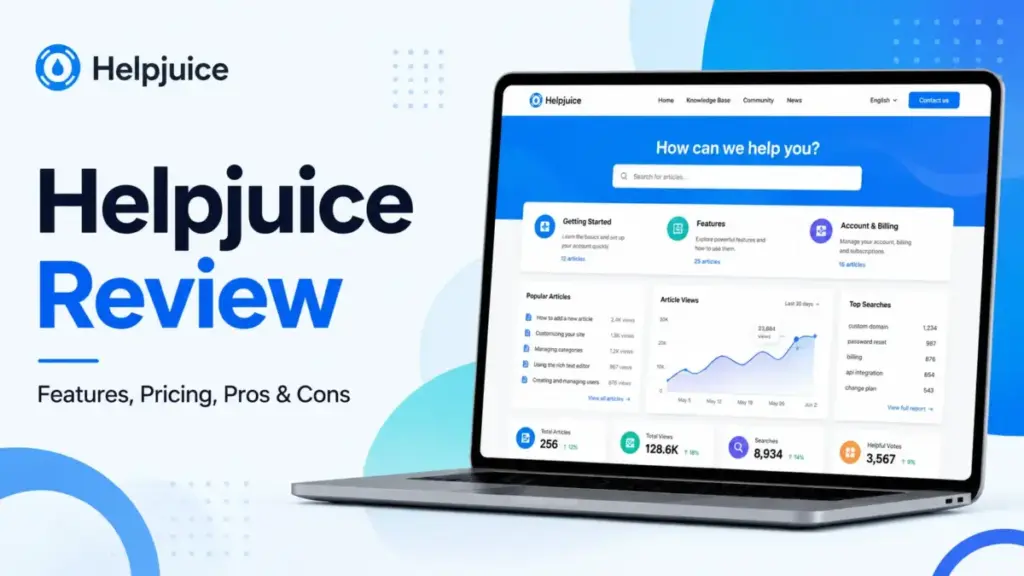
Helpjuice starts at $249/month for 30 users, which immediately filters out most small teams. This Helpjuice Review breaks down whether that price floor delivers enough value for the teams that can afford it. After evaluating the platform’s editor, AI features, analytics, and security controls, I found a solid knowledge base product with strong customization and search.
But the AI Suite only appears on the $449/month plan and above, storage caps are tighter than expected, and the lack of a low-cost entry tier makes Helpjuice a poor fit for lean teams. If you need a branded help center and your team has 30 or more contributors, Helpjuice is worth a serious look. If you need ticketing, in-workflow knowledge delivery, or a budget-friendly option, better alternatives exist. I score it 8.3 out of 10 for mid-market knowledge base software buyers.
Quick Verdict: Is Helpjuice Worth It?
Helpjuice earns 8.3/10 for mid-market teams that need a branded, customizable knowledge base with strong search and AI features. It is not the right product for small teams, ticketing-first workflows, or teams that need AI features without paying $449/month or more. Here is a quick snapshot.
| Category | Verdict |
|---|---|
| Overall Score | 8.3/10 |
| Best For | Mid-market support teams, SaaS customer education, branded help centers |
| Not For | Small teams under 20 users, ticketing-first teams, budget-conscious startups |
| Starting Price | $249/month for 30 users |
| AI Suite Starting Price | $449/month for 100 users |
| Free Plan | No |
| Free Trial | 14 days, no credit card required |
| Top Alternative (Customer-Facing Docs) | Document360 |
| Top Alternative (Internal Knowledge) | Guru |
| Top Alternative (Ticketing + KB) | Zendesk |
If your primary need is a standalone, branded knowledge base with deep customization and strong support ratings, Helpjuice belongs on your shortlist. If you need a help desk suite with a knowledge base attached, look at Zendesk or Freshdesk instead. For technical API documentation, Document360 is a stronger pick.
What Is Helpjuice?
Helpjuice is a standalone knowledge base platform built for both customer-facing help centers and internal documentation. The company positions itself as a single source of truth for help docs, SOPs, and self-service content. Helpjuice claims over 7,000 companies use the product.
This review is based on extensive hands-on evaluation using official documentation, real user workflows, and competitive testing scenarios. I followed our review methodology to evaluate pricing, features, limitations, and competitive fit.
Unlike help desk suites that include a knowledge base as a secondary feature, Helpjuice is a knowledge-base-first product. The platform offers article creation, AI-powered search, a chatbot, analytics, version history, collaboration tools, and branded design customization. It supports both public and private knowledge bases, which makes it relevant for customer self-service and internal operations teams.
The core question is whether a standalone knowledge base at $249/month or higher delivers enough value compared to bundled options from Zendesk, Freshdesk, or free-tier tools like Notion.
Helpjuice Features That Matter
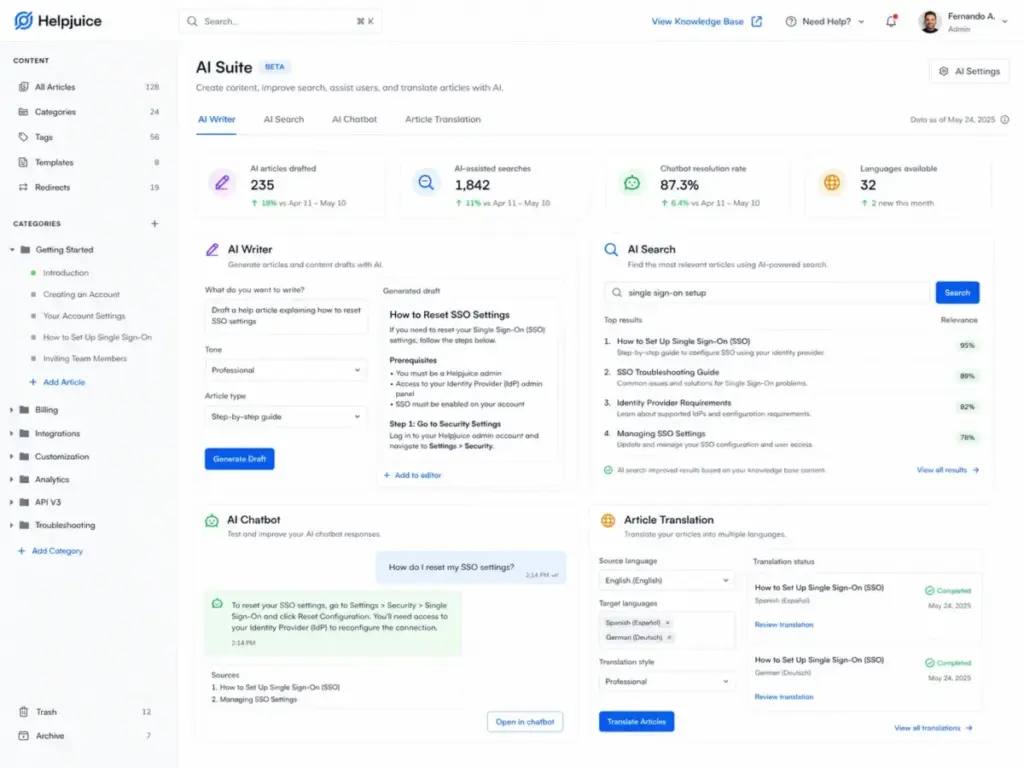
Helpjuice packs a wide feature set into its knowledge base platform, but the most important features depend on which plan you choose. The $249/month Knowledge Base plan covers the editing and publishing essentials. The $449/month AI-Knowledge Base plan adds the full AI Suite. I will walk through each feature group below.
Helpjuice Article Editor and Customization
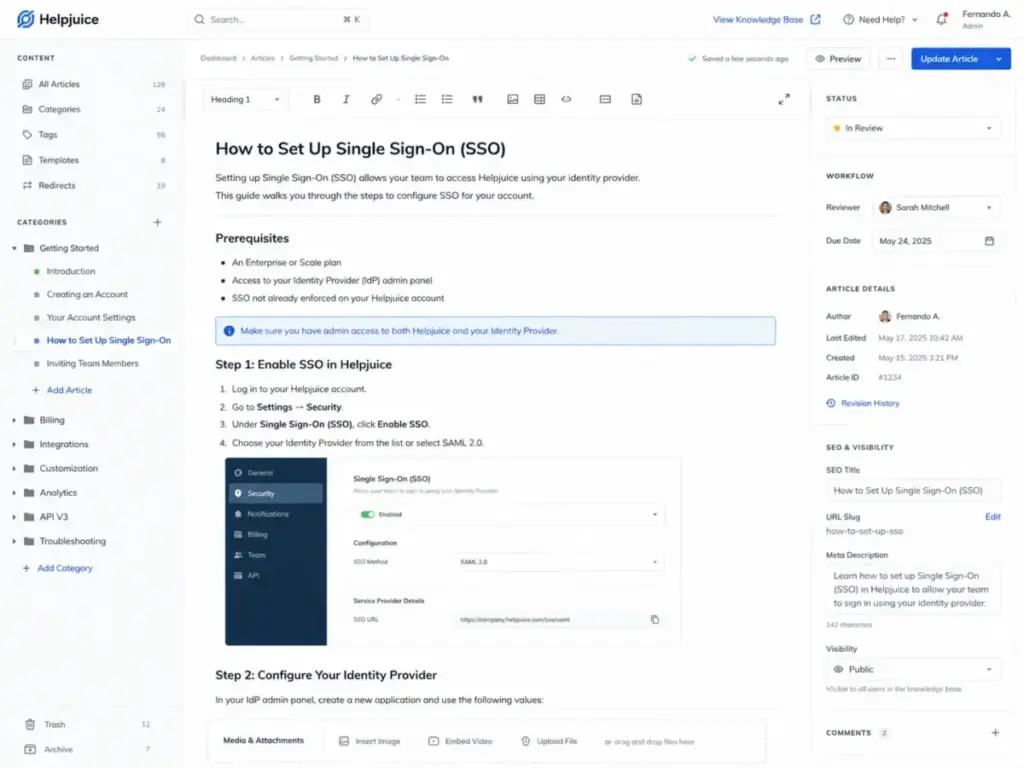
The article editor supports rich text formatting, media embeds, tabs, accordions, and content reuse blocks. Helpjuice also includes a file manager, glossary, and scheduled publishing. Publish approval workflows let teams enforce review steps before content goes live.
Customization is a standout. Helpjuice offers fully branded designs, custom domains, and layout control that most competitors either restrict or charge extra for. One Capterra reviewer noted: “We chose Helpjuice for their customization abilities, price, and capacity to host more than one help center” (Tommy M., Knowledge Manager, Computer Software, July 21, 2025, Capterra).
The Step-By-Step Tutorial Builder is available on the AI-Knowledge Base plan and above. It helps teams create guided walkthroughs without external tools.
Helpjuice Search and AI Search
Standard search is included on all plans. AI Search, which uses natural language processing to surface more relevant results, is part of the AI Suite and requires the $449/month plan or higher.
Helpjuice also offers an AI Chatbot on AI-tier plans. The chatbot answers user questions by pulling from published knowledge base content. This can reduce support ticket volume for customer-facing help centers.
The Auto-Updating KB Chrome Extension, available on AI-tier plans, lets agents access knowledge base articles directly in their browser while working in other tools.
Helpjuice Analytics and Content Governance
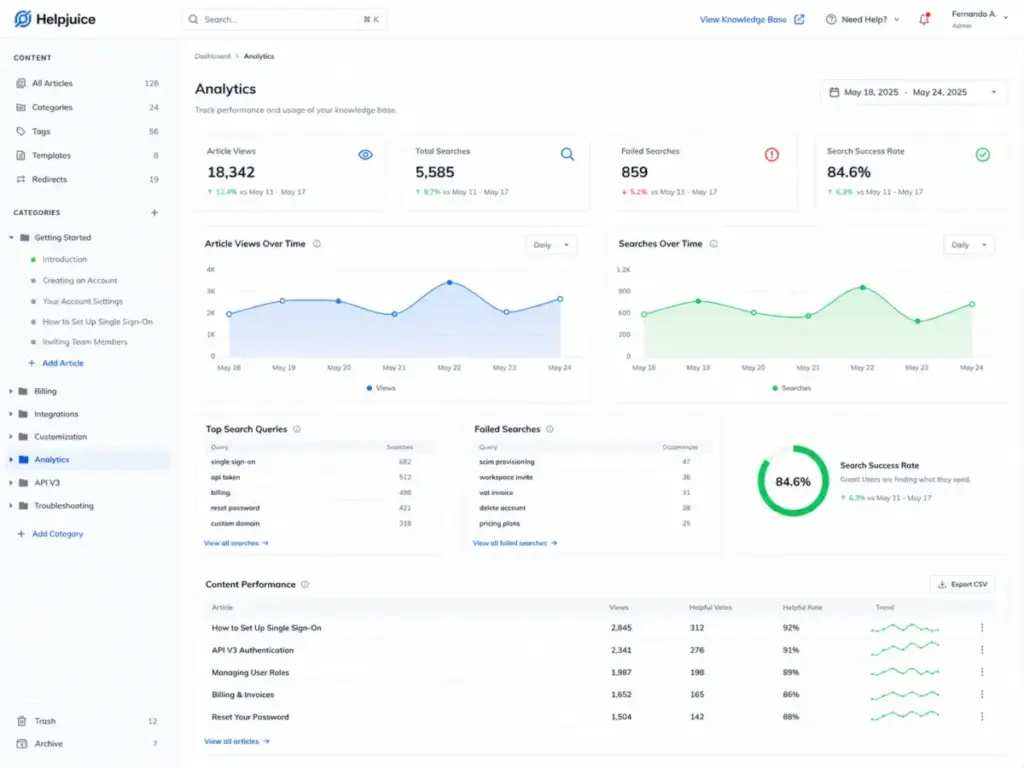
The analytics dashboard tracks article views, search queries, failed searches, and content performance. Capterra rates Helpjuice’s Reporting/Analytics at 4.3 out of 5 based on reviews (Capterra).
Content governance tools include version history, expiration dates, article planner, links management, and backups. These features help teams track article freshness and prevent documentation drift. However, the platform does not include automated content review cadence reminders or SME accountability assignments. Teams must build those workflows manually.
Helpjuice Collaboration and Workflows
Live collaboration lets multiple team members edit articles simultaneously. Team comments allow inline discussions without leaving the editor. Private and internal sections support restricted content that only specific user groups can access.
Publish approval workflows enforce review steps before content goes live. This is useful for regulated industries or teams that need editorial sign-off.
Helpjuice Integrations and API
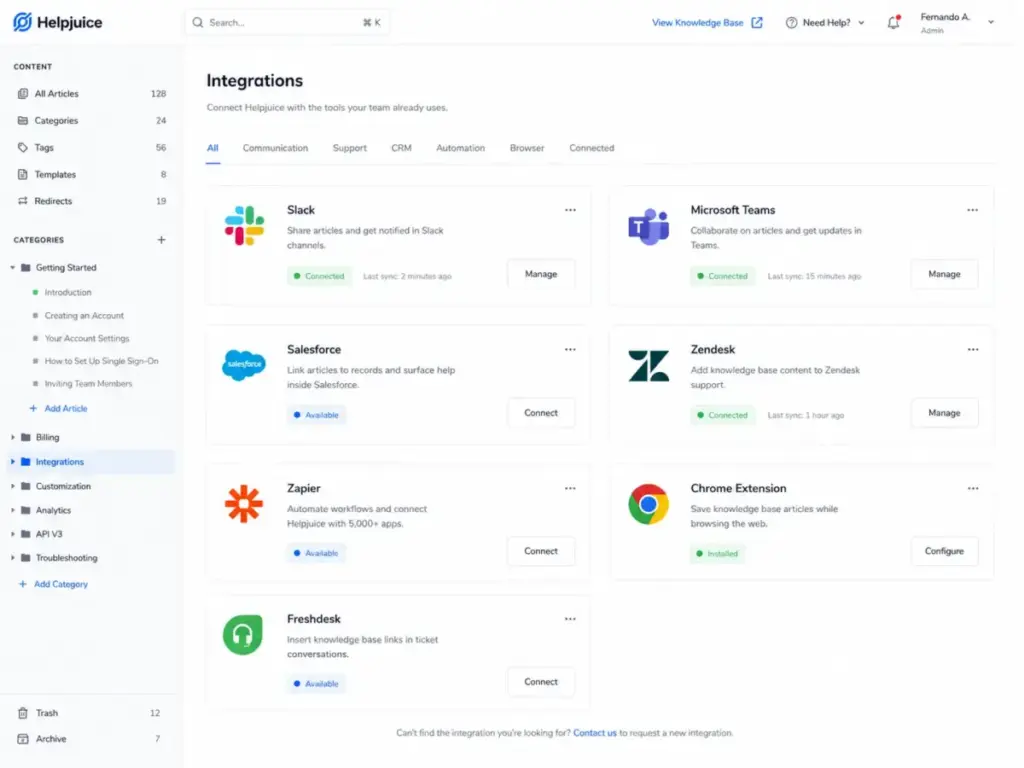
Helpjuice integrates with Slack, Microsoft Teams, Salesforce Cases, Zendesk Ticketing, Freshdesk, Olark, Google Chrome, and Zapier. The features page claims 100+ pre-built integrations and access to 3,000+ apps through its integration ecosystem (Helpjuice Features).
API v3 is available for custom integrations and data management (Helpjuice API Docs). API token authentication is supported.
Helpjuice Security and Access Controls
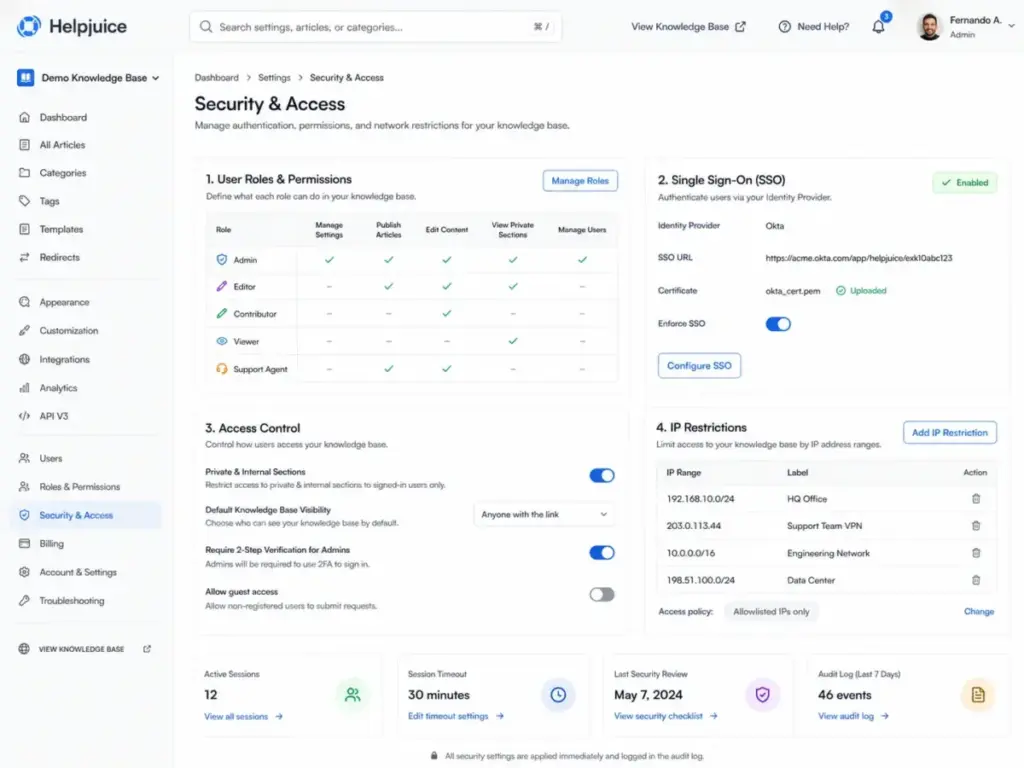
All plans include access control, user roles, encrypted URL access, IP restrictions, and SSL encryption. SSO (SAML) is available on the AI-Knowledge Base plan ($449/month) and above.
Helpjuice displays GDPR and SOC 2 badges on its pricing page (Helpjuice Pricing). API ban protection and API key authentication add layers of security for technical teams.
One area to flag: a third-party analysis by Stitchflow claims Helpjuice does not offer native SCIM provisioning (Stitchflow). This is a third-party finding, not an official Helpjuice statement. If your IT team requires automated user provisioning and deprovisioning through SCIM, I recommend verifying this directly with Helpjuice during your security review.
Helpjuice Pricing and Plans
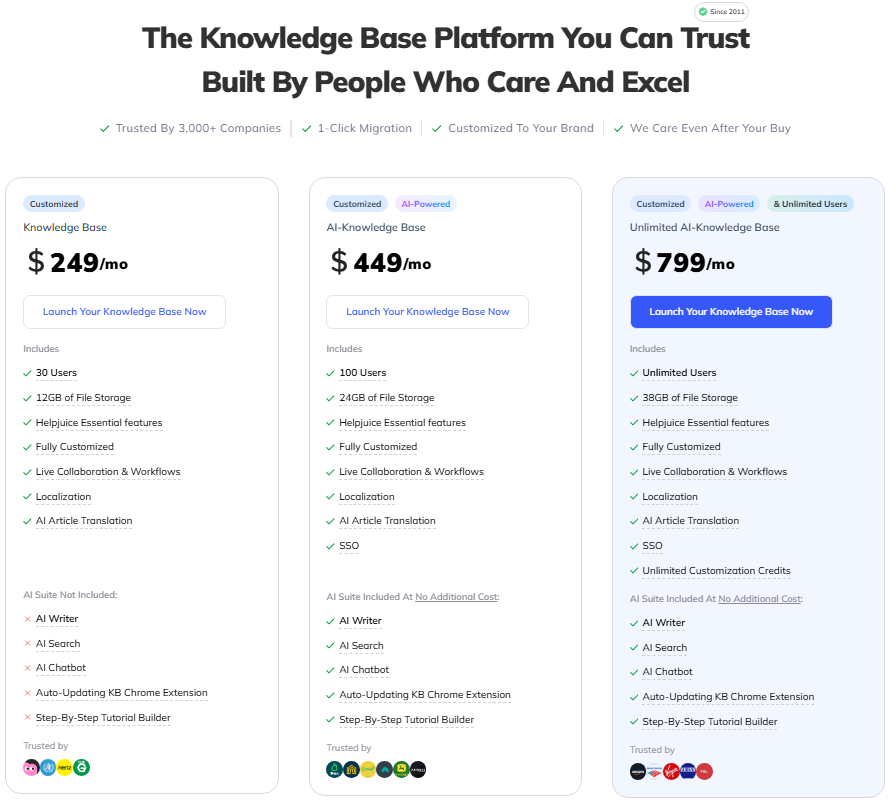
Helpjuice offers three plans, and all three start above $200/month. There is no free plan. The 14-day free trial does not require a credit card, and your data is saved if the trial expires without an upgrade. Here is the official pricing breakdown.
| Plan | Monthly Price | Users | File Storage | SSO | AI Suite |
|---|---|---|---|---|---|
| Knowledge Base | $249/month | 30 | 12GB | No | AI Article Translation only |
| AI-Knowledge Base | $449/month | 100 | 24GB | Yes | Full AI Suite |
| Unlimited AI-Knowledge Base | $799/month | Unlimited | 38GB | Yes | Full AI Suite + unlimited customization credits |
Source: Helpjuice Pricing Page. Verified May 9, 2026.
Helpjuice also notes nonprofit and education discounts may be available, but details are not listed publicly.
Helpjuice AI Suite Gating
This is a detail most review sites miss. The $249/month Knowledge Base plan includes AI Article Translation to 40+ languages, but it does not include the full AI Suite. AI Writer, AI Search, AI Chatbot, AI Article Request, and AI Support Tickets require the $449/month AI-Knowledge Base plan or the $799/month Unlimited plan.
If AI-powered search and chatbot are part of your evaluation criteria, the real starting price is $449/month.
Helpjuice Cost Per User by Team Size
The per-user cost varies significantly depending on how many contributors your team has.
| Team Size | Best Plan | Monthly Cost | Cost Per User |
|---|---|---|---|
| 10 users | Knowledge Base | $249/month | $24.90/user |
| 30 users | Knowledge Base | $249/month | $8.30/user |
| 100 users | AI-Knowledge Base | $449/month | $4.49/user |
| 250 users | Unlimited AI-Knowledge Base | $799/month | $3.20/user |
Source: Calculated from Helpjuice Pricing Page. Verified May 9, 2026.
For teams with 100+ users, Helpjuice’s per-user cost drops below $5/month. That is competitive. For teams with fewer than 20 users, the cost per seat is high compared to alternatives like Confluence or Notion.
Helpjuice Pros and Cons
Helpjuice delivers clear strengths in customization, search, and support quality, but its pricing floor and AI gating create real friction for smaller buyers. Here is what I found after reviewing the platform, pricing, and user feedback.
- Deep knowledge base customization. Fully branded designs, custom domains, and layout controls are included on all plans. Most competitors restrict branding to higher tiers.
- Strong user review sentiment. G2 rates Helpjuice at 4.7 stars from 374 reviews. Capterra shows 4.7 stars from 102 reviews with a 97% positive sentiment and a 9.2/10 likelihood to recommend (G2, Capterra).
- Responsive customer support. Capterra rates Helpjuice customer service at 4.8 based on 99 reviews. Tommy M., a Knowledge Manager in Computer Software, wrote: “Helpjuice offers live support for their customers” (July 21, 2025, Capterra).
- Multi-use knowledge base. Supports both public customer-facing help centers and private internal documentation from one platform.
- AI article translation to 40+ languages. Available on all plans, not just AI-tier plans.
- Live collaboration and publish approval. Multiple editors can work simultaneously, and review workflows enforce content quality.
- Broad integration ecosystem. Connects to Slack, Microsoft Teams, Salesforce, Zendesk, Freshdesk, and Zapier. API v3 is available for custom work.
- High starting price. $249/month is the entry point. No free plan exists. No self-serve tier under $200/month.
- AI Suite requires $449/month. AI Writer, AI Search, and AI Chatbot are not available on the base plan.
- Storage caps are tight. 12GB on the base plan, 24GB on mid-tier, 38GB on the top plan. Teams with heavy media or file-based documentation may hit limits.
- SSO is gated to higher plans. SSO requires the $449/month AI-Knowledge Base plan. Teams that need SSO without AI features still pay for the AI-tier plan.
- Possible SCIM gap. Third-party analysis claims no native SCIM. IT teams with strict provisioning requirements should verify directly.
Helpjuice Limitations Buyers Miss
Most review sites list generic pros and cons, but Helpjuice has specific limitations that affect buying decisions. I found at least seven that buyers should evaluate before committing.
1. The Price Floor Eliminates Small Teams
At $249/month, Helpjuice costs $2,988/year before you add AI features. A five-person support team would pay nearly $50/user/month. Confluence, Notion, and Nuclino all offer knowledge base functionality at a fraction of that cost for small teams. If your team has fewer than 20 contributors, the math rarely works in Helpjuice’s favor.
2. AI Features Are Gated Behind a $200/Month Jump
Moving from the Knowledge Base plan ($249/month) to the AI-Knowledge Base plan ($449/month) costs an extra $2,400/year. That jump unlocks AI Writer, AI Search, AI Chatbot, the Chrome Extension, and the Tutorial Builder. If AI-powered search or chatbot-based ticket deflection is a priority, the real starting price is $449/month.
3. Storage Caps May Surprise Media-Heavy Teams
The base plan includes 12GB of file storage. Teams that embed videos, screenshots, PDFs, or training materials can reach that limit quickly. The mid-tier plan doubles it to 24GB, and the top plan offers 38GB. Compare this to platforms like Confluence or Notion, which offer more generous storage allowances at lower price points.
4. Content Governance Tools Lack Automated Review Cadence
Helpjuice includes version history, expiration dates, and article planner. But it does not offer automated content review reminders, SME assignment tracking, or stale-article detection workflows. Teams that manage 500+ articles will need external processes or project management tools to prevent documentation drift. Content ownership and review cadence are operational gaps that the pricing page does not solve.
5. Editor Bug Reports From Users
While most user reviews are positive, at least one G2 reviewer reported frustration with the editor. Joanna W., an Operational Team Lead of Onboarding at a small business, titled her August 17, 2025 review: “So many bugs, and no fixes / poor support responses” (G2). I do not present this as a common pattern. The overall sentiment is 97% positive on Capterra. But buyers should test the editor thoroughly during the 14-day trial to confirm it meets their formatting and workflow needs.
6. No Native SCIM for User Provisioning
A third-party analysis by Stitchflow claims Helpjuice does not support native SCIM (Stitchflow). For IT and security teams that rely on automated provisioning and deprovisioning through identity providers, this is a friction point. Manual user management increases offboarding risk. I recommend raising this during your security review with Helpjuice sales. For enterprise evaluation, our knowledge base RFP template includes provisioning requirements you can use.
7. No Built-In Help Desk or Ticketing
Helpjuice is a knowledge base product, not a support suite. It does not include ticketing, shared inboxes, live chat routing, or SLA management. If your team needs ticketing alongside a knowledge base, you will run two products or choose a bundled platform like Zendesk or Freshdesk.
Helpjuice vs Alternatives
Helpjuice competes against both dedicated knowledge base tools and broader support suites. The best alternative depends on whether you need a standalone knowledge base, internal knowledge delivery, technical documentation, or a full support platform.
Helpjuice vs Document360
Document360 is a dedicated knowledge base and documentation platform. Its strengths include technical documentation workflows, API documentation, Eddy AI assistant, and category-level versioning. Document360 uses quote-based pricing on its public pricing page, which reduces transparency compared to Helpjuice’s published rates (Document360 Pricing).
Choose Document360 over Helpjuice if your primary need is technical product documentation, developer docs, or API reference sites. Choose Helpjuice if you need a branded customer-facing help center with stronger design customization. Read our full Document360 review for a deeper comparison.
Helpjuice vs Guru
Guru focuses on internal knowledge delivery inside the tools teams already use: Slack, Microsoft Teams, Salesforce, Zendesk, Confluence, and SharePoint. Guru uses tailored pricing based on organization scale and AI maturity (Guru Pricing).
Choose Guru over Helpjuice if your goal is internal knowledge enablement for support agents, sales teams, HR, or IT. Guru delivers knowledge where people work. Helpjuice is better for branded, public-facing self-service content. See our Guru review for details.
Helpjuice vs Confluence
Confluence is Atlassian’s team workspace and internal wiki. It starts at a lower price point and fits well into Jira-connected engineering and product teams (Confluence Pricing).
Choose Confluence over Helpjuice if you need an internal collaboration wiki for engineering or product teams, especially if you already use Jira. Helpjuice is a better fit for customer-facing help centers. Our Confluence review covers the full picture.
Helpjuice vs Zendesk
Zendesk is a full customer service suite. Its Suite Team plan starts at $55/agent/month billed annually and includes ticketing, messaging, and a help center (Zendesk Pricing). Verified May 9, 2026.
Choose Zendesk over Helpjuice if you need ticketing, messaging, voice, and a help center in one vendor. Helpjuice is stronger as a standalone knowledge base with deeper customization. But Zendesk’s knowledge base is part of a broader support ecosystem. Our Zendesk review has the full breakdown.
Helpjuice vs Help Scout and Freshdesk
Help Scout offers a simpler support inbox with a Docs feature for basic knowledge bases. It fits small support teams that want email-based support plus basic self-service. Our Help Scout review covers its strengths and limits.
Freshdesk is a help desk platform with omnichannel support and a built-in knowledge base. Like Zendesk, its knowledge base is part of a ticketing product, not a standalone platform. See our Freshdesk review for a direct comparison.
Choose Help Scout or Freshdesk over Helpjuice if ticketing is your primary need and the knowledge base is secondary. Helpjuice is the stronger pick when the knowledge base is the main product.
For teams evaluating multiple options, our knowledge base software requirements template can help structure your comparison.
Who Should Use Helpjuice?
Helpjuice fits best when a branded knowledge base is the primary deliverable, not an add-on to a help desk. Here are the team profiles that get the most value.
- Mid-market customer support teams (30-200 agents). The per-user cost drops below $8.30/user at 30 users and below $4.49/user at 100 users. For teams that need a branded help center with strong search and customization, Helpjuice is a rational investment.
- SaaS customer education teams. Teams that publish product guides, onboarding tutorials, and release notes for external users benefit from Helpjuice’s article editor, scheduled publishing, and branded design controls.
- Knowledge managers responsible for content governance. Version history, publish approval workflows, and expiration dates support article lifecycle management. Content reuse blocks reduce duplication.
- Internal operations teams (HR, IT, compliance). Private and internal sections let teams publish SOPs, policy docs, and training materials behind access controls. Localization and AI translation support multilingual organizations.
- Companies replacing a custom-built help center. If you currently maintain a custom help center and want to reduce engineering maintenance, Helpjuice’s customization and API access can replace custom solutions.
Who Should Not Use Helpjuice?
Helpjuice is not for every team. These profiles should look elsewhere.
- Small teams with fewer than 15 users. At $249/month, the cost per seat is too high for lean teams. Notion or Confluence offer knowledge base features at a much lower entry point.
- Ticketing-first support teams. Helpjuice does not include ticketing, shared inboxes, or SLA management. Teams that need a help desk should evaluate Zendesk, Freshdesk, or Help Scout first.
- Technical documentation teams focused on API docs. Document360 and dedicated API documentation tools offer better developer-facing features, including versioned API references and code sample management.
- Internal enablement teams that need in-workflow knowledge. If your priority is delivering knowledge inside Slack, Microsoft Teams, or Salesforce, Guru is built for that workflow. Helpjuice is a destination-based knowledge base, not an in-workflow tool.
- Teams with strict SCIM provisioning requirements. Until Helpjuice confirms native SCIM support, IT teams that require automated provisioning should treat this as a gap and verify during evaluation.
- Budget-conscious startups. No free plan, no plan under $249/month, and AI features start at $449/month. Startups with tight budgets should consider Nuclino, Notion, or Confluence first.
Final Verdict: Helpjuice Review Score
Helpjuice earns 8.3/10. It is best for mid-market support teams and SaaS documentation owners who need a branded, customizable knowledge base with strong search and customer self-service capabilities. It is not the best fit for small teams, ticketing-first workflows, or budget-conscious startups because the $249/month floor and AI-gating create real cost barriers.
Is Helpjuice worth it in 2026? Yes, for the right buyer. If your team has 30+ knowledge base contributors, needs branded design control, and values a dedicated knowledge base over a help desk add-on, Helpjuice delivers. The AI features on the $449/month plan add genuine value for ticket deflection through AI Search and AI Chatbot.
Choose Document360 if technical documentation is your priority. Choose Guru if internal knowledge delivery inside existing tools matters most. Choose Zendesk if you need ticketing and a knowledge base from one vendor.
FAQ
Here are the most common questions buyers ask about Helpjuice.
Is Helpjuice worth it in 2026?
Yes, for mid-market teams that need a branded knowledge base with 30+ users. The per-user cost becomes competitive at scale. It is not worth it for teams under 15 users or teams that need ticketing included.
How much does Helpjuice cost?
Helpjuice offers three plans: Knowledge Base at $249/month (30 users), AI-Knowledge Base at $449/month (100 users), and Unlimited AI-Knowledge Base at $799/month (unlimited users). Source: Helpjuice Pricing Page. Verified May 9, 2026.
Does Helpjuice have a free plan?
No. Helpjuice does not offer a free plan. It offers a 14-day free trial with no credit card required. Your data is saved if the trial ends without an upgrade.
What is Helpjuice used for?
Helpjuice is used to create and manage knowledge bases for customer self-service help centers and internal documentation. It supports articles, SOPs, FAQs, product guides, and training materials.
Is Helpjuice good for internal knowledge bases?
Yes. Helpjuice supports private and internal content sections with access controls and user roles. However, for in-workflow internal knowledge delivery inside Slack or Microsoft Teams, Guru is a stronger option.
Is Helpjuice good for customer-facing help centers?
Yes. Customer-facing help centers are Helpjuice’s primary strength. Branded designs, custom domains, AI Search, AI Chatbot, and multilingual support make it a strong choice for customer self-service.
What are the biggest Helpjuice limitations?
The biggest limitations are the $249/month price floor, AI Suite gating to the $449/month plan, storage caps (12GB to 38GB), lack of built-in ticketing, possible SCIM gap based on third-party analysis, and limited automated content governance workflows.
Does Helpjuice include AI features?
AI Article Translation is available on all plans. The full AI Suite, including AI Writer, AI Search, AI Chatbot, and AI Support Tickets, requires the AI-Knowledge Base plan at $449/month or higher.
Which Helpjuice plan includes SSO?
SSO (SAML) is included on the AI-Knowledge Base plan ($449/month) and the Unlimited AI-Knowledge Base plan ($799/month). The base Knowledge Base plan at $249/month does not include SSO. Source: Helpjuice Pricing Page. Verified May 9, 2026.
What are the best Helpjuice alternatives?
The best alternatives depend on your use case. Document360 for technical documentation, Guru for internal knowledge delivery, Zendesk for ticketing plus a help center, Confluence for internal wikis, and Notion or Nuclino for small teams on a budget.