Most teams do not realize they need a knowledge base until the same question has been answered 47 times in Slack, email and support tickets. The person who knows the answer is always busy, on vacation or already gone. That gap between “someone knows this” and “anyone can find this” is where organizations lose hours, frustrate customers and repeat mistakes.
A well-managed knowledge base closes that gap. It turns scattered expertise into a searchable system that works around the clock. This guide covers what a knowledge base actually is, how it works in real business workflows, the types that exist, why they fail, and how to pick the right knowledge base software for your team size and compliance needs.
What Is a Knowledge Base?
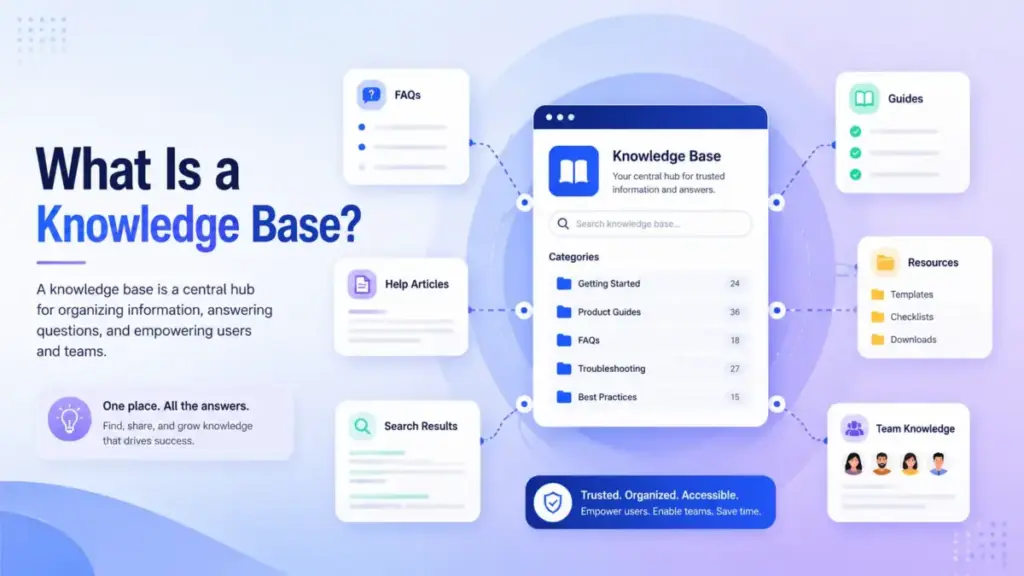
A knowledge base is a centralized, searchable repository where an organization stores verified answers, procedures and reference content for employees, customers or both. It replaces the habit of asking the same person the same question by routing people to documented, reviewed answers instead.
Unlike a shared folder or a cluttered wiki, a managed knowledge base has structure. Every article has an owner. Every answer follows a review cycle. Every search returns results that are current, not 18 months stale.
The simplest way to think about it: a shared folder stores content. A knowledge base routes people to verified answers.
Maya Patel’s Quick Take
“A knowledge base is not a content project. It is an operations discipline. The teams that treat it like a write-once library end up with 300 articles nobody trusts. The teams that assign owners, measure search quality and archive stale pages build something people actually use.”
The 60-Second Explainer
A knowledge base is the difference between asking the same senior employee for directions every day and installing labeled signs across the building. The signs do not replace the employee. They free the employee to do higher-value work while everyone else finds their own way.
How Does a Knowledge Base Work?
A knowledge base works when each answer has an owner, a review cycle and a measurable search outcome. Without those three elements, it becomes a dumping ground for drafts nobody maintains.
The operational lifecycle follows a pattern borrowed from KCS (Knowledge-Centered Service), the methodology maintained by the Consortium for Service Innovation. KCS treats knowledge as part of solving work, not a separate task. The core idea: capture knowledge during the moment it is needed, reuse existing content before creating new content, and evolve articles based on demand signals.
Knowledge Base Article Lifecycle
| Stage | What Happens | Owner | Trigger |
|---|---|---|---|
| Requested | A gap is identified via a support ticket, zero-result search or team request | Anyone | Search miss, repeated question, new feature launch |
| Drafted | Author writes first version using a template | Subject matter expert | Request approved |
| Verified | Technical reviewer or team lead confirms accuracy | Reviewer | Draft complete |
| Published | Article goes live and is searchable | Content owner | Verification passed |
| Reviewed | Scheduled check for accuracy, relevance and search performance | Content owner | 30, 60 or 90-day cadence |
| Archived | Article is retired because the product, policy or process changed | Content owner | Review finds content obsolete |
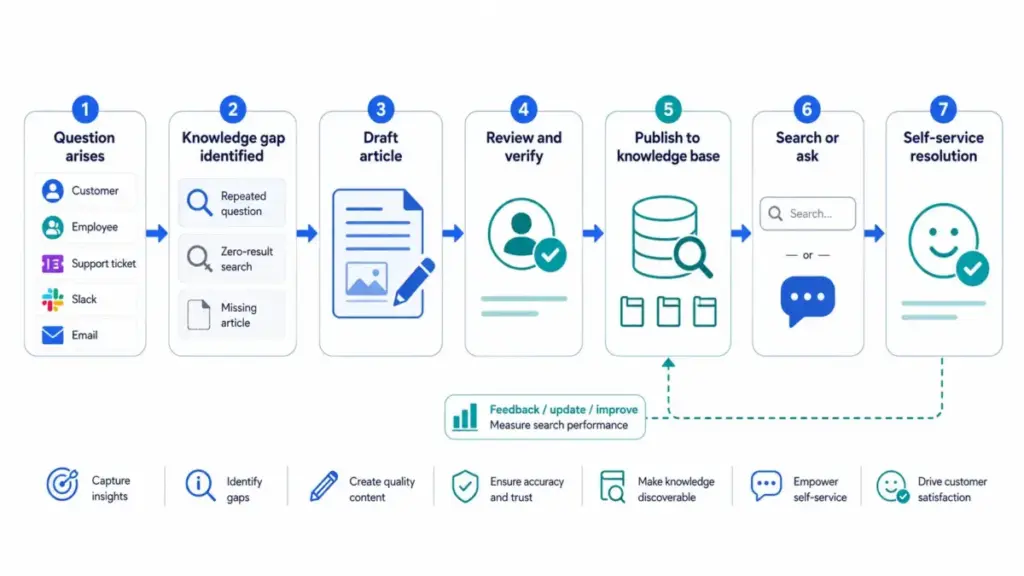
This lifecycle is what separates a knowledge base from a document dump. Without it, articles decay silently. A product changes. A policy updates. The article stays the same. Six months later, a customer follows outdated instructions and opens a ticket that should never have existed.
Types of Knowledge Bases
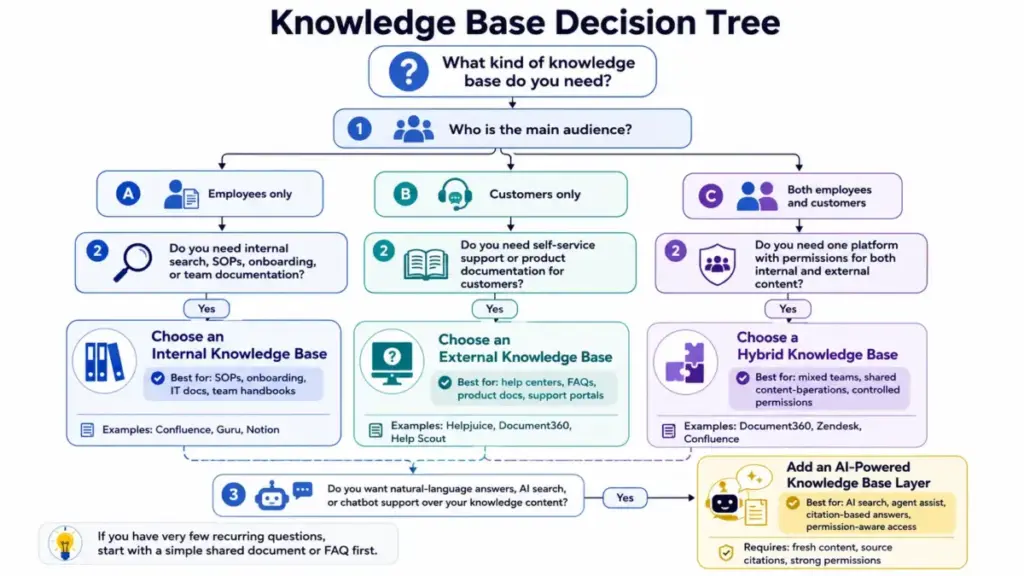
Not every team needs the same kind of knowledge base. The right type depends on who reads it, what content it holds and whether it faces outward, inward or both. Here is how the five main types break down by audience and use case.
Internal Knowledge Base
An internal knowledge base serves employees. It stores SOPs, HR policies, IT runbooks, onboarding checklists and institutional knowledge that otherwise lives in one person’s head. A 30-person IT team uses it to document server configurations. A startup founder uses it to capture decisions before they leave the building.
“Confluence helps us bring on employees quickly & address their needs.” Lucian Craciun, Head of Digital Operations at The Telegraph, Atlassian Confluence page
External Knowledge Base
An external knowledge base faces customers. It powers help centers, support portals and product documentation hubs. The goal: let customers resolve issues without contacting support. Salesforce reports that 61% of customers prefer self-service for simple issues. But self-service only works when articles are accurate, findable and written for the reader, not the product team.
Hybrid Knowledge Base
A hybrid system serves both internal teams and external customers from the same platform. Permissions control who sees what. A product team writes internal release notes in the same tool that publishes customer-facing feature guides. This reduces duplicate content but requires strong permission architecture.
Technical Knowledge Base
A technical knowledge base stores API documentation, architecture decisions, deployment runbooks and troubleshooting procedures for engineering and DevOps teams. The content is code-heavy, version-sensitive and often tied to CI/CD pipelines. Tools like Document360 and Confluence support versioned technical documentation alongside standard help content.
AI-Powered Knowledge Base
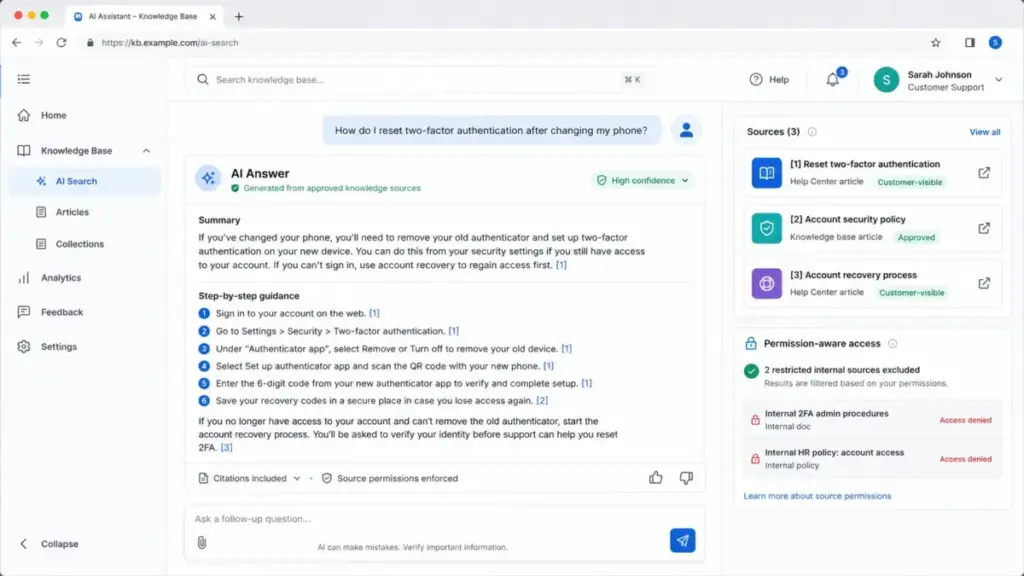
An AI-powered knowledge base adds a retrieval layer on top of existing articles. Instead of browsing categories or typing keywords, users ask a question in natural language. The system retrieves relevant articles, generates a summary answer and cites the source.
This is where RAG (Retrieval-Augmented Generation) fits. The AI does not invent answers. It retrieves content from the knowledge base and generates a response grounded in that content. But the quality of AI answers depends entirely on the quality of the underlying articles.
AI Readiness Checklist
Before enabling AI-powered search or chatbot answers over your documentation, verify these five conditions:
- Article freshness. Every published article has been reviewed within the last 90 days. Stale content produces stale AI answers.
- Duplicate control. No two articles answer the same question. Duplicates confuse retrieval and split relevance.
- Permission enforcement. The AI respects content permissions. Internal HR policies should not surface in customer-facing answers.
- Source citations. Every AI-generated answer links to the source article. Users must be able to verify the answer.
- Zero-result monitoring. When the AI cannot find a relevant article, it says so. It does not hallucinate an answer from training data.
“We no longer have to manually review knowledge accuracy.” Sav Cole, Manager of Clinical Service Development, Guru homepage
Knowledge Base vs Wiki, FAQ, Help Center and Database
A knowledge base is often confused with wikis, FAQs, help centers and databases, but each serves a different purpose. Understanding the distinctions prevents teams from choosing the wrong tool or building the wrong system.
| Feature | Knowledge Base | Wiki | FAQ | Help Center | Database |
|---|---|---|---|---|---|
| Primary purpose | Verified, searchable answers | Collaborative editing | Quick answers to common questions | Customer support portal | Structured data storage |
| Content ownership | Assigned per article | Shared, anyone edits | Usually marketing or support | Support team | Database admin |
| Review cadence | Scheduled (30/60/90 days) | Ad hoc or none | Infrequent | Varies | Schema-level, not content |
| Search optimization | Core feature | Basic | Minimal | Moderate | Query-based, not browsable |
| Version control | Full history with rollback | Full history | Rare | Limited | Transaction logs |
| Best for | Support, onboarding, SOPs | Brainstorming, team notes | Landing pages, pre-sales | Customer self-service | Transactional records |
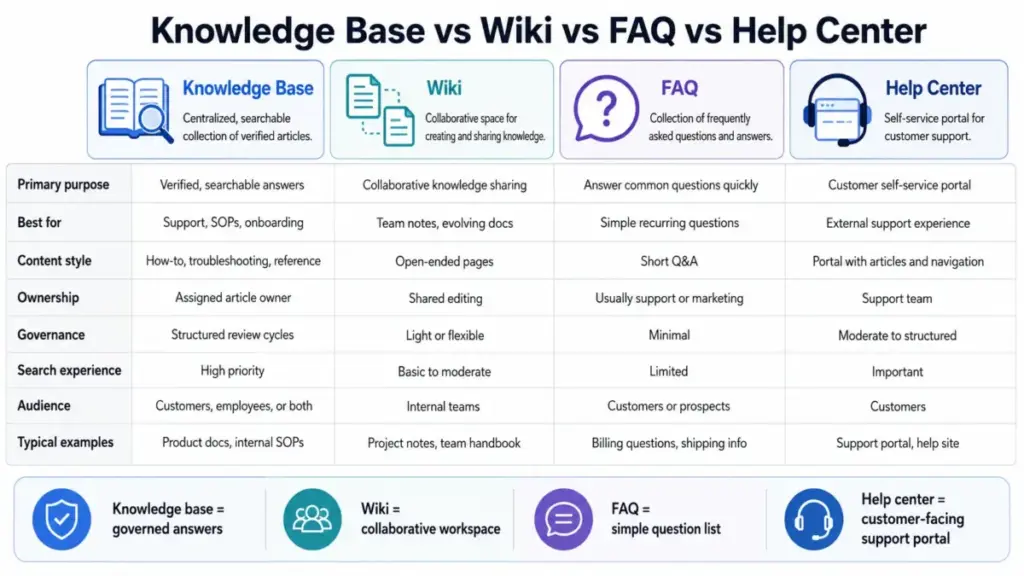
The short version: a wiki is more collaborative and less governed. An FAQ is a lightweight content format, not a system. A help center is a customer-facing portal that often contains a knowledge base. A database stores structured records, not explanatory answers.
For a deeper look at how Notion and Confluence compare as documentation tools, see the Notion vs Confluence comparison.
What Should a Knowledge Base Include?
A useful knowledge base contains the content types your audience actually searches for, not the content your team finds convenient to write. Start with the five most common question types your team answers repeatedly, then expand.
Common content types worth including:
- How-to guides. Step-by-step instructions for completing a task. Example: “How to reset two-factor authentication.”
- Troubleshooting articles. Symptom, cause, fix format. Example: “Login fails after password change.”
- FAQs. Short answers to pre-sale or onboarding questions.
- Policies and procedures. HR policies, return policies, security protocols.
- Runbooks. Step-by-step IT or DevOps procedures for incident response.
- API documentation. Endpoints, authentication, rate limits, error codes.
- Onboarding docs. New hire checklists, role-specific setup guides, tool access instructions.
- Release notes. What changed, what it affects, what users need to do.
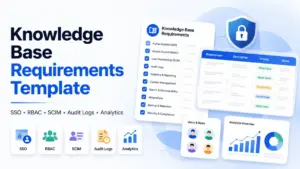
For teams evaluating what their knowledge base platform should support, the knowledge base software requirements template provides a structured checklist.
Why Knowledge Bases Matter
Organizations build knowledge bases to reduce repeated work, speed up onboarding and give customers answers without a wait. Those are the obvious benefits. The less obvious ones matter more in 2026.
Ticket reduction with quality, not just volume. A good self-service library does not just deflect tickets. It resolves the issue. The distinction matters because deflection without resolution creates frustrated users who call anyway, now angrier.
Institutional knowledge preservation. When a senior engineer or founding support lead leaves, the knowledge in their head leaves with them. A documented knowledge base turns personal expertise into organizational memory.
AI grounding. Every AI chatbot, copilot or agent assistant needs a source of truth. A current, well-structured documentation hub becomes the grounding layer that prevents AI hallucination.
Onboarding speed. New hires at a 5-person SaaS startup spend their first week asking the founder how things work. A documented knowledge base makes that founder’s time available for product work, not repeated explanations.
Consistency across support agents. When agents rely on memory, different customers get different answers. A single source of truth keeps responses accurate and consistent.
Why Knowledge Bases Fail
Most knowledge bases fail not because teams chose the wrong software, but because nobody owned the content after launch. Gartner reports the average self-service customer support success rate is only 14%. Improving that rate is a priority for 90% of service leaders surveyed. The problem is rarely the technology. It is the operating model.
Here are the six most common failure patterns:
- No content ownership. Articles have no assigned owner. When the product changes, nobody updates the article. It decays in silence.
- Stale content. A knowledge base without a review cadence becomes a stale archive. Users learn not to trust it, then stop using it.
- Duplicate articles. Three different articles answer the same question with slightly different instructions. Users pick the wrong one. Agents pick a different one. Consistency collapses.
- Poor search. If the search engine returns irrelevant results or no results, users give up and open a ticket. Search quality is the front door of any self-service system.
- No escalation path. When an article does not solve the problem, the user needs a clear path to human help. A knowledge base without an escalation button is a dead end.
- Wrong tool fit. A startup with 200 articles does not need an enterprise documentation platform. An enterprise with 10,000 articles cannot run on a shared Notion workspace. Mismatched tools create friction that discourages contribution.
How to Measure Knowledge Base Success
A knowledge base you cannot measure is a knowledge base you cannot improve. The following metrics table provides formulas and benchmarks for tracking whether your documentation system is actually working.
| Metric | Formula | Healthy Benchmark | What It Tells You |
|---|---|---|---|
| Search success rate | (Searches with clicks / Total searches) x 100 | Above 60% | Whether users find relevant results |
| Zero-result search rate | (Searches with 0 results / Total searches) x 100 | Below 10% | Where content gaps exist |
| Article helpfulness score | (Positive votes / Total votes) x 100 | Above 70% | Whether content resolves the question |
| Self-service resolution rate | (Issues resolved via KB / Total issues) x 100 | Above 30% | Whether self-service actually works |
| Escalation after article view | (Tickets opened within 5 min of article view / Article views) x 100 | Below 15% | Whether articles fail to resolve |
| Article freshness score | (Articles reviewed in last 90 days / Total published articles) x 100 | Above 80% | Whether content is current |
| Ticket deflection quality | (Deflected tickets with no follow-up ticket / Total deflected) x 100 | Above 85% | Whether deflection equals resolution |
These metrics only work if your knowledge base platform tracks search queries, article views and feedback signals. If your current tool does not support search analytics, that is a gap worth fixing before adding more content.
Best Practices for Building a Knowledge Base
The best knowledge bases are maintained by small, accountable teams with clear rules, not by everyone and no one. Here are eight practices that separate maintained systems from abandoned ones.
- Assign an owner to every article. Not a team. A person. That person reviews, updates or archives the article on a set cadence.
- Use templates. Every article type (how-to, troubleshooting, FAQ, runbook) should follow a consistent structure. Templates reduce writing time and improve readability.
- Review on a cadence. High-traffic articles: every 30 days. Standard articles: every 90 days. Archive anything that has not been viewed in 6 months.
- Monitor zero-result searches weekly. Every search with no results is a missing article. Track these queries and prioritize content creation around them.
- Write for the reader’s vocabulary. Customers search “can’t log in,” not “authentication error 403.” Match article titles and keywords to how people actually phrase problems.
- Build escalation into every article. If the article does not solve it, add a clear path to contact support. Do not leave users stranded.
- Start with 20 articles, not 200. Cover the 20 most frequently asked questions first. Measure. Expand based on search data, not assumptions.
- Separate internal from external content. Even if you use one platform, permission boundaries must be airtight. Internal HR policies should never surface in a customer help center.
Best Tools for Knowledge Bases
No single tool fits every team. The right choice depends on your audience, content volume, compliance needs and whether you need a standalone knowledge base or one embedded in a help desk suite. The table below maps tools to use cases without ranking them.
| Tool | Best Fit | Why It Fits | Limitation to Check | Pricing Model |
|---|---|---|---|---|
| Notion | Lightweight internal team wiki | Flexible page structure, easy onboarding, affordable | Limited search analytics, no built-in help center | Per seat, free tier available |
| Confluence | IT and enterprise documentation | Deep Jira integration, space permissions, templates | Slower for small teams, complex admin | Per user, free up to 10 users |
| Document360 | Product docs and mixed internal/external KB | Category manager, versioning, API docs, analytics | Higher tiers required for advanced features | Tiered by features |
| Guru | Governed AI-ready internal knowledge | Verification workflows, browser extension, Slack integration | Primarily internal, limited external publishing | Per user |
| Helpjuice | Branded customer-facing KB | Strong search, customization, analytics dashboard | No help desk or ticketing included | Flat rate by user count |
| Zendesk | Support-led KB inside CX suite | Embedded in help desk, agent assist, ticket linking | Knowledge base bundled with full suite cost | Per agent, bundled |
| Freshdesk | Help desk plus knowledge base | Built-in KB with ticketing, affordable entry | KB features limited on lower plans | Per agent, free tier available |
| Help Scout | Small support team help center | Simple Docs site, Beacon widget, clean UI | Limited analytics on lower plans | Per user |
“Document360 has empowered our teams to contribute and collaborate.” Dr. Karim Seghir, Chancellor, Ajman University, Document360 pricing page
For detailed evaluations, SaaS Zap publishes independent reviews of each tool: Notion review, Confluence review, Document360 review, Guru review, Helpjuice review, Zendesk review, Freshdesk review and Help Scout review.
If you are preparing a formal procurement process, the knowledge base RFP template covers evaluation criteria, vendor questions and scoring rubrics.
Which Knowledge Base Do You Need? A Matrix by Persona
| Persona | Team Size | Primary Need | Recommended Type | Tool Category |
|---|---|---|---|---|
| Startup founder | 1 to 5 | Capture founder knowledge before it is lost | Internal, lightweight | Notion, Guru |
| 5-person support team | 5 to 10 | Reduce repeated tickets, enable self-service | External or hybrid | Helpjuice, Help Scout |
| 30-user IT department | 20 to 50 | Standardize runbooks, incident response | Internal, technical | Confluence, Document360 |
| Product documentation owner | 1 to 3 | Publish versioned API docs and feature guides | External, technical | Document360 |
| Enterprise compliance team | 50+ | Audit trails, permissions, version control | Hybrid with governance | Guru, Confluence |
When Not to Build a Knowledge Base Yet
Not every team needs a knowledge base today. If your team has fewer than 10 support conversations per week and no recurring questions, a shared document or pinned Slack thread may be enough. Build a knowledge base when:
- The same question appears three or more times per week.
- A team member leaves and critical process knowledge goes with them.
- Customers email support for answers that already exist somewhere, but nobody can find them.
- You plan to add AI-powered support and need a grounding layer.
If none of these apply, document your top 10 processes in a shared folder and revisit in 90 days. A knowledge base built too early, before there is enough content or enough demand, often gets abandoned.
FAQ
Here are answers to the most frequently asked questions about knowledge bases.
What is the main purpose of a knowledge base?
The main purpose is to store verified, searchable answers so that employees or customers can resolve questions without asking someone directly. It reduces repeated work for support teams, preserves institutional knowledge and provides a grounding layer for AI-powered search and chatbot answers.
What is the difference between a knowledge base and a wiki?
A wiki is designed for collaborative, open editing where anyone can contribute and modify pages freely. A knowledge base assigns article ownership, enforces review cycles and prioritizes search accuracy. Wikis suit brainstorming and team notes. Knowledge bases suit governed, customer-facing or compliance-sensitive documentation.
What is the difference between a knowledge base and an FAQ?
An FAQ is a content format: a list of common questions with short answers. A knowledge base is a system that organizes, governs and serves multiple content types including FAQs, how-to guides, troubleshooting articles and runbooks. An FAQ can live inside a knowledge base, but it is not a substitute for one.
What is the difference between a knowledge base and a database?
A database stores structured records (rows, columns, queries) for transactional or analytical purposes. A knowledge base stores human-readable articles, procedures and reference content designed for browsing and searching. A database answers “what is the value in row 42.” A knowledge base answers “how do I reset my password.”
How do you create a knowledge base?
Start by identifying the 20 most repeated questions your team answers. Write one article per question using a consistent template. Assign an owner to each article. Publish them in a searchable platform. Monitor search analytics for zero-result queries. Add new articles based on demand, not assumptions. Review every article within 90 days of publishing.
How often should a knowledge base be updated?
High-traffic articles should be reviewed every 30 days. Standard articles every 90 days. Any article tied to a product release or policy change should be updated on the day the change goes live. Articles with no views in six months should be evaluated for archiving.
How does AI improve a knowledge base?
AI adds a retrieval layer that lets users ask natural language questions instead of browsing categories. RAG retrieves relevant articles and generates a summary answer with source citations. AI also surfaces content gaps by tracking unanswered queries. But AI answers are only as good as the underlying articles. Stale, duplicated or permission-blind content produces unreliable AI responses.
Key Takeaways
- A knowledge base is a searchable repository of verified answers with assigned owners, scheduled reviews and measured outcomes.
- The five types (internal, external, hybrid, technical, AI-powered) serve different audiences and require different governance models.
- Self-service fails when search quality is poor, content is stale or escalation paths are missing. Gartner reports the average success rate is only 14%.
- Measurement is not optional. Track search success rate, zero-result queries, article freshness and escalation after view.
- AI-powered search depends on article quality, permission enforcement and citation transparency.
- Start with 20 articles covering your most repeated questions. Expand based on data, not assumptions.
- Compare tools by use case, team size and compliance need using the SaaS Zap knowledge base software hub and independent reviews.