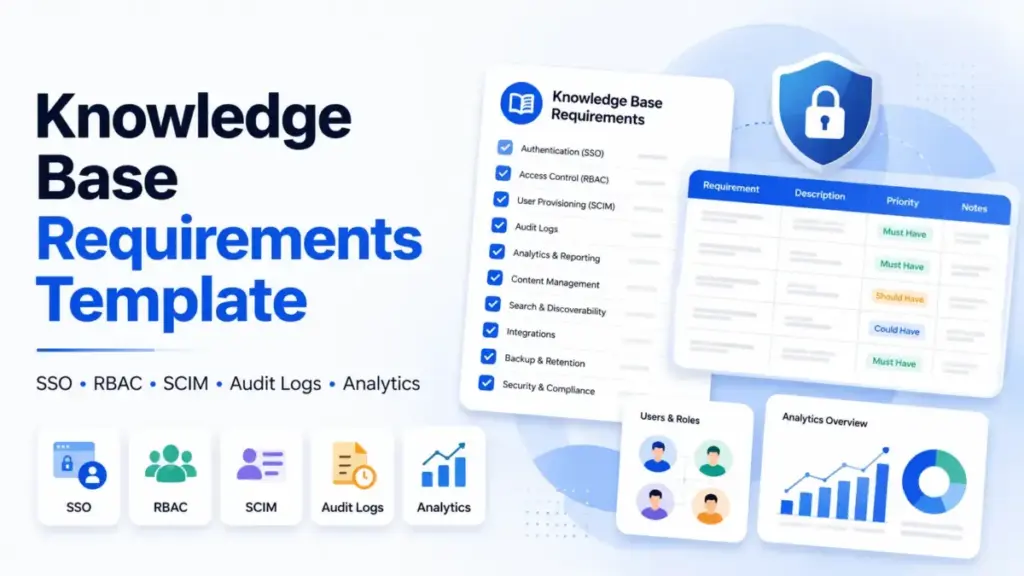
A knowledge base requirements template should not be a feature checklist. The moment you reduce SSO, RBAC, SCIM, audit logs, and analytics to yes/no checkboxes, every vendor passes. Then procurement discovers that SSO requires an Enterprise contract, SCIM does not handle group role mapping on the plan you budgeted, audit logs are retained for 30 days instead of 365, and the analytics dashboard cannot show you a single failed search term.
That is the gap this template closes. Instead of asking “does this tool have SSO,” the requirements below ask: “can a user authenticate through SAML 2.0 via Microsoft Entra ID, lose IdP group membership, and have restricted article access revoked within one SCIM sync cycle, without orphaning article ownership?” That question turns a feature checkbox into a procurement test. And most knowledge base software buyers never ask it until after the contract is signed.
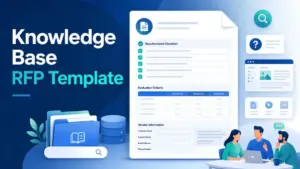
This guide gives you a copy/paste requirements template with acceptance tests, a security requirements checklist, a vendor evidence matrix, an RFP question bank, a pricing and tier dependency worksheet, and a migration governance checklist. Each section is mapped to the five tools that appear most often in enterprise knowledge base evaluations: Document360, Zendesk Knowledge, Intercom Help Center, Confluence Cloud plus Atlassian Guard, and Guru. Every pricing claim and feature reference uses official public sources only, verified June 2026.
Why Most Knowledge Base Requirements Templates Fail
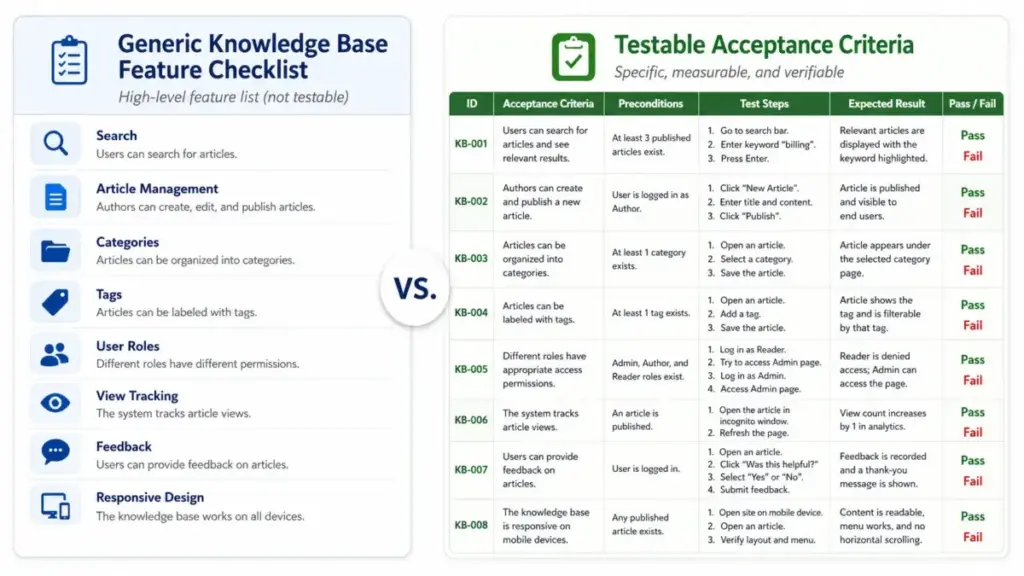
I have reviewed knowledge base evaluation documents from support, IT, documentation, and procurement teams across SaaS companies with 200 or more published articles. The pattern that shows up in nearly every failed evaluation is the same: the template treats identity, permissions, provisioning, auditability, and analytics as single-line items instead of testable requirements.
Here is what that looks like in practice. A template says “must support SSO.” The vendor confirms SSO. The buyer signs. Three months later, the security team discovers SSO requires SAML 2.0 but the tool only supports OIDC on the plan they purchased, or SSO is available but restricted to the Enterprise tier that costs three times the budgeted plan.
The same pattern repeats for SCIM, RBAC, audit logs, and analytics. “Must have SCIM” does not tell you whether the tool supports SCIM 2.0 group provisioning from Microsoft Entra ID, whether deprovisioned users lose access immediately or remain as orphaned accounts, or whether article ownership transfers automatically when someone leaves the company.
The template below replaces generic feature language with acceptance criteria. Each requirement has a category, a priority level, a testable acceptance condition, a field for vendor evidence URLs, and a field for the exact plan required. That structure is what separates a knowledge base procurement document from a feature wish list.
Step 1: Define Scope and Audience Before Picking Features
The most common mistake in knowledge base procurement is choosing a tool before naming the use case. An external customer help center has different SSO, analytics, SEO, and publishing requirements than an internal IT runbook repository. A developer documentation site needs versioning, Markdown support, and API reference publishing that a customer support help center does not.
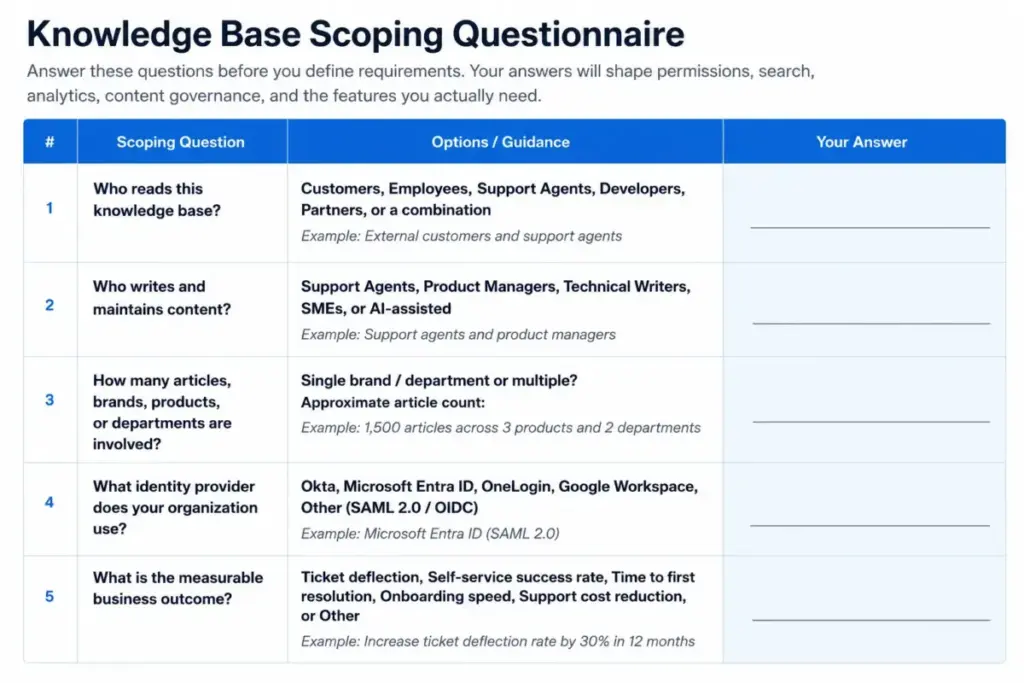
Before filling in the requirements template, answer these five scoping questions:
1. Who reads this knowledge base?
Customers, employees, support agents, developers, partners, or a combination. Each audience changes permissions, access controls, search behavior, and analytics priorities.
2. Who writes and maintains content?
Support agents, product managers, technical writers, subject matter experts, or AI-assisted drafts. Author workflows determine whether you need approval workflows, article templates, version history, and ownership tracking.
3. How many articles, brands, products, or departments are involved?
A single-brand help center with 50 articles has different governance needs than a multi-brand portal with 2,000 articles across four product lines and three departments.
4. What identity provider does the organization use?
Okta, Microsoft Entra ID, OneLogin, Google Workspace, or another IdP. This determines SSO protocol requirements (SAML 2.0 versus OIDC), SCIM compatibility, group mapping rules, and MFA assumptions.
5. What is the measurable business outcome?
Ticket deflection rate, self-service success rate, time to first resolution, employee onboarding speed, or support cost reduction. Tying requirements to outcomes prevents the template from becoming an abstract feature list.
Document these answers in the first section of your requirements template. Every subsequent requirement should trace back to at least one of these scoping decisions.
Step 2: Copy the Requirements Template
This is the core of the template. Copy the table below, adapt the acceptance tests to your environment, and use it as a living procurement document. Each row includes a requirement ID, category, priority (must-have, should-have, or optional), an acceptance test written in pass/fail language, a vendor evidence URL field, the plan required, an owner, and a caveat field.
| Req ID | Category | Requirement | Priority | Acceptance Test | Vendor Evidence URL | Plan Required | Owner | Caveat |
|---|---|---|---|---|---|---|---|---|
| ID-01 | SSO | SAML 2.0 SSO with [your IdP] | Must | User authenticates through SAML 2.0 via [IdP]. Session terminates when IdP session expires. Private help center access requires SSO. | [URL] | [Plan] | Security | Note if SSO is an add-on or tier-restricted |
| ID-02 | SSO | OIDC support | Should | User authenticates through OIDC. Token refresh works. IdP group claims map to tool roles. | [URL] | [Plan] | Security | Note OIDC limitations versus SAML |
| ID-03 | RBAC | Role-based access with least privilege | Must | Admin creates reader, author, reviewer, and admin roles. Author cannot publish without reviewer approval. Reader cannot access restricted articles. | [URL] | [Plan] | IT | Note if custom roles require higher plan |
| ID-04 | RBAC | Group-based content permissions | Must | IdP group “Engineering” maps to knowledge base space “API Docs.” Users outside the group cannot view restricted content. | [URL] | [Plan] | IT | Note if space vs. article permissions differ |
| ID-05 | SCIM | SCIM 2.0 user provisioning | Must | New user created in IdP appears in knowledge base within one sync cycle. Correct role assigned via group mapping. | [URL] | [Plan] | IT | Note sync frequency and group mapping limits |
| ID-06 | SCIM | SCIM deprovisioning and ownership transfer | Must | User removed from IdP loses knowledge base access within one sync cycle. Article ownership transfers to designated backup owner. No orphaned articles. | [URL] | [Plan] | IT | Note if deprovisioning deletes or deactivates |
| ID-07 | Audit | Admin action logging | Must | Admin role change, permission change, SSO config change, and article deletion are logged with actor, timestamp, and target. | [URL] | [Plan] | Security | Note if audit log requires Enterprise plan |
| ID-08 | Audit | Audit log retention and export | Must | Logs retained for [X] days minimum. Logs exportable via API or CSV. Retention length confirmed in writing. | [URL] | [Plan] | Security | Note if retention is shorter on lower plans |
| ID-09 | Analytics | Failed search and zero-result tracking | Must | Dashboard shows search terms with zero results. Report identifies top 10 failed searches in the last 30 days. | [URL] | [Plan] | Support Ops | Note if analytics require higher tier |
| ID-10 | Analytics | Article performance and feedback | Should | Each article shows views, unique visitors, helpful/not-helpful votes, and time on page. Content gaps report exists. | [URL] | [Plan] | Support Ops | Note if feedback widget requires setup |
| ID-11 | Analytics | Ticket deflection measurement | Should | Tool reports self-service rate, contact-after-search rate, or ticket deflection percentage. | [URL] | [Plan] | Support Ops | Note if deflection tracking requires integration |
| ID-12 | Governance | Article templates and approval workflows | Should | Author creates article from template. Article enters review queue. Reviewer approves or returns with comments. Published article shows version history. | [URL] | [Plan] | Content Lead | Note if templates are plan-gated |
| ID-13 | Governance | Stale content alerts and review cadence | Should | Articles older than [X] days without update trigger a review alert to the article owner. | [URL] | [Plan] | Content Lead | Note if review cadence is manual or automated |
| ID-14 | Security | SOC 2 Type II, DPA, data residency | Must | Vendor provides current SOC 2 Type II report, executed DPA, and confirms data residency region. | [URL] | [Plan] | Procurement | Note if compliance docs require NDA |
| ID-15 | Migration | Content import from existing tool | Should | Bulk import of [X] articles from [current tool] preserves titles, content, metadata, redirects, and author attribution. | [URL] | [Plan] | IT | Note migration support availability |
Adapt this table for your organization. Add rows for requirements specific to your use case, such as multi-language support, custom domain, API documentation publishing, or AI-assisted content generation.
Step 3: Add Security and Identity Acceptance Tests
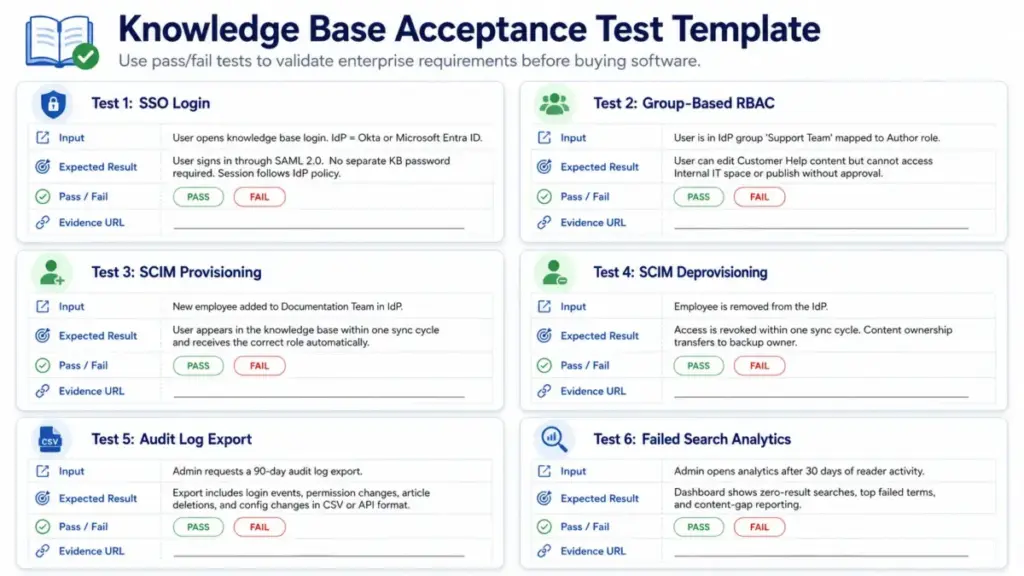
The requirements table captures what you need. Acceptance tests prove whether the vendor delivers it. These six tests cover the security and identity requirements that most templates leave as checkboxes.
Test 1: SSO Login
Input: User navigates to knowledge base login. IdP is Okta or Microsoft Entra ID.
Expected result: User authenticates through SAML 2.0. No separate knowledge base password required. Session timeout matches IdP policy.
Pass/fail: _ Evidence URL: _
Test 2: Group-Based RBAC
Input: User belongs to IdP group “Support Team.” Group maps to knowledge base role “Author” with access to “Customer Help” space only.
Expected result: User can create and edit articles in “Customer Help.” User cannot access “Internal IT” space. User cannot publish without reviewer approval.
Pass/fail: _ Evidence URL: _
Test 3: SCIM Provisioning
Input: New employee added to IdP group “Documentation Team.”
Expected result: User appears in knowledge base within one sync cycle. Role matches group mapping. No manual account creation required.
Pass/fail: _ Evidence URL: _
Test 4: SCIM Deprovisioning
Input: Employee removed from IdP (termination or department transfer).
Expected result: User loses knowledge base access within one sync cycle. Articles owned by the user transfer to the designated backup owner. No orphaned articles remain. No ex-employee access to restricted content.
Pass/fail: _ Evidence URL: _
Test 5: Audit Log Export
Input: Admin requests audit log export for the last 90 days.
Expected result: Export includes login events, permission changes, article deletions, admin config changes, and SCIM sync events. Export format is CSV or API-accessible JSON. Retention period meets [X]-day requirement.
Pass/fail: _ Evidence URL: _
Test 6: Failed Search Analytics
Input: Admin opens analytics dashboard after 30 days of reader activity.
Expected result: Dashboard shows top 20 search terms with zero results. Report identifies content gaps. Data is exportable.
Pass/fail: _ Evidence URL: _
These tests work for any vendor. Run them during a trial or request written confirmation during procurement. Vendor-published case studies illustrate why these tests matter: Document360 customer evidence reports a 30 percent reduction in support calls and a 15 percent reduction in support tickets for published customers, while Zendesk customer evidence reports decreased daily tickets and increased help center usage for customers using help desk software alongside knowledge base content. Those outcomes depend on the analytics, governance, and identity controls the acceptance tests verify.
Step 4: Map Pricing Tiers to Enterprise Controls
The biggest procurement surprise in knowledge base software is not the base price. It is which plan unlocks the security and governance controls your organization requires. SSO, SCIM, audit logs, advanced analytics, and private help center access are frequently restricted to higher tiers or sold as add-ons.
Here is what the pricing structure looks like across the five tools most commonly evaluated for enterprise knowledge base requirements (as of June 2026):
| Tool | Entry Price | Enterprise Security Tier | Billing Notes |
|---|---|---|---|
| Document360 | Quote-based public pricing | Enterprise for SSO, SCIM, testing environment, and Security Audit Trail | Enterprise is listed as yearly only. Tailored pricing depends on features, AI, and scale. |
| Zendesk Knowledge | Support Team from $19/agent/month billed annually. Suite Team from $55/agent/month billed annually. | Enterprise and above for audit log access. SCIM supported through identity integrations. | Verify current Suite and Enterprise pricing on the US pricing page before publishing exact enterprise prices. |
| Intercom Help Center | Essential $39/month or $29/year per seat | Expert plan lists SSO and identity management. Advanced or Expert needed for Private Help Center and custom reports. | Official help article states prices are in USD. SCIM availability depends on plan. |
| Confluence Cloud plus Atlassian Guard | Free for up to 10 users. Standard $5.42/user/month. Premium $10.44/user/month. | Atlassian Guard Standard $4.20/user/month for SAML SSO, SCIM, and organization audit log unless included with Cloud Enterprise. | Budget Confluence and Atlassian Guard together when SSO and SCIM are required. |
| Guru | Tailored pricing. No public per-seat price verified. | Verify SSO, SCIM, auditability, analytics, and enterprise package during procurement. | Official pricing page says investment is tailored to organization scale, knowledge complexity, and AI maturity. |
What this table reveals: three of the five tools require a specific plan, add-on, or separate product to unlock SSO, SCIM, and audit logs. Confluence buyers must budget Atlassian Guard separately unless they are on Cloud Enterprise. Intercom restricts SSO and identity management to the Expert plan. Document360 restricts the Security Audit Trail to Enterprise.
Ask vendors which plan unlocks each control before shortlisting. Add the required plan to every row in your requirements template.
Step 5: Build the Vendor Evidence Matrix
A vendor evidence matrix prevents sales claims from replacing documentation. For each vendor on your shortlist, record the official feature URL, pricing or pricing-status URL, required plan, caveats, and proof date. Do not accept verbal confirmation unless it is backed by a public URL or written vendor statement.
| Vendor | Feature Claim | Official Evidence URL | Plan Required | Caveat | Verified Date |
|---|---|---|---|---|---|
| [Vendor] | [Feature] | [URL from vendor docs] | [Plan name] | [Limitation or restriction] | [Date] |
Fill this matrix for every must-have requirement. The matrix becomes a procurement artifact that travels with the evaluation, not a disposable checklist that disappears after the demo.
For internal documentation use cases, the evidence matrix should also capture private access controls, employee lifecycle automation, and ownership transfer behavior, because those requirements differ from external help center evaluations.
Step 6: Validate Analytics Against Real Workflows
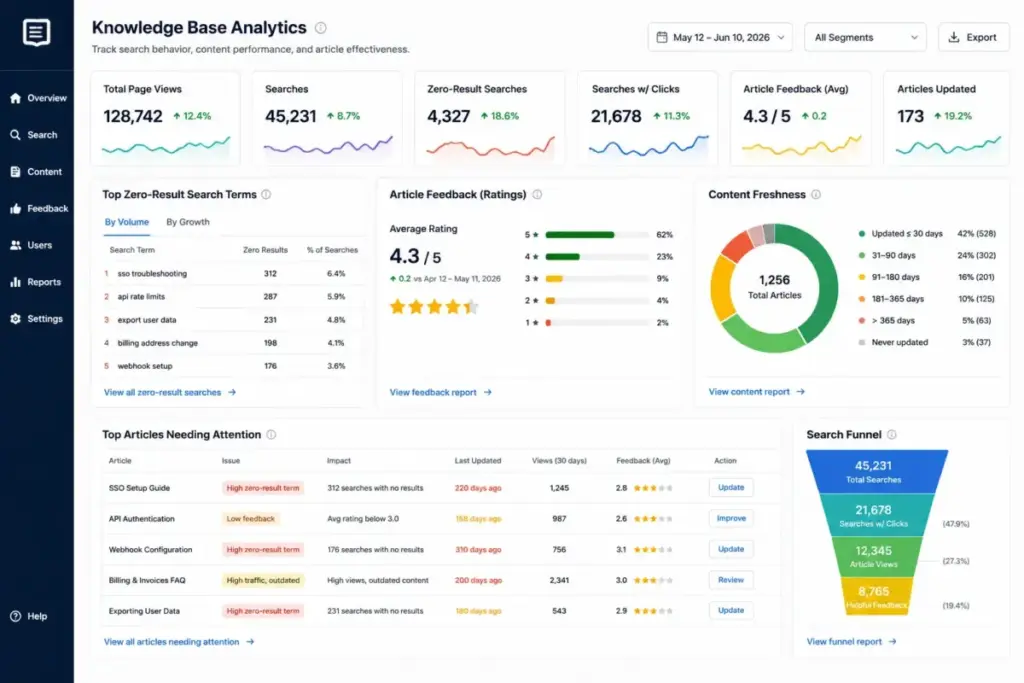
The analytics section of a knowledge base requirements template is where most evaluations go shallow. “Must have analytics” is not a requirement. “Must show the top 20 failed search terms with zero results, sortable by date range, exportable as CSV, and accessible without an Enterprise upgrade” is a requirement.
Validate that the tool can answer these six questions from your support and content operations workflows:
- Which search terms produce zero results? This identifies content gaps. If the tool cannot show failed searches, you are guessing at what to write next.
- Which articles have the lowest helpful ratings? Reader feedback identifies articles that need rewriting, not just page views that show traffic.
- What is the self-service rate or ticket deflection rate? This connects knowledge management to support cost reduction. Some tools calculate this natively. Others require integration with your ticketing system.
- Which articles have not been updated in 90 or more days? Stale content erodes trust. Content freshness reports prevent knowledge decay.
- Which authors are active versus inactive? Author activity tracking identifies knowledge bottlenecks when key contributors stop updating articles.
- Can analytics data be exported or accessed via API? If analytics are locked inside the tool with no export, your reporting team cannot integrate knowledge base data into broader support dashboards.
Use real search logs, support ticket tags, and article categories from your current environment when evaluating analytics features. A tool that shows page views but cannot surface failed searches is not meeting the analytics requirement.
Step 7: Document Migration and Content Governance
A requirements template that stops at vendor selection is half a template. Add migration and governance requirements so the document supports implementation, not just procurement.
Migration checklist:
- [ ] Bulk article import preserves titles, content, metadata, images, and internal links
- [ ] URL redirects from old help center to new knowledge base are documented
- [ ] Author attribution carries over or is reassigned
- [ ] Article categories, tags, and taxonomy transfer correctly
- [ ] Existing search analytics baseline is captured before migration
- [ ] Go-live date, rollback plan, and success criteria are defined
Content governance checklist:
- [ ] Every article has a named owner
- [ ] Article templates exist for common content types (how-to, troubleshooting, policy, API reference)
- [ ] Review cadence is defined (every 90 days, every 180 days, or event-triggered)
- [ ] Approval workflow is configured (author writes, reviewer approves, admin publishes)
- [ ] Stale content alerts notify article owners when review is due
- [ ] Version history is enabled for rollback
- [ ] Post-launch reporting cadence is defined (weekly for first month, monthly after)
These checklists connect requirements to outcomes. A customer service software evaluation that includes migration and governance requirements avoids the pattern where teams buy a tool, migrate content, and discover six months later that nobody owns article freshness.
Template Variations by Use Case
The core template above covers the universal requirements. Adjust priority levels and add rows based on your specific use case.
Startup customer help center. Prioritize article templates, SEO-friendly help center pages, search, basic analytics, branding, and low administrative overhead. SSO, SCIM, and audit logs may be optional or future-state requirements for teams under 50 employees.
Enterprise security review. Prioritize SSO, SCIM, RBAC, audit logs, custom roles, exportable logs, data handling, SLA, procurement terms, and tier verification. Every identity and auditability requirement should be must-have with a pass/fail acceptance test.
Internal IT and HR knowledge base. Prioritize private access, group permissions, employee lifecycle automation, ownership transfer, stale content review, and internal search analytics. SCIM deprovisioning tests are especially important because ex-employee access to internal policies is a compliance risk.
Developer documentation. Prioritize versioning, Markdown or developer workflow support, OpenAPI or API reference publishing, release notes, version history, search, and external publishing controls.
AI-assisted support knowledge. Prioritize source permissions, citation behavior, answer auditability, content freshness, feedback loops, and gap analytics before enabling AI automation. Verify how the vendor handles AI data processing and whether AI features change the data retention terms.
Common Mistakes That Break the Template
Mistake 1: Treating the template as an editor checklist. Avoid this by adding identity, permissions, lifecycle, auditability, analytics, and procurement evidence requirements alongside content authoring features.
Mistake 2: Assuming SSO and SCIM are the same. SSO handles authentication. SCIM handles provisioning, deprovisioning, group sync, and role assignment. Test them separately.
Mistake 3: Accepting “audit logs” without retention and export details. Ask which events are logged, how long logs are retained, and whether logs can be exported or accessed by API. A 30-day retention with no export is not the same as 365-day retention with API access.
Mistake 4: Ignoring plan restrictions. Map each enterprise control to the exact public pricing plan, custom plan, or add-on required. The pricing tier table above shows that SSO, SCIM, and audit logs frequently require Enterprise or equivalent plans.
Mistake 5: Selecting a tool before naming the knowledge base use case. Choose external, internal, hybrid, developer, or AI-assisted requirements first. The use case determines which acceptance tests matter.
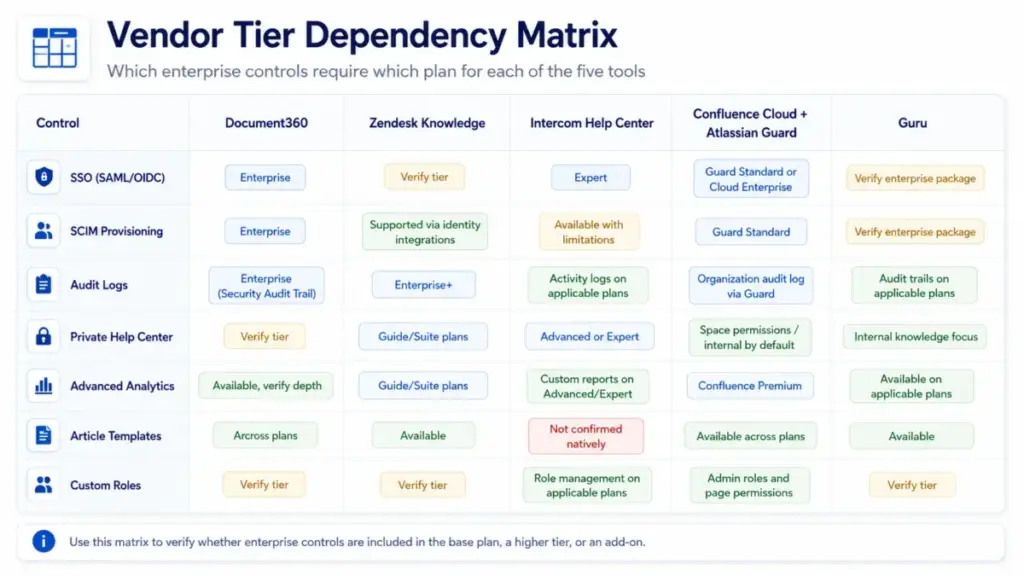
Vendor Tier Comparison: Which Plan Unlocks What
This table maps enterprise controls to the specific plan or add-on required for each of the five most evaluated knowledge base tools. Use it alongside the requirements template to verify tier dependencies before shortlisting.
| Control | Document360 | Zendesk Knowledge | Intercom Help Center | Confluence Cloud + Guard | Guru |
|---|---|---|---|---|---|
| SSO (SAML/OIDC) | Enterprise | Supported on Suite plans; verify tier | Expert | Atlassian Guard Standard or Cloud Enterprise | Verify enterprise package |
| SCIM Provisioning | Enterprise | Supported through identity integrations | Available with documented limitations | Atlassian Guard Standard | Verify enterprise package |
| Audit Logs | Enterprise (Security Audit Trail) | Enterprise and above | Teammate activity logs on applicable plans | Organization audit log via Atlassian Guard | Audit trails on applicable plans |
| Private Help Center | Available across plans; verify tier | Available on Guide/Suite plans | Advanced or Expert | Space permissions (internal by default) | Internal knowledge platform |
| Advanced Analytics | Analytics across plans; verify depth | Knowledge analytics on Guide/Suite plans | Custom reports on Advanced or Expert | Confluence Premium for advanced analytics | Analytics on applicable plans |
| Article Templates | Listed across plans | Help center templates available | No native article templates confirmed | Templates available across plans | Templates available |
| Custom Roles | Roles and permissions; verify tier | Role management; verify tier | Role management; SCIM group role mapping on applicable plans | Admin roles and page permissions | Roles and permissions; verify tier |
What this reveals: no tool gives you every enterprise control on its entry-level plan. Budget for the tier that matches your must-have requirements, not the tier that matches your preferred price.
Intercom’s SCIM implementation has documented limitations including no soft delete or archive for deprovisioned teammates and limits around team membership automation. Confluence buyers should budget Atlassian Guard separately unless Cloud Enterprise covers SSO and SCIM. Document360 groups SSO, SCIM, and the Security Audit Trail under Enterprise with quote-based pricing. Zendesk’s enterprise controls require plan verification on the current US pricing page. Guru’s pricing is tailored to organization scale with no public per-seat price verified.
FAQ
What should a knowledge base requirements template include?
A knowledge base requirements template should include scoping questions (audience, use case, identity provider, content volume, and business outcome), a requirements table with acceptance tests for SSO, RBAC, SCIM, audit logs, and analytics, a vendor evidence matrix with official documentation URLs, a pricing tier dependency worksheet, and a migration and governance checklist. Generic feature lists without testable criteria are not sufficient for enterprise procurement.
What is the difference between SSO and SCIM in a knowledge base?
SSO (Single Sign-On) handles authentication, meaning it controls how users log in. SCIM (System for Cross-domain Identity Management) handles provisioning, meaning it controls how users are created, assigned roles, synced with groups, and deprovisioned when they leave the organization. A tool can support SSO without SCIM, which means users authenticate through your IdP but must be manually created and removed in the knowledge base.
How do you test RBAC in knowledge base software?
Create at least four roles: reader, author, reviewer, and admin. Assign each role to a test user. Verify that the reader cannot access restricted articles, the author cannot publish without reviewer approval, the reviewer can approve but not change admin settings, and the admin can manage all permissions. Test with IdP group mapping if SCIM is in scope.
Why are knowledge base audit logs often restricted to enterprise plans?
Vendors position audit logging as a security and compliance feature that mid-market and enterprise buyers need for SOC 2, HIPAA, or internal policy requirements. Restricting audit logs to higher tiers allows vendors to charge more for compliance-ready plans. During procurement, verify the exact plan that includes audit log access, the retention period, and whether logs are exportable.
Do we need SCIM if our knowledge base already has SSO?
SSO without SCIM means your team manages user accounts manually inside the knowledge base. When an employee leaves the organization, someone must remember to remove their knowledge base access separately from IdP deprovisioning. SCIM automates that lifecycle. For teams with 50 or more knowledge base users, SCIM prevents orphaned accounts and reduces the risk of ex-employee access to restricted content.
What analytics should a knowledge base track?
At minimum: search terms with zero results, article helpful and not-helpful ratings, article views by time period, self-service rate or ticket deflection rate, stale content reports, and author activity. Advanced analytics include content gap analysis, reader journey tracking, and API-accessible reporting for integration with support dashboards.
What is the best knowledge base tool with SSO, SCIM, and audit logs?
The answer depends on the use case. Document360 is strongest for dedicated customer or product knowledge bases with article templates, analytics, and enterprise security controls. Zendesk Knowledge fits support teams that want help center content connected to tickets and AI answers. Confluence Cloud plus Atlassian Guard fits internal knowledge bases in Atlassian-native organizations. Intercom Help Center fits teams already using Intercom for customer messaging. Guru fits internal knowledge and AI-answer workflows. Verify which plan unlocks SSO, SCIM, and audit logs for each tool using the tier comparison table above.
How do I prevent ex-employees from accessing internal knowledge base articles?
Configure SCIM 2.0 between your identity provider and the knowledge base. When an employee is removed from the IdP, SCIM should deactivate or delete their knowledge base account within one sync cycle. Test the deprovisioning flow before go-live. Verify that article ownership transfers to a backup owner and that no orphaned content remains accessible to the deprovisioned user.
Can Confluence work as a customer-facing knowledge base?
Confluence is built for internal collaboration. While Confluence pages can be shared externally via links or exported, it does not offer the same public help center features as Document360, Zendesk Guide, or Intercom Help Center, such as SEO-optimized public pages, branded help center domains, contact forms, and customer-facing search. For a detailed comparison of Confluence’s internal strengths versus external limitations, see the Confluence and Notion comparison.
What should be included in a knowledge base RFP?
A knowledge base RFP should include organizational context, scoping questions, prioritized requirements with acceptance tests, security and identity requirements (SSO, SCIM, RBAC, audit logs), analytics requirements, content governance expectations, migration requirements, pricing transparency expectations (plan, tier, add-ons, billing terms), compliance requirements (SOC 2, DPA, data residency), and evaluation criteria with scoring weights.