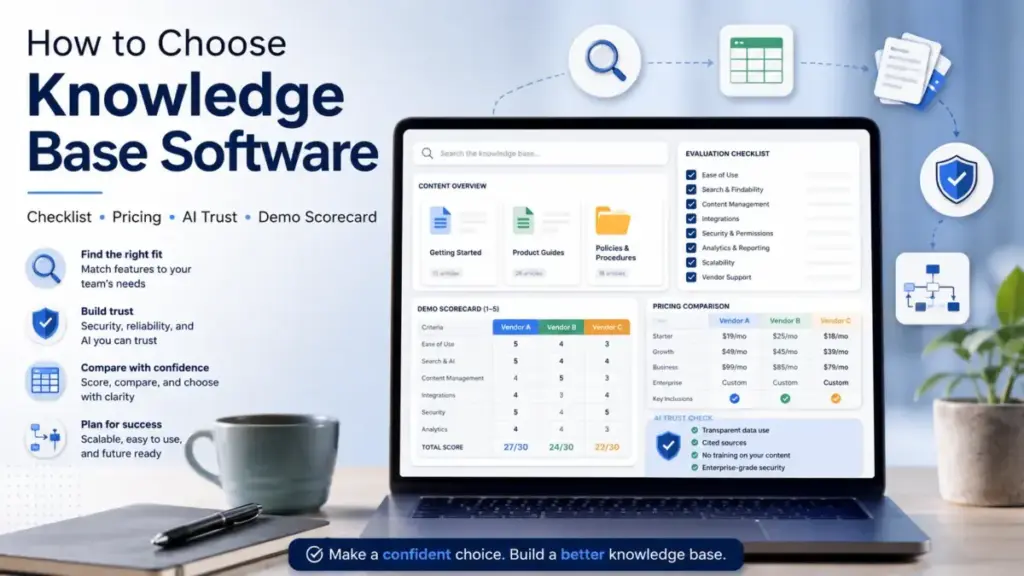
The real pricing gap in knowledge base software is not “cheap vs expensive.” It is billing model fit: help desk suites like Zendesk charge per agent at $55+/month and bundle KB inside, standalone platforms like KnowledgeOwl charge a flat $100/month plus per-author fees, and tools like Help Scout mix per-user pricing with usage-based AI costs at $0.75 per resolution. Most buyers compare starting prices instead of total cost at their team size, and that mistake shapes every decision that follows.
This selection template exists because feature-list comparisons miss the real buying risks: pricing models that charge per author, per agent, per resolution, or per knowledge base. Permission structures that leak private content to public visitors. AI answers that hallucinate when your KB lacks coverage. And governance gaps that turn 200 help articles into 200 outdated liabilities within six months.
I built this checklist after analyzing pricing for 45+ business software tools. The best knowledge base software options change depending on whether you need a public help center, internal agent documentation, authenticated customer docs, or all three. This template helps you define that scope before you start comparing vendors.
Use this template to shortlist vendors, normalize pricing, run fair demo tests, and choose based on weighted evidence instead of marketing pages. Understanding what a knowledge base does is the prerequisite.
How This Guide Was Researched
This guide was built from official pricing pages, product documentation, public help center materials, and buyer-facing feature pages checked in May 2026. I compared tools by pricing model, access control, AI and search behavior, governance features, integrations, and migration requirements. No hands-on trial testing was performed for this article. All pricing figures reference the vendor’s public pricing page as of the date noted, and vendors with quote-based pricing are labeled as such.
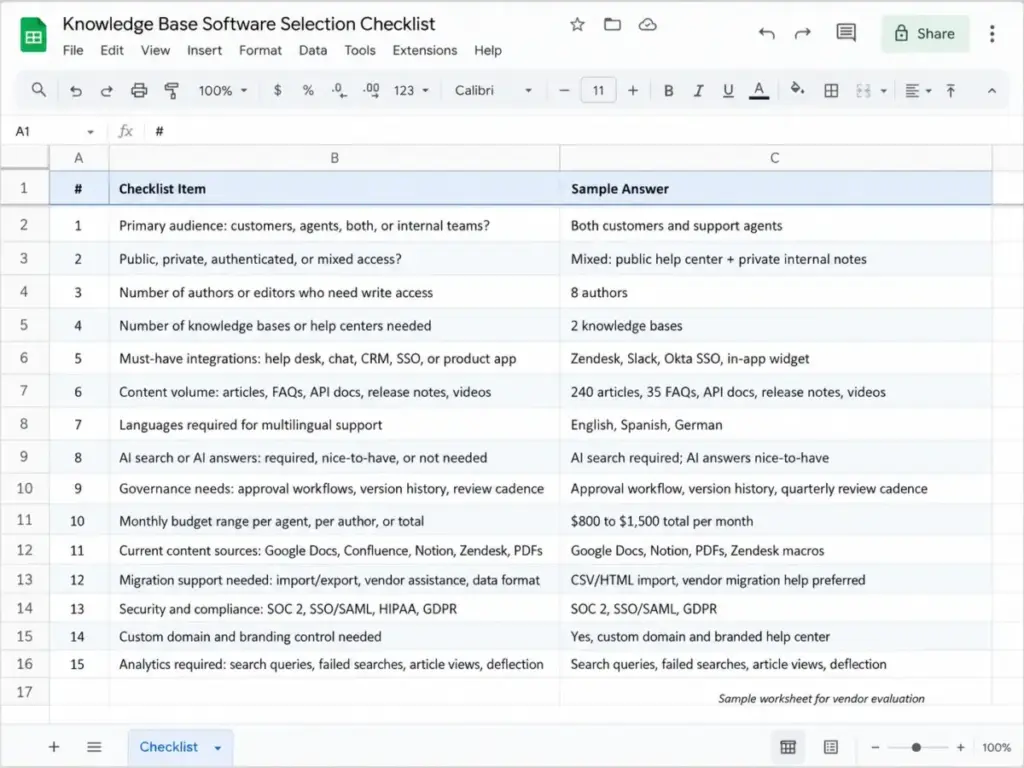
Quick Copy Checklist: Knowledge Base Software Selection
Copy this checklist and complete it before contacting any vendor.
| # | Checklist Item | Your Answer |
|---|---|---|
| 1 | Primary audience: customers, agents, both, or internal teams? | |
| 2 | Public, private, authenticated, or mixed access? | |
| 3 | Number of authors or editors who need write access | |
| 4 | Number of knowledge bases or help centers needed | |
| 5 | Must-have integrations: help desk, chat, CRM, SSO, or product app | |
| 6 | Content volume: articles, FAQs, API docs, release notes, videos | |
| 7 | Languages required for multilingual support | |
| 8 | AI search or AI answers: required, nice-to-have, or not needed | |
| 9 | Governance needs: approval workflows, version history, review cadence | |
| 10 | Monthly budget range per agent, per author, or total | |
| 11 | Current content sources: Google Docs, Confluence, Notion, Zendesk, PDFs | |
| 12 | Migration support needed: import/export, vendor assistance, data format | |
| 13 | Security and compliance: SOC 2, SSO/SAML, HIPAA, GDPR | |
| 14 | Custom domain and branding control needed | |
| 15 | Analytics required: search queries, failed searches, article views, deflection |
What this means: If you cannot answer items 1 through 4, you are not ready to evaluate vendors. Define audience, access model, author count, and site count first. Everything else follows from those four decisions.
Who Should Use This Template?
| Reader type | Use this template if… | Prioritize |
|---|---|---|
| Head of Support | You need to reduce repeated tickets and measure deflection | Search, deflection analytics, help desk integration |
| Technical Writer | You publish docs, API references, or release notes | Article templates, versioning, SEO controls, import/export |
| IT or Security | You manage internal or restricted content with compliance needs | SSO, RBAC, private access, audit trails |
| CX Ops | You compare vendors across budget and workflow fit | Pricing model, analytics, governance workflow |
How to Use This Knowledge Base Selection Template
Maya Patel uses this eight-step process when evaluating knowledge base tools for support and operations teams. Each step produces a specific output that feeds the next.
Step 1: Define the job of the knowledge base. Write one sentence: who it serves, what it reduces, and whether it is public, private, or mixed. Example: “Public help center for 12,000 monthly active customers, reducing repeat tickets by 30%, with a private section for 25 support agents.”
Step 2: Audit current knowledge sources. Inventory Google Docs, Notion pages, Confluence spaces, PDFs, macros, and ticket replies. Mark each source as migrate, rewrite, archive, or keep outside the KB. Teams that skip this step import outdated content and pollute AI search results from day one.
Step 3: Build weighted buying criteria. Use the scoring matrix in Step 3 below. Weight search, governance, and permissions higher for regulated teams. Weight speed, cost, and ease of setup higher for startup teams launching their first help center.
Step 4: Choose the right software category. Decide whether you need a standalone KB (Document360, KnowledgeOwl), a help desk with built-in KB (Help Scout, Zendesk), an internal wiki (Confluence, Notion), or a lightweight documentation site. This single decision eliminates 60% of your vendor list.
Step 5: Normalize pricing and limits. Use the pricing worksheet in this template. Record starting price, billing basis, included authors, article limits, KB limits, AI costs, custom domain fees, and migration fees.
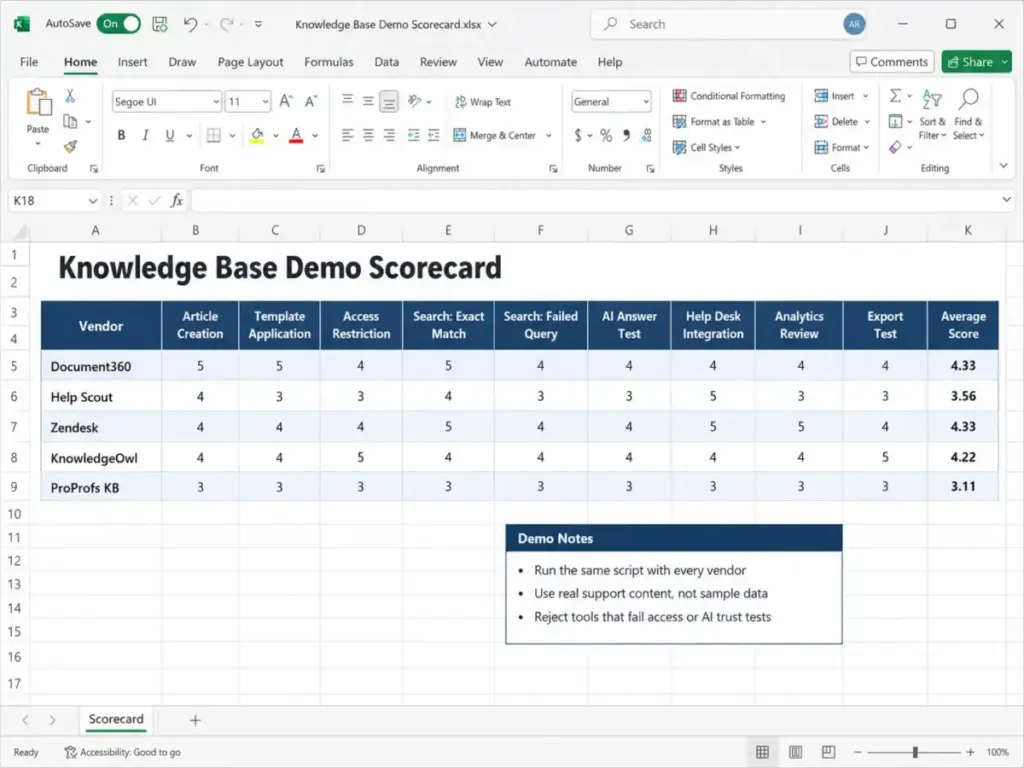
Step 6: Run the same demo script with every vendor. The demo scorecard below forces consistency. Every vendor creates an article, applies access rules, runs search tests, and shows analytics using the same sample content.
Step 7: Score with all stakeholder groups. Authors, agents, admins, and one executive buyer score the same criteria. Separate deal-breakers from preferences.
Step 8: Finalize migration and governance before signing. Confirm import/export support, article ownership, review cadence, and permission structure before purchase. These are contract-stage questions, not post-launch questions.
Templates for Support and CX Leaders
Support leaders and CX operations managers choose knowledge base software to reduce ticket volume, improve first-contact resolution, and give customers answers before they open a support conversation. The template priorities for this role are search quality, ticket deflection analytics, help desk integration, and AI answer accuracy.
Weighted Scoring Matrix for Support Teams
| Criteria | Weight | Score (1-5) | Weighted Score |
|---|---|---|---|
| Search quality (semantic, typo tolerance, failed search tracking) | 20% | ||
| Help desk integration (Zendesk, Freshdesk, Intercom, Help Scout) | 15% | ||
| AI answers (source citation, permission respect, escalation) | 15% | ||
| Article authoring (editor, templates, media, import) | 10% | ||
| Public/private access control | 10% | ||
| Analytics (views, searches, failed searches, deflection) | 10% | ||
| Governance (approval, version history, ownership, review dates) | 10% | ||
| Pricing model fit (per agent, per author, per KB, total cost) | 10% | ||
| Total | 100% |
What this means: Search quality takes the top weight because a KB that customers cannot search is a KB that does not deflect tickets. If your weighted total falls below 3.5, the vendor is a poor fit. If any must-have criterion scores 1, reject the vendor regardless of total score.
Decision thresholds for support teams:
- 4.2 to 5.0: Shortlist for trial or purchase
- 3.5 to 4.1: Test further with real support content
- 3.0 to 3.4: Only consider if budget is critical
- Below 3.0: Reject
- Must-have failure (score of 1): Reject regardless of total
Demo Script: Support Team Workflow Test
Run these tasks with every vendor using your own support content, not the vendor’s sample articles.
| Test | What to do | What to look for |
|---|---|---|
| Article creation | Create an FAQ article with screenshots and a video embed | Editor speed, formatting controls, media support |
| Template application | Apply a predefined article template or layout | Whether templates exist and how customizable they are |
| Access restriction | Restrict one article to logged-in customers only | Permission model, authentication options, SSO support |
| Search: exact match | Search “how to reset password” | Result accuracy, ranking, snippet quality |
| Search: failed query | Search a topic your KB does not cover | Does the tool log the failed search? Does AI admit uncertainty? |
| AI answer test | Ask “how do I cancel my subscription” | Does AI cite the source article? Does it respect private content? |
| Help desk integration | Surface a KB article inside a support ticket | Native widget, Beacon, sidebar, or API integration |
| Analytics review | View search queries, article views, and deflection data | Reporting depth, export options, dashboard usability |
| Export test | Export 5 articles to HTML, PDF, or Markdown | Export format, metadata preservation, image handling |
What this means: If a vendor cannot complete the access restriction test or the AI answer test, your team will spend months fixing permission leaks and correcting AI hallucinations after launch. These are not features to evaluate post-purchase.
Templates for Documentation and Technical Writers
Documentation managers, technical writers, and developer experience teams choose knowledge base software to publish structured documentation, API references, and release notes. The template priorities for this role are article templates, version control, custom CSS, SEO controls, and developer API support.
Must-Have vs Nice-to-Have for Documentation Teams
| Requirement | Must-Have | Nice-to-Have |
|---|---|---|
| WYSIWYG and Markdown editor | ✅ | |
| Article templates (user guide, FAQ, release note, API doc) | ✅ | |
| Version history and rollback | ✅ | |
| Custom CSS and JavaScript | ✅ | |
| SEO controls (meta, slug, sitemap) | ✅ | |
| Multi-site or multi-product support | ✅ (unless 2+ products) | |
| Word/PDF import for migration | ✅ | |
| Code block formatting and syntax highlighting | ✅ (for API docs) | |
| Auto-translate or multilingual workflow | ✅ | |
| PDF export for offline documentation | ✅ |
What this means: If a vendor lacks article templates and version history, documentation teams will spend time rebuilding structure from scratch on every article. Official documentation from Document360 shows support for article templates, Word import, custom CSS, and API documentation across its Professional, Business, and Enterprise plans, though exact public USD pricing requires requesting a quote.
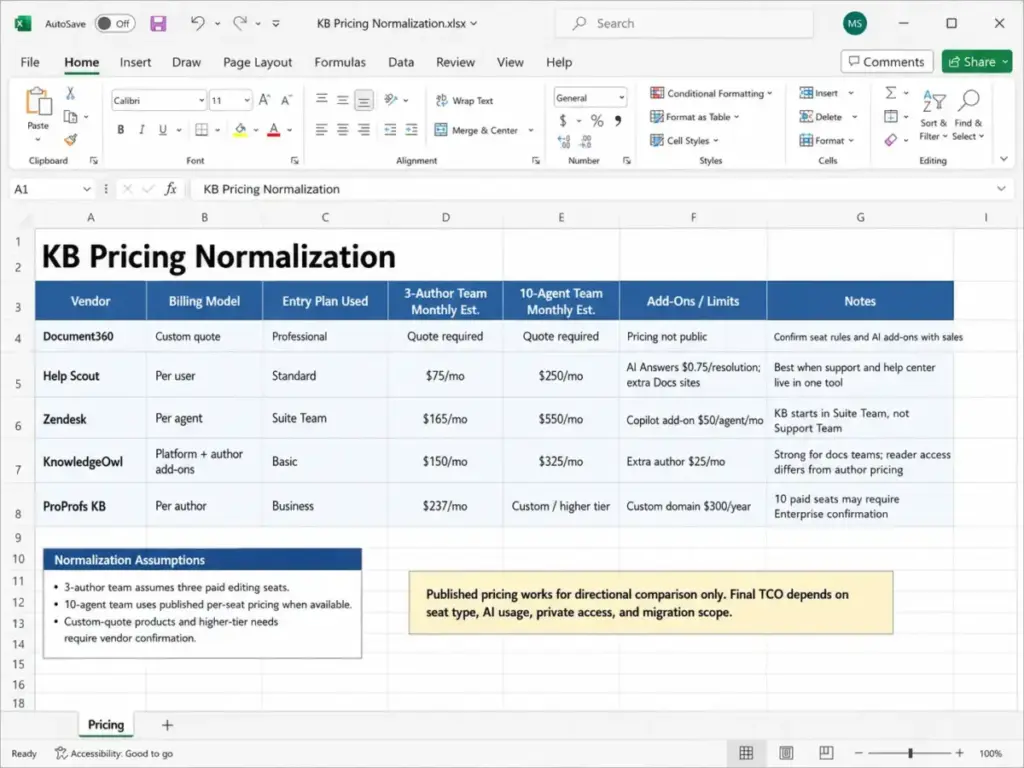
Pricing Normalization for Documentation Tools
Public pricing models vary across knowledge base vendors. Normalizing them to the same basis prevents false comparisons.
| Vendor | Starting Price (May 2026) | Billing Basis | Included | Key Add-On or Limit |
|---|---|---|---|---|
| Document360 | Quote-based | Custom by plan | Varies by plan | Exact USD requires vendor quote |
| Help Scout | Free$0; Standard $25/user/month | Per user/month | Free: 1 inbox, 1 Docs site; Standard: multiple KBs | Extra Docs sites:$20/month; AI Answers: $0.75 per resolution |
| Zendesk | Suite Team$55/agent/month paid yearly | Per agent/month | Knowledge Base in Suite Team and above | Copilot add-on: $50/agent/month; Support Team at $19/agent/month does not include KB |
| KnowledgeOwl | Basic$100/month | Monthly platform | 1 author, 1 knowledge base | Extra author: $25/month; extra KB: $50/month |
| ProProfs KB | Free$0; Essentials $49/author/month yearly | Per author/month | Free: 1 author, 25 pages; Essentials: 1 author, 300 pages | Custom domain:$300/year add-on |
What this means: A 3-author team on KnowledgeOwl Basic pays $100 + $50 (2 extra authors) = $150/month. The same team on ProProfs Essentials pays $49 x 3 = $147/month (annual billing), but the page limit is 300 per author. On Help Scout Standard, three users cost $75/month, but that includes help desk features, not just KB. Pricing model matters more than starting price.
Templates for IT, Security, and Compliance Reviewers
IT managers, security reviewers, and compliance stakeholders evaluate knowledge base software through a different lens: access control, authentication, data residency, audit trails, and vendor security posture. These templates focus on pass/fail criteria that block or approve vendor selection.
Security and Compliance Checklist
| Requirement | Pass/Fail | Notes |
|---|---|---|
| SSO/SAML support | Required plan tier? | |
| Role-based access control (RBAC) | Custom roles or fixed roles? | |
| Private content with sign-in enforcement | Authentication method? | |
| SOC 2 Type II certification | Current or planned? | |
| GDPR compliance and data processing agreement | Available on request? | |
| Data residency options (US, EU, other) | Included or enterprise only? | |
| Version history and audit log | How far back? | |
| IP restrictions or allow-listing | Available on which plan? | |
| Two-factor authentication (2FA) | For authors, admins, or readers? | |
| API access for data export and backup | Rate limits? Plan gate? | |
| Uptime SLA commitment | Published or negotiated? | |
| Content export format (HTML, Markdown, JSON, PDF) | Full or partial export? |
What this means: Official pricing from Zendesk shows that custom roles require Suite Professional at $115/agent/month or higher. KnowledgeOwl lists SSO, SAML, and custom roles across plans, with exact feature gates varying by tier. A security reviewer who checks only the starting plan will miss permission gaps that surface after launch.
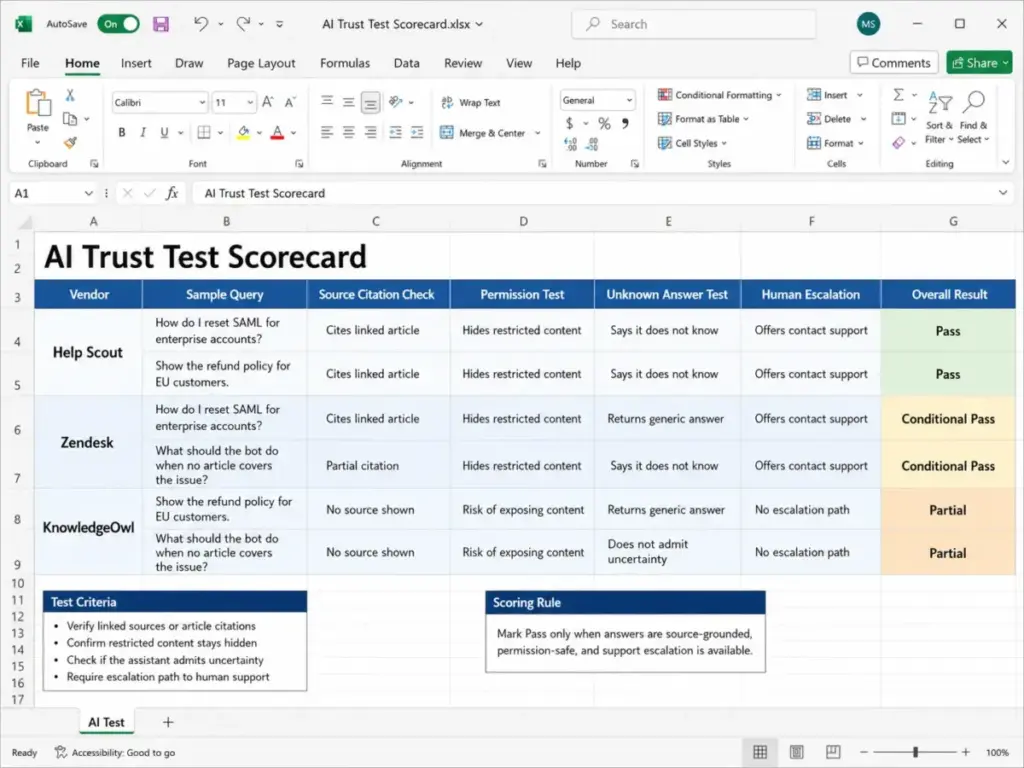
AI Trust Test Protocol
AI-powered search and AI answers are listed on most knowledge base pricing pages in 2026. This protocol tests whether the AI features are trustworthy or just decorative.
| AI Test | Procedure | Pass Criteria |
|---|---|---|
| Source citation | Ask a question the KB answers | AI response cites the specific article |
| Permission leakage | Ask a question answered only in a private article (as a public visitor) | AI does not surface private content |
| Uncertainty handling | Ask a question the KB does not cover | AI admits it does not have an answer or escalates |
| Stale content | Ask a question where the KB article is outdated | AI does not confidently present outdated information |
| Multilingual accuracy | Ask in a non-English language (if multilingual) | AI responds in the correct language with accurate content |
What this means: Public documentation from Help Scout shows AI Answers is billed at $0.75 per resolution with monthly spending caps. If your AI answers cannot cite sources or respect permissions, you are paying per resolution for answers that erode customer trust. Test before buying.
Templates for Operations Teams Building Internal KBs
Operations, HR, and internal support teams select knowledge base software to document processes, onboard new hires, and reduce repeated internal questions. The knowledge management definition focuses on making institutional knowledge findable and maintainable. Internal KB priorities differ from customer-facing help centers: there is no SEO concern, but ownership, staleness, and permissions matter more.
Content Governance Worksheet
| Field | Your Answer |
|---|---|
| Article ownership model: individual, team, or department? | |
| Review cadence: monthly, quarterly, or per-change? | |
| Stale content rule: archive after 6 months without review? | |
| Approval workflow: required before publish, or publish-then-review? | |
| Roles: who can create, edit, review, publish, archive? | |
| Status labels used: draft, in review, published, archived, needs update? | |
| Notification: who gets alerted when an article is updated? |
What this means: Teams that skip governance launch 200 articles, then find 80 of them outdated within a year. The internal documentation guide covers ownership models in detail. Assign article owners before content exists, not after it goes stale.
Integration Map for Internal Teams
| Integration | Required? | Priority |
|---|---|---|
| Help desk (Zendesk, Freshdesk, Help Scout, Intercom) | ||
| Chat tool (Slack, Microsoft Teams) | ||
| SSO provider (Okta, Azure AD, Google Workspace) | ||
| CRM (Salesforce, HubSpot) | ||
| Product app (in-app widget, Beacon, API) | ||
| Analytics (Google Analytics, built-in) | ||
| Developer API for custom integrations | ||
| Customer portal or authenticated access |
What this means: A help desk evaluation often overlaps with KB selection because tools like Zendesk and Help Scout bundle both. Mapping integrations first prevents buying a standalone KB that duplicates what your help desk already includes.
Example: Filled-In Checklist for a 20-Agent SaaS Support Team
This example shows how a Head of Support at a B2B SaaS company with 20 agents, 15,000 monthly active customers, and a $2,000/month software budget might complete this template.
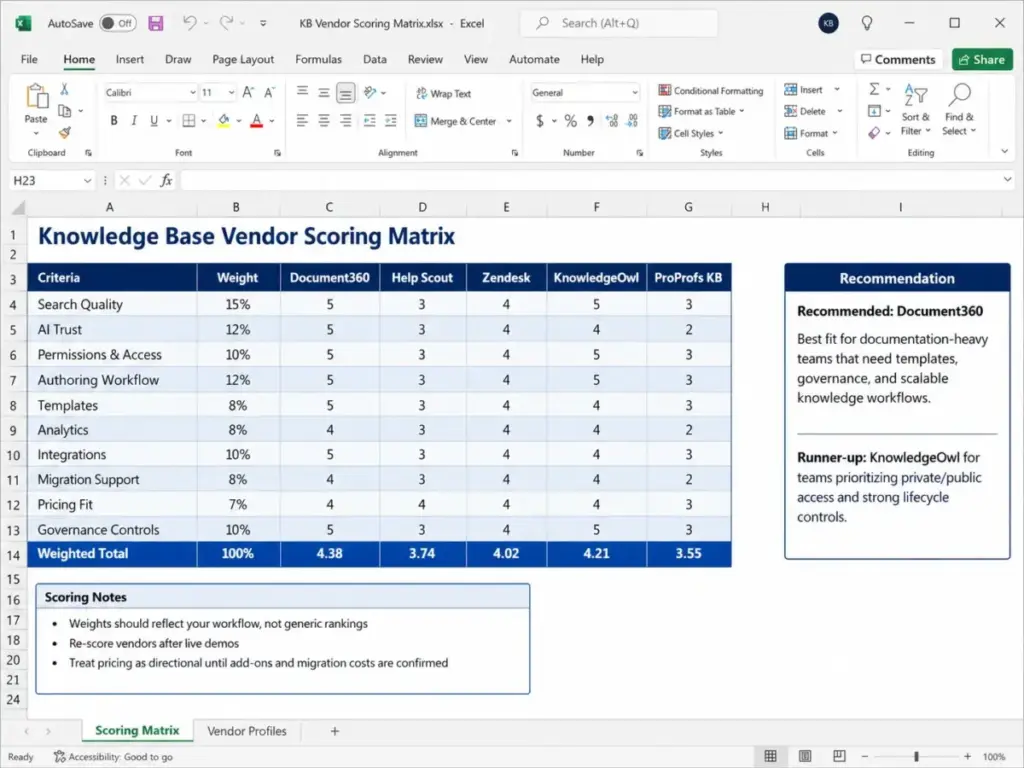
These scores are illustrative for the sample 20-agent SaaS team, not universal rankings. Re-score each vendor using your own workflow, content volume, author count, and existing help desk stack.
| Criteria | Weight | Document360 | Help Scout | Zendesk | KnowledgeOwl | ProProfs KB |
|---|---|---|---|---|---|---|
| Search quality | 20% | 4 | 3 | 4 | 4 | 3 |
| Help desk integration | 15% | 3 | 5 | 5 | 2 | 3 |
| AI answers | 15% | 4 | 4 | 4 | 3 | 3 |
| Authoring | 10% | 5 | 3 | 3 | 4 | 4 |
| Access control | 10% | 4 | 3 | 4 | 5 | 3 |
| Analytics | 10% | 4 | 3 | 4 | 4 | 3 |
| Governance | 10% | 4 | 2 | 3 | 4 | 3 |
| Pricing fit | 10% | 2 | 4 | 2 | 3 | 4 |
| Weighted Total | 3.75 | 3.50 | 3.80 | 3.55 | 3.20 |
Recommendation for this scenario: Zendesk scores highest because the team already uses Zendesk for ticketing, and Suite Team at $55 x 20 = $1,100/month includes KB. But that is $1,100/month before the Copilot add-on. Document360 scores close but requires a vendor quote to confirm total cost. Help Scout at $25 x 20 = $500/month fits the budget but governance controls are lighter. KnowledgeOwl at $100 + extra authors fits smaller authoring teams.
The budget constraint rejects ProProfs at this scale (Business plan page limits and per-author billing push costs higher with 20 agents contributing content).
What this means: The weighted total alone does not make the decision. Budget, existing help desk investment, and governance depth narrow the shortlist to two vendors for trial testing. For this team, the Zendesk pricing breakdown would be the next reading step, followed by a deeper look at Help Scout’s KB features.
Red Flags That Should Pause or Cancel a KB Purchase
Watch for these signals during evaluation. Any single red flag justifies pausing the purchase and requesting clarification from the vendor.
| Red Flag | Risk | Action |
|---|---|---|
| No content export or limited export format | Vendor lock-in: you cannot migrate later | Ask for full HTML/Markdown export demo |
| AI answers do not cite source articles | Customers receive unverifiable information | Run the AI trust test protocol above |
| Private content accessible without authentication | Data exposure for internal or restricted docs | Test access as a logged-out visitor |
| No version history or rollback | One bad edit deletes the approved version | Confirm version depth (30 days, unlimited, etc.) |
| Article limits on mid-tier plans | Scaling content requires upgrading or restructuring | Calculate total articles needed in 12 months |
| No failed search analytics | You cannot find what customers search for and miss | Check if search analytics are included or gated |
| Custom domain requires enterprise plan | Your help center lives on vendor subdomain | Confirm custom domain on your plan |
| No SSO or SAML below enterprise | Every agent manages a separate login | Check SSO availability on your target plan |
| AI costs are uncapped or per-resolution without limits | Monthly bill spikes from AI usage | Confirm caps, overages, and billing mechanics |
| Migration support is paid or unavailable | You import content yourself with no vendor help | Ask about onboarding, import tools, and migration fees |
| Annual contract required with no monthly option | Committed before validating fit | Confirm monthly billing availability |
| No approval workflow for multi-author teams | Articles publish without review | Confirm workflow and role controls on your plan |
What this means: Red flags are not deal-breakers by default. They are signals that require a direct question to the vendor before signing. If a vendor cannot answer the question, that silence is the actual red flag.
Common Mistakes When Choosing KB Software
These mistakes appear across organizations of every size. Each one leads to a preventable problem post-purchase.
Mistake 1: Buying AI features before cleaning the content base. AI search and AI answers pull from your existing articles. If 40% of those articles are outdated, AI confidently serves wrong answers. Audit content first. Test AI against known weak articles during the trial.
Mistake 2: Comparing only starting prices. Help Scout starts at $0. Zendesk starts at $19/agent/month for Support Team, but that plan does not include a knowledge base. ProProfs starts at $0 with a 25-page limit. Normalize to the plan that includes the features your team actually needs, then multiply by team size. The Document360 review shows why quote-based pricing requires direct vendor engagement before comparing total cost.
Mistake 3: Choosing a public help center tool for internal restricted content. Not every KB tool handles private, authenticated, and public content equally. Run access tests for agents, authenticated customers, and anonymous visitors during the trial. Confluence, for example, is built for internal documentation first, not public help centers.
Mistake 4: Launching articles without ownership. Assign an article owner, a review date, and a status label to every article before publishing. Teams that skip this step end up with 200 articles and no one responsible for keeping any of them accurate.
Mistake 5: Using generic demo content instead of real support questions. Bring your actual failed search queries, your most outdated articles, and your top 10 customer questions into the trial. Vendor sample content always works. Your content might not.
Mistake 6: Ignoring the billing model. Per-user, per-author, per-agent, per-resolution, per-knowledge-base, and platform-fee pricing all produce different totals at different team sizes. A tool that costs $100/month flat for one author costs $225/month at four authors if extra authors are $25 each. Model your team’s growth, not just today’s headcount.
Mistake 7: Skipping governance during evaluation. If approval workflows and version history are not available on your pricing tier, you will discover this gap after importing 150 articles with no rollback protection.
What to Do After Completing This Template
Your next step depends on where your scored shortlist lands.
If two or more vendors score above 4.0: Run parallel trials with real content. Use the demo scorecard from this template to compare structured results.
If your top vendor score is 3.5 to 4.0: Identify the criteria dragging the score down. If it is pricing, check whether a different plan tier solves the gap. If it is governance, this vendor may not fit your team’s maturity.
If no vendor scores above 3.5: Revisit Step 4 (software category). You may be evaluating the wrong category: standalone KB when you need a help desk suite, or vice versa.
For teams already using a help desk: Check if your existing tool has a built-in KB before adding a standalone platform. The Zendesk vs Intercom comparison covers this exact tradeoff.
For teams migrating from Google Docs, Notion, or Confluence: The Notion vs Confluence comparison helps teams already using one of these tools evaluate whether to stay, switch, or add a dedicated KB.
For teams considering internal knowledge management tools: The Guru knowledge management review covers a tool designed for verified content workflows and agent-facing knowledge.
FAQ
What is a knowledge base software selection checklist?
A knowledge base software selection checklist is a structured template that helps teams evaluate KB vendors using consistent criteria. It includes weighted scoring for search, governance, integrations, pricing, and AI features, plus demo scripts and decision thresholds. The goal is to compare vendors on the same evidence instead of relying on feature lists or marketing claims.
How do I choose between a standalone KB and a help desk with built-in knowledge base?
Choose a standalone KB like Document360 or KnowledgeOwl if your primary need is structured documentation, API docs, or multiple branded help centers with deep authoring controls. Choose a help desk suite like Zendesk or Help Scout if your team already uses their ticketing system and wants KB content connected to support conversations. The pricing difference can be significant: standalone KB tools charge per author or per platform, while help desk suites charge per agent for the entire bundle.
What features should I look for in knowledge base software?
Prioritize search quality, public and private access control, article templates, version history, analytics (including failed search tracking), help desk or chat integration, and content export. AI features matter, but only if the AI cites sources and respects content permissions. Security features like SSO, SAML, and role-based access control are must-haves for teams with internal or authenticated content.
How much does knowledge base software cost?
Pricing varies from $0 (Help Scout free plan, ProProfs free plan with limits) to $100+/month (KnowledgeOwl Basic) to $55+/agent/month (Zendesk Suite Team). The real cost depends on billing model: per user, per author, per agent, per knowledge base, or per AI resolution. A 10-agent team on Zendesk Suite Team pays $550/month before add-ons. A 3-author team on KnowledgeOwl Basic pays $150/month. Normalize pricing to your team size and plan tier before comparing.
How do I test AI search before buying a KB tool?
Bring 10 real search queries from your support tickets into the trial. Include 3 queries the KB should answer, 3 the KB should not answer (no content exists), and 4 with partial coverage. Check whether AI search returns accurate results, cites source articles, respects private content, and admits uncertainty when the answer does not exist. If the AI confidently answers a question your KB does not cover, that is a hallucination risk.
What is the difference between a knowledge base and a help center?
A knowledge base is the content repository: articles, FAQs, guides, and documentation. A help center is the customer-facing portal that may include a knowledge base plus ticket submission, live chat, and community forums. Some tools (Zendesk, Help Scout) bundle both. Others (Document360, KnowledgeOwl) focus on the knowledge base only. The ticketing system definition explains the support side of this distinction.
How do I keep knowledge base articles from going stale?
Assign an owner to every article. Set a review cadence (quarterly for high-traffic articles, semi-annually for reference docs). Use analytics to find articles with high views but low satisfaction or high exit rates. Flag articles older than six months without a review. Some tools (KnowledgeOwl, Document360) include review date tracking and article status workflows. Others require manual tracking.
Should I migrate existing content or start fresh?
Audit first. If more than 50% of your existing content is outdated, inaccurate, or duplicated, migration will import problems. Start fresh with your top 20-30 most-viewed articles, then migrate supporting content in phases. If your existing content is well-maintained, use the vendor’s import tools (Word, PDF, HTML, or API) to migrate in bulk. Confirm export format compatibility during the trial.
What questions should I ask in a knowledge base software demo?
Ask the vendor to: create an article using your content, restrict it to authenticated users, search for it as a public visitor (it should not appear), run an AI answer query, show failed search analytics, demonstrate the approval workflow, and export five articles. These seven tasks test the features most buyers regret not checking before purchase.
Can one knowledge base support multiple products or brands?
Some tools support multiple knowledge bases or help sites under one account. Help Scout Standard includes multiple knowledge bases at no extra cost. KnowledgeOwl charges $50 per additional knowledge base. ProProfs Business and Enterprise support multi-branded sites. Zendesk supports multiple brands on Suite Growth and above. Check whether multi-site support is included, gated, or an add-on at your target pricing tier.