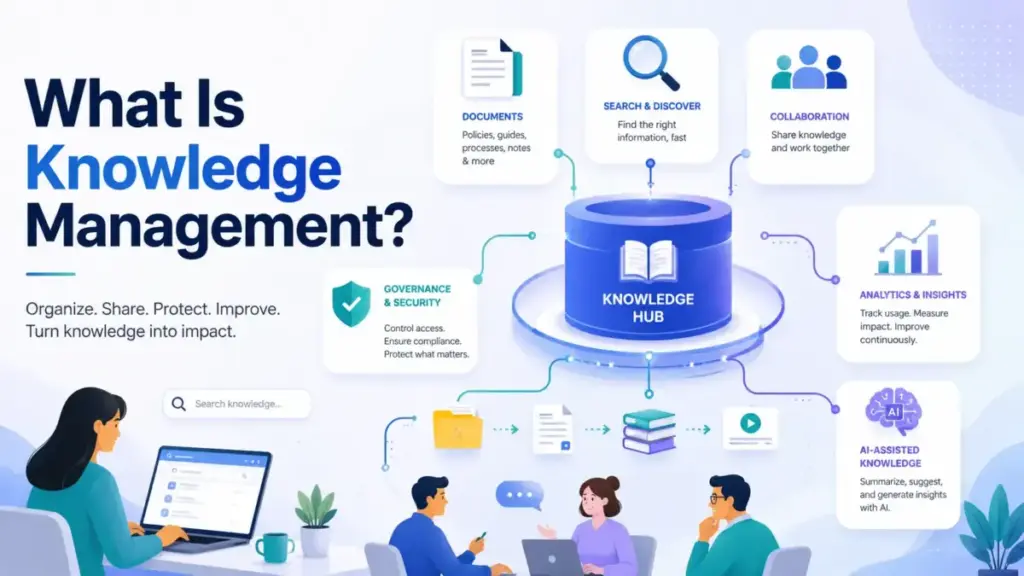
Every growing team hits the same wall: someone leaves, goes on vacation, or changes roles, and suddenly nobody knows where the answers are. Policies live in a Google Drive folder nobody checks. Troubleshooting steps sit in a Slack thread from nine months ago. New hires spend their first week asking the same five questions that nobody has written down.
That problem is what knowledge management solves. It is not a wiki. It is not an AI search box. It is the operating system that connects people, processes, governance, and tools so that the right information reaches the right person (or the right AI agent) at the right time. APQC, a leading research authority on the subject, defines knowledge management as a structured process that helps “information and knowledge flow to the right people at the right time” (APQC).
This guide breaks down what knowledge management actually means, how the cycle works in practice, where SaaS tools fit, and when a simpler documentation process is enough. If you manage a team’s knowledge base or evaluate knowledge base software, this is the operating context you need before picking a platform.
Quick Answer: Knowledge management (KM) is the structured process of identifying, capturing, organizing, governing, sharing, and improving organizational knowledge so employees, customers, partners, and AI systems find trusted information and act on it. It is broader than a knowledge base or wiki, covering people, process, content lifecycle, measurement, and technology.
The 60-Second Explanation of Knowledge Management
Layer 1 (Simple): Knowledge management means making sure the information your team needs is written down, easy to find, and kept accurate over time.
Layer 2 (Technical): KM involves capturing explicit knowledge (documented SOPs, help articles, FAQs), surfacing tacit knowledge (expert judgment, troubleshooting intuition), and codifying implicit knowledge (undocumented habits embedded in workflows). It structures this information with categories, metadata, ownership, permissions, version history, and review cycles so that retrieval systems, whether human search or AI-powered RAG pipelines, return trusted answers.
Layer 3 (Business): KM is a cost-center decision. Without it, support teams answer the same questions repeatedly, onboarding takes longer, and AI assistants generate answers from stale or unverified sources. With it, organizations reduce repeated work, retain critical know-how when employees leave, and give AI systems the governed source layer they need to produce accurate responses.
APQC’s 2026 predictions research highlights AI-ready knowledge foundations, business outcome measurement, and critical know-how retention as the year’s top priorities (APQC 2026 Predictions). Enterprise Knowledge’s 2026 trend report adds that semantic layers and knowledge governance are increasingly paired with enterprise AI to prevent hallucination and fill knowledge gaps (Enterprise Knowledge).
I evaluate help desk platforms and documentation tools for a living. The pattern I keep seeing: teams buy a knowledge base tool, dump every old document into it, skip ownership assignments, and wonder why nobody trusts the answers six months later. The tool is never the strategy. The governance around it is.
How Knowledge Management Actually Works
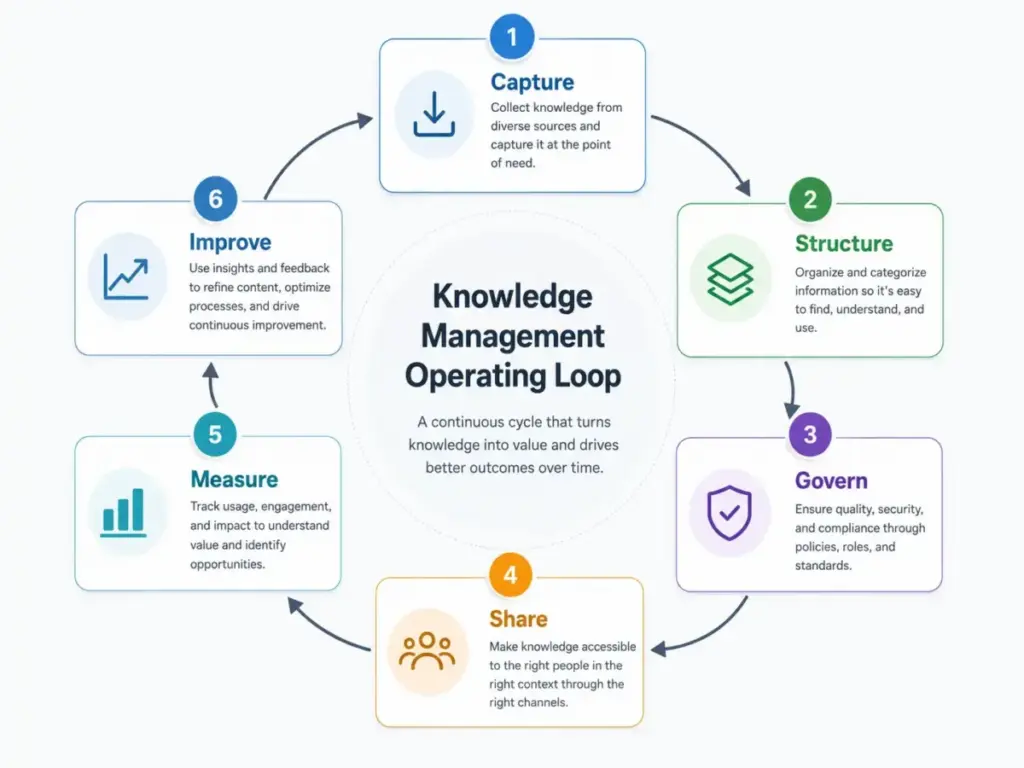
Knowledge management runs as a continuous cycle, not a one-time migration project. Here is the operating loop, step by step.
Step 1: Identify critical knowledge. Map the policies, troubleshooting procedures, product decisions, SOPs, customer-facing help content, lessons learned, expert know-how, and reusable templates your team depends on.
Step 2: Capture it. Pull knowledge from people (interviews, retrospectives), documents (PDFs, wikis), tickets (support conversations), meetings (action items, decisions), and project outputs.
Step 3: Structure it. Apply categories, metadata, ownership, permissions, version history, review schedules, and search-friendly formats. A help article without an owner and a review date has an expiration timer running from the moment you publish it.
Step 4: Distribute it. Deliver knowledge through knowledge bases, wikis, help centers, enterprise search, AI assistants, agent workspaces, and workflow integrations. The delivery channel depends on the audience: employees use an internal wiki, customers use a self-service portal, AI agents use a permission-aware retrieval layer.
Step 5: Measure usage. Track search success rate, no-result queries, article helpfulness scores, support deflection, time-to-answer, onboarding speed, and content freshness. These metrics tell you whether the system is working, not the number of articles published.
Step 6: Improve continuously. Merge duplicate articles, archive stale pages, update broken answers, fill search gaps, and act on feedback. Without this step, every knowledge system becomes a document graveyard.
One thing I have learned reviewing documentation platforms: the teams that measure search failures and review overdue rates build healthy knowledge systems. The teams that measure page views and article count build content landfills.
Knowledge Management vs Related Concepts
| Concept | What it is | When to use it | How it differs from KM |
|---|---|---|---|
| Knowledge base | A single repository of articles, FAQs, and documentation | When you need a structured content library for one audience | KM is the broader operating model that governs content across multiple repositories |
| Internal wiki | A collaborative workspace for team-editable pages | When employees need to co-author and share informal knowledge | A wiki is one delivery tool. KM adds ownership, review cycles, permissions, and measurement |
| Enterprise search | A search engine that indexes content across multiple tools | When information is scattered across apps and file systems | Search retrieves information. KM ensures the information is accurate, current, and governed |
| Document management | Storing, versioning, and controlling access to files | When you need file-level version control and audit trails | Document management organizes files. KM organizes and governsknowledge across file and non-file sources |
| AI knowledge base | A knowledge layer with AI search, RAG, and conversational retrieval | When users need AI-generated answers from internal sources | AI search depends on source quality. KM ensures source knowledge is curated, owned, and reviewed before AI processes it |
What this means: If someone on your team says “we need a knowledge base,” the first question is whether they mean the tool or the operating model. A knowledge base without ownership, review cycles, and metrics is just a folder with a search bar.
Step-by-Step Implementation
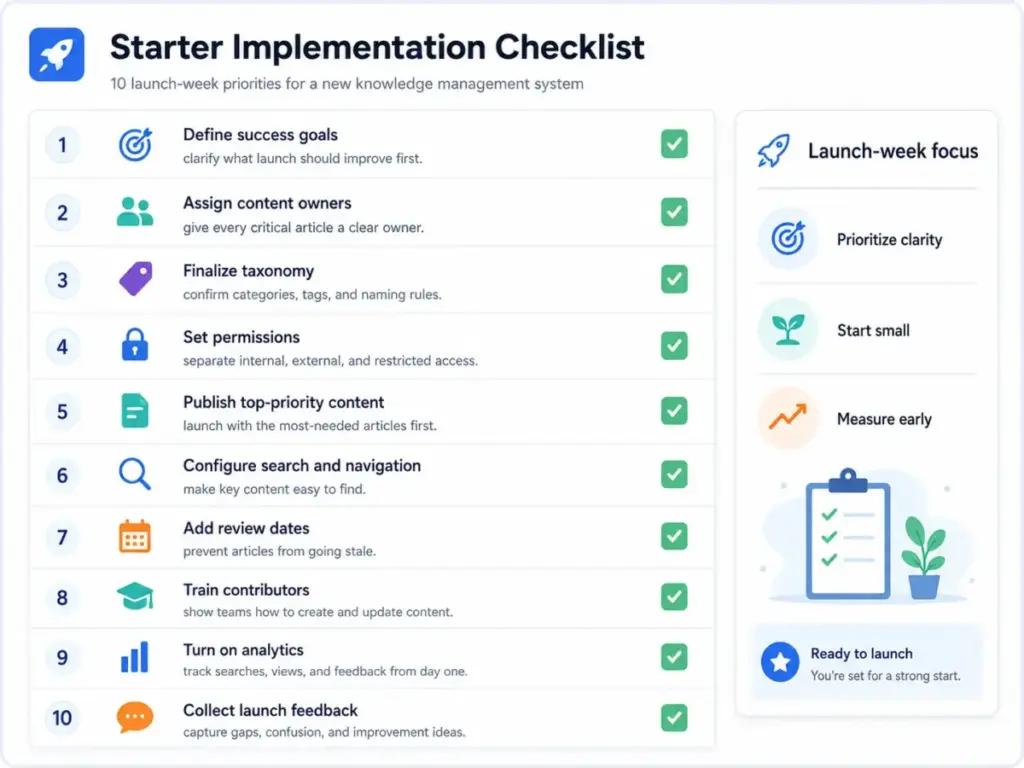
Step 1: Define the business problem
Start with a specific pain point. Repeated support tickets. Slow onboarding. Undocumented processes. Loss of expert knowledge when a senior team member leaves. Poor AI answer quality. Do not start with “we need a wiki.”
Step 2: Map your audiences and use cases
Employees, support agents, customers, partners, developers, HR, sales. Each audience needs different content, permissions, and delivery channels. Internal KM for SOPs and onboarding operates differently from external KM for customer self-service portals.
Step 3: Audit existing knowledge sources
Scan every location where information currently lives: shared drives, Slack channels, old wikis, CRM notes, support tickets, training materials, project retrospectives, and the heads of your subject-matter experts.
Step 4: Build a knowledge taxonomy
Define categories, tags, owners, article types, permissions, freshness rules, and a source-of-truth hierarchy. This taxonomy determines whether your search returns one answer or twelve conflicting ones.
Step 5: Choose the delivery layer
Select the tool category that fits your audience: internal wiki, customer help center, AI knowledge base, help desk knowledge module, or documentation platform. Section “Tools That Make Knowledge Management Easier” below maps five options to specific use cases.
Step 6: Assign ownership and review cycles
Every critical article needs an owner, an approval status, a review date, and a retirement path. Articles without owners become stale within 90 days. I see this pattern across every documentation platform I evaluate.
Step 7: Launch with a focused content set
Prioritize the top 20 questions, the highest-risk workflows, and the biggest support drivers. Migrating 500 old documents on day one guarantees nobody will trust the new system.
The Mistakes That Waste Your First Month
- Treating the tool as the strategy. Buying Confluence or Notion is not knowledge management. Without ownership, review cycles, and metrics, the tool becomes another abandoned folder.
- Importing every old document without cleanup. Migrating stale, duplicate, and contradictory content poisons the system from day one.
- Failing to assign content owners. Every article without an owner becomes an orphan. Orphaned articles decay silently.
- Ignoring tacit knowledge. The troubleshooting shortcuts in your senior engineer’s head are not captured by copying SOPs. Use exit interviews, incident retrospectives, expert shadowing, and support ticket analysis to surface undocumented know-how.
- Letting AI answer from stale content. AI search tools retrieve and summarize whatever you give them. If the source is outdated or wrong, the AI answer is confidently wrong.
- Skipping permissions and compliance. Publishing internal HR policies in a public help center is a compliance risk. Publishing customer-facing documentation behind an employee-only login breaks self-service.
- Measuring page views instead of business outcomes. A knowledge article with 10,000 views and a 15% helpfulness rating is worse than an article with 200 views and a 92% helpfulness rating.
- Building one giant wiki with no taxonomy. Without categories, owners, and search filters, your wiki becomes a document dump within six months.
Common Misconceptions
Misconception: Knowledge management is the same thing as a knowledge base.
Reality: A knowledge base is one tool or repository. KM is the broader operating model that includes people, processes, governance, content lifecycle, measurement, and technology.
Misconception: AI search fixes messy documentation.
Reality: AI search can retrieve and summarize information, but it still depends on source quality, permissions, ownership, review cycles, and clear metadata. APQC’s 2026 research and Gartner’s GenAI knowledge management category both emphasize that AI-ready KM requires curated, permission-aware, governed source knowledge.
Misconception: Only large enterprises need knowledge management.
Reality: Small teams need lightweight KM when one person owns critical knowledge, support questions repeat, onboarding depends on tribal knowledge, or documentation is scattered across tools.
Misconception: More articles automatically mean better knowledge management.
Reality: Useful KM depends on findability, freshness, accuracy, reuse, ownership, and whether people can apply the answer inside the workflow where they need it.
When to Use and When to Avoid
Use formal knowledge management when:
- Knowledge is scattered across many tools
- The same questions repeat across support, onboarding, or internal Slack channels
- Employees leave with critical know-how
- AI systems need trusted internal sources for RAG-based answers
- Compliance requires controlled access and audit trails
- Customers need self-service documentation
Avoid heavyweight KM software when:
- The team has fewer than a handful of stable documents
- There are no recurring knowledge handoffs
- Compliance risk is low
- There is no customer self-service or AI search requirement
In that case, a simple owned documentation habit (one Notion page with an owner, a review date, and a table of contents) is enough.
How to Measure Knowledge Management Success
| Metric | What it measures | Why it matters |
|---|---|---|
| Search success rate | Percentage of searches that return a clicked result | Shows whether users find answers |
| No-result search rate | Searches that return zero results | Identifies content gaps |
| Article helpfulness score | Reader rating on whether the article solved their problem | Measures quality, not volume |
| Ticket deflection rate | Support tickets avoided because users found self-service answers | Ties KM to cost savings |
| Agent resolution time | Average time for a support agent to resolve a case using the knowledge base | Measures internal KM value |
| Content freshness | Percentage of articles reviewed within their scheduled cycle | Prevents knowledge decay |
| Owner review completion | Percentage of assigned reviews completed on time | Measures governance health |
| Onboarding time | Days until a new hire reaches productivity benchmarks | Measures internal KM impact |
| AI groundedness rate | Percentage of AI answers that cite a verified source | Measures AI-ready knowledge quality |
What this means: If your team only tracks the number of published articles, you are measuring effort, not outcomes. The metrics above tell you whether the knowledge system is actually reducing repeated work and producing trustworthy answers.
What Good Knowledge Management Looks Like
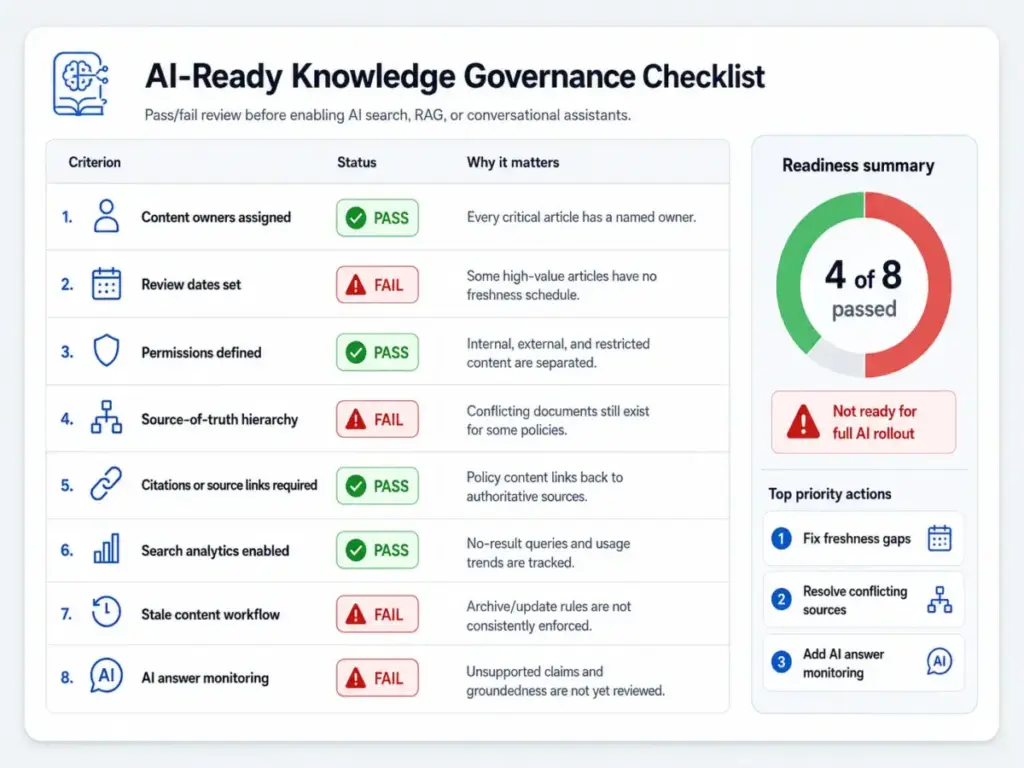
AI-Ready Knowledge Checklist
Before enabling AI search, RAG, or conversational assistants on your knowledge base, verify these governance foundations:
- [ ] Every article has an assigned owner
- [ ] Every article has a review date
- [ ] Permissions match audience boundaries (internal vs external vs restricted)
- [ ] Source-of-truth hierarchy is defined (which article wins when two contradict)
- [ ] Citations and source links are required for policy content
- [ ] Search analytics track no-result queries weekly
- [ ] Stale content process exists (merge, update, or archive)
- [ ] AI answer monitoring is active (unsupported-claim rate, groundedness score)
Without these foundations, AI search amplifies existing problems instead of solving them.
Tools That Make Knowledge Management Easier
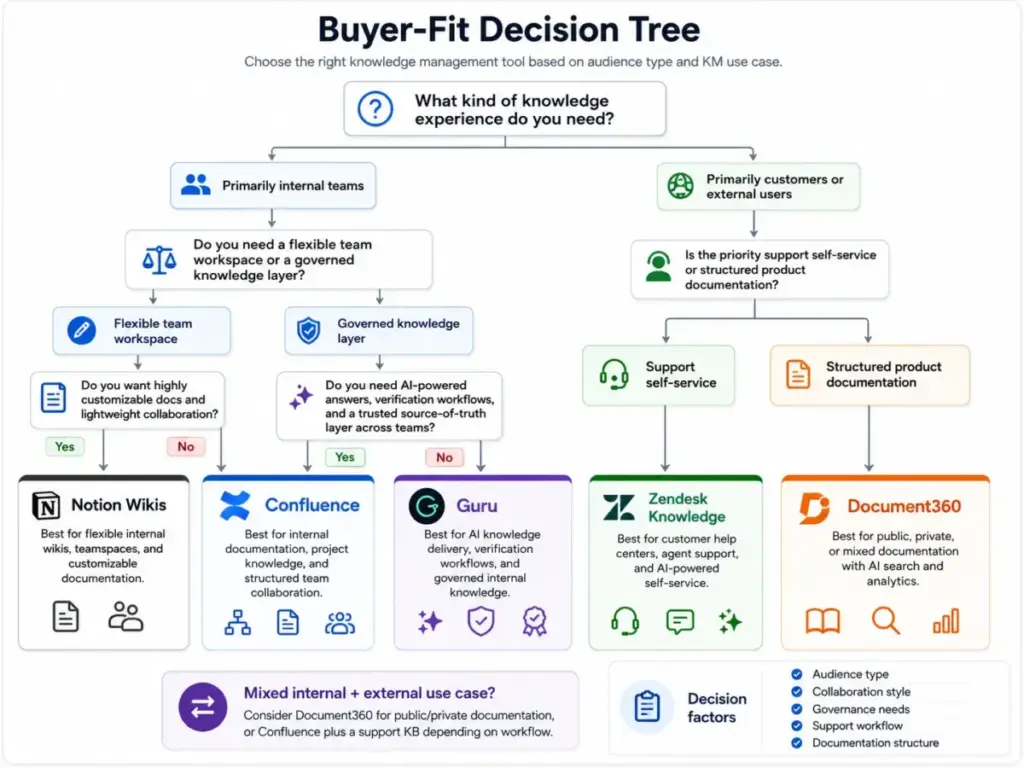
Five SaaS tools implement knowledge management in different ways. The right choice depends on your audience, content structure, and workflow.
| Tool | Best for | Pricing model (as of May 2026) | Key caveat |
|---|---|---|---|
| Atlassian Confluence | Internal team documentation, project wikis, Rovo AI search | Free (up to 10 users), Standard$5.42/user/month, Premium $10.44/user/month, Enterprise via sales (pricing page) | Standard includes Rovo Search, Chat, and Agents. Free plan caps at 10 users. |
| Zendesk Knowledge | Support-driven KM with help centers, agent workspace, AI | Suite Team starts at$55/agent/month annually, Suite Professional $115/agent/month, Enterprise $169/agent/month (pricing page) | Knowledge features are part of the Suite, not standalone. Suite Team includes one help center. Confirm regional pricing at checkout. |
| Guru | AI knowledge layer with verification workflows and usage signals | Custom enterprise pricing tailored to scale, knowledge complexity, and AI maturity (pricing page) | No public self-serve per-seat pricing. Request a quote. |
| Notion Wikis | Flexible internal wikis, docs, verified pages, teamspaces | Free (unlimited members), Plus$10/member/month, Business $20/member/month, Enterprise via contact (pricing page) | Enterprise Search is listed as beta. Verified pages and granular database permissions require Business plan or higher. |
| Document360 | Public, private, and mixed knowledge bases with AI search and analytics | Quote-based pricing with Business and Enterprise tiers (pricing page) | Exact public prices not disclosed. AI search suite includes Ask Eddy AI and federated search. Verify quote with sales before comparing final costs. |
Decision guide:
- Need an internal wiki for engineering and project docs? Start with Confluence.
- Need a customer self-service help center tied to your support workflow? Evaluate Zendesk.
- Need a governed AI knowledge layer with verification and usage signals? Evaluate Guru.
- Need a flexible all-in-one workspace for docs, wikis, and internal databases? Evaluate Notion.
- Need public product documentation with AI search and multilingual support? Evaluate Document360.
I evaluate these platforms regularly. One honest observation: the tools with the strongest AI search features still produce wrong answers when the source articles are stale, conflicting, or missing ownership. Governance first, AI second.
FAQ
What is meant by knowledge management?
Knowledge management is the structured process of capturing, organizing, governing, sharing, and improving an organization’s knowledge so people and AI systems can find the right information and trust it.
What is the difference between knowledge management and a knowledge base?
A knowledge base is a single repository of articles. Knowledge management is the broader operating model that includes people, processes, governance, ownership, measurement, and technology. A knowledge base is one tool inside a KM strategy.
What are the three types of knowledge in knowledge management?
The three types are explicit knowledge (documented manuals, SOPs, FAQs), tacit knowledge (experience-based judgment in people’s heads), and implicit knowledge (undocumented habits embedded in workflows). Capturing tacit and implicit knowledge is where most KM efforts struggle.
How does AI change knowledge management?
AI adds retrieval-augmented generation (RAG), conversational search, and automated article creation. These features depend on curated, permission-aware, and current source knowledge. AI amplifies source quality, whether good or bad. Teams that add AI search before fixing content governance get confidently wrong answers.
When should a company invest in knowledge management software?
Invest when the same questions repeat across support or onboarding, when employees leave with critical know-how, when documentation is scattered across five or more tools, when customers need self-service help, or when AI systems need trusted internal sources. If your team has fewer than a handful of stable documents and no recurring knowledge handoffs, a simple owned document is enough.
What are common knowledge management mistakes?
Treating the tool as the strategy, importing every old document without cleanup, failing to assign content owners, ignoring tacit knowledge, letting AI answer from stale content, skipping permissions, and measuring page views instead of business outcomes.
How do you measure knowledge management success?
Track search success rate, no-result queries, article helpfulness, ticket deflection, agent resolution time, content freshness, owner review completion, onboarding time, and AI groundedness rate. These metrics measure outcomes, not volume.
What is a source of truth for company knowledge?
A source of truth is the single, authoritative article or document that a team agrees represents the current, approved answer on a topic. When two articles contradict each other, the source-of-truth hierarchy determines which one wins. Without this hierarchy, search returns multiple conflicting answers.
How do support teams turn tickets into knowledge base articles?
Support teams review resolved tickets for recurring questions, extract the solution steps, write a reusable article with clear ownership and review dates, and tag it to the relevant category. Some help desk platforms include workflows that convert ticket resolutions into draft knowledge articles automatically.
Is Notion good enough for a company knowledge base?
Notion works well for flexible internal wikis, especially for teams under 50 who value customizable pages and synced blocks. Its limitations show at scale: Enterprise Search is currently in beta, granular permissions require the Business plan, and it lacks built-in review cycle enforcement and article helpfulness tracking. For customer-facing documentation or governed enterprise KM, purpose-built platforms like Document360 or Confluence offer more structure.