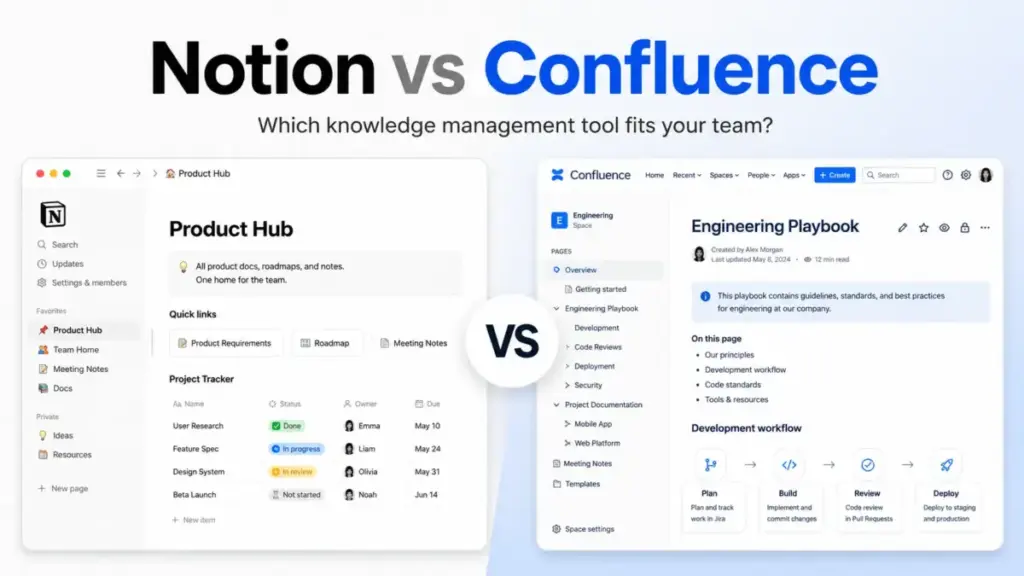
Your team wiki is a mess. Pages nobody owns, docs nobody updates, and a search bar that returns everything except the answer you need. That is the real reason teams compare Notion vs Confluence, and it is rarely about features alone. The deeper question is whether your knowledge base needs flexibility or governance first.
Notion is better for teams that want docs, databases, projects, forms, and lightweight workflows inside one workspace. Confluence is better for teams already running on Jira that need structured documentation, formal page permissions, and enterprise admin controls. I evaluated both tools across official documentation, pricing pages, plan-gated feature analysis, API documentation, and verified user feedback to map exactly where each tool wins, where it loses, and where neither fits.
This comparison covers pricing math at 5, 10, 25, and 50 users, AI capabilities, API limits, admin controls, migration difficulty, and the buyer scenarios most reviews skip.
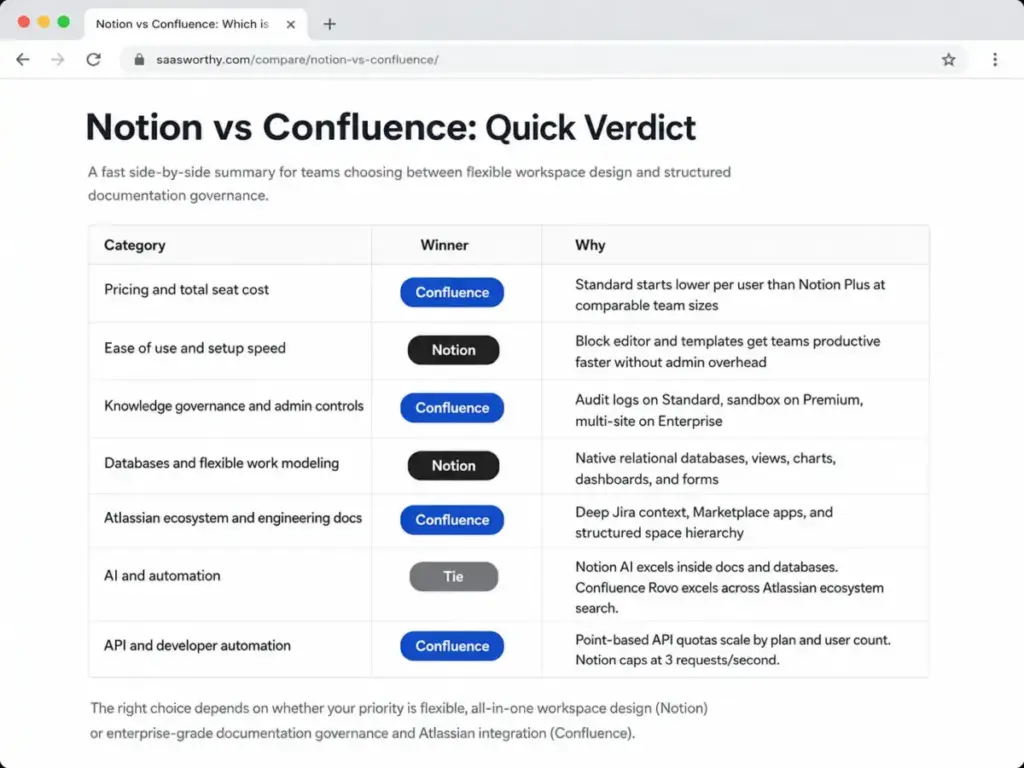
| Category | Winner | Why |
|---|---|---|
| Pricing and total seat cost | Confluence | Standard starts lower per user than Notion Plus at comparable team sizes |
| Ease of use and setup speed | Notion | Block editor and templates get teams productive faster without admin overhead |
| Knowledge governance and admin controls | Confluence | Audit logs on Standard, sandbox on Premium, multi-site on Enterprise |
| Databases and flexible work modeling | Notion | Native relational databases, views, charts, dashboards, and forms |
| Atlassian ecosystem and engineering docs | Confluence | Deep Jira context, Marketplace apps, and structured space hierarchy |
| AI and automation | Tie | Notion AI excels inside docs and databases. Confluence Rovo excels across Atlassian ecosystem search. |
| API and developer automation | Confluence | Point-based API quotas scale by plan and user count. Notion caps at 3 requests/second. |
Choose Notion if your team needs a flexible workspace that combines docs, databases, project tracking, and forms without Jira dependency. Choose Confluence if your team already lives in Atlassian, needs structured documentation governance, or requires enterprise-grade admin controls at scale.
How We Compared Notion and Confluence
This comparison uses Variation C (Workflow Showdown) structure to test both tools against real team workflows rather than listing features side by side.
I evaluated Notion and Confluence across official pricing pages, product documentation, API documentation, plan-gated feature matrices, and verified user feedback from Reddit and official customer quotes. Pricing for both tools comes from their official pricing pages, verified in May 2026. Confluence paid-plan pricing uses high-confidence third-party pricing captures that reference the official Atlassian pricing page, since Confluence renders some numeric values dynamically.
Comparison dimensions: pricing at scale, ease of use, knowledge governance, database capabilities, ecosystem fit, AI features, API limits, security and compliance, migration difficulty, and buyer-scenario fit.
Testing level: Official research only. I did not deploy either tool with a live team for this comparison, so workspace-specific performance observations (load times, notification behavior, offline reliability) should be confirmed through each vendor’s trial.
Review limitation: This comparison uses official pricing, public product documentation, third-party analysis, and verified user sentiment. I did not run a live multi-week team deployment of either tool, so workspace performance at scale and enterprise quote ranges should be confirmed with each vendor directly.
Notion vs Confluence at a Glance
| Notion | Confluence | |
|---|---|---|
| Best for | Startups, product teams, agencies wanting flexible docs + databases + projects | Engineering, IT, enterprise teams using Jira and needing structured wiki governance |
| Starting price | $0/member/month (Free) | $0 (Free, up to 10 users) |
| Practical team plan | Plus at$10/member/month (annual equivalent) | Standard at ~$5.42/user/month (annual equivalent, 1-10 user tier) |
| Free plan limits | Unlimited pages for individuals, limited collaborative blocks for 2+ members, 5 MB upload, 7-day history | Up to 10 users, 2 GB storage, community support |
| AI features | Notion AI Core, Meeting Notes, Agents, Enterprise Search (plan-gated) | Rovo AI for search, chat, agents, drafting, summaries (plan-gated) |
| Setup difficulty | Low to Medium | Medium to High |
| Main strength | Block-based flexibility, native databases, tool consolidation | Structured wiki, Jira integration, enterprise admin controls |
| Main limitation | Enterprise controls locked behind Enterprise plan | Value drops sharply without Jira/Atlassian dependency |
| Parent company | Notion Labs, Inc. | Atlassian |
Workflow 1: Building a Team Knowledge Base From Scratch
Notion wins this workflow. The gap is meaningful for teams under 25 people.
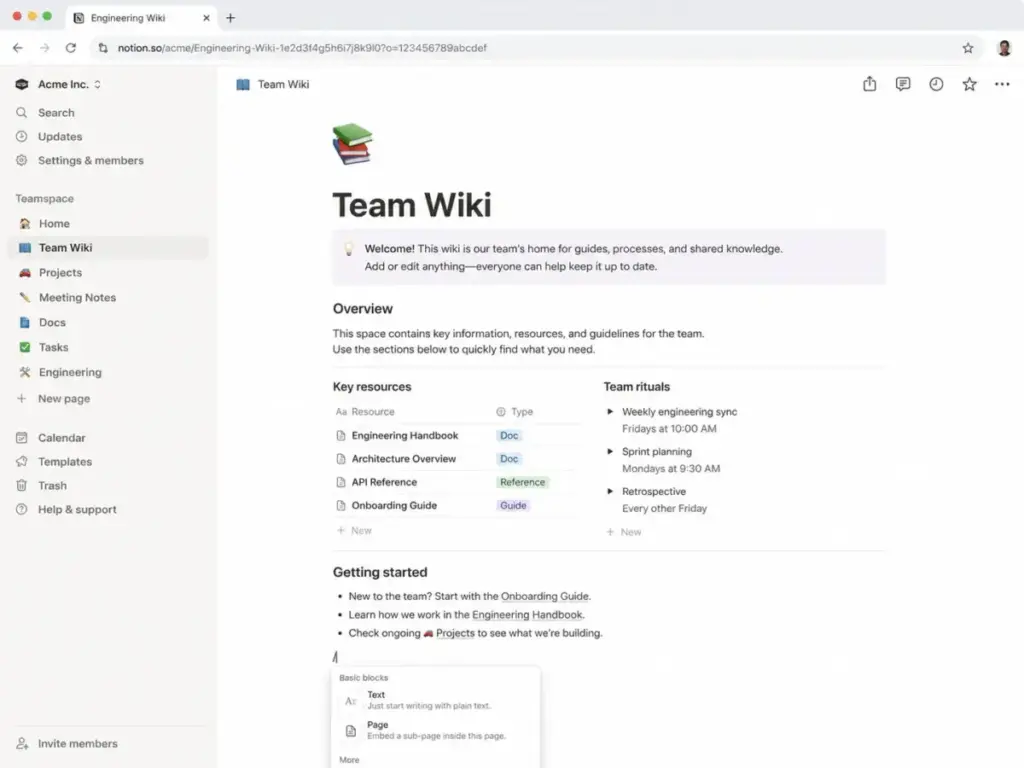
A 10-person product team starting a new knowledge base faces a clear fork. In Notion, the setup path runs through templates, nested pages, and the block editor. You pick a teamspace template, drag blocks around, and start writing. The learning curve is low because the interface treats everything as a block: text, databases, embeds, toggles, callouts. There is no separate admin panel to configure before your first page exists.
Confluence takes a different path. You create a space, define a page tree, set permissions, and then start writing. For teams already inside Atlassian, this feels natural because the space-and-page hierarchy mirrors how Jira organizes projects. For teams without Atlassian context, the setup overhead feels heavier than it needs to be.
One thing I noticed during evaluation: Notion’s free plan supports unlimited pages and blocks for individual users, but collaborative workspaces hit a block limit for teams of 2 or more. Once that limit triggers, team members can read and edit existing blocks but cannot add new content until upgrading to Plus. Confluence Free supports up to 10 users with 2 GB storage, no block limits, but only community support.
The practical implication: a 5-person startup can run Confluence Free indefinitely if 2 GB storage and community support are acceptable. The same team on Notion Free will hit collaborative block limits faster than expected, pushing toward the $10/member/month Plus plan.
Winner: Notion for speed to first useful page. Confluence wins only if the team already has Atlassian context.
Workflow 2: Structured Documentation for Engineering Teams
Confluence wins this workflow. The advantage compounds with team size.
Engineering teams writing product specs, runbooks, architecture docs, and incident postmortem pages need structure that holds up at 50+ contributors. Confluence’s space-and-page-tree model enforces this structure by default. Each space has a defined hierarchy. Pages inherit permissions from their parent space unless overridden. The page tree gives every document a predictable address.
Notion can do this, but the architecture depends entirely on how the team builds it. There is no enforced hierarchy. A team of 5 can keep a Notion workspace clean. A team of 50 produces nested pages, orphan databases, and duplicate teamspaces unless someone actively governs the workspace taxonomy. That governance cost is invisible on the pricing page but real in practice.
The Jira factor changes the calculus entirely. Confluence pages can reference Jira tickets, embed Jira filters, and display Jira roadmaps natively. Engineering teams using Jira for sprint planning get bidirectional context between their specs and their tickets without leaving Atlassian. Notion connects to Jira through an integration, but the connection is shallower: you see synced data, not native context.
Andrei Tuch, Atlassian Product Owner at Riverty, puts it this way on the official Confluence page: “Confluence has been massively easier to use than Sharepoint, and it is more consistent and easier to navigate than Google Docs.”
Winner: Confluence for engineering documentation at scale, especially with Jira.
Workflow 3: Flexible Project Tracking With Docs and Databases
Notion wins this workflow. Confluence does not compete here.
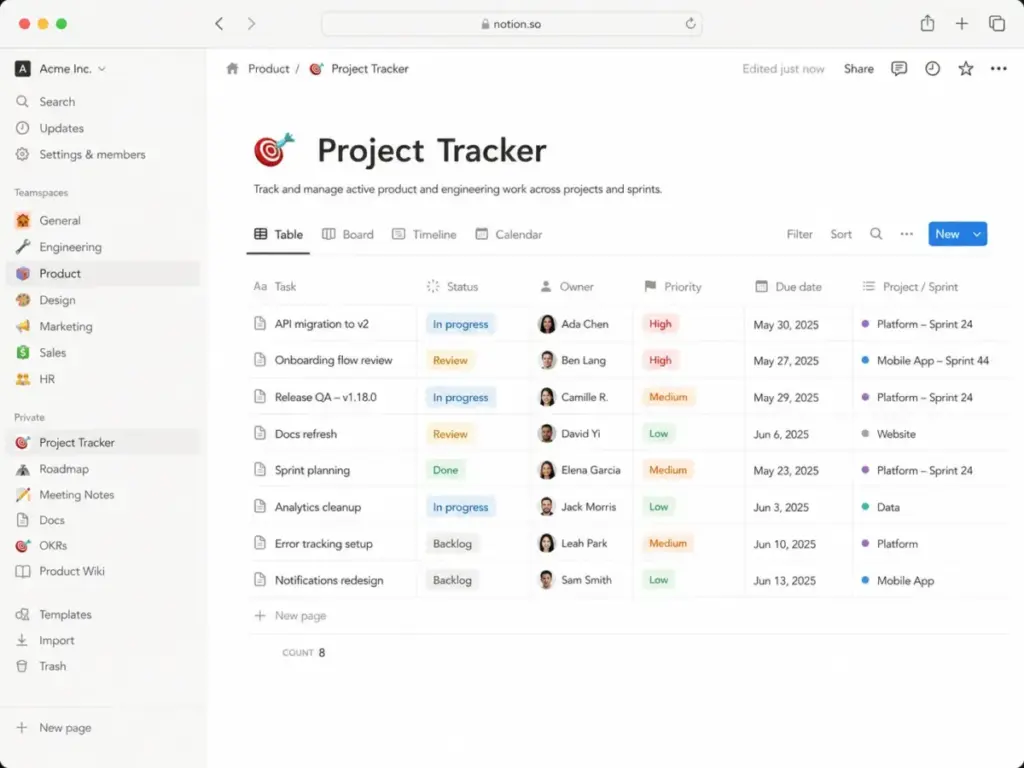
Notion’s native databases set it apart from every traditional wiki tool, including Confluence. You can create a database with custom properties (text, select, multi-select, date, person, relation, rollup, formula), then view it as a table, board, calendar, timeline, gallery, or chart. Each database row is also a full page. Filters, sorts, and grouped views let teams build CRM-style trackers, content calendars, sprint boards, and OKR dashboards without leaving the workspace.
According to Notion’s official pricing page, the Plus plan at $10/member/month includes unlimited collaborative blocks, unlimited file uploads, unlimited charts, custom forms, and custom sites. The Business plan at $20/member/month adds Notion Agent, AI Meeting Notes, Enterprise Search beta, SAML SSO, granular database permissions, and private teamspaces.
Confluence added database-like features recently, but the implementation is narrower. Confluence databases do not support relational properties, rollups, formulas, or the multi-view flexibility that Notion provides. For teams that need docs plus structured data tracking, Notion eliminates the need for a separate project management tool in many cases.
Nick Erdenberger from OpenAI’s GTM team, quoted on Notion’s pricing page, captures this: “There is power in a single platform where you can do all your work out of. Notion is that single place.”
The tradeoff: Notion’s flexibility creates governance debt at scale. Without disciplined workspace architecture, databases multiply, naming conventions drift, and search results degrade. I suspect most teams above 30 people will need a dedicated workspace admin to keep things usable.
Winner: Notion for any team that needs docs and structured data in one workspace.
Notion vs Confluence Pricing: The Real Numbers
Notion’s pricing page lists four core plans. Confluence’s pricing page lists four tiers with pricing that varies by user count and billing mode. Here is what the math looks like at team scale.
Plan-by-Plan Breakdown
Notion Plans (as of May 2026):
| Plan | Price | Key Inclusions | Main Gate |
|---|---|---|---|
| Free | $0/member/month | Unlimited pages for individuals, limited collaborative blocks for teams, 5 MB upload, 7-day history, 10 guests | Collaborative block limits for 2+ members |
| Plus | $10/member/month | Unlimited blocks, uploads, charts, forms, sites, basic connections, 30-day history, unlimited guests | No SAML SSO, no Notion Agent |
| Business | $20/member/month | Notion Agent, AI Meeting Notes, Enterprise Search beta, SAML SSO, granular DB permissions, private teamspaces, 90-day history | No SCIM, no audit log, no DLP/SIEM |
| Enterprise | Custom | Zero data retention with LLMs, SCIM, audit log, DLP/SIEM, domain management, workspace analytics, premium support | Sales-led pricing |
Confluence Plans (as of May 2026):
| Plan | Price | Key Inclusions | Main Gate |
|---|---|---|---|
| Free | $0 (up to 10 users) | Pages, spaces, community support, 2 GB storage | 10-user cap |
| Standard | ~$5.42-$6.40/user/month | 250 GB storage, page permissions, audit logs, data residency, 9-5 support, public links | No unlimited storage, no 24/7 support |
| Premium | ~$10.44-$12.30/user/month | Unlimited storage, 24/7 support, 99.9% SLA, sandbox, IP allowlisting, analytics, release tracks | No multi-site, no enterprise support |
| Enterprise | Custom (annual) | Multi-site architecture, advanced analytics, phone support, 30-min critical response | Sales-led, annual contract |
Confluence pricing varies by user tier and billing mode. Check the official Confluence pricing page for current rates before purchase.
Cost at Scale
| Team Size | Notion Plus (annual) | Confluence Standard (annual est.) | Cheaper Option |
|---|---|---|---|
| 5 users | $50/month | ~$27/month (or $0 on Free) | Confluence |
| 10 users | $100/month | ~$54/month (or $0 on Free) | Confluence |
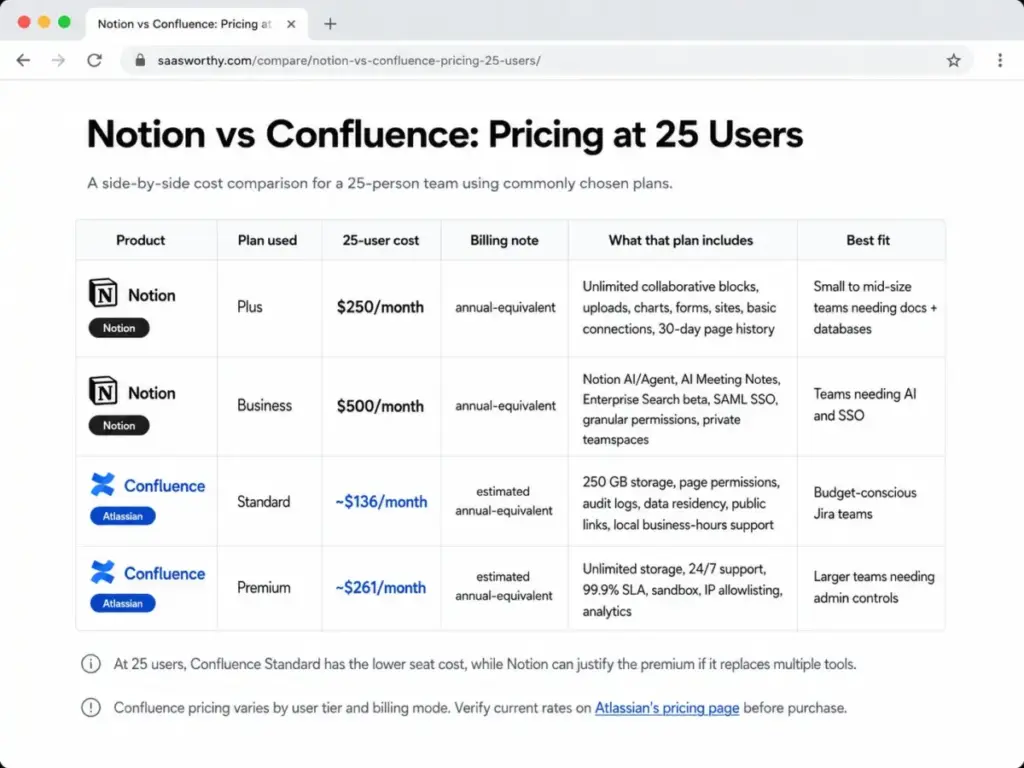
| 25 users | $250/month | ~$136/month | Confluence |
| 50 users | $500/month | ~$271/month | Confluence |
Confluence wins on raw seat cost at every team size when comparing Standard against Notion Plus. The gap is roughly 2:1 at 25+ users.
Where Pricing Starts to Pinch
The seat cost comparison misses the full picture. Notion’s value proposition is tool consolidation: if it replaces a separate project tracker, form builder, wiki, and lightweight CRM, the per-seat premium pays for itself. Confluence’s value grows when the team already pays for Jira, because the marginal cost of adding Confluence to an Atlassian stack is lower than adding Notion as a separate platform.
Hidden costs on the Notion side: Business plan required for SAML SSO and Notion Agent ($20/member/month). Enterprise required for SCIM, audit log, DLP/SIEM, and zero data retention. Custom Agents cost $10 per 1,000 monthly Notion credits after the trial. Custom site domains add $8-10/month per domain.
Hidden costs on the Confluence side: Premium required for unlimited storage, 24/7 support, 99.9% SLA, sandbox, and IP allowlisting. Atlassian Guard is a separate product for company-wide SAML, SSO, and enforced 2FA. Marketplace apps can add per-user costs. Enterprise pricing is annual and sales-led.
Feature Gates: What Each Plan Actually Unlocks
The plan you need depends on which features your team requires. This table maps the most decision-relevant features to their plan gates.
| Feature | Notion Plan Gate | Confluence Plan Gate | Buyer Implication |
|---|---|---|---|
| SAML SSO | Business ($20/member/month) | Via Atlassian Guard (separate product) | Both require paid upgrades for SSO |
| SCIM provisioning | Enterprise (custom) | Via Atlassian Guard (separate) | Enterprise-only on both sides |
| Audit logs | Enterprise (custom) | Standard (~$5.42/user/month) | Confluence exposes audit logs much earlier |
| Unlimited storage | Plus ($10/member/month) | Premium (~$10.44/user/month) | Notion includes unlimited uploads on Plus. Confluence caps at 250 GB on Standard. |
| 24/7 support | Enterprise (custom) | Premium (~$10.44/user/month) | Confluence offers 24/7 support two tiers below Notion |
| 99.9% uptime SLA | Enterprise (custom) | Premium (~$10.44/user/month) | Significant gate difference for reliability-sensitive teams |
| AI features | Limited trial on Free/Plus, full on Business/Enterprise | Rovo AI across plans (plan-gated depth) | Both gate AI seriously behind paid plans |
| Sandbox environment | Not available | Premium (~$10.44/user/month) | Confluence-only feature for change management |
| IP allowlisting | Enterprise (custom) | Premium (~$10.44/user/month) | Another significant gate gap |
| Native databases | All plans | Basic (no relational features) | Notion advantage across all tiers |
The pattern is clear: Confluence exposes enterprise-grade admin controls (audit logs, 24/7 support, SLA, sandbox, IP allowlisting) at Standard and Premium. Notion locks comparable controls behind Enterprise, which requires a sales conversation.
For a 25-person team that needs audit logs, 24/7 support, and an uptime SLA, Confluence Premium at roughly $261/month delivers what Notion requires an Enterprise contract to match.
AI Features: Notion AI vs Confluence Rovo
Both platforms invested heavily in AI. The implementations serve different use cases.
Notion AI works inside the workspace: drafting, summarizing, translating, extracting action items from meeting notes, answering questions about workspace content, and running custom agents that automate document workflows. The Business plan at $20/member/month includes Notion Agent, AI Meeting Notes, and Enterprise Search beta. Custom Agents cost $10 per 1,000 monthly Notion credits after the free trial.
Confluence Rovo works across the Atlassian ecosystem: searching across Confluence, Jira, and connected tools, answering questions about organizational knowledge, drafting content, and creating AI agents that automate Atlassian workflows. Rovo’s strength is cross-product search and context, not just in-document AI.
Neither tool clearly wins. Notion AI is better for teams that do most of their work inside Notion and want AI that operates on docs, databases, and meeting notes. Rovo is better for teams that need AI to surface answers from across Jira tickets, Confluence pages, and third-party tools connected through the Atlassian Teamwork Graph.
The cost comparison matters: Notion’s Custom Agents introduce usage-based costs beyond seat pricing. Confluence’s Rovo features are plan-gated but do not have a separate credit system. Teams planning heavy AI agent usage should model the credit cost before choosing Notion Business.
Winner: Tie. The right AI depends on whether your work lives inside one workspace (Notion) or across an Atlassian ecosystem (Confluence).
API and Automation Limits
Teams building integrations, running sync tools, or automating content workflows need to understand the API constraints.
Notion’s official API documentation states an average rate limit of 3 requests per second per connection. HTTP 429 responses include Retry-After headers. The documentation notes that future plan-specific rate limits are possible. For teams syncing thousands of pages or running migration scripts, 3 requests/second creates a meaningful bottleneck.
Confluence Cloud’s REST API uses a point-based rate limit system. According to Atlassian’s developer documentation, the default global pool is 65,000 points/hour. Per-tenant pools scale by plan and user count using formulas, capped at 500,000 points/hour. Standard, Premium, and Enterprise each have different per-tenant pool calculations.
For automation-heavy teams, Confluence’s model is more predictable and scalable. Notion’s per-connection limit means parallel connections help, but each connection still caps at 3 requests/second. Teams migrating large wikis or running continuous sync workflows will hit Notion’s rate limits sooner.
Winner: Confluence for API-heavy automation and migration workflows.
Security, Compliance, and Admin Controls
Both tools offer enterprise-grade security, but the plan gates differ significantly.
Notion security stack: SOC 2 Type 2, ISO 27001/27701/27017/27018, GDPR-aligned privacy program, HIPAA support with BAA (Enterprise), BSI C5, encryption, SAML SSO (Business), SCIM (Enterprise), audit logs (Enterprise), DLP/SIEM connections (Enterprise), and a 99.9% uptime guarantee.
Confluence security stack: Atlassian Trust Center provides SOC 2, ISO 27001, and GDPR resources. Confluence Standard includes audit logs and data residency. Premium adds IP allowlisting, sandbox, release tracks, 99.9% SLA, and 24/7 support. Enterprise adds multi-site architecture and advanced compliance controls.
The critical difference: Confluence Standard (the lowest paid tier) includes audit logs and data residency. Notion requires Enterprise (the highest tier) for audit logs, SCIM, and DLP/SIEM. For regulated organizations, this gate difference translates directly into cost.
Atlassian Guard is a separate product for centralized identity and security controls (SAML, SSO, enforced 2FA) across all Atlassian products. Teams needing these controls will pay for Guard on top of their Confluence plan.
Winner: Confluence for earlier access to admin controls and compliance features.
Migration and Switching Costs
Switching between Notion and Confluence is not just an export/import exercise. The real cost is governance cleanup.
| Direction | Main Risk | Export/Import | Cleanup Required | Difficulty |
|---|---|---|---|---|
| Notion → Confluence | Flexible pages, nested blocks, databases, and relations do not map cleanly to Confluence spaces and page trees | Notion exports as HTML, Markdown, CSV, PDF. Confluence imports through Atlassian tooling. | Database structures need rebuilding. Relations and rollups disappear. Custom views need recreation. | Medium |
| Confluence → Notion | Spaces, page trees, macros, and Marketplace app content need restructuring for Notion’s flat/nested model | Confluence exports through space-level tooling. Quality depends on macros, attachments, and apps. | Permission mapping, stale page cleanup, content deduplication, macro replacement. | Medium to High |
The biggest migration cost is not technical. It is deciding what to keep, what to archive, who owns each page, and how to rebuild the information architecture in the new tool. Teams with 500+ pages should budget 2-4 weeks of admin time for cleanup regardless of direction.
For teams rebuilding that architecture from scratch, the best knowledge base software category may be a better starting point than another point-to-point migration.
One practical tip: before migrating, audit your current wiki for pages with zero views in the past 90 days. Most teams discover that 30-50% of their wiki content is effectively dead. Migrating dead pages wastes time and pollutes the new workspace.
Where Notion Wins
Notion is the better choice in these scenarios:
- 5-person startup building its first knowledge base. Notion starts faster, combines docs and databases, and can replace separate tools for project tracking, forms, and lightweight CRM. The learning curve is measured in hours, not days.
- Marketing or operations team building trackers, SOPs, and calendars. Notion databases, forms, dashboards, and pages let teams turn SOPs into working systems without Jira-heavy structure.
- Teams that want tool consolidation. If Notion replaces a separate wiki, project tracker, form builder, and basic site builder, the per-seat premium over Confluence pays for itself in reduced tool sprawl.
- Teams that need relational databases inside their docs. No traditional wiki, including Confluence, matches Notion’s database depth for lightweight data modeling.
- Non-technical teams that prioritize ease of adoption. The block editor requires zero training for anyone familiar with modern doc tools.
Where Confluence Wins
Confluence is the better choice in these scenarios:
- 25-person product team already using Jira. Confluence keeps specs, tickets, spaces, permissions, and Atlassian work context connected. The integration depth reduces context-switching.
- Regulated enterprise requiring audit trails and admin controls. Confluence Standard includes audit logs and data residency. Premium adds 24/7 support, 99.9% SLA, sandbox, and IP allowlisting. These features cost significantly less than Notion Enterprise.
- Teams that need structured documentation governance from day one. Confluence’s space-and-page-tree model enforces hierarchy. Notion requires teams to build and maintain their own governance.
- Automation-heavy teams syncing thousands of pages through API. Confluence’s point-based API quotas scale by plan and user count. Notion’s 3 requests/second limit constrains heavy sync workflows.
- Organizations that need base seat cost minimized. Confluence Standard at ~$5.42/user/month is roughly half of Notion Plus at $10/member/month for comparable team collaboration features.
Who Should Choose Notion
Choose Notion if:
- Your team needs docs, databases, projects, forms, and sites in one workspace
- You do not use Jira and do not plan to adopt the Atlassian ecosystem
- You value fast setup and low onboarding friction over formal governance
- Your team is under 30 people and can maintain workspace discipline without dedicated admin
- You want relational databases, charts, dashboards, and flexible views inside your wiki
Who Should Choose Confluence
Choose Confluence if:
- Your team already uses Jira, Bitbucket, or other Atlassian tools
- You need audit logs, data residency, or admin controls on a Standard-tier budget
- Your organization requires 24/7 support and a 99.9% uptime SLA without enterprise-tier pricing
- You need structured spaces and page trees that enforce documentation hierarchy
- Your team has 25+ people and needs governance built into the platform, not bolted on
Who Should Avoid Both
Neither Notion nor Confluence is the right choice for every team. Consider alternatives if:
- You need a customer-facing help center or public knowledge base. Both tools can publish pages publicly, but dedicated platforms like Document360 or GitBook offer better SEO controls, versioning, and support documentation workflows.
- You want a lightweight team wiki without database or project features. Nuclino or Slite offer simpler wiki experiences with less feature bloat.
- You need task management as the primary function. ClickUp or Asana handle project execution better than either Notion or Confluence, even though Notion’s databases can approximate lightweight project tracking.
- You need a verified internal knowledge card system for frontline teams. Guru is purpose-built for sales, support, and revenue teams that need verified knowledge cards accessible inside workflows.
Notion vs Confluence Alternatives
| Alternative | Best For | Starting Price | Choose If |
|---|---|---|---|
| ClickUp | Teams that want docs + tasks + goals + dashboards in one platform | Free, paid from $7/member/month | You need execution management, not just documentation |
| Guru | Sales and support teams needing verified knowledge cards | Contact for pricing | Knowledge verification and frontline enablement matter more than databases |
| Document360 | Customer-facing knowledge bases and support docs | From $199/project/month | Public help center structure, SEO, and versioning are primary needs |
Final Verdict: Notion vs Confluence in 2026
There is no universal winner. The right tool depends on your team’s existing stack, governance needs, and whether you value flexibility or structure more.
For startups and small teams (under 15 people): Notion. The setup speed, database flexibility, and tool consolidation value outweigh Confluence’s lower seat cost. Most small teams will not need the admin controls that Confluence exposes earlier.
For Jira-heavy engineering and product teams: Confluence. The Atlassian ecosystem integration, structured spaces, and earlier access to enterprise controls create more value than Notion’s flexibility for teams already invested in Atlassian.
For budget-constrained teams at 25+ users: Confluence on base seat cost. Notion if replacing 2+ separate tools.
For regulated organizations needing compliance controls: Confluence. Audit logs on Standard, 99.9% SLA on Premium, and multi-site architecture on Enterprise are accessible without custom pricing conversations.
For teams that need docs plus relational databases: Notion. No contest. Confluence’s database features do not match Notion’s depth.
Before committing, check Notion’s pricing page and Confluence’s pricing page for current rates, and model the total cost including plan-gated features your team actually needs.
Questions I Would Ask Before Buying
Before choosing between Notion and Confluence, ask:
- Which plan tier unlocks the admin controls (SSO, SCIM, audit logs) our compliance team requires?
- How many integrations and connections do we need, and which plan gates them?
- Does our team use Jira today, and how deeply does documentation need to connect to ticket workflows?
- What is the realistic API throughput we need for migration and ongoing sync?
- How much workspace governance overhead can our team absorb without a dedicated admin?
Frequently Asked Questions
Is Notion better than Confluence?
Notion is better for teams that want flexible docs, native databases, and tool consolidation in one workspace. Confluence is better for Jira-dependent teams needing structured wiki governance and enterprise admin controls. The winner depends on whether flexibility or governance matters more to your team.
Which is cheaper, Notion or Confluence?
Confluence is cheaper on base seat cost. Confluence Standard starts at approximately $5.42/user/month (annual, 1-10 user tier) compared to Notion Plus at $10/member/month. At 25 users, Confluence Standard costs roughly half of Notion Plus. Notion can be cheaper overall if it replaces multiple separate tools.
Can Notion replace Confluence?
Yes, if your team does not depend on Jira integration or Atlassian ecosystem tools. Notion covers docs, databases, projects, forms, and lightweight workflows. Teams migrating from Confluence will need to rebuild space hierarchies, recreate permissions, and accept that Jira-native context disappears.
Is Confluence better for engineering teams?
Confluence is typically better for engineering teams that already use Jira. The bidirectional context between Confluence pages and Jira tickets reduces documentation drift. Teams not using Jira gain less value from Confluence’s engineering documentation strengths.
Does Notion integrate with Jira?
Yes, through a connection that syncs Jira data into Notion databases. The integration shows synced ticket data but does not provide the native bidirectional context that Confluence offers. Teams needing deep Jira-doc integration will find Confluence’s native connection stronger.
Which has better AI features, Notion or Confluence?
Both platforms offer competitive AI. Notion AI works inside docs, databases, and meeting notes with custom agents. Confluence Rovo works across the Atlassian ecosystem for search, answers, and cross-product context. Notion requires Business plan for full AI access. Both gate AI capabilities behind paid tiers.
How hard is it to migrate from Confluence to Notion?
Migration difficulty is medium to high. The technical export/import is manageable, but the real cost is governance cleanup: flattening space hierarchies, mapping permissions, replacing macros, deduplicating stale content, and rebuilding information architecture. Budget 2-4 weeks of admin time for teams with 500+ pages.
Which has better security, Notion or Confluence?
Both offer strong security (SOC 2, ISO 27001, encryption). The key difference is plan gating. Confluence Standard includes audit logs and data residency. Notion requires Enterprise for audit logs, SCIM, and DLP/SIEM. For teams needing compliance controls on a mid-tier budget, Confluence provides earlier access.
Is Confluence worth it without Jira?
Confluence works without Jira, but its strongest value proposition depends on Atlassian ecosystem integration. Without Jira, teams may find the admin overhead and space-configuration requirements heavier than necessary. Notion or simpler wiki tools often deliver better value for non-Atlassian teams.
Which is better for product requirements documents?
Both work for PRDs. Notion excels when PRDs need linked databases (user stories, acceptance criteria, stakeholder tracking) with multiple views. Confluence excels when PRDs need to reference Jira epics, embed sprint boards, and fit within a governed documentation hierarchy.