Atlassian reports that knowledge workers waste 25% of their time searching for answers buried across Slack threads, stale wikis, and scattered Google Docs. That wasted quarter of every workday is the cost of missing or broken internal documentation. The problem is not that teams refuse to write things down. The problem is that most companies treat internal documentation as a one-time writing project, then watch it decay into an unreliable, unsearchable pile within months.
This guide explains what internal documentation actually means in 2026, why the real challenge is maintenance rather than creation, which types matter, how to build a system that stays trusted, and which knowledge base tools fit different team sizes and maturity levels.
Quick Answer: What is internal documentation?
Internal documentation is the governed practice of creating, organizing, maintaining, and distributing company knowledge for employees and internal collaborators. It includes written processes, policies, technical references, project records, runbooks, SOPs, meeting decisions, and internal knowledge base articles that help people do their jobs consistently. Unlike external documentation built for customers, internal documentation is restricted to staff and authorized collaborators.
What Internal Documentation Actually Means
Internal documentation operates at three levels, depending on who is reading and why.
For a new hire, internal documentation is the collection of guides, policies, and how-to articles that answer “how does this company work?” without requiring a colleague to explain it in real time. A new support agent reads the escalation runbook. A new engineer reads the deployment checklist. A new HR coordinator reads the benefits policy.
For an operations manager, internal documentation is a system that converts implicit knowledge (the things people know but have not written down) into explicit, searchable, governed knowledge assets. According to IBM’s knowledge management framework, this transformation from tacit to explicit knowledge is the foundation of organizational knowledge management.
For a compliance or IT leader, internal documentation is a controlled layer of approved, permission-aware, version-tracked content that supports audit trails, access governance, AI search accuracy, and regulatory compliance. ISO 30401:2018 guidance warns that buying a technology system alone is not enough: ownership, culture, scope, review, and feedback loops determine whether the system works.
I verified pricing and product documentation for every tool mentioned in this guide through official product pages as of May 2026. This article is based on official documentation, published pricing, and verified product feature pages.
How Internal Documentation Works
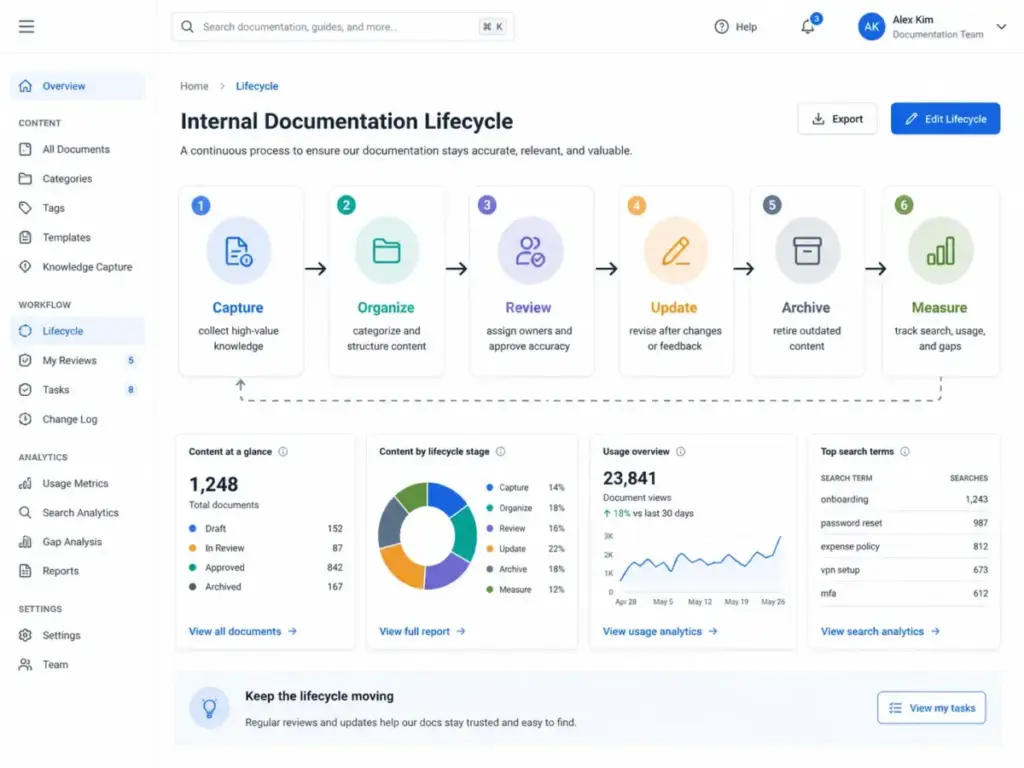
Internal documentation is not a document. It is a lifecycle. Most SERP guides describe the creation step and stop. The real system includes capture, organize, review, update, archive, and measure.
The Documentation Lifecycle
- Identify high-value knowledge. Start with recurring questions, risky procedures, onboarding blockers, critical systems, and customer-impacting workflows. Not everything belongs in documentation.
- Assign an owner. Every important page needs a named owner and a review schedule. Ownerless documentation decays fastest.
- Create using templates. Standardize formats by document type: SOP, runbook, policy, decision record, project brief, incident postmortem, and how-to guide.
- Apply permissions. Keep general operating knowledge discoverable. Restrict HR, security, finance, legal, and roadmap content by role.
- Publish and link. Place the page in the right taxonomy node, add search metadata, and link to related pages.
- Review on a cadence. Set quarterly or biannual review reminders. Pages without a review date are pages nobody trusts.
- Update when triggered. Product releases, incident postmortems, process changes, onboarding feedback, and team restructures all trigger documentation updates.
- Archive or remove. Old pages that no longer apply clutter search results and mislead AI answers. Archive with a clear notice or delete entirely.
- Measure usage. Track search terms, failed searches, page views, helpfulness ratings, stale-page counts, and ticket deflection. Documentation nobody finds is documentation that does not exist.
Where things go wrong: most teams execute steps 1 through 5 and skip steps 6 through 9. The result is a wiki that looks comprehensive during launch month and becomes a liability by month six. I see this pattern repeatedly across knowledge base deployments, including in tools that are well designed for documentation.
Internal Documentation vs External Documentation
The distinction matters because it shapes permissions, governance, tone, and tooling decisions.
| Dimension | Internal documentation | External documentation |
|---|---|---|
| Audience | Employees, contractors, internal collaborators | Customers, partners, public users |
| Access | Restricted by role, team, or department | Public or login-gated for customers |
| Tone | Direct, operational, assumes company context | Clear, neutral, assumes no context |
| Examples | SOPs, HR policies, runbooks, decision records | Help center articles, API docs, user guides |
| Governance | Owner, review cadence, version history, audit trail | Editorial review, public accuracy standards |
| AI search risk | Stale internal docs generate wrong AI answers for employees | Stale external docs generate wrong answers for customers |
What this means: the mistake most teams make is treating internal and external documentation as the same project. They use the same tool, the same structure, the same permissions model. In practice, internal documentation requires stricter ownership, faster review cycles, and tighter access control because internal readers trust it as the source of truth for their daily work. When an internal runbook is outdated, the consequence is an operational mistake, not just a confused customer.
Permission Levels for Internal Documentation
| Level | Description | Example content | Access |
|---|---|---|---|
| Company-wide | Discoverable by everyone | Operating norms, office policies, IT setup guides | All employees |
| Team-only | Visible to a specific team | Sprint rituals, team goals, backlog conventions | Team members |
| Restricted | Sensitive content with limited access | Security policies, termination procedures, board notes | Named individuals |
| System-of-record | Authoritative, version-controlled | Compliance procedures, SOC 2 documentation, financial controls | Compliance + leadership |
Types of Internal Documentation
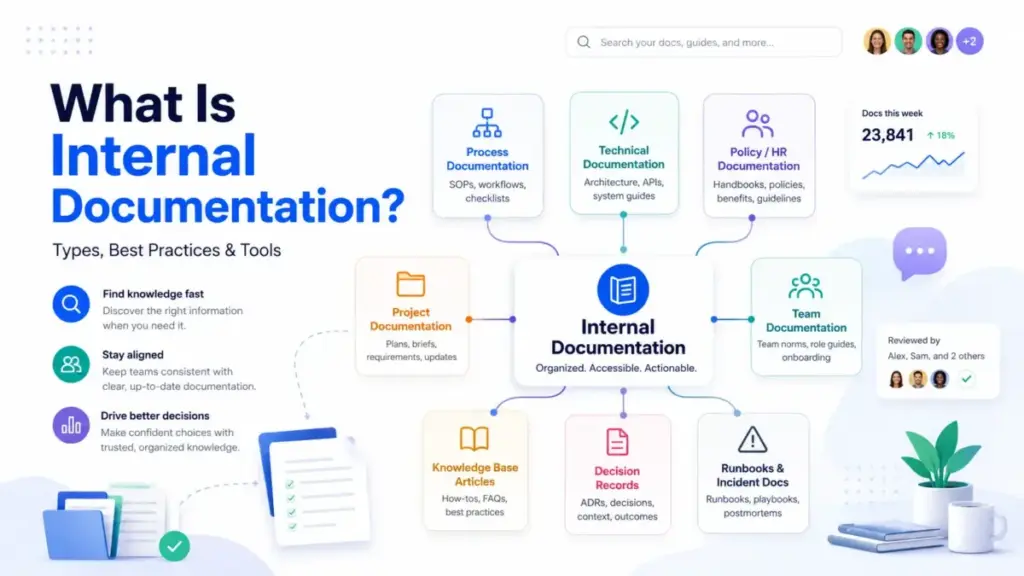
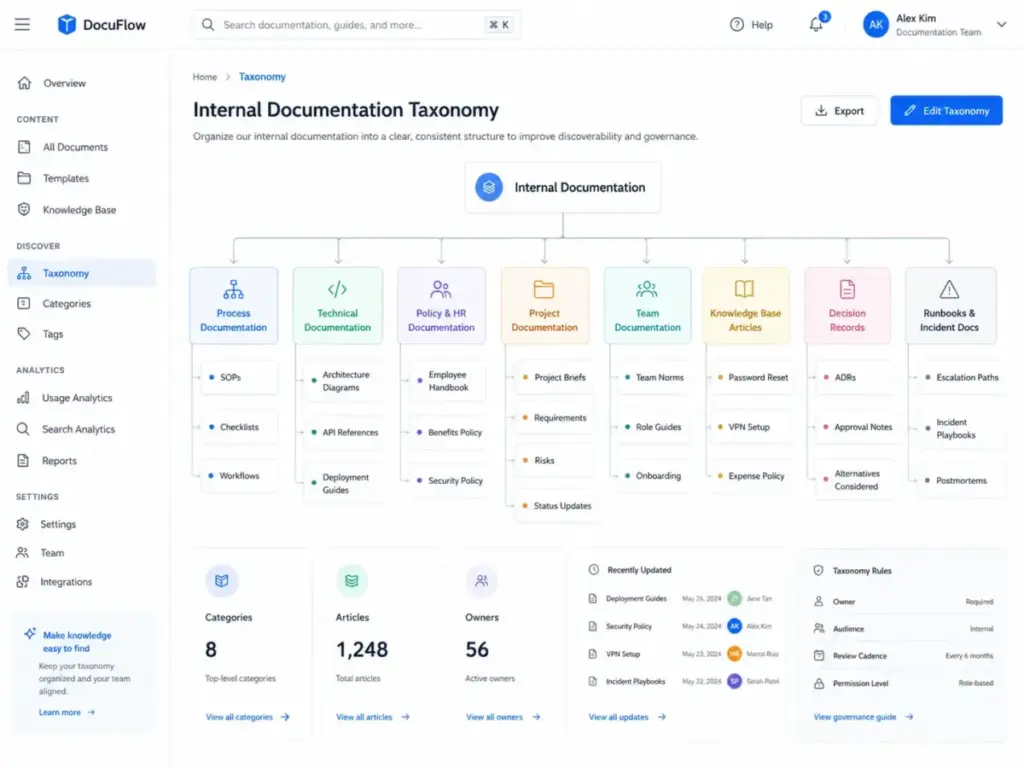
Internal documentation is not one category. It covers at least eight distinct types, each serving a different operational function.
| Type | What it covers | Example |
|---|---|---|
| Process documentation | SOPs, checklists, workflows, approvals, exceptions | Customer refund procedure |
| Technical documentation | Architecture diagrams, API references, runbooks, engineering decision records | Service deployment checklist |
| Policy and HR documentation | Employee handbooks, onboarding guides, security policies, benefits | Remote work policy |
| Project documentation | Charters, requirements, decisions, timelines, status, risks | Q3 product launch brief |
| Team documentation | Goals, operating norms, rituals, ownership maps, role guidance | Engineering team onboarding |
| Knowledge base articles | Reusable articles for search and self-service | How to reset SSO password |
| Decision records | Context, rationale, alternatives considered, approval, revisit date | Why we chose Stripe over Adyen |
| Runbooks and incident docs | Incident guides, escalation paths, postmortem learning | Database failover runbook |
What this means: if your company has only one documentation category called “wiki,” you are mixing eight different content types with different owners, review cadences, and permission needs. That is why company wikis become messy. Taxonomy is not optional.
Common Mistakes and Misconceptions
Why Internal Docs Fail
The most common failure is not a tool problem. It is a governance problem. Teams choose a tool, write 200 pages in the first month, and then stop maintaining any of them.
Mistake 1: Starting with a tool before defining ownership. If nobody is responsible for accuracy, every page becomes suspect. Fix: assign an owner before creating any page.
Mistake 2: Letting everyone create pages with no taxonomy. Freedom without structure produces duplicates, orphan pages, and conflicting instructions. Fix: create category rules before opening write access.
Mistake 3: Failing to archive outdated pages. Stale pages are worse than missing pages because they look authoritative. Fix: set automated stale-page alerts at 90 or 180 days.
Mistake 4: Hiding useful knowledge behind permissions. Over-restricting access means people cannot find what they need and create their own shadow documents. Fix: default to company-wide unless content is genuinely sensitive.
Mistake 5: Writing long text with no summary or steps. A 3,000-word policy document without a checklist is a document nobody reads. Fix: start every page with a summary, then expand.
Mistake 6: Allowing AI to answer from unverified docs. McKinsey’s 2025 State of AI survey reports 88% of organizations now use AI regularly in at least one business function, and knowledge management is among the areas with notable AI adoption. AI search is only as reliable as the documentation layer, permissions, citations, and verification process behind it. If your internal AI search tool pulls answers from a two-year-old process that was never reviewed, it amplifies misinformation at scale.
Mistake 7: Not connecting docs to workflows. Documentation updates belong in release checklists, incident closeouts, onboarding feedback loops, and process-change approvals. If documentation is a separate chore, it will not happen.
Common Misconceptions
Misconception: Internal documentation means writing everything down. Reality: good internal documentation focuses on reusable, high-value knowledge that prevents confusion, risk, rework, or repeated questions. Documenting trivial one-off details creates noise.
Misconception: A wiki tool automatically solves knowledge management. Reality: ISO 30401 guidance makes this explicit, stating that simply purchasing technology is not enough. Ownership, review cadence, feedback loops, and culture matter more than the tool.
Misconception: Internal documentation is only for engineering teams. Reality: HR, support, sales, finance, operations, and leadership all need internal documentation for policies, processes, decisions, and enablement.
Misconception: AI can replace documentation work. Reality: AI can summarize, retrieve, and draft. It still needs accurate source material, permissions, human review, and stale-content controls. AI without governance is a confidence engine for outdated information.
How to Measure Results
Documentation that nobody tracks is documentation that nobody improves. Tie metrics to the business goals that justified the investment.
| Goal | Metric | Why it matters |
|---|---|---|
| Onboarding speed | Time to productivity for new hires | Measures whether docs reduce ramp-up time |
| Self-service | Search success rate and failed searches | Shows whether people find answers |
| Support deflection | Ticket volume before and after KB launch | Measures direct cost savings |
| Governance | Stale-page count and review completion rate | Tracks documentation health |
| Adoption | Page views, helpfulness score, unique readers | Shows whether people actually use the docs |
| AI readiness | Percentage of verified pages vs total pages | Measures how trustworthy AI answers are |
| Compliance | Audit findings related to documentation gaps | Measures regulatory risk reduction |
What this means: if you only track page views, you know documentation exists but not whether it works. Failed searches tell you what people need but cannot find. Stale-page backlog tells you how fast your documentation is decaying. These are the metrics that separate a working documentation system from an abandoned wiki.
Tools That Make Internal Documentation Easier
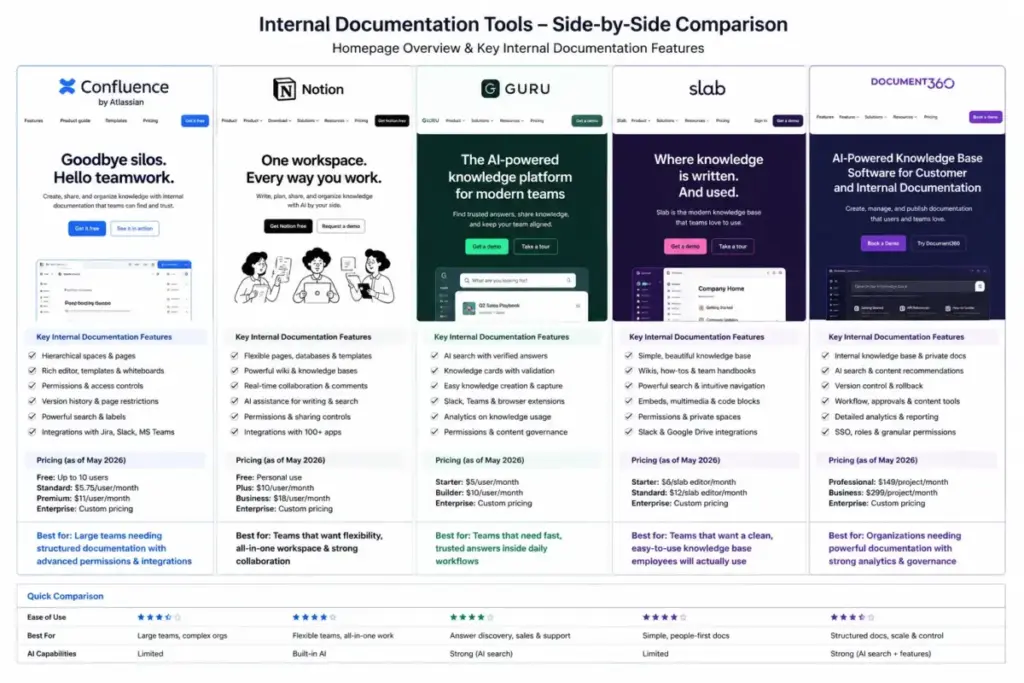
Five tools cover the most common internal documentation use cases. Each fits a different team maturity, governance need, and budget.
| Tool | Best fit | Starting price | AI/search capability | Governance features | Key caveat |
|---|---|---|---|---|---|
| Confluence | Teams already in Atlassian ecosystem | $5.42/user/month Standard (as of May 2026) | Rovo AI (add-on), built-in search | Spaces, permissions, automation, templates, databases | Rovo AI is a separate add-on cost; advanced permissions require Premium |
| Notion | Flexible wikis for small to mid-size teams | Free plan available; Plus at $12/seat/month | Enterprise search beta, AI add-on | Teamspaces, verified pages, private teamspaces, workspace permissions | Enterprise search and advanced permissions require Enterprise plan |
| Guru | Governed knowledge layer with enterprise AI | Builder plan (pricing requires contact) | Knowledge agents, permission-aware answers, enterprise search | Verification workflows, audit trails, integrations | Full AI search and governance features require higher tiers; pricing not fully public |
| Slab | Simple internal knowledge base teams | Free for up to 10 users; paid plans from $8/user/month | AI features on paid tiers, unified search | Posts, topics, verification, templates, private topics, analytics | AI capabilities and advanced analytics locked to paid tiers |
| Document360 | Mixed internal and external knowledge bases | Free plan available; paid from $199/project/month | AI search (Eddy), category manager | Access control, workflows, analytics, audit trails, SSO, SCIM on higher tiers | Reader accounts, SSO, and SCIM require Business+ tier; per-project pricing |
What this means: Confluence fits teams already paying for Jira and Atlassian products. Notion fits teams that want flexibility and are willing to self-impose structure. Guru fits organizations that need enterprise AI search with verification and permissions. Slab fits smaller teams that want simplicity without building complex workflows. Document360 fits teams that need both internal and customer-facing knowledge bases from one platform, but the per-project pricing model can scale quickly.
The right choice depends on three questions: (1) Do you need governed verification workflows, or is flexible editing sufficient? (2) Do you need AI search that respects permissions and document verification status? (3) Is your team already inside an ecosystem (Atlassian, Google, Microsoft) that makes one tool a natural fit?
When You Need Software for Internal Documentation
Not every team needs a dedicated knowledge management platform. Here are the signals that indicate your current approach is failing.
You need software when:
- New hires keep asking the same questions their predecessors asked
- Knowledge leaves the company every time someone quits or changes teams
- Slack search is your primary documentation system
- Different teams follow different versions of the same process
- Your support team cannot find internal answers and escalates instead
- Compliance audits flag missing documentation for critical procedures
- Your AI search tools surface outdated or unverified information
You do not need dedicated software yet when:
- Your team has fewer than 5 people and communicates daily
- A shared Google Doc or Notion page handles your entire process library
- You have not defined what to document or who owns it (solve governance first, then choose a tool)
Beginner Checklist: Building Internal Documentation
Use this checklist to start or audit your internal documentation system.
- Define the top 3 audiences: new hires, support agents, engineering
- Audit where knowledge currently lives: Slack, email, Docs, spreadsheets, individual laptops
- List the 10 most repeated questions across the company
- Create a taxonomy with at least 4 categories: process, policy, technical, project
- Choose 1 template per document type: SOP, runbook, decision record, how-to guide
- Assign an owner and review date to every new page
- Set permissions by sensitivity: company-wide, team-only, restricted
- Add a “last reviewed” date and owner name to every page
- Set up a stale-page alert at 90 or 180 days
- Track failed searches monthly to find documentation gaps
- Connect documentation updates to release and incident workflows
FAQ
Does internal documentation really save time, or is it just more admin work?
Yes, if the documentation system has owners, review schedules, and search analytics. The Atlassian State of Teams 2025 survey found knowledge workers waste 25% of their time searching for answers. A maintained documentation system recovers a portion of that time. An unmaintained one adds to the problem.
What is the difference between an internal wiki and internal documentation?
An internal wiki is one tool format for storing internal documentation. Internal documentation is the broader practice that includes SOPs, runbooks, decision records, policies, and project records, whether they live in a wiki, a knowledge base, a shared drive, or a ticketing system.
How do teams keep internal docs from going stale?
Three mechanisms: assign a named owner to every important page, set automated review reminders on a quarterly or biannual cadence, and connect documentation updates to workflow triggers like product releases, incident postmortems, and process changes. Without all three, stale pages accumulate.
Can AI search replace a company wiki?
No, unless the source documents are accurate, verified, permissioned, and current. AI search amplifies whatever it finds. If it pulls from a two-year-old runbook that nobody reviewed, it gives confident answers based on outdated information. AI search depends on documentation governance, not the other way around.
What should go in internal documentation versus a ticketing system or CRM?
Document knowledge that is reusable across incidents, not data that belongs in a system of record. The escalation process belongs in documentation. The individual ticket record belongs in the ticketing system. The customer account data belongs in the CRM. If you are manually documenting data that a source system already tracks, link to the source instead.
Should internal docs be reviewed like code?
Yes, for high-stakes content: security policies, compliance procedures, financial controls, and engineering runbooks. Approval workflows and version history are appropriate for these types. For team operating norms or meeting notes, a lighter review process with owner confirmation is sufficient.
How do you handle permissions for internal documentation?
Default to company-wide for operating knowledge. Restrict by team for sensitive internal processes. Restrict by named individuals for HR, legal, security, and financial content. Review permissions quarterly because team structures change. Over-restricting useful knowledge forces people to create shadow documentation in Slack and email.
What documentation should new hires read first?
Start with three categories: company operating norms (how we communicate, meet, and make decisions), role-specific processes (the daily workflows they will execute), and tool access guides (how to log in, where things live, who to ask). Reading priority should be defined in the onboarding template, not left to the new hire to figure out.