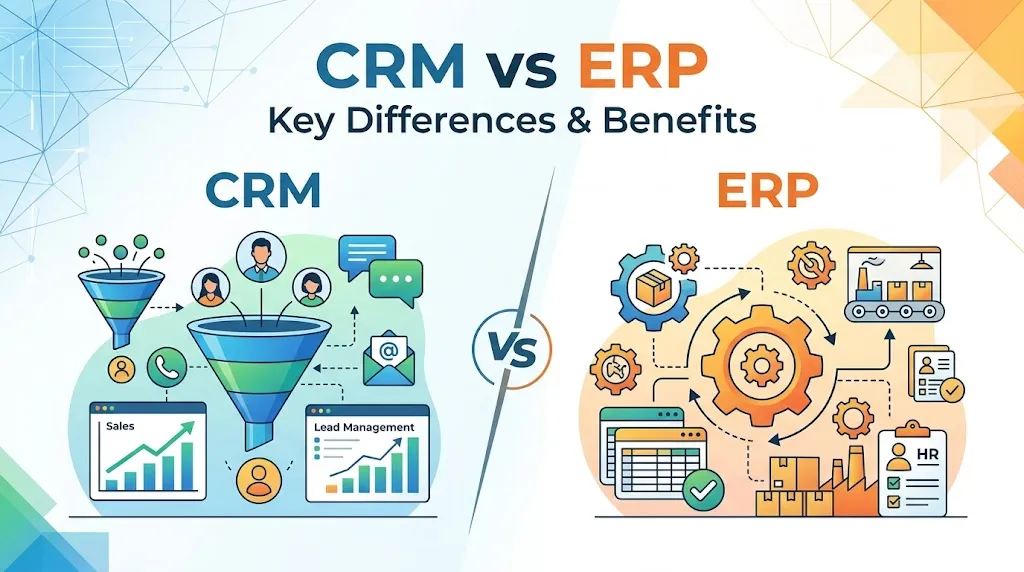
Most teams hit a wall where spreadsheets stop working, but they cannot tell whether the fix is a CRM software system or an ERP system. CRM vs ERP is not a rivalry; it is a question about which failure you need to solve first. A CRM (customer relationship management) system manages sales pipelines, leads, contacts, marketing activity, and customer communication.
An ERP (enterprise resource planning) system manages finance, accounting, inventory, procurement, orders, and fulfillment. One captures demand. The other proves whether you can deliver on it. This guide breaks down the real differences, shows when each system fits, and gives you a decision framework so you can stop guessing. If you want to explore CRM options right away, see our guide to the best CRM software.
What Is CRM vs ERP?
CRM handles the front office; ERP handles the back office. That one-liner is true, but it hides the details that matter when you are choosing software.
A CRM system is the system of record for customer-facing teams. Sales reps track leads, log calls, move deals through pipeline stages, and forecast revenue. Marketing teams run campaigns and score leads. Service teams manage tickets and track resolution times. All of this information is organized inside a CRM database that structures contacts, companies, deals, activities, and tickets into connected records. The data inside a CRM answers one question: who is the customer, and what should we do next?
An ERP system is the system of record for operations and finance. It tracks purchase orders, inventory levels, warehouse movements, invoices, payments, general ledger entries, and (in larger setups) manufacturing schedules and HR records. The data inside an ERP answers a different question: can we fulfill the order, and will we make money doing it?
The overlap appears when a sales quote must check inventory, when an invoice must match a closed deal, or when a renewal must trigger both a billing event and a customer success task.
| Category | CRM | ERP | What It Means |
|---|---|---|---|
| Main focus | Customer relationships and pipeline | Business operations and finance | Demand vs execution |
| Primary users | Sales, marketing, customer service | Finance, operations, HR, supply chain | Different team owners |
| Core data | Leads, contacts, deals, activities | Orders, inventory, invoices, GL entries | Different records |
| Business question answered | Who will buy? What should sales do next? | Can we deliver profitably? | Different decisions |
| First system for | Sales-led growth companies | Operationally complex businesses | Depends on the failure point |
| Quote-to-cash role | Creates quotes and captures demand | Validates margin, inventory, fulfillment | Handoff point matters |
| Typical examples | Salesforce, HubSpot, Pipedrive, Zoho | NetSuite, SAP, Dynamics 365 Business Central | See tools section below |
How CRM Works
A CRM system gives every customer-facing team a shared record of who the customer is and what they need. Without it, sales reps track deals in their heads, marketing cannot measure which campaigns produce revenue, and support agents start every ticket from scratch.
Here is what a CRM handles day to day:
- Lead capture and scoring. New leads arrive from web forms, ads, referrals, or imports. The CRM stores them, assigns owners, and (in most modern systems) scores them by fit and engagement.
- Pipeline management. Sales reps move opportunities through stages: qualified, demo, proposal, negotiation, closed. Managers see forecast totals and stuck deals.
- Contact and account records. Every email, call, meeting, and note ties back to a contact and an account. History is visible to anyone on the team.
- Marketing automation. Email sequences, drip campaigns, and lead nurturing run from the CRM or a connected marketing hub.
- Customer service. Tickets, cases, and satisfaction scores connect to the same customer record that sales and marketing use.
A practical example: a five-person sales team using HubSpot CRM logs every discovery call, tags deal stage, and sets follow-up tasks. The sales manager pulls a weekly pipeline report without asking each rep for updates. Marketing sees which campaigns produced the deals in the pipeline. That visibility is what a CRM solves.
Other CRM platforms worth evaluating include Salesforce, Pipedrive (strong for sales-led SMBs), and Zoho CRM (broad feature set at a lower price point). Each takes a different approach to pipeline design, automation depth, and pricing structure. We evaluate all of them using the same criteria in our SaaSZap review methodology.
How ERP Works
An ERP system connects finance, inventory, procurement, and operations into one database so teams stop reconciling spreadsheets. It is the system of record for everything that happens after a sale is made (and often before, on the supply side).
Core ERP functions include:
- Financial management. General ledger, accounts payable, accounts receivable, bank reconciliation, and financial reporting. This is the non-negotiable core of every ERP.
- Inventory and warehouse management. Stock levels, reorder points, bin locations, lot tracking, and stock transfers.
- Procurement. Purchase orders, vendor management, approval workflows, and cost tracking.
- Order management. Sales orders, fulfillment status, shipping, and returns.
- Manufacturing (for applicable businesses). Bills of materials, production scheduling, work orders, and shop floor tracking.
- HR and payroll (in larger suites). Employee records, time tracking, benefits, and payroll processing.
SAP defines ERP as software that helps organizations manage core business processes around a unified data model. That unified model is the point: finance sees the same order that the warehouse is shipping and that procurement sourced.
Common ERP platforms include Oracle NetSuite, SAP S/4HANA (enterprise-scale), and Microsoft Dynamics 365 Business Central (mid-market). ERP is not the same as accounting software. Tools like QuickBooks Online and Xero handle bookkeeping well, but they lack inventory depth, procurement workflows, manufacturing modules, and multi-entity consolidation that ERP provides.
CRM vs ERP Decision Matrix
The right system depends on which problem is costing you money right now. Do not buy both at once unless your business model demands it.
I treat this as a symptom-based decision. Match your biggest operational pain to the table below.
| Symptom | Choose First | Reason | Example Role | Risk If Ignored |
|---|---|---|---|---|
| Leads fall through the cracks | CRM | No shared pipeline; reps track deals in email or notes | Sales manager | Lost revenue from missed follow-ups |
| Sales forecast is a guess | CRM | No stage-based pipeline data to project revenue | VP Sales, RevOps | Budget and hiring decisions based on gut feel |
| Month-end close takes 2+ weeks | ERP | Manual reconciliation across spreadsheets and tools | Controller, CFO | Late reporting, audit risk |
| Inventory counts are wrong | ERP | No real-time stock visibility across locations | Operations manager | Overselling, stockouts, margin loss |
| Orders ship late or incomplete | ERP | Fulfillment disconnected from order entry | Warehouse lead | Customer churn, refund costs |
| Sales promises conflict with delivery capacity | Both | CRM captures demand but cannot check inventory or schedule | CIO, COO | Sales sells what operations cannot deliver |
| Revenue under $500K, under 10 employees | Neither yet | Spreadsheets and accounting software may still work | Founder | Overbuying software before product-market fit |
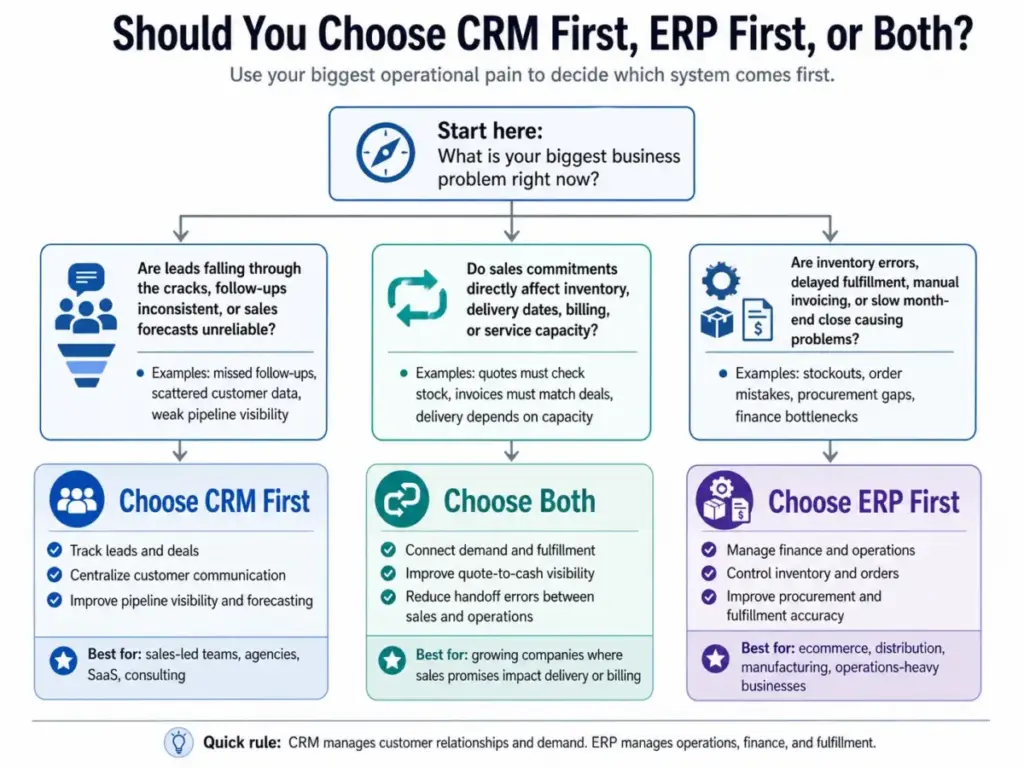
The core rule: if your biggest pain is customer-facing (pipeline, leads, forecast, communication), start with CRM. If your biggest pain is operational (finance, inventory, orders, procurement), start with ERP. If sales commitments directly affect delivery, inventory, or billing, plan for both.
How CRM and ERP Work Together
CRM creates demand signals; ERP confirms whether the business can fulfill them. The handoff between these two systems is where most operational gaps appear.
Here is a lead-to-cash workflow showing how CRM and ERP connect across seven steps:
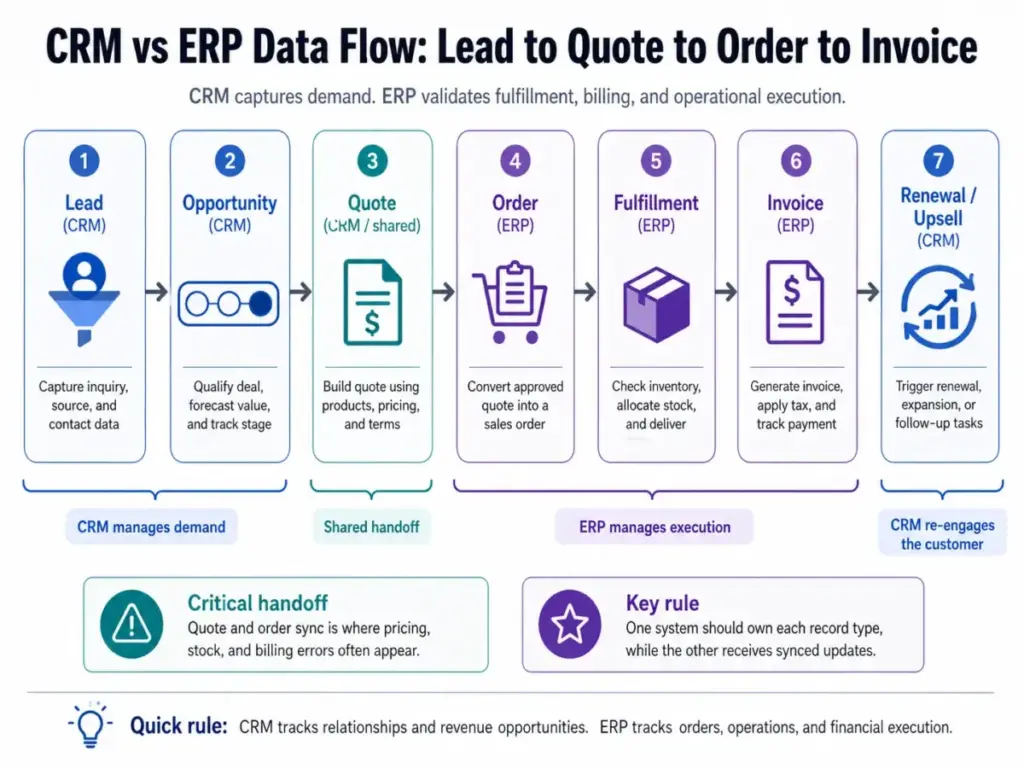
- Lead captured (CRM). A prospect fills out a form or a sales rep adds a lead. The CRM stores the contact, company, source, and initial engagement data.
- Opportunity created (CRM). Sales qualifies the lead and creates a deal. Pipeline stage, expected close date, and deal value are tracked in the CRM.
- Quote generated (CRM or shared). Sales builds a quote with products, quantities, and pricing. In integrated setups, the product catalog and pricing rules come from ERP.
- Order confirmed (ERP). The customer accepts the quote. The order moves to ERP, which checks inventory availability, validates margin, and confirms delivery dates.
- Fulfillment executed (ERP). The warehouse picks, packs, and ships. ERP updates stock levels and records shipping details.
- Invoice issued (ERP). Finance generates an invoice tied to the order. Payment terms, tax rules, and revenue recognition follow ERP logic.
- Renewal or upsell triggered (CRM). After delivery, the CRM flags the account for a renewal task, satisfaction survey, or expansion opportunity. The cycle restarts.
The critical insight: steps 3 and 4 are where most integration problems surface. If the CRM quote uses outdated pricing or shows products that are out of stock, sales makes promises that operations cannot keep.
CRM ERP Data Ownership
Every record needs one system of record, or you get duplicates, conflicts, and stale data. This is the part most “CRM vs ERP” articles skip.
When two systems store the same record, someone must decide which system is the master (the owner) and which system receives a synced copy. Without that rule, a customer address updated in CRM stays outdated in ERP, and the invoice ships to the wrong location.
| Record Type | CRM Owner | ERP Owner | Sync Rule | Failure Risk |
|---|---|---|---|---|
| Account/Company | Yes (master) | Copy | CRM pushes to ERP | Mismatched billing addresses |
| Contact | Yes (master) | Copy | CRM pushes to ERP | Invoices sent to wrong person |
| Product/Item | Copy | Yes (master) | ERP pushes to CRM | Sales quotes outdated prices |
| Quote | Yes (created here) | Copy or triggers order | CRM pushes accepted quote | Duplicate or missing orders |
| Sales Order | Notification only | Yes (master) | ERP owns after acceptance | Order edits lost if done in CRM |
| Invoice | Read-only copy | Yes (master) | ERP pushes status to CRM | Sales cannot see payment status |
| Payment | No | Yes (master) | ERP pushes confirmation | Collections follow-up delayed |
| Inventory Level | Read-only copy | Yes (master) | ERP pushes real-time levels | Sales sells out-of-stock items |
| Renewal/Contract | Yes (master) | Billing copy | CRM triggers; ERP bills | Missed renewals or double billing |
| Service Ticket | Yes (master) | No (or limited) | CRM only | Support blind to order history without sync |
The table above is a starting point. Your exact ownership map depends on your tools, team structure, and business model. The principle is constant: one system owns each record type, and the other system subscribes to updates.
CRM and ERP Integration Options
There is no single right way to connect CRM and ERP, but there is always a wrong way: manual re-entry. Every integration approach trades off cost, flexibility, and maintenance burden.
Here are the four main paths:
Native Suite Integration
Some vendors sell CRM and ERP as modules of one platform. Microsoft Dynamics 365 offers both Sales (CRM) and Business Central (ERP) with built-in connectors. Oracle NetSuite includes a CRM module alongside its ERP core. The advantage is shared data architecture. The tradeoff is that the CRM module in an ERP suite is often less capable than a best-of-breed CRM, and vice versa.
API-Based Integration
Most modern CRM and ERP platforms expose REST APIs. A development team builds custom integrations that sync specific objects (accounts, products, orders, invoices) on a schedule or in real time. This gives full control but requires developer resources for building, testing, and maintaining the connection. API changes on either side can break syncs.
iPaaS and Middleware
Integration platforms like Zapier, Make, and n8n connect CRM and ERP through pre-built connectors and visual workflow builders. These work well for straightforward syncs (push new CRM accounts to ERP, update deal status when an invoice is paid). They struggle with complex logic: multi-currency pricing, conditional tax rules, or inventory reservation workflows.
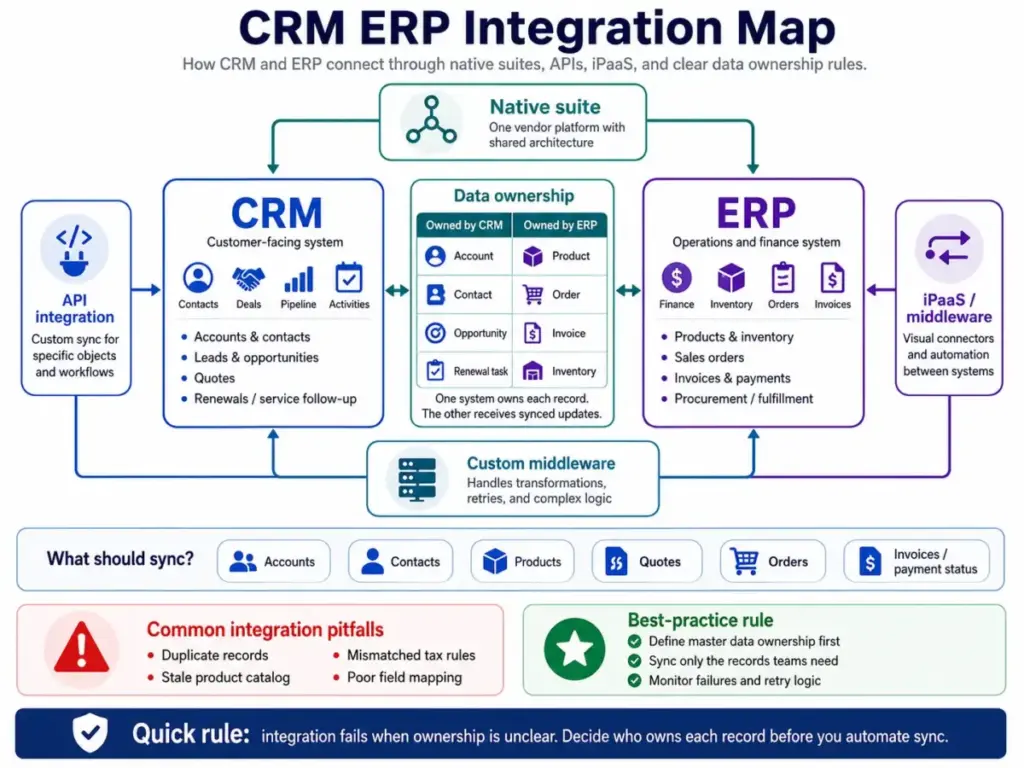
Custom Middleware
Larger organizations sometimes build dedicated middleware layers that sit between CRM and ERP. This approach handles complex transformations, error queues, and retry logic. It is the most expensive option and only justified when transaction volume or data complexity makes simpler tools unreliable.
Common Integration Pitfalls
No matter which path you choose, watch for these failures:
- Duplicate records. Without matching rules, the same customer appears twice with slight name variations.
- Stale product catalogs. CRM pricing does not update when ERP changes list prices or discontinues items.
- Mismatched tax rules. CRM quotes calculate tax differently than ERP invoices.
- Permission errors. API users lack access to certain ERP modules, causing silent sync failures.
- Poor field mapping. CRM “Company Name” maps to the wrong ERP field, corrupting reports.
CRM vs ERP Cost Reality
ERP almost always costs more than CRM, and the license fee is the smallest part of the gap. Understanding why helps you budget correctly before committing.
CRM pricing is relatively straightforward. Most CRM platforms charge per user per month, with tiers based on feature access. Examples with sourced pricing:
- HubSpot CRM offers a free plan that supports up to 2 users and 1,000 contacts. Paid tiers add automation, sequences, and reporting.
- Microsoft Dynamics 365 Sales Professional costs $65 per user per month (paid yearly).
- Salesforce CRM starts with Starter plans and scales through Professional, Enterprise, and Unlimited editions. See Salesforce pricing for current tiers.
ERP pricing is harder to pin down. The software license is just the entry point. Real ERP costs include:
- License or subscription fees. Microsoft Dynamics 365 Business Central Essentials costs $80 per user per month (paid yearly). The Premium tier is $110 per user per month. NetSuite pricing is custom-quoted and typically includes a base platform fee plus per-module and per-user charges.
- Implementation and configuration. ERP systems require chart of accounts setup, workflow configuration, approval chains, tax rules, and integration mapping. This phase can take weeks to months.
- Data migration. Moving historical data from spreadsheets or legacy systems into ERP requires cleanup, mapping, and validation.
- Customization. Most businesses need custom fields, reports, dashboards, or workflows beyond the default configuration.
- Training. ERP touches more departments than CRM. Training finance, operations, warehouse, and procurement teams takes time.
- Ongoing maintenance. API updates, module upgrades, and integration fixes are recurring costs.
The practical rule: budget 1.5x to 3x the annual license cost for a CRM implementation. Budget 3x to 7x the annual license cost for an ERP implementation. These are directional ranges, not guarantees, because actual cost depends on complexity, team size, and customization requirements.
CRM vs ERP by Business Type
The right system order depends on your business model, not your company size. A 20-person ecommerce brand may need ERP before CRM. A 200-person consulting firm may need CRM first.
SaaS Companies
SaaS businesses are sales-led and subscription-driven. The primary system is CRM: it tracks trials, demos, pipeline, expansion revenue, and churn risk. ERP or a finance tool handles subscription billing, revenue recognition, and tax compliance. Start with CRM. Add a finance system (or ERP) when billing complexity, multi-entity reporting, or audit requirements outgrow basic accounting software.
Ecommerce Brands
Ecommerce runs on inventory, orders, and fulfillment. An ERP (or at minimum an order management system) is the operational backbone. CRM becomes important when the brand adds B2B wholesale, account management, or retention marketing at scale. Start with ERP or an OMS. Add CRM when customer segmentation, lifecycle marketing, or account management becomes a growth lever.
Manufacturers
Manufacturers need both systems, but ERP comes first. Production scheduling, bills of materials, procurement, and inventory are existential. CRM enters when the sales team grows beyond the founder handling quotes by email. Start with ERP. Add CRM when sales volume or channel complexity demands pipeline tracking and structured quoting.
Agencies
Agencies sell time. CRM tracks prospects, proposals, and client relationships. ERP (or a PSA tool) tracks project budgets, resource allocation, timesheets, and profitability. Start with CRM. Add a PSA or ERP layer when project margin tracking and resource planning become critical.
Professional Services
Similar to agencies, but with higher compliance and billing complexity. Law firms, consultancies, and accounting firms need CRM for business development and ERP or practice management for engagement tracking, billing, and trust accounting. Start with CRM for pipeline. Add ERP or practice management when billing rules, partner compensation, or multi-office financials require operational control.
When CRM or ERP Is the Wrong Move
Buying the wrong system at the wrong time wastes budget and creates adoption problems that take months to fix. Here are the four most common mistakes.
Overbuying ERP Too Early
A 15-person company with simple invoicing and no inventory does not need a full ERP suite. The implementation will take longer than expected, most modules will sit unused, and the finance team will still export data to spreadsheets because the ERP reports do not match their workflow. Start with accounting software like QuickBooks Online or Xero and graduate to ERP when those tools hit real limits: multi-entity consolidation, inventory at scale, or manufacturing scheduling.
Stretching CRM Into Finance
Some teams try to make CRM handle invoicing, revenue tracking, and financial reporting. CRM platforms can generate quotes and even trigger invoices through integrations, but they are not designed for double-entry accounting, tax compliance, audit trails, or financial consolidation. Using CRM as a finance system creates reporting gaps that surface during tax season or due diligence.
Staying in Spreadsheets Too Long
The opposite mistake: refusing to adopt any system until the pain is extreme. By the time a team of 20 is managing customers in a shared Google Sheet, the data quality problems (duplicates, missing fields, no activity history) are so deep that any migration will require significant cleanup. Move to CRM or ERP when you start losing deals, missing shipments, or spending more than a day on month-end close because of manual data work.
Using Accounting Software as ERP Too Long
QuickBooks and Xero are excellent accounting tools, not ERP replacements. They handle bookkeeping, basic invoicing, and bank reconciliation. They do not handle multi-location inventory, production planning, advanced procurement, or warehouse management. If your accounting software is surrounded by five supplementary spreadsheets, you likely need ERP.
Best Tools for CRM and ERP
This section is not a ranking. It groups tools by use case so you can start evaluating the right category. For detailed scoring, features, and pricing breakdowns, follow the review links below.
CRM-First Teams
- HubSpot CRM: Free tier for small teams. Strong marketing integration. Good for inbound-led SMBs. See our HubSpot CRM review.
- Salesforce CRM: The enterprise standard. Deep customization, AppExchange ecosystem, and advanced reporting. See our Salesforce CRM review.
- Pipedrive: Built for sales reps who want visual pipeline management without complexity. See our Pipedrive CRM review.
- Zoho CRM: Broad feature set at a competitive price. Good for teams that want CRM, email, and project management from one vendor. See our Zoho CRM review.
Microsoft Ecosystem Teams
- Microsoft Dynamics 365 Sales + Business Central: CRM and ERP from the same vendor with native connectors. Best fit for teams already using Microsoft 365. See our Microsoft Dynamics 365 Sales review.
ERP-First Teams
- Oracle NetSuite: Cloud-native ERP with CRM, ecommerce, and financial modules. Strong for mid-market companies scaling operations. See NetSuite ERP overview.
- SAP S/4HANA: Enterprise-grade ERP for manufacturing, supply chain, and global operations. See SAP ERP overview.
- Microsoft Dynamics 365 Business Central: Mid-market ERP with finance, supply chain, and manufacturing modules. Pairs with Dynamics 365 Sales for CRM.
Accounting-Adjacent Teams (Not Yet Ready for ERP)
- QuickBooks Online: Best for small businesses that need invoicing, expense tracking, and basic reporting. See our QuickBooks Online review.
- Xero: Cloud accounting with strong bank feeds and a large app ecosystem. See our Xero review.
FAQ
Here are the most common questions about CRM and ERP systems.
What is the main difference between CRM and ERP?
CRM manages customer relationships, sales pipelines, and marketing activity. ERP manages finance, inventory, procurement, and operations. CRM is front-office software focused on revenue generation. ERP is back-office software focused on operational execution and financial control. The core split: CRM tracks demand, ERP tracks fulfillment.
Is CRM part of ERP?
Some ERP suites include a CRM module, but CRM is not inherently part of ERP. Oracle NetSuite and Microsoft Dynamics 365 offer both under one platform. However, the CRM module inside an ERP suite is often less capable than a dedicated CRM like Salesforce or HubSpot for pipeline management and marketing automation.
Can ERP replace CRM?
ERP can store basic customer records, but it cannot replace CRM for pipeline tracking, lead scoring, marketing automation, or sales activity management. ERP customer records are transaction-focused (who bought what). CRM customer records are relationship-focused (who to call, what they need, where the deal stands).
Can CRM replace ERP?
No. CRM cannot handle double-entry accounting, inventory management, procurement workflows, manufacturing scheduling, or financial consolidation. Some CRM platforms offer basic quoting and invoicing, but these features do not meet the compliance, audit, and reporting requirements that ERP addresses.
Do small businesses need CRM or ERP first?
It depends on the business model. Sales-led businesses (agencies, SaaS, consulting) usually need CRM first to manage pipeline and follow-ups. Inventory-heavy or operations-heavy businesses (ecommerce, distribution, manufacturing) usually need ERP first. Most businesses under $500K revenue can start with CRM plus accounting software before considering ERP.
What are examples of CRM and ERP systems?
CRM examples: Salesforce, HubSpot, Pipedrive, Zoho CRM, Microsoft Dynamics 365 Sales. ERP examples: Oracle NetSuite, SAP S/4HANA, Microsoft Dynamics 365 Business Central. Some platforms (Dynamics 365, NetSuite) offer both CRM and ERP modules.
Why integrate CRM and ERP?
Integration eliminates manual data re-entry, prevents duplicate records, and creates visibility across the full customer lifecycle. Sales can see invoice status and inventory levels. Finance can see pipeline forecasts. Operations can prepare for incoming orders before they ship. Without integration, teams rely on email and spreadsheets to share information that should flow automatically.
What data should sync between CRM and ERP?
At minimum: accounts, contacts, products, and order status. For full quote-to-cash visibility, also sync quotes, sales orders, invoices, payments, inventory levels, and contract or renewal dates. Each record type needs a clear owner (CRM or ERP) to prevent conflicts and stale data.
Is Salesforce a CRM or ERP?
Salesforce is a CRM platform. It manages sales pipelines, customer records, marketing campaigns, and service cases. Salesforce does not include native ERP functions like general ledger, inventory management, or manufacturing. Businesses using Salesforce typically integrate with a separate ERP or accounting system for financial and operational needs.
Is NetSuite a CRM or ERP?
NetSuite is primarily an ERP platform with a built-in CRM module. Its core strength is financial management, inventory, order management, and procurement. The CRM module handles basic pipeline and customer management but is less feature-rich than dedicated CRM platforms for sales automation and marketing.
Is Microsoft Dynamics 365 CRM or ERP?
Microsoft Dynamics 365 is both. It is a modular platform where Dynamics 365 Sales functions as CRM and Dynamics 365 Business Central functions as ERP. Businesses can license one or both. The native connector between Sales and Business Central is a key advantage for teams that need both front-office and back-office systems from one vendor.
What is more expensive, CRM or ERP?
ERP is almost always more expensive. CRM licenses start as low as free (HubSpot) or $65 per user per month (Dynamics 365 Sales). ERP licenses start around $80 per user per month (Dynamics 365 Business Central) and scale higher. More importantly, ERP implementation, migration, and training costs are significantly higher than CRM because ERP touches more departments and requires deeper configuration.
Key Takeaways
- CRM manages demand and relationships. ERP manages resources and execution. They solve different problems for different teams.
- Choose CRM first when your biggest pain is missed follow-ups, weak pipeline visibility, or inconsistent sales forecasting.
- Choose ERP first when your biggest pain is inventory errors, slow month-end close, manual invoicing, or fulfillment mistakes.
- Plan for both when sales commitments directly affect delivery, inventory, billing, or service capacity.
- Every shared record needs one owner. Decide whether CRM or ERP is the master for each data type before you integrate.
- ERP costs more than CRM, not just in license fees, but in implementation, training, and ongoing maintenance.
- The decision rule is simple: fix the system that is failing you today, then connect the other system when the handoff between teams becomes the bottleneck.