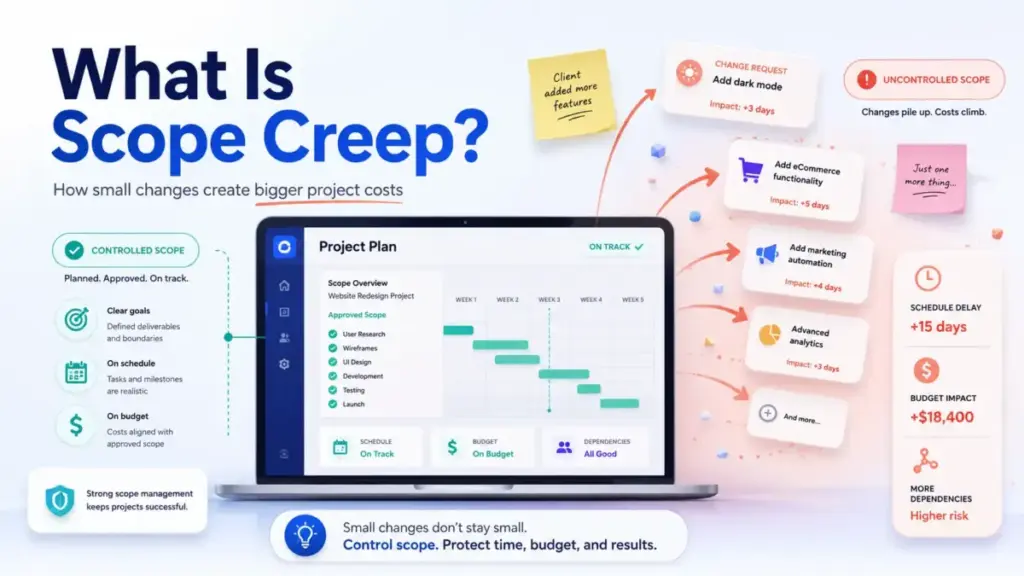
Every project manager has heard this line: “Can we just add one small thing?” That question, repeated across three stakeholders and two sprints, is how a 6-week project becomes a 10-week budget problem.
Scope creep is the uncontrolled expansion of a project’s deliverables, tasks, or requirements without matching adjustments to timeline, budget, or resources. The word “uncontrolled” does all the heavy lifting in that definition, because change itself is not the enemy. Unmanaged change is.
I have managed distributed teams using project management tools for over seven years, and scope creep shows up in every methodology, every industry, and every team size. This guide explains how scope creep works in practice, how to distinguish it from approved change, what signals to watch for, and which SaaS workflows help teams keep scope visible before it drifts.
Quick Answer: Scope creep is the uncontrolled expansion of project scope without corresponding adjustments to time, cost, or resources. It differs from approved scope change because it bypasses formal review, tradeoff analysis, and decision-owner sign-off. According to PMI’s Lexicon, scope creep is “the uncontrolled expansion to product or project scope without adjustments to time, cost, and resources.”
The 60-Second Explanation of Scope Creep
Scope creep means the work your team is doing no longer matches the work that was approved. PMI’s Lexicon of Project Management Terms defines it as “the uncontrolled expansion to product or project scope without adjustments to time, cost, and resources” (PMI learning library). A separate PMI article by Alec Satin describes it as “the slow, insidious growth of a project beyond its original work content and objectives” (PMI).
Layer 1: Simple
Scope creep happens when new work enters a project without anyone formally deciding to accept the cost. A client asks for an extra report. A designer adds a page that was not in the brief. A stakeholder mentions a “must-have” in a standup. None of it goes through a change request. The timeline stays the same. The budget stays the same. The work grows.
Layer 2: Technical
At a process level, scope creep breaks the project baseline. A baseline is the approved snapshot of scope, schedule, budget, and resources. Every addition that bypasses change control disconnects the baseline from reality. Dependencies shift. QA retesting increases. Documentation needs updating. The cumulative effect is that the project plan on screen no longer describes the project in motion.
Layer 3: Business
For SaaS teams, agencies, and cross-functional product organizations, scope creep directly affects margin, delivery dates, team morale, and client trust. A 15% scope increase without a timeline extension compresses every task. Teams absorb the extra work by cutting corners on testing, documentation, or stakeholder review. The result: more rework, more post-launch fixes, and less capacity for the next project.
How Scope Creep Actually Works
Scope creep rarely starts with a dramatic demand. It starts with something small and reasonable.
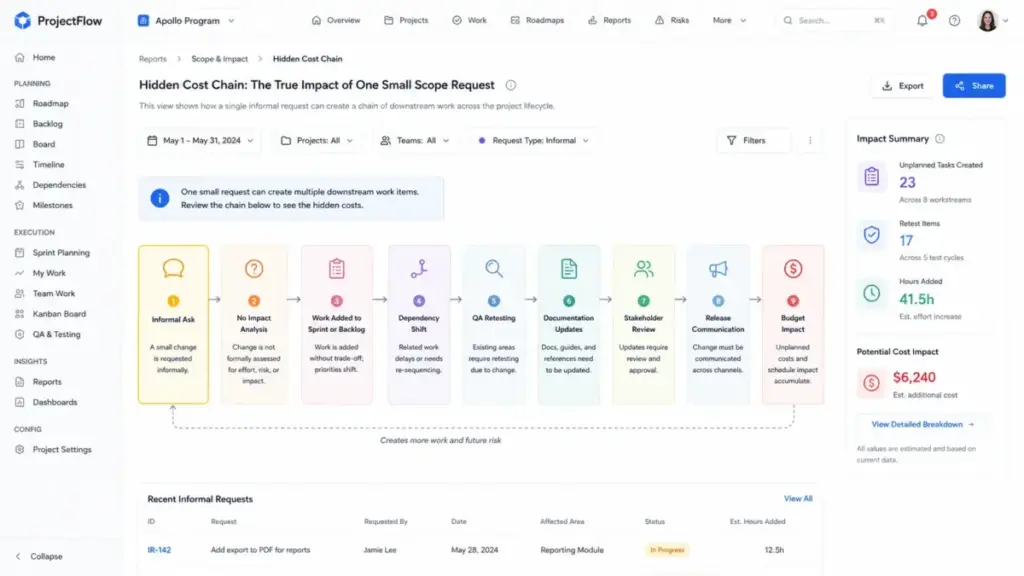
Here is the chain most teams miss:
- A request arrives informally. It shows up in a Slack message, a meeting comment, or a client email. It is not logged as a change.
- The team says yes without estimating. The request sounds quick. No one runs impact analysis.
- The work enters the backlog or sprint. It displaces planned tasks or runs in parallel with them.
- Dependencies shift. Downstream tasks that relied on the original plan now wait, overlap, or conflict.
- QA and testing expand. New work requires new test cases. Existing test cases need re-validation.
- Documentation needs updating. User guides, training materials, help articles, and release notes grow.
- Stakeholder review adds cycles. New deliverables need sign-off from people who were not part of the original approval.
- Release communication changes. Marketing, support, and sales teams need to know what shipped and what did not.
- Budget and capacity erode silently. Hours are consumed. Billing thresholds pass. Team utilization spikes.
What this means: a single “small” request can create 8 downstream work items that were never estimated, approved, or resourced. Multiply that by three requests per sprint, and the original project plan becomes fiction.
What Scope Creep Is and What It Is Not
Most scope creep articles stop at the definition. They do not answer the question teams actually fight about: “Is this scope creep or just a normal change?”
The distinction comes down to authorization and tradeoff analysis. Here is how to classify incoming requests:
| Request Type | Defined By | Effect on Baseline | Example |
|---|---|---|---|
| In-scope clarification | Refines existing approved work | None | “The report should include Q2 data, not just Q1” |
| Approved scope change | Formally reviewed, impact-analyzed, approved by decision owner | Baseline updated | “Add a dashboard, extend deadline by 1 week, reallocate QA hours” |
| Backlog candidate | Logged for future consideration, not committed | None (stays in backlog) | “We should add PDF export. Let us evaluate for v2.” |
| Gold plating | Team adds polish beyond what was requested | Baseline unchanged but work grows | Developer adds dark mode without approval |
| Scope creep | Uncontrolled, unapproved, no impact analysis, no tradeoff | Baseline disconnected from reality | Client asks for 3 extra pages via email, team builds them without updating timeline |
What this means: a change is not scope creep if it goes through review, gets approved by the decision owner, and triggers adjustments to schedule, budget, or priority. The dividing line is governance, not the change itself.
Six Types of Scope Creep
Not all scope creep looks the same. Knowing the type helps you spot it earlier.
Requirement Creep
New requirements arrive after the requirements phase closed. Stakeholders refine needs during execution because they see work in progress and realize what they actually want.
Feature Creep
Extra features get added because they seem useful. The brief said “dashboard with 3 charts.” The delivered product has 7 charts, 2 filters, and a CSV export nobody asked for.
Stakeholder-Driven Creep
Sponsors, clients, or executives add requests through informal channels. A VP mentions a “quick ask” in a hallway conversation. A client adds items to a shared doc without flagging them as new scope.
Gold Plating
The team adds extra polish or functionality beyond the approved deliverable. Intentions are good. Approval is missing. The project absorbs unplanned hours.
Process Creep
Extra meetings, reviews, compliance steps, or handoffs get added to the workflow without revising the schedule. The work stays the same, but the process around it grows.
Discovery Creep
The team learns valid new information during build, but fails to convert those findings into formal change decisions. Discovery becomes creep when insights stay informal and unpriced.
Early Warning Signs Before the Project Fails
Most guides list causes. Causes help you understand scope creep in theory. Signals help you catch it before the timeline breaks.
Watch for these leading indicators:
- Rising count of unplanned tasks in the current sprint or phase
- Repeated “quick asks” from stakeholders between formal review points
- Tasks entering execution without a named owner or approval record
- QA retest volume increasing without a matching feature release
- Blocked dependencies multiplying across the task board
- Acceptance criteria changing after work has started
- Baseline schedule variance exceeding 10% without a formal change record
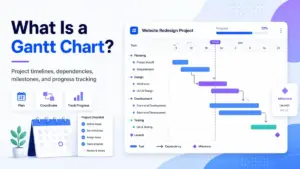
- Team members working on items not visible in the project plan or Gantt chart
If three or more of these signals appear in the same sprint, the project is already experiencing scope creep. The question is how far it has gone.
Scope Creep in Agile and SaaS Teams
A common misconception: agile teams do not have scope creep because agile welcomes change. That framing misses the mechanism.
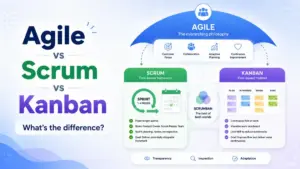
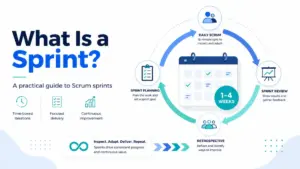
Agile absorbs change through prioritized backlog tradeoffs, not through unlimited expansion. A product owner adds a story to the sprint backlog. Something else gets removed or deprioritized. The sprint commitment stays realistic.
Scope creep in agile happens when:
- Stories enter a sprint without removing other stories of equal effort.
- Stakeholders bypass the product owner and assign work directly to developers.
- “Bug fixes” mask new feature requests.
- Sprint scope increases after sprint planning without revisiting capacity.
The framework does not eliminate creep. The framework gives teams a process for managing change. When teams skip that process, agile projects drift just as fast as waterfall projects.
Step-by-Step: How to Manage Scope Creep
Here is a 10-step workflow that works across Kanban boards, sprints, and traditional project plans.
- Define the project outcome, owner, deadline, budget, and success criteria before work begins.
- Write a scope statement that lists deliverables, exclusions, assumptions, acceptance criteria, dependencies, and approval owners.
- Break the work into tasks or a work breakdown structure so hidden work becomes visible before commitments are made.
- Set a baseline for scope, schedule, budget, and capacity. Save it in the project tool.
- Create a change request intake process that captures requester, reason, expected benefit, affected deliverables, estimate, deadline impact, and decision owner.
- Classify every new request as: in-scope clarification, approved change, backlog candidate, replacement tradeoff, or rejected out-of-scope request.
- Run impact analysis before approval. Check time, cost, resources, dependencies, QA, launch risk, documentation, support, and customer commitments.
- Approve scope changes only with a tradeoff. Add time, add budget, add resources, reduce another deliverable, or move the request to a later phase.
- Communicate decisions visibly and update timeline, task owners, budget fields, and stakeholder expectations in the project tool.
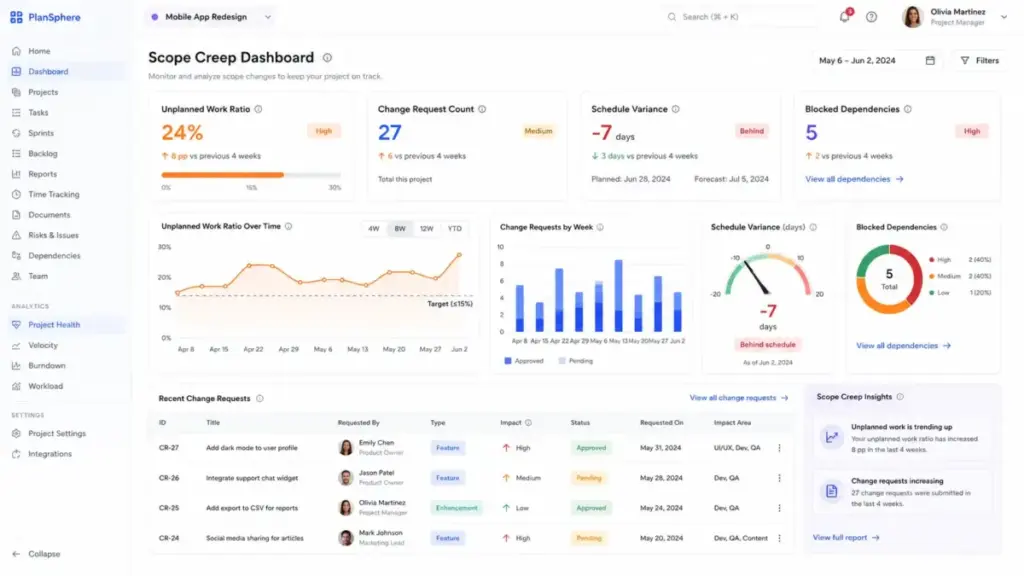
- Review scope drift weekly using change request count, unplanned work ratio, baseline variance, blocked tasks, and budget burn.
One tip I come back to: the biggest scope creep risk is not a demanding stakeholder. It is a team that says yes to everything because saying no feels harder than absorbing the work. The change request process exists to make “let me check the impact” as easy as “sure, I will add it.”
How to Measure Scope Creep
If you cannot measure it, you cannot manage it. Here are the metrics that matter.
| Metric | What It Tracks | Why It Matters |
|---|---|---|
| Change request volume | Number of scope change requests per phase or sprint | Rising volume signals unclear requirements or stakeholder misalignment |
| Approved vs unapproved changes | Ratio of formal approvals to informal additions | High unapproved count = governance failure |
| Unplanned work ratio | Percentage of total work not in original baseline | Above 15% signals significant drift |
| Schedule variance | Difference between planned and actual timeline | Growing variance without a change record = hidden creep |
| Budget variance | Difference between planned and actual spend | Same as schedule variance, measured in dollars |
| Blocked dependency count | Tasks blocked by upstream changes | Rising blocks indicate downstream impact from scope additions |
| Rework hours | Hours spent redoing completed work | Late scope changes create the most rework |
| Approval cycle time | Time from change request to decision | Slow approvals cause teams to bypass the process |
What this means: teams that track these metrics weekly catch scope creep at the 5% drift stage, not the 30% panic stage. Most free project management platforms include dashboards, custom fields, and reporting tools that can surface these numbers without manual tracking.
Tools That Help Prevent Scope Creep
Software does not prevent scope creep by itself. Teams still need ownership, decision rules, and stakeholder discipline. What tools do is make scope changes visible, traceable, and connected to downstream impact.
Here is how five major platforms support scope control:
| Scope-Control Job | Asana | monday work management | Jira | Smartsheet | ClickUp |
|---|---|---|---|---|---|
| Task dependencies | Yes | Yes (Pro+) | Yes (Premium for cross-project) | Yes | Yes |
| Baseline or snapshot | Goals, portfolios | Dashboards | Roadmaps, plans (Premium) | Baselines, Control Center | Goals, dashboards |
| Change intake forms | Forms | Forms | Forms | Forms | Forms |
| Approval workflows | Workflow Builder | Automations | Automation, permissions | Automations, Dynamic View | Automations |
| Dashboards and reports | Reporting, portfolios | Dashboards | Reports, dashboards | Reports, portfolios | Dashboards |
| Budget tracking | Limited (add-on) | Custom columns | Custom fields | Budget columns, add-ons | Custom fields |
| Workload management | Workload view | Workload view | Team-managed boards | Resource Management | Workload view |
What this means: all five tools cover the core scope-control jobs. The differences show up in plan gates and pricing.
Pricing Caveats for Scope-Control Features
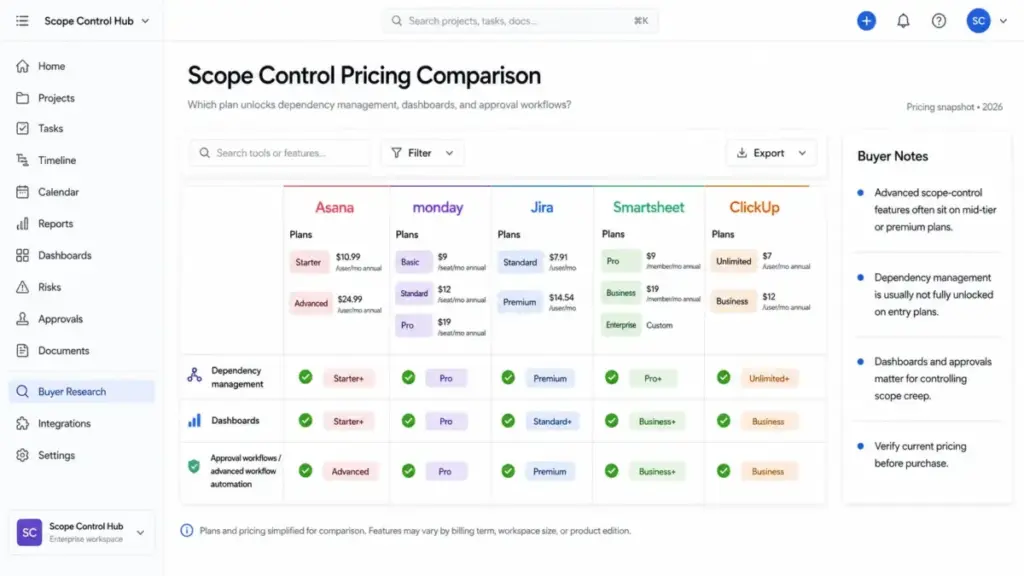
Scope-control maturity often lives on higher-priced tiers. Before committing, check which plan unlocks the features your team needs (as of May 2026):
- Asana: Dependencies and timeline available on Starter (10.99/user/month∗∗billedannually).Portfolios,goals,andadvancedreportingrequireBusiness(∗∗24.99/user/month). Budget and timesheet features need third-party integrations or add-ons. (Asana pricing)
- monday work management: Dependencies and Gantt require Pro ($19/seat/month billed annually, minimum 3 seats). Dashboards, time tracking, and advanced integrations start at Pro. (monday.com pricing)
- Jira: Standard plan starts at 8.15/user/month∗∗forupto35,000users.Premium(∗∗16/user/month) unlocks cross-project dependency management, advanced planning, and sandbox environments. (Jira pricing)
- Smartsheet: Business plan ($25/user/month billed annually, minimum 3 users) includes reporting, dashboards, and document builder. Enterprise adds Control Center, Dynamic View, and Data Shuttle. (Smartsheet pricing)
- ClickUp: Free plan includes tasks, docs, and Kanban. Unlimited (7/member/month∗∗billedannually)addsdashboardsandintegrations.Business(∗∗12/member/month) adds goals, workload, and advanced automations. (ClickUp pricing)
I would not call any of these tools a scope creep “solution.” They are visibility systems. The solution is the decision process your team runs inside them.
Common Misconceptions About Scope Creep
Misconception: Any change after kickoff is scope creep. Reality: A change reviewed, approved, documented, and matched with time, cost, or priority adjustments is an approved scope change. Not creep.
Misconception: Scope creep is always caused by demanding clients. Reality: It also comes from vague requirements, internal teams, executives, weak acceptance criteria, poor backlog hygiene, and gold plating by the delivery team itself.
Misconception: Agile teams do not have scope creep. Reality: Agile can absorb change through reprioritization, but additions that bypass backlog tradeoffs still create uncontrolled expansion.
Misconception: Small requests are harmless. Reality: Small requests become dangerous when they compound across dependencies, QA, documentation, stakeholder reviews, and release schedules.
Misconception: Project management software prevents scope creep. Reality: Tools help expose scope changes. Teams still need clear ownership, decision rules, approval workflows, and stakeholder discipline.
When to Use Formal Scope Control (and When Not To)
Use formal scope control when:
- The project has a fixed deadline, client contract, or budget constraint.
- Multiple teams share cross-functional dependencies.
- Deliverables are regulated, audited, or tied to external commitments.
- The project has more than one approval owner.
- The launch date cannot move without business impact.
Use lighter-weight governance when:
- The project is an early discovery sprint, prototype, or internal experiment.
- The goal is learning, not fixed delivery.
- The team is timeboxing discovery and documenting learning goals.
- Adding heavy process would slow valuable iteration without meaningful risk reduction.
The trap is applying the same level of governance to every project. A 2-person prototype sprint does not need a formal change control board. A 20-person client engagement with a fixed-price contract does.
Scope Creep Starter Checklist
If you are setting up scope governance for the first time, start here:
- Document the project outcome, owner, timeline, and budget before work starts
- Write a scope statement with deliverables, exclusions, and acceptance criteria
- Save the approved baseline in your project management tool
- Create a change request form or intake channel
- Assign a decision owner for every scope change request
- Classify each incoming request (in-scope, change, backlog, rejected)
- Run impact analysis before approving any addition
- Require a tradeoff for every approved change (time, budget, or priority swap)
- Track unplanned work ratio weekly
- Review scope health in your weekly standup or project review
FAQ
Is scope creep always a bad thing?
No, if the change is reviewed, approved, and matched with a timeline or budget adjustment. Scope expansion becomes a problem only when it bypasses governance. Controlled change can improve product-market fit, reduce wasted effort on irrelevant deliverables, and help teams respond to legitimate new information discovered during execution.
How do I push back on scope creep without damaging the client relationship?
Frame every request as a tradeoff, not a rejection. Say: “We can add this. Here is the time, cost, and priority impact. Which existing deliverable should we swap or delay?” This shifts the conversation from “no” to “what are we willing to trade?”
Can scope creep happen in agile projects?
Yes. Agile absorbs change through prioritized backlog tradeoffs, but if stories enter a sprint without removing other work of equal effort, the sprint scope grows uncontrolled. The framework helps. It does not eliminate the risk.
What is the difference between scope creep and gold plating?
Scope creep comes from outside the delivery team (clients, stakeholders, sponsors adding requests). Gold plating comes from inside the team (developers or designers adding polish or features beyond the approved spec without authorization). Both expand work without tradeoff approval.
Who is responsible for managing scope creep?
The project manager or product owner holds primary responsibility for scope governance. The decision owner (often the project sponsor or client) approves or rejects change requests. Every team member shares responsibility for flagging requests that arrive outside the formal process.
How do I measure scope creep before it ruins the schedule?
Track unplanned work ratio (percentage of tasks not in the original baseline), change request volume per phase, schedule variance, budget variance, and blocked dependency count. An unplanned work ratio above 15% signals drift worth investigating.
What should a scope statement include?
A scope statement lists deliverables, exclusions (what is not included), assumptions, acceptance criteria, dependencies, constraints, the project timeline, and the names of approval owners. Exclusions are the most commonly skipped item, and they are the most important for preventing scope disputes.
How do agencies handle scope creep on fixed-price projects?
The clearest approach: every out-of-scope request triggers a change order with a new estimate, new timeline, and explicit tradeoff or additional fee. The contract should specify what constitutes in-scope versus out-of-scope work, and the change order template should be agreed upon before the project starts.