What Is Kanban? It is a visual workflow method that makes all of that visible and gives teams a system to control how work moves. Kanban does not tell you what to build or when to ship. It shows you where work stalls, where people are overloaded, and where your process leaks time.
If you manage a team that juggles requests from multiple sources, a Kanban board is the fastest way to stop guessing and start measuring. But a board alone is not enough. The difference between a Kanban system and a visual task list comes down to WIP limits, pull rules, and a habit of reviewing flow data.
This guide covers all of it, from origins to metrics to tool selection, so you can decide whether Kanban fits your team and which project management software supports it best. For a broader view of the discipline, start with our explanation of project management.
What Is Kanban in Practice?
Kanban is a method for managing how work enters, moves through, and exits a defined workflow. In practice, it means a team maps its process on a board, caps the number of active items at each stage, and pulls new work only when capacity opens up.
“Kanban is a strategy for optimizing the flow of value through a process.” — The Kanban Guide, May 2025
Here is the catch. Many teams set up a board with columns like To Do, In Progress, and Done, then call it Kanban. That is not a Kanban system. That is a visual task list. A Kanban system adds three things a task list lacks: WIP limits, explicit policies, and regular flow review.
The table below breaks down each part, what it controls, and the mistake teams make most often.
| Kanban Element | What It Controls | Practical Example | Common Mistake |
|---|---|---|---|
| Board | Visibility of all work | A shared Trello or Jira board the whole team sees | Hiding work in private lists or chat threads |
| Columns | Workflow stages | Backlog, Ready, In Progress, Review, Done | Adding too many columns before the team agrees on stages |
| Cards | Individual work items | “Write Q3 blog post” or “Fix login timeout bug” | Cards too large to finish in a few days |
| WIP Limits | Active work per stage | Max 3 items in the In Progress column | No limit set, so In Progress grows to 15 items |
| Pull Policy | When new work enters | Pull from Ready only when In Progress drops below its limit | Pushing work into a stage regardless of capacity |
| Explicit Policies | Rules for entry, exit, priority, and blocked work | “A card enters Review only after the author runs QA checks” | Unwritten rules that only senior team members know |
| Flow Metrics | Speed, age, and volume of work | Cycle time of 4.2 days for bug fixes last month | Tracking nothing, then guessing why delivery is slow |
How Does Kanban Work?
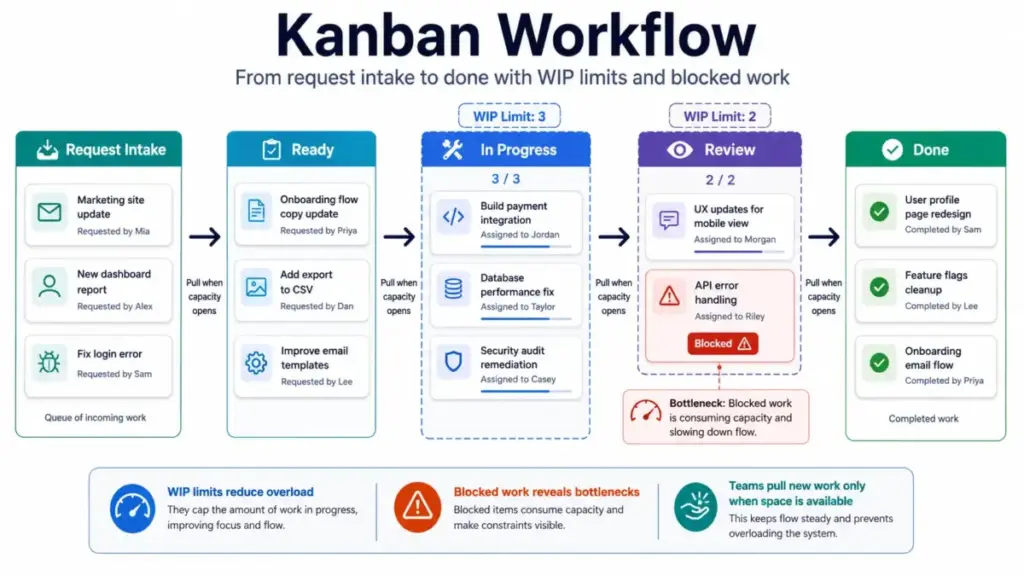
Kanban works by making work visible, limiting how much work is active at any time, and letting teams pull new items only when they have capacity. The result is fewer bottlenecks, shorter wait times, and a clearer picture of where the process breaks down.
Here is a concrete example. A five-person content team uses a board with six columns: Ideas, Brief Ready, Writing, Editing, Design, and Published. Each column has a WIP limit. Writing is capped at 3. Editing is capped at 2. Design is capped at 2.
On Monday morning, the board shows two cards in Writing and two cards in Editing. The editor finishes one review and moves the card to Design. That opens a slot in Editing. A writer who just finished a draft pulls her card from Writing into Editing. That opens a slot in Writing. The team lead pulls a new card from Brief Ready into Writing.
No manager assigned that work. The pull happened because capacity opened up. That is the pull system in action.
Now imagine the Design column is full. Two cards sit there, and the designer is out sick. Nothing can move from Editing to Design. Editing fills up. Writing fills up. The board shows the bottleneck clearly: Design is the constraint. The team can respond by helping with design, pausing new briefs, or adjusting the WIP limit.
Without WIP limits, none of that signal exists. Cards just pile up everywhere, and the team assumes they are busy rather than blocked.
Five Core Practices
- Visualize the workflow. Map every stage work passes through, from intake to delivery.
- Limit work in progress. Set a cap on each active stage. Start low.
- Manage flow actively. Watch for aging cards, blocked items, and empty columns.
- Make policies explicit. Write down when a card can move, what “done” means, and how to handle urgent requests.
- Improve collaboratively. Review flow data regularly and change one thing at a time.
Kanban Board Components
A Kanban board is only as useful as the parts it includes. Each component serves a specific function in controlling flow.
Kanban Cards
A Kanban card represents a single work item. It should contain enough information for anyone on the team to understand what the work is, who owns it, and what “done” looks like. Good cards include a title, a brief description, a due date or class of service, and a link to related documents. Bad cards say things like “fix the thing” or “follow up.”
Kanban Columns
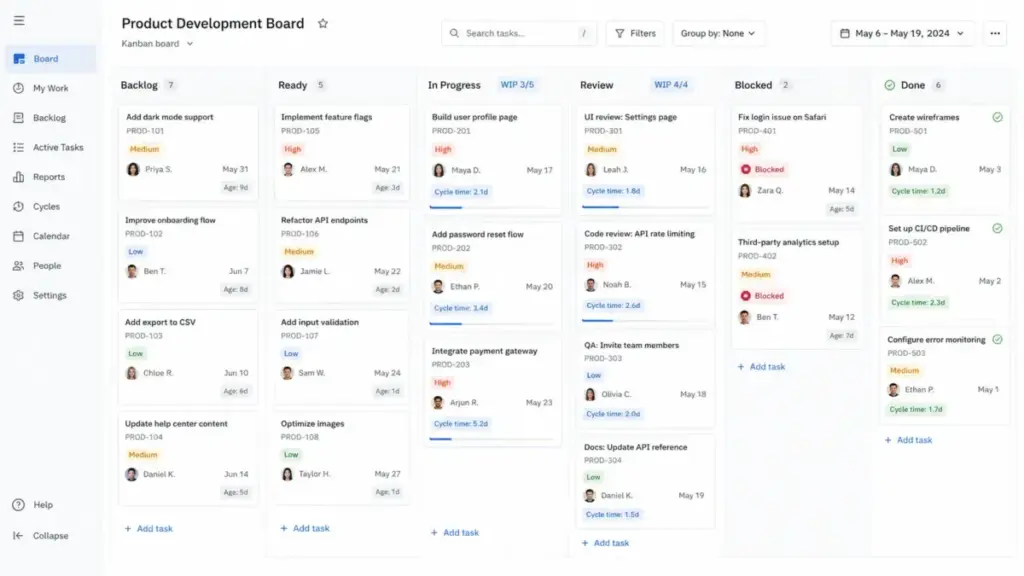
Columns represent stages in your workflow. The most basic board uses three: To Do, In Progress, Done. Most real teams need more. A software team might use Backlog, Ready, In Progress, Code Review, QA, and Done. A marketing team might use Ideas, Brief Ready, Writing, Design, Legal Review, Scheduled, and Published.
The rule: columns should mirror how work actually moves, not how you wish it moved.
WIP Limits
WIP stands for work in progress. A WIP limit is the maximum number of cards allowed in a column at any time. WIP limits are the single most important element that separates a Kanban system from a task board.
A practical starting heuristic: set the WIP limit to one or two active items per contributor in that stage. If three writers share the Writing column, start with a WIP limit of 4 or 5. Then watch. If cycle time is stable, keep it. If cards age and block, lower it. If the column starves, raise it slightly.
Pull Policies
A pull policy defines when a team member can move a card into the next column. The simplest rule: you pull only when a slot opens. This prevents overloading downstream stages and keeps the flow steady.
Flow Metrics
Flow metrics tell you whether your Kanban system is working. Without them, you are running a board, not a system. The key metrics are WIP count, throughput, cycle time, work item age, and cumulative flow diagrams. We cover each one in detail below.
Kanban Origins and Evolution
Kanban started on factory floors, not in software teams. Toyota developed the original Kanban system as part of the Toyota Production System in the late 1940s and 1950s. The word “kanban” translates roughly to “visual signal” or “signboard” in Japanese.
“Kanban is the quick-response system through which Just-In-Time production is achieved.” — Toyota UK Magazine
In manufacturing, a Kanban signal told the upstream process exactly which parts were needed, in what quantity, and when. Workers did not produce parts until a signal arrived. This prevented overproduction, one of the core wastes in Lean manufacturing.
Taiichi Ohno, the engineer credited with developing the Toyota Production System, modeled the approach on American supermarket shelving. Shelves were restocked only when items were removed by customers. Production followed consumption, not forecasts.
The jump to knowledge work happened in the 2000s. David J. Anderson adapted Kanban principles for software development and IT operations. The key shift: instead of signaling for physical parts, teams signaled for work capacity. The board replaced the factory floor. Cards replaced part bins. WIP limits replaced inventory caps.
Today, Kanban is used by marketing teams, support operations, legal departments, product teams, and solo founders. The mechanics changed, but the principle stayed the same: limit active work, pull based on capacity, and improve flow continuously.
Kanban Metrics That Matter
Metrics are what turn a visual board into a management system. If you never look at flow data, you are running a task board with columns. These six metrics give you the clearest picture of how work moves through your Kanban workflow.
| Metric | What It Measures | Plain-English Meaning | When to Check |
|---|---|---|---|
| WIP | Number of started but unfinished items | How much work is open right now | Daily |
| Throughput | Items completed per time unit | How many things the team finishes per week | Weekly |
| Cycle Time | Time from work start to work finish | How long a single item takes once someone starts it | Per item, reviewed weekly |
| Work Item Age | Elapsed time since a started item began | How old an in-progress item is right now | Daily, to catch aging cards |
| Cumulative Flow Diagram (CFD) | Visual chart of WIP, arrivals, and departures over time | Shows whether work is piling up at any stage | Weekly or biweekly |
| Service Level Expectation (SLE) | Forecast of expected completion time | “85% of bug fixes finish within 5 business days” | Monthly, based on past cycle time data |
Work item age is the most underused metric on this list. It tells you which cards are getting old before they become overdue. If your average cycle time for a bug fix is 3 days, and a card has been in progress for 6 days, that card needs attention now, not at the end of the sprint.
Throughput is the simplest metric to start with. Count how many cards your team moves to Done each week. Track it for four weeks. You now have a baseline. If throughput drops, check for rising WIP or blocked items.
Kanban Examples by Team Type
Kanban works differently depending on team size, work type, and intake patterns. Here are four examples with real columns, WIP limits, and the metric each team should watch first.
Marketing Team Kanban
A five-person marketing team handles blog posts, social campaigns, email sequences, and event collateral. Work arrives from the product team, the CEO, and the marketing calendar.
- Columns: Ideas, Brief Ready, Writing, Design, Legal Review, Scheduled, Published
- Starting WIP limit: Writing 3, Design 2, Legal Review 2
- Metric to watch: Work item age in Legal Review
- Failure risk: Legal Review becomes a bottleneck. Cards sit for days waiting for one reviewer. The board exposes this fast if the WIP limit is set.
Engineering Support Kanban
An eight-person engineering team splits time between product features and support escalations. Support tickets arrive daily and disrupt sprint work.
- Columns: Triage, Ready, In Progress, Code Review, QA, Done
- Starting WIP limit: In Progress 4 (one active item per two engineers as a baseline)
- Metric to watch: Cycle time by ticket type (bug vs. feature request vs. infrastructure)
- Failure risk: The team treats all tickets equally. Without a class of service, a minor UI tweak blocks a critical security patch.
Founder Kanban
A solo founder or a three-person startup team manages product decisions, sales follow-ups, hiring tasks, and investor updates on one board.
- Columns: Inbox, This Week, Doing, Waiting, Done
- Starting WIP limit: Doing 2
- Metric to watch: Number of aging cards in Waiting
- Failure risk: The Waiting column grows silently. Cards depend on external replies, and nobody reviews them weekly. Personal Kanban only works if you review the board daily.
Customer Support Kanban
A twelve-person support team handles tickets from email, chat, and phone. Escalations go to engineering. Resolution targets vary by plan tier.
- Columns: New, Assigned, Investigating, Waiting on Customer, Escalated, Resolved
- Starting WIP limit: Investigating 5
- Metric to watch: Throughput per week and age of escalated tickets
- Failure risk: Escalated tickets leave the support board and vanish. The team loses visibility unless the engineering board feeds status back.
Kanban vs Scrum: Which Method Fits Your Team?
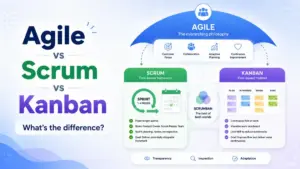
Kanban and Scrum both fall under the Agile umbrella, but they solve different problems. Kanban manages continuous flow. Scrum manages planned iterations. Picking the wrong one creates friction that no tool can fix.
| Decision Factor | Choose Kanban | Choose Scrum |
|---|---|---|
| Work intake | Continuous, unpredictable | Planned, batch-oriented |
| Priority changes | Weekly or daily shifts | Stable within a 2-week sprint |
| Roles | No prescribed roles | Product Owner, Scrum Master, Dev Team |
| Cadence | Continuous delivery | Sprint-based delivery |
| Planning | Replenishment meetings as needed | Sprint planning every 1-2 weeks |
| WIP control | Explicit WIP limits per column | Sprint backlog limits scope per sprint |
| Best for | Support, ops, marketing, mixed-intake teams | Product development with clear sprint goals |
| Metric focus | Cycle time, throughput, work item age | Velocity, sprint burndown |
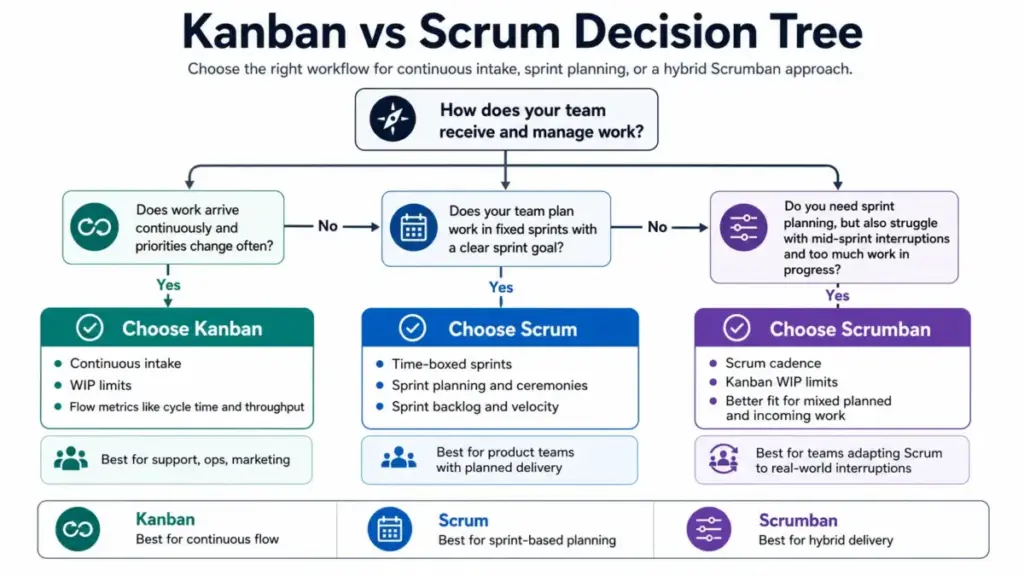
Here is a clear decision rule. If your team receives new requests every day and priorities shift weekly, start with Kanban. If your team plans work in two-week cycles and needs a fixed sprint goal, start with Scrum. If your Scrum team constantly pulls in mid-sprint work and struggles with WIP overload, try Scrumban. Scrumban combines Scrum’s planning cadence with Kanban’s WIP limits and flow metrics.
Many teams land on Scrumban after trying pure Scrum and finding that sprint commitments break under constant interruption. That is not a failure. It is a signal that continuous flow management fits the work better.
When Kanban Does Not Work
Kanban is not a universal fix. It fails predictably in specific conditions, and pretending otherwise wastes the team’s time.
A Kanban board without WIP limits is a prettier task list. This is the most common failure mode. Teams create columns, add cards, and never set a single WIP limit. The board looks organized, but nothing controls flow. Work piles up in every stage, and the team confuses visibility with control.
Here are the other failure cases:
- Leadership keeps adding urgent work without tradeoffs. If every new request bypasses WIP limits and jumps the queue, the system collapses. Kanban requires that adding one thing means deprioritizing another.
- Nobody reviews flow metrics. A board without data review is decoration. If the team never checks cycle time, throughput, or work item age, they cannot improve.
- Work items vary wildly in size. A card that takes 2 hours sits next to a card that takes 3 weeks. Without a class of service or size-splitting policy, WIP limits lose meaning.
- Dependencies are hidden outside the board. If half the work depends on another team’s output and that dependency is invisible, the board shows a false picture. Blocked items need explicit signals.
- The board is used for status theater. Some teams update the board only before a manager checks it. The board reflects what leadership wants to see, not what is actually happening.
- The team needs strict release planning. If your delivery model requires fixed scope, committed dates, and formal release gates, pure Kanban may not provide enough structure. Scrum or a hybrid model may fit better.
The honest test: if your team cannot agree to limit active work and review flow data weekly, Kanban will not help. Start with the discipline before you buy the tool.
Best Kanban Tools by Team Maturity
The right Kanban tool depends on where your team sits on the maturity curve, not on which product has the most features. A founder tracking tasks does not need the same software as a 50-person engineering org running flow metrics.
We evaluate tools using a transparent review methodology that considers pricing, workflow fit, and team size.
| Team Situation | Best-Fit Tool Type | SaaSZap Resource | Watch-Out |
|---|---|---|---|
| Solo founder or 2-3 person team | Simple visual board | Trello review | Free plan caps at 10 collaborators per workspace |
| Cross-functional team (5-15 people) | Work management with board views | Asana review | Board view is one of several project views; check if your team needs timeline or list views too |
| Software or engineering team | Agile-native project tracker | Jira review | Configuration complexity grows fast; small teams may find it heavy |
| All-in-one workspace team | Kanban plus docs, goals, automations | ClickUp review | Feature density can overwhelm new teams |
| Operations or non-technical team | Visual boards with templates | monday.com review | Template library is large, but custom Kanban setup needs manual column work |
Pricing Snapshot (as checked in May 2026)
- Trello: Free for up to 10 collaborators. Standard at $5/user/month billed annually. Premium at $10/user/month. See full Trello pricing.
- Asana: Personal plan free for up to 2 users. Starter at $10.99/user/month billed annually. Advanced at $24.99/user/month. See full Asana pricing.
- Jira: Free tier available for small teams. Paid plans scale by team size. See full Jira pricing.
- ClickUp: Free Forever plan includes Kanban boards. Unlimited at $7/user/month billed yearly. Business at $12/user/month. See full ClickUp pricing.
- monday.com: Basic at $9/seat/month billed annually. Standard at $12/seat/month. Pro at $19/seat/month. Kanban boards are available on all paid plans.
For teams testing Kanban for the first time, a free project management tool removes the cost barrier entirely. Start with a free board and upgrade only when you need automations, reporting, or cross-team visibility.
The Kanban Maturity Ladder
Not every team needs advanced tooling on day one. Here is a progression that matches tool complexity to team maturity.
Level 1: Visual Board. Sticky notes on a wall or a free Trello board. Three columns. No WIP limits. Goal: see all active work in one place.
Level 2: WIP-Limited Board. Same board, but with explicit WIP limits and a pull policy. The team agrees: “We do not start new work until a slot opens.” Goal: stop overloading team members.
Level 3: Measured Flow. The team tracks cycle time and throughput. Weekly review meetings look at work item age and blocked cards. Goal: use data to find and fix bottlenecks.
Level 4: Managed System. The team uses service level expectations, classes of service for urgent vs. standard work, and cumulative flow diagrams. Policies are written and visible. Goal: predict delivery dates and manage stakeholder expectations with data.
Level 5: Continuous Improvement. The team runs regular retrospectives focused on flow. Experiments are small, measured, and time-boxed. The board, policies, and WIP limits evolve as the work changes. Goal: the system improves itself.
Most teams benefit from reaching Level 3 within 60 to 90 days. Level 4 and 5 take months of practice and require organizational support.
James Carter’s Quick Take
I have watched dozens of teams adopt Kanban boards and call the job done. The board goes up. Cards get created. Everyone feels productive for about two weeks. Then the In Progress column fills to 20 items, nobody pulls from Ready, and the board becomes background noise.
Start with a simple board. Three to five columns. Set a WIP limit on your busiest stage. Review it weekly. That is enough for month one.
Do not call it a Kanban system until the team limits WIP and reviews flow. A board without those habits is just a prettier to-do list.
When the team outgrows a basic Trello board, move to Asana or ClickUp if you need cross-team views. Move to Jira if your engineering team needs Agile-native features. Move to monday.com if your ops team needs templates and automation. But do not upgrade the tool before you have built the habit. The discipline matters more than the software. If ClickUp is the next candidate after a basic board, compare ClickUp alternatives by Kanban simplicity, cross-team views, WIP visibility, automation needs, and the discipline required to keep the workspace clean.
Kanban Setup Checklist
Follow these steps to build a working Kanban system. Each step builds on the one before it.
- Map your current workflow. Write down every stage work passes through, from request to delivery. Include waiting stages.
- Define your start and finish points. Decide where work enters the system and where “done” means done. This sets the boundary for your cycle time measurement.
- Create columns that match reality. Do not copy a template. Use the stages your team actually follows. If work goes through Legal Review, add that column.
- Add explicit policies. Write the rules for each column. What qualifies a card to enter? What must be true before it moves to the next stage?
- Set first WIP limits. Start with one to two active items per person in each stage. Adjust after two weeks of data.
- Track blocked items. Mark blocked cards visibly. Review them daily. A blocked card that sits for three days is a process failure, not a task failure.
- Measure cycle time and work item age. Track how long items take from start to finish. Flag any card older than twice your average cycle time.
- Review and improve one constraint at a time. Hold a short weekly meeting to look at the board, check metrics, and pick one thing to change. Do not overhaul the system all at once.
FAQ
What is Kanban in simple terms?
Kanban is a visual method for managing work. Teams place tasks on a board with columns that represent workflow stages. Each column has a limit on how many tasks can be active at once. When a task finishes, the team pulls the next one. This prevents overload and makes bottlenecks visible.
What is a Kanban board used for?
A Kanban board is used to display all active work in one place. It shows what is waiting, what is in progress, what is blocked, and what is done. Teams use it to coordinate handoffs, spot overloaded stages, and decide what to work on next based on available capacity.
How does Kanban work?
Kanban works through three practices: visualizing workflow on a board, limiting work in progress at each stage, and actively managing items to improve flow. Teams pull new work only when capacity opens up. This reduces multitasking, shortens delivery times, and highlights process problems early.
What are the 3 main parts of a Kanban board?
The three main parts are columns, cards, and WIP limits. Columns represent workflow stages like Ready, In Progress, and Done. Cards represent individual work items. WIP limits cap the number of cards allowed in each column. Together, they control how work flows through the process.
What are WIP limits in Kanban?
WIP limits are caps on the number of active work items allowed in a column at any time. They prevent teams from starting too many tasks at once. When a column reaches its WIP limit, no new card can enter until one moves out. This forces teams to finish work before starting more.
Is Kanban Agile or Lean?
Kanban has roots in Lean manufacturing through the Toyota Production System. It is also used within Agile frameworks for software development and knowledge work. Kanban is compatible with both Lean and Agile, but it is not exclusive to either. It can operate independently as a flow management method.
What is the difference between Kanban and Scrum?
Kanban uses continuous flow with WIP limits and no fixed iterations. Scrum uses time-boxed sprints, defined roles like Product Owner and Scrum Master, and ceremonies like sprint planning and retrospectives. Kanban fits continuous intake work. Scrum fits teams that plan and deliver in fixed cycles.
What is an example of Kanban?
A marketing team uses a board with columns: Ideas, Brief Ready, Writing, Design, Legal Review, Scheduled, Published. The Writing column has a WIP limit of 3. When a writer finishes a draft and moves it to Design, a new card is pulled from Brief Ready into Writing. The board controls pacing.
What are Kanban cards?
Kanban cards are visual representations of individual work items on a Kanban board. Each card includes a title, description, owner, and status. Cards move across columns as work progresses. They can also carry tags for priority, blocked status, or class of service to help the team manage flow.
When should you not use Kanban?
Kanban does not work when teams refuse to limit active work, when leadership overrides WIP limits with constant urgent requests, or when nobody reviews flow data. It also struggles when work items vary wildly in size without splitting rules, or when the team needs strict release planning with fixed scope.
What tools are best for Kanban boards?
The best tool depends on team size and maturity. Trello works for simple boards and small teams. Asana fits cross-functional project teams. Jira suits software teams running Agile workflows. ClickUp offers an all-in-one workspace. monday.com works well for operations and non-technical teams. What Is Kanban without the right tool? Still valuable, even on sticky notes.
Can Kanban be used outside software development?
Yes. Kanban is used by marketing teams, customer support operations, legal departments, HR teams, and solo founders. Any work that flows through stages benefits from visual management and WIP limits. The method is workflow-agnostic. The board structure adapts to the team’s actual process.
Key Takeaways
- Kanban is a visual workflow method that controls how work enters, moves, and finishes. A board without WIP limits is just a task list with columns.
- WIP limits are the single practice that separates a Kanban system from a visual board. Start with one to two active items per contributor.
- Flow metrics like cycle time, throughput, and work item age turn guessing into measurement. Track them weekly.
- Kanban fits teams with continuous intake and shifting priorities. Scrum fits teams that plan work in fixed sprints. Scrumban bridges both.
- Match your tool to your maturity. A free Trello board is enough for most teams starting out. Upgrade to project management software like Asana, Jira, ClickUp, or monday.com when you need automations, reporting, or cross-team visibility.
- The discipline matters more than the software. Build the habit of limiting work and reviewing flow before investing in a paid tool.
- Start small: map your workflow, set one WIP limit, review weekly, and improve one constraint at a time.