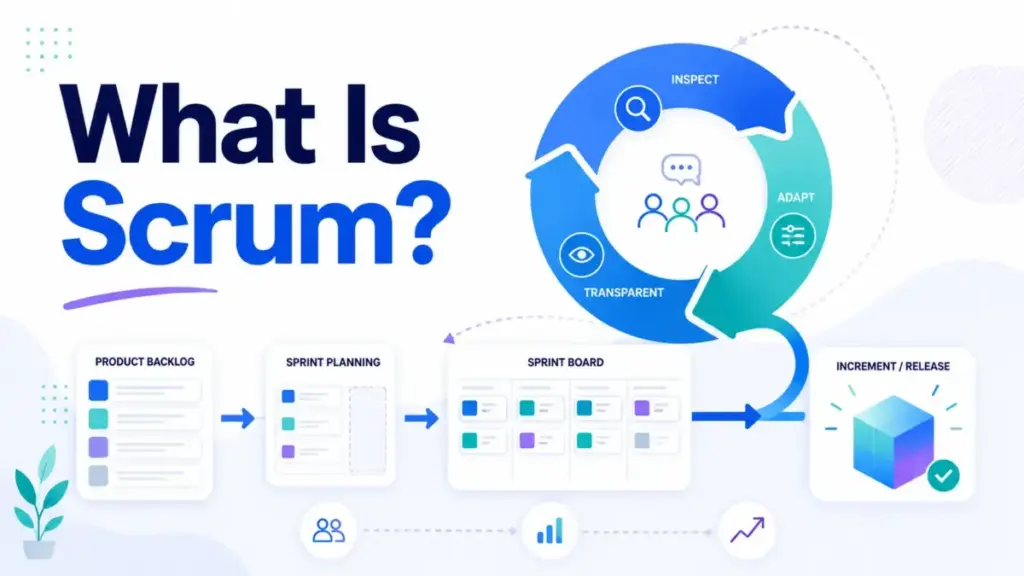
Scrum is not a meeting schedule. It is not a Jira board. And it is not a synonym for Agile. Most teams that say they “do Scrum” copy the ceremonies, skip the feedback loop, and wonder why delivery still feels chaotic. The Scrum Guide defines Scrum as a lightweight framework that helps people, teams, and organizations generate value through adaptive solutions for complex problems. That definition fits on a sticky note, but the operating question underneath it does not: does Scrum give your team a faster empirical learning loop, or does it just add ritual overhead?
I have spent seven years evaluating project management tools and deploying Agile workflows across distributed teams. This guide explains what Scrum actually is, how the roles, events, artifacts, and commitments fit together, when Scrum is useful, when it is a poor fit, and how SaaS teams can measure whether it is working. No certification jargon. No vendor sales pitch. Just the framework, the tradeoffs, and the practical decisions that matter.
Quick Answer: Scrum is a lightweight Agile framework built around a Product Owner, Scrum Master, Developers, five events (Sprint, Sprint Planning, Daily Scrum, Sprint Review, Sprint Retrospective), three artifacts (Product Backlog, Sprint Backlog, Increment), and three commitments (Product Goal, Sprint Goal, Definition of Done). Teams work in timeboxed Sprints of one month or less, inspecting a working Increment each cycle and adapting based on stakeholder feedback.
What Scrum Actually Means
Scrum is a framework for managing complex knowledge work through short, repeating cycles of planning, building, inspecting, and adapting. The Scrum Guide, authored by Ken Schwaber and Jeff Sutherland, describes Scrum as founded on empiricism and lean thinking. Empiricism means decisions come from observation, not assumptions. Lean thinking means reducing waste and focusing on what matters.
Three layers make this concrete.
Simple definition: Scrum is a team-level work system where a small group picks the most important work, builds something usable in a short cycle, shows it to stakeholders, and improves the process before repeating.
Technical definition: Scrum operates through three pillars: transparency (the work and its progress are visible), inspection (the team regularly examines results against goals), and adaptation (the team adjusts its plan, process, or product based on what inspection reveals). These pillars run through five formal events that create a continuous feedback loop.
Business definition: Scrum reduces risk in product development by forcing teams to test assumptions incrementally instead of hiding them until a final delivery phase. For SaaS teams facing fast-changing requirements, AI-assisted development workflows, and remote collaboration, this feedback discipline shortens the gap between building something and learning whether it matters to customers.
According to Digital.ai’s 17th State of Agile Report, 63% of Agile practitioners surveyed used team-level Scrum, making it the most common Agile framework among respondents. That number is survey evidence, not universal market share, but it signals how deeply Scrum has penetrated product delivery teams.
One thing I keep seeing in the field: teams confuse adopting Scrum with buying a tool. Configuring a Scrum board in Jira or ClickUp does not mean the team practices Scrum. The framework depends on accountabilities, inspectable increments, and empirical adaptation. Tools support those behaviors. They do not replace them.
How Scrum Works
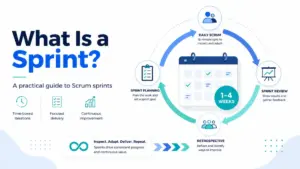
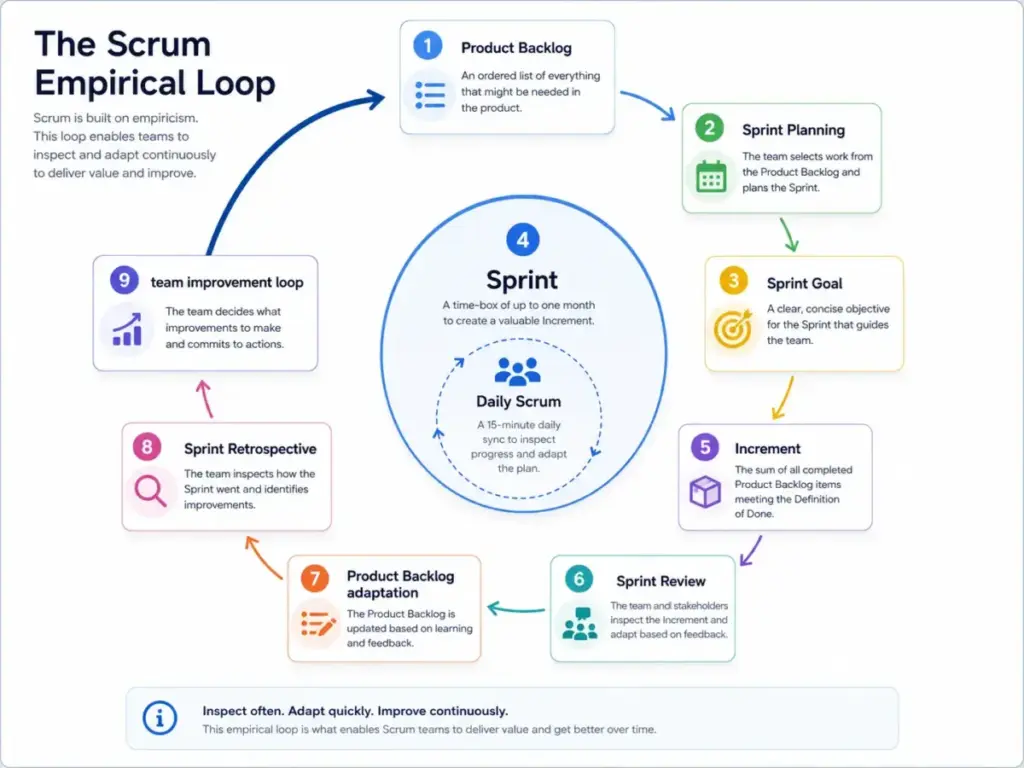
Scrum operates as a repeating empirical loop, not a linear project plan. Each cycle, called a Sprint, produces an Increment of usable work that stakeholders can inspect. The loop runs like this:
- Product Owner orders the Product Backlog around outcomes, user problems, risks, and the Product Goal. The Product Backlog is not a fixed commitment list. It is an ordered, evolving list of work needed to improve the product.
- Sprint Planning opens each Sprint. The team selects a Sprint Goal first, then identifies the Product Backlog items and tasks needed to reach that goal. Sprint Planning answers two questions: what value can this Sprint deliver, and how will the team build it?
- The Sprint is a fixed-length container of one month or less. All other events happen inside it. The team protects the Sprint from unplanned scope changes so they can focus on the Sprint Goal.
- Daily Scrum is a short planning and inspection event for Developers. It runs 15 minutes or less. Its purpose is to adapt the plan toward the Sprint Goal, not to report status to a manager. If Daily Scrum feels like a status meeting, something is wrong.
- Sprint Review happens at the end of the Sprint. The team inspects the Increment with stakeholders, collects feedback, and adapts the Product Backlog. This is where assumptions get tested against real reactions.
- Sprint Retrospective closes the Sprint. The team identifies one or two operational improvements it can actually complete in the next Sprint. Not a wishlist. Specific, actionable changes.
- The loop repeats. The improved process carries into the next Sprint Planning, and the cycle continues.
The entire loop depends on the Increment meeting a quality standard called the Definition of Done. If the Increment is not usable, Sprint Review has nothing meaningful to inspect. The feedback loop breaks.
That is where most teams go wrong. They run the five events on schedule but never produce a working Increment. The ceremonies continue. The learning stops.
Scrum Roles and Accountabilities
The Scrum Guide defines three accountabilities within a Scrum Team, not job titles. The team is cross-functional, self-managing, and typically has 10 or fewer people.
| Accountability | Core Responsibility | Common Misunderstanding |
|---|---|---|
| Product Owner | Decides what to build and in what order. Owns the Product Backlog and the Product Goal. Makes ordering decisions that maximize value. | Not a project manager. Not a requirements writer. One person, not a committee. |
| Scrum Master | Accountable for the team’s Scrum effectiveness. Coaches, facilitates, removes impediments, and helps the organization understand Scrum. | Not a task dispatcher. Not a project manager. Not the team’s secretary. |
| Developers | Create the Increment each Sprint. Own the Sprint Backlog and the technical decisions about how to build the work. | Not limited to software engineers. Includes anyone who contributes to the Increment: designers, testers, analysts. |
One misconception I encounter repeatedly: the Scrum Master is the project manager with a new title. Scrum does not define a project-manager role. The Scrum Master’s job is to improve how the team practices Scrum, not to assign tasks or track individual output.
Another friction point: absentee Product Owners. If the Product Owner is unavailable, the team has no one with authority to order the backlog or make value decisions. Sprint Planning becomes guesswork, and Sprint Review loses its feedback value. Scrum without an empowered Product Owner is Scrum in name only.
Scrum Events, Artifacts, and Commitments
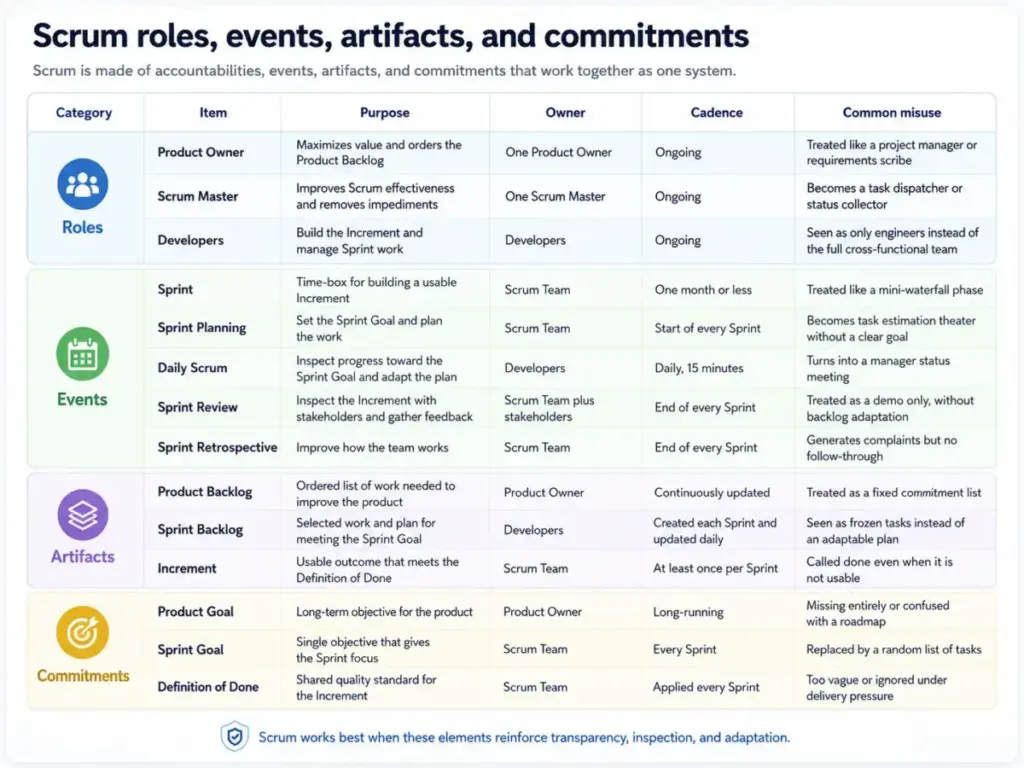
Scrum connects five events, three artifacts, and three commitments into a single system. Removing any piece changes the framework enough that the Scrum Guide says “implementing only parts of Scrum is not Scrum.”
The Five Events
| Event | Purpose | Timebox | Key Output |
|---|---|---|---|
| Sprint | Container event for all work and other events | 1 month or less | Usable Increment |
| Sprint Planning | Select a Sprint Goal and plan the work to reach it | 8 hours max for a 1-month Sprint | Sprint Backlog + Sprint Goal |
| Daily Scrum | Inspect progress toward the Sprint Goal and adapt the plan | 15 minutes | Updated plan for the day |
| Sprint Review | Inspect the Increment with stakeholders and adapt the Product Backlog | 4 hours max for a 1-month Sprint | Revised Product Backlog |
| Sprint Retrospective | Identify improvements the team can implement in the next Sprint | 3 hours max for a 1-month Sprint | Actionable improvement items |
The Three Artifacts and Their Commitments
| Artifact | Commitment | What It Contains |
|---|---|---|
| Product Backlog | Product Goal | Ordered list of everything needed to improve the product |
| Sprint Backlog | Sprint Goal | Selected items + plan for delivering the Increment this Sprint |
| Increment | Definition of Done | The sum of all completed Product Backlog items that meet the quality standard |
The commitments exist to create focus and transparency. The Sprint Goal gives the team a coherent objective instead of a random task list. The Definition of Done prevents “done but not really done” from contaminating the Increment. The Product Goal gives the Product Backlog a long-term direction.
Scrum vs Agile: The Distinction That Matters
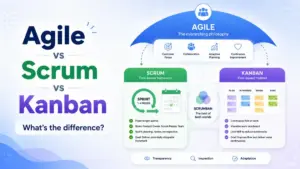
The Agile Manifesto defines Agile through four values and twelve principles. Agile is a philosophy. Scrum is one framework that operationalizes that philosophy through specific roles, events, artifacts, and commitments.
| Dimension | Agile | Scrum |
|---|---|---|
| What it is | A set of values and principles for iterative, people-centric software delivery | A specific framework with defined roles, events, artifacts, and rules |
| Prescriptiveness | Low. Describes what to value, not how to work. | Moderate. Defines five events, three roles, three artifacts, and their connections. |
| Alternatives | Kanban, XP, Lean, Crystal, DSDM, and others | Scrum is one Agile framework. It can be combined with practices like XP or DevOps. |
| Scope | Applies broadly to product and service delivery | Designed primarily for complex product development with inspectable increments |
Treating Scrum and Agile as interchangeable creates real problems. A team can follow every Scrum rule and still violate Agile principles if it ignores customer collaboration or resists change. A team can practice Agile values using Kanban or Lean without touching Scrum at all.
The practical takeaway: Scrum is one way to practice Agile. Not the only way, and not always the best way.
Scrum vs Kanban: When Each Fits
Another common comparison. Scrum and Kanban share Agile roots but solve different problems.
| Factor | Scrum | Kanban |
|---|---|---|
| Work cadence | Fixed-length Sprints (1-4 weeks) | Continuous flow, no fixed cadence |
| Roles | Product Owner, Scrum Master, Developers | No prescribed roles |
| Planning | Sprint Planning at the start of each Sprint | Pull from backlog when capacity opens |
| Change policy | Protect the Sprint from mid-cycle scope changes | Accept new work anytime if capacity allows |
| Best fit | Complex product work with regular feedback cycles | Interrupt-heavy operations, support queues, continuous delivery |
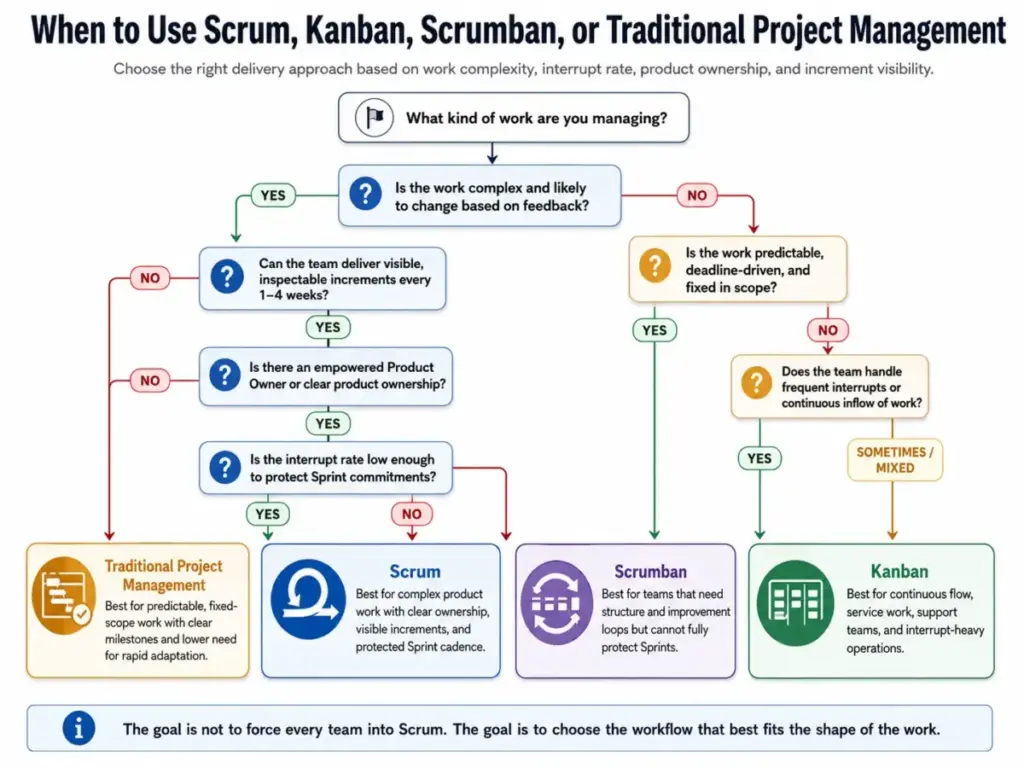
Teams doing mostly unplanned, interrupt-driven work (support tickets, production incidents, ad hoc requests) often struggle with Sprint-level coherence. Kanban handles that pattern better because it does not force work into a timebox.
Some teams use Scrumban, a hybrid that borrows Scrum’s review cadence and Kanban’s continuous flow. This can work for teams that need regular retrospectives but cannot protect a Sprint from interrupts. It should not be described as pure Scrum if core Scrum rules are changed.
How to Implement Scrum: Step by Step
This section maps implementation steps to real SaaS team workflows, not textbook abstractions.
Step 1: Confirm the Work Fits Scrum
Scrum works when the work is complex, feedback-driven, and can be delivered in inspectable increments. If the team primarily handles ticket queues, fixed-scope compliance delivery, or interrupt-driven operations, Scrum creates friction instead of reducing it.
Step 2: Define Accountabilities
Assign one Product Owner (not a committee), one Scrum Master, and Developers. The Product Owner needs decision-making authority over the Product Backlog. Without that authority, Sprint Planning becomes theater.
Step 3: Build the Product Backlog
Create or clean the Product Backlog around outcomes, user problems, and risks. Order it by value, not by department preference. Establish a Product Goal that gives the backlog a direction.
Step 4: Choose a Sprint Length
Pick a Sprint length of one month or less. Two weeks is the most common cadence for SaaS product teams. The cadence should be consistent and protected from external schedule pressure.
Step 5: Run Sprint Planning with a Goal First
Select a Sprint Goal before selecting tasks. The goal gives the Sprint coherence. Then pick the Product Backlog items and plan the work needed to reach the goal. Do not plan at 100% capacity. Leave buffer for unexpected complexity.
Step 6: Use the Daily Scrum for Adaptation
The Daily Scrum is for Developers to inspect progress toward the Sprint Goal and adapt their plan. It is not a status report for the manager. If the conversation is “what did you do yesterday,” the event has lost its purpose.
Step 7: Run Sprint Review with Stakeholders
Inspect the Increment with stakeholders. Collect real feedback. Adapt the Product Backlog based on what was learned. If nothing shipped, the team should discuss why and what to change, not pretend the Sprint succeeded.
Step 8: Close with a Focused Retrospective
Identify one or two operational improvements the team can actually complete in the next Sprint. Track whether those improvements happen. A retrospective that produces a wishlist but no follow-through is wasted time.
Step 9: Track the Right Metrics
Measure outcome, quality, flow, and feedback metrics instead of treating velocity as a productivity scoreboard. More on this in the metrics section below.
Common Mistakes and Anti-Patterns
These are the patterns I see most often when Scrum goes wrong. Each one sounds minor. Each one can hollow out the entire framework.
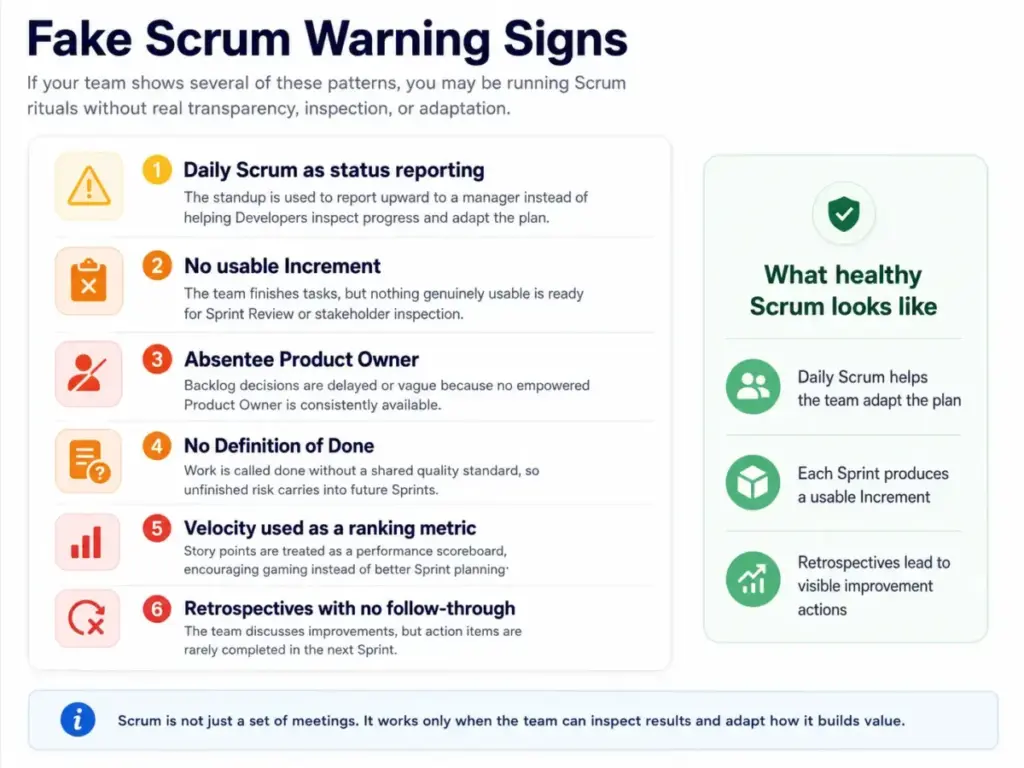
1. Copying ceremonies without a Product Goal. The team runs five events on schedule but has no Product Goal connecting them. Sprint Planning becomes a task-picking exercise instead of a goal-setting conversation. Without direction, the Sprint Goal defaults to “finish whatever we started.”
2. Treating Daily Scrum as manager status reporting. When a manager sits in and asks “what did you do yesterday?” the event flips from Developer-owned planning to upward reporting. Developers start performing instead of adapting.
3. Overcommitting 100% of team capacity. Teams that plan every Sprint at full capacity leave no room for unexpected complexity, production issues, or learning. The result: chronic missed commitments, declining morale, and a Sprint Goal that stops meaning anything.
4. Skipping the Definition of Done. If the team has no shared quality standard, “done” means different things to different people. Partially finished work carries risk into the next Sprint, and Sprint Review inspects something that is not actually usable.
5. Using velocity as a productivity ranking metric. Velocity is a team-level planning input. Using it to compare individuals or pressure higher output turns it into a performance surveillance tool. Teams respond by inflating story points, which destroys velocity’s planning utility.
6. Allowing an absentee Product Owner. When the Product Owner is unavailable for Sprint Planning, backlog refinement, or Sprint Review, the team makes ordering decisions without value context. The Scrum Master cannot substitute for this accountability.
7. Letting the Scrum Master become a task dispatcher. The Scrum Master’s job is to improve Scrum effectiveness, not to assign work. When the Scrum Master becomes a project manager in disguise, the team’s self-management atrophies.
8. Using a tool workflow that hides bottlenecks. A Scrum board that auto-moves tickets, collapses blocked items, or obscures work-in-progress counts reduces transparency instead of increasing it. The tool should expose problems, not bury them.
Common Misconceptions About Scrum
Misconception: Scrum and Agile are the same thing.
Reality: Agile is a broader set of values and principles. Scrum is one framework that can be used to practice Agile product delivery. Other frameworks include Kanban, XP, and Lean.
Misconception: Daily Scrum is a status meeting for the manager.
Reality: Daily Scrum is a short planning and inspection event for Developers to adapt their plan toward the Sprint Goal. It belongs to the Developers, not to management.
Misconception: The Scrum Master is the project manager.
Reality: The Scrum Master is accountable for Scrum effectiveness, coaching, facilitation, and removing impediments. Scrum does not define a project-manager role.
Misconception: The Product Backlog is a fixed commitment list.
Reality: The Product Backlog is an ordered, evolving list of work needed to improve the product. The Sprint Goal and selected Sprint Backlog define the Sprint-level commitment, not the full backlog.
Misconception: Buying a tool means the team is doing Scrum.
Reality: Jira, ClickUp, Asana, and monday dev can support Scrum boards, backlogs, reports, and workflows. The framework depends on team accountabilities, inspectable increments, and empirical adaptation. A Jira board with Sprint labels is not Scrum.
How to Measure Scrum Success
Velocity is not the answer. At least, not as a standalone metric.
| Metric | What It Measures | Why It Matters | Warning Sign |
|---|---|---|---|
| Sprint Goal success rate | Percentage of Sprints where the team meets the Sprint Goal | Indicates whether goals are realistic and the team can deliver coherently | Below 60% across 5+ Sprints |
| Cycle time | Time from work start to Done | Shows how fast value moves through the team’s process | Increasing trend with no explanation |
| Throughput | Number of items completed per Sprint | Measures raw delivery capacity | Declining while team size stays the same |
| Escaped defect rate | Defects found after release | Signals whether the Definition of Done is working | Rising despite stable velocity |
| Rework rate | Percentage of Sprint capacity spent on rework | Indicates quality debt accumulating across Sprints | Above 20% of Sprint capacity |
| Retro action completion rate | Percentage of retrospective actions actually done | Shows whether the team is improving or just talking about improving | Below 50% across 3+ Sprints |
| Deployment frequency | How often the team deploys to production | Proxy for delivery pipeline health | Less than once per Sprint |
Velocity can be used as a team planning input to estimate how much work fits in a Sprint. It should never be framed as an individual productivity score, a cross-team comparison metric, or a management KPI. When velocity becomes a target, teams inflate estimates to meet it. The number stops being useful.
The 18th State of Agile Report by Digital.ai notes that many organizations still have partial, inconsistent, or siloed Agile adoption while AI becomes part of delivery work. JJ Sutherland of Scrum Inc. put it directly: “Agility isn’t about ceremonies or compliance, it’s about how the organization runs.” Scrum metrics should measure whether the team is learning faster, not whether the team is attending more meetings.
When to Use Scrum and When Not to Use It
Use Scrum When
- The work is complex and priorities change based on market feedback, user data, or stakeholder input.
- The team can deliver a usable Increment at least once per Sprint.
- An empowered Product Owner can make ordering decisions about what to build next.
- Customer or stakeholder feedback matters and Sprint Review can produce actionable input.
- The team is cross-functional enough to build the Increment without external dependencies blocking every Sprint.
Avoid or Modify Scrum When
- The team primarily handles interrupt-driven operations (support queues, production incidents, ad hoc requests). Kanban handles this better.
- The work is fixed-scope compliance delivery with no room for adaptation. A governance-heavy project model fits better.
- The team has no empowered Product Owner. Scrum without product ownership authority produces ceremonies without decisions.
- No usable Increment can be inspected. If the work takes six months to produce anything stakeholders can evaluate, Sprint Review has nothing to inspect.
- Ticket queues have no Sprint-level coherence. If every Sprint is just “pull the next ticket,” Kanban or Scrumban removes unnecessary ceremony.
This is not a failure of Scrum. It is a fit question. Scrum solves specific problems for specific team shapes. Forcing it onto teams where it does not fit produces the “fake Agile” pattern that practitioners complain about in forums: rituals without outcomes, ceremonies without delivery improvement, and a framework that feels like overhead instead of help.
Scrum Tools: What Software Supports the Framework
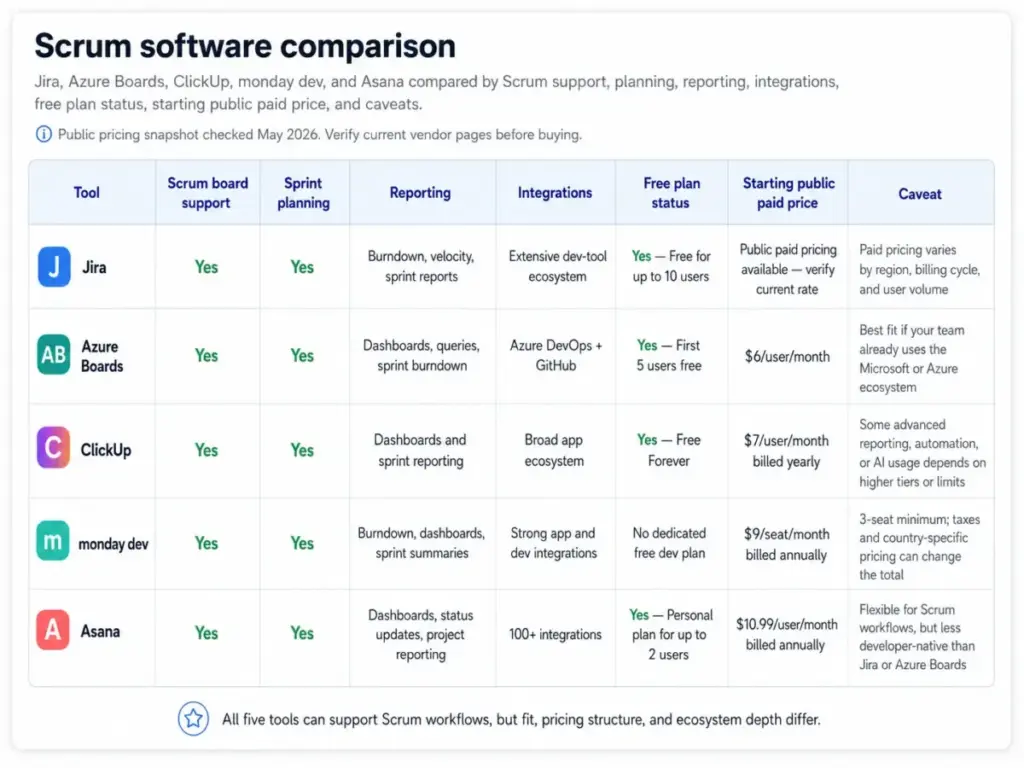
Several SaaS products support Scrum workflows. This table covers what each tool offers, with pricing-status caveats.
| Tool | Scrum Board | Sprint Planning | Backlog Management | Burndown/Velocity Reports | Free Plan | Starting Paid Price | Key Caveat |
|---|---|---|---|---|---|---|---|
| Jira | Yes | Yes | Yes | Yes | Up to 10 users, 2GB storage | Check Atlassian’s current pricing page | Free plan limited to community support. Paid tiers vary by region and billing term. |
| Azure Boards | Yes | Yes (iteration paths) | Yes | Sprint burndown, dashboards | First 5 users free | $6/user/month (Basic Plan, as of May 2026) | Total cost depends on related Azure DevOps services (pipelines, artifacts). Pricing details |
| ClickUp | Yes | Yes | Yes | Agile dashboards, sprint reports | Free Forever plan available | Check ClickUp pricing page for current paid tiers | Feature usage limits can apply and do not reset. Teams may need to upgrade when a plan limit is reached. |
| monday dev | Yes | Yes | Yes | Burndown charts, sprint summaries | No free plan for monday dev | $9/seat/month (Basic, billed annually, as of May 2026) | Prices exclude tax. Seat minimums and Enterprise quotes vary. Pricing page |
| Asana | Yes (boards) | Yes | Yes | Timelines, custom fields, dependencies | Personal plan (free, unlimited tasks) | $10.99/user/month (Starter, billed annually, as of May 2026) | Personal plan limits file storage to 100MB per file. Enterprise tiers require contact sales. Pricing page |
What this table means: All five tools support backlogs, Sprint-style planning, and some form of reporting. The differences show up in pricing structure, free-plan limitations, and integration depth. Jira and Azure Boards integrate most tightly with developer workflows (commits, pull requests, CI/CD). ClickUp and monday dev offer broader project management features beyond pure Scrum.
Asana approaches Scrum through Agile-style boards and timelines rather than native Scrum terminology. Teams considering ClickUp for broader Scrum-adjacent work should compare ClickUp alternatives by sprint reporting, backlog depth, non-technical usability, pricing transparency, and whether the tool reinforces the team’s actual Scrum discipline.
The critical point: a tool does not make a team Scrum. A perfectly configured Jira board with Sprint labels, story points, and burndown charts produces nothing if the team lacks an empowered Product Owner, a clear Definition of Done, or the discipline to inspect and adapt. Tools can reinforce the framework. They cannot replace it. If Jira is being used as a substitute for Scrum discipline, compare Jira alternatives by process fit, sprint reporting, backlog clarity, team maturity, and whether the tool makes inspection easier rather than heavier.
Why Scrum Still Matters in 2026
The 18th State of Agile Report by Digital.ai frames AI as a major force in Agile delivery and emphasizes that many organizations still have partial or inconsistent Agile adoption. AI-assisted development does not reduce the need for Scrum’s feedback discipline. If anything, it makes it more important.
When AI accelerates code generation, the bottleneck shifts from writing code to validating what was built. Sprint Review, Definition of Done, and stakeholder feedback become more critical because the team produces more output that needs inspection. Scrum’s empirical loop, transparency through the Product Backlog, inspection through Sprint Review, and adaptation through Sprint Retrospective, addresses this shift directly.
The Scrum Alliance describes Scrum benefits including fast feedback, quicker innovation, continuous improvement, rapid adaptation, and reduced risk. These benefits hold in 2026, but only for teams that practice the framework honestly. Copying ceremonies without empirical discipline produces the opposite: slower feedback, more meetings, and process theater that AI adoption makes even more visible.
Types of Scrum Implementation
| Type | Description | When It Fits |
|---|---|---|
| Single-team Scrum | The canonical Scrum Guide model: one Product Owner, one Scrum Master, and Developers working on one Product Goal. | Small to medium product teams (3-10 people) building a single product or feature set. |
| Scaled Scrum | Multiple Scrum Teams work on the same product, often using coordination patterns such as Nexus, Scrum@Scale, LeSS, or SAFe. | Organizations with 20+ developers on a single product. Adds coordination overhead. |
| Scrumban | Borrows Scrum cadence and reviews while using Kanban-style continuous flow. | Interrupt-heavy teams that need regular retrospectives but cannot protect Sprints from ad hoc work. |
| Non-software Scrum | Scrum applied to knowledge work beyond software when the team can deliver inspectable increments and adapt based on feedback. | Marketing campaigns, research projects, content production, and other iterative knowledge work. |
Scrum Beginner Checklist
Use this checklist to evaluate whether your team is ready for Scrum and whether you are practicing it correctly.
- [ ] The team has one empowered Product Owner who makes backlog ordering decisions
- [ ] The team has a Scrum Master focused on Scrum effectiveness, not task management
- [ ] Sprints are a consistent length of one month or less
- [ ] Sprint Planning starts with a Sprint Goal, not a task list
- [ ] The Product Backlog is ordered by value, not by department preference
- [ ] The Definition of Done is documented and shared across the team
- [ ] Daily Scrum is Developer-owned, not a manager status meeting
- [ ] Sprint Review inspects a usable Increment with stakeholders
- [ ] Sprint Retrospective produces actionable improvements, not just a wishlist
- [ ] Retrospective actions are tracked and completed in subsequent Sprints
- [ ] Velocity is used for team planning, not individual performance measurement
- [ ] The team can deliver a working Increment at least once per Sprint
Tools That Support Scrum Workflows
If you have decided that Scrum fits your team, the next step is choosing a tool that reinforces the framework rather than replacing team judgment. Here are the key signals that your team needs dedicated Scrum software:
- Sprint Planning requires more than a shared document or whiteboard
- The backlog exceeds 30 items and ordering becomes difficult to maintain manually
- The team needs burndown or velocity reports for Sprint-level planning
- Developers need development context (commits, pull requests, deployments) connected to Sprint items
- Stakeholders need visibility into Sprint progress without attending every Daily Scrum
For project management tools that support Scrum workflows, compare Jira, Azure Boards, ClickUp, monday dev, and Asana using the pricing and feature table above. For teams focused specifically on developer workflows, Linear offers a fast issue-tracking interface with cycles that function similarly to Sprints, though it should not be described as official Scrum implementation. That distinction matters when choosing Linear alternative tools for Scrum teams.
For teams that need visual collaboration alongside Scrum ceremonies, tools like Miro support Sprint Retrospective boards, planning canvases, and workflow diagrams that complement a primary Scrum tool.
Related Resources
- Jira review for the most widely used Scrum tool
- ClickUp review for teams that want Scrum alongside broader PM features
- Asana review for Agile-style project management
- Wrike review for mid-market Scrum and hybrid Agile workflows
- What is workflow automation for automating repetitive Sprint operations
FAQ
What is Scrum in simple terms?
Scrum is a team-level framework where a small group picks the most valuable work, builds something usable in a short cycle called a Sprint, shows it to stakeholders, collects feedback, and improves the process before repeating. The goal is to learn faster by delivering and inspecting small increments instead of building everything at once.
What are the three roles in Scrum?
Scrum defines three accountabilities: the Product Owner (decides what to build and in what order), the Scrum Master (improves how the team practices Scrum), and Developers (build the Increment each Sprint). These are accountabilities, not job titles. A person can hold one Scrum accountability while having a different job title in their organization.
What are the five Scrum events?
The five Scrum events are the Sprint (the timebox containing all work), Sprint Planning (setting the Sprint Goal and selecting work), Daily Scrum (15-minute Developer planning event), Sprint Review (inspecting the Increment with stakeholders), and Sprint Retrospective (identifying process improvements). All events serve the empirical cycle of transparency, inspection, and adaptation.
Is Scrum only for software development?
No. The Scrum Guide describes Scrum as applicable to complex problems in any domain where work can be delivered in inspectable increments and adapted based on feedback. Marketing teams, research groups, and content production teams have used Scrum-style cadences. The key requirement is that the team can produce something stakeholders can evaluate at the end of each Sprint.
Is velocity a useful metric or a management trap?
Velocity is a useful team-level planning input. It helps teams estimate how much work fits in a Sprint based on past performance. It becomes a management trap when it is used to compare individuals, pressure higher output, or rank teams against each other. When velocity becomes a target, teams inflate story point estimates. The metric loses its planning utility.
How should Jira be configured for Scrum?
Jira supports Scrum through Scrum boards with Sprint planning, backlog management, burndown and velocity reports, and development context (commits, branches, pull requests). Configure a Scrum board by creating a project with the Scrum template, defining Sprint length, establishing a Definition of Done as a custom field or checklist, and connecting development tools for visibility into commits and deployments.
When should a team not use Scrum?
Avoid Scrum when the team primarily handles interrupt-driven operations (support tickets, production incidents), fixed-scope compliance delivery with no room for adaptation, or work where no usable Increment can be inspected within a Sprint. In these cases, Kanban, Scrumban, or a governance-heavy project model fits better.
Can Scrum work without a dedicated Product Owner?
Not well. The Product Owner is accountable for ordering the Product Backlog and making value decisions. Without an empowered Product Owner, Sprint Planning lacks direction, Sprint Review lacks value context, and the team makes ordering decisions based on convenience instead of outcomes. If no one in the organization can fill this accountability, the team should question whether Scrum is the right framework.
What is the difference between Sprint Review and Sprint Retrospective?
Sprint Review focuses on the product: the team inspects the Increment with stakeholders, collects feedback, and adapts the Product Backlog. Sprint Retrospective focuses on the process: the team identifies how to work more effectively and commits to specific improvements for the next Sprint. Review looks at what was built. Retrospective looks at how it was built.
What tools support Scrum for remote teams?
Jira, Azure Boards, ClickUp, monday dev, and Asana all support distributed Scrum workflows through cloud-based backlogs, Sprint boards, and reporting. For remote Sprint Retrospectives and collaborative planning, visual collaboration tools like Miro add facilitation features that complement a primary Scrum tool. The tool selection matters less than the team’s discipline in maintaining transparency, inspection, and adaptation across time zones.