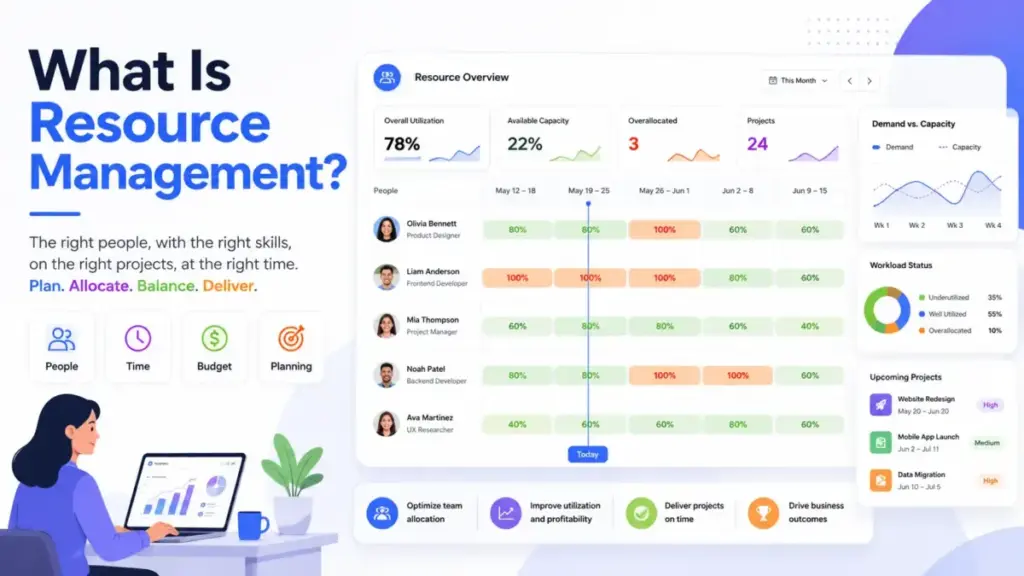
Every project plan looks great until three teams need the same developer in the same sprint. That is the moment most organizations realize they have a task list, not a resource plan. Project management tools can track what needs to happen, but resource management answers a harder question: can your team actually deliver it?
Resource management is the structured practice of planning, scheduling, allocating, monitoring, and adjusting the people, time, budget, equipment, technology, and materials required to deliver work successfully. The UK Government Project Delivery Teal Book defines it as ensuring resources are planned and managed efficiently so they are available when needed and capacity is used well.
Planview frames it as planning, scheduling, and allocating people, money, and technology to a project or program. Atlassian describes it as identifying, acquiring, allocating, and managing resources within scope, time, and budget constraints.
This guide explains how resource management actually works, where most teams get it wrong, which tools support it (with pricing caveats), what metrics to track, and when the process is worth the effort.
| Quick Answer | Details |
|---|---|
| What it is | Planning, scheduling, and monitoring people, time, budgets, and assets across work |
| Core goal | Match demand (what needs doing) to supply (who and what can do it) before commitments break |
| Who needs it | Teams with multiple projects competing for the same people or assets |
| Key difference from task management | Task management asks “what is due?” Resource management asks “who can realistically deliver it?” |
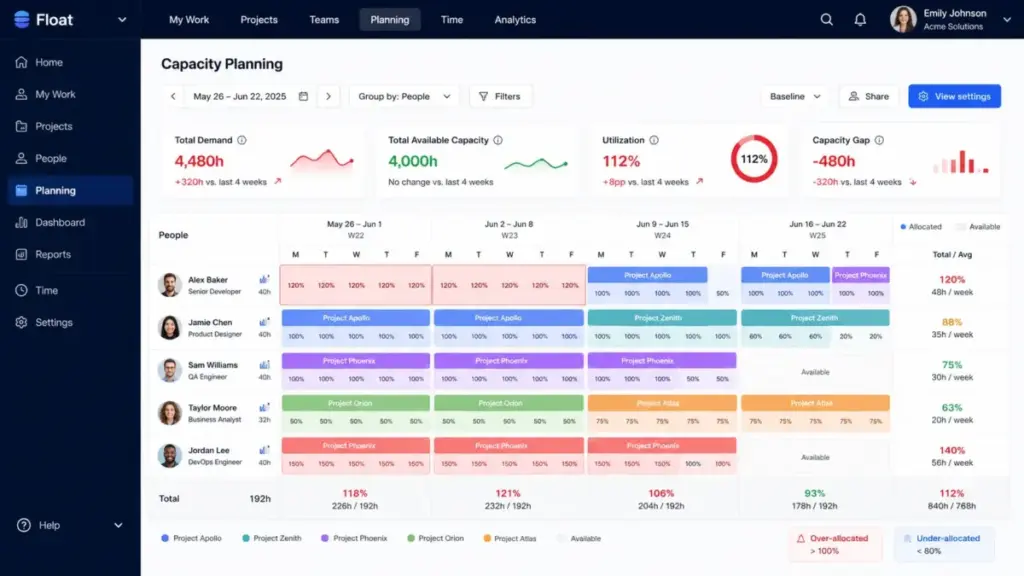
| Common tools | Float, Resource Guru, Kantata, Smartsheet Resource Management, monday work management |
What this means: if your team only runs one project at a time with dedicated people, a simple task board is enough. Resource management becomes necessary when multiple workstreams compete for the same finite capacity.
The 60-Second Explanation of Resource Management
Resource management operates at three levels, and most definitions stop at the first one.
Level 1 (Simple): Knowing who is available and assigning them to work. This is what a shared spreadsheet or calendar does. It answers “who is free?” but not “who is the right fit?”
Level 2 (Operational): Matching demand to supply across multiple projects using roles, skills, allocation percentages, and availability windows. At this level, you forecast capacity gaps before they cause missed deadlines. You plan with placeholders for roles you have not yet filled.
Level 3 (Strategic): Connecting capacity, skills, priorities, budgets, and delivery risk before commitments are made. This is project management at the portfolio level. It includes scenario planning, staffing forecasts, and demand intake governance.
The gap between Level 1 and Level 3 is where most organizations struggle. A monday.com 2026 resource management guide notes that modern tools have shifted from scheduling toward strategy, with AI features including predictive capacity planning, intelligent assignment matching, and early risk detection. That shift matters because the problem is no longer “who is free this week” but “can we realistically accept this project without breaking three others?”
I keep coming back to that distinction because most SERP results define resource management as scheduling people. That framing misses the real operational value: deciding what work the organization can take on, not just who does it.
How Resource Management Actually Works
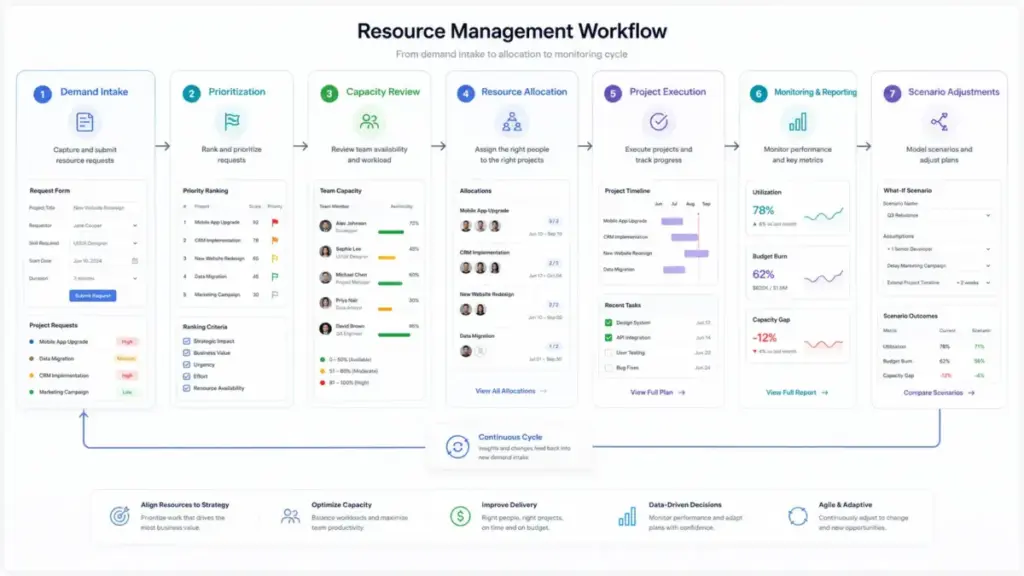
Resource management follows a demand-to-supply matching cycle. Here is the pipeline, including the points where plans typically fail.
Step 1: Define demand. Capture project requests, deadlines, business priority, required skills, and expected outcomes before assigning anyone.
Failure point: Teams skip this step and jump straight to assigning names. Without demand intake, every new request disrupts the existing plan.
Step 2: Build a resource inventory. List people, roles, skills, locations, contractors, equipment, budgets, and availability constraints.
Step 3: Create realistic capacity assumptions. Subtract leave, meetings, admin work, support rotations, training, and non-project commitments from theoretical working hours. Planning 40 hours of project work per week per person is the single most common planning mistake.
Step 4: Forecast demand by role and skill before assigning named people. Use placeholders for roles you have not yet filled. This is the step that separates true capacity planning from calendar blocking.
Step 5: Prioritize work before resolving conflicts. When two projects need the same person, use business value, deadline risk, contractual obligations, margin, and strategic priority to decide. Without priority rules, the loudest stakeholder wins.
Step 6: Allocate resources using hours, percentages, or effort units. Keep the method consistent for reporting and simple enough for teams to maintain.
Step 7: Monitor workload, utilization, budget burn, time variance, and capacity gaps weekly. Treat the plan as a living forecast, not a one-time schedule.
Step 8: Run what-if scenarios before accepting new work. Compare the impact of changing dates, adding contractors, delaying lower-priority work, or reducing scope.
Step 9: Review actuals against estimates. Use time tracking or completion data to improve future planning.
Step 10: Document governance. Define who can approve allocations, change priorities, override capacity limits, and commit new demand.
Does every team need all ten steps? No. A 5-person agency can start with steps 1, 3, 5, and 7. The full cycle matters when cross-project conflicts happen weekly instead of quarterly.
Resource Management vs Task Management
This distinction trips up more teams than any other concept in the category.
| Dimension | Task Management | Resource Management |
|---|---|---|
| Core question | What is due? | Who or what can deliver it? |
| Unit of work | Task or ticket | Person, role, skill, budget, or asset |
| View | Board, list, timeline | Capacity heatmap, allocation chart, utilization report |
| Handles conflicts by | Moving deadlines or reprioritizing tasks | Reallocating people, deferring projects, hiring, or reducing scope |
| Hidden work | Not visible | Accounts for meetings, PTO, support, admin, and split allocations |
| Scale trigger | More than one person needs reminders | More than one project competes for the same person |
What this means: a Kanban board tracks what needs to happen. Resource management checks whether the right people, time, budget, and assets are available to do that work sustainably. You need both, but confusing them leads to plans that look complete on paper while the team burns out.
Step-by-Step Implementation
Start with intake, not assignments
Capture every project request through a single intake process before touching the resource plan. Each request should include business priority, expected outcome, required skills, deadline, and estimated effort. Teams that skip intake end up with a resource plan that breaks every time a new request arrives.
Build a skills and availability inventory
List every team member with their role, skills, location, standard hours, and known constraints (parental leave, support rotations, part-time schedules). Include contractors and shared resources. This inventory is the supply side of the equation.
Subtract non-project time from capacity
A 40-hour week is not 40 hours of project capacity. After meetings, Slack, email, support escalations, training, and admin, most knowledge workers have 25 to 30 productive project hours per week. I have seen teams plan at 100% utilization and then wonder why every project slips by 20%.
Forecast by role before assigning names
Use placeholders like “Senior Designer” or “Backend Developer” for projects in the pipeline. Named assignments come later when the project is confirmed and the timeline is firm. This approach, documented by tools like Float and Smartsheet Resource Management, prevents the problem of blocking a specific person for tentative work.
Set priority rules before conflicts arise
Define how the team resolves competing demands. Without this, the person with the most urgent Slack message wins. Priority criteria include revenue impact, contractual deadlines, strategic alignment, client risk, and margin.
Monitor weekly, not monthly
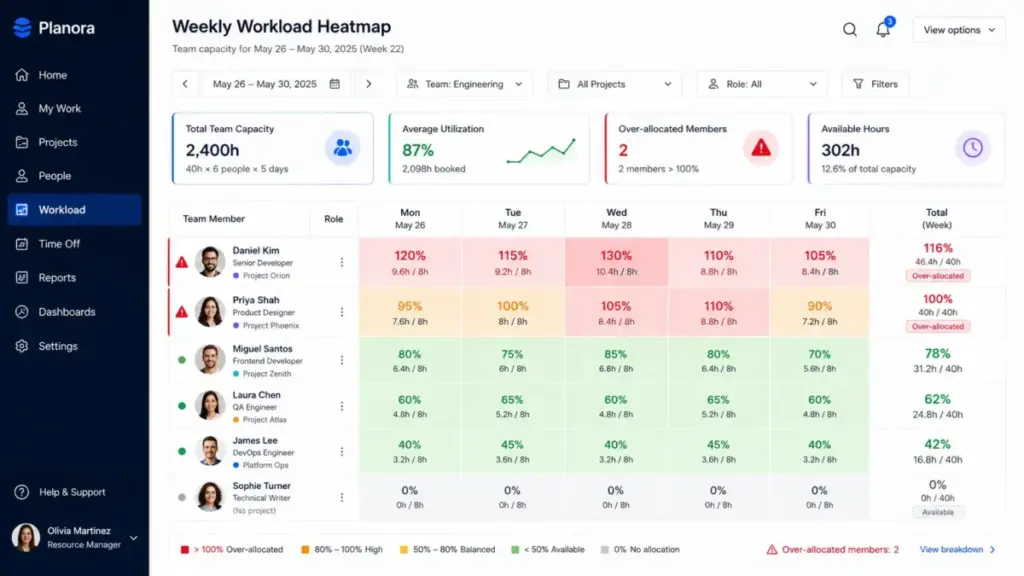
Check utilization, over-allocation, capacity gaps, and budget burn at least weekly. A monthly review catches problems too late to adjust. Gartner’s 2025 research summary on resource capacity planning states that inability to balance capacity and demand manifests as resource shortages, not as gradual warnings.
The Mistakes That Waste Your First Month
Mistake 1: Planning only named individuals instead of roles and skills. This locks the plan to specific people and collapses when one person goes on leave.
Mistake 2: Treating 40 hours as full project capacity. After meetings, support, admin, and context switching, usable project time is closer to 25 to 30 hours.
Mistake 3: Ignoring meetings, support work, and leave. If the plan does not account for non-project time, utilization numbers are fiction.
Mistake 4: Using spreadsheets after the team has too many cross-project conflicts. Spreadsheets work until you need live updates, scenario planning, or cross-project visibility. Most teams outgrow them at 10 to 15 people across 3 or more projects.
Mistake 5: Measuring utilization without measuring burnout. Very high utilization (above 85%) can hide context switching, lack of slack time, and quality risk. Good resource management balances utilization with delivery health.
Mistake 6: Buying a tool before fixing intake and priority rules. No tool compensates for unclear demand intake. If the team does not agree on how work enters the system, the tool just visualizes the chaos.
Mistake 7: Failing to check which resource features are included in each pricing tier. Some platforms lock workload views, capacity reports, time tracking, or placeholders behind higher-tier plans. Verify access before choosing.
Mistake 8: Updating the plan only after projects slip. A resource plan that only gets attention during post-mortems is a reporting artifact, not a planning tool.
Common Misconceptions
“Resource management is the same as task management.” Task management tracks what needs to be done. Resource management checks whether the right people, time, budget, and assets are available to do that work sustainably. Both matter. They are not the same.
“Resource management is just HR management.” Human resources are one resource type, but resource management also covers time, budgets, technology, equipment, materials, and capacity across work. HR administration handles hiring, payroll, and benefits. Resource management handles allocation, capacity, and delivery readiness.
“High utilization always means good resource management.” A team running at 95% utilization looks productive on a dashboard. In practice, that leaves zero buffer for urgent requests, sick days, or scope changes. Sustainable utilization targets for knowledge work typically land between 70% and 85%, depending on the role and industry.
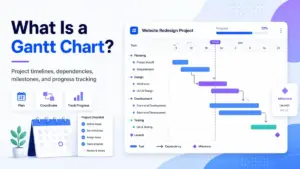
“A Gantt chart is enough for resource management.” A Gantt chart shows schedule dependency. It does not show true capacity, skills, allocation percentages, billable utilization, leave, or cross-project demand. Resource management needs a capacity layer on top of the schedule.
“Resource management is only for large enterprises.” Small agencies, consulting firms, SaaS implementation teams, and internal operations teams benefit once multiple projects compete for the same people. A 10-person consulting firm with 4 concurrent client engagements needs resource management more than a 200-person company with dedicated project teams.
When to Use and When to Avoid
Use formal resource management when:
- Multiple projects compete for the same people or assets
- Deadlines are missed because of hidden capacity conflicts
- Leaders need hiring or outsourcing forecasts backed by data
- Teams sell billable services and need utilization and margin tracking
- Project acceptance decisions require capacity evidence before commitment
Avoid heavy resource management when:
- The team is under 5 people with non-overlapping work
- Capacity conflicts are rare (fewer than once per quarter)
- The cost of maintaining detailed plans exceeds the decision value
- Leadership will not enforce priority rules or intake processes
- Work is simple, sequential, and predictable
That second list matters. I have watched teams implement detailed resource management processes that nobody maintained because the work did not justify the overhead. The trigger for resource management is conflict frequency, not team size.
How to Measure Success
| Metric Category | Metric | What It Tells You |
|---|---|---|
| Capacity | Allocation percentage by person | Whether individuals are over or under committed |
| Capacity | Capacity gap by role | Whether you need to hire, outsource, or defer work |
| Utilization | Billable utilization rate | Revenue efficiency for services teams |
| Utilization | Over-allocation count | How many people are assigned beyond their capacity |
| Delivery | Planned vs actual hours | Whether estimates are accurate |
| Delivery | Schedule variance | Whether projects finish on time |
| Financial | Project margin | Whether work is profitable after resource costs |
| Financial | Budget burn rate | Whether spending tracks to plan |
| Health | Reassignment frequency | Whether the plan changes too often (instability signal) |
| Health | Workload health score | Whether teams operate at sustainable capacity |
What this means: utilization alone is not a success metric. Pair it with over-allocation count, forecast accuracy, and on-time delivery rate. A team with 90% utilization and 60% on-time delivery has a resource management problem, not a productivity problem.
What Good Resource Management Looks Like
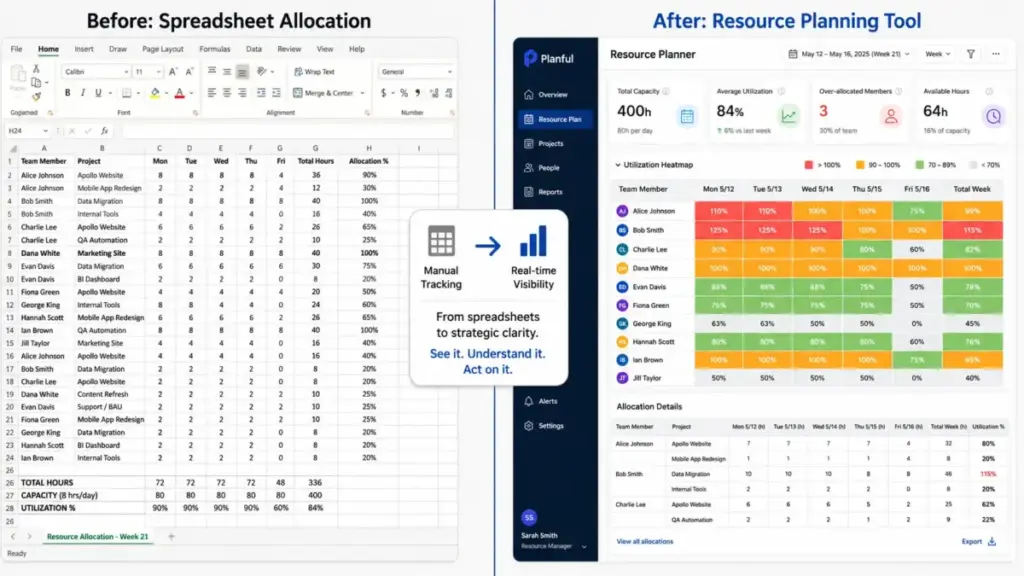
Before (spreadsheet era): A 12-person agency tracks allocations in Google Sheets. Two project managers update the sheet weekly, but they use different conventions. A new client project gets approved. The PM assigns the lead designer without checking that she is already at 120% allocation across two other projects. The project slips in week 3. Nobody saw it coming because the spreadsheet showed “assigned,” not “over capacity.”
After (structured resource management): The same agency uses a resource planning tool with live availability, skill filters, and allocation percentages. When the new project request arrives, the PM sees the designer is at 120%. The tool shows two options: delay the project start by one week (freeing the designer) or bring in a freelance designer for the first sprint. The PM runs both scenarios, picks the delay, and communicates the adjusted timeline before the project starts. No surprises.
The difference is not the tool. The difference is that demand, supply, and trade-offs are visible before commitments are made.
Tools That Support Resource Management
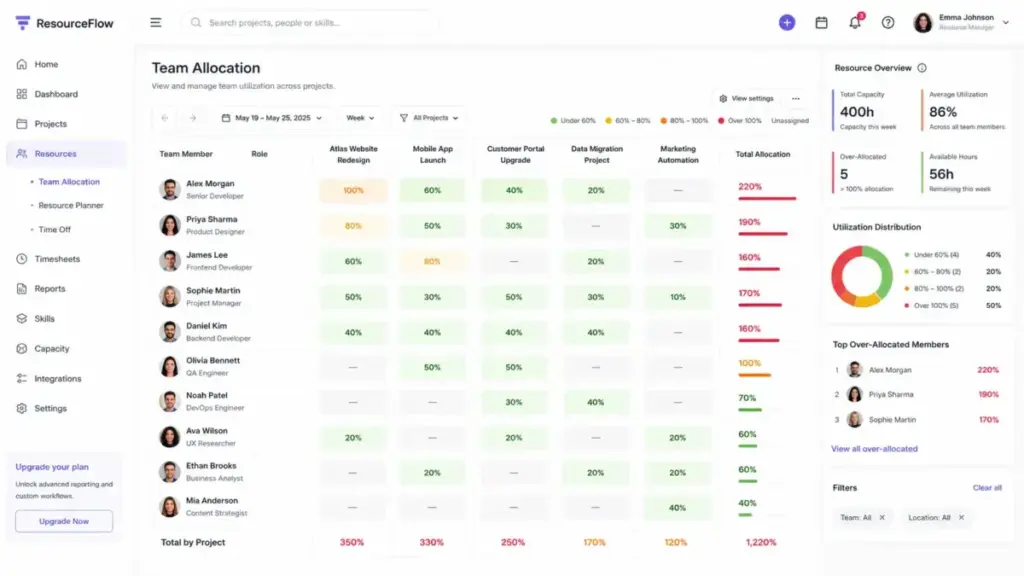
Five platforms illustrate how resource management works in practice. Each implements the concept differently, and pricing access varies.
| Tool | What It Does | Published Pricing (as of May 2026) | Key Caveat |
|---|---|---|---|
| Float | Resource scheduling, capacity planning, time tracking, project budgets, margin tracking, utilization reports | Starter 7∗∗/person/month,Pro∗∗12/person/month, Enterprise custom | Priced per scheduled person, not per user. “We 100% couldn’t have run an effective business without it,” per a Float customer quote |
| Resource Guru | Scheduling, capacity, leave management, equipment booking, timesheets, heatmaps, project budgets | Starts at $4.16/person/month (annual billing). Higher tiers add reports, budgets, approvals, SSO | Lower tiers lack budget tracking and approval workflows. Phone support requires highest tier |
| Kantata | Professional services automation: scoping, resourcing, forecasting, financial management, project delivery | Custom pricing, tailored by company size and goals | No published pricing. Requires sales engagement to evaluate cost |
| Smartsheet Resource Management | Availability, workload balancing, skill matching, time tracking, scenario planning, utilization reports | Workload tracking included in Business and Enterprise. Full Resource Management requires add-on with contact-sales pricing | “PMs have more visibility into who’s allocated where, and where conflicts are,” per a Smartsheet customer story. Core resource features sit behind an add-on, not the base plan |
| monday work management | Workload view, People columns, effort estimates, capacity settings, cross-board widgets, dashboards, time tracking | Free, Basic 12∗∗/seat/month,Standard∗∗14, Pro $24, Enterprise custom (3-seat minimum on paid plans) | Workload View is a Pro plan feature. Teams on Basic or Standard do not get capacity visualization |
What this means: pricing pages show starting prices, but resource management features often sit behind higher tiers or add-ons. Before choosing a platform, verify which plan unlocks the specific features your team needs: workload views, capacity planning, time tracking, scenario planning, skill matching, and utilization reports.
For a broader view of project management platforms that include some resource features, the category has significant overlap. But dedicated resource management tools (Float, Resource Guru, Kantata) tend to go deeper on capacity planning and utilization than general-purpose PM platforms.
Types of Resource Management
| Type | What It Covers | Example |
|---|---|---|
| Human resource management | People, skills, roles, availability, workload, team capacity (not HR admin like payroll or benefits) | Assigning a senior developer to two projects at 50% allocation each |
| Financial resource management | Budgets, rates, margin, cost forecasts, expenses | Tracking billable hours against project budget to protect margin |
| Material and physical resource management | Equipment, rooms, facilities, inventory, supplies | Booking a testing lab or reserving specialized hardware for a sprint |
| Time resource management | Availability, estimates, deadlines, utilization, scheduling constraints | Managing a 4-week delivery window when the team also has a support rotation |
| Project resource management | Applying resource planning to a single project’s scope, time, cost, and quality | Allocating a QA engineer for 3 weeks during a product release cycle |
| Portfolio resource management | Balancing capacity across multiple projects, programs, or departments | Scenario planning whether to accept a new client engagement or defer it |
The UK Government Project Delivery Teal Book adds another useful classification: reusable resources (people and equipment that move between work), replenishable resources (supplies that can be restocked), and exhaustible resources (budget or fixed deadlines that cannot be recovered once consumed). That framing helps because it explains why a developer can be reassigned but a missed contractual deadline cannot be undone.
For teams using agile frameworks, resource management maps to sprint capacity planning, velocity tracking, and backlog prioritization. The vocabulary differs, but the core question is the same: can the team deliver what has been committed?
Beginner Checklist
Use this checklist to start resource management without overengineering the process.
- List all active and planned projects with deadlines and required skills
- Create a resource inventory: people, roles, skills, availability, constraints
- Calculate realistic capacity per person (subtract meetings, leave, admin, support)
- Identify where two or more projects need the same person or skill
- Set priority rules for resolving conflicts (revenue, deadline, strategic value)
- Choose an allocation method: hours, percentages, or effort units
- Set a weekly check-in to review workload, over-allocation, and capacity gaps
- Define an intake process for new project requests
- Document who can approve allocations and override priorities
- Track planned vs actual hours for at least one month to calibrate estimates
Related Resources
- What is workflow automation for automating repetitive allocation tasks
- Team collaboration tools for coordinating distributed teams
FAQ
Does my small team actually need resource management?
Yes, if multiple projects compete for the same people more than once a month. A 6-person agency running 4 client projects simultaneously faces the same capacity conflicts as a 60-person department. The trigger is conflict frequency, not headcount.
Is resource management the same as HR?
No. HR administration handles hiring, payroll, benefits, and compliance. Resource management handles who works on what, for how long, and whether capacity supports current commitments. They share “human resources” in the name, but the workflows are different.
Can I do resource management in a spreadsheet?
Yes, until you need live updates, scenario planning, or cross-project visibility across more than about 10 people and 3 projects. After that threshold, a spreadsheet requires so much manual maintenance that the plan is outdated before you finish updating it.
What utilization rate should I target?
Sustainable utilization for knowledge work typically falls between 70% and 85%. Anything above 90% leaves no buffer for urgent requests, context switching, or quality reviews. The right number depends on the mix of project work, support, and meetings your team handles.
Should I plan in hours or percentages?
No single answer fits every team. Percentages work well for long-running projects where people split time across workstreams (e.g., “50% on Project A”). Hours work better for short engagements with firm deadlines. Pick one method and keep it consistent for reporting.
How do I stop the resource plan from breaking every week?
Two things fix this: a formal intake process for new work and agreed priority rules. Most plans break because new requests bypass intake and override existing allocations. If every project goes through the same demand queue with the same prioritization criteria, the plan absorbs changes instead of collapsing.
Do resource management tools replace project management tools?
No, unless the tool is designed as an all-in-one platform. Dedicated resource management tools (Float, Resource Guru, Kantata) focus on capacity and allocation. Project management tools focus on tasks, timelines, and deliverables. Many teams use both.
Some platforms like Smartsheet and monday.com include resource features within their broader project management suite, but the depth varies by plan. If Smartsheet is on your list for resource planning, compare alternatives to Smartsheet before choosing a platform.
When is resource management overkill?
When your team is under 5 people, work is sequential rather than parallel, capacity conflicts happen less than once a quarter, and leadership does not enforce priority or intake rules. Detailed resource management in that context creates process overhead without decision value.
What is the difference between resource management and capacity planning?
Capacity planning is one component of resource management. It focuses specifically on forecasting how much work the team can handle based on available hours, skills, and constraints. Resource management is broader: it includes demand intake, allocation, monitoring, scenario planning, budgets, and governance on top of capacity planning.
How do agencies and consulting firms avoid double-booking people?
They use resource scheduling tools with live availability views, allocation percentages, and cross-project visibility. When a PM tries to assign someone who is already at 100%, the tool flags the conflict before the commitment is made. Without this, double-booking is discovered when the work is already late.