Every team I talk to says they “do Agile.” Fewer than half can explain what that actually means for their daily work, their sprint cadence, or their board columns. The confusion is understandable. Agile, Scrum, and Kanban get used interchangeably in vendor marketing, job postings, and even standup meetings, but they describe three different layers of how teams organize and deliver work.
This guide breaks down the real differences between Agile vs. Scrum vs. Kanban, explains when each one fits (and when it creates more problems than it solves), compares the metrics that prove each method is working, and maps these frameworks to the project management tools teams actually use in 2026. If your team is stuck choosing between Scrum sprints and a Kanban board, or trying to figure out whether “being Agile” requires either one, start here.
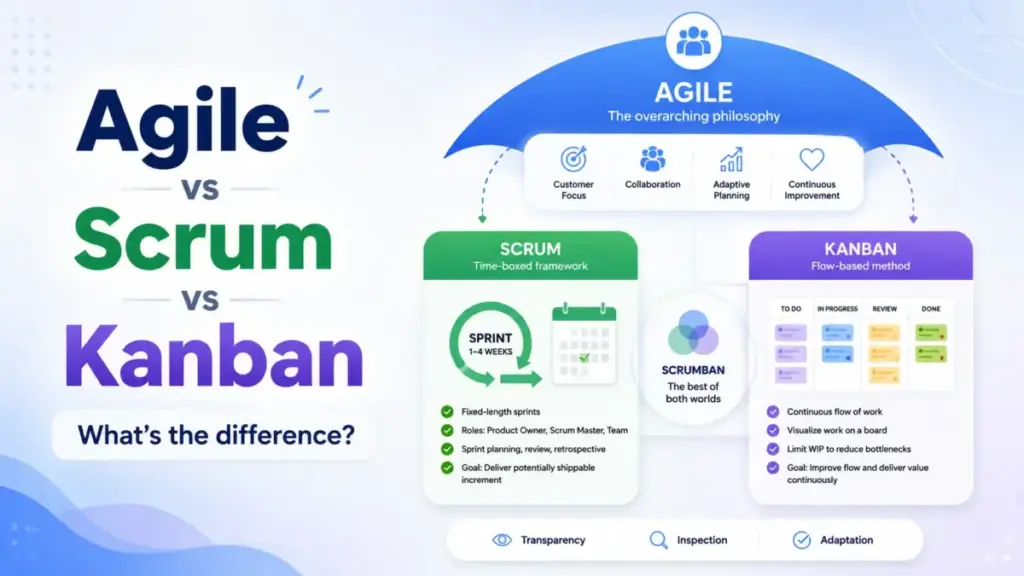
Quick Answer: Agile is a set of values and principles for adaptive, iterative work. Scrum is a time-boxed framework within Agile that uses sprints, defined roles, and ceremonies to manage complex product delivery. Kanban is a flow-based method that visualizes work, limits work in progress (WIP), and optimizes throughput. Scrum batches work into sprint commitments. Kanban pulls work continuously. Teams often combine both into Scrumban.
The 60-Second Explanation of Agile, Scrum, and Kanban
Agile is not a process. It is a philosophy defined by four values and twelve principles published in the Agile Manifesto. Those values prioritize individuals over processes, working software over documentation, customer collaboration over contracts, and responding to change over following a plan. Every framework that follows these values, including Scrum and Kanban, can be called Agile.
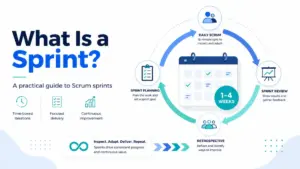
Scrum is one specific way to operationalize Agile. According to the official Scrum Guides, Scrum is “a framework for developing and sustaining complex products.” It structures work into fixed-length sprints (typically one to four weeks), assigns three accountabilities (Product Owner, Scrum Master, Developers), and requires five events: Sprint Planning, Daily Scrum, Sprint Review, Sprint Retrospective, and the Sprint itself.
Kanban operationalizes Agile and Lean principles through flow optimization. The Kanban Guide defines it as “a strategy for optimizing the flow of value through a process.” Kanban requires visualizing workflow, actively managing items in progress, setting WIP limits, and improving the system continuously. There are no mandatory roles, no sprints, and no prescribed ceremonies.
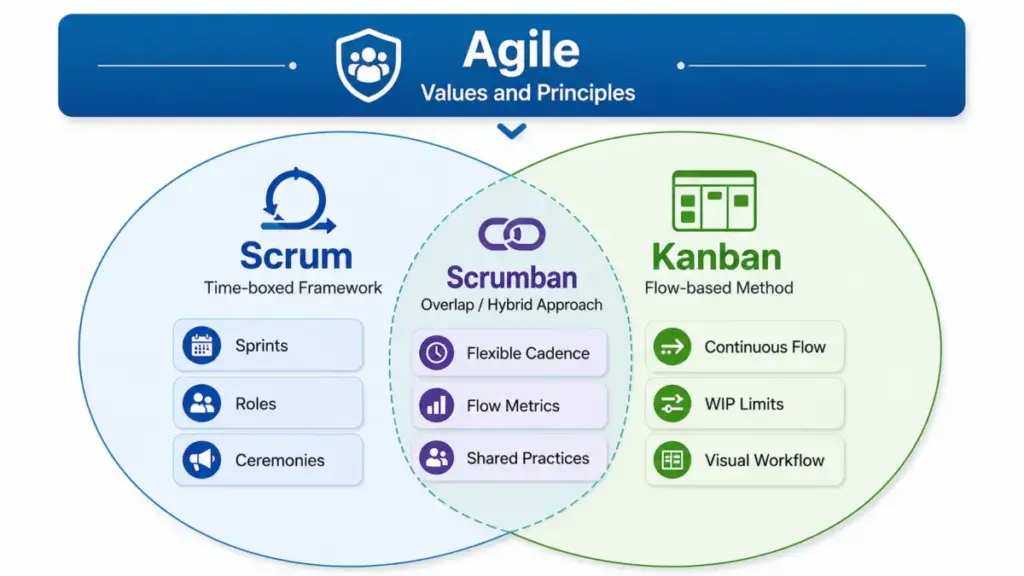
Here is the hierarchy in one sentence: Agile tells you why, Scrum and Kanban tell you how.
How Agile, Scrum, and Kanban Actually Work
Understanding the theory takes a minute. Understanding how these methods play out in a real team takes longer.
Agile in practice
Agile sets the operating philosophy. Teams commit to delivering working output in short cycles, gathering feedback from customers or stakeholders, and adjusting plans based on what they learn. The Agile Alliance describes Agile as “the ability to create and respond to change.” Agile does not prescribe a board layout, a meeting schedule, or a role title. It sets constraints on behavior: deliver early, collaborate with the customer, reflect regularly, and maintain technical quality.
Where Agile goes wrong: teams adopt the label without the feedback loop. Calling your workflow Agile while skipping retrospectives, ignoring customer input, and measuring only ticket velocity is not Agile. It is ad hoc work with a buzzword attached.
Scrum in practice
A Scrum team begins each sprint with Sprint Planning, where the team selects items from the Product Backlog and commits to a Sprint Goal. Every day, the team meets for a Daily Scrum (fifteen minutes maximum) to inspect progress toward that goal. At the end of the sprint, the team holds a Sprint Review to demonstrate the Increment and gather stakeholder feedback, followed by a Sprint Retrospective to improve the process.
The Product Owner decides what to build. The Scrum Master protects the process. Developers decide how to build it.
Scrum works well when the team can plan a meaningful timebox. If the team can protect focus for one to four weeks and form a Sprint Goal that stakeholders care about, Scrum provides structure, accountability, and a built-in feedback mechanism.
Where Scrum breaks: when incoming work is unpredictable, when the team cannot protect a Sprint Goal because priorities change daily, or when ceremonies become status theater instead of decision-making opportunities. I have seen teams run daily standups as fifteen-minute status reports where nobody changes behavior based on what they hear. That is ceremony overload, not Scrum.
Kanban in practice
Kanban does not batch work into sprints. Items enter the workflow when capacity exists (pull-based), move through explicitly defined stages, and exit when done. WIP limits cap how many items can be active at each stage, forcing the team to finish work before starting new work.
The critical point most articles miss: Kanban is not just a board with columns. A board without WIP limits, without active flow management, without explicit policies, and without improvement reviews is a task tracker, not Kanban. Real Kanban measures cycle time, lead time, throughput, and blocked time. It uses cumulative flow diagrams to detect bottlenecks. It requires the team to review and improve the workflow regularly.
Where Kanban breaks: when there is no prioritization discipline, no WIP enforcement, or no explicit policy for handling blocked work. A board with fifty items in “In Progress” and no WIP limit is a to-do list, not a Kanban system.
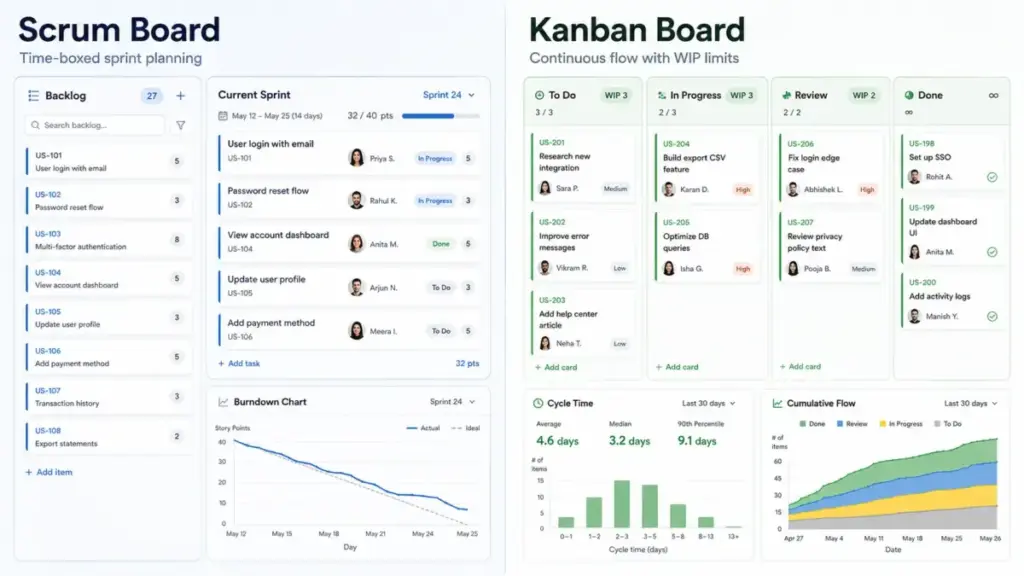
Agile vs. Scrum vs. Kanban: Comparison Table
| Dimension | Agile | Scrum | Kanban |
|---|---|---|---|
| What it is | Philosophy and values | Time-boxed framework | Flow-based method |
| Cadence | Defined by the team | Fixed sprints (1-4 weeks) | Continuous flow |
| Roles | None prescribed | Product Owner, Scrum Master, Developers | None required (optional service delivery roles) |
| Change policy | Embrace change | Changes discouraged during a sprint | Changes accepted anytime if WIP allows |
| Work commitment | Iterative delivery | Sprint Goal per timebox | Pull when capacity exists |
| Key artifacts | None prescribed | Product Backlog, Sprint Backlog, Increment | Visual board, WIP limits, explicit policies |
| Primary metrics | Customer value, feedback quality | Sprint goal completion, velocity, burndown | Cycle time, lead time, throughput, WIP |
| Best for | Setting team operating principles | Complex product work with plannable timeboxes | Continuous, interrupt-driven, or service work |
| Common failure mode | Becomes “no planning” without feedback | Ceremony overload without decision quality | Board without WIP discipline or flow metrics |
Step-by-Step: Choosing and Implementing the Right Method
Step 1: Define the work type
Product discovery, planned feature delivery, maintenance, support, content production, or mixed work? The answer narrows your options immediately. Planned product work leans toward Scrum. Interrupt-driven service work leans toward Kanban. Mixed work often needs Scrumban.
Step 2: Test your planning confidence
If your team can commit to a Sprint Goal for one to four weeks and protect that focus, Scrum fits. If work arrives unpredictably and you cannot protect a timebox because priorities shift daily, start with Kanban. This is the single most important decision in the Scrum vs. Kanban debate, and most comparison articles skip it entirely.
Step 3: Map the current workflow
Before configuring any tool, draw your actual workflow on a whiteboard. Identify intake, prioritization, active work, review, blocked items, release, and done. Every team I have worked with discovers at least two hidden bottlenecks during this step.
Step 4: Set working agreements
Definition of ready. Definition of done. WIP limits. Blocked-work policy. Priority rules. Stakeholder feedback cadence. These agreements matter more than which software you pick.
Step 5: Configure your tool to match
Create boards, columns, backlog fields, sprint folders, automation rules, and dashboards that reflect the chosen model. Do not configure the tool first and then try to fit the process around it.
Step 6: Measure outcomes, not activity
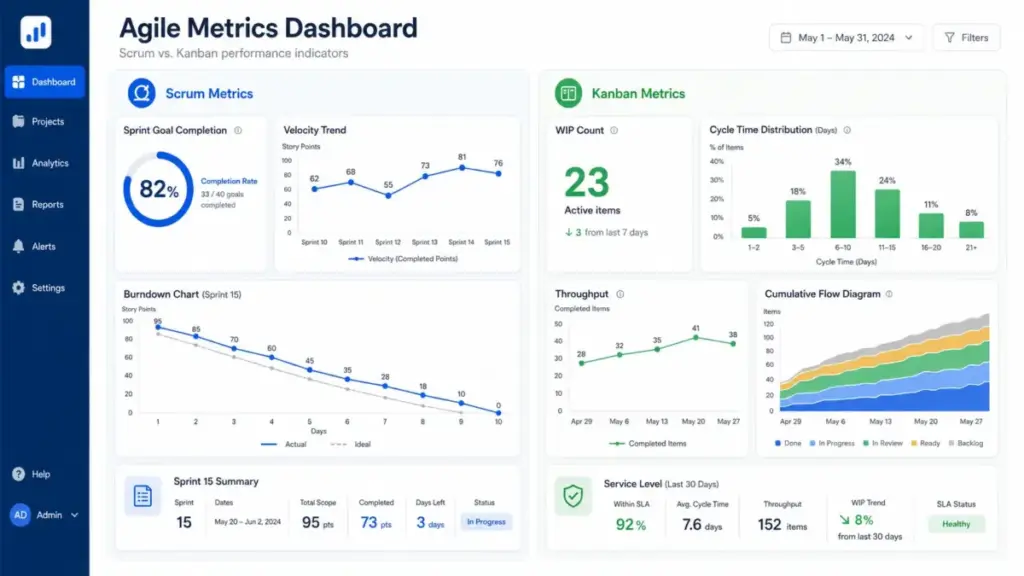
Start with cycle time, lead time, throughput, WIP count, sprint goal completion, and stakeholder feedback. Velocity alone tells you how much the team moved. It does not tell you whether the team moved toward the right outcomes.
Step 7: Review the system every two to four weeks
Remove ceremonies, automations, or policies that do not improve flow, quality, prioritization, or learning. If a meeting does not change a decision, it does not deserve a calendar slot.
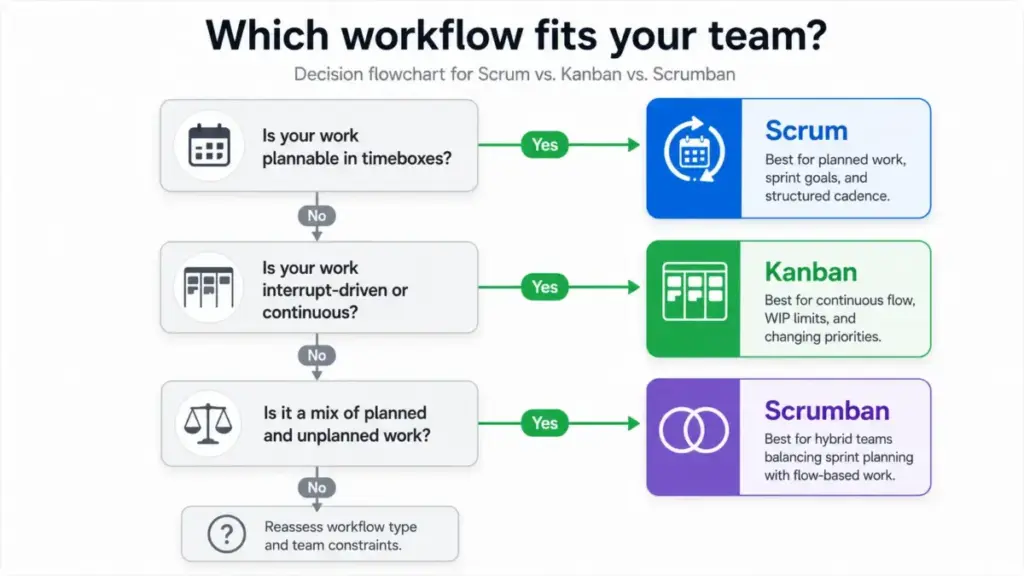
The Mistakes That Waste Your First Month
Starting with tools before process. Buying Jira or ClickUp and expecting the tool to make you Agile is the most common failure pattern. Tools support workflows. They do not create them.
Running Scrum without a Sprint Goal. If the team picks random backlog items without a unifying goal, the sprint becomes a task bucket, not a risk-management framework. Sprint Planning without a meaningful goal produces busy work, not product progress.
Using Kanban without WIP limits. A board where every column says “no limit” is a task list with a better layout. WIP limits are the mechanism that forces finishing over starting, which is the entire point.
Making Daily Scrums into status meetings. The Daily Scrum exists to inspect progress toward the Sprint Goal and adapt the plan. If each person reports what they did yesterday without the team making a single adjustment, the meeting has zero value. I have watched this pattern waste fifteen minutes a day across five-person teams, adding up to over six hours per sprint that produce no decisions.
Mixing planned and unplanned work without an explicit policy. If a Scrum team handles both roadmap features and urgent support tickets in the same sprint without reserving capacity or using an expedite lane, every sprint commitment becomes unreliable.
Measuring only completed tickets. Ticket count measures activity. It does not measure customer value, quality, or whether the team is solving the right problems. A team that completes forty tickets of low-impact work while the product loses customers is not succeeding.
Common Misconceptions
Misconception: Agile, Scrum, and Kanban are interchangeable terms.
Reality: Agile is the philosophy. Scrum and Kanban are different methods for applying Agile principles. Using one does not mean you are using all three.
Misconception: Kanban is just a board with To Do, In Progress, and Done columns.
Reality: The board is the visual layer. Kanban requires active flow management, explicit policies, WIP limits, and continuous improvement to function as a method.
Misconception: Scrum always means more productivity.
Reality: Scrum provides structure, not speed. It helps when teams can plan a meaningful timebox and need built-in feedback. It struggles when teams are constantly interrupted or lack product ownership.
Misconception: Kanban has no discipline because it has fewer ceremonies.
Reality: Kanban enforces discipline through WIP limits, service-level expectations, explicit policies, and flow metrics. Fewer meetings does not mean less rigor.
Misconception: Using Jira, Asana, Trello, monday.com, or ClickUp makes a team Agile.
Reality: Tools support Agile workflows, but process quality depends on team behavior, prioritization, feedback, and measurement.
When to Use and When to Avoid
Use Scrum when:
- Work is complex but plannable in short timeboxes
- There is a dedicated Product Owner who can prioritize
- Stakeholder feedback is needed at regular intervals
- The team can protect focus during a sprint
Use Kanban when:
- Work is continuous, interrupt-driven, or service-oriented
- Priorities shift frequently and sprint commitments would be unreliable
- The team handles maintenance, support, or operations work
- You need flow visibility and bottleneck detection
Use Scrumban when:
- A Scrum team needs WIP limits, flow metrics, and flexibility
- The team handles both planned roadmap work and unplanned support tickets
- Sprint cadence adds value but strict scope protection is unrealistic
Avoid Scrum when priorities change daily and the team cannot protect a Sprint Goal. Avoid pure Kanban when leadership needs predictable milestone planning but the team has no backlog refinement or prioritization discipline. Avoid calling any workflow Agile if there is no feedback loop, working output, or continuous improvement.
How to Measure Success
| Metric | Framework | What it measures | Why it matters |
|---|---|---|---|
| Sprint goal completion | Scrum | Did the team achieve the Sprint Goal? | Measures alignment, not just output |
| Velocity trend | Scrum | Story points completed per sprint over time | Predictability indicator, not a productivity score |
| Burndown chart | Scrum | Remaining work in a sprint | Detects scope creep and pacing problems |
| Escaped defects | Scrum | Bugs found after sprint release | Quality signal |
| WIP count | Kanban | Active items at each workflow stage | Overload detector |
| Cycle time | Kanban | Time from work started to work completed | Speed of individual items |
| Lead time | Kanban | Time from request to delivery | End-to-end responsiveness |
| Throughput | Kanban | Items completed per time period | Flow capacity measurement |
| Cumulative flow diagram | Kanban | Work distribution across stages over time | Bottleneck visibility |
| Customer value shipped | Both | Features, fixes, or outcomes delivered to users | The metric that actually matters |
Tools That Support Scrum and Kanban Workflows
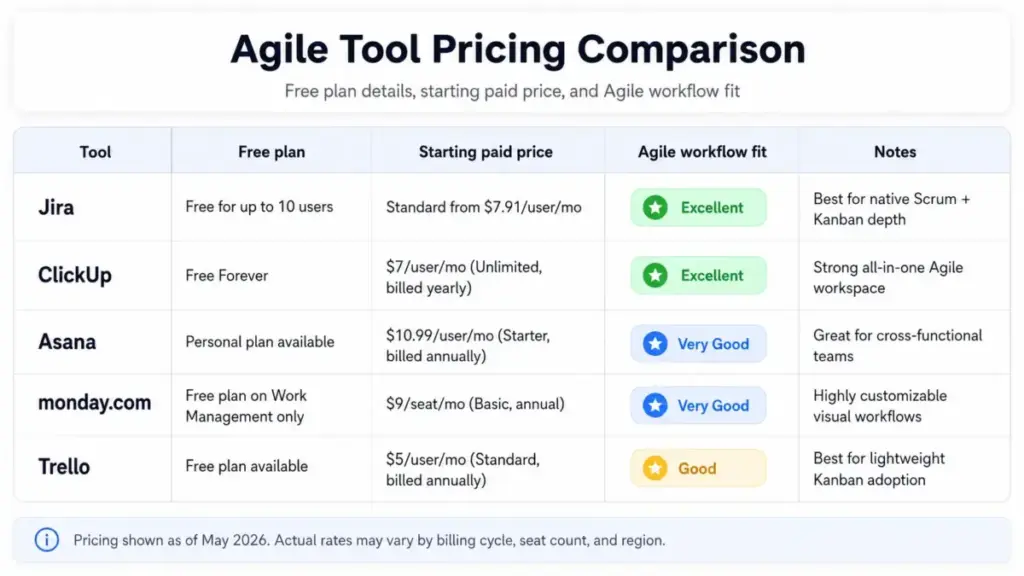
Picking the right framework matters more than picking the right tool. That said, tools differ in how well they support Scrum ceremonies, Kanban flow metrics, and hybrid workflows. Here is where the five most common options stand as of May 2026.
| Tool | Scrum depth | Kanban depth | Free plan | Starting paid price | Key limitation |
|---|---|---|---|---|---|
| Jira Software | Native sprints, backlog, burndown, velocity | Kanban boards with flow visualization | Free for 10 users | From$7.91/user/month (Standard) | Feels heavy for non-technical teams or simple task boards |
| ClickUp | Sprint dates, sprint points, reporting | Kanban boards, workload views | Free Forever | $7/user/month (Unlimited, billed yearly) | Sprint Cards and Sprint Automations require Business plan or higher |
| Asana | Board View, tasks, workflows, project views | Boards, custom fields, workflow stages | Personal plan available | $10.99/user/month (Starter, billed annually) | Deep Agile/Scrum reporting is less native than Jira |
| monday.com | Sprint planning, roadmaps, bugs, tasks | Kanban views, automations, filtering | Free (Work Management only) | $9/seat (Basic, annual) | Free plan availability and pricing differ by product line |
| Trello | Lightweight via templates and Power-Ups | Boards, cards, lists, automation | Free (up to 10 boards/Workspace) | $5/user/month (Standard, billed annually) | Complex Scrum reporting usually requires templates or external process discipline |
Pricing is based on official pricing pages checked in May 2026. Exact rates vary by billing cycle, seat count, and region. Check each tool’s pricing page directly for current rates.
Jira is the strongest option when teams need native Scrum and Kanban depth for software delivery. ClickUp consolidates sprints, Kanban, docs, dashboards, and automations in a single workspace, though advanced sprint features require the Business plan. Asana offers accessible boards and workflow views for cross-functional teams without Jira-level complexity.
monday.com provides customizable Agile, Kanban, and hybrid workflows with strong visual work management. Trello is the fastest Kanban adoption option for small teams and simple workflows. Teams considering ClickUp for one workspace across sprints, Kanban, docs, and dashboards should compare ClickUp alternatives by Agile depth, reporting needs, setup discipline, and which tool best matches the team’s delivery model.
One thing I have learned: the tool you pick matters less than whether your team actually enforces WIP limits, runs honest retrospectives, and measures outcomes rather than ticket counts.
Why This Matters in 2026
Agile is not fading. It is adapting. Digital.ai’s 18th State of Agile Report frames current Agile practice around AI, automation, hybrid work, outcomes, value, and adaptability. Teams face AI-assisted delivery, tighter budgets, and pressure to connect execution to measurable outcomes. The framework choice (Scrum, Kanban, or hybrid) is no longer an academic decision. It determines how well a team responds to change, manages workload, and proves delivery value when budgets tighten.
Beginner Checklist: Getting Started with Agile, Scrum, or Kanban
- [ ] Define your work type: planned product work, interrupt-driven service, or mixed
- [ ] Test planning confidence: can your team protect a one-to-four-week Sprint Goal?
- [ ] Map your current workflow before changing tools
- [ ] Choose the operating model: Scrum, Kanban, or Scrumban
- [ ] Set working agreements: definition of ready, definition of done, WIP limits, blocked-work policy
- [ ] Configure your tool to match the model (not the other way around)
- [ ] Measure cycle time, lead time, throughput, and sprint goal completion from day one
- [ ] Schedule a retrospective within two to four weeks of starting
- [ ] Remove any ceremony that does not change a decision
- [ ] Review your framework choice quarterly as your team and work type evolve
Related Resources
- Asana review for cross-functional boards and workflow views
- Trello review for lightweight Kanban adoption
- What is pipeline management? for connecting workflow methods to sales delivery
- Asana vs. Monday.com for comparing two of the top PM tools
FAQ
What is the main difference between Agile, Scrum, and Kanban?
Agile is a philosophy built on values like customer collaboration and responding to change. Scrum is a specific Agile framework that uses fixed-length sprints, three defined roles, and five ceremonies to manage complex product work. Kanban is a flow-based method that visualizes work, limits work in progress, and measures cycle time. Agile sets the “why.” Scrum and Kanban provide different versions of the “how.”
Is Scrum better than Kanban?
Neither is objectively better. Scrum fits teams that can plan meaningful timeboxes and need built-in feedback loops. Kanban fits teams handling continuous, interrupt-driven, or service-oriented work. The right choice depends on work volatility and planning confidence, not on framework popularity.
Can Scrum and Kanban be used together?
Yes. This combination is called Scrumban. Teams keep useful Scrum structure (sprint cadence, retrospectives, Sprint Goals) while adding Kanban-style WIP limits and flow metrics. Scrumban works well when a team handles both planned roadmap work and unplanned support tickets.
Is Kanban part of Agile?
Kanban aligns with Agile values (continuous improvement, customer focus, adaptive workflow) but originated from Lean manufacturing principles at Toyota. In practice, most software and SaaS teams use Kanban within an Agile context. The Kanban Guide describes it as a strategy for optimizing flow, which supports Agile principles.
Does Kanban use sprints?
Not by default. Kanban uses continuous flow with no prescribed timebox. Teams that want a regular planning cadence without strict sprint commitments sometimes add a lightweight planning rhythm, but this is optional and borrowed from Scrumban practice.
What are WIP limits and why do they matter?
WIP limits cap the number of items allowed at each workflow stage. They force teams to finish work before starting new work, which reduces context switching, exposes bottlenecks, and improves throughput. A board without WIP limits is a task list, not a Kanban system.
What metrics should Agile teams track beyond velocity?
Scrum teams benefit from sprint goal completion rate, burndown trends, and escaped defects. Kanban teams track cycle time, lead time, throughput, and aging work in progress. Both frameworks benefit from measuring customer value shipped and stakeholder feedback quality. Velocity alone measures activity, not impact.
Is Jira Agile, Scrum, or Kanban?
Jira supports both Scrum and Kanban workflows through dedicated board types, backlog management, sprint planning, burndown charts, velocity reports, and flow metrics. The tool itself is not a methodology. How a team configures and uses Jira determines whether the process is Scrum, Kanban, or a hybrid.
Which method is better for a startup engineering team?
Scrum works when the startup has a clear product roadmap and a Product Owner who can prioritize. Kanban works better during early-stage exploration when requirements change daily. Many startups begin with Kanban for discovery, then adopt Scrum once the product direction stabilizes.
Why does Scrum feel like too many meetings?
Scrum has five events. When those events produce decisions (adjusting the Sprint Backlog, reprioritizing work, improving the process), they earn their time. When they become status reports or presentation theater, they feel wasteful. The fix is not fewer meetings. It is better meetings that change the team’s behavior.