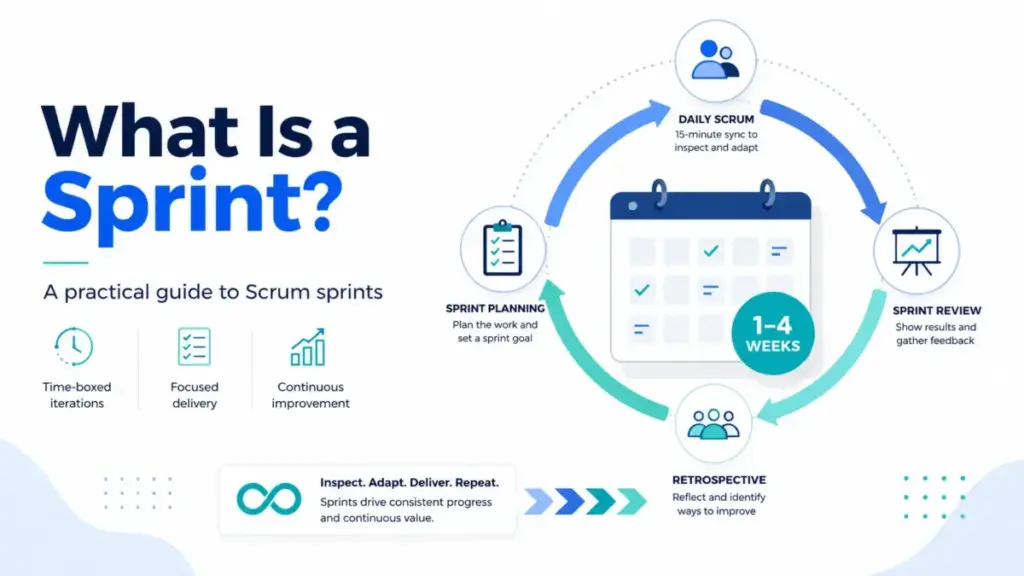
Most teams treat a Sprint like a two-week deadline. Fill it with tasks, race to finish, carry the leftovers forward, repeat. That framing turns Sprints into mini-waterfalls and creates the exact chaos they were designed to prevent.
A Sprint is a goal-bound learning loop inside the Scrum framework, not a container for batching tasks on a schedule. If your team keeps carrying unfinished work into the next cycle, the problem is rarely capacity. It is usually unclear goals, weak backlog discipline, or a missing feedback loop.
This guide explains what a Sprint actually is, how it works inside Scrum, when to use Sprints (and when to skip them), common mistakes I see teams repeat, the metrics that matter, and which project management tools support sprint workflows in 2026. I built this around the official Scrum Guide definition and cross-referenced it with how five major SaaS platforms implement sprint management, because theory and tooling rarely match perfectly.
Quick Answer: A Sprint is a fixed-length Scrum event of one month or less during which a team turns selected Product Backlog items into a usable Increment of value. It contains Sprint Planning, Daily Scrums, Sprint Review, and Sprint Retrospective. Sprints run back-to-back with no gaps. The Sprint Goal provides focus while allowing flexibility in the exact work needed.
What a Sprint Actually Means
A Sprint is the core repeating event in the Scrum framework. According to the Scrum Guide by Ken Schwaber and Jeff Sutherland, Sprints are “fixed length events of one month or less” where “a new Sprint starts immediately after the previous Sprint concludes.” That one-month ceiling matters. Two weeks is common, but the Scrum Guide does not mandate any specific duration below that ceiling.
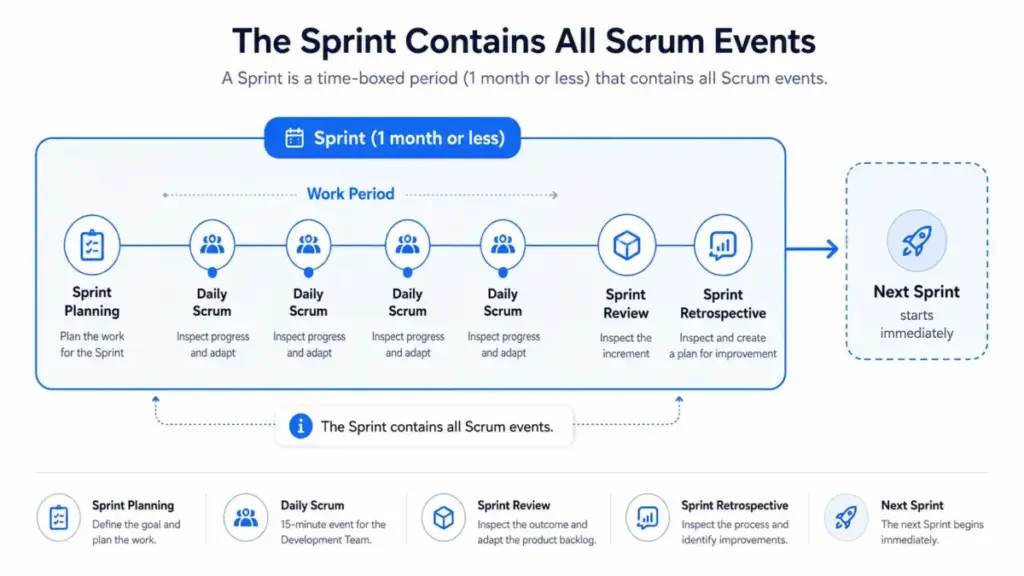
Here is where most explanations stop. They define the timebox and move on. The part they miss: a Sprint is the container for all other Scrum events. It is not just the coding or building phase. Sprint Planning, Daily Scrum, Sprint Review, Sprint Retrospective, backlog refinement as needed, and the actual delivery work all happen inside the Sprint. If your team treats the Sprint as “the part where we code,” they are running an incomplete version of Scrum.
Three layers of the definition
| Layer | What it means |
|---|---|
| Simple | A short, repeating work cycle (one month or less) where a team builds something usable |
| Technical | A Scrum event containing Planning, Daily Scrum, Review, and Retrospective, producing an Increment that meets the Definition of Done |
| Business | A recurring inspect-and-adapt cadence that limits risk, forces regular stakeholder feedback, and creates a predictable delivery rhythm for product teams |
The Scrum Guide frames it clearly: “Sprints enable predictability by ensuring inspection and adaptation of progress toward a Product Goal at least every calendar month.” Shorter Sprints create more learning cycles and limit cost of effort at risk.
How a Sprint Works
A Sprint follows a structured sequence. Each step serves a specific purpose, and skipping any of them weakens the feedback loop that makes Sprints useful.
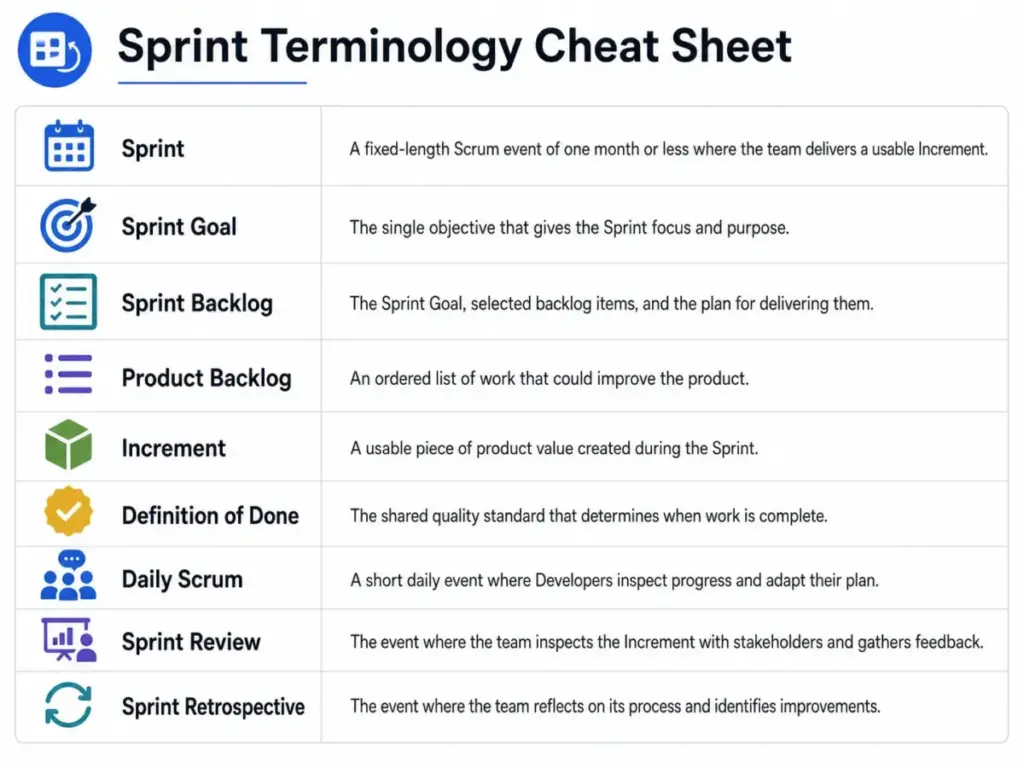
Step 1: Sprint Planning. The Product Owner brings ordered Product Backlog items and explains why the upcoming Sprint matters. Developers select work based on past performance, capacity, and the Definition of Done. The team creates three outputs: a Sprint Goal, selected backlog items, and a delivery plan. Sprint Planning addresses three questions: why is this Sprint valuable, what can be done, and how will the chosen work become a usable Increment.
Step 2: Sprint execution with Daily Scrum. Developers work toward the Sprint Goal. Every day, the team inspects progress in the Daily Scrum. This is not a status meeting for managers. It is a 15-minute planning session where Developers adapt their plan for the next 24 hours. The Sprint Backlog, which contains the Sprint Goal, selected items, and the delivery plan, stays visible as a real-time picture of planned work.
Step 3: Sprint Review. At the end of the Sprint, the team inspects the Increment with stakeholders and gathers feedback. This is not a demo-only presentation. It is a working session where the Product Backlog gets adjusted based on what the team learned.
Step 4: Sprint Retrospective. The team inspects its own process and selects improvements to carry into the next Sprint. The most impactful improvement becomes a concrete action, not an aspirational note on a whiteboard.
Step 5: Next Sprint starts immediately. No gap between Sprints. The cycle repeats.
Where things go wrong
The failure points I see most often sit between these steps. Teams skip the Sprint Goal and turn Planning into a ticket-assignment session. They run Daily Scrum as a reporting line instead of a replanning moment. They treat Retrospective actions as optional. Each of these breaks the inspect-and-adapt loop that gives Sprints their value.
One thing I have learned from watching teams across different tools: the Sprint Goal is the part that protects adaptability. The Scrum Guide says the Sprint Goal “provides flexibility in terms of the exact work needed to achieve it.” That means scope can be clarified and renegotiated with the Product Owner as the team learns more during the Sprint. Protect the goal, negotiate the scope.
Sprint vs Related Concepts
Teams often confuse Sprints with broader Agile methodology terms or mix them with different workflow approaches. This table clarifies the distinctions.
| Concept | What it is | When to use | Key difference from Sprint |
|---|---|---|---|
| Sprint (Scrum) | Fixed-length timebox containing all Scrum events | Teams with a Product Owner, ordered backlog, and ability to deliver usable Increments | The official Scrum event with Sprint Goal, Review, Retrospective |
| Agile iteration | A broader term for any timeboxed work cycle | Teams using Agile methods that are not strictly Scrum | No requirement for Scrum events or Sprint Goal |
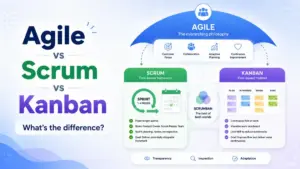
| Kanban flow | Continuous pull-based workflow with WIP limits | Teams handling mostly unplanned work, support queues, or continuous delivery | No fixed timebox, no Sprint Goal, no batch commitment |
| Scrumban | Hybrid of Scrum timeboxes and Kanban flow principles | Teams transitioning between approaches or handling mixed planned/unplanned work | Combines Sprint cadence with Kanban WIP limits |
| Design Sprint | A 5-day product design workshop (Google Ventures method) | Early-stage product discovery and rapid prototyping | Not related to Scrum Sprints despite the shared name |
| Release Sprint | An informal pattern where teams reserve a Sprint for stabilization | Teams with quality or deployment bottlenecks (use with caution) | Not an official Scrum concept; can hide quality problems |
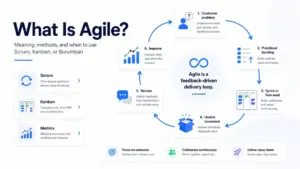
The most common confusion: treating “Agile” and “Sprint” as interchangeable. Agile is a set of values and principles. Scrum is one framework that implements those principles. Sprints are one event inside Scrum. Not all Agile teams use Sprints. Atlassian’s sprint guide makes this distinction clearly: Agile is a broader philosophy, and sprints are one way to implement Agile principles.
How to Implement Sprints
These steps translate the Scrum Guide theory into something a team can start this week. I have seen teams overcomplicate Sprint adoption. The pattern that works: start simple, inspect results, and adapt.
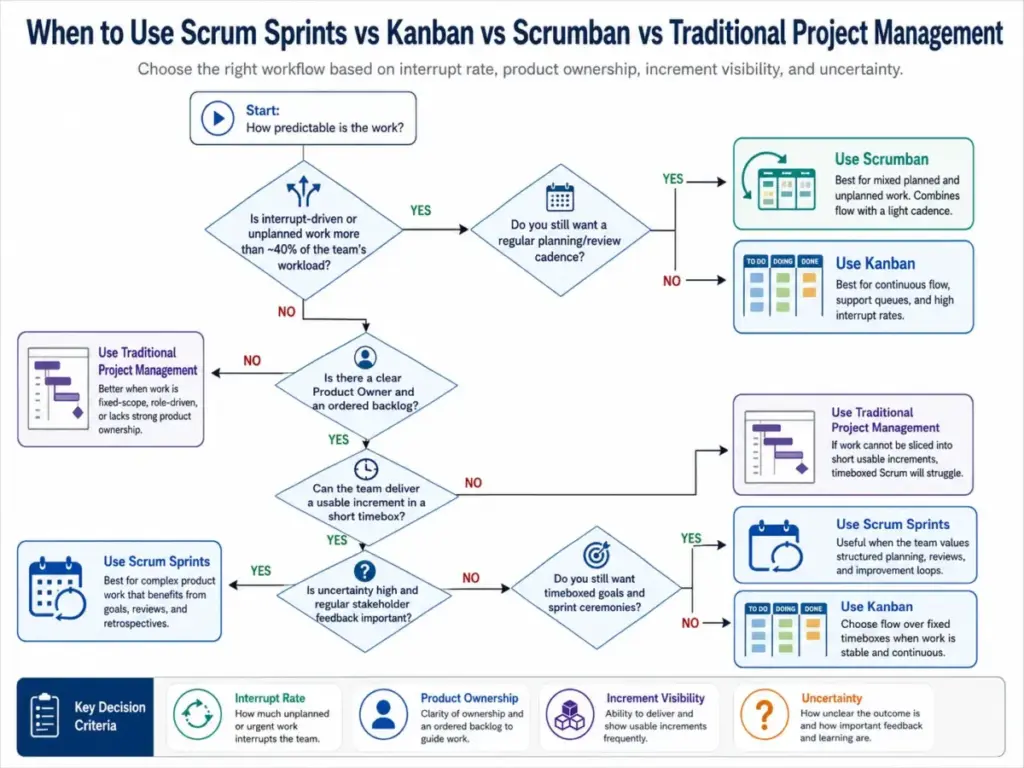
- Decide if Sprints fit your work. Sprints work when the team can plan around a product goal and produce usable Increments. They are a poor fit when work is mostly interrupt-driven, the team cannot define a Sprint Goal, or the team lacks authority to choose its own work.
- Define a clear Product Goal and order the Product Backlog. Without an ordered backlog, Sprint Planning becomes guesswork. The Product Owner must own this before the first Sprint.
- Choose Sprint length. Start with one or two weeks for fast-learning teams. Use longer durations only when feedback loops and delivery risk justify it. The Scrum Guide caps Sprints at one month. Two weeks is common, not required.
- Run Sprint Planning around three questions. Why is this Sprint valuable? What can be done? How will the chosen work become a usable Increment?
- Create a Sprint Goal, select backlog items, and build a visible Sprint Backlog. The Sprint Backlog must be visible enough to inspect every day.
- Use Daily Scrum for Sprint Goal progress, not manager status. Keep it to 15 minutes. Focus on what the team will do next to reach the goal.
- At Sprint Review, inspect the Increment and adjust backlog priorities with stakeholders. Gather real feedback, not applause.
- At Sprint Retrospective, identify improvements and commit to the most impactful one for the next Sprint.
Sprint readiness checklist
- Product Owner identified and available
- Product Backlog ordered with items refined enough for the first Sprint
- Sprint length chosen (one or two weeks recommended to start)
- Definition of Done agreed by the team
- Team understands Sprint Goal, Sprint Backlog, and Increment
- Sprint tool configured (board, backlog view, Sprint dates)
- Stakeholders aware of Sprint Review schedule
- Retrospective cadence set
Common Mistakes and Misconceptions
Mistakes teams keep repeating
Planning too much work. Teams pack the Sprint because they confuse “capacity” with “optimism.” When everything is urgent, nothing has a Sprint Goal.
Treating velocity as a performance quota. Velocity is a planning input for the team, not a management KPI. The moment velocity becomes a target, teams game story points instead of delivering value.
Using Daily Scrum as a status meeting. If the Scrum Master or a manager runs it and everyone reports upward, it is not a Daily Scrum. It is a standup theater.
Skipping backlog refinement. Sprint Planning fails when the team encounters items that no one understands. Refinement between Sprints prevents this.
Starting work without acceptance criteria. Verbal commitments in Sprint Planning often fail when they are not captured as concrete acceptance criteria on the work item. Practitioner forums confirm this is a recurring frustration.
Moving unfinished work forward automatically. Some tools automate carryover. That convenience hides a signal. Repeated carryover points to problems in slicing, capacity estimation, dependencies, or Definition of Done discipline.
Letting urgent work enter without renegotiating scope. The Sprint Goal should not be endangered, but pretending nothing changes mid-Sprint is equally harmful.
Treating retrospective actions as optional. If the team identifies an improvement and does nothing about it, the Retrospective becomes a complaint session instead of a process improvement tool.
Misconceptions corrected
| Misconception | Reality |
|---|---|
| A Sprint is just the coding phase | The Sprint contains Planning, Daily Scrum, Review, Retrospective, refinement, and delivery work |
| A Sprint must be exactly two weeks | The Scrum Guide allows one month or less. Two weeks is common, not mandatory |
| Once work enters a Sprint, nothing can change | The Sprint Goal stays stable, but scope can be clarified and renegotiated with the Product Owner |
| All Agile teams use Sprints | Sprints are specific to Scrum. Kanban teams use continuous flow. Many Agile teams do not run Sprints |
| Carrying unfinished work forward is always harmless | Occasional carryover happens. Repeated carryover signals problems in sizing, dependencies, or done-ness discipline |
Limitations and When NOT to Use Sprints
Sprints are not the right fit for every team. I want to be direct about this, because most Sprint guides skip the “avoid” case entirely.
Avoid Sprints when:
- The team handles mostly unplanned support tickets or interrupt-driven work. A Sprint Goal is impossible when 60% of the work arrives unpredictably.
- The team cannot define a Product Owner or lacks authority to choose its own work.
- The team cannot produce usable Increments within a Sprint timebox.
- The work is continuous maintenance or operations where fixed-duration commitments create artificial batch pressure.
Use Sprints when:
- The team has a coherent product or service boundary.
- Backlog items can be sliced into work that produces usable Increments.
- Stakeholders need recurring feedback opportunities.
- The team has enough stability to plan a short horizon.
Sprints also do not fix weak discovery, unclear backlog items, or missing product ownership. They expose those problems faster, which is useful only if the organization acts on what it learns.
How to Measure Sprint Success
Velocity and burndown charts get the most attention, but they are the metrics most likely to create management theater. Here is a broader set of Sprint health indicators.
| Metric | What it measures | Why it matters |
|---|---|---|
| Sprint Goal achievement | Did the team meet the Sprint Goal? (yes/no/partial) | The single most important Sprint outcome. A completed backlog with a missed goal is a failure |
| Usable Increment delivered | Did the team produce something that meets the Definition of Done? | Confirms the Sprint produced actual value, not just activity |
| Carryover rate | Percentage of selected work not completed | Low rates indicate good forecasting. Persistent high rates signal systemic problems |
| Blocked-item aging | How long items stay blocked during the Sprint | Reveals dependency and organizational friction |
| Escaped defects | Bugs found after the Sprint that should have been caught | Indicates Definition of Done discipline |
| Sprint Review feedback quality | Did stakeholders provide actionable input? | Empty reviews mean the feedback loop is broken |
| Retrospective action completion | Were prior Retrospective improvements implemented? | Measures whether the team actually adapts |
| Cycle time | Time from work start to done within the Sprint | Shorter cycle times within the Sprint indicate flow health |
Burndown charts and velocity still have a place, but they tell the team how it is tracking against its plan, not whether it is delivering the right outcomes. I have seen teams hit velocity targets every Sprint while the product stalled because nobody measured Sprint Goal achievement or Review feedback quality.
Tools That Support Sprint Management
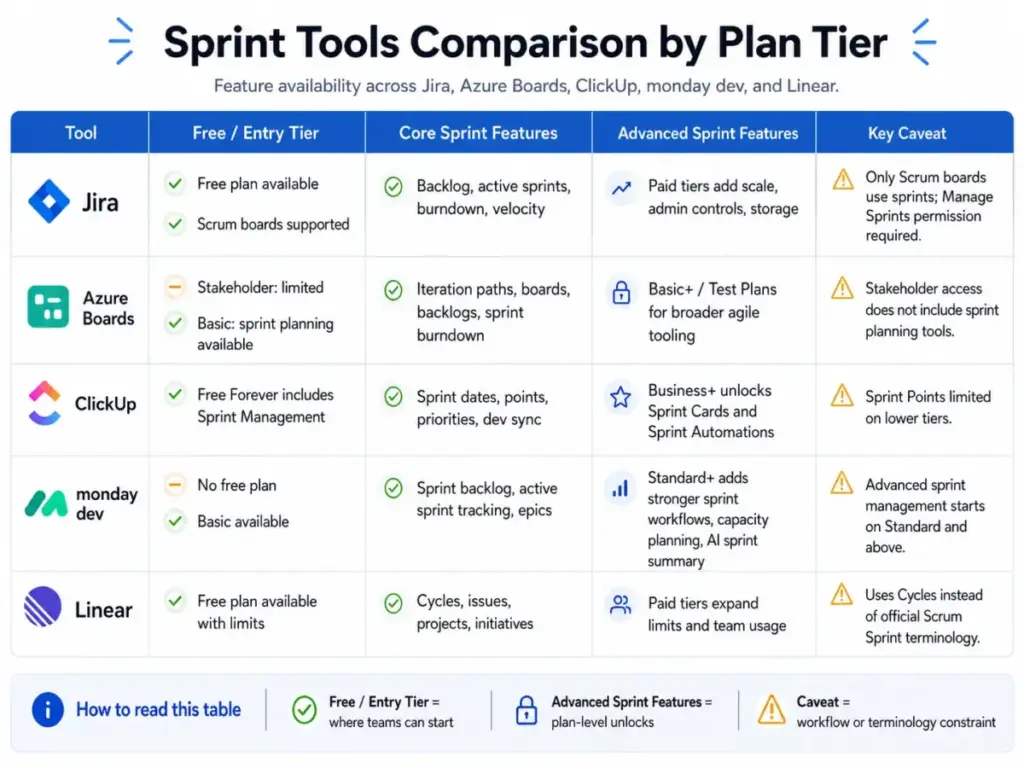
Five tools handle sprint workflows differently. Each one implements the concept with its own terminology, feature gates, and plan-level limits. This table maps what matters for teams evaluating sprint tooling.
| Tool | Sprint feature | Free plan | Paid pricing (as of May 2026) | Best fit | Primary limitation |
|---|---|---|---|---|---|
| Jira | Scrum boards, backlog, active sprints, burndown, velocity reporting | Free up to 10 users | Check Atlassian’s pricing page for current paid tiers | Software teams needing configurable Scrum boards, issue workflows, and agile reporting | Only Scrum board type supports sprints; users need Manage Sprints permissions |
| Azure Boards | Iteration paths, sprint planning, boards, backlogs, sprint burndown | First 5 users free (Basic plan) | $6/user/month (Basic); $52/user/month (Basic + Test Plans) | Teams using Microsoft developer tooling, Azure DevOps, or Visual Studio | Stakeholder access excludes Agile tools like sprint planning; requires Basic or higher |
| ClickUp | Sprint management, sprint points, automations, GitHub/GitLab/Bitbucket sync | Sprint Management on Free Forever | $7/user/month (Unlimited); $12/user/month (Business) | Cross-functional teams wanting sprints inside a broader work management platform | Sprint Cards and Automations require Business plan; Sprint Points limited to 100 uses on Free and Unlimited |
| monday dev | Sprint backlog, active sprint tracking, epics, AI sprint summaries, capacity planning | No free plan for monday dev | Check monday dev pricing page for current US pricing | Product teams wanting visual sprint workflows tied to roadmaps and stakeholder boards | Advanced sprint management on Standard and above; minimum seat model affects small teams |
| Linear | Cycles (sprint-like timeboxes), issues, projects, initiatives | Free plan (250 issues, 2 teams, 10MB file upload) | $10/user/month (Basic, billed yearly) | Engineering-led product teams wanting lightweight, fast issue tracking with cycle planning | Cycles are not tied to releases; teams needing strict Scrum ceremonies need extra process around the tool |
What this table reveals: No tool perfectly mirrors the Scrum Guide. Jira comes closest with dedicated Scrum boards, but even Jira requires the right board type and permissions. ClickUp gives you sprint management on a free plan, but the features that make sprints operational (automations, sprint cards) sit behind the Business tier at $12/user/month.
Linear uses “Cycles” instead of “Sprints,” which works well for engineering teams comfortable adapting terminology but creates friction for teams that want official Scrum labeling. Teams choosing between strict Scrum labeling and lighter cycle-based workflows should compare Jira alternatives by board configuration, permission model, sprint reporting, terminology fit, and how closely the tool needs to mirror Scrum.
As Megan Cook, Head of Product for Jira at Atlassian, frames it: “With scrum, a product is built in a series of iterations called sprints that break down big, complex projects into bite-sized pieces.” The tool handles the mechanics. The team handles the discipline.
Why Sprints Matter in 2026
The Scrum Alliance’s 2025 Annual Report signals a shift in what organizations need. As CEO Tristan Boutros stated: “As disruption intensifies, organizations need professionals who can learn continuously, integrate new technologies, and guide teams through change.” That pressure is visible across the industry. The Digital.ai 18th State of Agile report indicates mounting pressure on Agile adoption, with AI outpacing governance and visibility improving but frustration with application rising.
Sprints matter in this environment because they create a recurring inspect-and-adapt cadence for complex product work. AI can now summarize sprint progress, estimate effort, and surface blockers. Tools like monday dev already include AI sprint summaries. But AI does not replace product ownership, Definition of Done discipline, or the empirical inspection that happens in Sprint Review and Retrospective.
The teams getting the most from Sprints in 2026 use them as learning loops, not deadline containers. They measure Sprint Goal achievement, not velocity targets. They run Retrospectives that produce real process changes, not bullet-point lists that everyone ignores.
FAQ
What is a Sprint in simple words?
A Sprint is a short, repeating work cycle in Scrum, lasting one month or less. During each Sprint, a team plans work, builds something usable, reviews it with stakeholders, and reflects on how to improve. The next Sprint starts immediately after the current one ends.
How long should a Sprint be?
The Scrum Guide sets the maximum at one month. Most teams use one-week or two-week Sprints. Shorter Sprints create more learning cycles and limit risk, which suits teams that need fast feedback. Longer Sprints give more time for complex work but delay feedback. Start with two weeks and adjust based on what the team learns.
What is the difference between a Sprint and Scrum?
Scrum is the full framework, including roles (Product Owner, Developers, Scrum Master), events, and artifacts. A Sprint is one event inside Scrum. Every Sprint contains Sprint Planning, Daily Scrum, Sprint Review, and Sprint Retrospective. You cannot run a Sprint properly without Scrum’s other elements.
What happens in Sprint Planning?
Sprint Planning produces three outputs: a Sprint Goal (why this Sprint matters), a set of selected Product Backlog items (what can be done), and a delivery plan (how the work will get done). The Product Owner explains priorities. Developers select work based on capacity and past performance.
What is the difference between Sprint and Kanban?
Sprints use fixed-length timeboxes with a Sprint Goal and batch commitment. Kanban uses continuous flow with work-in-progress limits and no fixed iteration. Choose Sprints when your team can plan around goals and deliver Increments. Choose Kanban when work is mostly unplanned or interrupt-driven.
What happens if work is not finished in a Sprint?
Unfinished work goes back to the Product Backlog. The Product Owner decides whether to include it in the next Sprint based on current priorities. It does not automatically carry forward. Occasional carryover is normal. Repeated carryover signals problems in how work is sized, estimated, or defined.
Can a Sprint be cancelled?
Yes, but only the Product Owner has the authority to cancel a Sprint, and only when the Sprint Goal becomes obsolete. Cancellations are rare and disruptive. If the team consistently needs to cancel Sprints, the issue is usually in Product Goal clarity or backlog readiness.
Who decides what goes into a Sprint?
The Product Owner orders the Product Backlog and explains priorities. Developers select how much work they can complete based on capacity and the Definition of Done. The Sprint Goal is collaboratively crafted by the entire Scrum Team. No one outside the team dictates what enters the Sprint.
How do you measure Sprint success?
Sprint Goal achievement is the primary measure. Did the team deliver a usable Increment that meets the Definition of Done? Supporting metrics include carryover rate, blocked-item aging, escaped defects, and retrospective action completion. Velocity alone is not a success metric.
Which tools support Sprint management?
Jira pricing plans dedicated Scrum boards with sprint planning, burndown, and velocity reports. Azure Boards uses iteration paths for sprint workflows within Azure DevOps. ClickUp includes Sprint Management on its free plan. monday dev provides sprint backlog tracking with AI summaries.
Linear uses Cycles as sprint-like timeboxes for engineering teams. Each tool implements sprints differently, so match the tool to your team’s Scrum maturity and workflow needs. Teams that outgrow Cycles should review Linear alternatives against stricter sprint tools.