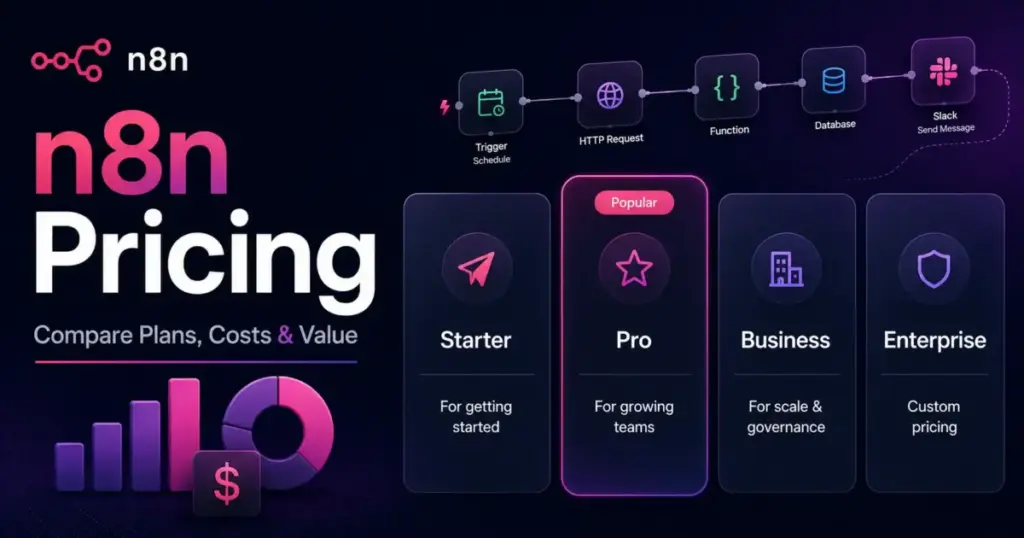
n8n pricing starts at $24 per month, or $20 per month if you pay for the year. That number is real, but it is not what a growing automation team ends up paying.
The plan that fits a working team is Pro at $50 per month billed annually. The jump after that is the part nobody warns you about.
Business runs $667 per month billed annually, and that is where the sticker price stops telling the whole story. It is also self-hosted, which means the price on the page is not the price on your infrastructure bill.
This guide breaks down every n8n plan, the execution math that decides which one you need, the costs buried in the pricing FAQ, and where n8n is genuinely cheaper than Zapier or Make. If you are still deciding whether the platform is right for you, our full n8n review covers the product itself. This page is about the money.
Prices were checked on July 2, 2026. n8n is a workflow automation platform, and it sits alongside the other workflow automation tools we track.
Quick Pricing Verdict
Here is the short version before the detail.
| Question | Answer |
|---|---|
| Starting price | $24/mo monthly, $20/mo billed annually (Starter) |
| Free option | Community Edition is free self-hosted software; there is no permanent free cloud tier |
| Best plan for most teams | Pro at $50/mo billed annually for teams under 10,000 executions |
| Plan to avoid | Business, unless you specifically need SSO, Git, or environments |
| Biggest hidden cost | Business overages and self-hosting infrastructure, not the plan fee |
| Best alternative if too expensive | Make for visual builders, Zapier for non-technical teams |
| Pricing verified | July 2, 2026 |
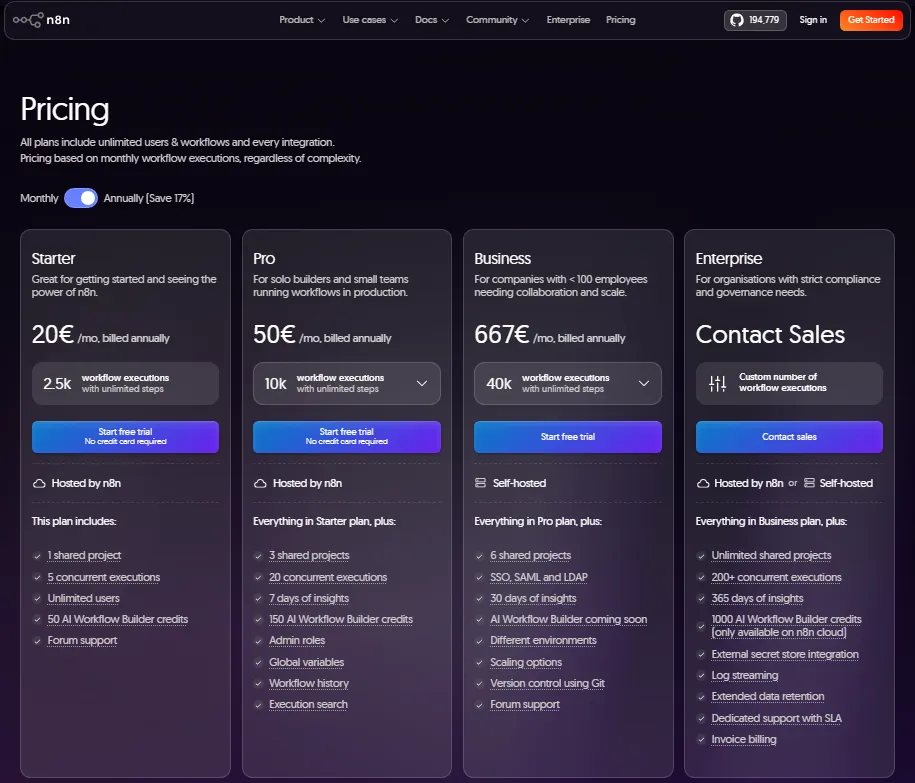
One currency note before we go further. The USD figures in this guide come from US-facing listings and current 2026 pricing sources.
The official n8n pricing page can render prices in euros depending on your region, and it showed EUR during our research. Check the live checkout in your own currency before you buy, because the number you approve should match the number you pay.
The Advertised Price vs The Real Price
The advertised price of n8n is honest. What it leaves out is the second bill that shows up depending on how you deploy and how much you run.
Here is the gap, plan by plan.
| Plan | Advertised (annual) | What you actually budget |
|---|---|---|
| Community Edition | $0 software | Server, database, backups, TLS, and the hours to maintain them |
| Starter | $20/mo | $20/mo, unless a 5-minute schedule blows past 2,500 executions |
| Pro | $50/mo | $50/mo, clean for most teams under 10,000 executions |
| Business | $667/mo | $667/mo plus self-hosting infrastructure, plus overage exposure |
| Enterprise | Custom | Custom, plus your negotiation for support and concurrency |
Notice the pattern. The cheap plans are honest about price and quiet about limits. The expensive plan is honest about features and quiet about what runs on top of it.
That is the friction point for anyone approving a budget. You are not choosing a price, you are choosing a billing unit and a deployment model, and both change the final number.
The Hidden Costs Nobody Puts on the Pricing Page
Six costs decide whether n8n stays cheap. None of them are on the plan cards.
Business Overages
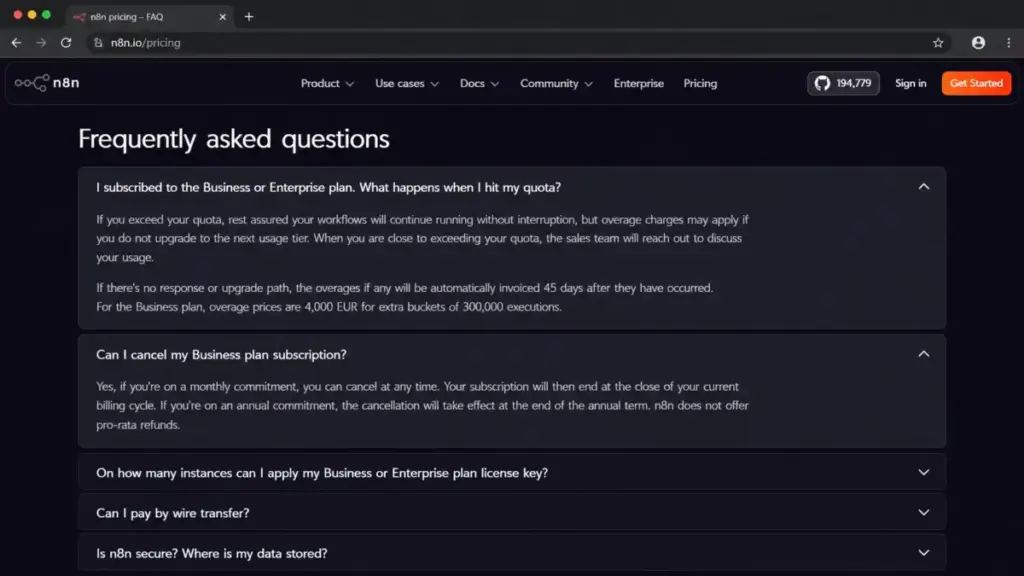
Business includes 40,000 monthly executions. The pricing FAQ says workflows keep running past your quota, and overages may be invoiced.
The official page listed overage in euros, at roughly 4,000 EUR for each additional 300,000 executions on Business. The USD equivalent was not directly visible during research, so treat that figure as a signal, not a settled US price, and confirm it before you sign.
The real risk is not the rate. It is that workflows do not stop when you hit the cap, so a runaway loop or a chatty webhook can quietly build a bill you did not plan for.
Self-Hosting Infrastructure
Community Edition and Business self-hosted both put the server on you. The software is free or licensed, but the machine is not.
A production setup needs a server, a database, a reverse proxy with TLS, backups, and monitoring. Hosting vendors like to quote a low monthly VPS number, and that number is real for a hobby instance.
It stops being real the moment the automation is load-bearing. At that point you are paying for uptime, and uptime is staff time.
DevOps and Security Maintenance
Self-hosted n8n is your responsibility to patch. Security researchers reported critical n8n vulnerabilities affecting self-hosted deployments in 2026, which is a reminder that a self-hosted instance is a service you now operate.
Nobody prices this because it is your payroll, not n8n’s invoice. Budget the hours anyway.
External AI and API Costs
n8n has an AI workflow builder and connects to model providers, and it can build AI agents. The tokens those agents burn are not part of your n8n plan.
If your workflow calls an external model on every run, that provider bills you separately. Your n8n execution count and your model bill grow together, and only one of them shows up on the n8n page.
No Pro-Rata Refunds on Annual Business
The pricing FAQ states that annual Business cancellation takes effect at the end of the annual term, and n8n does not offer pro-rata refunds.
For a team committing roughly $8,004 for the year, that is a real constraint. If you are not sure Business fits, run the Business trial before you commit the year.
Licensing Beyond Internal Use
Community Edition is free under the Sustainable Use License, but “free” has a boundary. We cover that boundary in the free-plan section below, because it is the cost that catches agencies by surprise.
Understanding n8n’s Billing Unit
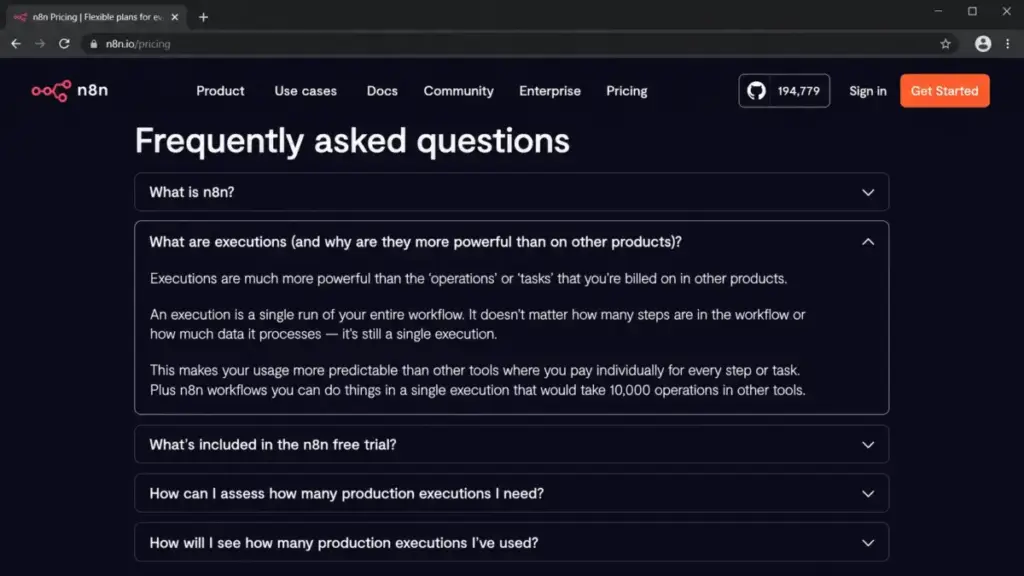
Before the plans make sense, one term has to be clear. n8n bills on workflow executions, and an execution is one full run of an entire workflow, no matter how many steps it has or how much data it moves.
That is the whole reason technical teams look at n8n. A 40-step workflow is still one execution, where a per-task or per-module tool would count each step.
There is a second term that gets confused with the first. Execution history is how long n8n keeps a record of past runs, and the pricing FAQ says reaching a saved-execution, storage, or retention limit does not stop your workflows from running.
So execution quota and execution history are different meters. One controls billing, the other controls how far back you can debug.
Execution Burn-Rate by Schedule
The plan you need depends more on how often workflows run than on how many people are on the team. The official FAQ gives schedule examples, and the math scales cleanly.
| Trigger frequency | Executions per month | Fits |
|---|---|---|
| Once a day | About 30 | Starter |
| Every 6 hours | About 120 | Starter |
| Every hour | About 720 | Starter |
| Every 15 minutes | About 2,880 | Pro (past Starter’s 2,500 cap) |
| Every 5 minutes | About 8,640 | Pro (near its 10,000 cap) |
| Webhook or chatbot | 1 per trigger event | Depends on volume |
Read that table twice if you run polling workflows. A single 5-minute schedule can eat almost a full Pro plan on its own, which is exactly the kind of surprise that pushes a team to the next tier faster than headcount ever does.
Webhooks and chatbots are the wild card. Each inbound event is an execution, so a busy support bot can outrun a schedule-based estimate quickly.
Plan-by-Plan Breakdown
Here is the full plan table, then the verdict on each one.
| Plan | Monthly | Annual (per mo) | Executions/mo | Concurrent | Shared projects | Best for |
|---|---|---|---|---|---|---|
| Community Edition | $0 software | $0 software | Self-managed | Self-managed | N/A | Solo technical builders |
| Starter | $24 | $20 | 2,500 | 5 | 1 | Light single-project automation |
| Pro | $60 | $50 | 10,000 | 20 | 3 | Working teams under 10K runs |
| Business | $800 | $667 | 40,000 | Scaling options | 6 | Teams needing SSO, Git, environments |
| Enterprise | Custom | Custom | Custom | 200+ | Unlimited | Regulated or high-volume ops |
Unlimited users and unlimited workflows are included on every paid plan, which sounds generous until you notice what actually gates the plans.
Community Edition
Best for a solo technical builder who is comfortable running a server. The software costs nothing under the allowed license.
It is missing role-based access control, which is available on every plan except Community Edition. It also carries the Sustainable Use License restrictions covered below.
Avoid it if you cannot patch and back up your own instance. Free software on an unmaintained server is not a saving, it is a liability.
Starter
Best for one person or a tiny team running a handful of daily or hourly workflows. At $20 per month billed annually it is the cheapest way onto n8n Cloud.
It includes 2,500 executions, 1 shared project, 5 concurrent executions, and 50 AI workflow builder credits. Support is the community forum.
Avoid Starter if you run anything on a 5-minute schedule. The execution cap is the ceiling you hit first, not the feature list.
Pro
Best for most working teams, and the plan I would point a five-person ops team to first. At $50 per month billed annually it is the practical tier.
It includes 10,000 executions, 3 shared projects, 20 concurrent executions, 150 AI credits, admin roles, global variables, workflow history, and execution search. That combination covers a real team without pushing you into the expensive tier.
Avoid Pro only if you need single sign-on, Git version control, or separate environments. Those three are the wall between Pro and Business.
Business
Best for a 10-person and up team that needs governance, not just automation. At $667 per month billed annually it is a large step.
It includes 40,000 executions, 6 shared projects, SSO with SAML and LDAP, 30 days of insights, environments, scaling options, and Git version control. It is self-hosted, so infrastructure is on you.
Here is the part the marketing skips. Business is self-serve, and dedicated support with an SLA is Enterprise-only, so a high price does not buy you a support line.
Enterprise
Best for regulated teams and high-volume operations that need custom concurrency and real support. Pricing is custom, and you should treat any published Enterprise number as a guess.
It adds an external secret store, log streaming, extended retention, 365 days of insights, 200-plus concurrent executions, and dedicated support with an SLA. Cloud queue mode, which handles high-concurrency production loads, is available on Cloud Enterprise.
Avoid assuming you need it before you have hit a real limit on Pro or Business. Enterprise is a conversation, and conversations move slowly.
Feature Gates: What You Actually Get by Plan
Unlimited users hides the real gates. The features that force an upgrade are governance and scale controls, not seats.
| Capability | Community | Starter | Pro | Business | Enterprise |
|---|---|---|---|---|---|
| Role-based access control | No | Yes | Yes | Yes | Yes |
| Admin roles, global variables | No | No | Yes | Yes | Yes |
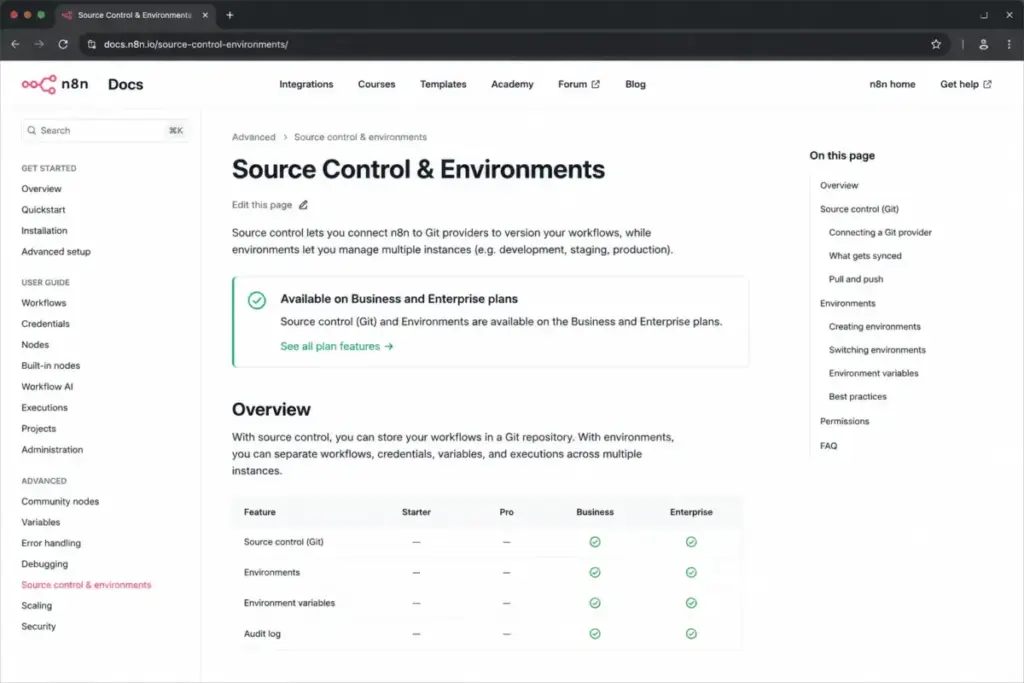
| SSO (SAML, LDAP) | No | No | No | Yes | Yes |
| Git version control, environments | No | No | No | Yes | Yes |
| External secret store, log streaming | No | No | No | No | Yes |
| Cloud queue mode | No | No | No | No | Yes (Cloud) |
| Dedicated support with SLA | No | No | No | No | Yes |
| Support channel | Community | Forum | Forum | Forum | Dedicated |
The single most expensive line in that table is the SSO row. It is the reason teams jump from Pro to Business, and it costs an extra $617 per month billed annually to cross.
That is the scale question every buyer should ask. Does your team genuinely need SSO, Git, and environments today, or are you paying Business money for 40,000 executions you will not use?
When the Free Plan Stops Working
n8n is free and paid at the same time, which is exactly what confuses people. Community Edition is free self-hosted software, while n8n Cloud is a paid hosted service with trials but no permanent free tier.
So “is n8n free” has two answers. The software can be free to license, but running it is not free, and the cloud is not free past the trial.
The bigger stop sign is the license. Community Edition runs under the Sustainable Use License, which restricts use to internal business purposes, non-commercial use, or personal use.
Read that against how you plan to use it. Running free n8n to automate your own company’s work is inside the boundary.
Running free n8n as the automation engine inside a product you sell to clients, or reselling it as a managed service, is where the internal-use boundary gets tested. This is not legal advice, and edge cases should go to n8n directly, but agencies and SaaS builders should not assume free equals unrestricted.
There is one more surprise for security-minded teams. Paid self-hosted Business and Enterprise license keys must ping n8n’s license server daily, and that check includes production execution data, so self-hosted does not always mean fully offline.
The Free Trial Is Not Full Pro
The Starter and Pro trial gives you Pro features, but under Starter limits. That distinction matters if you plan to stress-test performance.
The trial caps out at 5 concurrent executions, 320MiB of RAM, 10 millicore burstable CPU, 2,500 executions, and 20 AI credits. That is enough to evaluate features, not to prove out production throughput.
The Business trial is different. It runs 14 days with Business features and requires a credit card.
Cloud vs Self-Hosted: The Decision Behind the Price
The real question is rarely “which plan.” It is “cloud or self-hosted,” and price is only one input.
| Factor | n8n Cloud | Self-hosted |
|---|---|---|
| Cash cost | Plan fee only | Infrastructure plus staff time |
| Maintenance | Handled by n8n | Yours: patching, backups, uptime |
| Data location | EU servers in Frankfurt, Germany | Wherever you host it |
| Support | Forum, or SLA on Enterprise | Community, unless paid license |
| Setup skill | Low | Docker, database, and security comfort |
| Best fit | Teams that value time over control | Teams that need data control or already run infrastructure |
The Frankfurt detail is easy to miss and hard to reverse. If your compliance team requires US data residency, n8n Cloud storing data in Germany is a decision you make on day one, not a setting you flip later.
Self-hosting flips that. You control the location and the stack, and in exchange you own the patching, the backups, and the 2 a.m. page when the database fills up.
Real Cost Scenarios
n8n does not bill per user, so the useful question is team size plus run volume plus governance needs. Here is what real teams actually spend.
| Team profile | Recommended plan | Estimated software cost | Notes |
|---|---|---|---|
| Solo technical builder, under 2,500 runs | Community or Starter | $0 plus infra, or $240/yr | Self-host if you enjoy ops, Starter Cloud if you do not |
| 5-person ops team, under 10K runs | Pro | $600/yr | The clean answer for a working team |
| 10-person RevOps needing SSO and Git | Business | About $8,004/yr plus infra | Governance, not throughput, is what you are buying |
| 50-plus regulated or mission-critical | Enterprise | Custom | You need SLA support and higher concurrency |
Those totals are software before add-ons. For the Business and Community rows, add your infrastructure and your DevOps hours, because that is the line that decides the true cost.
The scenario that traps people is the middle one. A 10-person team assumes headcount forces Business, when in reality unlimited users means a well-run team can stay on Pro until they need SSO.
Monthly vs Annual Billing
Annual billing saves roughly 17 percent across the paid plans. The math is consistent.
| Plan | Monthly total/yr | Annual total/yr | You save |
|---|---|---|---|
| Starter | $288 | $240 | About $48 |
| Pro | $720 | $600 | About $120 |
| Business | $9,600 | $8,004 | About $1,596 |
Annual is the right call for Starter and Pro, where the commitment is small and the saving is free money. The recommendation flips on Business.
Because annual Business has no pro-rata refunds, an annual commitment there is a real bet. Run the 14-day Business trial, confirm SSO and Git behave the way your team needs, and only then lock the year.
For annual Business and Enterprise, n8n supports invoice and wire transfer, which helps finance teams that cannot pay by card.
Which Plan Should You Choose?
By buyer type, the decision is cleaner than the pricing page makes it look.
Solo builders and freelancers should start on Starter Cloud at $20 per month billed annually, or Community Edition if running a server is genuinely enjoyable rather than a chore. Under 2,500 runs, that is all you need.
Small teams of two to eight people belong on Pro at $50 per month billed annually. It gives you shared projects, admin roles, and 10,000 executions, and it does not make you pay for governance you will not touch.
Growing teams that hit a hard requirement for SSO, Git version control, or separate dev and prod environments move to Business. Not before. The trigger is a feature you cannot get on Pro, not a headcount number.
Regulated, high-volume, or mission-critical teams should talk to sales about Enterprise. If production uptime depends on your automations, the dedicated SLA support alone justifies the conversation.
Early-stage startups have a fifth path worth checking. n8n’s startup plan offers 50 percent off Business for companies with fewer than 20 employees and less than 5 million euros in total funding, available for a year and longer if you stay eligible.
That discount was shown in euros during research, so confirm the US figure at checkout. If you are a small startup that needs SSO, it is a cheaper route to Business features than paying full price.
Which Plan Should You Avoid?
Avoid Business unless a specific feature forces it. At $667 per month billed annually it is nearly seven times Pro, and most of that jump buys SSO, Git, and environments rather than raw capacity.
The reason is the support gap. Teams see the enterprise-style feature list and assume Business includes direct support, but it is self-serve, and dedicated SLA support lives only in Enterprise.
There is a case where Business still fits. If your organization mandates SSO for every tool, or your engineers require Git-based workflow version control and separate environments, Business is the entry point for those controls and the price is the price.
Also be careful with Starter for polling-heavy work. If your workflows run every few minutes, Starter’s 2,500-execution cap will push you to Pro within weeks, so buying Starter first can be a false economy.
n8n Pricing vs Competitors
The mistake buyers make is comparing 10,000 n8n executions to 10,000 Make credits as if they measure the same thing. They do not.
| Tool | Billing unit | Entry paid tier | Best for |
|---|---|---|---|
| n8n | Full workflow run | $20/mo annual (Starter) | Technical teams, long multi-step workflows |
| Zapier | Per task (per action step) | About $19.99 to $29.99/mo | Non-technical teams that want guided setup |
| Make | Per module action (credits) | About $9/mo annual, 10K credits | Visual builders at mid volume |
| Pipedream | Per compute segment (credits) | Credit-based | Developers writing code-first workflows |
| Workato | Custom, sales-led | Contact sales | Large enterprise integration programs |
Here is why the unit matters. One run of an 8-step n8n workflow is a single execution.
The same logic in Make can consume roughly one credit per module action, so an 8-module scenario can cost several times more per run in credit terms. That is where n8n’s per-run model wins for long workflows, and where Make can be cheaper for short ones.
Zapier counts each action as a task, and its FAQ describes workflows pausing at the task limit when pay-per-task is off. n8n Business behaves differently, letting workflows keep running while overage exposure builds, so the safer-when-you-hit-the-cap answer depends on which surprise you prefer.
For non-technical teams, Zapier is still the easier product, and it is worth reading a Zapier review or the broader field of Zapier alternatives before you commit. For visual, mid-volume automation, a Make review is the natural next stop.
Pipedream bills credits by compute time, roughly one credit per 30 seconds at 256MB per workflow segment, which is a developer-friendly model that rewards short, efficient runs. Workato does not publish a sticker price at all and routes you to sales.
Is n8n Worth the Price?
n8n is worth it if you run long, multi-step workflows and have the technical comfort to build them. The per-execution model means a 40-step workflow costs the same as a 2-step one, and that is a real saving that per-task tools cannot match.
It is worth it if you want the option to self-host for data control, or to build AI workflows without paying per action. Reviewer sentiment on G2 consistently positions n8n for technical teams that value custom code and self-hosting.
It is not worth it if your team is non-technical and wants a guided, no-code experience. Reviewer sentiment on TrustRadius and Capterra points to a steep learning curve for beginners, and one Capterra reviewer summed up the cost concern as pricing being a bit high.
It is also not worth Business money if you only need throughput. If you are eyeing Business purely for 40,000 executions and do not need SSO or Git, you are overpaying for governance you will not use.
If n8n is too much tooling for your team, a visual builder like Make or a guided tool like Zapier is the cheaper, calmer answer, and both show up in our roundup of productivity tools for lighter needs.
How to Avoid Overpaying for n8n
Seven moves keep the bill honest.
First, right-size by execution, not by headcount. Count how often your workflows actually run using the burn-rate table above, and buy for that number.
Second, stay on Pro until a feature forces Business. Unlimited users means team growth alone does not require the upgrade, so wait for a real SSO, Git, or environment requirement.
Third, audit polling workflows. A workflow running every 5 minutes burns close to 8,640 executions a month, so switch to webhooks or longer intervals wherever the use case allows.
Fourth, watch for runaway executions. Because workflows keep running past the quota on Business, set alerts on execution volume so a looping workflow does not build a silent overage.
Fifth, if you self-host, budget the infrastructure and the hours honestly. The $0 software line is real, the maintenance is not free, and pretending otherwise is how self-hosting quietly costs more than Cloud.
Sixth, pay annually for Starter and Pro, but trial before committing annual Business. The 17 percent saving is worth taking, except where the no-refund policy makes a wrong Business bet expensive.
Seventh, if you are an eligible startup, apply for the 50 percent Business discount before paying full price. Fewer than 20 employees and under 5 million euros in funding is the bar, and it is the cheapest legitimate route to Business features.
FAQ
How much does n8n cost?
n8n Cloud starts at $24 per month, or $20 per month billed annually, for the Starter plan. Pro is $50 per month billed annually, Business is $667 per month billed annually, and Enterprise is custom. Community Edition is free self-hosted software, but you pay for the infrastructure to run it.
Is n8n free to use?
The Community Edition software is free to license for allowed self-hosted use, but running it costs infrastructure and maintenance time. n8n Cloud is a paid service with trials and no permanent free tier, so “free” applies to the self-hosted software, not the hosted product.
What counts as an execution in n8n?
An execution is one full run of an entire workflow, no matter how many steps it has or how much data it processes. A 40-step workflow and a 2-step workflow each count as a single execution, which is why n8n’s model favors long, complex automations.
Does n8n charge per user?
No. Every paid plan includes unlimited users and unlimited workflows. The real limits are executions, concurrency, shared projects, and feature gates like SSO, not seat counts.
Does n8n Business include support?
Business includes forum support and is self-serve. Dedicated support with an SLA is only available on Enterprise, so a Business subscription does not come with a direct support line for production incidents.
What happens if I exceed my n8n execution quota?
On Business, workflows keep running past the quota and overages may be invoiced, so you will not get an automatic shutdown but you can build a bill. Set alerts on execution volume to catch runaway workflows before the overage lands.
Is n8n cheaper than Zapier?
For long, multi-step workflows, usually yes, because n8n counts one execution per workflow run while Zapier counts a task for each action step. For short workflows run by a non-technical team, Zapier’s guided experience can be worth the higher per-task cost.
Is n8n open source?
Not in the unrestricted sense. Community Edition runs under the Sustainable Use License, which limits use to internal business, non-commercial, or personal purposes, so agencies and product builders should confirm their use case with n8n rather than assuming it is fully open source.
Where is my n8n Cloud data stored?
n8n Cloud stores hosted data on EU servers in Frankfurt, Germany. If your compliance requirements demand US data residency, self-hosting is the route that gives you control over location.
Can I cancel n8n Business and get a refund?
Annual Business cancellation takes effect at the end of the annual term, and n8n does not offer pro-rata refunds. Run the 14-day Business trial before committing to a year so you are not locked into a plan that does not fit.