Apptivo advertises from $15 per user per month, which reads like one of the cheapest full business-app suites a sales team can buy. That number is exactly where the budgeting mistake starts.
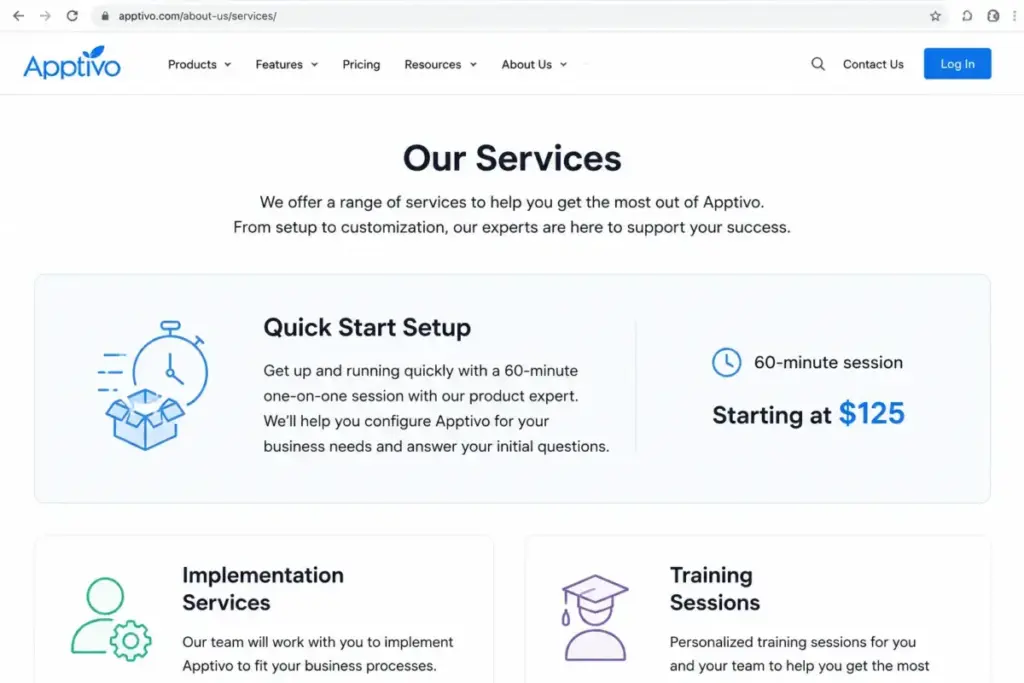
The $15 is the Lite tier billed annually. It caps you at 25 workflow triggers, 3,000 API calls per user per day, and 1GB of storage per user, and it sits beside paid onboarding that starts at $125 per session.
So the real question in any Apptivo pricing decision is not the sticker price. It is what a 5, 10, or 25-seat team pays over the first year once training, migration, and the right tier reach the invoice.
I’m Alex Morrison, and I read CRM bills for a living. Before you shortlist, this guide weighs Apptivo against the other sales CRM software worth considering, using official prices checked July 16, 2026.
It models total cost of ownership at real team sizes, exposes the costs that sit outside the license, and says which tier to buy. For the full feature picture behind the numbers, pair it with our Apptivo CRM review.
Quick Pricing Verdict
| Question | Answer (verified July 16, 2026) |
|---|---|
| Starting price | $15/user/month on Lite billed annually; $20/user/month billed monthly |
| Free plan or trial | No permanent free tier on the official pricing page; a 14-day free trial is offered |
| Best plan for most teams | Premium at $25/user/month annually, for growing teams needing broader apps, more workflows, and integrations |
| Plan to avoid | Lite for automation- or integration-heavy teams, because of the 25-workflow, 3,000-API-call, and 1GB caps |
| Biggest hidden cost | Paid onboarding and training from $125 per 60-minute session, plus quote-based migration and a 6-8 week implementation |
| Best alternative if too expensive | Freshsales (free up to 3 users; Growth $9/user/month annually) or Pipedrive (Lite $14/seat/month annually) |
| Pricing source | Official Apptivo pricing page, checked July 16, 2026 |
Read that “plan to avoid” row as a caution, not a ban. Lite is a genuinely good deal for a small team that lives in contacts, deals, and quotes and does not run heavy automation.
The trouble is that the caps deciding when Lite stops working are invisible on most competitor pages. So buyers upgrade reactively instead of planning for it.
Executive Summary: Apptivo TCO at 1, 5, 10, and 25 Users
Apptivo is priced per user per month, with no public seat minimum on the three self-serve tiers. That makes annual cost easy to model once you fix the tier.
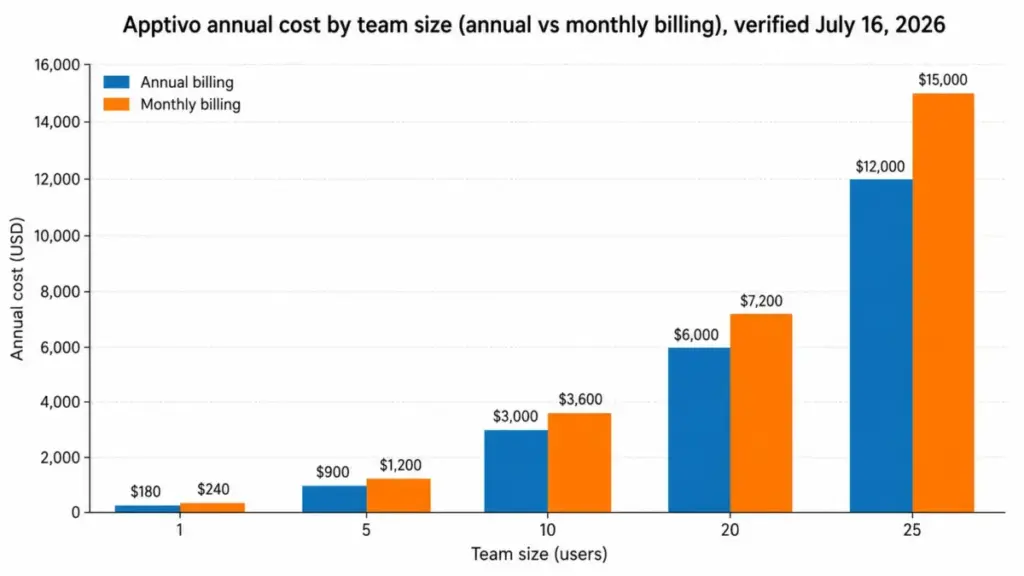
The table below uses official annual-equivalent prices and assumes every listed person needs a paid seat. It excludes taxes, migration, implementation, and any third-party subscription fees.
| Team size | Likely tier | Annual bill (annual billing) | Cost on monthly billing | Annual saving |
|---|---|---|---|---|
| 1 user | Lite | $180/year | $240/year | $60 |
| 5 users | Lite | $900/year | $1,200/year | $300 |
| 10 users | Premium | $3,000/year | $3,600/year | $600 |
| 20 users | Premium | $6,000/year | $7,200/year | $1,200 |
| 25 users | Ultimate | $12,000/year | $15,000/year | $3,000 |
The recommended tier reflects typical feature needs at each size, not a hard rule. A 5-person team that runs 40 automation triggers or syncs a high volume through the API will land on Premium or Ultimate regardless of headcount, and a 25-seat team with light automation could stay on Premium and pay $7,500 a year instead of $12,000.
One line changes the small-team picture. Add three optional $125 training sessions to that 5-seat Lite plan and the first-year cost moves from $900 to $1,275, a 42% jump driven entirely by services, not licenses.
That is the pattern to watch. Apptivo’s license math is cheap, and its implementation math is where the budget actually moves.
Line-Item Cost Breakdown: Every Billable Item
Apptivo’s list price covers software only. Everything else, training, migration, assisted setup, and any connected paid service, is quoted or billed separately.
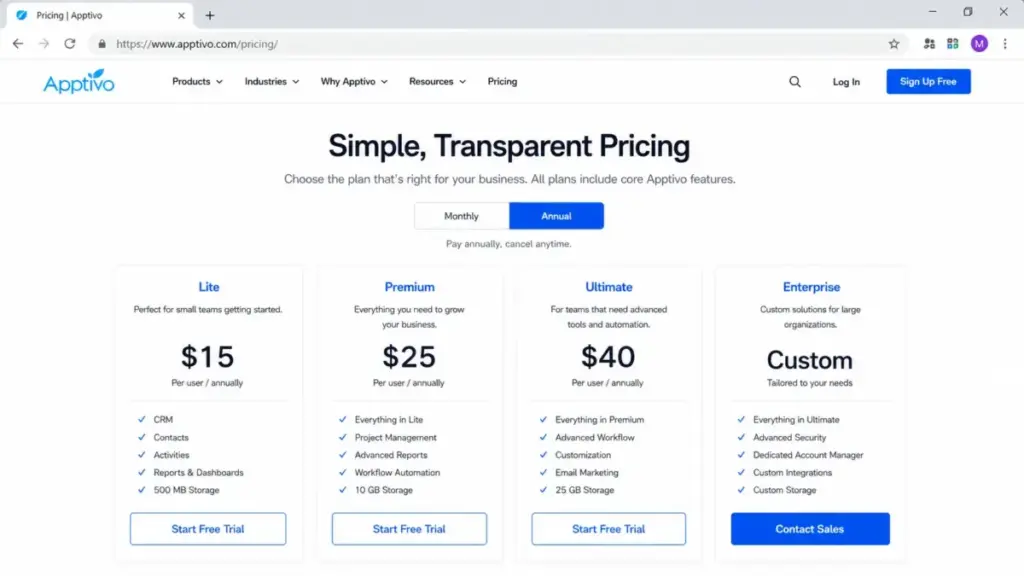
Here is the full plan table against the official pricing page.
| Plan | Monthly | Annual (per user) | Billing basis | Best for | Key limits |
|---|---|---|---|---|---|
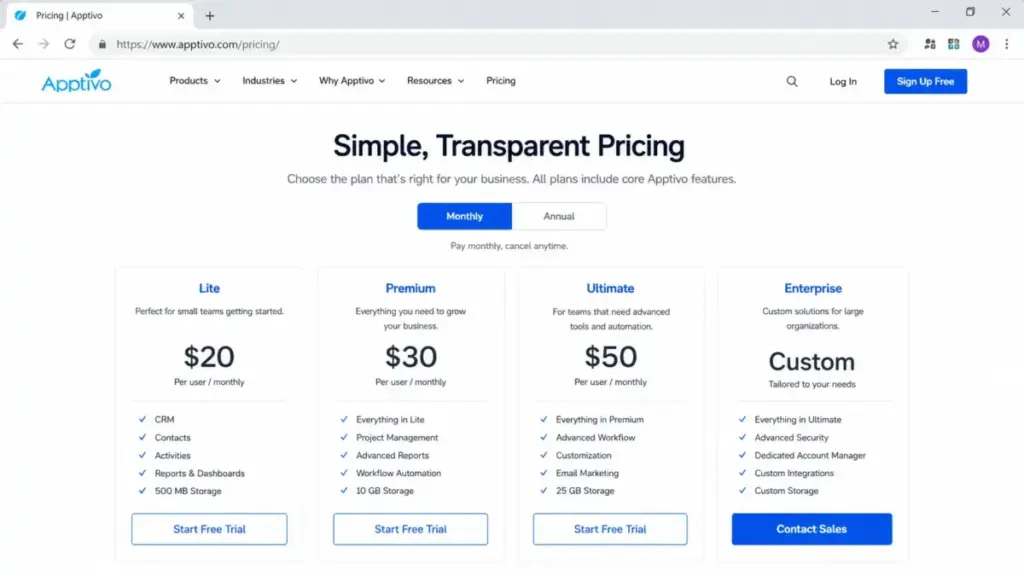
| Lite | $20/user | $15/user ($180/year) | Per user, per month | Small sales teams on contacts, deals, and quotes | 18 apps, 25 workflows, 1GB/user, 3,000 API calls/user/day |
| Premium | $30/user | $25/user ($300/year) | Per user, per month | Growing teams needing more apps and integrations | 46 apps, 75 workflows, 3GB/user, 5,000 API calls/user/day |
| Ultimate | $50/user | $40/user ($480/year) | Per user, per month | Integration- and automation-heavy operations teams | 57 apps, 150 workflows, 10GB/user, 20,000 API calls/user/day |
| Enterprise | Custom quote | Custom quote | Per user, per month | Larger orgs needing SLA, account manager, custom work | 65 apps, 300 workflows, 15GB/user, 30,000 API calls/user/day |
Prices come from the official Apptivo pricing page, checked July 16, 2026. Enterprise is genuinely custom: the public page shows “Contact Us,” not a number.
Treat any third-party database that renders Enterprise as $0 or a fixed figure as wrong, and budget it as a sales-led quote.
Apptivo Lite ($15-$20/user/month)
Lite is the entry paid tier and the plan most small teams start on. It includes 18 apps, 100 custom fields per app, 25 workflow triggers per account, 5 custom reports, 8 custom dashboards, 1GB of storage per user, and 3,000 API calls per user per day.
What it is missing is capacity, not core CRM. The 25-workflow ceiling and the 1GB-per-user storage cap are the two limits that force an upgrade first for document-heavy or automation-heavy teams.
My verdict: Lite is the right buy for a 3-to-10-person team that manages leads, opportunities, and quotes and automates lightly. Avoid it if you already know you need more than a couple of dozen automations or heavy file storage on day one.
Apptivo Premium ($25-$30/user/month)
Premium is the tier I would budget around for most growing teams. It roughly triples the workflow ceiling to 75, lifts storage to 3GB per user, raises custom reports to 25, expands to 46 apps, and moves API capacity to 5,000 calls per user per day.
That jump matters because it covers the two things Lite users hit first: automation headroom and reporting depth. For a 10-person sales and operations team, Premium at $3,000 a year on annual billing is the plan that avoids a mid-year forced migration.
My verdict: choose Premium when you need broader apps, real automation, and manager-level reporting. It is over-provisioned for a solo user and under-provisioned for a team pushing high-volume API syncs.
Apptivo Ultimate ($40-$50/user/month)
Ultimate is an integration and capacity tier, not a “more CRM features” tier. Its headline change is a four-fold API jump to 20,000 calls per user per day, alongside 150 workflows, 57 apps, 50 custom reports, and 10GB of storage per user.
The reason to pay for Ultimate is rarely the CRM screens. It is a high-volume data sync, a busy integration pipeline, or heavy automation that would throttle on Premium’s 5,000 daily calls.
My verdict: reserve Ultimate for operations-heavy teams whose integrations or automation volume genuinely exceed Premium’s ceilings. If your CRM usage is standard, you are paying for capacity you will not touch.
Apptivo Enterprise (custom quote)
Enterprise is where pricing goes private. The public page lists custom integration, an SLA, and a dedicated account manager, plus the highest caps: 65 apps, 300 workflows, 15GB per user, and 30,000 API calls per user per day.
Enterprise pricing was not publicly disclosed on the official page checked July 16, 2026, so treat it as a sales-led option and confirm the quote before shortlisting it.
My verdict: only worth a conversation if you need the SLA, the account manager, or custom work that the self-serve tiers cannot deliver. Everyone else should price Premium or Ultimate first.
Feature Gates by Plan: What You Actually Get
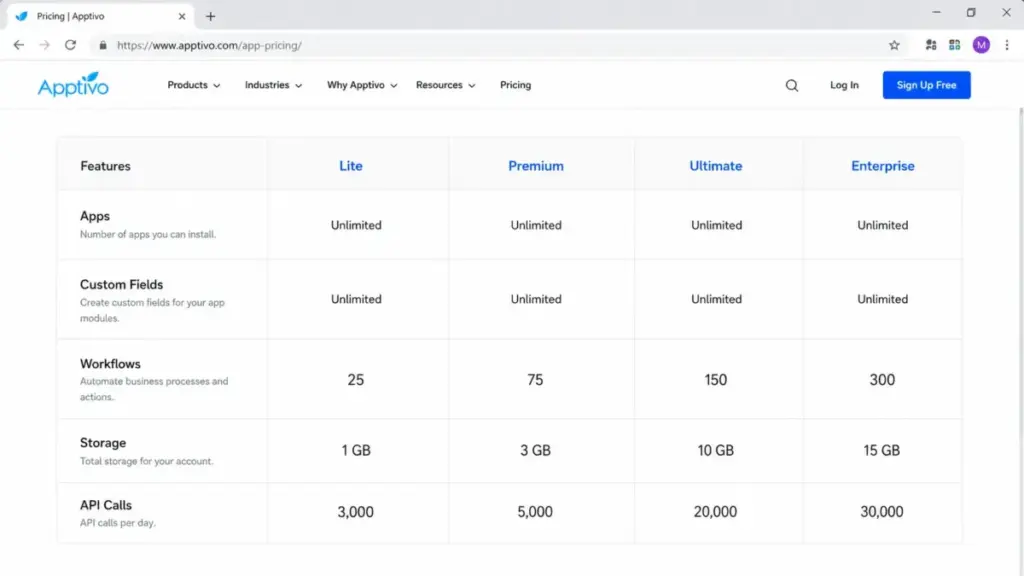
The four tiers share the same apps and screens. What separates them is capacity, and Apptivo publishes those caps as hard numbers, which makes plan selection unusually measurable.
| Capacity | Lite | Premium | Ultimate | Enterprise |
|---|---|---|---|---|
| Apps | 18 | 46 | 57 | 65 |
| Custom fields per app | 100 | 250 | 350 | 500 |
| Workflow triggers per account | 25 | 75 | 150 | 300 |
| Custom reports | 5 | 25 | 50 | 100 |
| Custom charts/dashboards | 8 | 25 | 50 | 100 |
| Storage per user | 1GB | 3GB | 10GB | 15GB |
| API calls per user per day | 3,000 | 5,000 | 20,000 | 30,000 |
| Mass email per user per month | 1,000 | 3,000 | 5,000 | Not clearly listed |
| Support | 24/7 email and chat, 24/5 phone | 24/7 email and chat, 24/5 phone | 24/7 email and chat, 24/5 phone | SLA support, account manager, training |
Three of these rows drive nearly every upgrade. The workflow ceiling climbs 25, 75, 150, 300, so if your automation design needs more than roughly two dozen triggers, Lite is out before any other feature runs short.
The API row jumps four-fold from Premium’s 5,000 to Ultimate’s 20,000 calls per user per day. That is the single reason an integration-heavy team skips straight to Ultimate even when its CRM needs are modest.
Reporting is the quiet third trigger. Custom reports move 5, 25, 50, 100, so a manager who wants more than five saved reports outgrows Lite on analytics alone, independent of headcount.
I would map your must-have automations, integrations, and reports to these numbers before you look at price. The caps, not the features, decide the tier.
Two cautions on this table. Apptivo does not publish overage pricing or automatic-upgrade behavior for these caps, so a team sitting near a limit should confirm with sales what happens at the ceiling before buying.
The Enterprise mass-email figure was not clearly listed in the source, so I have left it blank rather than guess.
API and Integrations
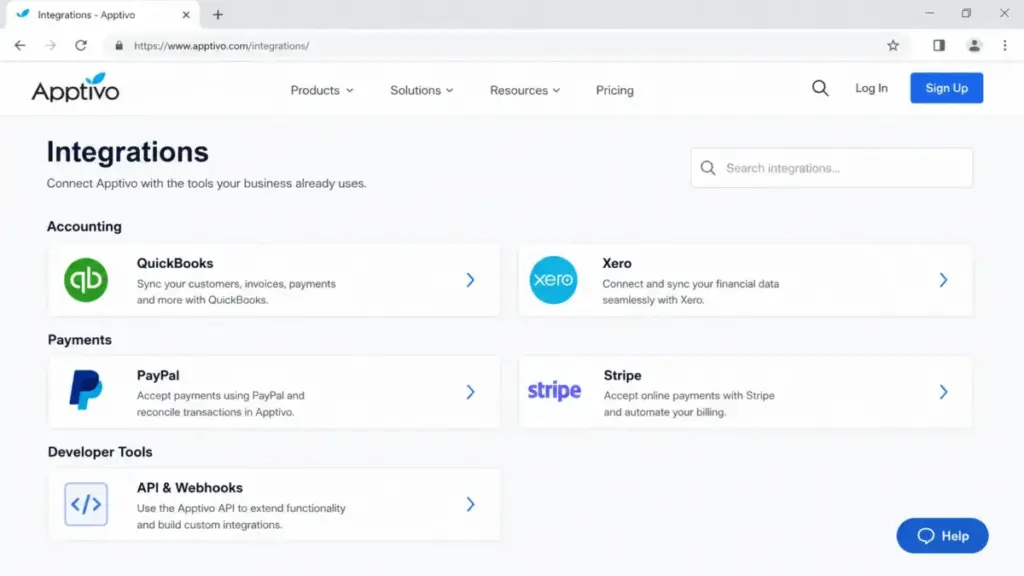
Apptivo publishes an API reference and webhooks and lists connectors for accounting, payments, productivity, and telephony, including QuickBooks, Xero, PayPal, and Stripe. The catalog is real, but it is narrower than the plug-and-play marketplaces around Salesforce or HubSpot, a limitation that recurs across independent reviews.
Before you commit, verify that each connection you need is native, versus something you build through the API or a paid third-party service. Native connectors add little effort, while API or middleware routes add implementation time.
Any connected paid service (an accounting suite, a telephony provider, an automation platform) carries its own subscription that Apptivo does not include. Treat integration cost as part of total cost, not a free checkbox, and route heavy syncs through the sales automation planning you do before purchase.
Annual vs Monthly: The Real Savings Math
Apptivo discounts annual billing, but the discount is uneven across tiers, so “just pay annually” is not automatically the best move on every plan. The gap between the monthly price and the annual-equivalent price is what you actually save.
| Plan | Monthly rate | Annual rate | Discount off monthly | Annual saving per seat |
|---|---|---|---|---|
| Lite | $20/user | $15/user | 25% | $60/year |
| Premium | $30/user | $25/user | 16.7% | $60/year |
| Ultimate | $50/user | $40/user | 20% | $120/year |
Lite gives the deepest percentage discount at 25%, which is why a confident small team should commit annually. Premium’s discount is the shallowest at 16.7%, so a team still testing fit loses less by staying monthly for a quarter before locking in.
Ultimate saves the most in raw dollars, $120 per seat per year. That compounds fast on a 25-seat plan into the $3,000 gap shown in the executive summary.
One contract term outweighs the discount for cautious buyers. Apptivo’s pricing FAQ states there is no cancellation fee, but no refund is issued if you cancel an annual plan.
So the “no commitment, pay-as-you-go” language is true for monthly billing and misleading if you read it as a refundable annual prepayment. If there is any real chance you churn mid-year, weigh a non-refundable annual payment against the discount before you sign.
Add-Ons, Overages, and Surprise Costs
The costs that decide whether Apptivo is actually cheap sit outside the license. Here is what to plan for.
| Cost item | What it runs | When it hits you |
|---|---|---|
| Quick Start training | Starting at $125 per 60-minute session | You want guided setup or module training |
| Data migration | Custom quote, not publicly disclosed | You move records from another CRM with vendor help |
| Implementation services | Custom quote; 6-8 weeks across 8 stages | You need assisted configuration, integrations, and go-live |
| On-site workshop | Referenced but current price not re-confirmed | You request an on-site engagement |
| Third-party subscriptions | Vendor-specific, separate from Apptivo | You connect paid accounting, payments, or telephony |
| Taxes | Jurisdiction-dependent, not itemized | Applicable tax rules |
| Annual cancellation | No fee, but no refund | You cancel an annual plan early |
For a small team, training is the line item that reshapes the budget. Three optional 60-minute sessions at $125 add $375, which is why the 5-seat Lite first-year example moves from $900 to $1,275.
Those three sessions are illustrative and not mandatory. A team without an in-house CRM admin usually needs some guided help, so budget at least one.
Those services are listed on Apptivo’s services page, which is where the $125 Quick Start rate appears. The larger unknown is assisted deployment.
Apptivo’s FAQ describes implementation as a 6-to-8-week engagement across eight stages: document collection, prototype configuration, data import, third-party integration, workflow verification, training, go-live, and hypercare. Migration and implementation prices are quote-based, so request them early if you are switching from another system.
Ease of Setup and Implementation Risk
The customization that makes Apptivo flexible is also what makes it slow to stand up. Independent review patterns from G2, Capterra, and a May 2026 TechRadar review consistently praise support and value while flagging a dated interface and real setup effort.
That is a total-cost signal, not just a UX complaint. A configurable suite with a learning curve means someone has to build custom fields, views, workflows, and reports, and if no one on the team can, you are back to paid training or implementation services.
The license being cheap does not help if adoption stalls. For a structured way to scope that work, our CRM implementation guide covers the questions to settle before you sign.
I would budget calendar time and an internal owner before you budget dollars. Plan for a multi-week rollout, name the person responsible for configuration, and treat the 6-to-8-week window as the realistic path for anything beyond a basic contact database.
If you are switching from another system, scope the move early, because vendor-assisted CRM data migration is quote-based and can rival the first-year license for a larger team.
Which Apptivo Plan Should You Choose?
Match the plan to the constraint that binds first, not to headcount alone.
Solo user or freelancer: Lite on annual billing at $180 a year gives you full CRM screens, quotes, and light automation. The only reason to go higher is heavy file storage or more than 25 workflows.
Small team (about 5 users): Lite is usually enough at $900 a year, plus one or two training sessions. Move to Premium early only if you already run more than roughly two dozen automations or need more than five custom reports.
Growing team (10 to 20 users): Premium at $3,000 to $6,000 a year is the value tier. The 75-workflow ceiling, 3GB storage, 25 custom reports, and 5,000 daily API calls cover most growing sales and operations needs without over-buying.
Larger or integration-heavy team (25+ users): Ultimate at $12,000 a year for 25 seats when API volume or automation load is high; otherwise Premium can hold. Enterprise only enters if you need the SLA, account manager, or custom work.
Premium earns the “best for most” label conditionally: it fits teams that need 46 apps, 75 workflows, 3GB per user, 25 custom reports, and 5,000 API calls per user per day. Stay on Lite if those limits are comfortable, and jump to Ultimate when your integrations or automation genuinely exceed Premium’s ceilings.
If you want a faster path, run your requirements through the caps in order. Count your planned automation triggers first: 25 or fewer keeps you on Lite, up to 75 points to Premium, and beyond that means Ultimate or Enterprise.
Then check daily API volume per user. Under 3,000 calls is fine on Lite, but a busy integration pipeline that clears 5,000 forces Ultimate, independent of every CRM feature.
Finally, count must-have custom reports and per-user storage. More than five saved reports or heavy file attachments pushes a small team off Lite before headcount does, which is why I size the plan to the binding constraint rather than the seat count.
Which Apptivo Plan Should You Avoid?
Avoid Lite the moment automation or integration volume is central to your workflow. The 25-workflow trigger cap and the 3,000-API-call-per-user-per-day limit are low enough that an automation-first team will hit them within the first configuration pass, and there is no published overage path, so you upgrade or you stop.
The exception: a small team that runs Apptivo as a straightforward contact, deal, and quote system, with a handful of automations, gets real value from Lite and should not pay for Premium out of caution.
There is also a buyer who should avoid Apptivo entirely, at any tier. If your team demands a modern, near-zero-configuration interface and expects to be productive on day one, the recurring dated-UI and setup-effort feedback is a genuine disqualifier.
Poor adoption erases the low license cost, so a polished, faster-to-deploy CRM can be the cheaper choice in practice even at a higher sticker price. In that case, browse the Apptivo alternatives before you commit.
Apptivo Pricing vs Competitors
Entry prices alone mislead here, because free tiers, billing cadence, and included features differ. The table shows official starting points, and the competitor 10-user costs reflect each vendor’s entry paid tier, so a team on a higher practical tier will pay more than the figure shown.
| CRM | Entry price | Practical tier | ~10-user annual cost | Best for |
|---|---|---|---|---|
| Apptivo | $15/user/month annual | Premium ($25/user annual) | ~$3,000 (Premium) | Teams wanting CRM plus operations apps in one suite |
| Pipedrive | $14/seat/month annual | Growth or Advanced | ~$1,680 (Lite entry) | Pipeline-first sales teams |
| Freshsales | $9/user/month annual; free ≤3 users | Growth or Pro | ~$1,080 (Growth) | Small sales teams wanting AI-assisted selling |
| HubSpot Sales Hub | Promotion-sensitive; recheck live | Starter or Professional | Recheck on publication day | Teams wanting a broad marketing-plus-sales platform |
On raw price, Apptivo is not the cheapest. Freshsales undercuts it and offers a free plan for up to three users, per Freshsales’ official pricing.
Pipedrive’s Lite seat runs a dollar under Apptivo’s at $14 billed annually, per Pipedrive’s official pricing. HubSpot’s Sales Hub price shifts with promotions, so verify it live rather than trusting a cached number.
Where Apptivo wins is scope. If a rival CRM license is cheaper but you still pay separately for invoicing, projects, and field service, Apptivo’s suite can lower total stack cost even when its per-seat price is higher.
The honest test is a worksheet: list every subscription Apptivo would actually retire in your workflow, then compare stacks, not seats. A 10-person team paying separately for a cheaper CRM plus an invoicing tool and a project app can spend more in total than the same team on Apptivo Premium at $3,000 a year.
The trap is counting savings you will not realize. Only credit a tool as retired if your team will genuinely move that workflow into Apptivo, because a half-adopted module leaves you paying for both.
For a pipeline-first team, the Pipedrive CRM review reads closer to your need.
For AI-assisted small-team selling, the Freshsales review is the better starting point.
Security and Compliance Notes for Procurement
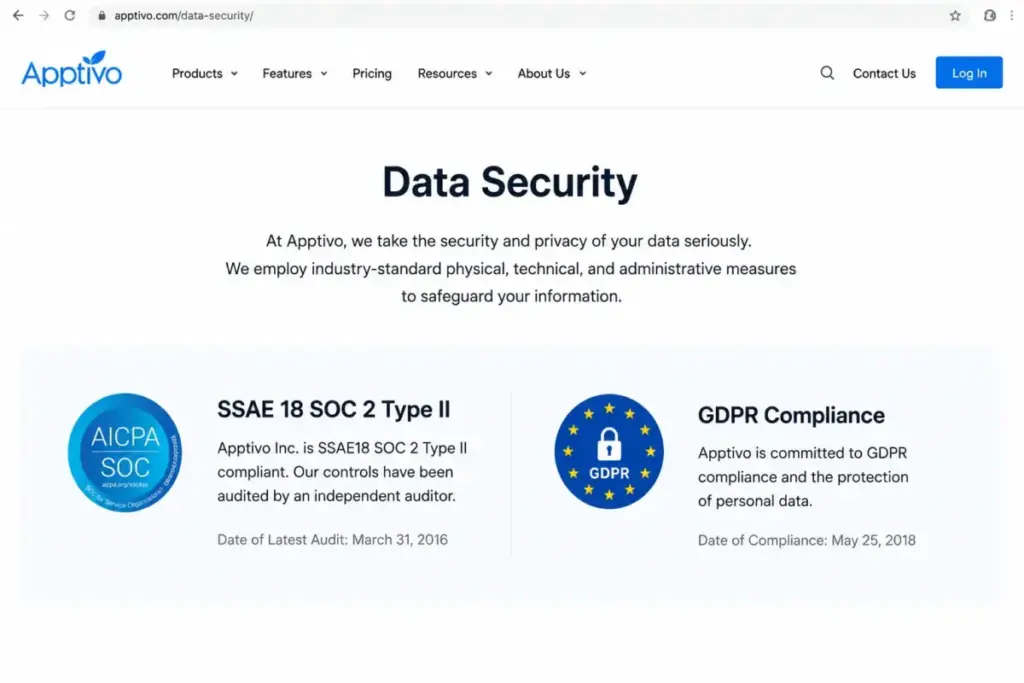
Apptivo’s official security page states SSAE18 SOC 2 Type II and GDPR compliance and links a Data Processing Addendum. That is a reasonable baseline for most SMB buyers.
The caveat is freshness. The public page references older audit and review dates, so a security or procurement team should request the latest SOC report and current DPA rather than relying on the badge.
I would not assume HIPAA, SCIM, or SSO from the reviewed pages, because none of those were verified in this research. Confirm them directly if they are requirements.
Mobile App: Availability Is Not Parity
Apptivo publishes iOS and Android apps, and lists Windows and macOS clients too, so mobile access is real. Availability is not the same as full workflow parity, though.
Review patterns report mobile limitations and sluggishness, so a field-dependent team should test its exact mobile tasks during the 14-day trial: creating an opportunity, logging an activity, sending a quote, and pulling a record on a phone. If those work on mobile, the app is fine for your use.
If they stall, that is a cost you want to find before you buy, not after.
Is Apptivo Worth the Price?
Apptivo is worth it if you want CRM plus operations apps (quotes, projects, invoicing, help desk, field service) in one configurable suite, you have 5 to 25 seats, and you can invest the setup time. At $180 to $480 per user per year, the license genuinely undercuts most integrated suites, and the consolidation value is real when it retires separate tools.
It is not worth it if you need a polished, near-instant-onboarding CRM, a very broad plug-and-play integration marketplace, or compliance evidence beyond the public SOC 2 and GDPR materials without vendor verification. In those cases the setup effort and finite ecosystem outweigh the low price.
If Apptivo is too heavy, Freshsales is the cheaper starting point with a free tier for tiny teams, and Pipedrive is the cleaner choice for a pipeline-first sales team. If you need suite breadth Apptivo cannot match, the HubSpot CRM review shows the opposite end on both features and cost.
How to Avoid Overpaying for Apptivo
- Map your must-have workflows, reports, and integrations to the exact caps before you pick a tier, so you buy Premium on purpose rather than upgrading reactively off Lite.
- Commit to annual billing only after you are confident on fit, because the annual plan is non-refundable if you cancel early.
- Take Lite’s 25% annual discount when a small team’s needs are stable; it is the deepest percentage saving of any tier.
- Budget at least one $125 training session for a team without an in-house CRM admin, and treat three sessions as a realistic small-team ceiling, not a floor.
- Get migration and implementation quotes in writing early, since both are custom and can rival the first-year license for a switching team.
- Confirm what happens at each cap (workflow, API, storage) with sales before purchase, because Apptivo does not publish overage pricing.
- Price stacks, not seats: only count Apptivo’s consolidation value against the subscriptions it will actually replace in your workflow.
Why Apptivo Prices Differ Across the Web
Search results for Apptivo pricing show $10, $15, $20, $40, $50, and even “free,” which is why buyers get confused. Most of that spread is billing cadence and stale data, not disagreement.
The current official page, checked July 16, 2026, is the source of truth. Monthly rates are $20, $30, and $50, and annual-equivalent rates are $15, $25, and $40.
Older or legacy snippets showing $10 or different plan names predate the current structure. Ultimate at $50 is the monthly price, not the annual $40 some sequences misreport.
Enterprise is a custom quote, never $0. Several third-party pages still reference a free or Starter tier, but the reviewed official pricing page did not advertise a permanent free plan on that date, only a 14-day trial.
So I would not budget around a free tier without an official notice. Older sources citing a 30-day trial are out of date, because the current term is 14 days.
FAQ
How much does Apptivo cost?
Apptivo costs $20, $30, or $50 per user per month on monthly billing for Lite, Premium, and Ultimate. Annual billing lowers those rates to $15, $25, and $40 per user per month. Enterprise is a custom quote. Prices were verified on the official Apptivo pricing page on July 16, 2026.
Does Apptivo have a free plan in 2026?
The official Apptivo pricing page reviewed on July 16, 2026 did not advertise a permanent free tier. It offered a 14-day free trial instead. Some third-party sites still reference a free or Starter plan, but those appear to be stale or syndicated, so confirm current availability directly with Apptivo before relying on a free option.
How long is the Apptivo free trial?
Apptivo’s official pricing FAQ lists a 14-day free trial. Older articles and some review sites mention a 30-day trial, but that conflicts with the current official page. Treat 14 days as the accurate figure and verify it on Apptivo’s pricing page, since trial terms can change without notice.
What is the difference between Apptivo Lite and Premium?
Lite ($15/user annually) includes 18 apps, 25 workflows, 1GB per user, and 3,000 API calls per user per day. Premium ($25/user annually) roughly triples workflows to 75, lifts storage to 3GB, raises custom reports to 25, expands to 46 apps, and increases API capacity to 5,000 calls. Premium is the upgrade for automation and reporting headroom.
Does Apptivo charge for onboarding and training?
Yes. Apptivo’s services page lists paid Quick Start training starting at $125 per 60-minute session, and migration and implementation are quote-based. For a small team without a CRM admin, budget at least one session. Assisted deployment is described as a 6-to-8-week engagement, so plan for services cost on top of the license.
Can I cancel Apptivo anytime?
Apptivo’s pricing FAQ states there is no cancellation fee, and monthly plans are pay-as-you-go. The catch is annual billing: if you cancel an annual plan, no refund is issued for the remaining term. So “no commitment” applies to monthly billing, and an annual prepayment is effectively non-refundable if you leave early.
Which Apptivo plan includes the most workflows?
Among the self-serve tiers, Ultimate includes 150 workflow triggers per account, versus 75 on Premium and 25 on Lite. Enterprise raises that ceiling to 300. If automation is central to your setup, the workflow cap is usually the first limit you hit, so choose the tier by trigger count before other features.
Is Apptivo cheaper than Pipedrive or Freshsales?
Not on entry price. Freshsales Growth starts at $9/user/month annually with a free plan for up to three users, and Pipedrive Lite is $14/seat/month annually, both under Apptivo’s $15. Apptivo can still cost less overall if its suite retires separate invoicing, project, or service tools you would otherwise pay for.
What are the hidden costs of Apptivo?
The main costs outside the license are paid training from $125 per session, quote-based migration and implementation, any connected third-party subscriptions, and taxes. There is no published overage pricing for the workflow, API, or storage caps, so confirm cap behavior with sales. Annual plans are also non-refundable if canceled early.
Which Apptivo plan is best for a 10-person team?
For most 10-person sales and operations teams, Premium at $3,000 a year on annual billing is the practical tier. Its 75 workflows, 3GB per user, 25 custom reports, and 5,000 daily API calls cover typical needs without over-buying. Move to Ultimate only if your integrations or automation volume exceed those Premium ceilings.