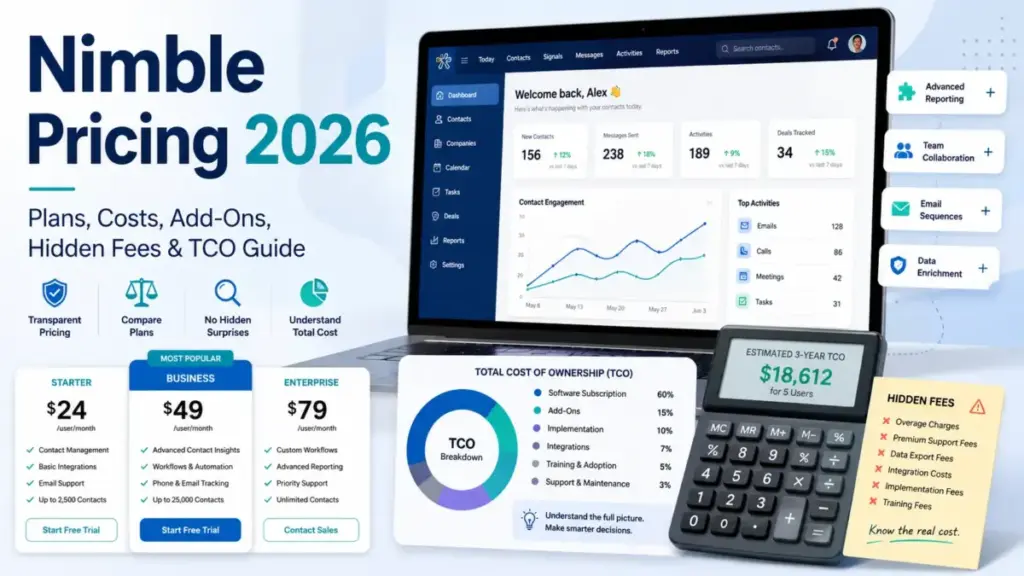
Nimble pricing looks settled at first glance: one paid plan, $24.90 per licensed seat per month on annual billing. The seat rate is not the number I would budget around.
This guide covers Nimble CRM from Nimble, Inc. at nimble.com. It does not cover Nimbleway or NimbleWork, two unrelated products that rank for the same search.
Nimble’s official pricing and support pages publish ten separate charges and billing rules on top of that seat fee. A 20-seat team running a realistic stack pays $6,749.90 a year instead of the $5,976 the seat rate implies.
Nimble sits mid range on price among the best CRM software options we track. This guide shows where that position moves once the included allowances run out.
Quick Nimble Pricing Verdict
| Question | Answer (checked July 27, 2026) |
|---|---|
| Starting price | $29.90 per licensed seat per month, billed monthly |
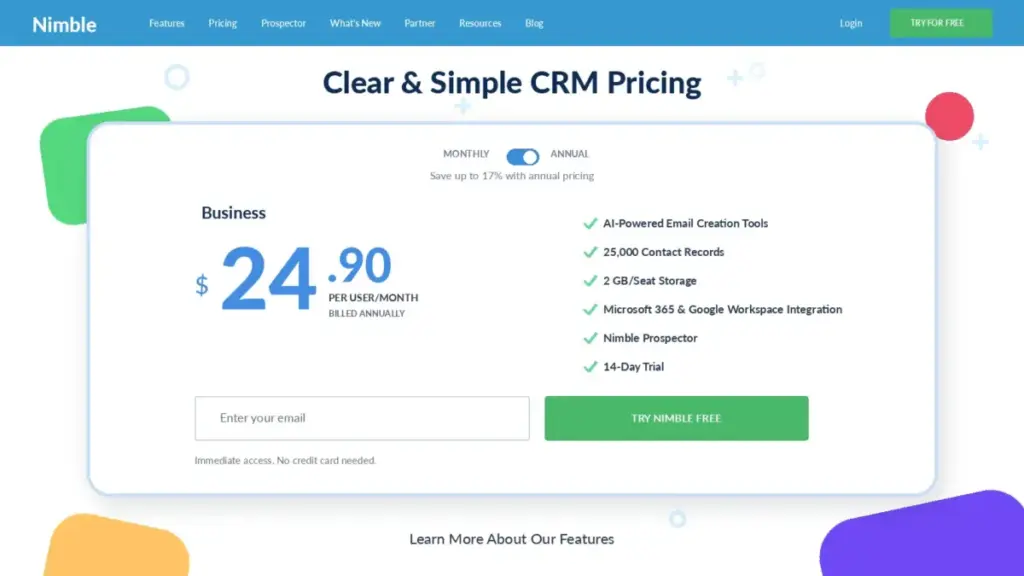
| Lowest published rate | $24.90 per licensed seat per month, billed annually as $298.80 per seat per year |
| Free plan | None published |
| Free trial | 14 days, no credit card, up to five licenses |
| Number of paid CRM tiers | One (Business), sold on two billing cadences |
| Best fit | Relationship-led teams of 1 to 15 working inside Gmail or Outlook |
| Biggest hidden cost | Nimble Email Marketing at $15 per company per month, plus message-volume packages up to $99 per month |
| Setup to avoid | Annual prepay when headcount may shrink, because removed licenses get no remaining-term refund |
| Hard disqualifier | Official support documentation states Nimble is not HIPAA compliant |
| Cheaper starting point | Pipedrive Lite at $14 per seat per month on annual billing |
Two lines in that table decide most Nimble purchases. The single-tier structure removes plan-selection anxiety, and it also removes any cheaper paid entry point for a team that only needs a contact database.
The annual rate saves $60 per seat per year. It also locks the seat count in a way that costs money during turnover, which I cover in the billing-rules section.
The Advertised Price vs the Real Nimble CRM Bill
Nimble markets one price and one plan.
Official marketing copy uses no-extra-fee and no-add-on framing. The official pricing page and help center list separate charges for contacts, storage, enrichment credits, automations, web forms, email marketing, and message volume.
Both statements are accurate in their own scope. Nimble genuinely has one core CRM tier rather than a Starter-Professional-Enterprise ladder, and it also sells optional modules and capacity blocks separately.
| Team profile | Seat-rate-only cost per year | Realistic cost per year with modeled add-ons | Gap |
|---|---|---|---|
| 1 seat, base plan | $298.80 | $298.80 | $0 |
| 5 seats plus Email Marketing | $1,494.00 | $1,643.90 | $149.90 |
| 10 seats plus Email Marketing, web forms, 25 extra automations | $2,988.00 | $3,401.90 | $413.90 |
| 20 seats plus Email Marketing, web forms, 50 extra automations, 10,000 extra contacts, 10GB extra storage | $5,976.00 | $6,749.90 | $773.90 |
All figures use annual CRM billing at $298.80 per seat per year and the published add-on prices. The add-on selections are transparent examples, not a claim that every team of that size needs them.
The gap is small in percentage terms and awkward in practice. It arrives one $10 or $12 line at a time, several months after purchase, which is exactly when nobody is re-running the budget.
Nimble CRM Pricing Plans Compared
Nimble publishes one paid tier. The comparison that matters is between the two billing cadences of that tier, not between feature editions.
| Item | Business, monthly billing | Business, annual billing | Business trial |
|---|---|---|---|
| Price | $29.90 per licensed seat per month | $24.90 per licensed seat per month, charged as $298.80 per seat per year | $0 for 14 days |
| Billing basis | Per licensed seat | Per licensed seat, prepaid | No card required |
| Cost per seat per year | $358.80 | $298.80 | Not applicable |
| Seat minimum | None stated on the reviewed public pages | None stated on the reviewed public pages | Up to five licenses |
| Contacts | 25,000 per account | 25,000 per account | 25,000 per account |
| Storage | 2GB per licensed user | 2GB per licensed user | 2GB per licensed user |
| Enrichment credits | 25 per user per month | 25 per user per month | 25 per user per month |
| Workflow automations | 25 | 25 | 25 |
| Group Message and Sequence emails | 1,000 per license per month through Nimble’s ESP | 1,000 per license per month through Nimble’s ESP | 1,000 per license per month |
| Downgrade flexibility | Cancel on the monthly cycle | Annual-to-monthly change restricted to the final 30 days of the term | Not applicable |
Every price and allowance above comes from Nimble’s official pricing page and its help center, checked July 27, 2026. Prices can change after that date, so confirm the checkout total and any applicable tax before you buy.
The feature set is identical across both cadences. You are buying a $60-per-seat discount in exchange for a fixed 12-month seat commitment, and that trade only works when headcount is stable.
What the Nimble Business Plan Includes
Nimble positions itself as a relationship CRM for solopreneurs and small teams working across email, calendars, and social profiles. The architecture is worth understanding before the pricing math, because it explains which add-ons a given team will trigger.
Contacts sit at the center, which is the part of what CRM software does that Nimble optimises hardest. Companies, deals, activities, and workflow stages attach to those contact records, and the Prospector browser extension pushes new records in from the web.
Email is the second spine. One-to-one sync with Gmail and Outlook is part of the seat, while bulk sending runs through Group Messages and Sequences against a shared monthly allowance.
Included in the seat, per official documentation:
- Unified contact records with relationship history
- Nimble Prospector browser extension and contact enrichment, capped at 25 credits per user per month
- Gmail, Outlook, Microsoft 365, and Google Workspace connectivity
- Unlimited lead pipelines and sales pipelines
- Unlimited tags and up to 1,000 custom fields
- Workflow automation, capped at 25 automations
- Templates, Group Messages, and Sequences against the 1,000-message monthly allowance
- iOS and Android apps with no separate mobile fee
Not included in the seat: the Email Marketing module, continued Web Forms and Web Chat access after the first 30 days, and any capacity above the allowances listed above.
That split between core records and paid capacity runs through our Nimble CRM review too. It decides whether the product feels cheap or expensive in month six.
Missing from the tier entirely, and therefore not purchasable at any price: HIPAA compliance. That is a stop signal, not a limitation, and I return to it below.
The Paid Expansions Nobody Puts in One Place
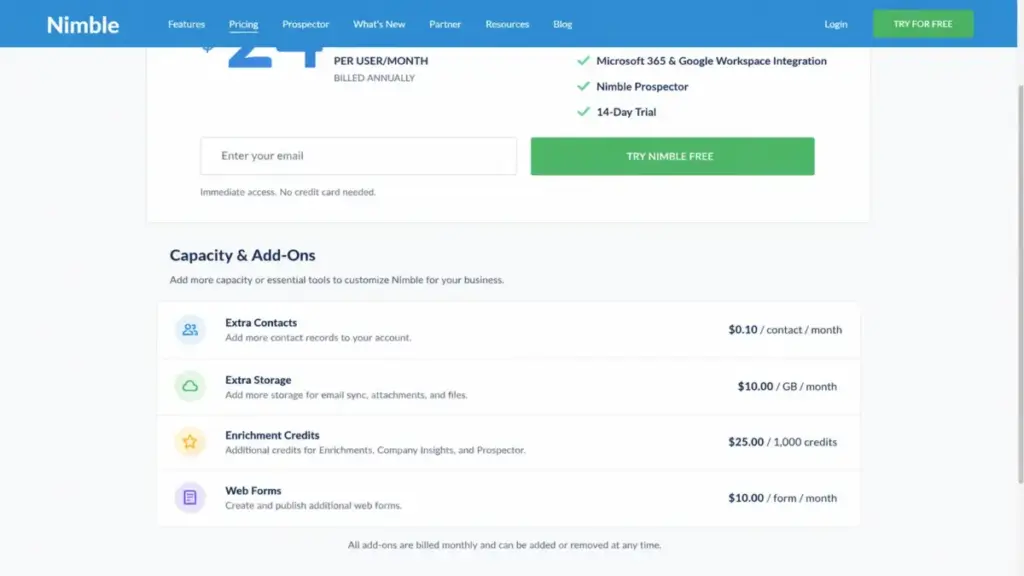
This is the section the current search results skip. Nimble’s official pages publish every one of these prices, but they sit across a pricing card, a feature table, a billing policy, and four separate help-center articles.
| Expansion | Included allowance | Paid increment | Price | Billing scope | Trigger |
|---|---|---|---|---|---|
| Contacts | 25,000 per account | 10,000 more | $10 per month | Account | Database exceeds 25,000 records |
| Storage | 2GB per licensed user | 10GB more | $10 per month | Account | Attachments exceed 2GB times seat count |
| Enrichment credits | 25 per user per month | 100 more | $10 per month | Documented as a credit block | Prospector use above the monthly credit cap |
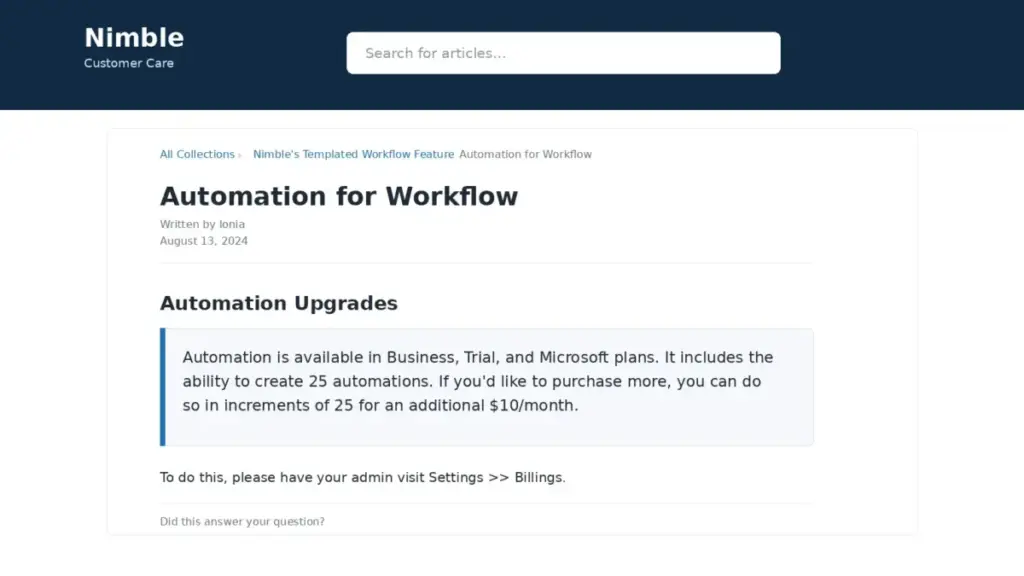
| Workflow automations | 25 | 25 more | $10 per month | Account | Automation design needs more than 25 rules |
| Web Forms and Web Chat | 10 forms for an initial 30 days | Continued access | $12 per month | Company | Day 31 of website lead capture |
| Nimble Email Marketing | Not included | Module access | $15 per month, or $149.90 per year on annual accounts | Company | Team switches on the marketing module |
| Recurring message volume | 1,000 per license per month | 2,000 / 10,000 / 25,000 | $15 / $69 / $99 per month | Documented as per-license recurring packages | Ongoing send volume above the base allowance |
| One-time message volume | Not applicable | 2,000 / 10,000 / 25,000 | $19 / $75 / $110 once | One-time purchase | A single campaign needs temporary capacity |
| Licenses added mid-term | Not applicable | Extra seats | Prorated to the remaining period | Account | Hiring between renewals |
| Licenses removed mid-term | Not applicable | Not applicable | No refund for the unused remainder | Account | Turnover on an annual plan |
Official documentation describes recurring Group Message upgrades as per-license monthly packages and the Email Marketing fee as company-level. Where the billing scope of a package is not stated plainly, I have repeated Nimble’s own wording rather than assume per-seat or per-company treatment.
I would confirm that scope in writing before buying volume for a large team.
Four of these expansions cost exactly $10 per month each.
That design is easy to approve one line at a time and easy to forget at renewal. It is how a $24.90 seat quietly becomes a $30-plus seat equivalent at small headcounts.
Feature Gates and Allowance Ceilings by Plan
A single-tier product has no plan gates in the usual sense. Nimble gates on volume instead, so the useful question is not which plan includes a feature but at what usage that feature starts costing more.
| Capability | Gate type | Where it stops being free | Cost to extend |
|---|---|---|---|
| Contact records | Account allowance | 25,000 contacts | $10 per month per 10,000 |
| File storage | Per-seat allowance, account-level top-up | 2GB times licensed seats | $10 per month per 10GB |
| Contact enrichment | Per-user monthly credits | 25 credits per user per month | $10 per month per 100 credits |
| Workflow automation | Account allowance | 25 automations | $10 per month per 25 |
| Bulk email sending | Per-license monthly allowance | 1,000 messages per license per month | $15 to $99 per month recurring |
| Website lead capture | Time-boxed introductory access | Day 31 | $12 per month per company |
| Email marketing module | Module purchase | Not included at all | $15 per month or $149.90 per year |
| Mobile apps | None | No ceiling published | Included |
| Custom fields | Account allowance | 1,000 custom fields | No published extension |
| API access | Admin token | No published numeric rate limit | Not applicable |
Nimble’s approach rewards teams with steady, modest volume and penalises spiky usage. A five-person agency doing deep relationship work inside the included allowances pays $1,494 a year and gets a genuinely complete CRM.
The same five people running two lead-gen campaigns a quarter trip the message allowance, the enrichment cap, and the web forms fee in the same month.
Automation is the gate I see teams misjudge most often. Twenty-five sounds generous until you count one rule per stage across two pipelines, plus onboarding handoffs and task reminders.
Knowing how sales automation works before rollout matters more than the price of the next block.
| Total automations needed | Blocks purchased | Added cost per month | Added cost per year |
|---|---|---|---|
| 25 | 0 | $0 | $0 |
| 50 | 1 | $10 | $120 |
| 75 | 2 | $20 | $240 |
| 100 | 3 | $30 | $360 |
Those totals are arithmetic from the official $10-per-25 increment, not a separately published price list. Nimble’s workflow automation documentation is the source for both the 25-automation allowance and the block price.
At 100 automations that line alone costs more per year than a single Nimble seat, which is the point where I would question whether the automation belongs in the CRM at all.
Where Contact and Storage Allowances Break
Contact growth is the most predictable cost in Nimble, and the easiest to price before you sign.
| Contacts on the account | Extra blocks | Added cost per month | Added cost per year |
|---|---|---|---|
| 25,000 | 0 | $0 | $0 |
| 35,000 | 1 | $10 | $120 |
| 55,000 | 3 | $30 | $360 |
| 105,000 | 8 | $80 | $960 |
The 25,000 figure and the $10-per-10,000 increment are official. The 55,000 and 105,000 rows are my arithmetic from that increment, so treat them as forecasting tools rather than published price points.
Storage behaves differently because the allowance scales with seats while the top-up is bought at account level.
| Licensed seats | Included storage | Cost of one 10GB top-up |
|---|---|---|
| 1 | 2GB | $10 per month |
| 5 | 10GB | $10 per month |
| 10 | 20GB | $10 per month |
| 20 | 40GB | $10 per month |
A 20-seat team starts with 40GB, which is enough for most contact-centric CRM use. A three-person team that attaches proposals and signed contracts to every deal record starts with 6GB and will pay the storage line within the first year.
Storage is worth comparing against Less Annoying CRM, which publishes 25GB per user on its official pricing page. If your workflow is document-heavy rather than relationship-heavy, that difference matters more than the seat rate.
Email and Marketing Costs Are a Separate Purchase
Nimble’s email pricing is where the biggest misconception sits. Buyers assume that because email sync is included, email marketing is included too.
Official documentation separates three things. One-to-one email sync with Gmail or Outlook comes with the seat, Group Messages and Sequences draw on a shared monthly allowance, and Nimble Email Marketing is a paid module.
The allowance detail matters for budgeting. Official Email Marketing documentation describes 1,000 emails per license per month shared between Group Messages and Sequences through Nimble’s ESP, so the two functions do not each get their own 1,000.
| Email capability | Cost | Scope |
|---|---|---|
| One-to-one email sync and tracking | Included in the seat | Per licensed user |
| Group Messages and Sequences base volume | Included, 1,000 per license per month, shared | Per licensed user |
| Nimble Email Marketing module | $15 per month, or $149.90 per year on annual accounts | Per company |
| Email Marketing free trial | None published | Not applicable |
The Nimble Email Marketing documentation also states there is no separate free trial for the add-on. That closes a common evaluation path, because a team cannot road-test the marketing module inside the 14-day CRM trial before committing.
The annual add-on price is not twelve monthly fees. Twelve months at $15 would be $180, while the published annual figure is $149.90, a $30.10 saving that most third-party pricing pages get wrong by annualising the monthly rate.
Message volume is sold two ways, and choosing the wrong one is a real budget error.
| Recurring package | Price per month | Cost over 12 months |
|---|---|---|
| 2,000 messages | $15 | $180 |
| 10,000 messages | $69 | $828 |
| 25,000 messages | $99 | $1,188 |
| One-time package | Price | Repeat purchase needed? |
|---|---|---|
| 2,000 messages | $19 | Yes, per campaign |
| 10,000 messages | $75 | Yes, per campaign |
| 25,000 messages | $110 | Yes, per campaign |
A team sending one 10,000-message campaign a year should buy the $75 one-time package, not the $69 recurring package that costs $828 across a year. A team sending monthly should do the opposite, since eleven one-time purchases cost $825 with more admin work.
Official pages present the recurring packages in the context of per-license Group Message upgrades. I would confirm whether a recurring package applies to one license or the whole account before buying volume for a team, because the difference at ten seats is substantial.
Email Sending Limits Your Provider Still Controls
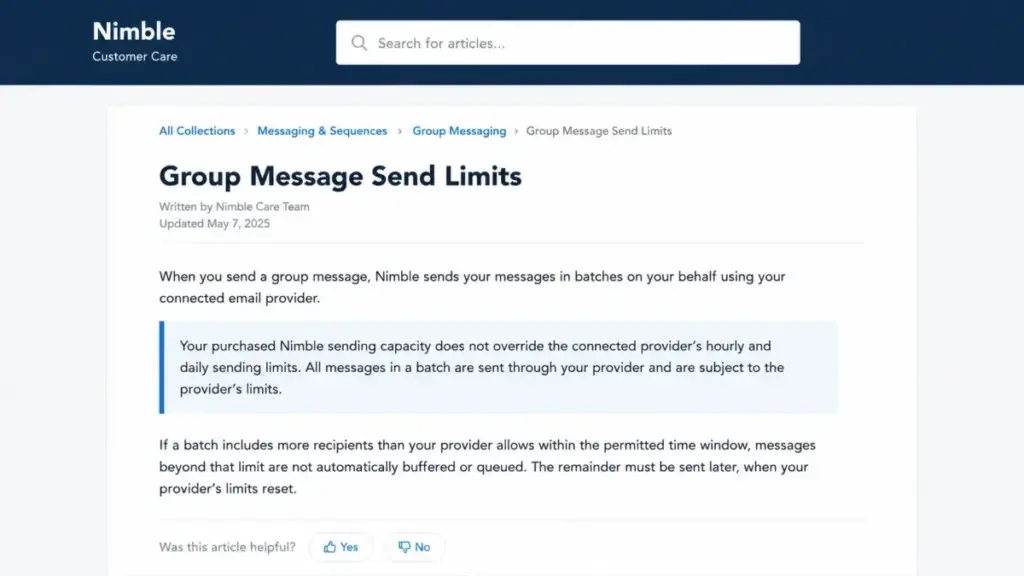
Buying more Nimble message volume does not buy more sending capacity from Gmail or Microsoft 365. Nimble’s Group Message send-limit documentation states that the connected email provider’s hourly and daily limits still apply, and those limits vary by provider and account type.
The failure mode is documented, not hypothetical. Official support material warns that messages beyond the permitted batch do not automatically continue later.
Here is what that looks like in a live campaign, described from Nimble’s own documentation rather than from any test I ran:
- A user selects a 4,000-contact segment and sends a Group Message.
- The connected provider permits only part of that batch within its current hourly or daily window.
- The remainder is not buffered for automatic later delivery, so someone has to re-segment and resend manually.
For a two-person consultancy sending 300 emails a month, this never comes up. For a team that bought the 25,000-message recurring package at $99 per month, it changes the operational plan entirely, because purchased volume and deliverable-per-day volume are different numbers.
I would not put a high-volume campaign team on Nimble for outbound sending. If bulk email throughput is the primary requirement, a dedicated email platform belongs alongside the CRM rather than inside it.
Real Nimble Cost Scenarios at 1, 5, 10, 20, and 50 Seats
Every total below uses the published $29.90 monthly and $24.90 annual per-seat rates and the published add-on prices. Add-on selections are stated per row so you can strip out anything your team will not use.
| Team size | Modeled stack | Month-to-month cost | Annual prepay cost | Annual saving |
|---|---|---|---|---|
| 1 seat | Base plan only | $29.90 per month, $358.80 over 12 months | $298.80 | $60 |
| 5 seats | Base plus Email Marketing | $164.50 per month, $1,974 over 12 months | $1,643.90 | $330.10 |
| 10 seats | Base only | $299 per month, $3,588 over 12 months | $2,988 | $600 |
| 10 seats | Base plus Email Marketing, web forms, 25 extra automations | $336 per month, $4,032 over 12 months | $3,401.90 | $630.10 |
| 20 seats | Base plus Email Marketing, web forms, 50 extra automations, 10,000 extra contacts, 10GB extra storage | $665 per month, $7,980 over 12 months | $6,749.90 | $1,230.10 |
| 50 seats | Base only | $1,495 per month, $17,940 over 12 months | $14,940 | $3,000 |
The five-seat annual figure is 5 times $298.80 plus the $149.90 annual Email Marketing fee. The 20-seat annual figure is 20 times $298.80, plus $149.90, plus twelve months of the $12 forms fee, $20 of automation blocks, $10 of contacts, and $10 of storage.
Two patterns stand out.
The annual saving grows linearly with seats and reaches $3,000 at 50 seats. That makes annual prepay the obvious choice for a stable team and an expensive mistake for a seasonal one.
The add-on load does not scale with seats. A 20-seat team absorbs $773.90 of add-ons across a much larger base, while a 5-seat team feels the same $149.90 Email Marketing line as a 9% budget increase.
That inversion is the real Nimble pricing story. Nimble gets relatively cheaper per unit of capability as the team grows, right up to the point where reporting depth and API maturity become the constraint instead of price.
Annual vs Monthly Billing: the Real Savings Math
The discount is $5 per seat per month, which is $60 per seat per year. Neither number is dramatic on its own.
| Seats | 12 months at $29.90 | Annual prepay at $298.80 | Saving | Cash due up front |
|---|---|---|---|---|
| 1 | $358.80 | $298.80 | $60 | $298.80 |
| 5 | $1,794 | $1,494 | $300 | $1,494 |
| 10 | $3,588 | $2,988 | $600 | $2,988 |
| 20 | $7,176 | $5,976 | $1,200 | $5,976 |
| 50 | $17,940 | $14,940 | $3,000 | $14,940 |
The annual column is a 16.7% reduction in run rate and a large single cash outlay. For a 20-seat team that is $5,976 in one transaction against $598 a month.
The decision rule I would use is headcount volatility, not the discount size. If you expect to hold or grow seat count for twelve months, take the annual rate.
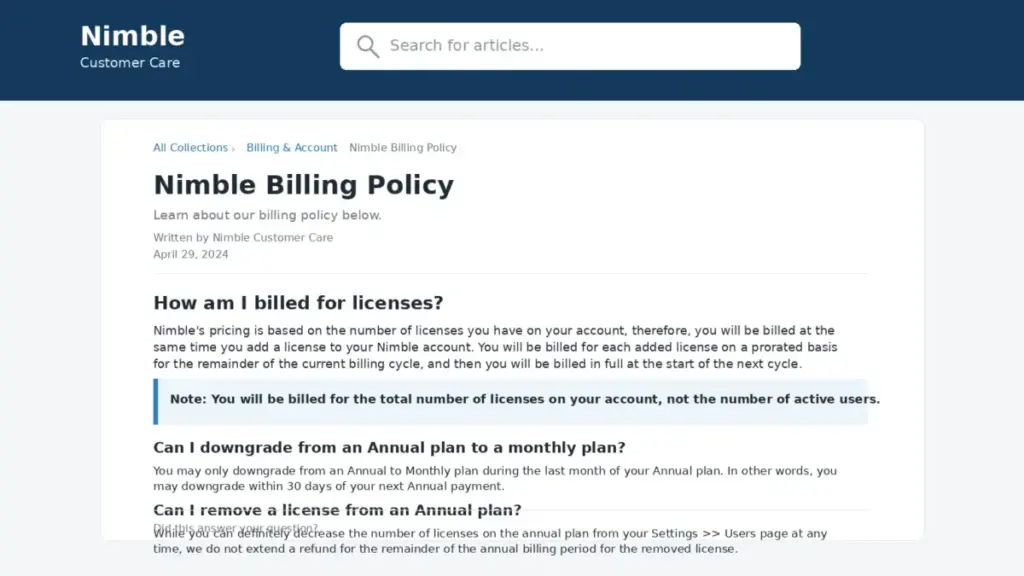
If a contract renewal, a seasonal team, or a layoff could cut seats mid-year, the $60 per seat is not worth the lock. Nimble’s billing policy states that removed licenses and cancellations receive no refund for the remaining billing period.
There is one more asymmetry. Official policy restricts an annual-to-monthly change to the final 30 days of the annual term, so a team that regrets the commitment in month three waits nine months to act on it.
Billing Rules That Quietly Change the Bill
Nimble bills on the number of licenses on the account. That is a different thing from the number of people actively logging in.
| Billing event | Official treatment | Cost consequence |
|---|---|---|
| Licenses on the account | Total licenses determine the charge | Unused assigned seats keep billing |
| Adding a license mid-term | Prorated to the remaining period | Predictable partial charge |
| Removing a license mid-term on annual billing | No refund for the unused remainder | Sunk cost until renewal |
| Changing annual to monthly | Restricted to the final 30 days of the annual plan | Nine to eleven months of lock-in |
| Cancelling | No refund for the remaining billing period | Prepaid value is not recovered |
A departing employee whose license is properly removed stops adding cost from the next cycle on a monthly plan.
On an annual plan that seat is already paid for and stays paid for. Seat hygiene therefore matters most in the month before renewal, not the month after someone leaves.
The practical control is a short recurring review, and I would treat it as an admin task with a calendar entry rather than a good intention:
- Count licenses on the account against your current headcount every quarter
- Remove licenses for departed staff immediately, even on annual billing, so the seat does not roll into the next term
- Audit capacity add-ons in the same pass, because contacts, storage, credits, automations, and forms each renew independently
- Set a reminder 45 days before an annual renewal, which leaves room inside the final-30-day window to change cadence
- Reconcile the Email Marketing and web forms company-level fees against whether anyone still uses those modules
Cancellation and Refund Policy
Third-party summaries often compress Nimble’s terms into “cancel anytime”. That is accurate for one cadence and misleading for the other.
Month-to-month subscriptions recur monthly and can be cancelled on that cycle. Annual subscriptions carry the restricted downgrade window and no refund for the remaining term, per official billing documentation.
Neither statement contradicts the other. They describe two products of the same tier with different exit costs, and the $60-per-seat discount is the price of the harder exit.
Free Trial and Onboarding
The trial is 14 days, requires no credit card, and supports up to five licenses per Nimble’s official pricing FAQ. The five-license ceiling is the detail most competing pages omit, and it changes how a larger team should evaluate.
A 20-person sales org cannot trial Nimble across the whole team. My recommendation is a deliberate five-person pilot covering one manager, two reps, one marketer, and one admin, which is editorial advice rather than a Nimble requirement.
Official pricing support material advertises onboarding and best-practice sessions on weekdays at 9:00 AM Pacific Time. A June 2026 TechRadar review reports email and phone support during restricted weekday hours with no 24/7 live chat, and no numeric response-time SLA appeared on the official public pages reviewed here.
Two trial constraints deserve planning time.
Email Marketing has no separate trial, so the module cannot be evaluated for free. The 14-day window is also short for testing contact sync direction and automation design together.
Migration and Data Portability
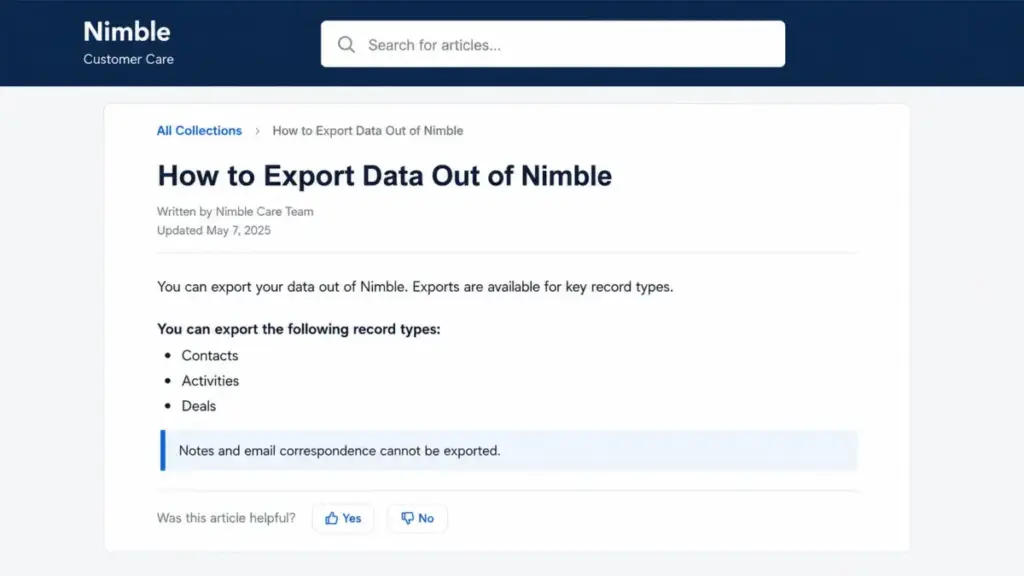
This is the section that changes the risk calculation, and almost no pricing page covers it. Nimble’s official export documentation permits CSV export of contacts, activities, and deals, while notes and email correspondence cannot be exported through that documented process.
| Data type | Documented CSV export | Switching consequence |
|---|---|---|
| Contacts | Yes | Clean transfer of the core record |
| Activities | Yes | Task and event history moves |
| Deals | Yes | Pipeline history moves |
| Notes | Not through the documented export | Written context stays behind |
| Email correspondence | Not through the documented export | Conversation history stays behind |
Notes and email threads are exactly where relationship CRMs accumulate their value. A team that runs Nimble for three years builds its institutional memory in the two fields it cannot export through the documented path.
That raises switching cost over time rather than at purchase, which is the pattern I would flag to a finance approver.
The mitigation is to decide up front whether long-term retention of notes and email history is a requirement. If it is, keep the source of record in the mailbox or a document system rather than only in Nimble.
Plan the exit alongside the entry. Our CRM migration planning guidance covers the field-mapping work that a contacts-plus-deals-only export leaves behind.
Integrations and API Readiness
Nimble’s official material references Microsoft 365, Google Workspace, Gmail, Outlook, Zapier, more than 100 integration partners, and more than 120 connected apps. Those counts include partner and automation-platform connections, so I would not read them as 120 native integrations.
One asymmetry is worth designing around. Official feature material distinguishes automatic two-way Microsoft 365 contact sync from one-way Google Contacts sync.
| Ecosystem | Contact sync direction per official feature material | Design consequence |
|---|---|---|
| Microsoft 365 | Automatic two-way | Either system can act as the working source of record |
| Google Contacts | One-way | Pick a single source of truth and enforce it |
A Google Workspace team that assumes symmetric sync will create duplicates and confuse reps about which system is authoritative. Mapping how CRM integration works at the field level prevents that before rollout.
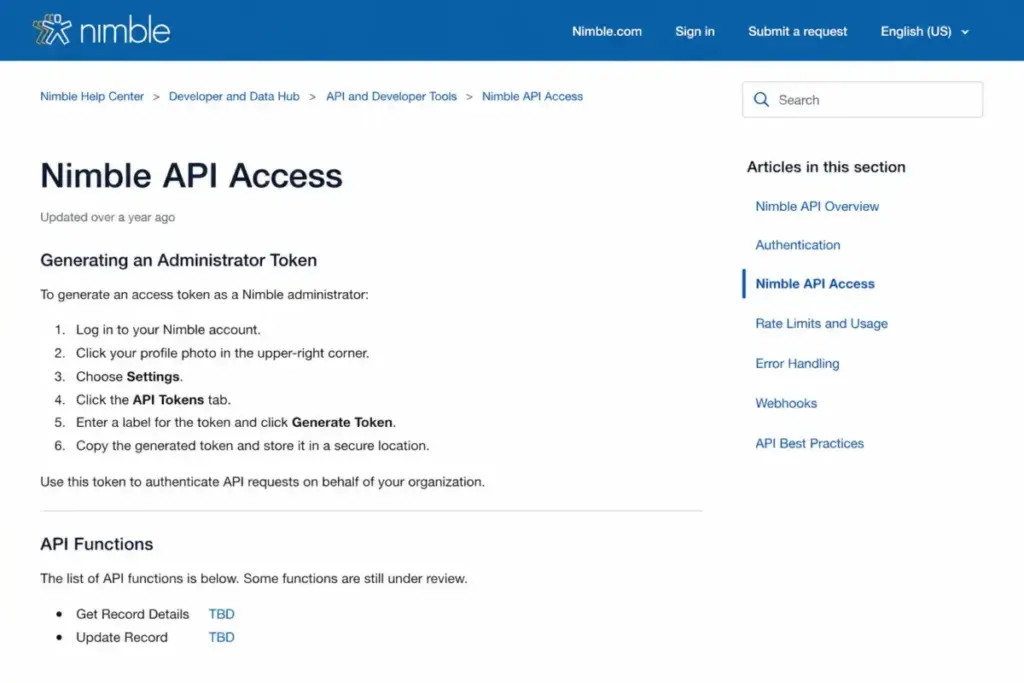
API access uses a token generated through an administrator workflow. Reviewed official documentation describes the API as evolving and marks some related-data or merge functions as TBD, and no public numeric rate limit was verified as of July 27, 2026.
That is not a claim those functions are permanently unavailable. It is a validation task: list the exact endpoints your integration needs, test them inside the 14-day trial, and confirm expected request volume with Nimble before committing to a custom build.
Security, Privacy, and Compliance
One line here overrides every pricing argument for a specific group of buyers. Nimble’s official support article on HIPAA states the product is not HIPAA compliant.
Healthcare teams handling protected health information should stop evaluating Nimble at that sentence. This is not a preference or a workaround, and no add-on changes it.
| Claim | Status as of July 27, 2026 | What a procurement team should do |
|---|---|---|
| SSL or encrypted transmission of sensitive data | Described on official privacy material | Accept as documented |
| Data processing addendum | Published by Nimble | Request the current signed version |
| Privacy framework language | Published on official pages | Review against your own obligations |
| HIPAA compliance | Official support states Nimble is not HIPAA compliant | Disqualify for protected health information |
| SOC 2 certification | No accessible official public statement was verified in this research | Request current assurance documentation directly |
| Support response-time SLA | No numeric public commitment was verified | Ask for it in writing before signing |
The SOC 2 row deserves care. Absence of a verified public statement is not proof of absence, so I would treat it as unknown and ask Nimble for current assurance documents rather than assuming either answer.
Generic security summaries blur encryption in transit, a DPA, and a formal attestation into one reassuring sentence. Procurement teams need the boundary between documented controls and audited certifications, and that is where I would push.
Who Nimble Pricing Fits Best
A single tier means the fit question is binary rather than a plan-selection exercise. Either the workload justifies $24.90 to $29.90 per seat, or a cheaper tool does the same job.
| Buyer profile | Verdict on Nimble pricing | Reasoning |
|---|---|---|
| Solo consultant doing relationship-led business development | Good value at $298.80 a year | Enrichment, inbox context, and pipelines all sit inside the base allowances |
| Five-person agency working leads from Gmail and public web research | Strongest fit, $1,494 to $1,643.90 a year | Prospector and relationship history earn the seat rate daily |
| Ten to twenty-person founder-led sales team | Reasonable at $2,988 to $6,749.90 a year | Per-seat cost is competitive; watch the automation and message ceilings |
| Team that only needs a searchable contact list | Overpaying | A lower entry price elsewhere delivers the same outcome |
| Healthcare team touching protected health information | Disqualified | Official documentation states Nimble is not HIPAA compliant |
| High-volume outbound campaign team | Wrong tool | Provider limits cap deliverable volume regardless of packages purchased |
| Engineering-led org planning a custom integration | Validate first | TBD API functions and no published rate limit make this a trial-stage decision |
| Analytics-heavy sales org needing custom enterprise reporting | Look elsewhere | Editorial and user-review patterns qualify Nimble’s reporting customization |
The middle rows are where the money is won or lost. Nimble prices as a relationship CRM, so a team using it as a static address book pays relationship-CRM rates for contact-management value.
Which Nimble Setup You Should Avoid
There is no bad plan to avoid because there is only one plan. There are two bad configurations.
Avoid annual prepay when seat count is uncertain. The $60 per seat saving does not cover the cost of one stranded license, since an annual seat removed in month four still bills through the term with no refund.
Avoid buying recurring message packages for campaign work that happens a few times a year. The $69 monthly package costs $828 across twelve months against $75 for a single one-time 10,000-message purchase.
One exception applies to the annual advice. A 50-seat team with predictable headcount saves $3,000 a year on annual billing, and at that scale the lock-in risk is usually smaller than the cash saving.
If either configuration describes your situation and the seat rate still feels high, the Nimble alternatives worth shortlisting are the ones with lower entry pricing and no module fee for basic lead capture.
Nimble CRM Pricing vs Competitors
These are entry-price anchors from each vendor’s official pricing pages, checked July 27, 2026. They are not feature-equivalent quotes, because contacts, storage, enrichment, messaging, automations, and support scope all differ.
| CRM | Entry price | 10 seats per year at entry price | Notable published difference |
|---|---|---|---|
| Nimble Business | $24.90 per seat per month, annual billing | $2,988 | One tier; capacity and modules sold separately |
| Less Annoying CRM | $15 per user per month | $1,800 | Official page states no contracts, 30-day trial, unlimited contacts and pipelines, 25GB storage per user |
| Pipedrive Lite | $14 per seat per month, annual billing | $1,680 | Multi-tier ladder with Growth, Premium, and Ultimate above it, plus separately priced add-ons |
| Capsule Starter | $18 per user per month, annual billing | $2,160 | Publishes a limited free plan below the paid tiers |
Nimble is the most expensive entry point in this set at ten seats, by $828 against Capsule Starter and $1,308 against Pipedrive Lite. That gap buys contact enrichment, the Prospector extension, and relationship history that the cheaper entry tiers handle differently or not at all.
The comparison changes shape by requirement rather than by price. If the requirement is unlimited contacts and generous storage on a simple contact system, Less Annoying CRM pricing is the better economic answer.
If the requirement is deal-stage discipline and a clear upgrade path as the sales team grows, Pipedrive pricing plans give more room to scale, since Nimble has no higher tier to grow into.
I will not call any of these cheapest overall, because the entry rows are not measuring the same product. What the table does prove is that Nimble is not competing on sticker price, and buyers should be clear about what the premium is buying.
Is Nimble CRM Worth the Price?
Nimble is worth $24.90 per seat per month when the team works its day inside email and public web research. At five to fifteen seats on the base allowances, it is a complete CRM at a fair price with no plan-selection guesswork.
It is not worth the price when the workload is a contact list, a document archive, or a high-volume email program. In those cases you pay relationship-CRM rates for something a cheaper tool does as well.
Worth it if: you work relationship-led deals from Gmail or Outlook, your database stays under 25,000 contacts, your automation design fits inside 25 rules, and your monthly send volume sits near 1,000 messages per person.
Not worth it if: you need HIPAA compliance, published API rate limits, deeply customizable reporting, a 24/7 support commitment, or complete export of notes and email history as an exit requirement.
For a document-heavy small team I would read the Capsule CRM review first, because Capsule publishes a free tier for testing the workflow before any spend. If relationship intelligence is the real requirement, Nimble earns its premium and the cheaper anchors do not replace it.
How to Avoid Overpaying for Nimble CRM
- Run the 14-day trial with all five licenses and test contact sync direction, automation count, and message volume, not just the interface.
- Count your planned automations before purchase, because crossing 25 adds $120 a year and crossing 75 adds $240.
- Choose the annual cadence only when you can commit to the seat count for twelve months, since removed annual licenses receive no remaining-term refund.
- Buy the $149.90 annual Email Marketing fee instead of twelve $15 months if you already know you need the module, which saves $30.10.
- Match message packages to send frequency: one-time packages for occasional campaigns, recurring packages only for monthly sending.
- Diary a license audit every quarter and 45 days before renewal, because billing follows total licenses rather than active users.
- Confirm the billing scope of any recurring message package in writing before buying volume for a multi-seat team.
- Decide before purchase whether notes and email history must be exportable, and keep the source of record elsewhere if the answer is yes.
Nimble Pricing FAQ
How much does Nimble CRM cost?
Nimble CRM costs $29.90 per licensed seat per month on monthly billing, or $24.90 per seat per month on annual billing, charged as $298.80 per seat per year. Both figures come from Nimble’s official pricing page, checked July 27, 2026. Capacity expansions and the Email Marketing module cost extra on top of the seat fee.
Does Nimble have a free plan?
No free plan appears on Nimble’s official pricing page. The product offers a 14-day free trial that requires no credit card and supports up to five licenses. After the trial, continued access requires a paid Business subscription on either the monthly or annual cadence.
What is included in Nimble Business?
Business includes contact records, unlimited lead and sales pipelines, unlimited tags, up to 1,000 custom fields, Gmail and Outlook connectivity, the Prospector extension, mobile apps, 25,000 contacts, 2GB of storage per user, 25 enrichment credits per user monthly, 25 workflow automations, and 1,000 shared Group Message or Sequence emails per license monthly.
Is the $24.90 Nimble price the total bill?
Not for most teams. The $24.90 annual rate covers the seat only, and official pages publish separate charges for extra contacts, storage, enrichment credits, automations, web forms, Email Marketing, and message volume. A modeled 20-seat stack reaches $6,749.90 a year against $5,976 for seats alone.
Does Nimble charge for extra contacts and storage?
Yes. Each additional 10,000 contacts beyond the included 25,000 costs $10 per month, and an additional 10GB of storage beyond the 2GB-per-user allowance also costs $10 per month. Both prices come from Nimble’s official pricing page, and both renew independently of the seat subscription.
How much is the Nimble email marketing add-on?
Nimble Email Marketing is $15 per company per month, or $149.90 per year on an annually billed account. Official documentation states the module has no separate free trial, so it cannot be tested for free during the 14-day CRM trial. The annual price is $30.10 less than twelve monthly payments.
What are Nimble's email sending limits?
The Business plan includes 1,000 emails per license per month, shared between Group Messages and Sequences through Nimble’s ESP. Larger recurring packages run from $15 to $99 per month. Official documentation states the connected provider’s hourly and daily limits still apply, and unsent remainders are not automatically buffered.
Can I cancel Nimble at any time?
Month-to-month subscriptions recur monthly and can be cancelled on that cycle. Annual subscriptions are different: official billing policy restricts annual-to-monthly changes to the final 30 days of the term, and cancellations or removed licenses receive no refund for the remaining billing period.
Can I export my Nimble notes and email history?
No, not through the documented export process. Official export documentation covers CSV export of contacts, activities, and deals, and states that notes and email correspondence cannot be exported. Teams that need long-term retention of written context should keep the source of record outside Nimble.
Is Nimble cheaper than Pipedrive or Capsule?
No, not at the entry level. At ten seats on annual billing, Nimble Business costs $2,988 a year against $1,680 for Pipedrive Lite and $2,160 for Capsule Starter, based on each vendor’s official pricing pages checked July 27, 2026. Those tiers are not feature-equivalent, so compare included capacity too.
How This Nimble Pricing Guide Was Researched
Every price, allowance, billing rule, and limitation in this guide comes from Nimble’s official pricing page, official product pages, and help-center documentation, checked on July 27, 2026. Competitor entry prices come from each vendor’s own official US pricing page on the same date.
No account, trial, paid subscription, or hands-on workflow test was performed for this guide. Where a figure is arithmetic rather than a published price, the calculation and its assumptions are stated in the surrounding text.
Third-party sources including G2, Capterra, and a TechRadar review updated June 25, 2026 were used to identify recurring sentiment and coverage gaps, not as the authority for any price. Reviewer patterns qualify Nimble’s reporting customization, native integration depth, and support availability, and individual experiences vary.
Alex Morrison covers CRM pricing and sales operations for saaszap.com. Nimble pricing rewards teams that already know which CRM functions they will use daily, and it penalises teams that buy relationship intelligence and then use a contact list.
Prices and allowances change. Confirm the current figures and any applicable tax on Nimble’s official pricing page before purchase.