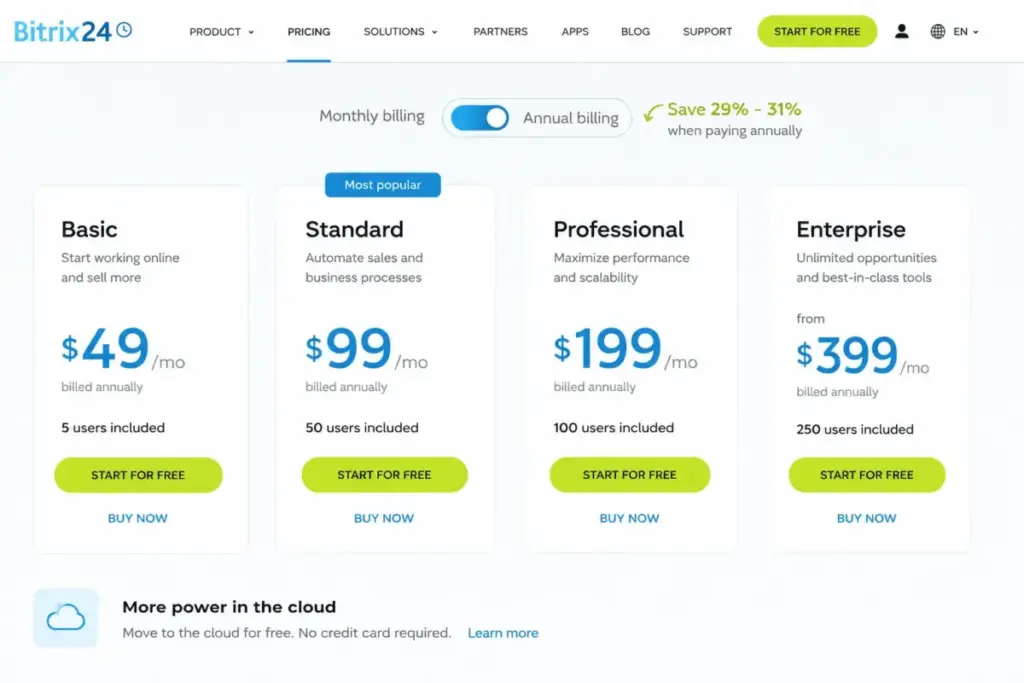
Bitrix24 pricing looks like the cheapest way to put 50 people on a CRM. Basic starts at $49 per month for the entire organization when billed annually, not $49 per seat.
The number that changes the decision sits at user 101. Professional caps at 100 users, so the 101st active person moves you to Enterprise 250 and takes the annual bill from $2,388 to $4,788.
Bitrix24 occupies an unusual position in the CRM market because it charges per organization instead of per seat. That single design choice is why it appears in our best CRM software rankings as a value pick for large teams and a poor fit for small ones.
The tradeoff is scope. Bitrix24 bundles far more than what CRM software does on its own, folding projects, chat, telephony, websites and HR into the same subscription.
Monthly prices also rose on April 20, 2026. Several pages still ranking for this keyword quote figures you can no longer buy.
Everything below uses the live US pricing page checked on July 28, 2026, plus current Bitrix24 help-center and REST API documentation. No account was purchased and no product testing was performed.
Quick Pricing Verdict
| Question | Answer |
|---|---|
| Starting price | $49/month for up to 5 users on Basic, billed annually as $588/year |
| Month-to-month starting price | $69/month on Basic, or $828/year |
| Free plan | Yes. The live US pricing page shows Free for 1-2 users with 5 GB storage |
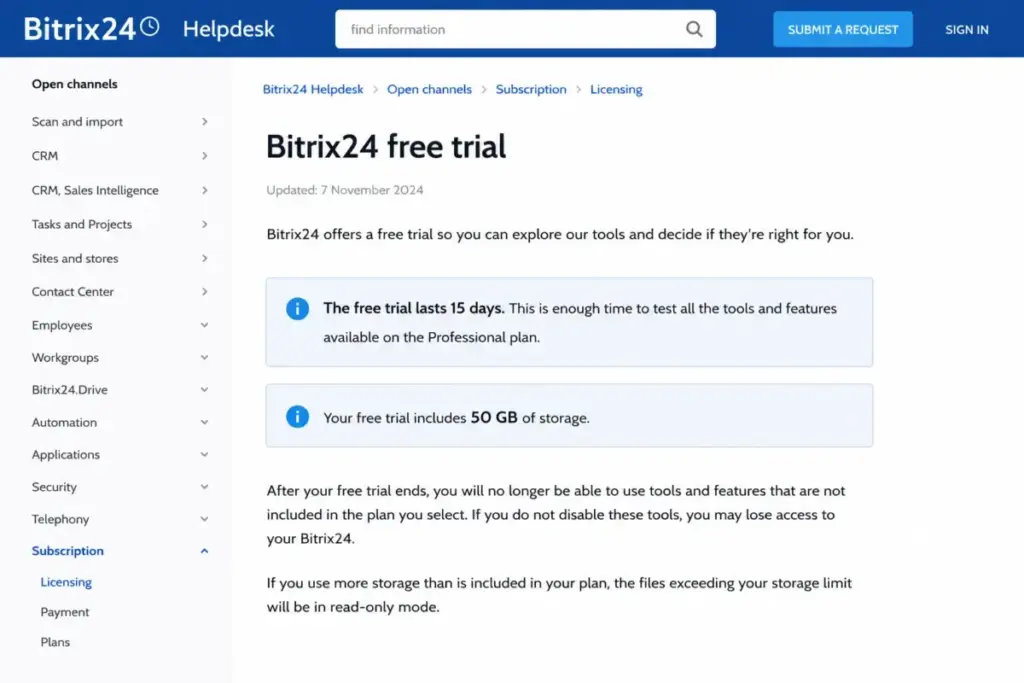
| Free trial | 15 days of Professional features with 50 GB trial storage |
| Best plan for 20-plus teams | Standard at $99/month billed annually, covering up to 50 users |
| Plan to avoid | Enterprise 250 bought only to absorb users 101 to 150 |
| Biggest hidden cost | Telephony: $4/month per US local number, $6/month per toll-free number, plus call charges |
| Best alternative if too expensive | Pipedrive Lite at $14 per seat/month for teams under 10 that only need a pipeline |
| Pricing verified | July 28, 2026, against the official Bitrix24 pricing page |
Two lines in that table carry most of the buying decision. The flat organization price is genuinely cheap at high headcount, and the plan caps create sharp jumps that per-seat CRMs never produce.
The Advertised Price vs the Number You Pay
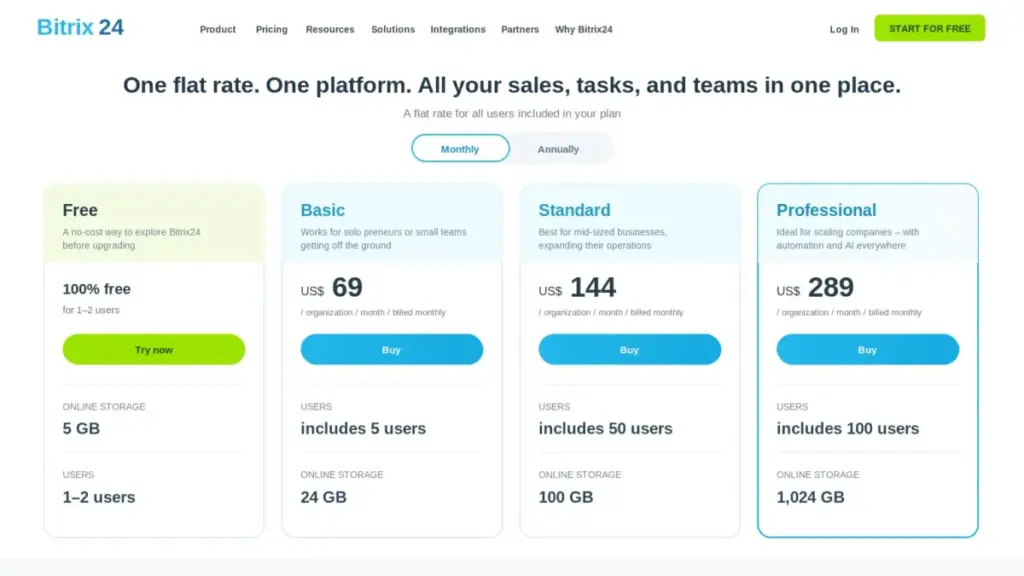
Bitrix24 pricing is honest on the plan cards and misleading in the way buyers read them. The gap sits between the annual-equivalent rate shown on the toggle and the amount that leaves your account.
Monthly subscription prices in USD increased by up to 16% on April 20, 2026, according to the official pricing-change notice. Annual prices were not affected during an active annual term.
| What the page suggests | The number to budget | Why the gap exists |
|---|---|---|
| Free plan for the team | $0 for 1-2 users, then $588/year | Live pricing displays Free for 1-2 users |
| “From $49/month” | $588 in one annual payment | $49 is the annual-equivalent rate, not a monthly charge |
| $49/month if you pay monthly | $828/year | Month-to-month Basic is $69 after April 20, 2026 |
| Professional covers 100 users | $4,788/year at 101 users | Enterprise 250 is the next tier; no 101-user package exists |
| Telephony available on paid plans | $4 to $6 per number monthly, plus usage | Numbers and call minutes are billed separately |
| Hundreds of Market integrations | Some apps carry their own subscription | App pricing depends on the third-party provider |
The pattern is consistent. Bitrix24 publishes accurate prices and leaves the buyer to discover the thresholds that make those prices change.
I would treat the annual figure as the real price and the monthly figure as a convenience fee. On Standard that convenience costs $540 a year.
Bitrix24 Pricing Plans Compared in 2026
Every Bitrix24 Cloud plan is a flat organization subscription with a fixed included user limit. Adding people does not change the invoice until you cross a cap.
| Plan | Monthly billing | Annual billing | Billing basis | Users included | Storage | Best for |
|---|---|---|---|---|---|---|
| Free | $0 | $0 | Per organization | 1-2 | 5 GB | Solo founders testing the CRM |
| Basic | $69/month | $49/month ($588/year) | Per organization | 5 | 24 GB | Five-person teams needing pipelines and forms |
| Standard | $144/month | $99/month ($1,188/year) | Per organization | 50 | 100 GB | 20-50 person companies running sales plus projects |
| Professional | $289/month | $199/month ($2,388/year) | Per organization | 100 | 1,024 GB | 51-100 person operations needing workflow automation |
| Enterprise 250 | $579/month | $399/month ($4,788/year) | Per organization | 250 | 3 TB | 101-250 user organizations needing branch controls |
Prices verified on the official Bitrix24 pricing page on July 28, 2026. All figures are USD for the US market and exclude applicable tax.
The storage jump from Standard to Professional is the largest single upgrade in the range. Going from 100 GB to 1,024 GB matters for teams storing call recordings, signed documents or design files inside the CRM.
Basic is the only plan where the per-user economics look ordinary. At five users on annual billing the effective cost is $9.80 per person each month, which is roughly what a per-seat CRM charges.
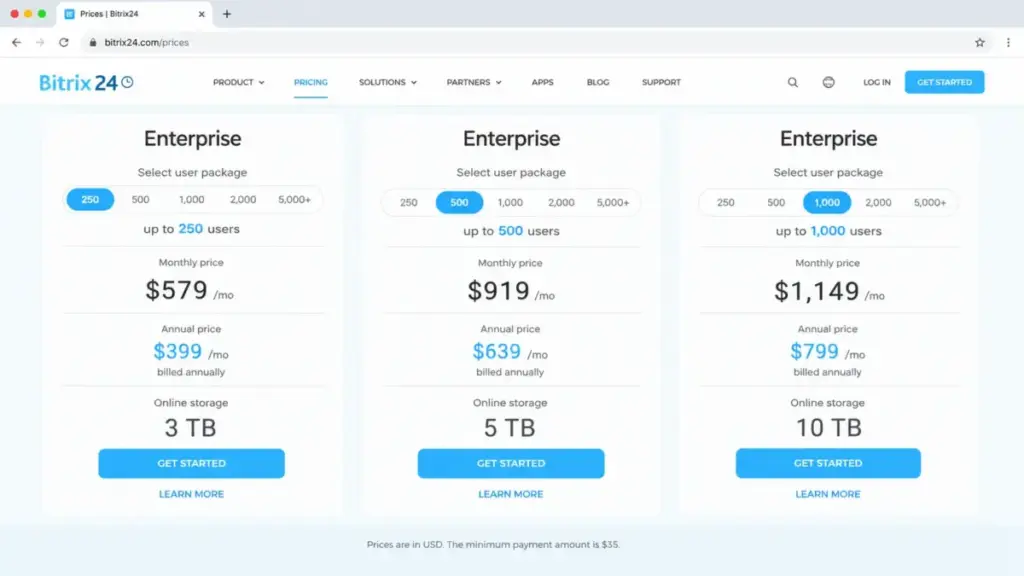
Bitrix24 Enterprise Pricing Ladder: 250 to 10,000 Users
Enterprise is usually reduced to a single “starts at $399” line on competing pages. The official selector publishes a full ladder.
| Enterprise package | Monthly billing | Annual billing | Annual total | Effective cost per user/month at full capacity |
|---|---|---|---|---|
| 250 users | $579 | $399 | $4,788 | $1.60 |
| 500 users | $919 | $639 | $7,668 | $1.28 |
| 1,000 users | $1,149 | $799 | $9,588 | $0.80 |
| 2,000 users | $2,299 | $1,599 | $19,188 | $0.80 |
| 3,000 users | $3,449 | $2,399 | $28,788 | $0.80 |
| 4,000 users | $4,599 | $3,199 | $38,388 | $0.80 |
| 5,000 users | $5,749 | $3,999 | $47,988 | $0.80 |
| 6,000 users | $6,899 | $4,799 | $57,588 | $0.80 |
| 7,000 users | $8,049 | $5,599 | $67,188 | $0.80 |
| 8,000 users | $9,199 | $6,399 | $76,788 | $0.80 |
| 9,000 users | $10,349 | $7,199 | $86,388 | $0.80 |
| 10,000 users | $11,499 | $7,999 | $95,988 | $0.80 |
These price pairs follow the ascending order of the official Enterprise selector checked on July 28, 2026. Confirm the displayed package inside the billing screen before purchase, because the selector maps packages dynamically.
Enterprise scalability documentation associates 250 users with 3 TB, 500 users with 5 TB and 1,000-user packages with at least 10 TB. Deployments above 10,000 users require a sales conversation.
Per-user economics flatten at 1,000 users and stop improving. Buying a larger package purely for a volume discount stops paying off above that point.
The Seven Hidden Costs Nobody Puts in the Quote
The subscription is the smallest part of the risk for phone-heavy or process-heavy teams. Here is the ranked list, ordered by how often it changes the annual budget.
1. Forced Tier Upgrades
Bitrix24 does not sell individual cloud tools, and the official plans and payment FAQ confirms there is no plan constructor. You cannot buy a lower-user version of Professional or purchase workflow automation on its own.
One feature requirement therefore costs a full tier. Needing RPA or task automation on a 12-person team means paying $2,388 a year for a plan sized for 100 people.
That rule is the mechanism behind almost every surprise Bitrix24 bill I have seen described publicly.
2. The 101st User
Professional stops at 100 users. The next public option is Enterprise 250 at $399 per month billed annually.
Hiring one person moves the annual bill from $2,388 to $4,788, a $2,400 increase and a 100.5% jump. Nothing about the feature set changes for the first 100 people.
3. Extranet Users Consume Paid Capacity
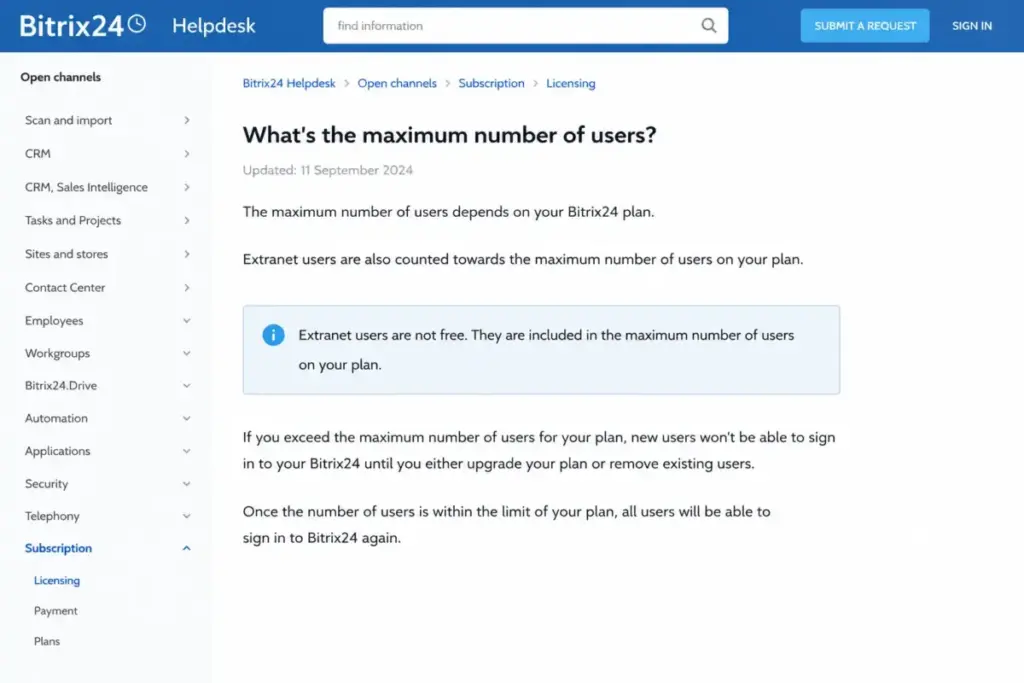
Official Bitrix24 user-count documentation states that extranet users count toward Cloud plan limits like regular users. Contractors, partner reps and client-side collaborators all draw down the same allowance.
The counter is also recalculated periodically rather than in real time. A team that looks compliant today can breach the cap after the next refresh and lose sign-in access.
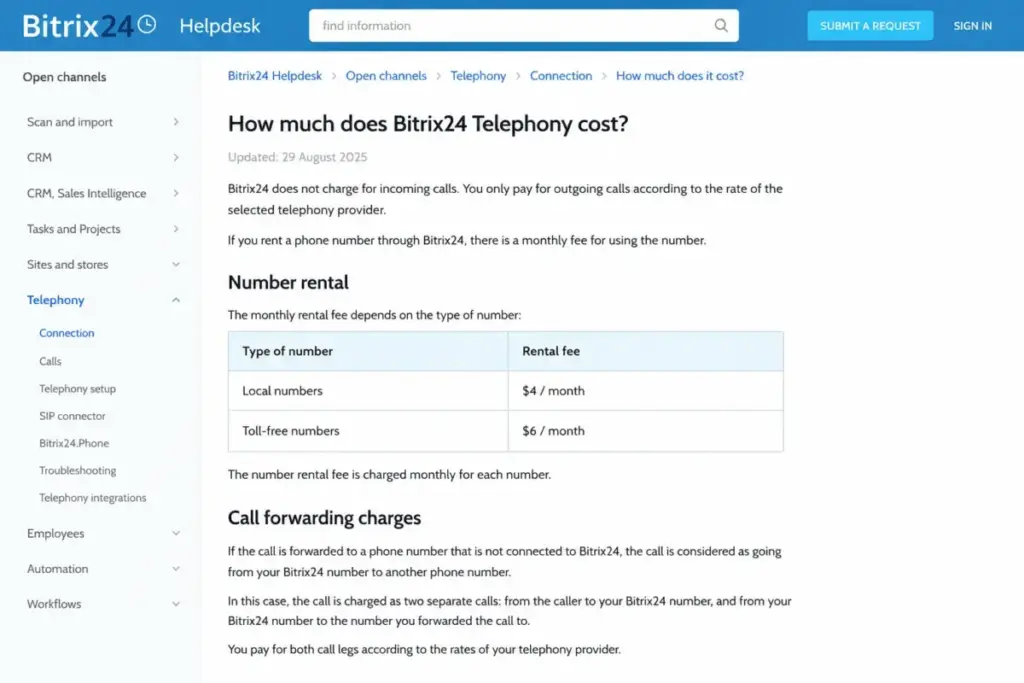
4. Telephony Numbers and Call Legs
US local numbers rent at $4 per month and toll-free numbers at $6 per month according to official telephony documentation. Call usage is billed on top of rental.
Forwarding an incoming call to an external number can be charged as two legs, incoming and outgoing. A 10-rep sales floor forwarding to mobiles should model that duplication before signing an annual term.
5. The SIP Connector
Connecting an external PBX includes a limited free allowance of 60 minutes. After that the SIP connector becomes a separately licensed item.
Bitrix24 did not publish a stable USD amount for that license in the documentation checked on July 28, 2026. Ask for the figure in writing before assuming your existing phone system arrives free.
6. Marketplace Applications
Bitrix24 Market lists hundreds of apps, and official documentation confirms that availability, payment and support can depend on the third-party provider. An integration shown as available is not automatically included.
Price each required connector individually. A single $30-per-month app adds $360 a year to a $588 Basic subscription.
7. Partner Implementation and Custom Support
Official support covers product troubleshooting. It excludes custom development, implementation, workflow design and SIP or PBX integration.
Those services run through Bitrix24 partners under separate contracts with negotiated fees. Budget for them if nobody internally owns CRM configuration.
| Hidden cost | Trigger | Published amount |
|---|---|---|
| Forced tier upgrade | One gated feature or crossing 5, 50 or 100 users | Full difference between tiers |
| Crossing 100 users | The 101st active account | +$2,400/year at annual billing |
| Extranet seats | Contractors or client users added to the portal | Counted against the plan cap |
| US local number | Renting a number for telephony | $4/month plus usage |
| US toll-free number | Renting a toll-free number | $6/month plus incoming usage |
| Call forwarding | Routing an inbound call to an external line | Variable; may bill two legs |
| SIP connector | External PBX use beyond 60 free minutes | Separate license; amount not published |
| Market apps | Installing a paid third-party app | Set by the app provider |
| Partner services | Migration, workflow design, training, PBX setup | Quote and contract dependent |
| Taxes and transaction charges | Jurisdiction and service dependent | Not standardized in public sources |
Four of those ten rows have no published price. That is the honest state of the evidence, and it is the reason I treat Bitrix24 as a low-sticker, medium-variance purchase rather than a fixed cost.
What Each Bitrix24 Plan Includes
Plan cards list features. Bitrix24 pricing decisions turn on what is missing and when that absence forces an upgrade.
Free: Useful for Evaluation, Unsafe as an Archive
Free covers core CRM, tasks, chat and video, Drive, sites and store, and Sign with 5 GB of storage. The live pricing page shows it sized for 1-2 users.
Missing: email marketing, sales automation, workflow automation, analytics, and every Professional-tier tool.
Avoid if: you plan to park historical CRM data in a dormant account. Official help states inactive Free accounts can be deactivated after roughly 40 days and deleted shortly afterward, with a separate current help summary using a 50-day inactivity rule.
Verdict: use Free to check whether the interface fits your team, not to run a business on.
Basic: Five Seats and a Real Pipeline
Basic at $49 per month billed annually adds five sales pipelines, email integration, telephony access, recurring deals, web forms and the website builder. Storage moves to 24 GB.
Missing: sales automation, unlimited leads, invoicing and payments, and every Professional automation tool.
Avoid if: you have six people. There is no six-user variant, so the next stop is Standard at more than double the price.
Verdict: the only Bitrix24 plan where per-seat math is competitive, and only at exactly five users.
Standard: The Default Starting Point for 20-Plus Teams
Standard at $99 per month billed annually raises the cap to 50 users and 100 GB. It adds sales automation, unlimited leads, invoices and estimates, payments, WhatsApp marketing, ecommerce and unlimited projects and boards.
Missing: workflow automation, RPA, AI sales tools, call tracking, email marketing, analytics, e-sign, booking, and HR and time tracking.
Avoid if: your requirement list includes business-process automation rather than deal-stage automation. Sales automation and workflow automation are different gates.
Verdict: at 20 or more people this is the strongest value in the range at $1,188 a year.
Professional: Automation, Analytics and 1 TB
Professional at $199 per month billed annually covers 100 users and 1,024 GB. It adds AI sales tools, call tracking, email marketing, workflow and task automation, RPA, analytics, e-signature, booking, HR and time tracking.
Missing: branch administration, the API rate boost, enterprise login and security controls, extended backups, the 99.95% SLA and priority support.
Avoid if: you are buying it at 12 users purely for one automation feature. Compare that $2,388 against a per-seat CRM with automation in a mid tier.
Verdict: the correct plan for 51-100 person operations that already have a system owner.
Enterprise: Scale Controls, Not More Features for Small Teams
Enterprise 250 at $399 per month billed annually adds branch management, the API boost, enterprise security and login controls, load balancing, longer backups, a 99.95% SLA and priority support.
Missing: nothing on the Cloud feature list, but branch architecture can raise questions about whether separate branch accounts carry their own plans and data boundaries.
Avoid if: your headcount is 101-150 and no Enterprise-only control is required. You are buying 250 seats to use 110.
Verdict: strong economics above 250 users, poor economics immediately after the Professional cap.
Feature Gates: Which Plan Opens Which Capability
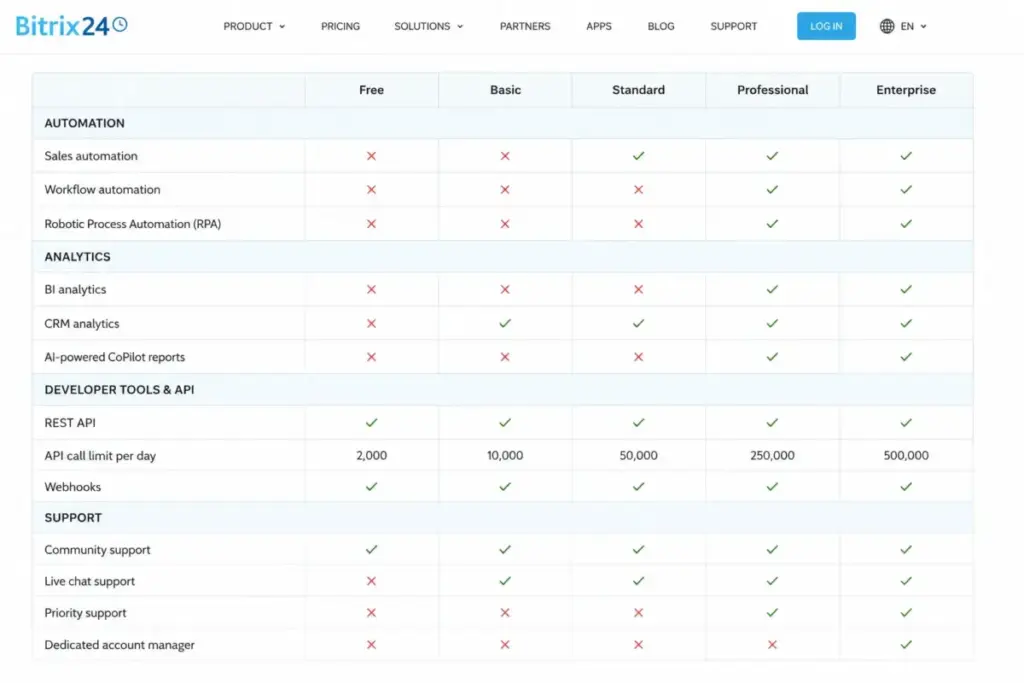
Generic “automation included” claims send buyers to the wrong tier. Bitrix24 separates sales automation, workflow automation, task automation and RPA into different gates.
| Capability | Free | Basic | Standard | Professional | Enterprise |
|---|---|---|---|---|---|
| CRM records and deals | Yes | Yes | Yes | Yes | Yes |
| Multiple sales pipelines | No | 5 pipelines | Yes | Yes | Yes |
| Email integration | No | Yes | Yes | Yes | Yes |
| Telephony access | No | Yes | Yes | Yes | Yes |
| Web forms and website builder | Limited | Yes | Yes | Yes | Yes |
| Sales automation | No | No | Yes | Yes | Yes |
| Unlimited leads | No | No | Yes | Yes | Yes |
| Invoicing, payments, ecommerce | No | No | Yes | Yes | Yes |
| Workflow automation and RPA | No | No | No | Yes | Yes |
| Task and project automation | No | No | No | Yes | Yes |
| AI sales tools and call tracking | No | No | No | Yes | Yes |
| Email marketing | No | No | No | Yes | Yes |
| CRM analytics and reporting | No | No | No | Yes | Yes |
| E-signature, booking, HR, time tracking | No | No | No | Yes | Yes |
| Branch administration | No | No | No | No | Yes |
| API rate boost | No | No | No | No | Yes |
| Enterprise login and security controls | No | No | No | No | Yes |
| 99.95% SLA and priority support | No | No | No | No | Yes |
| Included users | 1-2 | 5 | 50 | 100 | 250+ |
| Storage | 5 GB | 24 GB | 100 GB | 1,024 GB | 3 TB+ |
Gates mapped from the official pricing cards and the Cloud plan comparison page checked July 28, 2026. Where a numerical limit was not unambiguous in the dynamic comparison table, it is left out rather than estimated.
Three gates drive most upgrade decisions. Sales automation forces Standard, workflow automation and analytics force Professional, and API throughput or branch controls force Enterprise.
Run your requirement list against those three lines before looking at price. That is the fastest way to avoid buying a tier you will outgrow in a quarter, and it is also the honest use case for sales automation explained as a category rather than a feature checkbox.
API and Automation Limits by Plan
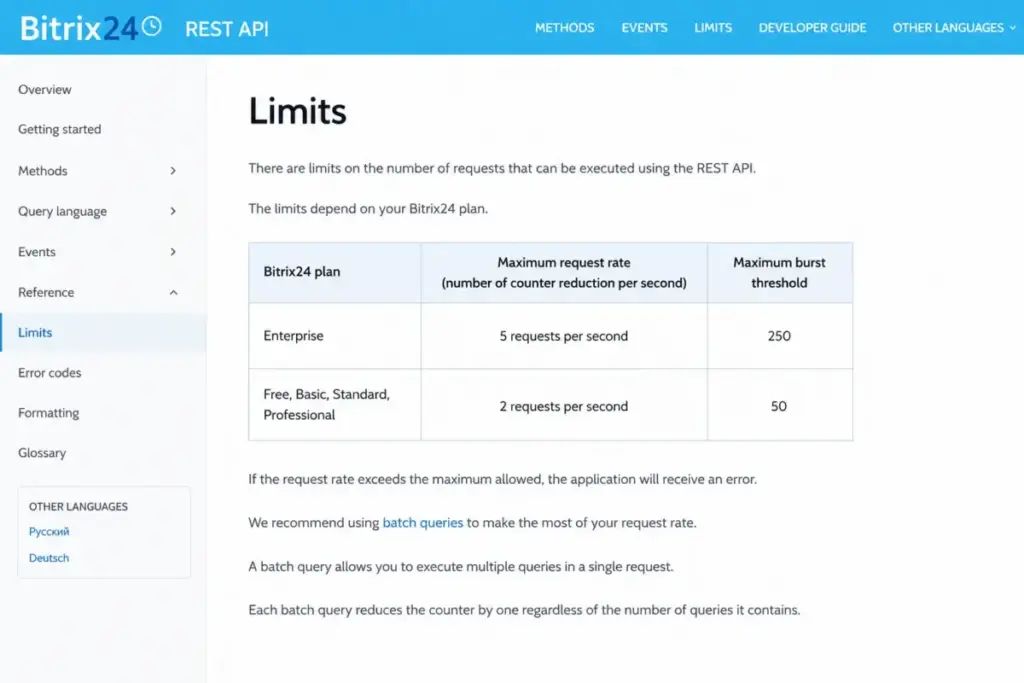
Integration volume is the one Bitrix24 gate that competing pricing pages reduce to a checkmark. The official documentation publishes a rate difference large enough to decide a plan.
| Limit | Enterprise | All other Cloud plans |
|---|---|---|
| Request counter reduction | 5 per second | 2 per second |
| Burst threshold | 250 | 50 |
| Batch method calls | Up to 50 per batch | Up to 50 per batch |
| Sustained mass data exchange | Not the intended design | Not the intended design |
Figures from the Bitrix24 REST API limits documentation checked July 28, 2026. Resource-intensive methods can also be temporarily blocked when accumulated execution time crosses the documented rolling-window limit.
A 2.5x rate difference and a 5x burst difference change what a nightly sync can move. Teams planning a data warehouse feed or a high-volume enrichment job should price Enterprise into the architecture decision, not the headcount decision.
That is a rare case where I would recommend Enterprise below 250 users. Everywhere else the API boost is not worth $2,400 a year on its own.
When the Bitrix24 Free Plan Stops Working
Free is where the stale-content problem is worst. Older Bitrix24 marketing material and several 2026-labeled guides still describe unlimited users on the free plan.
The live US pricing page checked on July 28, 2026 shows Free sized for 1-2 users. Treat the live pricing page as the purchasing source of truth and the older unlimited-user language as outdated.
Free breaks in four predictable ways.
Storage stops at 5 GB, which a sales team fills with attachments inside a quarter. Sales automation is absent, so every follow-up is manual.
Any third person on the portal moves you into Basic. Adding a contractor through the extranet counts the same way.
Dormancy is the risk nobody prices. The inactive-account help article describes deactivation after roughly 40 days without sign-in and deletion shortly after, and a separate current summary uses a 50-day formulation.
Do not use Bitrix24 Free as unattended archive storage for closed deals or historical contacts. Export instead.
Real Cost Scenarios: 5, 10, 20, 50 and 101 Users
Flat pricing is described as simple. It is simple to invoice and complicated to evaluate, because the value depends entirely on how much of the included allowance you use.
| Team size | Recommended plan | Annual billing | Annual total | Month-to-month annual spend | Effective cost per active user/month |
|---|---|---|---|---|---|
| 2 users | Free | $0 | $0 | $0 | $0 |
| 5 users | Basic | $49/month | $588 | $828 | $9.80 |
| 10 users | Standard | $99/month | $1,188 | $1,728 | $9.90 |
| 20 users | Standard | $99/month | $1,188 | $1,728 | $4.95 |
| 50 users | Standard | $99/month | $1,188 | $1,728 | $1.98 |
| 51 users | Professional | $199/month | $2,388 | $3,468 | $3.90 |
| 100 users | Professional | $199/month | $2,388 | $3,468 | $1.99 |
| 101 users | Enterprise 250 | $399/month | $4,788 | $6,948 | $3.95 |
| 250 users | Enterprise 250 | $399/month | $4,788 | $6,948 | $1.60 |
All totals assume annual billing and exclude telephony, Market apps, partner services and tax. Effective per-user figures are editorial arithmetic on published flat prices, not vendor per-seat pricing.
The sawtooth is the story. Cost per user falls steadily inside a tier, then jumps the moment you cross a cap, and the jump lands hardest at 51 users and 101 users.
A 50-person company pays $1.98 per person per month. A 51-person company pays $3.90, which is a 97% increase in unit cost for one hire.
The 101-User Cliff in Dollars
Professional at 100 users costs $2,388 a year. Enterprise 250 at 101 users costs $4,788 a year.
That is $2,400 more per year, a 100.5% increase, for one additional login. Extranet collaborators count toward that 100-user cap alongside employees.
Build a headcount worksheet before you buy. Count employees, administrators, service accounts and every external collaborator who will need portal access, then leave room for hiring inside the annual term.
I would rather commit to Enterprise 250 at 95 users than renew Professional and cross the cap in month three. The mid-term upgrade costs the same money and adds a migration conversation.
Monthly vs Annual Billing: The Break-Even Math
The advertised saving is real. The useful question is how many months you must stay before the annual commitment pays for itself.
| Plan | Month-to-month for 12 months | Annual payment | Savings | Savings % | Break-even |
|---|---|---|---|---|---|
| Basic | $828 | $588 | $240 | 29.0% | 8.5 months |
| Standard | $1,728 | $1,188 | $540 | 31.3% | 8.3 months |
| Professional | $3,468 | $2,388 | $1,080 | 31.1% | 8.3 months |
| Enterprise 250 | $6,948 | $4,788 | $2,160 | 31.1% | 8.3 months |
| Enterprise 500 | $11,028 | $7,668 | $3,360 | 30.5% | 8.3 months |
| Enterprise 1,000 | $13,788 | $9,588 | $4,200 | 30.5% | 8.3 months |
Arithmetic performed on the published monthly and annual prices verified July 28, 2026. The April 2026 pricing-change notice confirms monthly prices rose while active annual terms were unaffected.
Every plan breaks even between month eight and month nine. If you are confident Bitrix24 survives a nine-month evaluation, annual billing wins by roughly 30%.
If you are not confident, pay monthly through the first quarter and convert after the first automation build ships. The extra cost of three monthly payments on Standard is $135 against the annual rate.
Automatic renewal can apply, and the official plans and payment FAQ notes that a paid account can revert to Free after expiration with incompatible features disabled. Check the renewal setting the same week you buy.
Which Bitrix24 Plan Should You Choose?
Bitrix24 pricing rewards buyers who choose by required feature and maximum active-user count rather than by company-size label.
| Buyer profile | Plan I would pick | Annual cost | Reason |
|---|---|---|---|
| Solo founder validating a pipeline | Free | $0 | 5 GB and core CRM cover a single-operator sales motion |
| Five-person outbound sales team | Basic, or a per-seat CRM | $588 | Basic works only at exactly five users with no automation need |
| 20-person agency running projects plus CRM | Standard | $1,188 | Unlimited projects, sales automation and invoicing in one bill |
| 50-person multi-department company | Standard | $1,188 | $1.98 per person monthly is the best value point in the range |
| 51-100 person operation needing workflow automation | Professional | $2,388 | Workflow automation, RPA, analytics and 1 TB storage |
| 101-250 user organization with branches | Enterprise 250 | $4,788 | Branch administration, enterprise controls and the API boost |
| Integration-heavy team of any size | Enterprise 250 | $4,788 | 5 requests per second and burst threshold 250 |
Two profiles deserve a warning rather than a plan. A five-person team with no system administrator will spend more on configuration time than it saves on licence fees.
A 101-150 user organization is in the worst position on this pricing model. You pay for 250 seats, use fewer than 150, and gain only Enterprise controls you may not need.
For that group I would model an extra year on Professional with a hard headcount freeze, or move the evaluation to a per-seat CRM and compare against Bitrix24 alternatives with mid-tier automation.
Which Bitrix24 Plan Should You Avoid?
Enterprise 250 bought purely to absorb users 101 to 150 is the plan I would avoid. You are paying $4,788 a year for capacity you cannot fill and controls you did not ask for.
The exception is real. If branch administration, enterprise login controls, the 99.95% SLA or the API rate boost is on your requirement list, Enterprise 250 stops being an overpay and becomes the only option.
Basic is the second avoid case, and for the opposite reason. It is priced for exactly five people, so a team at six users pays $1,188 instead of $588 with no feature gain until they reach 50 people.
The tell is simple. If your headcount sits just above a cap rather than just below one, Bitrix24 pricing works against you.
Free Trial and Downgrade: The Exit Checklist
The trial runs 15 days with Professional features and 50 GB of storage. Official trial documentation explains what happens when it ends, and this is where evaluations go wrong.
If Professional-only tools are still enabled at expiry, the configuration becomes incompatible with the destination plan. Documentation states access can be suspended until the account is made compatible again.
Excess storage above the destination plan limit can become view-only until you reduce it or buy a suitable plan. Nothing is deleted at that moment, but nothing is editable either.
Run this checklist in the final 48 hours of the trial.
- Decide the destination plan and confirm its user cap against your current headcount, including extranet users.
- Disable Professional-only tools that the destination plan does not support, starting with workflow automation, RPA and analytics.
- Audit storage and export or delete files above the destination limit.
- Re-check connected mailboxes, integrations and permission groups after downgrading, because independent reviews report mailbox disconnection as a downgrade side effect worth verifying in the in-product compatibility checker.
- Confirm the renewal setting matches your intent before the trial closes.
Skipping step two is the failure that locks users out. It costs nothing to check and it is the highest-consequence line in this guide.
Support, Implementation and Security: What the Price Does Not Cover
AI support is available across plans, and paid plans can transfer a conversation to a human specialist. That is the full scope of what the subscription buys.
Official support excludes custom development, implementation, workflow design and SIP or PBX integration. Those sit with Bitrix24 partners under separate agreements, and partner support can replace default Bitrix24 support while it is active.
The practical consequence is a services line item. A 50-person company migrating from spreadsheets and a legacy phone system should budget partner time, not assume onboarding is included.
Security wording deserves the same precision. Official material describes AWS-hosted data centers, encryption, access controls, IP restrictions and enterprise login controls, framed as measures that help customers meet their requirements.
That is not the same as blanket certification of every Bitrix24 deployment or customer workflow. Regulated buyers should validate their specific configuration and contract rather than quoting a review page that compresses AWS standards into a compliance badge.
Implementation risk is the cost nobody invoices. Data import, custom fields, pipeline cleanup, permission design and telephony routing all consume internal hours, and reviewer patterns on Capterra, G2, TrustRadius and TechRadar consistently describe the platform as broad but heavy to configure.
Bitrix24 Pricing vs Pipedrive, Zoho CRM and monday CRM
Flat organization pricing behaves nothing like per-seat pricing. The comparison below uses entry-plan prices as anchors, not as a claim of feature equivalence.
| Product | Entry price | Practical tier used here | 10-user annual cost | 50-user annual cost | Best for |
|---|---|---|---|---|---|
| Bitrix24 | $49/month flat (5 users) | Standard, $99/month flat | $1,188 | $1,188 | Cross-functional teams above 20 people |
| Pipedrive | $14 per seat/month annually | Lite | $1,680 | $8,400 | Small outbound sales teams wanting a clean pipeline |
| Zoho CRM | $14 per user/month annually | Standard | $1,680 | $8,400 | Teams already inside the Zoho ecosystem |
| monday CRM | $12 per seat/month annually | Basic | $1,440 | $7,200 | Teams that want CRM and work management in one board model |
Competitor prices verified July 28, 2026. Pipedrive Lite is billed as $168 per seat annually, Zoho CRM Free supports three users, and monday CRM paid plans generally start from three seats.
Zoho’s USD figures required a secondary cross-check because the official page rendered regional currency during research.
At 10 users the gap is modest and feature fit should decide. At 50 users Bitrix24 is roughly 86% cheaper than Pipedrive Lite on sticker price, which is the strongest argument in its favor.
The counterweight is administration. A per-seat CRM with a narrower feature set usually reaches production faster, and that difference can erase a $7,000 licence saving in the first year of consulting hours.
If your team needs a pipeline and nothing else, Pipedrive pricing breakdown will look expensive at scale and cheap in total cost. If you need CRM plus projects plus telephony under one bill, Bitrix24 wins on price by a wide margin.
For a middle path, Zoho CRM pricing plans sit between the two models with per-user billing and a deeper feature ladder.
Is Bitrix24 Worth the Price?
Bitrix24 is worth the price when headcount fills the tier and one internal owner runs configuration. At 50 users on Standard the platform costs less per person per month than a single coffee, and it replaces a CRM, an intranet and much of what dedicated project management software delivers.
Bitrix24 pricing stops working when the team is small, the requirement is narrow, or nobody owns the system. Five people who need a pipeline will get to value faster on a per-seat CRM even at a higher licence cost.
Worth it if: you have 20 or more users, you need CRM plus projects plus communications, and you can staff an administrator for the first quarter.
Not worth it if: your headcount is 101-150, your requirement is a simple sales pipeline, or you need sustained high-volume REST export below Enterprise.
Better pick if too expensive: Pipedrive Lite for teams under 10 that only need deal tracking, or monday CRM Basic for teams that want CRM inside a board-based work system.
Buyers weighing an all-in-one suite against a marketing-led platform should read our Bitrix24 vs HubSpot comparison before shortlisting either.
How to Avoid Overpaying for Bitrix24
- Count every seat before you buy, including extranet collaborators, service accounts and planned hires inside the annual term.
- Stay just below a cap or commit fully above it. Buying Enterprise 250 at 105 users is the single most expensive mistake on this pricing model.
- Map your automation requirement to the exact gate. Sales automation stops at Standard, while workflow automation and RPA require Professional.
- Pay monthly for the first quarter, then convert to annual once the first automation build is live. Break-even sits at roughly month eight and a half.
- Price telephony separately. Model number rental, forwarding legs and destination call rates from the in-product rate table before committing.
- Check every Market app for a provider subscription rather than assuming the integration is included.
- Get partner implementation and SIP connector figures in writing before the annual payment, because neither is published as a standard USD price.
Tip two is the one that saves real money. Everything else is a few hundred dollars a year; a mistimed cap crossing is $2,400.
How I Checked These Bitrix24 Prices
This guide was written by Alex Morrison for SaaSZap using official Bitrix24 sources only. No Bitrix24 account was purchased, no paid subscription was operated, no telephony service was activated and no API workload was executed.
Every price comes from the official US pricing page checked on July 28, 2026, cross-referenced against the April 20, 2026 pricing-change notice and current help-center and REST API documentation. Arithmetic in the cost tables is transparent multiplication of published USD figures.
Third-party sources were used for two narrow purposes. Capterra, G2, TrustRadius, TechRadar and Prospeo informed usability and complexity patterns, and competing pricing pages were read to identify stale figures rather than to source prices.
Where official sources conflicted, the live pricing page won. That applied to the Free-plan user count and to the annual discount percentage, and both conflicts are flagged in the relevant sections above.
Prices change without notice. Confirm the total in the Bitrix24 billing screen before purchase, and read our full Bitrix24 CRM review for the feature-level assessment that sits behind these recommendations.
FAQ
Is Bitrix24 free forever?
Yes, with limits that changed. The live US pricing page checked July 28, 2026 shows the Free plan sized for 1-2 users with 5 GB of storage and core CRM, tasks, chat, Drive and Sign. Older official and third-party pages still describe unlimited free users, which the current page does not support. Inactive free accounts can also be deleted after roughly 40 to 50 days.
How much does Bitrix24 cost per user?
Bitrix24 does not charge per user. Plans are flat organization subscriptions with included user caps, so the effective per-user cost depends on how full the tier is. At 50 users on Standard the effective rate is $1.98 per person monthly on annual billing. At 51 users on Professional it rises to $3.90 for the same reason.
Which Bitrix24 plan includes automation?
That depends which automation you mean. Sales automation and unlimited leads open on Standard at $99 per month billed annually. Workflow automation, task and project automation, RPA, analytics and AI sales tools require Professional at $199 per month billed annually. Bitrix24 does not sell individual tools, so one automation requirement means paying for the full tier.
Does Bitrix24 charge extra for telephony?
Yes. Official telephony documentation lists US local numbers at $4 per month and toll-free numbers at $6 per month, with call usage billed separately. Forwarding an inbound call to an external number can be charged as two legs. Connecting an external PBX through the SIP connector becomes a separately licensed item after 60 free minutes.
Is Bitrix24 billed monthly or annually?
Both, and the difference is large. Monthly billing on Standard costs $144 per month, or $1,728 a year. Annual billing costs $1,188, a saving of $540 or 31.3%. Break-even sits at roughly 8.3 months across every plan. Automatic renewal can apply, and a paid account can revert to Free after expiration.
What happens when the Bitrix24 free trial ends?
The 15-day Professional trial includes 50 GB of storage. If Professional-only tools are still enabled at expiry, official documentation states the configuration becomes incompatible and access can be suspended until it is corrected. Storage above the destination plan limit can become view-only. Disable gated tools and reduce storage before the trial closes.
Is Bitrix24 worth it for 50 users?
For a 50-person cross-functional company, yes. Standard covers all 50 users for $1,188 a year, which is roughly $1.98 per person monthly and far below per-seat alternatives at that headcount. The condition is administration. Without one internal owner running configuration, the setup cost will outweigh the licence saving.
Is Bitrix24 cheaper than Pipedrive?
At 50 users, considerably. Bitrix24 Standard costs $1,188 a year for the whole company, while Pipedrive Lite at $14 per seat monthly reaches $8,400 for the same headcount. At five users the picture reverses in practical terms, because Basic costs $588 against $840 for Pipedrive but offers no sales automation.
Does Bitrix24 have hidden fees?
Nothing undisclosed, but several costs sit outside the plan price. Telephony numbers, call usage, the SIP connector licence, paid Market apps, partner implementation and forced tier upgrades all add to the bill. Four of those have no published standard USD price, so request quotes before committing to an annual term.
What is the Bitrix24 price for 101 users?
$399 per month billed annually, or $4,788 a year, on the Enterprise 250 package. Professional caps at 100 users, so the 101st active account moves the organization up a full tier. That is a $2,400 annual increase over Professional, a 100.5% jump, and extranet users count toward the same cap.