Sales professionals spend 60 percent of their average workweek on tasks that have nothing to do with selling, according to the Salesforce State of Sales, 7th Edition. That number is not a productivity complaint. It is an operational failure. If you are still picking a platform, see our list of the best CRM software options first.
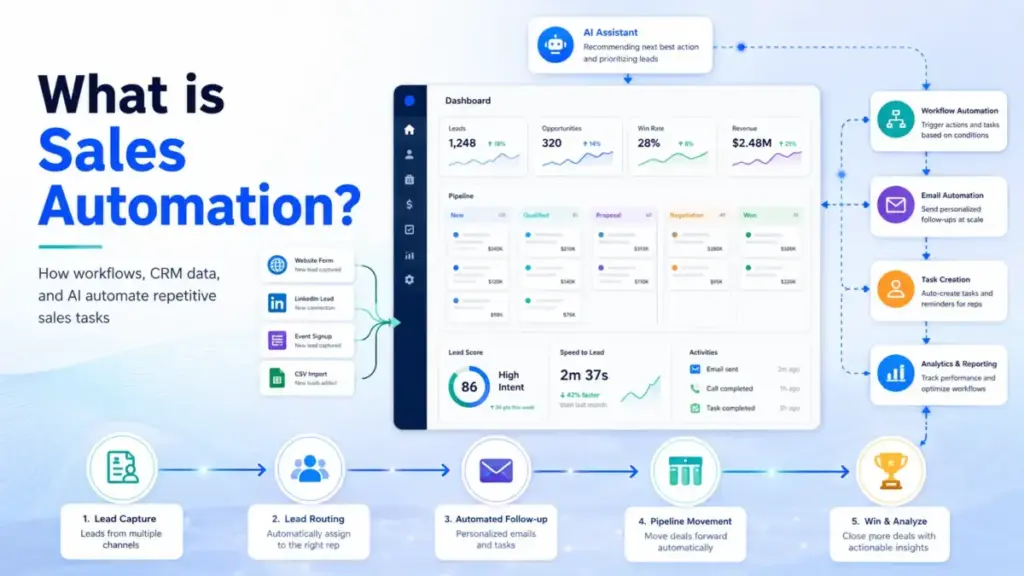
A CRM stores records. Sales automation acts on those records, using triggers, workflows, scoring, routing rules, sequences, and AI to execute the repetitive steps that eat selling time. This guide explains what sales automation actually is, how it works inside a CRM, which tasks to automate first, what tools enable it, which metrics to track, and when automation creates more problems than it solves.
The distinction matters because most concept pages blur CRM software storage and automation execution into one idea, repeating the same benefits list without explaining data quality requirements, plan-gated features, or governance issues that determine whether automation improves revenue or produces messier sales operations.
Quick Answer: Sales automation is the use of software, workflow rules, AI, and CRM data to perform repetitive sales tasks, including lead routing, follow-up, data entry, deal updates, quoting, forecasting, and activity tracking, without requiring a rep to do each step manually. It depends on clean data, well-designed triggers, and ongoing monitoring.
What Sales Automation Actually Means
Sales automation uses software to execute repetitive, rules-based sales tasks that a human rep would otherwise perform manually. IBM defines it as a strategy of using technologies to eliminate repetitive tasks, improve efficiencies, and increase sales team productivity (IBM Think). Salesforce describes it as technology that performs tedious human tasks, reducing manual time, effort, and error across data capture, workflow triggers, AI analysis, and generative AI outputs (Salesforce).
Those definitions are correct but incomplete. They cover what sales automation removes. They skip what sales automation requires: clean CRM data, clear ownership rules, well-designed triggers, suppression logic, and workflow monitoring.
Three Layers of Definition
| Layer | Explanation |
|---|---|
| Simple | Software that does repetitive sales work for you, such as assigning leads, sending follow-ups, or updating deal records. |
| Technical | Rule-based and AI-powered workflows that trigger actions (record updates, task creation, sequence enrollment, owner assignment, notifications, quote generation, forecast updates) based on CRM events, scores, form submissions, time rules, or pipeline changes. |
| Business | The operating layer between CRM data storage and consistent sales execution. When designed well, it returns selling time to reps, accelerates response speed, improves data quality, and makes sales forecasting more reliable. When designed poorly, it routes leads to the wrong reps, sends duplicate outreach, and creates workflow debt that no one maintains. |
How Sales Automation Works
Sales automation starts with CRM or customer data. A buyer action, record update, score change, sales pipeline movement, form submission, email reply, meeting event, quote request, or time-based rule triggers an automated action.
That action can update a record, assign an owner, create a task, enroll a contact in a sequence, notify a rep, generate a quote, or produce a forecast. Output quality depends entirely on input quality.
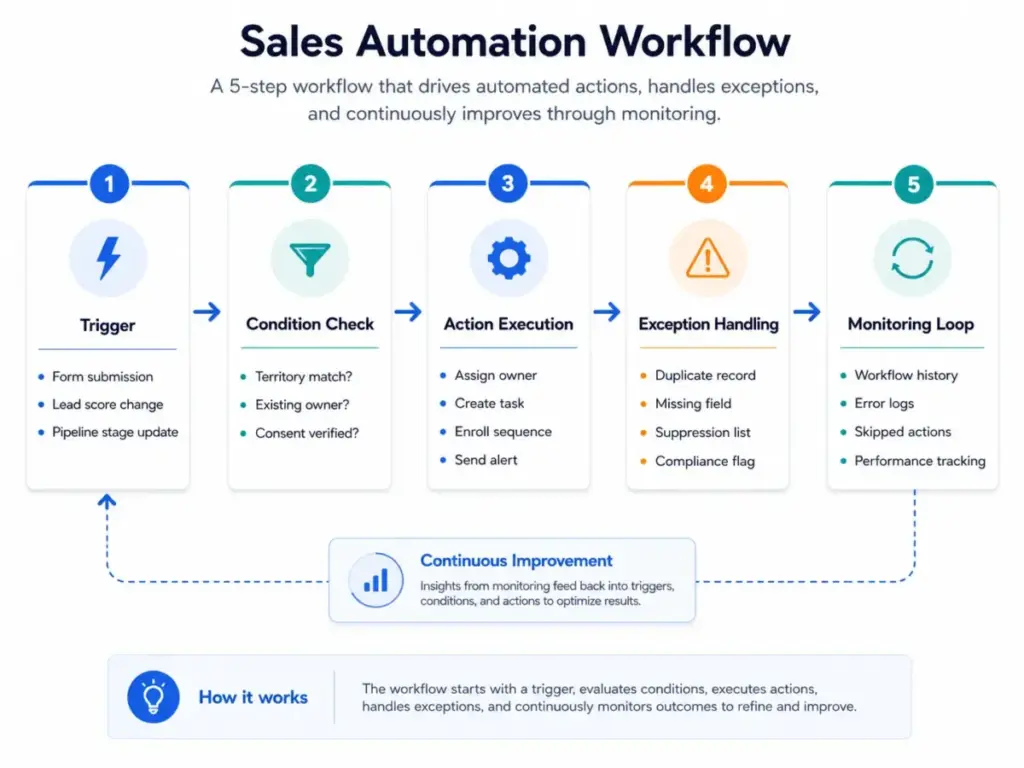
The Trigger-Condition-Action Loop
Every sales automation workflow follows the same logic:
- Trigger: Something happens. A form is submitted, a deal stage changes, a lead score crosses a threshold, a timer expires, or a rep logs an activity.
- Condition: The system checks rules. Is the lead in the right territory? Does the account already have an owner? Is the contact opted in? Has a follow-up already been sent?
- Action: The system executes. It assigns the lead, creates a task, enrolls a sequence, updates a field, sends a notification, or generates a quote.
- Exception handling: The system manages edge cases. Duplicate contacts, missing fields, existing ownership, suppression lists, and compliance flags require exception logic.
- Monitoring: Workflow history, error logs, skipped actions, and delayed steps need periodic review.
Rule-based automation follows fixed if-this-then-that logic. AI-powered automation adds prediction, lead scoring, content generation, summarization, and next-best-action recommendations. The Gartner Magic Quadrant for Sales Force Automation Platforms notes that SFA vendors are intensifying focus on generative AI and expanding into agentic AI use cases (Gartner).
A Worked Example: Inbound Lead Routing
Here is what a real lead routing automation looks like, step by step:
| Step | What Happens | Human Checkpoint |
|---|---|---|
| Form submitted | CRM creates or updates contact record | None |
| Territory and ownership checked | Workflow evaluates region, company size, and existing account owner | None |
| Consent verified | Automation confirms opt-in status before outreach enrollment | None |
| Owner assigned and SLA task created | Round-robin or territory rule assigns the lead; system creates a follow-up task with deadline | Rep receives task |
| Alert sent | Notification delivered to the assigned rep | Rep confirms receipt |
In practice, routing breaks when CRM data has duplicate records, missing company size fields, incorrect territory mapping, or no existing-account ownership check. A routing rule that ignores account ownership can reassign a $200,000 renewal opportunity to an SDR running a round-robin queue.
Sales Automation vs CRM and Related Concepts
One of the most common confusions in this category is treating CRM and sales automation as the same thing. HubSpot describes sales automation as software for repetitive tasks including lead qualification, follow-up messaging, record updates, lead routing, and data entry (HubSpot glossary). ZoomInfo distinguishes CRM from sales automation by saying CRM stores customer and prospect data while sales automation acts on that data to execute workflows, trigger outreach, score leads, and route prospects (ZoomInfo).
| Concept | What It Does | When to Use | Key Difference |
|---|---|---|---|
| CRM software | Stores contacts, deals, accounts, activities, and pipeline data | Always, as the system of record | Storage and visibility, not execution |
| Sales automation | Acts on CRM data through triggers, workflows, sequences, routing, scoring, and AI | When repetitive tasks slow reps or create inconsistency | Execution layer that depends on CRM data quality |
| Marketing automation | Manages campaigns, nurture sequences, scoring, and segmentation for marketing-qualified leads | Pre-sales funnel, demand generation | Focused on lead nurture before sales handoff |
| Sales engagement | Runs outbound outreach sequences, call cadences, and meeting scheduling | Active prospecting and follow-up | Outreach execution, not full pipeline automation |
| AI sales agents | Uses AI to summarize calls, draft messages, research accounts, enrich records, or take narrowly scoped actions | When prediction, summarization, or content generation adds value | Requires clean data, permissions, and defined scope |
The CRM is the system of record. Sales automation is the execution layer. Confusing them leads to buying the wrong tool or expecting a CRM to automate tasks it only stores.
Seven Types of Sales Automation
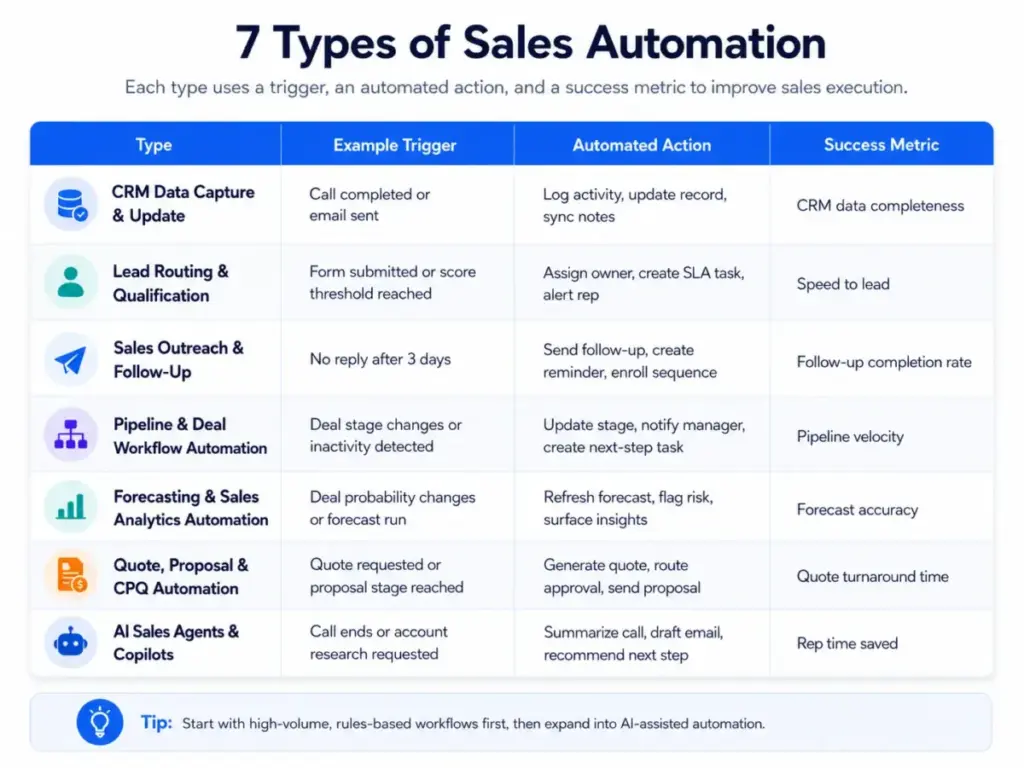
Sales automation is not one category. It covers at least seven distinct workflow types, each with different triggers, data requirements, and plan-gate considerations.
1. CRM Data Capture and Update
Automatically logs calls, emails, meetings, notes, deal changes, and contact updates. Reduces the manual CRM entry that accounts for a significant share of nonselling work.
2. Lead Routing and Qualification
Assigns inbound leads to reps based on territory, company size, source, score, account ownership, or round-robin rules. Failures here create the most immediate revenue risk.
3. Sales Outreach and Follow-Up
Uses sequences, cadences, reminders, and triggered emails to keep prospect follow-up consistent. HubSpot Sales Automation Tools describes how teams can automate prospect follow-up with sequences and workflows (HubSpot).
4. Pipeline and Deal Workflow Automation
Creates tasks, changes deal stages, sends internal alerts, enforces approval steps, and prevents deals from stalling. This is the category most buyers underestimate.
5. Forecasting and Sales Analytics Automation
Uses pipeline data, historical patterns, and AI signals to identify risks, improve forecasts, and prioritize next actions. Salesforce Sales Cloud includes AI and automation for productivity, lead management, customer tracking, and forecasting (Salesforce Sales Cloud).
6. Quote, Proposal, and CPQ Automation
Generates quotes, proposals, contracts, approvals, and related documents from CRM and pricing data. Many concept articles focus only on outreach automation and miss this category entirely.
7. AI Sales Agents and Copilots
Uses AI to summarize calls, draft messages, research accounts, enrich records, coach reps, or take narrowly scoped actions. According to the Salesforce State of Sales, 7th Edition, 94 percent of sales leaders with agents say agents are critical for meeting business demands, and nine in ten sales teams use agents today or expect to within two years.
Common Misconceptions About Sales Automation
Misconception: Sales automation means replacing sales reps.
Reality: Most practical sales automation removes repetitive steps so reps can spend more time on judgment-heavy work such as discovery, negotiation, relationship building, and deal strategy.
Misconception: A CRM automatically equals sales automation.
Reality: A CRM stores records and pipeline data. Sales automation acts on that data through triggers, workflows, scoring, sequences, routing, alerts, and AI recommendations.
Misconception: The best first automation is always an email sequence.
Reality: For many teams, lead routing, data cleanup, task creation, and stalled-deal alerts create more immediate value than outbound email automation.
Misconception: AI sales automation works well without clean CRM data.
Reality: AI agents and predictive automation depend on complete, unified, permissioned, and accurate customer data. The Salesforce State of Sales report notes that data issues among teams with agents include manual errors, duplicate data, security concerns, incomplete data, and corrupt data.
Misconception: Automation is set-and-forget.
Reality: Automation requires monitoring, change control, workflow logs, ownership review, and periodic cleanup to prevent broken or outdated processes.
How AI Changes Sales Automation in 2026
AI integrations in sales automation are not future state. Gartner describes SFA platforms as AI-enhanced tools that automate sales tasks and help manage buyer interactions across channels (Gartner Peer Insights). McKinsey’s State of AI 2025 report found that respondents most commonly report revenue benefits from AI use cases in marketing and sales.
The maturity ladder looks like this:
| Level | What It Does | Data Requirement | Example |
|---|---|---|---|
| Rule-based workflow | Fixed if-then-that logic | Structured CRM fields | Lead assignment by territory |
| Predictive automation | Scoring, risk signals, forecast adjustments | Historical deal data + activity logs | AI-weighted pipeline forecast |
| Generative copilot | Drafts messages, summarizes calls, researches accounts | Conversation data + CRM context | Call summary and next-step suggestion |
| Controlled AI agent | Takes narrowly scoped actions with guardrails | Clean, unified, permissioned data + defined scope | Account research agent that enriches records |
“The real magic is in the partnership between our human and digital reps.” — Brandon Metcalf, CEO, Asymbl (Salesforce State of Sales, 7th Edition)
The risk is that teams deploy AI automation on top of dirty data. Security concerns delayed AI initiatives for 51 percent of sales pros, according to the Salesforce State of Sales report. AI agents that route leads using incomplete territory data or score prospects with duplicate records will produce worse results than a well-maintained rule-based workflow.
Tools That Enable Sales Automation
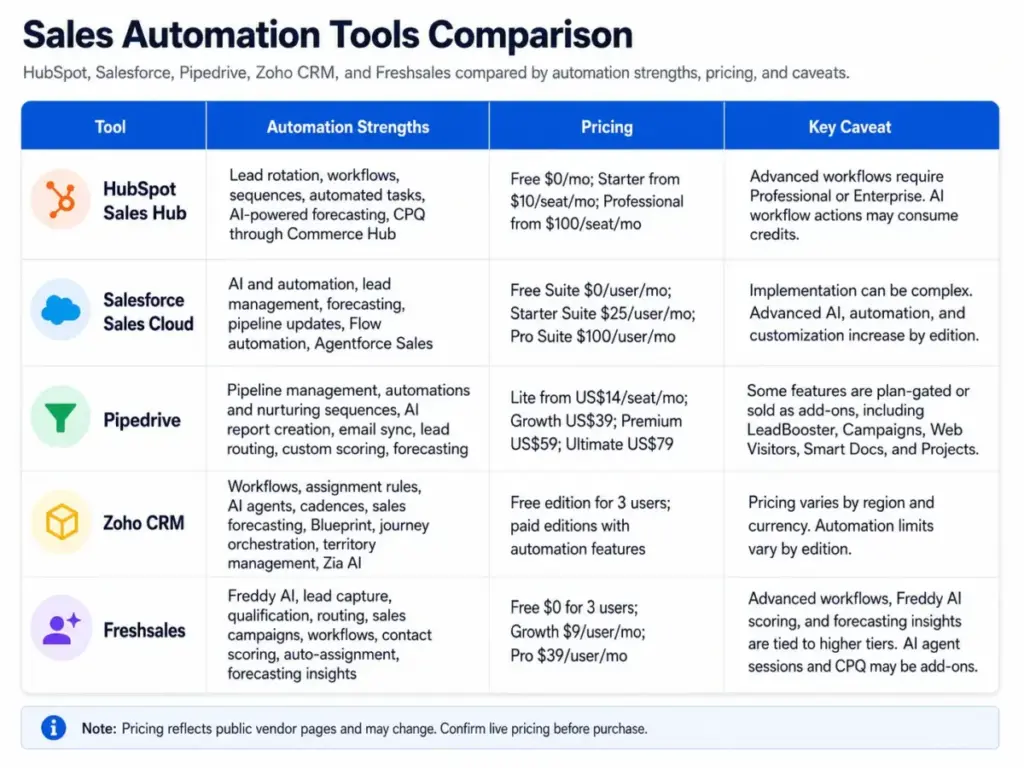
The table below covers five CRM platforms that implement sales automation with different depths, plan gates, and pricing structures. Pricing data was verified on official product pages as of May 2026. Confirm live pricing before purchase, as rates, discounts, and plan structures change.
| Tool | Best For | Automation Strengths | Starting Price | Key Caveat |
|---|---|---|---|---|
| HubSpot Sales Hub | Small to mid-market teams wanting CRM + marketing + sequences + workflows | Lead rotation, workflows, sequences, automated tasks, AI-powered forecasting, CPQ through Commerce Hub | Free at $0/mo; Starter from $10/seat/mo (limited-time discount noted on product page); Professional from $100/seat/mo | Advanced workflows require Professional or Enterprise. AI workflow actions may consume credits. Workflow counts and enrollment triggers have limits. |
| Salesforce Sales Cloud | Growing and enterprise organizations needing configurable SFA, AI agents, forecasting, and ecosystem depth | Sales Cloud SFA, AI and automation, lead management, forecasting, pipeline updates, Flow automation, Agentforce Sales | Free Suite $0/user/mo; Starter Suite $25/user/mo; Pro Suite $100/user/mo | Implementation complexity can require professional services. Advanced AI, automation, and customization increase by edition. |
| Pipedrive | Sales-led SMBs wanting visual pipeline management, follow-up automation, and practical workflow automation | Pipeline management, automations and nurturing sequences, AI report creation, email sync, meeting scheduler, lead routing, custom scoring, forecasting | Lite from US$14/seat/mo billed annually; Growth US$39; Premium US$59; Ultimate US$79 | Some capabilities are plan-gated or sold as add-ons (LeadBooster, Campaigns, Web Visitors, Smart Docs, Projects). |
| Zoho CRM | Cost-sensitive teams wanting broad CRM automation, AI, cadences, and process management inside a larger ecosystem | Workflows, assignment rules, AI agents, cadences, sales forecasting, process automation, Blueprint, journey orchestration, territory management, Zia AI | Free edition for 3 users; paid editions with automation features (checkZoho CRM pricing for current rates in your currency) | Pricing displays by region and currency. Automation limits vary by edition, including workflow rule counts, email limits, webhooks, and cadence limits. |
| Freshsales | SMBs wanting a sales-focused CRM with built-in communication channels, AI assistance, lead capture, scoring, and workflow automation | Freddy AI, lead capture, qualification, routing, sales campaigns, Kanban pipeline views, email templates, workflows, contact scoring, auto-assignment, forecasting insights | Free plan $0 for 3 users; Growth $9/user/mo billed annually; Pro $39/user/mo billed annually | Free plan limited to 3 users. Advanced workflows, Freddy AI scoring, custom modules, and forecasting insights tied to higher tiers. AI agent sessions and CPQ available as add-ons. |
What this means: The starting price is never the full story. Advanced workflows, AI features, lead routing rules, CPQ, enrichment, and add-ons often sit behind higher-tier plans or usage-based credits. Before committing, map your required automation workflows to the specific plan that supports them and calculate the total cost at your team size.
Sources: HubSpot Sales Hub, HubSpot Workflows FAQ, Salesforce Sales Cloud, Salesforce pricing, Pipedrive pricing, Zoho CRM features, Zoho CRM feature list, Freshsales, Freshsales pricing.
How to Implement Sales Automation
Automation fails when teams automate a broken process. The implementation sequence below prevents the most common mistakes.
- Map the current sales process from lead capture to closed won, including every manual handoff, CRM update, follow-up, and approval step.
- Clean the CRM fields that automation will rely on, especially lifecycle stage, lead source, owner, territory, company size, deal stage, consent status, and last activity.
- Start with one high-friction workflow, usually lead routing, follow-up task creation, or stalled-deal alerts.
- Define trigger, condition, action, exception rule, suppression rule, and success metric before building.
- Test with sample records or a sandbox before activating on live pipeline data.
- Monitor workflow history, errors, and rep feedback for the first 30 to 90 days. Expand only after measurable results.
How to Measure Sales Automation Success
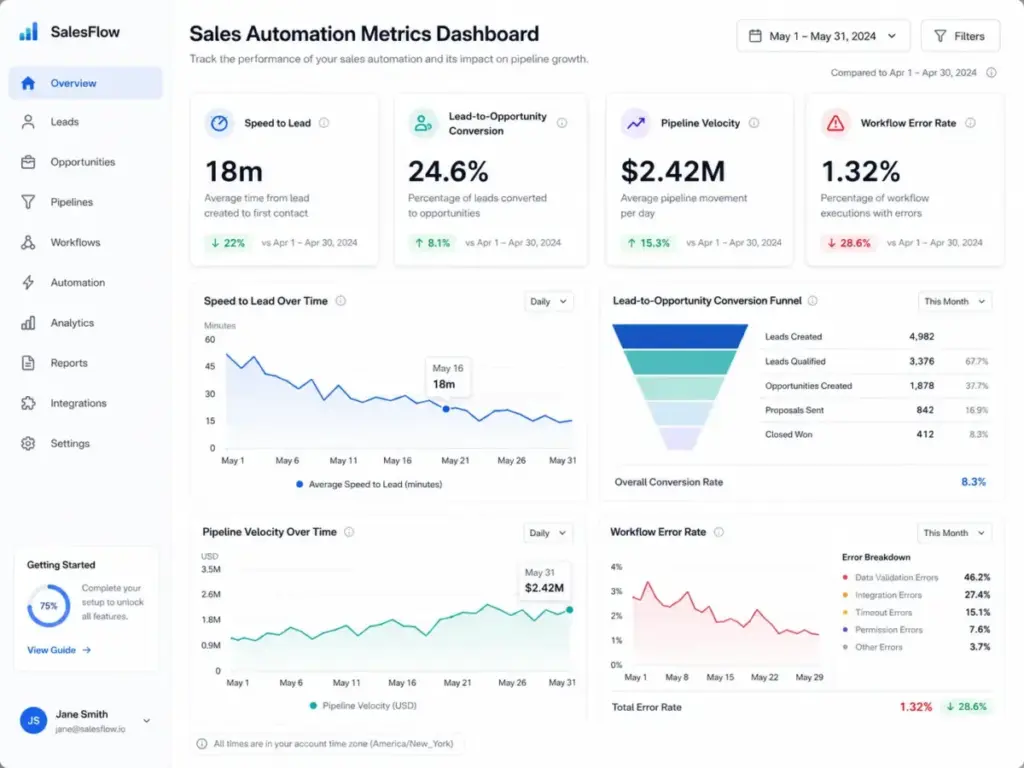
Pipedrive recommends measuring automation ROI through pipeline velocity, lead-to-close conversion rate, cost per acquisition, and time saved on manual tasks. A complete measurement system covers speed, revenue, data quality, and workflow health.
| Metric | What It Measures | Why It Matters |
|---|---|---|
| Speed to lead | Time from form submission to lead assignment | Faster assignment correlates with higher contact rates |
| Lead-to-opportunity conversion | Percentage of leads that become qualified opportunities | Indicates routing and qualification accuracy |
| Pipeline velocity | Speed at which deals move through stages | Shows whether automation reduces deal stalling |
| Follow-up completion rate | Percentage of automated follow-up tasks completed on time | Measures whether reps act on automated tasks |
| CRM data completeness | Percentage of required fields populated | Clean data is a prerequisite for accurate automation |
| Stale deal rate | Percentage of deals with no activity in 14+ days | Stale deals indicate automation gaps or rep disengagement |
| Workflow error rate | Percentage of automation runs with errors or skipped steps | High error rates indicate workflow design problems |
| Unsubscribe rate | Percentage of outreach recipients who opt out | High rates indicate over-automation or poor targeting |
When to Automate and When Not To
Automate when: The task is repetitive, high-volume, rules-based, and depends on structured CRM data. Good first choices: lead assignment, task creation, stalled-deal alerts, CRM logging, and structured follow-up.
Avoid automating when: The task requires nuanced negotiation, legal review, or personalized messaging where automation would reduce trust. If the automation sends a message a rep would need to undo, the task is not ready.
Common Sales Automation Mistakes
- Automating a broken process. If your current lead routing has no territory logic, automating it scales the chaos.
- Relying on dirty CRM data. Duplicate records, missing fields, and incorrect ownership route leads to the wrong reps.
- Sending outreach without suppression rules. Contacts who recently replied, unsubscribed, or complained need automatic exclusion.
- Assigning leads without account ownership logic. Round-robin rules that ignore existing relationships can reassign active deals.
- Failing to document or audit workflows. Undocumented automations become technical debt. Unreviewed workflow logs hide errors.
- Ignoring plan limits and AI credits. Workflow counts, AI actions, and add-on pricing vary by tier and can increase costs unexpectedly.
Sales Automation Benefits and Limitations
Benefits:
- More selling time. Automation returns time to customer conversations by handling CRM entry, routing, and follow-up.
- Faster response. Automated lead assignment and notifications reduce the risk of inbound leads sitting idle.
- More consistent execution. Standardized workflows reduce missed steps and inconsistent handoffs.
- Better forecasting. Automated logging and AI-assisted insights improve pipeline visibility.
Limitations:
- Bad data weakens automation. Duplicate records and missing fields can route leads incorrectly.
- Over-automation damages buyer trust. Outreach that ignores context or consent can feel robotic.
- Pricing complexity. Advanced workflows, AI credits, and add-ons sit behind higher tiers.
When You Need Sales Automation Software
You need it when:
- Your team misses follow-ups because reps forget or get busy
- Inbound leads sit unassigned for hours or days
- Reps spend significant time on CRM data entry instead of selling
- Your pipeline has stale deals with no recent activity
- Lead routing happens manually or inconsistently
- Your forecasting depends on reps updating deal stages by memory
- Quote or proposal generation requires manual document assembly
You do not need it yet when:
- Your team is under 3 people and volume is manageable manually
- Your CRM data is too messy to support reliable triggers
- You have not mapped your current sales process or defined deal stages
How to Choose the Right Sales Automation Tool
- Map your required automations to specific workflow types (routing, sequences, task creation, forecasting, CPQ).
- Identify the CRM plan tier that supports those automations. Starting prices rarely include advanced workflows.
- Calculate total cost at your team size, including per-seat pricing, add-ons, AI credits, and onboarding.
- Check workflow and enrollment limits per plan. Some platforms cap automation runs, active sequences, or workflow counts by edition.
- Evaluate data quality requirements. AI-powered automation requires cleaner data than rule-based workflows.
- Test routing and assignment rules in a sandbox before deploying to live pipeline.
- Confirm integration requirements. Your automation tool needs to connect with your email, calendar, communication, and reporting stack.
For a ranked comparison of CRM platforms that support sales automation, see our detailed reviews of HubSpot CRM, Salesforce CRM, Pipedrive, Zoho CRM, and Freshsales.
Sales Automation Beginner Checklist
- [ ] Map your sales process from lead capture to closed won
- [ ] Define deal stages with clear entry and exit criteria
- [ ] Clean CRM fields: lead source, owner, territory, lifecycle stage, consent
- [ ] Merge or flag duplicate records before building automations
- [ ] Choose one high-friction workflow to automate first (lead routing or follow-up tasks)
- [ ] Define trigger, condition, action, exception, and success metric
- [ ] Build and test in a sandbox or with sample records
- [ ] Activate and monitor workflow logs for 30 days
- [ ] Review error rates, skipped actions, and rep feedback
- [ ] Document the workflow with naming conventions and ownership
- [ ] Expand to a second workflow only after the first shows measurable results
- [ ] Schedule quarterly audits of all active automations
FAQ
What is sales automation in simple terms?
Sales automation uses software to handle repetitive sales tasks like assigning leads, sending follow-ups, updating CRM records, and generating reports without requiring a rep to do each step manually.
What is the difference between CRM and sales automation?
A CRM stores customer data, deal records, and pipeline information. Sales automation acts on that data through triggers, workflows, and rules to execute tasks automatically.
What sales tasks should be automated first?
Lead routing, follow-up task creation, stalled-deal alerts, and CRM data capture deliver the most immediate value. These tasks are high-volume, rules-based, and measurable.
Can sales automation replace sales reps?
No. Sales automation removes repetitive steps so reps can focus on discovery, negotiation, relationship building, and deal strategy.
How does AI improve sales automation?
AI adds prediction (lead scoring, deal risk signals), generation (email drafts, call summaries), and autonomous action (account research, record enrichment) to rule-based workflows.
What are the risks of sales automation?
The primary risks: automating on dirty CRM data (which routes leads incorrectly), over-automating outreach (which damages buyer trust), and ignoring workflow maintenance (which creates technical debt).
How do you measure sales automation success?
Track speed to lead, lead-to-opportunity conversion, pipeline velocity, CRM data completeness, stale deal rate, workflow error rate, and outreach unsubscribe rate.