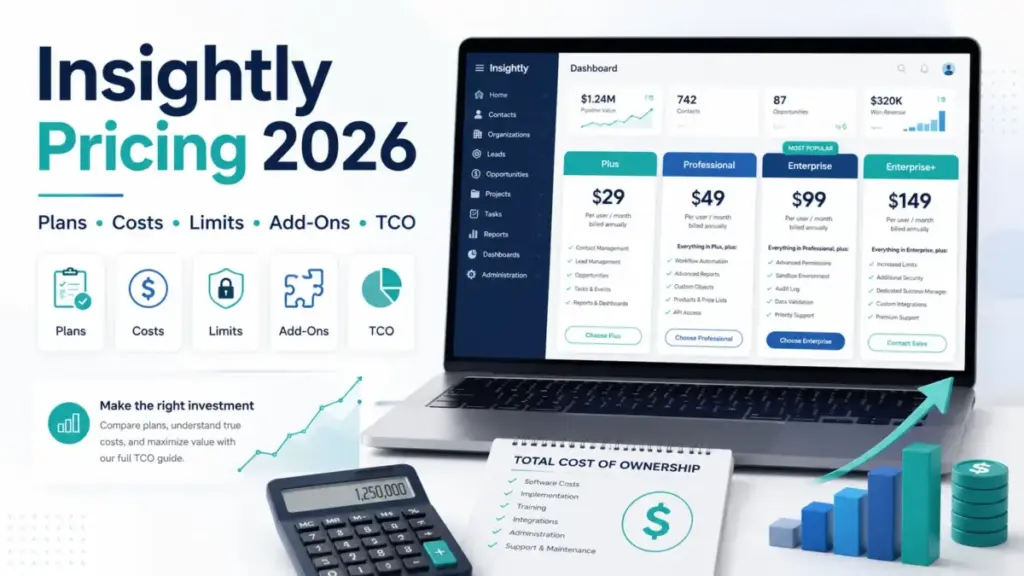
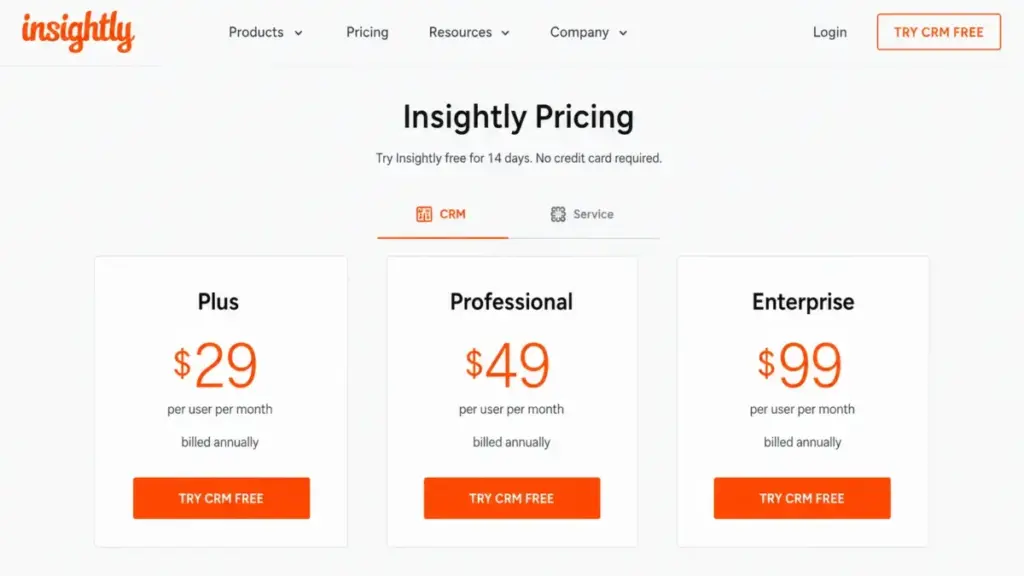
The advertised number for Insightly is $29 per user per month. The number a finance team approves is closer to $2,940 a year for a five-person sales-and-delivery team on Professional, because lead routing and workflow automation do not exist on the entry tier.
That gap is the whole story of Insightly pricing in 2026. This guide rebuilds every published cost line into annual totals, then shows which plan limits, add-on fees, and bundle requirements move the final invoice.
All prices below are US dollars, taken from Insightly’s official pricing page and help documentation checked on July 31, 2026. Nothing here comes from hands-on account testing, and every figure traces back to a named official source.
If you are still building a shortlist rather than pricing one vendor, the wider set of best CRM software options gives more context on where Insightly sits.
Quick Pricing Verdict
| Question | Answer |
|---|---|
| Starting price | $29 per user/month, billed annually ($348 per user/year) |
| Free plan | None shown on the public pricing page checked July 31, 2026 |
| Free trial | 14 days, no credit card required |
| Best plan for most teams | Professional at $49 per user/month ($588 per user/year) |
| Plan to avoid | Plus, for any team that needs lead routing or workflow automation |
| Biggest hidden cost | $3,000 one-time AppConnect technical setup, plus $249 per extra 25,000 tasks |
| Monthly (non-annual) rates | Not publicly disclosed on the July 31, 2026 pricing page |
| Best alternative if too expensive | Pipedrive for sales-only teams, at $14 per seat/month billed annually |
| Pricing verified | July 31, 2026, against Insightly’s official US pricing page |
Two lines in that table do most of the damage to a budget. The plan you probably want is 69% more per seat than the advertised entry price.
The integration layer many buyers assume is bundled turns out to be a separate subscription with its own setup fee.
Executive Summary: Insightly Cost at 1, 5, 10, and 25 Seats
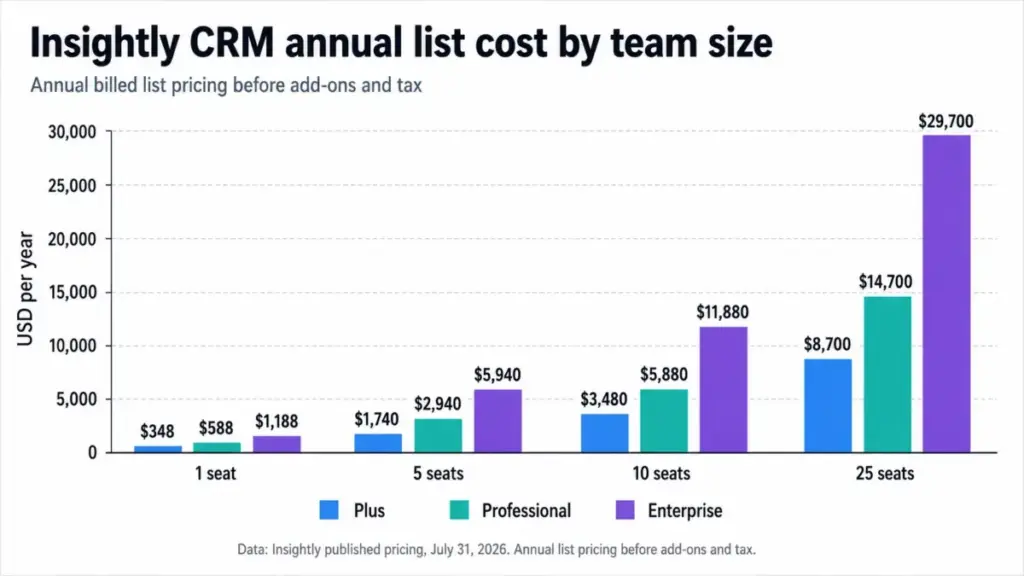
Here is the annual list bill before a single add-on. Insightly publishes per-user monthly rates on annual billing, so the yearly figure is the rate multiplied by twelve months and by seat count.
| Seats | Plus ($348/user/yr) | Professional ($588/user/yr) | Enterprise ($1,188/user/yr) |
|---|---|---|---|
| 1 | $348 | $588 | $1,188 |
| 5 | $1,740 | $2,940 | $5,940 |
| 10 | $3,480 | $5,880 | $11,880 |
| 25 | $8,700 | $14,700 | $29,700 |
| 50 | $17,400 | $29,400 | $59,400 |
Figures are SaaSZap calculations from Insightly’s published per-user annual-billed rates, excluding tax and add-ons.
The step between tiers is where budgets break. Moving ten seats from Plus to Professional adds $2,400 a year, and moving those same ten seats from Professional to Enterprise adds $6,000 a year.
I would treat Professional as the real starting point for any team with more than two salespeople. Plus has no lead assignment, no complete workflow automation, and no webhooks, which pushes most growing teams up within the first contract year.
Enterprise earns its $600 per seat per year premium only when SAML single sign-on, SCIM provisioning, field-level security, sandboxes, or audit logging are procurement requirements.
Insightly Pricing Plans Compared
Insightly sells four separate things: the CRM, Insightly Marketing, Insightly Service, and the AppConnect integration platform. This table covers the standalone CRM only, which is what most people mean by Insightly pricing.
The CRM subscription is the part that delivers what CRM software is built to do: contacts, pipelines, reporting, and in Insightly’s case, projects. The other three modules are priced independently.
| Plan | Monthly (month-to-month) | Annual-billed rate | Per user/year | Billing basis | Best for | Key limits |
|---|---|---|---|---|---|---|
| Plus | Not publicly disclosed | $29/user/mo | $348 | Per user | 1-3 person teams tracking contacts, projects, and a simple pipeline | 100,000 records, 10 GB storage, 40,000 API calls/day, 2,500 emails/day, 50 custom fields per standard object |
| Professional | Not publicly disclosed | $49/user/mo | $588 | Per user | 5-25 person sales-and-delivery teams that need routing and automation | 250,000 records, 100 GB storage, 60,000 API calls/day, 5,000 emails/day, 25 custom objects, 75 Copilot queries |
| Enterprise | Not publicly disclosed | $99/user/mo | $1,188 | Per user | IT-governed teams needing SSO, SCIM, sandboxes, and audit trails | 500,000 records, 250 GB storage, 100,000 API calls/day, 10,000 emails/day, 200 custom objects, 100 Copilot queries, 18-month audit log retention |
Prices verified against the official Insightly pricing page on July 31, 2026. Plan limits come from Insightly’s published CRM plan-level limits documentation, checked the same day.
The “not publicly disclosed” column is deliberate. Insightly’s billing documentation confirms that monthly and annual subscription terms both exist and that annual subscriptions receive a discount, but the public pricing page shown on July 31, 2026 did not publish month-to-month rates.
Several pages ranking for Insightly pricing still quote $35, $59, and $129 as monthly figures. Those come from an archived plan-comparison document, not from the live page, and I would not budget against them.
Ask Insightly sales for the month-to-month rate in writing before assuming any specific uplift.
What Each Insightly Plan Includes
Plus at $29 per user/month
Plus covers lead and contact management, opportunity pipelines, native project management, advanced reports, and pre-built dashboards. That is a working CRM for a small team that assigns work by conversation rather than by rule.
Includes: contact, lead, and opportunity records, project management linked to won deals, advanced reporting, pre-built dashboards, REST API access, mobile apps, 100,000 records, 10 GB storage.
Missing: lead assignment and routing, complete workflow automation, webhooks, custom objects, Insightly Copilot, and every Enterprise governance control.
Avoid Plus if: more than two people touch inbound leads, or any process depends on automatic follow-up tasks.
Plus at five seats costs $1,740 a year, which is $1,200 less than Professional. That saving disappears the moment an operations person starts hand-assigning leads.
Professional at $49 per user/month
Professional is where Insightly becomes an operations tool instead of a shared database. It adds lead assignment and routing, complete workflow automation, webhooks, custom objects, 100 custom dashboard cards, and Copilot.
Includes: everything in Plus, plus routing rules, workflow automation, webhooks, 25 custom objects, 250,000 records, 100 GB storage, 60,000 API calls per day, 75 Copilot queries.
Missing: products, pricebooks, and quotes, field-level security, calculated fields, validation rules, SAML and SCIM, audit logging, sandboxes, and custom apps.
Avoid Professional if: your security team has already written SSO or audit-retention into the requirements document, because you will pay twice.
At ten seats Professional lists at $5,880 a year. I would budget that as the realistic Insightly pricing baseline for a sales team that also delivers projects.
Enterprise at $99 per user/month
Enterprise is a governance purchase. The feature list clusters around identity, permissions, data integrity, and audit rather than around selling.
Includes: everything in Professional, plus products, pricebooks, and quotes, field-level security, calculated fields, validation rules, SAML single sign-on, SCIM provisioning, audit logging with 18-month retention, sandboxes, custom apps, and Lambda execution.
Missing: unlimited records or storage. The published ceilings are 500,000 records and 250 GB, which contradicts older documents that described Enterprise as unlimited.
Avoid Enterprise if: the only attraction is higher record and API ceilings, since 25 seats costs $29,700 a year against $14,700 on Professional.
Buy Enterprise when identity management is a compliance requirement, not when it is a preference.
Feature Gates by Plan: Where the Money Goes
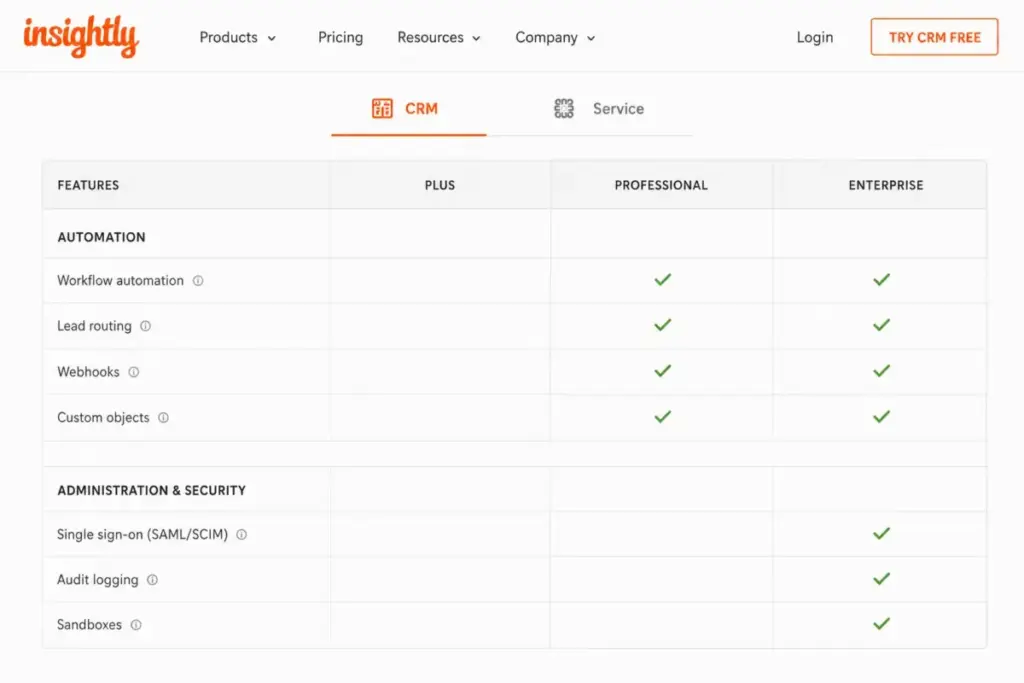
Insightly gates capability by tier rather than by usage credits. This table maps the gates that change how a sales team operates day to day.
| Capability | Plus | Professional | Enterprise |
|---|---|---|---|
| Lead assignment and routing | No | Yes | Yes |
| Complete workflow automation | No | Yes | Yes |
| Webhooks | No | Yes | Yes |
| REST API access | Yes | Yes | Yes |
| Daily API calls | 40,000 | 60,000 | 100,000 |
| Custom objects | 0 | 25 | 200 |
| Custom fields per standard object | 50 | 100 | 200 |
| Insightly Copilot | No | 75 queries | 100 queries |
| AI email summaries and reply generation | Yes | Yes | Yes |
| Products, pricebooks, and quotes | No | No | Yes |
| Field-level security | No | No | Yes |
| Validation rules and calculated fields | No | No | Yes |
| SAML SSO and SCIM provisioning | No | No | Yes |
| Audit logging | No | No | Yes, 18-month retention |
| Sandboxes | No | No | Yes |
| Phone and email support | Yes | Yes | Yes |
Three rows deserve a second look before you pick a tier.
Webhooks sit behind Professional even though the REST API is available on every paid plan. A Plus account can pull data on a schedule, but it cannot push a real-time event to an external system without polling or a paid integration layer.
That single row changes what CRM integration means on the entry plan, because scheduled polling burns daily API calls that event-driven syncing would not.
Custom objects go from zero to 25 at Professional. Teams modelling anything beyond contacts, organizations, opportunities, and projects have no path on Plus.
The Enterprise-only block is a single procurement conversation. SAML, SCIM, field-level security, validation rules, and audit logging arrive together, which is why the jump costs $600 per seat per year rather than a small module fee.
The Limits That Force an Upgrade Before Features Do
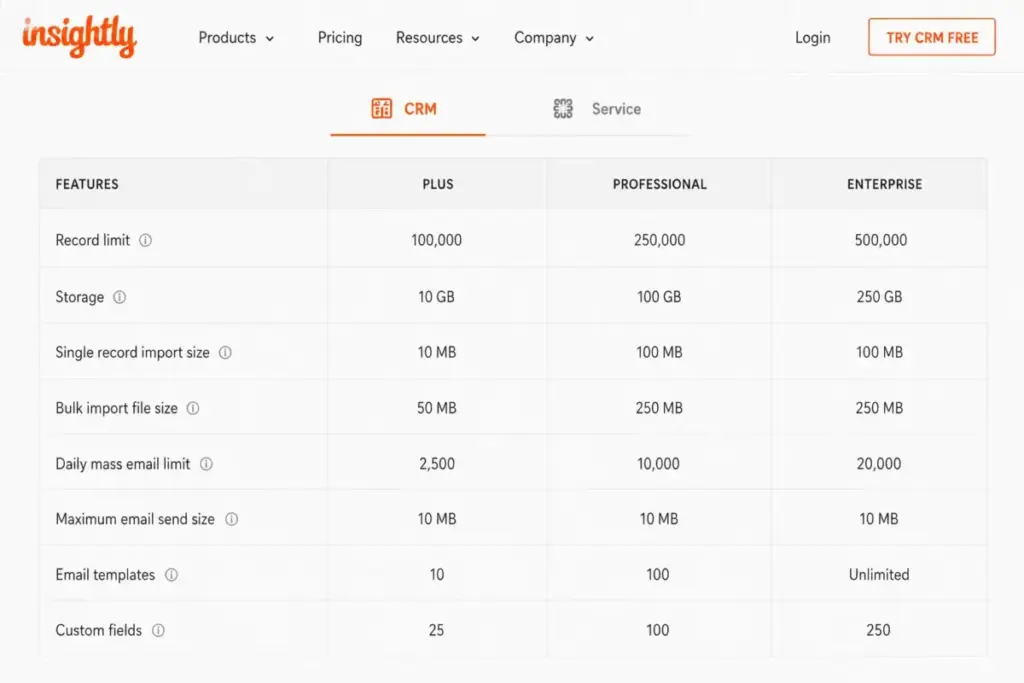
Feature gates get the attention. Record ceilings quietly do more upgrade work, because Insightly counts almost everything a team creates.
Insightly’s subscription documentation states that every created record counts toward the account limit, including contacts, leads, organizations, opportunities, projects, tasks, emails, events, notes, comments, reports, and items sitting in the recycle bin.
| Limit | Plus | Professional | Enterprise |
|---|---|---|---|
| Records (all object types combined) | 100,000 | 250,000 | 500,000 |
| File storage | 10 GB | 100 GB | 250 GB |
| Records per import | 25,000 | 50,000 | 50,000 |
| Daily API calls | 40,000 | 60,000 | 100,000 |
| Account-wide emails per day | 2,500 | 5,000 | 10,000 |
Run that against your own growth rate. A team creating 5,000 records a month across all object types fills the Plus ceiling in roughly 20 months, and a team creating 10,000 a month gets there in about 10 months.
Email logging is the usual accelerant. Synced email threads and auto-created tasks accumulate faster than contacts, which is why record counts surprise administrators who only track their contact list.
The API ceiling looks generous until it is divided by headcount and integrations. A ten-seat Plus account has 4,000 calls per user per day across every synced tool, and a five-seat account has 8,000.
Insightly’s API responses expose daily limit and remaining headers, so an administrator can measure real consumption instead of guessing. No public overage price exists for API calls, so treat the daily quota as a hard planning constraint rather than a soft one.
There is one more trap on the way down. Insightly’s help documentation describes an “Ineligible” state when account usage exceeds a lower plan’s limits.
Clearing that state means reducing users, records, files, templates, or custom fields first. Downgrading is a data project, not a billing toggle.
Email Limits Are Account-Wide, Not Per Seat
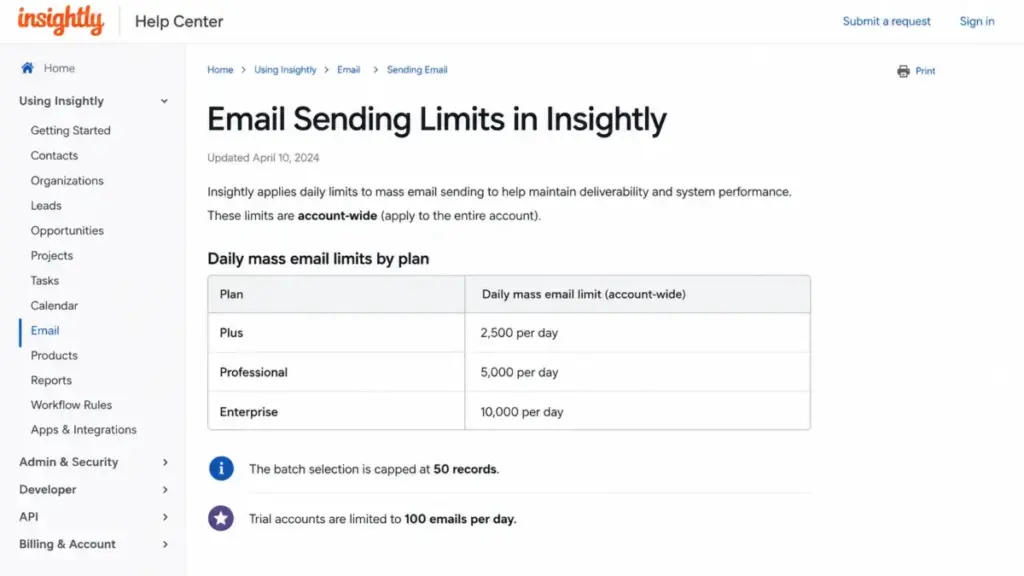
This is the limit buyers read wrong most often. Insightly’s published daily email allowances of 2,500, 5,000, and 10,000 apply to the whole account, not to each user.
A ten-person team on Plus shares 2,500 sends a day, which works out to 250 each if usage were split evenly. Batch selection is also capped at 50 records at a time, so using a full Plus allowance means running 50 separate batches.
Trial accounts are held to 100 emails a day, which makes trial-based capacity testing misleading.
The practical consequence is simple. CRM email in Insightly suits one-to-one follow-up and small batch outreach, and campaign-style nurture belongs in Insightly Marketing or a dedicated email platform.
Insightly’s own email-limit help article is the source to check before promising a sales manager any outbound volume. You can read the current figures on Insightly’s email sending limits documentation.
Insightly AI: Copilot Allowances Are Not the Whole Story
Several pricing summaries treat all Insightly AI as a Professional-tier feature. The official help documentation separates the two.
AI email summaries and AI reply generation are documented as included across pricing plans. Insightly Copilot is the gated capability, shown at 75 queries on Professional and 100 queries on Enterprise.
The published pricing comparison shows those query counts without stating a reset period on the page checked July 31, 2026. I would confirm whether the allowance resets monthly before treating Copilot as a daily working tool.
For a five-person team, that distinction is worth $1,200 a year. If the only draw is faster email handling, Plus already covers it, and Professional should be justified by routing and automation instead.
Line-Item Cost Breakdown: Every Billable Insightly Item
Insightly bills five different ways: per CRM user, per service agent, per marketing prospect volume, per AppConnect task tier, and per one-time service. Mixing those units is where cost estimates go wrong.
| Line item | Published price | Billing unit | When it applies |
|---|---|---|---|
| CRM Plus | $29/user/month | Per user, annual | Base CRM subscription |
| CRM Professional | $49/user/month | Per user, annual | Routing, automation, webhooks, custom objects |
| CRM Enterprise | $99/user/month | Per user, annual | SSO, SCIM, audit, sandboxes |
| Insightly Service | $29 / $49 / $99 per agent/month | Per agent, annual | Support ticketing alongside CRM |
| Insightly Marketing Plus | $99/account/month at 2,000 prospects | Per account, annual | Marketing automation |
| Insightly Marketing Professional | $499/account/month at 10,000 prospects | Per account, annual | Custom scoring, advanced tracking |
| Insightly Marketing Enterprise | $999/account/month at 20,000 prospects | Per account, annual | Calculated fields, validation, audit, higher scale |
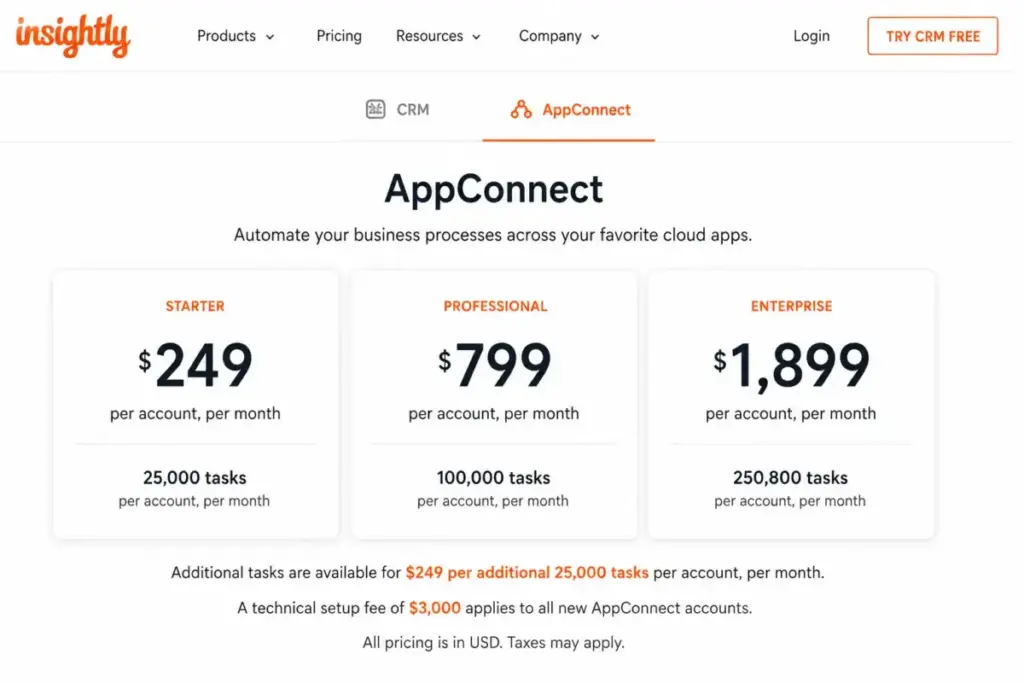
| AppConnect 25k | $249/account/month | Per account, annual | No-code integration, 25,000 tasks |
| AppConnect 100k | $799/account/month | Per account, annual | 100,000 tasks |
| AppConnect 250k | $1,899/account/month | Per account, annual | 250,000 tasks |
| Extra AppConnect tasks | $249 per additional 25,000 tasks | One-time per block | Task allowance exhausted |
| AppConnect technical setup | $3,000 one-time | One-time, required | Purchasing AppConnect |
| Guided onboarding | $1,500 | One-time, required for All-in-One | All-in-One bundle purchase |
| Premier Support | 20% of license, $3,000 annual minimum, required for All-in-One | Annual | All-in-One bundle purchase |
All figures come from Insightly’s official pricing page checked July 31, 2026. The onboarding and Premier Support requirements appear in the All-in-One comparison, so I would not apply them to a standalone CRM quote unless a sales rep confirms otherwise in writing.
Marketing pricing scales with prospect volume rather than seats, and Service is priced per agent even though its tier names match the CRM. Two teams paying “$49” can therefore be buying entirely different things.
Add-Ons, Overages, and Surprise Costs
AppConnect is the line item that breaks small-team budgets. It is a separate subscription, not an included CRM feature, and its entry tier costs $2,988 a year before setup.
Add the required $3,000 technical setup and the first year of AppConnect 25k reaches $5,988. For a five-seat Professional team, that add-on represents 67% of the $8,928 first-year total.
Cost per 1,000 tasks improves with volume, from $9.96 on the 25k tier to $7.99 on 100k and $7.60 on 250k. Volume pricing only helps teams that already generate the tasks.
Then there is the overage mechanic. Insightly’s Auto-Stop Protection documentation describes a $249 charge when an account reaches 100% of its monthly task limit, which equals a full extra month of the 25k subscription.
An unmonitored recipe loop can therefore add $249 to an invoice without a purchase order. I would set a task-usage alert in month one and review recipe efficiency before scaling automation volume.
Insightly’s official AppConnect Auto-Stop Protection article documents the trigger point.
Two smaller items belong in the same budget line. Insightly Marketing starts at $99 a month for 2,000 prospects and moves to $499 at 10,000.
Prospect growth is therefore a pricing event, not a settings change. Understanding what marketing automation is helps explain why that volume metric behaves so differently from seat pricing.
Insightly Service adds $348 to $1,188 per agent per year on top of CRM seats. A support agent who also works deals needs both subscriptions.
The All-in-One Bundle: First-Year Cost Math
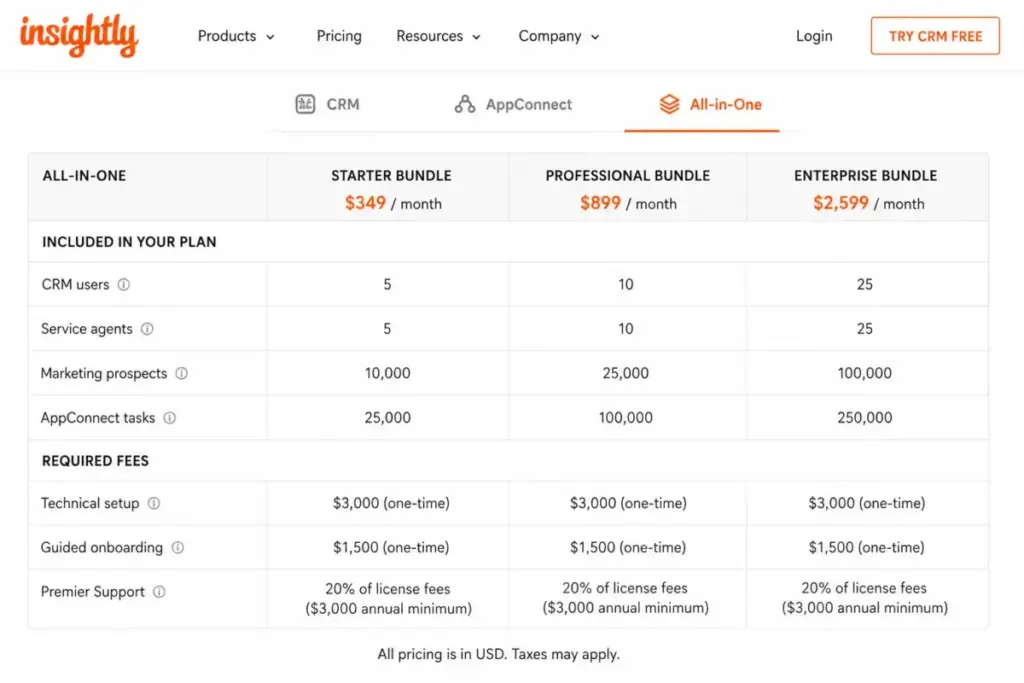
Insightly’s All-in-One bundles combine CRM, Service, Marketing, and AppConnect at $349, $899, and $2,599 a month. The sticker price excludes three fees the bundle comparison marks as required.
| Bundle | Sticker | Annual license | Required setup | Required onboarding | Premier Support | First-year minimum |
|---|---|---|---|---|---|---|
| All-in-One Plus | $349/mo | $4,188 | $3,000 | $1,500 | $3,000 (minimum applies) | $11,688 |
| All-in-One Professional | $899/mo | $10,788 | $3,000 | $1,500 | $3,000 (minimum applies) | $18,288 |
| All-in-One Enterprise | $2,599/mo | $31,188 | $3,000 | $1,500 | $6,237.60 (20% of license) | $41,925.60 |
Premier Support is priced at 20% of license with a $3,000 annual minimum, so the minimum governs the two smaller bundles and the percentage governs Enterprise. First-year totals are SaaSZap calculations from those published components.
Included headcount matters as much as price. All-in-One Plus covers 2 CRM users, 2 service agents, 2,000 prospects, and 25,000 AppConnect tasks, which prices out at $5,844 per CRM user in year one.
| Bundle | CRM users | Service agents | Prospects | AppConnect tasks |
|---|---|---|---|---|
| All-in-One Plus | 2 | 2 | 2,000 | 25,000 |
| All-in-One Professional | 5 | 5 | 10,000 | 25,000 |
| All-in-One Enterprise | 10 | 10 | 20,000 | 100,000 |
Teams above those counts pay additional seat rates on top of the bundle. A six-person sales team cannot use All-in-One Plus as a six-person plan.
Bundle or Separate Modules? The Math Flips at Scale
Buying the same modules separately is not always more expensive. I priced each bundle against its like-for-like à la carte equivalent using published list rates, applying the $3,000 AppConnect setup to both paths and the onboarding and Premier Support requirements only to the bundle.
| Scenario | Bundle year 1 | Separate modules year 1 | Bundle year 2 | Separate modules year 2 |
|---|---|---|---|---|
| Plus-level set (2 CRM, 2 agents, 2,000 prospects, 25k tasks) | $11,688 | $8,568 | $7,188 | $5,568 |
| Professional-level set (5 CRM, 5 agents, 10,000 prospects, 25k tasks) | $18,288 | $17,856 | $13,788 | $14,856 |
| Enterprise-level set (10 CRM, 10 agents, 20,000 prospects, 100k tasks) | $41,925.60 | $48,336 | $37,425.60 | $45,336 |
The smallest bundle is the worst value. All-in-One Plus costs $3,120 more in year one than assembling the same modules separately, because the mandatory onboarding and $3,000 support minimum are spread across only two CRM users.
At Enterprise scale the logic reverses. All-in-One Enterprise saves $6,410.40 in year one and $7,910.40 in year two against separate purchases, because the 20% support fee replaces a much larger à la carte module stack.
Buy the bundle at Enterprise scale. Assemble modules yourself at Plus scale, and add Insightly Service or Marketing only when a specific workflow requires it.
Annual vs Monthly Billing: The Real Savings Math
Insightly’s billing documentation confirms both monthly and annual subscription terms exist, and that annual subscriptions receive a discount. The public pricing page checked July 31, 2026 published only the annual-billed rates.
That leaves the saving unquantified, and I will not invent a percentage. The honest position is that $29, $49, and $99 are annual-billed rates, and the month-to-month figure requires a quote.
The commitment carries a real cost. Insightly’s cancellation documentation states that it does not provide refunds for unused subscription time, so an annual term signed in month one is spent even if the rollout stalls in month four.
Pair that with the downgrade friction described earlier and the switching cost becomes concrete. You can read the terms on Insightly’s cancellation and account documentation.
My recommendation: run the 14-day trial, then commit annually only after a written monthly quote and a documented decision on which plan the workflow needs. If the team is still debating whether routing is required, the annual commitment is premature.
Which Insightly Plan Should You Choose?
| Buyer | Team size | Recommended plan | Annual list cost | Why |
|---|---|---|---|---|
| Solo consultant | 1 | Plus | $348 | Contacts, pipeline, and projects without automation needs |
| Small agency | 3-5 | Professional | $1,764-$2,940 | Lead routing and automation remove manual assignment |
| Growing sales-and-delivery team | 10-25 | Professional | $5,880-$14,700 | Custom objects and webhooks support real integration work |
| IT-governed organization | 25+ | Enterprise | $29,700 at 25 seats | SAML, SCIM, field security, audit logging, sandboxes |
| Support plus sales operation | any | CRM plan plus Insightly Service | Add $348-$1,188 per agent/year | Service is a separate per-agent subscription |
Use these thresholds rather than headcount alone.
Choose Plus when nobody is assigning leads by rule, the record count stays under 100,000, and no external system needs real-time events. Choose Professional the moment routing, workflow automation, webhooks, or a custom object enters the requirements list.
Choose Enterprise only when single sign-on, SCIM provisioning, field-level security, or audit retention are written requirements. Those five controls are the entire justification for the extra $600 per seat per year.
Insightly’s distinct value is the handoff from won opportunity to delivery project inside one data model. Agencies, consultancies, and professional services firms get more from that architecture than pure outbound teams do.
The Insightly CRM review covers how that project layer behaves in practice.
Which Insightly Plan Should You Avoid?
Avoid Plus if more than two people work inbound leads.
The plan has no lead assignment or routing and no complete workflow automation, so an operations person absorbs the routing manually. At five seats, Plus saves $1,200 a year against Professional, which is roughly eight hours of an operations salary per month in most US markets.
Plus also has no webhooks. Any real-time sync to accounting, support, or a data warehouse needs polling against a 40,000-call daily quota, or an AppConnect subscription that costs more than the CRM seats.
Plus still fits one case: a one-to-three person consultancy that tracks relationships and projects, sends one-to-one email, and has no integration roadmap. That team should stay on Plus and revisit at 100,000 records.
The second plan to question is All-in-One Plus. As shown above, its first-year total runs $3,120 above buying the same modules separately, which is hard to justify for two CRM users.
Insightly Pricing vs Competitors
Entry prices across CRM vendors are not equivalent products. This table sets the anchors, then explains what each price buys.
| CRM | Entry price (annual billing) | Practical tier for a routing-and-automation team | 10-seat annual cost at entry | Best for |
|---|---|---|---|---|
| Insightly | $29/user/mo | Professional $49/user/mo | $3,480 | Sales teams that deliver projects after the close |
| Pipedrive | $14/seat/mo (Lite) | Growth $39/seat/mo | $1,680 | Sales-only pipeline management |
| monday CRM | $12/seat/mo (Basic) | Standard $17/seat/mo | $1,440 | Teams already standardized on monday boards |
| HubSpot Sales Hub | $7/seat/mo (Starter) | Professional $90/seat/mo | $840 | Marketing-led funnels with heavy content ops |
Competitor prices come from each vendor’s official pricing page checked July 31, 2026. Entry tiers are not feature-matched to Insightly Plus.
Insightly Plus costs 2.07 times Pipedrive Lite and 2.42 times monday CRM Basic per seat. At five seats that is a $900 gap against Pipedrive and a $1,020 gap against monday.
The premium buys native project management inside the CRM data model. If your team never converts a won deal into a delivery project, you are paying for architecture you will not use.
Checking monday CRM pricing or a leaner pipeline tool will usually cost less.
HubSpot inverts the shape of the problem. Its Starter tier is the cheapest entry point here at $7 per seat, but Sales Hub Professional lists at $90 per seat per month plus a $1,500 onboarding fee.
That puts HubSpot’s automation tier above Insightly Enterprise on a per-seat basis. You can check the current tiers on HubSpot’s official Sales Hub pricing page.
For a ten-seat team needing automation, Insightly Professional at $5,880 a year sits below HubSpot Sales Hub Professional at $10,800 plus onboarding. That is the comparison where Insightly pricing looks competitive rather than expensive.
monday CRM publishes Basic at $12, Standard at $17, and Pro at $28 per seat per month on annual billing, per monday.com’s official pricing page.
Where Insightly is more expensive: any sales-only team under ten seats. Where it is cheaper: any team that would otherwise buy a CRM plus a separate project tool, since Pipedrive pricing plus a project management subscription usually exceeds a single Insightly Professional seat.
Is Insightly Worth the Price?
Worth it if: you run a 5 to 25 person B2B team that closes deals and then delivers projects, you need lead routing and workflow automation, and your record count stays under 250,000. At that shape, $588 per user per year replaces a CRM plus a separate project tool.
Not worth it if: you are a sales-only team under ten seats, you need high-volume outbound email from the CRM, or you require SSO without a $99 per seat budget. Pipedrive lists Lite at $14 per seat per month on annual billing, which is the cheaper anchor for pure pipeline work, and its published tiers are on Pipedrive’s official pricing page.
The reviewer picture on G2, Capterra, and TrustRadius is split in a way that matches the pricing story. Daily contact and pipeline work draws praise, while automation setup, reporting depth, and advanced customization draw recurring criticism.
One 2026 TrustRadius reviewer from an 11-50 employee organization praised the platform’s adaptability and self-service customization while criticizing the CRM-to-Marketing connection and a dated Marketing interface. Treat those as sentiment patterns rather than measured results.
Budget administrator time into the business case. Automation, custom objects, and reporting configuration are where implementation hours accumulate, and that cost never appears on the pricing page.
If the project layer is not the reason you are buying, the direct HubSpot vs Insightly comparison is the better next read before committing to an annual term.
How to Avoid Overpaying for Insightly
1. Do not buy Enterprise for headroom. The jump from Professional costs $600 per seat per year, or $15,000 at 25 seats, so justify it with SAML, SCIM, field-level security, or audit retention.
2. Price AppConnect against the CRM seats it supports. At five Professional seats, the 25k tier plus its $3,000 setup costs more than the CRM subscription itself.
3. Set a task-usage alert in month one. Auto-Stop Protection triggers a $249 charge at 100% of the monthly task limit, and inefficient recipes burn tasks quietly.
4. Audit record growth before renewal. Emails, tasks, notes, comments, reports, and recycle-bin items all count toward the ceiling, so empty the recycle bin before renewal week.
5. Get the month-to-month rate in writing. The public page publishes annual-billed rates only, so the true annual discount cannot be verified without a quote.
6. Skip All-in-One at the smallest tier. Assembling CRM, Service, Marketing, and AppConnect separately at Plus scale runs $3,120 less in year one and $1,620 less in year two.
7. Confirm downgrade eligibility before you commit. Insightly’s help documentation describes an “Ineligible” state when usage exceeds a lower plan’s limits, and no refund applies to unused time.
Plan the exit before the entry. A shortlist of Insightly alternatives is worth building before an annual signature, not after.
FAQ
How much does Insightly cost?
Insightly CRM costs $29 per user per month for Plus, $49 for Professional, and $99 for Enterprise, all billed annually. That works out to $348, $588, and $1,188 per user per year.
A five-person team on Professional therefore pays $2,940 a year before add-ons. Prices were verified against the official pricing page on July 31, 2026.
Does Insightly have a free plan?
The public pricing page checked on July 31, 2026 shows three paid CRM plans and a 14-day free trial with no credit card required. No free CRM tier appears on that page.
Some older articles and directory entries still describe Insightly as freemium. That description does not match the pricing published on the date checked.
Is Insightly billed monthly or annually?
Insightly’s billing documentation confirms both monthly and annual subscription terms exist, and that annual subscriptions receive a discount. The public pricing page publishes only annual-billed rates of $29, $49, and $99 per user per month.
Exact month-to-month prices were not disclosed publicly on July 31, 2026. Ask sales for that figure in writing before comparing billing terms.
Which Insightly plan includes workflow automation?
Complete workflow automation starts at Professional, at $49 per user per month billed annually. Lead assignment and routing, webhooks, and custom objects begin at that same tier.
Plus includes REST API access but no webhooks. Real-time event pushes from a Plus account therefore require scheduled polling or a paid AppConnect subscription.
Does Insightly charge for onboarding?
Guided onboarding at $1,500 and Premier Support at 20% of license with a $3,000 annual minimum appear as required items in Insightly’s All-in-One bundle comparison. Neither is shown as mandatory for a standalone CRM subscription.
Confirm the scope in writing before signing. Bundle requirements and CRM-only quotes are priced on different terms.
How much is Insightly AppConnect?
AppConnect costs $249, $799, or $1,899 per account per month billed annually for 25,000, 100,000, or 250,000 tasks. A one-time $3,000 technical setup is required, which makes the first year of the entry tier $5,988.
Extra tasks cost $249 per additional 25,000. Auto-Stop Protection also charges $249 when an account reaches 100% of its monthly task limit.
Does Insightly have an API limit?
Yes. Daily API quotas are 40,000 calls on Plus, 60,000 on Professional, and 100,000 on Enterprise, and API responses expose limit and remaining headers so administrators can track consumption.
Webhooks are the bigger constraint. They are not available on Plus, which matters more than raw call volume for real-time integrations.
What are the hidden costs of Insightly?
The largest is AppConnect at $2,988 a year minimum plus a $3,000 one-time setup. Insightly Marketing starts at $99 a month for 2,000 prospects and rises to $499 at 10,000 prospects.
Insightly Service adds $348 to $1,188 per agent per year. Task overages trigger $249 charges, and no refunds apply to unused subscription time.
Is Insightly cheaper than HubSpot?
For automation-ready tiers, yes. Insightly Professional at $49 per seat per month sits below HubSpot Sales Hub Professional at $90 per seat per month plus $1,500 onboarding.
At ten seats that is $5,880 against $10,800 plus onboarding. HubSpot is cheaper at entry level, where Sales Hub Starter lists at $7 per seat.
Is Insightly good for small businesses?
It fits 5 to 25 person B2B teams that convert won deals into delivery projects, such as agencies and consultancies. Solo users and sales-only teams under ten seats tend to overpay here.
Pipedrive Lite at $14 and monday CRM Basic at $12 per seat cover pipeline work for less. The native project layer is the deciding factor.
The Verdict on Insightly Pricing in 2026
Insightly pricing is honest at the top of the page and complicated underneath it. The $29 entry rate is real, but Plus lacks routing, automation, webhooks, and custom objects, which pushes the majority of buyers to Professional at $588 per user per year.
Budget $5,880 a year for ten Professional seats, then decide separately about AppConnect, Marketing, and Service. Those modules, not the CRM tier, are where the invoice doubles.
Buy Insightly Professional if you sell and deliver in the same system and your record count stays under 250,000. Buy Enterprise only when SSO, SCIM, or audit retention appear in a requirements document, and look at Pipedrive or monday CRM if you are running a sales-only team under ten seats.
Prices and plan limits in this guide were verified against Insightly’s official pricing page and help documentation on July 31, 2026 by Alex Morrison for saaszap.com. Vendor pricing changes without notice, so confirm current figures before signing.