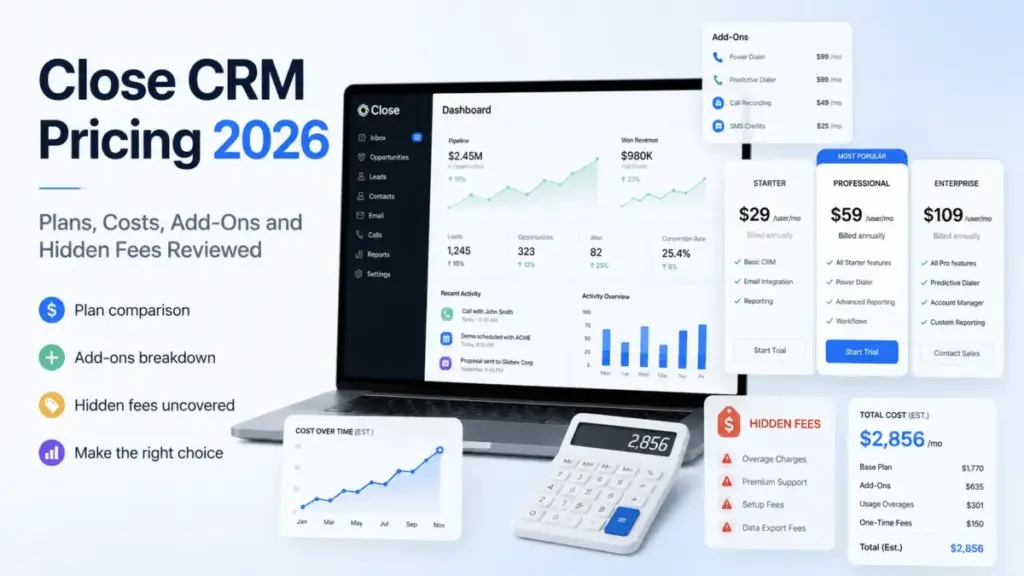
Close CRM pricing starts at $9 per user per month on annual billing, and that is the least useful number on the price card. Solo caps at exactly one user and 10,000 leads, so the second hire moves you to Essentials at $35 per seat.
The plan most outbound teams end up on is Growth at $99 per user per month billed annually, because workflows and the Power Dialer do not exist below it.
The bigger issue is that seats are only one of three bills. Calling minutes, phone numbers, SMS units, and AI credits are metered separately, and the official pricing page does not add them up for you.
I checked every figure in this guide against Close’s own pricing, help, developer, and legal pages on July 30, 2026. In the five-seat model below, the real monthly bill lands at $650, or $130 per seat, against a $99 list price.
Quick Pricing Verdict
| Question | Answer (verified July 30, 2026) |
|---|---|
| Starting price | $9 per user per month billed annually; $19 billed monthly (Solo, one user maximum) |
| Free plan | None. 14-day trial, no card required, then the account pauses or converts to paid |
| Best plan for most sales teams | Growth, $99 per user per month annually, because it is the first tier with workflows and the Power Dialer |
| Plan to avoid | Essentials, if you intend to automate follow-up. It includes calling and SMS but no workflows |
| Biggest hidden cost | Metered telephony plus AI credits. Included credits stop growing after the tenth seat |
| Largest fixed add-on | Premium Support, starting at $750 per month, which is 4.3x a five-seat Essentials license bill |
| Best alternative if too expensive | Freshsales or Zoho CRM entry tiers, with the caveat that neither bundles a native power dialer |
| Annual discount | 52.6% on Solo, 28.6% on Essentials, 9.2% on Growth, 6.7% on Scale (calculated from list prices) |
Close is a paid-only product with no free tier, so the trial is your only zero-cost evaluation window. Anyone comparing it against the field should start from the best CRM software options and narrow by whether native calling is a requirement or a nice-to-have.
Every Close CRM pricing figure below is a US list price in USD. Close can change them without notice, so re-check the official page before you sign anything.
Executive Summary: Close CRM TCO at 5, 10, and 20 Users
Seat licenses account for roughly 76% of the modeled bill at five seats and 76% again at twenty. The rest is telephony, transcription, and AI, which is why Close CRM pricing cannot be read off a per-seat table.
Every row below is a model built from official rates, not an observed invoice. Assumptions are printed in full so you can change them.
| Team size | Plan | Modeled monthly total | Modeled annual total | Effective cost per seat | Premium over list seat price |
|---|---|---|---|---|---|
| 1 | Solo | $16 | $192 | $16.00 | +78% |
| 5 | Growth | $650 | $7,800 | $130.00 | +31% |
| 10 | Growth | $1,250 | $15,000 | $125.00 | +26% |
| 20 | Scale | $3,650 | $43,800 | $182.50 | +31% |
| 25 | Scale | $5,500 | $66,000 | $220.00 | +58% |
The pattern matters more than any single row. Advertised seat pricing understated the modeled per-seat bill by 26% to 78% across all five scenarios.
The 25-seat row is the outlier, and not because of headcount. It is the only row carrying an AI credit add-on and Premium Support, which together add $950 per month.
If you budget Close from the price card alone, plan on being wrong by a quarter to a third at team scale. That is the single number I would take into a finance conversation.
How Close Bills You: Three Separate Ledgers
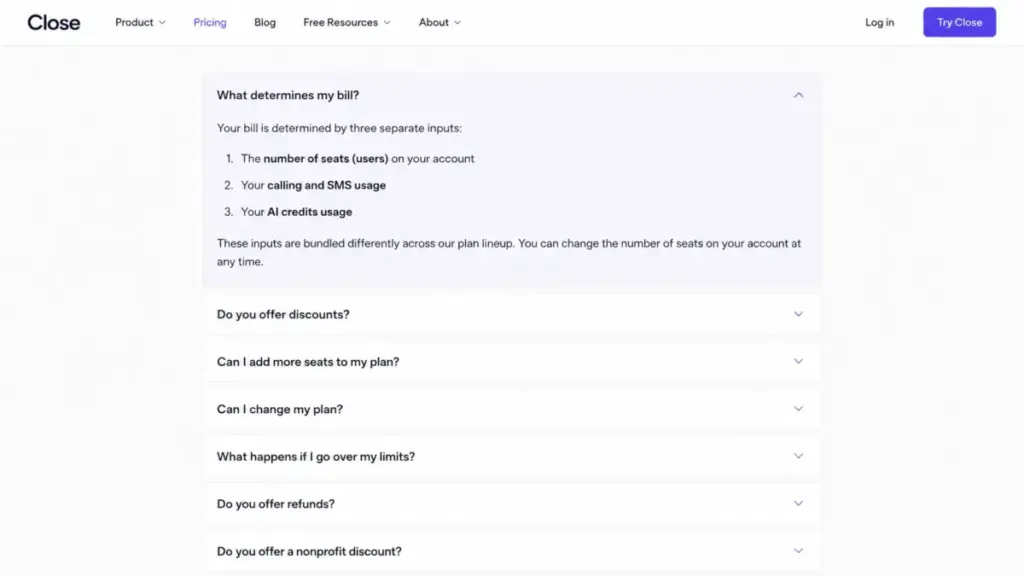
Close CRM pricing runs through three independent billing systems, and they do not appear on one line item. Understanding this before you compare vendors is the difference between a budget and a guess.
Ledger one is CRM seats. This is the per-user subscription for Solo, Essentials, Growth, or Scale, billed monthly or annually.
Ledger two is variable telephony usage. Calls, phone number rentals, SMS units, and MMS are metered and invoiced separately from your subscription, per Close’s variable usage cost documentation.
Ledger three is AI credits. Each plan includes a monthly credit pool, and anything beyond it requires a separate AI credit subscription.
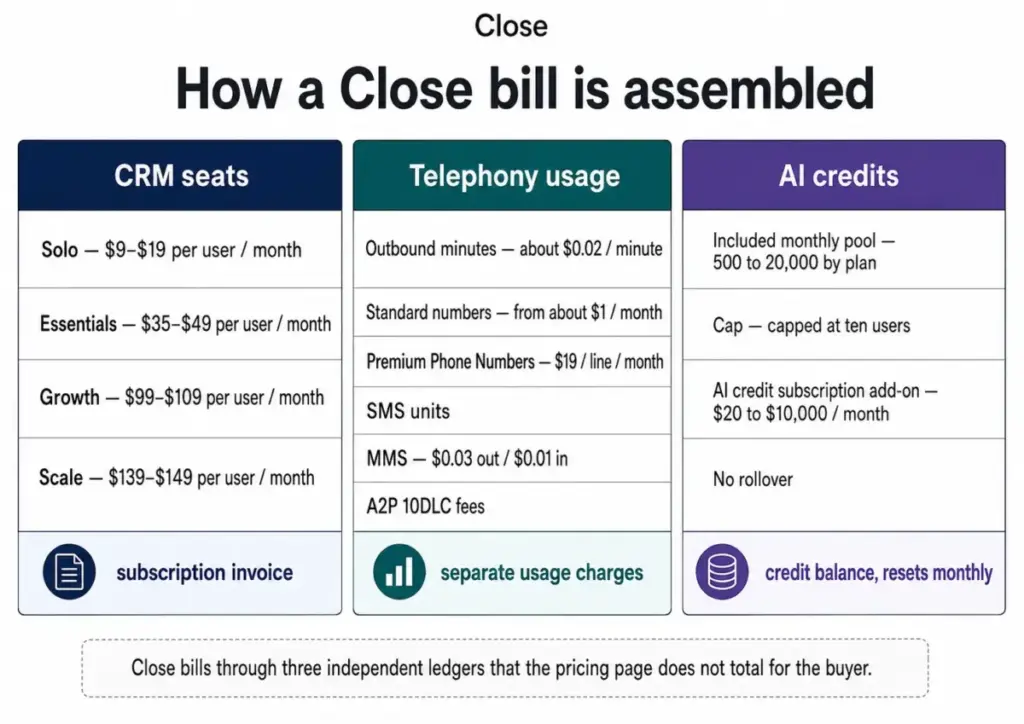
The practical consequence shows up in reconciliation. A finance team expecting one predictable subscription line will instead see a fixed seat charge plus a variable usage charge that moves with call volume.
For a phone-heavy team, ledger two is not a rounding error. In the 20-seat model above, telephony and transcription reached $870 per month against $2,780 in licenses.
If your buying process requires a single fixed monthly number, Close will not give you one. Budget a usage envelope and monitor it monthly.
Close CRM Pricing Plans Compared
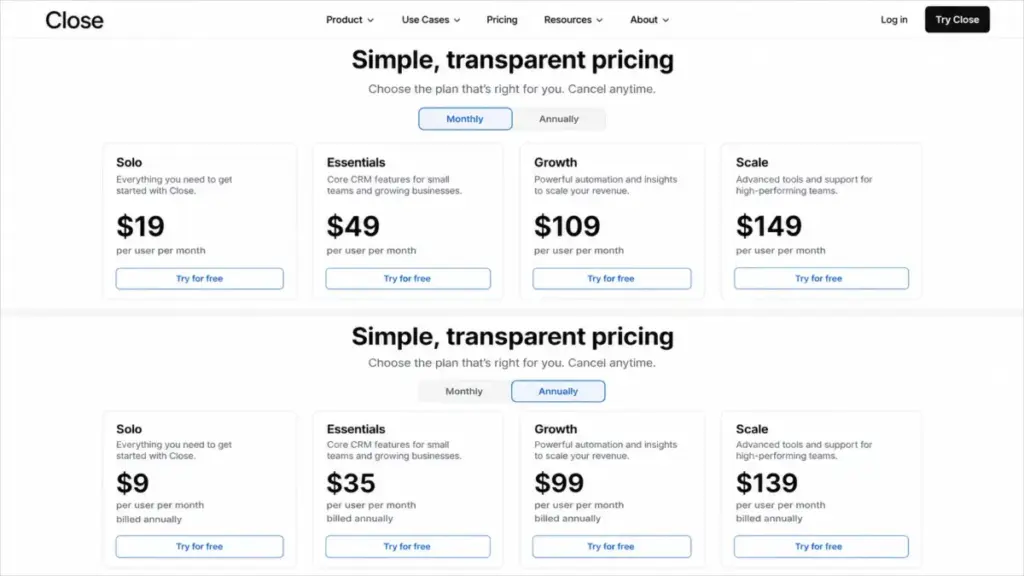
Close publishes four self-serve plans plus custom pricing, all per user per month in USD.
| Plan | Monthly | Annual (per month equivalent) | Billing basis | Best for | Key limits |
|---|---|---|---|---|---|
| Solo | $19 | $9 | Per user, per month | One founder running outbound alone with a finite B2B list | Maximum one user; 10,000 leads; 500 AI credits; no workflows; 3 connected email accounts; 30-day recording retention |
| Essentials | $49 | $35 | Per user, per month | 2-10 seat inside-sales teams that need shared calling, email, and SMS but not automation | Unlimited leads; 1,000 AI credits per user capped at 10,000; no workflows; no Power Dialer; 3 connected email accounts; 30-day recording retention |
| Growth | $109 | $99 | Per user, per month | 5-25 seat SDR and inside-sales teams running automated sequences and dialing lists | 1,500 AI credits per user capped at 15,000; 10 connected email accounts; 250 custom activity types; 50,000 custom activity instances per month; 90-day recording retention |
| Scale | $149 | $139 | Per user, per month | High-volume outbound organizations needing predictive dialing and role-based control | 2,000 AI credits per user capped at 20,000; 10 connected email accounts; 50,000 custom activity instances per month; unlimited recording retention |
| Custom | Not published | Not published | Negotiated | Complex requirements or larger commitments | Terms not publicly disclosed; request a written quote |
The four public tiers span a 15.4x range on annual pricing, from $9 to $139 per seat. That spread is unusual for a single CRM product and it reflects packaging, not scale discounts.
Solo is a single-operator license rather than a cheap team plan. Essentials is the first multi-seat tier, and Growth is where the product starts behaving like a sales engagement platform.
Stale plan names and prices still circulating in 2026
Several pages that rank for Close CRM pricing and carry 2026 update stamps still publish retired packaging. Checking them against the official Close pricing page on July 30, 2026 produced these corrections.
| Claim still appearing on 2026-dated pages | Verified position, July 30, 2026 |
|---|---|
| Plans named Base, Startup, Professional, or Enterprise | Retired. The current tiers are Solo, Essentials, Growth, and Scale |
| Monthly prices of $12, $45, $129, and $179 | Official monthly prices are $19, $49, $109, and $149 |
| A block of included calling minutes with each plan | No included-minute allowance is published. Calling is metered separately |
| Call recording sold as a $50 monthly add-on | Recording is included with tiered retention. The $50 add-on is Call Assistant, which is transcription and summaries |
| Enrichment billed at $0.05 per field | Current enrichment documentation bills 5 AI credits per run. The older per-field wording still exists on another Close page |
Three of the ten top-ranking pages I reviewed carried retired plan names. If a guide still says Startup or Professional, its cost math cannot be reconciled with a 2026 quote.
What Each Close Plan Includes
Solo: $9 to $19 per user per month
Best for: a single founder or consultant working a defined B2B list under 10,000 leads who wants calling, email, and SMS in the same record.
Includes: lead and opportunity management, two-way email sync, native calling and SMS, Smart Views, the shared Inbox, 250 custom fields, 3 connected email accounts, 500 AI credits per month, and 30-day call recording retention.
Missing: workflows, bulk email, Power Dialer, custom activities, custom objects, and advanced reporting.
Avoid if: you expect a second user within the year. Solo is capped at one seat, so growth forces a plan change rather than a seat addition.
Solo at $108 per year is the cheapest legitimate entry into the product. It is also the only tier where the annual discount is dramatic, at 52.6%.
Essentials: $35 to $49 per user per month
Best for: 2-10 seat inside-sales teams that want every rep calling, emailing, and texting from one shared pipeline without building automation.
Includes: everything in Solo plus unlimited leads and contacts, team collaboration, multiple pipelines, email tracking, forms, and 1,000 AI credits per user capped at a 10,000 credit pool.
Missing: workflows, Chloe in Workflows, Power Dialer, bulk email, and custom activities. Connected email accounts stay at three, and recording retention stays at 30 days.
Avoid if: automated follow-up sequences are part of the plan. Essentials has the communication tools and none of the orchestration.
This is the tier I see teams regret. They buy the calling and then discover the follow-up has to be manual.
Growth: $99 to $109 per user per month
Best for: 5-25 seat SDR and inside-sales teams running multi-step outbound with a dialing list.
Includes: workflows, Chloe in Workflows, the Power Dialer, bulk email, custom activities (250 types, 50,000 instances per month), 10 connected email accounts, 1,500 AI credits per user capped at 15,000, one included secondary organization, and 90-day recording retention.
Missing: Predictive Dialer, live call coaching, role-based permissions, lead visibility controls, custom objects, and custom graphs or Explorer reporting.
Avoid if: you need field-level permissioning or custom objects on day one. Those sit on Scale, and the gap is not closable with configuration.
The jump from Essentials to Growth costs $64 per seat per month annually, or $7,680 per year for a ten-seat team. What you buy is the automation layer, and for an outbound team that is the product.
Scale: $139 to $149 per user per month
Best for: high-volume outbound organizations with team leads who coach live and admins who need to restrict what reps see.
Includes: everything in Growth plus the Predictive Dialer, live call coaching, role-based permissions, lead visibility controls, custom objects, custom graphs or Explorer, Chloe access restrictions, 2,000 AI credits per user capped at 20,000, and unlimited recording retention.
Missing: nothing published on the self-serve comparison. Undisclosed enterprise terms sit behind custom pricing.
Avoid if: your team is under roughly eight reps and nobody is doing live coaching. The $40 annual per-seat premium over Growth buys administrative control, not more selling capacity.
Scale is an admin and dialing upgrade. I would only approve it when at least two of the trigger conditions later in this guide are already true.
Feature Gates by Plan
Close gates capability by tier rather than by usage volume, which makes plan selection a feature question first and a headcount question second.
| Gate | Solo | Essentials | Growth | Scale |
|---|---|---|---|---|
| Users | 1 maximum | Per seat | Per seat | Per seat |
| Leads | 10,000 | Unlimited | Unlimited | Unlimited |
| Workflows and automation | No | No | Yes | Yes |
| Bulk email | No | No | Yes | Yes |
| Power Dialer | No | No | Yes | Yes |
| Predictive Dialer | No | No | No | Yes |
| Live call coaching | No | No | No | Yes |
| Included AI credits per month | 500 | 1,000 per user, 10,000 cap | 1,500 per user, 15,000 cap | 2,000 per user, 20,000 cap |
| Chloe in Workflows | No | No | Yes | Yes |
| Connected email accounts | 3 | 3 | 10 | 10 |
| Custom activity instances per month | Not included | Not included | 50,000 | 50,000 |
| Call recording retention | 30 days | 30 days | 90 days | Unlimited |
| Custom objects | No | No | No | Yes |
| Custom graphs / Explorer | No | No | No | Yes |
| Role-based permissions and lead visibility | No | No | No | Yes |
| Included secondary organization | No | No | 1 | 1 |
| REST API access | Yes | Yes | Yes | Yes |
| Support | Email, business hours | Email, business hours | Email, business hours | Email, business hours |
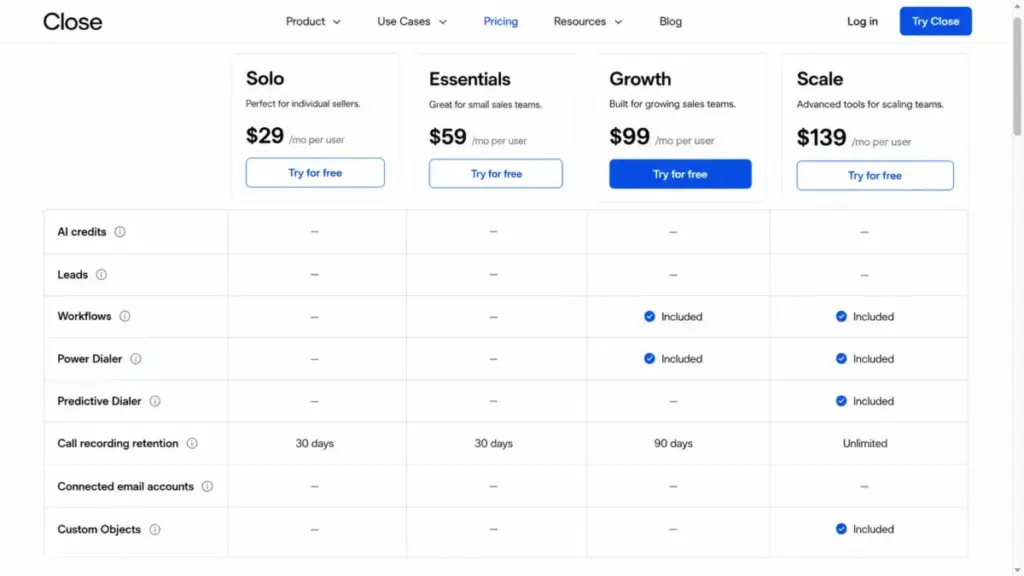
Two gates decide most purchases. Workflows and the Power Dialer both start at Growth, and predictive dialing plus permissions both start at Scale.
Support is the gate nobody notices. Every self-serve tier gets the same email queue during business hours, so paying for Scale buys no support upgrade at all.
Conflicting official limits on opportunities. Close’s pricing page describes up to 300 opportunities per Lead, while its opportunities help page states 1,000. Both are official and they disagree. If your data model needs more than 300 opportunities against a single Lead record, get the supported figure in writing from Close before you design around it.
Line-Item Cost Breakdown: Every Billable Item
This is the full list of charges Close publishes outside the seat price. Nothing here is estimated except where the label says so.
| Billable item | Published cost | What triggers it |
|---|---|---|
| Outbound calling | About $0.02 per minute for common outbound destinations; rates vary by destination | Any call placed through Close |
| Standard phone number | From about $1 per number per month; varies by number type and country | Leasing a Close number |
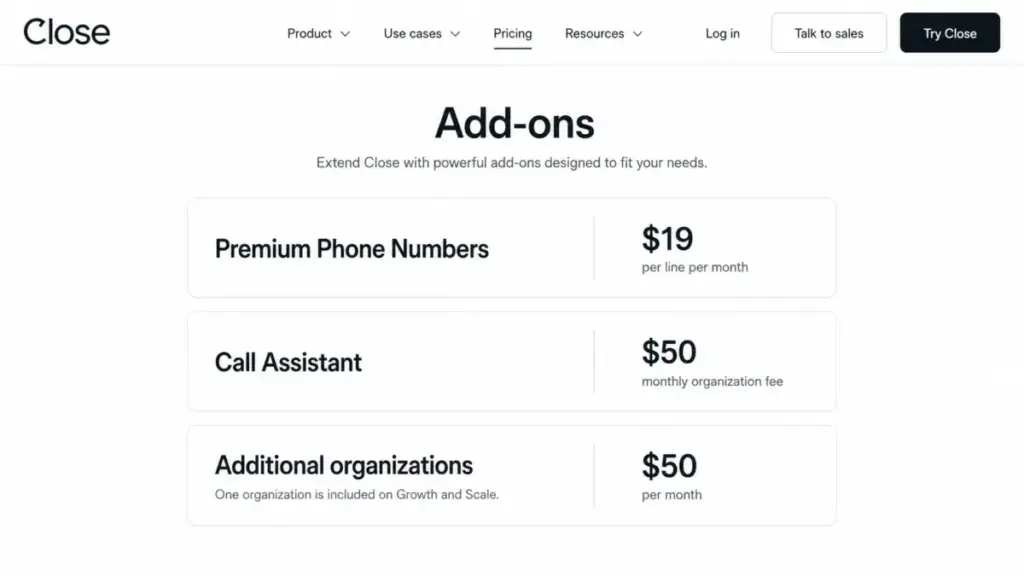
| Premium Phone Numbers | $19 per line per month | Needing IVR, lead-based routing, menus, or round-robin routing |
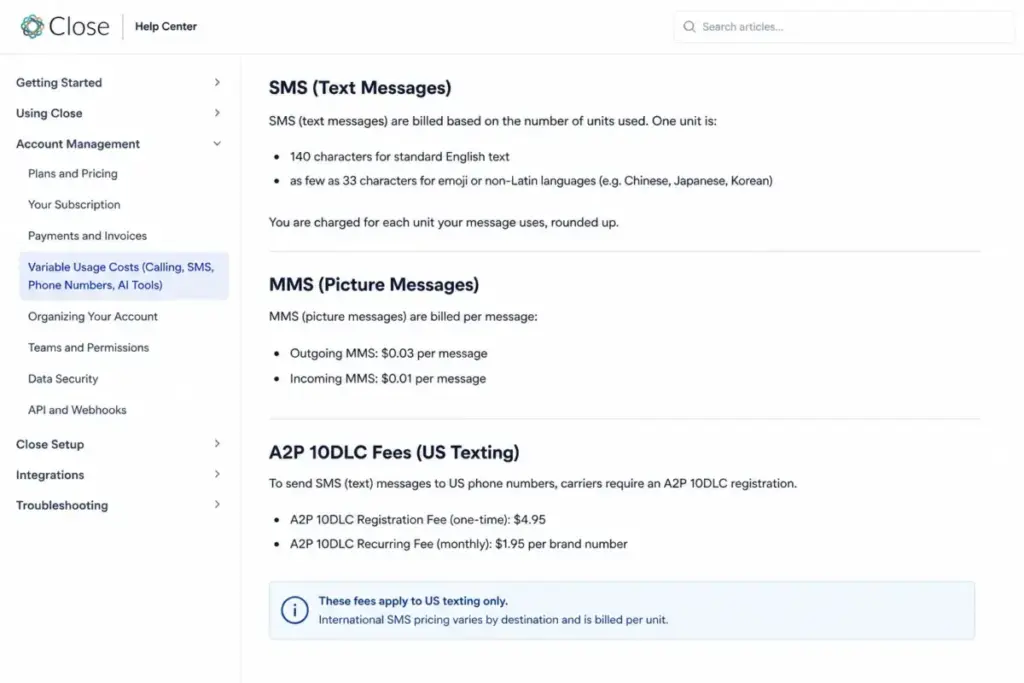
| SMS | Metered at pass-through rates, billed per unit rather than per visible message | Sending or receiving SMS |
| MMS (US and Canada) | $0.03 outgoing, $0.01 incoming | Sending or receiving MMS |
| A2P 10DLC registration | $4 low-volume standard or sole proprietor; $44 standard high-volume; plus $15 campaign verification | US business texting on ten-digit long codes |
| A2P 10DLC recurring | $1.50 low-volume; $2 sole proprietor; $10 above 6,000 message segments per month | An approved US messaging campaign |
| Call Assistant | $50 per organization per month plus $0.02 per transcribed minute | Turning on transcription and call summaries; only calls over 30 seconds transcribe |
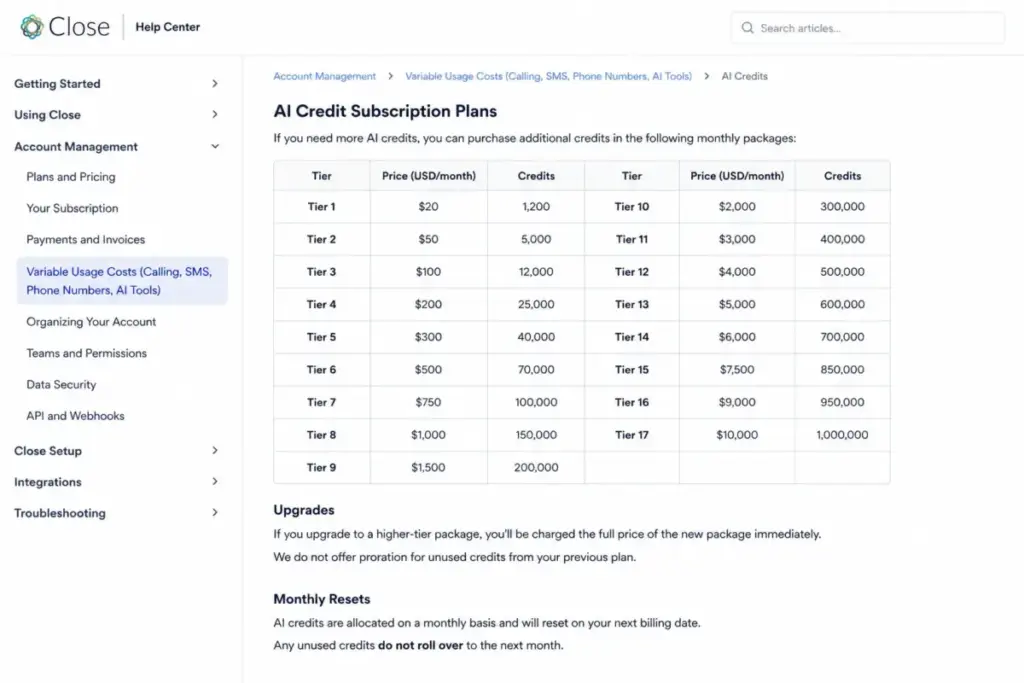
| AI credit subscription | $20 for 1,200 credits up to $10,000 for 1,000,000 credits per month | Exhausting the included credit pool |
| Additional organizations | $50 per organization per month; Growth and Scale include one secondary organization | Separating brands, clients, or business units |
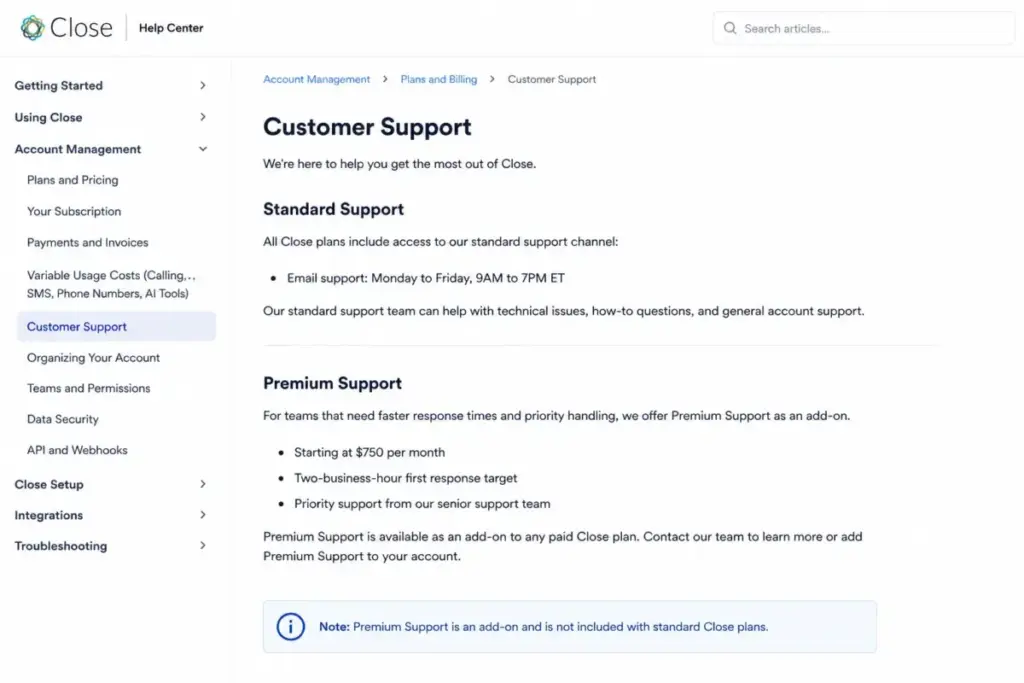
| Premium Support | Starts at $750 per month | Wanting a dedicated senior queue, screen shares, a customizable SLA, and 2-business-hour first response |
| Call coaching joined-call usage | About $0.004 per minute at the documented rate | Scale users joining or barging into live calls |
| Dedicated email sending service | Third-party fee, not published by Close | Needing capacity or deliverability infrastructure beyond your mailbox provider |
| Connector subscriptions | Third-party fee, varies by provider and task volume | Using Zapier, Make, or similar for non-native integrations |
| Custom enterprise terms | Not publicly disclosed | Negotiated scope, larger commitments, or professional services |
Fifteen separate billable items sit outside the seat price, and eleven of them scale with usage rather than headcount. That asymmetry is why a per-seat comparison against a cheaper CRM tells you almost nothing.
Two items deserve early attention because they are fixed and easy to forget. Call Assistant carries a $50 monthly floor per organization, and a second organization costs another $50.
Call Assistant at three volumes
Transcription pricing has a fixed floor and a variable tail, so its effective rate falls as call volume rises.
| Transcribed minutes per month | Fixed fee | Usage at $0.02 per minute | Total | Effective cost per minute |
|---|---|---|---|---|
| 1,000 | $50 | $20 | $70 | $0.070 |
| 5,000 | $50 | $100 | $150 | $0.030 |
| 25,000 | $50 | $500 | $550 | $0.022 |
A low-volume team pays 3.2x more per transcribed minute than a high-volume team for the same feature. Below roughly 2,500 monthly minutes, the $50 floor dominates and transcription is poor value.
Only calls longer than 30 seconds transcribe, so heavy no-answer dialing does not inflate this line as much as raw dial counts suggest.
Calling and SMS Costs: How the Telephony Ledger Works
Close resells telephony at pass-through rates, which means it publishes typical figures rather than a fixed rate card. Most outbound calls run about $0.02 per minute and standard numbers start near $1 per month, as of July 30, 2026.
Destination-specific rates change, so treat any per-minute figure as a planning input rather than a contract term.
Forwarded and transferred calls bill more than one leg
A conversation is not always one billable call. Forwarding and transfers create additional legs, and each leg meters independently.
| Call path | Billable legs | Cost formula at $0.02 per minute |
|---|---|---|
| Rep dials a prospect directly | 1 | minutes x $0.02 |
| Inbound call forwarded to a rep’s mobile | 2 (inbound leg plus forwarding leg) | minutes x $0.02 x 2 |
| Inbound call answered then warm-transferred | 3 (inbound, transfer leg, connected leg) | varies by overlap; budget 2-3x the talk time |
A five-minute forwarded call can bill closer to ten minutes than five. Teams that route inbound to mobiles should assume their real per-minute cost is double the published rate.
SMS is billed by character unit, not by message
Close bills text by unit. An English message unit is 140 characters, and units containing emojis or non-Latin characters can drop to as few as 33 characters.
| Message | Plain English | With an emoji or non-Latin characters |
|---|---|---|
| 140 characters | 1 unit | up to 5 units |
| 160 characters | 2 units | up to 5 units |
| 300 characters | 3 units | up to 10 units |
Adding a single emoji to a 300-character message can multiply its billable units by 3.3x. For a sequence sending 10,000 messages a month, that is a tripling of the SMS line with no change to the copy length.
I would ban emojis from any high-volume Close SMS template and cap message length at 140 characters where the copy allows it.
A2P 10DLC is a mandatory US launch cost
US business texting through ten-digit long codes requires carrier registration before you can send. The fees are small but the approval step affects launch timing.
| Registration path | One-time cost | Recurring | First-year total |
|---|---|---|---|
| Low-volume standard | $4 registration plus $15 campaign verification = $19 | $1.50 per month | $37.00 |
| Sole proprietor | $4 registration plus $15 campaign verification = $19 | $2.00 per month | $43.00 |
| Standard high-volume (above 6,000 segments per month) | $44 registration plus $15 campaign verification = $59 | $10.00 per month | $179.00 |
First-year A2P cost ranges from $37 to $179 depending on volume tier. That is trivial against license spend, but the registration and approval sequence is not something you can compress on the week you want to launch.
Close’s terms also place TCPA, Do Not Call, CAN-SPAM, telemarketing, and call-recording compliance on you, not on Close. Sales teams running consumer outbound should budget legal review alongside the platform.
Close AI Credits and Chloe: The Third Ledger
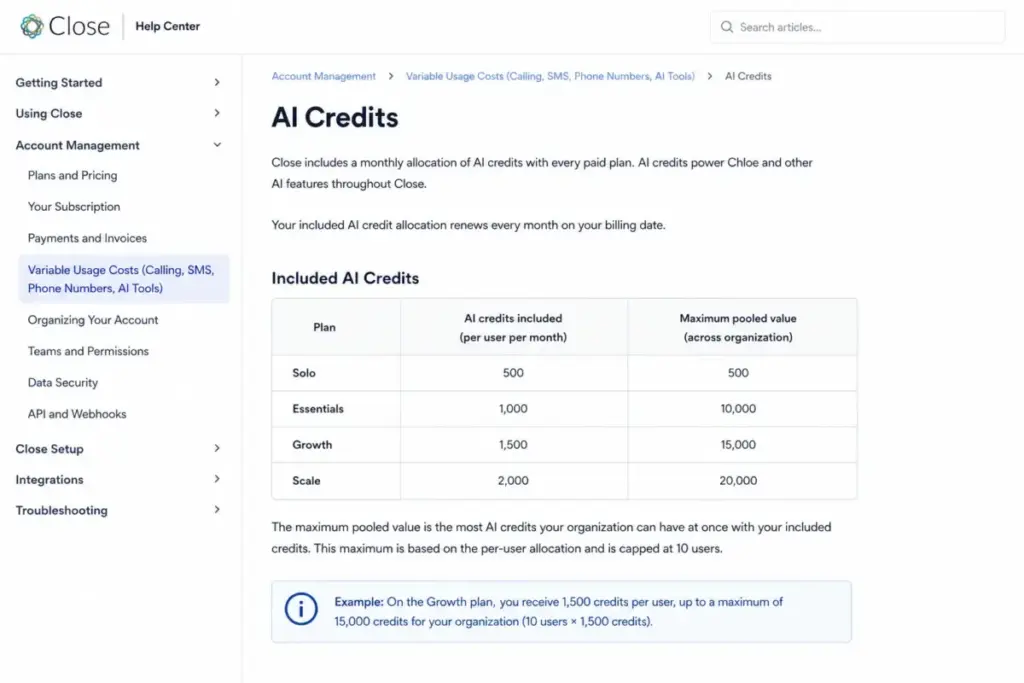
Chloe is Close’s AI layer, and it runs on a monthly credit pool rather than a flat AI seat fee. Each plan includes credits, and the pool resets every month.
Three mechanics in Close’s AI credits documentation change the cost picture, and none of them appear in the top-ranking pricing guides.
Included credits stop scaling at ten users
Per-user credit allocations are capped at ten users. Seats eleven and beyond add no credits to the pool.
| Team size | Essentials pool | Growth pool | Scale pool |
|---|---|---|---|
| 1 seat | 1,000 | 1,500 | 2,000 |
| 5 seats | 5,000 | 7,500 | 10,000 |
| 10 seats | 10,000 | 15,000 | 20,000 |
| 25 seats | 10,000 | 15,000 | 20,000 |
| 50 seats | 10,000 | 15,000 | 20,000 |
A 25-seat Scale organization receives 800 credits per seat, down 60% from the 2,000 per seat a 10-seat organization gets. At 50 seats it is 400 per seat, an 80% reduction.
Any team above ten seats that intends to use Chloe at scale should assume an AI credit subscription is a permanent line item, not an overflow charge.
The AI credit subscription ladder
Close publishes 17 credit packages. Larger packages cost less per credit, and the spread is wide enough to matter.
| Package | Credits per month | Cost per credit | Cost of a 5-credit action |
|---|---|---|---|
| $20 | 1,200 | $0.0167 | $0.083 |
| $50 | 3,200 | $0.0156 | $0.078 |
| $100 | 7,000 | $0.0143 | $0.071 |
| $150 | 11,400 | $0.0132 | $0.066 |
| $200 | 16,000 | $0.0125 | $0.062 |
| $10,000 | 1,000,000 | $0.0100 | $0.050 |
Per-credit cost falls 40% from the entry package to the largest one. Close’s enrichment documentation equates 5 credits to $0.05, which only holds at the $10,000 tier; on the $20 package the same enrichment run costs about $0.083.
That gap is small per action and large per campaign. Enriching 20,000 records consumes 100,000 credits, which is exactly the $1,000 package; the same volume priced at entry-package rates would run about $1,667.
No rollover, no proration, no spending cap
Three billing behaviors compound. Credits reset monthly and do not roll over, so unused credits are lost.
Upgrading a package mid-cycle charges the full price of the new package without proration. Buying up early in a month is far cheaper than buying up on day 28.
There is no global or per-agent credit cap. Spend control means disabling agents, pausing workflows, or avoiding batch operations, not setting a budget limit.
I would start any team above ten seats on a deliberately small package, watch one full month of consumption, then size up once at the start of a billing cycle.
Chloe voice calls meter twice
A Chloe voice agent call consumes AI credits and telephony minutes at the same time. The credit charge covers the agent; the minute charge covers the phone call.
Modeling voice agents on credits alone understates the cost by the entire telephony leg. Any voice-agent business case needs both assumptions written down.
Enrichment billing is in transition. Close’s current enrichment documentation bills 5 AI credits per run. An older variable-usage page still describes $0.05 per enriched field. Treat the credit-based wording as current, and check the in-app meter before running a bulk enrichment job.
Annual vs Monthly Billing: The Real Savings Math
Close markets an annual discount on every tier, and the discount is real. What the marketing does not say is that its value varies by more than 45 percentage points across the four tiers.
| Plan | Monthly billing | Annual billing (monthly equivalent) | Saving per seat per month | Saving per seat per year | Discount |
|---|---|---|---|---|---|
| Solo | $19 | $9 | $10 | $120 | 52.6% |
| Essentials | $49 | $35 | $14 | $168 | 28.6% |
| Growth | $109 | $99 | $10 | $120 | 9.2% |
| Scale | $149 | $139 | $10 | $120 | 6.7% |
All figures are calculated from the list prices on Close’s pricing page as of July 30, 2026.
Solo saves 52.6% and Scale saves 6.7% for the same twelve-month commitment. On Growth and Scale, the absolute saving is a flat $10 per seat per month regardless of tier, so the percentage shrinks as the price rises.
The commitment cost is not symmetrical either. Monthly plans can change at any time, while annual downgrades and cancellations take effect at the end of the term.
Close offers a 30-day money-back guarantee, which protects a bad first month but not months two through twelve. A 25-seat Scale annual commitment is $41,700 in licenses, and month six is not the moment to discover the fit is wrong.
My rule here is split by tier. On Solo and Essentials, take the annual discount, because the savings are material.
On Growth and Scale, pay monthly for the first quarter and confirm adoption. Then switch to annual at renewal, giving up $10 per seat for the option to leave.
Close also states that accounts of ten or more users with a twelve-month or longer commitment can qualify for custom discounts. The percentage is not published, so ask for it in writing before you sign at list price.
Real Cost Scenarios: 1, 5, 10, 20, and 25 Users
Every scenario below is modeled from published rates against stated assumptions, not from an invoice. Change the minute counts and the totals move.
| Team size | Plan | Licenses | Numbers | Calling | Call Assistant | AI add-on | Support | Monthly total | Annual total |
|---|---|---|---|---|---|---|---|---|---|
| 1 | Solo | $9 | $1 | $6 | Not enabled | None | Standard | $16 | $192 |
| 5 | Growth | $495 | $5 | $50 | $100 | None | Standard | $650 | $7,800 |
| 10 | Growth | $990 | $10 | $100 | $150 | None | Standard | $1,250 | $15,000 |
| 20 | Scale | $2,780 | $20 | $400 | $450 | None | Standard | $3,650 | $43,800 |
| 25 | Scale | $3,475 | $25 | $500 | $550 | $200 | $750 | $5,500 | $66,000 |
Assumptions, stated in full: annual-billed seat prices; one standard number per seat at about $1 per month; outbound calling at about $0.02 per minute; 300 minutes for the solo row, 500 minutes per rep for the 5-seat and 10-seat rows, and 1,000 minutes per rep for the 20-seat and 25-seat rows; Call Assistant transcribing all outbound minutes at $50 per organization plus $0.02 per minute; no SMS, no Premium Phone Numbers, no extra organizations, and no taxes. The 25-seat row adds one $200 AI credit package because included credits cap at 20,000, plus Premium Support.
The 10-seat row is the cheapest per seat at $125, because it captures the maximum included AI pool without triggering an add-on. The same team at 25 seats pays $220 per seat, a 76% increase in per-seat cost for a 150% increase in headcount.
That non-linearity is the finding I would put in front of a CFO. Close gets cheaper per seat up to ten users and more expensive per seat after that.
A five-seat team should budget $7,800 per year and treat $99 per seat as roughly two-thirds of the real cost. Teams evaluating this against a lighter-weight option should read the Close CRM review for the workflow side of the decision.
Which Close Plan Should You Choose?
Close CRM pricing decisions follow capability gates, not headcount. Work down this list and stop at the first row that matches.
| Your situation | Cheapest viable plan | Annual cost per seat | Why |
|---|---|---|---|
| One person, B2B list under 10,000 leads, manual follow-up | Solo | $108 | Only tier priced for a single operator; hard one-user cap |
| 2 or more reps sharing calls, email, SMS, and pipeline, follow-up handled manually | Essentials | $420 | First multi-seat tier; unlimited leads; no automation |
| Automated sequences or dialing through a call list | Growth | $1,188 | Workflows, Chloe in Workflows, Power Dialer, and bulk email all start here |
| Predictive dialing, live coaching, rep-level visibility limits, or custom objects | Scale | $1,668 | These five controls exist only on Scale |
| Undisclosed enterprise requirements or a large multi-year commitment | Custom | Not published | Negotiated terms; request a written quote |
Recommendations by buyer type
Solo founder or consultant. Solo at $108 per year, with one number and modest calling, lands near $192 all-in. Move to Essentials the month you hire, not before.
2-10 seat inside-sales team without automation. Essentials at $35 per seat annually. Five seats plus a number each and 500 minutes per rep models at roughly $232 per month.
5-25 seat SDR team. Growth. I would not put an outbound team on Essentials, because the sequence engine they need is the thing Essentials withholds.
High-volume outbound organization. Scale, but only when the trigger checklist below is already true.
The Scale upgrade trigger checklist
Two or more of these should be true before paying the $40 annual per-seat premium over Growth.
- Reps dial a list large enough that predictive dialing beats power dialing.
- A team lead needs to listen to and coach live calls.
- Reps must be prevented from seeing leads they do not own.
- Your data model needs custom objects, not custom fields.
- Reporting requires custom graphs or Explorer rather than standard reports.
- You need call recordings retained beyond 90 days for compliance or dispute handling.
Only one of these true means Growth plus a workaround is usually cheaper. Three or more means Scale is the honest answer.
For teams still deciding whether native calling justifies the premium at all, the best CRM for sales teams roundup frames that tradeoff against lighter alternatives.
The head-to-head most Close buyers run is against HubSpot, and the HubSpot vs Close comparison sets the two packaging models side by side.
Which Close Plan Should You Avoid?
Essentials, if automation is anywhere in your plan. It includes calling, SMS, email tracking, multiple pipelines, and team collaboration, then withholds workflows entirely.
The buyer failure looks like this. A team buys five Essentials seats at $35, builds a manual follow-up habit, then discovers at month two that sequences require Growth at $99.
That is a $64 per seat per month correction, or $3,840 per year for five seats, on top of whatever the manual process cost in rep time. Understanding what sales automation replaces before you pick a tier prevents this specific mistake.
Essentials still fits one profile. A small account-management or relationship-selling team that calls and emails from a shared pipeline, with no sequences and no dialing lists, gets real value at $35 per seat.
Solo is not a cheap team plan. The one-user cap means a second person moves you from $108 per year to $840 per year for two Essentials seats, a 7.8x jump in license spend.
Close CRM Pricing vs Competitors
Entry prices across this category are not comparable, because Close bundles a dialer and most rival entry tiers do not.
| Product | Entry price | Free tier | Practical tier for a 10-seat sales team | 10-seat monthly license cost at that tier | Native calling included |
|---|---|---|---|---|---|
| Close | $9 per user annually (Solo, 1 seat) | None; 14-day trial | Growth, $99 per user annually | $990 | Yes, plus metered usage |
| HubSpot Sales Hub | $7 per seat per month annually (Starter) | Free for up to 2 users | Starter or above; Professional and Enterprise carry required onboarding fees | $70 at Starter | Not on equivalent terms |
| Zoho CRM | $14 per user per month annually (Standard) | Free for 3 users | Standard or above | $140 at Standard | Not on equivalent terms |
| Salesforce Starter Suite | $25 per user per month | None published at this tier | Starter Suite for a small team | $250 | Not on equivalent terms |
| Freshsales | $9 per user per month annually (Growth) | Free for up to 3 users | Growth or above | $90 at Growth | Not on equivalent terms |
Close Growth licenses cost 14.1x HubSpot Sales Hub Starter, 11.0x Freshsales Growth, 7.1x Zoho CRM Standard, and 4.0x Salesforce Starter Suite for the same ten seats.
Those multiples are real and misleading at the same time. None of the four entry tiers includes a power dialer, predictive dialing, live call coaching, or native SMS on the terms Close ships, so the comparison prices different products.
The honest version is narrower. If your reps live on the phone, Close Growth replaces a CRM plus a dialer plus a texting tool, and the combined cost of those three elsewhere closes much of the gap.
If your reps live in email, Close is expensive for what you will use. For that profile I would take Freshsales or Zoho CRM and spend the difference on email infrastructure.
One caveat on the HubSpot row: Professional and Enterprise carry required onboarding fees, which the HubSpot pricing breakdown covers in detail.
Salesforce buyers should check the Salesforce pricing plans before treating $25 per user as the finished number.
Support, API, and Automation Limits That Affect Cost
Three ceilings sit outside the pricing table and change what Close costs to operate.
Support is email-only until you pay $750
Standard support on every self-serve plan is email, Monday to Friday, 9AM to 7PM ET, excluding listed US holidays. Premium Support starts at $750 per month and adds a dedicated senior queue, screen-share appointments, a customizable SLA, and a two-business-hour first-response target.
| Comparison | Monthly license cost | Premium Support as a multiple |
|---|---|---|
| 5 seats, Essentials, annual-billed | $175 | 4.3x |
| 5 seats, Growth, annual-billed | $495 | 1.5x |
| 5 seats, Scale, annual-billed | $695 | 1.1x |
For a five-seat Essentials team, faster support costs 4.3x the entire license bill. Close’s customer support documentation confirms both the standard hours and the Premium starting price.
Small teams should treat Premium Support as an enterprise line item and plan around business-hours email instead. If a two-hour response is a hard requirement for a five-person team, Close is not priced for you.
Email volume is capped by your mailbox provider, not by Close
Close sends through your connected SMTP provider, so Gmail and Microsoft 365 sending limits still apply after you buy Growth. Bulk email in Close does not override them.
Teams needing higher volume can connect a dedicated sending service such as Mailgun or SendGrid, at that provider’s cost. Close does not publish the third-party fee, so it is an unbudgeted line for anyone assuming built-in email means unlimited email.
Workflow and API throughput have separate ceilings
Workflows are rate-limited when a large number of trigger events fire at once, and runs can be delayed or paused. A bulk import that touches 50,000 records will not fire 50,000 sequence enrollments instantly.
API limits apply per endpoint group, per API key, and per organization, with the organization limit currently set at three times the key limit for the same endpoint group. Clients must handle HTTP 429 responses, per Close’s API rate limit documentation.
For a RevOps team, this is an integration-design constraint rather than a cost, right up to the point where it becomes contractor time.
Migration, Cancellation, and Phone Number Risk
Switching costs are where CRM decisions go quietly wrong, and Close has one specific exit risk worth pricing in.
Close’s terms describe phone numbers as leased rather than owned, and state that numbers are not guaranteed and can be forfeited after a downgrade or termination. Losing a published inbound number is a business continuity event, not an IT ticket.
Migration into Close runs through an Import2-powered process that Close describes as normally free when initiated through Close, with administrator and supported-source conditions. That covers standard CRM-to-CRM moves, not custom object mapping or workflow rebuilds.
Exit checklist before you commit
- Ask Close in writing which of your numbers can be ported out and under what conditions.
- Document every published number before cancellation, including numbers on collateral and Google Business listings.
- Export call recordings before a downgrade, because retention drops from unlimited on Scale to 90 days on Growth and 30 days below that.
- Confirm whether an annual downgrade takes effect immediately or at term end, since annual changes apply at the end of the term.
- Export leads, contacts, opportunities, and custom activity data while the account is active.
Number portability is the item I would settle before signing an annual Scale contract. A general CRM migration guide covers the data side; the telephony side is specific to Close and needs a vendor answer.
Is Close CRM Worth the Price?
Close CRM pricing earns its premium for one profile and looks expensive to everyone else.
Worth it if your reps make outbound calls as their primary activity, you need sequences plus dialing plus texting in one record, and you are willing to run three billing ledgers. At ten Growth seats the modeled all-in cost of $1,250 per month replaces a CRM plus a dialer plus a texting platform.
Worth it if your team is at or under ten seats, because that is where included AI credits peak per seat and the per-seat total is lowest at $125.
Not worth it if email is your main channel. You will pay $99 per seat for a dialer nobody opens, and mailbox-provider limits still cap your sending.
The cheaper substitute for that profile starts around $9 per seat, and the Freshsales pricing details show what the tradeoff costs in dialer capability.
Not worth it if you sell to individual consumers with household or address-heavy records. Verified reviewer patterns on marketplaces including G2’s Close pricing page point to friction with company-centric records and person-level address visibility, alongside recurring confusion about how phone and text billing works.
Not worth it if you need a fixed monthly number for procurement. Two of the three ledgers are variable by design.
Who should skip Close entirely
Person-first B2C teams, field-service operations, and post-sale or support-led organizations should test the record model during the trial before spending anything. Close’s data model is built around Leads and companies with contacts attached, which is a strength in B2B and an obstacle when the person is the account.
Teams needing advanced reporting or custom objects below Scale should also look elsewhere, since no amount of configuration moves those features down a tier. Anyone in that position should start with the Close CRM alternatives shortlist rather than negotiating.
My verdict on Close CRM pricing: the product earns $99 per seat from a phone-led team of five to ten reps, and stops earning it the moment calling becomes optional in the workflow.
How to Avoid Overpaying for Close CRM
Seven adjustments that lower your Close CRM pricing without changing the plan.
- Stop at ten seats where you can. Included AI credits cap at ten users, so seat eleven adds cost without adding credits. If you can run outbound with ten licensed reps and unlicensed managers, do it.
- Pay monthly on Growth and Scale for the first quarter. The annual discount is only 9.2% and 6.7% at those tiers, which is a low price for the option to leave.
- Take the annual discount on Solo and Essentials. At 52.6% and 28.6%, those are the only two tiers where a twelve-month commitment pays for itself.
- Buy AI credits at the start of a billing cycle. Upgrades charge full price without proration, so a day-28 upgrade wastes most of the package.
- Cap SMS templates at 140 characters and remove emojis. A single emoji can push a 300-character message from 3 billable units to 10.
- Skip Call Assistant below 2,500 transcribed minutes per month. The $50 floor makes the effective rate $0.070 per minute at 1,000 minutes against $0.022 at 25,000.
- Ask for the volume discount in writing at ten or more seats. Close states that qualifying accounts on twelve-month or longer commitments can receive custom discounts, and the percentage is not published.
One more, for teams routing inbound to mobiles: forwarding creates a second billable leg. Answering in the app instead of forwarding halves that specific line.
Close CRM Free Trial: What 14 Days Buys You
Close offers a 14-day trial with no card required, full feature access, about $5 in calling and enrichment credit, and a fixed pool of 1,000 AI credits. After 14 days the account converts to a paid plan or pauses.
The trial AI pool is fixed rather than per user, which matters for evaluation teams. Five people testing Chloe share the same 1,000 credits, and a handful of enrichment runs and voice-agent tests will consume a visible share of it.
There is no free-forever tier, so anything you build during the trial has to be paid for or abandoned.
A trial plan that tests the expensive parts
- Build one complete workflow, since workflows are the reason to pay Growth rather than Essentials.
- Run one dialing session on the Power Dialer with a real list.
- Send one SMS sequence and check how many units the messages consumed.
- Run enrichment on a small batch and watch the credit meter before and after.
- If you sell B2C, import 50 real records and check whether the Lead and Contact structure fits.
Measure credit consumption during those five tasks and multiply by your expected monthly volume. That number, not the price card, tells you which plan you are buying.
FAQ
How much does Close CRM cost?
Close costs $9 to $139 per user per month on annual billing, or $19 to $149 billed monthly, across four plans: Solo, Essentials, Growth, and Scale. Calling, SMS, phone numbers, and AI credits beyond the included pool are billed separately. All prices verified on Close’s official pricing page on July 30, 2026.
Does Close CRM have a free plan?
No. Close has no free-forever tier. The only free option is a 14-day trial that requires no credit card and includes full feature access, roughly $5 in calling and enrichment credit, and 1,000 AI credits total. When the trial ends the account either converts to a paid plan or pauses until you choose one.
What is included in the Close Solo plan?
Solo at $9 per user per month annually covers one user and 10,000 leads, with lead and opportunity management, two-way email sync, native calling and SMS, Smart Views, the shared Inbox, 3 connected email accounts, 500 AI credits per month, and 30-day recording retention. Workflows, bulk email, and the Power Dialer are not included at this tier.
Which Close plan includes workflows?
Workflows start on Growth at $99 per user per month billed annually. Solo and Essentials include calling, email, and SMS but no workflow automation, which is the single most common upgrade trigger. Chloe in Workflows, bulk email, and custom activities also begin on Growth, so automation-led teams should budget Growth rather than Essentials from the start.
Which Close plan includes the Power Dialer?
The Power Dialer begins on Growth. The Predictive Dialer and live call coaching require Scale at $139 per user per month billed annually. Neither dialer is available on Solo or Essentials, so any team that dials from a call list is buying at least Growth regardless of headcount.
Does Close charge for calls and SMS?
Yes. Calling, SMS, MMS, and phone number rentals are metered separately from your subscription. Common outbound calls run about $0.02 per minute and standard numbers start near $1 per month, with rates varying by destination. US texting also requires A2P 10DLC registration, which adds $19 to $59 one-time plus $1.50 to $10 monthly.
How do Close AI credits work?
Each plan includes a monthly credit pool: 500 on Solo, 1,000 per user on Essentials, 1,500 on Growth, and 2,000 on Scale. Per-user allocations cap at ten users, so a 25-seat Scale account still receives 20,000 credits. Credits reset monthly with no rollover, and extra credits come from subscription packages starting at $20 for 1,200.
Is Close CRM cheaper when billed annually?
Yes, but the discount varies sharply by tier. Annual billing saves 52.6% on Solo, 28.6% on Essentials, 9.2% on Growth, and 6.7% on Scale, calculated from list prices. Growth and Scale save a flat $10 per seat per month, so the percentage falls as the plan price rises. Annual changes take effect at term end.
Can I cancel Close CRM at any time?
Monthly plans can be changed or cancelled at any time. Annual plans continue to the end of the term, and downgrades or cancellations apply then rather than immediately. Close offers a 30-day money-back guarantee. Confirm phone number portability before cancelling, because Close’s terms describe numbers as leased and not guaranteed after termination.
Is Close CRM worth it for a small sales team?
For a phone-led team of five to ten reps, yes. Ten Growth seats model at $1,250 per month all-in, or $125 per seat, replacing a separate CRM, dialer, and texting tool. For email-first teams the same $99 per seat buys capability nobody uses, and Freshsales or Zoho CRM entry tiers cover that workflow for a fraction of the cost.
Methodology and Sources
Every Close CRM pricing claim here is based on official documentation and pricing pages, not hands-on account testing. No Close account was created, no calls were placed, and no invoice was reviewed.
Research covered Close’s US pricing page and full plan comparison, billing and variable-usage documentation, the AI credit schedule, telephony and messaging fees, support plans, developer API documentation, security page, mobile and migration documentation, and legal terms. All pricing was checked on July 30, 2026 and stated in USD for the US market.
Third-party sources including G2, Capterra, TrustRadius, Software Advice, and GetApp were used only for buyer sentiment and recurring question patterns, never as a source for a price or a feature limit. Marketplace promotions, including a first-billing-cycle offer advertised on G2, are not standard vendor list pricing and are excluded from every table above.
Every total cost figure in this guide is a model built from published rates with its assumptions printed alongside it. Where official Close pages contradict each other, on opportunity limits and enrichment billing units, both positions are stated rather than resolved editorially.
Written by Alex Morrison, CRM analyst and sales technology consultant, for saaszap.com. No vendor reviewed this guide before publication.
Close can change its pricing at any time, so verify current figures on the official pricing page before you buy. Readers new to the category can start with what CRM software does before comparing tiers.