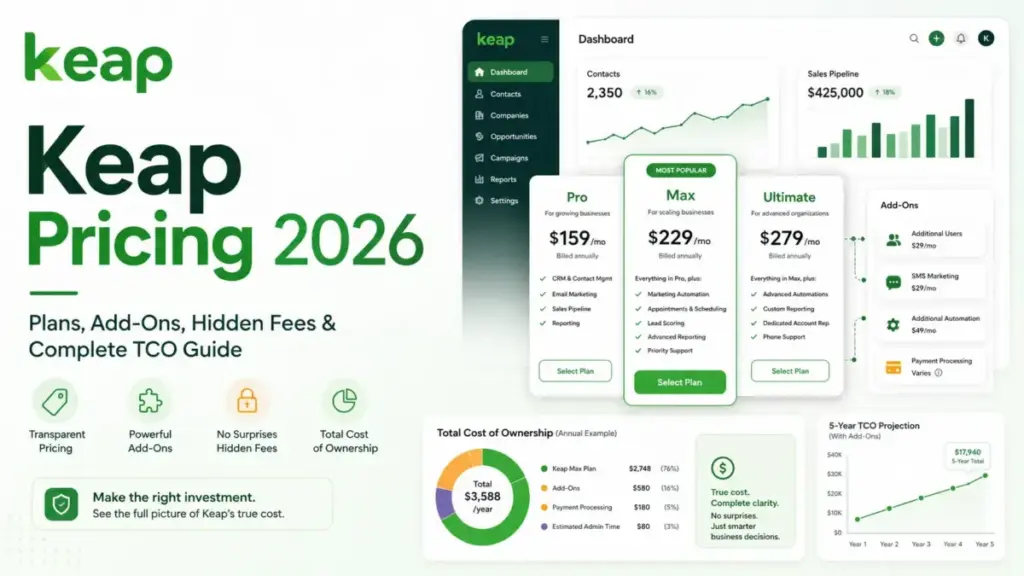
Keap pricing looks like a $249-per-month decision until you check the billing basis. That figure is the annual-prepay equivalent.
The monthly-billing price is $299.
Two user licenses and roughly 1,500 contacts come inside the subscription. Implementation is required, each extra seat adds $39 per month, and text messaging carries its own six-tier price ladder on top.
This guide rebuilds the entire bill: first-year cash cost at 2, 5, 10, and 25 users, every add-on and overage rate, and the cancellation terms other pricing pages skip.
It also names the volume threshold where one of the lighter sales CRM options saves a 10-person team more than $5,000 a year.
Quick Pricing Verdict
| Question | Answer (checked July 30, 2026) |
|---|---|
| Starting price | $299 per month on monthly billing, or $2,988 per year prepaid, equal to $249 per month |
| Free plan | No free plan. 14-day free trial, no credit card required |
| What the price includes | The complete platform, 2 users, typically 1,500 contacts, 500 messages, 100 voice minutes |
| Best configuration for a typical buyer | Annual billing plus Communications Tier 1, seats added only for reps who log in weekly |
| Configuration to avoid | Monthly billing, and Communications Tiers 2 through 4 |
| Biggest hidden cost | Required implementation, shown at $500 (reduced from $1,500) on July 30, 2026 |
| Second biggest | Contact growth past 1,500, priced in undisclosed tiers |
| Contract risk | $299 early termination fee on annual contracts, plus a 10-day phone cancellation notice |
| First-year cash cost, 2 users | $3,488 on annual billing, $4,088 on monthly billing |
| Best cheaper alternative | Pipedrive or Freshsales for pipeline-only teams, HighLevel for unlimited-seat agencies |
Every dollar figure above comes from Keap’s own pages, checked on a single day. Keap changes prices and runs promotions, so reconfirm the implementation amount and the contact band before you sign.
I did not open a Keap account for this guide. The numbers come from Keap’s official pricing page, its implementation and Business Line pages, its help center, its developer documentation, and its legal documents.
I cross-read those against current G2, Capterra, TrustRadius, and TechRadar coverage.
Keap Plans in 2026: One Platform, Not a Tier Ladder
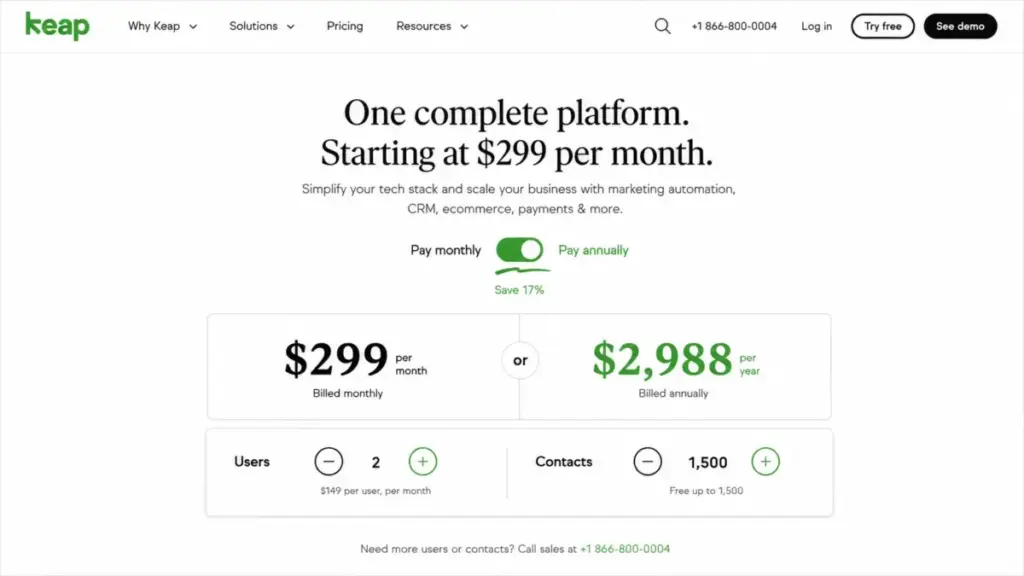
There is one public Keap plan for a new US purchase. Keap’s pricing page now sells the complete platform and no longer splits capability into feature-based tiers.
That single change breaks most of what is still indexed about Keap cost.
Stale pricing warning. Several pages ranking for Keap pricing still describe Pro, Max, Max Classic, or Ultimate as the current lineup. One of them was last updated in December 2022. The public page checked on July 30, 2026 presents one complete platform. Old tier prices and old per-user rates cannot budget a new purchase. Legacy Pro and Max prices apply only to existing contracts, and they do not tell you what a new purchase costs. The product was formerly called Infusionsoft, and Thryv, Inc. completed its acquisition of the business on October 31, 2024, which is why older directory records and current pricing sometimes disagree.
| What you are buying | Detail |
|---|---|
| Plan name | The complete Keap platform (no Pro, Max, or Ultimate selection) |
| Monthly billing | $299 per month |
| Annual billing | $2,988 per year, equal to $249 per month |
| Billing basis | Flat platform subscription, scaled by users and contacts |
| Included users | 2 |
| Included contacts | Typically 1,500 |
| Included messaging | 500 messages, 100 voice minutes, one toll-free number |
| Feature gates by plan | None. Cost is driven by seats, contacts, usage, and implementation |
The practical consequence is that you cannot buy a cheaper Keap by giving up automation or reporting. There is no downgrade path, only a smaller seat count and a smaller contact database.
For a two-person consultancy that wanted only contact storage and a pipeline, that is the core problem with Keap pricing. You are paying for marketing automation, a business phone line, invoicing, and checkout whether or not you switch them on.
Executive Summary: Keap TCO at 2, 5, 10, and 25 Users
| Team size | Extra seats | Seat cost/mo | Communications tier | Monthly equivalent | First-year cash cost | Effective cost per user/mo |
|---|---|---|---|---|---|---|
| 2 users | 0 | $0 | Tier 1 (included) | $249 | $3,488 | $124.50 |
| 5 users | 3 | $117 | Tier 2 ($24) + local number ($10) | $400 | $5,300 | $80.00 |
| 10 users | 8 | $312 | Tier 3 ($39) | $600 | $7,700 | $60.00 |
| 25 users | 23 | $897 | Tier 5 ($139) | $1,285 | $15,920 | $51.40 |
All four rows assume annual billing at $2,988, the $500 implementation amount shown on July 30, 2026, and a database inside the 1,500-contact allowance. They exclude tax, payment-processing fees, contact-band increases, message overages, and any third-party app subscription.
Keap gets cheaper per user as the team grows, which is the reverse of how most seat-priced CRMs behave. A two-person shop pays $124.50 per user per month; a 25-person team pays $51.40.
But here is the catch. The 25-user row is the least trustworthy number on this page.
A 25-person sales team almost certainly holds more than 1,500 contacts, and Keap does not publish what that costs.
The break-even inside the seat math is worth memorising: 6.4 extra users. At that point your seat surcharge equals the entire $249 base subscription, and Keap has quietly turned into a per-seat product.
Line-Item Cost Breakdown: Every Billable Item
| Line item | Price | When it hits you |
|---|---|---|
| Platform subscription | $2,988/year, or $299/month | Always |
| Extra user license | $39/user/month | Third licensed user onward |
| Implementation package | $500 one-time (shown reduced from $1,500) | Required at purchase |
| Additional contacts | Tiered, exact bands not published | Database passes ~1,500 contacts |
| Communications tier upgrade | $24, $39, $79, $139, or $279/month | Above 500 messages or 100 minutes |
| Message overage | $0.015 per message | Above your selected tier |
| Voice overage | $0.01 per minute | Above your selected tier |
| Extra 500-text block | $6/month | Optional top-up |
| Local business number | $10/month | You want a local rather than toll-free number |
| Payment processing | Processor’s standard rates, not published by Keap | You collect money through Keap Pay or a third-party processor |
| Annual early termination | $299 | You cancel an annual contract mid-term |
| Third-party automation platform | Not set by Keap | A connection you need runs through Zapier rather than natively |
| Extra migration or services | Not published | Migration passes 15 hours, or source data needs heavy cleanup |
Only three of those thirteen lines appear in Keap’s headline price. The rest are the difference between a $249 quote and a real budget.
Build your own figure from this formula rather than from any advertised number:
Real Keap bill = base subscription + ($39 x extra users) + contact-band increase + communications tier + overages + processor fees + first-year implementation
Two inputs in that formula are blank on purpose. Contact-band pricing and processor rates are not published.
Leave them blank in your own model and make Keap fill them in before you sign.
What the Keap Subscription Covers
The subscription is broad, and that breadth is the entire pricing argument.
Keap’s pricing page lists CRM and contact segmentation, lead scoring, a visual sales pipeline, landing pages, forms, funnels, email marketing, and an automation builder.
The same inventory adds appointment scheduling, quotes, invoices, checkout, recurring payments, a business phone line, SMS, a mobile app, reporting, an open API, and webhooks.
Includes: every listed platform capability, 2 users, typically 1,500 contacts, Communications Tier 1, US weekday phone support, 24/7 chat, a dedicated Customer Success Manager, and Thryv Academy training.
Missing: any way to pay less by using less of the platform, a free tier, a published contact-price ladder, and HIPAA-safe messaging.
Avoid if: your requirement list is contacts, deals, and email only, which is closer to what CRM software covers than to a full automation suite. At $2,988 a year you are funding an invoicing and telephony stack you will never open.
My read is that the bundle pays for itself only when a business would otherwise buy three or four tools. Replace a $39 scheduler, a $99 email platform, a $50 invoicing tool, and a $30 phone line, and the $249 base looks rational.
That substitution works only if you will run a real marketing automation platform rather than just store contacts.
Run that substitution honestly. If the tools you would cancel total less than $150 a month, the Keap bundle is not saving you money.
Feature Gates: The Limits That Drive Your Bill
With feature tiers gone, the gates moved somewhere less obvious. Keap now limits you by seats, contacts, usage volume, geography, and legal scope.
| Gate | Limit | Buyer consequence |
|---|---|---|
| User seats | 2 included, $39/month each after | Seat cost overtakes the base subscription at 6.4 extra users |
| Contacts | Typically 1,500 included, tiered above that | The one large cost variable Keap does not publish |
| Messages | 500/month included | Tier upgrade or $0.015 per message beyond it |
| Voice minutes | 100/month included | Tier upgrade or $0.01 per minute beyond it |
| Business phone lines | One line per Keap app, up to 5 outbound users | A 12-rep team cannot give every rep a Keap number |
| Text marketing | United States only | Blocks automated text campaigns for non-US audiences |
| One-to-one texts and dedicated line | United States and Canada | Cross-border teams need a separate messaging tool |
| Mobile app | US, Australia, Canada, UK, New Zealand | Reps outside those markets lose mobile access |
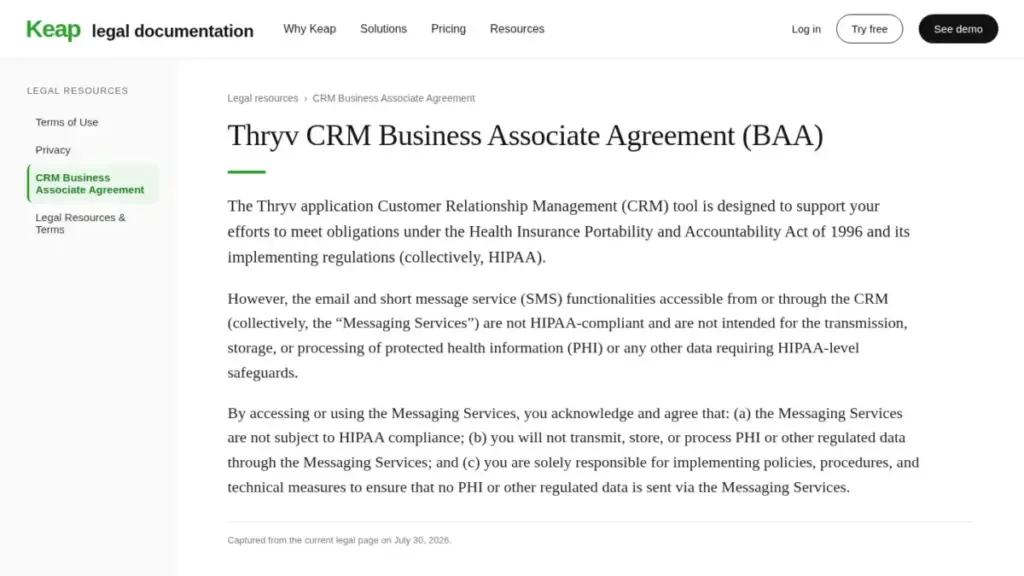
| HIPAA scope | CRM usable with controls and a BAA; messaging services excluded from PHI | Healthcare workflows cannot route PHI through Keap email or SMS |
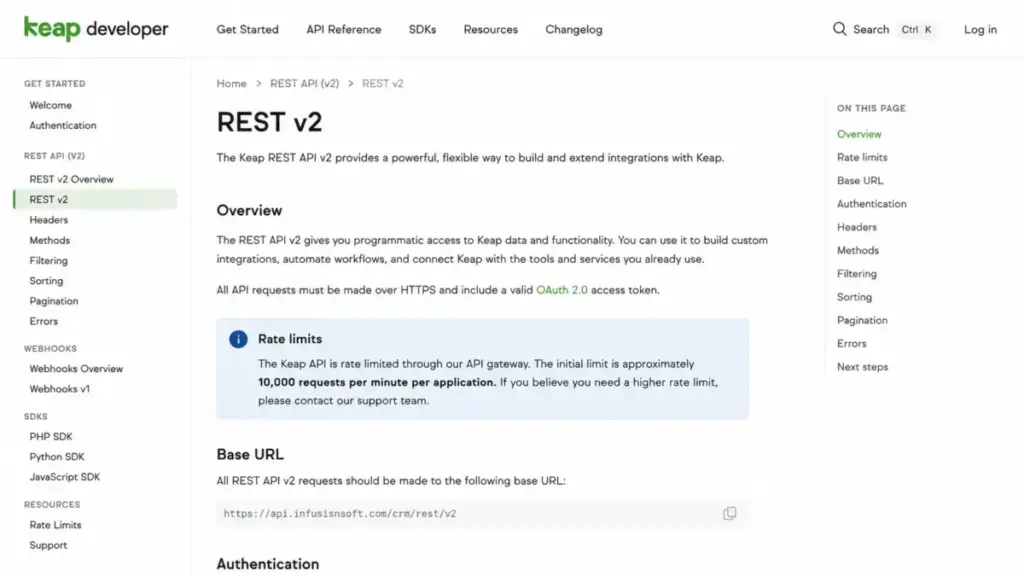
| API throughput | Approximately 10,000 requests per minute per application | High-frequency syncs need a design review before launch |
| Free trial | 14 days, 25 emails, no payments, no texts | Several paid workflows cannot be validated before purchase |
The Business Line ceiling is the gate almost nobody reports. Keap’s help documentation permits one Business Line per app with up to five users configured for outbound calls and up to five forwarding numbers.
A 10-person sales team paying $600 a month therefore gets phone capability for half its reps. If every rep needs a tracked number, budget for a separate phone platform on top of Keap.
Annual vs Monthly Billing: The Real Savings Math
Annual billing is the clearest saving available on Keap pricing, and it is larger than it looks in the headline.
| Billing choice | Year-one subscription | Implementation | First-year cash | Effective monthly |
|---|---|---|---|---|
| Monthly billing | $3,588 (12 x $299) | $500 | $4,088 | $299 |
| Annual prepay | $2,988 | $500 | $3,488 | $249 |
| Difference | $600 | $0 | $600 | $50 |
The saving is $600 a year, or 16.72% off twelve monthly payments. For a two-user subscription that is more than two free months.
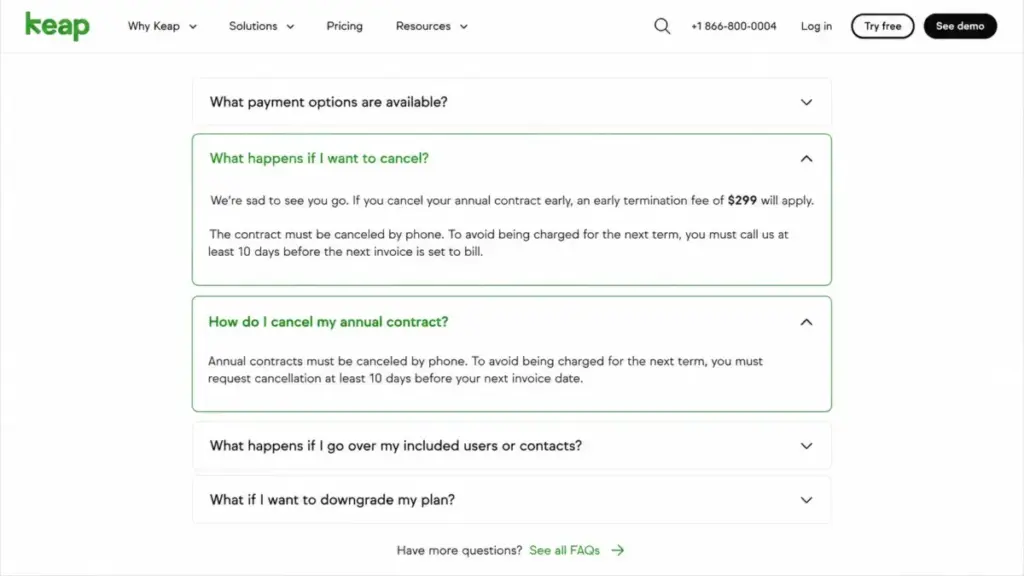
The commitment carries a real cost, though, and it is worth pricing before you choose. Keap’s pricing FAQ lists a $299 early termination fee when an annual contract is cancelled before the end of its term.
Even in that scenario the annual choice holds up. Pay $2,988 up front, cancel mid-term, and absorb the $299 fee, and you are still $301 below twelve months of monthly billing at $3,588.
That calculation assumes Keap does not refund unused annual months, which its public page does not address. Ask about refund treatment in writing before you prepay.
One more piece of the cancellation mechanics matters more than the fee. Keap requires the cancellation request by phone at least 10 days before your next invoice date.
I would choose annual billing for any business replacing a tool it has already used for a year. Choose monthly billing only if the decision is genuinely reversible inside 90 days, and diarize the 10-day notice window the moment you sign.
Implementation and Onboarding Cost
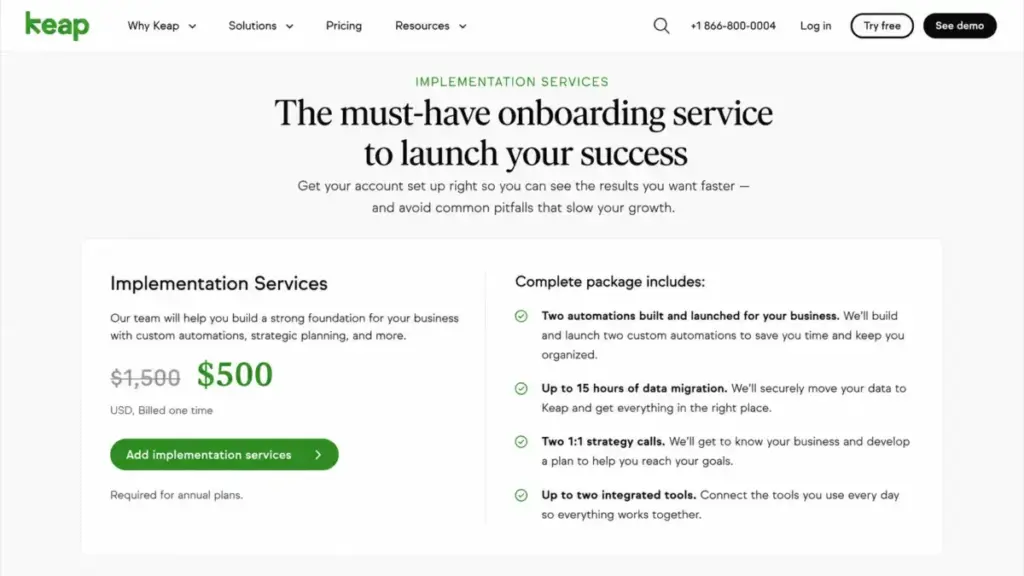
Implementation is not optional on a new Keap purchase. The amount you pay for it is a promotion rather than a list price.
Keap’s implementation services page displayed $500, struck down from $1,500, on July 30, 2026. Two other figures circulate in public.
Audience-specific Keap partner pages describe implementation as typically around $999, and a May 2026 TechRadar review reports packages starting at $1,500.
I treat the $500 figure as real but temporary. It sits at 14.33% of a $3,488 first-year bill.
At the struck-through $1,500 it becomes 33.42% of a $4,488 first year, a $1,000 swing on the same subscription.
The package is scoped, and the scope is the part worth judging:
- A mapping session covering your sales and follow-up process
- Two automations built and launched for you
- Contact import assistance
- Up to 15 hours of data-migration service
- Scheduled strategy calls through onboarding
- Up to two third-party tools integrated
Keap also requires you to do the unglamorous half. Its implementation FAQ states that you must clean your list and hand over a tidy CSV or Excel file.
Fifteen hours is the number to test against your own data, and our CRM implementation guide covers the scoping questions worth asking first. A single-source contact list with clean fields fits comfortably inside it; three overlapping exports with duplicate companies and free-text custom fields will not.
Compare the $500 against consultant rates for two built automations plus a migration. At typical CRM consulting rates the package is cheap, and that is the strongest defense of Keap’s first-year cost.
At $1,500 the argument gets thinner.
Contact Limits: What Happens Past 1,500
This is the weakest-documented part of Keap pricing, and I would rather say so than publish a table I cannot source.
Official Keap pages identify 1,500 contacts as the typical subscription allowance. Above that, Keap’s pricing FAQ confirms that additional contacts are priced in tiers, with a lower cost per contact at larger volumes.
What the page will not do is print the bands.
At the included allowance the arithmetic is friendly. Spread $2,988 a year across 1,500 contacts and you get $1.99 per contact per year, or about 16.6 cents a month.
That per-contact rate is the trap.
It is comfortable for a consultancy with 1,200 qualified leads. It is punishing for an ecommerce list of 40,000 newsletter subscribers on thin margins.
Competitor-authored comparisons and older articles still quote historical Keap figures for large databases such as 25,000 contacts. Those numbers were produced by an earlier calculator, and I will not recycle them as 2026 facts.
Ask Keap sales for the exact monthly price at your current contact count, at 2x that count, and at 5x it, in writing. A CRM whose largest cost variable is undisclosed deserves a quote with three data points, not one.
Partner and community promotions complicate the picture further. Some audience-specific Keap offers raise the included allowance to 2,500 contacts.
Treat that as a real discount rather than standard public pricing, and do not model your budget on it.
Text and Voice Pricing: The Six Communications Tiers
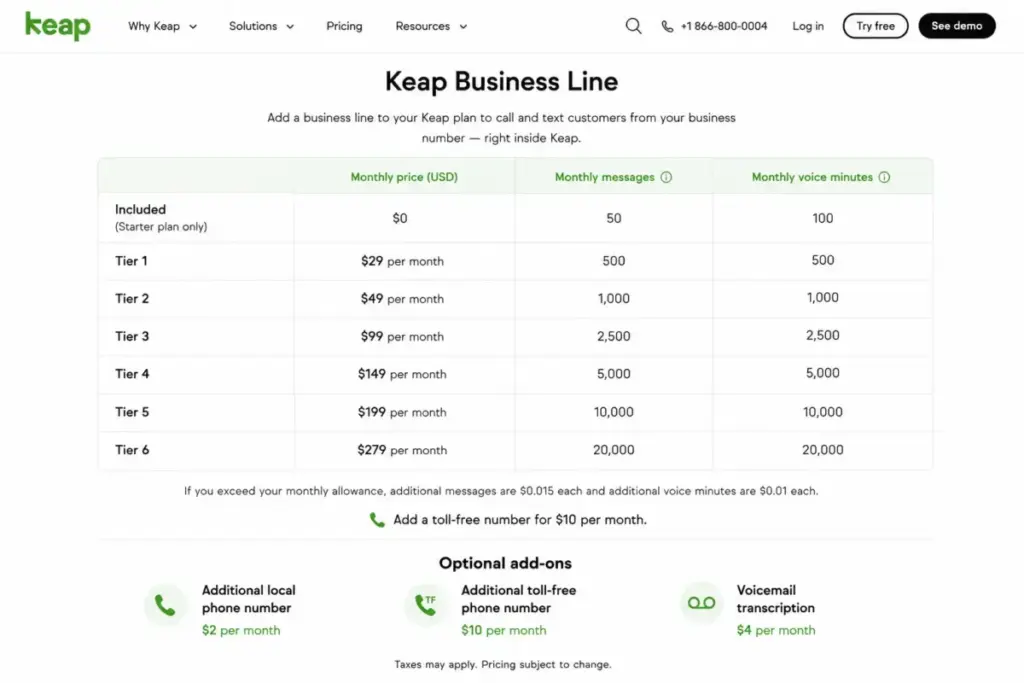
Keap includes messaging, then meters it. The Keap Business Line page and the pricing page both list six tiers.
| Tier | Price/month | Messages | Voice minutes | Incremental cost per added message |
|---|---|---|---|---|
| Tier 1 | Included | 500 | 100 | Baseline |
| Tier 2 | $24 | 1,000 | 300 | $0.0480 |
| Tier 3 | $39 | 2,500 | 500 | $0.0195 |
| Tier 4 | $79 | 5,000 | 800 | $0.0176 |
| Tier 5 | $139 | 10,000 | 1,000 | $0.0146 |
| Tier 6 | $279 | 25,000 | 2,000 | $0.0114 |
Tier 1 arrives with the subscription and includes a toll-free number. Overages run at $0.015 per message and $0.01 per voice minute.
Two optional add-ons sit alongside the ladder: an extra 500-text block at $6 a month and a local number at $10 a month.
The final column is the number that changes the decision. Upgrading from Tier 1 to Tier 2 buys 500 extra messages for $24.
That works out to 4.8 cents per message, more than three times the 1.5-cent overage rate.
The overage break-even hidden in the tier ladder
Price each tier against what the same extra volume would cost as pure overage on Tier 1, and three of the five upgrades lose.
| Upgrade from Tier 1 | Tier price | Same volume paid as overage | Cheaper option |
|---|---|---|---|
| Tier 2 | $24 | $9.50 | Stay on Tier 1 (save $14.50) |
| Tier 3 | $39 | $34.00 | Stay on Tier 1 (save $5.00) |
| Tier 4 | $79 | $74.50 | Stay on Tier 1 (save $4.50) |
| Tier 5 | $139 | $151.50 | Upgrade (save $12.50) |
| Tier 6 | $279 | $386.50 | Upgrade (save $107.50) |
Each overage column values the tier’s extra messages at $0.015 and its extra minutes at $0.01. That total is then set against the tier’s fixed price.
Tiers 2, 3, and 4 cost more than the volume they replace; Tiers 5 and 6 are the only genuine discounts.
The crossover sits at roughly 9,770 messages a month for a business whose voice use stays inside 100 minutes. Below that volume, paying overage on Tier 1 beats a fixed upgrade.
Two worked examples using only Keap’s published rates:
- 2,500 messages and 400 minutes. On Tier 1, overage is 2,000 messages at $0.015 ($30.00) plus 300 minutes at $0.01 ($3.00), so $33.00. Tier 3 covers the same volume for $39.00. Staying put saves $6 a month, or $72 a year.
- 15,000 messages and 800 minutes. On Tier 1, overage reaches $224.50. Tier 5 costs $139 plus 5,000 messages of overage at $0.015 ($75.00), so $214.00. Tier 6 covers everything for $279.00. Tier 5 wins at $214.00.
One caveat before you act on this. Keap’s pages confirm the overage rates.
They do not state whether Keap moves you up a tier automatically once usage crosses a threshold, and they do not confirm that unused allowance rolls over.
Confirm both points with sales, because the whole calculation collapses if the tier upgrade is automatic rather than chosen.
Add-Ons, Overages, and Surprise Costs
Four costs sit outside the subscription entirely, and none of them appear in Keap’s headline price.
Payment processing. Invoicing, checkout, and recurring payments are included as software. The money movement is not. Keap’s pricing FAQ states that Keap Pay or your third-party processor charges its normal transaction fees, and the current pricing page publishes no rate.
For a service business collecting $60,000 a month, processor fees will dwarf the software subscription. Get the Keap Pay rate card before you compare Keap against a tool with no payments module.
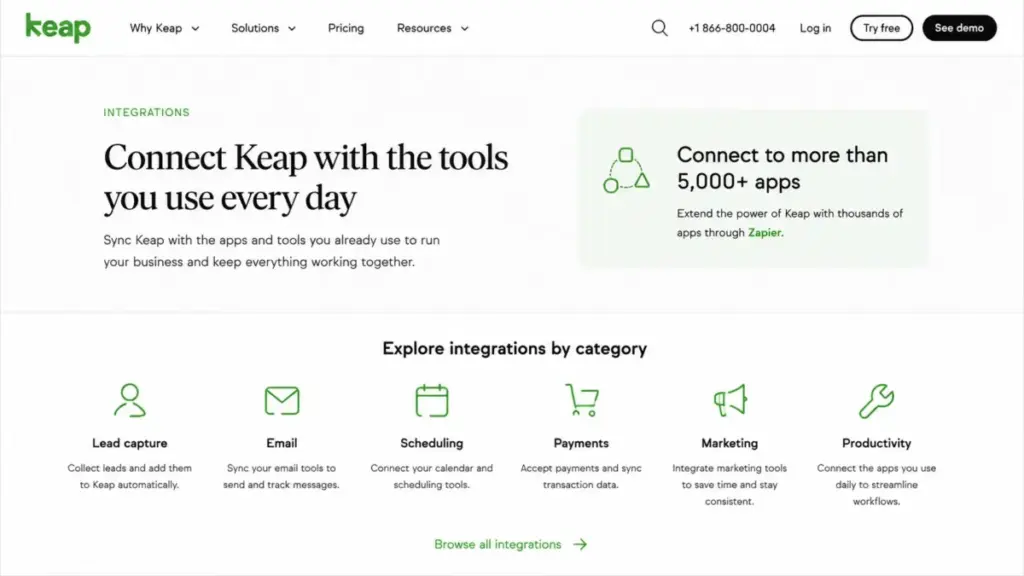
Third-party automation platforms. Keap advertises connections to more than 5,000 apps, and its integrations page frames that number as reach through Zapier. If the connection your workflow depends on is not native, a Zapier subscription becomes part of your Keap running cost.
Services beyond the package. Migration past 15 hours, heavier data cleanup, and extra done-for-you work are all purchasable. Keap publishes no rate card for them.
Administrative time. Reviewer patterns on Capterra and TrustRadius consistently pair praise for Keap’s automation depth with warnings about the training and configuration it demands. One TrustRadius reviewer, Jacob Siner of Practice Promotions, puts the staffing requirement plainly: <q>you need someone or a small team that is well-trained</q>.
That is a real line item even though no invoice shows it. Name an internal owner for the automation build during procurement, or the $500 implementation package becomes the only configuration your team ever finishes.
The Keap Free Trial: What You Cannot Test
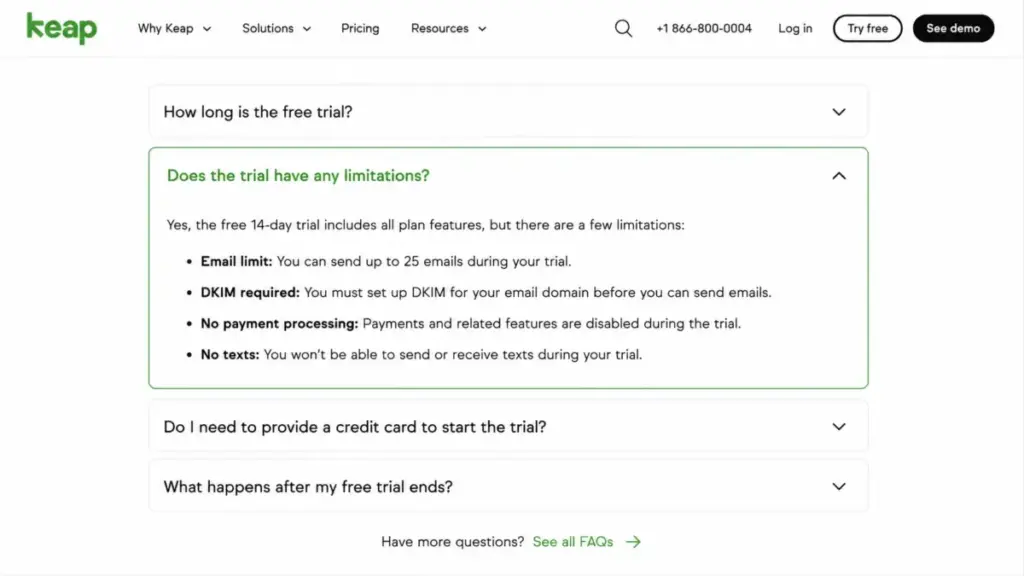
Keap’s free trial runs 14 days with no credit card required. It is not a full copy of the paid product, and the gaps land exactly on the workflows that justify the price.
| Workflow | Testable in the trial? |
|---|---|
| Contact management and segmentation | Yes |
| Pipeline and deal stages | Yes |
| Automation builder | Yes |
| Email sending | Capped at 25 emails, and DKIM must be configured first |
| Payment processing | No |
| Sending or receiving texts | No |
| Business phone line | Not usable for messaging workflows |
You can validate whether Keap’s data model fits your sales process. You cannot validate deliverability at volume, the checkout experience your customers will see, or the SMS follow-up that drives the communications spend.
Plan the trial around that limitation. Spend the 14 days on data structure and one automation build.
Then negotiate a paid pilot or a documented exit path for the payment and SMS workflows you cannot see.
Integrations and API Limits That Affect Your Bill
The 5,000-plus integration claim is accurate and easy to misread. Keap’s integrations page attributes that reach to Zapier, which means a share of it depends on a vendor Keap does not bill you for.
| Connection type | What it means for cost | Maintenance burden |
|---|---|---|
| Native Keap integrations | No extra vendor, no extra subscription | Keap owns the connection |
| Keap-certified marketplace tools | Separate vendor pricing per tool | Split between Keap and the partner |
| Zapier-enabled connections | A Zapier plan becomes part of your stack | You own the automation logic and its failures |
| Custom API and webhook builds | Developer time, not license fees | Your engineering team |
Before comparing Keap against a cheaper CRM on price alone, list the five integrations your process cannot lose. Check which column each one lands in.
A Zapier dependency adds a subscription, a second place for automations to break, and another vendor in your incident path.
On throughput, Keap’s developer documentation states an initial approximate gateway limit of 10,000 requests per minute per application. That is generous for a 25-person sales team and worth a design review for a nightly two-way sync against a large product catalogue.
The word doing the work there is “approximate”. Endpoint-specific behavior is not published in the same place.
Confirm the constraints for your highest-volume endpoints before committing to a production architecture.
Security and Compliance: The HIPAA Messaging Boundary
Keap publishes specific controls rather than vague assurances, and the specifics matter to any procurement review.
Its Data Processing Addendum documents TLS 1.2 or higher in transit, with a minimum of 128-bit encryption, and AES-256 encryption at rest.
The same document lists monitoring and logging, vulnerability scanning, access controls, firewalls, and expedited patching. Keap’s data-protection FAQ adds a DPA, standard contractual clauses for relevant international transfers, and a statement that Keap is audited annually for PCI DSS.
I found no public document establishing Keap’s own SOC 2 certification, so I am not claiming one. If SOC 2 is a procurement requirement, request the report directly rather than assuming it exists.
The compliance detail that changes purchase decisions sits in the healthcare stack.
| Keap capability | HIPAA status |
|---|---|
| CRM records and contact data | Usable with HIPAA controls enabled and an executed BAA |
| Email marketing and one-to-one email | Excluded from PHI handling under the BAA |
| SMS and text marketing | Excluded from PHI handling under the BAA |
| VoIP and related messaging services | Excluded from PHI handling under the BAA |
Keap’s Business Associate Agreement states that its messaging services are not HIPAA-compliant and must not transmit, store, or process protected health information. Its HIPAA controls page separately notes that enabling the controls does not by itself make your business compliant.
For a clinic, that is a workflow verdict rather than a footnote. Appointment reminders naming a procedure, a provider, or a diagnosis cannot run through Keap’s email or SMS.
That removes much of what a clinic would buy Keap for.
If your follow-up sequences must carry clinical detail, a healthcare-specific platform with a messaging BAA is the correct purchase, and Keap is not.
Migration and Switching Costs
Two documented quirks in Keap’s data handling create labour that no pricing page mentions.
Contact tags do not come out with a direct contact export. Keap’s help center directs you to the Tag Tracker report to associate exported contact IDs with their tags.
Your segmentation therefore leaves the system in two files that need rejoining.
Keap also does not allow an imported field to be mapped directly to contact owner. For a 10-rep team importing 1,400 accounts with existing ownership, that is a second pass of work after the import lands.
| Migration task | Covered by the $500 package? | Your effort |
|---|---|---|
| Contact import | Yes, with assistance | Provide a clean CSV or Excel file |
| Data migration service | Yes, up to 15 hours | Anything past 15 hours is chargeable |
| List cleanup and deduplication | No | Yours before handover |
| Contact owner assignment | Not mappable on import | Separate workflow after import |
| Tag export on the way out | Not applicable | Tag Tracker report plus a rejoin |
| Two automations built | Yes | Define the process to be automated |
| Two third-party integrations | Yes | Anything beyond two is extra |
Read that table as an exit cost as much as an entry cost. Fold both quirks into your CRM migration planning before the kickoff call.
A CRM where tags leave separately from contacts is harder to exit than to enter. That asymmetry belongs in your risk assessment before you prepay a year.
Which Keap Configuration Should You Choose?
There is one plan, so the real decision is billing cycle, seat count, and communications tier. Here is how I would configure it by buyer type.
Solo consultant or freelancer. Do not buy Keap. A two-seat platform at $2,988 a year plus implementation is the wrong shape for one person. A single seat on the Freshsales pricing tiers costs about $108 a year.
Two to five-person service team. Annual billing, Communications Tier 1, no local number at first. That is $249 a month and a $3,488 first year at two users. Five users pushes it to about $366 a month before any messaging upgrade.
Five to ten-person appointment-led business. Annual billing, seats only for weekly users, Tier 1 until real message volume is measured. At ten users this lands near $600 a month and $7,700 in year one.
Ten to twenty-five people. Annual billing, Tier 5 if messaging genuinely exceeds 9,770 messages a month, and a written contact-band quote before signing. Budget $1,285 a month at 25 users, and expect that to move once the contact count is priced.
Twenty-five people and above. Get the contact-band quote first, then price a separate phone platform. Keap allows one Business Line per app with up to five outbound users. At this size Keap is a marketing-automation and payments purchase, not a sales-team CRM purchase.
The seat discipline matters more than the tier choice. Every license you assign to an occasional user costs $468 a year, and Keap’s structure gives you no cheaper read-only seat.
Which Keap Configuration Should You Avoid?
Monthly billing. It costs $600 more a year for flexibility that the $299 termination fee and the 10-day notice window partly cancel out. The exception is a genuine 90-day evaluation where you have already accepted that you might walk away.
Communications Tiers 2, 3, and 4. All three cost more than the same volume priced as overage on Tier 1. Skip them unless Keap confirms that tier upgrades are automatic and unavoidable, or that a tier includes something the overage rate does not.
The $10 local number, on day one. Buy it when a customer complains about a toll-free caller ID, not before. It is $120 a year for a preference you have not tested.
Assigning a seat to every employee. Three occasional users cost $1,404 a year. Give them a shared report or a Zapier-fed dashboard instead.
The exception to the Tier 2 warning is worth naming, because it is a real one. If your message volume is unpredictable and your finance team will not tolerate a variable line item, a fixed $24 is worth $14.50 of predictability.
Keap Pricing vs Competitors
| Product | Entry price | 10-user monthly | 10-user annual | Best for |
|---|---|---|---|---|
| Keap | $299/mo, or $2,988/yr | $600 | $7,200 recurring, $7,700 in year one | Service teams using CRM, automation, payments, and SMS together |
| HubSpot | Free tools for up to 2 users; Starter listed at $20/seat/mo | $200 | $2,400 | Very small teams needing CRM records at no cost |
| Pipedrive Lite | $14/seat/mo billed annually | $140 | $1,680 | Pipeline-first outbound sales teams |
| Freshsales Growth | $9/user/mo billed annually, free plan for up to 3 users | $90 | $1,080 | Budget-conscious sales teams wanting a low seat rate |
| HighLevel Starter | $97/mo, or $970/yr, unlimited users and contacts | $97 | $970 | Agencies needing unlimited seats and contacts |
Competitor prices were checked on July 30, 2026 on each vendor’s own page: the Pipedrive pricing page and the HubSpot CRM pricing page, plus the Freshworks CRM pricing page and the HighLevel pricing page. HubSpot also displayed a limited-time new-customer promotion below the listed Starter rate, so treat the $20 figure as the durable comparison point.
At ten users Keap costs 4.3x Pipedrive Lite, 6.7x Freshsales Growth, 3x HubSpot Starter, and 7.4x HighLevel Starter on annual recurring spend. Against Freshsales that is a $6,120 a year gap.
Those ratios are anchors, not a like-for-like verdict. None of the four entry plans bundles marketing automation, a phone line, invoicing, checkout, payments, and a scoped implementation service the way Keap does.
The HubSpot vs Keap comparison makes the same point from the other direction. A cheaper entry price buys a narrower job.
The honest comparison is a stack, not a plan. Price Freshsales plus an email platform, a scheduler, an invoicing tool, and a phone line, and the gap narrows sharply.
The Pipedrive pricing breakdown shows how fast seat-based costs climb once you add the same modules.
HighLevel is the one anchor that survives feature normalization for a specific buyer. Run an agency, need unlimited seats and contacts, and accept a different support model, and HighLevel’s structure beats Keap’s per-seat and per-contact scaling outright.
Is Keap Worth the Price in 2026?
Keap is worth its price for a narrow, identifiable buyer, and it is a poor purchase for everyone else.
Best for: two to ten-person US service businesses (agencies, consultancies, coaches, contractors, appointment-led professional services) with fewer than 1,500 active contacts, lead values high enough that a closed deal covers a month of subscription, and a real need for automated follow-up plus invoicing and payments in one system.
Not best for: solo operators wanting contacts and a pipeline, ecommerce or newsletter businesses with large low-margin lists, sales teams needing a tracked phone line per rep, clinics that must send clinical detail by email or SMS, and buyers unwilling to complete guided implementation.
| Pros | Cons |
|---|---|
| One price covers CRM, automation, scheduling, invoicing, checkout, payments, and messaging | $2,988 a year is 3x to 7x the entry cost of pipeline-only CRMs, and contact-band pricing is unpublished |
| Cost per user falls from $124.50 to $51.40 between 2 and 25 users | Implementation is required, and the $500 amount is a promotion reduced from $1,500 |
| Scoped implementation at $500 includes two built automations and 15 migration hours | Communications Tiers 2 through 4 cost more than the same volume bought as overage |
| Annual billing saves $600, and stays $301 cheaper even after the $299 termination fee | One Business Line per app caps phone rollout, and messaging services are excluded from PHI under the BAA |
| Weekday US phone support, 24/7 chat, and a named Customer Success Manager are included |
Worth it if: you will retire at least $150 a month of other software, your contact count stays near 1,500, and one person owns the automation build.
Not worth it if: you need only a CRM. Pipedrive or Freshsales does that job for a fraction of the cost. The money you save funds a real email platform.
The alternative I would shortlist first if Keap prices out is HighLevel for agencies and Freshsales for pipeline-led sales teams. Our roundup of Keap alternatives worth shortlisting ranks the rest by replacement logic rather than headline price.
My verdict, after working through this pricing model for saaszap.com: Keap is fairly priced for what it bundles and badly priced for what the average buyer uses. The full Keap CRM review covers the product side of that judgment.
The deciding number is $150 a month of tools you will cancel.
How to Avoid Overpaying for Keap
- Prepay annually and diarize the notice window. The $600 saving is the largest discount available. The 10-day phone-notice requirement is what turns it into a trap.
- Get contact-band pricing in writing at three volumes. Ask for your current count, 2x, and 5x. This is the one cost Keap does not publish, and it is the one most likely to move your bill.
- Reconfirm the implementation amount on the day you buy. $500 was displayed on July 30, 2026 as a reduction from $1,500. A $1,000 swing on a $3,488 first year deserves a screenshot of your own.
- Measure message volume before choosing a communications tier. Below roughly 9,770 messages a month, overage on Tier 1 beats Tiers 2, 3, and 4. Run one month on Tier 1 and read the invoice.
- License only weekly users. Each seat is $468 a year. Audit logins at 90 days and remove anyone who has not signed in.
- Clean the contact list before the migration call. The 15 included hours go to structure, not deduplication, and cleanup past that point is chargeable.
- Price the Keap Pay rate card against your current processor. On real revenue, a fractional difference in transaction fees outweighs the whole subscription.
- Ask about current promotions explicitly. Keap’s pricing page invites the question, and partner-specific offers exist that are not advertised as standard public pricing.
FAQ
How much does Keap cost per month?
Keap costs $299 per month on monthly billing, or $2,988 per year prepaid, which equals $249 per month. That price includes two user licenses, typically 1,500 contacts, and Communications Tier 1 with 500 messages and 100 voice minutes. Required implementation was shown at $500 on July 30, 2026.
Is Keap $299 or $249 per month?
Both figures are correct, and the difference is the billing cycle. $299 is the monthly-billing price. $249 is the effective monthly cost when you prepay $2,988 for a year. Twelve monthly payments total $3,588, so annual billing saves $600, or 16.72%.
Does Keap have a free plan?
No. Keap does not offer a free plan, only a 14-day free trial with no credit card required. The trial caps email sending at 25 messages, requires DKIM setup before sending, disables payment processing, and does not allow sending or receiving texts. Plan your evaluation around those gaps.
Which Keap plan should you choose in 2026?
There is only one public plan, so the choice is billing cycle, seat count, and messaging tier. Annual billing at $2,988 is the right default for almost everyone, with Communications Tier 1 kept until real message volume is measured. Add seats only for reps who log in weekly, at $39 each.
How much are extra Keap users?
Each user beyond the two included licenses costs $39 per month, or $468 a year. At roughly 6.4 extra users, seat charges equal the entire $249 base subscription. Keap does not publish a cheaper read-only or occasional-user seat, so license only people who log in regularly.
Does Keap charge for additional contacts?
Yes. Keap’s pricing FAQ confirms that contacts beyond the included allowance are priced in tiers, with a lower cost per contact at higher volumes. The exact dollar figure for each band is not published in the readable page text, so request a written quote at your current and projected contact counts.
What does Keap implementation cost, and is it mandatory?
Keap lists implementation as required for new purchases. The implementation services page displayed a one-time $500 amount reduced from $1,500 on July 30, 2026. The package covers a process-mapping session, two automations built for you, contact import help, up to 15 migration hours, strategy calls, and up to two integrated tools.
What are Keap's text messaging fees?
Communications run in six tiers: included, $24, $39, $79, $139, and $279 per month, with allowances from 500 to 25,000 messages. Overages cost $0.015 per message and $0.01 per voice minute. An extra 500-text block is $6 a month and a local number is $10 a month.
Can I cancel Keap at any time?
Not without conditions on an annual contract. Keap’s pricing FAQ lists a $299 early termination fee for canceling an annual contract mid-term. Cancellation must also be requested by phone at least 10 days before your next invoice date. Even with that fee, annual billing stays $301 cheaper than twelve monthly payments.
Is Keap worth it, or is a cheaper CRM the better buy?
Keap is worth it when you will retire at least $150 a month of other tools and your contact list stays near 1,500. Below that, cheaper CRMs win outright. At ten users on annual billing, Freshsales Growth runs about $1,080 a year and Pipedrive Lite $1,680, against roughly $7,200 for Keap.
Keap Pricing: The Short Version
Keap pricing is one platform at $299 monthly or $2,988 annually. Two users and roughly 1,500 contacts sit inside the price, with required implementation on top. The advertised number is honest; it is just incomplete.
Four figures decide your budget: $39 per extra seat, an unpublished contact-band increase, a communications tier you probably should not upgrade, and a $500 implementation charge.
That last one was $1,500 before the promotion.
Buy Keap if you will genuinely cancel $150 a month of other software and your contact list stays small. Buy a pipeline CRM and a separate email platform if you will not.
Prices change without notice. Reconfirm every figure on Keap’s official pricing and implementation pages before purchase.