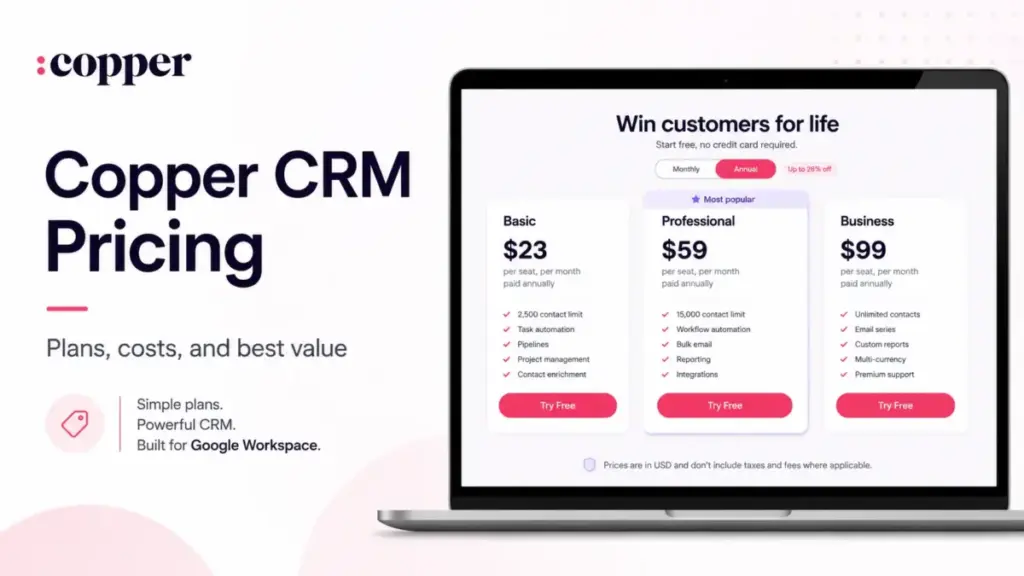
Copper CRM advertises $9/user/month on annual billing. That gets you 1,000 contacts, 10 custom fields, and zero pipelines. No leads. No workflow automation. No bulk email. No reporting beyond the basics.
For a sales team that needs any of those features, the real starting point is the Professional plan at $59/user/month billed annually, or $69 billed monthly. That is a 6.6x jump from the headline number.
I have built pricing models for 15+ CRM platforms at team sizes of 5, 10, 25, and 50. Copper is one of the few where the gap between advertised price and practical price is this wide, and where the upgrade trigger is not volume or contacts, but basic sales workflow features most teams assume are included from day one.
If your team runs on Google Workspace, Copper is worth a close look. But the price you see on the best CRM software options comparison pages is almost never the price you will pay.
This guide breaks down every Copper CRM plan, the feature gates that force upgrades, costs at scale from 5 to 100 users, and whether the price is justified for a US-based sales team in 2026.
Quick Pricing Verdict
| Category | Detail |
|---|---|
| Starting price | $9/user/month (annual) or $12/user/month (monthly), Starter plan |
| Practical plan for sales teams | Professional at $59/user/month (annual) |
| Free plan | No permanent free plan. 14-day trial only, no credit card required |
| Best plan for most teams | Professional. First plan with leads, workflow automation, bulk email, and reporting |
| Plan to avoid | Basic ($23/user/month annual). Omits leads, workflow automation, bulk email, and deep reporting |
| Biggest hidden cost | Google Workspace requirement, seat-minimum gates for premium support, and API rate limits |
| Annual savings at 10 users | $1,200/year on Professional versus monthly billing |
| Best alternative if too expensive | Freshsales at $9/user/month annual with leads and workflow automation on Growth plan |
| Pricing verified | June 12, 2026 |
What this means: Copper’s pricing grid looks affordable until you map your actual sales workflow to the plan that supports it. The Starter and Basic tiers work for contact management and simple pipeline tracking. The moment you need leads, automation, or email campaigns, Professional is the minimum viable plan.
The Advertised Price vs the Real Price
The CRM software category has a pattern: vendors publish entry-level pricing in large font and bury the practical plan cost in a feature comparison grid. Copper follows this pattern, but with an extra wrinkle.
| What you see | What most sales teams pay | The gap |
|---|---|---|
| Starter at $9/user/month annual | Professional at $59/user/month annual | $50/user/month or 556% higher |
| Basic at $23/user/month annual | Professional at $59/user/month annual | $36/user/month or 157% higher |
| 10-user monthly bill at $90 (Starter annual) | 10-user monthly bill at $590 (Professional annual) | $500/month difference |
What this means: A 10-user sales team budgeting around $100/month based on the Starter headline will hit the Professional tier at $590/month the moment they need lead tracking, workflow automation, bulk email, or reporting depth. That is the real buying decision for Copper.
There is a second gap most pricing pages do not mention. Copper’s official pricing grid currently shows Basic, Professional, and Business most prominently. The Starter tier is verified in Copper’s Help Center feature comparison and corroborated by TrustRadius and other third-party sources, but its visibility on the main pricing page grid is inconsistent. If you are evaluating Starter, confirm availability directly during checkout or with Copper’s sales team.
The 5 Hidden Costs Nobody Mentions
Google Workspace Is Not Optional
Copper’s signup page states the platform works exclusively with Gmail and Google Workspace. This is not a preference. It is a hard requirement. If your team uses Outlook, Microsoft 365, or any other email system, Copper is not an option regardless of price. The cost of Google Workspace itself (starting at $7/user/month for Business Starter) adds to your CRM total cost of ownership.
Seat Minimums for Premium Support and Onboarding
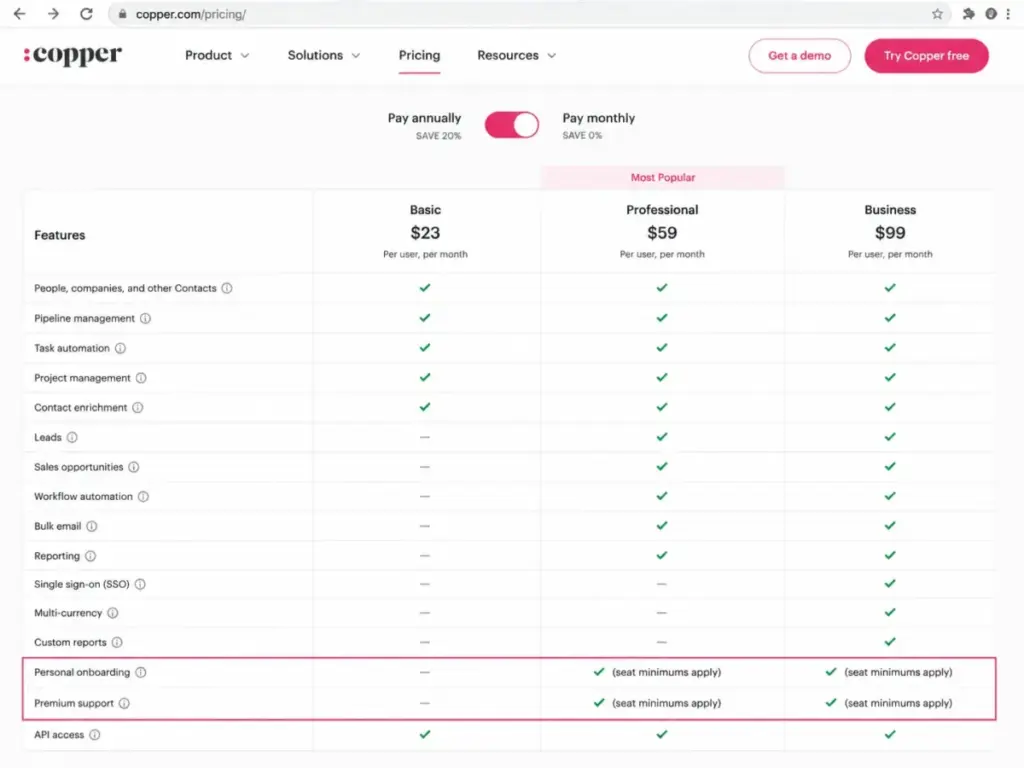
Copper’s pricing table shows “personal onboarding” and “premium support” rows for Professional and Business annual plans, but with a caveat: seat minimums apply. The exact minimum seat count is not publicly disclosed. A 3-person team on Business annual may not qualify for the premium support they are paying for. Confirm minimum seat requirements before signing an annual contract.
API Rate Limits Can Break Integrations
Every Copper API call is limited to 180 requests per minute. Bulk APIs have an additional cap of 3 requests per second and return 429 errors when exceeded. Webhook notifications are limited to 600 per minute per account and 1,800 per account every 10 minutes. There is no published overage fee, but engineering time to work around these limits is a real cost for teams running data sync, enrichment, or high-volume workflow automation.
External Integration Subscriptions
Copper supports integrations with Zapier, Mailchimp, DocuSign, QuickBooks, PandaDoc, JustCall, RingCentral, Slack, and Zendesk. Many of these require separate subscriptions. The integration itself may be free on Copper’s side, but the connected tools are not. Broader integrations are also gated: most require Professional or above.
Taxes and Fees Are Extra
Copper’s published USD prices do not include taxes and fees where applicable. Depending on your state and jurisdiction, expect the final invoice to be higher than the listed per-seat price.
Plan-by-Plan Breakdown with Feature Gates
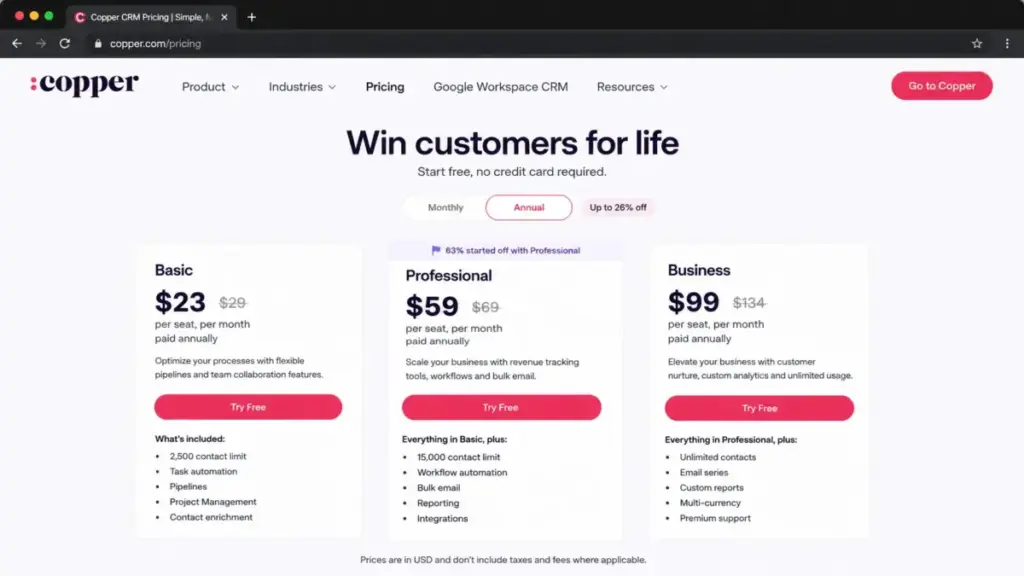
| Feature | Starter | Basic | Professional | Business |
|---|---|---|---|---|
| Monthly price | $12/user | $29/user | $69/user | $134/user |
| Annual price | $9/user | $23/user | $59/user | $99/user |
| Contact limit | 1,000 | 2,500 | 15,000 | Unlimited |
| Custom fields | 10 | 25 | 50* | Unlimited |
| Pipelines | No | Yes | Yes | Yes |
| Task automation | No | Yes | Yes | Yes |
| Workflow automation | No | No | Yes | Yes |
| Leads | No | No | Yes | Yes |
| Bulk email | No | No | Yes | Yes |
| Email click tracking | No | No | No | Yes |
| Email series | No | No | No | Yes |
| Custom reports | No | No | No | Yes |
| SSO (Okta) | No | No | No | Yes |
| Multi-currency | No | No | No | Yes |
*Copper’s pricing page lists 50 custom fields for Professional; the Help Center states unlimited for this tier. Verify current limits during your trial.
Official pricing page, verified June 12, 2026.
What this means: The feature gates on Copper follow a pattern I see across the CRM category. The first two tiers are contact databases with basic project management. Professional is where CRM becomes a sales tool with leads, automation, and reporting. Business adds the features that matter to larger teams: unlimited contacts, email sequences, custom reports, and single sign-on.
Across CRM pricing patterns, Copper’s practical sales workflow starts at Professional, not Starter.
When the Free Plan Stops Working
Copper does not have a permanent free plan. The 14-day free trial requires no credit card and gives you time to test the platform inside Gmail. But 14 days is tight for evaluating a CRM. Most teams spend the first week importing contacts and configuring pipelines. That leaves one week for actual workflow testing.
Once the trial ends, you must pick a paid plan. For teams that just need a shared contact database with Google Workspace integration, Starter at $9/user/month annual can work. But the trial likely exposed features, like pipelines and task automation, that require at least Basic. And if you tested leads or automation, you already need Professional.
Real Cost Scenarios: 5 to 100 Users
| Team size | Recommended plan | Monthly cost (annual billing) | Annual total | Notes |
|---|---|---|---|---|
| 5 users | Basic | $115/month | $1,380/year | Works for teams that need pipelines and project tracking but not leads, automation, or bulk email |
| 10 users | Professional | $590/month | $7,080/year | The recommended baseline. Adds leads, workflow automation, bulk email, reporting, integrations, and team permissions |
| 25 users | Professional | $1,475/month | $17,700/year | Best fit while contact count stays under 15,000 and Business-only features are not required |
| 50 users | Professional | $2,950/month | $35,400/year | Watch the 15,000-contact limit. Evaluate whether you need custom reports or premium support |
| 100 users | Business | $9,900/month | $118,800/year | Use when unlimited contacts, email series, custom reports, multi-currency, SSO, and premium support matter |
What this means: Copper’s annual-billed pricing is competitive for 5-to-25-user teams on Professional. The cost curve steepens at 50+ users, where the 15,000-contact ceiling and Business-only features like custom reports and SSO start driving the upgrade. At 100 users on Business, the annual commitment of $118,800 puts Copper in the same budget range as mid-market Salesforce deployments. The value proposition depends on whether your team’s Google Workspace integration saves enough adoption friction to justify that spend.
Monthly vs Annual Savings
| Plan | Monthly billing (10 users) | Annual billing (10 users) | Annual savings |
|---|---|---|---|
| Starter | $120/month | $90/month | $360/year |
| Basic | $290/month | $230/month | $720/year |
| Professional | $690/month | $590/month | $1,200/year |
| Business | $1,340/month | $990/month | $4,200/year |
Copper advertises up to 26% off with annual billing. The actual discount varies by tier: Starter saves 25%, Basic 20.7%, Professional 14.5%, and Business 26.1% compared to monthly billing. Annual commitment means paying upfront for the full year. Confirm downgrade and cancellation terms before locking in, especially on Professional and Business where seat-minimum caveats apply.
Which Copper Plan Should You Avoid?
Basic at $23/user/month annual is a poor value for sales teams.
Basic gives you pipelines, task automation, project management, and contact enrichment. It does not give you leads, workflow automation, bulk email, reporting depth, or broader integrations. For a team doing any form of outbound sales, lead qualification, or email campaigns, Basic forces an upgrade to Professional within months.
The exception: Basic works for relationship-management teams, consultancies, and agencies that use Copper as a project and contact tracker inside Gmail, not as a sales pipeline tool. If you need pipelines and project boards but not leads or automation, Basic can work.
Which Copper Plan Should You Choose?
For solo users and very small teams (1-3 people): Start with Starter if you need a shared contact database with Google Workspace integration. Move to Basic if you need pipelines.
For 5-to-15-person sales teams: Professional is the right plan. It is the first tier where Copper functions as a full sales CRM with leads, workflow automation, bulk email, and reporting. The $59/user/month annual price is fair for what it includes.
For 25+ users and growing teams: Professional still works if your contact count stays under 15,000 and you do not need custom reports, email series, or SSO. Once you cross those thresholds, Business at $99/user/month annual is the only option.
For teams not on Google Workspace: Copper is not the right CRM. The platform requires Gmail or Google Workspace. If your team uses Outlook, consider the HubSpot vs Copper comparison or look at CRM platforms that support both email ecosystems.
Copper Pricing vs Competitors at 10 Users
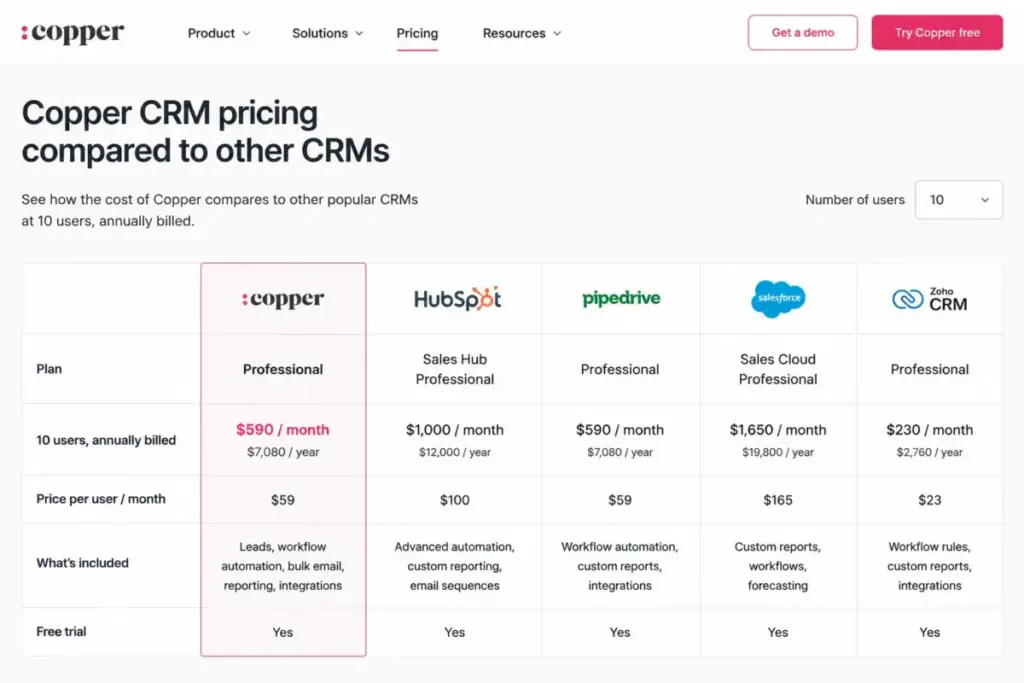
| CRM | Starting price | 10-user monthly cost (annual) | Free plan | Best for |
|---|---|---|---|---|
| Copper CRM Professional | $59/user/month | $590/month | No (14-day trial) | Google Workspace sales teams |
| HubSpot Sales Hub Starter | $20/user/month | $200/month | Yes (free tools) | Teams wanting free CRM + paid upgrades |
| Zoho CRM Standard | $14/user/month | $140/month | Yes (3 users) | Budget-conscious teams wanting full feature set |
| Freshsales Growth | $9/user/month | $90/month | Yes (3 users) | Teams needing leads and automation at lowest cost |
| Salesforce Starter Suite | $25/user/month | $250/month | No (30-day trial) | Teams planning for enterprise-grade scale |
| Streak CRM Pro | $49/user/month | $490/month | Yes (free email tools) | Gmail-native teams wanting CRM inside inbox |
What this means: At 10 users on the practical sales plan, Copper Professional at $590/month is the most expensive option on this list. Freshsales pricing starts at the same $9/user/month as Copper Starter, but its Growth plan includes leads and workflow automation at that price. Zoho CRM gives you a broader feature set at $14/user/month. Salesforce is cheaper at the Starter tier but scales more expensively at Enterprise.
Copper’s value argument is not about being cheap. It is about Google Workspace integration depth. If your team lives in Gmail, Google Calendar, and Google Drive, Copper reduces CRM adoption friction in a way that HubSpot CRM review shows HubSpot does not match at the inbox level. If that integration does not matter to your workflow, Copper is overpriced for the feature set.
Is Copper CRM Worth the Price?
Worth it if:
- Your team is standardized on Gmail and Google Workspace
- You need a CRM that your sales reps will adopt because it lives inside their inbox
- You are willing to pay for Professional to get leads, automation, and reporting
- Your contact count stays under 15,000 and your team is between 5 and 25 people
Not worth it if:
- Your team does not use Gmail or Google Workspace
- You need a generous free plan (look at Freshsales review or Zoho CRM)
- You need advanced marketing automation without paying for Business-tier gates
- Your budget cannot support $59/user/month for the features most sales teams need
- You need custom reports, email series, or SSO without jumping to $99/user/month
Alex Morrison’s verdict: Copper is fairly priced for what it does best, which is giving Google Workspace teams a CRM that lives where they work. But “fairly priced” starts at Professional, not Starter. If your team can live inside Gmail and needs a CRM with less complexity than Salesforce or HubSpot, Copper Professional at $59/user/month is a reasonable investment. If Google Workspace is not your default workspace, there are better options at every price point. For Copper CRM alternatives, look at Freshsales, Zoho, or Streak depending on your workflow and budget.
How to Avoid Overpaying for Copper CRM
- Start on Professional, not Starter or Basic. Most sales teams will outgrow both lower tiers within months. Skipping the intermediate upgrade saves migration effort and retraining time.
- Choose annual billing on Professional. The $1,200/year savings at 10 users justifies the commitment if you have validated Copper during the trial.
- Audit your contact count before choosing a plan. Professional caps at 15,000 contacts. If you are close to that ceiling, factor in the Business upgrade at $99/user/month.
- Confirm seat minimums for support before signing annual. Premium support and personal onboarding have undisclosed seat minimums. Ask Copper’s sales team directly.
- Test API limits during the trial. If your team plans to sync Copper with other tools through the API, test against the 180 requests/minute ceiling. Build throttling into your integration design.
- Clean inactive contacts regularly. Copper charges per user, but each plan has contact limits. Cleaning inactive contacts can delay the need to upgrade from Professional to Business.
- Do not pay for Business unless you need its exclusive features. Email series, custom reports, multi-currency, and SSO are the primary reasons to jump from Professional to Business. If you do not need those, Professional covers most sales workflows.
Before You Buy: Pre-Purchase Checklist
- Confirm your team uses Gmail or Google Workspace (hard requirement)
- Verify Starter plan availability on the live checkout page
- Test the 14-day free trial with your actual sales workflow
- Count your current contacts against plan limits (1K / 2.5K / 15K / unlimited)
- Check whether your needed features (leads, automation, bulk email) are on Professional or higher
- Ask Copper sales about seat minimums for premium support and onboarding
- Verify downgrade and cancellation terms before annual commitment
- Test API and webhook limits if you plan data integrations
For the full Copper CRM review covering features, ease of use, integrations, and limitations beyond pricing, see our detailed analysis.
FAQ
How much does Copper CRM cost in 2026?
Copper CRM pricing starts at $9/user/month on the Starter plan with annual billing, or $12/user/month billed monthly. The practical plan for most sales teams is Professional at $59/user/month annual or $69/user/month monthly. Business, the top tier, costs $99/user/month annual or $134/user/month monthly. Prices are in USD and do not include applicable taxes.
Does Copper CRM have a free plan?
No. Copper does not offer a permanent free CRM plan. There is a 14-day free trial with no credit card required. After the trial, you must select a paid plan to continue using the platform.
Which Copper CRM plan is best for small sales teams?
Professional is the best plan for sales teams of any size. It is the first tier that includes leads, workflow automation, bulk email, reporting, and broader integrations. Basic omits all of those features, making it a poor fit for teams running outbound sales or lead qualification workflows.
What is missing from Copper CRM Basic?
Basic does not include leads, sales opportunities, workflow automation, bulk email, deeper reporting, SSO, multi-currency, or custom reports. It provides pipelines, task automation, project management, and contact enrichment, which works for relationship tracking but not for active sales workflows.
Does Copper CRM work without Gmail?
No. Copper requires Gmail or Google Workspace. The signup page explicitly states this requirement. Teams using Outlook, Microsoft 365, or other email platforms cannot use Copper CRM.
Is Copper CRM cheaper than HubSpot?
It depends on the plan. Copper Professional at 10 users costs $590/month annually. HubSpot Sales Hub Starter at 10 users costs $200/month. HubSpot is cheaper at the Starter level, but HubSpot Sales Professional ($100/user/month) at 10 users costs $1,000/month, which is more than Copper Professional. The comparison depends on which features each team needs.
What are Copper CRM's hidden costs?
Key hidden costs include: Google Workspace subscription (required), undisclosed seat minimums for premium support and onboarding, API rate limits that may require engineering workarounds, external app subscriptions for integrations like Mailchimp or DocuSign, and applicable taxes not included in listed prices.
Is Copper CRM Business worth the upgrade from Professional?
Business at $99/user/month annual adds unlimited contacts, email series, email click tracking, custom reports, multi-currency support, SSO via Okta, and premium support eligibility. The upgrade is worth it for teams exceeding 15,000 contacts, needing custom reporting, or requiring SSO for compliance. For teams under those thresholds, Professional covers most sales workflows.