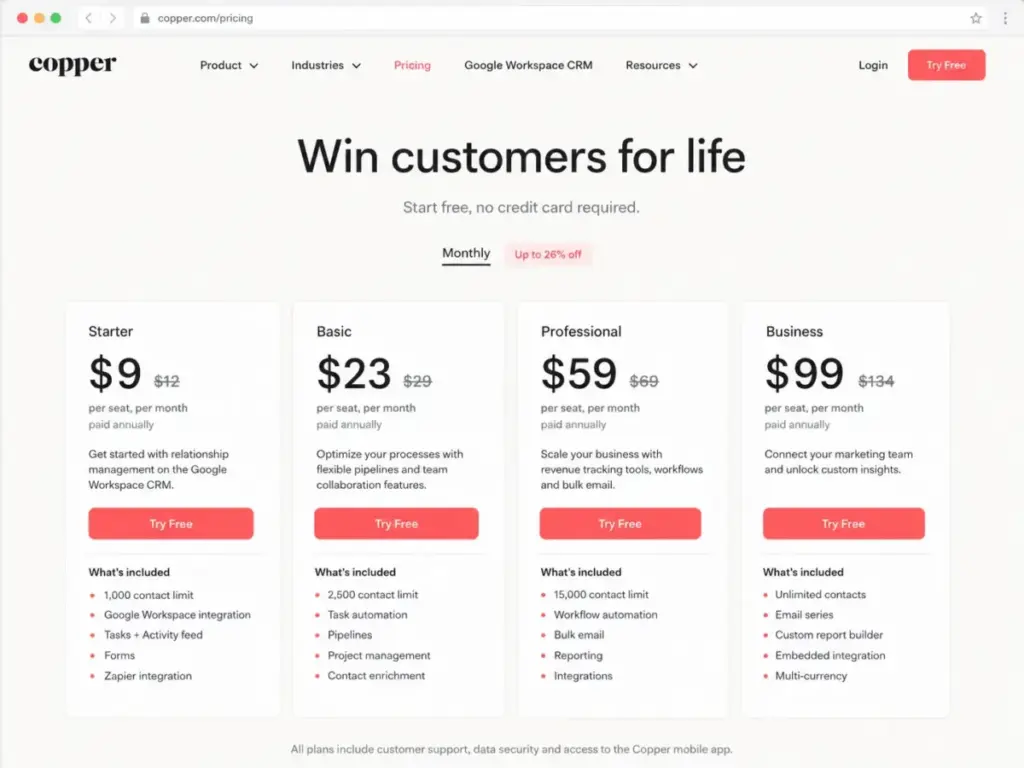
Copper starts at $9 per seat/month billed annually. That sounds reasonable until you realize Sales Opportunities are locked behind the Professional plan at $59 per seat/month, workflow automation starts there too, and custom reports require Business at $99 per seat/month. A 10-user team on Professional pays $590/month just to get the features most sales teams actually need (as of May 2026).
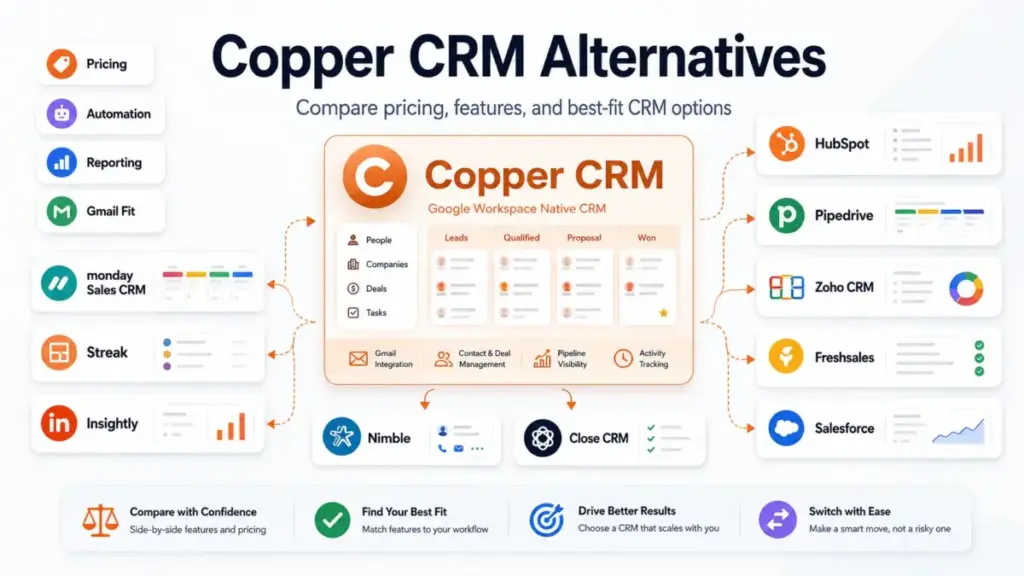
If your team runs on Google Workspace and tracks relationships inside Gmail, Copper still makes sense. But the moment you need broader automation, deeper reporting, multi-channel outreach, or an inbox outside Google, the ceiling shows up fast. This guide maps 10 Copper CRM alternatives to the specific pain point driving your search, compares what each one costs for a real 10-user team, and flags where the migration gets complicated. If you are evaluating best CRM software options beyond Copper, the right pick depends on which Copper limitation you hit first.
Understanding what CRM software actually does beyond contact storage helps frame why these alternatives exist. Copper is a relationship-tracking layer for Gmail. The alternatives below are CRM platforms that trade some of that inbox simplicity for capabilities Copper gates or omits entirely.
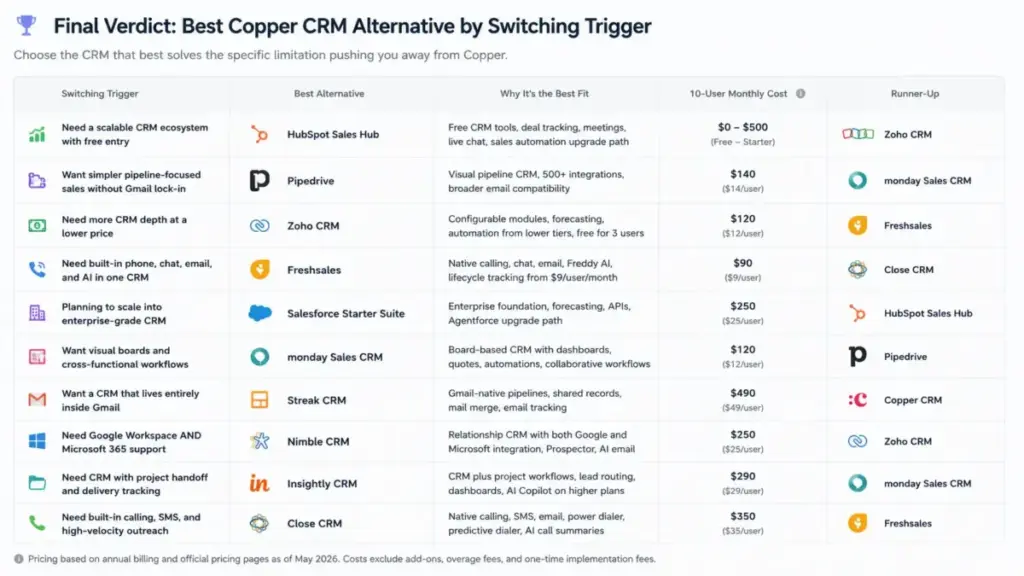
Quick Verdict: Best Copper CRM Alternatives by Switching Trigger
| If you are leaving Copper because… | Best alternative | Why |
|---|---|---|
| You need a scalable CRM ecosystem with free entry | HubSpot Sales Hub | Free CRM tools, deal tracking, meetings, live chat, sales automation upgrade path |
| You want simpler pipeline-focused sales without Gmail lock-in | Pipedrive | Visual pipeline CRM, 500+ integrations, broader email compatibility |
| You need more CRM depth at a lower price | Zoho CRM | Configurable modules, forecasting, automation from lower tiers, free for 3 users |
| You need built-in phone, chat, email, and AI in one CRM | Freshsales | Native calling, chat, email, Freddy AI, lifecycle tracking from $9/user/month |
| You are planning to scale into enterprise-grade CRM | Salesforce Starter Suite | Enterprise foundation, forecasting, APIs, Agentforce upgrade path |
| You want visual boards and cross-functional workflows | monday Sales CRM | Board-based CRM with dashboards, quotes, automations, collaborative workflows |
| You want a CRM that lives entirely inside Gmail | Streak CRM | Gmail-native pipelines, shared records, mail merge, email tracking |
| You need CRM with project handoff and delivery tracking | Insightly CRM | CRM plus project workflows, lead routing, dashboards, AI Copilot on higher plans |
| You need Google Workspace AND Microsoft 365 support | Nimble CRM | Relationship CRM with both Google and Microsoft integration, Prospector, AI email |
| You need built-in calling, SMS, and high-velocity outreach | Close CRM | Native calling, SMS, email, power dialer, predictive dialer, AI call summaries |
What this means: There is no single “best” Copper replacement. The right alternative depends on whether you are hitting a pricing wall, a feature gate, a reporting ceiling, an email-stack dependency, or an outreach depth limit. The table above maps each trigger to the tool that solves it most directly.
How We Evaluated These Alternatives
This is not a hands-on testing article. Every product was evaluated using official pricing pages, published feature documentation, verified plan comparisons, and public review-pattern signals from platforms like Capterra and G2 (as of May 2026). Pricing was verified against each vendor’s official page on the date noted. I did not sign up for trials or conduct workflow testing, so any claims about user experience come from public documentation and review-pattern synthesis, not direct usage.
Limitation: Pricing and feature availability change. Always verify current rates on the vendor’s official pricing page before making a purchase decision.
The Copper Problem Map
Copper is not a bad CRM. It is a Google Workspace CRM that does relationship tracking well within a specific boundary. The problems start when your team’s needs expand beyond that boundary.
Pain 1: Feature Gates Above the Entry Tier
Copper’s Starter plan at $9/seat/month billed annually is the price that appears in search results. But it excludes Projects, Processes, and Sales Opportunities. You need Professional at $59/seat/month for workflow automation and bulk email. Custom reports and email series require Business at $99/seat/month.
For a 10-user team, the gap between Starter ($90/month) and Professional ($590/month) is a 6.5x multiplier. That is the real pricing conversation most comparison pages skip.
Pain 2: Google Workspace Dependency
Copper’s core positioning is “the CRM for Google Workspace.” If your team uses Outlook, runs mixed email stacks, or wants CRM workflows outside the inbox, Copper’s architecture fights against you rather than helping.
Pain 3: Reporting and Forecasting Depth
Review patterns on Capterra and competitor analyses repeatedly flag reporting limitations as a reason buyers explore alternatives. Copper includes reporting on higher tiers, but teams that need forecasting dashboards, custom reports, or revenue analytics often find the depth insufficient for growing sales operations.
Pain 4: Sales Outreach Gaps
Copper is built around relationship tracking, not inside-sales velocity. If your team needs native calling, SMS, power dialers, email sequences, or call summaries, those capabilities simply are not part of Copper’s product scope.
Pain 5: Automation Ceiling
Copper offers task automation on Basic and workflow automation on Professional. Teams that need richer automation, conditional branching, or multi-step workflows at lower price points will hit this ceiling before they outgrow anything else.
Alternatives That Fix the Feature Gate Problem
HubSpot Sales Hub: Best Overall Copper Alternative

HubSpot Sales Hub is the strongest Copper CRM alternative for teams that want a broader CRM ecosystem they can start using for free and scale into as needs grow.
HubSpot offers free CRM tools with deal tracking, live chat, meeting scheduling, and contact management. The paid Starter tier was shown from $10/seat/month on the official page (noted as a limited-time discount, subject to tax). For a 10-user team, the free tools cost $0/month, and Starter comes to approximately $100/month at the verified promotional price.
HubSpot does better than Copper in CRM ecosystem breadth, marketing alignment, deal pipeline visibility, and sales automation. The tradeoff is complexity. Copper is simpler for teams that mainly want Gmail-native relationship tracking without a full CRM platform. Advanced automation, forecasting, and AI features require higher paid tiers, and pricing is subject to change.
Best for: Teams leaving Copper because they want deal tracking, meetings, live chat, and sales automation in one ecosystem. Avoid if: Your team only needs lightweight Gmail contact tracking and does not want a larger platform. Migration difficulty: Medium
If you are comparing these two platforms in depth, the HubSpot CRM review covers pricing tiers, feature gates, and hidden costs.
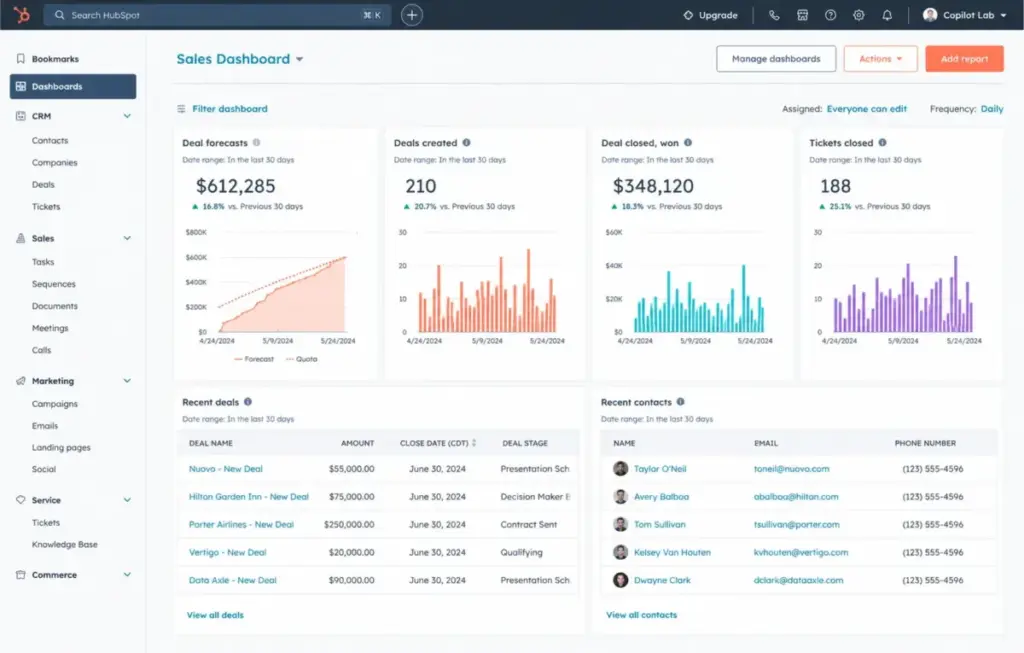
Pipedrive: Best for Simple Pipeline-Focused Sales Teams

Pipedrive starts at $14/user/month billed annually on the Lite plan, with a 14-day free trial. A 10-user team pays $140/month at annual billing. Add-ons for LeadBooster, e-signatures, data enrichment, and advanced security are charged separately at the company level.
Pipedrive does better than Copper in visual pipeline management, integration breadth (500+ integrations), and email-stack flexibility. The tradeoff is that Copper is more tightly embedded in Google Workspace, so Gmail-native relationship tracking feels smoother in Copper.
Best for: Sales teams that like Copper’s simplicity but want broader integrations and a classic visual pipeline CRM. Avoid if: You specifically need a CRM that lives inside Gmail. Pipedrive is a standalone app. Migration difficulty: Low-Medium
The Pipedrive CRM analysis breaks down what each tier actually unlocks. Pricing details are in the Pipedrive pricing breakdown.
Freshsales: Best for Built-in Phone, Chat, Email, and AI

Freshsales has a free plan for up to 3 users and paid plans from $9/user/month billed annually on Growth. A 10-user team on Growth pays $90/month, matching Copper’s Starter cost but with built-in chat, email, phone, deal management, lifecycle stages, and workflow options included.
Freshsales does better than Copper in multi-channel communication depth and AI assistance (Freddy AI). Copper may be cleaner for Gmail-first teams that want minimal CRM setup.
Best for: Teams leaving Copper because they need more communication channels, lifecycle tracking, and AI assistance at an equivalent or lower starting price. Avoid if: You want a CRM that stays embedded inside Gmail. Freshsales is a standalone platform. Migration difficulty: Medium
The Freshsales review covers feature gates and the Freshsales pricing details map what each tier unlocks.
Alternatives That Fix the Google Workspace Lock-in
Zoho CRM: Best Low-Cost Customizable CRM

Zoho CRM has a free edition for up to 3 users and paid USD plans from $14/user/month billed annually (verified from public pricing materials; the official page may render localized currency by region). A 10-user team on Standard pays approximately $140/month at annual billing.
Zoho does better than Copper in CRM configurability, module depth (leads, accounts, contacts, deals, forecasting, activities, social, currencies), and automation at mid-tier pricing. The tradeoff is setup complexity. Copper is usually easier for teams that mainly want Google Workspace relationship tracking without heavy CRM configuration.
Best for: Budget-conscious teams that need more customization, modules, and multi-channel CRM depth than Copper provides. Avoid if: Your team wants a zero-configuration CRM. Zoho’s flexibility comes with a learning curve. Migration difficulty: Medium-High
Nimble CRM: Best Relationship CRM for Google and Microsoft 365

Nimble lists one main plan at $24.90/seat/month billed annually (or $29.90 monthly), with 25,000 contact records and 2 GB storage per seat. A 10-user team pays $249/month at annual billing. Add-ons for email marketing, web forms, web chat, and higher email-message capacity are separate. If those add-ons change the real monthly cost, compare Nimble replacement options by inbox integration, contact enrichment, storage limits, and bundled sales features.
Nimble does better than Copper in supporting both Google Workspace and Microsoft 365, with contact enrichment, Nimble Prospector, AI email tools, and social/profile matching. Copper may be stronger for teams committed to a Google-first CRM with more structured Google Workspace positioning.
Best for: Relationship-driven teams that want Copper-style simplicity with both Google and Microsoft 365 compatibility. Avoid if: You need deep sales automation or multi-pipeline management. Nimble is a relationship CRM, not a full sales platform. Migration difficulty: Low-Medium
Alternatives That Fix the Reporting Ceiling
Salesforce Starter Suite: Best for Enterprise CRM Scale

Salesforce Starter Suite starts at $25/user/month in verified USD pricing, with a 30-day free trial for up to 10 users. A 10-user team pays $250/month. Higher Sales Cloud tiers add forecasting, opportunity scoring, conversation intelligence, APIs, and Agentforce features, but total cost rises significantly with add-ons, implementation, and admin work.
Salesforce does better than Copper in reporting depth, forecasting, governance, and sales process control. Copper is much simpler and lighter for small Google Workspace teams. Salesforce introduces admin and implementation overhead that small teams may not need.
Best for: Teams outgrowing Copper that expect heavier reporting, forecasting, and eventual enterprise CRM expansion. Avoid if: Your team is under 10 people and does not need enterprise-grade reporting. The implementation overhead is real. Migration difficulty: High
monday Sales CRM: Best for Visual Teams and Cross-Functional Workflows

monday Sales CRM starts at $12/seat/month billed annually with a 3-seat minimum. Standard is $17/seat/month and Pro is $28/seat/month. A 10-user team on Basic pays $120/month. There is no full free CRM version, only a 14-day trial.
monday does better than Copper in visual workflow flexibility, board-based collaboration, dashboards, and cross-functional handoffs. Copper is more natively connected to Gmail and Google Workspace relationship workflows.
Best for: Teams that want Copper-style pipeline visibility with more flexible workflow boards, dashboards, and collaboration. Avoid if: You need a CRM deeply integrated with Gmail. monday is a standalone platform. Migration difficulty: Medium
Alternatives That Fix Sales Outreach Gaps
Close CRM: Best for Inside-Sales Outreach

Close has a Solo plan at $9/month for one user and 10,000 leads, but for a 10-user team, the benchmark is Essentials at $35/user/month billed annually. That puts a 10-user team at $350/month. Workflows start on Growth, and Power Dialer and Predictive Dialer require higher tiers.
Close does better than Copper in built-in calling, SMS, email, pipeline reporting, central inbox, and AI call summaries. Copper is better aligned to Google Workspace relationship management for lower-velocity, relationship-based selling.
Best for: Sales teams leaving Copper because they need native calling, SMS, email sequences, and higher-velocity outreach tools. Avoid if: Your team does relationship selling through Gmail and does not need a dialer or SMS. Close is designed for inside-sales velocity. Migration difficulty: Medium
Streak CRM: Best Gmail-Native Alternative

Streak offers free email power tools and paid CRM plans starting at Pro for $49/user/month billed annually (or $59 monthly). A 10-user team on Pro pays $490/month. Advanced reports, integrations, automations, custom roles, and dedicated support require higher tiers.
Streak does better than Copper in being truly Gmail-native. Streak CRM lives directly inside the Gmail interface with pipelines, shared records, email tracking, snippets, and mail merge. The tradeoff is that Streak is more constrained to Gmail-centric workflows, while Copper can feel more like a standalone relationship CRM. Teams deciding whether Gmail-native simplicity is enough should compare Streak CRM alternatives by inbox workflow preservation, automation access, reporting depth, and the cost of scaling beyond email-centric sales.
Best for: Gmail-first teams that want an even more inbox-centered CRM experience than Copper provides. Avoid if: You want a CRM that works independently of Gmail, or you need a broad multi-channel CRM suite. Streak’s strength is also its boundary. Migration difficulty: Low-Medium
The Streak CRM review covers what each tier unlocks and where the Gmail-only model creates limitations.
Insightly CRM: Best for Sales-to-Project Handoff

Insightly starts at $29/user/month billed annually on Plus, with Professional at $49 and Enterprise at $99. A 10-user team on Plus pays $290/month. Marketing, AppConnect, Service, setup, and AI-related capacity are separate costs.
Insightly does better than Copper in combining CRM with project management, delivery handoff, lead routing, advanced reports, and dashboards. Copper is more lightweight and Google Workspace-native for relationship tracking.
Best for: Teams that need CRM plus project management, structured post-sale operations, and delivery handoff workflows. Avoid if: You need a simple relationship CRM without project management complexity. Insightly’s breadth adds setup depth. Migration difficulty: Medium
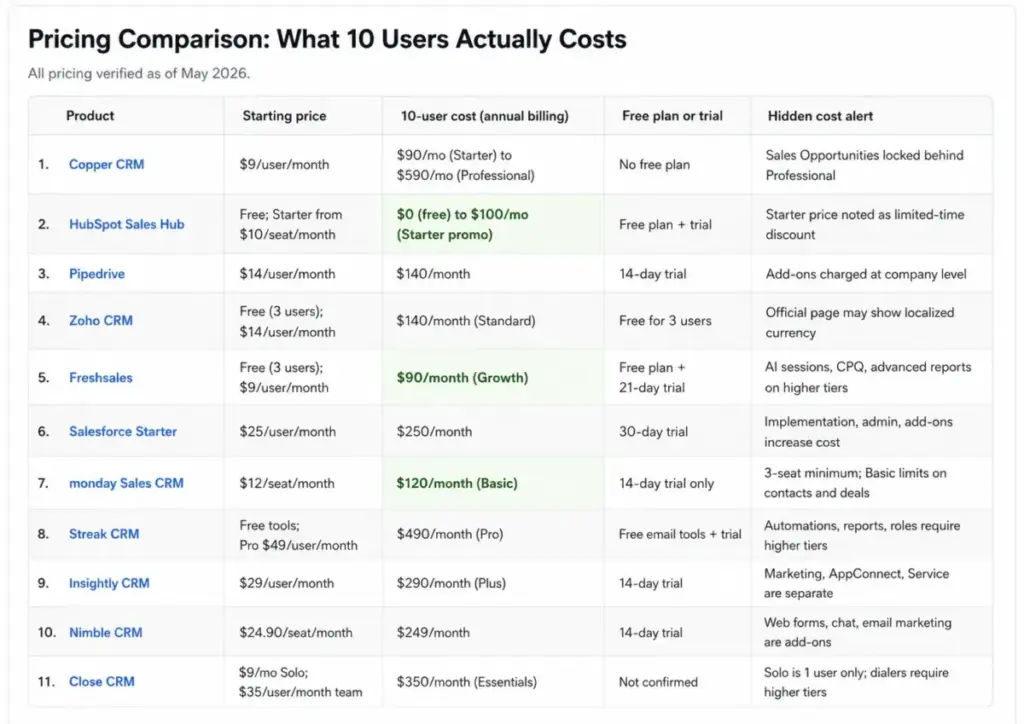
Pricing Comparison: What 10 Users Actually Costs
| Product | Starting price | 10-user cost (annual billing) | Free plan or trial | Hidden cost alert |
|---|---|---|---|---|
| Copper CRM | $9/user/month | $90/mo (Starter) to $590/mo (Professional) | No free plan | Sales Opportunities locked behind Professional |
| HubSpot Sales Hub | Free; Starter from $10/seat/month | $0 (free) to $100/mo (Starter promo) | Free plan + trial | Starter price noted as limited-time discount |
| Pipedrive | $14/user/month | $140/month | 14-day trial | Add-ons charged at company level |
| Zoho CRM | Free (3 users); $14/user/month | $140/month (Standard) | Free for 3 users | Official page may show localized currency |
| Freshsales | Free (3 users); $9/user/month | $90/month (Growth) | Free plan + 21-day trial | AI sessions, CPQ, advanced reports on higher tiers |
| Salesforce Starter | $25/user/month | $250/month | 30-day trial | Implementation, admin, add-ons increase cost |
| monday Sales CRM | $12/seat/month | $120/month (Basic) | 14-day trial only | 3-seat minimum; Basic limits on contacts and deals |
| Streak CRM | Free tools; Pro $49/user/month | $490/month (Pro) | Free email tools + trial | Automations, reports, roles require higher tiers |
| Insightly CRM | $29/user/month | $290/month (Plus) | 14-day trial | Marketing, AppConnect, Service are separate |
| Nimble CRM | $24.90/seat/month | $249/month | 14-day trial | Web forms, chat, email marketing are add-ons |
| Close CRM | $9/mo Solo; $35/user/month team | $350/month (Essentials) | Not confirmed | Solo is 1 user only; dialers require higher tiers |
What this means: The cheapest 10-user alternatives are Freshsales Growth ($90/month) and monday Sales CRM Basic ($120/month). HubSpot’s free tier costs nothing but gates sales automation. Streak’s Gmail-native CRM is the most expensive option at $490/month for Pro. If Copper’s Professional tier at $590/month triggered your search, most alternatives here cost less for comparable or broader feature sets.
All pricing verified as of May 2026. Check each vendor’s official pricing page for current rates.
Migration Difficulty Matrix
| Alternative | Difficulty | Main risk | Key consideration |
|---|---|---|---|
| HubSpot Sales Hub | Medium | Field mapping, workflow rebuild | Good import tools, but learning the platform takes time |
| Pipedrive | Low-Medium | Pipeline structure differences | Straightforward import, minimal workflow rebuild |
| Zoho CRM | Medium-High | Configuration complexity | Powerful but requires upfront setup investment |
| Freshsales | Medium | Communication channel setup | Setting up phone, chat, and email channels adds steps |
| Salesforce Starter | High | Implementation overhead, admin needs | Consider professional onboarding for teams over 10 |
| monday Sales CRM | Medium | Board structure differs from pipeline CRM | Visual, but CRM logic differs from traditional pipeline tools |
| Streak CRM | Low-Medium | Gmail-only scope | Easy if staying in Gmail; harder if workflows extend outside |
| Insightly CRM | Medium | Project + CRM dual setup | Setting up both CRM and project modules takes planning |
| Nimble CRM | Low-Medium | Contact enrichment setup | Simple core migration; add-ons configured separately |
| Close CRM | Medium | Communication channel configuration | Calling, SMS, and email setup require routing decisions |
Migration difficulty is an editorial estimate based on data model complexity, workflow rebuild effort, integration requirements, and setup depth. Actual migration timelines vary by team size and data volume.
How to Choose the Right Copper CRM Alternative
- Identify your switching trigger. Are you leaving because of pricing, feature gates, reporting, outreach gaps, or Google Workspace dependency? The answer narrows your list to 2-3 options.
- Compare the practical tier, not the starting price. Copper’s Starter at $9 and Freshsales Growth at $9 have very different feature sets. Always check what the plan includes at the tier you will actually use.
- Calculate the real 10-user cost. Add-ons, seat minimums, and AI credits change the math. A CRM that looks cheaper per seat can cost more at team scale.
- Check your email stack. If your team uses Outlook, mixed inboxes, or plans to move away from Google Workspace, eliminate Gmail-only tools (Streak, and consider whether Copper’s Google dependency is the problem you are solving).
- Assess migration risk honestly. A CRM with better features is not a better choice if the migration breaks your sales workflows for 3 weeks. Start with lower-risk alternatives if your team cannot afford downtime. Our CRM migration guide walks through the common risks.
- Test before committing. Most alternatives on this list offer free trials or free tiers. Use them with real data before migrating your entire team.
Which Copper Alternative Should You Avoid?
Not every alternative fits every team. Here are specific avoid-if signals:
- Avoid Salesforce if your team is under 10 people and no one has admin experience. The implementation overhead will slow you down more than Copper’s limitations.
- Avoid Streak if you need CRM capabilities outside Gmail or want a multi-channel sales platform. Streak’s strength is also its constraint.
- Avoid Zoho CRM if your team does not have time for configuration. Zoho’s flexibility requires upfront setup investment that Copper does not.
- Avoid Close CRM if your team does relationship-based selling through Gmail. Close is built for inside-sales velocity, not relationship nurturing.
- Avoid monday Sales CRM if you need deep CRM-specific features like sales pipeline automation. monday is a visual workflow tool with CRM features layered on top.
When to Stay with Copper
Copper is still the right choice if:
- Your entire team is committed to Google Workspace and Gmail is the center of your workflow.
- You need simple relationship tracking and contact management without heavy CRM configuration.
- Your team is under 10 people and the Starter or Basic tier covers your requirements.
- You value a CRM that stays out of the way. Copper’s lightweight approach reduces adoption friction.
- You do not need native calling, SMS, advanced automation, or forecasting dashboards.
Switch if: Feature gates on Professional or Business are blocking capabilities your team needs, your email stack is not exclusively Google, or your reporting and automation requirements have outgrown what Copper offers at a price you can justify.
Final Verdict: Best Copper CRM Alternative for Most Teams
For most teams leaving Copper, HubSpot Sales Hub is the strongest overall alternative. The free CRM tools give you a zero-cost starting point, the Starter tier keeps costs reasonable, and the platform scales into marketing, service, and operations as your needs grow. It solves the feature-gate problem, the reporting ceiling, and the ecosystem breadth limitation in one move.
But “most teams” is not every team:
- Best free option: Freshsales (free for 3 users, Growth at $90/month for 10 users)
- Best for simple pipeline sales: Pipedrive (clean pipeline CRM at $140/month for 10 users)
- Best for Gmail-native workflow: Streak CRM (stays inside Gmail, but costs $490/month for 10 users)
- Best for inside-sales outreach: Close CRM (built-in calling, SMS, dialers at $350/month for 10 users)
- Best for project handoff: Insightly CRM (CRM + project management at $290/month for 10 users)
- Best for budget CRM depth: Zoho CRM (configurable modules at $140/month for 10 users)
- Best for Google + Microsoft support: Nimble CRM (dual-stack relationship CRM at $249/month for 10 users)
- Best for enterprise scale: Salesforce Starter Suite (enterprise foundation at $250/month for 10 users)
- Best for visual workflow teams: monday Sales CRM (board-based CRM at $120/month for 10 users)
The right alternative matches your switching trigger, not just your budget. Identify which Copper ceiling you hit first, then pick the tool that raises it.
FAQ
What is the best alternative to Copper CRM?
HubSpot Sales Hub is the best overall Copper alternative for most teams because it offers free CRM tools with a clear upgrade path into sales automation, reporting, and multi-channel capabilities. However, the best pick depends on your specific exit reason. Freshsales is better for built-in phone and chat, Pipedrive is better for simple pipeline sales, and Close CRM is better for inside-sales outreach.
Is Copper CRM only for Google Workspace?
Yes, Copper is designed specifically for Google Workspace. It integrates deeply with Gmail, Google Calendar, and Google Drive. If your team uses Outlook or mixed email stacks, Copper’s core architecture will not serve you well. Alternatives like Nimble CRM, Pipedrive, and HubSpot support both Google and Microsoft environments.
Which Copper CRM alternative is cheapest for 10 users?
Freshsales Growth at $90/month for 10 users and HubSpot’s free CRM at $0/month are the lowest-cost options. monday Sales CRM Basic at $120/month and Pipedrive at $140/month are the next tier. But compare what each plan includes at those prices, not just the monthly total.
Does Copper CRM have a free plan?
No. Copper does not offer a free plan. The lowest tier is Starter at $9/user/month billed annually. If you need a free CRM, HubSpot, Freshsales, and Zoho CRM all offer free tiers with real functionality.
Which Copper alternative has the easiest migration?
Pipedrive, Nimble CRM, and Streak CRM have the lowest migration difficulty. Pipedrive offers straightforward data import tools. Nimble keeps the relationship-CRM model similar to Copper. Streak is easy if your team stays in Gmail. Zoho CRM and Salesforce require more setup investment.
Which Copper alternative has built-in calling and SMS?
Close CRM is the strongest option for teams that need native calling, SMS, email, power dialers, and predictive dialers built into the CRM. Freshsales also includes built-in phone and chat. Copper does not offer native calling or SMS.
Is monday Sales CRM better than Copper for agencies?
monday Sales CRM offers more visual workflow flexibility, cross-functional collaboration, and board-based project tracking that agencies often prefer. Copper is better for Gmail-native relationship tracking. The choice depends on whether your agency prioritizes visual collaboration boards or inbox-centered contact management.
How much does Copper CRM cost for 10 users?
Copper Starter costs $90/month for 10 users billed annually, but Starter lacks Sales Opportunities and workflow automation. Professional at $590/month for 10 users is the tier most sales teams actually need. Business at $990/month for 10 users adds custom reports and email series. The gap between advertised price and practical cost is the main reason teams evaluate alternatives.
Is Streak a good alternative to Copper CRM?
Yes, if you want to stay completely inside Gmail. Streak CRM runs directly in the Gmail interface with pipelines, shared records, and email tracking. The tradeoff is cost (Pro at $490/month for 10 users) and scope (Streak is Gmail-only, not a multi-channel CRM platform).
What are the main limitations of Copper CRM?
Copper’s main limitations include feature gating above the entry tier (Sales Opportunities locked behind Professional), Google Workspace dependency (not suitable for Outlook or mixed-email teams), reporting limitations on lower plans, no native calling or SMS, and contact limits on Starter. These limitations are the primary switching triggers driving teams to alternatives.