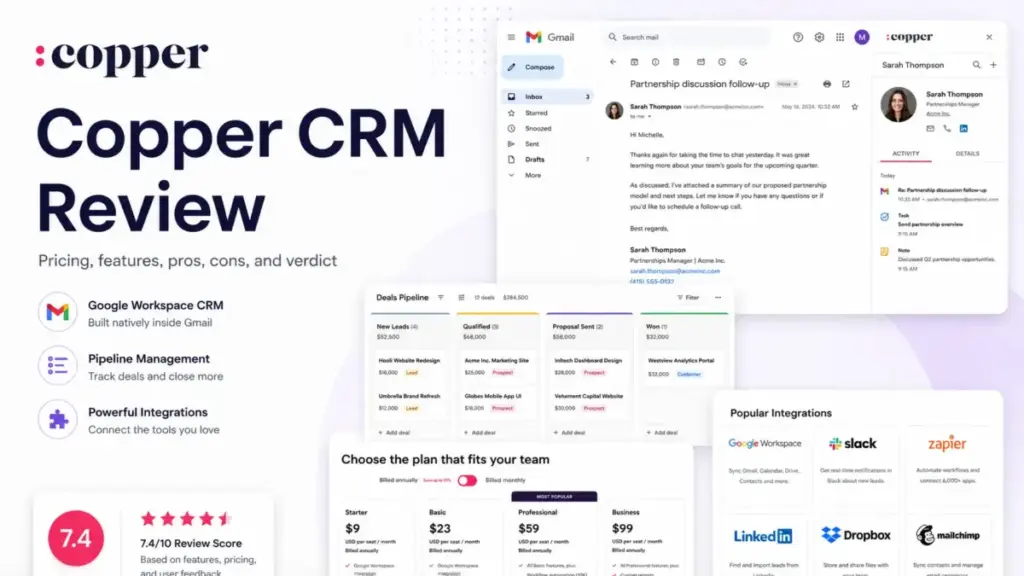
Copper CRM advertises a $23/user/month starting price for its Basic plan, but this entry-level option lacks essential sales features like lead tracking and workflow automation. For most sales teams, the practical choice is the $59/user/month Professional plan.
While this price jump is significant, Copper remains a top choice for teams that work exclusively within Gmail and Google Workspace.
This review maps every pricing tier and limitation so you can decide if Copper is worth your investment. If it does not fit your budget or workflow, you can check out our best CRM software roundup or explore specific Copper CRM alternatives to find the right match.
(Note: This evaluation relies on independent research, verified customer feedback, and official documentation. We advise verifying onboarding and mobile app performance directly with Copper.)
| Quick Verdict | Details |
|---|---|
| Best for | 5-30 person agencies, consultancies, and professional services teams using Gmail daily |
| Not ideal for | Outbound sales teams needing leads, opportunities, and deep reporting on entry plans |
| Starting price | $23/seat/month (Basic, billed annually) |
| Practical plan | $59/seat/month (Professional, billed annually) |
| Free plan/trial | No free plan. 14-day free trial, no credit card required |
| Setup difficulty | Medium: fast for Gmail-only teams, complex with imported data and automations |
| Main strength | Gmail and Google Calendar sync with zero-friction CRM adoption for Google-centric teams |
| Main limitation | Leads, Sales Opportunities, workflow automation, reporting, and API access require Professional ($59) or Business ($99) |
| Best alternative | HubSpot CRM (free tier with leads and pipeline) or Pipedrive (lower-cost sales pipeline) |
How We Reviewed Copper CRM
This review draws on Copper’s official pricing page (verified May 2026), official product documentation, developer API docs, and duplicate-management support articles. User sentiment analysis covers verified reviews on G2, Capterra, and TrustRadius.
I evaluated Copper against pricing transparency, feature gates per plan, CRM software fundamentals, integration depth, automation capabilities, and duplicate-management behavior documented in Copper’s own support center. Scoring reflects the gap between marketing positioning and the plan-level reality most buyers encounter.
The 3 Problems Copper CRM Solves
Problem 1: CRM Adoption Fails Because Reps Ignore Non-Gmail Tools
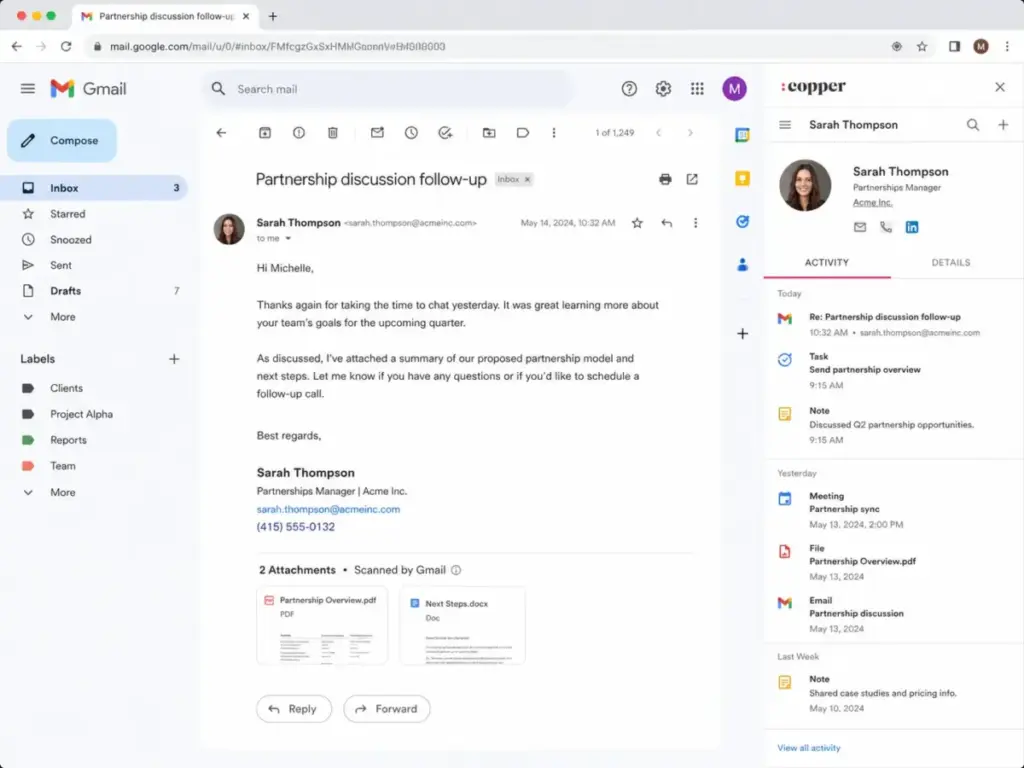
Copper syncs natively with Gmail, Google Calendar, Google Contacts, and Google Drive across all paid plans. Contacts, emails, calendar events, and files appear inside the CRM without manual entry. For Google Workspace teams, this removes the adoption barrier that kills CRM deployments: data entry friction.
According to Copper’s official feature documentation, the Chrome extension and Gmail sidebar let reps log emails, create contacts, and update pipelines without leaving their inbox. I suspect this is the single strongest reason teams choose Copper over alternatives. The activity feed pulls every touchpoint into a timeline, which means a 5-person consulting firm using Gmail for client conversations gets relationship visibility without training anyone on a new interface.
The catch: this Google-native fit is also a limitation. If your team uses Outlook, Microsoft Teams, or a non-Google calendar, Copper offers minimal value. The CRM is built around Google Workspace as its operating system.
Problem 2: Client-Facing Teams Need Pipeline and Project Tracking in One Place
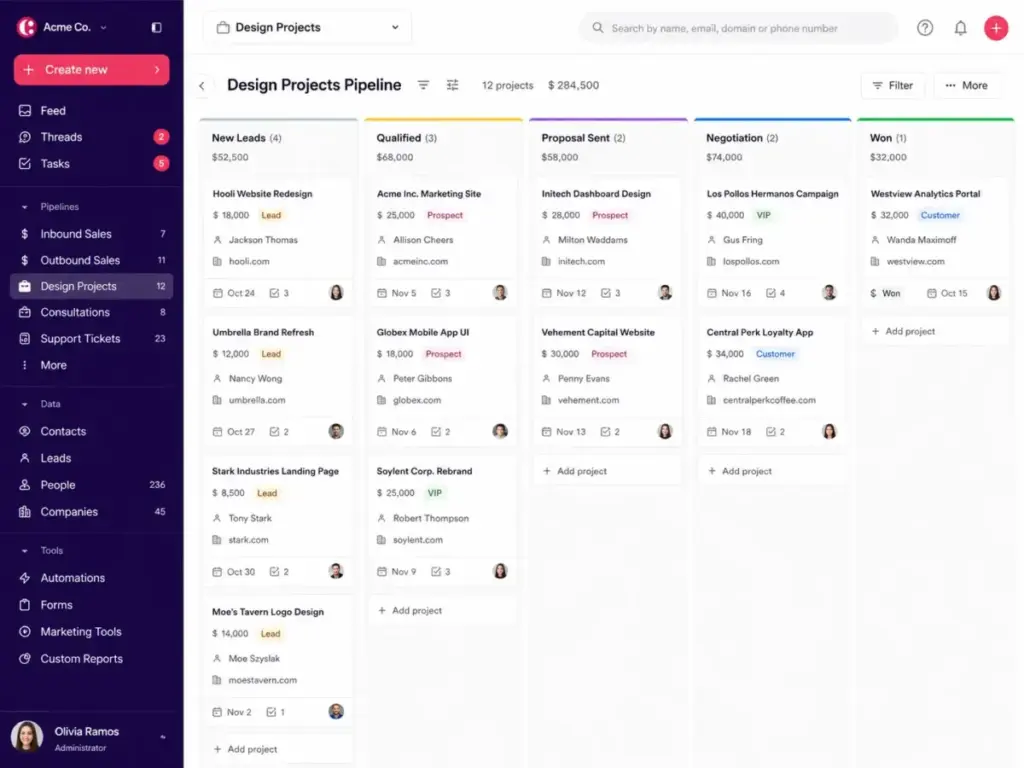
Copper includes pipeline management and project pipelines starting on the Basic plan ($23/seat/month, billed annually). Agencies, financial advisors, and professional services firms that manage both a sales pipeline and post-sale client delivery workflows can use Copper’s project pipelines to track client work alongside deal progression.
Contact enrichment is also available on Basic, which auto-fills company and contact details from public data. Task automation on Basic handles repetitive follow-up triggers without manual scheduling.
For a 10-person agency managing 50 active client accounts, the combination of Gmail sync, pipeline tracking, and project management in one view solves the tool-switching problem that plagues teams using a CRM plus a separate project tool. At $23/seat/month for 10 users, the monthly bill lands at $230 (billed annually), which is competitive for a combined CRM and project tracker.
Problem 3: Google-First Teams Want Reporting and Data in Familiar Tools
Copper integrates with Google Sheets and Looker Studio, allowing teams to export CRM data into the reporting tools they already use. For teams that build dashboards in Google Sheets rather than learning a proprietary reporting interface, this is a practical advantage.
The limitation: built-in reporting starts at Professional ($59/seat/month), and custom reports require Business ($99/seat/month). Teams on Starter or Basic who need pipeline reports must export data manually or rely on basic activity feeds.
The 2 Problems Copper CRM Creates
Problem 1: The Features Most Sales Teams Need Are Locked Behind Professional
Copper’s plan-gate structure is more aggressive than most competing reviews acknowledge. The table below maps the critical feature gates using data from Copper’s official pricing page (as of May 2026):
| Feature | Basic ($23) | Professional ($59) | Business ($99) |
|---|---|---|---|
| Contact limit | 2,500 | 15,000 | Unlimited |
| Google Workspace sync | Yes | Yes | Yes |
| Pipelines | Yes | Yes | Yes |
| Leads | No | Yes | Yes |
| Sales Opportunities | No | Yes | Yes |
| Task automation | Yes | Yes | Yes |
| Workflow automation | No | Yes | Yes |
| Bulk email | No | Yes | Yes |
| Reporting | No | Yes | Yes |
| API and SDK access | No | Yes | Yes |
| Advanced integrations | No | Yes | Yes |
| Email series | No | No | Yes |
| Custom reports | No | No | Yes |
| Multi-currency | No | No | Yes |
| Okta SSO | No | No | Yes |
| Premium support | No | No | Yes |
What this means: Starter is a contact manager, not a CRM. Basic adds pipelines and projects but still lacks leads and sales opportunities. Professional is where Copper becomes a functional sales CRM with leads, opportunities, workflow automation, reporting, and API access. For a 10-person sales team on Professional (billed annually), the cost is $590/month, not the $90/month the Starter price suggests.
Problem 2: Duplicate Records and Merge Limitations Create Operational Risk
Copper’s own support documentation confirms that People and Companies use email address and domain as unique identifiers to prevent duplicates. Leads, on the other hand, have no unique identifier. This means importing a lead list can create duplicate lead records with no automatic deduplication.
The second risk: merged records in Copper cannot be unmerged. Once two contacts are merged, the original records are gone. For teams importing thousands of contacts from a legacy CRM, this creates a one-way operation with no rollback.
Capterra reviewers frequently cite recurring glitches and duplicate handling as pain points. G2 reviewers confirm the Google integration praise but flag reporting and customization limitations. TrustRadius 2026 reviewers request better duplicate warnings, automation templates, and client-matter management.
These are not minor complaints. A 15-person financial advisory firm importing 3,000 client records needs to audit duplicates before merging, because Copper does not offer an undo.
Copper CRM Pricing Breakdown (2026)
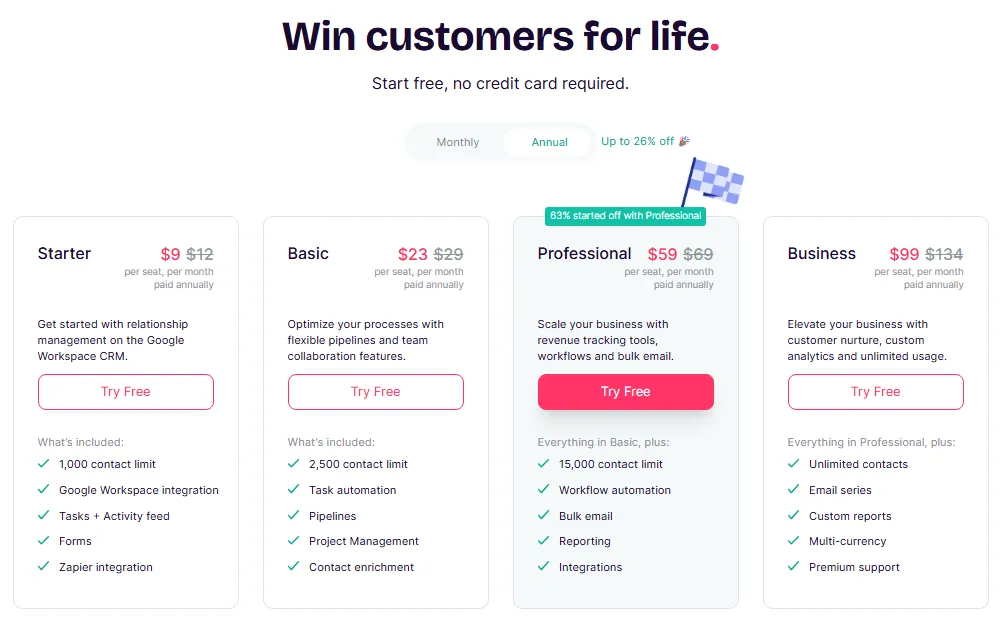
Copper offers four paid plans. All prices below are USD, verified on Copper’s official pricing page in May 2026. No free plan exists. A 14-day free trial is available with no credit card required.
| Plan | Monthly Billing | Annual Billing | Contact Limit | Best For |
|---|---|---|---|---|
| Basic | $29/seat/month | $23/seat/month | 2,500 | Small teams wanting pipelines, projects, and contact enrichment |
| Professional | $69/seat/month | $59/seat/month | 15,000 | Sales teams needing leads, opportunities, automation, and reporting |
| Business | $134/seat/month | $99/seat/month | Unlimited | International or enterprise teams needing custom reports, SSO, email series, and multi-currency |
Annual billing saves up to 26% compared to monthly billing. Prices exclude taxes and fees.
Where Pricing Starts to Pinch
A 10-person team on Professional (annual billing) pays $590/month or $7,080/year. That same team on Business pays $990/month or $11,880/year. The jump from Professional to Business adds $400/month for email series, custom reports, multi-currency, Okta SSO, and premium support.
For comparison, Pipedrive’s sales pipeline tools start at $14/seat/month (Essential) with leads and pipeline included on every plan. HubSpot CRM offers a free tier with unlimited users, though its paid plans scale steeply at Professional. The question for Copper buyers is whether the Google Workspace integration premium justifies the plan-gate trade-off.
Copper also applies seat minimums for guided onboarding within the first 30 days on certain plans. If your team needs hands-on onboarding, confirm whether your seat count qualifies.
Key Features With Plan Gates
Gmail and Google Calendar Sync (All Plans)
Every paid plan includes two-way Gmail sync, Google Calendar integration, Google Contacts sync, and Google Drive file attachment. The Chrome extension provides an inbox sidebar for managing contacts and deals without leaving Gmail. This is the baseline feature that differentiates Copper from CRMs that treat Gmail integration as an add-on.
Pipeline and Project Management (Basic and Above)
Pipelines and project pipelines are available starting at Basic. Teams can create custom deal stages, drag deals through a Kanban view, and track post-sale client projects in parallel. Task automation on Basic triggers follow-ups based on pipeline stage changes.
Leads and Sales Opportunities (Professional Only)
Leads and Sales Opportunities are gated to Professional ($59/seat/month). This means Starter and Basic users cannot track inbound leads as a separate object type or map sales opportunities through a qualification pipeline. Teams that run outbound prospecting or manage multiple opportunity types need Professional at minimum.
Workflow Automation and Bulk Email (Professional Only)
Workflow automation (trigger-based actions across the CRM) and bulk email require Professional. Starter and Basic users are limited to basic task automation, which covers follow-up reminders but not multi-step workflows.
Email Series, Custom Reports, and SSO (Business Only)
Email series (automated email sequences), custom report builder, multi-currency support, Okta SSO, and premium support are exclusive to Business ($99/seat/month). A growing sales team that starts on Professional and later needs email sequences will face a $40/seat/month upgrade.
Ease of Use, Integrations, and Support
Setup and Onboarding
Copper’s setup is straightforward for a 5-person Gmail team: install the Chrome extension, connect Google Workspace, and start logging contacts. Official documentation suggests setup can happen in minutes for simple use cases.
Complexity increases with imported data, custom fields, multiple pipelines, and automation rules. Copper offers guided onboarding within the first 30 days when seat minimums apply. Teams migrating from Salesforce or HubSpot with thousands of records should budget for data cleanup, especially given the duplicate-merge limitations.
Integrations and API
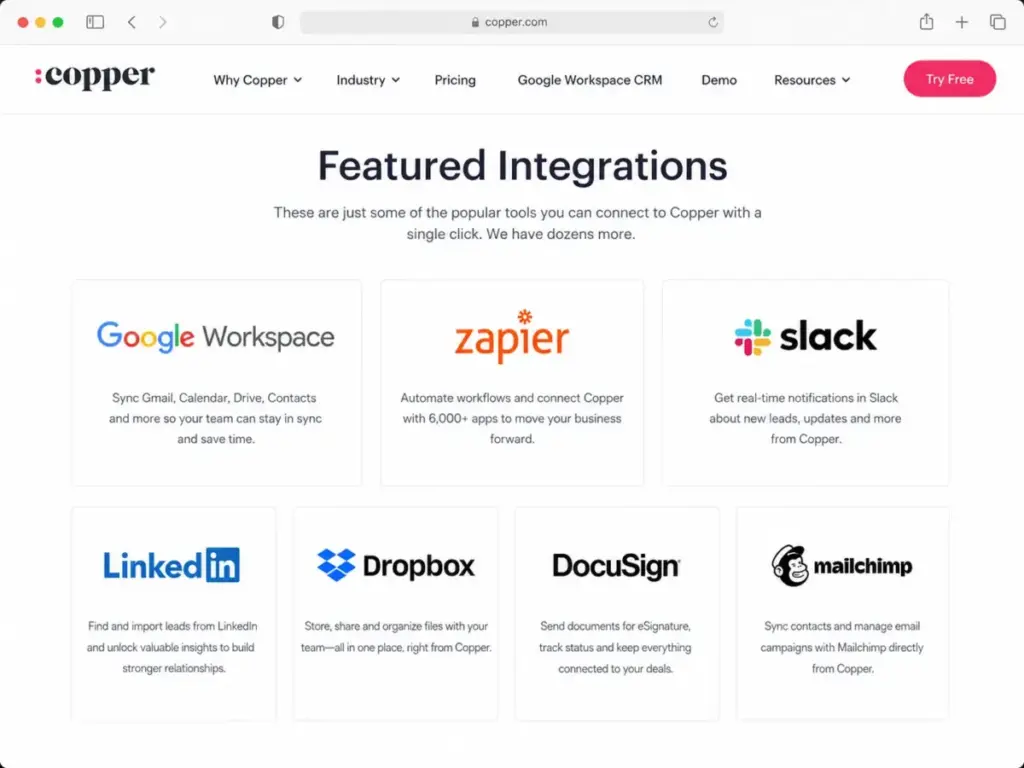
Google Workspace integrations (Gmail, Calendar, Contacts, Drive, Sheets, Looker Studio) are available on all plans. Zapier integration is included on Starter for basic cross-app automation.
Advanced integrations (LinkedIn, Mailchimp, DocuSign, QuickBooks, PandaDoc, JustCall, RingCentral, Slack, Zendesk, Calendly, Dropbox) require Professional or Business. API and Embedded Integration SDK access is gated to Professional and Business.
For RevOps teams building custom integrations: Copper’s public API documentation lists 180 requests per minute for standard API calls, 3 requests per second for bulk APIs, and a 100 active webhook subscription limit per account. Webhook notifications have no retry behavior, which means missed events require manual reconciliation. These limits matter for teams syncing Copper with data warehouses or building real-time integrations.
Support
All plans include a Help Center, in-app chat, and office hours. Premium support is Business-only. Capterra lists email/help desk, FAQs/forum, knowledge base, phone support, chat, and live representative support as available channels.
Security and Compliance
Copper states that it uses encryption in transit and at rest, role-based access controls, two-factor authentication for infrastructure access, regular vulnerability scans and penetration tests, GDPR-related controls, Privacy Shield, and standard contractual clauses. Okta SSO requires the Business plan.
Mobile App
Copper offers iOS and Android apps across all paid plans. Third-party user sentiment suggests the mobile experience may feel less complete than desktop for some workflows. Teams that rely heavily on mobile CRM access should validate their specific workflows during the trial.
Who Wins and Who Loses With Copper CRM
Use Copper CRM If:
- You are a 5-15 person agency or consulting firm using Gmail for every client conversation. Copper’s Google Workspace integration, activity feed, and project pipelines match this workflow without forcing CRM adoption resistance.
- Your team needs a combined CRM and client project tracker inside Google Workspace. Pipeline management plus project pipelines on Basic ($23/seat/month) covers both sales and delivery.
- You want contact enrichment and task automation without paying for a full sales CRM. Basic plan delivers contact management, pipelines, and basic automation at a reasonable price for relationship-tracking teams.
- Your finance, legal, or advisory team tracks relationships, not outbound pipeline. Copper’s strength is relationship management, not sales automation.
Skip Copper CRM If:
- You need leads and sales opportunities on your starting plan. These features are unavailable below Professional, which starts at $59/seat/month.
- You require email sequences, custom reports, or SSO. All three are Business-only at $99/seat/month, which puts Copper in the same price range as Salesforce CRM’s evaluation at Starter level.
- Your team does not use Google Workspace. Copper’s value proposition collapses without Gmail and Google Calendar at the center of the workflow. Outlook and Microsoft 365 teams should look elsewhere.
- You are building custom integrations with tight data-sync requirements. The API rate limits (180 req/min), webhook cap (100 subscriptions), and no webhook retry behavior create constraints that matter for RevOps workflows.
- You import large contact lists and cannot risk irreversible duplicate merges. Leads have no unique identifier, and merged records cannot be unmerged.
Better Alternatives for Teams Copper Does Not Fit
| Scenario | Best Alternative | Why | Avoid If |
|---|---|---|---|
| Need free CRM with leads and pipeline | HubSpot CRM (Free) | Unlimited users, leads, pipeline, and basic reporting at $0 | You need deep reporting or marketing automation without paying $90+/seat |
| Need low-cost sales pipeline without Google lock-in | Pipedrive (Essential, $14/seat/month) | Leads and pipeline on every plan, works with any email provider | You need built-in project management or marketing features |
| Need affordable CRM with broad feature coverage | Zoho CRM (Standard, $14/user/month) | Leads, pipeline, automation, and reporting at a lower price point than Copper Professional | You want Gmail-first experience without learning a new interface |
| Want Gmail CRM without leaving inbox | Streak CRM (Free or $59/user/month) | Lives entirely inside Gmail, no separate app to manage | You need project pipelines or multi-user pipeline management at scale |
| Need simple CRM with transparent pricing | Less Annoying CRM analysis | $15/user/month, all features included, no plan gates, no upgrade pressure | You need advanced automation, API access, or email marketing |
What this means: Copper’s Google Workspace fit is genuine, but the plan-gate structure means best CRM tools for small business like Pipedrive, Zoho, and Less Annoying CRM often deliver more sales functionality at equal or lower cost. The trade-off is Gmail integration depth: no competitor matches Copper’s native Google Workspace experience.
For teams specifically comparing Copper to pipeline-focused CRMs, the HubSpot vs Pipedrive comparison covers how those two alternatives handle the lead-to-deal workflow that Copper gates behind Professional.
Copper CRM Pros and Cons
- Tightest Google Workspace integration in the CRM category. Gmail, Calendar, Contacts, Drive, and Sheets sync is native across all plans, not an add-on.
- Low adoption friction for Google-first teams. The Chrome extension and inbox sidebar mean reps work inside Gmail, not a separate CRM window.
- Pipeline plus project management on Basic ($23/seat/month). Few CRMs combine deal tracking and client project pipelines at this price tier.
- Contact enrichment included on Basic. Auto-filled company and contact data reduces manual research time for relationship-building teams.
- 14-day free trial with no credit card. Instant activation lets teams evaluate before committing.
- Leads and Sales Opportunities require Professional ($59/seat/month). Any team running a qualification-based sales process cannot use Starter or Basic as a real CRM.
- Reporting and custom reports are gated to Professional and Business. Starter and Basic users have limited visibility into pipeline performance and sales metrics.
- Duplicate lead records have no unique identifier. Importing lead lists can create duplicates that require manual cleanup, and merged records cannot be unmerged.
- API and webhook limits constrain integration depth. 180 requests/minute, 100 webhook subscriptions, and no retry behavior affect RevOps teams building custom workflows.
- Minimal value without Google Workspace. Teams on Outlook, Microsoft 365, or hybrid email environments lose Copper’s core differentiator.
- Premium support is Business-only ($99/seat/month). Teams on lower plans rely on Help Center, in-app chat, and office hours.
Final Verdict: Is Copper CRM Worth It in 2026?
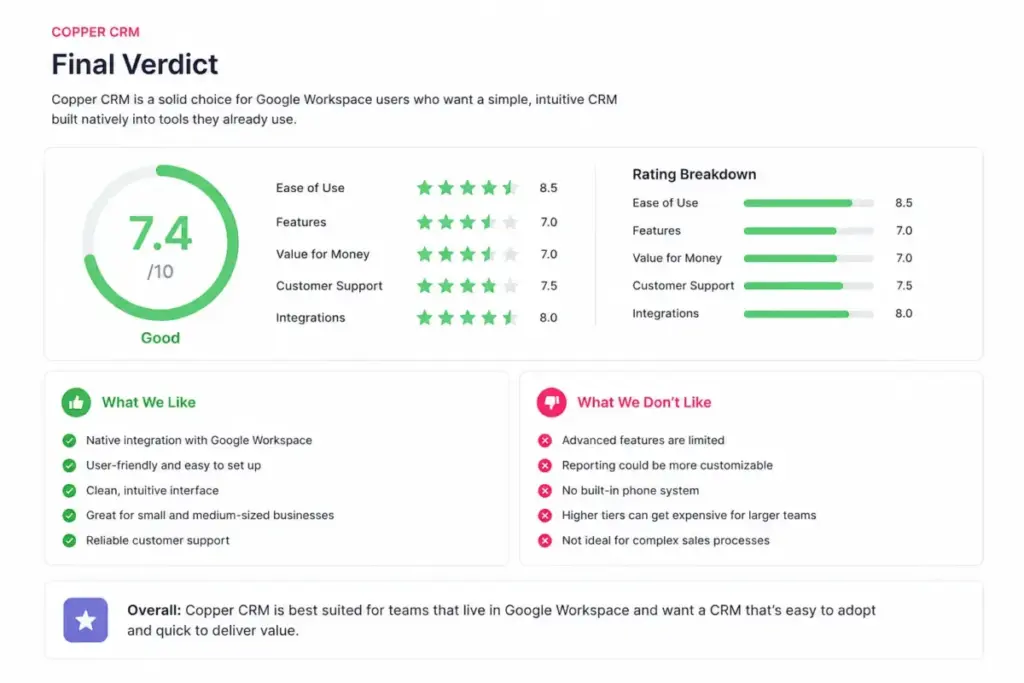
Copper CRM earns 7.4/10. It is the best CRM for Google Workspace-first teams that prioritize relationship tracking, Gmail adoption, and pipeline management within the Google ecosystem. It is not the best fit for outbound sales teams needing leads, opportunities, and reporting at an entry-level price.
Choose Copper if your team is a 5-20 person agency, consulting firm, or professional services group that lives in Gmail and needs a CRM that reps will actually use. Start with Basic ($23/seat/month) if you need pipelines and projects. Upgrade to Professional ($59/seat/month) only when you need leads, sales opportunities, workflow automation, and reporting.
Skip Copper if your team needs sales automation capabilities on every plan, works outside Google Workspace, or plans to build heavy API integrations. Pipedrive, HubSpot, or Zoho CRM deliver broader sales functionality at comparable or lower cost.
FAQ
Is Copper CRM worth the price for a small team?
Yes, if your small team already uses Gmail and Google Calendar daily and primarily needs contact management, activity tracking, and basic pipelines. The Basic plan at $23/seat/month delivers solid value for relationship-focused teams. No, if your team needs leads, sales opportunities, or workflow automation, because those features start at $59/seat/month on Professional.
Does Copper CRM have a free plan?
No. Copper does not offer a free plan. A 14-day free trial is available with instant activation and no credit card required. Teams needing a free CRM should consider HubSpot CRM (free tier with unlimited users) or free CRM software alternatives.
Which Copper plan includes leads and workflow automation?
Professional ($59/seat/month annually). Leads, Sales Opportunities, workflow automation, bulk email, reporting, advanced integrations, and API access all require Professional or higher. Teams on Starter or Basic cannot track leads as a separate object.
Can Copper CRM work outside Google Workspace?
Technically yes, but the value drops significantly. Copper’s core differentiator is native Gmail, Google Calendar, and Google Drive integration. Without Google Workspace, you lose the inbox sidebar, automatic email logging, calendar sync, and file attachment features that make Copper worth choosing over alternatives. Microsoft 365 and Outlook teams should evaluate Pipedrive’s CRM evaluation or HubSpot instead.
Can I run email sequences in Copper CRM?
Yes, but only on the Business plan at $99/seat/month (billed annually). Email series is a Business-exclusive feature. Teams needing email sequences on lower-cost plans should look at Pipedrive, HubSpot, or ActiveCampaign.
How does Copper handle duplicate contacts?
People and Companies use email address and domain as unique identifiers, which reduces duplicates. Leads have no unique identifier and can create duplicates during import. Merged records cannot be unmerged, so teams should audit data before merging. Copper’s support documentation confirms this limitation.
Is Copper CRM better than Pipedrive or Streak for Gmail users?
Copper offers deeper Google Workspace integration than Pipedrive (which is email-agnostic) and broader CRM features than Streak (which is Gmail-only with limited pipeline management). Choose Copper for combined pipeline and project management inside Google Workspace. Choose Pipedrive for lower-cost sales pipeline with email flexibility. Choose Streak for a minimal Gmail-only CRM without a separate app.
Does Copper CRM have good reporting?
Activity reports and pipeline reports are available on Professional ($59/seat/month). Custom reports require Business ($99/seat/month). Starter and Basic users have no built-in reporting beyond the activity feed. Teams that need pipeline management visibility across deal stages should note that verified G2, Capterra, and TrustRadius reviewers flag Copper’s reporting limitations and flexibility as recurring concerns.
What API limits does Copper CRM have?
Copper’s public API documentation lists 180 requests per minute for standard API calls, 3 requests per second for bulk APIs, and a maximum of 100 active webhook subscriptions per account. Webhook notifications have no retry behavior. API and SDK access require Professional or Business plans.