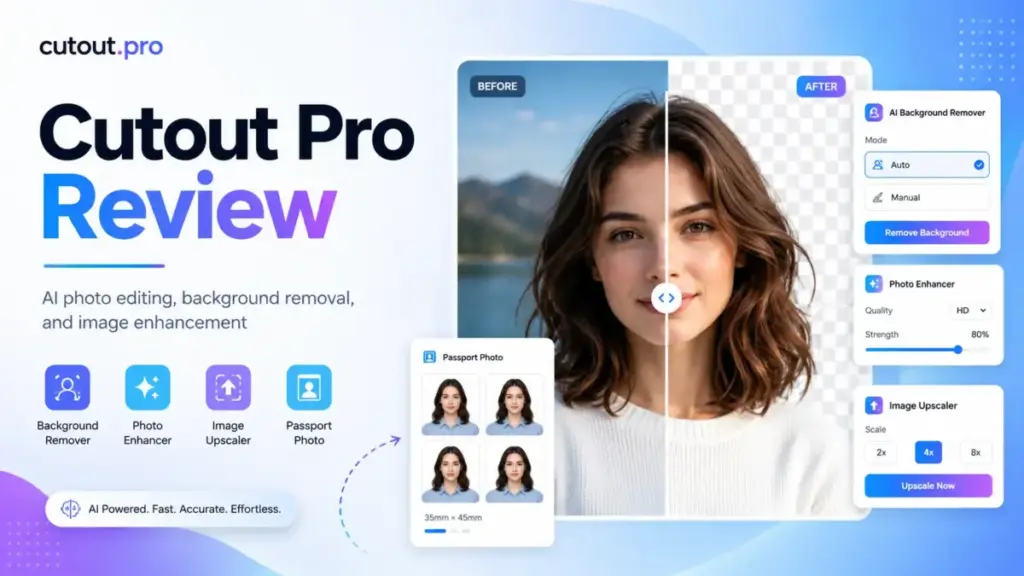
Most AI photo editor tools promise one-click magic. The reality is messier. Background removal works fine on a clean studio shot, but test it on a product sitting on a kitchen counter with natural hair in the frame, and the output tells a different story. This Cutout Pro review breaks down what the platform actually delivers in 2026, what it costs when you do the math by workflow, and where it falls short.
Cutout.Pro positions itself as an all-in-one AI visual content platform. It covers image background removal, video background removal, photo enhancement, object removal, AI art, e-commerce product staging, and developer API access. That breadth is unusual. It is also the source of its biggest pricing confusion, because different tools burn credits at different rates. Before spending money, you need to understand how the credit system maps to your actual production volume.
Quick Verdict: Cutout.Pro Scores 7.8/10
Cutout.Pro earns a 7.8 out of 10 in this review. It delivers strong value for recurring image workflows and broad tool access, but trust concerns and video pricing hold it back from a higher score.
I evaluate tools using the SaaSZap review methodology, which weights practical buyer outcomes over feature lists.
| Category | Score | What It Means |
|---|---|---|
| Background removal | 8.4/10 | Strong for clean product photos |
| Video tools | 7.2/10 | Useful but credit-heavy |
| Pricing clarity | 7.0/10 | Transparent rates, confusing multi-step workflows |
| API value | 8.0/10 | Good for simple automated cutouts |
| Trust and privacy | 6.5/10 | Good policy claims, breach concern remains |
| Overall | 7.8/10 | Worth it for image volume, not sensitive work |
What Is Cutout.Pro?
Cutout.Pro is an AI visual content platform that bundles image editing, video processing, and developer API tools under one credit-based account. It is built on generative AI models trained for background removal, image restoration, face cutouts, and e-commerce product staging.
The platform is not a single-purpose background remover. It is closer to a visual production toolkit aimed at sellers, creators, and developers who need repeatable image and video processing without opening Photoshop.
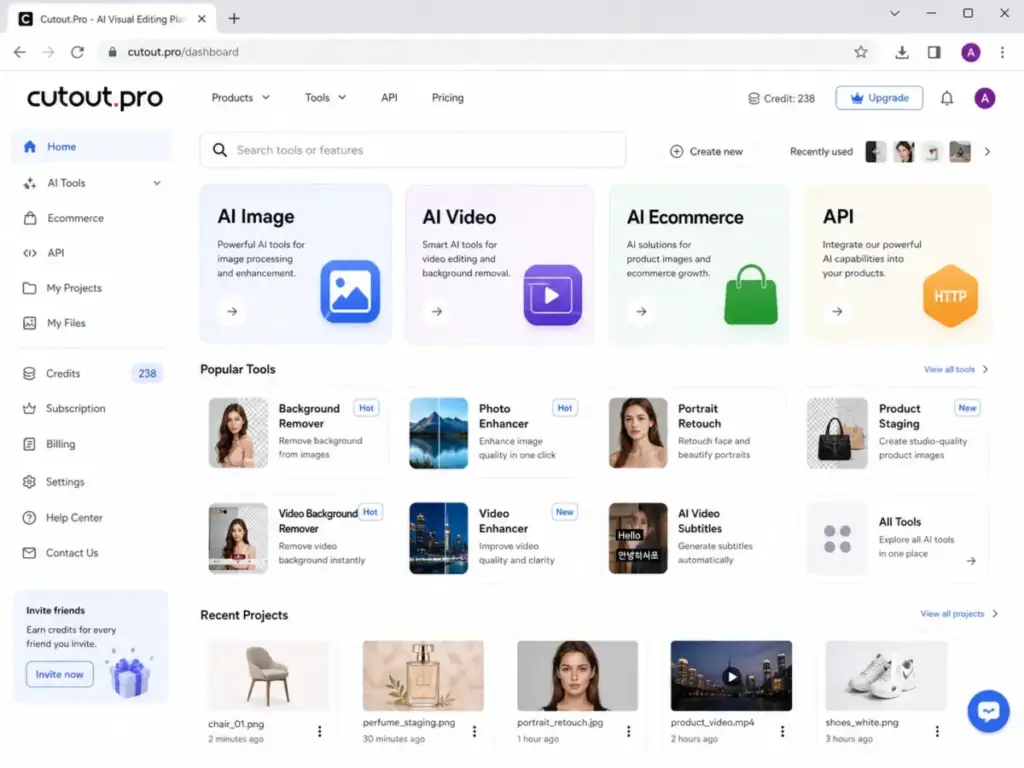
Cutout.Pro Is More Than Background Removal
The full feature set spans over 15 distinct tools: background remover, video background remover, photo enhancer, upscaler, colorizer, object remover, face cutout, passport photo maker, cartoon selfie, AI art generation, background diffusion, AI product staging, and AI e-commerce visuals. Desktop, mobile, and Shopify plugin access are also available.
This breadth is a genuine differentiator. It also creates tool sprawl risk. Each tool has its own credit cost, and switching between them inside a single production workflow can stack credits faster than the pricing page suggests. I will break that down in the pricing section.
Cutout.Pro’s Best Use Case
Cutout.Pro works best for repeatable, volume-driven image production. If you process 100 to 1,000 product images per month and need clean transparent PNGs, white backgrounds, or enhanced product shots, the subscription pricing makes sense. It is not a deep design tool. It is a production tool.
The strongest fit is an e-commerce seller or agency that needs to process catalog images quickly, consistently, and without manual masking. Think Amazon listing photos, Shopify product pages, eBay catalog refreshes, and print-on-demand asset creation.
Cutout Pro Features That Matter
Not every Cutout.Pro feature deserves equal weight in a buying decision. I am focusing on the tools that affect production workflows, credit costs, and output quality for the target audiences that benefit most from this platform.
Cutout.Pro Background Remover
The background remover is the core product. It accepts JPEG, PNG, and WebP uploads, processes them through an AI matting model, and exports transparent PNG files. For clean product photos with solid backgrounds, the results are strong. Subjects with well-defined edges export cleanly.
One Capterra reviewer noted: “You can take out the background of any image.” That matches the experience on simple subjects. The challenge is complex edges. Hair, fur, transparent glass, and thin fabric edges still produce artifacts. As one Trustpilot user put it: “Some of the backgrounds still exist.” This is a known limitation across all AI background removal tools, not unique to Cutout.Pro, but worth testing before committing to a paid plan.
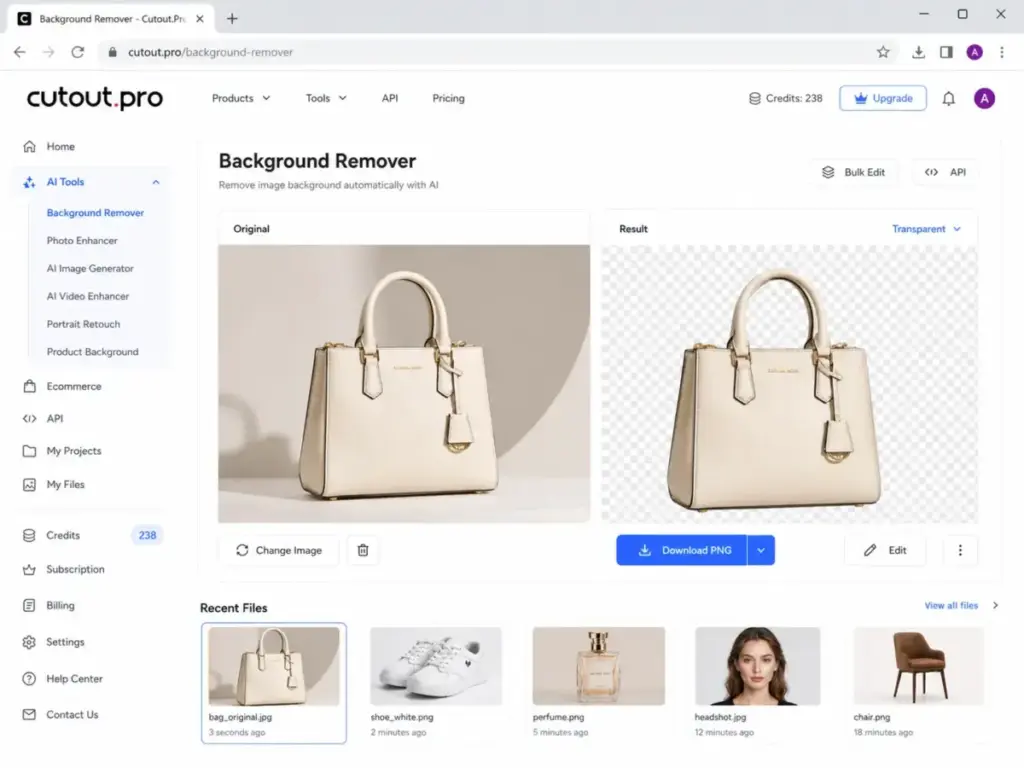
Background removal costs 1 credit per image. That is the simplest, most predictable cost on the platform.
Cutout.Pro Video Background Remover
Video background removal works without a green screen. You upload a video, and the AI separates the foreground subject from the background frame by frame. Maximum supported resolution is 4K, maximum file size is 2GB, and maximum frame rate is 30FPS.
This is a real differentiator for creators who record talking-head content, product demos, or short social clips without a studio setup. The tool category connects to the broader AI video generator space, though Cutout.Pro focuses specifically on background processing rather than full video generation.
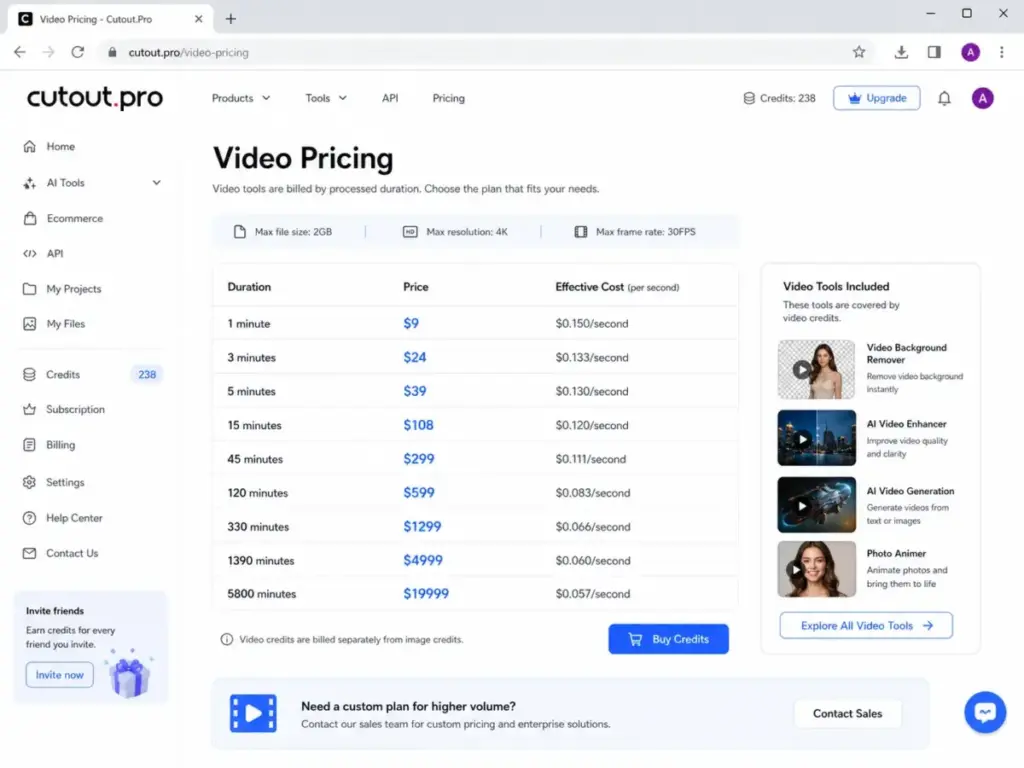
The limitation is cost. Video credits are sold separately from image credits, priced per second of processed video. I cover the exact burn rate in the pricing section, but the short version: processing a 5-minute video costs $39. That adds up fast for anyone editing multiple clips per week.
Cutout.Pro Photo Enhancer and Upscaler
The photo enhancer increases image resolution and sharpness using AI upscaling. It costs 2 credits per image, double the cost of background removal. Use cases include restoring low-resolution product photos, improving images pulled from old catalogs, and upscaling social media assets.
The 2-credit cost matters because it changes the math on multi-step workflows. If you remove a background (1 credit) and then enhance the result (2 credits), one image costs 3 credits total. That distinction is invisible on the pricing page.
Cutout.Pro Retouch and Object Removal
The retouch tool removes unwanted objects from images. Think product photos with visible wires, labels, stickers, or background clutter. It costs 1 credit per image.
For product cleanup and social content editing, this tool saves time compared to manual cloning in Photoshop. It works well on simple removals. Complex scenes with overlapping objects or textured backgrounds produce less predictable results.
Cutout.Pro API
Cutout.Pro offers a developer API for automated image and video processing. The API accepts image file uploads or image URLs, and returns either a processed image file or Base64-encoded image data in JSON format.
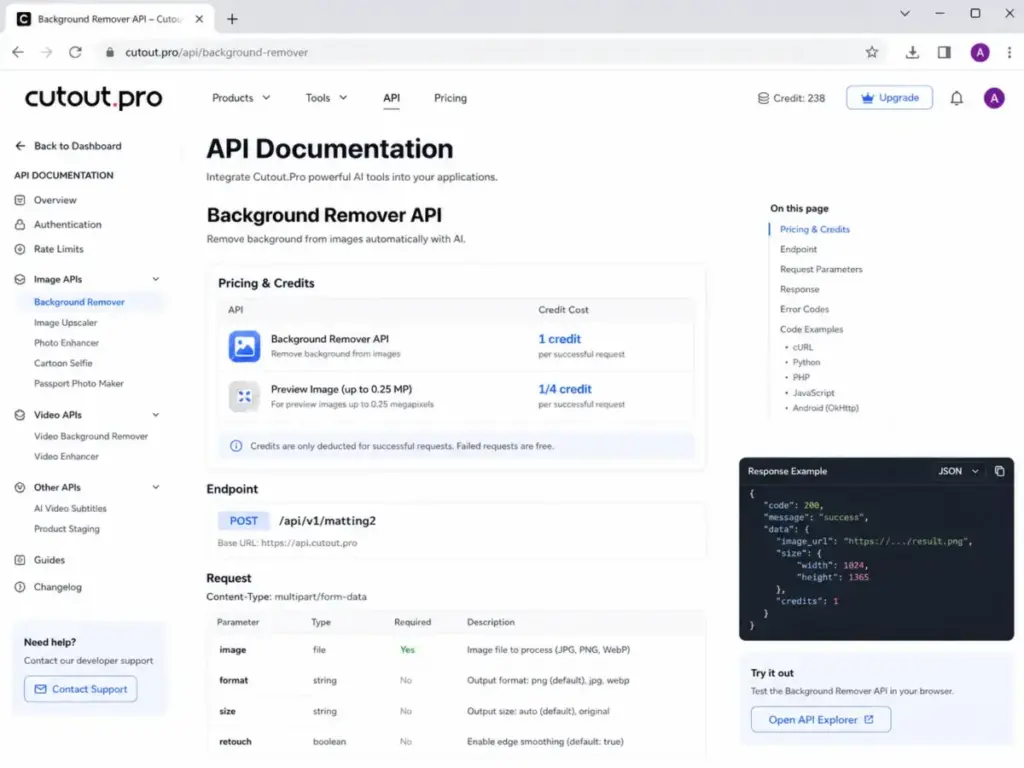
The API page claims 300 million or more API requests per month, peak load capacity of 4,000 requests per second, and 98% or higher uptime. Each successful API call costs the same number of credits as the corresponding web tool: 1 credit for background removal, 2 credits for enhancement, and so on.
For developers building background removal into a marketplace app, product listing tool, or automated catalog pipeline, the API is a viable option. Preview images up to 0.25 megapixels cost only 1/4 credit via the API or desktop app, which helps reduce costs during testing.
The API page also states that uploaded data and results are deleted after the API request ends.
Cutout Pro Pricing and Real Costs
Cutout.Pro uses a credit-based pricing model for images and a separate per-second pricing model for video. Both models are straightforward at face value, but multi-step workflows can make the real cost higher than expected. All pricing below was verified on May 5, 2026 from the official image pricing and video pricing pages.
Free accounts receive 5 credits and free previews forever. No credit card is required.
| Plan Type | Credits | Price | Cost Per Credit | Best For | Verified |
|---|---|---|---|---|---|
| Free | 5 credits | $0 | $0 | Testing real images | May 5, 2026 |
| Subscription | 80/month | $5.00 | $0.063 | Light monthly image work | May 5, 2026 |
| Subscription | 170/month | $9.90 | $0.058 | Solo seller | May 5, 2026 |
| Subscription | 300/month | $16.90 | $0.056 | Small catalog | May 5, 2026 |
| Subscription | 550/month | $29.00 | $0.053 | Marketplace seller | May 5, 2026 |
| Subscription | 1000/month | $49.00 | $0.049 | Agency image ops | May 5, 2026 |
| Subscription | 1450/month | $69.00 | $0.048 | High-volume team | May 5, 2026 |
| Pay as you go | 30 credits | $4.99 | $0.166 | Occasional work | May 5, 2026 |
| Pay as you go | 300 credits | $39.00 | $0.130 | Irregular batches | May 5, 2026 |
| Pay as you go | 900 credits | $79.00 | $0.088 | Seasonal projects | May 5, 2026 |
| Pay as you go | 3000 credits | $199.00 | $0.066 | One-time migration | May 5, 2026 |
| Pay as you go | 30000 credits | $1,399.00 | $0.047 | Enterprise batch | May 5, 2026 |
Subscription credits roll over up to 5x the monthly budget, but only while the subscription stays active. Cancel the plan, and rollover credits expire. Pay-as-you-go credits stay available forever. The platform offers a 14-day money-back guarantee, restricted to accounts that have downloaded 50 or fewer files.
What the Pricing Page Does Not Tell You
Credit costs look simple in isolation. One background removal costs 1 credit. One enhancement costs 2 credits. But real production workflows often chain multiple operations on the same image.
Here is how credit stacking works in practice:
- 1 product image, background removal only: 1 credit
- 1 product image, background removal plus enhancer: 3 credits
- 500 images, background removal only: 500 credits
- 500 images, background removal plus enhancer: 1,500 credits
- 500 images, background removal plus colorizer: 1,500 credits
The jump from 500 credits to 1,500 credits for the same 500 images is the gap the pricing page does not surface. If your workflow requires only background removal, the math is clean. The moment you add a second operation, credit consumption triples.
| Monthly Workflow | Credits Needed | Cheapest Sensible Plan | Approx Cost | Notes |
|---|---|---|---|---|
| 80 background removals | 80 | 80-credit subscription | $5.00 | Best entry plan |
| 250 background removals | 250 | 300-credit subscription | $16.90 | Leaves 50 rollover credits |
| 500 background removals | 500 | 550-credit subscription | $29.00 | Good seller fit |
| 1,000 background removals | 1,000 | 1000-credit subscription | $49.00 | Agency fit |
| 500 remove + enhance | 1,500 | 1450 sub + extra credits | $69+ | Multi-step workflows get expensive |
| 5,000 background removals | 5,000 | Custom or large PAYG packs | Custom | Ask sales or buy 3000+ PAYG packs |
Pay-as-you-go pricing is worse for recurring workflows unless you buy the 3,000-credit or 30,000-credit packs. At 30 credits for $4.99, you pay $0.166 per credit. At 3,000 credits for $199, you pay $0.066 per credit. The subscription at 1,000 credits for $49 sits at $0.049 per credit, making it the better deal for anyone processing images monthly.
Cutout.Pro Video Credits Burn Fast
Video processing uses a separate credit pool, priced per second. This table shows the effective cost for common video lengths.
| Video Length | Official Pack Reference | Cost | Effective Cost |
|---|---|---|---|
| 15 seconds | 1-minute pack | $9 | $0.150/second |
| 30 seconds | 1-minute pack | $9 | $0.150/second |
| 60 seconds | 1-minute pack | $9 | $0.150/second |
| 5 minutes | 5-minute pack | $39 | $0.130/second |
| 15 minutes | 15-minute pack | $108 | $0.120/second |
| 45 minutes | 45-minute pack | $299 | $0.111/second |
A solo creator processing four 60-second clips per week would spend $144 per month on video credits alone. A team editing 15-minute webinar recordings weekly would spend $432 per month. These numbers make video background removal practical for short clips and occasional use, not for regular long-form video production.
My position is clear: Cutout.Pro video tools work for short clips, talking-head tests, and occasional no-green-screen edits. They are not cost-efficient for long-form video production. If you process video regularly, look at dedicated video editing tools or the AI video generator category for alternatives with more sustainable pricing.
The First 30 Minutes With Cutout.Pro
The best way to evaluate Cutout.Pro is to use the 5 free credits on your own real images, not on stock photos. Stock photos are optimized for clean edges. Your actual product shots are not.
Cutout.Pro 5-Credit Test Plan
Here is how I would spend 5 free credits to get a real signal before paying:
- Clean product photo background removal (1 credit): Upload a standard product-on-white image. This should work well. If it does not, stop here.
- Hair or fur background removal (1 credit): Upload a portrait or pet image with fine edges. This is where AI matting models struggle. Check the edges closely at full zoom.
- Low-light product image (1 credit): Upload a product shot taken in poor lighting or with mixed shadows. This tests the model on non-ideal input.
- Object removal on cluttered background (1 credit): Upload an image with an unwanted item next to the product. Check whether the fill looks natural.
- Enhancer on a weak image (2 credits): Upload a low-resolution or blurry image. Note that this uses 2 credits, which exceeds the 5-credit budget. To run all five tests, skip one of the earlier tests or accept that the enhancer test requires paying for at least one additional credit.
The key principle: do not test only easy images. Upload the worst image from your actual workflow. If Cutout.Pro fails on that image, paying for credits will not improve the result. The AI model is the same at every pricing tier.
Cutout.Pro Pros and Cons
Every tool has tradeoffs. Here is what works and what does not, based on the feature set, pricing structure, and trust profile.
- Broad coverage across image, video, restore, and e-commerce tools in one account
- Subscription pricing is competitive for recurring image background removal
- API available for automated workflows with predictable per-call costs
- Browser, desktop, mobile, and Shopify plugin access
- Pay-as-you-go credits stay available forever, no expiration
- Video background removal without a green screen is a genuine differentiator
- Credit model becomes confusing when workflows use multiple operations on the same image
- Video processing gets expensive fast, especially above 5-minute clips
- Trust concern remains because of the reported 2024 breach and company denial
- Not suitable for confidential, unreleased, or regulated images
- Complex edges (hair, fur, glass, thin fabric) still require manual quality checks
- Output quality varies by lighting, subject separation, and material type
- Not a replacement for Photoshop, Lightroom, or specialist retouching workflows
Is Cutout.Pro Safe?
Cutout.Pro’s safety profile has two layers: what the company says, and what the public record shows. Both matter for a buying decision.
The official privacy policy states that uploaded images and videos are encrypted in transit using SSL/TLS, used only for the requested processing operation, not shared with third parties, and automatically deleted after processing. The API documentation reinforces this, stating that uploaded data and results are deleted after the API request ends.
On the public record side, Have I Been Pwned lists a February 2024 Cutout.Pro data breach involving approximately 20 million records, including email addresses, IP addresses, names, and password hashes. SC World reported that CutOut.Pro denied the hacker’s breach claim.
I treat this as a reported breach, disputed by the company. Neither side has been definitively settled in public reporting.
The breach history does not make Cutout.Pro unusable. It changes what I would upload. For standard product photos, marketplace catalog images, and non-sensitive visual assets, the platform is practical. I would not upload private portraits, unreleased product launches, identity documents, client-confidential files, or regulated content (legal, medical, financial) unless I was comfortable accepting the residual risk.
If your workflow involves sensitive images, consider tools with stronger documented compliance frameworks, or process images locally.
Cutout.Pro vs Alternatives
Cutout.Pro competes with specialist background removers, mobile-first product photo apps, and design platforms that include AI cutout features. The right choice depends on your primary workflow.
| Tool | Best For | Pricing Model | Strength | Weakness |
|---|---|---|---|---|
| Cutout.Pro | Broad image + video toolkit | Credits | Many tools in one account | Credit math gets complex |
| Remove.bg | Pure background removal | Credits/API | Specialist simplicity | Narrower toolkit |
| Photoroom | Mobile e-commerce sellers | Plans/API | Product photo workflow | Less video coverage |
| Canva AI | Design teams and creators | Subscription | Design ecosystem | Less production-focused |
| Adobe Express | Adobe users and quick edits | Free/Premium | Free background remover | Not built for batch ops |
| Pic Copilot | Marketplace product visuals | SaaS/credits | E-commerce creative focus | Narrower than full design suite |
Cutout.Pro vs Remove.bg
Remove.bg is a specialist. It does one thing: remove image backgrounds. It does it well, with a simple API and predictable pricing. Cutout.Pro is broader, offering video tools, enhancement, restoration, and e-commerce staging alongside background removal.
Read the full Remove.bg review for detailed pricing and API analysis.
Choose Cutout.Pro if you need background removal plus video processing, enhancement, or e-commerce staging in one account. Choose Remove.bg if background removal is your only job and you want specialist simplicity.
Cutout.Pro vs Photoroom
Photoroom targets mobile-first e-commerce sellers with a consumer-friendly editing flow. Its API offers a Basic tier at $0.02 per image for background removal, which undercuts Cutout.Pro’s per-credit API cost on pure volume. Photoroom is stronger for sellers who create product listings on their phone.
Choose Photoroom for mobile-first product listings and clear API pricing. Choose Cutout.Pro for broader image and video tool coverage from a single platform.
Cutout.Pro vs Canva AI
Canva AI includes a background remover inside Canva Pro, bundled with design tools, templates, Magic Resize, and brand kits. If your workflow starts and ends inside Canva, the built-in cutout tool is good enough and already included in your subscription.
Read the full Canva AI review for details on Canva Pro’s AI features.
Choose Canva if the background removal step is one part of a larger design workflow. Choose Cutout.Pro if background removal is the workflow.
Cutout.Pro vs Pic Copilot
Pic Copilot focuses on marketplace product visuals: AI-generated product backgrounds, e-commerce creative templates, and seller-specific workflows. It is narrower than Cutout.Pro but deeper on the e-commerce creative production side.
Read the full Pic Copilot review for marketplace-specific analysis.
Choose Pic Copilot for marketplace creative production and AI product staging. Choose Cutout.Pro if you also need video background removal, API access, image restoration, and non-e-commerce image tools.
For readers exploring the broader AI image category, the best AI image generators roundup covers generation tools that complement editors like Cutout.Pro. The Adobe Firefly review covers another option for users inside the Adobe ecosystem.
Who Should Use Cutout.Pro?
Cutout.Pro fits specific production profiles. The value increases with image volume and decreases when workflows require sensitive handling or deep manual control.
- Solo Etsy or Shopify seller processing 80 to 250 product images monthly. The $5 to $16.90 subscription tiers cover this volume at under $0.063 per image for background removal.
- 3-person Amazon or eBay agency processing 500 to 1,000 background removals monthly. The $29 to $49 subscription tiers deliver strong per-credit value at this scale.
- Print-on-demand operator creating avatar cutouts, face cutouts, and product mockup assets. The variety of tools (face cutout, cartoon selfie, background diffusion) under one account reduces tool switching.
- Developer adding background removal to an app with predictable image volume. The API costs 1 credit per call, with preview images at 1/4 credit. For simple cutout workflows, this is competitive.
- Social media creator editing short clips and product visuals. Video background removal works for clips under 60 seconds without overspending on credits.
Who Should Not Use Cutout.Pro?
Some workflows are a poor fit. Spending money on the wrong tool wastes more than credits.
- Retoucher needing pixel-level mask control on hair, glass, and transparent fabrics. AI matting is not a replacement for manual Photoshop masking in high-end retouching.
- Enterprise team processing confidential product launches or regulated content. The reported breach and lack of published compliance certifications make this a risk tradeoff you should evaluate carefully.
- Video editor processing 30-minute to 2-hour videos weekly. At $0.12 to $0.15 per second, weekly long-form video processing would cost $216 to $1,080 per month. Dedicated video tools or green screen setups are more economical.
- Designer already working inside Canva or Adobe Express. Both include background remover tools within their existing subscriptions. Adding Cutout.Pro creates cost overlap.
- Developer needing enterprise SLA, compliance documentation, and full audit trail. Cutout.Pro’s API page lists uptime and throughput claims, but does not publish the kind of compliance documentation that enterprise procurement teams require.
Final Verdict: Is Cutout.Pro Worth It?
Cutout.Pro is worth it for recurring image workflows, but it is not the safest or cheapest choice for every buyer.
The platform’s strength is breadth. Image background removal, video background removal, enhancement, restoration, API access, e-commerce staging, desktop app, mobile app, and Shopify plugin, all under one credit-based account. For sellers and agencies processing hundreds of product images monthly, the subscription pricing is competitive and the tool variety reduces the need for multiple subscriptions.
The weaknesses are real. Video credits burn fast. Multi-step workflows consume more credits than the pricing page implies. The reported 2024 data breach, even if disputed, adds a trust question that buyers should weigh based on the sensitivity of their uploads.
Overall: 7.8/10
- Best for: High-volume image background removal, e-commerce product photos, API-based image processing, short no-green-screen video tests
- Avoid if: Sensitive images, long-form video, pixel-perfect retouching, strict compliance requirements
Daniel Rivera’s Quick Take
I see Cutout.Pro as a solid middle-ground tool for image-heavy production teams. The subscription math works at 300 credits and above, especially if your workflow is background removal only. The moment you start chaining tools (remove background, then enhance, then colorize), the credit cost per image triples, and the value proposition weakens. Video is a nice extra for short clips, but the per-second pricing kills it for anything longer than a few minutes. On the trust side, I would process product photos through it without hesitation, but I would keep unreleased campaigns and client files off the platform until there is more clarity on the breach situation. If you process 500 or more product images per month, try the 5 free credits on your hardest images first. That 30-minute test will tell you more than any review.
FAQ
Common questions about Cutout.Pro, answered directly.
Is Cutout.Pro worth it in 2026?
Yes, for users processing 80 or more product images per month. The subscription pricing starts at $5 for 80 credits, and background removal costs just 1 credit per image. The value decreases for video-heavy workflows and sensitive image handling.
Is Cutout.Pro free?
Partially. Free accounts receive 5 credits and free image previews forever. After using the 5 credits, you need a subscription or pay-as-you-go purchase to download full-resolution results.
How much does Cutout Pro cost?
Image subscriptions range from $5 per month for 80 credits to $69 per month for 1,450 credits. Pay-as-you-go packs range from $4.99 for 30 credits to $1,399 for 30,000 credits. Video processing is sold separately, starting at $9 for 1 minute. All pricing verified May 5, 2026.
How do Cutout.Pro credits work?
Image credits are consumed per operation. Background removal and retouch cost 1 credit per image. Enhancer, colorizer, cartoon selfie, and passport photo tools cost 2 credits per image. Subscription credits roll over up to 5x the monthly budget while the subscription remains active. Pay-as-you-go credits never expire.
Does Cutout.Pro remove video backgrounds?
Yes. Cutout.Pro offers video background removal without a green screen. It supports up to 4K resolution, 2GB file size, and 30FPS. Video credits are sold separately from image credits, priced per second of processed video, starting at $9 for 1 minute.
Is Cutout.Pro safe to use?
For non-sensitive images, yes. The privacy policy states that uploads are encrypted, used only for processing, and automatically deleted. However, Have I Been Pwned lists a February 2024 breach affecting 20 million records. SC World reported that the company denied the breach claim. I would avoid uploading private portraits, unreleased products, identity documents, or regulated content.
Was Cutout.Pro hacked?
Have I Been Pwned lists a February 2024 data breach involving approximately 20 million records, including email addresses, IP addresses, names, and password hashes. SC World reported that CutOut.Pro denied the hacker’s breach claim. The situation remains disputed in public reporting.
What is the best Cutout.Pro alternative?
It depends on your workflow. Remove.bg is the best alternative for pure background removal. Photoroom is best for mobile e-commerce sellers. Canva AI works best if you already design inside Canva. Adobe Express offers a free background remover for lightweight edits.
Is Cutout.Pro better than Remove.bg?
Cutout.Pro is broader, offering video tools, enhancement, restoration, and API access alongside background removal. Remove.bg is a specialist that focuses on background removal with a simpler workflow. Choose Cutout.Pro for breadth. Choose Remove.bg for specialist reliability on a single task.
Does Cutout.Pro have an API?
Yes. The Cutout.Pro API accepts image file uploads or URLs and returns processed images or Base64-encoded JSON data. Each API call costs the same credits as the web tool (1 credit for background removal, 2 for enhancement). The API page claims 300 million or more monthly requests and 98% or higher uptime. Preview images at reduced resolution cost 1/4 credit.