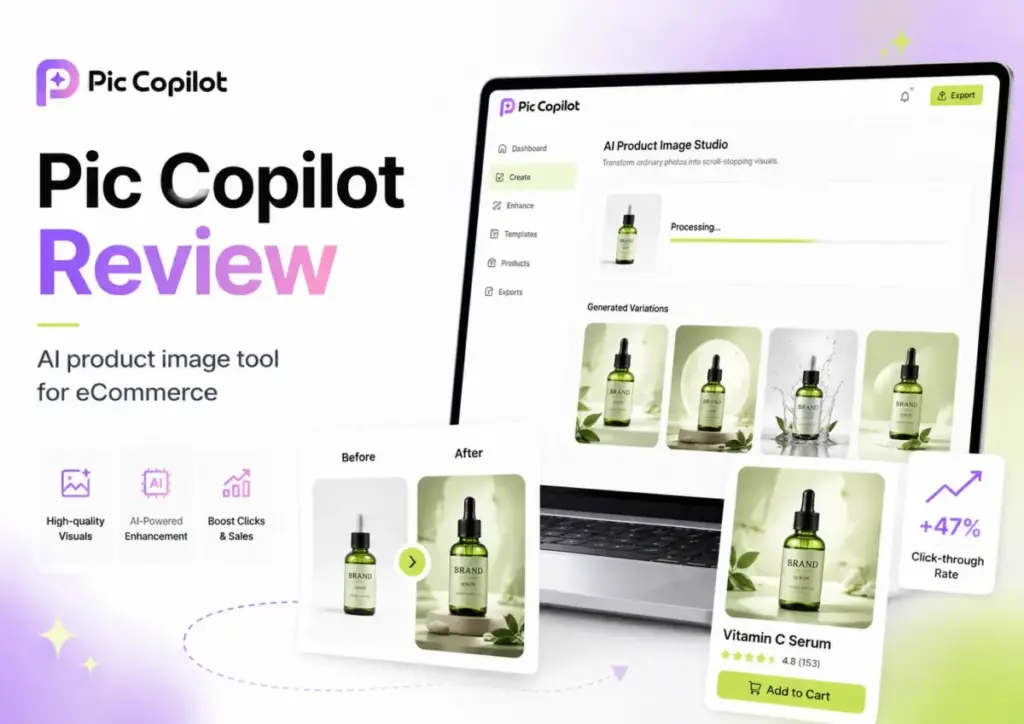
This Pic Copilot review breaks down what the AI product photography tool actually delivers for e-commerce sellers in 2026. Pic Copilot (styled PicCopilot on its official site) is not Microsoft Copilot or GitHub Copilot. It is a generative AI image tool built for marketplace merchants who need product visuals without booking studio time. Backed by Alibaba International and operated by Neuralnetics Pte. Ltd.
in Singapore, the platform promises virtual try-ons, AI model swaps, batch background removal, and 74,000+ marketing templates. The question is whether the Pcoin credit system, broad content-license terms, and inconsistent public pricing make it a reliable production tool, or just a fast prototyping shortcut. I evaluated the platform against five competitors to help you decide where it fits among the best AI image generators available today.
Quick Verdict on Pic Copilot
Pic Copilot earns a 7.8 out of 10 for e-commerce product visuals, with strong marks for feature breadth and penalties for pricing opacity. It is worth testing if you sell apparel, accessories, or general merchandise and need fast listing images. It is not the safest pick for teams that require transparent per-image costs, strict content-rights governance, or API-first catalog automation.
| Category | Verdict | Evidence | Buyer Impact |
|---|---|---|---|
| E-commerce visual quality | Good | 250M-parameter model, 240 product categories analyzed | Usable for marketplace listings and ad creatives |
| Ease of first result | Strong | Upload-to-output in under 5 minutes on free tier | Low barrier for solo sellers testing the tool |
| Pricing clarity | Weak | Crawled prices render as $0; Pcoin expiry monthly | Hard to budget without logging into live account |
| Feature breadth | Strong | 12+ tools: Virtual Try On, AI Model Swap, Fashion Reels, Image Translation | Covers most e-commerce visual needs in one dashboard |
| Batch and scaling | Moderate | Pro unlocks batch; Pcoin limits per plan unclear | Mid-volume sellers need to monitor credit burn |
| Commercial-use confidence | Moderate | Broad content license in terms; no output warranty | Legal review advised for brand-sensitive campaigns |
| Alternatives value | Moderate | Photoroom, Pebblely, Flair AI offer clearer pricing or deeper brand control | Pic Copilot wins on fashion try-on breadth |
| Support and docs | Weak | Email only; 1 Trustpilot review; thin help center | Risk for sellers needing fast issue resolution |
Overall score: 7.8/10
Scoring breakdown (weighted):
- E-commerce visual quality (20%): 8.0
- Ease of first result (15%): 8.5
- Pricing clarity (15%): 5.5
- Feature breadth (15%): 8.5
- Batch and scaling (10%): 7.0
- Commercial-use confidence (10%): 6.5
- Alternatives value (10%): 7.5
- Support and documentation (5%): 5.0
I follow the SaaS Zap review methodology for all product evaluations.
What Is Pic Copilot?
Pic Copilot is an AI-powered e-commerce design tool that generates product images, fashion model photos, and short marketing videos. Alibaba International launched the platform for U.S. users on December 5, 2024, targeting small and mid-size sellers who want to skip traditional product photography.
The platform runs on a 250-million-parameter model trained across 240 product categories. According to the official launch announcement, more than 35,000 users created Black Friday marketing materials during the trial period, and virtual try-on helped 10,000+ merchants generate over 80,000 model images.
Pic Copilot sits in a specific niche. It is not a general-purpose image generator like Midjourney or DALL-E. It is purpose-built for product listings, ad creatives, and catalog workflows. Think of it as a virtual photo studio with AI models, backgrounds, and templates baked in.
The contracting entity behind Pic Copilot is Neuralnetics Pte. Ltd., registered in Singapore. Services may vary by region, and the terms of service (updated March 11, 2025) note that Pic Copilot can change, suspend, or discontinue features at any time.

Pic Copilot Features Tested
Pic Copilot bundles 12+ AI tools into a single dashboard, all designed for e-commerce image production. The feature set covers everything from background removal to AI fashion videos. Below, I walk through the tools that matter most for product sellers, with notes on where each one performs and where it falls short.
Pic Copilot Virtual Try On
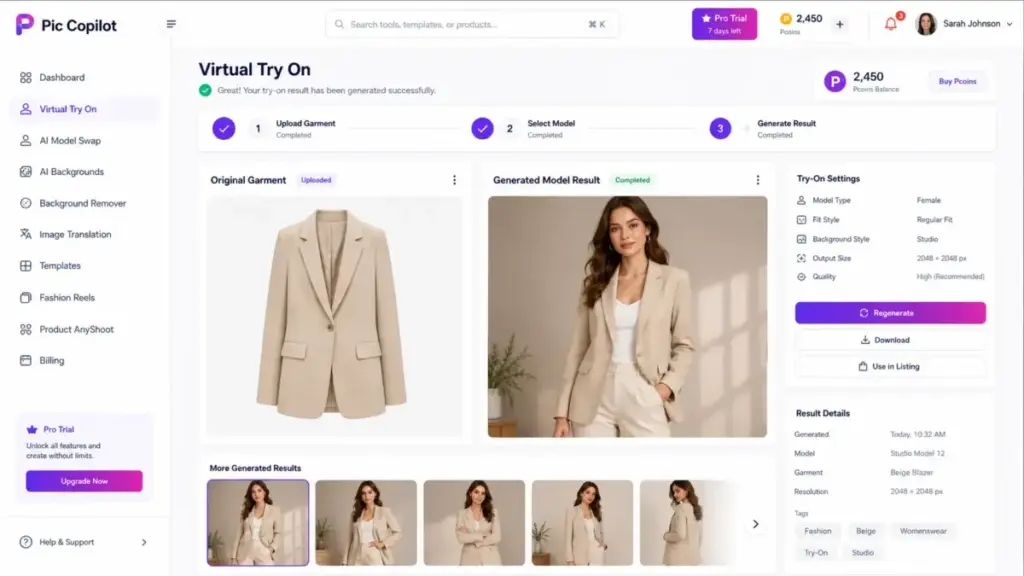
Virtual Try On is Pic Copilot’s headline feature for apparel sellers. You upload a flat-lay garment image, and the AI generates a model wearing that item. The launch data claims 160+ models across four major skin tones, which gives sellers localization options for different markets.
The workflow is straightforward: upload your garment photo, select a model type, and generate. Results appear in seconds rather than minutes. For sellers listing 20-50 clothing items per week on Depop, Etsy, or eBay, this removes the cost of hiring models and booking shoots.
The limitation I want to flag: fabric drape, fit accuracy, and texture rendering are not guaranteed. AI-generated try-on images can look convincing at thumbnail size but may show unrealistic folds or proportions at full resolution. If you sell fitted garments where cut and silhouette matter to buyers, verify each output carefully before publishing.
As one Reddit user in r/ecommerce noted: “It’s not perfect, but it’s saved me a ton of time.” That sums up the virtual try-on experience well. Fast and useful for testing, but not a blind replacement for real photography on high-stakes listings.
Pic Copilot AI Model Swap
AI Model Swap lets you change the model in an existing product photo to match different demographics or regional campaigns. If you shot a campaign with one model and need variants for Southeast Asian, European, or Latin American markets, Model Swap handles that without reshooting.
This tool pairs well with Image Translation (covered below) for sellers localizing listings across multiple marketplaces. The 160+ model library provides reasonable variety, though I could not independently verify the exact count or confirm how frequently new models are added.
Pic Copilot Background Tools
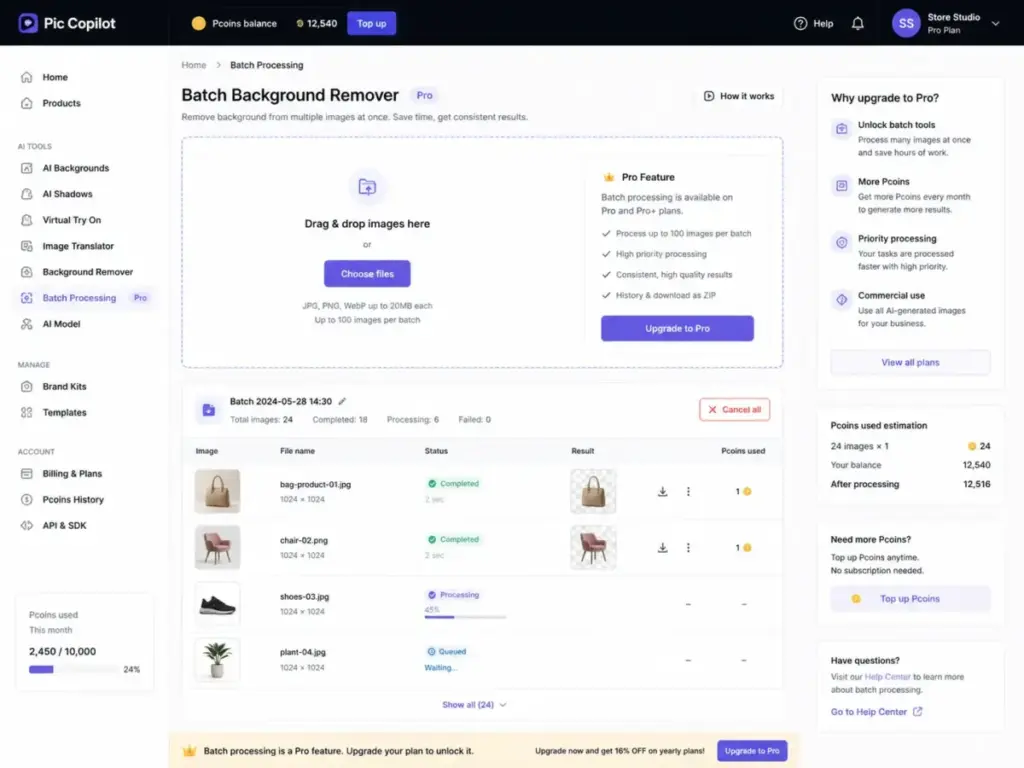
Pic Copilot offers both a Background Remover and AI Backgrounds for scene generation. The Background Remover strips cluttered backgrounds from product photos, and the tools page mentions batch processing support.
For comparison, dedicated background removal tools like Remove.bg and Cutout.pro focus exclusively on this task. Pic Copilot’s version is convenient if you already use the platform, but sellers who only need background removal may find standalone tools more cost-effective.
AI Shadows adds generated 3D shadows to product images, which improves the “floating product” look common in quick cutout workflows. This is a small touch that makes marketplace listings look more polished without manual editing.

Pic Copilot Templates and Translation
The pricing page claims access to 74,000+ high-CTR marketing templates. These are pre-designed layouts for promotional banners, social ads, and marketplace listing graphics. Pro subscribers get a larger template library than free users.
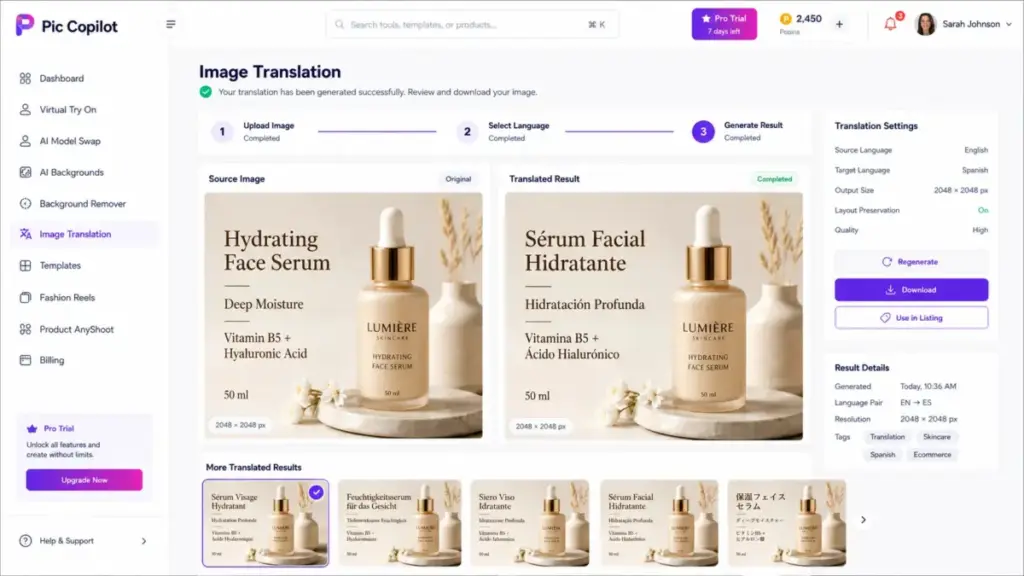
Image Translation is a standout feature for cross-border sellers. It translates text embedded in images, supporting Portuguese, English, Vietnamese, Spanish, Korean, Turkish, French, and Russian. If you sell on AliExpress, Amazon Europe, and Shopify simultaneously, this saves manual graphic editing for each market.
Product Avatars generate AI presenter-style visuals for product marketing, and Product AnyShoot provides a product photography workflow for transforming standard shots into lifestyle scenes. Both tools serve the same goal: making product images look more professional without studio equipment.
Pic Copilot Fashion Reels
Fashion Reels generates short AI videos showing models wearing your products. This targets sellers who need video content for social ads, TikTok Shop, or Instagram Reels but lack the budget for video production.
The feature is newer and falls into what Pic Copilot calls “Functions Lab,” which the pricing page warns may be unstable. If you need reliable AI video generation for production workflows, dedicated tools covered in our best AI video generators guide, such as RunwayML or Pika Art, offer more mature video pipelines.
Other tools worth noting: Image Upscaler and Image Enhancer improve resolution and quality for listing images. The Remove Watermark tool exists but should only be used on images you own the rights to. AI Avatars and AI Dubbing extend the platform into video marketing territory.
Pic Copilot Pricing and Pcoins
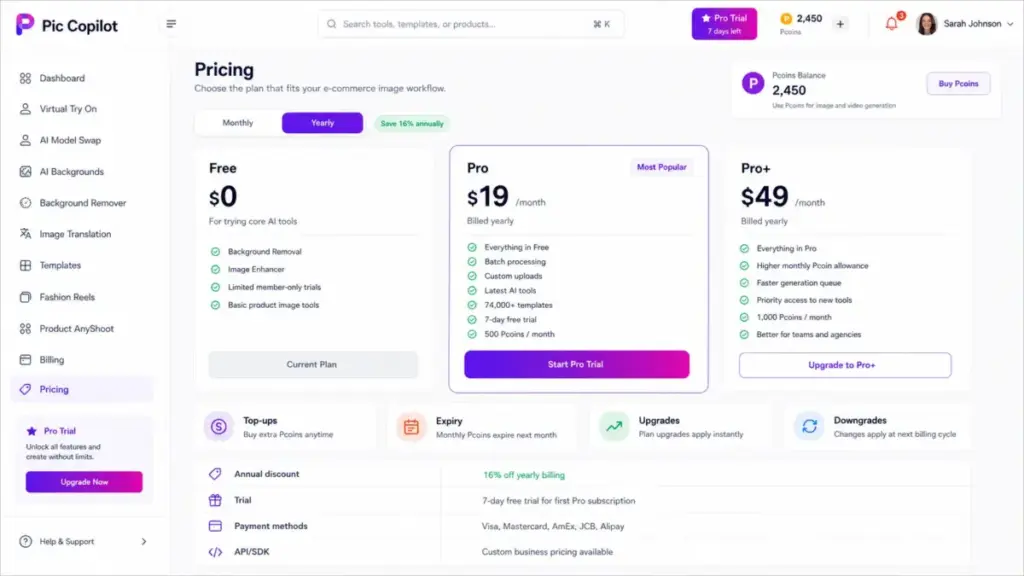
Pic Copilot uses a credit-based system called Pcoins, layered on top of Free, Pro, and Pro+ subscription tiers. This makes cost prediction harder than flat per-image pricing. Below is what the official pricing page confirms, along with what it leaves unclear.
Pic Copilot Free vs Pro vs Pro+
| Plan | Verified Price Status | Key Features | Limits and Risks | Best For |
|---|---|---|---|---|
| Free | Confirmed $0/month | Background Removal, Image Enhancer, limited trials of Pro features | Restricted tool access; no batch processing | Solo sellers evaluating the platform |
| Pro | Dollar amount not verified (crawl shows $0, likely rendering error) | Free features + custom uploads, batch processing, larger template library, latest tools | 7-day free trial for first-time subscribers; monthly Pcoin expiry | Active sellers needing batch workflows |
| Pro+ | Dollar amount not verified (crawl shows $0, likely rendering error) | All Pro features + higher Pcoin allocation | Downgrade to Pro not instant; takes effect after current period | High-volume sellers and small agencies |
A localized pricing snippet suggests Pro+ includes 12,000 Pcoins per year (1,000/month), images from $0.007 each, and videos from $0.056 each. I could not verify these figures in the live English UI during evaluation.
The pricing page confirms annual billing carries a 16% discount. Payment methods include Visa, Mastercard, American Express, JCB, UnionPay, and Alipay.
Pic Copilot Pcoin Costs
Pcoins are the internal currency that powers image and video generation. Each AI operation consumes a set number of Pcoins. You receive a monthly Pcoin allocation with your subscription, and you can purchase additional Pcoins through top-ups.
The critical detail: monthly Pcoins begin when your Pro subscription activates and expire at the same time the following month. Unused Pcoins do not roll over. This means low-volume months cost you the same as high-volume months, and seasonal sellers may waste credits during slow periods.
For comparison, Pebblely charges $19/month for 200 images with no expiring credit system. Flair AI starts at $8/month for Pro. Both offer more predictable cost structures.
What Pricing Does Not Make Obvious
Five pricing details that most Pic Copilot reviews skip:
- Monthly Pcoin expiry. If you subscribe to Pro but only generate 50 images in a slow month, the remaining Pcoins vanish. There is no rollover mechanism documented on the pricing page.
- No real-time downgrades. If you subscribe to Pro+ and want to move to Pro, the downgrade takes effect only after your current billing period ends. You cannot switch mid-cycle.
- Upgrades are immediate. Moving from Pro to Pro+ happens instantly, which means you start paying the higher rate right away. The asymmetry between upgrade and downgrade timing benefits the platform, not the subscriber.
- Functions Lab instability. The pricing page explicitly warns that Functions Lab tools “may be unstable.” If you are paying for Pro to access Fashion Reels or newer features, some of those tools may not work reliably.
- API and SDK pricing is custom. Large-scale users and teams must request pricing through an Alibaba survey form. There is no public API rate card.
Pricing checked on May 4, 2026. Pic Copilot’s public pricing page confirmed Free, Pro, Pro+, Pcoins, annual billing, trial, and top-ups, but plan dollar amounts rendered inconsistently during crawl. Verify exact prices in the live account or pricing UI before purchase.
The First 30 Minutes With Pic Copilot
The best way to evaluate Pic Copilot is a structured 30-minute test using the free tier. Here is the workflow I recommend before committing to a paid plan.
Minutes 1-5: Account setup. Visit piccopilot.com and register. The terms require registration for full access. Note the Pcoin balance displayed in your dashboard.
Minutes 5-10: Background Removal test. Upload a product photo with a cluttered background. Run the Background Remover. Evaluate edge quality around your product, especially for items with fine details like jewelry chains, hair accessories, or transparent packaging.
Minutes 10-18: Virtual Try On test. Upload a flat-lay garment image. Generate a model photo. Check fabric drape, fit proportions, and skin-tone accuracy. Compare the output to a real model photo if you have one. This is where Pic Copilot either wins you over or reveals its limits.
Minutes 18-25: AI Backgrounds and Templates. Place your background-removed product into 2-3 different AI-generated scenes. Try one marketing template. Evaluate whether the template library matches your brand aesthetic or feels too generic.
Minutes 25-30: Image Translation test. If you sell cross-border, upload an image with text overlay and test the translation tool. Check accuracy for your target language.
After this test, you will know three things: whether the output quality meets your listing standards, whether the Pcoin consumption rate fits your volume, and whether the tool handles your specific product category well.
Commercial Use and Image Rights
Pic Copilot’s terms grant the platform a broad license over content you upload and generate. This section matters for any seller using AI-generated images in paid advertising or on regulated marketplaces.
Key terms from the service agreement (effective March 18, 2025):
- User Content license. You grant Pic Copilot a license to use your uploaded content to “operate, develop, and improve” its services. The exact scope of “develop and improve” is broad enough to include training future AI models on your product images, though the terms do not explicitly confirm or deny this.
- No output warranty. Pic Copilot makes no guarantee about the accuracy, quality, or legal safety of AI-generated outputs. You are responsible for verifying that generated images meet marketplace guidelines and do not infringe on third-party rights.
- Upload responsibility. You must hold the necessary rights and permissions for any content you upload. This matters if you use supplier-provided images or third-party photography.
- Account sharing. Sharing accounts may lead to suspension or termination. Teams should plan for individual seats or inquire about business pricing.
- Regional variation. Services may differ by country. Features available in the U.S. may not match those in other markets.
For sellers running Amazon Sponsored Brand ads or Shopify storefronts, the lack of output warranty means you accept legal risk for every generated image. Compare this to Adobe Firefly, which offers IP indemnification on certain plans, or Photoroom’s SOC 2 Type 2 certification for enterprise API users.
My recommendation: if your brand operates in a regulated category (supplements, children’s products, medical devices), consult your legal team before using AI-generated product images at scale.
Pic Copilot Pros and Cons
Every AI image tool involves trade-offs between speed, cost, quality, and control. Here is where Pic Copilot lands after evaluation.
- E-commerce-specific feature set. Unlike general AI image generators, every tool targets product sellers. Virtual Try On, AI Model Swap, Product AnyShoot, and Image Translation all solve real listing problems.
- Virtual Try On breadth. 160+ models across four skin tones, with region-specific options. Few competitors match this diversity for fashion sellers specifically.
- Image Translation for cross-border sellers. Eight supported languages cover major e-commerce markets. This feature alone justifies evaluation for multi-market sellers.
- Free tier for testing. Background Removal and Image Enhancer work without payment. The 7-day Pro trial removes the paywall for serious evaluation.
- Template volume. 74,000+ marketing templates, if accurate, gives sellers more starting points than most competitors offer.
- Fast output speed. Most tools return results in seconds, not minutes. For high-volume listing workflows, speed matters.
- Pricing opacity. The English pricing page displayed $0 for paid plans during evaluation. Without verified dollar amounts, budgeting is guesswork. This is a significant trust issue for a paid SaaS product.
- Monthly Pcoin expiry. Credits vanish each month whether you use them or not. Seasonal sellers and low-volume months mean wasted spend.
- Broad content-license language. The terms allow Pic Copilot to use uploaded content for service improvement. Sellers uploading proprietary product designs should weigh this risk.
- Thin independent review base. Only 10 Product Hunt reviews (mostly brief praise) and 1 Trustpilot review (about affiliate support, not the core product). On Product Hunt, reviewer Haiwen Li from AlphaRank called it a “very useful and convenient tool for small business,” but the overall feedback pool is too small for strong conclusions.
- No confirmed native Shopify integration. I found no documentation confirming a direct Shopify plugin or native publishing workflow. Sellers must download images and upload manually.
- Functions Lab instability. The platform itself warns that newer tools may be unstable. Paying for Pro to access unreliable features is a poor value proposition.
- No real-time downgrade support. You can upgrade instantly but must wait out your billing cycle to downgrade. This asymmetry favors the platform.
- Support concerns. The help center lists email support at support@piccopilot.com. One Trustpilot reviewer, Yuri Axel Cunha, reported: “disabled my account and don’t respond.” While this single review focused on affiliate-program support rather than the core product, it raises questions about response times.
Pic Copilot Alternatives Compared
The right alternative depends on your workflow, not just pricing. Below, I compare Pic Copilot against five competitors on the dimensions that matter most for product sellers.
| Tool | Starting Price | Best For | Where It Beats Pic Copilot | Where Pic Copilot Wins |
|---|---|---|---|---|
| Photoroom | Free; Pro and Max tiers available | Polished listing photos, mobile workflows, enterprise API | Mobile app maturity, Shopify listing publishing, SOC 2 API | Fashion try-on breadth, image translation |
| Pebblely | $9/month (Lite, 30 images) | Simple product scenes, transparent quotas | Clear per-plan image limits, no expiring credits | More tool variety, virtual try-on, video |
| Flair AI | $0 (Free); $8/month (Pro) | Brand-consistent creative control, custom models | Custom model training, commercial license clarity | Fashion model diversity, template volume |
| Claid.ai | Free trial (50 credits) | API-first image enhancement and automation | Developer API with documented rate limits | End-to-end e-commerce visual workflow |
| Canva Magic Studio | Free; Pro from ~$13/month | Broad design, collaboration, brand kits | Team collaboration, brand kit management, social publishing | Fashion-specific AI tools, virtual try-on |
For a broader view of AI-powered design tools, compare pricing across the alternatives table above.
Pic Copilot vs Photoroom
Photoroom is the strongest direct competitor for product photo workflows. Its mobile app is more polished, its Pro tier includes Ghost Mannequin and Virtual Model features, and its Max tier offers Shopify listing publishing. Enterprise users get SOC 2 Type 2 certified API access, which Pic Copilot does not match.
Pic Copilot wins on fashion try-on model diversity (160+ models) and image translation. If your primary need is apparel model shots for multiple markets, Pic Copilot offers more variety. If you need a mature mobile workflow or enterprise security compliance, Photoroom is the better pick.
Pic Copilot vs Pebblely
Pebblely keeps pricing simple: $9/month for 30 images, $19/month for 200 images with bulk generation, $39/month for 500 images. No credit expiry. No Pcoin math. If you know your monthly image volume and want predictable costs, Pebblely is easier to budget.
Pic Copilot offers far more tools beyond scene generation. Virtual Try On, AI Model Swap, Fashion Reels, and Image Translation have no equivalent in Pebblely. For sellers who only need product-on-background scenes, Pebblely is simpler and cheaper. For sellers who need fashion model shots, Pic Copilot covers more ground.
Pic Copilot vs Flair AI
Flair AI targets brand-conscious creators with custom model training. At $26/month (Pro+), you get up to 8 custom models and 80 generated images with a commercial license. At $38/month (Scale), you get API early access and priority support.
The key difference: Flair AI lets you train models on your brand’s visual style for consistent outputs. Pic Copilot does not offer custom model training. If brand consistency across hundreds of product images matters more than feature variety, Flair AI provides deeper control. Pic Copilot wins on fashion model diversity and template volume for sellers who prioritize speed over brand precision.
Pic Copilot vs Claid.ai
Claid.ai targets developers and automation-first teams. Its API includes documented rate limits (RPS/RPM constraints) and a free trial with 50 credits. If you are building automated catalog workflows with custom integrations, Claid.ai provides the infrastructure Pic Copilot’s custom API inquiry form cannot match for transparency.
Pic Copilot wins for non-technical sellers who want a visual dashboard rather than an API console. The two tools serve different buyer profiles more than they compete on the same features.
Pic Copilot vs Canva
Canva Magic Studio is a broad design platform with AI features, not a product-photo specialist. It excels at team collaboration, brand kits, social media templates, and multi-format publishing. Its weakness against Pic Copilot: no dedicated virtual try-on, no AI model swap, and less depth for product-specific scene generation.
If your team already uses Canva for marketing collateral and only occasionally needs product images, adding Pic Copilot for fashion-specific tasks may make sense. If you need one tool for everything from social posts to product photos, Canva covers more surface area.
Decision Matrix: Which Tool Fits Your Workflow?
| Seller Type | Monthly Image Volume | Best Choice | Why |
|---|---|---|---|
| Solo reseller (Depop, eBay, Etsy) listing 20-50 items/week | 80-200 images | Pic Copilot Free or Pebblely Lite | Low cost, fast output, test before committing |
| 2-5 person Shopify apparel team, seasonal launches | 200-500 images | Pic Copilot Pro or Photoroom Pro | Virtual try-on (Pic Copilot) or Shopify publishing (Photoroom) |
| Dropshipper testing ad creatives | 50-150 images | Pic Copilot Free + Flair AI Pro | Pic Copilot for speed, Flair AI for brand-consistent ads |
| 500+ SKU marketplace operator | 1,000+ images | Photoroom Max or Claid.ai API | Batch limits, API reliability, enterprise support |
| Small agency producing client visuals | 300-800 images | Flair AI Scale or Pic Copilot Pro+ | Custom models (Flair) or template volume (Pic Copilot) |
Who Should Use Pic Copilot?
Pic Copilot fits sellers who need fast, varied product visuals and are willing to manage credit-based billing. Specific profiles that benefit most:
- Solo Depop, Etsy, or eBay resellers listing 20-50 products per week who cannot afford model shoots. The free tier handles basic background removal, and Virtual Try On turns flat-lays into model shots.
- 2-5 person Shopify apparel teams launching seasonal collections. AI Model Swap and Image Translation save hours when localizing campaigns for different markets.
- Dropshippers testing ad angles before investing in studio photography. Generate 10 visual variants in minutes instead of commissioning custom shoots for unproven products.
- Marketplace sellers localizing listings across Amazon US, Amazon Europe, AliExpress, and Shopify. Image Translation covering 8 languages handles text-in-image localization that most competitors skip entirely.
- Small agencies producing first-draft ad creatives for product brands. The template library and batch tools speed up client deliverables.
Who Should Avoid Pic Copilot?
Not every e-commerce team benefits from Pic Copilot’s approach. These profiles should look elsewhere:
- Enterprise catalog teams needing compliance documentation. Pic Copilot has no published SOC 2 certification, no SLA guarantees, and no transparent API rate card. Photoroom Enterprise offers SOC 2 Type 2 for teams that need it.
- Brands with strict legal review for uploaded content. The broad User Content license and lack of output warranty create risk for brands in regulated categories or with proprietary product designs.
- Teams needing predictable monthly costs for 500-5,000 images. Pcoin expiry, opaque plan pricing, and no rollover make cost forecasting difficult. Pebblely’s flat image quotas or Flair AI’s clear tier limits are easier to budget.
- Sellers where fabric accuracy and fit representation must be exact. Virtual try-on AI cannot guarantee accurate drape, texture, or sizing. For premium fashion brands where garment representation drives returns, real photography remains safer.
- Teams already standardized on Canva, Adobe, or Photoroom. Adding another tool creates workflow fragmentation without clear enough advantages to justify the switch.
What Most Pic Copilot Reviews Miss
Three areas where existing reviews fall short. I want to address these directly because they affect purchase decisions.
1. The Pcoin economy is harder to predict than it looks. Most reviews mention “credits” but skip the monthly expiry, the gap between plan allocation and actual consumption rates, and the lack of rollover. A seller who generates 800 images in November and 50 in December pays the same monthly rate and loses unused credits both months. On Adobe Firefly, unused generative credits also expire monthly, so this is an industry pattern, but Pic Copilot’s opaque pricing makes the math harder.
2. The content-license scope deserves attention. The terms grant a license to use your uploads to “operate, develop, and improve” the service. Whether this extends to AI model training is not explicitly stated. For sellers uploading original product photography or proprietary designs, this ambiguity is worth flagging with legal counsel.
3. The independent review base is unusually thin for a tool claiming 35,000+ Black Friday users. Ten Product Hunt reviews (mostly one-liners like Lily’s “AI creatives feature. Many templates!”) and one Trustpilot review about affiliate support do not provide enough signal to evaluate long-term reliability. Compare this to Photoroom or Canva, which have thousands of documented user reviews across multiple platforms.
If you are evaluating prompt-based workflows for your AI photo editing process, understanding these gaps helps set realistic expectations for what Pic Copilot can deliver versus what requires manual quality control.
Daniel Rivera’s Quick Take
I see Pic Copilot as a strong testing tool for e-commerce sellers, not yet a proven production workhorse. The feature breadth is real: few competitors bundle virtual try-on, model swap, image translation, batch processing, and 74,000+ templates in one platform. For a solo seller listing apparel on three marketplaces, that consolidation saves time.
But the pricing opacity bothers me. A SaaS tool that cannot display consistent plan prices on its own pricing page creates friction at the exact moment a buyer wants to commit. The Pcoin expiry model penalizes inconsistent usage. And the thin review base means I am relying more on vendor claims than independent verification.
My advice: use the free tier and the 7-day Pro trial to run the 30-minute test I described above. If the output quality meets your standards and the Pcoin math works for your volume, Pic Copilot can save real money compared to traditional shoots. If you need predictable costs, API access, or strict content-rights governance, start with Photoroom, Pebblely, or Flair AI instead.
FAQ
Answers to the most common questions about Pic Copilot in 2026.
Is Pic Copilot free?
Yes, Pic Copilot offers a free plan with basic AI features including Background Removal, Image Enhancer, and limited trials of member-only functions. The free tier is enough to test output quality but lacks batch processing and the full template library.
How much does Pic Copilot cost in 2026?
Pic Copilot offers Free, Pro, and Pro+ plans. The pricing page confirms annual billing with a 16% discount and a 7-day free trial for first-time Pro subscribers. However, exact dollar amounts displayed inconsistently during my evaluation. A localized snippet suggests images start from $0.007 and videos from $0.056 on Pro+, but verify current prices in the live UI before purchase.
What are Pcoins in Pic Copilot?
Pcoins are Pic Copilot’s internal credit currency. Each AI operation (image generation, background removal, try-on) consumes Pcoins. Monthly Pcoins come with your subscription and expire at the end of each billing month. You can buy additional Pcoins through top-ups, but unused monthly credits do not roll over.
Is Pic Copilot good for Shopify sellers?
Pic Copilot generates product images suitable for Shopify listings, but I found no confirmed native Shopify integration or direct publishing feature. You would need to download generated images and upload them to Shopify manually. Photoroom Max offers direct Shopify listing publishing if that workflow matters to you.
Can Pic Copilot replace product photography?
For marketplace listings and ad testing, Pic Copilot can reduce the need for traditional product shoots. For premium brands where fabric accuracy, fit representation, and color fidelity drive purchase decisions and returns, AI-generated images should supplement real photography rather than replace it entirely.
Does Pic Copilot work for fashion try-ons?
Yes, Virtual Try On is one of Pic Copilot’s strongest features. It supports 160+ models across four major skin tones. Results work well for marketplace thumbnails and ad creatives. Check full-resolution outputs carefully for fabric drape and fit accuracy before using them as primary listing images.
Who owns images created in Pic Copilot?
According to the terms (effective March 18, 2025), AI outputs are your responsibility, but Pic Copilot makes no warranty about them. You grant the platform a license to use your uploaded content to operate, develop, and improve its services. The exact scope of this license for proprietary product images is worth reviewing with legal counsel.
What are the best Pic Copilot alternatives?
The top alternatives depend on your needs. Photoroom leads for mobile workflows and enterprise API with SOC 2 certification. Pebblely wins on transparent pricing with fixed image quotas. Flair AI offers custom model training for brand-consistent visuals. Claid.ai serves API-first automation teams. Canva Magic Studio covers broader design needs beyond product photos.
Is Pic Copilot better than Photoroom?
Pic Copilot offers wider fashion try-on model diversity (160+ models) and image translation across 8 languages. Photoroom offers a more polished mobile app, direct Shopify publishing (Max tier), and SOC 2 Type 2 certified enterprise API. For apparel-focused sellers needing model variety, Pic Copilot has an edge. For teams needing mobile-first workflows or enterprise compliance, Photoroom is stronger.
Is Pic Copilot safe for commercial use?
Pic Copilot’s terms disclaim all warranties on AI-generated outputs. You are responsible for ensuring generated images comply with marketplace policies, advertising regulations, and intellectual property laws. The broad content-license language and lack of IP indemnification mean commercial use carries more legal uncertainty than tools like Adobe Firefly, which offer indemnification on select plans.