
Most background removers promise one-click results. This Remove.bg Review checks whether those results hold up when you factor in credit costs, resolution caps, and subscription traps. Remove.bg remains one of the top-rated AI photo editors for isolating subjects from backgrounds, but the gap between “free preview” and “production-ready cutout” is wider than the marketing suggests.
If you understand what AI means in creative software, you already know the model does the hard work. The real question is whether the pricing, workflow, and output quality justify paying for it over cheaper or broader alternatives. This review breaks down the features, credit economy, API limits, and honest verdict so you can decide before spending a dollar.
Quick Verdict: Remove.bg Scores 8.4/10
Remove.bg earns high marks for cutout quality and API maturity, but its credit-based pricing punishes teams that guess wrong on monthly volume. The score reflects strong technical performance offset by billing friction and a narrow feature scope compared to full product-photography suites.
| Category | Rating | What It Means |
|---|---|---|
| Background removal quality | 9.0/10 | Strong on hair, fur, portraits, product cutouts |
| Free plan value | 6.5/10 | Useful for previews, not production high-res |
| Pricing clarity | 7.0/10 | Credits are simple until subscription expiry matters |
| API and automation | 9.0/10 | Mature API, 500MP/minute rate model |
| Ecommerce workflow | 8.0/10 | Good cutouts, limited full product staging |
| Overall | 8.4/10 | Worth it for quality and API, weaker for cheap volume |
How we scored this review: Background removal quality carries 25% weight, pricing and credit clarity 20%, workflow and UX 15%, API and integrations 20%, limitations and support risk 10%, and alternative fit 10%. Full scoring methodology is available at SaaSZap review methodology.
What Is Remove.bg?
Remove.bg is a dedicated AI background remover that isolates subjects from images and exports transparent PNGs, colored backgrounds, or custom replacements. It handles one job and does it well.
The tool is a Canva Austria GmbH brand, originally built by Kaleido AI before the team joined Canva. It uses trained machine learning models, part of the broader wave of generative AI tools, to detect foreground subjects and separate them from backgrounds. Unlike full design suites, remove.bg stays focused on cutouts, batch processing, and API delivery.
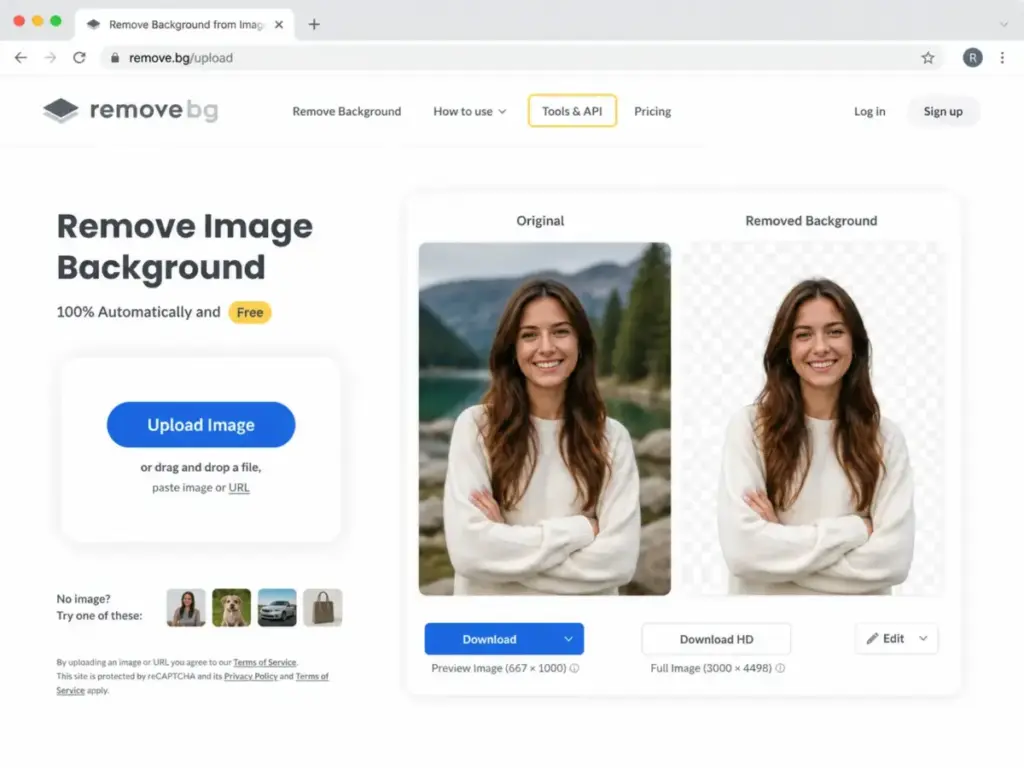
How Remove.bg Works
The core workflow is upload, process, review, and download. Every interaction starts with a single image and ends with a transparent or replaced-background result. The differences show up in how you get there and what resolution you walk away with.
Remove.bg supports web uploads, desktop batch processing, API calls, a Photoshop extension, and a mobile app. Each entry point follows the same AI pipeline but differs in credit usage, resolution limits, and automation depth.
Remove.bg Upload and One-Click Cutout
Drop an image on the web interface or paste a URL. The AI processes it in seconds and returns a preview with the background removed. The web preview is free but limited to 0.25 megapixels. Downloading the full high-resolution result costs one credit.
The cutout engine handles people, products, animals, cars, and logos. Hair edges, fur, and semi-transparent objects are where the model earns or loses trust, and I cover those results in the output quality section below.
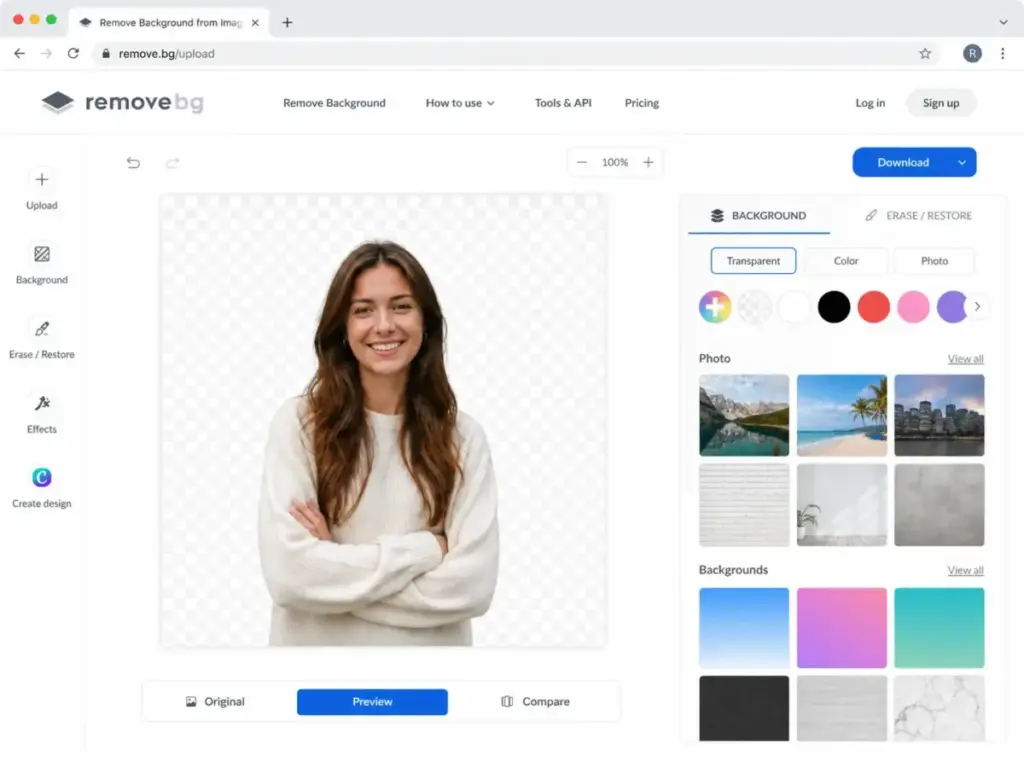
Remove.bg Background Replacement
After the cutout, you can keep the transparent background or swap it. Options include solid colors, preset photo backgrounds, custom uploaded images, or AI-generated scenes. The background generator lets you type a prompt and get a synthetic backdrop, useful for product photos that need context without a photoshoot.
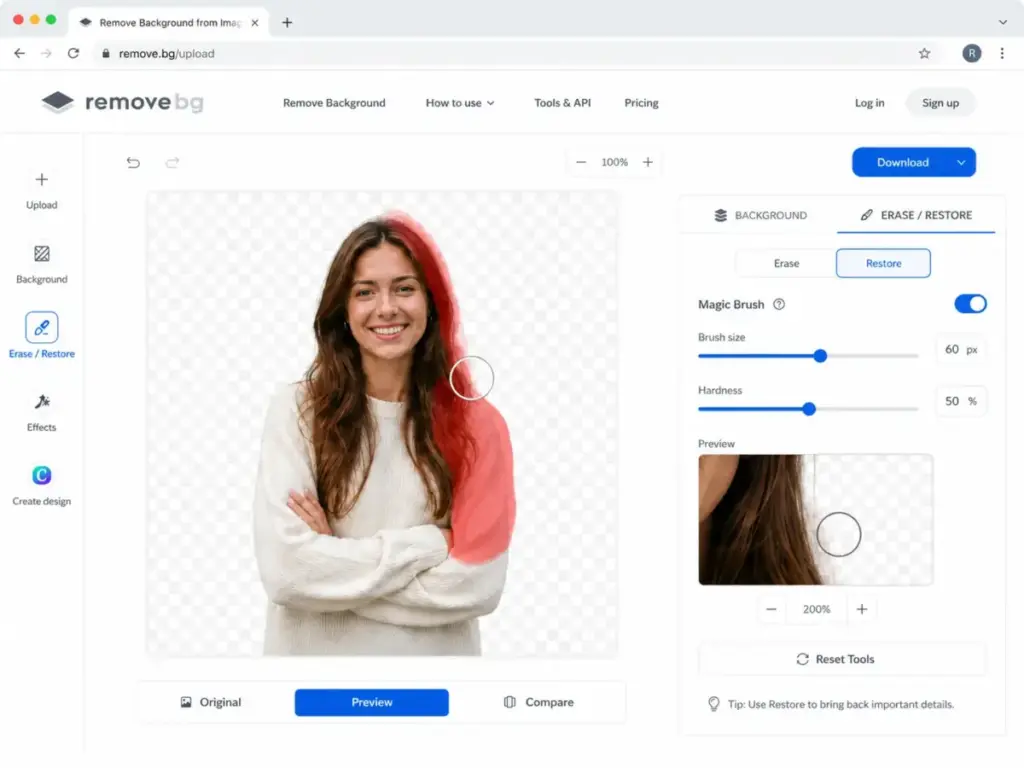
Remove.bg Magic Brush Corrections
When the AI misses an area or cuts too aggressively, the Magic Brush tool lets you paint corrections. You can restore removed sections or erase leftover background manually. It is not a full masking tool like Photoshop’s Refine Edge, but it handles common touch-ups without leaving the editor.
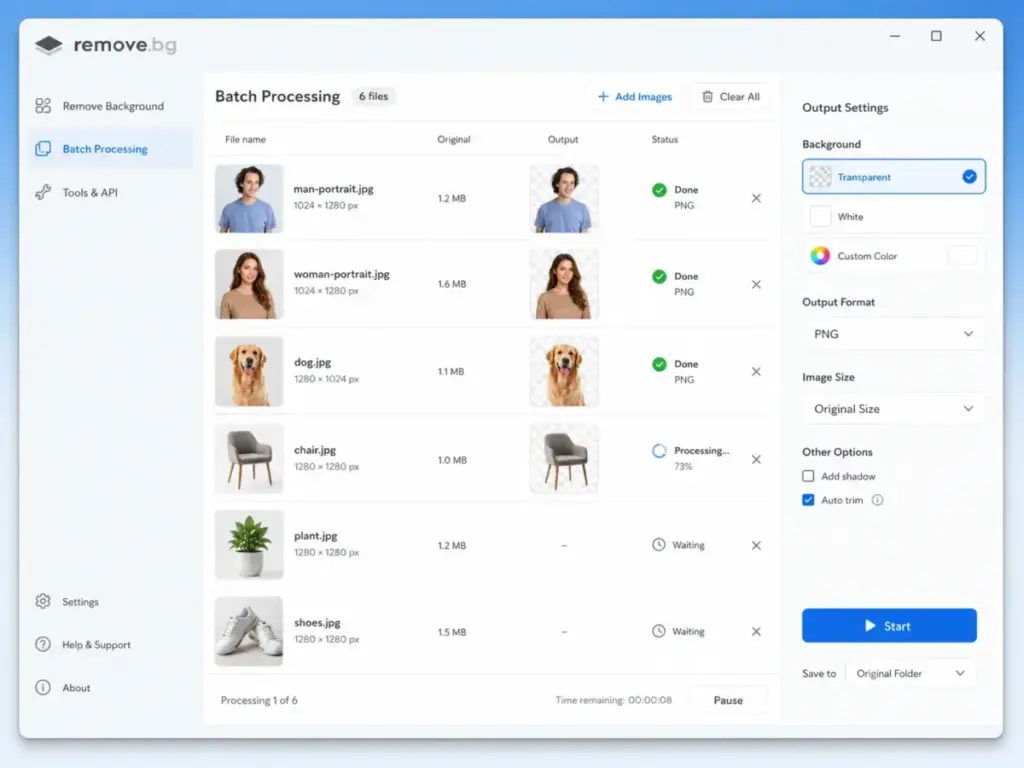
Remove.bg Batch Processing
The desktop app (Windows, Mac, Linux) supports batch processing. Drop a folder of images and the app processes them sequentially, applying background removal to each file. This is the fastest non-API method for teams handling 50 or more images per session. Each high-resolution output costs one credit.
Remove.bg API Workflow
The API accepts image uploads or URLs and returns processed results programmatically. It supports parameters for output format, resolution, cropping, scaling, background color, custom backgrounds, and shadow effects. Developers use it to build background removal into ecommerce platforms, print-on-demand flows, or SaaS onboarding screens. I cover API throughput and rate limits in detail below.
Remove.bg Features That Matter
Remove.bg’s feature set is narrow but deep where it counts. Every feature maps to a specific buyer need, so I will skip the generic feature list and focus on what matters for each workflow.
Background removal is the core product. The AI model handles portraits, product shots, pets, cars, and graphics. Edge quality on hair and fur is better than most browser-based competitors, which is the main reason photographers and designers still use it.
Transparent PNG creation is the default output. You get a clean alpha channel ready for compositing in Photoshop, Figma, Canva, or any design tool. For images above 10MP, you need WebP or ZIP format because PNG output caps at 10 megapixels.
AI background generator adds synthetic scenes behind your subject. Type a prompt, pick a result, and export. It works for social media posts and quick product mockups but does not replace staged product photography.
Photoshop plugin lets you remove backgrounds without leaving Photoshop. The extension sends the active layer to remove.bg, processes it, and returns the cutout as a new layer with transparency. One credit per high-resolution result.
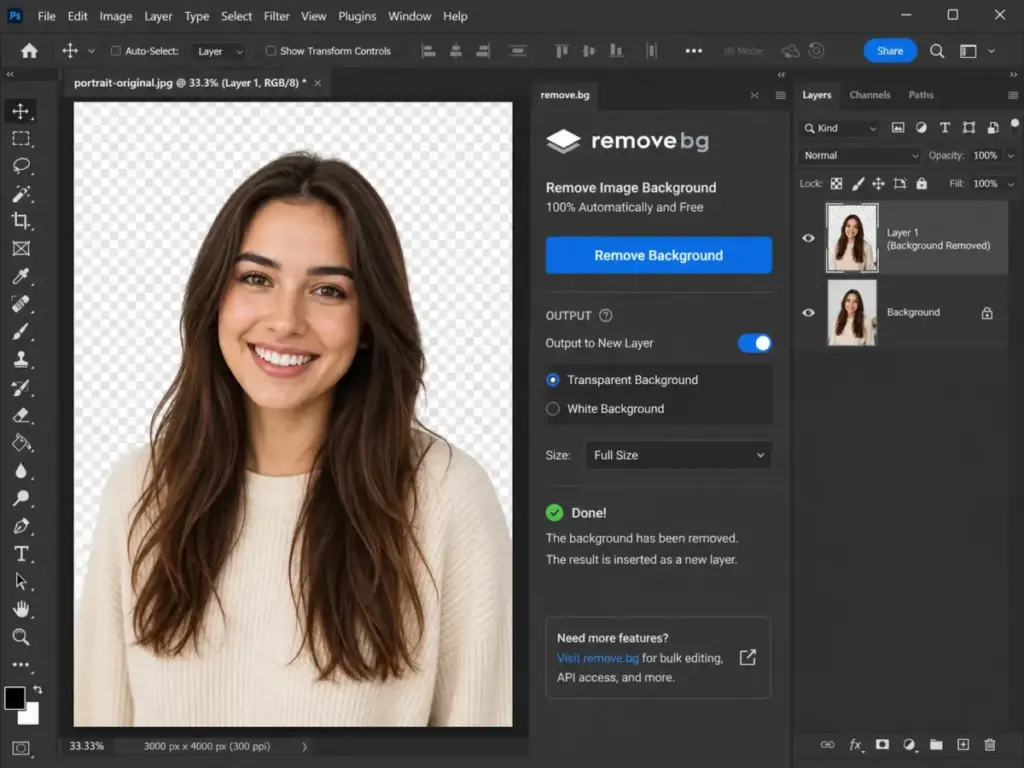
Zapier and Make automation connects remove.bg to workflows. Trigger background removal when a new product image uploads to Shopify, Google Drive, or Dropbox. Useful for teams that want hands-off processing without writing API code.
Mobile app (Android) gives field teams quick cutouts from phone photos. The resolution and credit rules match the desktop experience.
API is the most mature feature for developers and high-volume teams. I cover it in its own section.
Remove.bg Pricing and Credits
Remove.bg is free for previews, not free for recurring high-resolution production. The distinction matters because the free tier creates an impression of zero cost that breaks the moment you need a printable or web-ready image above 0.25 megapixels.
Every high-resolution download costs one credit. Preview images on the website are free. Previews through apps and API cost one quarter of a credit. The pricing structure splits into subscriptions and pay-as-you-go, and the recent credit rollover policy change makes choosing the right plan more important than ever.
| Plan / Credit Type | What You Get | Cost | Best For | Important Limitation |
|---|---|---|---|---|
| Free account | 0.25MP previews, 1 bonus credit, 50 API/app previews monthly | $0 | Testing and occasional low-res assets | Not production high-res |
| Lite annual | 40 credits/month | $8.10/mo ($97.20/yr) | Solo creators | Subscription credits expire monthly |
| Pro annual | 200 credits/month | ~$35.10/mo | Small ecommerce teams | Unused credits expire monthly |
| Volume+ annual | 500 credits/month | ~$80.10/mo | Regular catalog processing | Not cheapest at high volume |
| Pay-as-you-go | One-time credit purchase | 3 credits for $3 | Irregular usage | Higher per-image cost |
Pricing checked May 5, 2026. Verify at the official remove.bg pricing page before purchasing.
Remove.bg Free Plan
The free account gives you unlimited low-resolution previews on the website and 50 free previews per month through apps and API. You also get one bonus credit for testing a single high-resolution download. After that, every full-resolution image requires a paid credit. The free plan is a testing tool, not a production pipeline.
Remove.bg Subscription Credits
Subscriptions give you a monthly credit budget at a lower per-image cost than pay-as-you-go. Lite provides 40 credits, Pro provides 200, and Volume+ provides 500. Monthly billing is also available (40 credits at $9/month, 200 credits at $39/month) but costs more per credit than annual billing.
Subscription credits are consumed before pay-as-you-go credits. If you have both types, the subscription pool drains first.
Remove.bg Pay-As-You-Go Credits
Pay-as-you-go credits are purchased in one-time packs starting at 3 credits for $3. They do not expire, which makes them the safest option for users with unpredictable monthly volume. The per-credit cost is higher than subscription rates, but you never lose unused credits.
The Credit Rollover Change
This is the pricing detail most reviews miss. Since October 22, 2025, unused subscription credits expire at the end of each billing period for new or changed subscriptions. Before this date, some plans allowed rollover. Now they do not.
This means a Pro subscriber who uses 120 of 200 credits in a month loses the remaining 80. Over a year, that waste adds up. The real remove.bg cost is not the credit price. It is the credits you pay for and never use.
What Happens If You Cancel
If you cancel your subscription, remaining subscription credits are invalidated after the current billing period ends. You keep access until the period expires, but any leftover credits vanish. Pay-as-you-go credits remain in your account.
Remove.bg API and Automation
The remove.bg API is one of the most mature background-removal APIs available, with documented rate limits, flexible output formats, and 50 free monthly preview calls. For developers who need to understand API basics, the remove.bg API accepts standard HTTP requests with image uploads or URLs and returns processed images.
The first 50 API calls per month are free at preview resolution. High-resolution API calls cost one credit each. The API supports images up to 50 megapixels and offers parameters for resize, crop, scale, position, background color, custom background, shadows, and output format.
API Throughput by Image Resolution
The rate limit is based on total megapixels processed per minute, not image count. The official limit is 500 megapixels per minute. This means throughput drops sharply as input resolution increases.
| Input Resolution | Megapixels | Effective Rate Limit |
|---|---|---|
| 625 × 400 | 1MP | 500 images/min |
| 1600 × 1200 | 2MP | 250 images/min |
| 2500 × 1600 | 4MP | 125 images/min |
| 4000 × 2500 | 10MP | 50 images/min |
| 6250 × 4000 | 25MP | 20 images/min |
| 8000 × 6250 | 50MP | 10 images/min |
Exceeding the rate limit returns HTTP 429 and does not charge credits. Developers should calculate throughput in megapixels, not image count, when planning batch workflows.
Output Format Decision Table
| Output Format | Max Resolution | Transparency | Best Use |
|---|---|---|---|
| PNG | 10MP | Yes | Standard transparent assets |
| JPG | 50MP | No | White or colored backgrounds |
| WebP | 50MP | Yes | Web workflows needing transparency |
| ZIP | 50MP | Yes | Fast transparent high-res workflows |
ZIP output is up to 80% smaller than PNG and up to 40% faster to generate according to official documentation. It requires composition on the client side but is the best option for high-volume transparent workflows above 10MP.
Output Quality and Real-World Limits
Remove.bg produces clean cutouts on standard portraits and product shots, but complex edges, reflective surfaces, and similar-color scenes still create artifacts that require manual correction. No AI background remover handles every image perfectly, and claiming otherwise would be dishonest.
Hair and fur edges are where remove.bg performs above average. Flyaway hairs, curly textures, and pet fur retain more detail than most browser-based alternatives. The model struggles more with semi-transparent objects (glass bottles, clear plastic), reflective jewelry, and scenes where the foreground color closely matches the background.
As Capterra user Yasin Can Y., Data Annotator, noted: “Render quality might be better.” That aligns with what I see in edge cases where color similarity confuses the model.
For print workflows, resolution matters more than DPI metadata. A 50MP output at 300 DPI covers large print formats. A 0.25MP preview is unusable for anything beyond a thumbnail.
Test Matrix for Editorial Verification
| Test Image Type | What To Check | Expected remove.bg Risk | Editor Result |
|---|---|---|---|
| Curly hair portrait | Flyaway edges | Minor touch-up | [FILL AFTER TEST] |
| White product on light background | Subject/background confusion | Medium risk | [FILL AFTER TEST] |
| Jewelry or reflective metal | Reflections/artifacts | High risk | [FILL AFTER TEST] |
| Pet fur | Fine edge preservation | Medium risk | [FILL AFTER TEST] |
| Transparent glass bottle | Semi-transparency | High risk | [FILL AFTER TEST] |
| 50MP product image | Output format choice | PNG cap issue | [FILL AFTER TEST] |
Remove.bg User Experience
The upload-to-download workflow is fast, but the account wall for high-resolution downloads adds friction that free-tier users do not expect. Uploading an image and seeing the preview takes under five seconds. Downloading the full resolution requires signing in and spending a credit.
The credit counter is visible in the dashboard, and the download modal clearly shows preview versus high-resolution options. Credit management is straightforward until you need to track subscription expiry and pay-as-you-go balances separately.
[SCREENSHOT: remove.bg high-resolution download modal showing credit requirement]
The editor corrections (Magic Brush, background swap) work without leaving the browser. Batch workflows require the desktop app or API. Developer workflows are well-documented with code samples in Python, Node.js, Ruby, PHP, and cURL.
G2 user Martin J., CEO, confirms: “Quality of their background removal is excellent. The API is reliable.”
On the free tier side, G2 user Akshay D., UI UX Designer, notes: “The free version has limitations on image quality and resolution.”
Remove.bg Pros and Cons
The strengths center on cutout quality and developer tooling. The weaknesses center on pricing structure and feature scope.
- Fast one-click cutouts with results in seconds
- Strong edge quality on hair, fur, and complex subjects
- Mature API with 500MP/minute throughput and flexible output formats
- Photoshop plugin, Figma integration, Zapier and Make automation
- High-resolution support up to 50 megapixels
- Desktop app for batch processing without writing code
- Free plan produces only 0.25MP previews, not production-ready images
- Subscription credits expire at the end of each billing period (post October 2025)
- Pay-as-you-go is expensive for regular monthly use
- Complex edges (reflective, transparent, similar-color) still need manual correction
- PNG output caps at 10MP, forcing WebP or ZIP for larger transparent images
- Not a complete product photography suite (no staging, virtual models, or listing tools)
- Privacy-sensitive teams should review the data processing policy before uploading
Remove.bg vs Alternatives
No single background remover fits every team. The right choice depends on whether you need standalone cutouts, a full product-photo suite, or a multi-tool AI platform. Here is how remove.bg compares to five direct competitors.
| Tool | Best For | Starting Cost Context | Better Than remove.bg When | Worse Than remove.bg When |
|---|---|---|---|---|
| Photoroom | Ecommerce product visuals | Free plus paid suite | You need product staging and virtual models | You need a specialist API for cutouts only |
| Cutout.Pro | Multi-tool AI visual workflows | Credit-based | You need image, video, and enhancement tools under one account | You want a cleaner single-purpose UX |
| Canva | Canva design workflows | Canva plan based | Final asset is built in Canva anyway | You need standalone API or batch automation |
| Adobe Express | Occasional free edits | Free/Premium | You need quick Adobe ecosystem handoff | You need batch or API depth |
| Slazzer | Direct background-removal alternative | Credit/API based | Price or specialized cutout testing wins | You need Canva ecosystem trust and integration breadth |
Remove.bg vs Photoroom
Photoroom is an ecommerce-first product photography suite. It handles background removal, AI backgrounds, product staging, virtual models, and batch editing in one platform. Choose Photoroom if you need end-to-end product visuals. Choose remove.bg if you only need cutouts and want a more mature API.
Remove.bg vs Cutout.Pro
Cutout.Pro offers background removal alongside face cutouts, passport photos, image enhancers, and video tools. Its API pricing charges 1 credit per successful call and 1/4 credit for previews, similar to remove.bg. Choose Cutout.Pro for breadth. Choose remove.bg for focused cutout quality and ecosystem trust. Read the full Cutout.Pro review for a deeper comparison.
Remove.bg vs Canva Background Remover
Canva’s background remover lives inside the Canva editor. If your final asset is a social graphic, presentation, or branded template, the Canva workflow avoids an export/import step. Remove.bg wins when you need standalone API access, batch processing outside Canva, or higher-resolution transparent outputs. See the Canva AI review for full details.
Remove.bg vs Adobe Express
Adobe Express offers a free online background remover with handoff into the Express editor. It works well for occasional social and presentation assets. Remove.bg offers deeper batch and API automation. For teams already in the Adobe ecosystem, Express is convenient for light work, but it lacks the throughput for high-volume processing. The Adobe Firefly review covers Adobe’s broader AI tooling.
Remove.bg vs Slazzer
Slazzer targets the same specialist background-removal market with a desktop app and API. It is a direct alternative worth testing on your specific image types. Remove.bg has stronger ecosystem visibility, Canva backing, and documented API rate limits. Slazzer may compete on price for certain volume tiers.
For ecommerce teams exploring AI-powered product photography beyond background removal, the Pic Copilot review covers an alternative focused on marketplace listing optimization. You can also browse curated best AI image generators for creative asset production beyond cutouts.
What Most Remove.bg Reviews Get Wrong
The common mistake is framing remove.bg as “expensive per image.” The actual cost problem is wasted subscription credits. One image for one credit is simple math. But subscribing to 200 credits when you use 120 means you are paying for 80 phantom images every month. Over a year on the Pro annual plan, that is 960 wasted credits, roughly $168 in unused capacity.
The smarter approach is matching your payment type to your actual monthly volume.
| Monthly Need | Best Payment Type | Why |
|---|---|---|
| 1-10 images | Free plus occasional pay-as-you-go | Avoid wasted subscription credits entirely |
| 40 images | Lite subscription | Lowest predictable monthly entry point |
| 200 images | Pro subscription | Better per-image cost if you consistently hit 200 |
| Seasonal spikes | Pay-as-you-go backup plus short subscription | Avoid months of expired unused credits |
| 1,000+ images | Request a quote or test alternatives | Compare total cost including QA time across tools |
The contrarian angle: use remove.bg for hard edge cases (hair, fur, complex subjects) and route standard catalog cutouts through a cheaper batch-first tool. This hybrid approach captures remove.bg’s quality advantage without overpaying for simple product-on-white images.
Is Remove.bg Safe?
Remove.bg processes images in the cloud, and the privacy policy allows broader data use than most users expect. According to the official privacy policy, uploaded files are securely uploaded, processed, provided for download, and deleted shortly after.
However, the privacy policy also states that uploaded content, account activity, and media data may be analyzed to provide, customize, train, improve, and develop services. This language is standard for cloud AI tools, but it matters for teams handling unreleased product images, client photography, or customer-identifiable content.
Privacy-sensitive teams should review the full policy before uploading confidential material. For teams that cannot upload images to cloud services, offline or self-hosted background removal tools are the safer path.
Who Should Use Remove.bg?
Remove.bg fits teams that value cutout quality and workflow speed over all-in-one product staging. Here are the profiles where it delivers the most value.
- Solo Etsy seller with 20-40 product images per month. The Lite plan at $8.10/month covers your volume. The web editor handles one-off corrections. You do not need API access or batch tools.
- Shopify team of 5 processing 200-500 catalog photos per month. The Pro or Volume+ plan provides enough credits. The desktop batch app saves time. The Photoshop plugin fits into existing retouching workflows.
- Design agency handling portraits, hair, and urgent ad creatives. Edge quality on hair and fur is remove.bg’s strongest advantage. The speed of one-click cutouts matters when deadlines are tight.
- Developer integrating cutouts into a SaaS onboarding or print-on-demand flow. The API is well-documented, handles up to 50MP, and the rate-limit model is predictable. The 50 free monthly preview calls let you prototype before committing budget.
- Canva or Photoshop user who wants quick first-pass masking. The integrations eliminate the export/import friction. Remove the background in remove.bg, continue designing in your primary tool.
Who Should Not Use Remove.bg?
Remove.bg is not the right tool for every image workflow. Knowing when to skip it saves money and frustration.
- Marketplace seller needing 1,000+ standard cutouts per month at lowest cost. At high volume, the per-credit cost adds up. Batch-first tools or self-hosted models may be cheaper with acceptable quality.
- Privacy-sensitive studio handling confidential imagery. If your policy prohibits cloud uploads or your clients require on-premise processing, remove.bg’s cloud-only model is a dealbreaker.
- Fashion seller needing virtual models, ghost mannequin, and product staging. Remove.bg removes backgrounds. It does not stage products, generate virtual models, or build marketplace-ready listing images. Photoroom or dedicated ecommerce photography tools cover those needs.
- User expecting free full-resolution downloads. The free tier produces 0.25MP previews. If you need production-quality images without paying, remove.bg is not the answer.
- Team with unpredictable monthly volume that wastes subscription credits. If your image processing spikes from 30 to 300 and back to 20 across months, subscription credits will expire unused. Pay-as-you-go or a hybrid strategy works better.
Final Verdict
Remove.bg earns 8.4/10 in this review. It remains one of the best AI background removers for edge quality, API maturity, and design-tool integration. The cutout engine handles hair, fur, and complex subjects better than most browser-based alternatives.
Buy it if quality, API speed, and workflow fit with Photoshop, Canva, or Figma matter to your team. The credit system is fair when your monthly volume is predictable and you pick the right plan tier.
Skip it if price predictability and a full product-photography workflow matter more than cutout quality alone. Teams with variable monthly volume will waste subscription credits. Teams needing product staging, virtual models, or listing optimization need a broader platform.
The best hybrid strategy: keep remove.bg for complex edge cases where cutout quality cannot be compromised, and use a cheaper batch tool for standard catalog images where the subject-background contrast is simple. This approach captures remove.bg’s quality advantage at a fraction of the all-in cost.
FAQ
Answers reference remove.bg pricing and features as of May 2026.
Is remove.bg free?
Yes, for previews. The free account lets you remove backgrounds and preview results at up to 0.25 megapixels on the website. You also get one bonus credit for a single high-resolution test and 50 free preview calls per month through apps and API. Full-resolution downloads for production use require paid credits.
How much does remove.bg cost?
Remove.bg starts at $8.10 per month for 40 credits on the Lite annual plan. The Pro annual plan costs about $35.10 per month for 200 credits. Pay-as-you-go starts at 3 credits for $3. Each high-resolution image costs one credit. Check the official pricing page for current rates.
What is a remove.bg credit?
One credit equals one high-resolution image download at up to 50 megapixels. Preview images through apps and API cost one quarter of a credit. Website previews are free. Credits are the currency for all paid processing on the platform.
Do remove.bg credits expire?
Subscription credits expire at the end of each billing period for subscriptions created or changed after October 22, 2025. Pay-as-you-go credits do not expire. If you cancel, remaining subscription credits are invalidated after the billing period ends.
Does remove.bg support high-resolution images?
Yes. Remove.bg supports input and output up to 50 megapixels. However, PNG output caps at 10MP. For transparent results above 10MP, use WebP or ZIP output format. The free preview tier is limited to 0.25MP.
Does remove.bg have an API?
Yes. The remove.bg API accepts image uploads or URLs and returns processed results. It supports up to 50MP input, multiple output formats, and custom parameters for cropping, scaling, backgrounds, and shadows. The rate limit is 500 megapixels per minute. The first 50 API calls per month are free at preview resolution.
Is remove.bg better than Photoroom?
It depends on your workflow. Remove.bg is better for standalone cutout quality, API automation, and Photoshop integration. Photoroom is better for complete ecommerce product photography, including product staging, virtual models, and batch visual editing. Choose based on whether you need a specialist remover or a full product-photo suite.
What is the best remove.bg alternative?
The best alternative depends on your need. Photoroom fits ecommerce teams that need product staging. Cutout.Pro suits teams needing multiple AI visual tools. Canva’s background remover works best for users already designing in Canva. Adobe Express handles occasional free edits. Slazzer is a direct specialist competitor worth price-testing.
Can I use remove.bg for ecommerce product photos?
Yes. Remove.bg handles product background removal well for items with clear subject-background contrast. It is less effective for transparent products, reflective surfaces, or scenes where product and background colors are similar. For full ecommerce listing workflows including staging and mockups, consider pairing it with a product photography platform.
Is remove.bg safe for uploaded images?
Remove.bg states that uploaded files are processed and deleted shortly after. However, the privacy policy also allows analysis of uploaded media and account activity to provide, customize, train, improve, and develop services. Teams handling confidential, unreleased, or customer-identifiable images should review the full privacy policy before uploading.