Gemini handles search summaries, email drafts, and quick Android lookups without friction. But the moment you need a cited source for a client report, a coding output you can trust without a 20-minute review, or an AI workspace that does not route every interaction through Google’s data layer, Gemini starts creating more work than it saves.
That gap between what Gemini promises and what it delivers in specific workflows is the reason this list exists.
I mapped 10 alternatives to the exact frustration that makes teams switch, not to a generic “best AI chatbot” ranking. Pricing, privacy tradeoffs, migration effort, and plan-gate realities are documented below with official sources verified as of June 2026.
If you need a broader comparison of best AI chatbot options, start there. This guide is for people who already know Gemini and want to know what fixes the specific thing it breaks in their workflow.
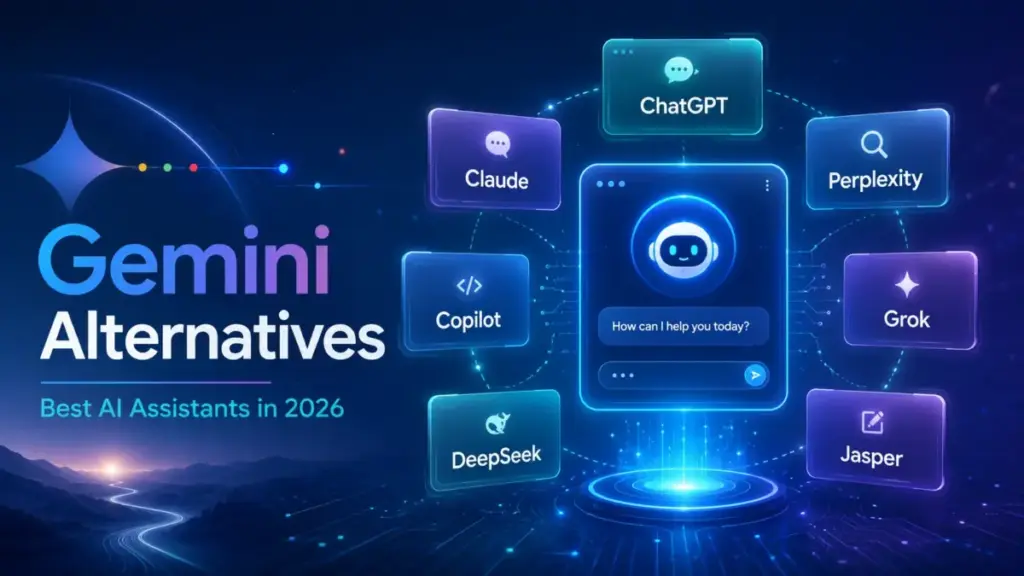
Quick Verdict: Best Gemini Alternatives by Switching Trigger
| If you are leaving Gemini because… | Best alternative | Why |
|---|---|---|
| You need a broad, reliable Gemini replacement | ChatGPT | Wider assistant ecosystem with custom GPTs and business workspace controls |
| Writing and reasoning feel generic or overconfident | Claude | Stronger long-form writing, careful reasoning, and editing at Pro tier |
| You want every answer to cite its sources | Perplexity | Research-first interface with inline citations and source control |
| Your team lives in Word, Excel, Outlook, and Teams | Microsoft 365 Copilot | Native AI inside every Microsoft 365 app |
| You want a free AI assistant without paying Google | Meta AI | Zero-cost consumer assistant across Meta apps |
| You want real-time web and X context in answers | Grok | xAI’s assistant with real-time X and web grounding |
| You want European AI with enterprise deployment options | Mistral Vibe | Open model workspace with coding agents and on-prem options |
| You need the cheapest API for coding and reasoning | DeepSeek | API token pricing well below most competitors |
| You want to test multiple AI models from one interface | Poe | Multi-model access with Claude, ChatGPT, and dozens of bots |
| You need brand voice and marketing campaign governance | Jasper | Purpose-built marketing AI platform with brand controls |
What this means: There is no single “best” Gemini alternative. The right pick depends entirely on the specific frustration pushing you away. A researcher needing cited answers has a different best option than a developer chasing cheap API calls or a marketing team that needs brand governance. The table above maps each exit reason to its strongest match.
How I Evaluated These Alternatives
This is an editorial research review, not a hands-on test of all 10 products. I reviewed official product pages, pricing pages, feature documentation, and user review signals from platforms like Capterra to build each product profile. Pricing was verified from official sources on June 8, 2026, but plan names, limits, and checkout prices can change. Where exact pricing was not fully disclosed on an accessible official page, I flagged it as a caveat rather than guessing.
Daniel Rivera has published 50+ AI tool evaluations for SaaSZap, tracking what AI chatbots cost and how they work across 12 tools monthly for 18 months. Every recommendation below maps to a specific switching trigger, not a generic feature comparison.
Review limitation: Testing level for all products in this article is official_research_only. I did not run controlled head-to-head tests. Claims are based on official documentation, publicly listed pricing, and verified user review signals.
The Gemini Problem Map
Gemini is not a bad product. It is a strong choice for users who live inside Google Search, Android, Gmail, Docs, and Drive. Google AI subscriptions offer Deep Research, multimodal AI, and coding assistance. The problem is that Gemini creates specific friction points that no amount of Google ecosystem convenience can fix for certain workflows.
Problem 1: Research answers without reliable citations
Gemini can perform Deep Research, but it does not behave like a citation-first answer engine by default. When you ask a factual question, Gemini often returns a confident summary without inline sources. For researchers, journalists, students, and analysts who need to verify every claim before passing it to a client or a professor, that means an extra 10 minutes of manual fact-checking per query.
“It’s a bit overconfident… especially when it gets a math problem wrong.” — Chris L., Operations, Publishing (Capterra)
That overconfidence extends beyond math. When Gemini generates a research summary, the user bears the full burden of verifying accuracy. For professionals whose output is judged on source quality, this is the switching trigger that pushes them toward Perplexity or ChatGPT.
Problem 2: Google ecosystem lock-in and privacy concerns
Every Gemini interaction routes through Google’s infrastructure. For users already inside Google Workspace, that is convenience. For teams that want AI without adding another Google-controlled data layer, or for organizations that need clearer enterprise data controls, no-training guarantees, or self-hosting options, Gemini creates a dependency they cannot accept.
This is not a theoretical concern. Enterprise buyers evaluating AI assistants in 2026 are asking specific questions about data retention, training opt-outs, and deployment control. Gemini’s privacy settings are tied to your Google account, and the history controls (like the 72-hour activity window) add complexity rather than clarity for compliance teams.
Problem 3: Coding reliability and workflow-specific depth
Gemini offers coding assistance, but teams that rely on AI-generated code for production workflows report needing to review and correct outputs more frequently than they expected. The gap is not in capability but in consistency. For developers who need a coding assistant they can trust without a second review pass, the inconsistency becomes a productivity drag. (For context on the broader market, see our list of the best AI coding assistants.)
Combined with the lack of multi-model access (you get Google’s models only), power users who want to compare outputs across Claude, GPT, and open-source models hit a ceiling that Gemini cannot address by design.
Alternatives That Fix the Citation and Research Problem
ChatGPT: Best Overall Gemini Alternative

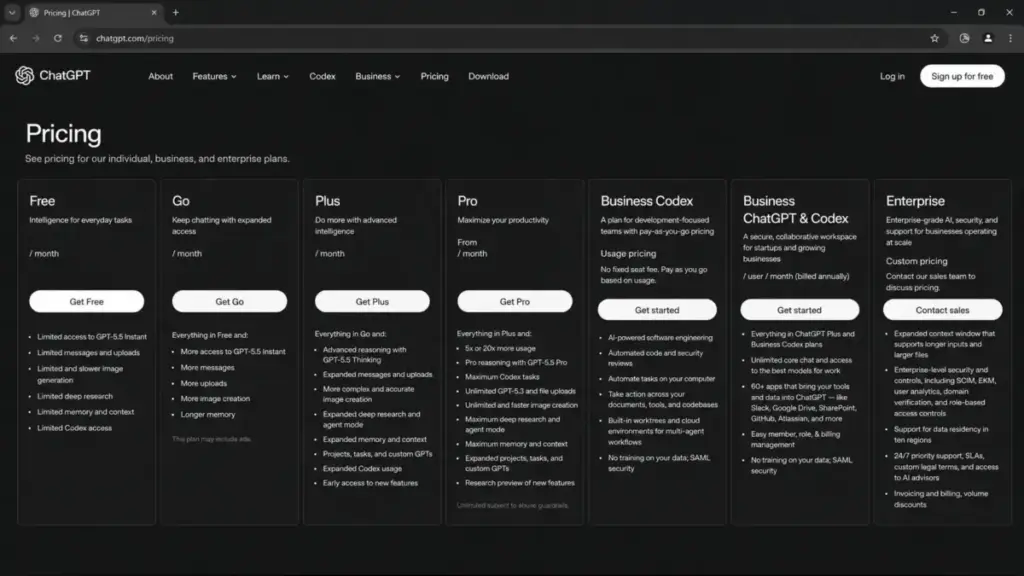
ChatGPT is the strongest all-around Gemini replacement for teams that want writing, coding, brainstorming, file analysis, and custom assistant workflows without Google lock-in.
Pricing: Free plan available. Paid personal and business plans are listed on the official ChatGPT pricing page. Exact plan prices can vary by region and account state.
ChatGPT’s ecosystem advantage over Gemini is the custom GPT layer. (For a deeper breakdown, see the full ChatGPT review and evaluation.) Teams can build specialized assistants for specific workflows: legal document review, sales email generation, data analysis pipelines. Gemini offers a more general assistant tied to Google apps, but ChatGPT’s connected apps and tool integrations create a broader workspace.
The tradeoff: Gemini stays more naturally tied to Google Search, Gmail, and Android. If your daily workflow starts and ends inside Google apps, ChatGPT requires context-switching that Gemini avoids.
Best for:
- Teams wanting a general-purpose Gemini replacement
- Business users who need admin controls and workspace features
- Users who build custom assistant workflows
Avoid if: Your team depends on Google Workspace integration and switching to a non-Google assistant would break existing workflows.
Migration difficulty: Low. No data migration required. Sign up and start prompting.
Perplexity: Best for Cited Research

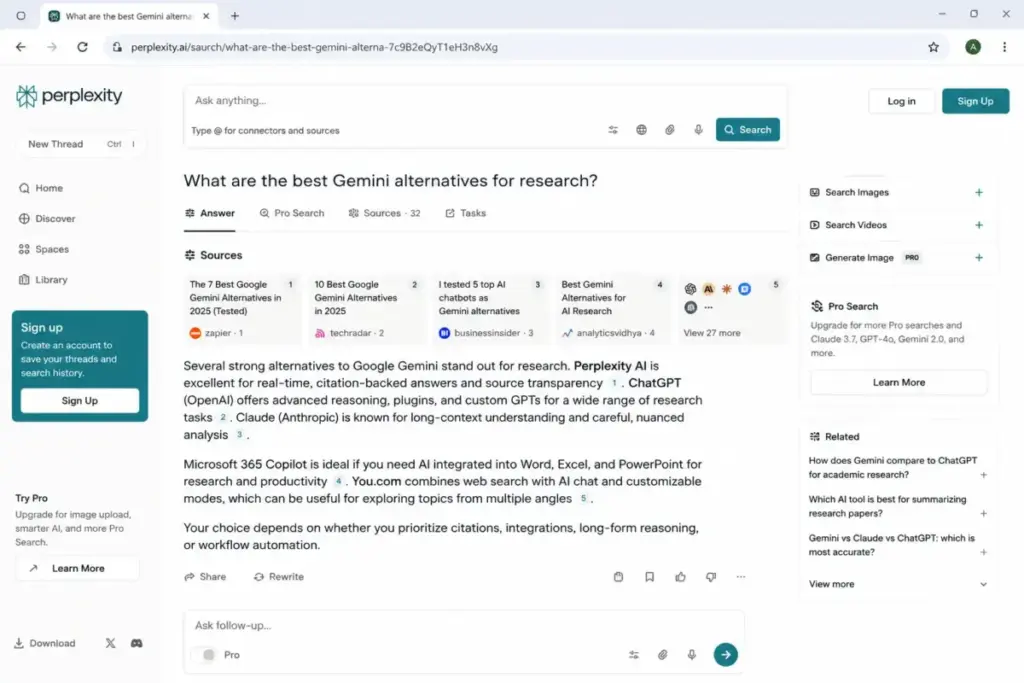
Perplexity is the Gemini alternative for anyone whose primary complaint is “I cannot verify where this answer came from.” Every Perplexity response includes inline citations with source links.
Pricing: Free plan available. Pro at $20/month or $200/year. Enterprise Pro at $40/user/month monthly. Enterprise Max pricing is higher. (Official pricing)
The key difference from Gemini: Perplexity treats research as its primary function, not as a secondary feature bolted onto a chatbot. Pro searches use multiple AI models, and the interface surfaces sources before answers. For a 10-person research team, 10 Pro seats cost $200/month, with enterprise privacy controls available at higher tiers.
The tradeoff: Perplexity is less of a general productivity assistant. It will not draft your emails, manage your calendar, or integrate with Google Docs. If you need both research and workplace productivity, you may end up running Perplexity alongside another tool.
Best for:
- Researchers, journalists, and analysts
- Students who need source verification
- Teams that want answer-engine style research with citations
Avoid if: You need a full workplace productivity assistant, not just a research tool.
Migration difficulty: Low. No data to migrate. Start searching.
Poe: Best for Multi-Model Comparison
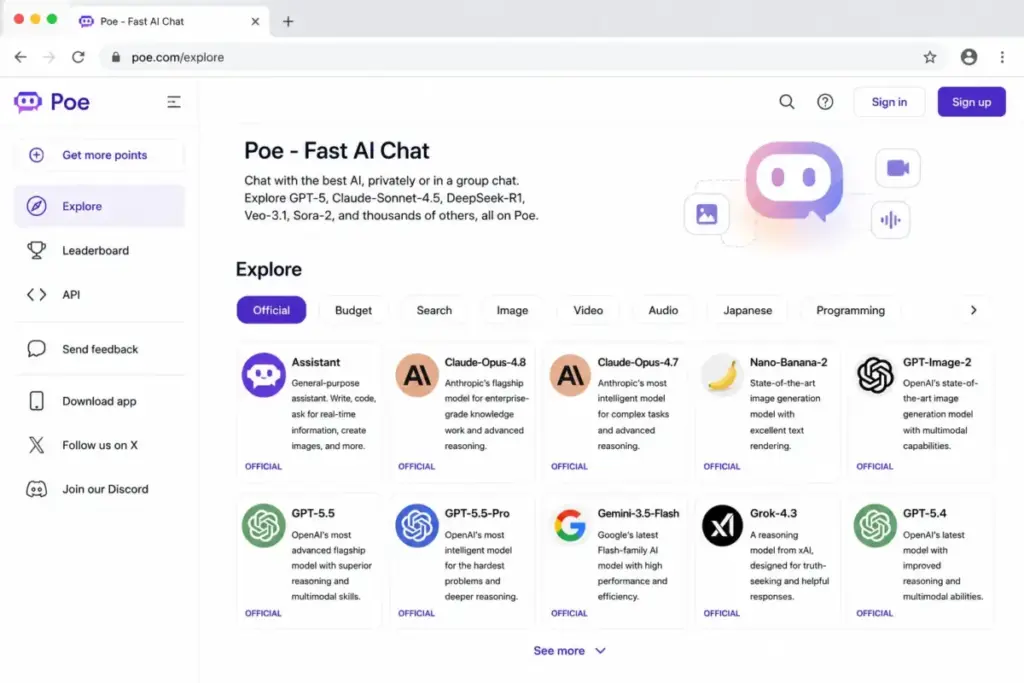
Poe solves a problem Gemini cannot address by design: access to multiple AI models from a single interface. Instead of being locked into Google’s models, Poe lets you compare responses from Claude, ChatGPT, and dozens of other bots.
Pricing: Free access with usage limits. Annual subscription listed at $199.99/year on the App Store. Verify current plan limits inside the app. (App Store listing)
For a 10-person team on the annual plan, that is approximately $1,999.90/year (about $166.66/month). Model-specific usage depends on points and subscription tier.
The tradeoff: Poe is a multi-model interface, not a first-party productivity suite. It does not replace Google Workspace or Microsoft 365 integration. You get model variety, not workflow depth.
Best for:
- Users who want to test multiple AI models side-by-side
- Power users comparing Claude vs. ChatGPT vs. open-source outputs
- Developers evaluating model quality for specific tasks
Avoid if: You need deep workplace integration or enterprise admin controls.
Migration difficulty: Low.
Alternatives That Fix the Privacy and Lock-In Problem
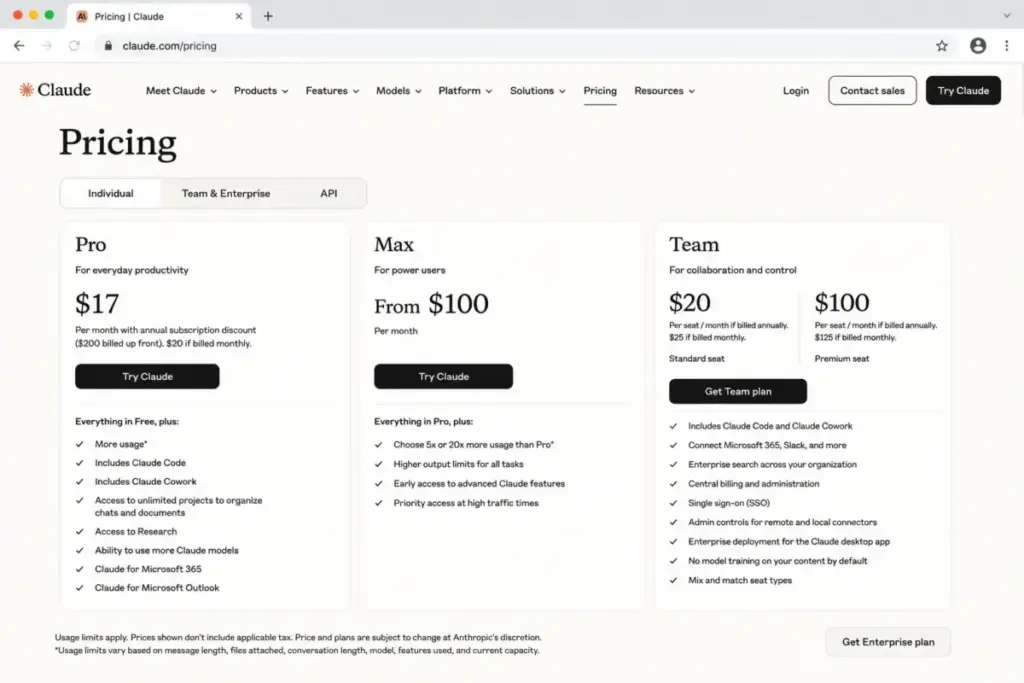
Claude: Best for Writing and Careful Reasoning

Claude is the Gemini alternative for writers, analysts, and product teams that want a more careful AI assistant. Where Gemini can feel overconfident and generic on nuanced tasks, Claude’s approach to long-form reasoning and writing produces outputs that require less editing.
Pricing: Free plan available. Pro at $20/month or $17/month billed annually. Team at $25/user/month monthly or $20/user/month billed annually. Max tier also available. (Official pricing)
For a 10-person team: $200/month on Pro (individual seats) or $250/month on Team monthly ($200/month billed annually). Usage limits apply on all plans. Heavier users will need Max or Team.
Claude also offers web search, file uploads, code and data visualization, memory, and third-party connectors. For a full breakdown of plan tiers, see the Claude pricing guide. It is not as deeply integrated with Google Search, Gmail, or Android as Gemini, but for teams whose primary concern is writing quality and data privacy, that tradeoff is acceptable.
Best for:
- Writers and editors who need careful, nuanced AI outputs
- Analysts and executives handling long-form reports
- Teams that want clearer data privacy controls outside Google
Avoid if: Your workflow requires native Google Workspace or Android integration.
Migration difficulty: Low.
Mistral Vibe: Best Open European AI Workspace Alternative

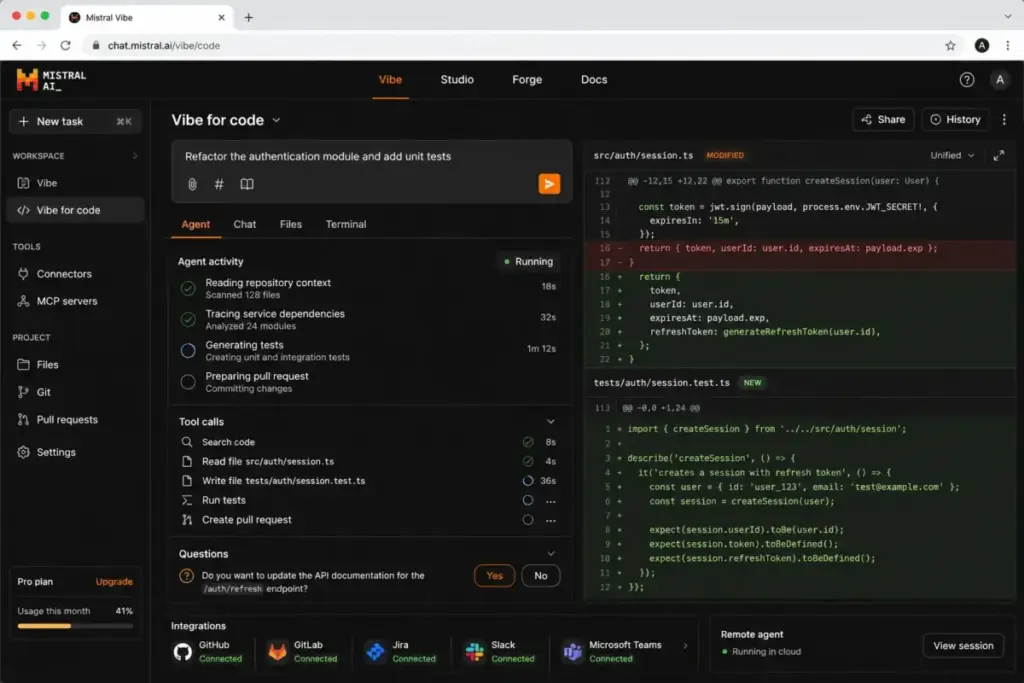
Mistral Vibe is the Gemini alternative for technical teams, European buyers, and privacy-focused organizations that want an agentic AI workspace with coding, connectors, and enterprise deployment options including on-premises and private cloud.
Pricing: Free plan available. Pro at $14.99/month. Enterprise pricing is custom. (Official pricing)
For a 10-person team on Pro: $149.90/month. Enterprise deployment, governance, and private deployment options require a custom commercial agreement.
The key differentiator from Gemini: Mistral offers MCP support, code agents, and the option for on-prem or private deployment. For organizations that cannot accept another US-based cloud AI layer, Mistral provides a European alternative with deployment control that Google does not offer at the consumer or standard business level.
The tradeoff: smaller consumer ecosystem than Google or OpenAI. Fewer native app integrations. Enterprise-grade deployment is sales-led.
Best for:
- European buyers with data residency requirements
- Technical teams wanting coding agents and MCP support
- Organizations needing on-prem or private cloud AI deployment
Avoid if: You need a large consumer ecosystem or native Google/Microsoft app integrations.
Migration difficulty: Medium. Enterprise deployment requires planning.
Alternatives That Fix the Workflow and Productivity Problem
Microsoft 365 Copilot: Best for Microsoft 365 Teams
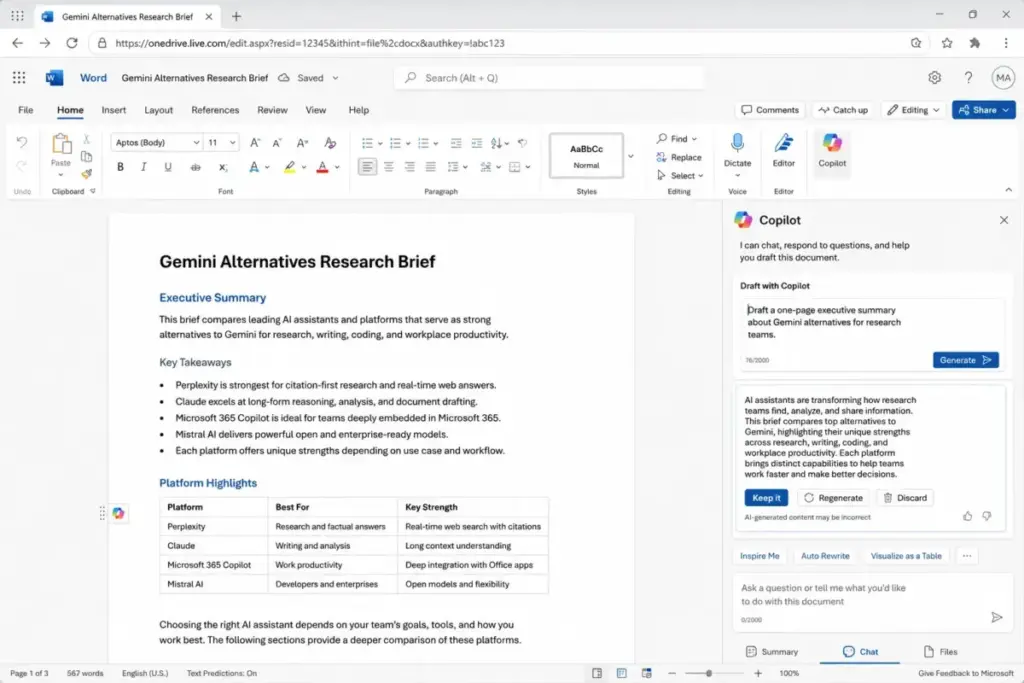
Microsoft 365 Copilot is not a chatbot you use instead of Gemini. It is an AI layer embedded inside Word, Excel, PowerPoint, Outlook, and Teams. For organizations standardized on Microsoft 365, Copilot provides the native AI experience that Gemini provides for Google Workspace users.
Pricing: $25.20/user/month on monthly billing. Annual pricing is also listed. Requires a qualifying Microsoft 365 base subscription. (Official pricing)
For a 10-person team: $252/month for the Copilot add-on alone, before Microsoft 365 base licenses. Total cost depends on which Microsoft 365 plan each user has.
The switching logic is straightforward: if your team spends most of the day in Microsoft apps, Copilot delivers AI assistance where you work. (See also: ChatGPT vs Gemini comparison for a head-to-head look at the two most common alternatives.) If your team uses Google Workspace, Copilot creates more friction than it solves.
Best for:
- Companies standardized on Word, Excel, PowerPoint, Outlook, and Teams
- Teams needing AI inside existing Microsoft workflows
- Organizations with existing Microsoft 365 admin controls
Avoid if: Your team uses Google Workspace or you need a standalone AI chatbot, not an embedded productivity tool.
Migration difficulty: Medium. Requires qualifying Microsoft 365 licenses and admin setup. For a detailed look at what Copilot delivers inside each Microsoft app, see the Microsoft Copilot review and evaluation.
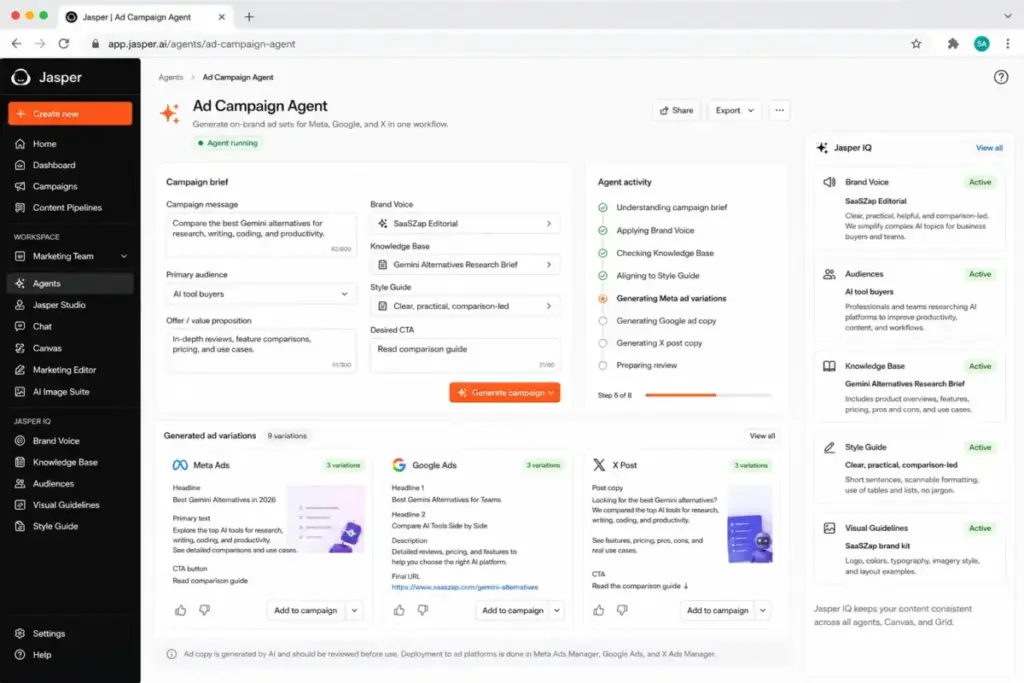
Jasper: Best for Marketing Teams

Jasper is not a Gemini replacement for general chat. It is a marketing AI platform with brand voice controls, campaign agents, knowledge assets, governance, and approval workflows. If your switching trigger is “Gemini does not understand our brand voice and cannot manage marketing content at scale,” Jasper is the purpose-built answer.
Pricing: Pro at $69/seat/month monthly or $59/seat/month billed yearly. Business pricing is custom. 7-day Pro trial available. (Official pricing)
For a 10-person team: $690/month on Pro monthly. But Pro includes one seat by default. Adding users pushes teams toward Business/custom pricing. Advanced agents, API access, governance, and dedicated account support are Business-tier features.
The cost math: Jasper Pro at $69/seat costs 3-4x more than any consumer AI chatbot subscription like Claude Pro or ChatGPT’s paid plans. The ROI argument only works if your marketing team produces enough content to justify the per-seat cost in time savings and brand consistency.
Best for:
- Marketing teams that need brand voice governance
- Content teams managing campaigns, approvals, and knowledge assets
- Organizations that need marketing-specific AI agents
Avoid if: You need a general-purpose AI assistant. Jasper is built for marketing workflows, not everyday chat.
Migration difficulty: Medium. Brand voice setup and knowledge asset configuration take time.
Alternatives That Fix the Cost Problem
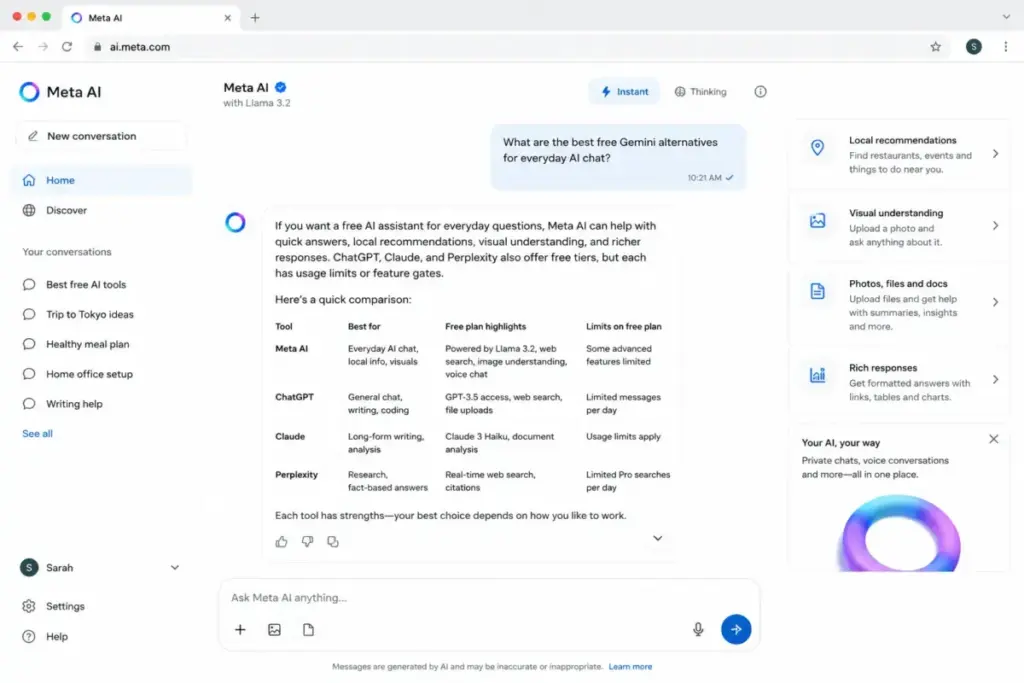
Meta AI: Best Free Social AI Assistant

Meta AI is the Gemini alternative for casual users who want free AI help without paying for any subscription. It is embedded across Facebook, Instagram, Messenger, WhatsApp, and the Meta AI web experience.
Pricing: $0. Free consumer access. Usage limits and premium tier details are not publicly disclosed on the official product page.
For a 10-person team: $0 baseline consumer access. Business or premium usage details are not publicly disclosed.
The tradeoff is straightforward: Meta AI is free because it lives inside Meta’s ecosystem. Privacy expectations depend on your Meta account settings. It is not suited to professional workflows requiring enterprise controls, deep research citations, or document integration.
Best for:
- Casual users wanting free AI chat
- Users already active on Facebook, Instagram, WhatsApp, or Messenger
- Anyone who wants to test AI without committing to a paid plan
Avoid if: You need enterprise privacy controls, cited research, or workplace document integration.
Migration difficulty: Low.
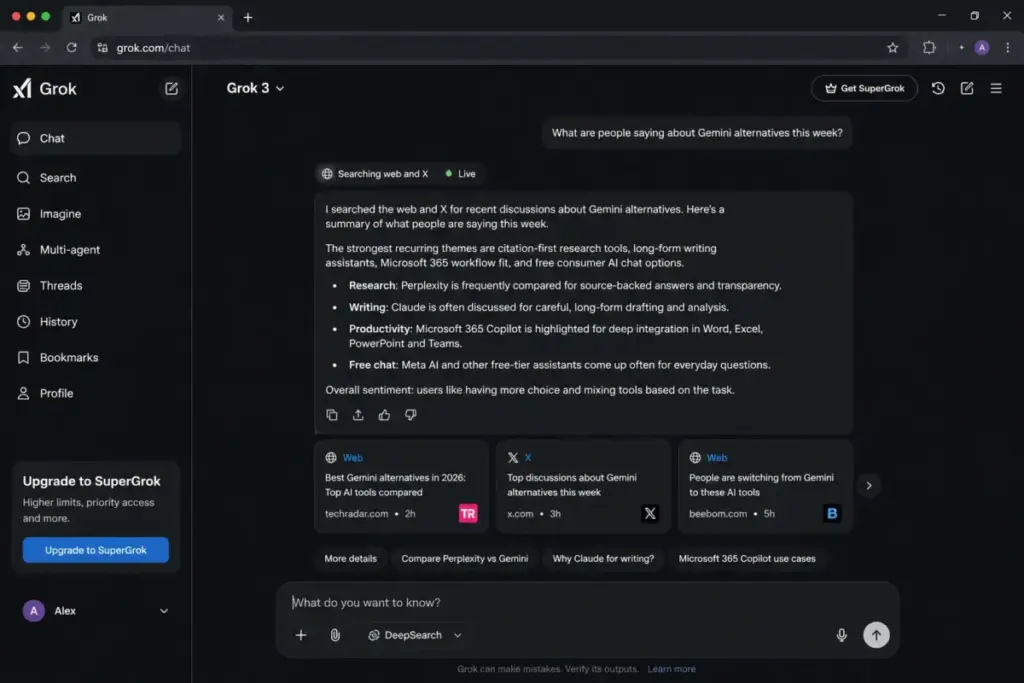
Grok: Best for X and Real-Time Social Context

Grok is xAI’s AI assistant with real-time web and X-oriented answers. For users who want AI responses grounded in what is happening on X right now, Grok fills a gap Gemini does not.
Pricing: Free or bundled access is available. Paid Grok or SuperGrok pricing requires checking the official plans page or account checkout. Third-party reporting mentions paid tiers, but exact official prices are not fully exposed in accessible page text.
The pricing caveat is real: Grok’s pricing visibility is less straightforward than Google, Claude, or Perplexity. Paid tiers may be bundled with X or xAI subscriptions.
Best for:
- Users who want AI answers grounded in real-time X content
- People seeking a non-Google AI assistant with web search
- Users who want coding help and image generation outside Google’s ecosystem
Avoid if: You need transparent, publicly listed pricing or enterprise packaging.
Migration difficulty: Low.
DeepSeek: Best Low-Cost Technical and API Alternative

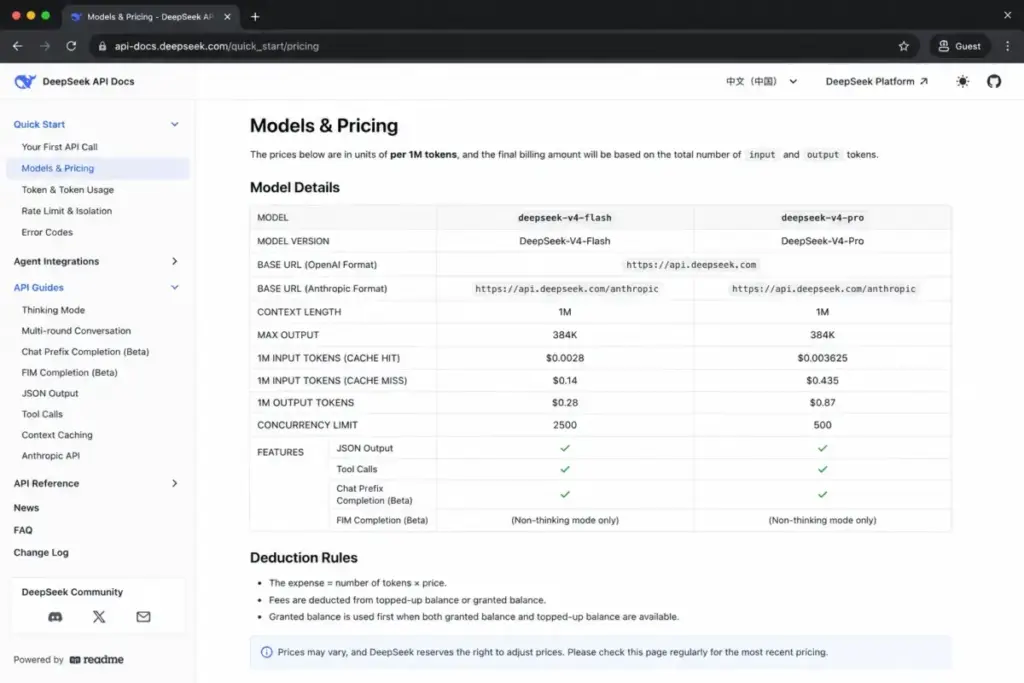
DeepSeek is the Gemini alternative for developers and technical teams who care about API cost more than consumer polish. Official pricing is usage-based per token, not per seat.
Pricing: API usage-based. Consumer chatbot access and limits are separate from API pricing. Cache-hit and cache-miss pricing tiers are listed. (Official API pricing)
The cost math: DeepSeek lists some of the lowest API token prices in the market. For teams building AI-powered applications, the cost-per-query gap between DeepSeek and Gemini API is significant. But do not convert API token pricing into a normal user-seat subscription price. They are different billing models.
Best for:
- Developers building AI-powered applications
- Technical teams optimizing for API cost
- Price-sensitive AI builders who need coding and reasoning models
Avoid if: You want a polished consumer chatbot experience or enterprise privacy guarantees. Verify regional availability and compliance before business use.
Migration difficulty: Medium. Requires API integration work.
Pricing Comparison: Gemini Alternatives at a Glance
| Product | Starting price | 10-user cost estimate | Free plan | Billing basis |
|---|---|---|---|---|
| Google Gemini | Free; paid AI subscription tiers | Varies by plan and region | Yes | Consumer subscription |
| ChatGPT | Free; paid plans available | Check official pricing page | Yes | Free + paid personal/business |
| Claude | Free; Pro from $20/month | $200/month (Pro) or $250/month (Team monthly) | Yes | Per user/seat |
| Perplexity | Free; Pro $20/month | $200/month (Pro) | Yes | Per user/seat |
| Microsoft 365 Copilot | $25.20/user/month | $252/month (add-on only; base license extra) | No | Per user add-on |
| Meta AI | $0 | $0 | Yes | Free consumer |
| Grok | Pricing not fully disclosed | Not safely calculable | Yes (with caveats) | Free/bundled/paid |
| Mistral Vibe | Free; Pro $14.99/month | $149.90/month (Pro) | Yes | Free + Pro + enterprise custom |
| DeepSeek | API usage-based | Token-based, not seat-based | Consumer access may be free | API usage |
| Poe | Free; $199.99/year | ~$1,999.90/year (~$166.66/month) | Yes | Free + in-app subscription |
| Jasper | $69/seat/month monthly | $690/month (Pro monthly) | 7-day trial | Per seat |
Prices verified from official sources on June 8, 2026. Plans, limits, and checkout pricing can change. Verify current prices before purchasing.
What this means: The cost range for Gemini alternatives spans from $0 (Meta AI) to $690/month for 10 users (Jasper Pro). Claude and Perplexity cluster at $200/month for 10 Pro users. Microsoft 365 Copilot adds $252/month on top of existing Microsoft 365 licenses. The cheapest paid options for individual users are Mistral Vibe Pro ($14.99/month) and Claude/Perplexity Pro ($20/month). DeepSeek is the outlier: usage-based API pricing means your cost depends on token volume, not headcount.
The hidden cost pattern: products with “free” tiers (ChatGPT, Claude, Perplexity, Mistral Vibe, Poe) gate their most useful features behind paid plans. Gemini itself follows this pattern with Google AI subscription tiers. The practical cost is almost never the starting price.
Feature-to-Plan Map: What Each Tier Gets You
This is the section most Gemini alternatives articles skip. Knowing the starting price is useless if the feature you need is locked behind a higher tier. Below is a plan-gate map showing where key capabilities become available for each alternative.
| Alternative | Free tier limit | Paid tier that delivers full value | Key feature gated behind paid |
|---|---|---|---|
| ChatGPT | Basic model access, usage caps | Paid personal/business plans | Custom GPTs, advanced model access, workspace admin |
| Claude | Limited daily messages | Pro ($20/month) or Team ($25/user/month) | Extended context, priority access, team admin |
| Perplexity | Limited Pro searches per day | Pro ($20/month) | Unlimited Pro searches, file uploads, model selection |
| Microsoft 365 Copilot | No free tier | $25.20/user/month (requires M365 base) | AI in Word, Excel, PowerPoint, Outlook, Teams |
| Meta AI | Consumer access | N/A (free) | No paid tier publicly available |
| Grok | Basic access | Paid Grok tier (verify pricing) | Higher usage limits, advanced features |
| Mistral Vibe | Basic model access | Pro ($14.99/month) | Code agents, MCP, higher limits |
| DeepSeek | Consumer chatbot access | API usage-based | Full API access, batch processing |
| Poe | Point-limited model access | $199.99/year | Higher point allocation, premium model access |
| Jasper | 7-day trial only | Pro ($69/seat/month) | Brand voice, knowledge assets, campaign agents |
What this means: The feature-gate pattern across Gemini alternatives is consistent: free tiers give you a taste, paid tiers give you the tool. The most aggressive gates are Jasper (7-day trial only, then $69/seat), Microsoft 365 Copilot (no free tier at all), and Claude Team (team features require $25/user/month). The most generous free tiers are Meta AI (fully free, no paid gate for consumer use) and Mistral Vibe Free (basic model access without payment).
For teams evaluating Perplexity alternatives or comparing research-focused tools, the plan-gate comparison matters more than the starting price. A free tier that caps you at 5 Pro searches per day forces you onto the paid plan within a week of real usage.
Migration Risk Assessment
| Alternative | Migration difficulty | Main risk | Notes |
|---|---|---|---|
| ChatGPT | Low | None | No data to migrate. Sign up and use. |
| Claude | Low | None | No data to migrate. |
| Perplexity | Low | None | No data to migrate. |
| Microsoft 365 Copilot | Medium | Requires Microsoft 365 base license | Admin setup and qualifying license needed |
| Meta AI | Low | Privacy expectations | Tied to Meta ecosystem settings |
| Grok | Low | Pricing visibility | Verify paid tier details at checkout |
| Mistral Vibe | Medium | Enterprise deployment planning | On-prem setup requires commercial agreement |
| DeepSeek | Medium | API integration work | Regional availability and compliance checks needed |
| Poe | Low | Point-based usage limits | Model availability varies by subscription |
| Jasper | Medium | Brand voice and knowledge setup | Configuration time for brand assets |
Migration difficulty is an editorial estimate based on setup complexity, data portability, and integration requirements.
What this means: Most Gemini alternatives are low-migration. AI chatbots do not require data export or import. The exceptions are Microsoft 365 Copilot (needs qualifying licenses), Mistral Vibe enterprise (needs deployment planning), DeepSeek (needs API integration), and Jasper (needs brand voice configuration). If switching cost is your primary concern, ChatGPT, Claude, Perplexity, and Poe are the easiest transitions.
How to Choose the Right Gemini Alternative
Stop thinking about “best AI chatbot” and start thinking about the specific frustration driving your search.
If your primary frustration is citation quality: Perplexity. Every answer cites its sources inline. No other tool in this list treats research citations as the primary interface design principle.
If your primary frustration is writing quality: Claude. The careful reasoning and long-form editing produce outputs that need less human cleanup than Gemini or ChatGPT for analysis and writing tasks.
If your primary frustration is Google lock-in: Claude, Mistral Vibe, or ChatGPT Business. Each operates independently from Google’s data layer with varying levels of enterprise privacy control.
If your primary frustration is cost: Meta AI (free), Mistral Vibe Free, or DeepSeek API. But free tiers always come with usage limits or privacy tradeoffs. Calculate whether the “free” option actually costs you more in workaround time.
If your primary frustration is Microsoft workflow fit: Microsoft 365 Copilot. No other option embeds AI inside Word, Excel, Outlook, and Teams. The cost is higher, but the workflow integration is unmatched for Microsoft shops.
If your primary frustration is marketing governance: Jasper. No general-purpose chatbot offers brand voice, campaign agents, or content approval workflows. Jasper is expensive, but it solves a problem Gemini was never designed to address.
If your primary frustration is model variety: Poe. Test Claude, ChatGPT, and open-source models from one interface before committing to a single provider.
Which Gemini Alternative Should You Avoid?
Every tool on this list has scenarios where it is the wrong choice. Here is the honest assessment:
- Avoid Jasper if you need a general-purpose AI assistant. At $69/seat/month, it is purpose-built for marketing workflows and overpriced for everyday chat.
- Avoid DeepSeek if you need a polished consumer chatbot or verified enterprise privacy. API token pricing is great for developers but confusing for non-technical teams.
- Avoid Microsoft 365 Copilot if your team does not use Microsoft 365. The add-on cost plus base license requirement makes it the most expensive option for non-Microsoft shops.
- Avoid Meta AI for professional workflows that require enterprise controls, research citations, or document integration.
- Avoid Grok if transparent pricing is important to your purchasing process. The pricing structure is less clear than Claude, Perplexity, or ChatGPT.
- Avoid Poe if you need deep workplace integration. It is a model comparison tool, not a productivity suite.
When to Stay with Gemini
Not everyone needs to switch. Gemini is still the right choice in these scenarios:
- You live inside Google’s ecosystem. Gmail, Google Docs, Drive, Android, and Google Search are your daily tools. No alternative integrates with Google apps as naturally as Gemini. The convenience of asking Gemini to draft an email inside Gmail or summarize a Drive document without switching apps is genuine productivity value.
- You use Deep Research for long-form Google-native research. Gemini’s Deep Research feature is tied to Google’s infrastructure in ways competitors cannot replicate. If your research workflow starts with Google Search and ends with a Google Doc, Gemini keeps you inside one ecosystem.
- Your AI needs are casual. For everyday questions, summarization, and quick drafts, Gemini’s free tier handles most tasks well enough. If you are not hitting the limits of the free plan, there is no reason to pay for an alternative.
- You already pay for a Google AI subscription. If you are on Google AI Pro or Ultra, switching means paying for a second AI subscription on top of what you already spend. Do the math on whether a second tool saves enough time to justify the additional cost.
- Your team has standardized on Google Workspace. For organizations where every employee uses Gmail, Calendar, and Drive, Gemini’s native integration reduces friction in ways that a standalone chatbot cannot match.
The switching signal: if you find yourself copying Gemini answers into a search engine to verify them, or if you are adding a second AI tool because Gemini cannot handle your workflow, the cost of staying is higher than the cost of switching. For a full breakdown of what Gemini does well and where it falls short, see the Gemini review and analysis.
The Alternative Nobody Mentions
Poe does not get the attention of ChatGPT or Claude, but it solves a unique problem: what if you do not want to commit to a single AI provider?
At $199.99/year, Poe gives you access to multiple AI models from one interface. You can compare Claude’s writing output against ChatGPT’s coding output against Mistral’s reasoning in the same session. For power users evaluating which AI fits their workflow, Poe is the cheapest way to comparison-shop before committing to a single provider’s paid plan.
The limitation: Poe’s usage depends on points and model availability. You get breadth, not depth. But as a decision tool before you commit $20-69/month to a single provider, the math works.
Final Verdict: Best Gemini Alternative for Most Teams
ChatGPT is the safest all-around Gemini replacement. It covers the widest range of use cases (writing, coding, brainstorming, custom assistants, business workspace), has the most mature ecosystem, and offers both free and paid tiers. For most teams leaving Gemini, ChatGPT is the lowest-risk switch.
But the “best” alternative depends on your exit reason:
- For cited research: Perplexity at $20/month (Pro)
- For writing and careful reasoning: Claude at $20/month (Pro)
- For Microsoft 365 teams: Microsoft 365 Copilot at $25.20/user/month (add-on)
- For free everyday chat: Meta AI at $0
- For multi-model comparison: Poe at $199.99/year
- For marketing teams: Jasper at $69/seat/month (Pro)
- For European enterprise deployment: Mistral Vibe Pro at $14.99/month
- For cheap API access: DeepSeek (usage-based)
- For real-time X context: Grok (verify pricing at checkout)
The best Gemini alternative in 2026 is not the highest-benchmark model. It is the tool that fixes the exact switching trigger Gemini creates for your workflow. Start with your frustration, not the feature list.
FAQ
What is the best Gemini alternative in 2026?
ChatGPT is the best overall Gemini alternative for most users. It covers writing, coding, brainstorming, file analysis, and custom assistant workflows with both free and paid plans. For specific needs like research citations, Perplexity is the stronger pick. For writing quality, Claude wins.
Is ChatGPT better than Gemini?
For general-purpose AI assistant tasks, ChatGPT offers a broader ecosystem with custom GPTs, connected apps, and business workspace controls. Gemini is better if you live inside Google apps and want native Gmail, Docs, and Android integration. The “better” answer depends on your ecosystem, not the model benchmark.
Is Claude better than Gemini for writing?
Yes, for most long-form writing and editing tasks. Claude’s approach to reasoning produces outputs that feel less generic and require less revision than Gemini’s writing output. Claude Pro starts at $20/month. The tradeoff is that Claude lacks native Google Workspace integration.
What is the best free Gemini alternative?
Meta AI offers free consumer AI access across Facebook, Instagram, WhatsApp, Messenger, and web. ChatGPT, Claude, Perplexity, and Mistral Vibe also have free tiers with usage limits. Free always comes with caveats: usage caps, limited model access, or privacy tradeoffs tied to the platform’s ecosystem.
Which Gemini alternative is best for coding?
ChatGPT and Claude are the most commonly used general-purpose AI coding alternatives. DeepSeek offers the lowest API pricing for developers building code-generation pipelines. Gemini’s own coding assistance is decent, but users report inconsistency on complex tasks.
Is Perplexity better than Gemini for research?
Yes, if your priority is cited answers with inline source links. Perplexity treats research as its primary function. Gemini can perform Deep Research, but its default mode does not cite sources with the same granularity. Perplexity Pro costs $20/month or $200/year.
Can Meta AI replace Gemini?
For casual everyday questions, yes. Meta AI is free and accessible across Meta’s apps. For professional workflows requiring enterprise controls, deep research, or Google/Microsoft document integration, Meta AI is not a sufficient replacement. It is best suited for social and consumer use cases.
What Gemini alternative works best for Microsoft 365 users?
Microsoft 365 Copilot is the only option that embeds AI directly inside Word, Excel, Outlook, PowerPoint, and Teams. It costs $25.20/user/month and requires a qualifying Microsoft 365 license. No other Gemini alternative offers this level of native Microsoft AI integration.
Is there a Gemini alternative with better privacy?
Claude, Mistral Vibe, and ChatGPT Business all offer enterprise data controls that operate independently from Google’s ecosystem. Mistral Vibe adds on-prem and private deployment options for organizations that cannot use US-based cloud AI. DeepSeek requires independent compliance verification before business use.
Should I pay for Gemini Advanced or switch to a competitor?
If you already use Google Workspace daily and value the native integration, staying with a paid Gemini plan is reasonable. If you are paying for Gemini but also using a second AI tool for research, writing, or coding, consolidating to one paid competitor (ChatGPT, Claude, or Perplexity at $20/month) may save money and reduce context-switching.
Pricing verified from official sources on June 8, 2026. All prices are in USD. Plans, features, and limits can change. Verify current pricing on each product’s official page before purchasing. This article reflects editorial research, not hands-on testing of all products. For our full Gemini pricing analysis, see the dedicated guide.