Google Gemini markets itself as your everything AI assistant: research, writing, coding, image generation, video creation, and direct help across Gmail, Docs, Drive, and Android.
The marketing page makes it look like one product. The reality is at least four separate buying decisions: a personal free tier, three paid consumer subscriptions (Google AI Plus, Pro, and Ultra), a usage-based developer API, and an entirely different Gemini Enterprise product line for business teams. Most Google Gemini reviews treat these as one thing. They are not.
This Google Gemini review maps exactly what each tier unlocks, where the limits hide, what users on G2, Capterra, and TrustRadius actually report about accuracy, and which buyer should pick which path.
If you are comparing AI chatbots and trying to decide between Gemini, ChatGPT, or Claude, the plan gates matter more than the feature list.
This review is based on official documentation, verified pricing pages, and third-party user sentiment from G2 (4.4/5, 430 reviews), Capterra, and TrustRadius (8.7/10, 101 reviews). Pricing verified as of May 2026.
Quick Verdict: Google Gemini Scores 7.4/10
Google Gemini is the strongest AI chatbot for users already inside the Google ecosystem. It is not the best general-purpose chatbot.
| Category | Detail |
|---|---|
| Score | 7.4/10 |
| Best for | Google Workspace power users, Android-first professionals, research-heavy workflows using Deep Research and NotebookLM |
| Not for | Users who need transparent fixed message limits, consistent long-form writing, strict data separation from Google accounts, or non-Google workflows |
| Starting price | $0/month (Free), $4.99/month (AI Plus), $19.99/month (AI Pro), $249.99/month (AI Ultra) |
| Recommendation | Try Google AI Pro if you live in Gmail, Docs, and Drive daily. Skip Ultra unless you need highest video limits, 30 TB storage, and YouTube Premium bundled. |
The 60-Second Version
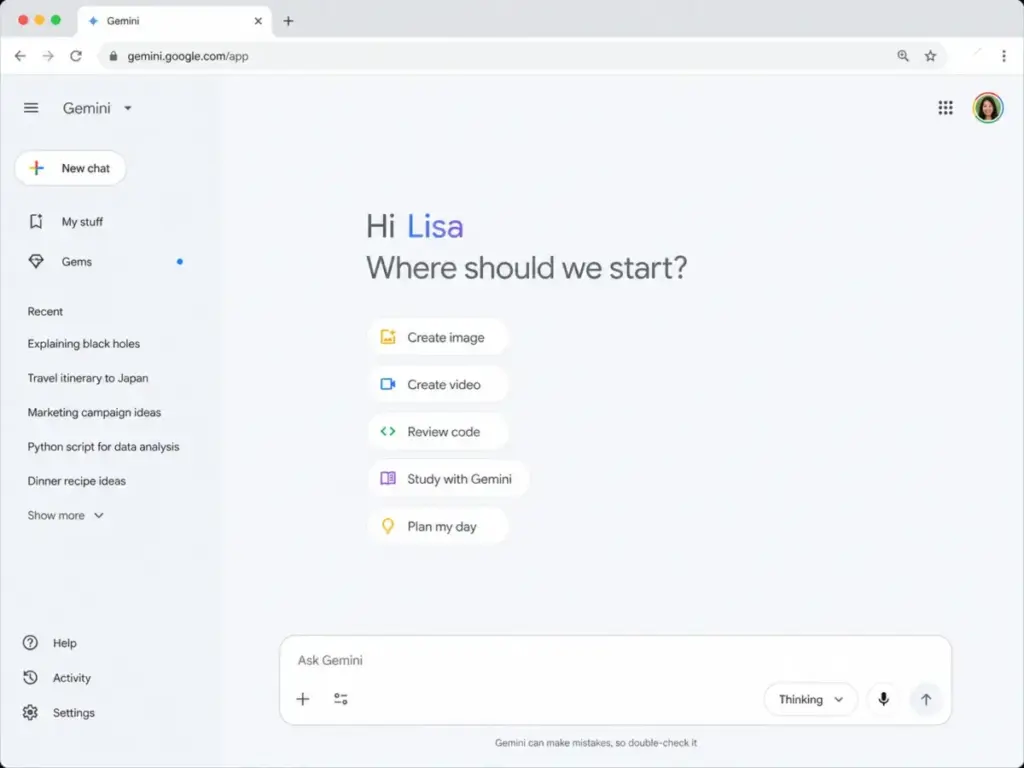
Google Gemini gives you a free AI assistant that works. Gemini Live handles voice conversations. Deep Research produces multi-source reports. Canvas helps with document editing. Connected Apps pull context from Gmail, Calendar, Photos, YouTube, and more. The Google AI Pro plan at $19.99/month unlocks higher access to Gemini 3.1 Pro, Nano Banana Pro image generation, Veo 3.1 Lite video, Flow, Gemini Code Assist, Gemini CLI, Google Antigravity, NotebookLM, and 5 TB of storage. That is genuinely competitive with ChatGPT Plus at $20/month. The catch: consumer rate limits are dynamic and not published as fixed numbers, accuracy complaints appear across all major review platforms, and the $249.99/month Ultra tier is only justifiable for a narrow set of power users. Developers need the API (priced separately by token), and enterprise teams need Gemini Enterprise (a completely different product). Do not confuse these paths.
The 3 Problems Google Gemini Solves
Problem 1: Google Ecosystem Fragmentation
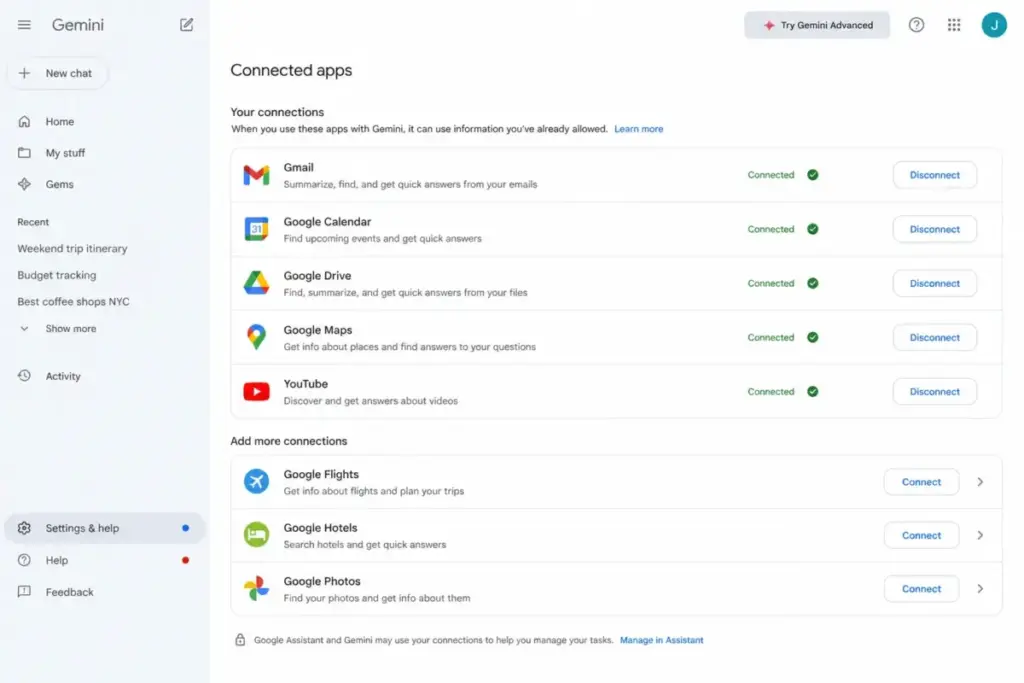
Before Gemini, working across Gmail, Docs, Drive, Calendar, and Photos meant switching context constantly. Gemini connects directly to these apps through Connected Apps permissions. Ask it to summarize a long email thread, find a document in Drive, create a calendar event from a conversation, or search your Google Photos library.
According to Google’s Connected Apps documentation, Gemini can interact with Gmail, Google Calendar, YouTube Music, Spotify, Google Photos, Samsung Gallery, WhatsApp on Android, and various Android utilities depending on permissions and availability.
One detail most reviews miss about Gemini: Connected Apps require explicit permission grants and depend on your Gemini Apps Activity settings. You control which apps Gemini can access, but you need to actively manage those permissions. This is both a productivity feature and a privacy surface.
G2 users consistently praise this integration. A technical editor on G2 reported that Gemini works smoothly with Google tools, pulls details from long email threads, and summarizes Drive documents, helping with information overload. That matches what the product does best: reducing friction inside an ecosystem you already use.
Problem 2: Research Takes Too Long
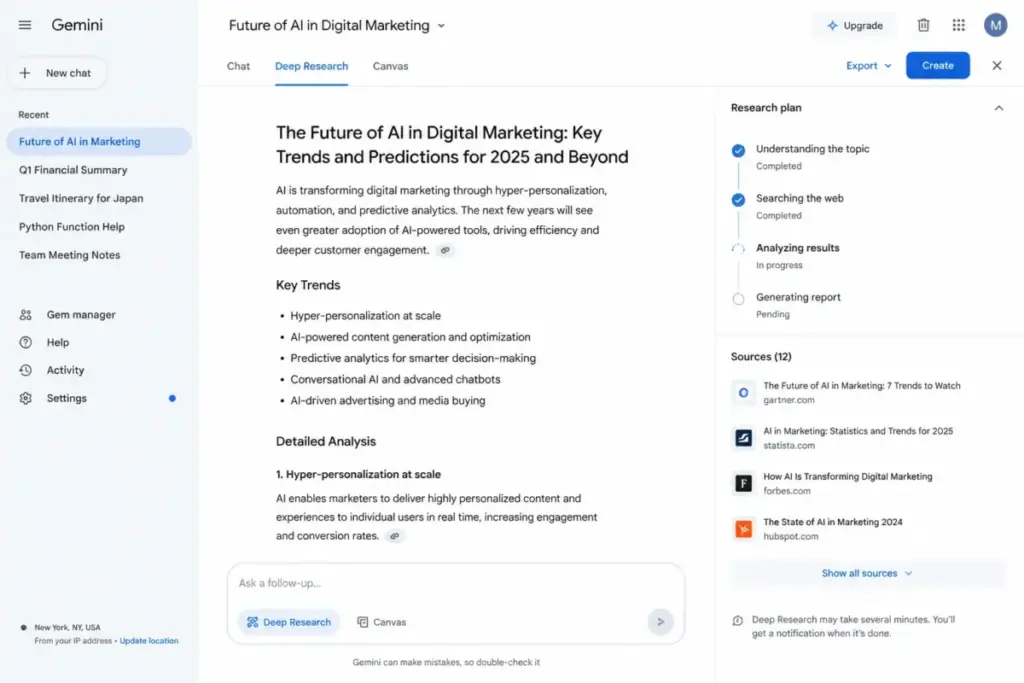
Deep Research is Gemini’s strongest differentiator. It generates multi-source research reports by searching the web, synthesizing information, and producing structured output with citations.
A Capterra reviewer praised Deep Research and Gemini’s ability to incorporate documents and earlier chat context for faster research turnaround. A TrustRadius reviewer (Nishant Thakkar, Senior Analyst) reported using Deep Research for business research with faster turnaround times.
Deep Research availability depends on your plan tier. The Free plan offers limited access. Google AI Pro unlocks higher Deep Research access. Google AI Ultra provides the highest limits. The exact number of Deep Research queries per day or month is not published as a fixed count for consumer plans, so do not assume unlimited access on any tier.
For teams doing document-heavy research, the NotebookLM review covers how Google’s research notebook complements Gemini’s capabilities. Google AI Pro includes NotebookLM access, and Ultra provides the highest NotebookLM limits.
Problem 3: Multimodal Creation Is Scattered Across Tools
Gemini consolidates text, image, and video generation into one interface. Google AI Pro includes Nano Banana Pro for image generation and editing, Veo 3.1 Lite for video, and Flow for video creation workflows.
Gemini Live adds voice conversations with camera and screen sharing support. This works on both Android and iOS.
The mobile app runs on Android 9+ with 2 GB RAM minimum (Android Go not supported) and iOS. Availability spans more than 150 countries and multiple languages. One limitation rarely discussed: Android Work Profile support has limitations, and the iOS app availability can vary by country and language rollout.
The question to ask: does Gemini replace a separate image generator, video tool, and voice assistant for your workflow? For Google-first creators doing occasional image and video work, yes. For production-volume creators, the rate limits and quality compared to dedicated tools like Midjourney or RunwayML will matter.
The 2 Problems Google Gemini Creates
Problem 1: Accuracy and Hallucination Risk Is Real
Google’s own Gemini Apps Privacy Hub warns that Gemini Apps may produce inaccurate or offensive information and should not be relied on for medical, legal, financial, or other professional advice.
User sentiment confirms this is not a theoretical risk. G2 reviewers report that Gemini can sound confident while giving wrong answers and becomes repetitive in long conversations. Capterra reviews mention hallucinations, misspelled text in images, distorted images, long-chat stalls, and context problems. TrustRadius reviewers note hallucinations, generic output without strong prompts, and room to improve coding assistance.
The biggest mistake most AI chatbot users make: treating any model’s output as verified fact without checking sources. Gemini is no exception. But the gap between Gemini’s confident tone and its actual accuracy creates a specific risk pattern. Why does Gemini forget context in long chats? Because all large language models experience context degradation over extended conversations, and Gemini’s behavior here matches what users report on G2 and Capterra.
Does Gemini Deep Research hallucinate less? Deep Research adds source citations, which helps verification. But citations do not guarantee accuracy. The underlying model can still misinterpret or misrepresent sources.
For a deeper look at this challenge across all AI models, see what AI hallucinations are and why they happen.
Problem 2: Plan Complexity and Opaque Limits
Google now offers Free, Google AI Plus, Google AI Pro, and Google AI Ultra for consumer users. Add the Gemini Developer API (Free and Paid tiers) and Gemini Enterprise (Business, Standard, Plus editions) for organizations. That is at least seven distinct access paths with different pricing, limits, data policies, and feature sets.
Consumer Gemini limits are not always expressed as fixed public message counts. According to Google’s official pages, rate limits apply and can vary by feature, model, country, and tier. This means you cannot calculate a reliable cost-per-query for consumer plans the way you can with API token pricing.
This is where most reviews get it wrong: they list features by plan but do not explain that you might hit a dynamic rate limit mid-conversation without warning. If transparent, predictable limits matter to your workflow, compare Gemini against ChatGPT and Claude, which publish clearer usage boundaries for paid tiers.
Feature-to-Plan Map: What Each Tier Gets You
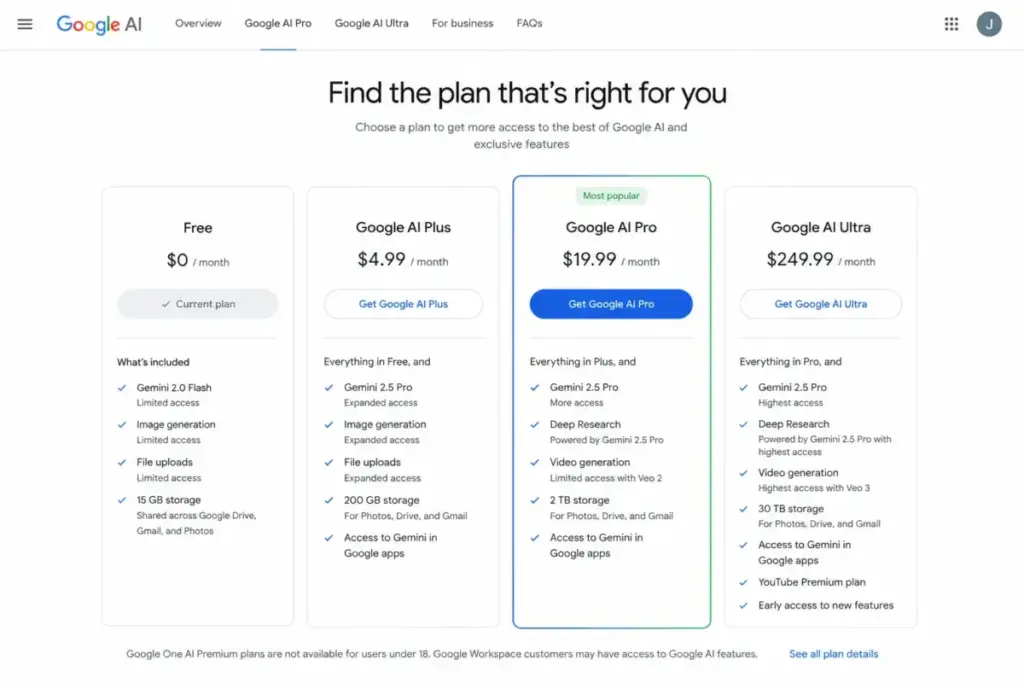
This is the plan-gate table most Gemini reviews fail to build. Every feature below is mapped to the plan that unlocks it (as of May 2026).
| Feature | Free | AI Plus ($4.99/mo) | AI Pro ($19.99/mo) | AI Ultra ($249.99/mo) |
|---|---|---|---|---|
| Gemini app access | Baseline | More access | Higher access | Highest access |
| Gemini 3 Flash | Yes | Yes | Yes | Yes |
| Gemini 3.1 Pro | Limited | More access | Higher access | Highest access |
| Deep Research | Limited | More access | Higher access | Highest access |
| Deep Think | No | No | No | Yes (US, English) |
| Gemini Agent | No | No | No | Yes (US, English) |
| Gemini Live (voice, camera, screen) | Yes | Yes | Yes | Yes |
| Canvas | Yes | Yes | Yes | Yes |
| Gems | Yes | Yes | Yes | Yes |
| Nano Banana Pro (image gen/edit) | No | No | Yes | Yes |
| Veo 3.1 Lite (video) | No | No | Yes | Yes |
| Flow (video creation) | No | No | Yes | Yes |
| Gemini Code Assist and CLI | No | No | Yes | Yes |
| Google Antigravity | No | No | Yes | Yes |
| NotebookLM | Limited | Limited | Yes | Highest |
| Gemini in Google apps | Limited | Direct access | Yes | Yes |
| Connected Apps | Yes | Yes | Yes | Yes |
| Google storage | 15 GB | 200 GB | 5 TB | 30 TB |
| YouTube Premium | No | No | No | Where available |
Source: Google AI Plans pricing page (verified May 2026). Prices shown are USD. Pricing varies by country.
Where Pricing Starts to Pinch
The Free plan works for casual use. 15 GB of storage, baseline Gemini access, Gemini Live, Canvas, and Gems. You hit the ceiling when you need consistent access to Gemini 3.1 Pro, image generation, video tools, or higher Deep Research limits.
Google AI Plus at $4.99/month adds more access and 200 GB storage. It bridges the gap between Free and Pro for users who want direct Gemini access in Google apps without the full Pro commitment.
Google AI Pro at $19.99/month is the value tier for professionals. 5 TB storage alone is worth noting: Google One’s standalone 2 TB plan runs separately, and Pro bundles significantly more storage with AI capabilities.
The real pinch point: the gap between Pro ($19.99/month) and Ultra ($249.99/month) is $230/month, a 12.5x multiplier. Ultra adds Deep Think, Gemini Agent (US English only), highest limits across all features, YouTube Premium, and 30 TB storage. For most users, that math does not work.
Subscription vs API: Do Not Confuse These
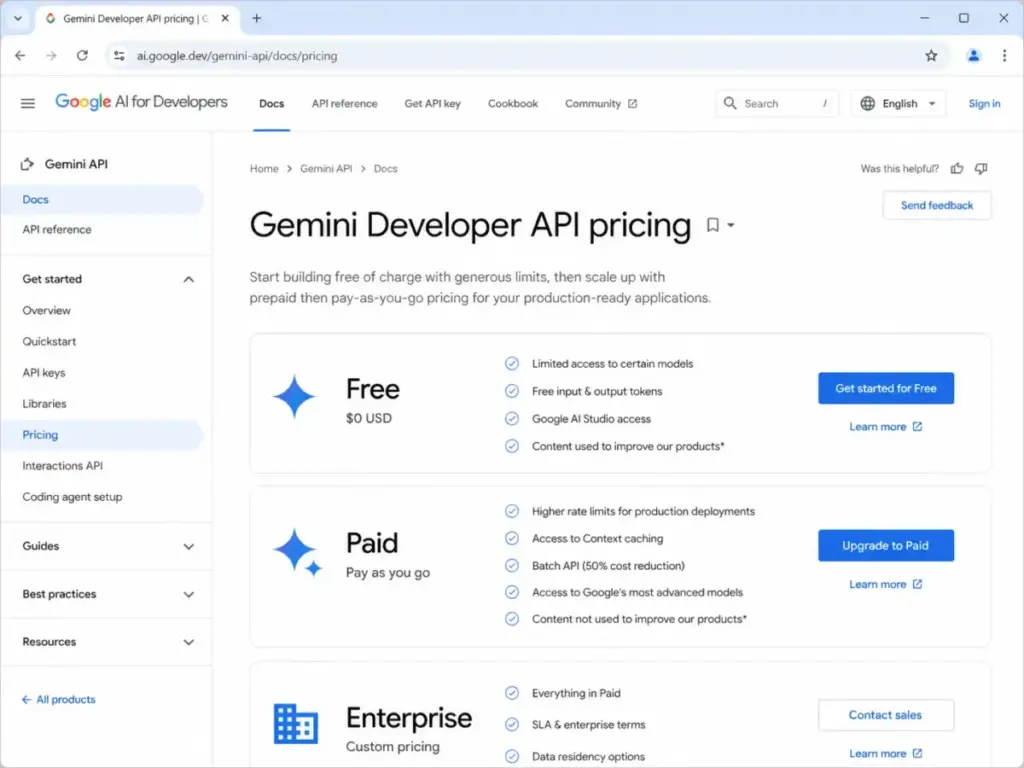
The Gemini Developer API is a completely separate pricing model from consumer subscriptions. Google AI Pro does not make API usage free for production applications.
| Tier | Pricing Model | Example Rate | Best For |
|---|---|---|---|
| API Free | Usage-limited, $0 | Free input/output tokens for supported models | Prototyping, small projects |
| API Paid | Per 1M tokens | Gemini 2.5 Flash-Lite:$0.10 input / $0.40 output per 1M text/image/video tokens | Production apps, higher volume |
Source: Gemini API pricing (verified May 2026).
API Paid tier adds higher rate limits, context caching, Batch API cost reduction, and advanced model access. Google Search grounding can carry additional costs after free quotas. Rate limits vary by model and tier; users can view active limits in Google AI Studio.
Before you commit to API integration, model your token usage carefully. A developer building with the Gemini API needs a different cost analysis than a professional using the Gemini app for daily research.
Privacy, Security, and Data Use
Privacy is a decisive objection for Google ecosystem AI tools, and most reviews handle it with one vague paragraph. Here is the actual distinction.
| Dimension | Personal Gemini (Consumer) | Gemini Enterprise (Business) |
|---|---|---|
| Data used for training | Gemini Apps Activity may be used; depends on settings | Customer data is NOT used to train Google models |
| Data sold to third parties | Not sold (per Google Privacy Policy) | Not sold |
| Data used for advertising | Subject to Google Privacy Policy | Not used for advertising |
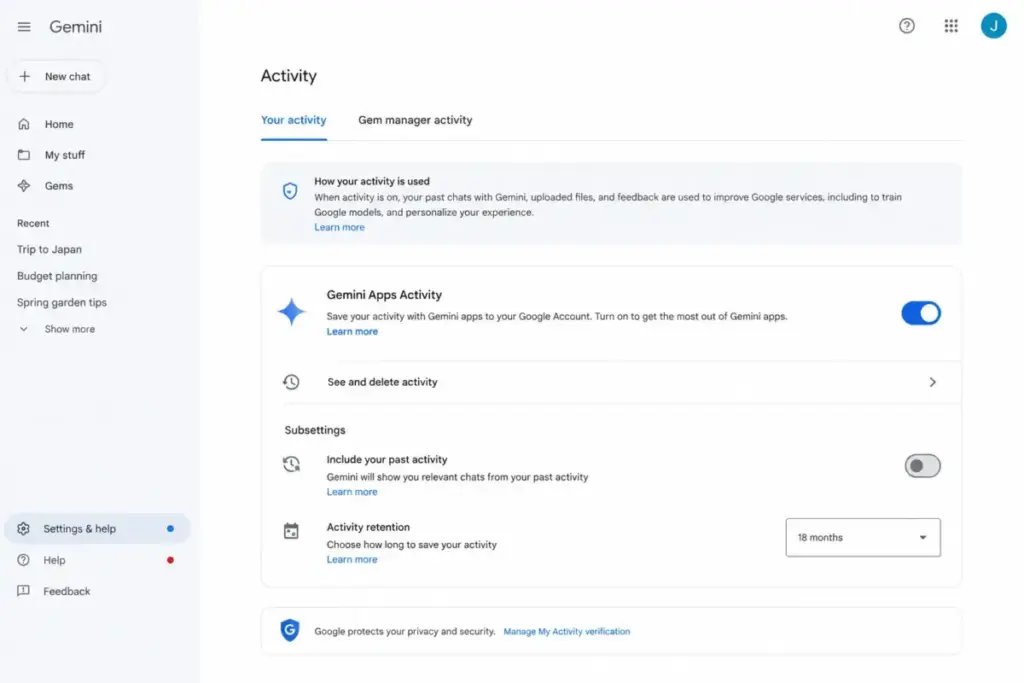
| Retention default | Auto-delete default 18 months; adjustable to 3, 36 months, or indefinite | Customer-owned data with enterprise controls |
| Human review retention | Data selected for human review may be retained up to 3 years | Enterprise-grade controls |
| Compliance | Google Privacy Policy, Gemini Apps Privacy Notice | VPC-SC, CMEK, Access Transparency, data residency, HIPAA, FedRAMP High (where available) |
Source: Gemini Apps Privacy Hub (linked above) and Google’s Gemini Enterprise page (verified May 2026).
The critical detail: on consumer Gemini accounts, conversations flagged for human review can be retained up to three years, even if you delete the conversation from your Gemini Apps Activity. You can change auto-delete settings from the default 18 months to 3 months, 36 months, or indefinite. You can manually delete chats. But human-reviewed data follows a different retention schedule.
For teams needing strict data controls, Gemini Enterprise Business, Standard, and Plus editions state that customer data is owned by the customer. This is a fundamentally different data posture than personal Gemini accounts.
Gemini for Business and Enterprise: A Different Product Path
If you are evaluating Gemini for a team or organization, do not start with consumer Google AI plans. Start here.
Gemini Enterprise connects to Microsoft 365, Google Workspace, Google Drive, OneDrive, SharePoint, HubSpot, Jira, and more. It supports enterprise search grounded in business data and no-code agents.
Google states Gemini Enterprise editions are built on secure-by-design infrastructure. Enterprise Standard and Plus support advanced controls including VPC-SC, Customer-Managed Encryption Keys, Access Transparency, data residency, HIPAA workloads, and FedRAMP High workloads where available.
For organizations already using Google Workspace, Workspace plans include Gemini capabilities depending on edition. Gemini Enterprise app adds business-data grounding, permission-aware enterprise search, and governance controls that personal Gemini accounts do not provide.
| Buyer Scenario | Best Path | Why |
|---|---|---|
| Solo consultant using Gmail, Docs, Drive | Google AI Pro ($19.99/mo) | Deep Research, Gemini in apps, 5 TB, NotebookLM |
| Creator making AI images and occasional videos | Google AI Pro or Ultra | Pro for occasional use; Ultra only if highest limits justify the cost |
| Developer building with Gemini API | Gemini API Paid tier | Token-based pricing separate from subscriptions |
| Enterprise knowledge team | Gemini Enterprise Standard or Plus | Business-data connectors, compliance, governance, agents |
Is Google AI Ultra Worth $249.99/Month?
For most users, no.
Ultra makes sense for a narrow set of power users: video-heavy creators needing highest generation limits, AI researchers needing Deep Think and Gemini Agent access (currently US English only), users who need 30 TB of Google storage, and early-access model enthusiasts who want highest access to every Google AI feature.
The YouTube Premium individual plan bundled with Ultra (where available) offsets roughly $13.99/month of the cost. That still leaves $236/month for AI features above what Pro provides.
Based on the pricing and feature gates, the tipping point where Google AI Ultra stops being worth it is clear: if you do not use video generation regularly, do not need 30 TB storage, and do not require Deep Think or Gemini Agent, Pro gives you 90%+ of the capability at 8% of the Ultra price.
Google Gemini Pros and Cons
What Works
- Deep Google ecosystem integration. Gemini pulls context from Gmail, Drive, Calendar, Photos, YouTube, and more through Connected Apps. No other AI chatbot matches this depth of Google service access.
- Deep Research produces structured, cited reports. For research-heavy workflows, Deep Research saves hours by synthesizing multiple web sources into organized output with references.
- Competitive Pro pricing at $19.99/month. Includes 5 TB storage, Gemini Code Assist, CLI, NotebookLM, image generation, video tools, and Gemini in Google apps. Comparable to ChatGPT Plus at $20/month but with significantly more storage.
- Gemini Live voice conversations. Camera and screen sharing support makes mobile AI interaction genuinely useful, not just a novelty.
- Multimodal in one place. Text, image (Nano Banana Pro), video (Veo 3.1 Lite, Flow), voice (Gemini Live), and code (Code Assist, CLI) without switching tools.
- Mobile app available in 150+ countries. Android and iOS coverage with broad language support.
What Does Not Work
- Hallucinations and confident-but-wrong answers. G2, Capterra, and TrustRadius users consistently report this. Google’s own documentation warns against relying on Gemini for professional advice.
- Dynamic, opaque rate limits on consumer plans. You cannot predict when you will hit a limit. Google does not publish fixed message counts for consumer features. This creates workflow unpredictability.
- Long-conversation context degradation. Multiple review platforms report Gemini becoming repetitive, producing generic output, and losing context in extended conversations.
- $249.99/month Ultra tier is hard to justify. The 12.5x price jump from Pro gets you Deep Think, Gemini Agent (US English only), highest limits, and YouTube Premium. Most users do not need these.
- Consumer privacy retention. Human-reviewed conversation data may be retained up to 3 years. The default auto-delete is 18 months. Users who want strict data separation from their Google account should consider enterprise options or competitors.
- Coding assistance needs improvement. TrustRadius reviewers note room to improve coding capabilities. Large code review can be slow according to G2 user reports.
- No confirmed dedicated phone support for personal plans. Support channels include Help Center, community, and plan-dependent Google One support. Enterprise gets dedicated support through Google Cloud.
Alternatives by Scenario
The right alternative depends on what failure mode you cannot accept. If you want to compare Gemini directly against its closest competitor, see the ChatGPT vs Gemini comparison.
| Scenario | Best Choice | Why | Avoid If |
|---|---|---|---|
| You need consistent long-form writing | ChatGPT | GPT-4o and o-series models handle extended writing with less repetition | You depend on Gmail/Drive integration |
| You need transparent usage limits | Claude | Anthropic publishes clearer message limits per plan | You need real-time web search built in |
| You need real-time web research | Perplexity | Built specifically for search with source citations | You need document editing or image generation |
| You need AI inside Google Workspace | Google Gemini | No competitor matches Gemini’s native Google app integration | You need non-Google workflow support |
| You need enterprise data grounding | Gemini Enterprise or Microsoft Copilot | Both offer business-data connectors and compliance controls | You only need personal AI assistance |
For readers evaluating Claude as an alternative, the full Claude AI review is available on SaaSZap. For Perplexity, see the Perplexity AI review.
Who Wins and Who Loses With Google Gemini
Choose Google Gemini if:
- You work in Gmail, Docs, Drive, and Calendar daily and want AI that connects directly to those tools
- You need Deep Research for multi-source investigation and report generation
- You use Android and want an AI assistant integrated into your phone
- You want image generation, video creation, voice conversations, and coding help in one subscription
- You already pay for Google One storage and want AI capabilities bundled
Avoid Google Gemini if:
- You need fixed, transparent message or query limits you can plan around
- You need best-in-class long-form writing consistency without repetition or context loss
- You want strict separation between your AI conversations and your Google account data on consumer plans
- Your workflow is built around non-Google tools (Microsoft 365, Notion, Slack) without Google Workspace
- You need low-cost, high-volume API usage without carefully modeling token costs and grounding charges
FAQ
Is Google Gemini worth it in 2026?
Google Gemini is worth it if you already live inside Google Workspace. The AI Pro plan at $19.99/month bundles Deep Research, image generation, video tools, 5 TB storage, and Gemini in Google apps. That combination offers genuine value for Google-first professionals. It is not worth switching ecosystems for.
How much does Google Gemini cost?
Google Gemini offers Free ($0), Google AI Plus ($4.99/month), Google AI Pro ($19.99/month), and Google AI Ultra ($249.99/month) for consumer users. The Gemini Developer API has separate Free and Paid tiers with per-token pricing. Enterprise editions have separate pricing. All prices USD, verified May 2026 via Google’s official AI plans page linked above.
What is included in Google AI Pro?
Google AI Pro includes higher access to Gemini 3.1 Pro, Deep Research, Nano Banana Pro image generation and editing, Veo 3.1 Lite video, Flow, Gemini Code Assist, Gemini CLI, Google Antigravity, NotebookLM, Gemini in Google apps, and 5 TB of Google storage.
What is the difference between Google AI Pro and Ultra?
Ultra adds Deep Think, Gemini Agent (US English only), highest access limits across all features, YouTube Premium individual plan (where available), highest NotebookLM capabilities, and 30 TB storage. The price jumps from $19.99/month to $249.99/month. Most users should start with Pro.
Does Google Gemini use my data for training?
On consumer accounts, Gemini Apps Activity settings control data collection. Human-reviewed conversation data may be retained up to 3 years. Gemini Enterprise editions state customer data is not used to train Google models, not sold to third parties, and not used for advertising.
Can Gemini access Gmail and Google Drive?
Yes, through Connected Apps. You grant permissions for specific apps. Gemini can summarize email threads, find Drive documents, and create Calendar events. You can disconnect apps at any time through your Gemini settings.
Is Gemini good for coding?
Gemini Code Assist and Gemini CLI (available with Google AI Pro and Ultra) provide coding assistance. TrustRadius reviewers note coding capabilities have room to improve. G2 users report slow performance on large code reviews. Dedicated coding assistants still outperform Gemini for complex development workflows.
Does Gemini have an API?
Yes. The Gemini Developer API is available through Google AI Studio with Free and Paid tiers. Paid API pricing uses per-token billing. This is separate from consumer Gemini subscriptions. See the Gemini API pricing documentation linked in the pricing section above.
What are Gemini's main limitations?
Hallucinations, dynamic rate limits without fixed published counts, long-conversation context loss, repetitive output in extended sessions, and a consumer privacy model that retains human-reviewed data up to 3 years. The Ultra tier pricing is difficult to justify for most users.
Should I use Gemini or ChatGPT if I use Google Workspace?
Use Gemini. No competitor matches its native integration with Gmail, Docs, Drive, Calendar, and Google Photos. ChatGPT is stronger for long-form writing consistency and has more transparent usage limits, but it cannot pull context from your Google apps the way Gemini does. See our review methodology for how we evaluate AI tools.
Final Verdict: 7.4/10
Google Gemini earns 7.4/10. It is best for professionals and students who already work inside Gmail, Docs, Drive, Android, and Google’s broader ecosystem because no competitor integrates as deeply with Google services. Deep Research, Gemini Live, and the bundled storage at $19.99/month (AI Pro) represent genuine value.
It is not the best fit for users who need predictable rate limits, consistent long-form output, strict data separation on consumer accounts, or workflows outside the Google ecosystem. Choose ChatGPT if writing quality and transparent limits matter most. Choose Claude if you prioritize safety and longer context handling. Choose Perplexity if real-time research with source citations is your primary use case.
The accepted claim that Gemini is simply “Google’s ChatGPT competitor” misses the point. The real decision is whether Google ecosystem leverage, specifically the Gmail, Drive, Photos, and Android integration that no competitor can replicate, offsets the opacity around limits, the hallucination risk that users document across G2, Capterra, and TrustRadius, and the plan complexity that even this review needed a full table to decode.
Start with the free plan. Upgrade to Pro if you confirm the Google integration fits your daily workflow. Only consider Ultra if you can justify $249.99/month against specific, measurable needs that Pro does not satisfy.