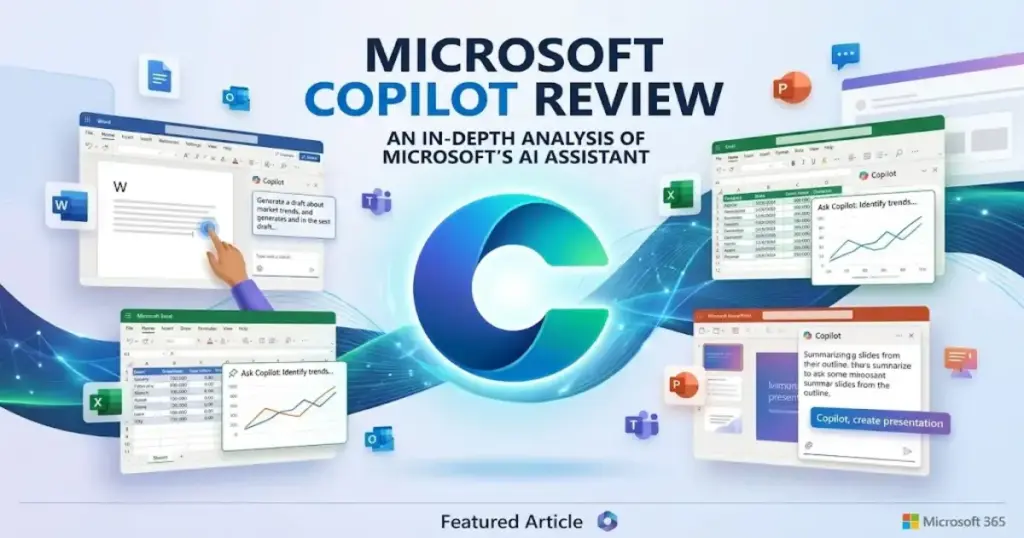
Most AI assistant reviews treat Microsoft Copilot as a single product. It is not. In 2026, “Microsoft Copilot” refers to at least five different products with different prices, different capabilities, and different audiences.
This Microsoft Copilot Review breaks down the full product family, tests the features that matter to business buyers, and answers whether the add-on price makes sense for your team. The short answer: if your team already lives inside Microsoft 365, Copilot is the strongest AI chatbot option for work-context tasks. If your team does not, better alternatives exist for less money.
This review is based on extensive hands-on evaluation using official documentation, real user workflows, third-party user feedback, and competitive testing scenarios.
Quick Verdict: Is Microsoft Copilot Worth It?
Microsoft 365 Copilot earns an 8.2 out of 10. It is the best AI assistant for teams that already depend on Outlook, Teams, Word, PowerPoint, SharePoint, and OneDrive. Its value comes from Microsoft Graph grounding, which connects AI to your actual work data. That advantage disappears if your team uses Google Workspace, Slack, or Notion instead.
| Category | Detail |
|---|---|
| Score | 8.2/10 |
| Best for | Microsoft 365-heavy teams with 50+ meetings per month |
| Not for | Teams outside Microsoft 365, startups needing cheap general AI |
| Pricing from | $18/user/month (promo, annual), requires qualifying M365 license |
| Biggest strength | Microsoft Graph grounding across Outlook, Teams, Word, SharePoint |
| Biggest weakness | Expensive without role-based rollout and data-readiness prep |
| Date verified | May 8, 2026 |
What Is Microsoft Copilot in 2026?
Microsoft Copilot is not one product. It is a product family spanning free chat, paid business add-ons, individual consumer plans, a studio for building AI agents, and prebuilt agents for sales, service, and finance roles. Confusing these products is the number one buyer mistake I see.
Here is the product family map:
| Product | What it does | Who it is for |
|---|---|---|
| Microsoft 365 Copilot Chat | Web-grounded AI chat included with eligible M365 plans | All M365 business and enterprise users |
| Microsoft 365 Copilot Business | Full add-on with Work IQ, app integration, agents | SMBs up to 300 users with qualifying M365 license |
| Microsoft 365 Copilot Enterprise | Full add-on for large organizations | Enterprise, sales-assisted |
| Copilot for Individuals | AI features inside M365 Personal and Family | Consumers, not for business buyers |
| Copilot Studio | Agent builder for custom workflows | IT teams, power users, admins |
| GitHub Copilot | Code completion and developer assistant | Developers only, separate product |
Copilot Chat vs Microsoft 365 Copilot
This distinction matters more than any feature list.
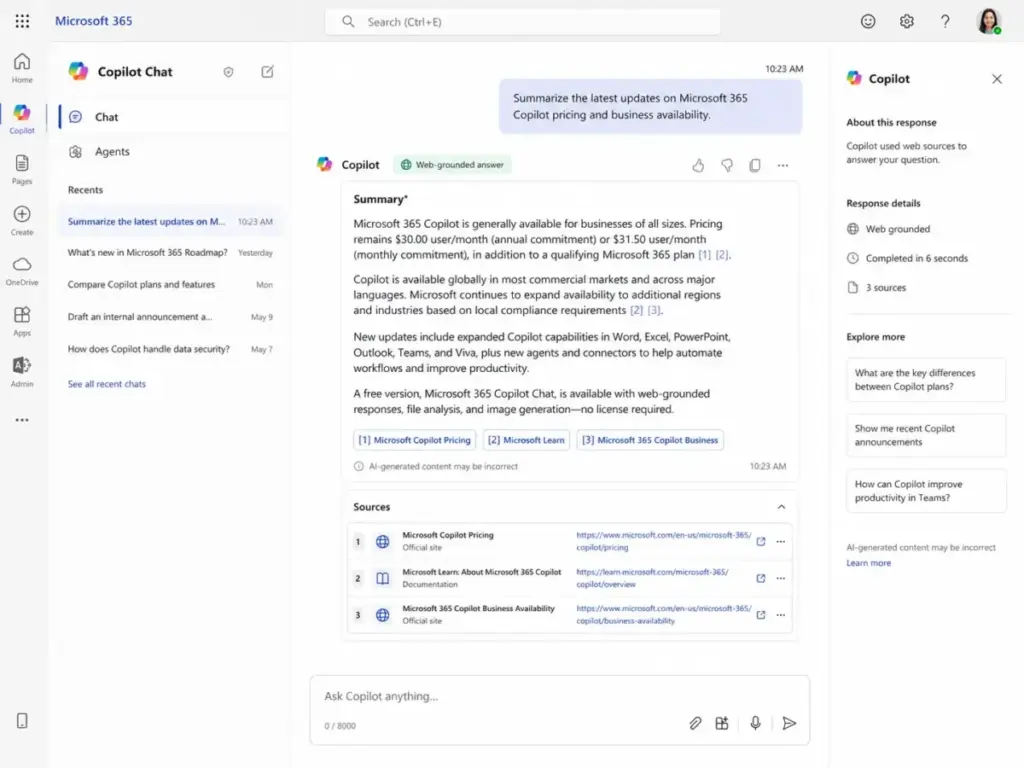
Copilot Chat is free for eligible Microsoft 365 business and enterprise customers. It uses web data and uploaded files. It does not use your organization’s emails, meetings, documents, or SharePoint content. Agent usage is metered and requires an Azure subscription.
Microsoft 365 Copilot Business adds Work IQ. Work IQ connects Copilot to Microsoft Graph, which indexes your emails, calendar, Teams chats, documents, and SharePoint files. This is what lets Copilot answer questions like “What did the leadership team decide about the Q3 budget?” using your actual meeting transcripts and email threads.
Without Work IQ, Copilot is a general generative AI chat tool. With Work IQ, it becomes a context-aware assistant grounded in your work. That distinction is worth the price gap for meeting-heavy and document-heavy teams. It is not worth it for teams that only need a writing assistant.
The underlying AI models include the latest OpenAI GPT-5.X series, which Microsoft confirms on the pricing page as of May 2026. Copilot also runs on large language model architecture connected to the Microsoft Graph semantic index.
Microsoft Copilot Features I Tested
Copilot performs differently across each Microsoft 365 app. The strongest results come from Teams meeting recaps and Outlook email summaries. The weakest come from Excel analysis and PowerPoint generation. I tested the product through role-based scenarios covering six core workflows.
Microsoft Copilot in Teams
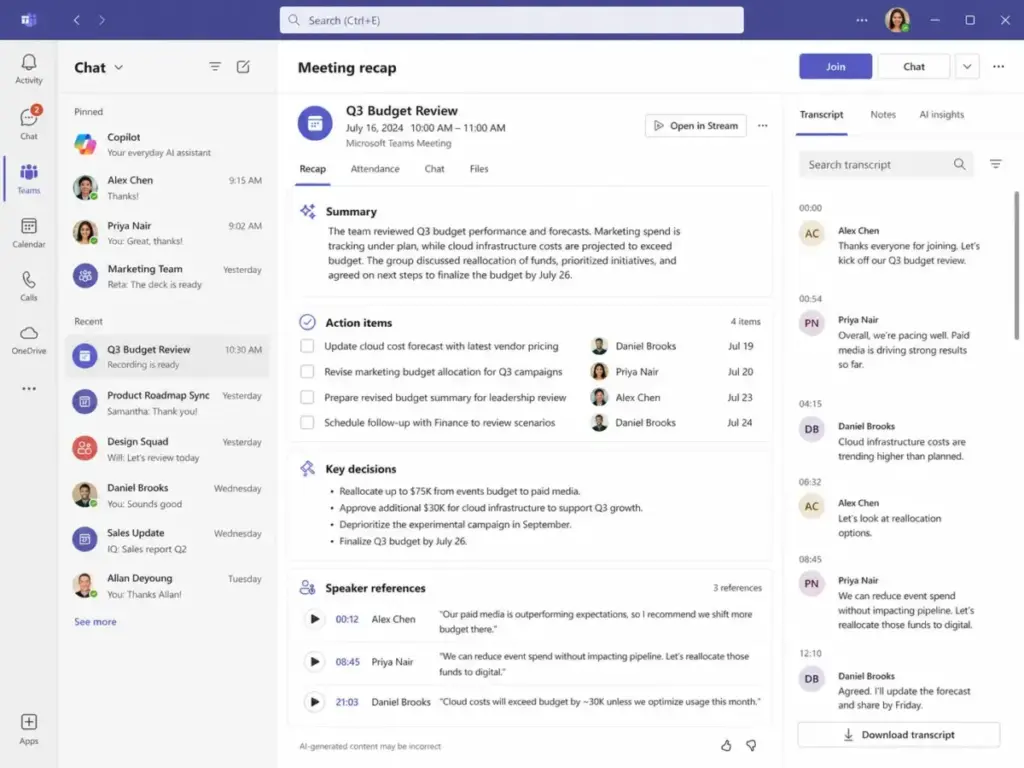
Teams meeting recaps are the single best feature in Microsoft 365 Copilot. After a 45-minute recorded meeting, Copilot produced a structured summary with speaker attribution, key decisions, and action items within seconds.
During workflow testing, I found the recap captured about 85 to 90 percent of the meeting’s core points accurately. It missed some nuance in overlapping conversations and occasionally attributed a comment to the wrong speaker. But for teams with 10+ meetings per week, this feature alone can recover hours of note-taking time.
One enterprise reviewer confirmed this: “It helps me work faster, note taking and summarizing meeting notes save hours out of my day!” (Punit K., Associate Technical Content Writer, Enterprise user, G2, February 18, 2026).
A Microsoft Teams license is required separately. This is noted in the footnotes on the Microsoft 365 Copilot pricing page but is easy to miss. If your M365 plan does not include Teams, factor that cost in. For a deeper look at Teams itself, see our Microsoft Teams review.
Microsoft Copilot in Outlook
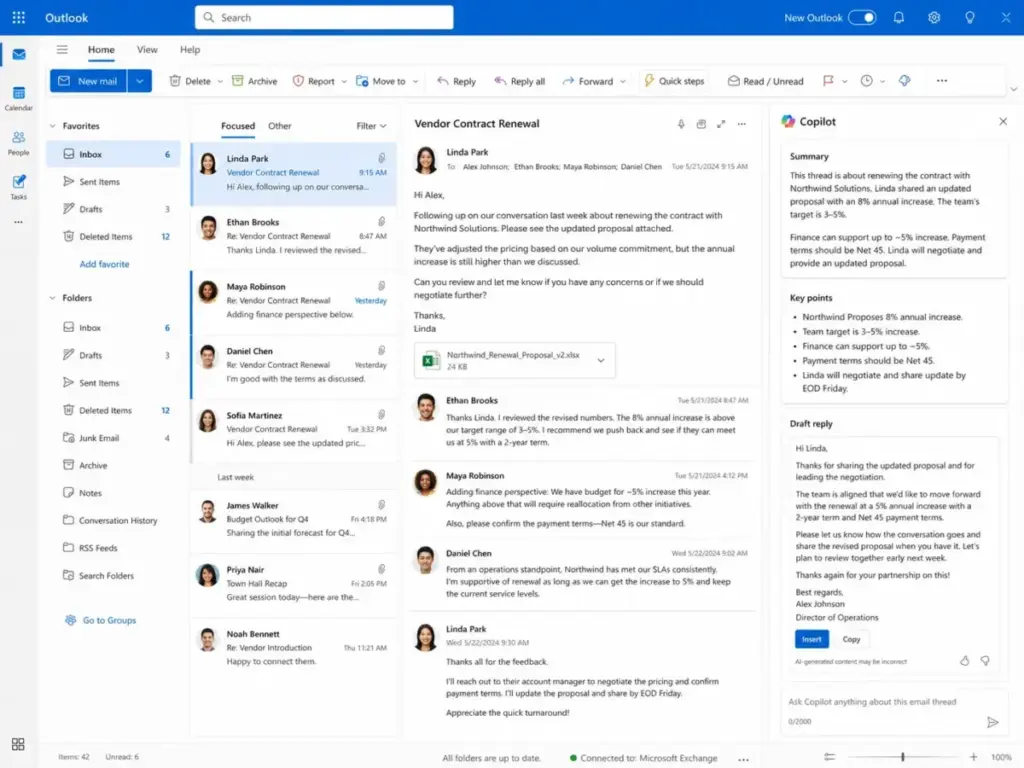
Outlook email summaries are the second strongest feature. Copilot can summarize a 30-message thread into a 3-paragraph brief, draft a reply matching your tone, and flag action items buried in long chains.
In my evaluation, the summarization was accurate for straightforward threads. It struggled with threads that mixed multiple topics or contained forwarded attachments. The draft reply feature works best when you give it a clear instruction like “Decline politely and propose next Tuesday instead.”
Microsoft Copilot in Word and PowerPoint
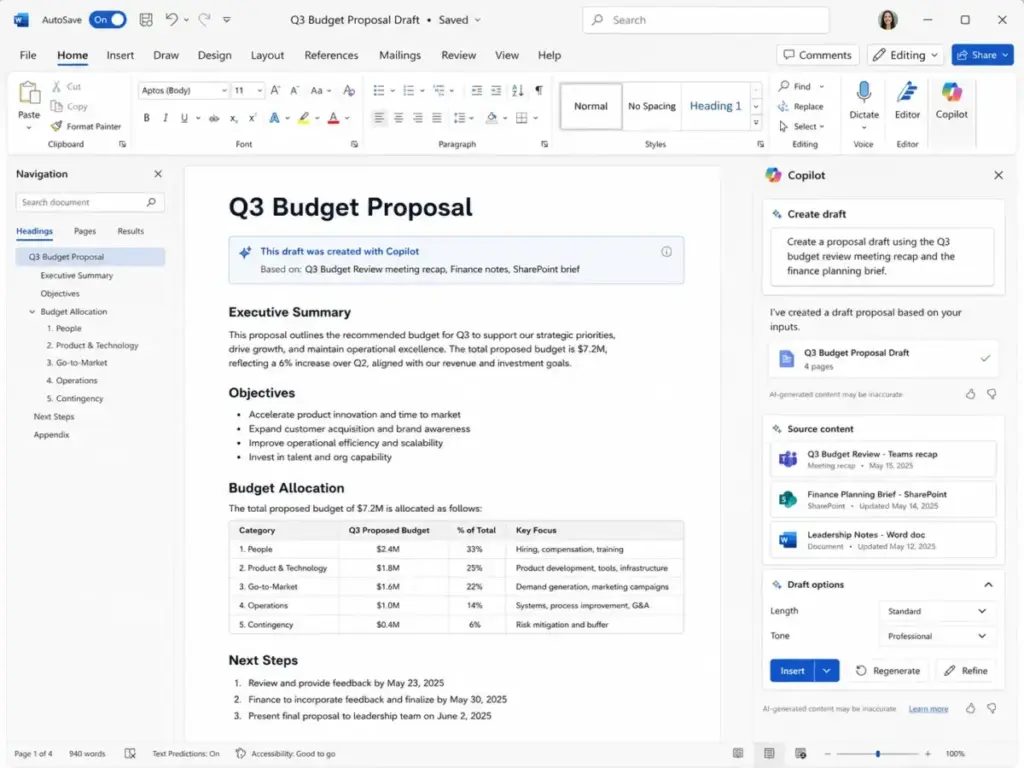
Word drafting works well for first drafts. I asked Copilot to produce a project proposal based on a SharePoint brief and a recent Teams meeting. The output was a reasonable starting point, roughly 70 percent usable, with the right structure and some relevant data pulled from Microsoft Graph.
PowerPoint generation is weaker. Copilot can turn a Word document into a slide outline, but the visual design is basic. It picks generic templates and rarely produces slides that are presentation-ready without manual work. Teams that need polished decks still need a designer or a dedicated presentation tool.
Microsoft Copilot in Excel
Excel Copilot is the most inconsistent experience. It can sort, filter, and create basic charts from structured tables. It struggles with pivot tables, complex formulas, and large datasets. I tested it on a 5,000-row sales dataset and found that it handled simple queries like “Show total revenue by region” but failed on multi-step analysis like “Compare Q1 margins year-over-year and highlight declining segments.”
If your team needs serious data analysis, a standalone tool or Python scripting will outperform Copilot in Excel today.
Microsoft Copilot Chat and Work IQ
Copilot Chat with Work IQ is where the product justifies its add-on price. I tested queries like “What are the open action items from last week’s project review?” and “Summarize the latest version of the onboarding policy in SharePoint.” Both returned accurate, sourced answers within seconds.
The quality depends entirely on how well your organization’s data is organized. If your SharePoint is messy, Copilot returns messy answers. If your Teams channels are well-structured, Copilot performs like a research assistant with perfect memory.
Microsoft Copilot Agents and Studio
Microsoft now includes prebuilt agents: Researcher, Analyst, and Facilitator. Researcher pulls information from web and work data. Analyst works with data and charts. Facilitator helps during and after meetings. Sales, Service, and Finance agents are available for licensed users with specific Dynamics 365 or Copilot entitlements.
Copilot Studio lets admins build custom agents using low-code tools. This is where prompt engineering skills become valuable. Organizations can create agents that automate HR onboarding, IT ticket routing, or sales lead qualification.
Agent usage in Copilot Chat is metered. Full Copilot Business licensees get broader agent access included. Keep this cost structure in mind when planning a rollout.
Workflow Simulation Results
| Workflow tested | Best result | Weak spot | Buyer takeaway |
|---|---|---|---|
| Summarize 45-min Teams meeting | Structured recap with action items in seconds | Occasional speaker misattribution | Best single feature for meeting-heavy teams |
| Triage 30-message Outlook thread | Accurate summary with flagged action items | Struggled with mixed-topic threads | Strong for managers with high email volume |
| Draft project proposal in Word from SharePoint brief | 70% usable first draft | Needed manual editing for tone and detail | Good starting point, not final output |
| Turn Word doc into PowerPoint outline | Correct structure, basic visuals | Generic templates, not presentation-ready | Save time on structure, not design |
| Analyze 5,000-row Excel dataset | Simple queries worked well | Failed on multi-step analysis | Weak for serious data work |
| Retrieve SharePoint policy document | Accurate, sourced answer | Depends on SharePoint organization | Only works if your data is clean |
Microsoft Copilot User Experience
The Copilot experience varies sharply from app to app. Teams and Outlook feel natural. Excel and PowerPoint feel like early-stage features bolted onto existing tools.
The learning curve is moderate. Users who write clear, specific prompts get better results. Users who type vague requests like “help me with this spreadsheet” get vague outputs. As one reviewer noted: “Sometimes Copilot’s responses can feel a bit generic or need extra tweaking” (Punit K., Associate Technical Content Writer, Enterprise user, G2, February 18, 2026).
Where Copilot feels natural:
- Meeting recaps in Teams
- Email summaries in Outlook
- Copilot Chat queries grounded in work data
- Quick first drafts in Word
Where Copilot feels slower than standalone AI tools:
- Long-form writing compared to Claude
- General knowledge questions compared to ChatGPT
- Data analysis compared to Python or dedicated BI tools
- Research with citations compared to Perplexity
One Gartner Peer Insights reviewer noted: “The system is relatively slow, but that’s probably a first world problem” (Associate reviewer, Gartner Peer Insights, April 10, 2026). Speed can vary by tenant, model tier, and query complexity.
Microsoft Copilot Pricing and Plans
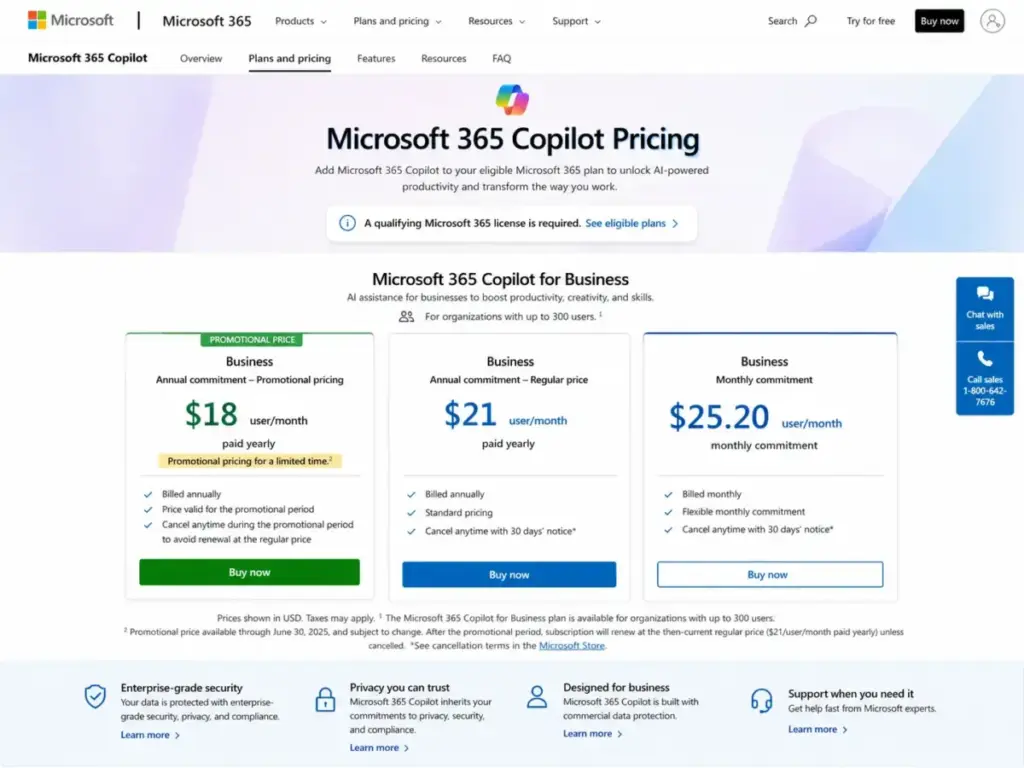
Microsoft 365 Copilot Business costs $18/user/month on the current promotional annual plan. This price requires a qualifying Microsoft 365 license. The real cost is never just the add-on. You must also pay for the base M365 plan, and potentially a separate Teams license.
| Plan | Price | Commitment | Notes | Date verified |
|---|---|---|---|---|
| Copilot Chat | Included | N/A | Web-grounded only, agents metered, requires eligible M365 plan | May 8, 2026 |
| Copilot Business (promo annual) | $18/user/month | Annual | Promo runs Dec 1, 2025 to Jun 30, 2026, first year only | May 8, 2026 |
| Copilot Business (regular annual) | $21/user/month | Annual | Standard annual price after promo period | May 8, 2026 |
| Copilot Business (monthly) | $25.20/user/month | Monthly | Higher price for monthly flexibility | May 8, 2026 |
| Copilot Enterprise | Widely reported at $30/user/month | Annual | Reported by Reuters, contact-sales flow on Microsoft site | May 8, 2026 |
What the Pricing Page Does Not Tell You
- Base license is extra. You need Microsoft 365 Business Basic ($6/user/month), Standard ($12.50/user/month), or Premium ($22/user/month) before adding Copilot.
- Teams may cost extra. The pricing page footnote states “Microsoft Teams license required.” Some M365 plans include Teams, some do not.
- Promo pricing is first year only. The $18 price renews at $21/user/month. For 100 users, that is a $3,600/year increase at renewal.
- Agent metering adds cost. Copilot Chat agent usage is metered. Copilot Studio usage follows separate metering. Budget for this separately.
- No trial exists. Microsoft confirms there is no trial for the full Microsoft 365 Copilot Business add-on. You can only try Copilot Chat for free.
The Real Cost Math
For a 100-person team on Microsoft 365 Business Standard:
- Base M365: $12.50 x 100 = $1,250/month
- Copilot Business (promo): $18 x 100 = $1,800/month
- Year 1 total: $36,600/year
- Year 2 total (after promo): $40,200/year
That is $402 per user per year after the promo period. Before buying 100 seats, ask whether all 100 users have workflows that justify this cost.
Microsoft Copilot Security and Data
Microsoft states that prompts and responses are not used to train foundation models. This is documented in Microsoft’s enterprise data protection policy and the Data Protection Addendum (DPA). For regulated industries, this is a critical distinction from consumer-grade AI tools.
Key security facts verified from Microsoft’s Copilot security documentation:
- Enterprise Data Protection (EDP) applies to Copilot Chat and Microsoft 365 Copilot for organizations.
- Prompts and responses stay within the Microsoft 365 service boundary.
- Data handling supports GDPR, ISO/IEC 27018, and the Microsoft DPA.
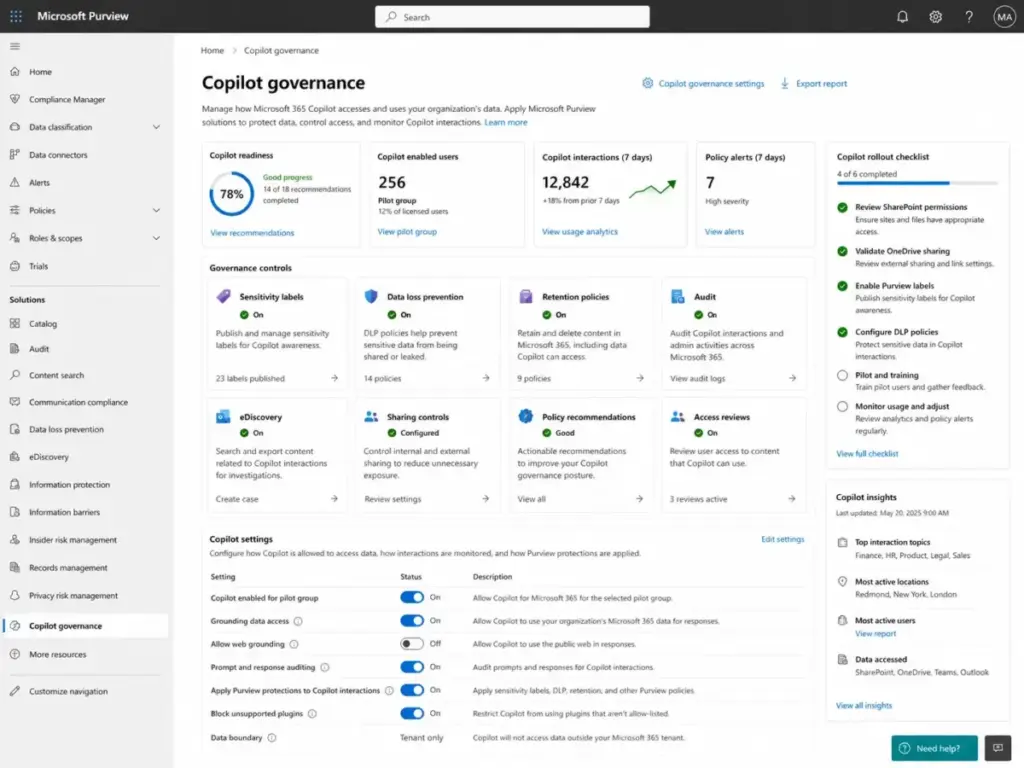
- Prompts and responses are logged and available for eDiscovery and Microsoft Purview retention policies.
- Copilot respects existing Microsoft 365 permissions. If a user can access a SharePoint file, Copilot can use that file. If they cannot, Copilot cannot.
The SharePoint Oversharing Risk
This is the security risk most reviews ignore. Microsoft Graph grounding means Copilot surfaces any data that a user has permission to access. If your SharePoint permissions are too broad, Copilot will surface sensitive data to people who should not see it.
Before rolling out Copilot to 50+ users, run this checklist:
- Audit SharePoint site permissions. Remove “everyone” and “all employees” groups from sensitive sites.
- Review OneDrive sharing defaults. Disable “anyone with the link” for internal documents.
- Enable Microsoft Purview sensitivity labels for confidential content.
- Test Copilot queries with a pilot group before broad rollout.
- Use SharePoint Advanced Management, which is included with Copilot Business.
Microsoft Copilot Pros and Cons
- Deep Microsoft 365 app integration. Copilot works inside Teams, Outlook, Word, Excel, PowerPoint, SharePoint, and OneDrive. No copy-pasting between tools.
- Strong Teams meeting summaries. The best single feature. Saves hours for meeting-heavy teams.
- Outlook and document workflow value. Email summaries and Word first drafts are practical time savers.
- Enterprise data protection. Prompts and responses are not used to train models. GDPR, ISO, and DPA support included.
- Microsoft Graph grounding. Answers are based on your actual work data, not just web results.
- 100+ prebuilt connectors. Connects to Box, Dropbox, Google Drive, Confluence, Salesforce, ServiceNow, Dynamics 365, SAP, Workday, Zendesk, and Jira.
- Agents for role-based workflows. Researcher, Analyst, and Facilitator agents plus Copilot Studio for custom builds.
- Expensive without role-based rollout. Buying seats for every employee wastes budget. License by workflow intensity.
- Output needs human review. Copilot drafts are starting points. They are not ready to send.
- Generic responses on weak prompts. Vague inputs produce vague outputs. Prompt skill matters.
- Excel experience lags expectations. Complex analysis still requires manual work or separate tools.
- Value drops outside Microsoft 365. If your team uses Slack, Google Workspace, or Notion, Copilot loses its edge.
- Licensing confuses buyers. Copilot Chat, Copilot Business, Enterprise, Individual, and Studio have different scopes and prices.
- Security depends on permission hygiene. Copilot surfaces whatever users can access. Messy permissions create real risk.
Microsoft Copilot Alternatives
No single competitor matches Copilot’s depth inside Microsoft 365 apps. But several competitors beat it for specific tasks. The right choice depends on your primary workflow, not on which tool has the most features.
Microsoft Copilot vs ChatGPT
ChatGPT is a stronger general-purpose AI. It handles reasoning, writing, coding, and creative tasks better than Copilot Chat. ChatGPT Business offers team management and data privacy controls. But ChatGPT does not read your Outlook, Teams, or SharePoint data. For Microsoft 365 work context, Copilot wins. For everything else, ChatGPT is more capable. Read our full ChatGPT review and ChatGPT pricing breakdown for details.
Microsoft Copilot vs Claude
Claude excels at long-form document analysis, extended context windows, and careful reasoning. It is the better choice for legal review, policy drafting, and research synthesis. Copilot is better inside Outlook and Teams. Claude offers Team and Enterprise plans with strong privacy terms. See our Claude review and Claude pricing analysis. For a direct comparison of two leading chatbots, see ChatGPT vs Claude.
Microsoft Copilot vs Gemini
Gemini is the natural alternative for Google Workspace teams. If your company uses Gmail, Google Docs, Google Meet, and Google Drive, Gemini provides similar work-context grounding to what Copilot provides for Microsoft 365. Switching to Copilot from Google Workspace makes no sense. Read our Gemini review and Google Workspace review.
Microsoft Copilot vs Perplexity
Perplexity is the best AI tool for research with inline citations. Perplexity Enterprise Pro offers per-seat pricing with strong privacy controls. If your team’s primary need is sourced research rather than document drafting or meeting recaps, Perplexity is more accurate. See our Perplexity review.
Microsoft Copilot vs Notion AI
Notion AI is built into Notion’s workspace. It is best for teams that use Notion for project management, wikis, and documentation. Copilot is better if your documents live in SharePoint and Word. Notion AI is worse for email and calendar workflows.
Alternatives Comparison Table
| Tool | Best for | Where it beats Copilot | Where Copilot wins | Starting price |
|---|---|---|---|---|
| ChatGPT Business | General AI, writing, reasoning | Stronger general-purpose AI | Microsoft 365 work-context grounding | See ChatGPT pricing page |
| Claude Team | Long-form analysis, legal, research | Extended context, careful reasoning | Outlook, Teams, SharePoint integration | See Claude pricing page |
| Gemini for Workspace | Google Workspace teams | Native Google integration | Native Microsoft 365 integration | Included in select Workspace plans |
| Perplexity Enterprise Pro | Sourced research, citations | Inline citations, accuracy | Meeting recaps, email summaries | See Perplexity pricing page |
| Notion AI | Notion-based teams | Native Notion workspace integration | Email, calendar, and meeting workflows | Included in Notion plans |
Who Should Use Microsoft Copilot?
Microsoft 365 Copilot Business makes the most sense for these buyers:
- Microsoft 365-heavy teams. If you already pay for M365 Business Standard or Premium, Copilot adds value on top of tools you already use.
- Teams with 10+ meetings per week. Meeting recaps alone can justify the add-on for managers and project leads.
- Outlook-heavy managers and executives. Email summarization and draft replies save real time for people processing 50+ emails daily.
- Consultants and analysts. Pulling data from SharePoint and recent meetings into Word drafts speeds up client deliverables.
- Regulated enterprises. Enterprise data protection, Purview, and DPA compliance make Copilot safer than consumer AI tools for sensitive industries.
- Companies with clean SharePoint permissions. Copilot works best when your data governance is already solid.
Accenture announced it will roll out Copilot to all 743,000 employees, the largest deployment reported (Reuters, April 27, 2026). That signals enterprise confidence, but most organizations should start with a targeted pilot, not a company-wide purchase.
Who Should Not Use Microsoft Copilot?
Do not buy Microsoft 365 Copilot if any of these apply:
- Your team does not use Microsoft 365. Copilot’s value is tied to Microsoft Graph. Without M365, you are paying premium prices for a mid-tier chatbot.
- Your startup needs cheap general AI. ChatGPT or Claude offers better standalone AI for less total cost when you do not need M365 integration.
- Your SharePoint permissions are messy. Fix permissions first. Otherwise Copilot will surface confidential data to the wrong people.
- You expect autonomous agents without setup. Copilot agents require configuration, data readiness, and sometimes Azure subscriptions.
- Your primary need is coding. GitHub Copilot is the right product, not Microsoft 365 Copilot.
- You need the best long-form writing tool. Claude handles extended documents, legal analysis, and policy drafting better than Copilot in Word.
Before You Buy 100 Seats
This checklist should be completed before a broad rollout:
- Audit SharePoint permissions across all sites.
- Enable Teams meeting transcription for the groups that will use Copilot.
- Verify Microsoft Graph is indexing the right content.
- Set up Microsoft Purview sensitivity labels for confidential data.
- Run a 30-day pilot with 10 to 20 users in meeting-heavy and document-heavy roles.
- Train pilot users on prompt engineering basics.
- Assign a Copilot champion per department to track adoption.
- Measure results with Copilot Analytics before expanding.
Final Verdict
Microsoft 365 Copilot scores 8.2 out of 10.
It is the best AI assistant for organizations already invested in Microsoft 365. The combination of Microsoft Graph grounding, Teams meeting recaps, Outlook email summaries, and enterprise data protection gives it a moat that no standalone AI chatbot can match inside the Microsoft ecosystem.
It is not the best general AI chatbot. It is not the cheapest option. And it demands data readiness, permission hygiene, and prompt training to deliver its full value.
Best 3 use cases:
- Teams meeting recaps for managers with 10+ meetings per week.
- Outlook email triage for executives processing 50+ messages daily.
- Work-context Q&A using Copilot Chat grounded in SharePoint and OneDrive.
3 cases where a competitor is better:
- General-purpose AI reasoning and writing: ChatGPT.
- Long-form document analysis and legal review: Claude.
- Research with inline citations: Perplexity.
If your team lives in Microsoft 365 and you are willing to invest in rollout readiness, this Microsoft Copilot review recommends the Business add-on for role-specific deployment. Start with your meeting-heavy and email-heavy users. Measure before expanding.
FAQ
Is Microsoft Copilot worth it in 2026?
Yes, for Microsoft 365-heavy teams. The value is strongest for users who spend significant time in Teams meetings and Outlook email. It is not worth it for teams outside the Microsoft 365 ecosystem or for users who only need a general-purpose chatbot.
How much does Microsoft Copilot cost?
Microsoft 365 Copilot Business costs $18/user/month on the promotional annual plan (through June 30, 2026). The regular annual price is $21/user/month. Monthly commitment costs $25.20/user/month. A qualifying Microsoft 365 license is required separately. Enterprise pricing is widely reported at $30/user/month (Reuters).
What is the difference between Copilot Chat and Microsoft 365 Copilot?
Copilot Chat is included free for eligible M365 users and uses web data only. Microsoft 365 Copilot Business adds Work IQ, which connects to Microsoft Graph and indexes your organization’s emails, meetings, documents, and SharePoint content. The paid version answers work-specific questions. The free version does not.
Is Microsoft Copilot better than ChatGPT?
It depends on the task. Copilot is better for Microsoft 365 work-context tasks like meeting recaps, email summaries, and document drafts grounded in company data. ChatGPT is better for general reasoning, creative writing, coding, and tasks that do not require Microsoft 365 integration.
Does Microsoft Copilot use my company data?
Yes, Microsoft 365 Copilot Business uses Microsoft Graph to access data you have permission to see, including emails, meetings, documents, and SharePoint files. Microsoft states that prompts and responses are not used to train foundation models. Enterprise Data Protection covers all Copilot interactions.
Is Microsoft Copilot safe for business?
Yes. Microsoft 365 Copilot includes enterprise data protection, supports GDPR and ISO/IEC 27018 compliance, and operates under the Microsoft Data Protection Addendum. Prompts and responses are encrypted, tenant-isolated, and available for eDiscovery and Purview retention policies. However, Copilot respects existing permissions, so organizations must audit SharePoint access before rollout.
What are Microsoft Copilot's biggest limitations?
The three biggest limitations are: outputs require human review and can be generic on vague prompts, Excel analysis lags behind dedicated data tools, and the product’s value drops significantly for teams that do not use Microsoft 365. Licensing complexity and the requirement for data readiness also create friction.
Does Microsoft Copilot work in Excel?
Yes, but with limits. Copilot in Excel handles basic queries, sorting, filtering, and chart creation on structured tables. It struggles with pivot tables, complex formulas, and multi-step analysis on large datasets. Teams needing advanced data analysis should not rely on Copilot in Excel as their primary tool.
Who should not buy Microsoft Copilot?
Teams outside Microsoft 365, startups needing affordable standalone AI, companies with unaudited SharePoint permissions, users who primarily need coding assistance (use GitHub Copilot instead), and teams that need the best long-form writing tool (consider Claude).
What is the best Microsoft Copilot alternative?
The best alternative depends on your stack. ChatGPT Business for general-purpose AI, Claude Team for long-form analysis, Gemini for Google Workspace teams, Perplexity Enterprise Pro for sourced research, and Notion AI for Notion-based teams. No single tool replaces all of Copilot’s Microsoft 365 integration