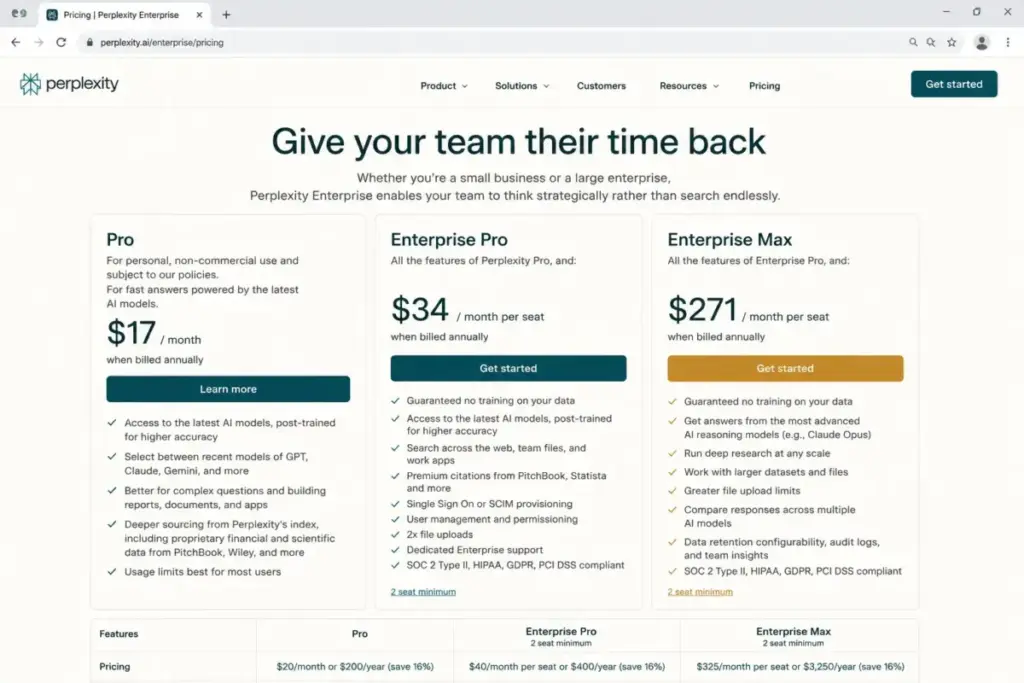
Perplexity Pro costs $17/month billed annually and includes Deep Research, Pro Search, file uploads, and multi-model access. That sounds like a complete AI search package until you hit the usage caps mid-project, watch a “cited” answer link to a source that does not say what the summary claims, or realize your team needs answers grounded in internal docs, not just the open web.
I have tracked AI search and assistant tools for 6 years. The pattern repeats: a product builds its reputation on one strength (Perplexity’s is fast, cited web answers), then tries to expand into a full platform. The result is that switching triggers multiply. Quota changes frustrate power users. Enterprise pricing climbs. And better-fit tools exist for every exit reason, if you know where to look.
This guide maps 10 Perplexity alternatives to the specific frustration driving your search. Not every tool here is a direct Perplexity clone, and that is the point. The best AI chatbot options include general assistants, enterprise copilots, privacy-first search, and developer APIs. Treating them all as “answer engines” is exactly what most competing guides get wrong.
One finding worth flagging early: for most individual users leaving Perplexity due to quota frustration, ChatGPT Plus at $20/month gives broader assistant coverage. But if you are leaving because you want private, ad-free search, the answer is Kagi, not another chatbot. The right alternative depends entirely on why you are leaving.
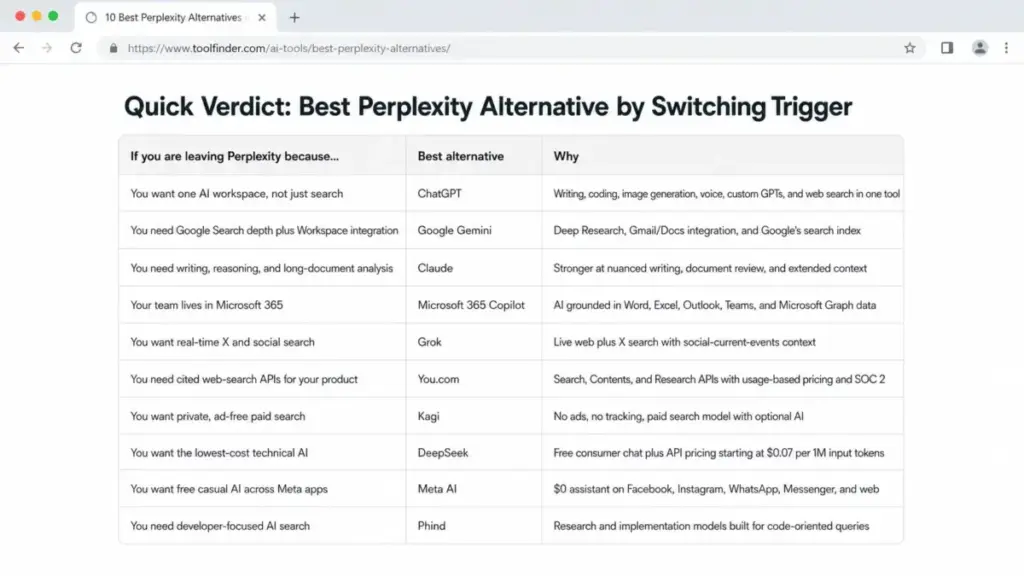
Quick Verdict: Best Perplexity Alternative by Switching Trigger
| If you are leaving Perplexity because… | Best alternative | Why |
|---|---|---|
| You want one AI workspace, not just search | ChatGPT | Writing, coding, image generation, voice, custom GPTs, and web search in one tool |
| You need Google Search depth plus Workspace integration | Google Gemini | Deep Research, Gmail/Docs integration, and Google’s search index |
| You need writing, reasoning, and long-document analysis | Claude | Stronger at nuanced writing, document review, and extended context |
| Your team lives in Microsoft 365 | Microsoft 365 Copilot | AI grounded in Word, Excel, Outlook, Teams, and Microsoft Graph data |
| You want real-time X and social search | Grok | Live web plus X search with social-current-events context |
| You need cited web-search APIs for your product | You.com | Search, Contents, and Research APIs with usage-based pricing and SOC 2 |
| You want private, ad-free paid search | Kagi | No ads, no tracking, paid search model with optional AI |
| You want the lowest-cost technical AI | DeepSeek | Free consumer chat plus API pricing starting at$0.07 per 1M input tokens (cache hit) |
| You want free casual AI across Meta apps | Meta AI | $0 assistant on Facebook, Instagram, WhatsApp, Messenger, and web |
| You need developer-focused AI search | Phind | Research and implementation models built for code-oriented queries |
What this means: there is no single “best Perplexity replacement.” ChatGPT is the closest general-purpose swap. Kagi is the right pick if privacy is your trigger. You.com and Phind serve developer workflows that Perplexity’s consumer UI was never designed for.
How I Evaluated These Alternatives
I reviewed official product pages, pricing pages, feature documentation, and published API references for all 10 alternatives. Pricing was verified against official sources on June 8, 2026. I also analyzed review sentiment on G2 and Trustpilot for Perplexity and cross-referenced switching triggers against user complaints.
Testing level for this article: official research only. I did not run hands-on benchmark tests on each product for this guide. Feature claims and pricing come from official documentation, not personal testing. Where third-party validation was used (Phind), I note it explicitly.
Limitation: Pricing, usage limits, and feature availability change frequently in the AI space. Verify current plans before purchase.
Daniel Rivera has published 50+ AI tool evaluations with plan-gate mapping for SaaSZap. This article applies the same methodology: map features to plans, calculate real costs, and flag what the marketing pages leave out. If you are still figuring out what an AI chatbot does versus an AI search engine, that distinction shapes every recommendation below.
The Perplexity Problem Map
Perplexity is still a strong AI search tool. It pioneered the cited-answer format, and Pro Search and Deep Research remain useful for quick research sessions. But the frustrations that push users to explore alternatives fall into clear patterns.
Pain 1: Quota Walls and Changing Limits
Perplexity Pro and Enterprise tiers include stated limits on Pro queries, Deep Research sessions, file uploads, and asset generation. Review sentiment on Trustpilot surfaces frustration when those limits shift.
“Obscure pricing, constantly changing quotas” — Karl B., Trustpilot reviewer
The free plan is capped further. Enterprise Pro starts at $34/seat/month billed annually, and Enterprise Max jumps to $271/seat/month billed annually. For a 10-seat Enterprise Pro deployment, that is $340/month before you consider the higher-tier Max plan.
Pain 2: Shallow or Repetitive Answers on Hard Questions
Perplexity excels at fast, surface-level web answers. But G2 reviewers flag a pattern:
“Can still be shallow or repetitive on harder questions” — G2 reviewer
For users who need extended reasoning, long-document analysis, or multi-step research, the answer-engine format hits a ceiling. Deep Research helps, but one Trustpilot reviewer noted:
“Deep Research was the only feature that justified the price” — Anne Clore, Trustpilot reviewer
Pain 3: Limited Fit Beyond Search
Perplexity positions itself as an AI search engine, not a full AI workspace. It does not replace your writing assistant, coding tool, spreadsheet copilot, or enterprise knowledge search. Teams that want AI embedded in their daily workflow (not just their research workflow) outgrow Perplexity’s scope quickly.
| Perplexity strength | Perplexity limitation |
|---|---|
| Fast cited web answers | Shallow on complex research tasks |
| Multi-model access on Pro | Usage caps change and can feel restrictive |
| Deep Research on paid plans | Enterprise pricing scales steeply ($34–$271/seat/month annually) |
| Clean answer-engine interface | Limited beyond search: no deep writing, coding, or workspace integration |
| Document and image uploads | Not a full AI assistant for daily productivity |
What this means: Perplexity remains the best product for fast, cited web lookups. The alternatives below each solve one or more of these three pain points better.
Alternatives That Fix the Quota and Scope Problem
ChatGPT: Best Overall Perplexity Alternative

ChatGPT is the strongest Perplexity alternative for users leaving because they want one AI workspace for search, writing, coding, file analysis, image generation, voice, and custom assistants.
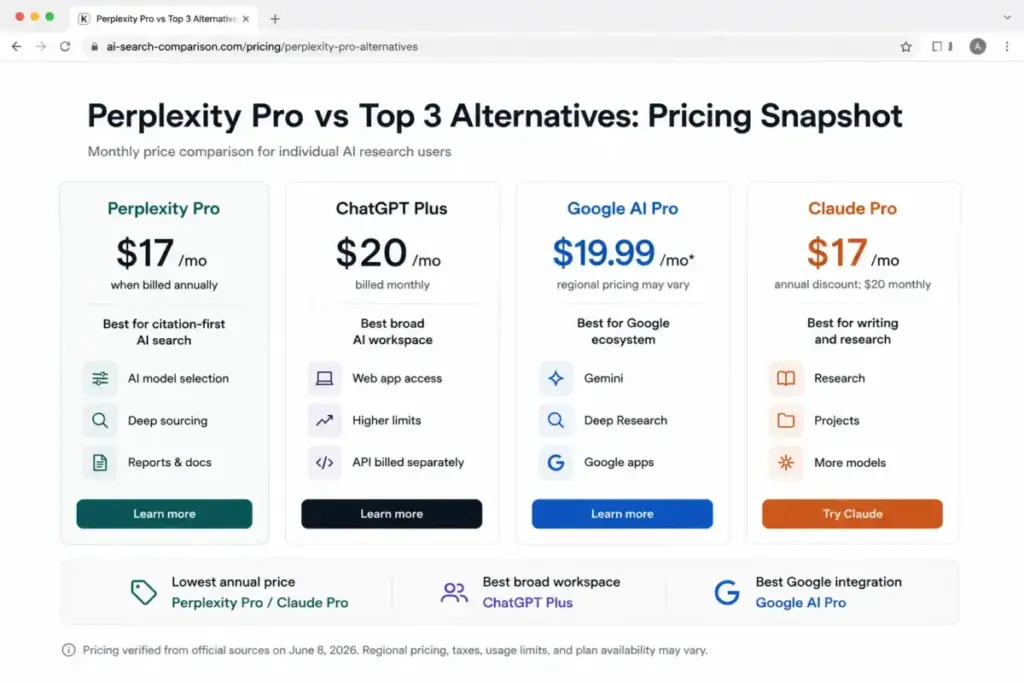
Pricing starts at $0 (free plan). Plus costs $20/month. The free plan includes web search and GPT access. Plus adds GPT-5.5, higher usage limits, and features like Deep Research where available.
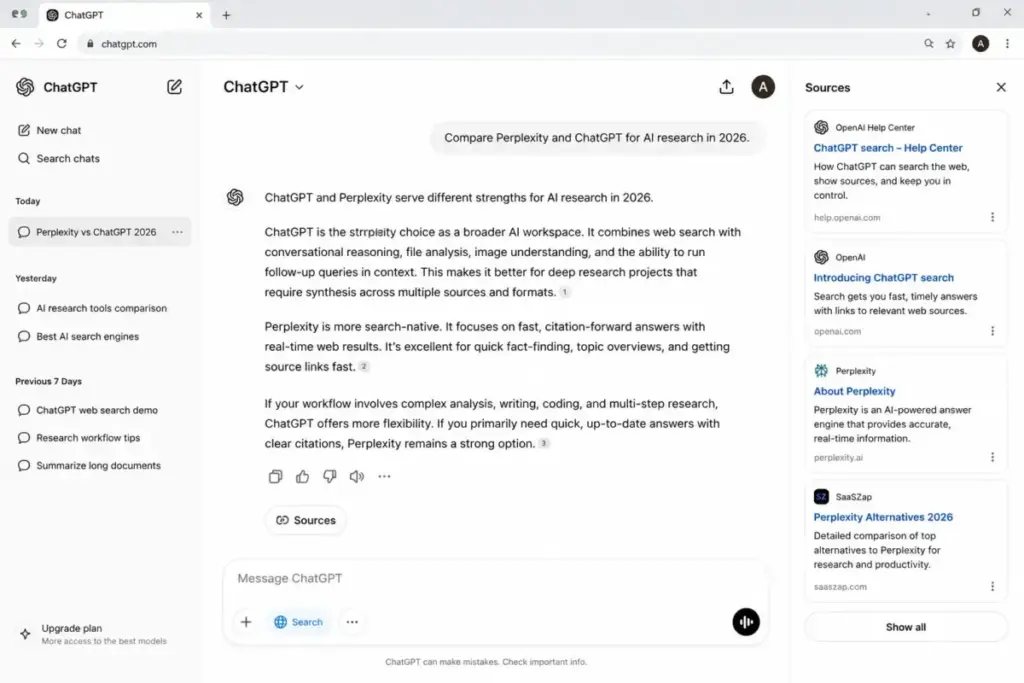
ChatGPT does better than Perplexity as a broader assistant. Search is one workflow inside ChatGPT, not the entire product. You can upload documents, generate images, build custom GPTs, use voice, and analyze data, all within the same interface. The full ChatGPT review covers how well each feature holds up under real use.
The tradeoff: Perplexity remains more search-native and citation-forward. If your primary workflow is “ask a question, get a cited answer, browse sources,” Perplexity’s interface is built for that. ChatGPT’s search results are woven into a conversational format that prioritizes synthesis over source browsing.
Best for:
- Users who want AI search plus writing, coding, and image generation in one tool
- Teams that outgrew Perplexity’s search-only scope
- Users frustrated by Perplexity Pro quota limits who want broader functionality
Avoid if:
- You only need fast cited web answers and prefer a search-first interface
- You need API access bundled with your subscription (ChatGPT API is billed separately)
Migration difficulty: Low
Google Gemini: Best for Google Ecosystem Search and Research
Google Gemini is the best Perplexity alternative for users who want AI search and research connected to Google’s broader ecosystem, including Gmail, Docs, and Google Search.
Pricing: free plan available. AI Pro is commonly listed in the US at $19.99/month. Verify local checkout pricing, as the official subscription page localizes currency by region.
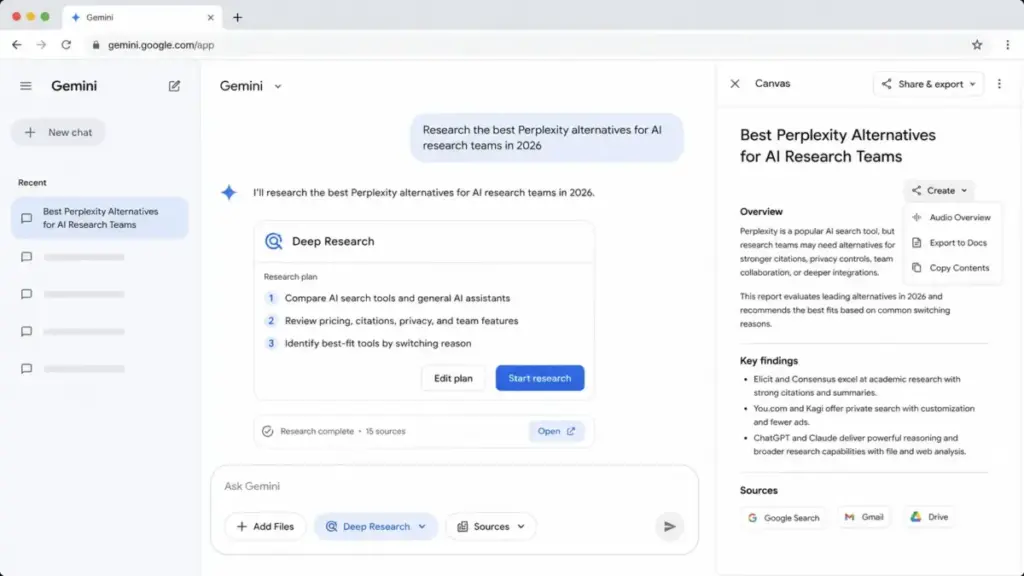
Gemini connects AI search to Google’s search index, which is a structural advantage no standalone answer engine can match. Deep Research, Gemini Live, Canvas, and image generation/editing are available. Paid tiers add Gmail and Docs integration plus NotebookLM access. The Gemini AI review breaks down what each tier delivers.
The tradeoff: Perplexity’s answer interface is more explicitly citation-forward. Gemini weaves answers into Google’s ecosystem, which is powerful for Workspace users but less focused for pure research sessions.
Best for:
- Google Workspace users who want AI search integrated with Gmail, Docs, and Drive
- Users who value Google Search depth over standalone answer-engine UX
- Researchers who want Deep Research plus large-context multimodal workflows
Avoid if:
- You do not use Google Workspace and want a standalone search tool
- You need transparent, region-consistent pricing before committing
Migration difficulty: Low
Gemini is a strong example of how AI assistants are evolving past the answer-engine model.
Claude: Best for Writing, Reasoning, and Long-Form Work

Claude is the best Perplexity alternative for users who paste long sources, draft nuanced writing, review documents, or want a reasoning-first assistant rather than a search-first one.
Pricing: free plan available. Pro costs $20/month (or $17/month billed annually). Team and Enterprise plans add admin controls, Microsoft 365 connectors, and Outlook integration.
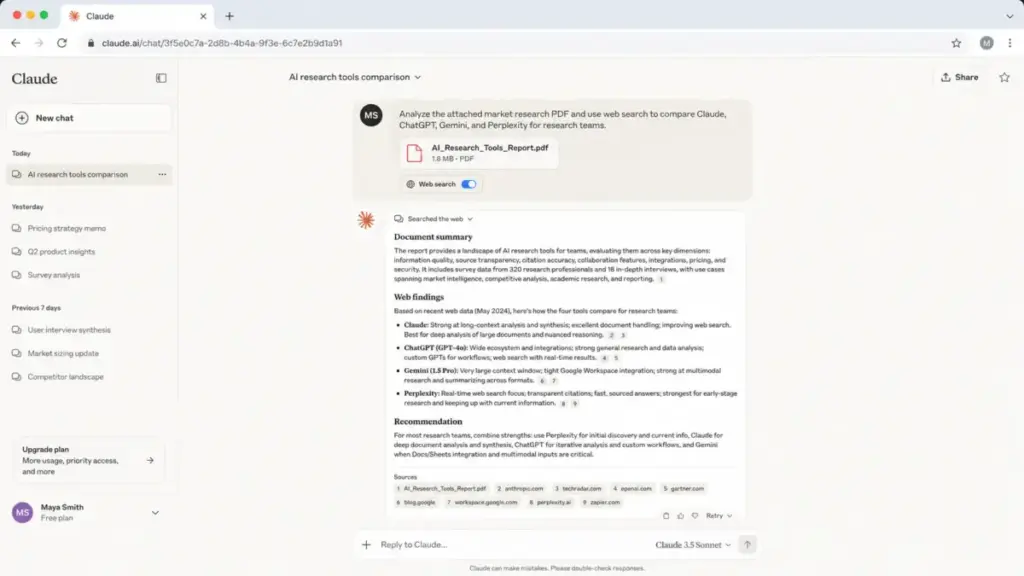
Claude is stronger than Perplexity as a writing and reasoning partner. It handles long-context inputs well, produces more nuanced prose, and supports code execution and data visualization. The Research feature provides multi-step investigation capability.
The tradeoff: Claude is less search-native than Perplexity for quick cited web lookups. If you type a factual question and want five cited sources in 3 seconds, Perplexity is faster. Claude shines when the task requires thinking, not just retrieving.
Best for:
- Writers and researchers who need nuanced, long-form output
- Teams that paste lengthy documents for analysis and summarization
- Users who want reasoning depth over search speed
Avoid if:
- Your primary use case is fast web search with cited links
- You need an enterprise plan without sales engagement (Enterprise pricing requires contact)
Migration difficulty: Low
For a deeper look at Claude’s capabilities and limitations, see the Claude AI review on SaaSZap.
Alternatives That Fix the Workspace Integration Problem
Microsoft 365 Copilot: Best for Microsoft 365 Teams
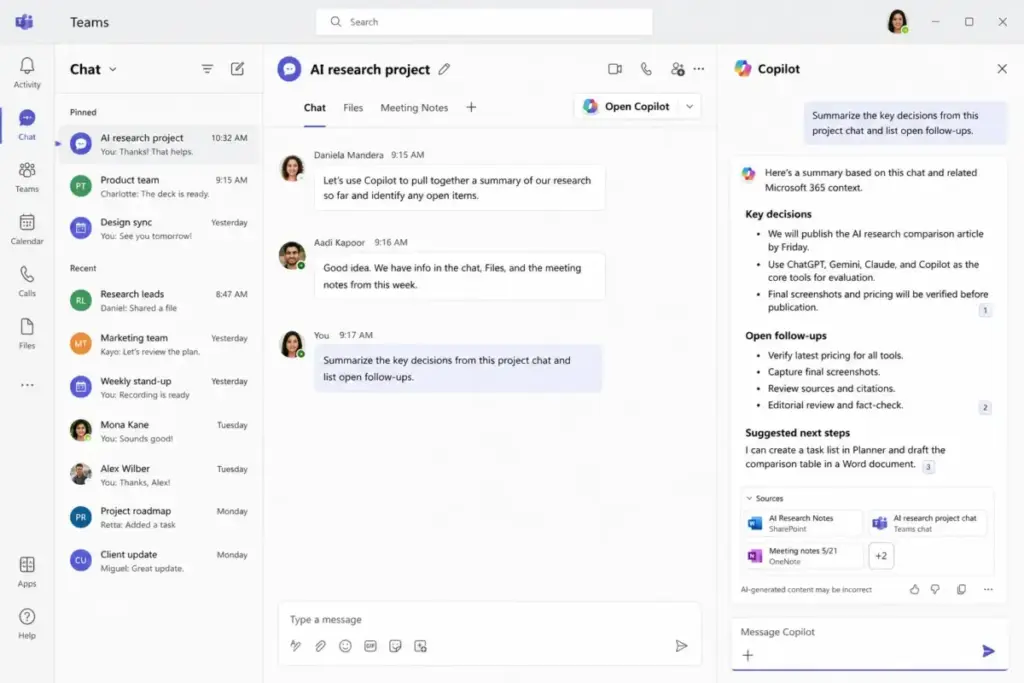
Microsoft 365 Copilot is the best Perplexity alternative for teams that want AI search and answers embedded directly in Word, Excel, PowerPoint, Outlook, and Teams.
Pricing: Copilot Chat is included for eligible Microsoft 365 subscribers. Microsoft 365 Copilot Business starts at $18/user/month billed yearly during a listed limited-time offer. This is an add-on to a qualifying Microsoft 365 subscription.
The key differentiator: Work IQ and Microsoft Graph grounding connect AI answers to your business files, meetings, email, and Microsoft apps. Perplexity searches the open web. Copilot searches your organization’s data.
The tradeoff: Copilot is less attractive for users outside Microsoft 365 or users who mainly need open-web research. The licensing dependency is a real barrier; you need a qualifying Microsoft 365 plan before the AI add-on is even available.
Best for:
- Teams already on Microsoft 365 who want AI inside Word, Excel, Outlook, and Teams
- Organizations that need enterprise data protection and admin controls
- Users who value internal-data grounding over open-web search
Avoid if:
- You are not on Microsoft 365 (the prerequisite licensing makes this impractical)
- You mainly need open-web research, not workplace document search
- Your budget cannot absorb the Microsoft 365 plan plus the Copilot add-on
Migration difficulty: High. Requires qualifying Microsoft 365 licensing, admin setup, and organizational rollout.
For pricing details on the broader Microsoft AI ecosystem, the Microsoft Copilot pricing breakdown covers plan tiers and hidden costs.
Alternatives That Fix the Real-Time and Social Search Problem
Grok: Best for Real-Time Web and X Search

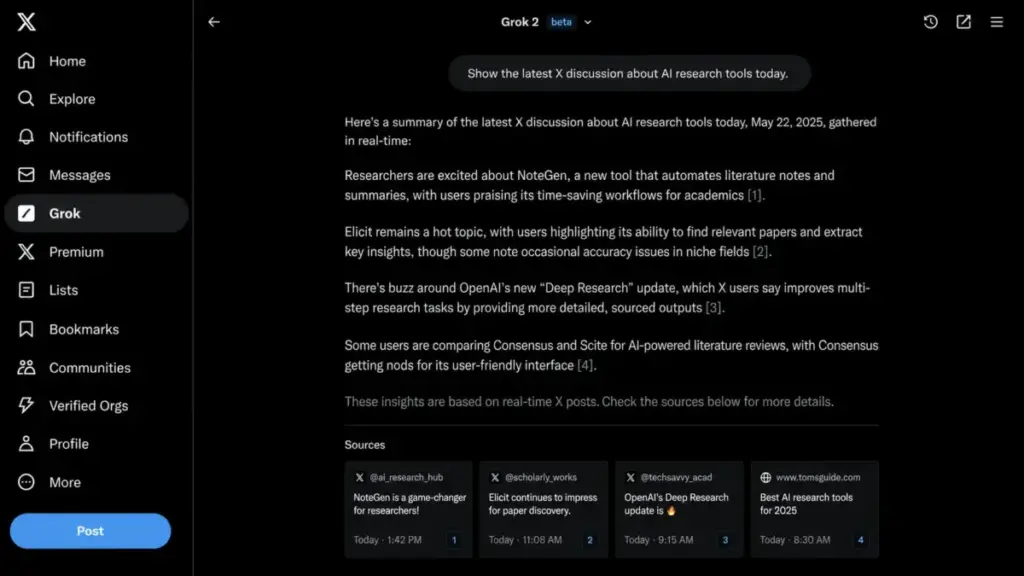
Grok is the best Perplexity alternative for users who care about live X/social signals, real-time web context, and current-events orientation.
Pricing: Grok can be tried for free. SuperGrok costs $30/month. X Premium bundles start separately: Premium from $3/month, Premium+ at $40/month on web. Access routes and rate limits differ between xAI plans and X Premium bundles.
Grok differentiates through live web plus X search. If your research involves trending topics, breaking news, or social media sentiment, Grok surfaces signals that Perplexity’s standard web crawl may not capture as quickly.
The tradeoff: Perplexity is a cleaner, research-first answer engine. Grok carries brand-safety and content-moderation concerns that matter for professional use. The bundled pricing structure (xAI plans vs. X Premium) can be confusing.
Best for:
- Users who need real-time web and X search for current events or social analysis
- People who want image/video generation, file analysis, and voice alongside social search
Avoid if:
- Brand safety and content moderation are non-negotiable for your team
- You need a clean, research-focused interface without social media context
- You find the bundled pricing routes confusing and want simple per-user pricing
Migration difficulty: Low
Alternatives That Fix the Developer and API Problem
You.com: Best for Developer Web-Search and Research APIs

You.com is the best Perplexity alternative for developers and AI teams replacing Perplexity with source-backed research APIs, clean web extraction, and real-time web data infrastructure.
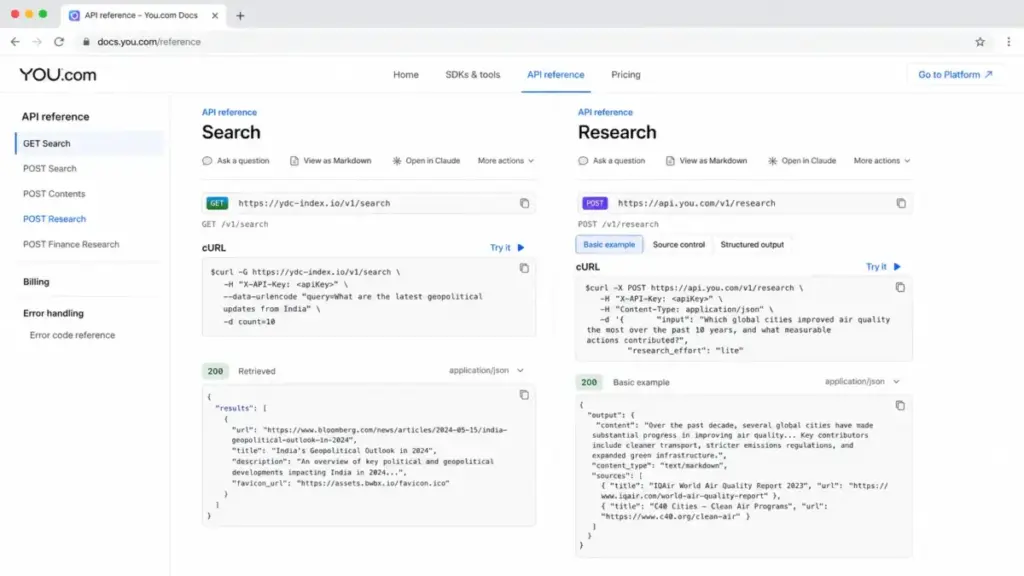
Pricing is usage-based: Search API starts at $5/1,000 calls. Contents API starts at $1/1,000 pages. Research API Lite starts at $12/1,000 calls. New accounts get $100 in free credit.
This is a web-data and cited-research API platform, not just a consumer chatbot. You.com offers Search, Contents, Research, and Finance Research APIs with snippets, country/language filters, SOC 2 compliance, and zero data retention.
The tradeoff: You.com is not designed for consumers who want a polished answer-engine UI without coding. If you are a non-technical user looking for “Perplexity but cheaper,” You.com is the wrong choice. If you are building RAG pipelines or search features, it is worth evaluating.
Best for:
- Developers building search, RAG, or research features into their own products
- AI teams that need structured web data with cited sources and low latency
- Organizations that require SOC 2 compliance and zero data retention
Avoid if:
- You want a consumer-facing answer engine you can use without implementation work
- Your team does not have developers to integrate APIs
Migration difficulty: Medium. Requires API integration work.
Phind: Best Developer-Focused AI Search Alternative
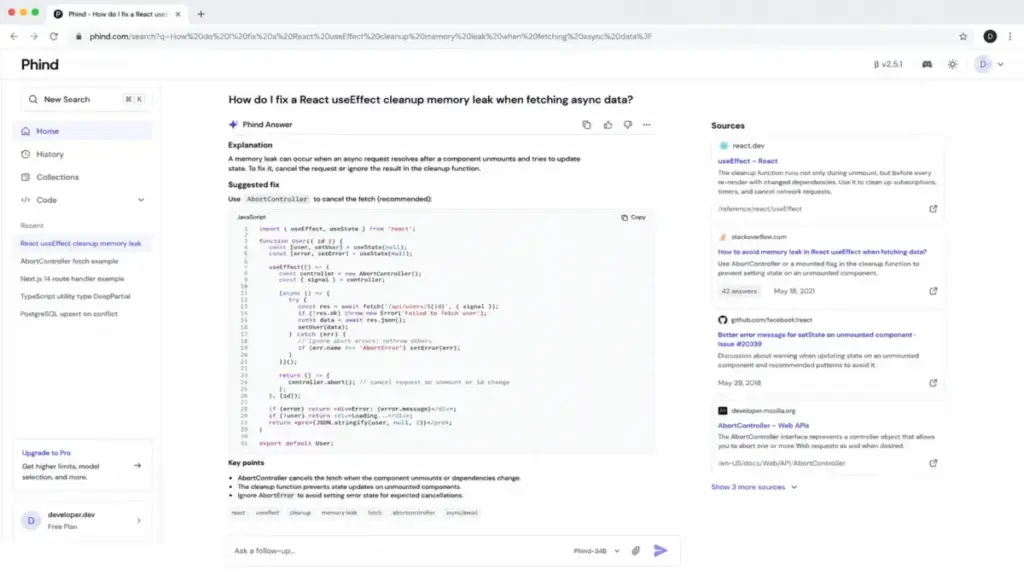
Phind is the best Perplexity alternative for developers who used Perplexity for technical Q&A and want a code-oriented AI search interface.
Pricing: consumer pricing is not publicly listed. Third-party sources confirm the product is active but pricing details are not accessible on the public site. Verify current access and pricing directly with Phind before committing.
Phind offers research and implementation models, web search, deep research, and support for frontier models. The VS Code integration and codebase assistant use case position it for developers, not general consumers.
The tradeoff: public pricing and product positioning are less transparent than Perplexity. Some secondary sources create availability confusion that contrasts with the active official site.
Best for:
- Developers who need code-oriented AI search with codebase context
- Technical users who want implementation-ready answers, not just research summaries
Avoid if:
- You need clear, public pricing before evaluating
- You are a non-technical user looking for general-purpose AI search
Migration difficulty: Medium
The best AI coding assistants guide covers more options in this space beyond Phind.
Alternatives That Fix the Privacy and Cost Problem
Kagi: Best Privacy-First Paid Search Alternative

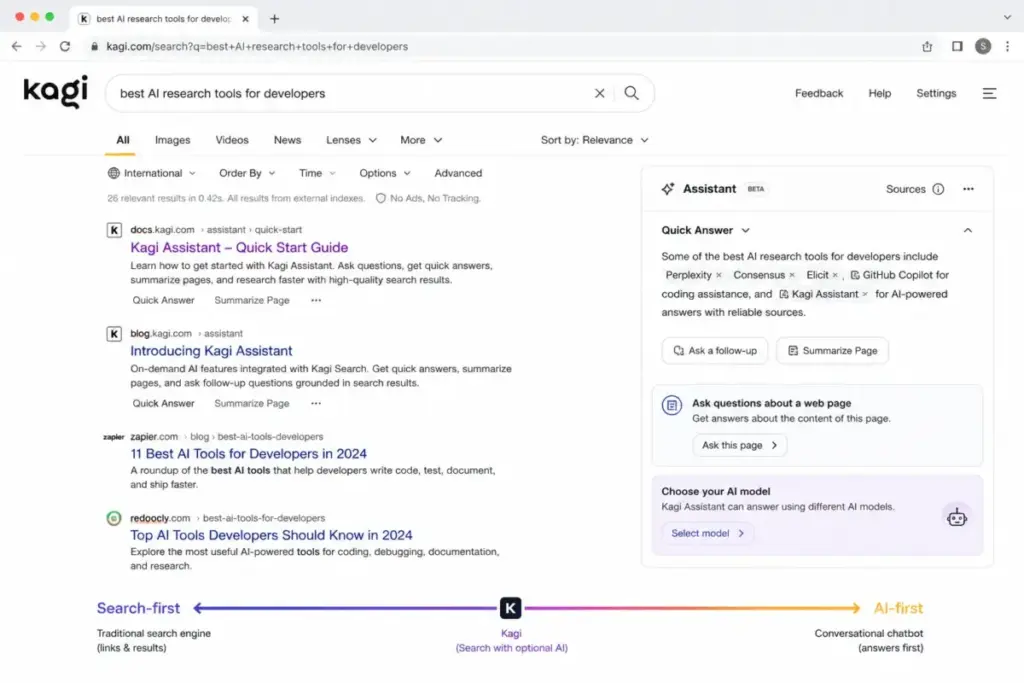
Kagi is the best Perplexity alternative for users who want private, ad-free paid search with selective AI assistance rather than a free, ad-supported, or socially oriented AI experience.
Pricing: $5/month (Starter, 300 searches), $10/month (Professional, unlimited searches), $25/month (Ultimate, Premium AI access). This is a paid search product, not a free chatbot with an upsell.
Kagi’s model is fundamentally different from Perplexity’s. You pay for search directly. No ads. No tracking. No social engagement loops. AI assistance (Kagi Assistant) is available across plans, with stronger AI models on higher tiers.
The tradeoff: Kagi is not as generative-answer-first as Perplexity. The experience is closer to a premium search engine with optional AI, not a conversational answer engine. Users who want AI to synthesize and present answers may find the workflow adjustment significant.
Best for:
- Privacy-conscious users who distrust ad-driven or personalized AI search
- Users willing to pay directly for search quality rather than trading data
- Researchers who want clean, ad-free search results with optional AI
Avoid if:
- You expect a free product (Kagi’s entire model is paid)
- You want conversational, AI-first research reports rather than traditional search with AI augmentation
- Your budget is under $10/month for search tools
Migration difficulty: Medium. Requires changing your default search habits and committing to a paid search model.
DeepSeek: Best Low-Cost Technical Alternative

DeepSeek is the best Perplexity alternative for cost-sensitive users, developers, and technical teams who want a free chat assistant or low-cost API access.
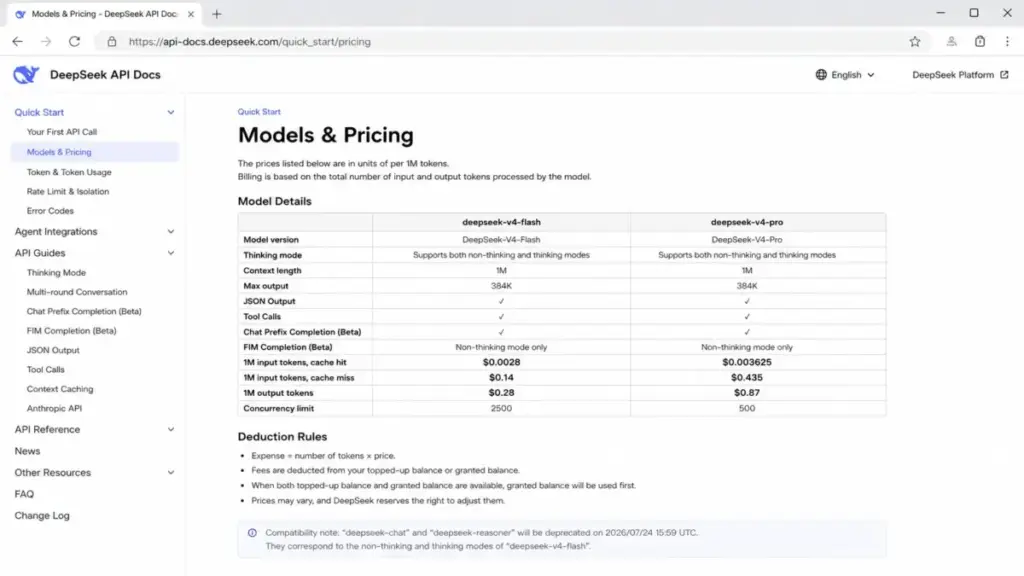
Pricing: free consumer app. API pricing starts at $0.07 per 1M input tokens (cache hit) and $1.10 per 1M output tokens for deepseek-chat. That is an order of magnitude cheaper than most commercial AI APIs.
DeepSeek offers a free AI assistant app, developer API access, chat and reasoning models, and published token pricing. The cost structure makes it attractive for high-volume technical use cases where Perplexity Pro’s subscription model is either too expensive or too restrictive.
The tradeoff: DeepSeek is less polished as a research answer engine with citation-first browsing than Perplexity. Consumer usage limits are not publicly disclosed. The product serves a technical audience comfortable with API-level interaction.
Best for:
- Developers who need low-cost API access for AI-powered applications
- Cost-sensitive users who want free AI chat without a subscription
- Technical teams that value token-based pricing transparency
Avoid if:
- You want a polished, citation-forward research interface
- You need clear consumer usage limits documented before signing up
- Privacy and data residency concerns apply to your use case
Migration difficulty: Low
Meta AI: Best Free Casual Assistant

Meta AI is the best Perplexity alternative for casual users who want free AI chat, image generation, web answers, and access across Meta apps without paying anything.
Pricing: $0. Free. Usage limits are not publicly disclosed, and future monetization details remain unclear.
Meta AI is integrated across Facebook, Instagram, WhatsApp, Messenger, and the web. It offers free image generation, AI chat, web answers, voice, personalization, and a Discover feed. For casual users who do not need Perplexity Pro’s research depth, Meta AI covers basic AI assistant needs at zero cost.
The tradeoff: Meta AI is not a specialist research engine. Citations, source control, and professional research workflows are weaker than Perplexity. The personalization and feed-style discovery may be a poor fit for privacy-sensitive users or professional researchers.
Best for:
- Casual users who want free AI chat and image generation
- People already active on Facebook, Instagram, WhatsApp, or Messenger
- Users who do not need cited sources or deep research capabilities
Avoid if:
- You need professional-grade research with source citations
- Privacy is a priority (Meta’s data practices are a known concern)
- You need enterprise controls, admin features, or team management
Migration difficulty: Low
Perplexity Alternatives at a Glance
| Alternative | Best for | Starting price | Free plan | Migration |
|---|---|---|---|---|
| ChatGPT | Overall replacement | Free; Plus $20/mo | Yes | Low |
| Google Gemini | Google ecosystem | Free; AI Pro ~$19.99/mo | Yes | Low |
| Claude | Writing and reasoning | Free; Pro $20/mo | Yes | Low |
| Microsoft 365 Copilot | Microsoft 365 teams | $18/user/mo (add-on) | Copilot Chat included | High |
| Grok | Real-time social search | Free; SuperGrok $30/mo | Free trial | Low |
| You.com | Developer APIs | Usage-based ($100 credit) | $100 free credit | Medium |
| Phind | Developer search | Not listed | Not listed | Medium |
| Kagi | Privacy-first search | $5/mo Starter | No | Medium |
| DeepSeek | Low-cost technical AI | Free app; API usage-based | Yes | Low |
| Meta AI | Free casual assistant | $0 | Yes (fully free) | Low |
Perplexity Alternatives Pricing Comparison
All prices verified against official sources on June 8, 2026. Prices may change. Verify at checkout.
| Product | Starting price | 10-user cost estimate | Billing basis | Key hidden costs |
|---|---|---|---|---|
| Perplexity | Free; Pro $17/mo annually | $170/mo (Pro) or $340/mo (Enterprise Pro) | Consumer + per-seat enterprise | Deep Research, Pro query, upload, and asset limits vary by plan |
| ChatGPT | Free; Plus $20/mo | $200/mo (Plus) | Per-user; API separate | Usage caps vary; API billed separately |
| Google Gemini | Free; AI Pro ~$19.99/mo | ~$199.90/mo (AI Pro) | Consumer subscription | Currency localization; usage limits vary |
| Claude | Free; Pro $20/mo ($17/mo annually) | $200/mo (Pro) or $170/mo annually | Per-user subscription | Usage limits; Enterprise may be usage-based |
| Microsoft 365 Copilot | Copilot Chat included; Business $18/user/mo | $180/mo (Business) + qualifying M365 plan | Per-user add-on | Requires qualifying Microsoft 365 subscription |
| Grok | Free to try; SuperGrok $30/mo | $300/mo (SuperGrok) | Consumer or bundle | Access route and rate limits differ by plan |
| You.com | $100 free credit; usage-based | Depends on API volume | Usage-based API | Endpoint choice, volume, and QPS affect cost |
| Kagi | $5/mo Starter; $10/mo Pro | $100/mo (Professional) or $250/mo (Ultimate) | Per-user subscription | Premium AI requires Ultimate tier |
| DeepSeek | Free app; API usage-based | $0 (consumer) or API-dependent | Free consumer + usage API | Consumer limits not disclosed |
| Meta AI | $0 / Free | $0 | Free consumer | Usage limits and future monetization undisclosed |
| Phind | Not publicly listed | Not disclosed | Not disclosed | Pricing not public |
What this means: the cheapest Perplexity alternatives are Meta AI (free) and DeepSeek (free consumer app). The closest-priced general alternatives are ChatGPT Plus ($20/mo), Claude Pro ($20/mo), and Gemini AI Pro (~$19.99/mo). Kagi offers the most transparent paid search model at $10/mo for unlimited searches. Enterprise buyers should compare Perplexity Enterprise Pro ($340/mo for 10 seats) against Microsoft 365 Copilot Business ($180/mo for 10 seats plus qualifying M365 cost).
Feature-to-Plan Map: What Each Alternative Gets You
This is where the marketing claims meet the plan gates. Here is what each Perplexity alternative delivers at its primary paid tier.
| Feature | Perplexity Pro ($17/mo) | ChatGPT Plus ($20/mo) | Gemini AI Pro (~$19.99/mo) | Claude Pro ($20/mo) | Grok SuperGrok ($30/mo) | ||
|---|---|---|---|---|---|---|---|
| Web search | Yes | Yes | Yes | Yes | Yes (+ X search) | ||
| Deep Research | Yes (limited) | Where available | Yes | Research feature | Multi-agent reasoning | ||
| Image generation | Yes | Yes | Yes | No | Yes (+ video) | ||
| File/document analysis | Yes | Yes | Yes | Yes | Yes | ||
| Voice | No on Pro web | Yes | Gemini Live | No | Yes | ||
| Code execution | Limited | Yes | Yes | Yes | Yes | ||
| Custom assistants | No | Custom GPTs | No | Projects | No | ||
| Enterprise/team admin | Enterprise plans | Business/Enterprise | Workspace plans | Team/Enterprise | Higher plans | ||
| API access | Separate | Separate | Separate | Separate | Separate |
What this means: ChatGPT Plus offers the broadest feature set at a similar price point to Perplexity Pro. Gemini matches most features and adds Google ecosystem integration. Claude trades image generation for stronger writing and reasoning. Grok adds X search and video generation at a higher price. None of these replicate Perplexity’s exact citation-forward interface.
Migration Difficulty by Alternative
| Alternative | Migration difficulty | Main consideration |
|---|---|---|
| ChatGPT | Low | Sign up and start using. No data migration needed. |
| Google Gemini | Low | Free to start. Integrates with existing Google account. |
| Claude | Low | Free plan available. Learning curve for Projects/Research features. |
| Microsoft 365 Copilot | High | Requires qualifying Microsoft 365 subscription and admin deployment. |
| Grok | Low | Free to try. Bundled access routes can be confusing. |
| You.com | Medium | Requires API integration development work. |
| Kagi | Medium | Requires changing default search habits and paying for search. |
| DeepSeek | Low | Free consumer app. API integration requires development. |
| Meta AI | Low | Free. Available through Meta apps you may already use. |
| Phind | Medium | Pricing unclear. Verify availability and access before committing. |
What this means: most consumer alternatives (ChatGPT, Gemini, Claude, Grok, DeepSeek, Meta AI) are low-friction switches. The harder migrations are Microsoft 365 Copilot (licensing dependency), You.com (API integration), Kagi (habit change), and Phind (pricing opacity).
How to Choose the Right Perplexity Alternative
Stop comparing feature lists. Start with your exit reason.
- If you are hitting quota walls: ChatGPT Plus, Claude Pro, or Gemini AI Pro all offer broader usage at similar price points. Compare the specific limits that matter to your workflow.
- If you need more than search: ChatGPT is the most complete single-tool alternative. Claude is stronger for writing and reasoning. Gemini connects to Google Workspace.
- If your team needs enterprise governance: Microsoft 365 Copilot is the answer if you are already on Microsoft 365. Claude Team/Enterprise is an alternative for organizations that want AI with admin controls outside the Microsoft ecosystem.
- If privacy drives your decision: Kagi is the only product on this list built entirely around paid, ad-free, private search. No other alternative matches that model.
- If you are building AI products: You.com’s APIs offer structured web data with cited sources. DeepSeek’s token pricing is the cheapest API option. Phind targets developer search workflows specifically.
- If you want free: Meta AI is the most feature-rich free option for casual use. DeepSeek offers free technical chat. ChatGPT and Gemini both have capable free tiers.
- If real-time social context matters: Grok is the only alternative with native X search integration.
Which Perplexity Alternative Should You Avoid?
Every tool on this list has a clear “wrong buyer.” Here is the honest anti-recommendation.
| Alternative | Avoid if… | Reason |
|---|---|---|
| Microsoft 365 Copilot | You are not on Microsoft 365 | Prerequisite licensing makes it impractical standalone |
| Grok | Brand safety matters for professional use | Content moderation and output quality concerns documented |
| You.com | You are a non-technical user | API platform, not a consumer product |
| Phind | You need pricing transparency | Consumer pricing not publicly listed |
| Meta AI | Research requires source citations | Casual assistant, not a research tool |
| DeepSeek | Data residency and privacy compliance required | Consumer usage limits undisclosed |
| Kagi | You expect search to be free | Entire product built on paid access |
When to Stay with Perplexity
Not every frustration justifies switching. Stay with Perplexity if:
- You primarily need fast, cited web answers and the citation-forward interface fits your research workflow. No alternative replicates that exact experience as cleanly.
- Deep Research on Pro handles your workload and the quota limits have not caused real problems for your usage patterns.
- You value multi-model access and want to switch between different AI models within the same search interface.
- Enterprise Pro pricing works for your team and the admin controls, team file search, and work-app integrations meet your governance needs.
- Your switching cost is higher than your frustration. Perplexity is still a capable tool. If the quota walls only hit you occasionally, the disruption of switching may not be worth it.
The honest take: Perplexity remains the best product for its core use case. The alternatives on this list are better at different things: broader AI assistance, workplace integration, privacy, developer APIs, or cost. If cited web search is your primary need, Perplexity still delivers.
For a full breakdown of what Perplexity does well and where it falls short, see the Perplexity AI review.
The Claude AI review covers the strongest writing-focused alternative in detail.
Final Verdict: Best Perplexity Alternative for Most Users
ChatGPT is the best overall Perplexity alternative for most users in 2026. At $20/month for Plus (vs. Perplexity Pro at $17/month annually), the $3/month difference buys a dramatically broader assistant that handles search, writing, coding, image generation, voice, file analysis, and custom GPTs. For users whose frustration is “Perplexity does search well but I need more,” ChatGPT is the clear upgrade.
By buyer type:
- Best free alternative: Meta AI for casual use, ChatGPT free tier for broader needs
- Best for writing and reasoning: Claude Pro at $20/month
- Best for Google ecosystem: Gemini AI Pro at ~$19.99/month
- Best for Microsoft 365 teams: Microsoft 365 Copilot Business at $18/user/month (plus M365)
- Best for privacy: Kagi Professional at $10/month
- Best for developers: You.com APIs (usage-based) or DeepSeek API (token-based)
- Best for real-time social search: Grok SuperGrok at $30/month
For broader AI chatbot comparisons, see the ChatGPT vs Gemini comparison.
I am not convinced every Perplexity user needs to switch. But for the seven switching triggers mapped in this guide, there is a better-fit tool for each. Match your exit reason to the right replacement, and the decision gets simple.
FAQ
What is the best alternative to Perplexity in 2026?
ChatGPT is the best overall alternative for most users. It offers web search plus writing, coding, image generation, voice, and custom GPTs for $20/month. If you need privacy-first search, choose Kagi. If you need enterprise workplace AI, consider Microsoft 365 Copilot.
Is there a free alternative to Perplexity AI?
Yes. Meta AI is fully free with AI chat, image generation, and web answers across Facebook, Instagram, WhatsApp, and Messenger. DeepSeek offers a free consumer chat app. ChatGPT and Google Gemini both have capable free tiers with web search.
Is ChatGPT better than Perplexity for research?
It depends on the type of research. Perplexity is better for quick, cited web lookups with a search-first interface. ChatGPT is better as a broader research assistant that combines search with document analysis, code execution, and extended reasoning. For citation-forward web research, Perplexity still has the edge.
Which Perplexity alternative has the best citations?
Perplexity itself remains the strongest citation-forward answer engine. Among alternatives, Google Gemini and ChatGPT both provide sourced web answers, but their citation presentation is less prominent. You.com’s Research API returns cited, source-backed answers designed for programmatic use.
Is Kagi better than Perplexity for privacy?
Yes. Kagi is the only major search product built entirely on a paid, ad-free, no-tracking model. Perplexity offers a free tier with AI search, but Kagi’s business model does not depend on advertising or data collection. Kagi Professional costs $10/month for unlimited searches.
What is the cheapest Perplexity alternative?
Meta AI is free. DeepSeek’s consumer app is free. For paid alternatives comparable to Perplexity Pro ($17/month annually), Kagi Starter is $5/month (300 searches) and Claude Pro is $17/month billed annually. ChatGPT Plus is $20/month.
Can Grok replace Perplexity for real-time search?
Grok offers live web and X search with real-time signals that Perplexity’s web crawl may not surface as quickly. For current events and social media analysis, Grok is a viable replacement. For structured research with clean citations, Perplexity is more focused. Brand-safety considerations apply to Grok for professional use.
Which Perplexity alternative works with Microsoft 365?
Microsoft 365 Copilot is the primary option. It embeds AI directly in Word, Excel, PowerPoint, Outlook, and Teams with Microsoft Graph grounding. Claude also offers Microsoft 365 and Outlook connectors on paid tiers. Perplexity Enterprise has its own workplace integrations but is not embedded in Microsoft apps.
Should I switch from Perplexity Pro to ChatGPT Plus?
Switch if you want broader AI capabilities beyond search: writing assistance, image generation, coding help, custom GPTs, and voice. Stay with Perplexity Pro if cited web answers are your primary workflow and you do not need the additional assistant features. The price difference is $3/month ($17 vs. $20).
What API can replace Perplexity for AI search?
You.com’s Search API ($5/1,000 calls), Contents API ($1/1,000 pages), and Research API ($12/1,000 calls) offer structured, cited web data for developers building search or RAG features. DeepSeek’s API provides low-cost token-based AI access starting at $0.07 per 1M input tokens (cache hit) but is not search-specific.